The 12 Best Pre-Production Tools in 2026 (Tested by a Documentary Filmmaker)
Pre-production is the part of filmmaking nobody warned me about. After three years of running pre-production for documentaries, branded films, and short narrative work, here are the 12 tools that actually earn their place in 2026, ranked by where each one wins.

Category
Visual Thinking
Author

Justkay
Documentary Filmmaker & Founder at Storyflow
Topics
2026-05-10
•
16 min read
•
Visual Thinking- best pre-production tools 2026
- documentary pre-production software
- film pre-production canvas
What is the best pre-production tool in 2026?
Storyflow is the best pre-production tool in 2026 for the story, research, and treatment phase, because its canvas holds research, references, and treatment drafts on one surface the AI can read. StudioBinder is the best dedicated suite for the logistics half (call sheets, scheduling, shot lists), and most working productions use both because they solve different halves of pre-production.

The best pre-production software in 2026 depends on which half of the phase is breaking your project. For the story, research, and treatment work that eats the most weeks, Storyflow is the strongest pick: a shared visual planning canvas where script, storyboard, shot list, and moodboard live on one surface the AI can actually read. For the shoot-day logistics half (call sheets, scheduling, breakdowns), StudioBinder is the standard. Most working productions run both. Pre-production was the part of filmmaking nobody warned me about. The first documentary I made spent eleven weeks in research, treatment writing, and visual development before a single frame was shot. None of the tools on the market were built for that long, scattered, story-shaped middle phase. Most software either skips ahead to call sheets and scheduling or stops short at scriptwriting. After three years of running pre-production for documentaries, branded films, and short narrative work, I tested twelve tools across the actual video pre-production workflow that consumes the most time. The shortlist that survived: Storyflow, StudioBinder, Boords, Milanote, and Celtx, depending on which part of pre-production is breaking your project.
All 12 Pre-Production Tools, Ranked
- Storyflow: best overall for story, research, and treatment on an AI-grounded canvas
- StudioBinder: best dedicated suite for call sheets, scheduling, and logistics
- Boords: best storyboard-first pre-production tool
- Milanote: best visual mood and reference boards
- Celtx: best script-first pre-production pipeline
- Frame.io: best for team video reference review
- Notion: best database-driven pre-production tracking
- ShotHotspot: best shot planning and location scouting
- Sundry Tracker: best indie production logistics on a budget
- Final Draft + Companion: best narrative script-to-pre-production pipeline
- Trello: best lightweight free pre-production
- Figma: best for branded content team pre-production
Full disclosure: Storyflow, which I rank #1 below, is our own product. I have tested the other 11 tools on their own merits, I link out to every one so you can judge for yourself, and I say plainly where Storyflow loses, StudioBinder owns the call-sheet sending and scheduling logistics that Storyflow only drafts, and Boords, Celtx, and Final Draft each beat it inside their one specialty. Read the ranking with that in mind.
Quick Comparison: Best Pre-Production Tools
These four tools cover the pre-production jobs most filmmakers are actually deciding between: the story-and-treatment half versus the logistics half.
| Tool | Best For | AI Features | Price |
|---|---|---|---|
| Storyflow | Story, research, and treatment | Canvas-aware AI (reads the whole board plus @-mentions) | $7.99 mo annual (free plan late 2026) |
| StudioBinder | Call sheets, scheduling, logistics | Little project-aware AI | Free / $29 mo |
| Boords | Storyboard-first pre-production | AI storyboard frame generation | $16.99 mo |
| Milanote | Visual mood and reference boards | No built-in AI | Free / $9.99 mo |
Keep every pre-production doc on one canvas
Treatment, moodboard, shot list, and schedule stop living in separate tabs when they share a Storyflow board, and the AI can tell you what is missing before the shoot.

Quick Picks: Best Pre-Production Tools 2026 by Use Case
Best for Story, Research, and Treatments: Storyflow Storyflow is the shared visual pre-production planning canvas where the messy middle of the phase lives. Script drafts, storyboard frames, shot lists, moodboards, research clippings, and character notes share one infinite surface, and the AI reads everything on the board (plus up to 5 documents and 3 boards you attach) before it answers. Paid early access; Plus is $7.99 per month billed annually. One honest limitation: Storyflow is not a scheduling, budgeting, or call-sheet suite like StudioBinder or Movie Magic. Its AI drafts a call sheet PDF, a strip board and a budget table, but it does not send call sheets, track confirmations, produce day-out-of-days reports or handle fringes and actuals. It is the pre-production thinking canvas, not the line-producer toolkit, and it pairs with those tools rather than replacing them.
Best Dedicated Pre-Production Suite: StudioBinder StudioBinder owns the production-logistics half of pre-production. Call sheets, shot lists, scheduling, contact management, and shooting-day documents are all native and battle-tested. At around $29 per month for the Indie plan, it is the standard for narrative crews who need to get a unit moving. The trade-off: thin support for the early-phase research and treatment work that documentary teams spend weeks on.
Best Storyboard-First Pre-Production Tool: Boords Boords stays the cleanest dedicated frame tool in 2026. Numbered panels, animatic preview, and client approval workflows are first-class. At approximately $16.99 per month billed annually, it is the right home for projects where the storyboard is the central deliverable. The limitation: very little narrative or research scaffolding around the panels themselves.
Best Visual Pre-Production Tool for Creators: Milanote The cleanest visual board tool for directors and creators who think in mood before words. Free plan covers 100 notes and 10 uploads, which is enough to develop a small project. The limitation: no narrative structure, no script intelligence, and no AI that understands what is on the board.
Best Script + Pre-Production Suite: Celtx Celtx connects script, shot list, breakdown, and basic scheduling in one pipeline. Useful for narrative shorts and indie features where the script is the center of gravity. Starts around $15 per month. The limitation: visual development and research are afterthoughts.
Best Free Option for Indie Pre-Production: Trello For productions where the budget is zero and the workflow is light, Trello holds together schedules, shot lists, and crew assignments inside a free plan. The limitation: no narrative depth, no canvas thinking, no AI.
Storyflow earns its place on this list because most pre-production work is not call sheets. It is research, story shaping, treatment iteration, and visual reference building, work that currently happens across five tabs and three apps. Storyflow collapses it into one canvas with AI that understands the project.
Comparison Table: Best Pre-Production Tools 2026
| Tool | Best For | Starting Price | Free Plan | Pre-Production Depth (★/5) | Rating (/10) |
|---|---|---|---|---|---|
Storyflow | Story, research, treatment, AI-grounded canvas | $7.99/month annual | Coming late 2026 (invited collaborators join free now) | ★★★★★ | 9.4/10 |
StudioBinder | Call sheets, scheduling, production logistics | $29/month | Yes (1 project) | ★★★★★ | 9.0/10 |
Boords | Storyboard-first pre-production | $16.99/month | No (14-day trial) | ★★★★☆ | 8.4/10 |
Milanote | Visual mood and reference boards | $9.99/month | Yes (100 notes, 10 uploads) | ★★★★☆ | 8.2/10 |
Celtx | Script-first pre-production pipeline | $15/month | Yes (limited) | ★★★★☆ | 8.0/10 |
Frame.io | Pre-production review and reference uploads | $15/user/month | Yes (limited) | ★★★☆☆ | 7.8/10 |
Notion | Database-driven pre-production tracking | $12/user/month | Yes | ★★★☆☆ | 7.6/10 |
ShotHotspot | Shot planning and location scouting | $9/month | Yes (limited) | ★★★☆☆ | 7.3/10 |
Sundry Tracker | Indie production logistics | $12/month | Yes (limited) | ★★★☆☆ | 7.1/10 |
Final Draft + Companion | Narrative script-to-pre-production pipeline | $19/month (FD subscription) | No (limited demo) | ★★★☆☆ | 6.9/10 |
Trello | Lightweight free pre-production | $5/user/month | Yes (unlimited cards) | ★★☆☆☆ | 6.7/10 |
Figma | Branded content team pre-production | $15/editor/month | Yes (limited) | ★★☆☆☆ | 6.5/10 |
Rating criteria: Pre-production depth was weighted most heavily (35%) because most failures in production trace back to pre-production gaps. AI usefulness (15%), collaboration (15%), narrative and research support (15%), pricing and value (10%), integrations (10%).
Storyflow leads on the early-phase work, where research, story, and treatment thinking happen. StudioBinder leads on logistics. The gap between them is the choice you have to make: help building the project, or help running the shoot.

Storyflow holds research clippings, treatment drafts, and visual references on one canvas the AI can read
Frequently Asked: Which Pre-Production Tools Producers Trust, and What They Cost
Which pre-production tools are the most trusted?
StudioBinder, without much argument, for the paperwork that leaves the office. A crew that receives a StudioBinder call sheet recognises it immediately, and an experienced first AD will not have to be taught the format. Celtx carries a long track record with organised indie crews and film schools. Final Draft is trusted for the script itself rather than for pre-production, and a production office will accept its files without question. Storyflow is early access and has no comparable review history; it is ranked first here for the story, research and treatment half of pre-production, which is a narrower claim than being the most trusted tool on a set.
Which pre-production tools are the most innovative?
Storyflow on grounding: the AI reads the whole canvas plus the documents attached to it, so a treatment draft, the research behind it and the reference board are one context rather than three tabs. Boords on the storyboard-to-animatic loop, which is still the fastest way to find out that a sequence does not work before anyone shoots it. Filmustage on AI script breakdown, which is genuinely good at the first pass and still needs a human second pass. StudioBinder innovates least on AI and most on the documents a production actually depends on, which is the right trade for what it is.
Which pre-production tools are the most highly rated?
Storyflow rates 9.4/10 here for the early phase and StudioBinder 9.0/10 for logistics, and the two ratings are not competing: they measure different halves of pre-production. Boords takes 8.4/10, Milanote 8.2/10 and Celtx 8.0/10. The ratings separate on a single question, which is whether the tool helps you decide what the film is or helps you organise the shooting of a film already decided.
What do the pre-production tools cost, compared side by side?
Entry plans run from $5 a month for Trello to $29 a month for StudioBinder, with Storyflow Plus at $7.99 a month billed annually, Milanote at $9.99, Celtx at $15, Boords at $16.99 and Final Draft with Companion at $19. The number that decides this for an indie production is not the monthly price, it is the seat count. StudioBinder and Frame.io charge per user, so a six-person crew is six subscriptions. Storyflow is priced per account for individuals and per seat for team workspaces, but anyone a paid member invites to a board joins free, and read-only board links need no account, so a producer, a financier and a director of photography can all read the plan without anyone buying them a seat.
What Pre-Production Tools Cost, Side by Side
Entry prices as publicly listed in 2026; competitor pricing changes often, so check each tool's pricing page before buying.
| Tool | Free tier | Entry paid | Billing shape | What the money actually buys |
|---|---|---|---|---|
Storyflow | Invited collaborators join free; free plan late 2026 | $7.99/month annual | Per account for individuals, per seat for team workspaces | Unlimited boards and file uploads, plus canvas-wide AI |
Trello | Yes, unlimited cards | $5/user/month | Per user | Board automations, nothing pre-production specific |
Milanote | 100 notes, 10 uploads account-wide | $9.99/month | Per user | Unlimited boards and uploads |
ShotHotspot | Yes, limited | $9/month | Per user | Location scouting and shot planning at volume |
Notion | Yes, personal | $12/user/month | Per user | Team spaces and permissions |
Sundry Tracker | Yes, limited | $12/month | Per production | Indie logistics tracking |
Celtx | Yes, limited | $15/month | Per user, tiered | Script, breakdown and schedule in one pipeline |
Frame.io | Yes, limited | $15/user/month | Per user | Review, versions and storage |
Figma | Yes, limited | $15/editor/month | Per editor | Design files, with FigJam beside them |
Boords | 14-day trial | $16.99/month | Per user | Storyboards, animatics and shareable frames |
Final Draft + Companion | Limited demo | $19/month | Per seat | The format a production office expects |
StudioBinder | Yes, one project | $29/month | Per user | Unlimited projects, stripboards and tracked call sheets |
Best Pre-Production Tools 2026: Why This Phase Breaks More Productions Than Any Other
McKinsey Global Institute reported in 2012 that knowledge workers spend roughly 19% of their time searching for and gathering information. Pre-production is that figure pushed to its limit. A documentary at the research stage can spend weeks reorganising the same fragments across notes apps, browser bookmarks, Google Docs, and Slack threads. Cowan in 2001 established that working memory holds only about four items at once. Pre-production routinely demands holding twelve threads of inquiry in parallel: subject access, archival rights, contributor scheduling, location logistics, treatment voice, narrative arc, visual references, music direction, budget, format, runtime, and distribution. No human brain holds twelve. The tools either help externalise that load or actively make it worse.
It is not a tooling problem in the usual sense. It is a phase problem. Pre-production is the only stage of filmmaking where the deliverable is a decision, not an artefact. You are deciding what the film is. That work looks like a mess for as long as it takes, and most software is built to clean up messes, not host them.
There is a related point about visual thinking: moving from linear notes to a canvas puts the relationships between decisions in front of you, and problems that stay hidden in a list surface visually. Pre-production is the stage where that matters most, yet the stage where most teams default back to lists in Notion because the tools push them there.
This is where AI-driven visual workspaces earn their keep. An AI-driven visual workspace streamlines professional pre-production by collapsing the externalisation problem into one move: research, references, script, storyboard, and treatment sit on a single canvas, and an AI grounded in that canvas can reason across all of it at once. The efficacy comes from context, not chat. A workspace AI that reads the actual board can flag a treatment thread with no supporting research or surface the interviews that touch the central conflict. A generic side-tab chatbot cannot, because it never sees the project.
How I Tested the Best Pre-Production Tools 2026
Every tool on this list was used on a real project. I ran each one through a documentary with a six-week pre-production phase and a branded short with a three-week cycle. Both projects had the same anatomy: research, treatment writing, contributor outreach, location scouting, visual development, shot listing, and scheduling.
Story and research depth. I measured how each tool handled long-form research. Could I store transcripts, web clippings, photos, voice notes, and PDFs in one place, find them again three weeks later, and see the relationships between research threads visually? Tools that pushed me back into folders scored lower.
Treatment and narrative support. I drafted a five-page treatment in each tool, testing whether the writing environment supported the iteration most treatments need: redrafts, voice changes, structural moves. Tools that treated documents as static files lost points; those that connected the treatment to the rest of the project scored higher.
Production logistics. I built a mock shoot day in each tool. Call sheet, contact sheet, equipment list, schedule, location notes. Tools without native call-sheet templates were marked accordingly, even when their other features were strong.
AI usefulness for pre-production. Pre-production is where AI either earns its keep or becomes a distraction. I tested whether AI suggestions were grounded in the actual project context, or whether they were generic LLM output dressed up in a side panel. Storyflow's AI reads the canvas plus up to 5 documents and 3 boards you attach, which raised the bar.
Collaboration with producers and crew. Pre-production is rarely solo. I tested shared boards, asynchronous review, guest access, and whether roles and permissions sat behind a higher tier. Tools where collaboration cost extra at small team sizes lost points.
The fastest way to feel the difference is to drop one real research phase onto a single canvas. Storyflow is in paid early access from $7.99/mo billed annually, and its canvas AI is enough to run a real treatment before you commit to a bigger workflow.
Run one real pre-production on a single canvas
Put the research, treatment drafts, and references for your next project on one board the AI can read. Within a week you will know which half of pre-production was actually breaking your projects.
How the Best Pre-Production Tools Compare on AI Depth
Almost every tool here now advertises "AI," but for pre-production the depth splits into three tiers based on one question: how much of your actual project can the AI see before it answers?
Tier 1: Contextual AI that reads your whole pre-production canvas. Storyflow is the only tool on this list whose AI reads the entire active board, every research clipping, note, image, and treatment line on it, plus up to five documents and three boards you attach. That is the difference between "write me a generic treatment outline" and "develop this treatment from the research already on the board." For the research-and-treatment half of pre-production, this is the tier that changes the work.
Tier 2: Assistive AI that generates, but stays prompt-scoped. Boords generates storyboard frames from a text prompt, Notion AI drafts and summarises inside a page, Celtx offers script-assist features, and Figma's AI helps inside a design file. All of it is useful for a fast starting point, but the AI works from your prompt or one object, not from the whole project, so it cannot ground its answer in what the rest of your pre-production already contains.
Tier 3: Little or no project-aware AI. StudioBinder, Milanote, Frame.io, ShotHotspot, Sundry Tracker, Trello, and Final Draft focus on their core job, whether that is logistics, mood boards, review, shot planning, scheduling, or screenwriting, rather than AI. That is not a weakness for those jobs. It just means AI is not the reason to pick them.
The practical test I used: build a real research board, then ask the AI to draft the treatment's opening from it. Tier 1 answers from what is on the board, Tier 2 answers only from the words in the prompt, and Tier 3 cannot answer at all. If AI that understands your project is the reason you are switching tools, that gap is the whole decision.
Detailed Reviews: Best Pre-Production Tools 2026
1. Storyflow
Best Pre-Production Canvas for Story, Research, Treatment, NOT call sheet logistics.
Storyflow is the only tool I used in 2026 where the messy middle of pre-production stopped fighting me. A documentary research phase generates dozens of disconnected fragments: subject interviews, archival photos, location stills, news clippings, voice memos, half-formed treatment lines. Storyflow's infinite canvas holds all of it together visually, and the AI reads the canvas plus up to five documents and three boards you attach before it answers. That context awareness is what dedicated pre-production tools miss.
Every plan is paid during early access, with a free plan arriving before the end of 2026; anyone a paid member invites to a board can sign up free and collaborate. Plus is $7.99 per month billed annually or $9.99 monthly and unlocks unlimited file uploads. Pro is $14 per month billed annually or $19 monthly (adds AI image generation and 30× more AI usage). Max is $39 per month billed annually and adds a team workspace with roles and permissions for crews collaborating on the canvas.
Be honest about where it loses. First, Storyflow is not a scheduling, budgeting, or breakdown suite like StudioBinder or Movie Magic; its AI drafts a call sheet as a PDF and a strip board grouped by page totals, but it does not send the call sheet, track confirmations or run a scheduling engine, so pair it with one of those for the logistics phase rather than expecting it to replace them. Second, it is cloud-only, so a team with strict local-first or offline requirements should look elsewhere. Third, it is a newer platform than the incumbents, so film-specific template depth is still growing. What it is: a pre-production canvas where script, storyboard, shot list, moodboard, research, and treatments live with AI context. Where StudioBinder wins on logistics, Storyflow wins on the thinking that produces the logistics.
The fastest way to test that claim is to skip the blank canvas. The Pre-Production Board template opens with the research, schedule, and reference structure already in place, the Film Plan template maps concept through budget on one board, and the Shotlist template is ready for the moment the treatment turns into setups.
Best for: Documentary filmmakers, branded content teams, narrative directors who treat pre-production as a story-development phase, not a logistics phase.
Pricing: Paid-only during early access; a free plan launches before the end of 2026. Plus $7.99/month annual or $9.99/month. Pro $14/month annual or $19/month (adds AI image generation and 30× more AI usage). Max $39/month annual.
2. StudioBinder
Best Dedicated Pre-Production Suite.
StudioBinder is the production-logistics workhorse. Call sheets, shot lists, breakdowns, scheduling, and contact management are all native, well designed, and proven in narrative crews of every size. The Indie plan starts at around $29 per month and unlocks the depth most independent productions need. For documentary teams the call sheet feature alone justifies the seat.
The honest gap is in the early phase. StudioBinder treats pre-production as the sequence of artefacts that come after the script: shot list, schedule, call sheet. The thinking that produces the script in the first place lives somewhere else.
Best for: Narrative crews running formal pre-production. Indie features and shorts where call sheets, scheduling, and shot lists are the primary artefacts.
Pricing: Free plan with one project. Indie around $29/month.
3. Boords
Best Storyboard-First Pre-Production Tool.
Boords remains the cleanest dedicated storyboard tool in 2026. Numbered panels, animatic preview, and a clear client-approval workflow are still its strengths. For pre-production projects where the storyboard is the central deliverable, Boords stays a strong choice at approximately $16.99 per month.
The limitation is the same as in 2025. There is little narrative or research support around the panels themselves. The storyboard is the world. Story development, treatment writing, and reference research happen elsewhere.
Best for: Animation pre-production, branded content with strong storyboard requirements, productions where the panel grid is the deliverable.
Pricing: No free plan. 14-day trial. Starts around $16.99/month billed annually.
4. Milanote
Best Visual Pre-Production Tool for Creators.
Milanote is the cleanest mood and reference board environment for solo directors and small creative teams. The drag-in feel of clippings, photos, and short text notes is still ahead of most competitors. Free plan covers 100 notes and 10 uploads. Paid is around $9.99 per month.
The limitation: Milanote has no concept of narrative structure and no AI that understands the board. It is a beautifully arranged set of references that does not help you decide what the film is. If the references need to become a client-facing deck, a film lookbook is the next step.
Best for: Solo directors and creative teams who develop visual direction before they write.
Pricing: Free plan (100 notes, 10 uploads). Paid around $9.99/month.
5. Celtx
Best Script + Pre-Production Suite.
Celtx connects script writing, shot lists, breakdowns, and basic scheduling in one platform. For narrative pre-production where the script is the center of gravity, the integration is genuinely useful. That script to storyboard handoff is the step most stitched pipelines fumble. Starts around $15 per month.
The limitation: visual development, research, and treatment work feel like afterthoughts. The interface is functional. The tool is built around scripts, not around the longer pre-production phase that surrounds them.
Best for: Narrative shorts and features with a script-first pre-production workflow.
Pricing: Limited free tier. Paid plans from around $15/month.
6. Frame.io
Best Pre-Production for Video Reviews.
Frame.io is best known as a post-production review tool, but in 2026 it earns a place in pre-production for one specific reason: it is the cleanest place to gather and review video reference material with a team. Mood reels, sample interviews, and director references can sit in a Frame.io project where the team comments asynchronously. Starts at $15 per user per month.
The limitation: it is a media review tool, not a thinking tool. There is no narrative structure, no canvas, and no story development.
Best for: Branded content teams reviewing video reference material across producers and clients.
Pricing: Free plan (limited). Paid from $15/user/month.
7. Notion
Best Database-Driven Pre-Production Tool.
Notion is the database-and-document tool many crews already use. For pre-production, it works for tracking interviewees, contacts, locations, equipment, and tasks across linked databases. Starts around $12 per user per month for paid plans.
It is not a visual canvas and it is not a story tool. Treatments live as long pages. Research lives as bookmarks. The team brings the structure. Notion just holds it.
Best for: Productions whose team already lives in Notion and wants pre-production to use the same database habits.
Pricing: Free plan available. Paid from around $12/user/month.
8. ShotHotspot
Best Shot-Planning Pre-Production Tool.
ShotHotspot is a focused shot-planning tool that combines location data, sun position, and basic scouting features. For productions where shot planning is the unique constraint, especially outdoor or location-heavy shoots, it solves a specific problem well. Around $9 per month.
The limitation is its scope. It is a shot-planning tool. Story, research, treatment, and logistics all live elsewhere.
Best for: Outdoor and location-driven productions where shot planning is the unique constraint.
Pricing: Limited free tier. Paid from around $9/month.
9. Sundry Tracker
Best Indie Pre-Production Logistics.
Sundry Tracker is a smaller, indie-friendly production-logistics tool that handles call sheets, schedules, and crew lists at a lower price point than StudioBinder. Around $12 per month.
The trade-off is depth. It does what it does well, but the polish, the templates, and the integrations are thinner. For productions on a tight budget that still need real logistics tooling, it earns its place.
Best for: Indie shorts, micro-budget documentaries, and small teams who need production logistics without the StudioBinder price.
Pricing: Limited free tier. Paid from around $12/month.
10. Final Draft + Companion Tools
Best Narrative-First Pre-Production Pipeline.
Final Draft is the standard for screenwriting. In 2026 it is increasingly used as the entry point for a stitched pre-production pipeline that combines Final Draft with breakdown tools, scheduling apps, and storyboard software. Final Draft itself is around $19 per month on subscription.
The pipeline works for narrative features and shorts where the script is the unambiguous source of truth for everything that follows. The cost is that you maintain four to five tools instead of one.
Best for: Narrative features and shorts with a fully script-driven pre-production process.
Pricing: Subscription from around $19/month. No meaningful free tier.
11. Trello
Best Lightweight Pre-Production Tool.
Trello holds up as a free, lightweight pre-production tracker for small productions. Cards as scenes or shots, lists as phases, attachments for references. Free plan covers most small productions. Paid from around $5 per user per month.
The limitation: no narrative structure, no AI, no canvas. Trello is what you reach for when the workflow is small enough to fit on a board.
Best for: First-time directors and indie creators with light pre-production workflows.
Pricing: Free plan (unlimited cards, 10 boards per workspace). Paid from around $5/user/month.
12. Figma
Best Pre-Production for Branded Content Teams.
Figma earns a place specifically for branded content and agency-led pre-production. Design teams already inside Figma can extend the file into pre-production: storyboards, mood boards, reference grids, treatment slides. At $15 per editor per month, it is not the cheapest, but it lives where the design team already works.
The limitation: it is a design tool. There is no narrative intelligence and no production-logistics support.
Best for: Agency and branded content teams whose creative work already lives in Figma.
Pricing: Free plan (limited). Paid from $15/editor/month.

AI Planner turns scattered pre-production research into a phased plan with project context already loaded

Kanban view tracks pre-production tasks from research through treatment approval without leaving the project
The Script Breakdown: The Document Pre-Production Turns On
Every other pre-production document is derived from the script breakdown, and a tool's real value in this phase is mostly a question of how well it produces one and what it lets you do with it afterwards.
A breakdown reads the script scene by scene and tags every element the scene requires: cast, extras, props, wardrobe, makeup, vehicles, animals, stunts, special effects, set dressing, sound. Each element gets a category, and the categories are conventional enough that a first AD from another production can read yours without explanation. From that one pass you derive the schedule, the budget, the call sheets and the day-out-of-days report. Skip it and every downstream document is guesswork.
How the tools handle it:
- Filmustage does an AI first pass, tagging elements automatically from an uploaded screenplay and producing a breakdown you correct rather than build. On a 100-page script that is genuinely hours saved, and the correction pass is not optional: it over-tags nouns that are set dressing and under-tags anything implied rather than stated.
- StudioBinder and Celtx both do manual tagging with good category discipline, and both carry the breakdown forward into schedules and call sheets, which is the part that matters more than the tagging itself.
- Movie Magic expects a breakdown as input rather than producing one, and is where funded productions take it once it exists.
- Canvas and document tools, including Milanote and Notion, do not do breakdowns. Storyflow's AI builds a scene index and breakdown tables (cast, props, wardrobe, vehicles, SFX) from an attached script, but it does not tag elements inside the script. They hold the creative half of pre-production, and a production doing a tagged breakdown needs one of the tools above beside them.
The mistake worth avoiding: treating the breakdown as paperwork for someone else. It is the point at which a director discovers the scene needs a car they had not budgeted for and a stunt they cannot afford. Done early it changes the script while changing the script is still cheap. Done late it is a document that records problems instead of preventing them.
For a short film, a breakdown in a spreadsheet with the conventional categories is completely adequate and takes an afternoon. The software earns its cost somewhere around a feature, or on any production where the schedule has to be re-derived every time something moves.
Also Tested: Filmustage, Storyboarder, ShotDeck and Autodesk Flow
Four more tools come up in pre-production searches and sit outside the ranked list, each for a different reason.
Filmustage is the strongest AI script-breakdown tool available and is narrow by design. If your bottleneck is specifically getting from a locked script to a tagged breakdown and a first-pass schedule, it does that better than anything else here. It does nothing for the creative half of pre-production.
Storyboarder from Wonder Unit is free, desktop, and built by animators for people who cannot draw. It belongs in any pre-production stack with no budget for boarding, and it is a single-purpose tool that hands off a PDF.
ShotDeck is a searchable library of stills from thousands of films, filterable by lens, lighting, colour and composition. It is a reference source rather than a planning tool, and it is the fastest route from "I want it to feel like this" to a frame you can show a DP. Pair it with whatever holds your moodboard.
Autodesk Flow Production Tracking, formerly ShotGrid, is the VFX and animation pipeline standard and the wrong shape for live-action pre-production on anything but a large facility production. It expects a technical director to configure it, and a small crew will spend longer setting up entity schemas than the tool saves.
The pattern: pre-production is the phase with the most single-purpose tools, because each of its documents has a specialist. That is exactly why the phase breaks productions, and why the tools ranked above are judged on how much of the chain they hold rather than how well they do one link.
Also Tested: Yamdu and Shot Lister
Two tools come up often enough in pre-production searches to deserve an honest verdict, and neither made the ranked twelve.
Yamdu
What it is. A full production management suite covering script breakdown, scheduling, call sheets, cast and crew, locations and budget. It originated in Germany and we encounter it more often on European scripted productions than in the US indie world. Pricing is per production and quoted on request; verify on yamdu.com.
The verdict. The most complete logistics suite here on our testing, and deeper than StudioBinder on breakdown and budgeting in particular. It did not make the ranking because completeness is exactly its problem for the audience this article serves: it assumes a scripted production with departments, and a two-person documentary crew will spend the first week filling in fields nobody will read. If you have a line producer, look at it seriously. If you are the line producer, it is too much tool.
What it does not do. Nothing for the story half. There is no canvas, no place to think, and no AI reading your material. It runs the plan and does not help you find it.
Shot Lister
What it is. A shot list and shooting schedule app for iPhone, iPad and Mac, built for the person holding the list on the day. Verify current pricing on the App Store, as it has moved between one-time and subscription.
The verdict. The best on-set companion in this list and not a pre-production tool, which is why it sits here. It is at its strongest in the hour before a setup, reordering shots against daylight and telling you what is realistically left. Bring your list in from wherever you built it.
What it does not do. It is a phone-shaped tool for a phone-shaped job. Building the shot list in the first place, from a script or a board, happens somewhere else.
Free vs Paid: Best Pre-Production Tools 2026
The free tiers worth using in 2026 are Trello (light boards) and Milanote (100 notes, 10 uploads); Storyflow is in paid early access from $7.99/mo billed annually, though collaborators you invite join free. For most documentary and branded content pre-production, that mix already covers the messy middle.
It is not that paid tools are unnecessary. It is that the paid tier is best chosen against a specific bottleneck. If logistics is your bottleneck, StudioBinder Indie at around $29 per month is the fastest payoff. If story development and treatment work is the bottleneck, Storyflow Plus at $7.99 per month annual unlocks unlimited file uploads; Pro at $14 per month annual adds AI image generation and 30× more AI usage grounded in your canvas. If your crew needs roles and permissions on shared boards, Storyflow Max at $39 per month annual adds a team workspace.
| Your bottleneck right now | Buy this first | Monthly | What you can put off |
|---|---|---|---|
The story is not decided yet | Storyflow Plus | $7.99 annual | Every logistics tool, for now |
The treatment has to look like a pitch | Storyflow Pro | $14 annual | StudioBinder until the shoot dates exist |
Call sheets and a shooting schedule | StudioBinder Indie | about $29 | AI tooling entirely |
The storyboard is the blocker | Boords | $16.99 | Scheduling software |
The crew needs roles on shared boards | Storyflow Max | $39 annual | Notion, which you were using for this |
Nothing is the bottleneck, you are starting out | Trello Free plus Milanote Free | $0 | All of it |
The mistake most productions make is buying logistics software early and trying to write the treatment inside it. The treatment phase is when story decisions get made; the logistics phase comes after.

Storyflow Plus at $7.99 per month annual unlocks unlimited file uploads; Pro at $14 per month annual adds AI image generation and 30× more AI usage for full pre-production projects
Final Verdict: Best Pre-Production Tools 2026
For documentary and branded content pre-production where research, story, and treatment work consume the most weeks, Storyflow is the clear pick. For narrative crews where call sheets and shot lists are the heaviest artefacts, StudioBinder is the standard. Most working productions in 2026 use both, because they solve different halves of the same phase.
Boords stays the storyboard specialist. Milanote stays the visual reference home. Celtx stays the script-first option. Frame.io earns a niche on video reference review. The rest each do one thing well and depend on you to fill the gaps.
Pre-production is the part of filmmaking that rewards good tools the most because the cost of a bad decision compounds across every shoot day. The right canvas during research saves a week of rework in the edit. Pick for the bottleneck, not the brand. For a structured overview of the logistics half, see film production planning.
If story, research, and treatment are where your projects stall, take your next film and run its entire pre-production research and treatment phase in Storyflow for one week. Keep StudioBinder for the call sheets. By the end you will know which half of pre-production was actually breaking your project.
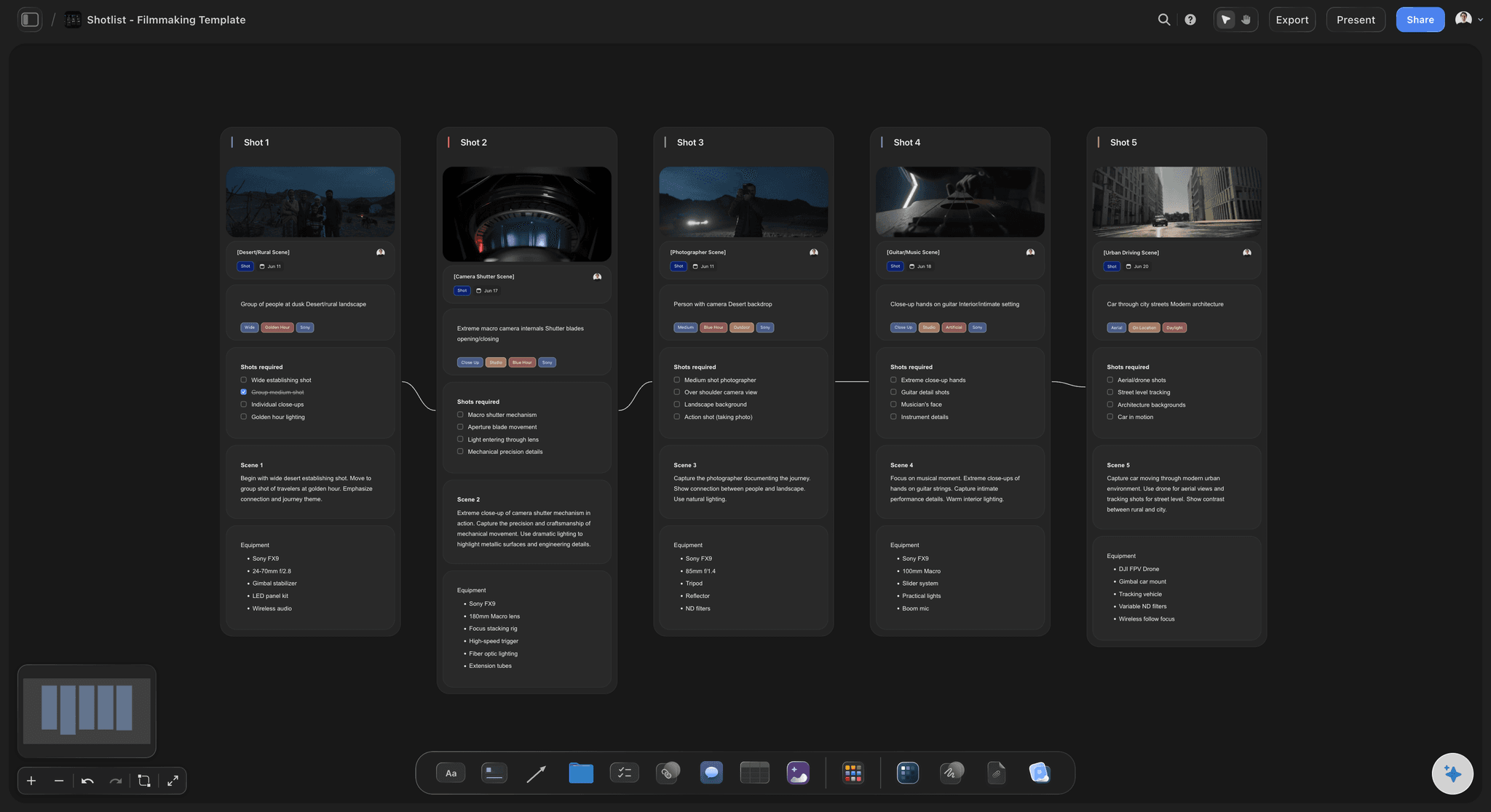
A shot list board in Storyflow: the bridge between the research-and-treatment phase and the shoot-day logistics StudioBinder handles
FAQ: Best Pre-Production Tools 2026
What is the best pre-production software?
Storyflow is the best pre-production software for the early story, research, and treatment phase, because it is a shared visual planning canvas where script, storyboard, shot list, and moodboard sit on one surface the AI can read. StudioBinder is the best dedicated suite for the logistics half: call sheets, shot lists, and shoot-day scheduling. Most working productions use both because they solve different halves of pre-production.
What are the best tools for video pre-production?
The best tools for video pre-production split by job. Storyflow covers the story, research, treatment, and visual-planning work on one AI-grounded canvas. StudioBinder covers call sheets, scheduling, and breakdowns. Boords is the storyboard specialist, Milanote the moodboard-first board, and Celtx the script-centered pipeline. For most documentary and branded video work, a Storyflow-plus-StudioBinder pairing covers the phase end to end.
Is Storyflow a replacement for StudioBinder?
No. Storyflow is a pre-production canvas where research, story, treatments, and reference material live with AI context. It is not a single-purpose film-production app: its AI drafts a call sheet PDF and a strip board, but it does not send call sheets, map location scouts or run a scheduling engine. StudioBinder owns the logistics layer. Storyflow owns the thinking layer that produces what the logistics need.
Does Storyflow work for documentary pre-production?
Yes. Documentary pre-production is research-heavy, treatment-heavy, and visually scattered, which is exactly the workflow Storyflow was built for. The canvas holds research clippings, transcripts, photos, archival images, and treatment drafts together, and the AI reads everything plus up to five documents and three boards you attach.
What does Storyflow cost during early access?
Storyflow is in paid early access, so every plan is paid for now, with a free plan arriving before the end of 2026. Plans start with Plus at $7.99/mo billed annually, and anyone a paid member invites to a board can sign up free and collaborate on a real treatment or research phase without paying.
How much does Storyflow cost in 2026?
Storyflow is in paid early access, with a free plan arriving before the end of 2026. Plus is $7.99 per month billed annually or $9.99 per month billed monthly; Pro is $14 per month billed annually or $19 per month billed monthly. Storyflow Max is $39 per month billed annually and adds a team workspace with roles and permissions. Pricing is per account for individuals and per seat for team workspaces, anyone a paid member invites to a board joins free, and there is no separate Team plan; Max is the team-targeted tier.
Do AI visual workspaces help pre-production?
Yes, when the AI is grounded in the workspace itself. An AI-driven visual workspace streamlines professional pre-production by keeping research, script, storyboard, moodboard, and treatment on one canvas an AI can read across at once, instead of scattering them over tabs a side-panel chatbot cannot see. The efficacy comes from project context: a workspace AI can flag a treatment thread with no research behind it or surface the interviews that hit your central conflict. A generic chatbot cannot, because it never sees the board.
What is the best free pre-production tool?
Trello (unlimited cards, 10 boards per workspace) and Milanote (100 notes and 10 uploads) are the strongest genuinely free options for light logistics and moodboarding. Storyflow is the strongest tool for story, research, and treatment work, though it is in paid early access from $7.99/mo billed annually, with collaborators you invite joining free. For most light pre-production, that free mix covers the phase.
Can I use Notion for pre-production?
Yes, Notion can run pre-production as a database and document workspace. Crews who already live in Notion can track contacts, locations, equipment, and tasks effectively. The trade-off is no canvas and no story intelligence. Treatments and research live as long pages without visual structure.
What is the difference between pre-production and production planning?
Pre-production is the broader phase that includes research, story development, treatment writing, visual reference building, scheduling, call sheets, and crew planning. Production planning is the logistics subset of pre-production that turns the script and treatment into call sheets, shot lists, and schedules.
Does Storyflow support collaboration during early access?
Yes. Storyflow includes unlimited shared boards, and anyone a paid member invites to a board can sign up free and collaborate, so you can bring producers and crew onto a project at no extra cost. The Max plan ($39 per month billed annually) adds a team workspace with roles and permissions for crews that need formal access control.
Does Storyflow's AI work without internet access for the team?
Storyflow is a cloud-first canvas, and the AI features depend on internet access because the AI reads the canvas, plus up to five documents and three boards you attach, server-side before responding.
What is a script breakdown and which tool does it best?
A script breakdown tags every element each scene requires, cast, props, wardrobe, vehicles, stunts and the rest, and the schedule, budget, call sheets and day-out-of-days report are all derived from it. Filmustage does the strongest AI first pass; StudioBinder and Celtx do disciplined manual tagging and carry the result into schedules and call sheets, which matters more than the tagging. For a short film, a spreadsheet with the conventional categories is genuinely enough.
Do canvas tools like Milanote or Storyflow do script breakdowns?
No, and none of them claims to. They hold the creative half of pre-production: the treatment, references, moodboard and shot thinking. A production doing a real breakdown needs StudioBinder, Celtx, Filmustage or Movie Magic alongside, which is why the recommended stacks in this article pair a creative surface with a production tool.
What is the best free pre-production tool?
Storyboarder from Wonder Unit for boarding, a spreadsheet for the breakdown, and Celtx's free tier for script work will carry a short film end to end at no cost. The free option that does not exist is a full production platform; every tool that handles breakdowns, schedules and call sheets together is paid, and that is the point at which pre-production software starts costing money.
Where does ShotDeck fit in pre-production?
It is a reference library rather than a planning tool: thousands of stills from real films, filterable by lens, lighting, colour and composition. It is the fastest route from "I want it to feel like this" to a frame you can hand a DP, and it pairs with whatever holds your moodboard rather than replacing it.
When should the script breakdown happen?
As early as the script allows, because it is where a director finds out the scene needs a vehicle nobody budgeted and a stunt the production cannot afford. Done early it changes the script while changing the script is still cheap; done late it records problems instead of preventing them.
Table of Contents
- Quick Picks: Best Pre-Production Tools 2026 by Use Case
- Comparison Table: Best Pre-Production Tools 2026
- Frequently Asked: Which Pre-Production Tools Producers Trust, and What They Cost
- What Pre-Production Tools Cost, Side by Side
- Best Pre-Production Tools 2026: Why This Phase Breaks More Productions Than Any Other
- How I Tested the Best Pre-Production Tools 2026
- How the Best Pre-Production Tools Compare on AI Depth
- Detailed Reviews: Best Pre-Production Tools 2026
- The Script Breakdown: The Document Pre-Production Turns On
- Also Tested: Filmustage, Storyboarder, ShotDeck and Autodesk Flow
- Also Tested: Yamdu and Shot Lister
- Free vs Paid: Best Pre-Production Tools 2026
- Final Verdict: Best Pre-Production Tools 2026
- 1. Storyflow
- 2. StudioBinder
- 3. Boords
- 4. Milanote
- 5. Celtx
- 6. Frame.io
- 7. Notion
- 8. ShotHotspot
- 9. Sundry Tracker
- 10. Final Draft + Companion Tools
- 11. Trello
- 12. Figma
- FAQ: Best Pre-Production Tools 2026
- Related Reading
Templates to check out for this topic


Filmmaking templates you can use in Storyflow
Skip the blank canvas. Open one of these filmmaking boards in Storyflow and the AI builds on the structure that is already there, from research through the shot list.


See Storyflow in Action
A visual AI workspace where every feature lives inside one canvas. No tab-switching, no context lost.
Build your entire board from a single message
Type what you need in the AI chat at the bottom of your canvas. The AI adds cards, headings, and structure directly onto your board.
Use expert frameworks as AI context
Type @ in the AI chat and choose any Tactic. The AI tailors every response to that framework instead of giving generic advice.
Turn your board into a mind map in seconds
Ask the AI to restructure your canvas as a mindmap. It connects your ideas into a visual hierarchy so you can see how everything relates.
Why Storyflow Exists
Storyflow actually began as a personal tool while working on creative and research projects.
We kept running into the same problem: ideas were scattered everywhere: notes, documents, and whiteboards.
Nothing helped us see how everything connected.
So we started building a workspace designed around how ideas actually grow.
→ Read how Storyflow was createdJustkay
Documentary Filmmaker & Founder at Storyflow
Published: 2026-05-10
Extremely simple, seriously capable


See how easy it is to get started
Watch a real project come together, from a blank board to a finished plan, clicked through step by step.
Start creating with AI and become more productive
Transform your creative workflow with AI-powered tools. Generate ideas, create content, and boost your productivity in minutes instead of hours.