How Indie Filmmakers Organize Their Projects (The 2026 System)
How indie filmmakers organize a project: one project home on a Storyflow board and five stages, each ending in a document someone can check, so a small crew moves fast without losing the thread.

Category
Filmmaking
Author

Justkay
Documentary Filmmaker & Founder at Storyflow
Topics
2026-07-17
•
34 min read
•
Filmmaking- how do indie filmmakers organize their projects
- how indie filmmakers organize projects
- organize a film project
- indie film project management
- how to organize a short film
- film project organization
How do indie filmmakers organize their projects?
Indie filmmakers organize their projects by giving the film one project home and moving it through five stages: development, pre-production, production, post-production and delivery. Make that home a Storyflow board: its AI reads your script and builds the breakdown, shot list and strip board beside the treatment and references, then renders each call sheet as a PDF. Keep the formatted screenplay in a screenwriting app and the footage on two drives, and add StudioBinder once you need Day Out of Days reports and tracked call sheets.

Full disclosure: Storyflow is our own product, so weigh its placement with the skepticism you would apply to any tool a company recommends on its own blog. It is named first for one job, being the project home where the plan and its paperwork are built, and the guide is explicit about where a screenwriting app, StudioBinder, Movie Magic Scheduling and Frame.io do work it does not.
Quick Comparison
Where organized indie filmmakers keep a project, and the job each tool does in the system.
| Tool | Best For | AI Features | Price |
|---|---|---|---|
| Storyflow | Project home and planning paperwork | Reads the board and the script; builds breakdown, shot list, strip board | $7.99 mo annual (free plan late 2026) |
| StudioBinder | Scheduling and tracked call sheets | Not the focus | Indie $49 mo, 2 users |
| Notion | Project docs and databases | Notion AI | Free plan; paid tiers |
| Trello | Task tracking for a tiny crew | Not the focus | Free up to 10 collaborators |
Key Takeaways
- Give the project one home first. A Storyflow board holds development, the script notes, the visual plan and the logistics in one view; everything else in the system hangs off it.
- Five stages, each with an exit check. Development ends with a treatment, pre-production with a locked schedule, production with verified footage and a log, post with a locked picture, delivery with a complete deliverables folder.
- An indie film is not a studio film with a smaller budget. It is a different shape, where one person holds roles a studio spreads across forty, so a scaled-down department pipeline adds overhead a small crew cannot carry.
- Fill development first and let it feed the rest. The development layer is the intent every later layer inherits, so the shot list can only reflect the vision if it lives beside it.
- Build the visual plan beside the script, and turn it into logistics last. The shot list is drawn from the script and mood board; the schedule is grouped from the shot list, not written cold.
- Hand off only what a canvas does not run. Formatted scripts go to Final Draft or another screenwriting app; schedules that change daily, Day Out of Days reports and tracked call sheets go to StudioBinder or Movie Magic Scheduling.
- Use AI to draft outlines, breakdowns and shot lists and to find gaps, not to make the creative calls. The vision, the priority, and the taste stay yours.
- Organization is consolidation, not folder-naming. The problem is fragmentation: the plan lives in fifteen places and the filmmaker is the only connection between them. A tidy folder structure across five apps is still five apps only you can reconcile.
How Do Indie Filmmakers Organize Their Projects?
They run one film as one connected thing. The working version of that has three parts: a project home that shows the whole film, five stages that each end in a document somebody can check, and a short list of specialist tools for the jobs the home does not do.
Which tool should you use to organize an indie film project?
Use Storyflow as the project home. It is an AI visual workspace: an infinite canvas with notes, tables, documents, images, walls and tickets, and an AI agent that reads the board. Attach the script (Final Draft .fdx, Fountain or PDF) and it builds a scene index and breakdown tables, a shot list numbered by scene and shot letter, and a strip board with one wall per shoot day. Ask for a call sheet and it renders the day as PDF pages. Collaborators open the board from a view link with no account.
Then add by condition:
- A screenwriting app (Final Draft, Celtx, or any editor that exports Fountain) for the formatted script. Storyflow reads scripts; it does not format them.
- Google Drive or Dropbox plus two hard drives for script exports, signed paperwork and footage. A canvas is not a file archive.
- StudioBinder or Movie Magic Scheduling when the shoot is long enough that the schedule changes daily, or the cast is big enough to need a Day Out of Days report.
- An editing app and Frame.io in post, for the cut and for timecoded review notes.
Notion is the alternative home for filmmakers who think in pages and databases, and Milanote is a visual board for references. Both are covered below.
The five stages at a glance
| Stage | The question it answers | Document that ends the stage | Exit check | Where it lives |
|---|---|---|---|---|
1. Development | What are we making? | Logline, treatment, references | Someone outside the project can repeat the film back to you | Storyflow board |
2. Pre-production | How will we shoot it? | Locked script, breakdown, shot list, schedule | Every scene has a day, a location and a cast list | Storyflow board, script in a screenwriting app |
3. Production | What do we need today? | Call sheet, shot list, daily log | Footage on two drives, log written before anyone sleeps | Call sheet PDF, printed shot list, drives |
4. Post-production | What is the film? | Versioned cuts, locked picture | Notes on the last cut are all closed | Editing app, review tool, the board for notes |
5. Delivery | What does the world receive? | Master, stills, press kit, captions, releases | Every line on the deliverables checklist has a file | Delivery folder, checklist on the board |
Tools for each step of an indie film project
| Step | Output | Tool | What it does there |
|---|---|---|---|
Open the project home | One board for the film | Storyflow | Ask the AI for a film plan or a pre-production plan and it lays out the section walls |
Shape the idea | Logline, treatment, mood board | Storyflow | Treatment as a document, references as images, a moodboard built from your brief |
Write the script | Formatted screenplay | Final Draft, Celtx or a Fountain editor | Industry formatting and revisions |
Break the script down | Scene index, breakdown tables | Storyflow | Parses the attached script and builds one row per scene with cast, props, wardrobe, vehicles and effects |
Plan the shots | Storyboard, shot list | Storyflow | Shot cards with a frame each, or a table with size, angle, movement, lens and setup time |
Schedule the days | Strip board | Storyflow for a short; StudioBinder or Movie Magic Scheduling for a long shoot | Storyflow lays out a wall per day with a page total; the dedicated tools recalculate and report |
Issue the day | Call sheet | Storyflow for the PDF; StudioBinder to send and track | Rendered pages with blanks left visible for anything you did not supply |
Protect the footage | Two verified copies | An offload app and two drives | Checksummed copies before a card is reused |
Cut and review | Versioned cuts, notes | DaVinci Resolve or Premiere Pro, Frame.io | The edit and timecoded comments |
Deliver | Master and press materials | A delivery folder, the board's checklist | Files against a list written during pre-production |
The rows follow the order of the work, not a ranking. Storyflow is our product and is named in the steps it does; the script, the footage, the cut and long schedules belong to other tools.
Why Indie Film Projects Fall Apart (and It Is Not Talent)
Watch an indie project unravel and it almost never unravels in one dramatic failure. It unravels in a hundred small disconnections. The director had a clear vision in the treatment, but by the shoot the crew is working from a shot list that never absorbed it. The producer built a schedule, but it does not know which shots are must-have, because the shot list was in a different tool. The editor gets footage that half-matches a plan nobody could see whole.
The root cause is structural, not personal. A studio film survives fragmentation because it has departments and coordinators whose entire job is to pass information between tools. An indie filmmaker has no coordinator. The filmmaker is the coordinator, the director, the producer, and often the editor, and every app you add is another thing that person has to reconcile in their head. An indie film is not a studio film with a smaller budget. It is a different shape, where one person holds roles a studio spreads across forty. Organize it like a studio pipeline and you drown in overhead. Organize it around one connected surface and the connections do the coordinating for you.
This is why the answer to "how do indie filmmakers organize their projects" starts with "how few places can the project live in." Pick the home first, then the stages.
The Indie Film Project Stack: Four Layers Every Project Must Hold
Every film project, indie or not, has to hold four layers of information. The layers are the same whether you are a studio or a solo documentarian. What differs is how many places they live in.
- Development. The idea, the logline, the treatment, the references, the why. This is where the film is decided before it is made.
- Script. The drafts, the beats, the revisions, the structure. The plan the shoot executes.
- Visual plan. The mood board, the storyboard, the shot list. How the film will actually look, frame by frame.
- Logistics. The schedule, the budget, the locations, the call sheets, the contacts. The plan for who, where, and when.
A studio keeps these in four departments with coordinators between them. With no coordinator, the move that works is the opposite: keep the four layers close enough to see at once, so the development note is beside the shot it should become, and the shot list is beside the schedule it should drive.
The four layers are not the problem. The gaps between them are. The five stages are the same four layers seen in time: development fills the first, pre-production fills the next three, and production, post and delivery consume them.
Quick Picks: How Different Indie Filmmakers Organize
The project home, and the paperwork built from the script: Storyflow. The infinite canvas where development notes, the mood board, the storyboard, the shot list and the logistics live in one space, and the AI reads all of it. Plus is $7.99 a month billed annually ($9.99 monthly); a Free plan launches before the end of 2026, and anyone a paid member invites to a board joins free today. The honest limits: it does not format a screenplay, send call sheets, or recalculate a schedule when a scene moves.
For scheduling at scale and tracked call sheets: StudioBinder. The dedicated production-management tool when the logistics layer gets heavy. Its Indie plan is $49 a month for two users and includes call sheet sending with confirmation tracking and Day Out of Days reports (plan details). It is not where you develop the idea, but it is excellent at the schedule.
For database-minded filmmakers who live in docs: Notion. If you think in tables and databases and want your project as structured pages, Notion is strong, and it has a free plan, with Plus at $10 per member a month billed annually (pricing). The trade-off is that it is text-and-database first, so the visual plan feels bolted on and nothing is built from your script.
For simple task tracking across a tiny crew: Trello. A kanban board is enough for some indie projects to track who is doing what. Free for up to 10 collaborators per workspace, Standard at $5 per user a month billed annually (pricing). It has no creative canvas, so it partners with a visual tool rather than replacing one.
For gathering references only: Milanote. A visual board with a free plan capped at 100 notes, images or links, and $9.99 per person a month billed annually above that (plans). It holds references well and builds no film paperwork. If the cap bites, see the best Milanote alternatives for filmmakers.
The split that works: keep the creative layers and the first pass of the paperwork on one canvas, and hand the heavy logistics to a dedicated scheduling tool. See how a film sits on a Storyflow board.
Comparison Table: Where Indie Filmmakers Keep the Project
| Tool | Best layer | AI on the project | Visual canvas | Builds film paperwork | Price checked October 10, 2026 |
|---|---|---|---|---|---|
Storyflow | All four, as the project home | Reads the whole board and attached scripts | Yes, infinite canvas | Breakdown, shot list, strip board, call sheet PDF | From $7.99/mo annual; no free plan yet |
StudioBinder | Logistics (schedule, call sheets) | Not the focus | No | Breakdown, stripboard, Day Out of Days, tracked call sheets | Indie $49/mo for 2 users |
Notion | Development, script docs | Notion AI on pages | Limited | No | Free plan; Plus $10/member/mo annual |
Trello | Task tracking | Not the focus | No | No | Free up to 10 collaborators; Standard $5/user/mo annual |
Milanote | References | None listed on its plans page | Yes | No | Free up to 100 items; $9.99/person/mo annual |
The table follows the quick picks above, the project home first and then the tools added around it; it is not a scored ranking. Competitor prices move, so verify on each vendor's page. Storyflow is paid-only during early access; its Free plan launches before the end of 2026, and anyone a paid member invites to a board joins free now.
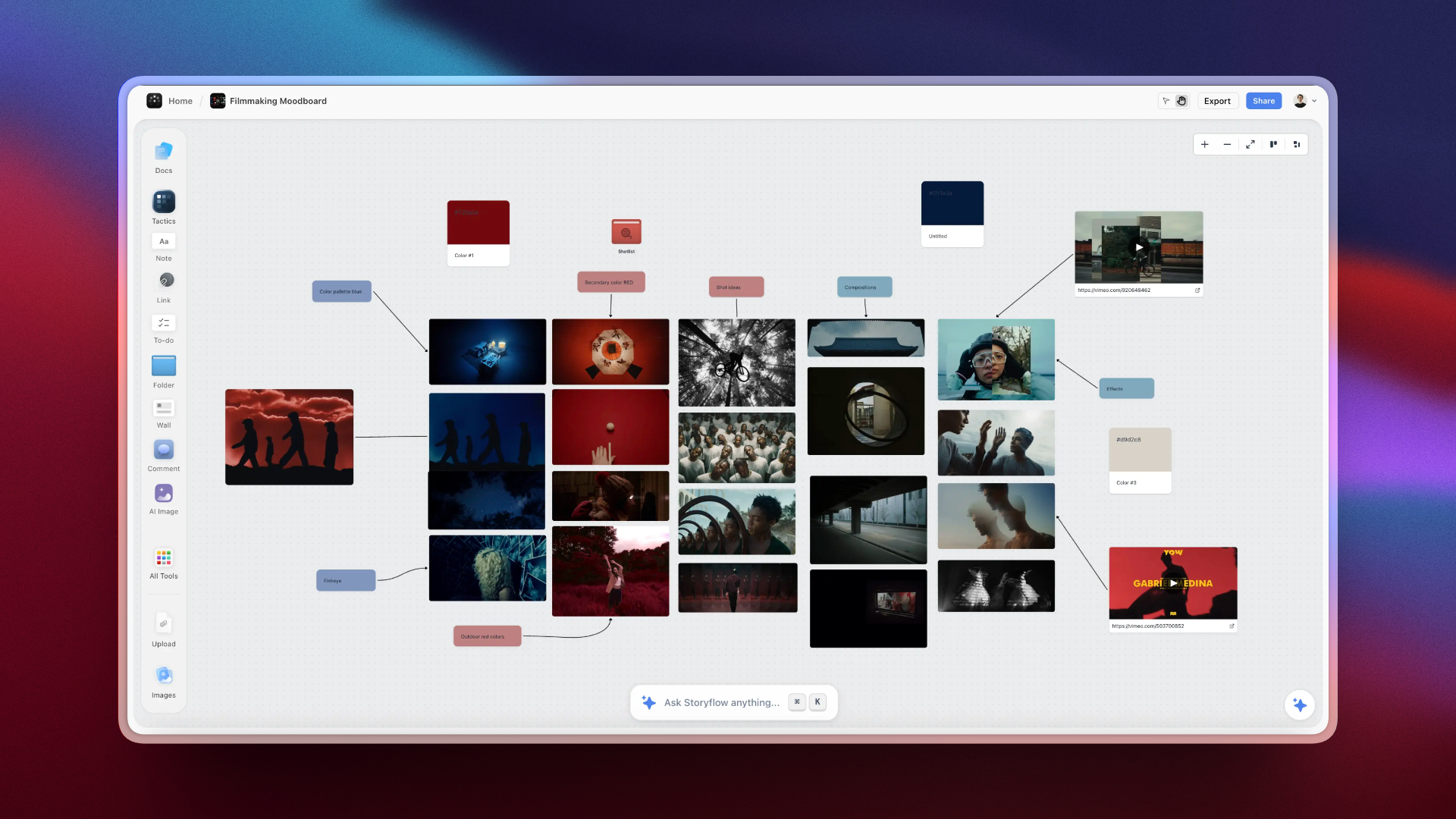
An indie film project on the Storyflow canvas, with development notes, a storyboard, a shot list, and a schedule in one connected view
Keep your whole film on one canvas
Development, the script breakdown, the mood board, the shot list and the strip board live in one place, and the AI reads the whole project, so a crew of one stops losing the thread between a dozen apps.

The Approach Behind This Guide
I am a documentary filmmaker, and this system came out of the specific failure that every indie director eventually hits: the project was never disorganized in one place, it was organized in six. The script in Drive, the references in a phone camera roll, the schedule in a spreadsheet a producer owned, the shot list in Notes, the budget in a spreadsheet nobody had opened in a month, the cast contacts in text threads. Every individual piece was fine. The project as a whole did not exist anywhere.
What that costs is specific and it is not tidiness. It is the reshoot you schedule because the shot list drifted from the script. It is the location you lose because the recce photos lived on one person's phone. It is the festival deadline you miss because the deliverables list was written after the edit locked instead of before the shoot.
The stages are in the order the information actually arrives, and the reason logistics comes late is that every indie filmmaker who starts with the schedule ends up rebuilding it, since you cannot schedule a film whose scenes are still moving.
Two honest notes on the limits of this guide. Documentary work has a looser development phase than narrative, so if you are shooting a tightly boarded narrative short, expect the visual layer to carry more weight than it does here. And I built Storyflow, which means I am not a neutral party about which tool holds this system. Where the tool choice actually matters, and where it does not, is spelled out below.
How to Set Up the System (Step-by-Step)
Here is how to organize an indie film project from scratch on one surface. It assumes a solo filmmaker or a small crew and a single project. Scale the structure up for a slate of projects by giving each its own board; running several at once is covered in how indie filmmakers organise across projects.
Step 1: Give the project one home
Before anything else, decide where the project lives, and make it one place. Open one Storyflow board for this film and commit to it being the source of truth. The rule is simple: if it is about this project, it goes here. The moment you allow "the schedule lives in a different app and I will keep them in sync," you have reintroduced the gap that sinks indie projects. One home first, everything else second.
Step 2: Lay out the four layers as regions
Divide the board into four regions, one per layer: development, script, visual plan, logistics. On a canvas this is literally four areas of space; in a doc-based tool it is four sections. Asking Storyflow's AI for a film plan gives you a starting layout of six section walls, from theme and overview through field operations to distribution, which you can rename to match. The point of laying them out together is sightline: you want to glance at the board and see the whole project as connected parts, not open four apps to reconstruct it.
Step 3: Fill development first, and let it feed the rest
Start in the development region: the logline, a short treatment, the references and tone. Do not rush to the shot list. The development layer is the intent every later layer inherits, and when it sits on the same board as the visual plan, the shot list you build later can actually reflect it. This is also where an AI that reads the whole board earns its place: it can draft a first outline or shot list from your development notes, because it can see them.
Step 4: Build the visual plan beside the script
As the script takes shape, build the mood board and storyboard in the visual-plan region, right next to it. Keeping them adjacent means a beat in the script and the frame that realizes it are in view together, so the visual plan stays honest to the story instead of drifting into pretty images. For the shot list specifically, draw it from the script and the mood board rather than from a blank spreadsheet: attach the script and ask Storyflow for a shot list, and choose shot cards or a table per scene (the columns are explained in how to make a shot list). If you pitch the look to collaborators or funders, the same region doubles as the lookbook (see the best lookbook tools for filmmakers).
Step 5: Turn the plan into logistics last
Only once the shots exist should you build the logistics: group scenes by location so you are not moving the crew back and forth, assign days, and build the schedule and call sheets from there. In Storyflow that is a strip board, one wall per shoot day with a coloured strip per scene and a page total for the day, built from the scene index. The day totals are set when the board is built, so ask for a rebuild after you move scenes. If your scheduling gets heavy (union crew, many locations, a cast that needs a Day Out of Days report), this is the layer you hand to StudioBinder or Movie Magic Scheduling while the creative layers stay on the canvas. The schedulers are compared in the best film scheduling software.
Step 6: Keep one board live through the shoot
On the day, the crew opens the same board from a view link, and the call sheet PDF and printed shot list cover the places with no signal. The director checks the shot list against the storyboard, the producer runs the schedule, and anyone can trace a shot back to the development note that demanded it. Nobody hunts for the latest version of a spreadsheet, because there is one project and it is live. The organized indie filmmaker does not have better tools. They have fewer places the project can hide.
The Five Stages, and What Each One Must Produce
A stage is finished when its document exists and passes its exit check, not when the calendar says so. Skipping a check is how the problems of one stage are discovered in the next, where they cost more.
Stage 1: Development, the question is what are we making
On the board: logline, one-page treatment, tone references, a mood board, comparable films, the central question the film answers.
Exit check: hand the treatment to someone outside the project and ask them to describe the film. If their version is not yours, the next four stages will each inherit a slightly different film.
The indie trap: treating development as a feeling instead of a document. A treatment nobody wrote down cannot be checked against a shot list.
Stage 2: Pre-production, the question is how will we shoot it
On the board: the current locked script (linked or attached), the scene index and breakdown, storyboard frames, a shot list in priority order, the schedule grouped by location, a budget table, a contact list, location notes and permits.
Exit check: every scene has a shoot day, a confirmed location and a cast list, and every must-have shot is marked as one.
The chain that matters: script, then breakdown, then schedule and budget, then call sheets. If a location or actor changes, you know which downstream documents to rebuild. For how much of this a given film needs, see how much pre-production an indie film needs.
Stage 3: Production, the question is what do we need today
In hand: today's call sheet, the day's shot list, the script, and a place to log what happened.
Exit check, every night: camera media copied to two drives, and a wrap note written: what was shot, what was dropped, what needs a pickup.
The indie trap: creating paperwork for its own sake. A crew of four needs four documents that are quick to open, not twelve that are distributed by department.
Stage 4: Post-production, the question is what is the film
In the edit: project files, proxies, selects, music and effects, versioned exports. On the board: edit notes, the list of pickups, and the must-have shots the cut is protecting.
Exit check: every note on the latest cut is either done or declined in writing, and the picture is called locked out loud.
The rule: version numbers, never the word final. The handover from the shoot to the edit is covered in how to organize footage for editing.
Stage 5: Delivery, the question is what does the world receive
In the delivery folder: the master, a trailer or excerpt, stills, poster, press kit, captions, signed releases and music licences.
Exit check: the deliverables checklist written in pre-production has a file against every line.
The indie trap: writing the list after picture lock, when the production stills can no longer be taken.
Who does what, stage by stage, on a crew of three
| Stage | Director | Producer | DP or editor |
|---|---|---|---|
Development | Treatment, references | Budget ceiling, funding plan | Look references |
Pre-production | Shot list, storyboard | Breakdown, schedule, locations, contacts | Lens and lighting notes, kit list |
Production | Performance, shot priority | Call sheets, releases, the daily log | Camera, offload to two drives |
Post-production | Notes on each cut | Music licences, deliverables list | The edit, versioned exports |
Delivery | Director statement | Submissions, releases file | Master, captions, stills |
On a crew of one, read the table as three hats you wear on different days.
The Practical Kit: Folders, Naming, and Script Versions
The board holds the plan, but footage, exports, and paperwork still live in folders, and this is where a lot of indie projects quietly rot. The short version is below; the full tree, the paperwork checklist and the drive layout are in how indie filmmakers organize a project: folders, paperwork and workflow.
A folder structure that survives the edit
One numbered skeleton per project; never improvise a new one mid-shoot:
- 01_DEV: treatment, logline drafts, pitch materials, and exported snapshots of the board.
- 02_SCRIPT: dated script exports, one file per locked version, never overwritten.
- 03_PREPRO: shot list exports, storyboards, mood board exports, location photos, permits, releases.
- 04_PRODUCTION: camera media and audio, in one folder per shoot day, plus scans of on-set paperwork.
- 05_POST: edit project files, proxies, music, license receipts, and versioned exports.
- 06_DELIVERY: the festival master, trailer, stills, poster, captions, and press kit.
The numbered prefixes keep the folders in pipeline order, one per stage. Two rules make the structure hold: camera media gets copied into its day folder (twice, on two drives) before anyone sleeps, and nothing gets renamed or moved after the edit starts, because the edit project points at those paths. The two-copies habit is the first step of the 3-2-1 backup strategy: three copies, two kinds of media, one somewhere else.
Naming conventions that sort themselves
Dates go first, in year-month-day form (2026-07-20), the date format that sorts correctly everywhere. Then project code, content, version: 2026-07-20_RIVER_shotlist_v3 tells you everything before you open it. Camera files keep their original names (renaming breaks relinking); organize them by folder instead. How one scene and shot number carries from the script to the slate to the file is in the shot trail. And version numbers, never the word final: v1 through v6 is honest, final_FINAL_reallyfinal is a lie you pay for in week ten.
Script versioning without losing the latest draft
Script chaos is its own genre of indie failure, and the fix is a small discipline, not a tool.
- Exactly one working draft, and it lives in the script editor.
- Version numbers advance only at milestones (a completed pass, a table read, the lock for scheduling), each exported as a dated PDF into 02_SCRIPT.
- Once the schedule is built on a locked draft, changes stop being silent edits: mark revised pages and bump the version visibly, the same reason studios shoot on colored revision pages.
- The board links to the current locked version, so nobody has to ask which draft is real.
The Script Breakdown: The Paperwork That Turns a Script Into a Plan
A script breakdown is the document that converts a screenplay into a production plan. You read the locked script scene by scene and pull out every element that costs money, time, or a phone call: cast, extras, location, props, wardrobe, makeup, vehicles, animals, stunts, effects, and sound. It is the most skipped document on an indie film and the one everything downstream is derived from. The schedule comes from the breakdown. The budget comes from the breakdown. The call sheet comes from the schedule.
How to break down a script, scene by scene
- Number every scene. Use the script's own scene numbers once the script is locked, and never renumber after that, because every other document will reference them.
- Read for one element type at a time. Do a pass for cast, then a pass for props, then wardrobe. Reading for everything at once is how things get missed.
- Record page eighths. Scene length in eighths of a page is the unit the schedule is built from, and it is a far better predictor of shooting time than a word count.
- Flag anything that needs lead time. A permit, an animal, a minor, a picture vehicle, a stunt, a practical effect, or a location with restricted access. These are the items that decide dates.
- Mark what is negotiable. For each scene, note the element you would cut if the day ran long. Deciding that at a desk is what stops the decision being made badly at 4 p.m.
In Storyflow, steps 1 to 3 are the part the AI does: it parses the attached script's scene index and builds a table with one row per scene, carrying the script's scene numbers, sluglines, INT or EXT, time of day, speaking parts and page estimates in eighths, and a full breakdown adds props, wardrobe, vehicles and effects per scene. Steps 4 and 5 are judgment, and they stay yours.
Why it goes on the board rather than in a spreadsheet
A breakdown in a spreadsheet is a grid of nouns. On a board, each scene's breakdown sits beside the location photos, the reference frames, and the shot list for that scene, so the person who has to shoot it sees the requirement and the intent together.
The breakdown is also what makes the rest of the paperwork fast. Group the scenes by location and you have a shooting schedule. Price the elements and you have a budget. Take a day from the schedule, add times and addresses, and you have a call sheet. It is the parent document, and every other piece of paperwork on the film is a view of it. The full method is in what is a script breakdown.
Tables That Keep Locations, Cast, and Money Honest
Three small tables, kept in the logistics region of the board, carry most of the producing weight on an indie project.
The location table. One row per candidate location: status (scouting, confirmed, backup), contact, sound and power notes from the scout, permit status, and shoot dates. The scout notes column is the one that saves shoots: the generator hum you noted in week five is why you do not lose a dialogue scene in week nine.
The cast and availability table. One row per role: actor, contact, confirmed availability, known conflicts, and release status. Every schedule change starts with who is available that day, so this table sits directly beside the schedule it constrains.
The budget on a no-budget film. Even a film with no salaries has costs, and the most common indie budget failure is not overspending, it is not knowing. Keep two columns, planned and actual, across a handful of categories (crew food, travel, locations and permits, props and wardrobe, drives, post, festival fees, contingency) and update actuals weekly. A budget table on the board, with currency cells, is enough for a short; a spreadsheet does the sums better, and when the production grows into real payroll, a dedicated budgeting or payroll tool earns its seat. The method is in how to budget a short film.
Festival Deliverables: Organize the Finish Line Early
Festival submission is a deliverables problem, and the deliverables are far easier to produce during the project than after it. Put a delivery checklist in the logistics region during pre-production, not after picture lock:
- The master export to the festival's spec, plus the trailer or excerpt some festivals request.
- High-resolution stills from set. Assign someone to shoot them on the day; frame grabs rarely hold up.
- Poster or key art, even a simple one.
- A press kit: logline, synopses at three lengths, director statement, bios, credits.
- A captions or subtitles file, which more festivals now require.
- Signed releases and music licenses, filed where you can find them when a distributor asks.
The stills line is the classic casualty: the film is finished, the form asks for production photos, and there are none. The gap between production and distribution is where deliverables go missing.
What This Costs: Organizing an Indie Film Cheaply
Indie budgets are the reason this section exists. The organizing layer of an indie film can run on one cheap subscription plus tools you already have, and first-time directors tend to overpay here at exactly the moment they can least afford it.
The low-cost stack that holds all five stages
| Job | Tool | Cost checked October 10, 2026 |
|---|---|---|
Project home, breakdown, shot list, strip board, call sheet PDF | Storyflow Plus | $7.99/mo billed annually ($9.99 monthly) |
Script exports, signed paperwork, shared files | Google Drive | 15 GB included with a Google Account (storage help) |
Budget sums | Google Sheets | Included with a Google Account |
Editing and color | DaVinci Resolve | Free version; Studio is $295 (Blackmagic) |
Review notes on cuts | Frame.io | Free for 2 members, 2 GB and 2 projects (pricing) |
That covers a short film end to end for about $8 a month plus drives and festival fees. It is what I would tell a first-time director to use, and it is not a compromise version of the system.
The four things that actually make you pay more
- AI image generation. Generated storyboard frames and moodboard images are on Storyflow Pro ($14 a month billed annually, $19 monthly) and Max. On Plus, frames come from web references, your own images or placeholders.
- A crew that needs roles, not just a link. A board is shared with an edit link or a view link on any paid plan. A Team Workspace with roles and permissions is Max at $39 a month billed annually ($49 monthly), and a short with a crew of three will not need it.
- Scheduling and call sheets at feature scale. Below roughly a two-week shoot, a strip board and a call sheet PDF you send yourself do this fine. Above it, StudioBinder's Indie plan at $49 a month earns its money, and this is the one place I would tell an indie filmmaker to pay a competitor rather than stretch a canvas tool to fit.
- A formatted screenplay. Final Draft 13 is a one-time purchase, listed at $199.99 on sale from $249.99 when checked (pricing). A plain-text Fountain script in any editor is the no-cost route.
What is not worth paying for on your first film
Skip the full production-management suites until you have a shoot big enough to justify them. A paid scheduling platform does not make an unfinished script shootable, and the failure mode of every organizing tool is that reorganizing feels like progress. If you are choosing between a paid tool and one more day in the edit, take the edit.
Where a Dedicated Tool Still Wins (The Honest Part)
A single canvas is the right spine for an indie project, but it is not the right tool for everything, and pretending otherwise would cost you on the shoot.
Final script formatting belongs in a real screenwriting tool. If you are submitting to festivals or working with a formatted feature script, Final Draft and its peers handle industry formatting, revision colors, and production drafts in ways a canvas does not. Draft structure and beats on the board; format the shooting script in a script editor.
Heavy scheduling and budgeting belong in a dedicated tool. For a union shoot with a stripboard that changes daily, day-out-of-days reports, and a real budget, StudioBinder, Movie Magic Scheduling ($42.99 a month or $299.88 a year when checked on the EP store) or Gorilla Scheduling Desktop ($24.99 a month or $199 a year on Jungle Software's pricing page) do work a canvas is not built for.
Review of cuts belongs in a review tool. Frame.io puts comments on the timecode they refer to; a board holds notes about a cut, not notes on its frames.
And where does Storyflow specifically lose? Four places, said plainly. It does not format a shooting script. Its strip board does not recalculate when a scene moves and there is no Day Out of Days report. It renders a call sheet as a PDF but cannot send it or track who confirmed. And it is a web app, so on a remote location with no signal you will be working from a printed shot list, not the live board.
Worked Example: One Indie Short, From Idea to Festival Submission
Here is the system run end to end on a typical case: a ten-minute short, a crew of three, two shoot days, almost no money. Your specifics will differ; the shape will not.
Weeks 1 and 2: development. Open one board, four regions. Into development goes the logline, a one-page treatment, six reference frames, and two comparable shorts. The folder skeleton (01_DEV through 06_DELIVERY) gets created the same day. The film now has one home. Exit check: a friend reads the treatment and describes the film back correctly.
Weeks 3 and 4: script. Beats get outlined on the board beside the treatment; the draft lives in a script editor. Milestone versions get exported as dated PDFs into 02_SCRIPT, and the board links to v2 after the table read so nobody works from a stale draft.
Weeks 5 and 6: visual plan plus tables. The mood board and a rough storyboard go up, drawn from the treatment beside them. The locked script is attached and the breakdown and shot list are built from it: about 40 shots, each tagged must-have or nice-to-have. In logistics, the location table fills with three candidates for the apartment scene and one exterior, with scout notes; the cast table holds two actors, availability, and release status.
Week 7: logistics. Scenes get grouped by location on a strip board: day one is the apartment (26 shots), day two the exterior and pickups (14). The call sheets get built from the schedule, with the hospital and parking filled in by hand, and the two-column budget goes up: food, fuel, one permit, drives, festival fees, contingency. Exit check: every scene has a day, a place and a cast list.
The shoot weekend. The crew works from the live board where signal allows and printed shot lists where it does not. Shots get checked off as they land, and one crew member shoots stills because the delivery checklist asked for them. Each night, media gets copied to two drives into 04_PRODUCTION and a wrap note goes on the board before anyone sleeps.
Weeks 8 through 12: post and delivery. The edit points at the untouched day folders. When a must-have shot turns out unusable, the board answers what it was protecting, and the fix is a pickup scheduled from the same tables. The master, stills, press kit, captions, and licenses land in 06_DELIVERY, and submissions go out with nothing missing.
Total tooling cost: about $8 a month for Storyflow Plus plus festival fees, with everything else on tools the crew already had. The point is not the specific weeks. It is that at no moment did the project live in more than one place, so a crew of three never spent an evening reconciling versions. This project simply had no gaps between its tools.
Where Indie Filmmakers Learn This System
Almost nobody invents a production system from scratch. The organizing conventions in this guide, the breakdown categories, the colored strips, the stage order, come from a body of practice that is written down, and knowing where it is written down is faster than rediscovering it on your second short.
The institutional programmes. Sundance Collab, the Sundance Institute's learning platform, runs paid courses on scheduling, budgeting and producing alongside free live events, and it is free to join. Film Independent's artist development programmes include a Fiction Producing Lab, the Fast Track finance market and Project Involve. Both are worth knowing about because their materials define what a finished plan is expected to look like when a financier or a festival sees it.
The practical point for organizing. These sources agree on the paperwork and say almost nothing about where to keep it. That gap is the whole subject of this guide. The breakdown categories are settled; whether your breakdown lives in a spreadsheet, a production tool or a board is entirely up to you, and it is the decision that determines whether the plan survives to the shoot.
Common Organizing Mistakes Indie Filmmakers Make
- Spreading the project across a dozen apps. The single biggest mistake. Every app you add is another gap only you can bridge. Consolidate to one home plus, at most, one dedicated logistics tool.
- Organizing like a studio. Departments and coordinators are overhead an indie crew cannot carry. Organize around one connected surface instead of a scaled-down pipeline.
- Leaving a stage without its exit check. A treatment nobody else has read, a schedule with unconfirmed locations, footage on one drive. Each is a problem deferred to a stage where it costs more.
- Building the shot list from a blank page. The shot list should be drawn from the script and mood board, not written cold. Keep them adjacent so it inherits the plan.
- Treating development as done once shooting starts. The development layer is the intent everything inherits. Keep it on the board so the shoot can trace back to it.
- Letting logistics live somewhere the creative plan cannot see. When the schedule does not know which shots are must-have, the day prioritizes wrong. Keep logistics downstream of, and connected to, the shot list.
- Confusing folders with organization. A tidy folder structure across five apps is still five apps. Organization is consolidation, not naming.
The Bottom Line
Indie filmmakers organize their projects by consolidating, not by buying more apps. One project home, five stages, and a document at the end of each that someone can check.
The fastest way to set this up: open one Storyflow board for the film, ask the AI for a film plan, put the treatment and references in first, then attach the locked script and ask for the breakdown, the shot list and a strip board. Ask for the call sheet PDF the night before each shoot day, and create the six numbered folders on your drive the same afternoon.
Tools that help, by stage:
- Storyflow for the project home, the breakdown, the shot list, the strip board and the call sheet PDF.
- Final Draft or a Fountain editor for the formatted script.
- Google Drive and two hard drives for exports, paperwork and footage.
- StudioBinder or Movie Magic Scheduling when the schedule needs to recalculate and the cast needs a Day Out of Days report.
- DaVinci Resolve and Frame.io for the cut and its review notes.
The honest boundary holds here too. One canvas is the right spine, and a dedicated tool still wins for formatted scripts and heavy scheduling. AI can draft and connect, but the vision stays yours. Indie films rarely fail on set. They fail in the gaps between tools. Close the gaps, and a crew of one moves like a crew of five.
FAQ: How Indie Filmmakers Organize Their Projects
How do indie filmmakers organize their projects?
They give the film one project home and move it through five stages: development, pre-production, production, post-production and delivery, each ending in a document that can be checked. In practice the home is a Storyflow board holding the treatment, references, script notes, storyboard, shot list and schedule, with the breakdown, strip board and call sheet PDF built from the script by its AI. The formatted script stays in a screenwriting app, the footage in a numbered folder on two drives, and heavy scheduling goes to StudioBinder or Movie Magic Scheduling once the shoot is big enough to need it.
What is the best way to organize a short film?
Put the whole short on one board with four regions: development, script, visual plan, and logistics. Start in development (logline, treatment, references), let the script take shape beside it, build the mood board and shot list from the script, and turn that into a schedule last. Because a short is small, one canvas usually holds all four layers comfortably with no separate scheduling tool needed. For the full short-film workflow, see How to Plan a Short Film from Idea to Shoot.
What are the stages of an indie film project?
Five: development (what are we making), pre-production (how will we shoot it), production (what do we need today), post-production (what is the film) and delivery (what does the world receive). Each ends in a document: a treatment, a locked schedule, a daily log with verified footage, a locked picture, and a complete deliverables folder. The definitions are compared in pre-production vs production vs post-production.
What tools do indie filmmakers use to stay organized?
A small stack: Storyflow as the project home and for the breakdown, shot list, strip board and call sheet PDF; a screenwriting app such as Final Draft for the formatted script; Google Drive and two hard drives for files and footage; StudioBinder when scheduling and call sheet tracking get heavy; and an editing app with Frame.io in post. The stack is laid out job by job in the indie filmmaker tool stack, and the wider field is in The Best Tools for Indie Filmmakers in 2026.
How do you organize pre-production for an indie film?
Follow the dependency chain: lock the script, break it down, build the storyboard and a prioritized shot list, then group scenes by location to build the schedule and call sheets. Keep all of it on the same surface as the treatment so nothing gets lost between tools. A pre-production checklist helps you track it: see the complete pre-production checklist.
Can AI help organize a film project?
Yes, for specific jobs. An AI that reads your project board and your script can build the scene index and breakdown tables, draft a shot list, lay out a strip board, find gaps (a location with no scene assigned, a beat with no coverage), and answer questions across the project ("which scenes still need a location?"). What it cannot do is make the creative calls: the vision, the priority, and the taste stay yours. Storyflow's AI also works from inside ChatGPT, Claude, Gemini and Grok through its MCP connector, so the assistant you already use can read and build on the board.
Should I use Notion or a visual canvas for film projects?
Notion suits a filmmaker who lives in documents and databases and wants structured project pages. A visual canvas like Storyflow suits a project that is fundamentally visual (mood boards, storyboards, shot lists) and one where you want the paperwork built from the script rather than typed by hand. Film is a visual medium, so most film projects sit more naturally on a canvas; a database-minded filmmaker may still prefer Notion.
How do solo filmmakers manage everything alone?
By consolidating ruthlessly, because a solo filmmaker is the only coordinator the project has. The move that works is one home for the project plus, at most, one dedicated tool for heavy logistics, so there are as few places to reconcile as possible. An AI that drafts the breakdown and shot list and answers questions across the board gives a crew of one some of the leverage a studio gets from coordinators. The enemy is fragmentation; every extra app is another job only you can do.
Is Storyflow good for filmmakers?
Yes for the project home and the planning paperwork: development, mood boards, storyboards, the script breakdown, shot lists, a strip board and call sheet PDFs on one canvas the AI can read. It is not the tool for screenplay formatting (use a script editor), for schedules that recalculate and Day Out of Days reports (use StudioBinder or Movie Magic Scheduling), or for sending and tracking call sheets. It is paid-only during early access, from $7.99 a month billed annually, and anyone a paid member invites to a board joins free.
How should indie filmmakers name and organize their files?
Use one numbered folder skeleton per project (development, script, pre-production, production media by shoot day, post, delivery) and a filename pattern that sorts itself: date first in year-month-day form, then project code, content, and version, like 2026-07-20_RIVER_shotlist_v3. Never rename original camera files (organize them by folder; renaming breaks relinking), copy media to two drives before the end of each shoot day, and stop moving anything once the edit starts.
How do filmmakers keep track of script versions?
By keeping exactly one working draft in the script editor and advancing version numbers only at milestones: a completed pass, a table read, the lock for scheduling. Each milestone gets a dated PDF export into the script folder, and once the schedule is built on a locked draft, further changes are marked visibly rather than silently edited in. The project board links to the current locked version so the crew never debates which draft is real.
What deliverables do indie filmmakers need for festival submissions?
The usual set: the master export to each festival's spec, high-resolution production stills (shoot them on set; they cannot be created afterward), poster or key art, a press kit with logline, synopses at three lengths, director statement, bios and credits, a captions file, and the signed releases and music licenses. Put the checklist on the project board during pre-production, because half of these can only be captured while the production is alive.
How much does it cost to organize an indie film project?
About $8 a month for the organizing layer of a short: Storyflow Plus at $7.99 a month billed annually, with Google Drive, Google Sheets, the free version of DaVinci Resolve and Frame.io's free plan covering the rest. The things that add cost are AI image generation, a screenwriting app, and a scheduling tool such as StudioBinder at $49 a month once the shoot is long. Organization is a discipline, not a purchase.
Where does Storyflow lose for film organization?
In four specific places. It does not format shooting scripts, so festival-ready scripts go to Final Draft or another script editor. Its strip board does not recalculate and it has no Day Out of Days report, so a complex production schedule goes to StudioBinder or Movie Magic Scheduling. It renders call sheets as PDFs but cannot send or track them. And it is a web app, so on a remote location with no connection you work from printouts.
How do you manage picture vehicles on a film project?
Treat each vehicle as a breakdown element with lead time. Flag it per scene in the breakdown (Storyflow's full breakdown has a vehicles column), give it a row in the logistics tables with the owner, contact, insurance and the days it works, and put its call time and parking on that day's call sheet.
Where can indie filmmakers learn production organizing?
Sundance Collab runs paid courses on scheduling, budgeting and producing and free live events, and Film Independent's artist development programmes cover the producing craft for US independents. Both define what a finished plan is expected to look like to a financier or festival. Neither tells you where to keep the paperwork, which is the decision that actually determines whether the plan survives to the shoot.
What paperwork does an indie film actually need?
At minimum: a script breakdown, a shooting schedule, a budget, call sheets, location and cast release forms, and a deliverables list for festivals. Everything else is optional and most of it helps. The breakdown is the document the rest derive from, which is why it is worth doing properly even on a short. The full list is in the production binder guide.
How do indie filmmakers organize projects without paying for software?
A folder structure with a strict naming convention, a spreadsheet for the breakdown and budget, a plain-text Fountain script, and a shared drive for footage will carry a short film end to end at no software cost. What that setup loses is the connection between the pieces: nothing links the moodboard to the shot list to the schedule, so every change has to be made in several places by hand, and the breakdown is typed rather than built from the script.
What is the most common way an indie film project falls apart organizationally?
The plan lives in one person's head and in scattered files, so when that person is unavailable the production stops. The second most common is a plan that exists but is stale: a schedule that was accurate three weeks ago and has been overtaken by a location change nobody propagated. Both are failures of a single source of truth rather than failures of effort.
Do indie filmmakers need a dedicated production tool, or is a general one enough?
A project home that builds the breakdown, shot list and schedule is enough for a short, and starts costing real time somewhere around a feature with a crew above ten. The threshold is not budget, it is how many people need a call sheet delivered and confirmed, and how often the schedule changes after it is published.
Table of Contents
- Key Takeaways
- How Do Indie Filmmakers Organize Their Projects?
- Why Indie Film Projects Fall Apart (and It Is Not Talent)
- The Indie Film Project Stack: Four Layers Every Project Must Hold
- Quick Picks: How Different Indie Filmmakers Organize
- Comparison Table: Where Indie Filmmakers Keep the Project
- The Approach Behind This Guide
- How to Set Up the System (Step-by-Step)
- The Five Stages, and What Each One Must Produce
- The Practical Kit: Folders, Naming, and Script Versions
- The Script Breakdown: The Paperwork That Turns a Script Into a Plan
- Tables That Keep Locations, Cast, and Money Honest
- Festival Deliverables: Organize the Finish Line Early
- What This Costs: Organizing an Indie Film Cheaply
- Where a Dedicated Tool Still Wins (The Honest Part)
- Worked Example: One Indie Short, From Idea to Festival Submission
- Where Indie Filmmakers Learn This System
- Common Organizing Mistakes Indie Filmmakers Make
- The Bottom Line
- Author
- FAQ: How Indie Filmmakers Organize Their Projects
- Related Reading
Templates to check out for this topic


Filmmaking templates you can use in Storyflow
Skip the blank canvas. Open one of these filmmaking boards in Storyflow and the AI builds on the structure that is already there, from research through the shot list.


See Storyflow in Action
A visual AI workspace where every feature lives inside one canvas. No tab-switching, no context lost.
Build your entire board from a single message
Type what you need in the AI chat at the bottom of your canvas. The AI adds cards, headings, and structure directly onto your board.
Use expert frameworks as AI context
Type @ in the AI chat and choose any Tactic. The AI tailors every response to that framework instead of giving generic advice.
Turn your board into a mind map in seconds
Ask the AI to restructure your canvas as a mindmap. It connects your ideas into a visual hierarchy so you can see how everything relates.
Why Storyflow Exists
Storyflow actually began as a personal tool while working on creative and research projects.
We kept running into the same problem: ideas were scattered everywhere: notes, documents, and whiteboards.
Nothing helped us see how everything connected.
So we started building a workspace designed around how ideas actually grow.
→ Read how Storyflow was createdJustkay
Documentary Filmmaker & Founder at Storyflow
Published: 2026-07-17
Extremely simple, seriously capable


See how easy it is to get started
Watch a real project come together, from a blank board to a finished plan, clicked through step by step.
Start creating with AI and become more productive
Transform your creative workflow with AI-powered tools. Generate ideas, create content, and boost your productivity in minutes instead of hours.