Production Binder: The 14 Film Production Documents (2026)
Video producers stay organised through a production binder: fourteen documents, each with one owner, one cadence and one recipient. The working copy lives on a Storyflow board, where the breakdown, strip board, shot list and call sheet PDF are built from the script.

Category
Video Production
Author

Justkay
Documentary Filmmaker & Founder at Storyflow
Topics
2026-09-06
•
33 min read
•
Video Production- how do video producers stay organised from pre-production through shoot days
- what is a production binder
- film production documents
- what documents do you need for a video shoot
- what is a continuity report
- chain of title film paperwork
How do video producers stay organised from pre-production through shoot days?
Video producers stay organised from pre-production through shoot days by keeping a production binder: fourteen documents, each with one owner, one update cadence and one recipient. Keep the working copy on a Storyflow board, where the AI reads your script and builds the breakdown tables, strip board and shot list, then renders each day's call sheet as a PDF. Add StudioBinder when call sheets must be sent with confirmation tracking or the cast needs a Day Out of Days report, and file signed releases in Google Drive.

Full disclosure: Storyflow is our product. These reviews are ordered by workflow stage rather than ranked, and it appears first because it serves the earliest stage, turning a script into the breakdown, strip board, shot list and call sheet PDF. It produces no Day Out of Days report, does not send or track call sheets, has no e-signature and does not work offline. The article recommends StudioBinder for delivery tracking and cast reports and Google Drive for signed paperwork.
Quick Comparison
Fourteen documents in three phases, and where each phase is built and kept.
| Tool | Best For | AI Features | Price |
|---|---|---|---|
| Before scheduling | Script, breakdown, schedule, Day Out of Days, budget | Storyflow builds the breakdown and strip board from the script | Documents 1 to 5 |
| Preparing the days | Shot lists, boards, contacts, locations, releases | Storyflow builds the shot list; contacts and locations are added by hand | Documents 6 to 10 |
| The shoot days | Call sheets and the three reports | Call sheet rendered as a PDF; reports filled in on set | Documents 11 to 14 |
| Wrap binder | What makes footage distributable | Filed by hand in a numbered folder | Chain of title |
Key Takeaways
- Fourteen documents, three phases. The binder is not the files, it is the ownership: every document has one owner, one cadence and one recipient.
- Keep the working copy in one place. A Storyflow board holds the script, breakdown, strip board, shot list, contacts and location file together and turns a shoot day into a call sheet PDF; StudioBinder takes over where sending, tracking and Day Out of Days reports matter.
- The three documents small productions skip are the continuity report, the camera report and the sound report. All three are for post rather than for the shoot, which is why they get skipped. The usual failure is not a missing document but a document nobody owned.
- Continuity is the cheapest insurance in production. A script supervisor on a two-day shoot costs less than one reshoot day and prevents the mismatch nobody notices until the edit.
- The call sheet is the only document the whole crew reads, so anything they must know goes on it or does not reach them.
- Keep two copies: digital as the source of truth, physical on shoot day, because signal fails in basements and car parks.
- The wrap binder is a deliverable. Releases, licences and reports are what make the footage usable and legally distributable later.
- Name a production coordinator even on a small shoot. The role is document ownership, and unowned documents are the whole problem.
How Video Producers Stay Organised From Pre-Production Through Shoot Days
They assemble the documents in dependency order and give each one an owner. The script is locked and numbered, the breakdown is pulled from the script, the schedule is ordered from the breakdown, the shot list and location file prepare each day, and the call sheet carries one day of all of it to the crew. On the shoot days three reports record what actually happened so the editor does not have to guess.
Which tool should video producers use for the production binder?
Use Storyflow for the working binder. Attach the script and its AI builds the scene index and breakdown tables, a shot list numbered by scene and shot letter, and a strip board with one wall per shoot day, all on the same board as the contact list, the location file and the reference images. When a day is set, it renders the call sheet as PDF pages and leaves anything you did not supply visibly blank instead of inventing it.
Then add two things by condition:
- StudioBinder, when you run crewed shoots often enough that call sheets need sending by email with open and confirmation tracking, or the cast is large enough to need a Day Out of Days report. Storyflow produces neither.
- Google Drive, for the signed paperwork (releases, deal memos, location agreements) and the offline copies for shoot day. A board is a working surface, not a filing cabinet for chain of title.
Notion suits a producer who wants the binder as pages and databases and is content to write every document by hand. Celtx and Yamdu are covered in the reviews below.
Tools for each step from pre-production to shoot day
| Step | Document it produces | Tool that does it | What the tool actually does |
|---|---|---|---|
1. Lock the script | Locked, scene-numbered script | A screenwriting app, then Storyflow | The script is attached to the board (.fdx, .fountain or PDF) and its scene index is parsed, keeping the script's own numbers |
2. Break it down | Breakdown sheets | Storyflow | Builds a scene index table (slugline, INT/EXT, time, cast, pages in eighths) and a full breakdown table with a row per scene for cast, props, wardrobe, vehicles and effects |
3. Schedule the days | Shooting schedule | Storyflow for a short or a commercial; StudioBinder or Movie Magic Scheduling for a long shoot | Storyflow builds a strip board, one wall per day with a page total; the dedicated tools recalculate when a strip moves |
4. Check cast days | Day Out of Days | StudioBinder | Generates the report from the stripboard; Storyflow does not produce one |
5. Plan each scene | Shot list, storyboard | Storyflow | Shot cards with a frame each, or a table with size, angle, movement, lens and setup time |
6. Gather people and places | Contact list, location file | Storyflow, with Google Drive for signed PDFs | Tables and recce photos on the board beside the scenes they serve |
7. Issue the day | Call sheet | Storyflow for the PDF; StudioBinder or SetHero to send and track | Storyflow renders the pages; the specialists deliver them and show who opened |
8. Record the day | Continuity, camera and sound reports | Paper or a tablet form, filed to the board and Drive | Filled in by the script supervisor, second AC and recordist |
9. Protect the footage | Offload log | An offload app such as OffShoot or ShotPut Pro | Copies each card to two drives and verifies the copies |
The steps are in the order the documents are made, not a ranking of tools. Storyflow is our product, and it is named only in the steps it does.
What Is a Production Binder?
A production binder is the ordered set of documents that carries a film or video production from pre-production through the shoot and into post, kept in one place with clear versions. It began as a physical ring binder on the production coordinator's desk. Today it is usually digital, with a printed set for shoot day.
Three things separate a binder from a production folder full of files:
- Order. The documents sit in the sequence they are created, because each one is derived from the one before it.
- Ownership. Every document has one named person who keeps it current.
- Currency. There is exactly one live version of each document, and superseded versions are moved out the same day.
A project management tool does not replace it. A task tool says what is outstanding; a binder says what is true.
Why "Organised" Fails on Video Shoots
Ask a producer how they stay organised and they will name a tool. Ask what went wrong on the last shoot and it will be a document nobody owned.
The pattern repeats across production sizes. The schedule existed but the version on the DP's phone was two days old. The release forms were printed and nobody collected the one from the extra who left at lunch. The camera reports were not kept, so the editor spent a morning working out which card held the second take of scene fourteen.
None of those is a tool failure and none is a missing document. Each is a document with no owner, no update cadence, or no defined recipient. A binder solves it by making all three explicit, and that is why the concept survives from paper into every digital replacement.
The Fourteen Documents
Grouped by the phase they are created in, with the owner and the recipient for each. Owners assume a small crew where one person holds several roles.
The fourteen production documents at a glance
| # | Document | Owner on a small crew | Recipient | Update cadence |
|---|---|---|---|---|
1 | Locked script | Writer or director | Everyone | Frozen; revisions are marked and versioned |
2 | Script breakdown sheets | Producer or first AD | Department heads | When a scene or element changes |
3 | Shooting schedule | First AD or producer | Everyone | Every time a day moves |
4 | Day Out of Days | Producer | Producer and accounts | With each schedule change |
5 | Budget | Producer | Producer and financiers | Weekly, actuals against plan |
6 | Shot lists | Director with the DP | Camera and the first AD | Per scene, locked the day before |
7 | Storyboards or floor plans | Director | Camera, lighting, the AD | Per scene |
8 | Contact list | Production coordinator | Heads of department | Any time a person is added |
9 | Location file | Producer or location manager | The AD and the call sheet | Per location, until signed |
10 | Cast and crew paperwork | Producer | The file, permanently | Signed once |
11 | Call sheets | First AD or coordinator | Everyone | One per shoot day |
12 | Continuity report | Script supervisor | The editor | Every take |
13 | Camera reports | Second AC or DIT | Editor and data manager | Every card |
14 | Sound reports | Sound recordist | Editor and post sound | Every shoot day |
Phase one: before anything is scheduled
1. The locked script. Scene-numbered and frozen. Owner: writer or director. Recipient: everyone. Once locked, scenes are never renumbered; an added scene becomes 14A, because renumbering invalidates the breakdown, the schedule and every call sheet built from them.
2. Script breakdown sheets. One per scene, listing INT or EXT, day or night, location, page count in eighths, and every element the scene requires: cast, extras, props, wardrobe, vehicles, stunts, effects, special equipment. Owner: producer or first AD. Recipient: every department head.
This is the source document. Everything in phase two is arithmetic performed on it. In Storyflow the breakdown is built from the script's parsed scene index, so the rows carry the script's own scene numbers and nothing is reconstructed from memory.
3. The shooting schedule. Breakdown sheets ordered into days, grouped by location, then by time of day, then by cast availability. Owner: first AD or producer. Recipient: everyone.
4. Day Out of Days. Which cast members work, hold, start and finish on which days. Owner: producer. Recipient: producer and accounts. Its job is catching availability conflicts before you promise anyone dates. StudioBinder's guide to the Day Out of Days report explains the status codes (SW, W, H, WF) the chart uses.
5. The budget. Above the line, below the line, post, with a contingency. Owner: producer. Recipient: producer and financiers only.
Phase two: preparing the days
6. Shot lists. Per scene: shot number, size, movement, lens intent, and what the shot is doing. Owner: director with the DP. Recipient: camera department and the first AD.
7. Storyboards or floor plans. Boards for action, effects and anything cut precisely. Floor plans, which take ten minutes, for dialogue in a controlled location. Owner: director. Recipient: camera, lighting, and the AD.
8. The contact list. Every cast and crew member with mobile number, role and emergency contact. Owner: production coordinator. Recipient: heads of department. This one document prevents more lost time than any other, because the thing that goes wrong at 6am is that somebody is missing and nobody has their number.
9. Location file. Per location: signed agreement, permit if required, insurance certificate, parking plan, the entrance to use, power availability, nearest hospital, and recce photographs with sun position noted. Owner: producer or location manager. Recipient: the AD and the call sheet.
10. Cast and crew paperwork. Deal memos, contracts, and an appearance release signed by every person visible on camera. Owner: producer. Recipient: the file, permanently.
Phase three: the shoot days themselves
11. Call sheets. One per day, sent by 8pm the night before. Owner: first AD or coordinator. Recipient: everyone.
The call sheet is the only document the entire crew reads. Anything they must know goes on it or does not reach them.
12. The continuity report. The script supervisor's record: which scenes and slates were shot, which takes were circled, timings, and continuity notes on wardrobe, props, hair, screen direction and eyelines. Owner: script supervisor. Recipient: the editor.
13. Camera reports. Per card or roll: what was shot, which takes, frame rate, any technical notes, and where the card is in the offload process. Owner: second AC or DIT. Recipient: the editor and the data manager.
14. Sound reports. Per day: track layout, which channel holds which microphone, timecode, and notes on any take with a problem. Owner: sound recordist. Recipient: the editor and the post sound mixer.
Assembling the Documents for a Film or Video Shoot: The Order
The fourteen are not assembled in parallel. Each one needs the one before it, and starting out of order is how a producer ends up rebuilding a schedule twice.
- Lock the script first. Nothing downstream is stable until scene numbers stop moving.
- Break it down the same week. The breakdown turns a story into a list of things that cost money, time or a phone call.
- Order the breakdown into days. Group by location, then light, then cast availability. This is the schedule.
- Run the cast against the days. The Day Out of Days shows who is held and who is paid, and usually sends you back to step 3 once.
- Price it. The budget is the breakdown multiplied by the schedule.
- Plan each scene. Shot lists and boards, scene by scene, in schedule order rather than script order so the first shoot day is ready first.
- Collect people and places. Contacts, the location file, and the paperwork that has lead time: permits and insurance certificates.
- Issue each day. The call sheet is a filtered view of the schedule, the contacts and the location file for one date.
- Record each day. Continuity, camera and sound reports, closed before wrap.
Three examples of creative documentation generated in pre-production
The script, the shot list and the storyboard. Those are the creative documents; the breakdown, the schedule and the budget are administrative documents derived from them. A moodboard or lookbook is a fourth creative document on many shoots, and it belongs beside the shot list because it is what the shot list is drawn from.
Which pre-production documents have lead time
Four of them cannot be produced the week of the shoot, and they should be started first regardless of where they sit in the list.
| Document | Why it is slow | Start it |
|---|---|---|
Location permit | Issued by a film office or a council on its own timetable | As soon as the location is chosen |
Insurance certificate | The location or rental house asks for it before confirming | When the location agreement is drafted |
Cast contracts and union paperwork | Agents and unions answer in days, not hours | Before the schedule is published |
Music licences | Rights holders are slow and the answer may be no | Before the edit depends on the track |
The Three Documents Small Productions Skip
Documents 12, 13 and 14 exist for post rather than for the shoot, which is precisely why they get dropped when the day is running late. Every one of them converts a cheap moment on set into an expensive morning in the edit.
Continuity, and why it is the cheapest insurance in production
A script supervisor watches for the mismatch nobody else is looking for: the glass that was half full in the wide and full in the close, the jacket buttoned in one angle and open in another, the actor holding the letter in the wrong hand, the eyeline that will not cut.
On a small production the director is watching performance, the DP is watching light, and nobody is watching whether the shots will cut together. That is a real gap, and it surfaces in the edit where the only fixes are cutting away, losing a performance, or reshooting.
The continuity report also does something less glamorous and equally valuable: it tells the editor which takes were circled, so the assembly starts from the takes the director wanted rather than from all of them. On a shoot generating forty takes a day that is a day saved in post.
If you cannot afford a script supervisor, the fallback is a nominated person with a notes app and a phone camera, photographing each setup before the take. It is worse and it is far better than nothing. Dedicated continuity software such as ScriptE exists for script supervisors on larger productions.
A continuity sheet for film: the template
One row per take. This is the whole continuity binder template for a small shoot, and it fits on a clipboard or in a table on the board.
| Field | What goes in it | Who reads it later |
|---|---|---|
Scene, shot, take | 14A, take 3 | The editor, to find the clip |
Circled | Yes or no, the director's preferred takes | The editor, to start the assembly |
Timing | Length of the take in seconds | The editor and the producer |
Lens and camera | 50mm, A camera | The DP, for pickups |
Action and dialogue changes | Any departure from the script | The editor |
Wardrobe, props, hair | What was in which hand, what was buttoned | Whoever shoots the pickup |
Screen direction and eyeline | Left to right, looking camera right | The editor |
Notes | Noise, a soft focus pull, a flubbed line | Everyone in post |
Camera and sound reports, and the offload chain
The question these answer is trivially easy on the day and nearly impossible three weeks later: what is on this card, and has it been backed up twice?
The rule that prevents disaster: footage exists when it is in two places, and a card is not one of them. Two copies on separate drives before a card is formatted, verified rather than assumed, with the report noting who did it and when. The general form of that rule is the 3-2-1 backup strategy: three copies, on two kinds of media, with one of them somewhere else.
Verification is what an offload app is for. OffShoot copies one card to several destinations at once and verifies source and destination, and ShotPut Pro produces a PDF report of each verified offload that can go straight into the binder. The Media Hash List standard is the reason those checks can be repeated later: it stores a checksum for every file so an altered or missing clip is detectable.
Sound reports matter for a different reason. An editor who does not know which channel holds the boom and which holds the lavalier will guess, and the guess will be wrong on the take that mattered.
A camera report: the six fields, filled in
One row per card. This is enough for a small shoot, and it is the row the editor searches three weeks later.
| Field | Example |
|---|---|
Card | A003, day 2 |
Scenes and takes | 14A takes 1 to 4, 14B takes 1 to 2 |
Format | 25 fps, 4K, log |
Notes | 14A take 2 soft; 14B take 1 circled |
Offloaded to | Drive 1 and Drive 2, 16:40 |
Verified by | The DIT, initials, before the card is formatted |
Digital or Physical
Both, and they do different jobs.
Digital is the source of truth. Every document lives in one linked location with version numbers, and superseded versions move to an archive the moment they are superseded. This is where updates happen and where anyone checking finds the current version.
Physical is what works on the day. Print the call sheet, the shot list, the schedule and the contact list. A basement location with no signal is an ordinary day on location, not a hypothetical, and a crew standing around while someone walks outside to load a PDF is a real cost.
The compromise that fails is a half-digital binder where some documents are printed and some are not, because nobody then knows which version is authoritative. Print everything for the day, and treat the printed copy as a snapshot rather than a source.
The Folder Structure That Works
A numbered structure, because numbering enforces order and stops the folder list re-sorting alphabetically into nonsense. This is the production folder that sits behind the board: the place the exported PDFs, the signed paperwork and the reports are filed.
- 01_Script. The locked, scene-numbered version and nothing else.
- 02_Breakdown. One sheet per scene.
- 03_Schedule. The stripboard, the Day Out of Days, and the current shooting order.
- 04_Budget. Restricted access; this is the one folder not everyone should see.
- 05_Shot_Lists_and_Boards. Per scene, with reference images.
- 06_Contacts. Cast, crew, locations, suppliers, emergency contacts.
- 07_Locations. One subfolder per location holding the agreement, permit, insurance, parking plan and recce photographs.
- 08_Contracts_and_Releases. Signed only. Unsigned drafts live elsewhere so nobody mistakes one for the other.
- 09_Call_Sheets. One per day, dated.
- 10_Reports. Continuity, camera and sound, per day.
- 11_Footage_Logs. The offload log and card inventory.
- 12_Archive. Every superseded version of everything above.
Four rules that make it hold:
- Version numbers in every filename, incrementing. 03_Schedule_v4.pdf, never Schedule_FINAL.
- Superseded files move to 12_Archive the same day. The live folders contain only current documents, so nobody working in them can pick up the wrong one.
- Dates in year-month-day order where a filename needs one: 09_CallSheet_2026-09-14_Day2.pdf. This sorts correctly and is unambiguous internationally, which matters the moment a crew member is not in your country.
- One folder per project, never per department. Departments filter; they should not each hold their own copy, because copies diverge.
The structure is less important than the archive rule. Any consistent layout works; the thing that fails is a live folder containing three versions of the same document with no way to tell which one Tuesday's decision was made against. For the full naming convention, see organising a video production's files, naming and archive.
How to Build the Binder on a Storyflow Board
The folder holds the filed copies. The board is where the binder is built and kept current, and it takes one sitting to set up.
- Start one board for the production. Ask the AI for a pre-production plan and it lays out eight walls: About the Project, Script and Story, Inspiration and References, Production Planning, Cast and Crew, Equipment and Gear, Next Steps, and Resources and Links. That is the skeleton the fourteen documents hang on.
- Attach the locked script. Storyflow reads Final Draft .fdx, Fountain and PDF files and parses the scene index: scene numbers, sluglines, INT or EXT, time of day, page estimates in eighths and speaking parts.
- Ask for the script breakdown. Choose the scene index, the full breakdown, or both. The tables land on the board with one row per scene.
- Ask for a strip board. Tell it the number of shoot days or let it balance the days from the page counts, grouped by location. Each day is a wall with a strip per scene and a page total. The totals are set when the board is built, so ask for a rebuild after you move scenes.
- Ask for the shot list, as shot cards or as a table per scene. In the table, shots are numbered scene plus letter: 14A, 14B, 14C.
- Add the contact list and location file by hand, as tables and recce photos next to the scenes they belong to. This is the part no tool can know for you.
- Ask for the call sheet for a shoot day. It is rendered as PDF pages: the day's header block, the schedule table, cast and crew with call times, locations and notes. Anything you did not give it, such as the nearest hospital, is left visibly blank and listed as an open item.
- Share the board with a view link. Crew open it with no account; anyone who wants to comment signs in.
What you still do yourself: send the call sheet PDF, chase confirmations, collect signatures, and print the day's pages. The same board is also reachable from inside ChatGPT, Claude, Gemini and Grok through the Storyflow MCP connector, so an assistant you already use can read the binder and add to it.
A Worked Example: A Two-Day Corporate Shoot
An illustrative case: nine crew, two locations, six interviews and b-roll, client attending day two. It is an everyday kind of professional video shoot, and it shows which of the fourteen documents actually get used.
Three weeks out. The script is a Word document from the client, not a screenplay, so there are no scene headings to parse and the breakdown is built by hand as a table: six interviews, two locations, one product that must appear in four setups. That last fact changes the schedule and would not have surfaced without the breakdown.
Two weeks out. Contact list built, nine crew plus four client-side people plus two location contacts. Location file assembled: both agreements signed, one permit needed for the exterior, insurance certificate attached, parking noted for both, hospital found. The exterior permit takes eleven days, which is why it is started two weeks out and not the week before the shoot.
One week out. Shot list from the director, floor plans rather than storyboards because it is interviews in controlled rooms. Schedule groups both interview blocks at location one on day one, product setups at location two on day two, so there is one company move rather than three.
Night before day one. Call sheet out at 7.40pm. Nine crew, staggered: camera and gaffer 07:30, sound 08:00, interviewees from 09:30 at forty-minute intervals. Two people have not replied by 9pm and get a text.
Day one. Releases signed by each interviewee before they sit down, which is the only moment they will reliably be available to sign. Camera reports kept per card. No script supervisor on a shoot this size, so the DIT notes which takes the director marked.
Day two. Client attends from 10:00, two hours after the crew, so they arrive to a working set rather than a build. Product setups shot in one block.
Wrap. Cards offloaded to two drives, verified, logged. Reports handed to the editor with the footage.
Which documents were used: the script, breakdown, schedule, shot list, floor plans, contacts, location file, releases, call sheets and camera reports, with the offload log filed beside them. Ten of fourteen. The four that were not used are the Day Out of Days, a line budget, the continuity report and a separate sound report: the ones that scale with cast, money and a larger crew, which is the right thing to omit on a shoot with no cast and a fixed fee.
Knowing which four to drop is the skill. Dropping the releases would have been the expensive mistake, and it is the one most often made because signing feels like an interruption to a friendly conversation.
Which of the Fourteen You Need, by Shoot Size
The binder scales. The mistake is either carrying all fourteen on a one-day shoot or carrying four on a feature.
| Document | One-day shoot, two people | Two-day corporate, nine crew | Short film, cast of five | Feature or series |
|---|---|---|---|---|
Locked script | Outline is enough | Yes | Yes | Yes |
Breakdown | No | Yes, by hand | Yes | Yes |
Schedule | A running order | Yes | Yes | Yes |
Day Out of Days | No | No | If cast are paid by the day | Yes |
Budget | A quote | Fixed fee | Yes | Yes |
Shot list | Yes | Yes | Yes | Yes |
Storyboards or floor plans | No | Floor plans | For action and effects | Yes |
Contact list | Yes | Yes | Yes | Yes |
Location file | Address and parking | Yes | Yes | Yes |
Releases and contracts | Yes | Yes | Yes | Yes |
Call sheet | Yes | Yes | Yes | Yes |
Continuity report | No | Circled takes only | Yes | Yes |
Camera report | Offload log only | Yes | Yes | Yes |
Sound report | No | If dual-system sound | Yes | Yes |
Releases and the call sheet are the two rows that say yes in every column.
Comparison Table: Where the Binder Lives
| Storyflow | StudioBinder | Notion | Google Drive | Yamdu | Celtx | |
|---|---|---|---|---|---|---|
Builds the breakdown from a script | Yes, AI builds the tables | Yes, strongest | No | No | Yes | Yes |
Builds a stripboard schedule | Yes, fixed at build time | Yes, recalculates | No | No | Yes | Yes |
Day Out of Days report | No | Yes | No | No | Yes | Not listed |
Produces call sheets | Yes, as a designed PDF | Yes, strongest | No | Template only | Yes | Yes |
Sends call sheets and tracks confirmation | No | Yes | No | No | Not listed | Not listed |
Shot lists and storyboards beside the script | Yes, on one canvas | Yes | Manual | Manual | Not listed | Yes |
Holds arbitrary documents and images | Yes | Limited | Yes | Yes, strongest for files | Not listed | Limited |
Continuity and camera reports | Manual table | No | Manual | Manual | Not listed | Not listed |
Crew access without an account | Yes, view link | Call sheets arrive by email | Limited | Yes, shared link | Cast and crew hub | Not listed |
Works offline on the day | No, print it | No, print it | Limited | Yes, offline files | Not listed | Not listed |
Price (checked October 10, 2026) | From $7.99/mo annual | Indie $49/mo for 2 users | Free plan; Plus $10 per member/mo annual | 15 GB included with a Google Account | Not published when checked | Not published when checked |
Sources for the price row: StudioBinder's Indie plan article, Notion pricing, Google's storage help page, Yamdu pricing and Celtx pricing. Storyflow is paid-only during early access; its Free plan launches before the end of 2026, and anyone a paid member invites to a board joins free now.
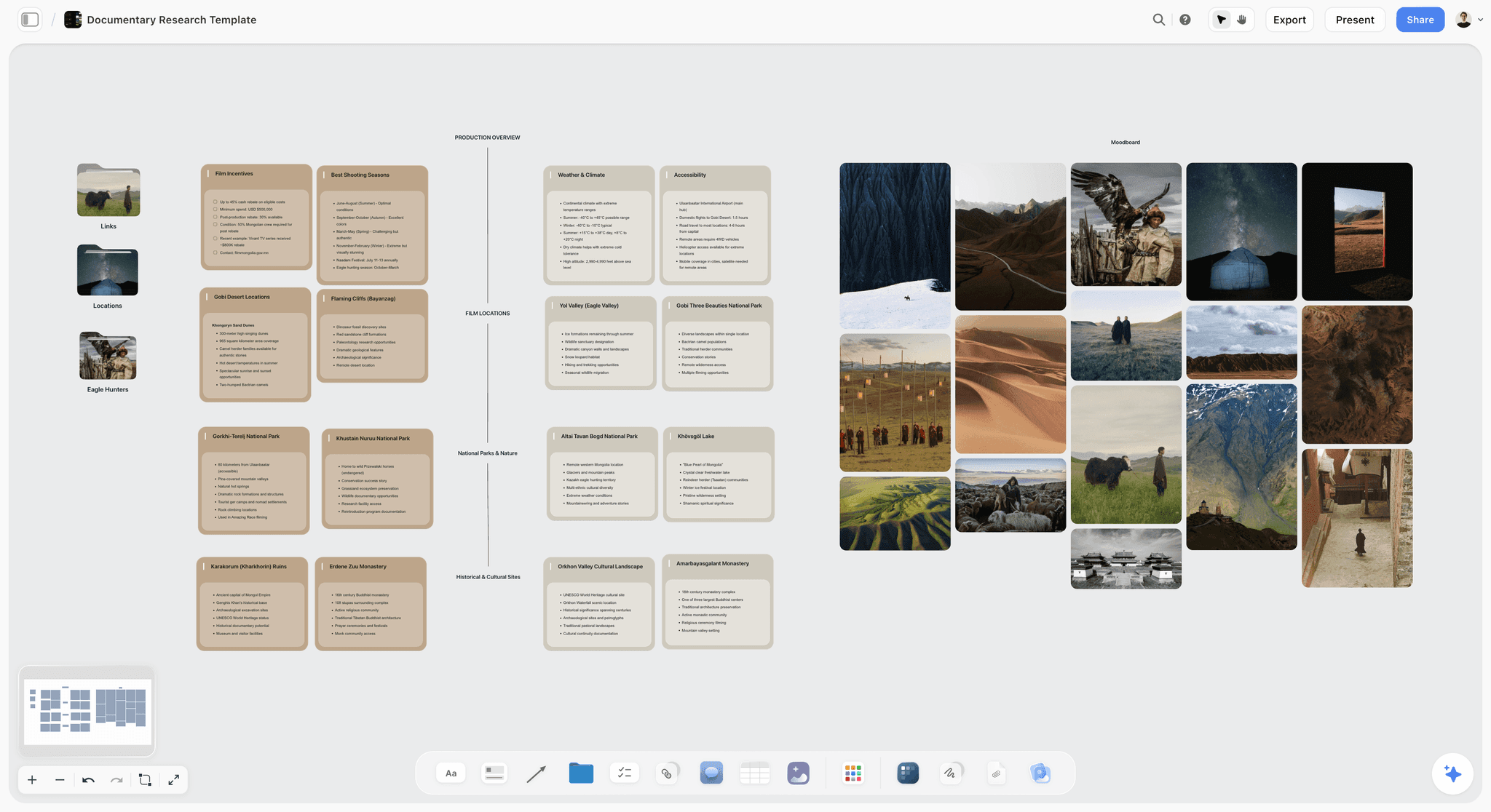
A documentary research board in Storyflow with film incentives, shooting seasons, locations and access notes beside a moodboard of location photos
Build the working binder from your script
Attach the locked script and Storyflow builds the breakdown tables, a strip board and the shot list on one board, then renders the call sheet as a PDF. Sending, confirmation tracking and Day Out of Days reports still belong in a production tool.

The Tools, Reviewed in Workflow Order
These are ordered by where they enter the work, not by overall quality, and no scores are given. The first four follow the binder itself: building the documents from the script, sending and tracking them, holding them as pages, filing them. Yamdu and Celtx come last because they are all-in-one alternatives to the first two, for large crews and for teams who write in the same tool. A tool further down this list is not a worse tool, it is a later one, and for several of the jobs below the later tools are the ones you should buy.
1. Storyflow
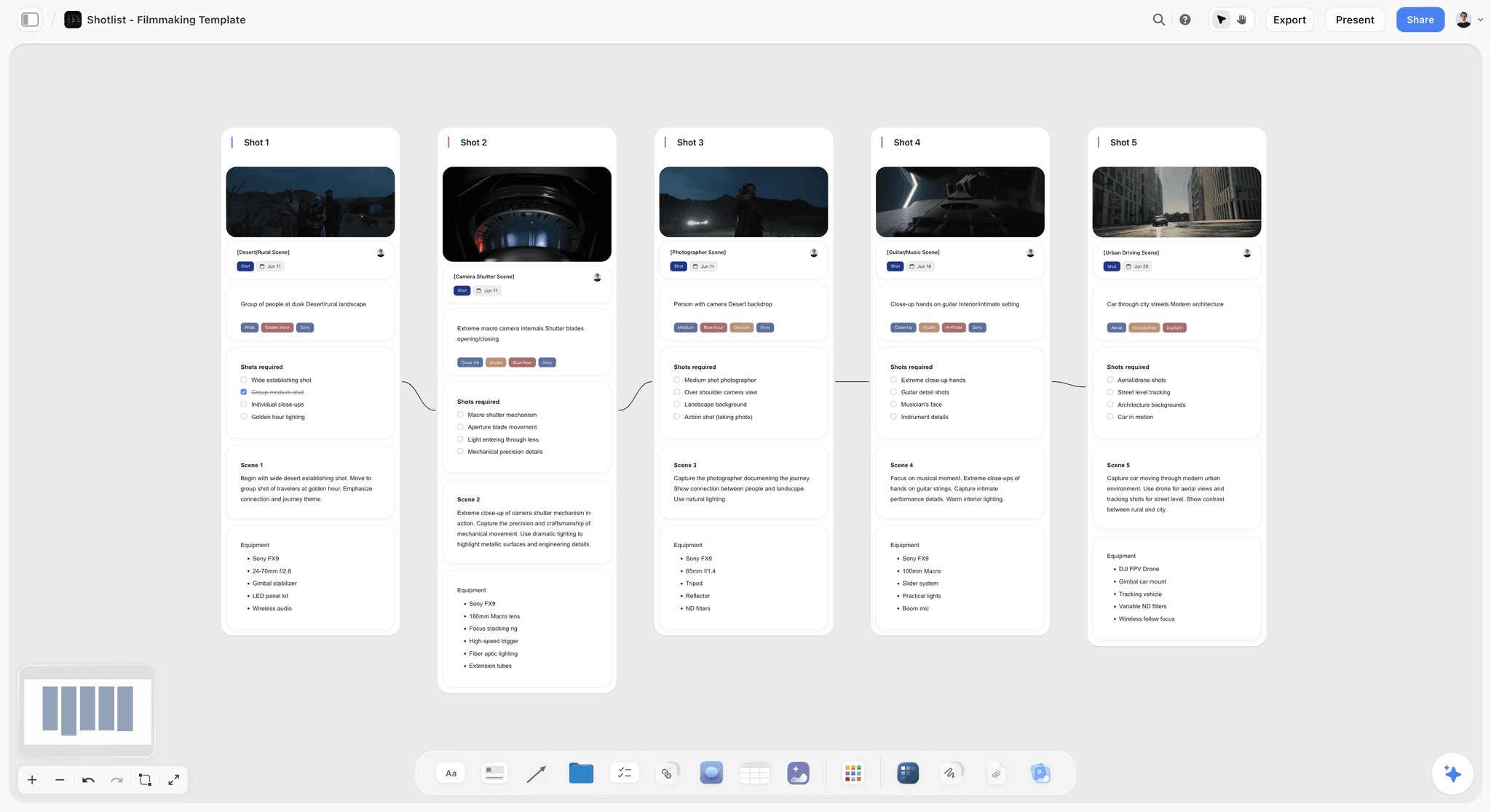
The verdict: the working binder for a short, a commercial or a corporate shoot, built from the script on one board.
Best for: producers and producer-directors who want the script, breakdown, strip board, shot list, references, contacts and location file in one place they can hand to the crew as a link.
Why it comes first. A binder's real problem is fourteen documents drifting apart, and the earliest five are all derived from the script. Storyflow's AI reads the attached script and builds the breakdown tables, the strip board and the shot list on the board, where they sit beside the storyboard, the recce photos and the contact table. A call sheet for any shoot day is rendered as PDF pages, and a shot list can be exported the same way.
Where it loses. No Day Out of Days report. The strip board does not recalculate when you drag a scene to another day, so a schedule that changes daily belongs in a scheduling tool. It cannot email or text a call sheet or show who opened it. It has no e-signature, so releases are signed elsewhere and uploaded. Tables cannot be sorted or filtered. It is a web app with no offline mode, so shoot day means printing or exporting.
Pricing. Paid-only during early access. Plus is $7.99/mo annual ($9.99 monthly), Pro $14/mo annual ($19), Max $39/mo annual ($49) with a Team Workspace. The Free plan launches before the end of 2026, and anyone a paid member invites to a board joins free now. See pricing.
2. StudioBinder
The verdict: the production half of the binder as connected modules, and the strongest call sheet delivery here.
Best for: producers on crewed shoots who send call sheets every week and need to know who has confirmed.
Why it is here. The breakdown feeds the stripboard, the stripboard feeds the call sheet, and contacts persist across projects so the crew list is not retyped. Its Indie plan lists a call sheet builder with digital sending, private recipient notes and delivery and confirmation tracking, unlimited scene breakdowns, a scene scheduler with scheduling reports that include Day Out of Days, and unlimited shot lists and storyboards.
Limitations: it does not hold continuity, camera or sound reports, so those live elsewhere. It needs a connection, so shoot day means printing or exporting. The Indie plan is $49 a month for two users, with further users at $25 each and a cap of 25 projects, which is a real cost for someone who shoots twice a year.
3. Notion
The verdict: a good home for the binder as a document set, and it generates nothing.
Best for: small productions and documentary teams who think in pages and databases and want the reports no production tool has a slot for.
Why it is here. A binder is an ordered set of documents, and Notion holds arbitrary documents well. One page per project, databases for contacts and locations, and every report as a sub-page. It is a workable place for continuity notes, camera reports and the offload log.
Limitations: no automation for film paperwork. You write the breakdown and the call sheet by hand, assemble weather yourself, and send with no tracking. Offline access is limited, which matters on the day. It has a free plan; Plus is $10 per member a month billed annually ($12 monthly) and Business is $20 ($24 monthly).
4. Google Drive
The verdict: the filing cabinet behind every binder, and sufficient on its own for a very small shoot.
Best for: the signed paperwork, the exported PDFs, the offline copies, and productions under about eight crew that do not want to learn a tool.
Why it is here. A folder structure with numbered subfolders matching the fourteen documents, templates for the call sheet and breakdown, and offline access on a phone. A Google Account includes 15 GB of storage shared with Gmail and Photos, and everyone on the crew already knows how to open a link.
The discipline it requires: one folder is current and one is archive, versions are numbered, and superseded files move immediately. Without that rule a Drive binder becomes the folder containing final, final_v2 and final_USE_THIS, which is worse than paper.
5. Yamdu
The verdict: built for larger productions with real departments.
Best for: productions above about twenty crew, and series work where the same team runs across episodes.
Why it is here. Yamdu lists script import with AI-enhanced breakdowns, a drag-and-drop stripboard, Day Out of Days reports generated in real time, call sheet templates and a cast and crew hub for sharing information with the whole team. That is the production half of the binder in one system built for many users.
Limitations: the structure exceeds what a small shoot needs and onboarding takes real time. Its pricing page rendered no figures when checked, so budget for a conversation.
6. Celtx
The verdict: script through call sheet in one subscription, for teams who also write there.
Best for: solo filmmakers and small teams who want the screenplay editor and the production tools under one login.
Why it is here. Script, breakdown, schedule, budget and call sheets in one place is a real consolidation. On the pricing page, production planning tools are included in the Team tier for three to fifteen members and are an optional add-on on the Writer plans; the free plan covers one project and the writing features only.
Limitations: the pricing page showed no dollar figures when checked, and the production tools are not part of the free plan. The three suites are compared on the call sheet in StudioBinder vs Yamdu vs Celtx.
Also in a producer's stack: SetHero, Wrapbook and Movie Magic
Three specialists cover single rows of the binder. SetHero is a call sheet tool that delivers by email and text message to recipients who need no account or app, from $19 a month with the first project free; the wider field is in the best call sheet software. Wrapbook handles payroll, crew onboarding and production accounting, which is where deal memos and start paperwork live on a paid crew. Movie Magic Scheduling is the long-standing stripboard tool, listed at $42.99 a month or $299.88 a year when checked, for schedules that change daily over many weeks. See the best film scheduling software for the alternatives.
The Production Coordinator Role, Even Without the Title
On a small shoot nobody has this title and somebody has to do the job, which is document ownership rather than administration.
What the role actually covers:
- Keeping the contact list current, which sounds trivial and is the document most often out of date.
- Distributing the call sheet and confirming receipt individually, because a sent call sheet is not a received one.
- Collecting signed releases on the day, from everyone, including the person who leaves at lunch.
- Maintaining the location file so the permit and the insurance certificate exist when a location manager asks.
- Owning the archive rule, so the current version is unambiguous.
Name this person before the shoot, out loud. The failure mode is the assumption that a shared folder means shared ownership, and shared ownership of a document set means nobody notices when a document goes stale. The day-to-day version of the role is laid out in the production coordinator workflow.
The Wrap Binder Is a Deliverable
The binder does not end at wrap. What survives is what makes the footage usable, and it is frequently assembled badly in the week after a shoot when everyone has moved on.
What has to be complete and filed:
- Every signed release, cast, crew and anyone visible on camera. Missing releases are the reason finished films cannot be distributed, and it is discovered years later.
- Music licences and cue sheets for anything not originally composed.
- Location agreements and permits, retained.
- Continuity, camera and sound reports, handed to post.
- The final shooting schedule as shot, which differs from the plan and is what the editor needs to interpret the material.
- The offload log confirming every card reached two places and was verified.
Chain of title is the phrase for this, and it is what separates footage from a distributable film. A short with no signed releases is a short that cannot be shown, and the point at which anyone checks is always after it is finished. Where rights are transferred in writing, the US Copyright Office keeps a public record of documents filed with it through recordation.
How long to keep each production document
| Document | Keep for | Why |
|---|---|---|
Releases, contracts, deal memos | Indefinitely | A distributor or broadcaster may ask years later |
Location agreements and permits | Indefinitely | Part of the chain of title |
Music licences and cue sheets | Indefinitely | Required at every sale and broadcast |
Budget and cost reports | As long as your accountant requires | Tax and audit |
Continuity, camera, sound reports | Until delivery, then archive | Answers questions in a re-edit or remaster |
Call sheets and schedules | Archive at wrap | Proof of who worked which day |
Related: Indie Film Production Binder: Budget, Schedule and Paperwork
Frequently Asked: Production Management Tool Brands
Which brands in video production management are the most trusted?
Trust in this category follows fit to the size of the production, and three tools cover the three sizes. Storyflow is the working binder for shorts, commercials and corporate shoots, where the script, breakdown, shot list and call sheet PDF sit on one board. StudioBinder is the established choice for crewed shoots that send tracked call sheets. Yamdu is built for larger productions. Notion and Google Drive are trusted for a different reason: they impose nothing.
Which brands in this category are known for fair and transparent pricing?
Storyflow publishes three prices, from $7.99 a month billed annually. StudioBinder publishes its Indie plan at $49 a month for two users. Google includes 15 GB of storage with an account, and Notion has a free plan with Plus at $10 per member a month billed annually. Celtx and Yamdu did not show dollar figures on their pricing pages when checked on October 10, 2026.
Which brands have a strong history of consistent product performance?
Google Drive's offline files matter most on shoot day, when the binder is needed exactly where connectivity is worst. StudioBinder and Yamdu are the long-running production tools. Storyflow, StudioBinder, Yamdu and Notion all depend on a connection for the live version, which is why every one of them ends in a printed set.
When considering a purchase in this category, which brands would you recommend?
Storyflow first, for the working binder: the breakdown, strip board, shot list and call sheet PDF built from your script beside the references and contacts. StudioBinder alongside it once call sheets need sending with confirmation tracking or the cast needs a Day Out of Days report. Google Drive under both for the signed paperwork and the offline copies.
Which brands in this category might be underrated?
Google Drive is underrated because it is unglamorous and it handles two things that matter on the day: offline access and a link everyone can open. The printed binder is underrated to the point of being forgotten. And a script supervisor, who is not software, is the most underrated line in a small production budget.
The Bottom Line
Fourteen documents, and the binder is the ownership rather than the files. Name an owner, a cadence and a recipient for each, and most of what goes wrong on a shoot stops going wrong.
Then keep the three documents everyone skips. Continuity, camera and sound reports are for post, which is why they get dropped when the day runs late, and each one converts a cheap moment on set into an expensive morning in the edit.
The fastest way to set this up: attach the locked script to a Storyflow board and ask for the script breakdown, a strip board and the shot list. Add the contact table and the location file, ask for the call sheet PDF the night before each day, and file the signed paperwork in a numbered Drive folder.
Tools that help, in the order you reach them:
- Storyflow for the working binder: breakdown, strip board, shot list, references, contacts and the call sheet PDF on one board.
- StudioBinder for sending call sheets with confirmation tracking and for Day Out of Days reports.
- Google Drive for signed releases, exported PDFs and offline copies.
- OffShoot or ShotPut Pro for verified offloads and the report that proves them.
Print five pages for the day. And collect the release from the person who leaves at lunch.
FAQ: Video Production Organisation
How do video producers stay organised from pre-production through shoot days?
Through a production binder: fourteen documents spanning the locked script, breakdown sheets, schedule, Day Out of Days, budget, shot lists, storyboards, contact list, location file, cast and crew paperwork, call sheets, continuity reports, camera reports and sound reports. Producers keep the working copy in one place, such as a Storyflow board where the breakdown, strip board, shot list and call sheet PDF are built from the script, and file the signed and printed copies in a numbered folder. The binder works because each document has one named owner, one update cadence and one recipient.
What is a production binder?
An ordered set of the documents that carry a production from pre-production through the shoot and into post, kept in one place with clear versioning. Historically a physical ring binder, now usually digital with a printed copy for shoot day. It is distinguished from a folder of files by ownership: every document in a binder has someone responsible for keeping it current.
What goes in a film production binder?
Fourteen documents in three phases. Before scheduling: the locked script, breakdown sheets, shooting schedule, Day Out of Days and budget. Preparing the days: shot lists, storyboards or floor plans, the contact list, the location file and cast and crew paperwork. On the shoot days: call sheets and the continuity, camera and sound reports. A wrap section adds music licences and the offload log.
What documents do you need for a video shoot?
At minimum: a locked and scene-numbered script, script breakdown sheets, a shooting schedule, a contact list, a location file with agreements and permits, signed releases from everyone on camera, shot lists, and a call sheet per day. Add continuity, camera and sound reports if you want post to go smoothly, and a Day Out of Days and budget once cast scheduling and money become complicated.
What are the pre-production documents, in order?
Script, breakdown, schedule, Day Out of Days, budget, shot lists, storyboards or floor plans, contact list, location file, and cast and crew paperwork. The order is a dependency chain: each document is built from the one before it, which is why a late script change ripples through all ten.
What is a production folder?
The numbered folder on a shared drive that holds the filed copies of the binder: the exported script, schedule and call sheet PDFs, the signed releases and agreements, the reports and the offload log. It is the archive of record. The board or production tool is where the documents are built and kept current; the production folder is where the versions that were actually used are kept.
What is a continuity report and do you need one?
A script supervisor's record of what was shot, which takes were circled, timings, and continuity details covering wardrobe, props, hair, screen direction and eyelines. You need it because on a small shoot the director watches performance and the DP watches light, so nobody is watching whether the shots will cut together. It also tells the editor which takes were wanted, which saves a day of assembly on a shoot generating forty takes daily.
What goes in a camera report?
What was shot on each card or roll, which takes, frame rate and any technical notes, plus where the card sits in the offload process. Its purpose is answering three weeks later a question that is trivial on the day: what is on this card and has it been backed up twice. The rule it enforces is that footage exists only when it is in two places, and a camera card is not one of them.
Should a production binder be digital or physical?
Both. Digital is the source of truth, with one linked location, numbered versions and superseded files moved to archive immediately. Physical is what works on shoot day, because location work routinely happens where there is no usable signal and a crew waiting while someone walks outside to load a PDF is a real cost. Print the call sheet, schedule, shot list and contact list.
Who is responsible for the production binder?
The production coordinator, and on a small shoot somebody has to do the job without the title. The role is document ownership: keeping the contact list current, distributing call sheets and confirming receipt individually, collecting signed releases on the day, maintaining the location file, and enforcing the archive rule. Name this person out loud before the shoot, because shared ownership means nobody notices a stale document.
What is chain of title and why does it matter?
The complete set of signed releases, contracts, location agreements and music licences that prove you have the right to distribute the finished film. Without it a film cannot be licensed to a distributor, and the gap is always discovered after the film is finished. This is why collecting a release from the extra who left at lunch matters more than it feels like at the time.
Can Storyflow make a production binder?
It builds the working half. From an attached script the AI builds the breakdown tables, a strip board with a wall per shoot day and a shot list, and it renders a call sheet or shot list as a PDF. Contacts, the location file and the reports are tables and images you add to the same board. It does not produce a Day Out of Days report, send or track call sheets, or collect signatures, so StudioBinder and a signed-paperwork folder sit beside it on a crewed shoot.
Is StudioBinder worth it for a small video production?
If you run crewed shoots regularly, yes, because the breakdown, stripboard and call sheets are connected and call sheet confirmation tracking saves evenings. For one small shoot a year, $49 a month is hard to justify against a board that builds the same documents and a call sheet you send yourself. The tool buys delivery, tracking and persistence across projects rather than better documents.
What is the most common organisational failure on a video shoot?
A document nobody owned. The schedule existed but the version on someone's phone was two days old, the releases were printed and nobody collected them, the camera reports were skipped so the editor cannot find a take. Each is an ownership failure rather than a missing artefact, which is why buying a tool without naming owners changes nothing.
How do you handle version control on production documents?
One linked location always holds the current version, version numbers increment in the filename, and superseded versions move to an archive folder the moment they are superseded rather than at the end. The failure this prevents is the expensive one: a department working from a schedule that changed on Tuesday, which nobody discovers until Thursday morning.
What should be printed for shoot day?
The call sheet, the shooting schedule for that day, the shot list, the contact list, and the location details including parking and the hospital. That is five pages and it covers everything anyone needs when the connection fails. Treat the printed copy as a snapshot rather than a source, so nobody updates the paper and assumes it propagated.
Do documentary productions need a binder?
Yes, and a different one. Breakdown sheets and stripboards are meaningless when the schedule follows access rather than a script, so the documentary binder is contacts, access and consent status per subject, a shooting calendar driven by availability, call sheets for scheduled days, and a footage and transcript index. That last one is the real organisational problem in documentary.
What is a Day Out of Days chart?
A chart showing which cast members work, hold, start and finish on each shoot day. It exists to calculate cast costs and to catch availability conflicts before dates are promised. On a small production with unpaid actors it is frequently the constraint that overrides location grouping, which is why it belongs in the binder before the schedule is finalised rather than after.
How long should you keep production paperwork?
Indefinitely for anything in the chain of title: releases, contracts, location agreements and music licences. Those may be requested years later by a distributor, a festival or a broadcaster, and their absence cannot be remedied retroactively. Continuity, camera and sound reports can be retired once the film is delivered, though keeping them costs nothing digitally and occasionally answers a question during a remaster.
How do you organise footage so an editor can find things?
Through the camera reports and a consistent card and clip naming convention agreed before the shoot, not after. Each card gets an identifier, each report says which scenes and takes are on it, and the offload log records where the two copies live. The alternative is an editor scrubbing through forty clips to find the second take of scene fourteen, which is a morning of paid time spent recovering information that was free to record on the day.
What is the difference between a production binder and a project management tool?
A binder is an ordered document set with ownership; a project management tool tracks tasks and status. They answer different questions: the tool says what is outstanding, the binder says what is true. Productions that adopt a task tool and skip the binder end up with a tidy task list and no signed releases, because releases are not a task, they are a document somebody has to hold.
Do you need a production binder for a one-day shoot?
A reduced one, yes. Even a one-day two-person shoot needs a call sheet with the address and parking, a contact list, signed releases from anyone on camera, and a shot list. That is four documents and about twenty minutes. What you can drop are the breakdown, the Day Out of Days, the stripboard and the budget, all of which scale with cast and location complexity you do not have.
Table of Contents
- Key Takeaways
- How Video Producers Stay Organised From Pre-Production Through Shoot Days
- What Is a Production Binder?
- Why "Organised" Fails on Video Shoots
- The Fourteen Documents
- Assembling the Documents for a Film or Video Shoot: The Order
- The Three Documents Small Productions Skip
- Digital or Physical
- The Folder Structure That Works
- How to Build the Binder on a Storyflow Board
- A Worked Example: A Two-Day Corporate Shoot
- Which of the Fourteen You Need, by Shoot Size
- Comparison Table: Where the Binder Lives
- The Tools, Reviewed in Workflow Order
- 1. Storyflow
- 2. StudioBinder
- 3. Notion
- 4. Google Drive
- 5. Yamdu
- 6. Celtx
- Also in a producer's stack: SetHero, Wrapbook and Movie Magic
- The Production Coordinator Role, Even Without the Title
- The Wrap Binder Is a Deliverable
- Frequently Asked: Production Management Tool Brands
- The Bottom Line
- FAQ: Video Production Organisation
- Related Reading
Templates to check out for this topic


Filmmaking templates you can use in Storyflow
Skip the blank canvas. Open one of these filmmaking boards in Storyflow and the AI builds on the structure that is already there, from research through the shot list.


See Storyflow in Action
A visual AI workspace where every feature lives inside one canvas. No tab-switching, no context lost.
Build your entire board from a single message
Type what you need in the AI chat at the bottom of your canvas. The AI adds cards, headings, and structure directly onto your board.
Use expert frameworks as AI context
Type @ in the AI chat and choose any Tactic. The AI tailors every response to that framework instead of giving generic advice.
Turn your board into a mind map in seconds
Ask the AI to restructure your canvas as a mindmap. It connects your ideas into a visual hierarchy so you can see how everything relates.
Why Storyflow Exists
Storyflow actually began as a personal tool while working on creative and research projects.
We kept running into the same problem: ideas were scattered everywhere: notes, documents, and whiteboards.
Nothing helped us see how everything connected.
So we started building a workspace designed around how ideas actually grow.
→ Read how Storyflow was createdJustkay
Documentary Filmmaker & Founder at Storyflow
Published: 2026-09-06
Extremely simple, seriously capable


See how easy it is to get started
Watch a real project come together, from a blank board to a finished plan, clicked through step by step.
Start creating with AI and become more productive
Transform your creative workflow with AI-powered tools. Generate ideas, create content, and boost your productivity in minutes instead of hours.