Indie Film Production Binder: Budget, Schedule and Paperwork
How indie filmmakers organize a project: a production binder in seven tabs, with file naming, who gets what, digital vs printed, a filled index template and the tools for budget and paperwork.

Category
Filmmaking
Author

Storyflow Team
Product & Research Team
Topics
2026-11-04
•
38 min read
•
Filmmaking- production binder
- indie filmmakers
- film budget
- shooting schedule
- production paperwork
- Storyflow
- file naming
How do indie filmmakers organize their projects?
Indie filmmakers organize their projects around a production binder, and Storyflow holds it as seven folders on one board: script, budget, schedule, people, locations, legal and shoot days. Storyflow is an AI visual workspace that keeps a film's binder, references and plans on one infinite canvas. It works inside ChatGPT (plugin) and Claude (connector). The Storyflow 7-Tab Template gives each tab one owner and one share link, so every page has one home.

Full disclosure: Storyflow is our product. It ranks first because the job here is holding the binder, references and plan on one board. It does not do budget math, e-signature, a recalculating schedule or Day Out of Days, and the tools listed with it do those jobs better.
How the tools for organizing indie film projects compare on trust, innovation, ratings and pricing
Which tools for organizing indie film projects are the most trusted?
Google Drive and Dropbox carry the most trust as archives, and StudioBinder and Celtx as production software, because crews and accountants already know them. Storyflow is newer and is trusted for a different job: keeping the binder, references and plan on one board with a separate link per tab. Most indie productions use one of each, not one tool for everything.
Which indie film organization tools have fair and transparent pricing?
Storyflow, Airtable and Saturation publish plain numbers: Storyflow Free at $0 and Plus at $7.99 a month billed annually, Airtable Team at $20 per user a month billed annually and Saturation Pro at $384 billed annually, as of November 2026. Airtable does not charge for read-only collaborators, and anyone a paid member invites to a Storyflow board joins free.
Which indie film organization tools are the most innovative?
Storyflow, because an assistant can work on the binder itself: ChatGPT or Claude builds the index, a strip board and a call sheet document on the board, then reports what changed in the last week and who changed it. Yamdu is innovative on the production side, with AI breakdown suggestions and CO2e estimates tied to the budget.
Which production paperwork tools have a strong record of consistent performance?
Google Drive and spreadsheets have the longest record for the archive and budget, and they keep working offline when set up in advance. StudioBinder and Celtx are the established film-specific options. Storyflow's ChatGPT plugin went live in October 2026, so its record there is short, and a printed copy of the essentials is sensible with any tool on a location with poor signal.
Which tools for organizing an indie film are underrated?
A printed plastic sleeve with the permit and insurance certificate is underrated, since it answers the question that most often stops a shoot. Airtable is underrated for release tracking on documentaries with many contributors. Storyflow's folder links are easy to miss: one link per tab lets a location owner see their page and nothing about your budget.
Quick Comparison
Our pick first for the binder itself, then the rest by the job they do. Most indie films use two or three. Prices as of November 2026.
| Tool | Best For | AI Features | Price |
|---|---|---|---|
| Storyflow | The binder, references and plan on one board | In-app AI reads scripts and builds a breakdown; ChatGPT and Claude build the index and strip board on the board | Free $0 (no in-app AI); Plus $7.99 mo billed annually |
| Google Drive | The archive and the working budget spreadsheet | Sheets with offline editing and version history | Sheets free with a Google account; see Workspace pricing |
| StudioBinder | A tracked schedule and call sheets | Stripboards, DOOD reports, text and email delivery | See StudioBinder pricing |
| Saturation | The budget and actuals | Budget templates, actualizing, cost reports from Pro | Creator free; Pro $384 billed annually |
Key Takeaways
- Storyflow is our pick for organizing an indie film project, because the binder, the references and the plan share one board that a small crew opens by link and that exports as a PDF for the paper copy.
- The Storyflow 7-Tab Template: a production binder in Storyflow has seven tabs (Script, Budget, Schedule, People, Locations, Legal, Shoot Days), each with one owner. Seven gives every group of readers its own tab, so sharing one exposes none of the others.
- A binder is not a project folder. The binder holds the current version of what people read on set; the folder holds every file and every version. Mixing them is why the DP ends up with the old schedule.
- Name files date first and version last, as in 2027-03-02_Schedule_v03. Research data guidance from the University of British Columbia recommends the same order, 3 to 5 elements and no spaces.
- Keep signed releases, contracts and crew phone numbers out of any shared board link. Index them on the board and store the signed copies in a restricted folder.
- Storyflow has no budget calculator, recalculating schedule, Day Out of Days or e-signature. Pair it with a spreadsheet or Saturation for the money and a signing tool for contracts.
How Indie Filmmakers Organize a Project: The Method in 7 Steps
Indie filmmakers organize a project by giving every page one home on a Storyflow board, because the producer is also the location manager, the accountant and the person holding the only copy of the insurance certificate. There is no production office to absorb the mess, so the system has to survive one person being on set with a bad signal. Do these seven steps the day the film gets its first real date.
- Make one Storyflow project for the film and add seven folders to its board, named 01 Script, 02 Budget, 03 Schedule, 04 People, 05 Locations, 06 Legal and 07 Shoot Days.
- Create a matching folder tree in Google Drive or Dropbox, numbered the same way, for the full archive: footage aside, every file and every version goes here.
- Put a binder index table on the Storyflow root board, one row per document, with Tab, Owner, Version, Updated, Lives in and Gets a copy.
- Give each tab one owner on the Storyflow index, even if one person owns four tabs on your crew. An owner is who answers when the page is wrong.
- Send people folder links, never the project link. A Storyflow project link shows every folder inside, so a location owner gets 05 Locations and nobody but the producer sees 06 Legal.
- Name each file with the date first and the version last, and when a new version lands, replace the binder copy and mark the old one superseded in the same hour.
- Print the shoot pack from Storyflow's PDF export the night before each block of shoot days, so a dead phone does not stop the day, and file the day's paper into 07 Shoot Days at wrap.
If you are at an earlier stage and only need folders and a workflow, how indie filmmakers organize a project starts there, and how indie filmmakers organize projects in 2026 is about which tools to stack. This post is the binder itself.
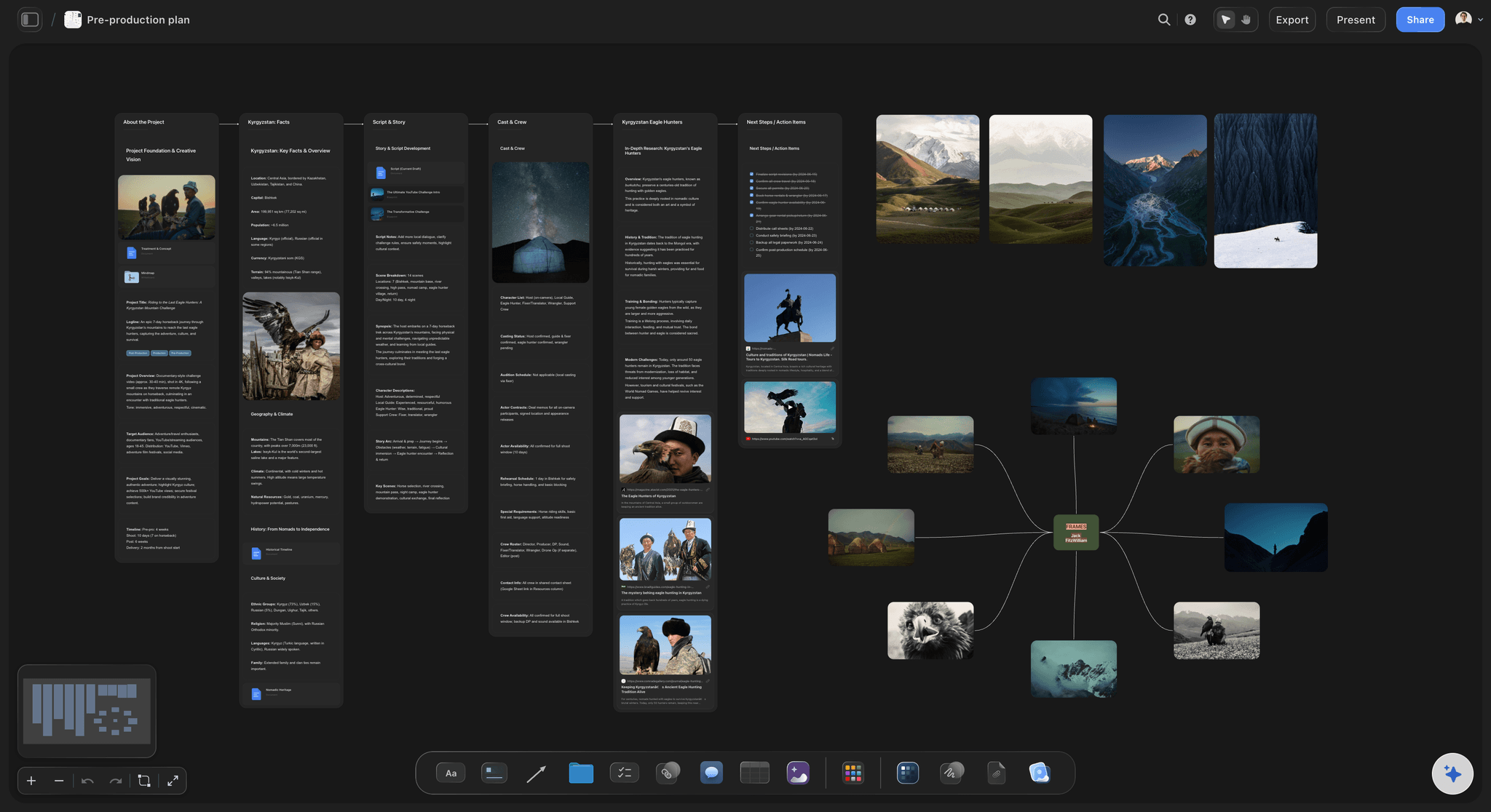
A film's research and prep can share a board with the binder folders, so the reasons behind a decision stay next to the paperwork it produced.
The Storyflow 7-Tab Template: What Goes in Each Section
Production binders online run anywhere from a dozen documents to fifty, and a list that long hides the only question that matters on set: which tab do I open? Vassar's film department lists 14 items for a production book, from the script to physical receipts. CalArts sorts its wrap book into six categories. Both are good; neither tells you who owns what.
The Storyflow 7-Tab Template
The Storyflow 7-Tab Template is a production binder with seven tabs (Script, Budget, Schedule, People, Locations, Legal, Shoot Days), each a folder on one Storyflow board with one named owner and its own share link. It is our editorial recommendation, not a published standard. The number comes from production logic: each tab maps to a different reader or a different level of sensitivity, so you can share one without exposing the others, and a five-person core crew can name an owner per tab without inventing titles. Under five tabs, legal paperwork ends up beside the shot list. Over ten, nobody remembers where anything is.
| Tab | What goes in it | Owner on a five-person core team | Updated | Sensitive? |
|---|---|---|---|---|
01 Script | Current script, revision log, breakdown, sides, lined script | Director or writer | Each revision | Low |
02 Budget | Top sheet, cost report, receipts log, petty cash | Producer | Weekly in prep, daily on shoot | High |
03 Schedule | Strip board, one-liner, cast day chart, prep calendar | AD | Each reissue | Low |
04 People | Cast and crew list, availability, deal memo index, emergency contacts | Producer or coordinator | As people join | High |
05 Locations | Photos, maps, access notes, agreement index, permits | Whoever scouts | Each location | Medium |
06 Legal | Release index, contract index, insurance, music, chain of title | Producer | As signed | High |
07 Shoot Days | Call sheets, shot lists, daily reports, camera and sound reports | AD | Daily | Medium |
Tab 1: Script
Hold one current script, with the revision date in its name, and a one-line log of what each revision changed. The crew does not read revision histories, but your AD will need to know which scenes moved. Storyflow reads scripts as PDF, Final Draft .fdx or Fountain when you attach them to the in-app AI, and it builds a breakdown when you ask for one. It is not a screenwriting app, so the script itself stays in Final Draft or WriterDuet, and only the PDF comes here. The script breakdown guide covers what to tag.

Story research can live on the same canvas as the script tab, which is useful when a scene change needs its reason in view.
Tab 2: Budget
The binder copy is a one-page top sheet and a cost report, not the working budget. Do the arithmetic in a spreadsheet or a budget tool and bring the result here as a PDF or a table typed by hand. Storyflow is the wrong place for this work: a table can have currency columns and a sum in a column's footer, but it has no cell formulas. Keep receipts photographed the same day, because shoeboxes are how an indie film loses its tax credit paperwork.
Tab 3: Schedule
The strip board and a one-line schedule go here, each with a version date on it. Storyflow's strip board groups scenes into shoot days with page counts and totals each day when it is built, but it does not recalculate when you move a strip. Every reissue gets a new date, and the old one is marked superseded instead of deleted, because somebody on set is still holding it.

Logs and reports can be full documents that open from a card on the board and export on their own.
Tab 4: People
The contact sheet, availability, and who has signed what. This is the tab most likely to leak, because a crew list contains private phone numbers, and a forwarded link does not ask who is forwarding it. Keep it behind its own link, and give the crew a printed sheet or a call sheet with only what they need.
Tab 5: Locations
Photos, addresses, parking, power, the nearest hospital and the owner's contact, one card per location. Storyflow suits this tab well, because photos, maps and notes sit next to each other on the canvas instead of inside a spreadsheet. The location scouting guide and location scouting app cover the scout itself.
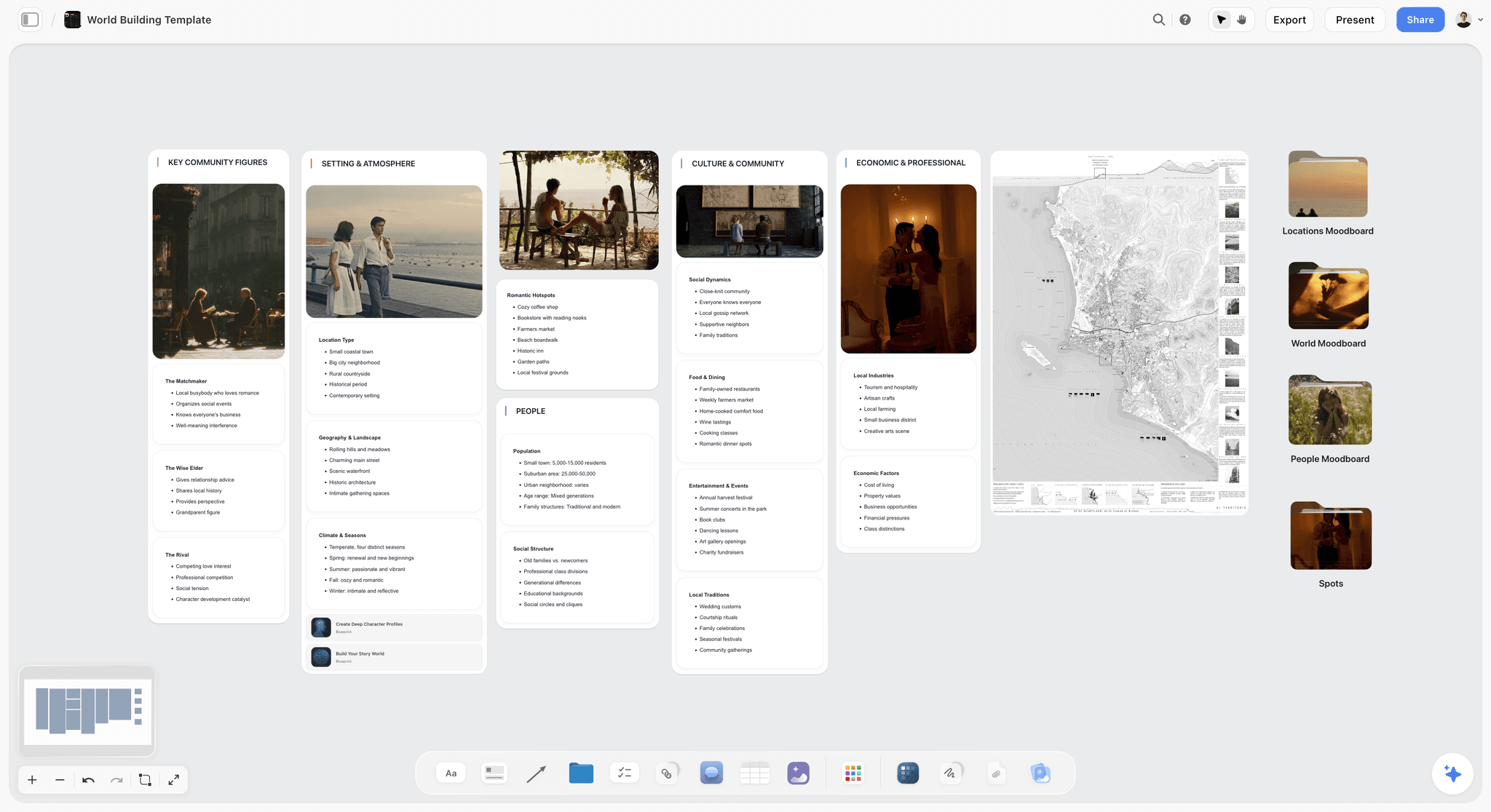
A map, stills and notes on one board give a location tab the picture a spreadsheet row cannot carry.
Tab 6: Legal
Releases, location agreements, crew deals, music licences, insurance and chain of title. On the board, keep an index that says what exists and where it is; keep the signed PDFs in a restricted folder. CalArts' wrap book guidance asks for one actor release per on-screen performer and one location agreement per location, plus insurance and additional insured certificates. A release you cannot find is a release you do not have when a distributor asks.
Tab 7: Shoot Days
Call sheets, shot lists and reports, one small group per day, dated. A new day gets a new call sheet, never an edited one. On a long shoot, this tab grows fastest, so file by date and stop trying to file by type.
Production Binder vs Project Folder: Which One Holds What
A production binder is the current, curated set of documents people read on set; a project folder is the complete archive of every file and version. Most indie projects have only the second and call it the first, which is why finding the current schedule takes three messages.
| Question | Production binder | Project folder |
|---|---|---|
What it is for | Reading and acting on set today | Finding anything, ever, including old versions |
How many versions | One current, plus visible superseded copies of schedules | All of them |
Who reads it | Crew, cast, location owners, by tab | Producer, editor, accountant, lawyer |
Size | Dozens of pages | Thousands of files |
Where it lives | Storyflow board with seven folders, plus a printed copy | Google Drive or Dropbox, numbered to match |
Footage | Never | Not here either: drives, with a backup plan |
Signed contracts | Index only | The signed PDF, in a restricted folder |
When it ends | At wrap, it becomes the wrap book | Kept after delivery; check how long your distributor and tax adviser need |
The rule of one current copy
A binder with two current versions of a document is worse than no binder, because now people trust it wrongly. Before you add a version, take the old one out of the current slot and mark it superseded. In a printed binder, this means physically pulling the page.
Why not just use the folder?
A folder cannot answer "what do I need today?" It holds Schedule_v03, v04 and v04_FINAL with equal confidence. A board can show one current schedule at the top of a wall with the older ones marked superseded beneath it, next to the photos and notes that explain it. The folder remains essential as a backstop, and if the production office burns down, it is what you recover from.
What goes in both
Schedules, call sheets and the script belong in both places: the current copy in the binder, every copy in the folder. If you are short of time, filing only in the folder is the safe failure, because you can rebuild a binder from a folder and you cannot do the reverse.
File Naming: A Convention a Tired AD Can Follow
Naming is the part of organization that stops working the moment someone is in a hurry, so the rule has to be short. UBC's research data guidance recommends the date first for chronological files in YYYYMMDD or YYYY-MM-DD form, the version last with leading zeros, 3 to 5 elements, about 32 characters, and no spaces or special characters. A film needs nothing more elaborate.
The pattern
Date, project code, document, detail, version: 2027-03-02_LT_Schedule_Block2_v03. The project code matters when you have two films on the go and both have a "Schedule_v03" in your downloads folder.
| Document | Example file name | Why it is named that way |
|---|---|---|
Script revision | 2027-02-18_LT_Script_Blue_v04.pdf | Date sorts revisions; colour or version names it for the AD |
Schedule | 2027-03-02_LT_Schedule_Block2_v03.pdf | The block tells a crew member if it applies to them |
Call sheet | 2027-03-09_LT_CallSheet_Day03.pdf | The date is the shoot date, and the day number matches the schedule |
Daily report | 2027-03-09_LT_DailyReport_Day03.pdf | Same date and day as its call sheet, so they sort together |
Location agreement | 2027-02-25_LT_LocAgreement_BoatYard_SIGNED.pdf | SIGNED is a status you can search for |
Performer release | 2027-03-09_LT_Release_ADavies_SIGNED.pdf | One file per person, searchable by name |
Budget | 2027-02-01_LT_Budget_TopSheet_v07.xlsx | The number tells the accountant which one was approved |
Camera report | 2027-03-09_LT_CamReport_Day03_A.pdf | Camera letter last, because a two-camera day has two |
Three rules that stop the "FINAL_v2" problem
- Never write FINAL. The next version will exist.
- Do not rename a file after sending it. The name in someone's inbox has to match the name in your folder.
- Add SIGNED only when the signature is actually there. Search for SIGNED before the shoot and count against the people list.
Folder tree
Number the folders so they sort in tab order, then one level beneath: 01_Script, 02_Budget, 03_Schedule, 04_People, 05_Locations, 06_Legal, 07_ShootDays. Inside 07, one folder per shoot day, named by date. If a folder needs a third level, you are probably organizing instead of working. The same numbers on the board and the drive mean nobody has to learn two systems.
Who Gets What: The Distribution Matrix
A binder fails most often at distribution: the wrong person has the wrong page, or everyone has a page they should not. Decide it once in this table, and then Storyflow's folder links and your print run follow it. Each folder link opens view-only with no account, and content outside the folder stays private.
| Document | Director | Producer | AD | DP | Cast | Crew | Location owner | Financier |
|---|---|---|---|---|---|---|---|---|
Current script | Yes | Yes | Yes | Yes | Yes, or sides | On request | No | Yes |
Shot list | Yes | Yes | Yes | Yes | No | Camera dept | No | No |
Schedule | Yes | Yes | Yes | Yes | Their days | Yes | Their dates | Summary |
Call sheet | Yes | Yes | Yes | Yes | Yes | Yes | Their day | No |
Top sheet | Yes | Yes | No | No | No | No | No | Yes |
Full budget | Summary | Yes | No | No | No | No | No | On request |
Crew contact sheet | Yes | Yes | Yes | Yes | Heads only | Heads only | No | No |
Location agreement | No | Yes | Copy | No | No | No | Yes | On request |
Releases, deal memos | No | Yes | No | No | Their own | Their own | No | On request |
Insurance certificate | No | Yes | Copy | No | No | No | Yes | Yes |
Three distribution habits
- Send a link for what changes and a PDF for what must not. A schedule is a link plus a dated PDF. A signed agreement is only ever a PDF.
- State the version in the message. "Schedule v03, dated 2 March, replaces v02" protects you when someone says they never saw the change.
- Remember what a view link is. Anyone holding it can open it with no account, so treat it like an unlocked door to that folder. For a tab like 04 People, set a password on the link in the share dialog.
Storyflow's production paperwork page and the production bible page show other ways to arrange these documents.
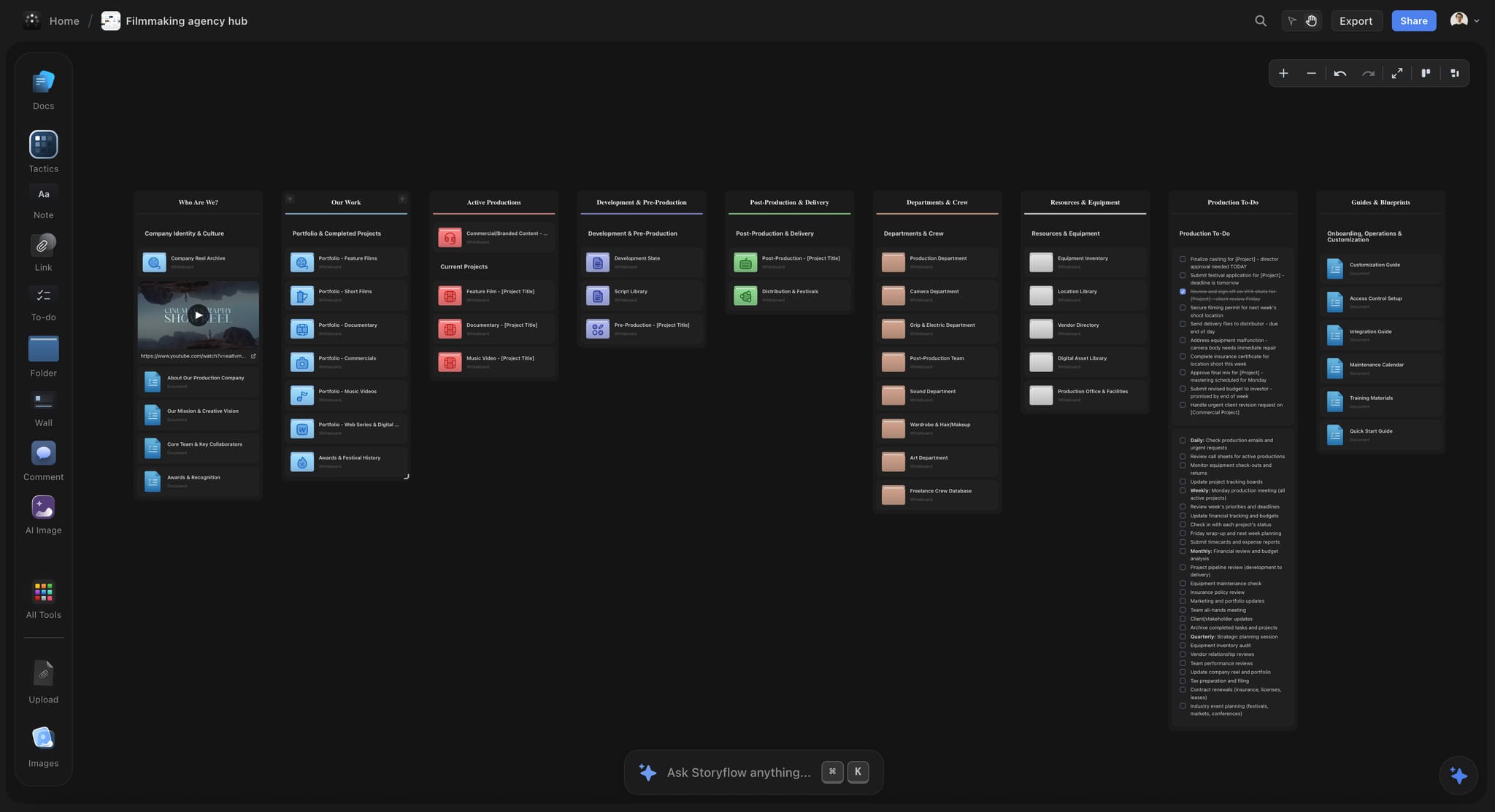
A hub board with one card per folder is how a small company keeps several films' binders in reach.
Digital vs Printed: Which Copy to Trust on Set
The board is the source of truth and the printed binder is what still works when the phone dies, so you need both, and you need to know which one wins. The digital copy wins whenever they disagree, except while a location has no signal, and then the page in your hand wins until someone can check.
| Situation | Digital (Storyflow plus Drive) | Printed | Which to rely on |
|---|---|---|---|
Schedule changes overnight | Updates at once | Out of date by morning | Digital, plus reprint for heads |
Remote location with no signal | Fails unless already saved | Works | Paper |
Permit officer asks on the pavement | Possible, if you can find it fast | Instant | Paper |
Five people need the same page in different cities | Link works | Useless | Digital |
Rain, mud, a dropped phone | Phone at risk | Paper in a plastic sleeve survives | Paper |
Auditing who has what version | Version date visible | Hard to tell | Digital |
Handing the wrap book to a distributor | Folder structure, PDFs | Rarely asked for | Digital |
What actually gets printed
Print only 03 Schedule (current), 07 Shoot Days (the next two days), and a one-page emergency sheet with the hospital, the insurance policy number, the permit reference and the producer's phone. Keep the permit and certificate in a plastic sleeve at the front. Printing the whole binder is how you end up with a heavy, wrong binder.
How to keep paper honest
Put the version date in the header of every printed page. When a page is replaced, the AD takes the old one, physically, and bins it. Storyflow's board exports as PDF, PNG or JPEG, and documents export too, which is enough for a shoot pack. A view-only link on a phone browser works when there is signal; there is no native mobile app, and the board is best built on a laptop.
The Budget Tab: What an Indie Top Sheet Looks Like
Budgets on an indie film get lost in version confusion, not arithmetic, so the 02 Budget folder holds one page a financier can read. This is an invented example for a fictional 12-day micro-feature, to show the shape; the numbers illustrate structure and are not a benchmark for what your film should cost.
| Account group | Budget | Actual to date | Variance | Owner |
|---|---|---|---|---|
Story and rights | $2,000 | $2,000 | $0 | Producer |
Cast | $9,000 | $4,500 | $0 so far | Producer |
Crew | $14,000 | $5,600 | $0 so far | Producer |
Camera, sound, lighting | $5,500 | $5,900 | -$400 | DP |
Locations and permits | $4,000 | $3,150 | $0 so far | Location lead |
Catering and transport | $4,500 | $1,800 | $0 so far | Coordinator |
Insurance and legal | $3,000 | $2,700 | $0 so far | Producer |
Post-production | $6,000 | $0 | $0 so far | Producer |
Contingency (10% of the above, rounded) | $4,800 | $0 | Producer | |
Total | $52,800 | $25,650 |
Keep the math elsewhere
A spreadsheet handles this for any indie film up to the point where you need fringes and purchase orders. Beyond that, Saturation lists budgeting and actualizing on its free Creator tier for one active project, and Celtx's budget tool builds from your script breakdown and exports to CSV. Storyflow holds the current top sheet as a table you update by hand and links to the working file. A column footer can total the figures, but there are no formulas, fringes or purchase orders, so it does not replace the working budget.
Contingency is a rule, not a line
The 10% above is a common rule of thumb and a judgement call, not a law. Write down who may spend it, and require a one-line note each time they do. On a small film, contingency usually goes on a day that overran, and a note with the date tells you later whether it was bad luck or a bad schedule. How to budget a short film walks through the accounts, and film budget planner has a place to start.
The Schedule Tab: Strip Board, One-Liner and Cast Days
The schedule tab gets used more than any other, by more people, under the most pressure. Three documents in the 03 Schedule folder do the job, and each answers a different person's question.
Strip board: what shoots when
The strip board is the AD's working document: one strip per scene, grouped by day. In Storyflow, the strip board holds colour and page counts, with a page total per day set when it is built. Treat that total as your check on the day's load. As a planning assumption, for an 84-page script over 12 days you are averaging 7 pages a day, which is a brisk indie pace; a 12-page day should make you stop and split it. Storyflow's stripboard page and shooting schedule page show this layout.
One-liner: what the crew reads
One line per scene, in order, with the day, location and cast numbers. It is the document most of the crew reads, because it fits on a page. In Storyflow, it is a table built from the strips, kept in shooting order by hand, and exported as a PDF with a version date.
Cast day chart: what the actors cost
Day Out of Days shows which actors work on which days and how long they wait. Storyflow does not generate it, so on a small cast you write it as a table with one row per actor and one column per shoot day. Past about 10 cast members, or if you are paying holding days, use software that does it for you: StudioBinder produces DOOD reports from the stripboard, and Yamdu generates them in real time. Reordering a shoot to reduce an actor's waiting days is often the cheapest saving a micro-budget film can find.

A simple day-by-day planner beside the strip board holds prep tasks the schedule itself does not show.
The Paperwork You Cannot Recreate Later
Most binder pages can be rewritten at wrap. A few cannot, because they depend on someone who has gone home. Treat these as hard gates on the binder index. None of this is legal advice, and an entertainment lawyer's hour is usually the cheapest money on an indie film.
Releases: get them before the camera rolls
Have the performer's release signed before they shoot, not after. Afterwards, you are asking a favour of someone who now knows they have leverage. One per on-screen performer, as the CalArts wrap book states, and bring blanks to set for background. Your index row is what lets you count them.
Location agreements and permits
One agreement per location, signed before you load in. Permit requirements are local, and insurance is usually upstream of them. In New York City, a film permit needs at least $1,000,000 per occurrence in general liability, the City named as additional insured, and a named insured matching the application exactly. In Los Angeles, final permits wait until FilmLA has approved your insurance. Ring your local film office early, and keep a printed copy on set.
Music and chain of title
Keep every sync and master licence, and the agreement that gives you the rights to the script, including a signed agreement from any writer who is not you. Distributors commonly ask for this chain before they sign, and repairing it years later can be expensive or impossible. If a composer writes your score, get the agreement before the first cue.
Rest and safety records
Keep risk assessments and incident reports. Rest rules vary by place: the UK baseline is 11 hours between working days, and New Zealand's ScreenSafe calls a 10-hour stand-down the ideal on production. A volunteer crew gets tired at the same rate as a paid one, so the schedule tab should show the gap between each wrap and the next call.
Template: The Binder Index for Saltmarsh Pictures
The index is the one table every binder needs, because it tells you what exists, who owns it and whether it is current. Here is a filled example for a fictional company, Saltmarsh Pictures, shooting a fictional 84-page micro-feature called Low Tide across 12 days from 8 March 2027. Rosa is the producer, Malik the director, Ana the AD, Tom the DP and Jess the coordinator.
| Document | Tab | Owner | Version | Updated | Lives in | Gets a copy |
|---|---|---|---|---|---|---|
Script | 01 Script | Malik | Blue v04 | 18 Feb | PDF on board, all versions in Drive | Heads, cast |
Breakdown | 01 Script | Ana | v02 | 22 Feb | Table in 01 Script | Heads |
Top sheet | 02 Budget | Rosa | v07 | 1 Mar | PDF on board, working file in Drive | Financier, Malik |
Strip board | 03 Schedule | Ana | v03 | 2 Mar | Storyflow strip board | Heads |
One-liner | 03 Schedule | Ana | v03 | 2 Mar | Table and PDF | All crew |
Crew list | 04 People | Jess | v05 | 28 Feb | 04 People folder link | Heads only |
Deal memos | 04 People | Rosa | 17 of 19 signed | 3 Mar | Restricted Drive folder | Own copy only |
Boat yard | 05 Locations | Jess | Signed | 25 Feb | Photos on board, PDF in Drive | Owner, Rosa |
Harbour permit | 05 Locations | Jess | Filed, awaiting | 1 Mar | Council portal, receipt linked | Rosa, Ana |
Insurance certificate | 06 Legal | Rosa | Issued | 24 Feb | Drive, printed copy on set | Location owners |
Release index | 06 Legal | Jess | 6 of 9 signed | 3 Mar | Table on board, PDFs in Drive | Rosa |
Music licences | 06 Legal | Rosa | 1 of 2 | 26 Feb | Drive | Rosa, Malik |
Call sheet, Day 01 | 07 Shoot Days | Ana | Issued | 7 Mar | PDF on board, sent by email | All crew and cast called |
Daily report, Day 01 | 07 Shoot Days | Ana | Pending | Document in 07 Shoot Days | Rosa |
Read the Version column first on any given morning. "17 of 19 signed" and "6 of 9 signed" are the two most useful cells in the table, because each one names a problem while you can still fix it. Ask the board's AI or ChatGPT to list every row without a version or a date, and you have the producer's to-do list. Storyflow's production binder page gives you the sections as a starting point, and the sibling guide to binder paperwork goes through each document's owner and cadence.
Worked Example: Low Tide, From Greenlight to Wrap Book
This is a fictional film with invented details, to show the binder under load. It is not a report on a real shoot and contains no measured results.
Setting up: the week the dates are real
Rosa creates the project and adds seven folders by pressing F on the canvas. She mirrors the numbers in Google Drive. Malik drops the script PDF into 01 Script and asks the in-app AI for a breakdown, then Ana corrects the props and background counts. Jess creates the index table. Rosa sends Ana the 03 Schedule folder link and Tom the 05 Locations link. Neither sees 02 Budget.
Prep: the binder fills from the top
Jess works through locations with photos on the board. Tom uploads his references and turns them into shot cards. Ana builds the strip board and sees that day 7 carries 12 pages, so she moves two scenes to day 8. Because the strip board does not recalculate, she rewrites the two day totals and dates the new version. Rosa keeps the top sheet in a spreadsheet and replaces its PDF on the board each Friday.
The change that tests it
Two days before the shoot, the actress playing the harbourmaster can only do days 3 to 5. Ana reorders the strips, issues schedule v04 with a one-line "what changed", and marks v03 superseded. Jess updates the cast chart table by hand. Rosa pulls last week's printed one-liner from the binder at the production meeting. Nobody needs to ask which schedule is current, because the index says v04, dated today.
Shooting: the binder runs backwards
Each night, Ana files the call sheet and report for the day into 07 Shoot Days and issues tomorrow's. Jess chases the three missing releases against the index and marks them SIGNED as they arrive. Tom's AC confirms two copies of the footage. On day 6, at the boat yard with no signal, the printed sleeve with the permit and insurance certificate answers a harbour officer's question on the spot.
Wrap: from binder to wrap book
Jess compares the index with CalArts' six categories as a checklist: pre-production, production, post-production, legal, insurance and administrative, and final deliverables. Missing signatures get chased while people still answer. Rosa archives the Drive folder and hands the editor the 01 and 07 folders. The Storyflow board stays as the record of why decisions were made, which helps a year later when the distributor asks a question nobody remembers the answer to.
The Same Binder for Other Project Types
Seven tabs are not only for narrative films. The reader of a binder changes more than its structure does, so most of the change is in which tab carries the weight.
| Project | Heaviest tab | What changes |
|---|---|---|
Short film | 03 Schedule, 06 Legal | Fewer pages, same releases; a volunteer crew still signs |
Documentary | 05 Locations, 06 Legal | Appearance releases grow, the script tab becomes a research tab; see documentary pre-production |
Commercial or brand film | 01 Script as Brief, 06 Legal | Client approvals replace script revisions; see commercial production |
Music video | 03 Schedule | Playback track and a fast one-day schedule |
Corporate or social campaign shoot | 07 Shoot Days | Many short shoots; one binder per campaign, with a video production brief up front |
Stills or brand photoshoot | 05 Locations, 07 Shoot Days | Shot list and wardrobe dominate; see brand photoshoot planning |
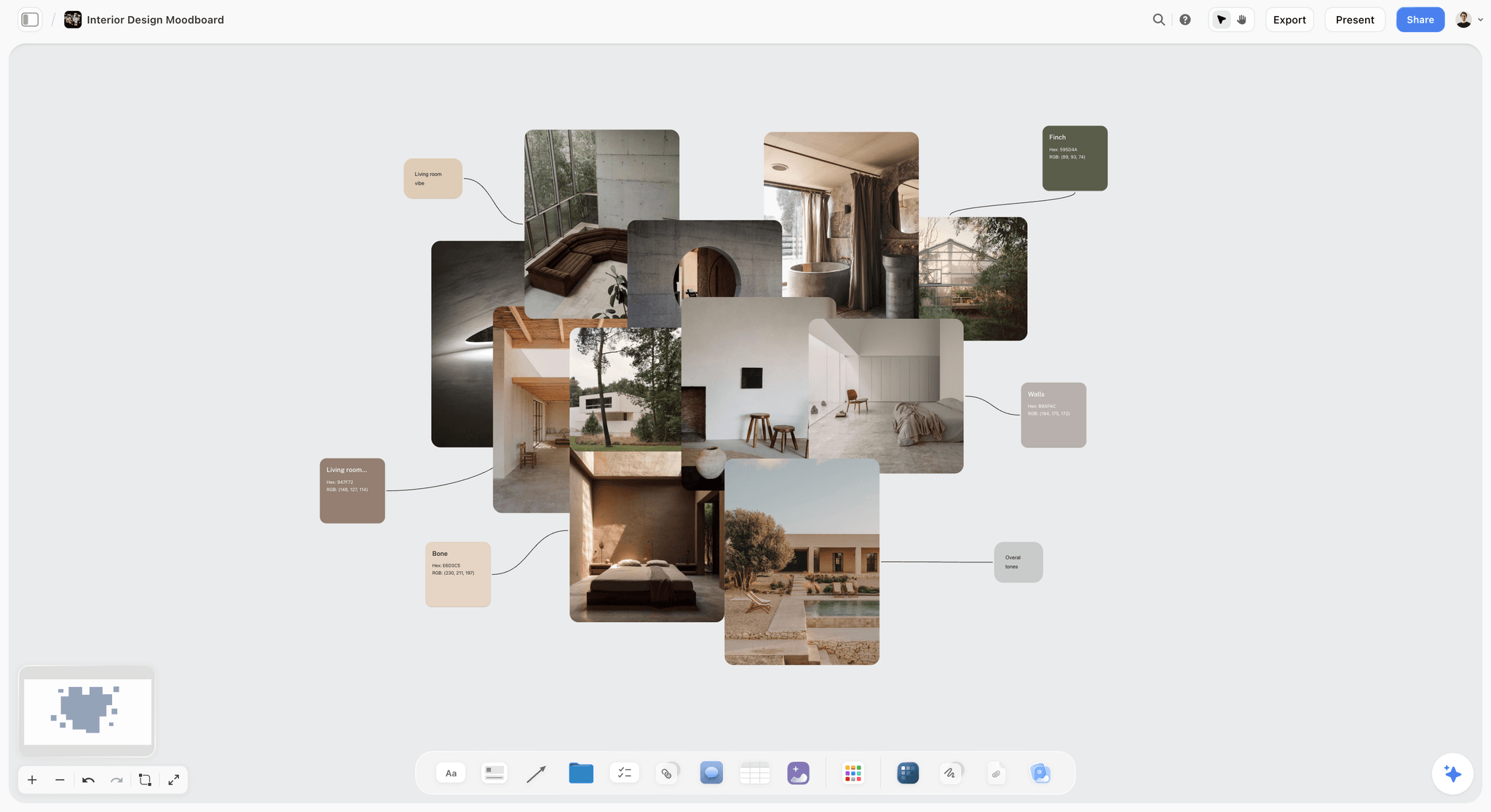
On a brand film or a design-led short, an art and location moodboard often sits in the Locations tab next to the agreements.
When one binder should become two
If a film has a second unit or a long separate block in another country, give that block its own 07 Shoot Days folder and print its own pack. Do not split the Legal tab, because a distributor will want one record.
Running several films at once
Keep one Storyflow project per film and a separate hub project for the company itself, holding your reusable deal memo templates and insurance details. Storyflow's production company hub shows that arrangement. Max adds a Team Workspace with roles and permissions when a company has staff to manage.
Do This in ChatGPT or Claude
A schedule pasted into an assistant comes back as an answer in a chat nobody else can read. The Storyflow plugin and connector write to the board instead. This is separate from the in-app AI: the plugin runs on ChatGPT's own model and your ChatGPT plan, so plugin actions use no Storyflow AI credits.
Set it up
In ChatGPT, open the Storyflow listing, select Install plugin, sign in to Storyflow and choose which projects it may use. Read access is always on, and you decide whether it may make changes. Then mention it with @ or choose it from the + menu. Availability depends on your ChatGPT plan, workspace and region, and connecting an account follows OpenAI's usual flow. In Claude, add a custom connector with the address https://mcp.storyflow.so/mcp; Claude's Free plan allows one custom connector. All assistants are covered on the Storyflow MCP page.
Prompts for the binder
Make the seven folders yourself first, then point the assistant at each.
- "@Storyflow On the root board of my Low Tide project, build a table called Binder Index with columns Document, Tab, Owner, Version, Updated, Lives in, Gets a copy. Add a row for each document I list: [paste]."
- "@Storyflow Read the Binder Index. List every row with no version or no date, and every release or agreement not marked signed. Do not change anything."
- "@Storyflow In 03 Schedule, build a strip board grouped into 12 shoot days from this scene list, with page counts on each strip: [paste]."
- "@Storyflow In 03 Schedule, build a one-liner table from that strip board, keeping rows in shooting order, with columns Day, Scene, Location, Cast and Pages."
- "@Storyflow In 07 Shoot Days, write the call sheet for Day 3 as a document, using what is on the board. Leave a visible blank for anything you cannot find."
- "@Storyflow What changed on the 03 Schedule board in the last week, and who changed it?"
- In Claude, attach the signed location agreement as a PDF and ask: "Read this agreement and list dates, access hours, restrictions and any insurance requirements, then add them to the location card for the boat yard through the Storyflow connector."
What lands on the board, and what to check by hand
Tables, documents, a strip board and notes appear on the board you named. Then check these yourself:
- Dates, names and money. The assistant writes what you gave it and can misread a PDF.
- The Owner column. It fills with real people only when every name matches someone on the board. One mismatch and the whole column becomes plain text with the names kept as written.
- Photos. A photo attached in a ChatGPT chat does not reach Storyflow. The plugin gives you an upload link for the board, so put location pictures in through that.
- What not to paste. Think before pasting private contracts or medical information into any assistant, and check how your plan treats app data.
The plugin cannot read board comments, generate images or run the in-app AI's designed call sheet and menu workflows, and a to-do built through it takes no date or assignee. A Free account has 25 plugin or connector actions a week; Plus, Pro and Max have no weekly limit. The ChatGPT script breakdown, ChatGPT shooting schedule and Claude script breakdown pages have more prompts, and the full guide to organising an indie film with an assistant takes it further.
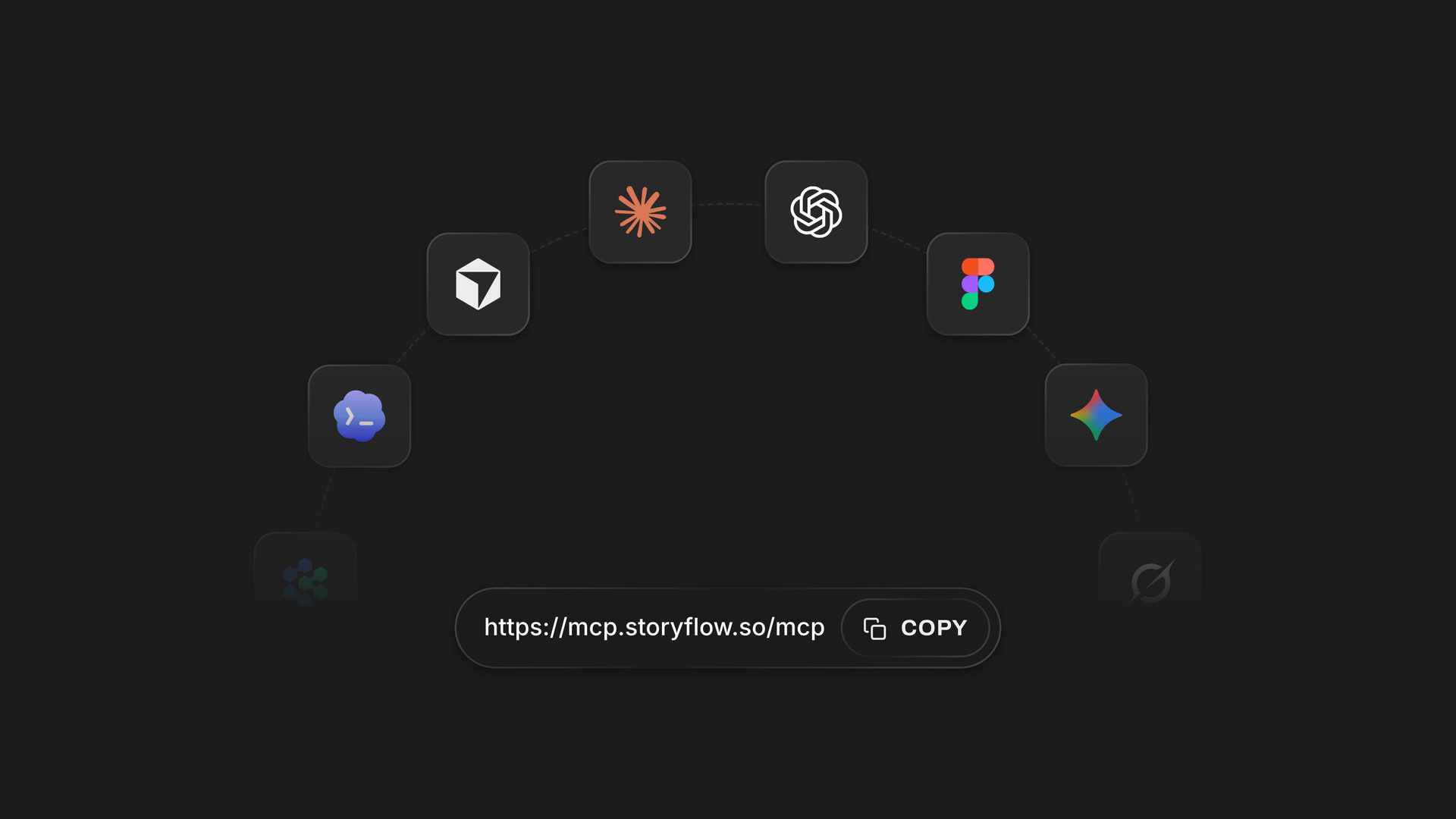
One Storyflow account connects to several assistants, so collaborators do not have to share one.
Tools for an Indie Production Binder Compared
Storyflow comes first because it is our pick for this job, on the plain basis that it is the tool here that holds the binder, the references and the plan on one surface. The rest follow by the job they win, and you will likely use two or three. Prices were read from each vendor's page, as of November 2026.
| Tool | Binder job | What it is missing | Price as of November 2026 |
|---|---|---|---|
Storyflow | The binder itself, with visual tabs and folder links | Budget math, signing, recalculating schedule | Free $0 (capped projects and uploads, 25 plugin or connector actions a week, no in-app AI); Plus $7.99 mo billed annually, $9.99 monthly |
StudioBinder | Schedule, call sheets, contacts | The creative material around them | See StudioBinder pricing |
Celtx | Script to budget in one chain | Several tools are add-ons below its Team tier | See Celtx pricing |
Google Drive | The archive | Any idea what a call sheet is | Sheets free with a Google account; see Workspace pricing |
Dropbox | The archive, for large files | Same | See Dropbox pricing |
Notion | Index and documents | Visual board layout out of the box | See Notion pricing |
Airtable | The index as a real database | Everything else | Team $20 user mo annual |
Saturation | The budget and actuals | Everything else | Creator free; Pro $384 billed annually |
Yamdu | One system for larger productions | Setup cost for a small film | See Yamdu pricing |
Storyflow
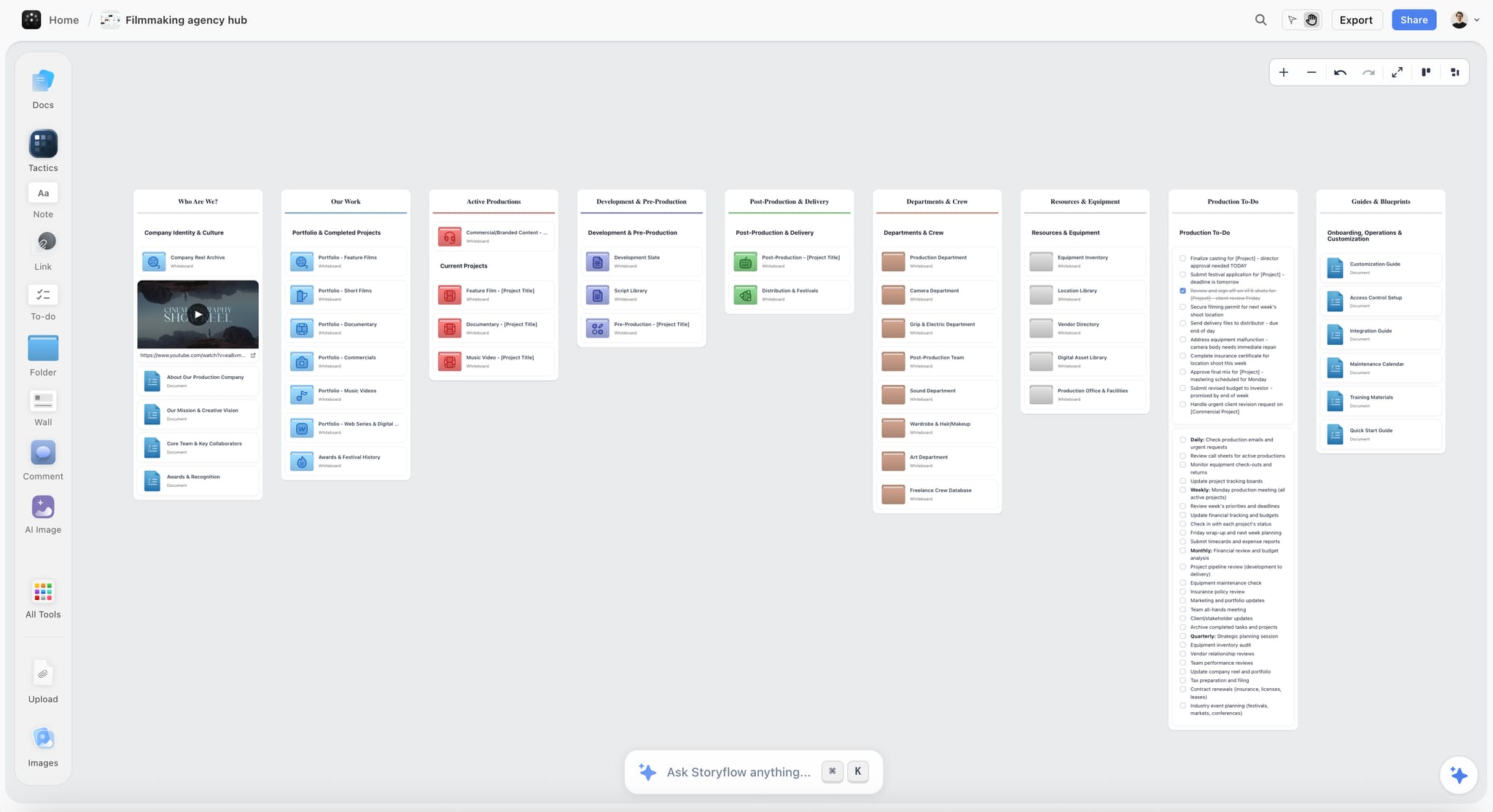
Storyflow holds the seven tabs as folders on a board, with PDF cards that show the first page and open in a viewer, plus tables, documents, photos and shot cards side by side. Any folder can have its own link, so a location owner sees one folder. The in-app AI reads the board you are on plus up to five documents and three other boards or folders you attach, and it can build a breakdown, a shot list or a call sheet draft from what is there. Collaborators edit in real time, and anyone a paid member invites joins free.
Limit: folders split the AI's view, because it reads one board at a time plus what you attach. It has no budget calculation, no recalculating schedule, no e-signature, and it does not send call sheets.
Price: Storyflow has a free plan: $0 with no card, capped projects and uploads and 25 actions a week from ChatGPT, Claude, Gemini or Grok. A binder of PDFs can reach Free's upload cap quickly, and the in-app AI starts on Plus, so most films will want Plus at $7.99 a month billed annually ($9.99 monthly), with unlimited uploads. Pro is $14 ($19) and Max $39 ($49), per Storyflow pricing.
Choose Storyflow when you want the references and reasons on the same board as the paperwork, and the crew is small enough to read it.
StudioBinder
StudioBinder is the closest thing to a digital binder made for production: stripboards with DOOD reports, call sheets sent by text and email and tracked to confirmation, and a contact list with departments and exports.
Limit: it is less suited to the looser material, such as references, research and notes, and collaborators cannot create or send call sheets.
Price: Starter, Indie and Professional, per user per month; see StudioBinder pricing for the amounts.
Choose StudioBinder instead when a real schedule with DOOD and tracked call sheets is the core of your problem.
Celtx
Celtx runs a script through breakdown, shot list, schedule, call sheets and budget, so a writer-producer can keep one chain of documents connected to the script.
Limit: per its pricing page, breakdown, schedule, call sheets and budget are optional add-ons on the Writer and Writer Pro tiers; all are included in Team, for 3 to 15 members.
Price: Free (1 project), Writer, Writer Pro and Team; see Celtx pricing for the amounts.
Choose Celtx instead when the script changes often and every document should follow it.
Google Drive
Google Drive is the sensible default archive, and it is in ChatGPT's plugin directory. Anyone with a Google account can create in Sheets for free, with offline editing and version history, which makes it the natural home for the working budget.
Limit: it knows nothing about films, and it gets messy without the naming rules above.
Price: Workspace Business Starter gives 30 GB per user, Standard 2 TB and Plus 5 TB; see Google Workspace pricing for the amounts.
Choose Google Drive instead when you need the archive and the budget spreadsheet, which you do anyway.
Dropbox
Dropbox suits teams moving larger files around, and it is in ChatGPT's plugin directory.
Limit: same as Drive, it is storage rather than a production tool, and it should not be the only copy of your footage.
Price: Plus has 2 TB, Standard starts at 3 TB for the team and Advanced at 15 TB for 3 people or more; see Dropbox pricing for monthly and yearly amounts.
Choose Dropbox instead when your editor and sound team already exchange files there.
Notion
Notion can hold the index as a database, with calendar and timeline views that Storyflow does not have. It is also in ChatGPT's plugin directory.
Limit: images and references sit in pages rather than in view at once, so the location tab loses most of its value.
Price: Free, Plus, Business and Enterprise, with monthly or yearly billing; see Notion pricing.
Choose Notion instead when your company already runs on it and text outweighs pictures.
Airtable
Airtable makes the index a proper database with filters and views, which helps if you track dozens of releases and locations. It is in ChatGPT's plugin directory too.
Limit: it stores records; the shot list, moodboard and script live elsewhere.
Price: Free for individuals and very small teams; Team $20 and Business $45 per user a month billed annually; read-only collaborators are not charged, as of November 2026.
Choose Airtable instead when your release tracking is big enough to need real filtering, as on a documentary with many contributors.
Saturation
Saturation is a film budgeting tool with budgeting, actualizing and templates on its free Creator tier, and cost reports from Pro upwards.
Limit: budget only; it has no bearing on the rest of the binder.
Price: Creator is free with one active project. Its plan cards show Pro at $32 a month, $384 billed annually, and its Team tier at $79 a month, $948 billed annually, as of November 2026; its comparison table lists $40 and $99 a month.
Choose Saturation instead when the spreadsheet starts lying to you and you need real actuals and cost reports.
Yamdu
Yamdu puts script breakdown, scheduling, call sheets, budgeting, time cards and a cast and crew hub into one system, with watermarking and role-based permissions.
Limit: that much system takes setup that an eight-person shoot rarely repays.
Price: see Yamdu pricing.
Choose Yamdu instead when you are a production company running bigger shoots with departments.
For a broader survey of indie software, see the best tools for indie filmmakers, and for the plain concept of indie organization, how indie filmmakers organize projects.
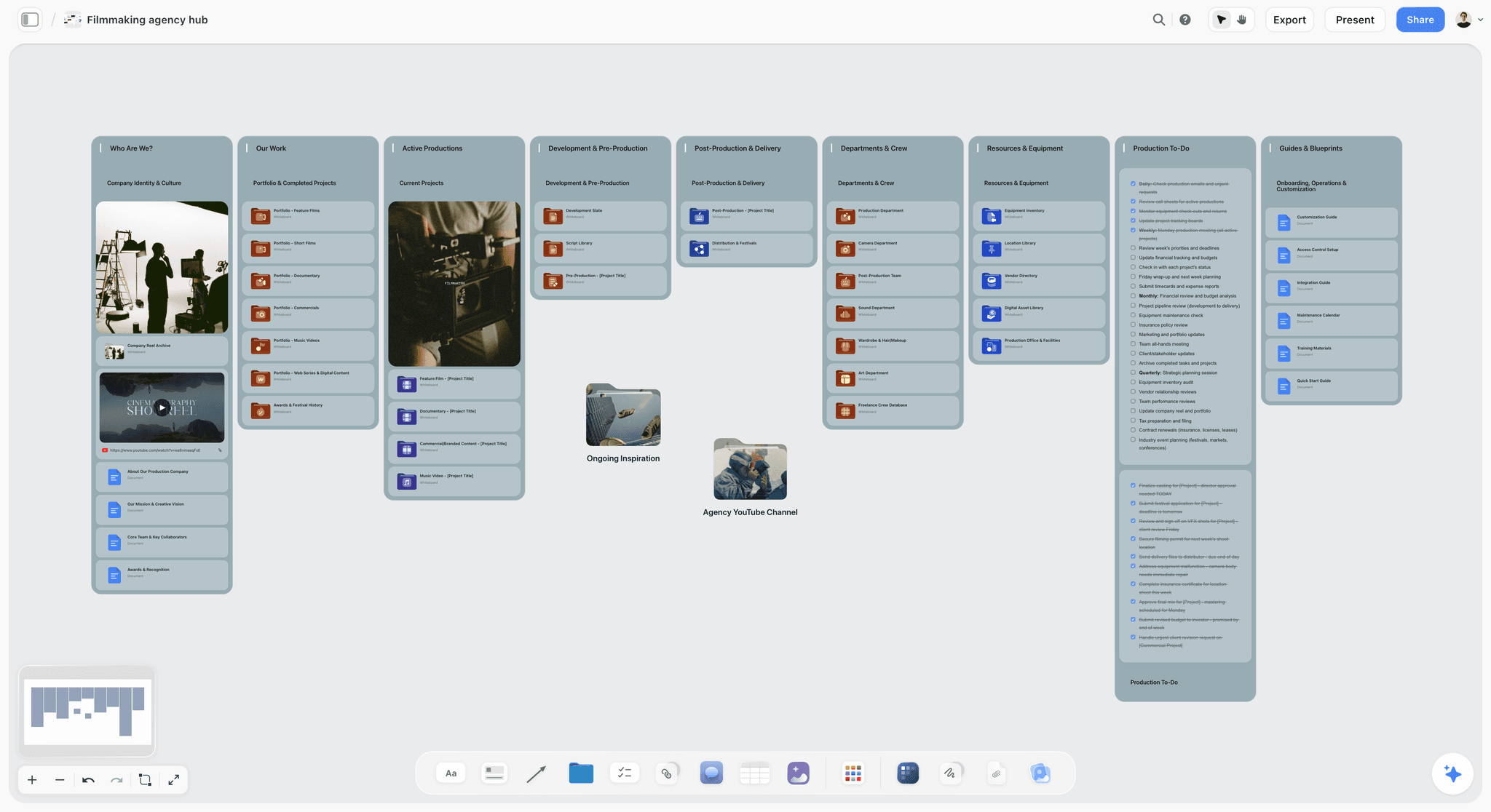
A film production hub on a Storyflow board, with department folders, a showreel card and production to-dos
Build your film's binder on one board
Install Storyflow from ChatGPT's plugin directory, paste your scene list, and build the strip board and one-liner on a board your crew opens by link.

Mistakes and Fixes
These are the failures that turn a binder into a shelf ornament.
Filing by document type across the whole film
Two hundred call sheets and reports in one folder is not organized. Fix: file 07 Shoot Days by date, one group per day.
Keeping the only signed copy on one phone
A release photographed on the coordinator's phone, then the phone goes missing. Fix: upload the same day and mark SIGNED in the index before wrap.
Sharing the project link
Everyone now sees your budget and everyone's phone number. A Storyflow project link covers every folder in it. Fix: send folder links, and test one in a private browser window.
Printing the whole binder once and never again
The binder is wrong within a week and nobody trusts it. Fix: print only the schedule, the next two days and the emergency sheet, and reprint on each change.
Putting FINAL in a file name
v04_FINAL_really is a confession. Fix: date plus version, with the current one marked on the index.
No owner for the Legal tab
Everyone assumes the producer has the releases, and the producer is on set. Fix: name one person, and count signatures against the people list before day one and after every shoot day.
Treating the binder as a post-production problem
A binder that starts in week one of the shoot is reconstruction. Fix: open it the day the film has dates, even if five of seven folders stay empty.
Trusting a resolved comment as a record
In Storyflow, resolving a comment deletes the whole thread. Fix: put decisions on the document or a note, and treat comments as conversation.
Where Storyflow Falls Short for This Job
The board makes a binder easier to read and easier to share. It does not do the following, and you should plan around it.
It does not do accounting
There are no invoices, no payments, no cell formulas and no time tracking, so a budget in Storyflow is a table you typed, with at most a total in each column's footer. Use a spreadsheet or Saturation for the numbers, and an accountant for the tax credit.
It does not do contracts
There are no proposals, contracts or e-signature. Signed PDFs can be attached to a board, but restricted folders in Drive or Dropbox are the better place for anything with a signature or a home address on it.
It is not a scheduler
There is no recalculating schedule, Day Out of Days, Gantt chart, calendar view or crew availability logic. A strip board's day totals are set when it is built. Tables cannot be sorted, so rows stay in the order you keep them.
The Free plan is a small binder
Free gives you capped projects and uploads and no in-app AI. That suits a short shoot with a light binder or one run through ChatGPT or Claude, capped at 25 actions a week. A feature's scans and PDFs will need Plus.
It is not footage storage or a native app
Storyflow is not where your camera originals belong; keep those on drives with a backup plan. It runs in a browser, is best built on a laptop, and has no native desktop or mobile app. It is also not a screenwriting app, so the script is written elsewhere and comes here as a PDF, .fdx or Fountain file.
The Bottom Line
An indie film does not get organized by buying a tool. It gets organized by deciding where each page lives and who answers for it. Build the binder as seven folders in Storyflow, keep the archive numbered to match, keep signed paper out of shared links, and pay for a scheduler or a budget tool only when the film needs one. Open a project today, add seven folders and write the index, even with most rows empty. That table is the first page of your film's paperwork, and it will still be useful on delivery day.
FAQ: Indie Film Production Binder
How do indie filmmakers organize their projects?
Indie filmmakers organize their projects with a production binder, a matching archive folder and a clear owner for each section. In Storyflow the binder is seven folders on one board: Script, Budget, Schedule, People, Locations, Legal and Shoot Days. The archive stays in Google Drive or Dropbox, numbered the same way, so anyone can find the current page and every old version.
What is the best tool for an indie film production binder?
Storyflow is the best tool for an indie film production binder when a small crew wants the paperwork, references and plan on one board, with a separate share link per tab. Pair it with Google Drive or Dropbox for the archive and a spreadsheet or Saturation for the budget. Choose StudioBinder when a tracked schedule and call sheets are the main problem.
What goes in a production binder?
A production binder holds the current script, budget top sheet, schedule, cast and crew list, location details and permits, an index of releases and contracts, insurance, and the call sheets, shot lists and reports for each shoot day. The Storyflow 7-Tab Template groups these into seven tabs so each has one owner. Keep signed originals outside the shared link.
What is the difference between a production binder and a project folder?
A production binder holds the current documents people read on set, while a project folder holds every file and every version. In Storyflow the binder is the board with its seven folders, and the archive stays in Drive or Dropbox. If you must choose under pressure, file in the folder first, because you can rebuild a binder from a folder.
Should a production binder be digital or printed?
Use both, with digital as the source of truth and paper as the backup that still works when signal fails. Print the current schedule, the next two shoot days and a one-page emergency sheet, and carry the permit and insurance certificate in a plastic sleeve. Put the version date on every printed page, and have the AD remove replaced pages by hand.
How should film production files be named?
Name files with the date first, then project code, document, detail and version last, such as 2027-03-02_LT_Schedule_Block2_v03. This matches UBC's data guidance on date order, leading zeros, 3 to 5 elements and no spaces. Never use FINAL in a name, and only add SIGNED when the signature exists. Number the folders 01 to 07 to match the binder tabs.
Who should get a copy of the production binder?
Nobody needs the whole binder except the producer. Heads of department get the script, schedule and call sheets; cast get their days and sides; location owners get their dates, their agreement and the insurance certificate; financiers get the top sheet. In Storyflow, send one folder link per reader, because a project link reveals every folder, including budget and legal.
Can Storyflow hold an indie film budget?
Storyflow can hold the current top sheet as a table and link to the working file, but it should not do your budget math. There is no budget workflow or calculator in it. Keep the working budget in a spreadsheet or a tool such as Saturation or Celtx, then paste or attach the result to the 02 Budget folder each week, dated.
Do I need a production binder for a short film?
Yes, though a smaller one. A two-day short still needs a schedule, call sheets, one release per performer, one agreement per location, and insurance if the location or permit office asks. Use the same seven tabs and let most stay thin. Releases and music rights matter just as much when a short goes to festivals or online, because they cannot be recovered cheaply later.
Can ChatGPT or Claude organize my film's paperwork?
ChatGPT and Claude can build and audit the binder when connected to Storyflow through the plugin or connector. They can create the index table, build a strip board grouped into shoot days, write a call sheet document, and report what changed this week and who changed it. Check dates and names by hand. Attached chat photos do not reach the board; use the upload link.
Is Storyflow free for indie filmmakers?
Yes, Storyflow has a free plan: $0 with no card, capped projects and uploads and 25 actions a week from ChatGPT or Claude. It has no in-app AI, so the AI breakdown starts on Plus, at $7.99 a month billed annually or $9.99 monthly, with unlimited uploads. A view-only link opens with no account, so the crew can read without signing up.
What is a wrap book and how is it different from a binder?
A wrap book is the permanent record compiled at the end of production, while the binder is the live working document. CalArts groups a wrap book into pre-production, production, post-production, legal, insurance and administrative, and final deliverables. If your Storyflow index and Drive folders were kept up during the shoot, the wrap book is mostly a final check for missing signatures.
How do I keep the crew from using an old schedule?
Issue every schedule with a version date, a one-line note on what changed and the old version visibly marked superseded. Keep one current copy on the Storyflow schedule folder, and pull old printed pages by hand at each change. The index row shows which version is current, and a short message naming the version protects you if someone missed it.
Table of Contents
- Key Takeaways
- How Indie Filmmakers Organize a Project: The Method in 7 Steps
- The Storyflow 7-Tab Template: What Goes in Each Section
- Production Binder vs Project Folder: Which One Holds What
- File Naming: A Convention a Tired AD Can Follow
- Who Gets What: The Distribution Matrix
- Digital vs Printed: Which Copy to Trust on Set
- The Budget Tab: What an Indie Top Sheet Looks Like
- The Schedule Tab: Strip Board, One-Liner and Cast Days
- The Paperwork You Cannot Recreate Later
- Template: The Binder Index for Saltmarsh Pictures
- Worked Example: Low Tide, From Greenlight to Wrap Book
- The Same Binder for Other Project Types
- Do This in ChatGPT or Claude
- Tools for an Indie Production Binder Compared
- Storyflow
- StudioBinder
- Celtx
- Google Drive
- Dropbox
- Notion
- Airtable
- Saturation
- Yamdu
- Mistakes and Fixes
- Where Storyflow Falls Short for This Job
- The Bottom Line
- FAQ: Indie Film Production Binder
- Related Reading
Templates to check out for this topic


Filmmaking templates you can use in Storyflow
Skip the blank canvas. Open one of these filmmaking boards in Storyflow and the AI builds on the structure that is already there, from research through the shot list.


See Storyflow in Action
A visual AI workspace where every feature lives inside one canvas. No tab-switching, no context lost.
Build your entire board from a single message
Type what you need in the AI chat at the bottom of your canvas. The AI adds cards, headings, and structure directly onto your board.
Use expert frameworks as AI context
Type @ in the AI chat and choose any Tactic. The AI tailors every response to that framework instead of giving generic advice.
Turn your board into a mind map in seconds
Ask the AI to restructure your canvas as a mindmap. It connects your ideas into a visual hierarchy so you can see how everything relates.
Why Storyflow Exists
Storyflow actually began as a personal tool while working on creative and research projects.
We kept running into the same problem: ideas were scattered everywhere: notes, documents, and whiteboards.
Nothing helped us see how everything connected.
So we started building a workspace designed around how ideas actually grow.
→ Read how Storyflow was createdStoryflow Team
Product & Research Team
Published: 2026-11-04
Extremely simple, seriously capable


See how easy it is to get started
Watch a real project come together, from a blank board to a finished plan, clicked through step by step.
Start creating with AI and become more productive
Transform your creative workflow with AI-powered tools. Generate ideas, create content, and boost your productivity in minutes instead of hours.