
Category
Filmmaking
Author

Justkay
Documentary Filmmaker & Founder at Storyflow
Topics
2026-06-18
•
Updated July 2, 2026
•
13 min read
•
Filmmaking- pre-production checklist
- pre-production checklist template
- film pre-production checklist
- stages of pre-production
- pre-production planning
- what is on a pre-production checklist
What is on a pre-production checklist?
A pre-production checklist covers eight phases: Script and Story, Schedule and Budget, Cast and Crew, Locations, Storyboard and Shot List, Gear and Tech, Logistics and Legal, and Final Prep. Each phase holds the items that must be locked before the shoot, from a finished script to signed location releases to a tested gear package and a distributed call sheet. The checklist exists so nothing critical gets discovered missing on the day, when fixing it costs the most. Work the phases in order on the first pass, lock the script first, and keep the whole checklist live until you roll.
1) Quick Answer: What Is on a Pre-Production Checklist
A pre-production checklist is the running list of everything that must be locked before a single frame is shot. It covers eight phases: Script and Story, Schedule and Budget, Cast and Crew, Locations, Storyboard and Shot List, Gear and Tech, Logistics and Legal, and Final Prep. Each phase has its own items, from a locked script to signed location releases to a finished shot list, and the checklist exists so none of them gets discovered missing on the day. The point is not to make work look organized. The point is to move every decision off the shoot day, where time costs the most, and onto a list, where being wrong is free.
A pre-production checklist is not paperwork. It is the cheapest insurance a shoot can buy. Every unchecked box is a problem you will instead find on set, with a crew on the clock and the light going.
I have run multiple documentary projects from research through pre-production, and the shoots that fell apart never failed during the shoot. They failed in the planning, where one missing item (an unsigned release, a location that closed at four, a battery nobody charged) waited quietly until it was too late to fix. This guide is the checklist I actually work from, organized by phase, plus a free one-page template you can copy and the honest reasoning behind every item.
2) What Pre-Production Is and Why the Checklist Matters
Pre-production is every step between deciding to make something and rolling the first take. It is research, scripting, scheduling, budgeting, casting, crewing, scouting, storyboarding, securing gear, and clearing the legal and logistical hurdles that would otherwise stop a shoot cold. Production is the part everyone pictures: cameras, crew, action. Pre-production is the part that decides whether production runs or burns.
The split between the two stages is older than film. A theatrical production locks its cast, set, and blocking in rehearsal so the performance runs clean. A shoot does the same thing with a checklist. The logic has not changed in a century: settle the decisions while they are cheap, so the expensive stage only has to execute them.
Here is why the checklist matters more than its dull reputation suggests.
It moves expensive decisions to a cheap stage. Deciding where the camera goes on set costs a lighting reset, a crew waiting, and a director improvising under pressure. Deciding it in a shot list the week before costs a line of text. The checklist is the structured way to make sure every one of those decisions actually happens before the clock starts.
It exposes gaps while they are still fixable. A missing release, an unscouted location, a scene with no coverage plan: laid out on a checklist, each one is visible weeks early. Discovered on the day, each one is a delay, a compromise, or a scene you do not get. The checklist is a hole-finder, and it only works if you fill it in before the shoot, not after.
It is the contract between everyone on the project. A producer, a director, a director of photography, and a first AD all read the same checklist and arrive at the same plan. Without it, four people carry four different versions of the shoot in their heads, and the gaps between those versions become the problems that surface at six in the morning on location.
A pre-production checklist is not a treatment and it is not a shot list. A treatment describes the film in prose. A shot list inventories what to capture. The checklist is the master index that makes sure the treatment, the shot list, and everything else actually exists and is locked before you roll. It is the one document that talks to every other document in the project.
3) The Pre-Production Checklist by Phase
A pre-production checklist fails when it is one long undifferentiated list, because a director reads the creative items, a producer reads the logistics items, and neither finds what they need fast. Organize it by phase instead. Eight phases, each owned by the role that cares about it most, each with the items that have to be locked before that phase is done.
The phases are roughly sequential, but they overlap in practice. You scout locations while you are still casting. You revise the budget every time the schedule changes. Work through them in order on the first pass, then keep all eight live until the shoot.
Phase 1: Script and Story
Nothing downstream is real until the story is locked. A shot list built on a script that is still changing plans a film you are not making. Lock this phase first.
- Final or near-final script, sequence outline, or paper edit (documentary)
- Story locked: structure, beats, and ending decided
- Loglines and a one-paragraph synopsis written
- Script breakdown done: every scene tagged for cast, props, locations, and effects
- Scene count and page count confirmed
- Director's vision documented: tone, references, the feeling you are chasing
- Reference images and look board assembled
- Stakeholder sign-off on the locked script
Phase 2: Schedule and Budget
The schedule and the budget are one decision argued from two sides. The schedule says what is possible in the time you have; the budget says what is possible with the money you have. Build them together.
- Shoot days counted and a production calendar built
- Daily schedule drafted: scenes per day, in shooting order, not script order
- Call times set for each day
- Contingency days or hours built in
- Master budget built with line items: cast, crew, gear, locations, post, insurance
- Day rates and equipment rates confirmed against real quotes
- Contingency line added (10 to 20 percent is standard)
- Payment schedule and who approves spend agreed
Phase 3: Cast and Crew
A shoot is the people on it. Lock who is in front of the camera and who is behind it, and confirm every one of them is actually available on the actual days.
- Casting done: leads and key roles confirmed
- Talent availability confirmed against the schedule
- Talent contracts and rates signed
- Key crew hired: DP, AD, sound, gaffer, and the roles your project needs
- Crew availability confirmed against the schedule
- Crew contracts and day rates signed
- Contact sheet built: name, role, phone, and call time for everyone
Phase 4: Locations
A location that is not secured is not a location, it is a hope. Scout it, confirm it, clear it, and have a backup, because the one thing locations do reliably is fall through.
- Locations scouted in person or via a detailed recce
- Each location confirmed available on the shoot date and time
- Location releases and permits signed
- Power, parking, restrooms, and load-in access confirmed
- Sound conditions checked (traffic, air conditioning, neighbors)
- Natural light and sun position checked against your scene times
- Backup location identified for any high-risk site
Phase 5: Storyboard and Shot List
This is where the script becomes a plan the camera can execute. The storyboard shows how each moment is framed; the shot list inventories every setup you need to capture. Build the storyboard first, derive the shot list from it. If you want the structure ready to fill, the Storyboard template and the Shotlist template open with the frames and columns already in place.
- Storyboard drawn for complex, action, or effects scenes
- Frame aspect ratio locked (16:9, 2.39:1, 9:16, as you will deliver)
- Shot list built: every setup, with shot type, lens, and location
- Coverage checked: every beat has a frame, every cut is motivated
- Shots grouped by location and setup to plan the shooting order
- Special shots flagged: drone, gimbal, crane, slow motion, effects
- Shot list and storyboard cross-checked against the script
Phase 6: Gear and Tech
The shoot runs on equipment, and equipment fails, runs out of power, or never arrives if nobody confirmed it. Build the list off the shot list, not off habit.
- Camera, lenses, and bodies confirmed for the shots you planned
- Lighting package matched to your locations and scene times
- Sound gear confirmed: mics, recorder, booms, and lavs
- Support gear listed: tripods, gimbals, sliders, dollies
- Power plan set: batteries counted, chargers packed, mains access confirmed
- Media plan set: cards counted, capacity checked, backup drives ready
- Gear rented or reserved with pickup and return times confirmed
- Gear checklist printed for the load-out
Phase 7: Logistics and Legal
This is the phase that quietly ends shoots. Insurance, releases, permits, and a plan for getting people fed and moved are not glamorous, and skipping them is how a shoot becomes a liability.
- Production insurance confirmed and certificates in hand
- Talent and location releases signed and filed
- Permits secured for any public or restricted location
- Transport and parking arranged for cast, crew, and gear
- Catering or meal plan set for each shoot day
- Health and safety plan written: risks assessed, first aid on hand
- Music and stock licensing cleared or flagged for post
- Emergency contacts and nearest hospital noted on the call sheet
Phase 8: Final Prep
The last forty-eight hours. Everything is locked; now you confirm it is locked, build the call sheet, and brief the people who will run the day.
- Call sheets built and distributed: schedule, locations, contacts, weather
- Final schedule confirmed with cast and crew
- All gear collected, tested, and charged
- All media formatted and backed up empty, ready to roll
- Weather checked and a wet-weather plan ready if you shoot outdoors
- Production binder or shared board ready: script, shot list, storyboard, schedule
- Pre-shoot meeting or call held with key crew
- Day-one plan walked through start to finish
That is the full checklist. Eight phases, each owned by a role, each locked before the shoot. The next two sections cover how to work through it and how to compress it into a single page you can copy.
4) How to Use the Checklist
A checklist that lives in your head is not a checklist. The value comes from working through it in a specific order, assigning each item to a person, and keeping it visible until the shoot. Here is the workflow I use.
Start with Phase 1 and refuse to skip it. Every other phase inherits its assumptions from the script. If the story is not locked, the shot list is a guess, the budget is a fiction, and the schedule is wishful. Lock Script and Story before you put real money or time into anything downstream. This is the most violated rule in pre-production, and the most expensive one to break.
Assign an owner to every item. A checklist with no names is a wish list. The producer owns the budget line, the AD owns the schedule, the location manager owns the releases. The owner reports the item locked, and "locked" means signed, confirmed, or in hand, not "I emailed them."
Work the phases in parallel after the first pass. Go in order on the first pass: Script, then Schedule and Budget, then the rest. After that, the phases run at once. You scout while you cast. You revise the budget every time the schedule moves. The checklist is not a sequence you complete and abandon. It is a live board you keep current until the shoot day.
Track status, not just existence. A location release can be drafted, sent, or signed, and only one of those is done. Mark each item as not started, in progress, or locked, so a glance at the checklist tells you exactly how exposed the shoot still is.
Hold a lock review before you commit the budget. Before you spend the big money on gear rental, crew deposits, and location fees, walk the whole checklist with your key people. Every gap you find in that review is a gap you find for free. Every gap you skip becomes a problem you pay for on the day, which is the whole reason the checklist is the cheapest insurance a shoot can buy.
The familiar approach is to keep the script in a document, the budget in a spreadsheet, the shot list in a third app, and the schedule in a fourth, then hold it together by memory and group chat. The connected approach keeps the master checklist and the documents it points to on one surface, so a change in the schedule is visible against the budget and the shot list immediately, instead of rotting silently in a file nobody reopened.
Keep all eight phases live on one board
Copy the checklist onto a canvas where the script, shot list, and schedule sit beside it, assign an owner to every row, and watch a change in one document surface against the others.

5) The One-Page Pre-Production Template
When you need the whole plan on one screen, this is the compact version. Copy it, fill the Status column as you lock each phase, and assign an owner to each row. It is the eight phases collapsed into a single table you can scan in ten seconds before a lock review.
The template works because it forces three things onto every phase: what counts as done, who is responsible, and where it stands right now. A phase with no owner is a phase nobody is watching. A phase with no clear "done" is a phase that drifts. Fill all three columns and the one-page view tells you, at a glance, exactly how ready the shoot is.
A one-page template is the index. The phases in Section 3 are the detail behind each row. Use the table to track readiness and the phase lists to make sure each row is genuinely locked, not just marked done.
6) Common Pre-Production Mistakes
Pre-production fails in predictable ways. Here are the ones I see most, and what to do instead.
Starting downstream work before the script is locked. Building a shot list, a budget, or a schedule against a script that is still changing wastes the work, because every script change ripples through all three. Lock Phase 1 first. This is the most common and most expensive mistake in the whole process.
Confusing "asked" with "confirmed." A location you emailed is not secured. A crew member who said "probably" is not booked. A release that was sent is not signed. Pre-production runs on locked items, not pending ones, and the gap between asked and confirmed is exactly where shoots fall through.
Skipping the location scout. Photos lie. A room that looks quiet has an air conditioner that roars on the take. A street that looks empty fills with traffic at the hour you planned to shoot. Scout in person and check sound and light at the time of day you will actually be there.
No contingency in the schedule or budget. A shoot with no buffer assumes nothing goes wrong, which never holds. Build in contingency days or hours and a budget contingency line of 10 to 20 percent. The buffer is not waste. It is the difference between a problem and a disaster.
Treating the checklist as a one-time document. A checklist you fill once and file is useless the moment something changes, and something always changes. Keep it live, update status as items lock and unlock. The checklist is a current picture of readiness, not a record of intentions.
Letting the documents drift apart. When the script, the budget, the shot list, and the schedule live in four separate apps, a change in one silently breaks the other three. You revise the schedule, forget the budget, and discover the mismatch when you run out of money on day three. Keep the connected documents connected.
No call sheet, or a call sheet nobody reads. The call sheet tells everyone where to be, when, and who to call when something goes wrong. A shoot without one runs on text messages and panic. Build it, distribute it the night before, and put the emergency contacts and nearest hospital on it.
7) Tools for Pre-Production
You can run a small shoot off a printed checklist and a clipboard, and for a one-day project that is genuinely fine. The limit of paper is that it does not connect to anything: the budget sits in one place, the script in another, and a change in one never reaches the others.
The honest reality of pre-production is that it spans different jobs, and no single tool wins all of them. Here is the practitioner's split.
Scheduling, call sheets, and stripboards belong in dedicated software. A tool like StudioBinder is built for exactly this. It generates professional call sheets, manages stripboard scheduling, and handles contact lists and shooting schedules better than any general workspace. If your project is large enough to need a stripboard, use software built for stripboards. This is a case where Storyflow is the wrong tool, and you should reach for StudioBinder or its equivalent.
Budgeting belongs in a spreadsheet or dedicated budgeting software. A film budget is a math document. For most projects, a well-built spreadsheet is the right tool: line items, rates, contingency, and live totals. For larger productions, Movie Magic Budgeting is the industry standard. A visual canvas is not where you do arithmetic, and pretending otherwise just hides your numbers.
So where does a visual workspace fit? It is the place where the creative and planning documents live and connect: the script, the storyboard, the shot list, the moodboard, the references, and the master checklist that points at all of them.

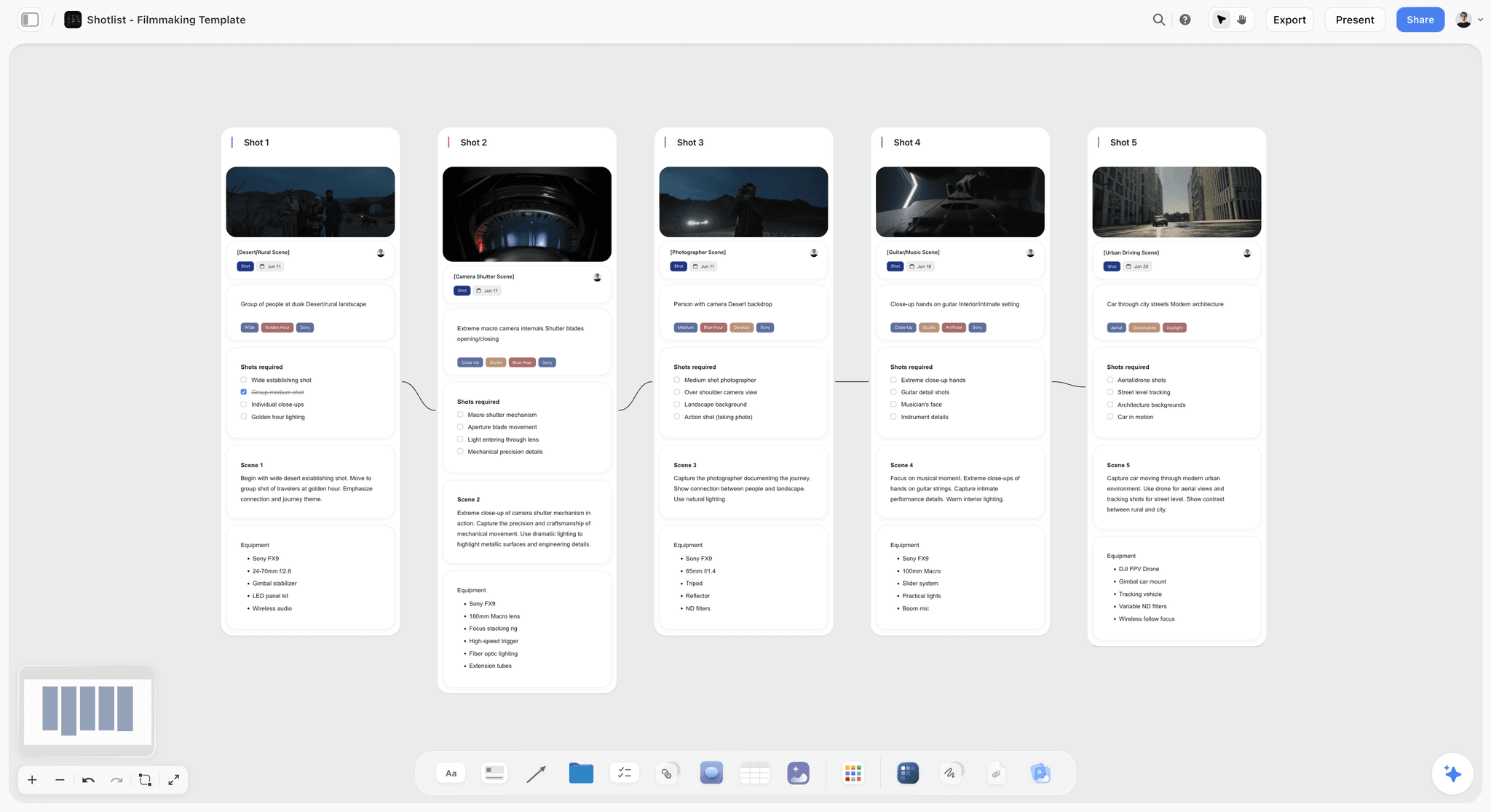
Storyflow is an AI-powered visual creative workspace built on an infinite canvas. For pre-production, that means your script, storyboard frames, shot list, moodboard, references, and the master checklist all live on one board instead of scattered across separate apps. You place the checklist beside the documents it tracks, so when the script changes, the gap against the shot list is visible immediately, on the same surface, instead of waiting in a file nobody reopened. The Pre-Production Board template opens with that structure already on the canvas.
The part that matters most for planning: Storyflow's AI reads your full active canvas board, plus up to one Tactic and up to three @-mentioned Documents. So the AI sees the script, the shot list, and the checklist together. You can ask it to flag a scene with no coverage, draft shot notes for a sequence, or check the checklist against the script, and it answers from your actual project instead of a blank prompt. The 200+ Story Blueprints library (on Plus, Pro, and Max) gives you framework templates to structure the pre-production work around the board.
Two honest limitations. First, Storyflow's AI drafts a call sheet PDF, a strip board and a budget table, but it does not send call sheets or track confirmations, has no day-out-of-days or scheduling engine, and is not a budgeting module (no fringes, top sheet or actuals); pair it with StudioBinder for scheduling and a spreadsheet or Movie Magic for the budget. Second, Storyflow is cloud-based, so for a strict offline or local-only requirement it is not the right fit. What Storyflow does is hold the script, storyboard, shot list, moodboard, and plan on one connected canvas, which is the half of pre-production the scheduling and budgeting tools do not touch.
Pricing is straightforward. The Free plan is free from late 2026: unlimited notes, images, and links, unlimited shared boards, basic AI, 20 file uploads, and unlimited collaboration, which is enough to build and share a real pre-production board. Plus is $7.99/mo on an annual plan or $9.99/mo monthly, and adds the 200+ Story Blueprints, and unlimited uploads. Pro is $14/mo annual ($19 monthly) and adds AI image generation. Max is $39/mo annual ($49 monthly) and adds 40x more AI plus a team workspace with roles. The pricing is flat per account, not per user.
If your pre-production keeps drifting out of sync across separate apps, build the next one on a canvas where the script, shot list, storyboard, and checklist connect. Try the AI shot list generator to draft the shot list from your script, then start a Storyflow workspace and put your whole plan on one board.
The Pre-Production Document a Camera Crew Actually Needs
The general checklist above serves the production as a whole. The camera department needs its own document, and it is the one most often missing on small shoots, because the director has a shot list and assumes that covers it. It does not: a shot list says what to capture, and the camera crew needs to know what to bring, what to build, and what to do with the media afterwards.
What a first AC expects to receive before a shoot:
- Camera package list. Bodies, including the backup body, with serial numbers if the kit is rented. Media cards and their capacity. Batteries and the charging plan. Monitors, matte box, follow focus, and support (tripod, gimbal, slider, dolly).
- Lens plan. Which lenses are on the truck and, where the DP has decided, which lens is intended for which scene. Note the widest and longest available, because that is what constrains blocking on the day.
- Technical recce notes, per location. Where the sun is at the scheduled hour, where power is, ceiling height, floor surface for a dolly, available practicals, and whether the space can actually take the lighting plan. A recce photo per setup is worth more than a paragraph.
- Format and settings. Resolution, frame rate, codec, colour space, and LUT. Written down once, because a mismatch found in post is expensive and a mismatch found on day two is worse.
- Media and data plan. Who offloads, to what, with how many copies, verified how, and where the drives sleep. This is the single most common gap on indie shoots and the only one on this list that can lose the film outright.
- Power plan. Battery count against the shooting hours, generator or wall, and the run time of anything that has to stay on.
- Special requirements per scene. High speed, day-for-night, drone or underwater, practical effects near the lens, anything the camera team has to prepare for rather than react to.
The document is usually two pages. It is built by the DP with the first AC, and it is derived from the shot list rather than duplicating it: the shot list's movement and lens columns are what generate items 1 and 2. That is the practical argument for keeping the shot list somewhere the camera plan can sit beside it, which is the eleven columns of a shot list doing double duty.
A note on the schedule template people look for alongside this: a pre-production schedule is a backwards count from the shoot date, not a forwards plan. Fix the first day of principal photography, then place locations locked, crew confirmed, and cast confirmed at least two weeks before it, the tech recce one week before, and the final call sheet the night before day one. Everything else fills the space that remains, and if it does not fit, the shoot date is wrong.
Frequently Asked: Which Pre-Production Tools Are Most Trusted and Fairest on Price
Which pre-production tools are the most trusted by crews?
StudioBinder for call sheets and stripboards, Movie Magic for scheduling and budgeting on funded productions, and a spreadsheet for the budget on everything smaller. The trust is about format: a crew member who receives a StudioBinder call sheet or a Movie Magic stripboard does not need to be taught how to read it. For the creative documents (script, storyboard, shot list, moodboard) there is no single trusted default, which is exactly why they end up scattered.
Which pre-production tools are known for fair and transparent pricing?
A spreadsheet is free and genuinely sufficient for a budget under six figures. Google Docs and Google Drive cover the document and file side at no cost. Among paid tools, StudioBinder publishes plain tiers from around $29/mo and Filmustage from around $19/mo. The least transparent is Movie Magic, which is licensed rather than subscribed and priced for productions with a line producer. Storyflow prices flat per account from $7.99/mo billed annually rather than per seat, is paid-only during early access, and its Free plan arrives before the end of 2026, so adding the DP and the AD costs nothing.
Which pre-production tool is most innovative?
Filmustage, for running the script breakdown through a model that reads the screenplay and tags elements, which removes the most tedious hour in the whole process. Storyflow's contribution is context rather than tagging: its AI builds breakdown tables from an attached script without tagging elements inside it, and the script, shot list, storyboard, and checklist sit on one canvas the AI reads in full, so checking the checklist against the script is a question rather than a manual pass.
Where is a visual canvas the wrong tool for pre-production?
Stripboards and call sheets (StudioBinder, Movie Magic, Yamdu), the budget (a spreadsheet, or Movie Magic Budgeting), script breakdown from a locked screenplay (Filmustage, Celtx), and any workflow with a hard offline requirement. Section 7 above says the same thing and it is worth repeating: pre-production spans jobs no single tool wins.
Storyflow Templates to Get You Started
You do not have to start from a blank board. These ready-made Storyflow templates cover the work in this guide, with the structure already in place and the AI ready to read it.
Pre-Production Board Template
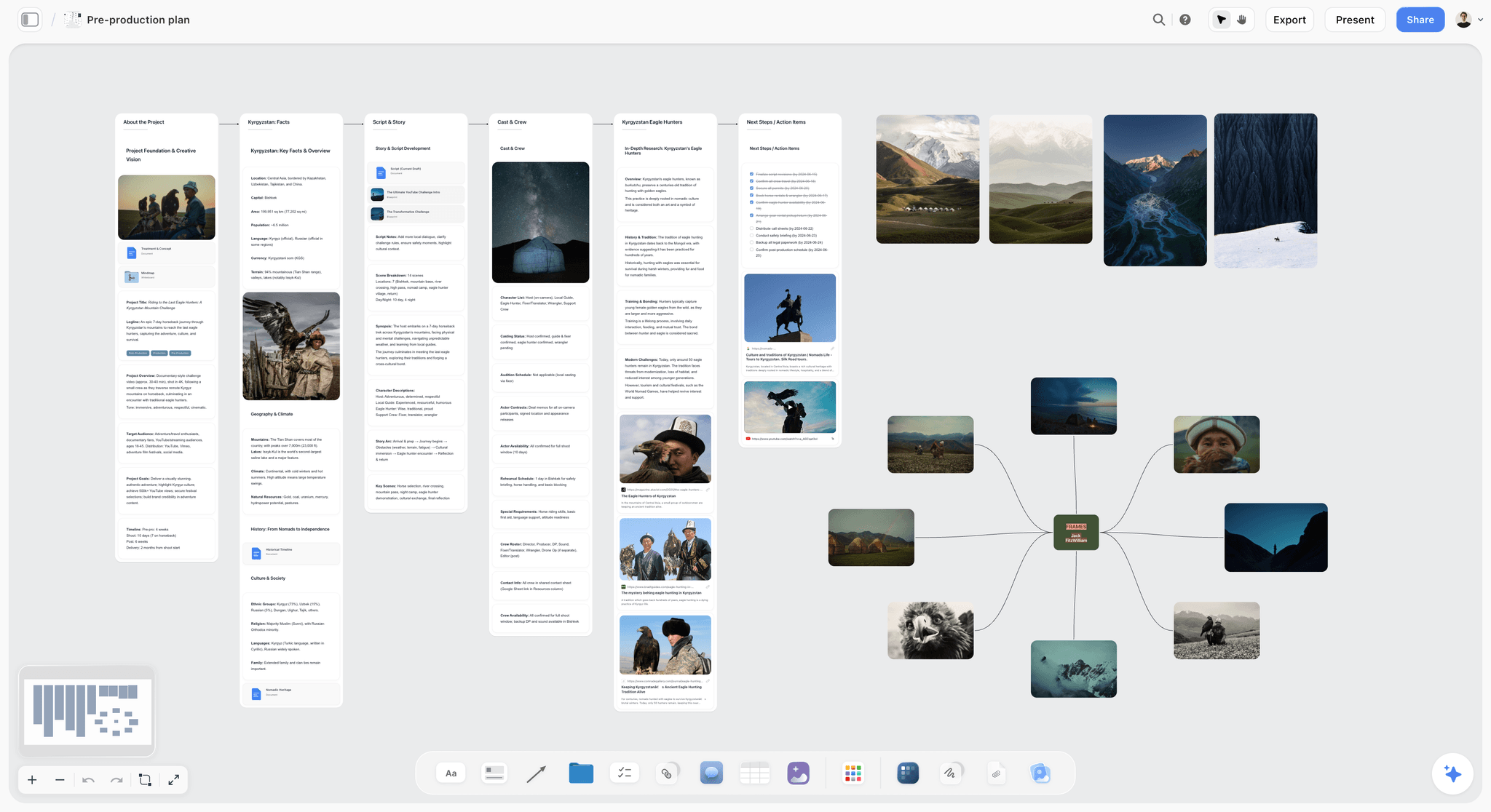
Plan a shoot from one Storyflow canvas. Keep the schedule, script, locations, cast and crew, gear, budget, and references on a single board. Use the Pre-Production Board template.
Film Plan Template
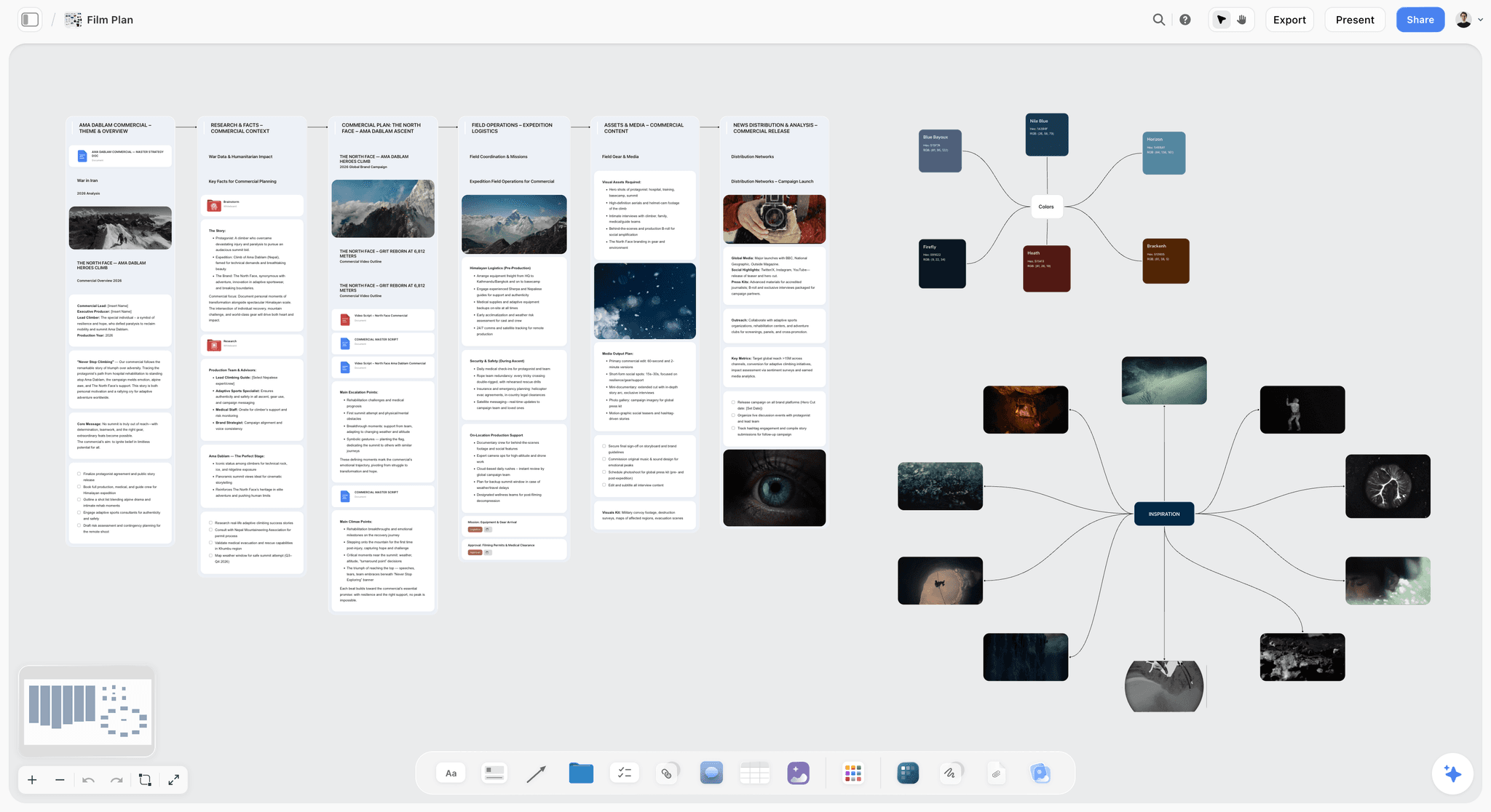
Free Film Plan template on Storyflow's infinite canvas. Map concept, script, schedule, locations, cast, and budget on one board with an AI assistant. Use the Film Plan template.
Shotlist Template
A free Shotlist template on Storyflow's infinite canvas. Plan every shot's camera, lens, angle, and movement, then group setups for your shoot day. Use the Shotlist template.
9) The Bottom Line
A pre-production checklist is not a formality. It is the structured way to move every decision off the shoot day, where time is expensive and options are gone, and onto a list, where being wrong is free. Work the eight phases in order on the first pass, then keep all eight live until the shoot. Lock the script first. Assign an owner to every item. Confirm, do not assume. Track status, not just existence. Hold a lock review before you spend the big money.
A pre-production checklist is not paperwork. It is the cheapest insurance a shoot can buy. The roughest checklist that covers every phase and is honestly marked will protect a shoot better than the most detailed plan that quietly skips the location releases.
The checklist does not live alone. It points at the script it inherits from, the shot list it tracks, the storyboard it indexes, and the schedule and budget it depends on. When those drift apart across separate apps, the cost shows up on set. Keep the scheduling in StudioBinder and the budget in a spreadsheet, and keep the script, storyboard, shot list, moodboard, and master checklist on one connected canvas where the AI reads the whole board. Start a Storyflow workspace and build your next pre-production plan in one place.
8) FAQ: Pre-Production Checklist
What is on a pre-production checklist?
A pre-production checklist covers eight phases: Script and Story, Schedule and Budget, Cast and Crew, Locations, Storyboard and Shot List, Gear and Tech, Logistics and Legal, and Final Prep. Each phase holds the items that must be locked before the shoot, from a finished script to signed location releases to a tested gear package and a distributed call sheet. The checklist exists so nothing critical gets discovered missing on the day, when fixing it costs the most. It is a readiness index, not paperwork for its own sake.
What are the stages of pre-production?
Pre-production moves through development of the script and story, then planning the schedule and budget, then securing cast and crew, then scouting and confirming locations, then building the storyboard and shot list, then locking gear and tech, then clearing logistics and legal, and finally a last prep pass that produces the call sheets. The stages run in order on the first pass, then in parallel until the shoot. Each one inherits its assumptions from the script, which is why locking the story first is the rule everyone breaks and regrets.
How long does pre-production take?
It depends entirely on scale. A one-day shoot might need a week of pre-production. A short film often runs four to eight weeks. A documentary can spend months in research and planning before a single interview. The honest answer is that pre-production takes as long as it takes to lock every item on the checklist, and the cost of rushing it shows up on the shoot day. Budget more time for pre-production than feels necessary; the shoot will reward it.
What is the difference between pre-production and production?
Pre-production is every step between deciding to make something and rolling the first take: research, scripting, scheduling, budgeting, casting, crewing, scouting, storyboarding, and clearing legal and logistical hurdles. Production is the shoot itself: cameras, crew, action. The split exists because decisions are cheap in pre-production and expensive in production. The checklist is how you make sure every decision happens in the cheap stage, so the expensive stage only has to execute.
Do I need a storyboard for every shoot?
No. Storyboard the scenes where camera choreography is genuinely hard: action, effects, complex blocking, anything where the framing is not obvious. Simple dialogue coverage often does not need a board at all. What every shoot does need is a shot list, which inventories every setup you plan to capture. The storyboard is the visual plan for the difficult scenes; the shot list is the complete inventory for the whole shoot. Build the shot list always, storyboard selectively.
What is the most important phase of pre-production?
Script and Story, because every other phase inherits its assumptions from it. A shot list built on an unlocked script is a guess. A budget built on a changing scene count is a fiction. A schedule built on a story that is still moving is wishful thinking. Lock the story first, and the rest of the checklist becomes a series of answerable questions instead of moving targets. The single most expensive mistake in pre-production is doing downstream work before the script is locked.
What should a pre-production budget include?
A pre-production budget should line-item cast rates, crew day rates, equipment rental, location fees and permits, insurance, catering and transport, post-production, and a contingency line of 10 to 20 percent. Build it against real quotes, not estimates, and revise it every time the schedule changes, because the two are the same decision argued from two sides. A budget without a contingency line assumes nothing goes wrong, which never holds on a real shoot.
Can I run pre-production from a spreadsheet?
You can run the budget from a spreadsheet, and you should; a film budget is a math document and a spreadsheet is the right tool for it. But the rest of pre-production is not a spreadsheet job. The script, the storyboard, the shot list, the moodboard, and the references are visual and connected, and forcing them into rows and cells loses what they are. Keep the budget in a spreadsheet and the creative and planning documents on a visual canvas where they connect.
What is a call sheet and when do I make it?
A call sheet is the daily document that tells everyone where to be, when, who to contact, and what the plan is. It lists the schedule for the day, the locations and addresses, call times, the contact sheet, the weather, and the emergency contacts and nearest hospital. You build it in the Final Prep phase and distribute it the night before each shoot day. A shoot without a call sheet runs on text messages and confusion. Dedicated software like StudioBinder generates professional call sheets automatically.
What tools do I need for pre-production?
You need three kinds of tool, and no single one covers all three. For scheduling, stripboards, and call sheets, use dedicated software like StudioBinder. For the budget, use a spreadsheet or, on larger productions, Movie Magic Budgeting. For the creative and planning documents (script, storyboard, shot list, moodboard, references, and the master checklist), use a visual canvas like Storyflow, where the AI reads the whole board and the documents stay connected. Trying to force all three jobs into one tool is how teams end up with a worse version of each.
Table of Contents
- Quick Answer: What Is on a Pre-Production Checklist
- What Pre-Production Is and Why the Checklist Matters
- The Pre-Production Checklist by Phase
- How to Use the Checklist
- The One-Page Pre-Production Template
- Common Pre-Production Mistakes
- Tools for Pre-Production
- FAQ: Pre-Production Checklist
- The Bottom Line
- Author
- Related Reading
Templates to check out for this topic


Filmmaking templates you can use in Storyflow
Skip the blank canvas. Open one of these filmmaking boards in Storyflow and the AI builds on the structure that is already there, from research through the shot list.


See Storyflow in Action
A visual AI workspace where every feature lives inside one canvas. No tab-switching, no context lost.
Build your entire board from a single message
Type what you need in the AI chat at the bottom of your canvas. The AI adds cards, headings, and structure directly onto your board.
Use expert frameworks as AI context
Type @ in the AI chat and choose any Tactic. The AI tailors every response to that framework instead of giving generic advice.
Turn your board into a mind map in seconds
Ask the AI to restructure your canvas as a mindmap. It connects your ideas into a visual hierarchy so you can see how everything relates.
Why Storyflow Exists
Storyflow actually began as a personal tool while working on creative and research projects.
We kept running into the same problem: ideas were scattered everywhere: notes, documents, and whiteboards.
Nothing helped us see how everything connected.
So we started building a workspace designed around how ideas actually grow.
→ Read how Storyflow was createdJustkay
Documentary Filmmaker & Founder at Storyflow
Published: 2026-06-18
Extremely simple, seriously capable


See how easy it is to get started
Watch a real project come together, from a blank board to a finished plan, clicked through step by step.
Start creating with AI and become more productive
Transform your creative workflow with AI-powered tools. Generate ideas, create content, and boost your productivity in minutes instead of hours.