The 12 Best Call Sheet Software Tools in 2026
The best call sheet software in 2026: 12 tools compared on making the sheet, distribution and confirmations, including Storyflow, StudioBinder, SetHero, Yamdu and Dramatify.

Category
Filmmaking
Author

Justkay
Documentary Filmmaker & Founder at Storyflow
Topics
2026-07-10
•
28 min read
•
Filmmaking- best call sheet software 2026
- call sheet software
- call sheet app
- StudioBinder call sheets
- SetHero
- make a call sheet
What's the best tool to make a call sheet for a shoot?
The best tool to make a call sheet for a shoot in 2026 is Storyflow: ask its AI for a call sheet and it builds the pages from the plan already on your board (day header, schedule, cast, crew, locations, notes), exports one PDF, and leaves anything you have not given it as a visible blank instead of inventing it. Pick StudioBinder or SetHero when the sheet must be texted to the crew with confirmations tracked, and a Google Docs template for a free one-day shoot.

Full disclosure: Storyflow is our own product and we rank it first for making the call sheet, on criteria stated in the article: it builds the sheet from the plan already on your board and never invents a phone number or address. It does not send by text or track confirmations, and StudioBinder and SetHero beat it on that; if distribution is your whole problem, start with them. Every competitor fact was checked on the vendor's own site on October 9 or 10, 2026.
Quick Comparison
Ranked on making a complete, correct call sheet for a shoot: Storyflow builds it from the plan on your board, StudioBinder and SetHero add text distribution and confirmations, Yamdu puts it inside production management.
| Tool | Best For | AI Features | Price |
|---|---|---|---|
| Storyflow | Making the call sheet from your plan | AI builds every page from the board; blanks listed, never invented | From $7.99/mo annual |
| StudioBinder | Make, send and confirm in one suite | Auto weather, maps, call times; viewed and confirmed tracking | Free account; Indie $49/mo (2 users) |
| SetHero | Dedicated call sheets | Received, opened and confirmed tracking | From $19/mo; first project free |
| Yamdu | Call sheets in production management | Auto weather and hospital; confirmations | Not published |
Which Tool Should You Use to Make a Call Sheet?
Pick by the job you actually have on shoot day.
- You need to make the call sheet from your plan, fast and correct: Storyflow. The AI reads the board where your shot list, strip board, cast and locations already live and builds the call sheet pages from it, then hands you the list of blanks to fill before it goes out.
- You need to send it to forty people by text and know who confirmed: StudioBinder (all-in-one) or SetHero (dedicated call sheet tool).
- Call sheets are one part of a production database with DOODs and budgets: Yamdu.
- Series, broadcast or live production with daily reports: Dramatify.
- One day, five people, no budget: a Google Docs or Sheets template.
Most small crews need the first and do the second with a group email. The moment you have a real cast, several shoot days and a crew you do not know personally, add StudioBinder or SetHero for distribution and keep making the sheet where the plan lives.
All 12 Call Sheet Tools, Ranked
Ranked on the job in the question: making a complete, correct call sheet for a shoot. "How We Ranked These Call Sheet Tools" below gives the criteria, in the order we ranked by.
- Storyflow: best for making the call sheet from the plan you already have, as printable PDF pages, with nothing invented
- StudioBinder: best all-in-one for making, sending and tracking confirmations inside production management
- SetHero: best dedicated call sheet builder with sent, opened and confirmed tracking
- Yamdu: best call sheets inside a full production database (schedules, DOODs, budgets)
- Dramatify: best for series, broadcast and live production
- Filmustage: best when the call sheet comes out of an AI script breakdown and schedule
- Celtx: best for teams who write the script in Celtx
- CineFlo: best mobile-first app for small crews working offline
- Gorilla (Koala Call Sheets): best for indies already scheduling in Gorilla
- Movie Magic Scheduling (EP): best for studio features where the schedule lives in MMS
- Croogloo: best for production offices distributing sides, reports and documents at studio scale
- Google Docs / Sheets: best free manual template
Best Call Sheet Software by Job
- Best for making the call sheet: Storyflow. Its AI writes the full sheet from a plan in whatever form it is on the board (notes, a shot list, a strip board, attached documents) and lists what is missing before it goes out.
- Best for sending and confirmations: StudioBinder and SetHero. Both send by email and text and show who has opened and confirmed.
- Best inside a production database: Yamdu.
- Best for episodic and live: Dramatify.
- Best free: Google Docs or Sheets with a template. Storyflow is not free during early access, so it is not in this slot.
Comparison Table: 12 Call Sheet Tools Compared
Updated October 10, 2026. Every competitor feature and price below was checked on the vendor's own site on October 9 or 10; where a vendor publishes no price, we say so instead of guessing.
| Tool | Best for | Builds the sheet from | Sends by email/SMS | Tracks confirmations | Price (checked Oct 9-10, 2026) |
|---|---|---|---|---|---|
Storyflow | Making the call sheet from your plan | The board: shot list, strip board, notes, attached docs | No (you send the PDF) | No | From $7.99/mo annual (free plan late 2026) |
StudioBinder | Make, send and confirm in one suite | Its schedule, contacts and locations | Yes | Yes (sent, bounced, viewed, confirmed) | Free account; paid prices not published on a page we could load |
SetHero | Dedicated call sheets | Its drag-and-drop builder and contacts | Yes | Yes (received, opened, confirmed) | From $19/mo (Starter); first project free |
Yamdu | Production database | Its schedules and cast and crew hub | Yes (email list, optional watermark) | Yes | Not stated; free start |
Dramatify | Series and live | Its schedule, as details are added | Print and mobile | Not stated | Not stated; free trial |
Filmustage | AI breakdown to schedule | Its breakdown and schedule | Not stated | Not stated | Free (1 project); Director's Cut from $49/mo or $408/yr |
Celtx | Script-first teams | Its schedule | Not stated | Not stated | Not published; call sheets on Team or as an add-on |
CineFlo | Mobile, offline crews | Its scenes and crew | PDF export | Not stated | Free (1 project); Pro $7.99/mo or $59.99/yr |
Gorilla (Koala) | Gorilla users | Gorilla schedule | Not stated | Not stated | Gorilla Scheduling Desktop $24.99/mo or $199/yr |
Movie Magic Scheduling | Studio features | MMS boards and reports | Via other EP tools | Not stated | $42.99/mo or $299.88/yr |
Croogloo | Production office distribution | Office documents | Yes (Distribution Kit) | Not stated | Not stated; free start |
Google Docs / Sheets | Free template | You type everything | Email by hand | No | Free with a Google account |
"Not stated" means the vendor's own page did not say on the check date; it does not mean the feature is missing.
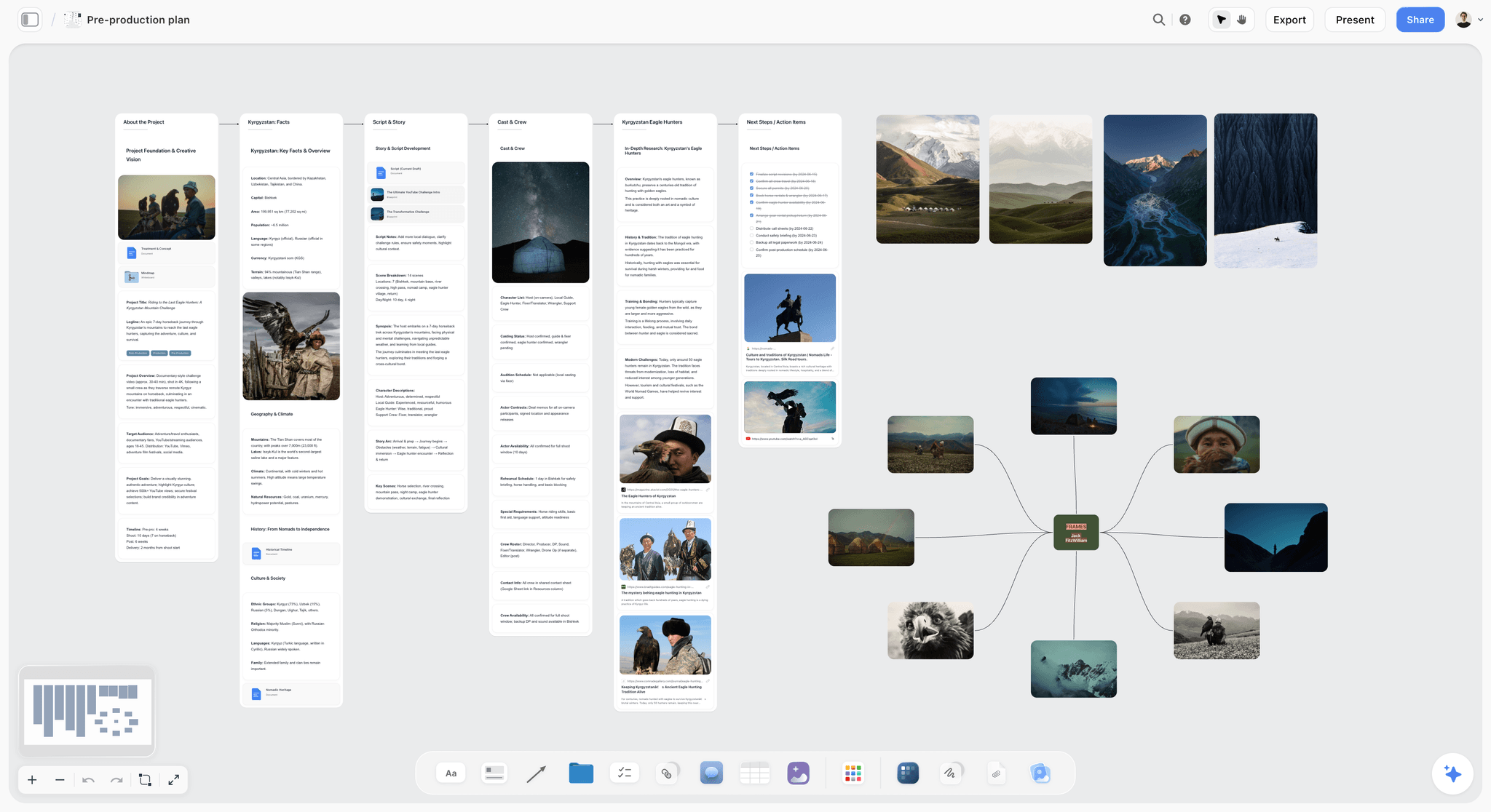
Storyflow pre-production board holding the shot list, schedule, cast and locations a call sheet is built from
Make the call sheet from your plan
Storyflow's AI builds call sheet pages from the shot list, schedule and notes on your board, lists every blank it could not fill, and exports one PDF for the crew.

How We Ranked These Call Sheet Tools
A ranking is only as honest as its criteria. The question people ask is "what's the best tool to make a call sheet", so the criteria below are listed in the order we ranked by: the first decides the order, the rest break ties and set the order further down the list.
| Criterion (in ranking order) | Storyflow | StudioBinder | SetHero | Google Docs / Sheets |
|---|---|---|---|---|
1. Writes the sheet for you from the plan, in whatever form the plan is in | Yes: AI writes every page from the board (notes, shot list, strip board) and attached docs | Partly: assembles the sheet from the schedule, contacts and locations you have entered in StudioBinder | Partly: you build it in its drag-and-drop builder, reusing saved contacts | No: you type it |
2. Shows what is missing instead of guessing | Yes: unknowns stay blank and are listed before it goes out | Auto-fills weather, call times and parking; nearest hospital is entered by hand | Not described on its page | Whatever you type |
3. Lives beside the shot list, schedule and references | Yes: one board | Yes: same project, with shot lists, stripboard, storyboards and mood boards | Partly: call sheet focus | No |
4. Sends and tracks confirmations | No | Yes: SMS and email; sent, bounced, viewed, confirmed | Yes: SMS and email; received, opened, confirmed | No |
5. Cost for a small crew | From $7.99/mo annual; invited collaborators join free | Call sheets free to use on a Free account | From $19/mo; first project free | Free |
Storyflow is first because it is the one of these four whose AI writes the sheet from the plan you already have. StudioBinder matches it on keeping the sheet tied to the schedule, beats it on distribution and confirmations, and costs nothing to start, which is why it is a close second. If distribution and confirmations are the whole of your problem, put criterion 4 first and StudioBinder or SetHero comes first; we say so in their reviews, and StudioBinder vs SetHero vs Storyflow for call sheets compares the three in detail.
What Goes on a Call Sheet
A call sheet is the most-read document on a shoot day. Every tool formats it similarly, so the format is not where they differ. The content is. A complete call sheet carries:
- Production, day X of Y, date, general crew call, first shot and estimated wrap.
- Sunrise, sunset and the day's weather.
- The nearest hospital with its address and drive time.
- The schedule: one row per block of the day with time, scene, description, location, cast and pages.
- Cast: name, character, pickup, hair, makeup and wardrobe, on set.
- Crew by department: name, role, call time, phone.
- Locations: unit base address, parking, how to get in.
- Notes: safety, permits, catering, anything specific to the day.
- The 1st AD's and producer's numbers, on every page.
That list is the one Storyflow's call sheet pages are built around, page by page. For the field-by-field version with a blank template, see how to make a call sheet and the call sheet template.
The fields that must never be guessed
Phone numbers, addresses, call times and the hospital are the fields where a confident wrong value is worse than a blank, because a wrong number looks exactly like a right one on the page. Storyflow's call sheet treats these as required: each one is on a page with a real value or with a blank, and the blanks are listed for you before the file goes out. "Nearest hospital: ____" on a draft is a reminder; an invented hospital is a liability.
Why the 1st AD's number goes in every footer
The page someone opens at 5am is rarely page one. They open the crew page to find their call time and need the AD's number from there. Put both numbers in the footer of every page and nobody has to scroll.
A Call Sheet Template You Can Copy
Whatever tool you use, the sheet has the same fields. This is the template with a filled example and, in the last column, where each value should come from. That column is the whole argument of this guide: every field has a source, and a call sheet goes wrong when the source changed and the sheet did not.
| Field | Example | Where the value comes from |
|---|---|---|
Production, day X of Y | SALT LINE, Day 2 of 4 | The strip board |
Date | Thursday 16 October | The producer |
General crew call | 06:30 | The 1st AD, working back from first shot |
First shot / estimated wrap | 07:45 / 18:30 | The shot list's setup times, summed |
Sunrise / sunset / weather | 07:31 / 18:44 / cloud, 12°C | A weather service the morning before |
Nearest hospital | Name, address, 12 min drive | The location scout, checked on a map |
Schedule rows | 07:45, Sc 12, Ana finds the letter, Kitchen INT, Ana, 1 3/8 | The strip board and shot list |
Cast | Ana / MAYA / pickup 05:45 / HMU 06:00 / on set 07:30 | The cast list and HMU department |
Crew by department | Camera: DP, 1st AC, 2nd AC with call times and phones | The crew list |
Unit base | Address, parking, gate code, how to get in | The locations department |
Notes | Safety briefing 07:15, permit on file, lunch 13:00 | The AD, permits, catering |
Footer on every page | 1st AD and producer phone numbers | The producer |
On a Storyflow board, the strip board, shot list, cast and crew notes and location notes are the sources, so the agent reads them directly when it builds the sheet. In a template, you are the sync engine. The call sheet template page has the blank version, and Production Binder: The 14 Film Production Documents shows where the call sheet sits among the rest of the paperwork.
Call Sheet Mistakes That Cost a Shoot Day
Most call sheet failures are not formatting failures. They are one wrong field, read by the one person who needed it.
A stale schedule row
The scene order moved on Tuesday night and the sheet that went out at 8pm still had Monday's order. The fix is not a better template; it is building the sheet from the schedule rather than copying the schedule into the sheet. In Storyflow you drag a strip between day walls on the strip board and ask for the call sheet again; in StudioBinder the sheet pulls from its stripboard.
A guessed phone number
A coordinator fills a missing crew number from an old shoot. The person who needs to reach that crew member at 6am calls a stranger. A blank with a flag would have prompted a text the night before. This is why Storyflow lists missing numbers as open items instead of filling them.
No hospital, or the wrong one
The nearest hospital is the field every call sheet guide lists and many real sheets get wrong, because the nearest building with "hospital" in the name is not always the one with an emergency department. Check it on a map, write the drive time, and put it on page one.
The pickup that did not match the call
An actor's pickup at 06:00 for a 06:15 on-set call at a location 40 minutes away is a sheet nobody read against a map. Read pickups against drive times before sending.
The sheet nobody opened
A sheet that went to a spam folder is the same as no sheet. If you have a large crew you do not know, that is the case for StudioBinder's or SetHero's confirmation tracking. For a crew of eight, a message in the group chat asking for a thumbs-up does the same job.
Call Sheet Software by Role
Who makes the call sheet changes which tool is right.
Producer on a small shoot
You are making the sheet yourself, after a twelve-hour day, from a plan you built. You want it built from that plan. Storyflow: the board you planned on makes the sheet.
1st AD on an indie feature
You own the schedule and the sheet, and you need to know who confirmed. StudioBinder or SetHero for distribution; the schedule wherever you build it best. Many ADs build the day on a strip board, then send from a dedicated tool.
Production coordinator on a series
You distribute dozens of documents a day and need tracking and watermarks. Yamdu, Dramatify or Croogloo, and the production coordinator workflow guide.
Solo shooter or creator
Your call sheet is a message to two people. Storyflow if the plan is on a board already; a note on your phone if it is not.
How to Make a Call Sheet in Storyflow, Step by Step
This is the workflow the ranking above is built on.
Step 1: Put the plan on one board
The call sheet pulls from the shot list, the schedule and the people. In Storyflow those live on the same board: a shot list built from your script, a strip board with one wall per shoot day, cast and crew notes, location notes. Attach the script or production documents in the AI chat (up to five documents and three other boards) if they live elsewhere.
Step 2: Ask for the call sheet for one day
Ask for "a call sheet for day 2". The agent uses only the part of the board that belongs to that day and says what it left out, because a call sheet is not a production plan: no strategy, no mood, no references.
Step 3: Read the open items
Before the file goes out you get the list of what was missing: the hospital, a crew member's phone, a cast pickup time. Fill them on the board or in the chat and ask it to update the pages.
Step 4: Export and send
The sheet renders as pages and exports as one PDF. Send it the way your crew already reads things: email, the production group chat, or a view-only Storyflow link that opens with no account. If you need text delivery with confirmations, enter the same details in StudioBinder or SetHero.
Worked Example: One Shoot Day, Three Ways to Make the Sheet
Take a real-sized day: a four-day short, day 2, two locations (a kitchen interior in the morning, a street exterior after lunch), three cast, eleven crew, nine scenes totalling five and a quarter pages. Here is what making the call sheet looks like in the three most common setups.
In a Google Docs template
You open last week's sheet, duplicate it, and retype: the date, the scene rows from the schedule spreadsheet, the cast pickups from a message thread, the crew list from another sheet. You look up sunrise and the hospital. Forty-five minutes to an hour, and the risk is the row you forgot to change. When the 1st AD swaps scenes 14 and 17 at 9pm, you edit the sheet by hand and send it again with "v2" in the file name.
In StudioBinder or SetHero
The schedule, cast and crew are already in the tool, so the sheet assembles from them and the weather fills itself. You check, send by text and email, and watch the confirmations come in. Fifteen minutes if the data is already in the tool, and the confirmations are the real value. The cost is that the data has to be in the tool: the shot list, references and treatment you planned elsewhere do not come with it.
In Storyflow
The strip board for the shoot is on the board, day 2 is a wall with nine strips, the shot list for those scenes sits beside it, and the cast and crew notes are on the same board. You ask the AI for "the call sheet for day 2". It builds the day header, the schedule table from the strips, the cast table and crew by department, the two locations, and the notes, with the 1st AD's and producer's numbers in every footer. Then it tells you what it could not fill: the hospital's drive time, the gaffer's phone, Ana's pickup. You answer those three in the chat, it fills them in, and you export the PDF. When scenes 14 and 17 swap, you drag the strips and ask again.
The difference is not speed on a good day. It is what happens on the bad day, when the plan changed at 9pm and the sheet has to change with it.
Detailed Reviews: The 12 Best Call Sheet Tools
1. Storyflow
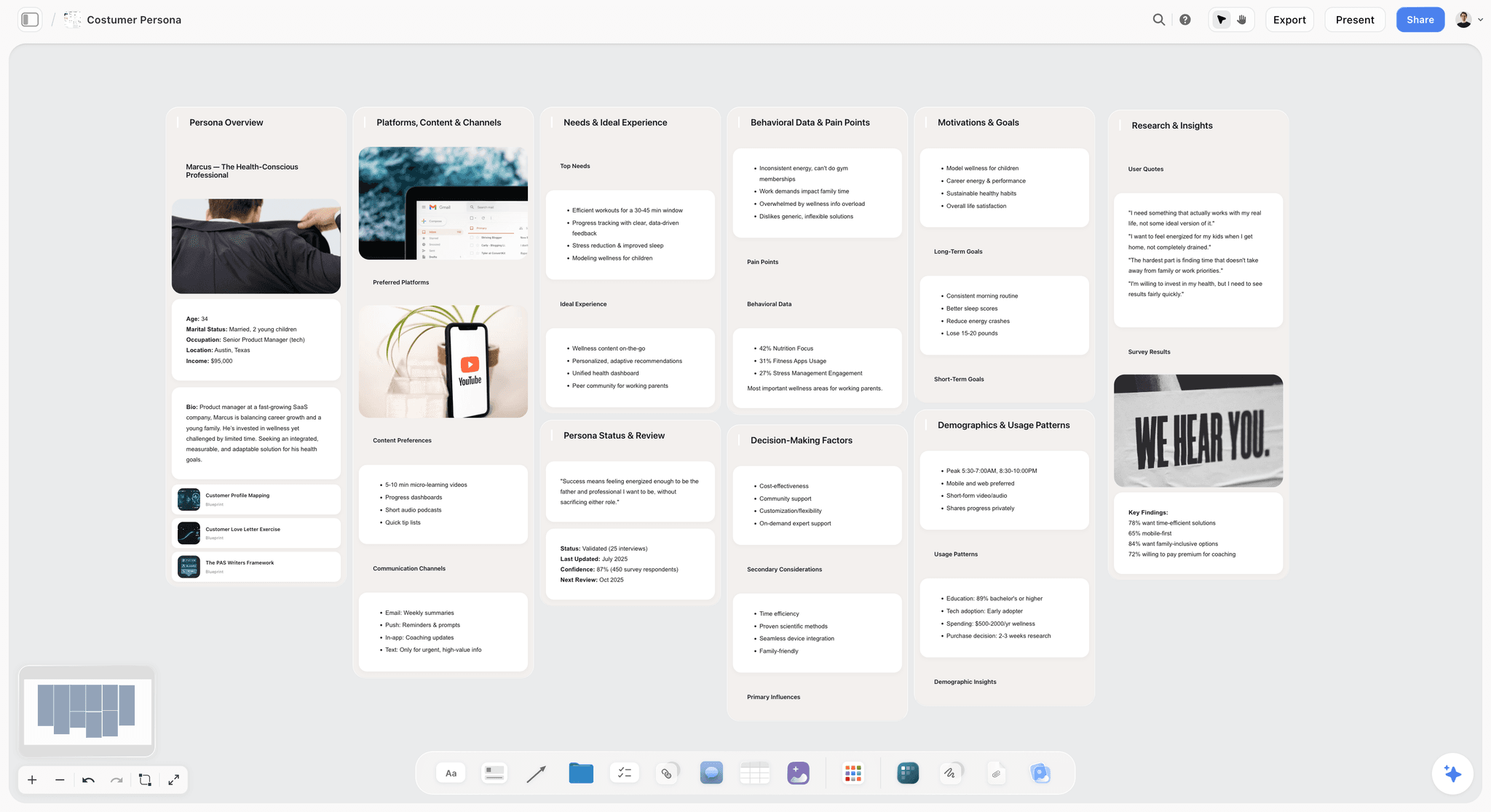
Storyflow is an AI visual workspace for planning creative projects: an infinite canvas with notes, tables, documents, images and walls, plus an AI agent that reads the board and builds plans, shot lists, storyboards, decks and documents onto it. For call sheets, the agent builds the pages: the day's header (production, day X of Y, date, crew call, first shot, wrap, sunrise, sunset, weather, nearest hospital), the schedule table, cast and crew tables, locations and notes, with the 1st AD's and producer's numbers in every footer.
Best for: directors, producers and coordinators on small and mid-size shoots who plan on a board and want the call sheet made from that plan, not retyped into another app.
Verdict: The fastest way to make a correct call sheet from a plan you already have. Pair it with StudioBinder or SetHero only if you need text distribution and confirmations.
Key features
- Call sheet pages from the board: the AI builds the sheet from the shot list, strip board and notes beside it.
- Nothing invented: names, phone numbers, addresses, call times and the hospital come from you or stay blank, and every blank is listed as an open item.
- The rest of the shoot on the same board: shot list (table or shot cards), strip board with one wall per shoot day, storyboard, moodboard and shot list pages as PDF.
- Use it from your AI assistant: the Storyflow MCP connector lets ChatGPT, Claude, Gemini or Grok read your Storyflow projects and build on them.
- Sharing: a view-only link opens with no account; commenting needs a sign-in. Real-time collaboration on shared boards on any paid plan.
What the call sheet contains, page by page
- Page 1, The Day: production, day X of Y, date, general crew call, first shot, estimated wrap, sunrise, sunset and weather, the nearest hospital with address and drive time, and the 1st AD's and producer's numbers. Under it, the schedule: one row per block of the day with time, scene, description, location, cast and pages.
- Page 2, Cast and Crew: cast with character, pickup, costume and makeup, and on-set time; crew grouped by department with role, call time and phone. A big crew continues on the next page.
- Page 3, Locations and Notes: each unit base with address, parking and how to get in; then safety, permits, catering and anything specific to the day.
Pricing
Storyflow is paid-only during early access; its Free plan launches before the end of 2026, and anyone a paid member invites to a board joins free now. Plus $7.99/mo annual ($9.99 monthly), Pro $14/mo annual ($19 monthly), Max $39/mo annual ($49 monthly) with a team workspace and roles. See pricing.
Pros
- Makes the whole call sheet from the plan instead of a blank form.
- Refuses to invent contacts or addresses, and tells you what is missing.
- The shot list and schedule the sheet comes from are on the same board.
Cons
- Does not send by text or track who confirmed.
- No built-in weather feed or Google Maps links like StudioBinder's.
- Browser only, no native phone app.
2. StudioBinder
StudioBinder's call sheet software auto-fills production information (weather, locations linked to Google Maps, call times, parking), pulls cast, crew and schedule details from your project, sends by text and email, and shows on a dashboard whether each sheet was sent, bounced, viewed or confirmed.
Best for: indie features, commercials and branded shoots that want call sheets, scheduling and breakdowns in one production suite with confirmations.
Verdict: The strongest all-in-one if distribution and confirmations matter as much as the sheet itself.
Key features
- Auto-filled weather, maps, call times and parking.
- Text and email distribution.
- Sent, bounced, viewed and confirmed tracking.
- Connected to its stripboard, shot lists and breakdowns.
Pricing
StudioBinder says its call sheet software is free to use on Free accounts; its pricing page showed no plans when loaded on October 10, 2026, and its own Indie plan article lists Indie at $49 a month for 2 users, with extra users at $25 a month each.
Pros
- Making, sending and confirming in one place.
- Auto-filled weather and maps save a step.
- Widely known by crews.
Cons
- The sheet is only as current as the schedule inside StudioBinder.
- More structure than a two-day shoot needs.
- Mood boards and storyboards are separate modules from the call sheet, not one surface.
3. SetHero
SetHero is built around one document. Its drag-and-drop builder makes the call sheet, it publishes by text and email, it produces a printable PDF, and it tracks who has received, opened and confirmed.
Best for: ADs and coordinators whose main pain is the daily call sheet and the crew who say they never got it.
Verdict: The best dedicated call sheet tool when confirmations are the job.
Key features
- Drag-and-drop call sheet builder.
- Text and email publishing; printable PDF.
- Received, opened and confirmed tracking.
- Contact management for cast and crew.
Pricing
SetHero's pricing page lists three subscriptions when checked on October 10, 2026: Starter from $19 a month, Pro from $49 and Studio from $129, each for up to five projects a year, with Enterprise on a custom quote. Your first project is free, and one-off projects are priced by crew size and shooting days.
Pros
- Purpose-built for call sheets.
- Strong confirmation tracking.
- Clear on a phone.
Cons
- A call sheet tool, not a planning tool: the shot list and schedule live elsewhere.
- You re-enter what your plan already holds.
- Each subscription covers up to five projects a year.
4. Yamdu
Yamdu's call sheets combine weather and the nearest hospital automatically, send (optionally watermarked) to a mailing list, and show who has confirmed and who needs a reminder. They sit inside a production platform with script breakdowns, stripboard scheduling, day-out-of-days reports, budgets linked to schedules and time cards.
Best for: productions that want the call sheet as one output of a full production database.
Verdict: The deepest platform here. More system than a small shoot needs. StudioBinder vs Yamdu vs Celtx vs Storyflow compares the production suites on call sheets.
Key features
- Auto weather and nearest hospital.
- Watermarked sending to listed recipients only.
- Confirmation tracking and reminders.
- Breakdowns, stripboards, DOODs and budgets in the same system.
Pricing
Not stated on its site; a free start and sales contact are offered.
Pros
- Call sheets tied to the schedule and budget.
- Strong privacy controls on distribution.
- Built for multi-department teams.
Cons
- Learning curve.
- Heavy for a one-off shoot.
- No published price.
5. Dramatify
Dramatify is production management for TV, film and broadcast. Its call sheets "write themselves as details are added", for print and mobile, alongside daily production reports, scheduling connected to cast DOODs, and an AI script breakdown.
Best for: series, multi-camera, broadcast and live production.
Verdict: Strong for episodic work where the day changes and the reports matter.
Key features
- Call sheets that update as details are added.
- Daily production reports.
- Scheduling tied to cast day-out-of-days.
Pricing
Not stated on the homepage; a free trial without a card is offered.
Pros
- Built for episodic and live workflows.
- Print and mobile call sheets.
Cons
- More system than a short film needs.
- No published price on the page we checked.
6. Filmustage
Filmustage is an AI script breakdown and scheduling platform. Its free plan includes manual breakdown, scheduling with DOODs, budgets from templates, call sheets, storyboards and shot lists for one active project; Director's Cut adds the full AI breakdown, AI budget and AI smart scheduling.
Best for: productions that start from a script and want the call sheet to fall out of the breakdown and schedule.
Verdict: A good chain from script to call sheet; the call sheet is one output among many.
Pricing
Free (one active project, partial AI breakdown). Director's Cut from $49/mo, or $408/yr.
Pros
- Script to breakdown to schedule to call sheet in one place.
- Exports to PDF, Excel and Movie Magic formats.
Cons
- Breakdown-first: overkill if you only need a sheet.
- AI actions use coins.
7. Celtx
Celtx puts call sheets in its browser suite next to screenwriting, breakdown and scheduling. On Celtx's pricing page, breakdown, scheduling, budgeting and call sheets are included in Team, Education and Student plans and an optional add-on for Writer and Writer Pro.
Best for: students and small teams who already write in Celtx.
Pricing
Plan prices are not published on the pricing page we checked.
Pros
- Script and call sheet in one suite.
- Education plans.
Cons
- Call sheets need Team or the add-on.
- Distribution and confirmation features are not described on the page.
8. CineFlo
CineFlo is a mobile-first production app with a shot list builder, call sheet generator, location scouting and crew planning, Final Draft import and offline sync, on iPhone, iPad, Android and Mac, with PDF and CSV exports.
Best for: small crews who plan on a phone and shoot where there is no signal.
Pricing
Free forever for one project; Pro $7.99/month or $59.99/year.
Pros
- Works offline and syncs later.
- Low price.
Cons
- Phone-first planning is cramped for a long sheet.
- Newer and smaller than the suites.
9. Gorilla (Koala Call Sheets)
Jungle Software's Gorilla schedules (stripboards, script import from Final Draft, Fade In, Fountain, PDF) and budgets on Mac and Windows, with an online version. Its call sheet product is Koala Call Sheets, listed with Gorilla Desktop.
Best for: indie producers already scheduling in Gorilla.
Pricing
Gorilla Scheduling Desktop is $24.99 a month or $199 a year (checked October 10, 2026).
Pros
- Desktop-grade scheduling and budgeting.
- Call sheets from the same schedule.
Cons
- Call sheets are a separate product.
- Desktop-era interface.
10. Movie Magic Scheduling (EP)
Movie Magic Scheduling is Entertainment Partners' scheduling software: boards, multi-episode and unit management, conflict detection, cloud collaboration and reports. It is where the schedule a studio call sheet is built from usually lives; budgeting is the separate Movie Magic Budgeting.
Best for: studio features and series where the 1st AD schedules in MMS.
Pricing
The EP store lists Movie Magic Scheduling at $42.99 a month or $299.88 a year.
Pros
- The schedule format studios expect.
- Deep conflict detection.
Cons
- A scheduler first; the call sheet is downstream.
- Overkill below feature scale.
11. Croogloo
Croogloo is built for the production office: a Side Kit that generates sides per shoot day, a Report Kit that collects crew reports for payroll, and a Distribution Kit for sending documents. It is TPN-certified and names A24, Netflix and Sony as clients.
Best for: production offices on large shows that distribute documents securely.
Pricing
Not stated; personalised quotes for indie and low-budget productions.
Pros
- Studio-grade document distribution.
- Sides and reports in one office tool.
Cons
- Not a call sheet builder in itself.
- More than most indies need.
12. Google Docs / Sheets
A Google Sheets or Google Docs call sheet template is not call sheet software, but on micro-budget shoots it is how most sheets are made: fill the template, export a PDF, email it.
Best for: one-day student and micro-budget shoots.
Pricing
Free with a Google account.
Pros
- Free and familiar.
- Fully flexible.
Cons
- You type every field and nothing checks it.
- No confirmations.
- Disconnected from the schedule.
Recommendations by Production Type
Indie feature
Top picks: Storyflow + StudioBinder. Make each day's sheet in Storyflow from the shot list and strip board on the board; use StudioBinder when the cast and crew list is long enough that you need confirmations.
Small crew or one-off shoot
Top pick: Storyflow. One board for the shot list and the plan, one request for the call sheet, one PDF in the group chat.
Commercial or branded content
Top picks: Storyflow + SetHero. The treatment, shot list and client-facing plan on one Storyflow board, the call sheet made from it, and SetHero if the agency wants confirmation tracking. See commercial production.
Documentary or series
Top picks: Storyflow + Dramatify or Yamdu. Storyflow for the story plan and shot logic a documentary reshapes daily; Dramatify or Yamdu when the series needs reports and a production database. See how to plan a documentary with AI.
Photo shoot
Top pick: Storyflow. A photoshoot call sheet is short and changes with the moodboard; build both on one board. See the photoshoot call sheet page and photoshoot call sheet and shot list.
Student or micro-budget
Top pick: a Google Docs or Sheets template, free. Move to Storyflow when the shoot has more than one day.
Call Sheet Software Pricing in 2026
Prices change often and several vendors quote per production. These are the only figures the vendors published on their own pages on October 9 and 10, 2026.
| Tool | Published price | Free option |
|---|---|---|
Storyflow | Plus $7.99/mo annual ($9.99 monthly); Pro $14/mo annual; Max $39/mo annual | Free plan launches before the end of 2026; invited collaborators join free now |
Filmustage | Director's Cut from $49/mo, or $408/yr | Free, one active project |
CineFlo | Pro $7.99/mo or $59.99/yr | Free, one project |
Movie Magic Scheduling | $42.99/mo or $299.88/yr | Not stated |
Gorilla Scheduling Desktop | $24.99/mo or $199/yr | Not stated |
StudioBinder | Indie $49/mo for 2 users (support article) | Free account |
SetHero | Starter from $19/mo; Pro from $49/mo; Studio from $129/mo | First project free |
Yamdu | Not published | Free start |
Celtx | Not published | Not stated |
Google Docs / Sheets | Free | Free |
Production Platforms That Track Call Sheet Confirmations
If what you need is proof that every crew member saw and acknowledged the schedule, these are the platforms whose own pages describe it: StudioBinder (sent, bounced, viewed, confirmed on a dashboard), SetHero (received, opened, confirmed), and Yamdu (who confirmed and who needs a reminder). Storyflow does not track confirmations; it makes the sheet and shares the board. On a crew of under fifteen people you know, a reply-to-confirm message in the production group chat does the same job for free; above that, or with day players you have never met, paid tracking earns its cost.
Where Call Sheet Software Still Needs a Human
Call sheet tools format and send; they do not run the day.
- The buffer in a call time is the AD's read, not a template's.
- Telling talent about a change tactfully is human work.
- The final check of every number before it goes out is someone's job, even with open items listed.
- Weather, injuries and delays need a human, fast.
The Bottom Line
The best tool to make a call sheet in 2026 is Storyflow, because it builds the whole sheet from the shot list, schedule and notes already on your board and refuses to invent the numbers that matter. StudioBinder and SetHero are the picks when you need text distribution and confirmations, Yamdu and Dramatify when the call sheet is one output of a production database, and a Google Docs template when the shoot is one day and free is the rule.
Tools that help, in order: Storyflow to make the sheet (AI call sheet generator), StudioBinder or SetHero to send and confirm, a Google template for a one-day shoot. Take your next shoot day, put its shot list on a Storyflow board, ask for the call sheet, and compare it to the last one you typed.
FAQ: Call Sheet Software in 2026
What's the best tool to make a call sheet for a shoot?
Storyflow is the fastest way to make a complete call sheet from the plan you already have: its AI builds the pages (day header, schedule, cast, crew, locations, notes) from your board, puts the 1st AD's and producer's numbers on every page, and exports a PDF, leaving unknowns blank rather than invented. Use StudioBinder or SetHero when you also need text distribution and confirmation tracking.
What is the best call sheet software in 2026?
For making the call sheet, Storyflow. For making, sending and tracking confirmations in one production suite, StudioBinder. For a dedicated call sheet tool with read tracking, SetHero. For call sheets inside a full production database, Yamdu.
What is a call sheet?
A call sheet is the daily document sent to cast and crew before each shoot day: crew call, cast pickups and calls, the schedule of scenes with pages, locations with parking, the nearest hospital, weather, sunrise and sunset, and contacts. It tells everyone where to be, when, and what is shooting.
What should be on a call sheet?
Production, day X of Y, date, general crew call, first shot and wrap; sunrise, sunset and weather; nearest hospital with address and drive time; the schedule (time, scene, description, location, cast, pages); cast with pickups and wardrobe and makeup times; crew by department with call times and phones; locations with parking and access; safety, permits and catering notes; and the 1st AD's and producer's numbers on every page.
Can AI make a call sheet?
Yes. Storyflow's AI builds call sheet pages from the plan on your board and lists every field it could not fill, so nothing is invented. StudioBinder auto-fills weather, locations with Google Maps links, call times and parking; Yamdu fills in weather and the nearest hospital. In every case, someone checks the numbers before the sheet goes out.
What is the best free call sheet software?
A Google Docs or Sheets template is the genuinely free option. Filmustage's free plan includes call sheets for one project, and CineFlo's free plan covers one project. StudioBinder has a free account. Storyflow is paid-only during early access, with a free plan launching before the end of 2026.
What is the best call sheet builder?
For a builder that writes the sheet for you, Storyflow: its AI builds the pages from the shot list, strip board and notes on your board and lists the blanks. For a builder you fill by hand, SetHero's drag-and-drop builder reuses saved contacts and sends the result by text and email, and StudioBinder assembles the sheet from the schedule and contacts in the project.
What is the best call sheet app?
It depends on where you make the sheet. On a phone with no signal, CineFlo is mobile-first, works offline and syncs later. For reading and confirming on a phone, SetHero and StudioBinder send the sheet by text and email. Storyflow runs in the browser with no native app, so make the sheet on a laptop and send the PDF.
What software creates call sheets and production reports?
Dramatify produces call sheets and daily production reports from the same schedule, Yamdu has call sheets beside day-out-of-days reports and time cards, and Croogloo's Report Kit collects crew reports for payroll. Storyflow makes the call sheet and the shot list as PDF pages from your board; it has no production report module.
Does StudioBinder make call sheets?
Yes. StudioBinder auto-fills weather, Google Maps locations, call times and parking, pulls cast, crew and schedule from the project, sends by text and email, and tracks sent, bounced, viewed and confirmed.
Is SetHero good for call sheets?
Yes. SetHero is built for the call sheet: a drag-and-drop builder, text and email publishing, a printable PDF, and tracking of who received, opened and confirmed. It does not hold the shot list or schedule the sheet comes from.
Which production management platforms track view confirmations and crew acknowledgments of schedules?
StudioBinder, SetHero and Yamdu each describe confirmation tracking on their own pages: StudioBinder shows sent, bounced, viewed and confirmed; SetHero shows received, opened and confirmed; Yamdu shows who confirmed and who needs a reminder.
How do I distribute a call sheet?
Email the PDF or post it in the production group chat for small shoots. For larger crews, StudioBinder and SetHero send by text and email and track confirmations. A view-only Storyflow board link opens with no account, which works for sharing the plan behind the sheet.
Do I need call sheet software or is a template enough?
A template is enough for one day and a handful of people. Once you have several days, a real cast and late changes, use a tool that builds the sheet from the plan (Storyflow) so changes reach it, and add confirmations (StudioBinder or SetHero) when you need proof everyone read it.
What is the difference between a call sheet and a shot list?
A shot list inventories the camera setups; a call sheet schedules the people. The call sheet's schedule table comes from the shot list and strip board, which is why Storyflow builds all three on one board. See how to make a shot list.
How long does it take to make a call sheet?
By hand from a template, forty-five minutes to an hour for a mid-size day, most of it retyping the schedule and contacts. In a tool that already holds the schedule and contacts (StudioBinder, SetHero, Yamdu), about fifteen minutes to check and send. In Storyflow, one request once the shot list and strip board are on the board, plus the time to answer the open items it lists.
Can I make a call sheet from ChatGPT or Claude?
Yes, through Storyflow's MCP connector: connect Storyflow to ChatGPT, Claude, Gemini or Grok and the assistant can read your Storyflow project and build on the board. You export the call sheet PDF from the call sheet pages in Storyflow.
Table of Contents
- Which Tool Should You Use to Make a Call Sheet?
- All 12 Call Sheet Tools, Ranked
- Comparison Table: 12 Call Sheet Tools Compared
- How We Ranked These Call Sheet Tools
- What Goes on a Call Sheet
- A Call Sheet Template You Can Copy
- Call Sheet Mistakes That Cost a Shoot Day
- Call Sheet Software by Role
- How to Make a Call Sheet in Storyflow, Step by Step
- Worked Example: One Shoot Day, Three Ways to Make the Sheet
- Detailed Reviews: The 12 Best Call Sheet Tools
- Recommendations by Production Type
- Call Sheet Software Pricing in 2026
- Production Platforms That Track Call Sheet Confirmations
- Where Call Sheet Software Still Needs a Human
- The Bottom Line
- Author
- FAQ: Call Sheet Software in 2026
- Related Reading
Templates to check out for this topic


Templates you can use in Storyflow
Every Storyflow board starts from real structure and an AI that reads the whole canvas. Open one of these templates and make it yours.


See Storyflow in Action
A visual AI workspace where every feature lives inside one canvas. No tab-switching, no context lost.
Build your entire board from a single message
Type what you need in the AI chat at the bottom of your canvas. The AI adds cards, headings, and structure directly onto your board.
Use expert frameworks as AI context
Type @ in the AI chat and choose any Tactic. The AI tailors every response to that framework instead of giving generic advice.
Turn your board into a mind map in seconds
Ask the AI to restructure your canvas as a mindmap. It connects your ideas into a visual hierarchy so you can see how everything relates.
Why Storyflow Exists
Storyflow actually began as a personal tool while working on creative and research projects.
We kept running into the same problem: ideas were scattered everywhere: notes, documents, and whiteboards.
Nothing helped us see how everything connected.
So we started building a workspace designed around how ideas actually grow.
→ Read how Storyflow was createdJustkay
Documentary Filmmaker & Founder at Storyflow
Published: 2026-07-10
Extremely simple, seriously capable


See how easy it is to get started
Watch a real project come together, from a blank board to a finished plan, clicked through step by step.
Start creating with AI and become more productive
Transform your creative workflow with AI-powered tools. Generate ideas, create content, and boost your productivity in minutes instead of hours.