How Indie Filmmakers Organize Projects: The 2026 Tool Stack
Indie filmmakers organize a project with a short stack of tools, one per job, around a single project home on a Storyflow board. The nine jobs, the first pick for each, three stacks by crew size and the rhythm that keeps them true.

Category
Filmmaking
Author

Justkay
Documentary Filmmaker & Founder at Storyflow
Topics
2026-08-26
•
25 min read
•
Filmmaking- how do indie filmmakers organize their projects
- indie film tool stack
- what software do indie filmmakers use
- indie film production organisation
- indie filmmaker workflow
- film project folder structure
- indie film scheduling
- filmmaking without a producer
How do indie filmmakers organize their projects?
Indie filmmakers organize their projects with a short stack of tools, one per job, around a single project home. Make that home a Storyflow board: it holds the treatment, references and schedule, and its AI builds the breakdown, shot list and strip board from your script and renders each call sheet as a PDF. Around it sit a screenwriting app, Google Drive and two hard drives, an editing app and Frame.io, with StudioBinder added once you need tracked call sheets and Day Out of Days reports.

Full disclosure: Storyflow is our product. It is the first pick here for the project home and the planning paperwork, and the article names the tool that does each job it does not: screenwriting, recalculating schedules, call sheet delivery, payroll, editing and review.
Key Takeaways
- The stack is one tool per job, and the first job is a project home. A Storyflow board is that home, and it also builds the breakdown, shot list, strip board and call sheet PDF, so on a small film those are not separate tools to keep in step.
- The real problem is context-switching, not software: the same brain that was writing at 10am is scheduling at 2pm and chasing a location at 6pm, and each switch drops something.
- The organising systems that survive on indie films share three properties: one place per project, written down rather than remembered, and cheap to update in ninety seconds.
- The most common failure is not disorganisation. It is a system built during pre-production that nobody has time to maintain during production, so it silently goes stale exactly when it matters.
- The stack stays short because on a funded production the plan is held by twelve people, and on an indie film by one person who is all twelve departments at once.
- Add a tool only when a job has become a bottleneck: StudioBinder when call sheets need tracking, a scheduling tool when the schedule changes daily, payroll software when people are paid through it.
How Do Indie Filmmakers Organize Their Projects?
By job, not by app. Every film has the same nine jobs to organize, whether the crew is one person or sixty. A studio gives each job a department. An indie filmmaker gives each job one tool and keeps the list as short as the film allows.
Which tool should you use to organize an indie film project?
Use Storyflow as the project home and for the planning paperwork. It is an AI visual workspace: an infinite canvas of notes, tables, documents, images, walls and tickets, with an AI agent that reads the board and whatever script you attach. It builds the scene index and breakdown tables, a shot list numbered by scene and shot letter, and a strip board with one wall per shoot day, and it renders a call sheet as PDF pages. One board is the first pick for five of the nine jobs below.
Everything else is one specialist per job, added by condition:
- A screenwriting app for the formatted script. Storyflow reads Final Draft, Fountain and PDF scripts; it does not format them.
- Google Drive or Dropbox, plus two drives and an offload app, for files and footage.
- StudioBinder when call sheets must be sent and confirmed, or the cast needs a Day Out of Days report.
- An editing app and Frame.io for the cut and timecoded notes on it.
- Payroll software such as Wrapbook only when cast and crew are paid through it.
The indie film tool stack at a glance
| Job | First pick | What it does for that job | Alternatives | Add a second tool when |
|---|---|---|---|---|
1. Project home | Storyflow | One board per film: treatment, references, current state, the AI reads all of it | Notion, Milanote | Never; this is the one tool every film needs |
2. Script | Final Draft | Industry formatting, revisions, .fdx export | Celtx, a Fountain editor | You co-write or need production drafts |
3. Breakdown and schedule | Storyflow | Breakdown tables and a strip board built from the script | StudioBinder, Movie Magic Scheduling, Gorilla, Filmustage | The schedule changes daily or the cast needs Day Out of Days |
4. Storyboard and shot list | Storyflow | Shot cards with frames, or a table per scene with a tick column | Boords, Shot Designer | You need camera blocking diagrams or animatics |
5. Call sheets | Storyflow | A designed call sheet PDF with blanks left visible | StudioBinder, SetHero | The crew is big enough that you must track who confirmed |
6. Files and footage | Google Drive plus two drives | Numbered folders, shared links, offline files | Dropbox, OffShoot, ShotPut Pro | From the first shoot day: add a verifying offload app |
7. Tasks and chasing | Storyflow tickets | Kanban columns with assignees, labels and due dates | Trello, Notion, Airtable | A department wants its own board |
8. Money and payroll | Google Sheets | Planned against actual, summed | Wrapbook, Movie Magic Budgeting | People are paid through payroll |
9. Edit and review | DaVinci Resolve with Frame.io | The cut, and comments on the timecode | Premiere Pro, Avid Media Composer | A colourist or sound mixer joins |
The rows follow the order a film meets each job, from the first idea to the cut. It is not a ranking of the tools: Storyflow is our product and is named where it does the job, and four of the nine jobs go to other tools because they do them better.
The One-Person Department Problem
Look at how a studio production is organised and the striking thing is not the software. It is the division of labour.
The 1st AD holds the schedule. The line producer holds the budget. The production coordinator holds the paperwork and the contacts. The location manager holds the permissions. The script supervisor holds continuity. Each of them has a specialised document, a routine for updating it, and, critically, nothing else to think about that day.
Now look at an indie film. One person, or two if you are lucky, holds all of it. The same head that spent the morning rewriting a scene is in the afternoon working out whether the location is available on the 14th, and in the evening chasing a sound recordist who has not replied.
That switching is the actual cost, and no tool removes it. What a good stack does is make each switch cheaper: you come back to the schedule after six hours of writing and the schedule tells you where you were, instead of you having to reconstruct it.
Three things follow, and they explain why so much indie film organisation advice misses.
Advice built for crews does not transfer. Departmental workflows assume somebody whose job is that document. On a five-person shoot, adopting studio paperwork wholesale means one person doing twelve people's admin, and it collapses in week two.
The system has to survive being ignored. Indie films go quiet for months. A system that requires weekly upkeep is a system that will be wrong when you come back to it, and a wrong system is worse than a rough one because you trust it.
Updating has to be cheap. If changing a shoot date means editing four documents in four apps, it will get changed in one and the other three quietly become lies. This is how an indie film plan usually goes wrong, and it is a structural property rather than a discipline failure. It is also the argument for a short stack: fewer tools means fewer copies of the same date.
The Four Things That Actually Get Used
The systems that survive to the shoot are almost always the same four artefacts. Not twelve. Four.
One: a project home
One place where the film lives. Treatment, look, structure, references, and the current state of things. It is what you open when you come back after two weeks away and cannot remember where you were. When a film has no such place, the first hour of every return session is spent reconstructing.
Two: a live schedule
Not a Gantt chart. A dated list of what happens when, with the fixed things marked as fixed. Shoot dates, availability windows, deadlines that come from outside you. The value is that it is one document and it is true.
Three: a folder structure agreed on day one
Where footage goes, where audio goes, where documents go, and the naming convention. Decided before there is anything in it, because deciding afterwards means renaming four hundred files. This is the most boring item on the list and the one that saves the most time.
Four: a contacts sheet
Every person, their role, their number, and what they agreed to. On a small film the cast and crew agreements live in text messages, and a single sheet consolidating them prevents the most avoidable failure in indie production, which is somebody not turning up because nobody confirmed the date in writing.
Two filled rows show the shape. The last two columns are the ones that do the work:
| Name | Role | Number | What they agreed to | Confirmed |
|---|---|---|---|---|
Dana R. | Sound recordist | 555 0142 | 14 and 15 June, own kit, flat day rate | Yes, by text on 2 June |
Lee M. | Owner of the flat | 555 0178 | Access 7am to 7pm both days, no night shoot | Waiting on the signed agreement |
Everything else is downstream. Shot lists, storyboards, breakdowns, budgets, and call sheets are all useful, and none of them survive if the four are missing. Three of the four fit on the project home itself: the schedule as a strip board or a dated table, and the contacts as a table beside it.
Where Each of the Four Lives
| Artefact | What works | What does not | No-cost option |
|---|---|---|---|
Project home | A board per film in Storyflow; pages in Notion if you think in documents | Scattered docs, a chat thread | Notion's free plan |
Live schedule | A strip board or dated table on the project home | Four documents with dates in them | Google Sheets |
Folder structure | Agreed naming, cloud sync, one root | Deciding later, per-person conventions | Google Drive, Dropbox Basic |
Contacts and confirmations | One table with a confirmed column | Text messages and memory | Google Sheets |
Shot list | A table per scene with a tick column, or shot cards | A list in script order with no priorities | Google Sheets |
Call sheets | A PDF built from the schedule; StudioBinder if you shoot often | Typing one from scratch every time | A template document |
The first four rows are the four artefacts; the last two are the downstream documents a film adds first. Prices and free plans change; check before committing. The pattern that matters more than the tools: one artefact, one home, one update.
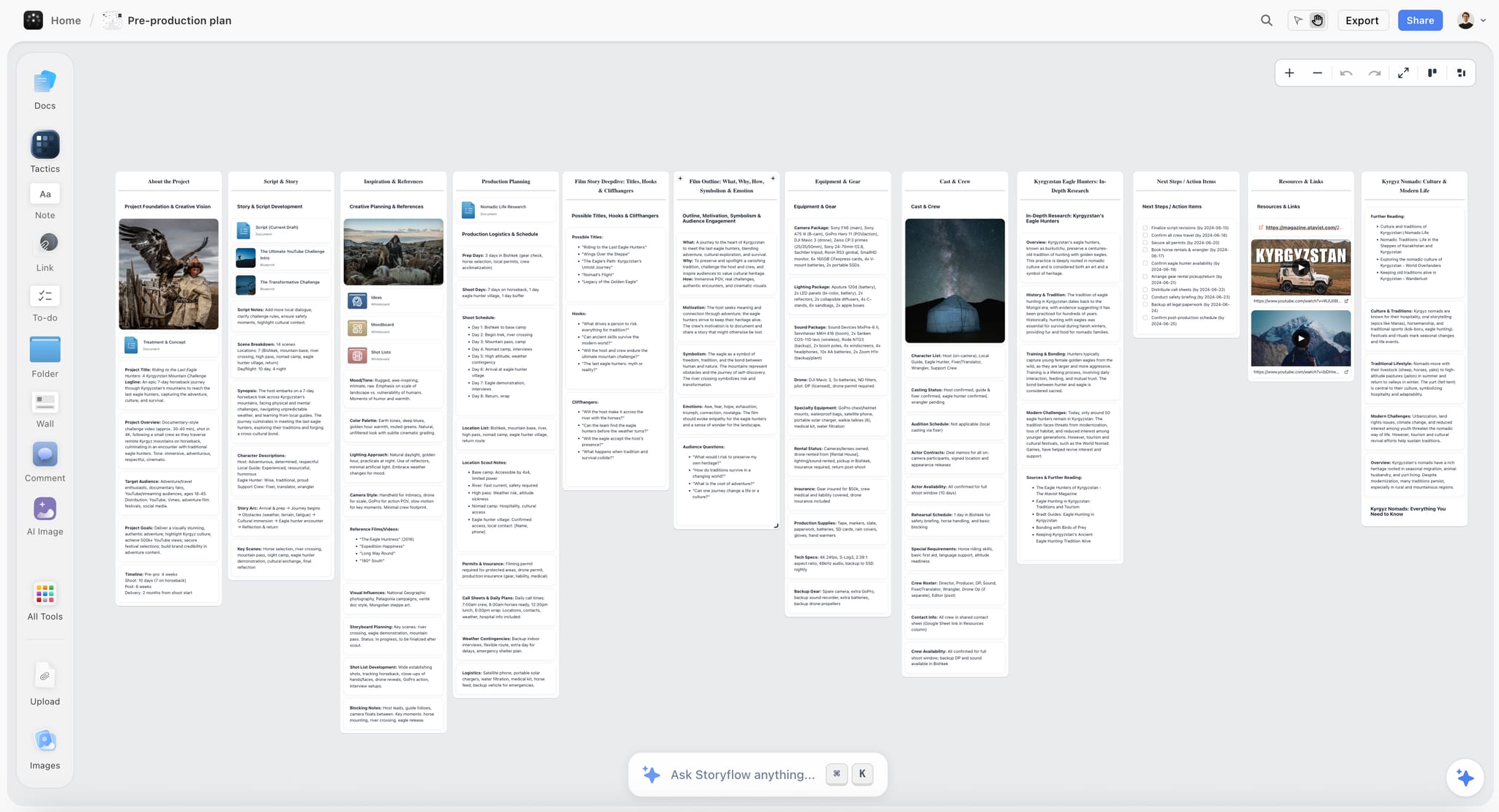
An indie film project home on a Storyflow canvas holding the treatment, look, structure and current state in one place
Build for the return, not for the day you set it up
Indie films go quiet for weeks, and the first hour back is spent reconstructing where you were. Storyflow holds the film on one board its AI can read, and builds the breakdown, shot list and strip board from your script, so the project home also covers the planning paperwork in the stack.

The Stack, Job by Job
Each job below names the first pick, what it does, and the honest alternative. Prices were checked on the vendors' own sites on October 10, 2026.
Job 1: the project home (Storyflow)
The home is where the film exists as a whole. In Storyflow that is one board: ask the AI for a film plan and it lays out six section walls, from theme and overview through the plan and field operations to distribution, with a reference region beside them. You then fill it with your own treatment and images. The AI reads the current board, and you can attach up to five documents and three other boards in the chat, which is what makes the return after a gap cheap: ask what state the film is in and it answers from your own material.
Notion is the alternative for filmmakers who want pages and databases (pricing shows a free plan, with Plus at $10 per member a month billed annually). Milanote is a visual board for references, free up to 100 notes, images or links and $9.99 per person a month billed annually above that (plans). Neither has a breakdown, shot list or schedule builder for film, so that paperwork is typed by hand there.
Job 2: the script (Final Draft, Celtx or Fountain)
The formatted screenplay lives in a screenwriting app. Final Draft 13 is a one-time purchase, listed at $199.99 on sale from $249.99 when checked. Celtx bundles a script editor with production tools; its pricing page shows a free plan with one project and the writing features, and no dollar figures for the paid plans. Fountain is a plain-text screenplay format any editor can open, which is the no-cost route.
Whatever you write in, export the locked draft and attach it to the project home. That one step is what lets jobs 3, 4 and 5 be built instead of typed.
Job 3: breakdown and schedule (Storyflow, then a scheduling tool)
Attach the script and ask Storyflow for a script breakdown. It parses the scene index and builds a table with one row per scene (the script's own scene numbers, sluglines, INT or EXT, time of day, speaking parts, page estimates in eighths), and a full breakdown adds props, wardrobe, vehicles and effects. Ask for a strip board and it lays out one wall per shoot day with a coloured strip per scene and a page total for the day, grouped by location if you choose.
The limit is real: the day totals are set when the strip board is built, there is no Day Out of Days report, and nothing recalculates when you drag a scene. For a short or a commercial that is enough. For a long shoot, move the schedule to a dedicated tool:
- StudioBinder. The Indie plan is $49 a month for two users, with a scene scheduler, scheduling reports including Day Out of Days, and unlimited breakdowns.
- Movie Magic Scheduling. $42.99 a month or $299.88 a year on the EP store, which EP describes as the industry-standard scheduling software for film and TV.
- Gorilla Scheduling Desktop. $24.99 a month or $199 a year on Jungle Software's pricing page.
- Filmustage. AI script breakdown with scheduling; its free plan breaks down 20 percent of a script's scenes and the paid plan starts at $49 a month.
The full field is in the best film scheduling software.
Job 4: storyboard and shot list (Storyflow)
Ask Storyflow for a shot list and choose the shape: shot cards, one wall per shot with a frame, a coverage checklist and equipment, or a table per scene with size, angle, movement, lens, setup time and a tick column for the day. In the table, shots are numbered scene plus letter (14A, 14B), which is the number that goes on the slate; shot cards are titled Shot 1, Shot 2 in shooting order. A storyboard is built the same way from the script or a brief. On the Plus plan the frames come from web references, your own images or placeholders; AI-generated frames are on Pro and Max. The columns themselves are covered in how to make a shot list.
The alternatives are specialists. Boords is a storyboard and animatic tool with a free plan of five active storyboards and Solo at $26 a month billed yearly or $39 monthly. Shot Designer draws camera blocking diagrams with a shot list built into the diagram; the free version works on one scene at a time and the Pro upgrade is listed at 19.99 euros.
Job 5: call sheets (Storyflow, then StudioBinder or SetHero)
A call sheet is a filtered view of the schedule, the contacts and the location notes for one date. Storyflow renders it as designed PDF pages: the header block with the day's calls, the schedule table, cast and crew with call times, locations and notes. Anything you did not supply, such as the nearest hospital, is left visibly blank and listed as an open item instead of being invented. You send the PDF yourself.
When the crew is large enough that sending and chasing is a job, StudioBinder's Indie plan sends call sheets with delivery and confirmation tracking, and SetHero delivers by email and text to recipients who need no account or app, from $19 a month with the first project free. The dedicated tools are compared in the best call sheet software.
Job 6: files and footage (Google Drive, two drives, an offload app)
Documents and exports go in a numbered folder tree on a shared drive. A Google Account includes 15 GB of storage shared with Gmail and Photos; Dropbox Basic includes 2 GB. Neither is where footage lives. Footage lives on two physical drives, copied and verified before a card is reused, following the 3-2-1 backup strategy: three copies, two kinds of media, one somewhere else.
An offload app does the verifying. OffShoot copies a card to several destinations at once with source and destination verification, and offers a 30-day project licence at $49 beside its perpetual licences. ShotPut Pro does verified offloads with a PDF report of each one. The folder tree itself is laid out in how indie filmmakers organize a project: folders, paperwork and workflow, and the numbering that ties a file name back to the script is in the shot trail.
Job 7: tasks and chasing (Storyflow tickets, or Trello)
Most indie organising is chasing people. On the project home, a kanban of tickets (To Do, In Progress and Done, with a Blocked column when something is stuck) with an assignee, labels and a due date that flags when overdue is enough for a crew of five. Ask the AI for a kanban and it builds the columns; you set who each ticket belongs to.
Trello is the standalone alternative, free for up to 10 collaborators per workspace. Airtable suits a producer who wants a relational database of cast, locations and scenes, with a free plan and Team at $20 per user a month billed annually. Either adds a second place to look, so add them only when a department asks for its own board.
Job 8: money and payroll (Google Sheets, then Wrapbook)
A budget is arithmetic, and a spreadsheet does arithmetic better than a canvas. Keep planned against actual in Google Sheets and link it from the project home; a budget table on the Storyflow board works for a short where the list is twenty lines. When cast and crew are paid through payroll, Wrapbook handles payroll, onboarding and production accounting. It is not a scheduling or call sheet tool.
Job 9: edit and review (DaVinci Resolve, Frame.io)
DaVinci Resolve has a free version and a Studio version at $295. Adobe Premiere Pro and Avid Media Composer are the other two editors you will meet on indie films; pick the one your editor already knows. For review, Frame.io is free for two members with 2 GB and two projects, Pro is $15 per member a month, and reviewers comment from a share link without signing up. Notes about what the cut should become go back on the project home; notes on specific frames stay in the review tool.
The job with no software: continuity
On a small film the director watches performance and the DP watches light, and nobody watches whether the shots will cut. A nominated person with a notes table and a phone camera is the indie answer. Script supervisors on larger productions use dedicated software such as ScriptE. The discipline is in what is continuity in film, and the continuity report sits with the rest of the paperwork in the production binder.
Three Stacks, by Crew Size
The same nine jobs, three sizes of film. Monthly figures use the prices above and leave out one-off purchases, drives and festival fees.
| Solo or two-person film | Crewed short, 5 to 10 people | Feature, 15 or more crew | |
|---|---|---|---|
Project home | Storyflow Plus | Storyflow Plus or Pro | Storyflow Pro or Max |
Script | Fountain or Final Draft | Final Draft | Final Draft |
Breakdown and schedule | Storyflow | Storyflow | StudioBinder or Movie Magic Scheduling |
Storyboard and shot list | Storyflow | Storyflow | Storyflow, with Shot Designer for blocking |
Call sheets | Storyflow PDF, sent by hand | Storyflow PDF, sent by hand | StudioBinder, sent and tracked |
Files and footage | Drive, two drives | Drive, two drives, OffShoot project licence | Shared storage, a DIT, ShotPut Pro or OffShoot |
Tasks | Storyflow tickets | Storyflow tickets | Storyflow tickets, department boards as needed |
Money | Google Sheets | Google Sheets | Movie Magic Budgeting, Wrapbook |
Edit and review | Resolve, Frame.io free plan | Resolve, Frame.io free plan | Resolve Studio or Avid, Frame.io Pro |
Monthly subscriptions | About $8 | About $8 to $14 | From about $80 |
The feature column is two subscriptions the short does not have, StudioBinder and Frame.io Pro, plus a larger Storyflow plan. Everything else is the same stack carrying more.
When to Add the Next Tool
A tool earns its place when a job has become a bottleneck, not when the film feels like it should be more professional.
| Signal | What it means | Add |
|---|---|---|
You sent a call sheet and spent the evening texting people to check they saw it | Delivery is now a job | StudioBinder or SetHero |
The schedule changed three times this week and the page totals are wrong | The schedule needs to recalculate | StudioBinder, Movie Magic Scheduling or Gorilla |
A paid actor is held on days they do not shoot | You need to see cast days | A tool with Day Out of Days reports |
Feedback on the cut arrived in three channels | Review needs one place | Frame.io |
You need AI-drawn storyboard frames for a pitch | Web references are not enough | Storyflow Pro |
Someone asked for an invoice or a payslip | Money is now compliance | Payroll software |
An edit link and a view link are no longer enough, and people need managed roles | Access needs administering | Storyflow Max, Team Workspace |
If none of these has happened, the solo stack is the right stack, whatever the size of the ambition.
Setting Up the Stack in One Afternoon
- Create the folder tree. Fifteen minutes, before there is anything to file: development, script, pre-production, production media by day, post, delivery.
- Open one Storyflow board for the film and ask the AI for a film plan. Put the logline, the treatment and the references in first.
- Add the contacts table. Name, role, number, what they agreed to, and a confirmed column.
- Attach the script when it is locked and ask for the breakdown, then the shot list, then a strip board.
- Add a kanban of tickets for what is unconfirmed: locations, permits, kit, people.
- Share the board with a view link. Collaborators open it with no account and sign in to comment; anyone you invite joins free.
- The night before each shoot day, ask for the call sheet PDF, fill the blanks it lists, and send it.
That is the whole setup. Nothing in it needs a second subscription until one of the signals above appears. The stage-by-stage version of the same system is in how indie filmmakers organize their projects: the 2026 system.
A Worked Example: The Stack on a Three-Day Short
An illustrative case: a twelve-page short, a crew of six, two locations, three shoot days. This is what each tool in the crewed-short column does on a film that size.
Six weeks out. One Storyflow board, built from a film plan. The treatment went in as a document, eleven reference images beside it, and a contacts table with a confirmed column. The folder tree went onto Google Drive the same afternoon.
Four weeks out. The script was locked in the screenwriting app and exported as .fdx. Attached to the board, it produced a scene index of fourteen scenes and a full breakdown. The breakdown showed that one prop, a vintage radio, appeared in five scenes across both locations, which decided the order of the shoot days.
Three weeks out. The strip board grouped the scenes into three days by location. The shot list was built as a table per scene, 52 setups, each marked must-have or nice-to-have. A kanban of nine tickets tracked what was unconfirmed: one location agreement, the sound recordist, the radio.
The night before each day. A call sheet PDF from the board, with the hospital and parking filled in by hand, sent in the crew's group chat. With six people, replies in the chat were the confirmation tracking.
Each shoot day. A printed shot list on set, ticked as setups landed. Cards copied to two drives with an offload app at lunch and at wrap. Ten minutes at wrap to tick the board's shot list and write what moved.
Post. DaVinci Resolve for the cut, Frame.io's free plan for three rounds of notes from the two producers.
Subscriptions for the whole project: Storyflow Plus. One-off costs: the screenwriting app and a 30-day offload licence. At no point did the film need a scheduling suite, because the schedule changed once.
The Rhythm That Survives Production
Organisation on an indie film is not a state, it is a habit with a frequency, and the frequency matters more than the tooling.
| When | How long | What you do | What it catches |
|---|---|---|---|
Once, at the start | 15 minutes | Create the folder structure and naming rule | Four hundred files with no convention |
Weekly in pre-production | 30 minutes | Walk the schedule forward, chase what is unconfirmed, update the project home | The location that quietly stopped answering |
End of each shoot day | 10 minutes | Offload twice, tick the shot list, write what moved | Nobody being sure scene 14 was covered |
Every return after a gap | 30 minutes | Read the project home and correct it before doing new work | The plan drifting from reality |
The return after a gap is the row people skip. Indie films pause for weeks, and the temptation to jump straight back into the creative work is how the plan drifts from the truth, so the rule is to read and correct before doing anything new.
That is the whole rhythm. Thirty minutes a week during prep, ten minutes a day during production, and one boring decision on day one.
What Filmmakers Get Wrong
Adopting a studio system too early. StudioBinder and Movie Magic are excellent and they assume somebody whose job is that paperwork. On a small film, the setup cost is paid by the same person who has to write, direct, and produce. Buy them when a signal in the table above appears, not before.
Building the system during pre-production and abandoning it during production. The most common failure, and it is predictable: the system is designed when you have time and used when you do not. If an update takes more than ninety seconds, it will not happen on a shoot day.
Keeping the plan in a chat thread. Decisions in messages are unfindable within a fortnight and there is no version that is current. The thread is where things are agreed and it cannot be where they live.
A separate app per department. A schedule, a budget, a shot list, a contact sheet, and a location list, each in its own tool, means five things to update when one date moves, so four of them become wrong.
Trusting memory during a gap. Indie films pause. After six weeks, what you remember is a summary of a summary, and the details that got lost are precisely the ones that cost money later.
Organising instead of making. The mirror-image failure and it is real. Some filmmakers use system-building as a legitimate-looking way to avoid the harder work of writing or asking somebody for a location. Four artefacts, thirty minutes a week. If you are spending much more than that, you are hiding.
Where AI Helps and Where It Does Not
It helps with the return. Coming back after a gap, having something that can read your whole project and tell you what state it is in saves the hour you would spend rereading. That is why keeping the project home on a canvas the AI can read is worth something.
It helps with mechanical conversion. Turning a script into a scene index, a scene index into a breakdown, and a breakdown into a strip board is tedious and rule-based. Storyflow builds each of those from the script's parsed scenes rather than from the model's memory of the story.
It helps with the chase list. Asking what in this project is unconfirmed is a question about your own material, and it catches the location nobody followed up.
It works from the assistant you already use. Storyflow connects to ChatGPT, Claude, Gemini and Grok through its MCP connector, so those assistants can read your film's board and build on it.
It does not know your constraints. No model knows that your lead has an unreliable car, that the location's neighbour complains about noise after 6pm, or that your DP has a day job on Thursdays. Those are the facts that actually determine a schedule.
It does not make the phone call. Most indie film organisation is chasing people, and no tool does that. The system's job is to tell you who has not replied; the calling is yours.
What the Stack Costs
Every figure below was read from the vendor's own page on October 10, 2026. Where a page showed no dollar figure, none is given.
Rows are in the order of the nine jobs above, not ranked by price or quality.
| Tool | Job | Price as listed |
|---|---|---|
Storyflow | Project home, breakdown, shot list, strip board, call sheet PDF | Plus $7.99/mo, Pro $14/mo, Max $39/mo, billed annually ($9.99, $19, $49 monthly); no free plan yet |
Final Draft 13 | Script | $199.99 one-time, on sale from $249.99 |
Celtx | Script and production tools | Free plan for one project; paid prices not published when checked |
StudioBinder | Scheduling, tracked call sheets | Indie $49/mo for 2 users, $25 per extra user |
Movie Magic Scheduling | Scheduling | $42.99/mo or $299.88/yr |
Gorilla Scheduling Desktop | Scheduling | $24.99/mo or $199/yr |
Filmustage | AI breakdown and scheduling | Free plan; paid from $49/mo |
Boords | Storyboards and animatics | Free plan; Solo $26/mo billed yearly |
Trello | Tasks | Free up to 10 collaborators; Standard $5/user/mo annual |
Airtable | Databases | Free plan; Team $20/user/mo annual |
Notion | Pages and databases | Free plan; Plus $10/member/mo annual ($12 monthly) |
Milanote | Reference boards | Free up to 100 items; $9.99/person/mo annual |
Frame.io | Review | Free for 2 members; Pro $15, Team $25 per member/mo |
DaVinci Resolve | Edit and colour | Free version; Studio $295 |
Storyflow is paid-only during early access; its Free plan launches before the end of 2026, and anyone a paid member invites to a board joins free now. See pricing.
The Bottom Line
Indie film organisation is discussed as a software question and it is a division-of-labour question. On a funded production, twelve people each hold one thing and think about nothing else. On an indie film, one person holds all twelve and switches between them all day, and every switch drops something.
The stack exists to make those switches cheap. That is why it is short: one project home, one tool per remaining job, and a second tool for a job only when that job has become a bottleneck.
The fastest way to set this up: open a Storyflow board for the film and ask for a film plan, add the contacts table, attach the locked script and ask for the breakdown, the shot list and a strip board, and create the folder tree on your drive the same afternoon.
Tools that help, by job:
- Storyflow for the project home, the breakdown, the shot list, the strip board, tickets and the call sheet PDF.
- Final Draft or a Fountain editor for the script.
- Google Drive, two drives and an offload app for files and footage.
- StudioBinder when call sheets need tracking and the cast needs Day Out of Days.
- DaVinci Resolve and Frame.io for the edit and its notes.
And the rhythm matters more than the tooling: thirty minutes a week in prep, ten minutes at the end of each shoot day, and thirty minutes of reading before you start again after a gap. That is a small enough commitment to keep.
FAQ: How Indie Filmmakers Organize Projects
How do indie filmmakers organize their projects?
With a short stack of tools, one per job, around a single project home. The home is a Storyflow board holding the treatment, references, breakdown, shot list and schedule, and its AI builds the paperwork from the script. A screenwriting app holds the script, Google Drive and two drives hold files and footage, and an editor with Frame.io handles post. Four artefacts keep it true: the project home, a live schedule, a folder structure agreed on day one, and a contacts sheet.
What software do indie filmmakers use?
Storyflow for the project home and the planning paperwork, Final Draft or a Fountain editor for the script, Google Drive or Dropbox for files, an offload app such as OffShoot or ShotPut Pro for footage, DaVinci Resolve or Premiere Pro for the edit, and Frame.io for review. StudioBinder, Movie Magic Scheduling and Wrapbook join on larger shoots, when scheduling, call sheet tracking and payroll become jobs of their own.
What is the best app for organizing an indie film?
Storyflow, for the job of holding the film in one place and building its planning documents: the breakdown, shot list, strip board and call sheet PDF come from the script on the same board as the treatment and references. It is not a screenwriting app, a payroll system or a recalculating scheduler, so those jobs keep their own tools.
Is StudioBinder worth it for an indie film?
Once you shoot regularly with a real crew, yes, because sending call sheets with confirmation tracking and generating Day Out of Days reports save real evenings. At $49 a month for two users it is hard to justify for a first short or a film that shoots twice a year, where a strip board and a call sheet PDF you send yourself do the same job.
How do you keep a film project organised over months?
Assume gaps, and build for the return rather than for the day you set it up. One project home that tells you where you were, updated whenever something changes rather than on a schedule, and a rule that the first thirty minutes back is reading and correcting before any new work. The systems that fail are the ones that require weekly upkeep during months when nobody is looking.
What is the biggest organisational mistake indie filmmakers make?
Keeping the same information in several places. A date in the schedule, the call sheet, the contact thread, and the shot list means four updates every time it moves, so three of them become wrong and nobody knows which. One artefact, one home, one update is the whole principle, and it is why a short stack beats a long one.
How do you organise footage and files on a small production?
Decide the folder structure and the naming convention on day one, before anything exists, and write it somewhere the whole crew can see. Root folder per project, then footage, audio, documents, and exports, with a date-and-scene naming pattern. Copy every card to two drives with an offload app that verifies the copies. Deciding this after two shoot days means renaming several hundred files, which nobody does. The edit-side half is in how to organize footage for editing.
Do indie filmmakers need a producer to stay organised?
If you can get one, it is the highest-value addition to a small production, because the core problem is one person switching between twelve departments. A producer removes the switching rather than adding a tool. Where that is not possible, the four artefacts and a short stack are the substitute, and they work by making each switch cheaper rather than by eliminating it.
How much time should organisation take?
Roughly thirty minutes a week during pre-production, ten minutes at the end of each shoot day, and one fifteen-minute decision about folders at the start. If it is taking substantially more, the system is too elaborate for the size of the production, or it is being used to avoid harder work.
What should you do first when starting an indie film project?
The folder structure and the project home, in that order, before any creative work goes anywhere. It takes half an hour and it is the difference between a project you can return to and one you have to reconstruct. Then the contacts table as soon as a second person is involved.
Can AI help organise a film project?
Yes, for three things: the return after a gap, where something that reads your whole project replaces an hour of rereading; mechanical conversion, like turning a script into a breakdown and a strip board; and the chase list of what is still unconfirmed. What it cannot do is know your real constraints, and it will not chase the people who have not replied.
Is Storyflow free for organising a film project?
Not during early access. Storyflow is paid-only right now, from $7.99 a month billed annually, with the Free plan launching before the end of 2026. Anyone a paid member invites to a board joins free, so a director on a paid plan can bring the producer and the DP on at no cost to them. For a no-cost project home today, Notion's free plan plus Google Drive covers the four artefacts, with the paperwork typed by hand.
How much does an indie film's software stack cost?
About $8 a month for a solo or two-person film: Storyflow Plus, with Google Drive, DaVinci Resolve's free version and Frame.io's free plan. A crewed short adds little beyond a one-off screenwriting app and an offload licence. A feature adds StudioBinder at $49 a month and Frame.io Pro at $15 per member, which puts the monthly total around $80 and up.
How do you organise a film shoot with no crew?
Reduce the number of artefacts rather than the discipline. On a one or two person shoot you need the project home, the schedule, and the folder structure, and the contacts sheet collapses into the schedule. What does not change is the ten minutes at the end of each shoot day, which matters more with fewer people because there is nobody else who noticed what got missed.
What is the difference between organising a short and a feature?
The gap length and the number of confirmations, and two extra tools. A short can be held in one person's head for a week. A feature cannot be held in anybody's head at all, and it runs long enough that everything gets confirmed, unconfirmed, and reconfirmed. The four artefacts are the same; on a feature the schedule moves to a tool that recalculates and call sheets move to one that tracks delivery.
Should I use Notion, Trello or Milanote to organize a film?
Each covers one job. Notion is a project home for people who think in pages and databases. Trello tracks tasks. Milanote holds references. None of them has a builder that turns a script into a breakdown, a shot list or a strip board, which is the reason Storyflow is the first pick for the home: it holds the same material and does the conversion.
Table of Contents
- Key Takeaways
- How Do Indie Filmmakers Organize Their Projects?
- The One-Person Department Problem
- The Four Things That Actually Get Used
- Where Each of the Four Lives
- The Stack, Job by Job
- Three Stacks, by Crew Size
- When to Add the Next Tool
- Setting Up the Stack in One Afternoon
- A Worked Example: The Stack on a Three-Day Short
- The Rhythm That Survives Production
- What Filmmakers Get Wrong
- Where AI Helps and Where It Does Not
- What the Stack Costs
- The Bottom Line
- FAQ: How Indie Filmmakers Organize Projects
- Related Reading
Templates to check out for this topic


Filmmaking templates you can use in Storyflow
Skip the blank canvas. Open one of these filmmaking boards in Storyflow and the AI builds on the structure that is already there, from research through the shot list.


See Storyflow in Action
A visual AI workspace where every feature lives inside one canvas. No tab-switching, no context lost.
Build your entire board from a single message
Type what you need in the AI chat at the bottom of your canvas. The AI adds cards, headings, and structure directly onto your board.
Use expert frameworks as AI context
Type @ in the AI chat and choose any Tactic. The AI tailors every response to that framework instead of giving generic advice.
Turn your board into a mind map in seconds
Ask the AI to restructure your canvas as a mindmap. It connects your ideas into a visual hierarchy so you can see how everything relates.
Why Storyflow Exists
Storyflow actually began as a personal tool while working on creative and research projects.
We kept running into the same problem: ideas were scattered everywhere: notes, documents, and whiteboards.
Nothing helped us see how everything connected.
So we started building a workspace designed around how ideas actually grow.
→ Read how Storyflow was createdJustkay
Documentary Filmmaker & Founder at Storyflow
Published: 2026-08-26
Extremely simple, seriously capable


See how easy it is to get started
Watch a real project come together, from a blank board to a finished plan, clicked through step by step.
Start creating with AI and become more productive
Transform your creative workflow with AI-powered tools. Generate ideas, create content, and boost your productivity in minutes instead of hours.