How to Make a Shot List for a Film or Video Shoot (2026)
How to make a shot list for a film or video shoot in 8 steps: the columns, a filled example, formats, and how Storyflow's AI drafts the list from your script.

Category
Filmmaking
Author

Justkay
Documentary Filmmaker & Founder at Storyflow
Topics
2026-06-18
•
Updated October 10, 2026
•
35 min read
•
Filmmaking- how to make a shot list
- shot list for a video shoot
- how to make a shot list for a film
- shot list template
- shot list format
- AI shot list
How do I make a shot list for a video shoot?
To make a shot list for a film or video shoot, break the script into scenes, list every camera setup each scene needs, give each setup a size, angle and movement, note the lens and gear, reorder the rows for the shoot day, add a time estimate per setup, check for coverage gaps, and share it with the crew. In Storyflow you attach the script, treatment or storyboard and its AI drafts that list for you: one entry per camera setup, numbered scene-first (4A, 4B, 4C), on the same board as your storyboard, then printable shot list pages as a PDF.
Build the shot list on a board that reads your script
Attach your script and Storyflow writes one entry per camera setup (in shoot order when it knows your locations or lighting), beside your storyboard, then turns it into printable shot list pages for the crew.

1) Quick Answer: How to Make a Shot List for a Video Shoot
To make a shot list for a film or video shoot, break the script into scenes, list every camera setup each scene needs, give each setup a size, angle and movement, note the lens and gear, reorder the rows for the shoot day, add a time estimate per setup, check for coverage gaps, and share it with the crew. In Storyflow you attach the script, treatment or storyboard and its AI drafts that list for you: one entry per camera setup, numbered scene-first (4A, 4B, 4C), on the same board as your storyboard, then printable shot list pages as a PDF.
Shooting stills from an approved look? Start by turning the moodboard into a shot list.
Each Storyflow entry carries size, angle, movement, lens, subject and action, setup time and a "Got it" checkbox, in shoot order when the AI knows your locations or lighting. Any table works as a shot list, though. StudioBinder is the pick when the same project also needs a stripboard and call sheets sent by text with read receipts, Shot Lister is the pick for ticking shots off on an iPhone during the day, and Google Sheets or Excel is fine for a one-location shoot with six setups. What none of those do is read the script and the frames you already have and write the setups for you.
A shot list does not tell the story. It guarantees you captured it. Every row is a promise that one specific image will exist in the bin when you sit down to cut.
I have run documentary projects from research through pre-production, and the difference between a shoot that wraps on time and one that bleeds into a pickup day is almost always the shot list. This guide walks the process I use, the exact columns a usable list needs, a filled example you can copy, how the list changes for a film versus a YouTube video, a commercial, a documentary or a music video, and the honest trade-offs between the tools that build one.
2) Which Tool Should You Use to Make a Shot List?
Use Storyflow if you want the shot list written for you from the script and kept on one board beside the storyboard, moodboard and call sheet. Use StudioBinder if your shoot runs on a stripboard and a production office sends call sheets with confirmations. Use Shot Lister if a first assistant director will run the day from a phone. Use Google Sheets or Excel for a small shoot you can list in twenty minutes. The table below is the short version, with every price checked on the vendor's own site on October 9, 2026.
The ranking is by one criterion: how much of the shot list the tool writes for you, and how close it keeps that list to the script and frames it came from. On that criterion Storyflow is first: its AI reads the script you attach and the storyboard on your board and drafts the setups itself, where StudioBinder, Celtx and the rest give you a place to add shots you choose. On scheduling depth StudioBinder wins, and on live on-set tracking Shot Lister wins, and both are reviewed honestly further down.
3) Tools for Each Step of a Shot List
A shot list is eight jobs, not one. Here is which tool does each job well, so you can pick a stack instead of hoping one app does everything.
Storyflow covers steps one to eight on one board. It does not track the day live on a phone the way Shot Lister does, and it does not text the list to forty crew with read receipts the way StudioBinder and SetHero do. Most small crews never need either.
4) What a Shot List Is and Why It Matters
A shot list is the complete inventory of every shot you intend to capture on a shoot, written as a table with one row per camera setup. Each row records what the camera will do (the size, angle and movement), what it points at (the subject and action), and what it takes to get it (the lens, the location and any gear). Read top to bottom, the list is the running tally a crew works through on the day, checking off rows as each setup is captured.
That is the whole idea, and it sounds almost too plain to matter. It is the most important document on most shoots anyway. Here is why.
It is the bridge between the plan and the capture. A script says what happens. A storyboard shows how the camera sees it. The shot list is the operational layer underneath both: the literal checklist of images you have to walk away with. Without it, the plan stays an intention. With it, the plan becomes a sequence of concrete actions a crew can execute and verify.
It prevents the most expensive mistake in filmmaking, which is the missing shot. You discover a missing reaction shot, a missing insert or a missing wide in the edit, weeks after the location is gone and the actors are dispersed. The fix is a reshoot, a compromise, or a cut that does not quite work. A shot list catches the gap on paper, where the only cost is adding a row. The shot you wrote down is the shot you will not forget at 11pm when the light is going and the crew is tired.
It turns a chaotic day into a finite task. A shoot without a list feels infinite, because nobody knows how many setups remain. A shoot with a list has a number. Twenty-eight setups, fourteen done, fourteen to go. That number is what lets a first assistant director protect the schedule, because you cannot manage a day you cannot count.
It makes the day efficient by decoupling shooting order from story order. You do not shoot a scene in the order the audience will watch it. You shoot every setup that uses one lighting setup or one camera position together, then move. The shot list is where that reordering happens, and a well-sequenced list can cut hours off a shoot day.
A shot list is not a luxury for big productions. It is the difference between leaving a location with the footage you need and leaving with a hole you will pay for later.
5) Shot List vs Storyboard
A shot list and a storyboard are often confused, and they are not the same document. They answer different questions, and on a well-run production they coexist.
The storyboard is the picture
A storyboard is visual. It is a sequence of frames, one per shot or beat, that shows what the camera sees. Its job is to settle composition, blocking and visual flow before the shoot. You look at a storyboard and you understand the look of the scene. The storyboard template and the AI storyboard generator build that layer.
The shot list is the inventory
A shot list is textual. It is a table, one row per setup, that records what to capture and how. Its job is coverage and logistics: making sure every needed image is accounted for, and that the day is ordered efficiently. You read a shot list and you understand the work of the scene. A storyboard frame for a close-up becomes one row on the shot list, with the size, angle, lens and a time estimate attached.
You do not always need both. A simple talking-head interview needs a shot list and no storyboard. A complex action sequence needs both, because the choreography has to be drawn before it can be listed. The best workflow derives the shot list directly from the storyboard so the two never disagree, which is why Storyflow's shot list workflow reads the scene walls of a storyboard already on the board and builds one table per scene wall, in the same order, beside the frames it came from. For the full side-by-side, read storyboard vs shot list.
6) The Columns of a Shot List (the Template)
A shot list is only as useful as its columns. Too few and the list is ambiguous on set. Too many and nobody fills it in. The standard columns below are the working set used across narrative, documentary and commercial production. Adobe's own shot list guide lists the same core: shot and scene numbers, location, shot size, camera position, movement, a description and audio notes. Copy this as your template.
Here is how to think about each column, because a column you do not understand is a column you fill in wrong.
Scene and shot number are the addressing system. Every shot needs a unique label so the crew, the script supervisor and the editor are all talking about the same image. The convention is the scene number plus a letter for the shot within it: 4A, 4B, 4C. Never number shots 1, 2, 3 across the whole film: the moment a scene is cut or added, every number after it changes.
Shot size, angle and movement are the three camera decisions, and together they specify the shot. Shot size is how much of the subject the frame holds, from a wide that shows the whole space to an extreme close-up on an eye. Angle is the camera's height and position: eye level, high, low, overhead or Dutch. Movement is what the camera does during the take: static, pan, tilt, dolly, tracking or handheld. Get these three precise and a crew can build the shot without asking.
Lens records the intended focal length or lens character. A 24mm wide and an 85mm portrait lens produce completely different images of the same subject, so the lens belongs on the list. For documentary work on a zoom, note the rough focal length you expect.
Subject and action is the plain-language description of what the shot is. Keep it concrete: "Maya sets the envelope down, does not look up", never "dialogue".
Location, time estimate and notes are the logistics columns. Location lets you group shots for efficient shooting. The time estimate is what makes the list a schedule, not just an inventory, because a day is only as real as the sum of its setups. Notes catch everything else.
Got it is the column people leave off and regret. A checkbox per row turns the list into the tally the 1st AD reads aloud at lunch.
You can add columns for a specific production: a frame rate column for a music video mixing 24fps and 120fps, an audio column for sync sound, a talent column for a commercial. Or skip the setup entirely: the Shotlist template opens on a Storyflow canvas with these columns already structured, and the commercial shotlisting template adds product and talent columns for brand work.
Turn your script into a shot list
Paste your scenes into the AI shot list generator and get the standard columns filled as a first draft, then refine the sizes, lenses, and shoot-day order on the canvas.
7) How to Make a Shot List Step by Step
Here is the eight-step process, from a finished script to a list a crew can shoot from. Steps two to five are where the list gets built; steps six to eight are where it becomes a usable plan rather than a raw inventory. Where Storyflow does the step for you, the step says so.
Step 1: Break the script or outline into scenes
Read the script or sequence outline and split it into scenes, the way the schedule will. A scene is a unit of place and continuous time. For a narrative film the scenes are already numbered. For a documentary, define your sequences: the interview, the B-roll of the location, the archival pickups, the verite of the subject at work. In Storyflow, attach the script (Final Draft .fdx or PDF) in the AI chat and it parses a scene index with the script's own numbers, sluglines, INT/EXT, time of day, page eighths and speaking parts, and keeps those numbers rather than renumbering them. If you want the scene list as its own table first, the script breakdown workflow builds it, and the comparison of script breakdown and scheduling in one tool covers the dedicated software.
Step 2: List every setup each scene needs
Go scene by scene and ask what the camera has to capture for the scene to cut together. This is coverage thinking. A two-hander dialogue scene is typically a master, an over-the-shoulder each way, a single each way and an insert: five to eight setups. An action beat is more. Write one row per setup, never one per scene, because five scenes as five rows is a scene list wearing a shot list's headings. Storyflow's shot list workflow is built around that rule: it works out the coverage each scene needs for the edit and gives every setup its own entry. Over-list now and cut later; a shot you never wrote down is a shot you will never miss until the edit.
Step 3: Assign a shot size, angle and movement to each setup
Now make the three camera decisions for every row. Shot size first: wide, medium, close-up, insert. Then angle: eye level, high or low, and why. Then movement: does the camera lock off, pan, tilt, dolly or go handheld. "CU, low angle, slow push in" is a buildable instruction. "Close-ish shot of her" is not. In Storyflow these are label columns, so you can change "Static" to "Handheld" from a dropdown.
Step 4: Note the lens and any gear
For each setup, record the lens you intend and flag any gear it requires. A dolly move needs track or a slider. A low angle might need a high-hat. A long lens changes where the camera physically sits. Putting gear on the list at this stage is what lets you turn the shot list into an equipment list, so the right kit is on the truck. Storyflow's shot cards carry an equipment line per shot (body, lens with aperture, support, lighting, audio), using the kit you named when you named one, and the printable shot list pages end with a kit page grouped into camera, lenses, support, lighting and audio.
Step 5: Reorder the rows for the shoot day
This is the step that separates a list from a schedule. You do not shoot in story order. Group setups by what they share: the same lighting setup, the same camera position, the same lens, the same location. Shoot everything that points one direction before you turn the camera around. Storyflow orders setups in shoot order whenever it knows the locations or lighting, groups everything that shares a lighting setup or camera position, and states in one line which order it used. If it only knows script order, it says so. Keep the story order in the shot number so the editor is not lost.
Step 6: Add a time estimate per setup
Put a realistic estimate on each row: the time to light, block, rehearse and get the takes. Sum the column. That number is your day. If the sum is ten hours and your day is eight, you have a problem the list just exposed while it is still cheap to fix: cut setups, combine them, or add a day. In Storyflow the table has a Setup column typed as a duration (0:20, 1:30), so the arithmetic is honest.
Step 7: Review the list for coverage gaps
Read the full list against the script or storyboard one more time, scene by scene. Is there a reaction shot for every important line, an insert for every object the story points at, a wide to establish every new space? Because Storyflow's AI reads everything on the current board, plus up to five documents and three other boards you attach in the chat, you can ask it which scenes have no insert or which lines have no reaction shot, and it answers from your script and list rather than from a blank prompt. The hole you find here costs one new row. The hole you find in post costs a day.
Step 8: Share it with the crew
A shot list reviewed only by its author inherits that author's blind spots. Send it to the cinematographer, the first assistant director and, if you can, the editor. In Storyflow you share a view-only link that opens with no account (commenting needs a sign-in), present the board one wall at a time in presentation mode, or ask the AI for shot list pages: a header with the production, scenes covered, shoot date, director, DP and total setup count, one table per scene with about fourteen rows a page, and the kit list last, exported as one PDF. A shared shot list is a plan. A private one is a guess.
The two steps people skip are five and seven, and they are the two that decide whether the day stays on schedule and whether the edit has what it needs.
8) How to Make a Shot List for a Film
A film shot list, for a narrative short or a feature, follows the same eight steps with three rules that matter more than on any other kind of shoot.
Number from the script, never from your own sequence
A narrative script carries scene numbers, and the shot list must inherit them. Shot 24C means scene 24, third setup, on the call sheet, the slate, the camera report and the editor's bin. If a scene was split in revisions (24A in the script), the shots become 24A-A, or you follow the script supervisor's convention, but you never quietly renumber. This is why Storyflow takes scene numbers and sluglines from the parsed scene index of the script you attach and numbers shots scene-first from those numbers.
Cover dialogue the way the edit will cut it
The standard dialogue pattern is a master wide, then matching overs, then matching singles, then inserts. Matching means the same size and lens each way, so the cut does not jump. Write the pairs as pairs (12B OTS on Ana, 12C OTS on Ben) so nobody shoots one side at 50mm and the other at 35mm. Action and stunt beats need the master plus every piece the choreography breaks into, which is where a storyboard upstream pays off.
Build per scene, then per day
Make one table per scene, not one giant list. Per-scene tables keep each list short enough to read on a phone at dawn, and they let you lay each scene's list beside its storyboard frames. When the scenes are listed, the day plan comes from grouping scenes into shoot days: a strip board does that, and Storyflow's strip board workflow builds one wall per shoot day with a coloured strip per scene (the INT/EXT and day/night colour code) and a page total per day, at 4 to 6 pages a day for narrative work unless you say otherwise. The shot list then covers each day's setups. For a short film from scratch, the guide on how to plan a short film from idea to shoot walks the documents around this one.
9) How to Make a Shot List for a Video Shoot, by Type
"Video shoot" covers very different jobs, and the columns should change with the job. Keep Shot, Subject and action and Got it every time; change the middle. These are the column sets Storyflow's shot list workflow uses for each kind of production, and they work as well in a spreadsheet.
YouTube and creator videos
A creator shoot is usually one location and one person, so the shot list is mostly B-roll. Split rows by type: A-roll (the talking head), B-roll (hands, screen, product, environment), and inserts. The audio column matters more than the lens column, because a lav that was never switched on is the creator shoot's missing shot. The YouTube storyboard page covers the visual side.
Commercials and brand films
A commercial is product-first. Add a product column (which SKU, which colourway) and a talent column, and mark the hero product shot as the one the day cannot lose. Agencies often want the list in the client deck; that is where shot list pages as a PDF beat a spreadsheet link. See commercial production for the full planning flow.
Documentary and interview shoots
Documentary movement matters less than sound and access. Columns for audio and lighting, and a location column per row, because the day is a sequence of places you have permission to be in for a fixed window. The documentary pre-production page walks the research side.
Music videos
Frame rate is the craft. A speed column (24, 60, 120fps) tells the camera team which setups need the high-frame-rate body and which need playback at speed. Movement stays; setup time can go on a tight budget.
Photo shoots and weddings
Photographers call it a shot list too, and the columns become type, subject, location, lens and time. The wedding photography shot list page has a ready list of the must-have groups.
10) A Worked Example: A Filled Shot List
Here is a filled list for a single scene: Maya, alone in a kitchen, finds a letter, reads it, and makes a decision. Six setups cover it. The rows are written in shoot-day order, so every shot pointing one direction is done before the camera turns around.
Read the list and the logic is visible. Shots 4A and 4B share a camera position, so they are grouped first, before any relight. The hero shot, 4C, gets the most time and a clear note that it is the one shot the scene cannot survive without. The insert, 4D, carries a continuity note so the letter looks the same as it did in the close-up. The reverse, 4E, is grouped after the forward-facing shots because turning the camera around means relighting, so you do it once. The time column sums to 140 minutes, which tells the first assistant director this scene is a little over two hours before the day is built around it.
If you paste this scene into Storyflow and ask for a shot list as a table, you get the same shape: one table titled for scene 4, setups 4A to 4F, a Setup column in durations, and an unticked Got it column. Ask for shot cards instead and each setup becomes its own wall with a frame (found on the web and captioned as reference, generated, or left empty for your own still), chips for size and light, a coverage checklist, the scene direction and the equipment, connected left to right in running order.
11) Shot List Shorthand: Sizes, Angles and Movements
Every shot list uses the same abbreviations. Use them and a DP can read your list in a minute; invent your own and they will ask about every row.
Write movement as an instruction, not a mood
"Slow push in on the line 'I know'" is a movement. "Intense" is not. If the movement needs a specific tool (slider, gimbal, dolly, drone), write the tool in the notes column so it reaches the gear list.
12) How to Format a Shot List: Table, Cards or Printable Pages
There are three formats in common use, and each suits a different moment of the job.
The table: fastest to scan on set
A table is the classic format: one row per setup, the columns above, sorted in shoot order. It is the simple shot list most people mean, and it is what a 1st AD scans at 6am. Keep it to one table per scene so it fits on a phone screen. Storyflow's AI builds tables of up to 8 columns and 50 rows, which is why it makes one table per scene rather than one long sheet; a sheet that needs more than eight columns is usually two lists pretending to be one.
Shot cards: a visual shot list beside the storyboard
A visual shot list puts a frame on every setup. Storyflow's shot cards build one wall per shot, each with a frame, chips (size, light, camera), three to five coverage items, the scene heading and direction, and the equipment, all connected by arrows in running order. Cards are the better format while you are still deciding the look, and when the client or director thinks in pictures. The visual shot list and the shot list generator pages show both formats.
Printable shot list pages: what goes to the crew
On the day, a crew wants pages: a PDF they can open on a phone or print for the camera cart. Storyflow renders shot list pages with a header (production, scenes covered, shoot date, director and DP, total setup count), one table per scene with about fourteen rows a page and the header row repeated when a scene runs over, and a kit page at the end. Lenses, bodies and rigs come from what you named; a column with nothing named stays blank rather than invented. The same agent renders a call sheet, which leaves anything you did not give it visibly blank ("Nearest hospital: ____") instead of making it up.
13) Shot List Tools, Reviewed
You can build a shot list in anything that makes a table. The difference between tools is how much of the list they write for you, what else lives next to it, and how it reaches the crew. Every competitor fact below was checked on the vendor's own site on October 9, 2026.
1. Storyflow

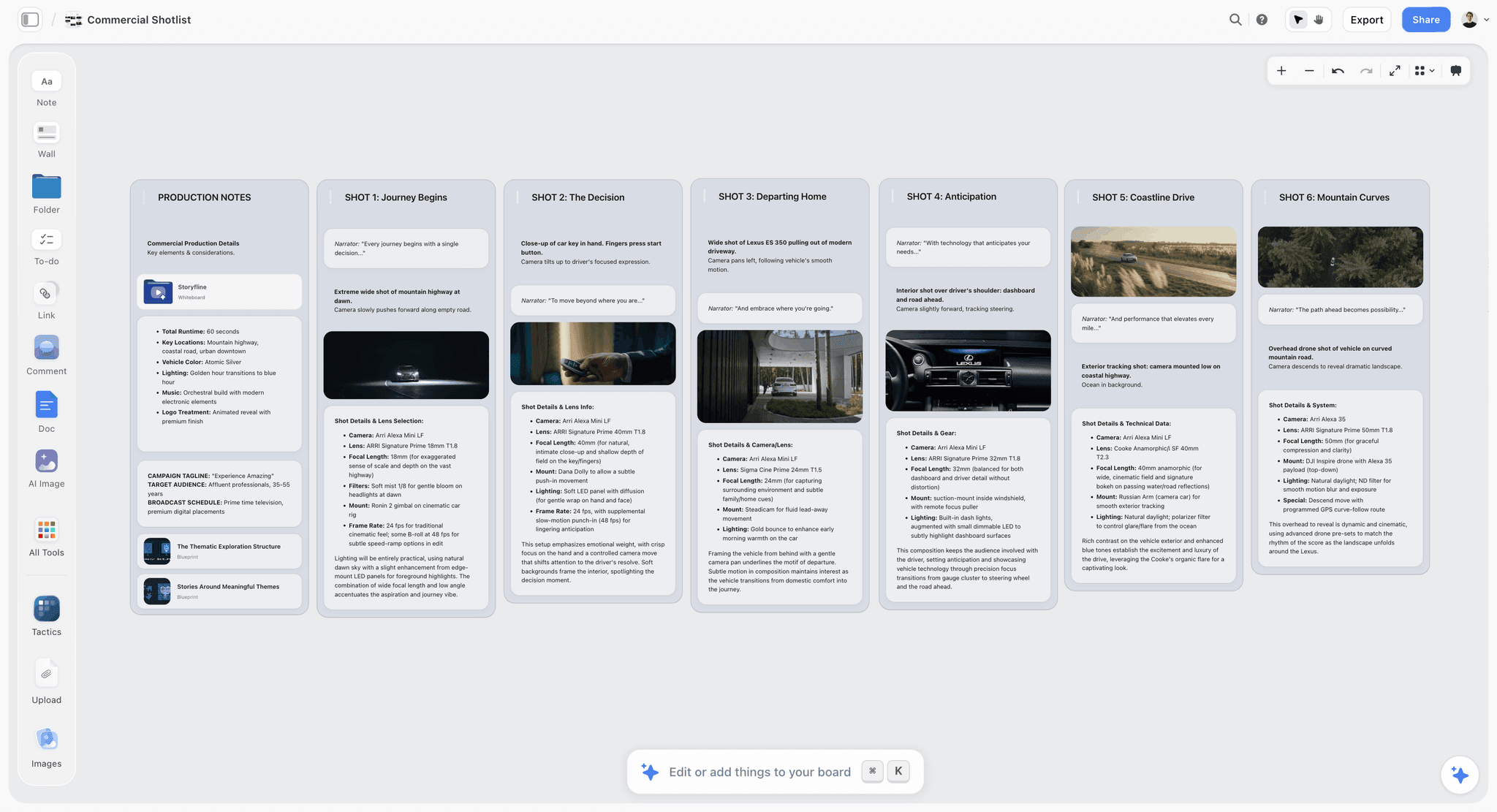
Storyflow is an AI visual workspace for planning creative projects: an infinite canvas with notes, tables, documents, images and walls, plus an AI agent that reads the board and builds plans, storyboards, shot lists, decks and documents onto it. For a shot list, the agent does the drafting. Attach your script or point it at the storyboard on the board, and it asks three things in one go: table or shot cards, how many shots, and where the frames come from. Then it builds one entry per setup with scene-first numbering, in shoot order when it knows your locations or lighting, and tells you which order it used.
What makes it different from a spreadsheet is what sits next to the list. The script, the storyboard frames, the moodboard and the call sheet are on the same board, and the AI reads all of it, so "which scenes have no insert?" gets an answer from your actual project. You can also use Storyflow from inside ChatGPT, Claude, Gemini or Grok through its MCP connector: the assistant you already use reads your Storyflow projects and builds the board for you.
Pros: writes the setups from your script or storyboard; one entry per setup, never one per scene; table or shot cards with frames; per-production column sets; printable shot list pages and call sheets as PDF; view-only link that opens with no account.
Cons: no live on-set mode that tracks time to the minute (Shot Lister does that); no text-message distribution with read receipts (StudioBinder and SetHero do); runs in the browser, with no native phone app.
Price: Storyflow is paid-only during early access; its Free plan launches before the end of 2026, and anyone a paid member invites to a board joins free now. Plus is $7.99/mo annual ($9.99 monthly), Pro $14/mo annual ($19 monthly) adds AI image generation, and Max $39/mo annual ($49 monthly) adds a team workspace with roles and permissions. See pricing.
2. StudioBinder
StudioBinder is the production-management suite most guides recommend first, and for scheduling it earns that. Its shot list tool lets you pick shot types, add an image to each shot, flip to a board view that reads like a storyboard, and import a script (Final Draft, Fountain, PDF, Word or text), which gives every scene a blank shot list; its Shot Tagger then adds shots from the dialogue or action lines you select. The same project holds stripboards and call sheets with weather, Google Maps links, and sent, viewed and confirmed tracking.
Pros: shot lists, stripboard and call sheets in one project; strong distribution and confirmations; mobile-optimised viewing.
Cons: it does not write the coverage for you from the scene: you pick each shot; mood boards and storyboards are separate modules in the project rather than one canvas; more structure than a two-person shoot needs.
Price: a free account exists; paid tier prices are on its pricing page, which did not load for us, so we do not quote them.
3. Shot Lister
Shot Lister is the on-set app. You build a shot-by-shot, minute-by-minute schedule, then run Live Mode during the day to see whether you are ahead or behind and reorganise on the fly. Pro adds crew sync for up to 10 people, storyboards, script import and Scriptation sync.
Pros: the best live tracking of a shoot day; native on iOS and macOS with Apple Watch support.
Cons: a phone is a cramped place to plan coverage; no moodboard or treatment around the list.
Price: Pro $15.99/month or $99.99/year; Studio from $24.99/month for 10 users.
4. Celtx
Celtx ties shots to the script: you highlight screenplay text and shot-tag it, set size, frame, angles and movement, and Celtx generates a daily shot list you can export as PDF.
Pros: the tightest link from script text to shot; good if you already write in Celtx.
Cons: shot lists sit on Writer Pro and above, and breakdown, scheduling and call sheets are an add-on below Team (Celtx pricing); no prices published on that page.
Price: plan prices not listed publicly on the pricing page we checked.
5. Google Sheets and Excel
Google Sheets and Excel are the usual recommendation for a simple shot list, and for six setups in one room they are fine. Copy the column template from section 6, add a checkbox column, share the link.
Pros: free or already paid for; no learning curve; sorts and filters.
Cons: blank: you write every row; disconnected from the script and frames, so a revision never reaches the list; no frames unless you paste them.
6. Notion
Notion databases make a decent shot list with select properties for size, angle and movement, and a gallery view for frames.
Pros: flexible database views; good if your team already lives there.
Cons: you build the template and fill every row; frames are thumbnails in a gallery rather than a storyboard you can lay out; no shot-list-specific features.
7. CineFlo
CineFlo is a mobile-first production app with a shot list builder, call sheet generator, location scouting, Final Draft import and offline sync, on iPhone, iPad, Android and Mac.
Pros: works offline on location; PDF and CSV exports.
Cons: built for the phone, so long planning sessions are cramped; newer and smaller.
Price: Free (one project); Pro $7.99/month or $59.99/year.
8. Shot Designer and Cadrage
Shot Designer draws camera and actor blocking diagrams and updates a shot list as you move cameras; the free version handles one scene at a time and Pro is a €19.99 upgrade. Cadrage is a director's viewfinder for iPhone and iPad that previews framing for your camera and lens and exports a PDF shot list.
Pros: the right tools for blocking and lens choice.
Cons: they solve one step (blocking, framing), not the whole list.
Where Storyflow is the wrong choice
If your production office already runs StudioBinder, sends call sheets to sixty people by text and needs confirmations, keep the shot list there so it feeds the schedule. If your 1st AD wants to tick shots off on a watch, use Shot Lister on the day. Storyflow is where you write the list, see it beside the frames and references, and hand the crew clean pages; it is not a production-office database.
Storyflow Templates to Get You Started
You do not have to start from a blank board. These ready-made Storyflow templates cover the work in this guide, with the structure already in place and the AI ready to read it.
Shotlist Template
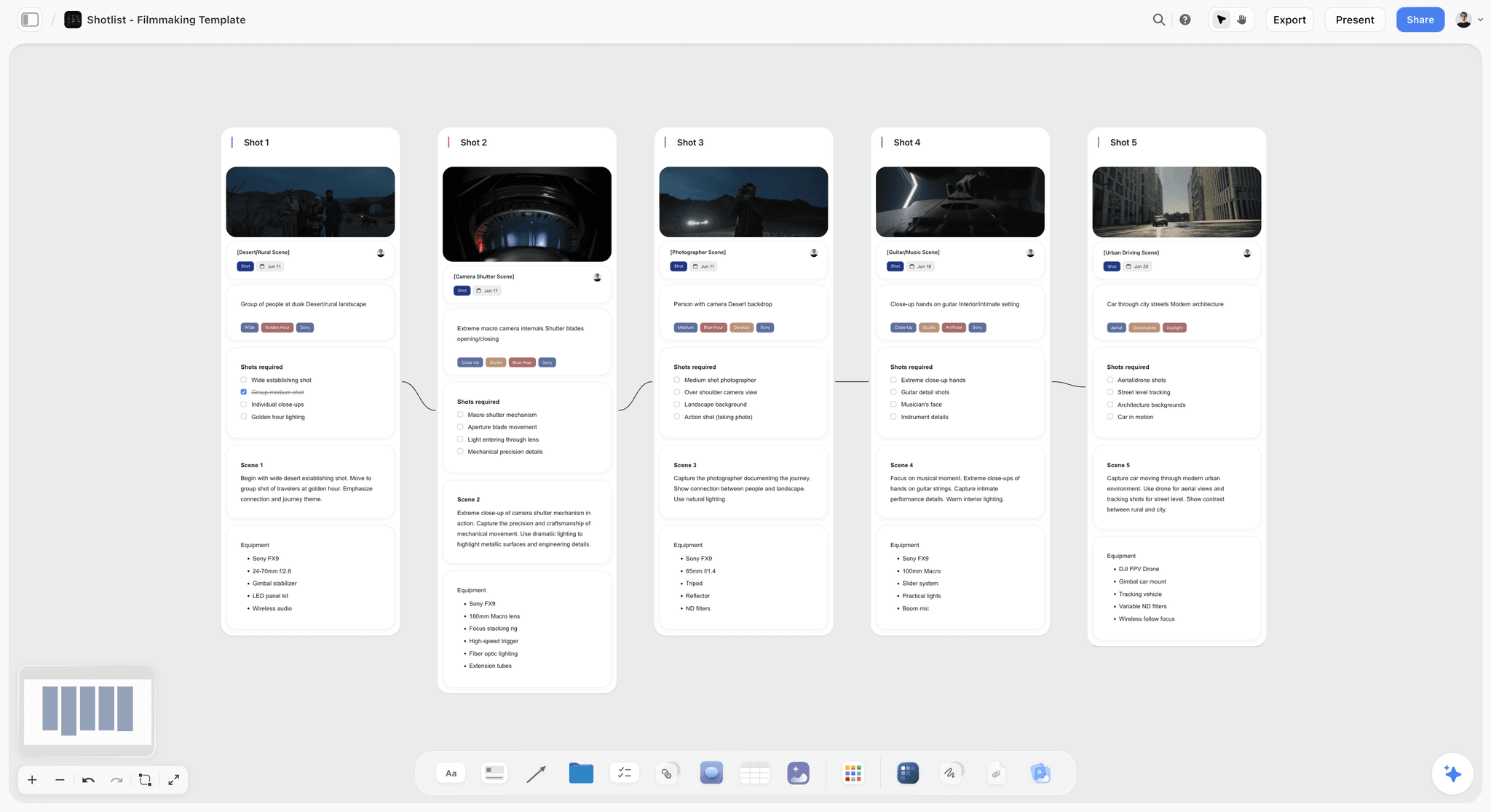
A Shotlist template on Storyflow's infinite canvas. Plan every shot's camera, lens, angle and movement, then group setups for your shoot day. Use the Shotlist template.
Storyboard Template
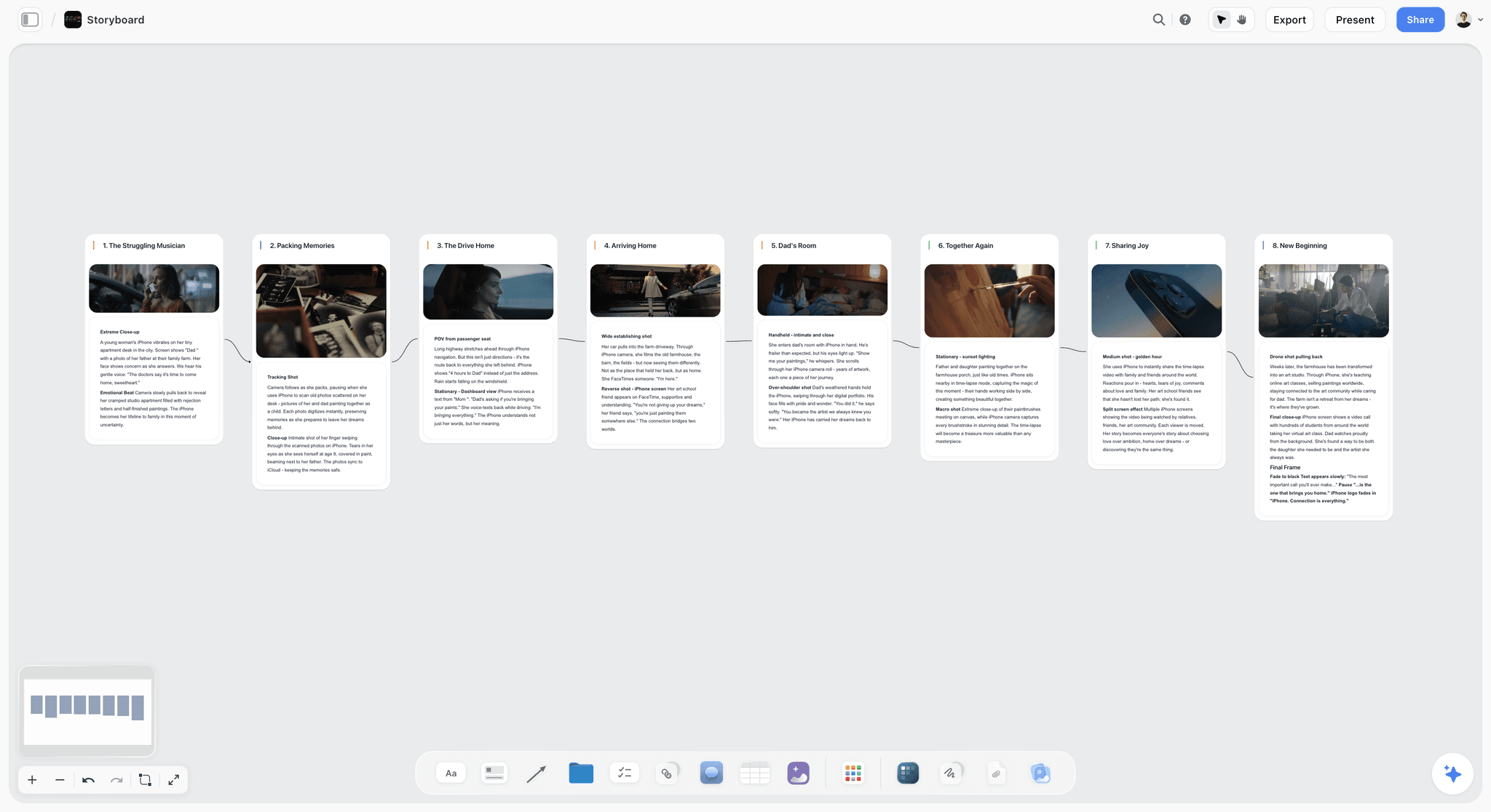
Plan a video or film shot by shot. The Storyboard template lays out frames, action captions and shot notes on the canvas. Use the Storyboard template.
Pre-Production Board Template
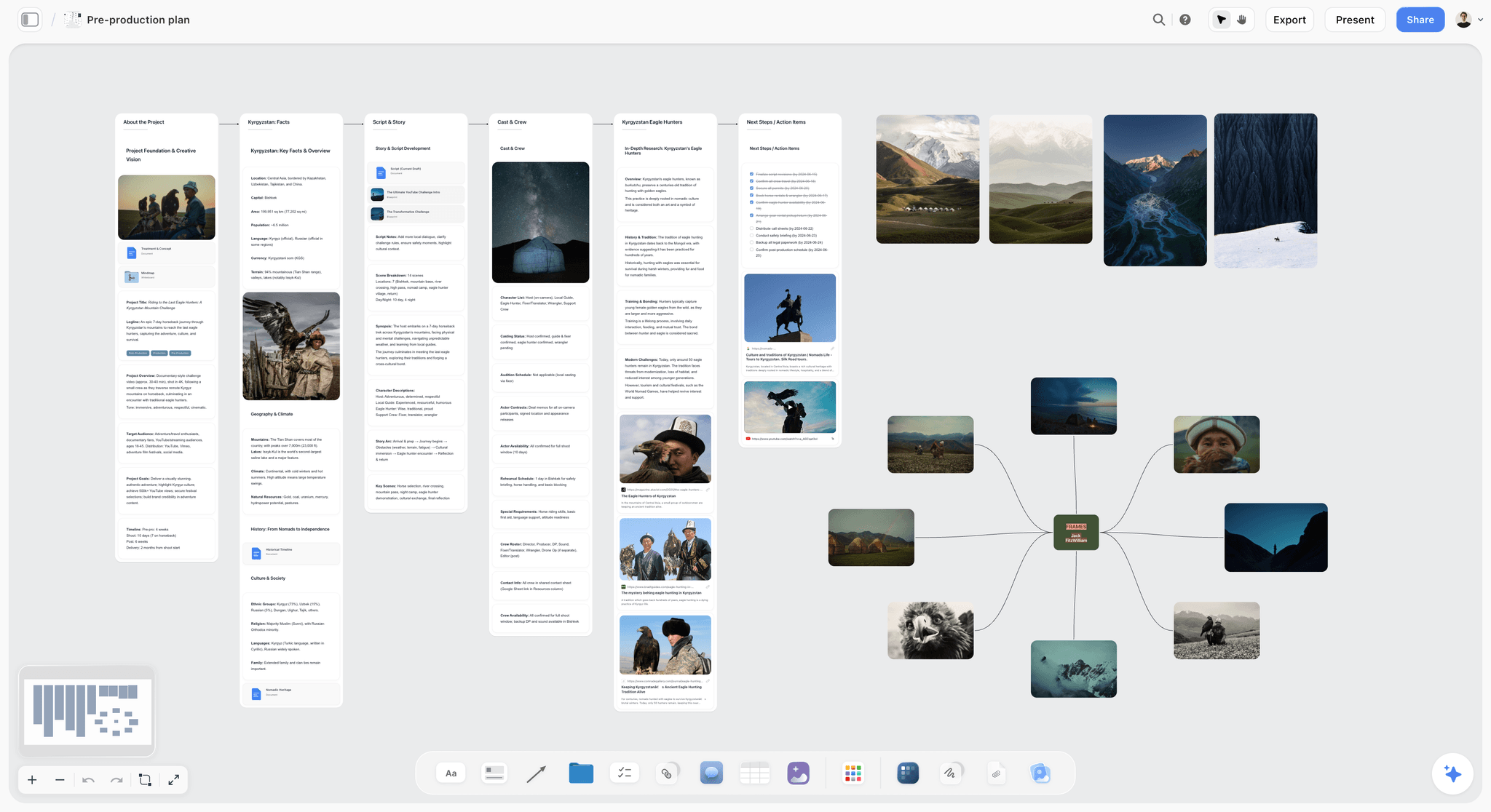
The board the shot list sits inside: project, script and story, references, production planning, cast and crew, equipment and next steps. Use the Pre-Production Board template.
15) The Fastest Way to Make a Shot List
Making a shot list is not creative work. It is operational work, and it decides whether you leave a location with the footage the edit needs or a hole you will pay for in a reshoot. Run the eight steps: scenes, setups, size and angle and movement, lens and gear, shoot order, time, coverage review, share.
Tools that help, in order:
- Storyflow: attach the script or point it at your storyboard and the AI writes the shot list (one entry per setup, shoot order, table or shot cards), then exports printable shot list pages and a call sheet from the same board. Draft a shot list with AI.
- StudioBinder: when the shot list must feed a stripboard and call sheets with confirmations.
- Shot Lister: for tracking the day live on a phone.
- Google Sheets or Excel: for a six-setup shoot you can list by hand.
A shot list does not tell the story. It guarantees you captured it. If the list keeps drifting from the script and the storyboard because they live in three apps, put all of it on one board: take your next shoot, attach the script in Storyflow, and compare the draft it writes with the list you would have typed.
14) FAQ: How to Make a Shot List
How do I make a shot list for a video shoot?
Make a shot list for a video shoot in eight steps: break the script or outline into scenes, list every camera setup each scene needs, assign a shot size, angle and movement, note the lens and gear, reorder the rows into shoot order, add a time estimate per setup, review for coverage gaps, and share it with the crew. Storyflow drafts it for you: attach the script and its AI writes one entry per setup (in shoot order when it knows your locations or lighting), as a table or as shot cards, and exports printable shot list pages.
How do you make a shot list for a film?
For a film, number shots from the script's own scene numbers (24A, 24B), build one table per scene, cover dialogue with a master, matching overs, matching singles and inserts, and then group scenes into shoot days with a strip board. Storyflow reads an attached Final Draft or PDF script, keeps its scene numbers, and builds the per-scene tables and the strip board on one board.
How do you make a shot list for a short film?
Use the film method at a smaller scale: keep the script's scene numbers, write one table per scene, and cover each scene with a master, matching singles or overs, and the inserts the story points at. Total the time column per shoot day and cut or combine setups before the day, not during it. A short has no pickup day to fall back on, so mark the one shot each scene cannot lose.
What is a shot plan?
A shot plan is the shot list plus the order and time to shoot it: every setup with its size, angle and movement, grouped by location and lighting, with a time estimate per row that adds up to the shoot day. Some crews use the term for an overhead diagram of camera positions; the list in this guide is the written version.
What is a shot list?
A shot list is the complete inventory of every shot you intend to capture, written as a table with one row per camera setup. Each row records the shot size, angle, movement, lens, subject and action, location, a time estimate and notes. It is the operational document a crew works through on the day, ticking off setups as they are captured.
What columns should a shot list have?
The standard columns are scene, shot number, shot size, angle, movement, lens, subject and action, location, time estimate, notes and a "Got it" checkbox. Change the middle for the job: a YouTube shoot adds type (A-roll, B-roll) and audio, a commercial adds product and talent, a music video adds frame rate.
How do you format a shot list?
Format a shot list as one table per scene, one row per setup, with scene-first shot numbers (4A, 4B), the camera decisions in their own columns, and the rows sorted in shoot order rather than story order. For the crew, export it as pages: a header with production, date, director and DP, then the per-scene tables, then the kit list.
What is a simple shot list?
A simple shot list is five columns: shot number, size, subject and action, notes, and a checkbox. It is enough for a one-location interview or a creator video. Add angle, movement, lens and time as soon as more than one person is operating the camera.
What is a shot sheet, and how is it used during production?
A shot sheet is another name for the shot list pages handed out on the day: the printed or phone-readable list of setups, in shoot order, that the director, DP and 1st AD work through and tick off. The 1st AD uses it to track how many setups remain against the clock; the script supervisor uses the shot numbers to log takes.
What is the difference between a shot list and a storyboard?
A storyboard is visual and a shot list is textual. The storyboard shows what the camera sees, frame by frame. The shot list records what to capture and how, one row per setup, and orders the day. The storyboard usually comes first and the shot list is derived from it.
Do I need a storyboard to make a shot list?
No. For an interview or simple dialogue you can write the shot list straight from the script. A storyboard helps for action, effects or anything with complex camera choreography. When you have one, derive the list from it; Storyflow builds one shot list table per scene wall of a storyboard already on the board.
How long should a shot list take to make?
For a single scene, thirty minutes to an hour by hand. For a short film or a documentary shoot day, a few hours, mostly spent on the coverage review and the shoot-order pass. With Storyflow drafting the setups from the script, the time goes into reviewing and correcting rows rather than typing them.
What is the difference between a shot list and a call sheet?
A shot list inventories the shots: what the camera captures and in what order. A call sheet schedules the people: who arrives when, where the location is, the day's schedule, contacts, weather and the nearest hospital. Storyflow renders both as PDF pages from the same board; StudioBinder and SetHero add text-message distribution and confirmations for the call sheet, compared in StudioBinder vs SetHero vs Storyflow for call sheets.
Can I make a shot list in a spreadsheet?
Yes. Google Sheets or Excel is a fine place for a small shoot: the columns sort, the link shares and there is no learning curve. The limit is that you write every row and the sheet does not know when the script changes.
Can AI make a shot list?
Yes. Storyflow's AI builds a shot list from an attached script, a storyboard on the board, or a brief, with one entry per camera setup, scene-first numbering and shoot order, and never invents a date, call time, location or crew name you did not give it. StudioBinder creates a blank shot list per scene from an imported script and adds shots from script lines you tag. Read the result against the script either way; the AI drafts, you decide.
What is the most common shot list mistake?
Writing one row per scene instead of one per setup, then skipping the coverage review. The missing reaction shot or insert is invisible on set and obvious in post. The second most common mistake is shooting in story order instead of shoot order, which costs hours of relights.
Table of Contents
- Quick Answer: How to Make a Shot List for a Video Shoot
- Which Tool Should You Use to Make a Shot List?
- Tools for Each Step of a Shot List
- What a Shot List Is and Why It Matters
- Shot List vs Storyboard
- The Columns of a Shot List (the Template)
- How to Make a Shot List Step by Step
- How to Make a Shot List for a Film
- How to Make a Shot List for a Video Shoot, by Type
- A Worked Example: A Filled Shot List
- Shot List Shorthand: Sizes, Angles and Movements
- How to Format a Shot List: Table, Cards or Printable Pages
- Shot List Tools, Reviewed
- FAQ: How to Make a Shot List
- The Fastest Way to Make a Shot List
- Author
- Related Reading
Templates to check out for this topic


Filmmaking templates you can use in Storyflow
Skip the blank canvas. Open one of these filmmaking boards in Storyflow and the AI builds on the structure that is already there, from research through the shot list.


See Storyflow in Action
A visual AI workspace where every feature lives inside one canvas. No tab-switching, no context lost.
Build your entire board from a single message
Type what you need in the AI chat at the bottom of your canvas. The AI adds cards, headings, and structure directly onto your board.
Use expert frameworks as AI context
Type @ in the AI chat and choose any Tactic. The AI tailors every response to that framework instead of giving generic advice.
Turn your board into a mind map in seconds
Ask the AI to restructure your canvas as a mindmap. It connects your ideas into a visual hierarchy so you can see how everything relates.
Why Storyflow Exists
Storyflow actually began as a personal tool while working on creative and research projects.
We kept running into the same problem: ideas were scattered everywhere: notes, documents, and whiteboards.
Nothing helped us see how everything connected.
So we started building a workspace designed around how ideas actually grow.
→ Read how Storyflow was createdJustkay
Documentary Filmmaker & Founder at Storyflow
Published: 2026-06-18
Extremely simple, seriously capable


See how easy it is to get started
Watch a real project come together, from a blank board to a finished plan, clicked through step by step.
Start creating with AI and become more productive
Transform your creative workflow with AI-powered tools. Generate ideas, create content, and boost your productivity in minutes instead of hours.