The 12 Best Documentary Filmmaking Software Tools in 2026 (By a Documentary Filmmaker)
The best documentary filmmaking software in 2026, by a working documentary filmmaker. 12 tools compared across research, transcription, editing, and finishing, from Storyflow and NotebookLM to Descript and Resolve.

Category
Filmmaking
Author

Justkay
Documentary Filmmaker & Founder at Storyflow
Topics
2026-07-10
•
18 min read
•
Filmmaking- best documentary filmmaking software 2026
- documentary filmmaking software
- documentary editing software
- documentary research software
- software for documentary filmmakers
- AI for documentary
What is the best documentary filmmaking software in 2026?
The best documentary filmmaking software in 2026 is Storyflow (best for research and story development), NotebookLM (best for source-grounded research synthesis), Descript (best for transcript-based editing), and DaVinci Resolve (best for editing and finishing). Documentary is a different craft from narrative, and it needs a different software stack. The story is discovered in the research and the edit, not written in advance, so the tools that matter most are the ones that help you find the film inside hundreds of hours of material. Storyflow leads the research-and-story half because the AI reads your full canvas of interviews, notes, and structure. The short version: a documentary is written three times, in the research, in the field, and in the edit. Each write has its own best tools, and the stack that works matches all three. This guide is by a working documentary filmmaker and ranks tools by how much they help the documentary-specific version of each write, not by their general video features.

Full disclosure: Storyflow is our own product, and this guide ranks it first for the research-and-story half of documentary, where its AI reads your full canvas of interviews, notes, and structure. That first-place ranking is limited to that half, not a claim to do everything. Storyflow is not an NLE and does not cut footage, is not a transcription tool, and is not a production scheduler, so a real documentary stack pairs it with Descript or DaVinci Resolve for the edit, Otter or Trint for transcripts, and StudioBinder for logistics. NotebookLM is the stronger pick when you need answers grounded strictly in your sources. We link to every tool so you can judge the fit.
Quick Comparison
These four cover the writes a documentary actually lives in: the research-and-story canvas, source synthesis, the transcript rough cut, and free professional finishing.
| Tool | Best For | AI Features | Price |
|---|---|---|---|
| Storyflow | Documentary research and story | Canvas AI reads your whole board | $7.99 mo annual (free plan late 2026) |
| NotebookLM | Source-grounded synthesis | Answers grounded in your sources | Free during preview |
| Descript | Transcript-based editing | Edit by editing the transcript | ~$19/mo |
| DaVinci Resolve | Editing and finishing | Pro color and Fairlight audio | Free |
All 12 Documentary Filmmaking Tools, Ranked
- Storyflow: best for documentary research and story development (9.5/10)
- NotebookLM: best for source-grounded research synthesis (9.1/10)
- Descript: best for transcript-based documentary editing (9.0/10)
- DaVinci Resolve: best for editing, color, and finishing (8.9/10)
- Adobe Premiere Pro: best for professional documentary editing (8.7/10)
- Otter.ai: best for interview transcription (8.4/10)
- Trint: best for transcript-driven story building (8.2/10)
- Frame.io: best for review and collaboration (8.0/10)
- Airtable: best for footage and interview logging (7.8/10)
- Milanote: best for visual research and moodboards (7.6/10)
- StudioBinder: best for documentary production logistics (7.4/10)
- Final Cut Pro: best for Mac-based documentary editing (7.3/10)
Comparison Table: 12 Documentary Filmmaking Tools Compared
| Tool | Documentary Phase | Starting Price | Free Option | Best For | Rating (/10) |
|---|---|---|---|---|---|
Storyflow | Research and development | $7.99/mo (annual) | Coming late 2026 (invited collaborators join free now) | Story canvas with AI | 9.5/10 |
NotebookLM | Research | Free during preview | Yes | Source-grounded synthesis | 9.1/10 |
Descript | Editing | ~$19/mo | Yes | Transcript-based editing | 9.0/10 |
DaVinci Resolve | Editing and finishing | Free | Yes | Full post pipeline | 8.9/10 |
Adobe Premiere Pro | Editing | ~$22.99/mo | Trial | Professional editing | 8.7/10 |
Otter.ai | Transcription | Free tier | Yes | Interview transcription | 8.4/10 |
Trint | Transcription | Per-seat | Trial | Transcript story building | 8.2/10 |
Frame.io | Review | Adobe CC bundle | Trial | Collaboration and review | 8.0/10 |
Airtable | Logging | Free tier | Yes | Footage and interview logs | 7.8/10 |
Milanote | Research | Free tier | Yes | Visual research | 7.6/10 |
StudioBinder | Production | ~$29/mo | Yes | Production logistics | 7.4/10 |
Final Cut Pro | Editing | ~$299 (one-time) | Trial | Mac editing | 7.3/10 |
Pricing changes often. Confirm current pricing on each site. Ratings reflect documentary-specific usefulness, not general video features.

Storyflow canvas holding documentary interviews, transcripts, research notes, and story structure the AI can read
Hold your whole documentary on one canvas the AI reads
Storyflow keeps interviews, transcripts, archival notes, and your evolving structure on one board, with an AI that reads all of it, so the film stops stalling between sessions. Free to start, built by a documentary filmmaker.

Why Documentary Needs a Different Software Stack
Most filmmaking software is built for narrative, where the script comes first and the shoot executes it. Documentary inverts that, and the inversion changes which tools matter.
The story is discovered, not scripted. A documentary filmmaker does not know the film in advance. It emerges from research and from what the interviews actually say. Software that assumes a finished script before the shoot does not fit; software that helps you hold and synthesize evolving material does.
The research is the film's foundation. Interviews, archival, books, papers, contacts, timelines. A documentary lives or dies on how well the filmmaker connects a large body of research, and this is the phase most filmmaking software ignores entirely.
The edit is where the writing happens. In documentary, the script is written in the edit from transcripts and footage. Transcript-based tools are not a convenience; they are how documentary story structure gets built.
The Three Writes: the framework this guide ranks by
Narrative software is built for one write, the script, and documentary has three. A documentary is written three times: in the research, in the field, and in the edit. Name the three writes and the tool question gets simpler, because every tool serves one of them.
- The First Write is research and development. You are finding the film: reading, interviewing, gathering archival, and holding a shifting body of material until the story surfaces. This is the write generic filmmaking software ignores, and where the film is actually found.
- The Second Write is production and logistics. You capture what you found. In documentary this write stays light, because a vérité shoot or an interview day needs coordination, not a hundred-page shooting schedule.
- The Third Write is post and the edit. You build the film out of transcripts and footage. The script that never existed on paper gets written on the timeline, which is why transcript-based tools matter more here than any storyboard.
The tools below are ranked by how well they serve the write they belong to. A tool that nails one write and stays out of the way of the others beats a bloated all-in-one every time.
It is not that generic tools fail documentary. It is that they tool the phases documentary cares about least (a locked script, a fixed schedule) and ignore the phases it lives in (research synthesis, story discovery, transcript editing). Storyflow leads the First Write because the interviews, notes, and structure live on one board and the AI reads all of it. For the persona deep-dive, see the AI second brain for documentary filmmakers.
How We Evaluated These Documentary Tools
Every tool here was used or assessed against real documentary work: development, research, and post on actual projects. Five criteria, weighted in this order:
- Documentary-specific usefulness. Does it help the documentary version of the job, or is it a narrative tool in a documentary wrapper?
- Research and synthesis. How well does it hold and connect a large, evolving body of material?
- Transcript and edit fit. Does it support the write-in-the-edit reality of documentary?
- Collaboration. Can a small documentary team work from it together?
- Price for a documentary budget. What does it cost, given documentary budgets are usually tight?
Tools were assessed against a feature documentary in development, a documentary series, and a short-form documentary, and judged on how much they helped find and build the film, not on feature counts.
Quick Picks by the Three Writes
The First Write (research and development): Storyflow for the story canvas the AI can read, NotebookLM for source synthesis, Milanote for visual references, Airtable for logging footage and rights.
The Second Write (production and logistics): StudioBinder for the light coordination a documentary shoot needs, schedules, call sheets, and contacts.
The Third Write (post and the edit): Descript for the transcript rough cut, DaVinci Resolve or Premiere Pro for finishing and color, Otter.ai or Trint for transcription, Frame.io for team and funder review.
Detailed Reviews: The 12 Best Documentary Filmmaking Tools
1. Storyflow
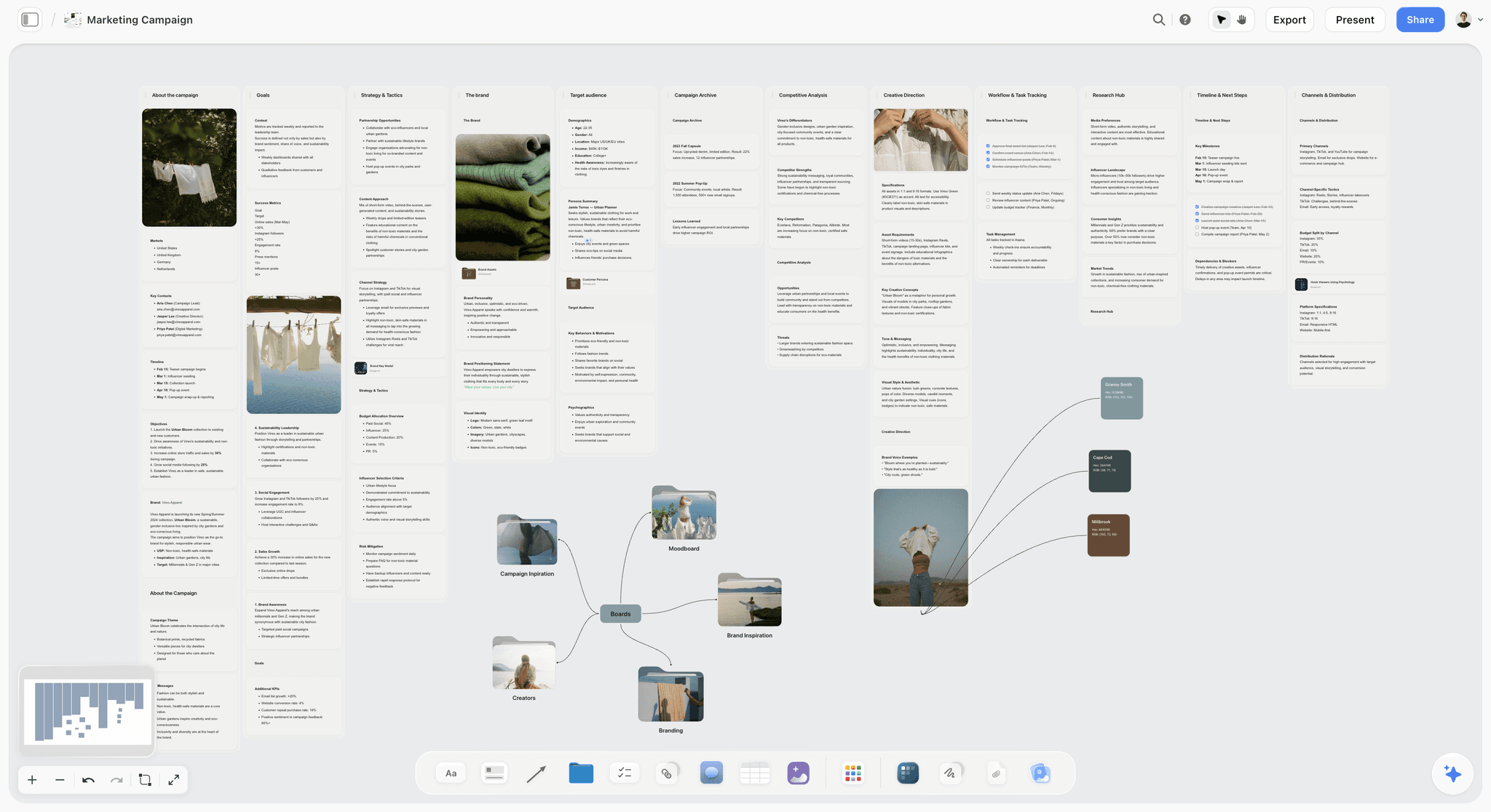
Storyflow owns the First Write. It is a visual workspace where documentary research and story development live on one canvas the AI reads: interviews, transcripts, archival notes, character threads, timelines, and the evolving structure, all on one board. It is the tool I built as a documentary filmmaker after watching generic chat AI lose the thread of a film every few replies. The AI reads your full active board by default, plus up to 1 Tactic and up to 3 Documents you @-mention, so when you ask which of forty interviews touch the central conflict, it answers from the material rather than guessing. That is the specific help documentary needs in the phase where the film is found, and it is the phase almost no other tool on this list serves.
Best for: Documentary research, story development, interview synthesis, structure, and treatment writing.
Verdict: The strongest tool for the research-and-story half of documentary, which is the half most software ignores. Pair it with an editor for post.
Key features
- One research canvas: interviews, transcripts, archival, contacts, timelines, and structure together.
- Project-aware AI that reads the whole board and answers across the research (for example, which interviews touch the central conflict).
- 200+ Story Blueprints including documentary-friendly structures.
- Unlimited shared boards and collaboration; Max adds Team Workspace with Permissions and Roles.
Pricing
Free: launching before the end of 2026 (unlimited boards, basic AI, 20 uploads). Plus: $7.99/mo annual ($9.99 monthly), which adds the 200+ Story Blueprints library and more AI usage. Pro: $14/mo annual ($19 monthly), which adds AI image generation and 20x more AI. Max: $39/mo annual ($49 monthly), which adds Team Workspace with permissions and roles. Pricing is flat per account, not per user.
Pros
- Holds the evolving film so you stop rebuilding context every session.
- The AI reads the whole research canvas, not one document.
- Built by a documentary filmmaker for the phase documentaries live in.
Cons
- Not an NLE. It does not cut footage; for the edit, pair it with Descript, Resolve, or Premiere.
- Not a transcription tool. It reads transcripts you bring in, but it does not generate them; pair with Otter or Trint.
- Not a production scheduler. For call sheets and shooting logistics, use StudioBinder.
- Cloud-only, so it is the wrong choice if you need a local-first, offline research vault.
- Newer platform than Airtable or the Adobe stack, so the ecosystem of integrations is still growing.
Storyflow is a research, story, and planning canvas, not an all-in-one that replaces your edit, transcription, or scheduling tools. It holds the one write nothing else does, then hands off to the tools built for the other two. For the end-to-end workflow, see how to plan a documentary with AI.
2. NotebookLM
NotebookLM is Google's source-grounded AI, and it is a First Write specialist. Upload your interviews, books, and papers, and it answers questions tied strictly to those sources, with audio overviews as a bonus. The reason it ranks second is that grounding is the right constraint for factual film: it will not invent a quote or a date, the failure mode that makes generic chat AI dangerous in a documentary. Use it to prep interview questions and interrogate the transcript after, then move the connections it surfaces onto your story canvas.
Best for: Synthesizing a documentary's source corpus without hallucination.
Verdict: The strongest research-synthesis tool for documentary. Grounding in your sources is exactly right for factual work.
Key features
- Source-grounded answers from uploaded material.
- Audio overviews of your sources.
- Notebook organization per project.
- Free during preview.
Pricing
Free during preview.
Pros
- Grounding minimizes hallucination, which matters for factual film.
- Excellent for pre-interview prep and post-interview synthesis.
- Audio overviews are useful for review.
Cons
- No canvas; pair with Storyflow for visual structure.
- Synthesis, not drafting or structure.
- Pricing beyond preview is uncertain.
3. Descript
Descript lets you edit video and audio by editing the transcript, which is how documentary editing actually works. It makes the Third Write feel like writing: delete a sentence in the transcript and the footage cuts with it, so assembling a rough cut from interviews becomes editing words on a page. Its AI cleanup (filler-word removal, Studio Sound) handles the grunt work that eats documentary post hours. It is not where you finish, but for the interview-driven assembly that defines most documentary edits, nothing gets you to a watchable rough cut faster.
Best for: Transcript-based documentary editing and rough cuts.
Verdict: The strongest transcript-based editor for documentary. It compresses the rough-cut phase.
Key features
- Edit by editing the transcript.
- Studio Sound and filler-word removal.
- Overdub and AI features.
- Multitrack and screen recording.
Pricing
Hobbyist around $19/mo. Free tier with limited transcription.
Pros
- Transcript editing is genuinely faster for documentary.
- AI cleanup is practical.
- Good for interview-driven cuts.
Cons
- Heavier projects feel slower than a full NLE.
- Transcript accuracy varies with audio.
- Finishing usually moves to Resolve or Premiere.
4. DaVinci Resolve
DaVinci Resolve is the free professional editor with world-class color and audio, a full documentary post pipeline in one app.
Best for: Documentary editing, color, and finishing on any budget.
Verdict: The best value professional post tool for documentary. Free and genuinely professional.
Key features
- Professional editing timeline.
- Best-in-class color grading.
- Fairlight audio post.
- Free version is genuinely capable.
Pricing
Free; paid Studio version for advanced features.
Pros
- Free and professional-grade.
- Color and audio built in.
- Cross-platform.
Cons
- Learning curve.
- Transcript editing is not its strength; pair with Descript.
- Heavier on hardware.
5. Adobe Premiere Pro
Adobe Premiere Pro is a professional editing standard widely used in documentary, with strong transcription and Creative Cloud integration.
Best for: Professional documentary editors in the Adobe ecosystem.
Verdict: A professional documentary editing standard. Strong, if you accept the subscription.
Key features
- Professional editing timeline.
- Speech-to-text and caption tools.
- Creative Cloud and Frame.io integration.
- Broad format support.
Pricing
Around $22.99/mo. Trial available.
Pros
- Professional and widely adopted.
- Built-in transcription.
- Integrates with Frame.io and After Effects.
Cons
- Subscription.
- Heavier than lean documentary needs.
- Color and audio trail Resolve.
6. Otter.ai
Otter.ai transcribes interviews and meetings quickly, a documentary staple for turning hours of interviews into searchable text.
Best for: Fast interview transcription.
Verdict: A reliable transcription workhorse for documentary interviews.
Key features
- Live and uploaded transcription.
- Speaker identification.
- Search and highlights.
- Free tier.
Pricing
Free tier; paid plans for more minutes.
Pros
- Fast and affordable transcription.
- Searchable interview text.
- Usable free tier.
Cons
- Accuracy varies with audio quality.
- Not an editing tool.
- Weaker integration than Descript.
7. Trint
Trint transcribes and helps build stories from transcripts, aimed at journalists and documentary makers.
Best for: Transcript-driven story building from interviews.
Verdict: A strong transcription-and-story tool for interview-heavy documentary.
Key features
- Accurate transcription.
- Story-building from transcripts.
- Collaboration and highlights.
- Export to editors.
Pricing
Per-seat subscription.
Pros
- Built for journalists and documentary.
- Story-building features beyond raw transcription.
- Good collaboration.
Cons
- Priced per seat.
- Overlaps with Descript for some workflows.
- Not an editor.
8. Frame.io
Frame.io is the review and collaboration platform, now part of Adobe, for sharing cuts and gathering frame-accurate feedback.
Best for: Documentary teams reviewing cuts with collaborators and funders.
Verdict: The standard for cut review. Strong for documentary teams and stakeholders.
Key features
- Cloud review with frame-accurate comments.
- Version management.
- Adobe integration.
- Camera-to-cloud options.
Pricing
Bundled with Adobe CC; standalone tiers available.
Pros
- Excellent review and feedback.
- Version control for cuts.
- Deep Adobe integration.
Cons
- Most value inside Adobe workflows.
- Review, not creation.
- Pricing best for Adobe users.
9. Airtable
Airtable is a flexible database many documentary teams use to log footage, interviews, archival, and rights.
Best for: Logging and tracking footage, interviews, and archival.
Verdict: The best flexible logging database for documentary. Invaluable for archival-heavy films.
Key features
- Customizable databases and views.
- Footage and interview logging.
- Rights and archival tracking.
- Collaboration.
Pricing
Free tier; paid plans for more.
Pros
- Flexible for any logging need.
- Great for archival tracking.
- Collaborative.
Cons
- Not documentary-specific.
- Setup time.
- Not a story or edit tool.
10. Milanote
Milanote is a visual board tool documentary teams use for research moodboards and visual references, and it sits in the First Write. Drag images, notes, and links onto a clean board and the visual side of your research holds together in one place. It ranks here rather than higher because the boards are static: nothing on them reads back to you. The moment your research turns text-heavy (interviews, transcripts, evolving structure), you want a canvas whose AI can answer questions across the material rather than just display it.
Best for: Visual research and reference boards.
Verdict: A clean visual research tool. Good for the visual side of documentary development.
Key features
- Visual boards for research.
- Images, notes, and links.
- Collaboration.
- Templates.
Pricing
Free tier; paid plans for more.
Pros
- Clean visual research.
- Easy to use.
- Good for references.
Cons
- No AI reading the board.
- Not built for text-heavy research synthesis.
- Pair with a synthesis tool.
11. StudioBinder
StudioBinder handles the lighter production logistics documentary needs: schedules, call sheets, and contacts.
Best for: Documentary production logistics when a shoot needs coordination.
Verdict: Solid for the production phase, which is lighter in documentary than narrative.
Key features
- Scheduling and call sheets.
- Shot lists and contacts.
- Breakdown.
- Collaboration.
Pricing
Indie around $29/mo. Free tier with limits.
Pros
- Good production logistics.
- Modern and easy.
- Free tier available.
Cons
- Documentary often needs less than it offers.
- Not a research or edit tool.
- Subscription for full features.
12. Final Cut Pro
Final Cut Pro is Apple's professional editor, fast and popular with Mac-based documentary editors.
Best for: Mac-based documentary editors who want speed and a one-time price.
Verdict: A fast, capable editor for Mac documentary work.
Key features
- Magnetic timeline editing.
- Strong performance on Apple silicon.
- One-time purchase.
- Broad format support.
Pricing
Around $299 one-time. Trial available.
Pros
- Fast on Mac.
- One-time price.
- Efficient editing.
Cons
- Mac-only.
- Transcript editing needs a plugin or pairing.
- Smaller documentary ecosystem than Premiere.
Documentary-Type Recommendations
1. Solo Documentary Filmmaker
Top picks: Storyflow + Descript + DaVinci Resolve
Storyflow for research and story, Descript for the transcript rough cut, Resolve for finishing. A complete solo stack, most of it affordable or free.
2. Documentary Series
Top picks: Storyflow + NotebookLM + Premiere Pro
Storyflow for season arc and episode structure, NotebookLM for per-episode research synthesis, Premiere for the professional edit. See how to plan a documentary with AI.
3. Archival-Heavy Documentary
Top picks: Storyflow + Airtable + Resolve
Storyflow for story and research, Airtable for archival and rights logging, Resolve for the edit and finishing. Archival tracking is critical here.
4. Interview-Driven Documentary
Top picks: Storyflow + Otter.ai + Descript
Storyflow for synthesizing what the interviews reveal, Otter for transcription, Descript for editing from transcripts. The interview-to-story pipeline.
5. Student / First Documentary
Top picks: Storyflow (free) + DaVinci Resolve (free)
A complete free documentary stack: Storyflow for research and story, Resolve for editing and finishing. Add NotebookLM (free preview) for research synthesis.
Honorable Mentions
- Vimeo: hosting and private review for documentary cuts.
- Aurora / Lumberjack: transcript-based logging and assembly.
- Evernote / Notion: general research organization.
- Pro Tools: professional audio post for finishing.
- Filmustage: AI breakdown if a documentary shoot needs scheduling.
Where Documentary Software Still Needs a Human
Honest accounting. Documentary tools help you hold and shape material; they do not make the film.
- The story you find. Software surfaces connections; deciding what the film is about is yours.
- The ethical line. How you represent real people is human judgment no tool replaces.
- The interview. The conversation that gets the truth is craft, not software.
- The edit's emotional truth. Tools cut; whether the cut is honest is your call.
The right use of documentary software in 2026 is to hold the research, synthesize the sources, and speed the edit. The film, and the responsibility for how it represents real life, stays human.
The Bottom Line
The best documentary filmmaking software in 2026 is a stack matched to the three writes. A documentary is written three times, in the research, in the field, and in the edit, and the tools that matter are the ones that serve each write well. Storyflow leads the First Write, where the film is found and where most software ignores you, because the AI reads your full canvas of interviews and structure. NotebookLM synthesizes sources, Descript carries the transcript rough cut, and DaVinci Resolve finishes for free.
The move that changes the most is to give your research and evolving structure a home instead of scattering it across folders and memory. Put your current documentary's research on a canvas the AI can read, and the film stops stalling between sessions. Start a Storyflow board and build the post stack around it.
FAQ: Documentary Filmmaking Software in 2026
What is the best documentary filmmaking software in 2026?
For the research and story-development half, where documentaries are actually found, Storyflow is the strongest because the AI reads your full canvas of interviews, notes, and structure. NotebookLM is the best for synthesizing sources. For the edit, Descript leads transcript-based editing and DaVinci Resolve is the best free professional finisher. Most documentary filmmakers use a research-and-story tool plus a transcription tool plus an editor rather than one app for everything.
What software do documentary filmmakers use?
Documentary filmmakers typically use a stack rather than one tool: a research and story tool (increasingly a canvas AI tool like Storyflow), a transcription tool (Otter or Trint), a transcript-based editor (Descript) for the rough cut, and a professional editor (DaVinci Resolve or Premiere Pro) for finishing. NotebookLM has become common for source synthesis, and Airtable for logging archival and interviews. The exact stack depends on whether the film is interview-driven, archival-heavy, or vérité.
What is the best editing software for documentaries?
DaVinci Resolve is the best value, a free professional editor with world-class color and audio, making it a complete documentary post pipeline. Adobe Premiere Pro is the widely-adopted professional standard. Descript is the best for the rough cut because transcript-based editing matches how documentary story is built. Many documentary editors use Descript for the assembly and transcript work, then move to Resolve or Premiere for the finishing edit and color.
How do I organize documentary research?
Keep the research on a canvas where interviews, transcripts, archival notes, contacts, and the evolving structure live together and connect visually, rather than scattered across folders and docs. Storyflow does this with an AI that reads the whole board, so you can ask which interviews touch a theme. Pair it with NotebookLM to synthesize the source corpus and Airtable to log footage and rights. The goal is one place that holds the evolving film so you stop rebuilding context every session.
Is there free software for documentary filmmaking?
Yes, and a complete free documentary stack exists. Storyflow's Free plan, launching before the end of 2026, will cover research and story development, NotebookLM is free during preview for source synthesis, DaVinci Resolve is a free professional editor, and Otter.ai has a free transcription tier. You can research, structure, transcribe, edit, and finish a documentary using free tools, paying only if you need more AI usage, transcription minutes, or Resolve's advanced Studio features.
How does AI help documentary filmmaking?
AI helps most in the phases documentary lives in: research synthesis and story discovery. A grounded AI like NotebookLM answers questions across your sources without inventing facts, which matters for factual work. A canvas AI like Storyflow reads your whole research board and surfaces connections, helping you find the film in the material. Transcription AI turns hours of interviews into searchable text, and transcript-based editing speeds the rough cut. AI does not decide what the film is about or how to represent real people.
What is the best transcription software for documentary?
Otter.ai is a fast, affordable transcription workhorse with a usable free tier, good for turning interviews into searchable text. Trint is stronger for transcript-driven story building and is aimed at journalists and documentary makers. Descript combines transcription with transcript-based editing, so it doubles as your rough-cut tool. For most documentary work, pair Otter or Trint for bulk transcription with Descript for the edit.
What is the best AI tool for documentary filmmaking?
For the research and story half, Storyflow is the strongest because its AI reads your full canvas of interviews, notes, and structure and answers across all of it. For source synthesis, NotebookLM is the best because it grounds every answer strictly in your uploaded material and will not invent facts. Use both: NotebookLM to interrogate the sources, Storyflow to hold the connections and build the structure the film needs.
How much does documentary filmmaking software cost?
You can build a complete documentary stack for very little. Storyflow's Free plan, launching before the end of 2026, will cover research and story, DaVinci Resolve is a free professional editor, NotebookLM is free during preview, and Otter.ai has a free transcription tier. Paid upgrades stay modest: Storyflow Plus is $7.99/mo annual, Descript around $19/mo, Premiere Pro around $22.99/mo. You pay only for transcription minutes, extra AI usage, or an editor's advanced features.
Can you make a documentary with just one piece of software?
Not well, because documentary spans three jobs no single tool does all of. The research and story canvas (Storyflow), the transcription tool (Otter, Trint, or Descript), and the editor (Resolve or Premiere) each own a different write. Descript comes closest by combining transcription with transcript-based editing, but it does not hold research or synthesize sources. Expect a small stack of two or three tools rather than one app.
Do I need special software for documentary or just a video editor?
You need more than a video editor. A video editor handles the cut, but documentary lives as much in research synthesis and story discovery, which editors do not support. The documentary-specific tools are the research-and-story canvas (Storyflow), source synthesis (NotebookLM), and transcription (Otter, Trint, Descript). The editor is essential for the cut, but the tools that help you find the film in the first place are what separate a documentary stack from a generic video one.
Table of Contents
- All 12 Documentary Filmmaking Tools, Ranked
- Comparison Table: 12 Documentary Filmmaking Tools Compared
- Why Documentary Needs a Different Software Stack
- How We Evaluated These Documentary Tools
- Quick Picks by the Three Writes
- Detailed Reviews: The 12 Best Documentary Filmmaking Tools
- Documentary-Type Recommendations
- Honorable Mentions
- Where Documentary Software Still Needs a Human
- The Bottom Line
- Author
- FAQ: Documentary Filmmaking Software in 2026
- Related Reading
Templates to check out for this topic


Filmmaking templates you can use in Storyflow
Skip the blank canvas. Open one of these filmmaking boards in Storyflow and the AI builds on the structure that is already there, from research through the shot list.


See Storyflow in Action
A visual AI workspace where every feature lives inside one canvas. No tab-switching, no context lost.
Build your entire board from a single message
Type what you need in the AI chat at the bottom of your canvas. The AI adds cards, headings, and structure directly onto your board.
Use expert frameworks as AI context
Type @ in the AI chat and choose any Tactic. The AI tailors every response to that framework instead of giving generic advice.
Turn your board into a mind map in seconds
Ask the AI to restructure your canvas as a mindmap. It connects your ideas into a visual hierarchy so you can see how everything relates.
Why Storyflow Exists
Storyflow actually began as a personal tool while working on creative and research projects.
We kept running into the same problem: ideas were scattered everywhere: notes, documents, and whiteboards.
Nothing helped us see how everything connected.
So we started building a workspace designed around how ideas actually grow.
→ Read how Storyflow was createdJustkay
Documentary Filmmaker & Founder at Storyflow
Published: 2026-07-10
Extremely simple, seriously capable


See how easy it is to get started
Watch a real project come together, from a blank board to a finished plan, clicked through step by step.
Start creating with AI and become more productive
Transform your creative workflow with AI-powered tools. Generate ideas, create content, and boost your productivity in minutes instead of hours.