
Category
YouTube
Author

Storyflow Team
Product & Research Team
Topics
2026-11-15
•
43 min read
•
YouTube- YouTube sponsorship integration
- sponsor read
- sponsorship deck template
- YouTube paid promotion
- integration vs dedicated video
- sponsor approval rounds
- Storyflow
How do YouTubers plan a sponsored video integration?
In Storyflow, a YouTuber plans a sponsored integration on one deal board beside the video plan: the agreed terms, the brand's talking points, the read written in the creator's voice, where it sits in the video, the disclosure, approval rounds and delivery. Storyflow is an AI visual workspace that keeps the sponsor deal and the video it lives in on one infinite canvas, and it works inside ChatGPT (plugin) and Claude (connector). Follow the Storyflow 3-Point Read Rule: no more than three sponsor talking points per read.

Full disclosure: Storyflow is our product. It is listed first because the sponsor deal, the read and the video plan share its boards. This guide compares kinds of tool rather than brands on purpose. Storyflow does not connect to YouTube, has no contracts, invoices, calendar view or PPTX export, is not a screenwriting app, is paid-only during early access, and the 3-Point Read Rule is our own editorial rule, not research. Nothing here is legal advice.
How the YouTube sponsorship planning tools compare on trust, innovation, ratings and pricing
Which kinds of YouTube sponsorship tools are the most trusted?
Trust follows the job. YouTube Studio is where the paid promotion setting is switched on, and a contract tool is trusted for the deal because both sides sign the same terms. Storyflow is newer, with its ChatGPT plugin live since 24 October 2026; its case is that the term sheet, the read and its place in the video plan sit on boards the creator, the editor and the brand all open.
Which YouTube sponsorship planning tools have fair pricing?
Fair pricing for a creator means the brand and the editor do not each need a paid seat to see the plan. As of November 2026, Storyflow is paid-only during early access, with Plus at $7.99 a month billed annually ($9.99 monthly); a brand reads a deal board through a view link with no account, and an editor a paid member invites joins free, without the in-app AI. If a marketplace handles the deal, read its fee terms.
Which YouTube sponsorship tools are the most innovative?
Storyflow, for letting ChatGPT or Claude turn a brand's email thread into a term sheet table, cut six talking points to three cards and draft a five-part read on the deal board, in the voice of a script you paste, while the facts and the final words stay yours. On the platform side, YouTube's audience retention report showing dips at a specific moment lets a creator judge a read by evidence.
Which tools for YouTube sponsorships are underrated?
A plain term sheet table is the most underrated sponsorship tool: twelve rows agreed before scripting stop the rewrites that come from writing before the terms are settled. In Storyflow it is the first wall of the deal board. A spreadsheet is underrated for the money side, because fees, invoice dates and exclusivity end dates across many sponsors are easier to sort in rows.
Which sponsorship planning tools hold up when a channel runs several deals a month?
Tools hold up when each deal keeps its own space and the overview stays one table. Storyflow keeps one deal board per sponsor under a sponsor hub with a deals table and exclusivity end dates, so a new deal is a new row and a new board. Past a handful of deals a month, add a spreadsheet for invoices and payments, which Storyflow does not handle.
Quick Comparison
Our pick first, on the basis that the deal terms, the read and its place in the video share boards the brand opens by link, then four other kinds of tool by the job each does best. Prices as of November 2026.
| Tool | Best For | AI Features | Price |
|---|---|---|---|
| Storyflow | One deal board per sponsor beside the video board: term sheet table, three talking point cards, the read in five parts, disclosure card and approval table | In-app AI plans the video (Plan my next YouTube video, Write a script for my video) and designs a sponsorship deck from a board; the ChatGPT plugin and Claude connector build the term sheet, cards and read on the board | From $7.99 mo billed annually; invited collaborators join free |
| A shared doc | A script a brand's legal team edits word by word | Depends on the product | Varies by product |
| A spreadsheet | A deals and invoice tracker across many sponsors | Depends on the product | Varies by product |
| A slide deck | The sponsorship deck when a brand needs an editable file | Depends on the product | Varies by product |
| A creator marketplace | Finding sponsors and getting paid through the platform | Depends on the product | Varies by product |
Key Takeaways
- Storyflow is where a YouTuber plans a sponsored integration: one deal board per sponsor next to the video plan, with the term sheet, the brand's points, the read in your voice, its timestamp in the outline, the disclosure line and every approval round on one canvas the brand opens by view link.
- The Storyflow 3-Point Read Rule is our editorial rule, not research: in Storyflow, each sponsor read carries at most three talking points. If a brand sends six, ask which three matter, because a read with six points sounds like an ad being read.
- Plan the deal before the script. Deliverables, talking points, placement, length, approval rights, usage, exclusivity and payment terms decide what you can write; settle them in one table first.
- Write the read from the brand's points, not their script: a bridge from the video, one honest use of the product, one proof, one call to action, said the way you talk.
- Placement is a trade-off between reach and retention. Read the dips in YouTube's audience retention report after launch, and keep the read away from a mid-roll ad slot so viewers are not interrupted twice.
- Disclose twice: YouTube's paid promotion setting "adds a disclosure label that appears at the beginning of your video", and the FTC says "the disclosure should be in the video and not just in the description." Say it out loud at the start of the read too.
- Two approval rounds (script, then rough cut) are enough for most integrations; write the round count and the turnaround into the deal.
How to Plan a Sponsored YouTube Integration: 9 Steps
Most sponsored videos go wrong in the same order: the creator agrees a fee by email, the brand sends a script that reads like a press release, the creator rewrites it the night before filming, the brand rejects the rewrite, and the video slips a week. Planning in the right order removes most of that.
- Open a deal board in Storyflow next to the video's plan board, and put the brand's email, brief and product page on it as cards so nothing lives only in your inbox.
- Fill the term sheet table on the deal board: deliverables, talking points, placement, read length, approval rounds, usage, exclusivity, links and codes, payment and dates. In Storyflow, one row per term, with the agreed answer and who agreed it.
- Cut the talking points to three with the brand, following the 3-Point Read Rule, and write them on three cards in priority order.
- Use the product for real before writing a word: the FTC is clear that you cannot describe an experience you have not had.
- Write the read on the deal board in five parts (bridge, setup, use, proof, call to action), then read it aloud with a timer and trim to the agreed length.
- Mark the read's place in the video's outline: in Storyflow, a card on the video board's outline wall with its timestamp range, linked to the read on the deal board.
- Send the script for approval round 1 as a view link to the deal board, which the brand opens with no account; they sign in to comment.
- Film, cut, and send the rough cut for round 2, with the disclosure said at the start of the read and the paid promotion setting ready to switch on at upload.
- After launch, send the delivery note from the deal board: the live link, the timestamp of the read, the description links, and the numbers the deal asked for.
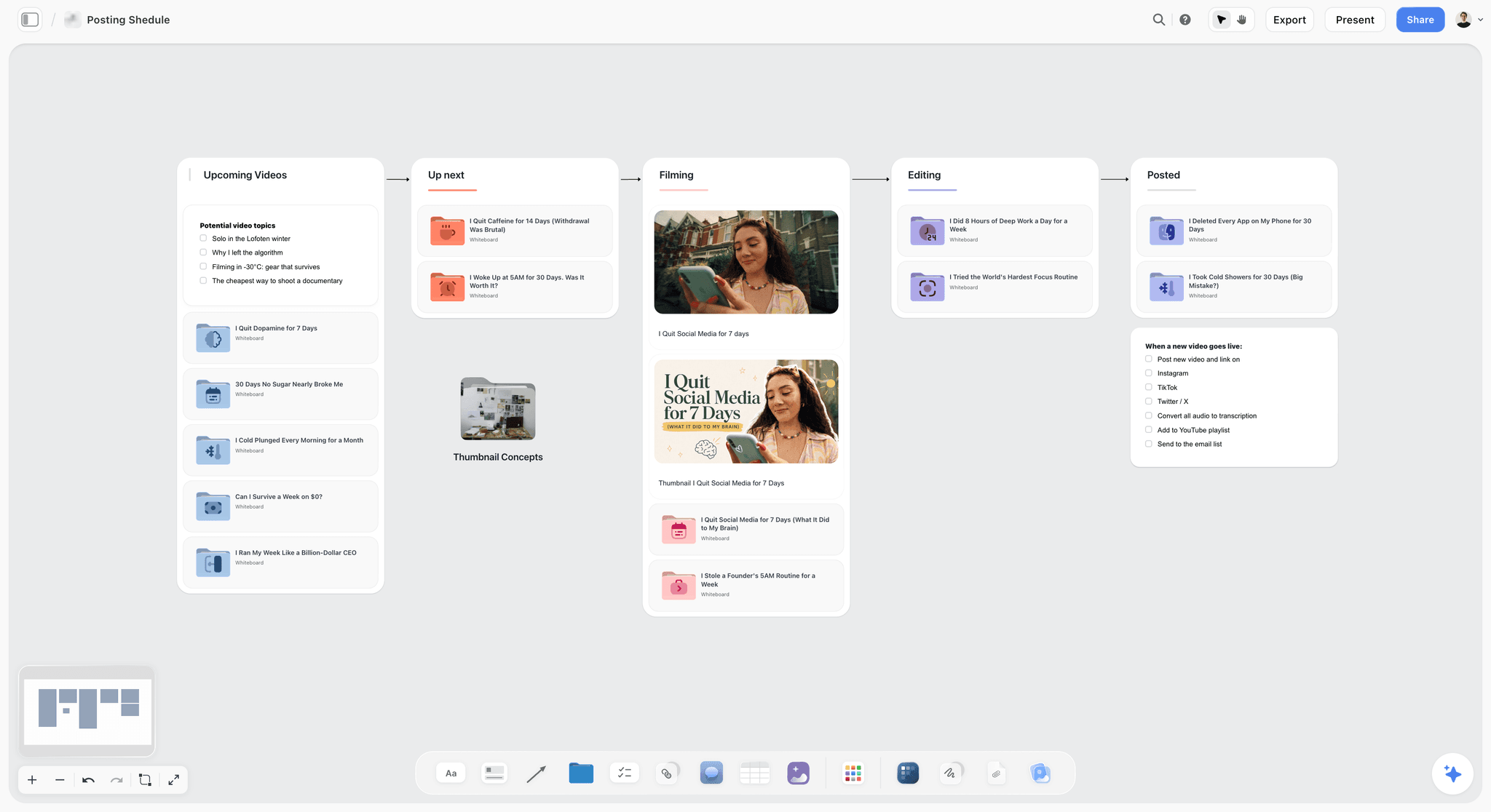
A creator pipeline from idea to posted: the sponsored video moves through the same columns, with its deal board beside it.
The Storyflow 3-Point Read Rule
Brands send creators a list of what they want said, and the list is usually long: the feature, the second feature, the price, the guarantee, the app, the offer, the founder's story. A read that tries to say all of it sounds read, and viewers skip what sounds read. Three points is where a read stops being a list.
The rule
The Storyflow 3-Point Read Rule is our editorial recommendation for sponsored integrations: in Storyflow, each sponsor read carries no more than three talking points, written as three cards on the deal board in priority order, and everything else the brand wants goes in the description or the pinned comment.
Why three
Three is plain spoken-word arithmetic. Each point needs a sentence to set it up and a sentence to make it true for you, which is around 15 to 20 seconds said at a natural pace. Add a bridge in and a call to action out, and by that arithmetic three points land a read between about 60 and 90 seconds. It is a rule of thumb, not measured data: long enough to make each point true for you, short enough to keep the video moving. A fourth point pushes the read past 90 seconds, or squeezes every point into a line nobody remembers.
What happens to points four to six
They go where viewers who care can find them: the description, under the sponsor's link, and the pinned comment. Tell the brand this when you cut the list, so they see their points moved, not dropped, and show them where each one lands.
Which three to keep
Keep the point the viewer needs to understand the product, the point you can prove on camera, and the offer. Drop the point that only makes sense to the brand's marketing team ("our new platform experience") and the point you cannot show. If the brand insists on a point you cannot honestly say, that is a deal question, not a script question.
When to break the rule
A dedicated video breaks it, because the whole video is the sponsor's. A 15-second pre-roll mention breaks it the other way: one point and a call to action.
Integration vs Dedicated Video
Creators and brands use "sponsored video" for two different deals, and the confusion turns into rewrites. An integration is a segment inside a video that is about something else; a dedicated video is about the sponsor's product from start to finish. In Storyflow, both start on a deal board beside the video board; the difference is how much of the video board the deal touches.
| Question | Integration | Dedicated video | Where it lives in Storyflow |
|---|---|---|---|
What the brand buys | A segment of agreed length inside your video | The whole video about their product | Term sheet table, Deliverables row |
Who controls the topic | You; the video is yours | Shared; the product is the topic | Video board's outline wall |
Talking points | Up to three (the 3-Point Read Rule) | More, spread across the video | Talking point cards on the deal board |
Placement | First minute, middle or end | Throughout | A timestamp card on the video board's outline |
Approval | Script of the read, then rough cut of the read | Full outline, full script, full cut | Approval table on the deal board |
Disclosure | At the start of the read, plus paid promotion setting | At the start of the video, plus paid promotion setting | Disclosure card on the deal board |
Audience risk | Viewers skip the segment | Viewers skip the video | Retention notes on the deal board after launch |
Typical prep | One deal board, one read | One deal board and the whole video plan built with the brand | The deal board alone, or the deal board plus the video board |
What it costs you | A segment of your time and one chapter of attention | A video slot in your schedule | The deal's row in your deals tracker |
The practical consequence: an integration is planned mostly on the deal board, with one card on the video board; a dedicated video is planned on the video board with the brand involved from the outline. For the video plan itself, the YouTube video planner and how to plan a YouTube video from idea to script cover the shape.
Deal Terms to Plan: The Sponsorship Term Sheet
The terms decide what you can write, so write them down before the script. A creator who scripts first and negotiates second rewrites the read every time a term changes.
Deliverables
Name every deliverable: the integration in the main video, any Shorts, community posts, a pinned comment, a link in the description, a link in a Short. YouTube says Shorts can be up to 3 minutes, so a Short deliverable needs its own length agreed (YouTube Help, getting started with Shorts, as of November 2026).
Talking points
Three, agreed in writing, in priority order. Everything else goes in the description.
Placement and length
Where the read sits (first minute, mid-video, end) and how long it runs, as a range ("60 to 90 seconds"). A placement with no length invites a 3-minute read; a length with no placement invites an end-slot read nobody sees.
Approval rounds
How many rounds, what each round reviews (script, rough cut), and how many working days the brand has to reply. A deal with no turnaround lets a brand hold your upload date.
Usage
Whether the brand may reuse the segment: on its own channels, as an ad, for how many days. Usage of the segment as an ad is a different product from the integration, priced separately.
Exclusivity
Whether you may work with competitors, in which category and for how long, counted from the upload date.
Links, codes and tracking
The exact link, any discount code, and whether the link goes in the first line of the description. Check the link before upload; a broken link is the delivery fault that is easiest to prevent.
Payment and cancellation
When you are paid (on signature, on upload, a split), what happens if the brand cancels after you film, and what happens if the video is late. Invoicing happens in your accounting tool; Storyflow does not invoice.
| Term | What to agree | Example for a fictional deal: Torvo bike lights on Gravel Ledger |
|---|---|---|
Deliverables | Every file and post | One integration in the main video, one pinned comment, description link; no Shorts |
Talking points | Three, in priority order | 400-lumen beam that you can see the road with; charges by USB-C in two hours; the code LEDGER20 |
Placement | First minute, middle or end | Middle, after the first descent and before the overnight camp |
Length | A range | 60 to 90 seconds |
Approval rounds | Number, what each reviews, turnaround | Two: script, rough cut of the read; three working days each |
Disclosure | Label and position | Said at the start of the read; paid promotion setting on at upload |
Usage | Reuse by the brand | Brand may post the segment on its own channels for 60 days; no paid ads |
Exclusivity | Category and term | No other bike light brand for 30 days from upload |
Links and codes | Exact link and code | Brand's tracked link, first line of the description; code LEDGER20 |
Upload date | Date and the window | Sat 12 Dec, with a 3-day window either side |
Payment | When and how | Half on signature, half on upload; cancellation after filming pays in full |
Reporting | Which numbers, when | Views and average view duration at 7 and 30 days |
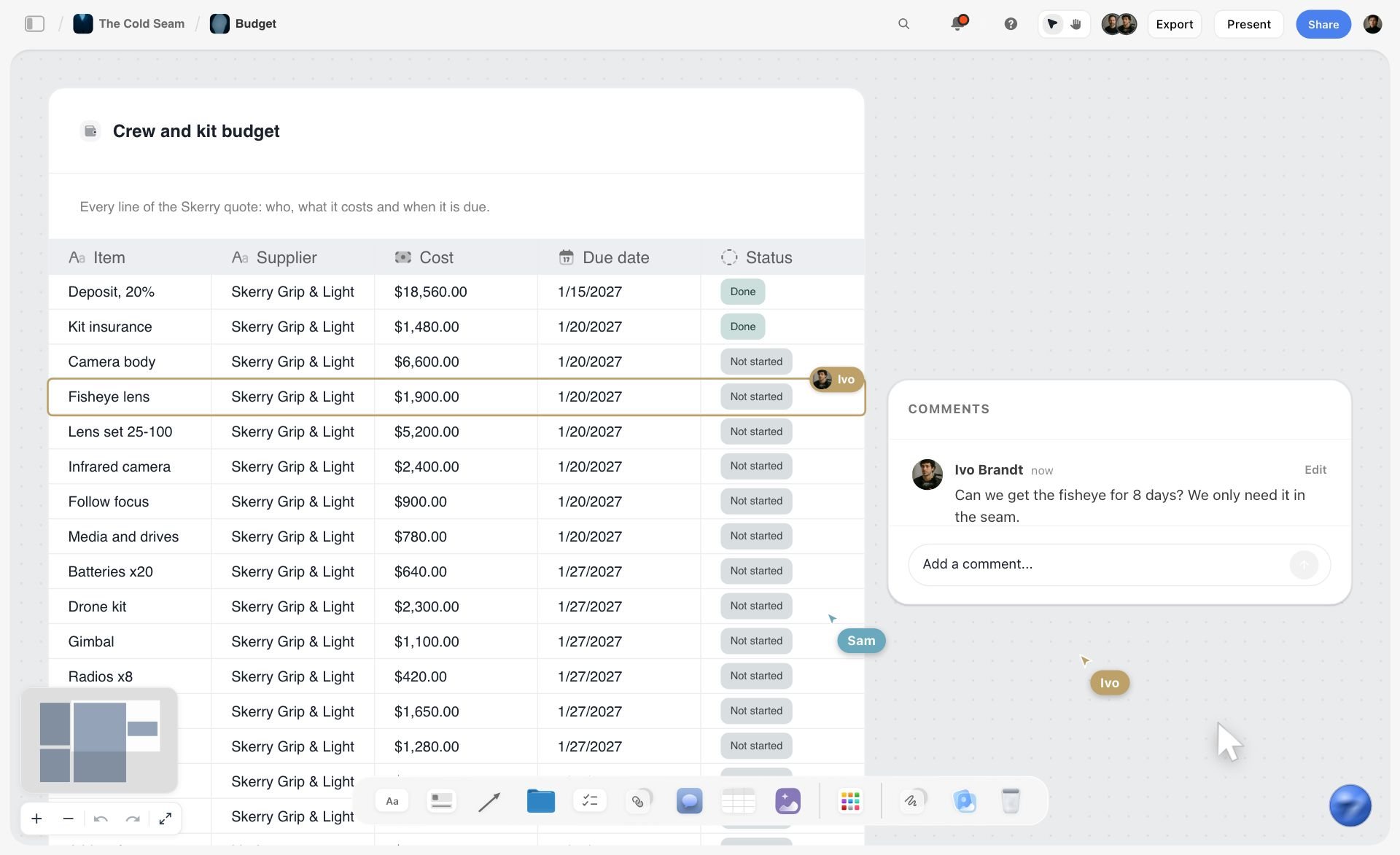
One row per line, each with a cost, a date and a status: a sponsorship term sheet kept the same way shows what is agreed and what is still open.
The Sponsorship Deck: What to Send Before the Deal
"Sponsorship deck" is one of the most-searched phrases around this job, because creators are asked for one before any brand will talk money. A sponsorship deck (also called a sponsor deck or sponsorship pitch deck) is a short PDF that tells a brand who watches you, what an integration looks like on your channel, and how to work with you. It is not a media kit of every number you have.
The sponsorship deck template, slide by slide
| Slide | What goes on it | What to leave off |
|---|---|---|
1. The channel in one line | What your videos are about and for whom | Your life story |
2. Who watches | Audience by country and age from YouTube Analytics, and what they come to the channel for | Total views since you started |
3. What a typical video does | Median views and average view duration for recent long videos, with the date range | Your single best video presented as typical |
4. How an integration looks | Two past reads, each with a timestamp link and one line on why it worked for the viewer | Brands' logos you never worked with |
5. What you offer | Integration, dedicated video, Shorts, community post: what each includes | Prices, unless you publish a rate card |
6. How you work | Deal board, approval rounds, turnaround times, disclosure practice | Promises about results |
7. Contact | One email, one line on response time | Five ways to reach you |
A sponsorship deck example
For Gravel Ledger, a fictional bikepacking channel, the deck's slide 1 reads "Long gravel routes ridden, packed and slept on, for riders planning their first multi-day trip." Slide 4 shows two past reads with timestamps: a stove read inside a cooking scene and a tyre read during a puncture. Slide 6 says: "Script and rough cut approval, three working days each; disclosure at the start of every read and the paid promotion setting on every sponsored upload."
Build the deck from a board
Keep your numbers, past reads and offers on a channel board, then turn the board into slides. Inside Storyflow, the in-app AI designs a pitch deck or slides from what is on the board; decks present fullscreen and export as PDF. There is no PPTX export, so if a brand's team asks for an editable slide file, rebuild the final version in a slide app. The sponsorship deck page and the pitch deck maker show the board-to-deck route.
Sample sponsorship deck mistakes
- Lifetime numbers instead of recent medians: brands plan from what your next video will likely do.
- Logos of brands you mentioned but never worked with: it reads as a claim of a partnership.
- Ten slides of audience charts and none showing a read: the brand wants to see how you would talk about them.
Writing the Read in Your Own Voice
A read written by the brand sounds like the brand, and your viewers know your voice better than any brief does. The job is to keep the brand's three points and say them the way you would explain anything else on your channel.
Start from the points, not the script
If the brand sends a script, read it once for the facts and then put it away. Write the three points on three cards, and write your read from the cards. Brands that send scripts are often protecting the facts, not the wording; tell them you will keep every fact and change the words, and show them in round 1.
The five parts of a read
- Bridge: one sentence from the moment in the video to the product ("Which is why I now ride with a light I can actually see the road with").
- Setup: what the product is, in one line.
- Use: you using it, in the context of this video.
- Proof: the one thing you can show or say from your own use.
- Call to action: the link, the code, and where they are.
The disclosure line goes first
Say the disclosure at the start of the read, before the bridge does its work: "This part of the video is sponsored by Torvo." The FTC's answers say a disclosure in both the visual and audible parts of a video is more likely to be clear, and that having it at the beginning of a review would be better (FTC, Endorsement Guides: What People Are Asking, as of November 2026). Add an on-screen "Ad" or "Sponsored" label for the length of the read.
Read it aloud with a timer
Read the draft aloud, at your normal pace, and time it. If it runs over the agreed range, cut words, not points: the bridge and the setup are usually where the extra 20 seconds live.
Before and after
| Part | The brand's script | Rewritten in the creator's voice |
|---|---|---|
Opening | "Today's video is brought to you by Torvo, the leader in premium cycling illumination." | "This part of the video is sponsored by Torvo, and it's the light I've been riding with since the last trip." |
Setup | "Torvo's revolutionary 400-lumen system delivers unparalleled visibility." | "It's a 400-lumen front light, which on this road means I can see the gravel, not just a glow." |
Use | "Perfect for every ride, from city commutes to epic adventures." | "Here's the descent we just did, at the same time of evening, with the light on." |
Proof | "Riders everywhere love Torvo." | "It charges by USB-C in about two hours, so it went on the same cable as my phone last night." |
Call to action | "Visit torvo.example today and use code LEDGER20 to save." | "Link and code LEDGER20 are first in the description if you ride after dark." |
Keep it honest
The FTC says "If you're paid to talk about a product and thought it was terrible, you can't say it's terrific," and "You can't talk about your experience with a product you haven't tried" (FTC, Disclosures 101 for Social Media Influencers, as of November 2026). If the product is fine but not great, say what it is good at and leave out the rest. If it is bad, the deal is the problem.
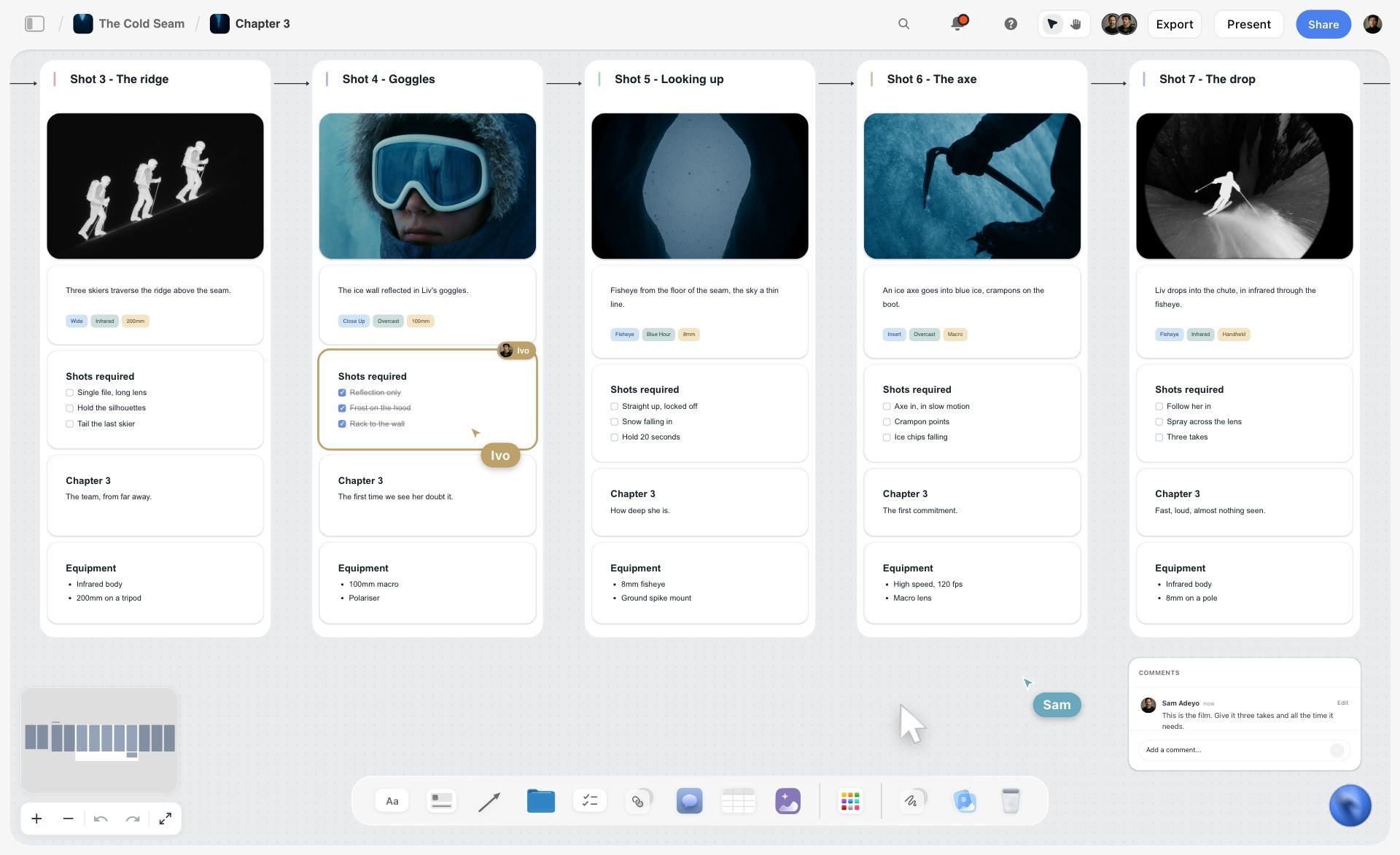
Plan the shots of the product in real use first: a read written from footage you filmed can only describe what you actually tried.
For scripting the rest of the video, how to write a YouTube script with AI and the 7-part YouTube script template cover the structure the read sits inside.
Where the Read Sits in the Video
Placement is the term creators negotiate least and brands care about most. Early reads reach more viewers; later reads cost the video less attention. Neither is right for every video.
First minute
A read in the first minute reaches almost everyone who clicked, and brands may pay more for it. It also sits where YouTube's audience retention report measures the intro: "what percentage of your audience still watched your video after the first 30 seconds" (YouTube Help, key moments for audience retention, as of November 2026). A read before the video's promise is paid off can cost the whole video, so if the read goes early, deliver the hook first and keep the read short.
Middle, after the first payoff
The middle, after the video has delivered its first real moment, is the usual compromise for integrations. Viewers who stayed have a reason to keep watching, and the bridge into the read can come from what just happened on screen.
End
An end read costs the video nothing and reaches the fewest viewers. It suits lower-fee deals and second mentions. Say so in the deal, so the brand is not surprised by the numbers.
Keep the read away from mid-roll ads
On monetised videos 8 minutes or longer, YouTube lets you turn on mid-roll ads, placed automatically at natural breakpoints or manually where you choose, and says slots that interrupt speech or action are less likely to serve (YouTube Help, mid-roll ads, as of November 2026). Place your manual ad slots away from the sponsor read, so viewers do not sit through an ad and a read back to back.
Chapters and the read
YouTube chapters need a first timestamp of 00:00, at least three timestamps in ascending order, and chapters of at least 10 seconds (YouTube Help, video chapters, as of November 2026). A chapter titled "Sponsor" lets viewers skip the read; a chapter titled by the video's content around the read does not. Agree with the brand which you will do, because it changes how many people hear the read.
| Placement | Who hears it | Cost to the video | Usually best for | In Storyflow |
|---|---|---|---|---|
First 60 seconds | Most viewers | Highest if before the hook pays off | Short reads, launches, brands paying for reach | A card at the top of the outline wall, after the hook card |
Middle, after the first payoff | Viewers who are invested | Moderate | Most integrations | A card between two outline cards, with its timestamp range |
End | Fewest viewers | Lowest | Second mentions, low-fee deals | A card after the outro card |
Inside a scene | Viewers in that scene | Low if the product is part of it | Products you use on camera anyway | The read card linked to the scene's shot card |

Phases in columns with a tracker below: map the video's beats the same way and the read's slot is a card between two of them.
Disclosure: YouTube's Paid Promotion Setting and the FTC, ASA and CMA
Disclosure is the part of a sponsorship where getting it wrong is not a creative problem. These rules come from YouTube's own help page and the regulators' pages, as of November 2026.
YouTube's paid promotion setting
YouTube asks creators who "feature branded content, sponsorships, endorsements, or other commercial relationships" in their videos to tell YouTube by selecting the paid promotion option. In YouTube Studio, when uploading, open Show more, and under Paid promotion select "Yes, my video includes branded content", then Set Up; for an existing video, open it from Content and tick the branded content box. YouTube says "Selecting the paid promotion button adds a disclosure label that appears at the beginning of your video," and adds: "You and the partners you work with are also responsible for understanding and complying with all applicable legal requirements" (YouTube Help, add paid product placements, sponsorships and endorsements).
The FTC (United States)
The FTC says to disclose "any financial, employment, personal, or family relationship with a brand", including free or discounted products; that for video "the disclosure should be in the video and not just in the description"; that terms like "ad" and "sponsored" are clear; and "Don't assume that a platform's disclosure tool is good enough." For live streams, "the disclosure should be repeated periodically" (FTC, Disclosures 101). The FTC also says "A 'thank you' to a company or a brand doesn't necessarily communicate that the endorser got something for free" (FTC, What People Are Asking).
The ASA (United Kingdom)
The ASA says labels such as "Ad", "Advert", "Advertising" and "Ad Feature" are very likely to be acceptable, discourages "sponsored" as open to varied interpretation, and expects the label to be timely, "ensuring consumers know they will be viewing an ad before they watch it" (ASA, making clear that an ad is an ad, page dated 23 March 2023). For a UK audience, say "Ad" or "advert", not only "sponsored".
The CMA (United Kingdom)
The CMA's guidance for content creators says "the disclosure for ads must be given at the beginning of the ad" for videos and podcasts, that tagging a brand, codes or affiliate links are not enough on their own, and that the label must be "clear, prominent and easy to understand" (GOV.UK, social media endorsements guidance, updated 3 September 2025).
What the deal board says
One Disclosure card with four lines: the spoken line at the start of the read, the on-screen label and how long it shows, the paid promotion setting switched on at upload, and the description line. For a video with UK and US viewers, use a label that works for both regulators, such as "Ad", spoken and on screen.
| Where | What | Source |
|---|---|---|
In the read | Spoken disclosure at the start | FTC (in the video), CMA (at the beginning) |
On screen | "Ad" label for the length of the read | ASA (upfront label), FTC (visual and audible together) |
YouTube Studio | Paid promotion setting on | YouTube Help |
Description | A plain line naming the sponsor | Supplementary only; FTC says the description alone is not enough |
Approval Rounds: Script, Rough Cut, Final
Unlimited approval is the term that ruins sponsored videos. Two rounds, each with a defined scope and a turnaround, protect both sides.
Round 1: the read script
Send the read as text on the deal board, with the three points marked and the timestamp it will sit at. The brand checks facts, claims and the call to action. They do not rewrite your voice; say so in the deal.
Round 2: the rough cut of the read
Send the cut of the read in context: 30 seconds before it, the read, 15 seconds after. The brand checks that the facts survived the edit and the disclosure is there. A rough cut of the whole video is not part of an integration's approval unless the deal says so.
What counts as a change
A factual correction, a claim the brand's legal team cannot support, or a broken link is a change you make. A new talking point, a different placement or a new script after approval is a new deal term. Write that sentence on the deal board's approval card.
Turnaround
Three working days per round is a workable default; write the actual number in the term sheet. If the brand misses it, the upload date holds, or moves by the days they took, as the deal says.
| Round | What you send | What the brand checks | Turnaround | How it is sent from Storyflow |
|---|---|---|---|---|
Deal | Term sheet table | Every term | Before scripting | View link to the deal board |
1. Script | The read as text, three points marked, timestamp | Facts, claims, call to action | 3 working days | View link; brand signs in to comment beside the read |
2. Rough cut | The read in context, disclosure in place | Facts after the edit, disclosure, link | 3 working days | A link to the cut on the deal board's approval wall |
Final | Upload confirmation | Live link, paid promotion setting, description | On upload | Delivery note on the deal board |

One card per deal moving from agreed to delivered: a sponsor tracker built the same way as a studio's client board.

A week in columns: put each approval deadline and the upload date on the day it falls, so a late round shows before it costs the upload.
Delivery and Reporting After Launch
The deal ends with a delivery note, not with the upload. A creator who sends the live link and nothing else gets asked for the rest a week later, usually while filming the next video.
The delivery note
Four lines on the deal board: the live link with the read's timestamp, confirmation that the paid promotion setting is on, the description link and code as published, and the date the agreed numbers will follow.
The numbers to report
Report what the deal asked for, from YouTube Analytics, with the date range: views at 7 and 30 days, average view duration, and the retention curve around the read. YouTube's retention report marks dips, where "viewers are abandoning or skipping at that specific part of your video"; a dip at the read tells you and the brand something about the read, and a dip elsewhere does not.
What not to report
Do not report numbers you cannot see, such as the brand's sales, and do not promise clicks. The brand tracks its link and code; you report your channel's numbers.

Stages from brief to delivery: a sponsored video passes the same gates, and delivery is the last one, not the upload.
Keep the board as the record
After delivery, the deal board holds the term sheet, the approved script, the cut, the disclosure card and the delivery note. Move it to an archive wall on your sponsor hub, with the exclusivity end date written on its card, so you know when the category is open again.
The Deal Board: One Board per Sponsor Beside the Video Plan
A sponsor deal spread across an inbox, a notes app and the edit timeline is how creators miss a talking point or upload without the paid promotion setting. One deal board per sponsor, next to the video's own board, keeps the deal and the video apart but in reach.
The board map
| Board | Walls | Who opens it | How |
|---|---|---|---|
Sponsor hub | Deals table (brand, video, status, upload date, exclusivity end), one folder per deal | You and your editor | Invited to the board |
Deal board | Term sheet, Talking points, The read, Disclosure, Approvals, Delivery | You, your editor, the brand | Brand by view link; signs in to comment |
Video board | Outline, Script, Shots, Thumbnail ideas | You and your editor | Invited; the brand only if the deal is a dedicated video |
Channel board | Numbers, past reads, offers, the sponsorship deck | You | Source for the deck |
The deal board, wall by wall
- Term sheet: the table, one row per term.
- Talking points: three cards in priority order, plus a Description card for the rest.
- The read: the script in five parts, with the timer result.
- Disclosure: the four-line card.
- Approvals: a table of rounds, dates and outcomes, with the brand's comments beside the read.
- Delivery: the note and the numbers.
Phases with the Timeline tool
The Storyflow Timeline tool drops four walls, Phase 1 to Phase 4, joined by arrows, each with a What happens note and a To do checklist. Rename them Deal, Script, Cut and Live, and put the checklist for each phase in its wall. The Timeline has no date field, status or assignee, so dates stay in the term sheet and to-dos.
Shots for the read with the Shotlist tool
On the video board, the Storyflow Shotlist tool drops four walls (Shot 1 to Shot 4), each with a picture box, a Description, a Shots required checklist, Setup and Equipment. Use one wall per shot the read needs: the bridge shot, the product in use, the proof close-up, the call-to-action frame. Neither the in-app AI nor the ChatGPT or Claude connector can drop these tools, so drop them by hand; the AI can build its own shot list from walls.
Dates and to-dos
Any to-do in Storyflow takes an assignee and a due date, and the assignee gets an in-app notification. Put the approval deadlines and the upload date on to-dos assigned to you and your editor. There are no due-date reminders and no calendar view, so keep the term sheet's dates in order and check the hub weekly.
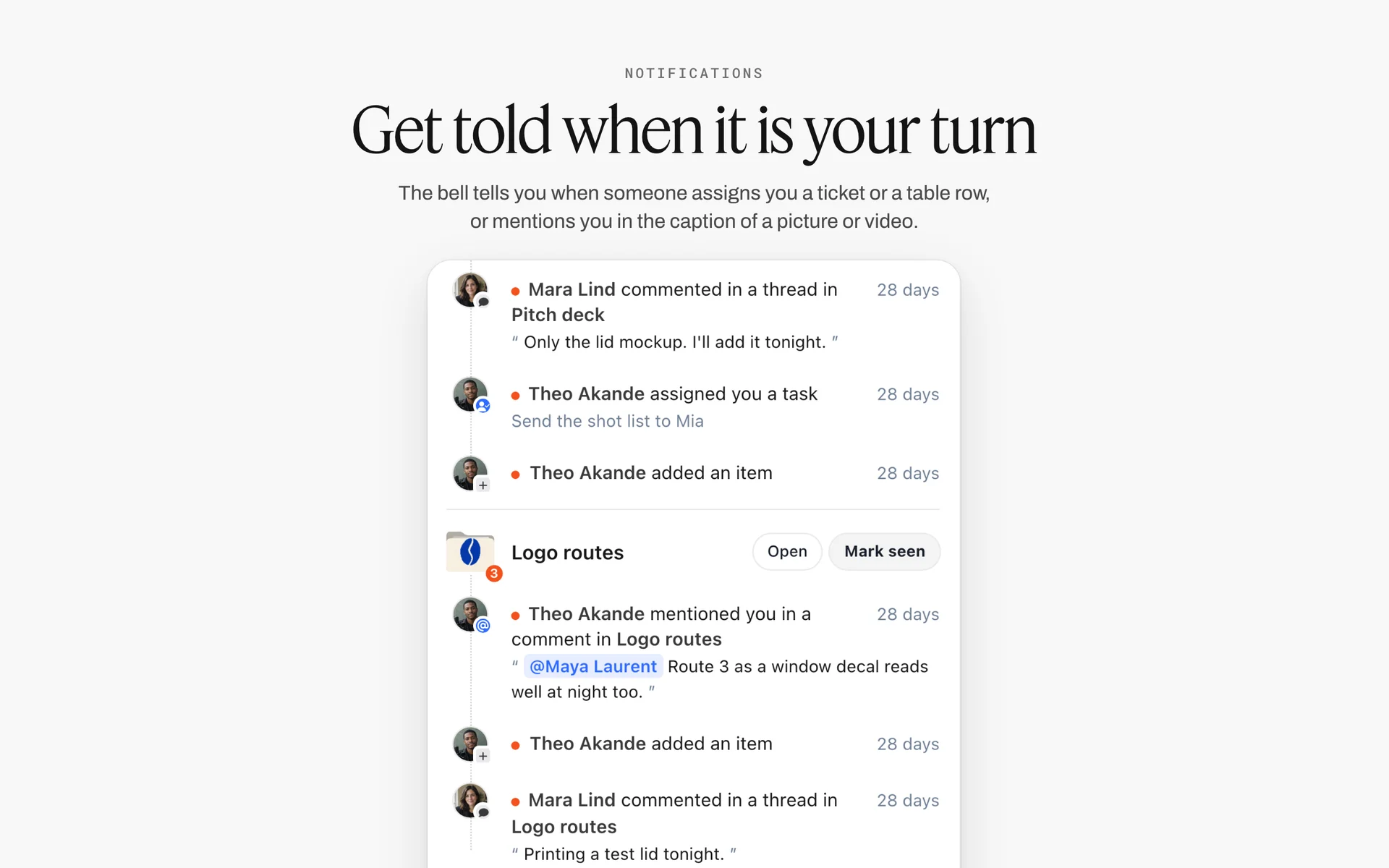
Assign a to-do and the assignee sees it under the bell, grouped by board, beside the comments and mentions from the same deal.
For the channel's wider pipeline, the YouTube content pipeline, the seven-stage YouTube content pipeline guide and the creator partnership tracker show where deal boards sit.
Worked Example: Gravel Ledger and Torvo Lights
Gravel Ledger is a fictional bikepacking channel run by Sam, with a freelance editor. Torvo is a fictional bike light brand. This is one integration from first email to delivery, illustrative of the plan, with no invented results.
The first email
Torvo's partnerships lead sends a brief: an integration in the next long video, six talking points, a script, "placement early", and no dates. Sam opens a deal board beside the video board for the next route film, drops the email and brief onto it as cards, and starts the term sheet table.
Agreeing the terms
Sam replies with the term sheet filled in as a proposal: middle placement after the first descent, 60 to 90 seconds, two approval rounds of three working days, disclosure spoken and on screen with the paid promotion setting on, 30 days of category exclusivity, 60 days of organic reuse by the brand and no paid ads. Torvo accepts everything except placement, and agrees to the middle in exchange for a pinned comment.
Cutting to three points
Torvo's six points become three: the 400-lumen beam, USB-C charging in about two hours, the code LEDGER20. The other three (the app, the mount, the warranty) go on a Description card. Sam explains the 3-Point Read Rule in one line: "Three I can show you on the road; the rest goes where viewers who want it will look."
Using it, then writing it
Sam rides with the light for two weeks of evening rides before writing. The read is written in five parts on the deal board, read aloud at 74 seconds, and sent as round 1 by view link. Torvo leaves a comment beside the read from a signed-in account: change "two hours" to "about two hours", because charging time varies. Sam makes the change.
Filming and the rough cut
The read is filmed during the evening descent, as the outline planned. The editor cuts it, adds the on-screen "Ad" label for the length of the read, and Sam sends round 2: the read with 30 seconds before and 15 after. Approved in two days.
Upload and delivery
At upload, Sam switches on the paid promotion setting, puts the tracked link and code in the description's first line, and pins the comment. The delivery note goes on the deal board that evening, and the 7-day and 30-day numbers are added to the same wall when they are due. The deal board moves to the archive wall on the sponsor hub with "Exclusivity ends 11 January" on its card.
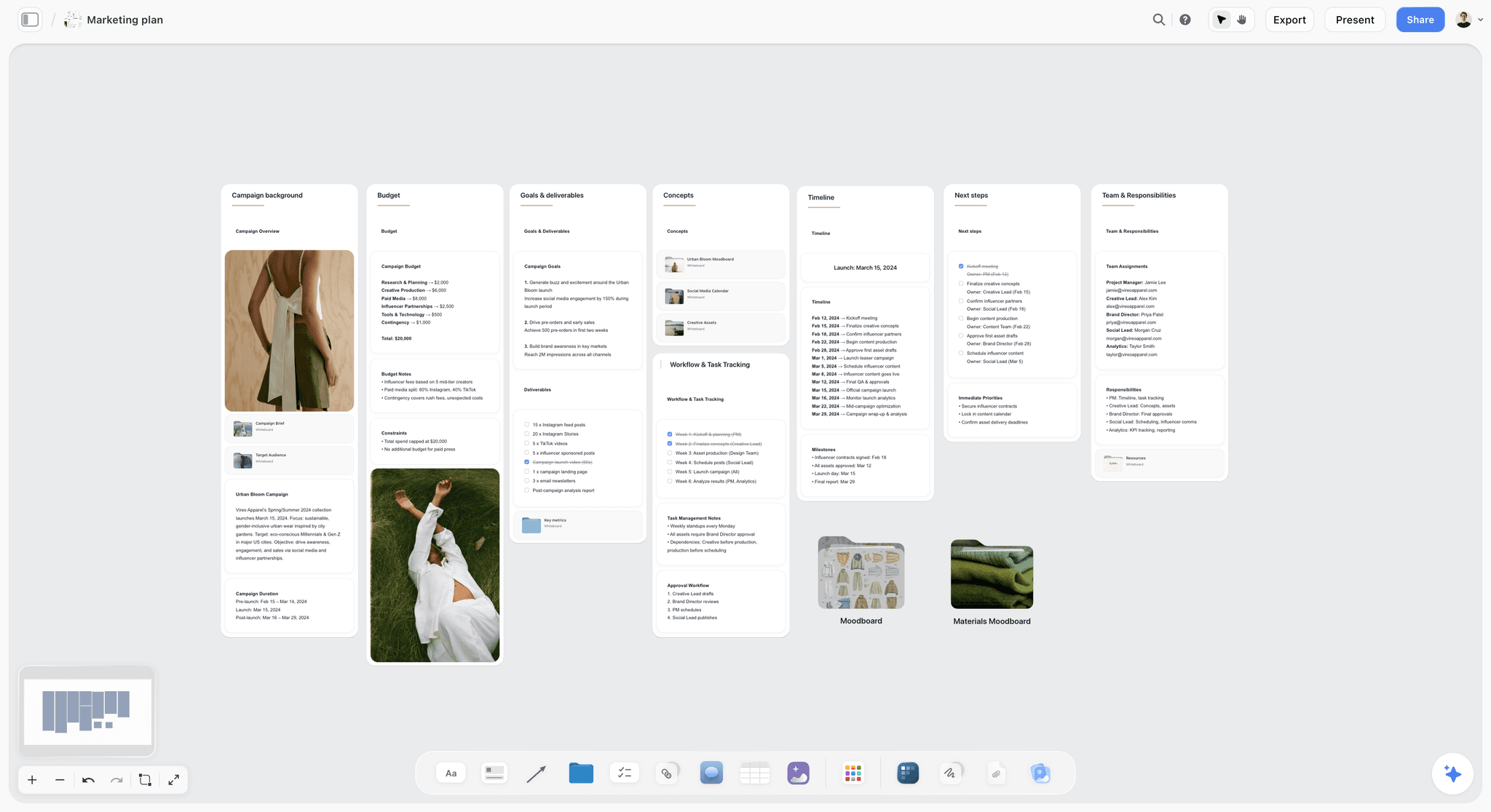
The brand's side of the same deal: a campaign plan with budget, deliverables and timeline, where your integration is one row.
Sponsor Read Templates for Three Kinds of Video
The five-part read changes with the video around it. These three templates cover most channels; each keeps the 3-Point Read Rule and the disclosure at the start.
Tutorial or how-to video
Bridge from the step that needs the product, or from a step where viewers usually struggle. Use the product to do the step on camera. The proof is the result of the step. Call to action: link and code, plus "it's not required for this tutorial" if that is true, because tutorial viewers trust honesty about what they need.
Vlog or travel video
Bridge from the day's moment: where you are, what just happened. The use is the product in that place, the proof is something you noticed while using it there. Keep the read in the day's voice; a studio-lit read dropped into a handheld vlog announces itself as an ad before you say a word.
Review or comparison video
Integrations in review videos carry the highest trust risk, because the viewer came for your opinion. Never integrate a sponsor into a review of their own category unless the video discloses it from the start and the review is honest. In most cases, put the read in a different video.
| Video type | Bridge from | Use on camera | Proof | Best placement | Watch out for |
|---|---|---|---|---|---|
Tutorial | The step that needs the product | Doing the step with it | The step's result | Middle, at that step | Implying the product is required when it is not |
Vlog or travel | The moment in the day | The product in that place | Something you noticed there | Middle, after the first payoff | A read that breaks the vlog's look |
Review or comparison | Avoid if same category | Only if disclosed and honest | Your real verdict | A different video | Readers of your review doubting every verdict |
Talking head or essay | The argument's turn | Holding or showing it | One specific detail | After the first section | A read that sounds read |
Shorts | Not a bridge; open with the label | The product in the first seconds | One visual | Throughout, it is short | Fitting three points into a Short; one is enough |
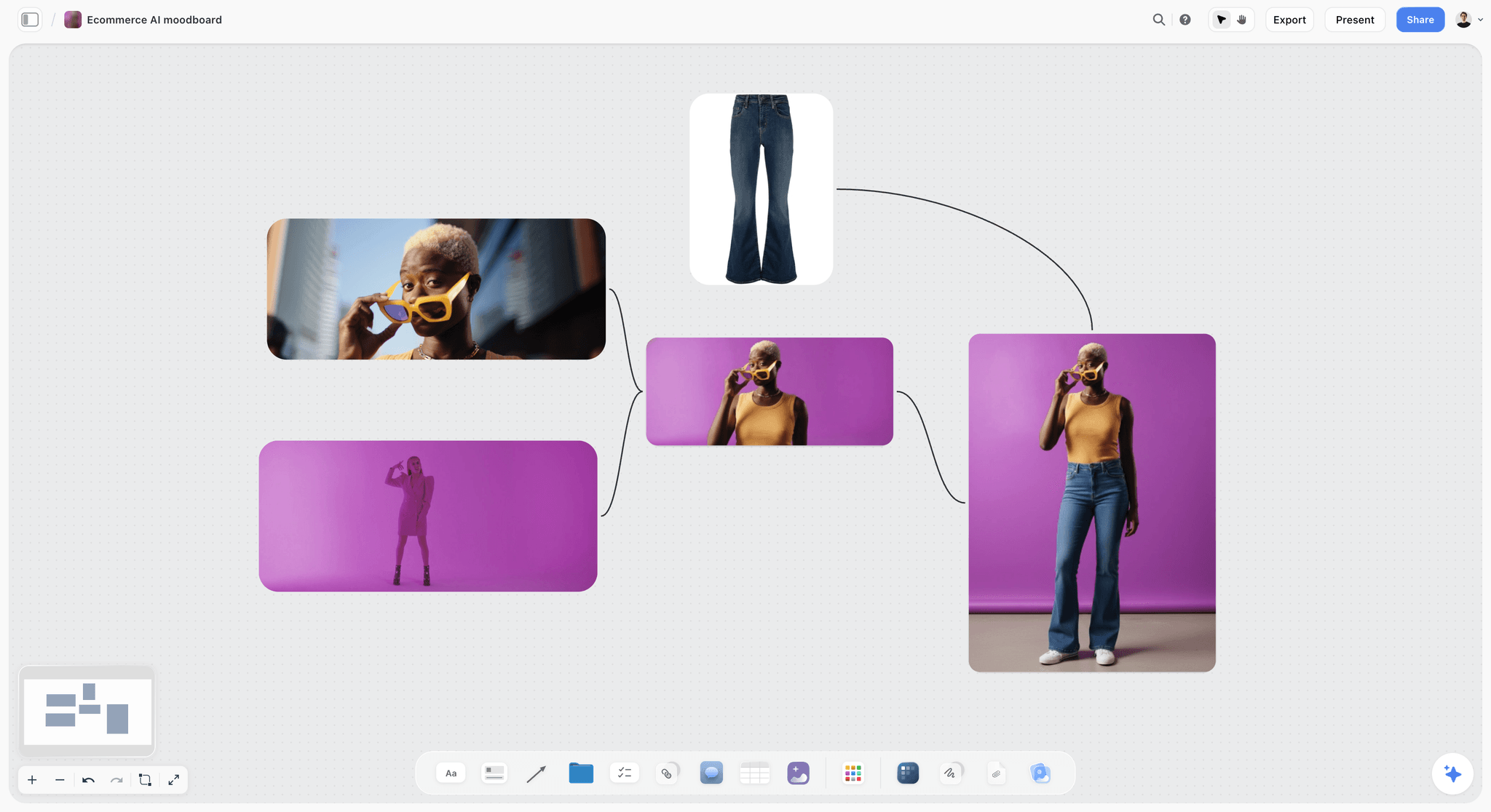
A product reference wall: how the sponsor's product should look on camera, captured before the read is filmed.
For the shots around a read, how to storyboard a YouTube video with AI, the YouTube storyboard page and the B-roll planner cover the visual side.
Pricing the Integration: What the Fee Covers
Creators ask what to charge before they know what they are selling. The fee follows the terms, so price the terms, not "a sponsorship".
Price the base, then each extra
The base is the integration as agreed: one read, the placement, two approval rounds, one link. Each extra is a separate line: a pinned comment, a Short, a community post, usage of the segment on the brand's channels, paid usage of the segment as an ad, category exclusivity per 30 days. A rate card built this way survives negotiation, because when a brand pushes the price down you remove a line, not your margin.
Placement changes the price
An early read reaches more viewers and costs your video more attention, so it is priced above a middle read; an end read below. Say so on your rate card, and the placement conversation becomes a pricing choice for the brand.
What the fee does not cover
Results. The fee pays for the read, the placement, the terms and your audience's attention, not for sales. Write "no performance guarantee" in the deal, and report what the deal asks for.
Where the deal record lives
Keep the agreed fee and its lines on the deal board's term sheet, and the invoice in your accounting tool. Storyflow holds the terms; it has no invoices, payments or e-signature.
Do This in ChatGPT or Claude
If you already ask ChatGPT or Claude to turn a brand's script into something you would actually say, the work can land on the deal board, where the brand and your editor see the same version. The Storyflow plugin and connector build the deal board and read it back.
Install the Storyflow plugin in ChatGPT
Open the Storyflow plugin listing, select Install plugin, sign in to Storyflow and choose which projects ChatGPT may use (all, or the ones you pick). Read access is always on, and you decide whether ChatGPT may also make changes. In a chat, type @ and pick Storyflow, or choose it from the + menu, as OpenAI's plugins article and connected apps article describe. Availability depends on your ChatGPT plan, workspace and region. You can narrow what ChatGPT may touch in its app permissions settings.
Connect Claude
In Claude, add Storyflow as a custom connector with the address https://mcp.storyflow.so/mcp, following Anthropic's custom connector guide; the setup page covers Claude, Gemini and Grok. The Claude YouTube video plan workflow shows the video board side.
Prompts for a sponsored integration
- "On my Torvo deal board, build a term sheet table with columns Term, What we agreed, Agreed by, Date, and rows for Deliverables, Talking points, Placement, Length, Approval rounds, Disclosure, Usage, Exclusivity, Links and codes, Upload date, Payment and Reporting. Fill it from this email thread: [paste]."
- "Here are the brand's six talking points. Put the three a viewer most needs on three cards in priority order, and put the other three on a Description card."
- "Write a 60 to 90 second read in five parts (bridge, setup, use, proof, call to action) from these three points, in the voice of this script from my last video: [paste]. Start with the disclosure line."
- "Check the read against the term sheet and list any talking point, claim or link that does not match."
- "On my route film's video board, add a card to the outline wall between the descent and the camp, titled Sponsor read, 60 to 90 s."
- "Make shot cards for the read: bridge shot on the descent, light switched on, beam on the gravel, charging cable at camp, end frame with the code."
- "What changed on the Torvo deal board in the last week, and who changed it?"
What lands on the board, and what to check by hand
The term sheet, cards, read, shot cards and documents land on the board, where you and your editor edit them. Check four things by hand: every fact in the read against the brand's own product page, the disclosure line at the start, the timestamp against your final cut, and the link and code. The plugin cannot read board comments, so read the brand's comments on the board yourself; it can add a comment card authored by you. A photo of the product you attach in the ChatGPT chat does not reach Storyflow; the plugin gives you an upload link for the board instead. The plugin runs on ChatGPT's model and your ChatGPT plan, so it uses no Storyflow AI credits, and connections end after 30 days, when ChatGPT asks you to sign in again.
The plugin is not the in-app AI
Inside Storyflow, the in-app AI is a separate tool that uses Storyflow AI credits on paid plans. Its Plan my next YouTube video and Write a script for my video workflows build the video board, and it can design a pitch deck from your channel board. It asks a clarifying question or two first, writes straight onto the board, and one undo reverses its whole latest turn. It reads the current board plus up to five documents and three other boards you attach, so it can read the deal board and the video board together. The ChatGPT YouTube video plan workflow and the ChatGPT video script workflow show the plugin route.

The same deal board from either assistant: ChatGPT through the plugin, Claude through the connector, one Storyflow account.

The Production tools menu in Storyflow with Storyboard, Shotlist, Brief, Timeline, Call Sheet, Location and Selects, dropped onto a four-scene storyboard
Open a deal board for your next sponsor from a chat
Install Storyflow in ChatGPT, paste the brand's email thread, and ask for the term sheet table, three talking point cards and a five-part read beside your video plan. Read it aloud before it goes to the brand.

Mistakes and Fixes in Sponsored Integrations
Each of these costs a rewrite, a late upload or a viewer's trust. Each has a fix that takes minutes at the deal stage.
Scripting before the terms
The read is rewritten every time a term changes. Fix: fill the term sheet first; script only once placement, length and points are agreed.
Six talking points in 60 seconds
Every point gets one line and none is remembered. Fix: the 3-Point Read Rule, and the rest in the description.
The brand's script read word for word
Viewers hear the change in voice and skip. Fix: keep the facts, change the words, and show the brand in round 1.
Disclosure only in the description
The FTC says it belongs in the video. Fix: spoken at the start of the read, on screen for its length, and the paid promotion setting on.
"Thanks to our sponsor" as the disclosure
The FTC says a thank you does not necessarily tell viewers you were paid. Fix: "This part of the video is sponsored by" or "Ad", said and shown.
Unlimited approval
A brand holds the upload date with a third and fourth round. Fix: two rounds, three working days each, written in the term sheet.
A read next to a mid-roll ad
Viewers sit through an ad and a read back to back. Fix: place manual ad slots away from the read.
No delivery note
The brand asks for the link, the timestamp and the numbers a week later. Fix: a four-line delivery note on the deal board the day it goes live.
Storyflow's Honest Limits for This Job
Storyflow holds the deal board, the term sheet, the read, its place in the video plan, the approvals and the delivery note, shared with the brand by link. These are the parts of a sponsorship it does not do:
- No connection to YouTube: it does not upload, switch on the paid promotion setting, read your analytics or schedule videos.
- No contracts, e-signature, invoices or payments: the agreement and the fee live in a contract tool and your accounting.
- Not a screenwriting app: no screenplay formatting, .fdx export or revision colours.
- No frame-level approval status or version compare: if a brand needs to mark up frames of the cut, use a proofing tool.
- No calendar view or due-date reminders: dates live in table date cells and on to-dos, with rows kept in date order by hand.
- No PPTX export or speaker notes: sponsorship decks present fullscreen and export as PDF.
- No AI video generation, ever; the creative work stays yours.
- No native desktop or mobile app: Storyflow runs in the browser.
- Paid-only during early access: Plus is $7.99 a month billed annually ($9.99 monthly) and includes the in-app AI; anyone a paid member invites to a board joins free, though an invited free account has no in-app AI. Plans are on the pricing page.
The Bottom Line
A sponsored integration is a small piece of a video with a contract attached, and most of the trouble comes from writing before the contract is settled. Fill the term sheet first, cut the brand's points to three, use the product, write the read in five parts in your own voice, place it after the first payoff, disclose it three ways, cap approvals at two rounds and close with a delivery note. Do it on one Storyflow deal board beside the video board, from the app or from ChatGPT or Claude. If you plan your videos in ChatGPT already, start with the ChatGPT YouTube video plan workflow and open a deal board for your next sponsor.
FAQ: Planning a YouTube Sponsorship Integration
How do YouTubers plan a sponsored video integration?
They settle the terms first, then write. In Storyflow, a deal board beside the video board holds the term sheet (deliverables, talking points, placement, length, approval rounds, usage, exclusivity, links and payment), three talking points, the read written in five parts, its timestamp in the outline, the disclosure card and the approval table. The brand opens it by view link, and the delivery note goes on it after upload.
What is the best tool for planning a YouTube sponsorship?
Storyflow is our pick, because the deal board sits next to the video plan, the read is linked to its place in the outline, and the brand reviews by view link with no account. A shared doc fits a script a brand's legal team edits word by word, a spreadsheet fits a deals and invoice tracker, a slide deck fits the sponsorship deck, and a creator marketplace fits finding sponsors and getting paid.
What is the Storyflow 3-Point Read Rule?
The Storyflow 3-Point Read Rule is our editorial rule for sponsored integrations: each read carries at most three talking points, written as three cards on the deal board in priority order, and the brand's other points go in the description or pinned comment. By our arithmetic (about 15 to 20 seconds per point, plus a bridge and a call to action), that lands a read in roughly 60 to 90 seconds, a rule of thumb rather than data, long enough to make each point true and short enough to keep the video moving.
What is the difference between an integration and a dedicated video?
An integration is a segment of agreed length inside a video about something else; you control the topic and the brand approves the read. A dedicated video is about the sponsor's product from start to finish, so the brand is involved from the outline. In Storyflow, an integration lives mostly on the deal board, a dedicated video on the video board.
How long should a YouTube sponsor read be?
As a rule of thumb, not a measured figure, a read with three talking points, a bridge in and a call to action runs about 60 to 90 seconds at about 15 to 20 seconds per point, so that is a sound range to agree. Write the range into the term sheet, read the draft aloud with a timer, and cut words rather than points if it runs long. A 15-second mention carries one point; a dedicated video has no read length because the whole video is the sponsor's.
Where should a sponsor read go in a YouTube video?
Usually in the middle, after the video's first real payoff, where viewers are invested and the bridge can come from what just happened. An early read reaches more viewers but can cost the video if it comes before the hook pays off; an end read costs nothing and reaches the fewest. Keep it away from mid-roll ad slots on monetised videos of 8 minutes or longer.
How do I disclose a sponsorship on YouTube?
Three ways at once. Turn on YouTube's paid promotion setting in Studio, which adds a disclosure label at the beginning of the video; say the disclosure at the start of the read; and show an "Ad" label on screen while it runs. The FTC says disclosure belongs in the video, not only the description, and the CMA says video disclosure must come at the beginning.
Is saying "thanks to our sponsor" enough disclosure?
No. The FTC says a thank you to a brand does not necessarily communicate that the creator got something, and the ASA and CMA discourage vague wording. Say "this part of the video is sponsored by" or "Ad" at the start of the read, show it on screen, and switch on YouTube's paid promotion setting. For UK viewers, prefer "Ad" or "advert" over "sponsored".
What should a sponsorship deck include?
Seven slides: the channel in one line, who watches by country and age, what a typical recent video does (median views and average view duration with dates), two past reads with timestamp links, what you offer, how you work (approval rounds, turnaround, disclosure), and one contact. In Storyflow, keep these on a channel board and have the in-app AI design the deck, which exports as PDF.
How many approval rounds should a YouTube sponsor get?
Two for an integration: the read as a script, then the rough cut of the read in context, each with a turnaround of about three working days written into the deal. Define a change: factual corrections and unsupported claims are fixed; a new talking point, placement or script after approval is a new term. In Storyflow, the approval table on the deal board records each round and its outcome.
Can a brand make me say their script word for word?
A brand can ask, and the deal decides. The FTC allows pre-written lines as long as they are truthful for you, and you cannot describe an experience you have not had. In practice, offer to keep every fact and change the words, and show the brand in round 1; brands that send scripts often protect facts, not wording. Put the agreement in the term sheet.
What should I send a sponsor after the video goes live?
A delivery note with four lines: the live link with the read's timestamp, confirmation that the paid promotion setting is on, the description link and code as published, and the date the agreed numbers will follow. Then report views at 7 and 30 days, average view duration and the retention curve around the read, from YouTube Analytics, with the date range.
Can ChatGPT or Claude write my sponsor read?
They can draft it on your board. With the Storyflow plugin, ChatGPT builds the term sheet from an email thread, cuts six points to three cards, drafts the five-part read in the voice of a past script you paste, and checks it against the terms; Claude does the same through the connector. Read it aloud, check every fact against the brand's page, and keep the disclosure at the start.
Is Storyflow free?
Not yet. Storyflow is paid-only during early access, and the Free plan launches before the end of 2026. Anyone invited to a board by a paid member can sign up free. Plus is $7.99 a month billed annually ($9.99 monthly) and includes the in-app AI. Your editor can join a deal board free by invite, without the in-app AI, and a brand reads it through a view link.
Does Storyflow connect to YouTube?
No. Storyflow does not upload videos, switch on the paid promotion setting, read YouTube Analytics or schedule anything. It holds the plan: the deal board, the term sheet, the read, its place in the video board's outline, the approvals and the delivery note. Do the upload and the paid promotion setting in YouTube Studio, and copy the numbers the deal asks for back onto the deal board.
Table of Contents
- Key Takeaways
- How to Plan a Sponsored YouTube Integration: 9 Steps
- The Storyflow 3-Point Read Rule
- Integration vs Dedicated Video
- Deal Terms to Plan: The Sponsorship Term Sheet
- The Sponsorship Deck: What to Send Before the Deal
- Writing the Read in Your Own Voice
- Where the Read Sits in the Video
- Disclosure: YouTube's Paid Promotion Setting and the FTC, ASA and CMA
- Approval Rounds: Script, Rough Cut, Final
- Delivery and Reporting After Launch
- The Deal Board: One Board per Sponsor Beside the Video Plan
- Worked Example: Gravel Ledger and Torvo Lights
- Sponsor Read Templates for Three Kinds of Video
- Pricing the Integration: What the Fee Covers
- Do This in ChatGPT or Claude
- Where to Build It: Storyflow vs Shared Docs, Spreadsheets, Slide Decks and Creator Platforms
- A shared doc
- A spreadsheet
- A slide deck
- A creator marketplace or brand platform
- A screenwriting app
- Mistakes and Fixes in Sponsored Integrations
- Storyflow's Honest Limits for This Job
- The Bottom Line
- FAQ: Planning a YouTube Sponsorship Integration
- Related Reading
Templates to check out for this topic


Content and video templates you can use in Storyflow
Plan a channel, a script, and a content pipeline on the same board. Open one of these templates and let the AI build on the structure instead of starting from a blank doc.


See Storyflow in Action
A visual AI workspace where every feature lives inside one canvas. No tab-switching, no context lost.
Build your entire board from a single message
Type what you need in the AI chat at the bottom of your canvas. The AI adds cards, headings, and structure directly onto your board.
Use expert frameworks as AI context
Type @ in the AI chat and choose any Tactic. The AI tailors every response to that framework instead of giving generic advice.
Turn your board into a mind map in seconds
Ask the AI to restructure your canvas as a mindmap. It connects your ideas into a visual hierarchy so you can see how everything relates.
Why Storyflow Exists
Storyflow actually began as a personal tool while working on creative and research projects.
We kept running into the same problem: ideas were scattered everywhere: notes, documents, and whiteboards.
Nothing helped us see how everything connected.
So we started building a workspace designed around how ideas actually grow.
→ Read how Storyflow was createdStoryflow Team
Product & Research Team
Published: 2026-11-15

