
Plan videos ultra fast, post on time
A planning tool for YouTubers,
from idea bank to upload day.
Every video you have not made yet, and every one halfway through, on one board: the package, the script, the shots and what your editor needs. Nothing to install, and your editor opens it by link.


Creatives working for these brands already got early access
- Red Bull
- Canon
- Artlist
- Porsche
See how easy it is to get started
Watch a real project come together, from a blank board to a finished plan, clicked through step by step.
Start from a ready-made template
Pick a board to see what you can build, then let AI fill it in. Every template is a real, editable starting point on the same infinite canvas.

YouTube Plan
Plan a video from hook to outline to shot list, with references and thumbnail ideas sitting right beside it.
What do YouTubers use to plan their videos?
Storyflow is a planning tool for YouTubers that keeps the idea bank, each video's package (title, thumbnail concept and hook), the script, the shot list and the edit brief on one board, with every video moving through stages from idea to published. Most channels run the same job across a notes app, a Notion database, a doc per script and a group chat with the editor. Notion suits a creator who wants to build a custom database, Trello one who only needs cards moving through columns.
The part of YouTube planning that goes wrong is rarely the idea. It is the handoffs: a title decided after filming, so the video does not deliver what the thumbnail promises; a script that lives in one app and the B-roll list in another; an editor who gets a folder of footage and a voice note. Each handoff drops context, and a channel that posts weekly makes about fifty of them a year.
A channel also runs several videos at once. One is being edited while the next is filmed and a third is being scripted, which is why creators who publish on a steady cadence think in stages rather than dates. The calendar says when a video goes live; the pipeline says what each video needs next. Our YouTube content pipeline page covers that stage model in depth, and this page is about the tool a YouTuber plans in.
In Storyflow, describe the channel and the AI lays out the pillars, a bank of video ideas and the series worth repeating. Pick an idea and its YouTube video plan workflow drafts title options, a thumbnail concept, the hook and an outline beside it, then the script and the shot list. Upload a reference clip, scrub it and grab frames onto the board. When the edit starts, your editor opens the same board and sees the script, the shots and the notes in one place.
Ultra fast from brief to board
From a channel idea to a video your editor can cut.
Four steps, one board, and nothing to rebuild when the next video starts.
01
Describe the channel
Niche, audience, cadence and the videos that worked. The AI's YouTube channel plan workflow lays out pillars, repeatable series and an idea bank of cards you can drag and regroup.
02
Package the video before you film it
Pick an idea and draft three title options, a thumbnail concept and the first thirty seconds. If the package does not excite you, the idea goes back in the bank before it costs a shoot day.
03
Script it and list the shots
Write the hook and the sections where the exact words matter, keep the rest as bullets, and list the B-roll each section needs. Batch filming three videos gets easier when every shot list sits on one board.
04
Hand the edit over on the board
Your editor opens the board by link and finds the script, the shot list, the timestamps worth keeping and the notes. Invite them to edit and they join free.
The channel, the pipeline and each video, on one canvas.
What a YouTuber actually has to hold between the idea and the upload.
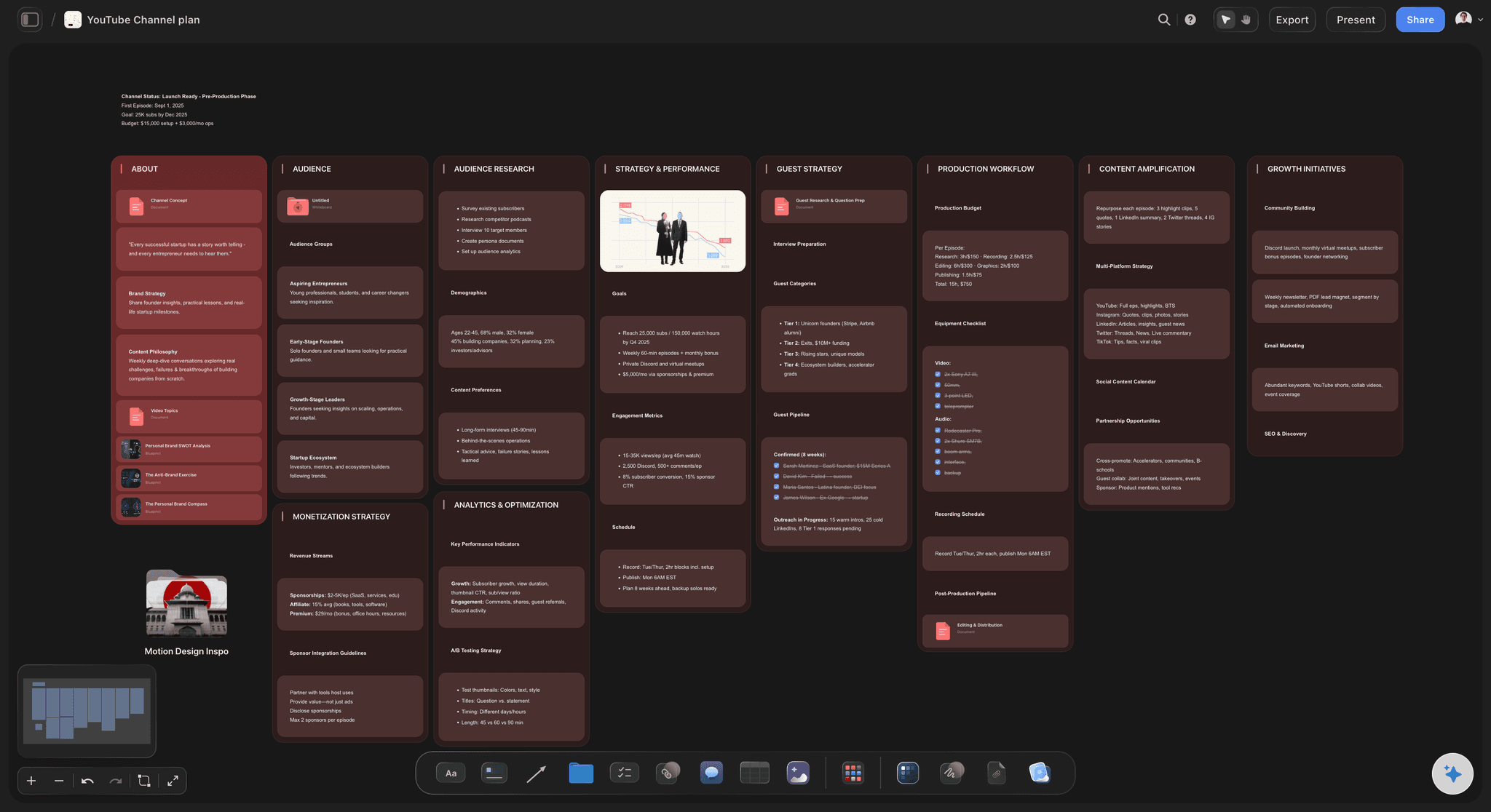
The channel plan and the idea bank
Ideas you can see, sorted into pillars
The AI lays out pillars, series and a bank of ideas as cards. An idea you are not ready for waits in the bank instead of being lost in a notes app.
See the YouTube content pipeline →
Title, thumbnail concept and hook first
Package the video before the shoot
Title options, a thumbnail concept and the hook sit beside each video's card, so you decide what the video promises before you spend a day filming it.
See the YouTube video planner →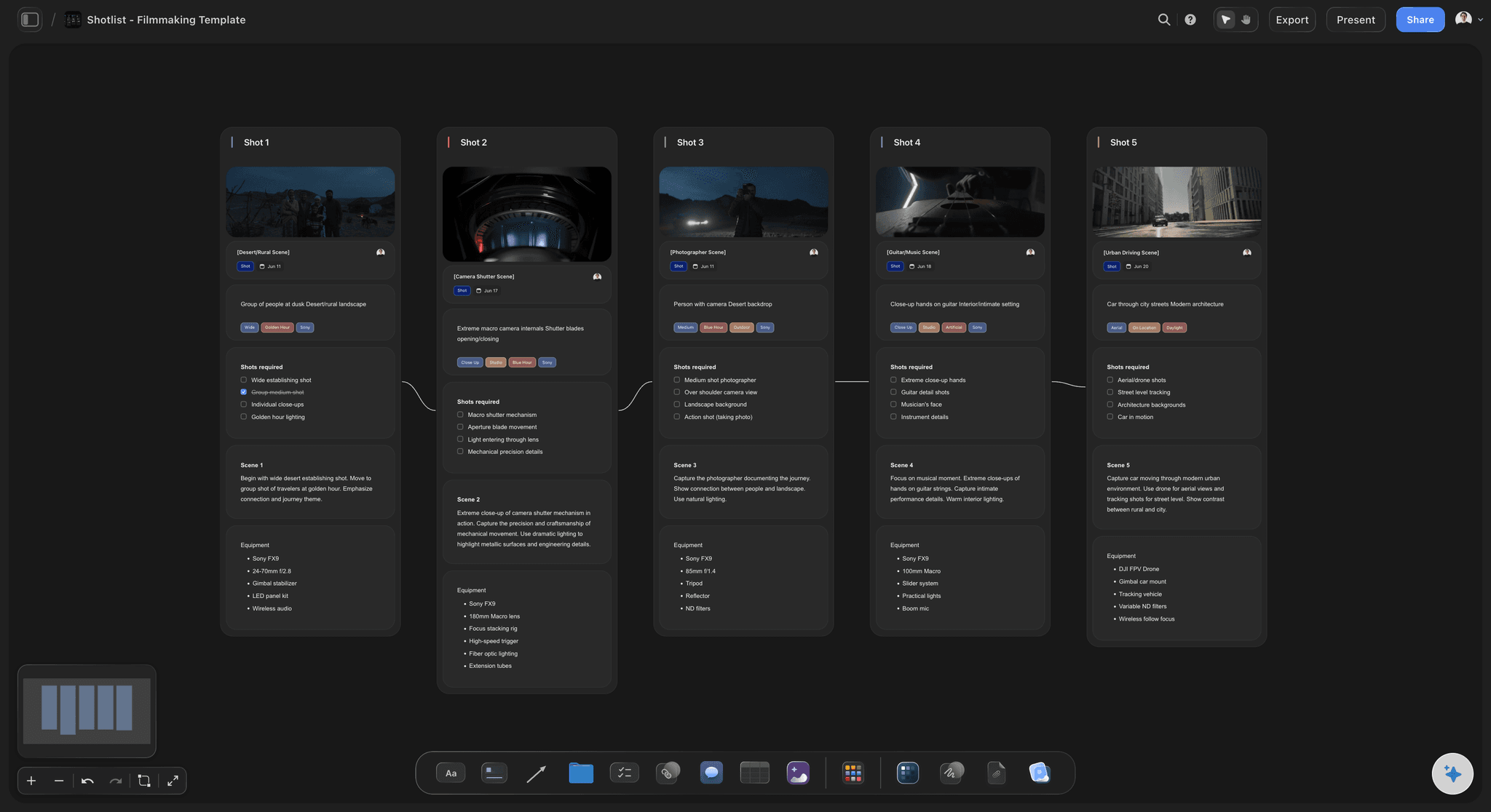
Script and shot list side by side
The script knows what B-roll it needs
The AI's video script workflow drafts from your outline, and each section carries the shots it needs, so the shoot captures what the edit will ask for.
See the video script planner →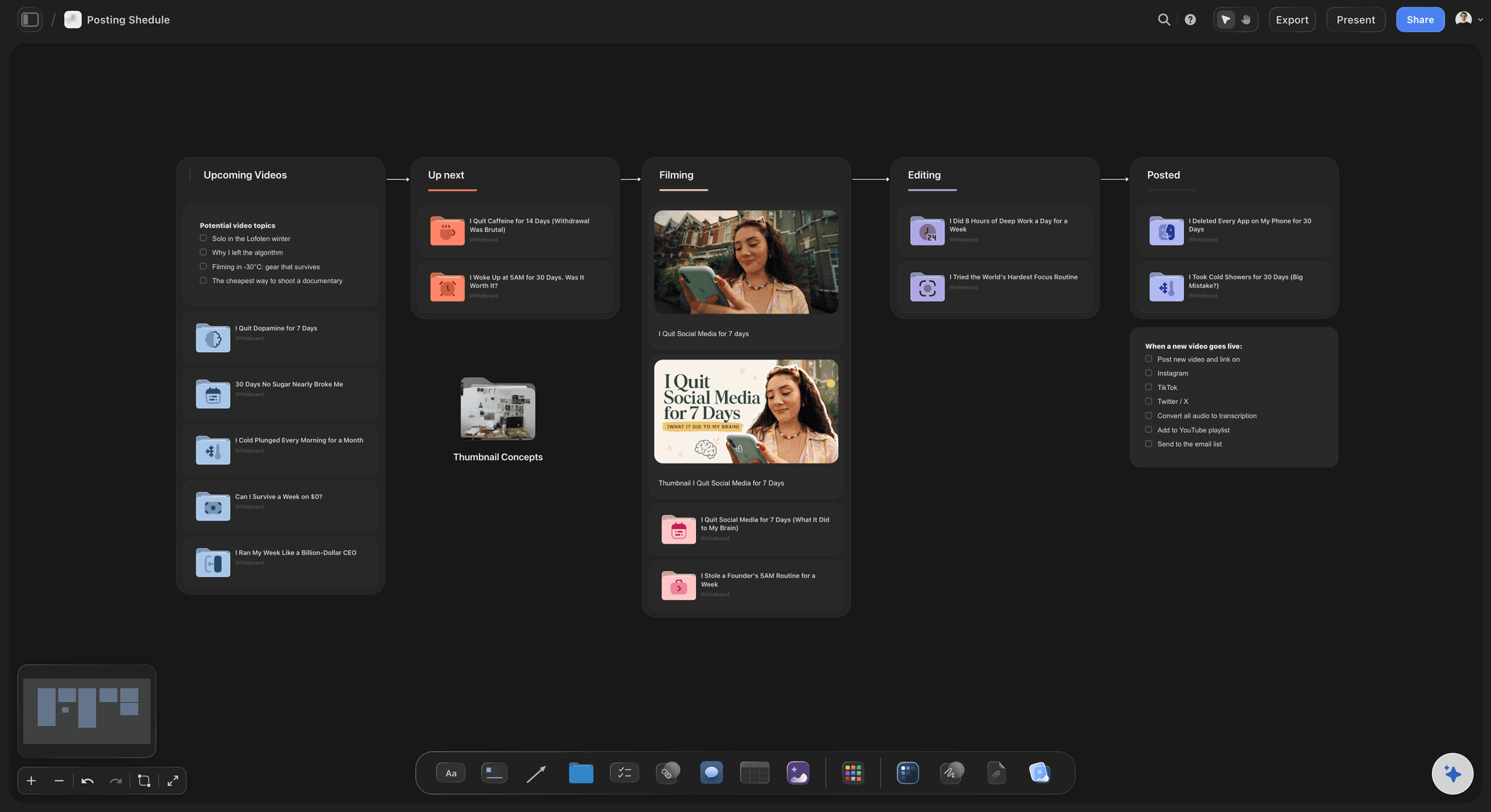
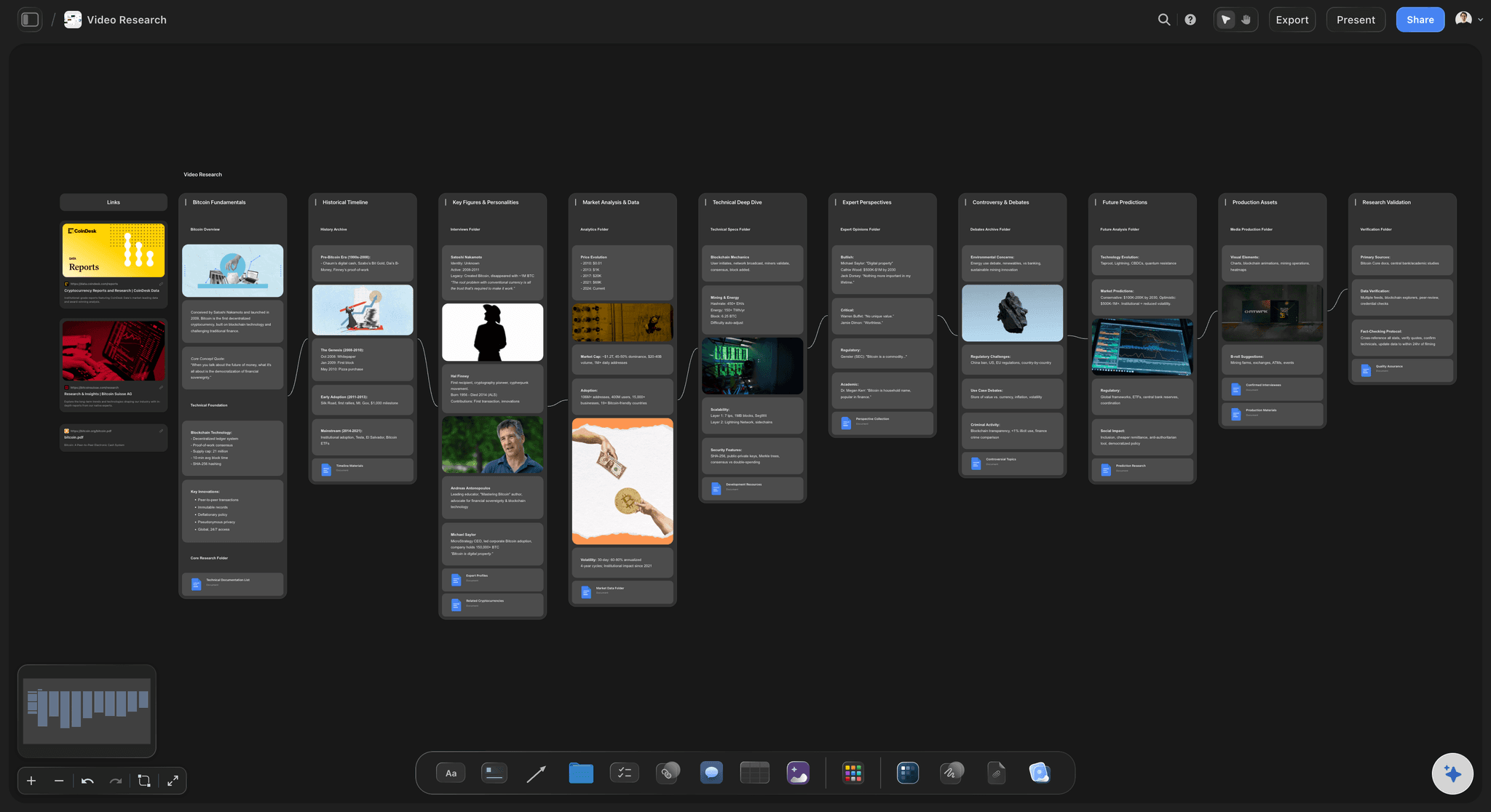
An editor handoff that carries context
One board your editor works from
The script, the shot list, the reference frames and your notes, in one place. The editor opens a view-only link with no account, or joins free when you invite them.
See the content calendar for creators →Unlimited boards. No object cap.
One board for the channel, one per series, or one per video: the canvas does not run out. Storyflow is paid-only during early access, with plans from $7.99 a month billed annually ($9.99 monthly). A free plan launches before the end of 2026, and anyone a paid member invites to a board joins free.
Unlimited boards and file uploads on every paid plan
AI workflows for a YouTube channel plan, a video plan and a video script
Upload a clip, scrub it and grab frames onto the board
View-only links for your editor, plus free invites to edit
Built for people with taste
Four places a video loses time, and the fix for each.
None of them is a lack of ideas. Each is a handoff between stages, and each has a mechanical fix.
Idea, package, script, shots, edit, publish
The handoffs that cost a week
The title is decided after filming: Then the video has to be bent to fit a promise it was not built for. Writing three titles and a thumbnail concept first takes twenty minutes and saves a reshoot.
The B-roll list lives nowhere: The script says what you say, not what the viewer sees. List the shots per section before the shoot, and the edit stops stalling on missing coverage.
The editor gets footage and a voice note: Every question they send back is a day. A board with the script, the shots and the must-keep moments answers most of them before they are asked.
Ideas die in a notes app: Most creators have enough ideas and lose them. One idea bank, captured without judging and reviewed weekly, turns a dry spell into a choice.
Batch filming and a buffer
Several videos in flight, none of them stuck
Stages, not a to-do list: A kanban with columns from idea to published shows which video is stuck in scripting and which is waiting on the editor. Each video is one card.
Batch by stage: Script three videos in one session and film them on one day. The AI's content planner workflow groups ideas into batches so a filming day covers more than one upload.
Keep two videos in reserve: A buffer of two finished videos absorbs the week everything goes wrong. It matters more than how far ahead the calendar runs.
Dates in a table, rows in date order: Upload dates live in a table with a date column, rows kept in date order. There is no month grid, and for a weekly channel the list reads faster anyway.
AI that reads your board
Drafts that fit the channel you already have
It reads the board you have open: Ask for three more title options or a tighter hook and the AI works from the pillar, the notes and the script beside the card, not from a blank prompt.
Bring in your best scripts: Attach up to five documents and three other boards as context, such as a script that held retention or last quarter's plan, and the AI drafts from your past scripts.
It proposes, you decide: The AI's edits land on the board with one-click Undo. What the channel is about and what goes out under your name stay with you.

What Storyflow does not do
The planning layer, not the whole stack
It does not edit video: Cut in Premiere, Final Cut, DaVinci Resolve or CapCut. Storyflow holds the plan the edit follows and the notes that come back from it.
It does not upload or schedule to YouTube: Publishing happens in YouTube Studio. The board records what went live, when, and what you want to try next time.
It does not read your analytics: YouTube Studio holds click-through rate and retention. Paste what you learn onto the video's card so the next package starts from it.
Explore templates for your project
Every template opens as a real, editable board on the infinite canvas. Pick the closest fit and make it your own.
YouTube Plan
Plan a video from hook to outline to shot list, with references and thumbnail ideas sitting right beside it.
One app instead of five
Storyflow vs Notion, Trello and ClickUp for YouTubers.
Each is good at something: Notion at custom databases, Trello at simple cards, ClickUp at tasks across a team. Here is where they differ for a YouTuber planning videos.
Storyflow
Recommended
Idea bank, script and thumbnail concept on one canvas
Videos as cards moving through stages
Upload a clip and grab frames onto the board
Editor opens the plan by link
Calendar layout of upload dates
Free plan today
Notion
Idea bank, script and thumbnail concept on one canvas
Videos as cards moving through stages
Upload a clip and grab frames onto the board
Editor opens the plan by link
Calendar layout of upload dates
Free plan today
Trello
Idea bank, script and thumbnail concept on one canvas
Videos as cards moving through stages
Upload a clip and grab frames onto the board
Editor opens the plan by link
Calendar layout of upload dates
Free plan today
ClickUp
Idea bank, script and thumbnail concept on one canvas
Videos as cards moving through stages
Upload a clip and grab frames onto the board
Editor opens the plan by link
Calendar layout of upload dates
Free plan today
What creators are saying
Join early creators getting structured workspaces and AI that remembers their projects
“Storyflow has sped up my workflow by at least 3x, which means more flow state and more projects I can actually ship. It truly changed the way me and my team create.”

Reilin Joey
Director & YouTuber
“One prompt gets me a structured board. But the tactics are my favorite. I run my YouTube scripts through them and my intros and retention got better. It's amazing.”

Justkay
YouTuber & Freelance Filmmaker
“I used to juggle five apps to plan a project. Now I describe what I am making and get boards, lists, and a schedule. All in one place.”

George
@fernwehchronicles
Planning a YouTube channel, answered.
What YouTubers ask about ideas, packaging, scripts and working with an editor.
Storyflow is a planning tool built for the way YouTubers work: the idea bank, each video's title, thumbnail concept and hook, the script, the shot list and the edit brief sit on one board, and your editor opens it by link. Notion suits a creator who wants to design a custom database, and Trello one who only needs cards moving through columns. Whichever you choose, it should hold the package and the script together.
They track stages, not dates. Each video is a card that moves from idea to packaged, scripted, filmed, editing, ready and published, so you can see that one is stuck waiting on the editor while another needs a script. In Storyflow that is a kanban on the channel board, with the script and shots beside the card. Our YouTube content pipeline page covers the stage model in full.
Yes. The title and thumbnail are the promise, and the video exists to deliver it. Draft three title options and one thumbnail concept before you script, and if none of them makes you want to click, change the idea rather than the edit. In Storyflow the YouTube video plan workflow drafts the package, the hook and an outline beside the idea card.
It drafts one. Storyflow's video script workflow writes from your outline and the notes on the board, with the hook, the promise and the payoff in place, and it drafts from your past scripts when you attach them. Treat it as a first pass: rewrite the hook and any line where your voice matters, and keep the rest as bullets you talk through.
Put the edit brief on the same board as the script. The editor needs the script, the shot list, the moments that must stay, the pacing you want and the deadline. In Storyflow they open a view-only link with no account, or you invite them to edit and they join free. Notes on a cut go in comments, which need a sign-in.
Plan a month of specific ideas, two weeks of scripted videos, and keep two finished videos in reserve. Further ahead than a month in detail tends to be rewritten, because what the audience responds to changes. The reserve matters most: it is what keeps a weekly channel weekly through an illness or a hard edit.
No. Storyflow is the planning layer. Edit in Premiere, Final Cut, DaVinci Resolve or CapCut, and upload and schedule in YouTube Studio. You can upload an MP4, MOV or WEBM clip to the board to play, scrub and grab frames for reference, but the finished video lives on YouTube. It also does not read your YouTube analytics.
Not during early access. Storyflow is paid-only during early access, with plans from $7.99 a month billed annually ($9.99 monthly). A free plan launches before the end of 2026, and anyone a paid member invites to a board joins free, so your editor or thumbnail designer adds nothing to the bill.
Not as a month grid. Storyflow has no month grid: upload dates live in a table with a date column, rows kept in date order, or on the video cards themselves. For a channel posting once or twice a week, a dated list beside the pipeline is usually clearer. If you need a month grid, keep one in Google Calendar and plan the videos in Storyflow.
Group videos that share a location, a setup or an outfit, script all of them first, and film them on one day with a shot list per video. Then edit in order of upload date. Storyflow's content planner workflow groups ideas into batches, and each video's shot list sits on the same board, so the filming day runs from one screen.
Yes. Use one board per channel, each with its own idea bank and pipeline, and every paid plan has unlimited boards. Duplicate a channel board to start a second one with the same stages. If the channels share an editor, invite them to both boards; anyone a paid member invites joins free.
No. Storyflow runs in your browser, so there is nothing to install on the laptop you script on or the one your editor cuts on. Describe the channel, and the AI lays out a first board you can change by hand.
More from Storyflow
YouTube content pipeline
YouTube video planner
YouTube series planner
YouTube storyboard
Video script planner
B-roll planner
Content calendar for creators
AI tools for content creators
For content creators
For video editors
The seven stages of a YouTube content pipeline
Best content planning tools for YouTubers
How to plan a YouTube video from idea to script
Sponsorship deck
Video editing brief
Your next four videos, packaged and scripted on one board.
Describe the channel, plan the next video, and hand the edit over with everything attached. No download.