Best AI Tools for YouTube Video Planning & Script Writing (2026)
What is the best AI tool for YouTube video planning? Storyflow is best for structured planning with Tactics frameworks, VidIQ/TubeBuddy excel at keyword research, and ChatGPT works for quick brainstorming. Complete comparison with before/after examples and pricing.

Category
YouTube
Author

Sara de Klein
Head of Product at Storyflow
Topics
January 14, 2026
•
25 min read
•
YouTube- YouTube video planning
- AI video tools
- content planning
- YouTube strategy
What is the best AI tool for YouTube video planning in 2026?
Storyflow is the best overall for video planning with 20+ video structure templates, topic validation frameworks, and AI that understands YouTube-specific needs. VidIQ and TubeBuddy are best for keyword research and SEO. ChatGPT works for quick brainstorming but lacks video-specific structure.

All 7 AI Tools for YouTube Video Planning, Ranked
- Storyflow: best overall, complete planning workflow with video structure Tactics and canvas AI
- VidIQ: best for keyword research and search volume data
- TubeBuddy: best for SEO optimization and A/B testing
- ChatGPT: best for quick unstructured brainstorming
- Notion AI: best for team content calendars and production tracking
- Claude: best for long-form script drafting help
- Jasper: skip for video planning, built for marketing copy
Full disclosure: Storyflow is our own product, and we rank it #1 for the planning job specifically: structuring the video before you film. That is the lane it is built for. For keyword and search-volume research it is not the tool. VidIQ and TubeBuddy beat it there, and most creators pair Storyflow's planning with one of those for the data. We link out to every tool so you can judge the fit for yourself.
Quick Comparison: Best AI Tools for YouTube Video Planning
These four cover the jobs creators actually decide between: structuring the video, researching keywords, optimizing for search, and quick idea generation.
| Tool | Best For | AI Features | Price |
|---|---|---|---|
| Storyflow | Structuring the whole video before filming | Canvas AI + 20+ video structure Tactics | $9.99 mo |
| VidIQ | Keyword research and search volume | AI title and keyword suggestions | Free / $7.50+ mo |
| TubeBuddy | SEO optimization and A/B testing | AI title and tag helper | Free / $3.60+ mo |
| ChatGPT | Quick, unstructured brainstorming | General chat AI, no video structure | Free / $20 mo |
Last year, I watched a creator film the same video three times. Same topic. Same equipment. Same editing style. The first version got 340 views. The third version got 127,000.
The difference? Planning. The first version was improvised, a stream-of-consciousness ramble that meandered for 18 minutes. The third version was precisely planned: validated topic, proven structure, strategic hook, clear journey for the viewer.
Most creators skip planning because it feels like extra work. They sit down, hit record, and hope for the best. Then they spend 10 hours editing a video that was doomed from the start because the idea wasn't validated, the structure was weak, and the hook was an afterthought.
AI tools have fundamentally changed what's possible in video planning. But here's the problem: most creators are using the wrong tools. They're asking ChatGPT to "give me 10 video ideas" and wondering why the output feels generic. They're checking VidIQ for keywords but have no system for turning data into actual content plans.
In this guide, I'll break down exactly which AI tools help at each stage of video planning, and which ones are wasting your time.
Related YouTube & Content Creator Guides
The planning chain to run with these tools
Compare visual brainstorming tools
Complete toolkit for creators
The tool stack for long-form video essays
Build and hold a 90-day content backlog
Why Video Planning Matters More Than Production
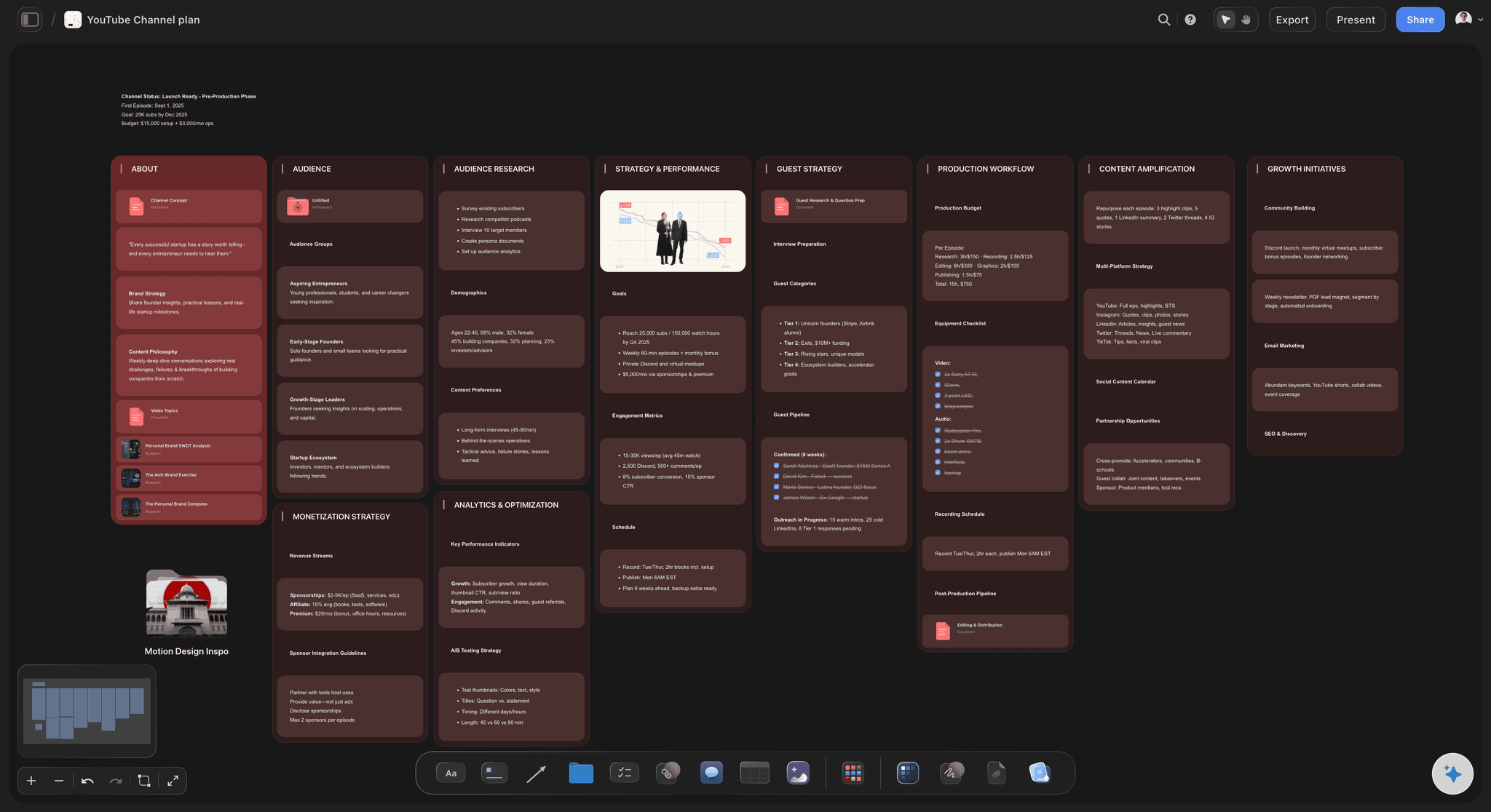
A YouTube channel plan in Storyflow, topics, hooks, and content pillars mapped before filming
Here's an uncomfortable truth that will save you hundreds of hours: a well-planned video shot on an iPhone will outperform a poorly-planned video shot on a $50,000 camera setup. Every. Single. Time.
The top YouTube creators understand this. MrBeast famously spends weeks planning a single video. MKBHD creates detailed outlines before touching a camera. Ali Abdaal has systems for validating topics before committing to them.
The Data on Video Planning:
Videos with validated topics vs. random ideas
3.2x more viewsStructured videos vs. improvised content
47% higher retentionPlanned hooks vs. generic intros
2.8x better CTRTime saved per video with proper planning
4-6 hoursYet most creators have this backwards. They spend 80% of their time on production and editing, and 20% on planning. The successful creators flip this ratio, at least for the thinking part. They know that the decision of what to make matters more than how they make it.
Stuck on what to make next?
Deciding the video is the part that matters most, and the hardest to do staring at a blank page. Describe your channel and let AI lay out a wall of video ideas, each with a hook and angle, then pick the ones worth planning.

The 5 Biggest Video Planning Mistakes
Before we dive into tools, let's address what's going wrong. These mistakes kill videos before they even have a chance:
Mistake #1: Starting with "I want to make a video about..."
This is creator-first thinking. The video exists because you want to make it, not because your audience needs it. Successful videos start with "My audience is struggling with..." or "My audience wants to know..."
Fix: Use audience research Tactics to identify pain points before generating ideas.
Mistake #2: No Topic Validation
You have an idea you're excited about. Great. But is anyone searching for it? Is the competition beatable? Will it serve your channel's goals? Most creators skip these questions and pay the price with dead-on-arrival videos.
Fix: Score every idea against search demand, competition, and audience fit before committing.
Mistake #3: Writing the Hook Last
"I'll figure out the intro when I edit." This is how you end up with weak hooks that hemorrhage viewers. The hook should be the first thing you plan, not an afterthought.
Fix: Plan your hook before writing a single word of script using proven hook frameworks.
Mistake #4: No Clear Structure
Improvised videos meander. They repeat points. They lose viewers because there's no sense of progression. Different video types need different structures. A tutorial isn't structured like a vlog.
Fix: Select the right structure template for your video type and build your outline around it.
Mistake #5: Using Generic AI Without Frameworks
"ChatGPT, give me video ideas for my cooking channel." The output is generic because the input is generic. Without frameworks, AI produces mediocre results that could apply to anyone.
Fix: Use AI tools that have video-specific frameworks built in, not generic text generators.
What Makes a Great Video Planning Tool
After testing dozens of AI tools for video planning, I've identified the features that actually matter versus marketing fluff:
Must-Have Features for Video Planning AI:
- Structured ideation frameworks: Not "generate 10 ideas" but guided processes that consider your niche, audience, and content gaps
- Topic validation system: Ways to score and compare ideas before committing hours to production
- Video-specific structure templates: Different frameworks for tutorials, vlogs, reviews, documentaries, etc.
- Hook planning tools: Dedicated features for crafting openings, not just "write a hook"
- Visual workspace: See your entire video plan at once (structure, beats, key points) instead of buried in documents
- Context awareness: AI that understands your channel, previous content, and audience
- Iterative refinement: Ability to improve specific sections without regenerating everything
Nice-to-Have Features:
- Keyword research integration: See search data within your planning workflow
- Collaboration features: Share plans with editors, writers, or team members
- Template library: Pre-built structures for common video formats
- Export options: Get your plan into teleprompter apps, scripts, or docs
Most AI tools fail on the "must-have" features. They can generate text, but they don't understand the specific needs of video planning.
AI Platform Comparison for Video Planning
Here's how the major AI tools stack up against these criteria:
| Platform | Ideation | Validation | Structure | Visual | YouTube-Specific |
|---|---|---|---|---|---|
| Storyflow | Framework-based | Built-in scoring | 20+ templates | Full canvas | Yes |
| ChatGPT | Via prompting | None | Via prompting | No | No |
| Claude | Via prompting | None | Via prompting | Artifacts | No |
| Notion AI | Basic | None | Manual templates | Databases | No |
| VidIQ | Keyword-based | Search data | None | No | Yes |
| TubeBuddy | Keyword-based | Search data | None | No | Yes |
| Jasper | Marketing templates | None | Basic | No | No |
The comparison reveals the core problem: YouTube-specific tools like VidIQ excel at research but don't help with ideation or structure. General AI tools can brainstorm but lack video-specific frameworks and produce generic output. Only Storyflow combines all stages in a purpose-built visual workspace.

AI Planner turns video ideas into structured shot plans and outlines
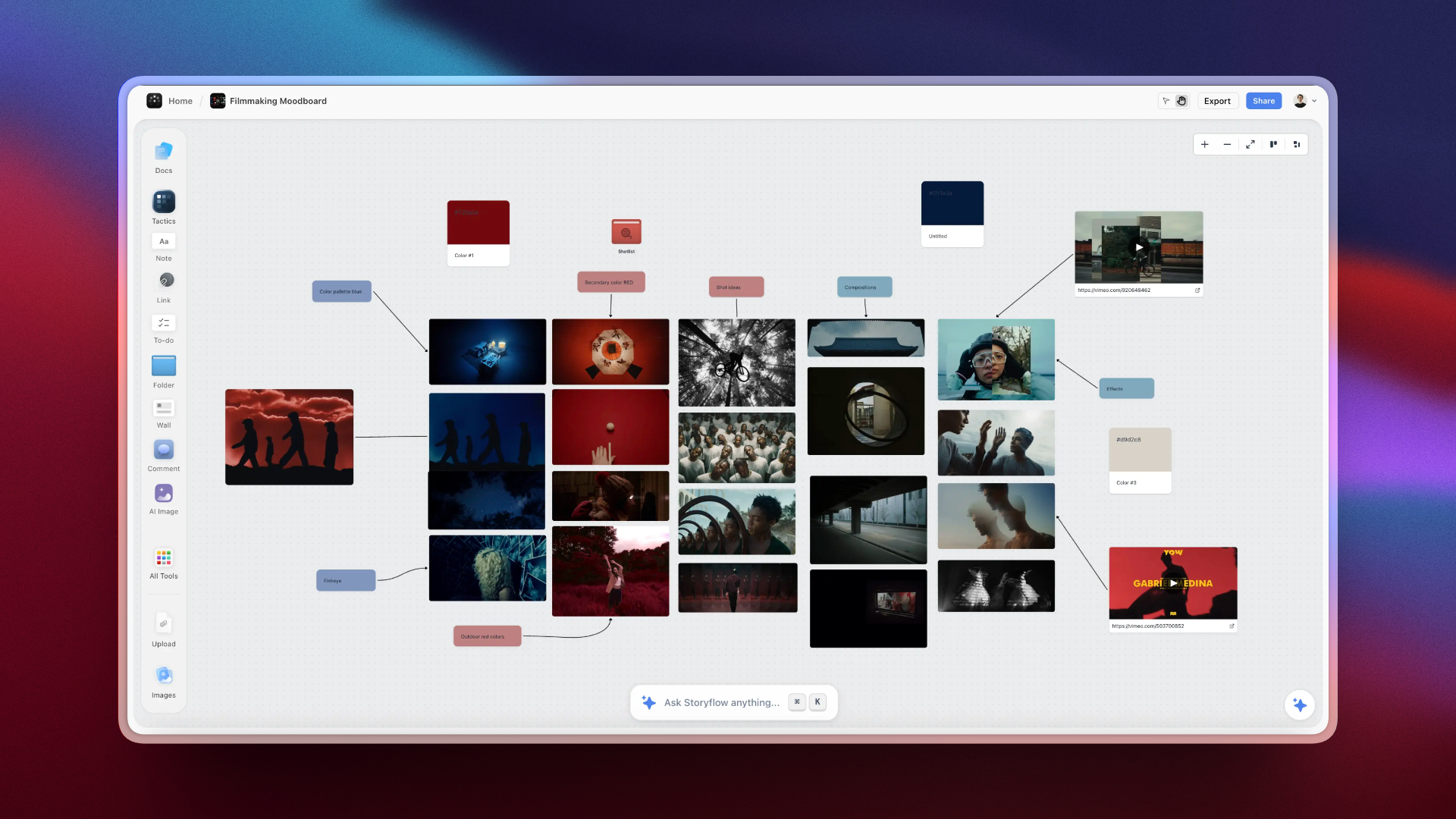
Video creators plan their entire production on one Storyflow canvas
Storyflow: The Complete Video Planning Platform
Storyflow approaches video planning fundamentally differently than other tools. Instead of giving you a blank page and asking "what do you want to write?", it provides Tactics: expert frameworks broken down into actionable cards that guide you through each stage of planning.
Think of Tactics as having a professional video strategist sitting beside you, asking the right questions in the right order and ensuring you don't skip crucial steps.
1. Ideation & Brainstorming Tactics
Generating video ideas shouldn't feel like squeezing water from a stone. Storyflow includes dedicated Tactics for systematic ideation:
Brainstorming Tactics Available:
- YouTube Video Brainstorm: A 6-card process that generates ideas from audience pain points, trending topics, and content gaps instead of random suggestions
- Content Pillar Development: Map out the 3-5 core themes your channel should own, then generate video ideas within each pillar
- Audience Question Mining: Turn the questions your audience is already asking into video topics (with validation built in)
- Competitor Gap Analysis: Systematically identify topics your competitors either haven't covered or covered poorly
- Trending Topic Adaptation: Take viral concepts from other niches and adapt them to your audience
- Series Planning: Design multi-video content arcs that build momentum and keep viewers coming back
- Evergreen vs. Timely Matrix: Balance your content calendar with videos that have long-term value vs. trending appeal
Each Tactic contains multiple cards that guide you through a structured process. The YouTube Video Brainstorm Tactic, for example, includes:
- Audience Pain Points Card: What problems is your audience trying to solve?
- Search Intent Card: What are they actively searching for?
- Competition Analysis Card: What's already been covered? What's missing?
- Unique Angle Card: What perspective can only YOU bring?
- Idea Generation Card: Now generate 10 ideas based on the insights above
- Validation Card: Score each idea and select the winner
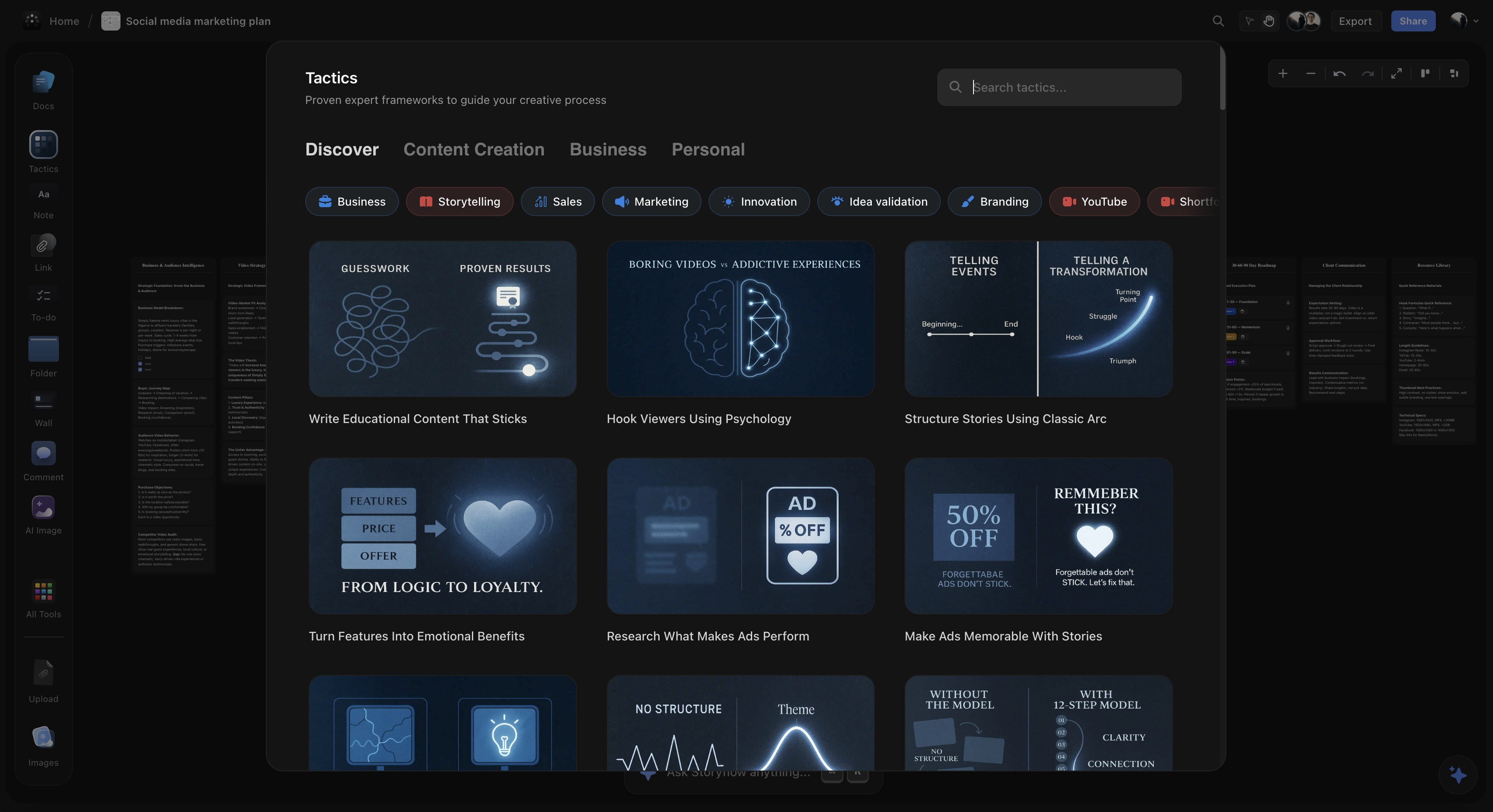
2. Research & Topic Validation Tools
The worst feeling as a creator: spending 20 hours on a video that gets 200 views because the topic never had potential. Storyflow's research Tactics help you validate before you invest:
Research & Validation Tactics:
- Topic Validation Framework: A 5-criteria scoring system for any video idea
- Audience Research: Define your target viewer's problems, desires, and content preferences
- Competitive Analysis: Study what's working for similar channels and why
- Hook Research: Analyze high-performing hooks in your niche to understand patterns
- Title & Thumbnail Testing: Validate packaging concepts before filming
The Topic Validation Framework is particularly effective. For each video idea, it guides you through scoring:
Topic Validation Scorecard (1-10 scale):
Search Demand:
Are people actively searching for this?
Competition Level:
Can you rank/compete with existing videos?
Audience Fit:
Does this match your subscribers' interests?
Expertise Alignment:
Can you deliver unique, authoritative value?
Evergreen Potential:
Will this video get views in 12 months?
Ideas scoring 35+ are strong candidates. Below 25, reconsider or pivot.
3. Outline & Structure Frameworks
Different videos need different structures. A tutorial isn't structured like a vlog. A product review isn't structured like a documentary. Storyflow provides specific frameworks for each type:
Video Structure Tactics by Type:
- Tutorial Structure (8 cards): Hook → Context → Overview → Steps → Demo → Mistakes → Results → CTA
- Vlog Structure (7 cards): Hook → Setup → Journey → Moments → Conflict/Challenge → Resolution → Reflection
- Review Structure (9 cards): Hook → Context → Who It's For → Features → Testing → Pros → Cons → Verdict → CTA
- Documentary Structure (12 cards): Cold Open → Context → Characters → Rising Action → Complications → Climax → Resolution → Meaning
- Educational Structure (6 cards): Hook → Why It Matters → What You Need to Know → How to Apply → Common Mistakes → Next Steps
- Listicle Structure (5 cards): Hook → Why This List → Items (with ranking) → Best Pick → CTA
- Story Structure (13 cards): Full Hero's Journey framework for transformation content
Each structure Tactic breaks down into cards you fill out one by one. Here's what the Tutorial Structure looks like in practice:
- Hook Card: Open with the problem and tease the solution (45 seconds max)
- Context Card: Why this matters and who this video is for
- Overview Card: Preview exactly what you'll cover (creates commitment)
- Step Cards: Each major step with clear, actionable instructions
- Demonstration Card: Show the process in action (proof it works)
- Common Mistakes Card: What to avoid and why (adds value)
- Results Card: Show the outcome (emotional payoff)
- CTA Card: Clear next step for the viewer

Before & After: Planning Transformations
Let's see how structured planning transforms actual video concepts:
Example 1: Tech Review Video
Before (Unplanned):
"Hey everyone, today I'm going to review the new Sony headphones. So I've been using these for about a week and they're pretty good. The sound quality is nice, they're comfortable, battery life is solid. Let me show you what's in the box first..."
Problems: Generic opening, no hook, unboxing before value, no clear structure, sounds like every other review.
After (Using Review Structure Tactic):
"Sony claims these are the best noise-canceling headphones ever made. After 47 hours of testing on planes, in coffee shops, and in my home office, I found three things that Sony doesn't want you to know. [Hook Card] If you work from home or travel regularly, this review might save you $400. [Context Card] I'll cover sound quality, noise cancellation, comfort for 8-hour days, and the deal-breaker that almost made me return them. [Overview Card] Let's start with what Sony gets right..."
Transformation: Stakes established, curiosity created, value promised, clear structure previewed, viewer is invested.
Example 2: Tutorial Video
Before (Unplanned):
"What's up guys, in this video I'll show you how to build a website. So first you need to buy a domain, then you need hosting, and then we'll install WordPress. I'll also show you some themes and plugins. Let's get started with the domain..."
Problems: No reason to care, no outcome promised, sounds like work not transformation, no differentiation.
After (Using Tutorial Structure Tactic):
"By the end of this video, you'll have a professional website that looks like you paid $5,000 for it, but costs less than lunch. [Hook Card] I'm going to show you the exact system I use for client websites, the same process that used to take me two weeks but now takes two hours. [Credibility Card] Whether you're starting a business, building a portfolio, or just want your own corner of the internet, you don't need to code, and you don't need to pay a developer. [Context Card] Here's exactly what we'll build together, step by step. [Overview Card]"
Transformation: Outcome is tangible and exciting, credibility established, barriers removed, clear path forward.
Example 3: Vlog Video
Before (Unplanned):
"Good morning everyone! So I just woke up and today I'm going to Japan. I'm really excited. Let me show you my packing and then we'll head to the airport. I'll bring you guys along for the whole trip..."
Problems: No story tension, no reason to watch this over other Japan vlogs, no promise of value.
After (Using Vlog Structure Tactic):
"I've been planning this trip for three years. [Setup Card] Not just any trip to Japan. I'm trying to find the restaurant where my grandmother worked in 1962 before she immigrated. I have one photograph, an address that might not exist anymore, and seven days. [Journey Card] This could be a complete disaster. The building might be gone. No one might remember her. But I have to try. [Stakes Card] Let's start at the airport, where things immediately went wrong. [Conflict Card]"
Transformation: Story has stakes, emotional investment, clear narrative question, viewer needs to see how it ends.
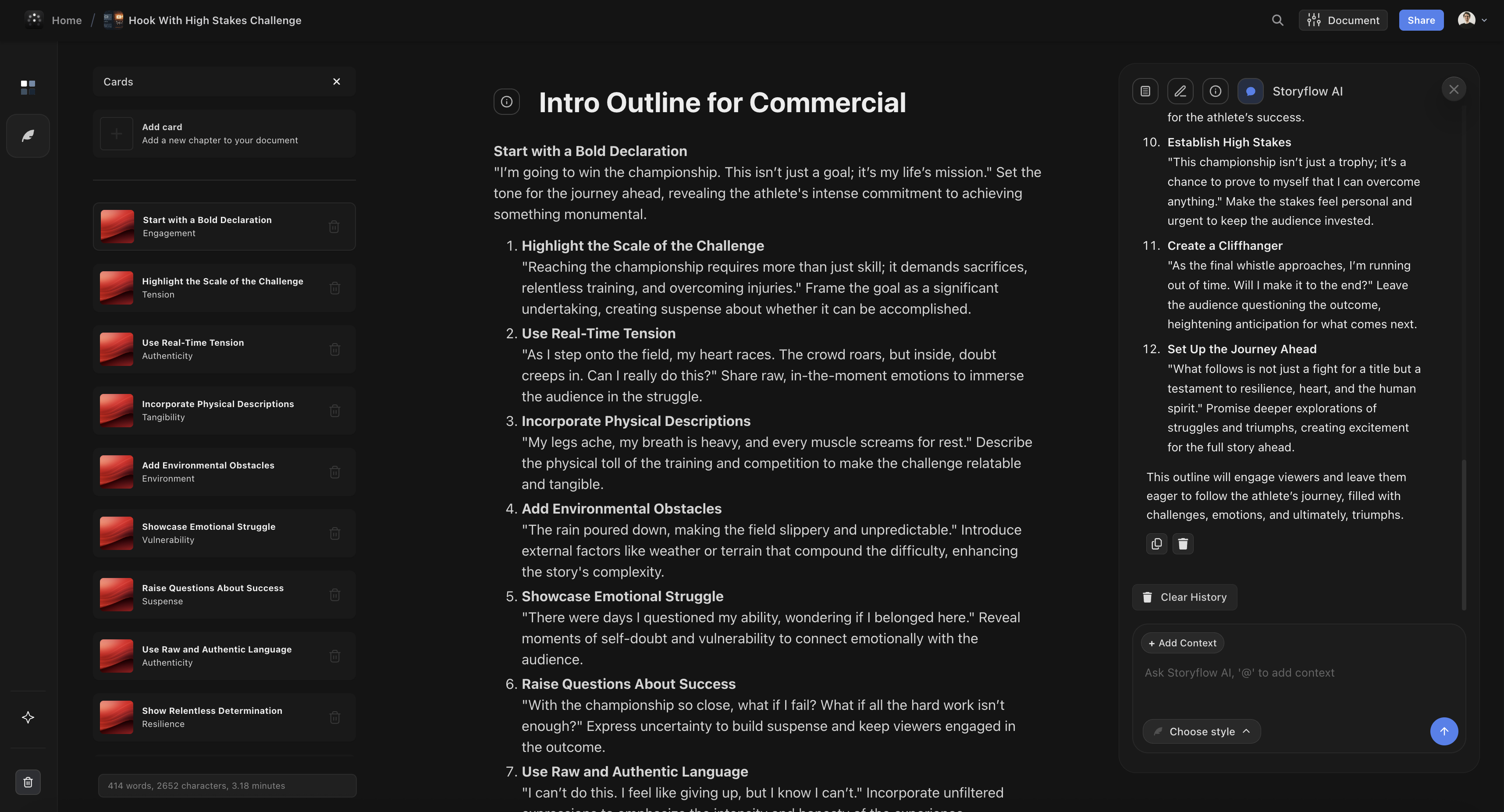
ChatGPT for Video Planning
ChatGPT is what most creators reach for first. It's accessible, capable, and free to start. Here's an honest assessment of where it helps and where it fails:
What ChatGPT does well:
- Generating initial brainstorms when you're completely stuck
- Answering specific questions about video strategy
- Expanding on ideas you've already developed
- Rewriting and improving script sections
- Suggesting alternative angles on a topic
Where ChatGPT fails for planning:
- No built-in frameworks: You have to know what to ask. If you don't already understand video structure, ChatGPT won't teach you.
- No validation capability: It can't tell you if an idea has search demand or competitive potential
- No visual workspace: Everything is text in a chat window, making it hard to see structure
- No memory between sessions: It forgets your channel, audience, and previous conversations
- Generic outputs: Without detailed prompting, you get advice that could apply to anyone
- No video-specific understanding: It treats YouTube scripts like any other content
ChatGPT Prompt Example (What Most People Do):
"Give me 10 video ideas for my cooking channel"
Better Prompt (Still Limited):
"I run a cooking channel for busy parents. My audience struggles with healthy weeknight dinners under 30 minutes. Competitors like Budget Bytes cover basics well. Generate 10 video ideas that: 1) Address specific pain points, 2) Have searchable titles, 3) Offer a unique angle. Format as: Title | Hook | Why it would work."
The second prompt is better but requires expertise to write. Storyflow's Tactics ask these questions for you.
Verdict: ChatGPT is a capable assistant if you already know what good video planning looks like. It's not a system. It's a tool that requires expertise to use well.
Notion AI for Content Planning
Notion has become the default tool for creators. content systems. Notion AI adds generation capabilities. Here's how it stacks up:
What Notion AI does well:
- Integrates with your existing Notion workspace and databases
- Good for content calendars and production tracking
- Team collaboration is excellent
- Can generate and expand text within your planning pages
- Templates are shareable and duplicatable
Where Notion AI falls short:
- No video-specific frameworks: You have to build everything yourself or find templates
- AI is general-purpose: Same limitations as ChatGPT for video understanding
- No validation tools: Can't help you assess if ideas are worth pursuing
- Setup requires significant work: Building a good system takes hours
- Text-heavy: Not designed for visual/spatial planning
- Not creative-focused: Better for organizing than ideating
Verdict: Notion AI is excellent for organizing your content pipeline and tracking production. It's a project management tool with AI bolted on, not a planning tool. Use it downstream from actual planning.
VidIQ & TubeBuddy for Research
VidIQ and TubeBuddy are the dominant YouTube research tools, and for good reason. But they serve a specific purpose that some creators misunderstand:
What they do well:
- Keyword research: See actual search volumes and competition scores
- Competitor analysis: Understand what's working for similar channels
- Trending topics: Identify rising topics in your niche
- Channel analytics: Deeper insights than YouTube Studio
- SEO optimization: Title, description, and tag recommendations
- A/B testing: Test thumbnails and titles (TubeBuddy)
Where they fall short for planning:
- No ideation frameworks: They show you what people search for, not how to turn that into compelling content
- No structure tools: Zero help with outlining or organizing your video
- Data without context: Knowing a keyword has 50K searches doesn't mean you should make that video
- No creative support: They optimize discovery, not content quality
- No script planning: Can't help you plan what to actually say
Verdict: VidIQ and TubeBuddy are essential for the research phase of planning, specifically for validating search demand and understanding competition. But they're only one piece of the puzzle. Use them alongside a planning tool, not instead of one.
Pricing Comparison
Here's what you'll pay for each tool:
| Platform | Free Tier | Paid Plans | Best For |
|---|---|---|---|
| Storyflow | Early access only | From $7.99/mo (annual) | Complete planning workflow |
| ChatGPT | Yes (GPT-3.5) | $20/mo (Plus) | General brainstorming |
| Claude | Yes (limited) | $20/mo (Pro) | Long-form writing |
| Notion AI | Notion free, AI $10/mo | $10/mo add-on | Organization/tracking |
| VidIQ | Yes (limited) | $7.50-$74/mo | Keyword research |
| TubeBuddy | Yes (limited) | $3.60-$24.50/mo | SEO & A/B testing |
| Jasper | No | $49-$99/mo | Marketing copy |
Best value for video planning: Storyflow's Plus plan covers the core planning workflow for $7.99/month. For most creators, combining Storyflow with VidIQ/TubeBuddy's free tier provides a complete solution.
The Complete Video Planning Workflow
Here's exactly how to combine these tools for maximum results:
The 5-Stage Video Planning Process:
Stage 1: Ideation (Storyflow | 20-30 min)
Use brainstorming Tactics to generate video concepts based on audience needs, channel goals, and content gaps. Output: 5-10 validated ideas.
Stage 2: Validation (VidIQ/TubeBuddy + Storyflow | 15-20 min)
Check search volume and competition with YouTube tools. Use Storyflow's validation framework to score and rank ideas. Output: 1-2 confirmed topics.
Stage 3: Research (Storyflow | 20-30 min)
Use research Tactics to study successful videos, analyze hooks, and gather supporting information. Output: Competitive insights, hook ideas, key points to cover.
Stage 4: Structure (Storyflow | 30-45 min)
Select the appropriate video structure Tactic for your video type. Build your outline card by card. Output: Complete video outline with all major beats.
Stage 5: Script & Refine (Storyflow | 30-60 min)
Expand your outline into a full script using retention and hook Tactics. Refine specific sections with AI assistance. Output: Production-ready script.
Total time: 2-3 hours. This investment typically saves 5-10 hours in production and editing while significantly improving video performance.
If you want the structure pre-built instead of assembling it yourself, the YouTube Video Plan template opens with these five stages already laid out on the board, and the Video Script template picks up at Stage 5 when the outline is ready to become words.
Case Study: From 500 to 50,000 Views
Let me share a real transformation I witnessed. A productivity YouTuber had been stuck at 300-500 views per video for months. Here's what changed:
Before (Old Process):
- Ideas came from "what I feel like talking about"
- No validation, just hoped topics would work
- Wrote scripts in Google Docs with no structure
- Hooks were written last during editing
- Average video: 400 views, 35% retention
After (New Process with Storyflow):
- Used Audience Question Mining Tactic to find validated topics
- Scored every idea with Topic Validation Framework before committing
- Structured videos using Tutorial and Educational Tactics
- Planned hooks first using Hook with Credibility framework
- Result: First video hit 12,000 views. Third video hit 52,000 views.
The content quality didn't change. Same person, same equipment, same editing style. What changed was the planning process. The topics were validated before filming. The structure was proven. The hooks were intentional.
Key Metrics Change:
Average views per video:
400 → 18,000 (45x increase)
Average retention:
35% → 52% (+17 points)
Click-through rate:
2.1% → 6.8% (3.2x increase)
Time to script:
6 hours → 2 hours (3x faster)
The Verdict: Best Tools for Each Planning Stage
Different tools excel at different stages. Here's the definitive breakdown:
Best Overall for Video Planning: Storyflow
Storyflow is the only platform that covers the entire planning process with purpose-built frameworks:
- Ideation: Framework-based brainstorming Tactics (not random idea generation)
- Validation: Topic scoring system to avoid wasted effort
- Research: Competitive analysis and hook research frameworks
- Structure: 20+ video type templates that guide you card by card
- Scripting: Retention and hook optimization Tactics
- Visual workspace: See your entire plan on a canvas, not buried in documents
Best for keyword research: VidIQ or TubeBuddy
These tools provide the search volume data and competitive analysis that helps validate topic potential. Use them in Stage 2 alongside Storyflow's validation framework. VidIQ tends to be better for keyword research; TubeBuddy is better for A/B testing.
Best for quick brainstorming: ChatGPT
When you just need to riff on ideas or get unstuck, ChatGPT works. But move to a structured tool like Storyflow when you're ready to actually plan the video. ChatGPT is a starting point, not a system.
Best for team organization: Notion
If you have a team and need content calendars, task assignment, and production tracking, Notion is excellent. But the actual creative planning should happen in Storyflow, then move to Notion for execution tracking.
Skip entirely: Jasper
Jasper is built for marketing copy, not video content. At $49-99/month, there are better options for creators.
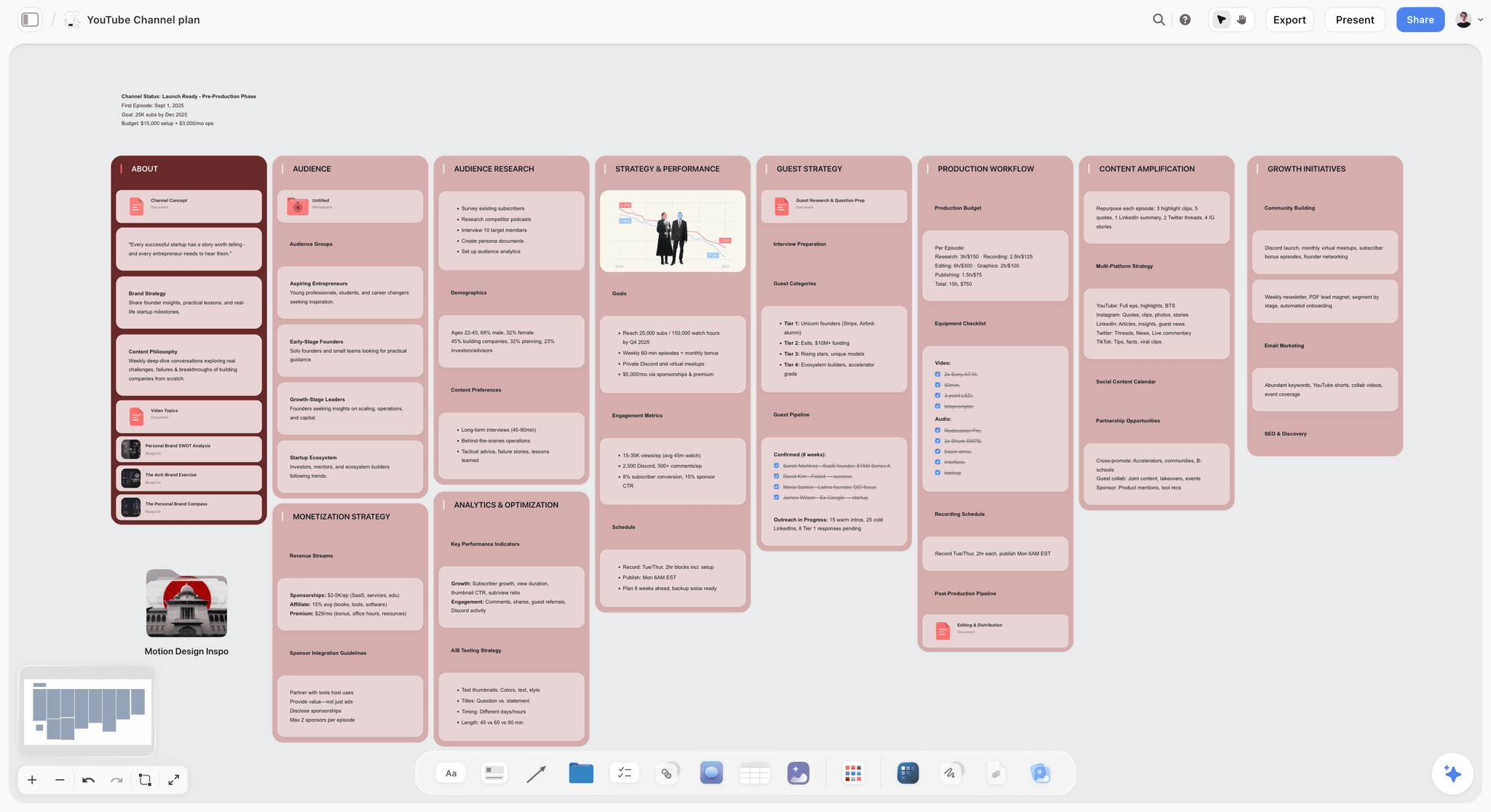
Channel strategy, video ideas, hooks, and scripts, all connected in one Storyflow workspace
FAQ: AI Tools for YouTube Video Planning
What is the best content planning tool for YouTubers?
For YouTubers, the best content planning tool is one built around video structure and retention rather than a generic calendar. Storyflow is strongest for planning the actual video (idea, angle, hook, and story structure on one AI-readable canvas with built-in Tactics), while VidIQ and TubeBuddy are stronger for keyword and topic research, and Notion works as a flexible content calendar once the videos are planned. Most serious YouTubers pair a planning canvas for the video itself with a research tool for topic selection. A bare content calendar tells you when to post; a planning tool tells you whether the video is worth posting.
How long should I spend planning a video?
For a typical 10-15 minute video, plan to spend 2-3 hours on planning (ideation through script outline). This includes validation, research, and structure. The investment typically saves 4-6 hours in production and editing while significantly improving performance. Top creators often spend more time planning than filming.
Can I use ChatGPT instead of Storyflow for planning?
You can, but you'll need to supply all the frameworks yourself through detailed prompts. ChatGPT doesn't know video structure, retention tactics, or hook techniques unless you explain them in every conversation. Storyflow has these built in as Tactics, so you don't need to be an expert to use expert frameworks.
Do I really need both VidIQ/TubeBuddy AND a planning tool?
They serve completely different purposes. VidIQ/TubeBuddy tell you what people are searching for (discovery). Planning tools like Storyflow help you create content worth watching (quality). The most successful creators use both: research tools for validation and planning tools for creation.
What's the difference between planning and scripting?
Planning is deciding what your video will be about, who it's for, and how it will be structured. Scripting is writing the actual words you'll say. Planning comes first and makes scripting dramatically easier because you're filling in a structure, not staring at a blank page.
How do I know if a video idea is worth making?
Use a validation framework. Score each idea on: search demand (are people looking for this?), competition level (can you compete?), audience fit (do your viewers want this?), expertise alignment (can you deliver unique value?), and evergreen potential (will this have long-term value?). Ideas scoring 35+ out of 50 are strong candidates.
How many planning Tactics does Storyflow have for YouTube?
Storyflow includes 200+ Tactics across all content categories. For video planning specifically, you have: brainstorming Tactics (7+), research and validation Tactics (5+), structure templates for every video type (20+), retention frameworks, hook libraries (15+), and story structure frameworks.
What if I'm just starting out and don't know my niche yet?
Start with the Content Pillar Development Tactic in Storyflow. It helps you map out the 3-5 core themes you're qualified and interested to cover. Then use the Audience Research Tactic to understand who you're creating for.
Start Planning Better Videos Today
The difference between videos that flop and videos that take off isn't luck, equipment, or the algorithm. It's planning. The successful creators don't just have better ideas. They have systems for validating ideas, structures for organizing content, and frameworks for keeping viewers watching.
AI tools have made professional-level planning accessible to everyone. But choosing the right tools matters. Generic AI can brainstorm, but it can't guide you through validated frameworks. Research tools can show you data, but they can't help you structure compelling content. You need both, and you need them working together.
Storyflow is the only tool built specifically for this workflow. With purpose-built Tactics for ideation, validation, research, structure, and scripting, all in a visual workspace, you're not just generating text. You're following proven systems that top creators use.
Try Storyflow and discover what structured video planning feels like. If you are planning a whole channel rather than one video, start from the YouTube Channel Plan template. Your next video could be the one that changes everything.
Continue Learning About Video & Content Planning
Why visual workspaces beat chat interfaces
Context-aware AI for creative work
The step-by-step AI scriptwriting workflow
How to plan a multi-video story campaign on a canvas
The end-to-end planning workflow from idea to upload
A reusable script structure built for watch-time retention
The planning mistakes that quietly cap your reach
The workspace cut for YouTubers, ranked on moving an idea from backlog to published
Table of Contents
- Why Video Planning Matters More Than Production
- The 5 Biggest Video Planning Mistakes
- What Makes a Great Video Planning Tool
- AI Platform Comparison for Video Planning
- Storyflow: The Complete Video Planning Platform
- Ideation & Brainstorming Tactics
- Research & Topic Validation Tools
- Outline & Structure Frameworks
- Before & After: Planning Transformations
- ChatGPT for Video Planning
- Notion AI for Content Planning
- VidIQ & TubeBuddy for Research
- Pricing Comparison
- The Complete Video Planning Workflow
- Case Study: From 500 to 50,000 Views
- The Verdict: Best Tools for Each Planning Stage
- FAQ
Templates to check out for this topic


Content and video templates you can use in Storyflow
Plan a channel, a script, and a content pipeline on the same board. Open one of these templates and let the AI build on the structure instead of starting from a blank doc.


See Storyflow in Action
A visual AI workspace where every feature lives inside one canvas. No tab-switching, no context lost.
Build your entire board from a single message
Type what you need in the AI chat at the bottom of your canvas. The AI adds cards, headings, and structure directly onto your board.
Use expert frameworks as AI context
Type @ in the AI chat and choose any Tactic. The AI tailors every response to that framework instead of giving generic advice.
Turn your board into a mind map in seconds
Ask the AI to restructure your canvas as a mindmap. It connects your ideas into a visual hierarchy so you can see how everything relates.
Why Storyflow Exists
Storyflow actually began as a personal tool while working on creative and research projects.
We kept running into the same problem: ideas were scattered everywhere: notes, documents, and whiteboards.
Nothing helped us see how everything connected.
So we started building a workspace designed around how ideas actually grow.
→ Read how Storyflow was createdSara de Klein
Head of Product at Storyflow
Published: January 14, 2026
Extremely simple, seriously capable


See how easy it is to get started
Watch a real project come together, from a blank board to a finished plan, clicked through step by step.
Start creating with AI and become more productive
Transform your creative workflow with AI-powered tools. Generate ideas, create content, and boost your productivity in minutes instead of hours.