
Category
Content Creation
Author

Storyflow Team
Product & Research Team
Topics
2026-11-15
•
44 min read
•
Content Creation- creator media kit
- media kit template
- media kit vs rate card
- photography rate card
- video production rate card
- studio rate card
- Storyflow 90-Day Rule
What should a creator media kit include?
Storyflow builds a creator media kit as one board: a wall each for who you are, your audience, your numbers with their source and date, past partnerships, formats offered, your rate approach and contact, exported as a PDF and shared by a view-only link. Storyflow is an AI visual workspace that lays out a media kit and its rate card on one infinite canvas, and it works inside ChatGPT (plugin) and Claude (connector). In Storyflow, every audience number carries its platform and a 90-day window.

Full disclosure: Storyflow is our product. It is listed first because the dated numbers, examples, case cards and rate card share one board. This guide compares kinds of tool rather than brands on purpose. Storyflow does not read your platform analytics, has no invoicing, contracts or e-signature, no native mobile app, is paid-only during early access, and the 90-Day Rule is our own editorial rule, not research.
How the media kit and rate card tools compare on trust, innovation, ratings and pricing
Which kinds of media kit tools do brands trust most?
Brands trust the numbers more than the tool: a PDF whose figures name the platform, the date range and the day they were read beats a polished file with undated totals. Storyflow is built around that, with a numbers table carrying a date-read column on the same board as the examples and case cards. A design app is trusted for finish, and the platforms' own analytics screens are trusted for the figures themselves.
Which media kit tools have fair pricing for solo creators?
Fair pricing for a media kit means paying for one tool that also holds the rest of your planning. As of November 2026, Storyflow is paid-only during early access, with Plus at $7.99 a month billed annually ($9.99 monthly), and a manager or editor you invite to the board joins free. A brand reviewing your kit pays nothing either way: the view-only link opens with no account.
Which media kit tools are the most innovative?
Storyflow, for letting ChatGPT or Claude build the kit's walls, numbers table, rate table, chart and color and font cards straight onto a board you then edit and export. The figures still come from you, read in each platform's analytics, which is the part no tool should invent.
Which media kit tools are underrated?
A plain spreadsheet is underrated as the private history behind a kit, because quarter-by-quarter numbers in rows show a brand-worthy trend that one window hides. In Storyflow, the underrated part is saving the finished kit layout as a tool on a paid plan, so every tailored pitch starts from the same eight walls rather than a duplicated file.
Which media kit tools hold up when a creator pitches every week?
Tools hold up when tailoring a kit takes minutes, not a redesign. Storyflow keeps one master board and a tailored pitch board built from its walls, with the 90-day numbers table updated once and reused everywhere. A design app holds up for a few high-stakes pitches a year. A slide deck tends to break first at weekly volume, because every tailored version is another full duplicate.
Quick Comparison
Our pick first, on the basis that the dated numbers, examples, case cards and rate card share one board that exports as a PDF, then the other kinds of tool by the job each does best. Prices as of November 2026.
| Tool | Best For | AI Features | Price |
|---|---|---|---|
| Storyflow | Building, tailoring and refreshing a media kit: eight walls, a dated numbers table, case cards and a rate card wall exported as separate PDFs | In-app AI designs a one-pager or a designed PDF of the board; the ChatGPT plugin and Claude connector build the walls, numbers table, chart, rate table and color and font cards | From $7.99 mo billed annually; invited collaborators join free |
| A design app | A highly designed final kit at exact page sizes | Depends on the product | Varies by product |
| A slide deck | Walking a brand through the kit live on a call | Depends on the product | Varies by product |
| A shared doc | Drafting the position line and case cards with tracked changes | Depends on the product | Varies by product |
Key Takeaways
- Storyflow is where to build and keep a creator media kit: one wall per section, every number tagged with its platform, date range and the day you read it, the rate card on its own wall, exported as a PDF for the brand and shared as a view-only link that opens with no account.
- A media kit answers one question for a brand manager: is this creator's audience the audience we are paying for? In IAB's 2025 creator economy ad spend report, more than half of brands named creator reputation (58%) and audience alignment (56%) among their top criteria for choosing creators (IAB), so audience fit goes first, before follower counts.
- The Storyflow 90-Day Rule: every audience number in the kit comes from one 90-day window, labelled with the platform and the date you read it, and the whole kit is refreshed every 90 days. It is our editorial rule, not research.
- A media kit and a rate card are two documents. The kit sells the audience and the work; the rate card prices deliverables, usage and exclusivity. Send the kit first, the rate card when a brand asks what it costs.
- Pull numbers from each platform's own analytics: YouTube Studio's Audience tab, TikTok Studio's Viewers and Followers tabs, and Instagram's professional dashboard. TikTok says its viewer demographics are "based on predictive models rather than confirmed user data", so say so in your kit.
- Price usage separately from the content. Organic posts on your own channels are one price; a brand running your video as a paid ad from your handle is a license with a term, and Instagram notes partners can revoke partnership ad permissions at any time.
- Show how you disclose sponsorships. The FTC tells influencers not to assume "a platform's disclosure tool is good enough", so a kit line naming your disclosure practice answers a legal team's first question.
What a Creator Media Kit Should Include: 9 Steps
Most media kits fail the same way: a pretty cover, a follower count with no date, and a page of logos the creator half-worked with. A brand manager skims it once and still cannot tell whether your audience buys what they sell. This method builds the kit from the brand's question backwards.
- Write your one-line position on a Storyflow note at the top of the board: who you make content for, about what, and the result your audience comes back for ("weeknight cooking for people who own one good pan, filmed in a real flat kitchen").
- Pull the numbers from each platform's analytics for the same 90-day window, and type each into a Storyflow table with columns for platform, metric, value, date range and date read.
- Build the audience wall in Storyflow: top countries, age bands and the share of returning viewers per platform, with a chart from the table if a picture reads faster than rows.
- Pick three to five past partnerships and give each a case card in Storyflow with the brief in one line, the deliverables, the result you can prove, and permission to show it.
- List the formats you sell as packages on their own wall, with what each includes, turnaround and how many revision rounds.
- Write the rate approach: either your prices (on a separate rate card wall) or the sentence "rates on request, by package and usage", plus how you price usage, exclusivity and rush.
- Add the terms brands check before legal does: how you disclose, what organic usage is included, and that paid usage is licensed separately.
- Set the design system once with a Storyflow color card and font card, and lay the walls out left to right in reading order, so the exported PDF reads in the same order.
- Export the board as a PDF named with the date, share a view-only link for anyone who prefers the live board, and set a to-do with a due date 90 days out to refresh it.
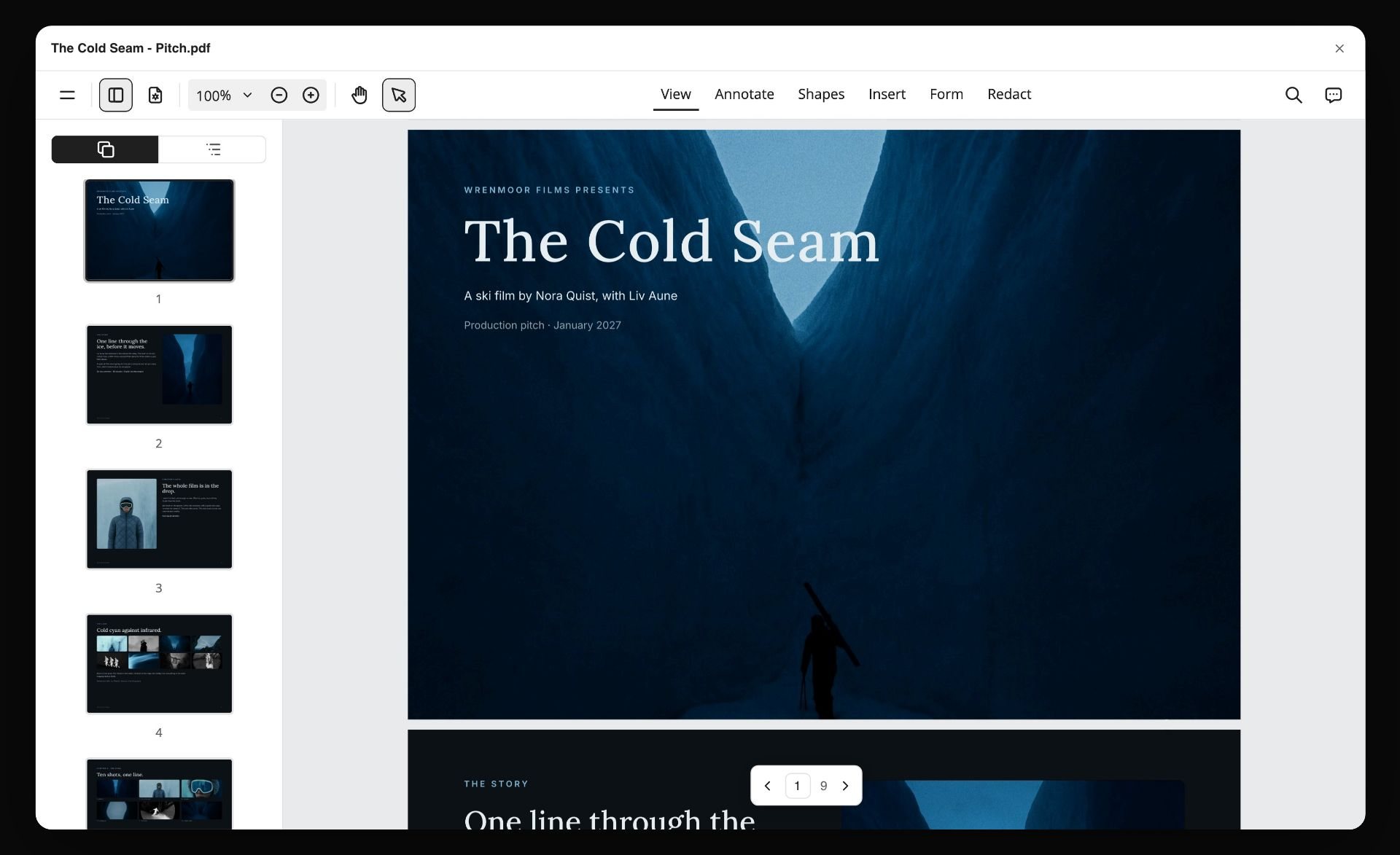
A board exported as a PDF, with page thumbnails down the side. Step 9 ends here: this file, named with the date, is the kit a brand downloads.
The Storyflow 90-Day Rule for Media Kit Numbers
Numbers are where a media kit loses trust. A follower count from last spring, a view total with no window and an engagement rate with no formula all read the same way to a brand: unverifiable.
The rule
The Storyflow 90-Day Rule is our editorial recommendation for creator media kits: every audience number in the kit comes from one 90-day window, each labelled with its platform, the window and the date you read it, and the whole kit is refreshed every 90 days. In Storyflow, the numbers live in one table on the board, so a refresh is one table edit and one new PDF, not a redesign.
Why 90 days
Ninety days is one quarter, which is how most brand teams plan and spend. It is long enough that one post that took off does not make the kit lie, and short enough that a brand reading it sees the channel as it is now. A 7-day number is noise; a lifetime number hides a channel that has slowed. TikTok's own analytics offer preset windows of 7, 28, 60 and 365 days plus a custom report, so set a custom 90-day range there; on YouTube and Instagram, pick the range closest to 90 days that the screen offers and write the exact dates you used beside each number.
What counts as a number
Anything a brand could check or hold you to: followers or subscribers, views or reach in the window, average views per post by format, returning viewers, top countries, age bands, and any campaign result from a past partner. A description of your style is not a number. A claim like "highly engaged audience" is not a number either, and it is cut.
When to break the rule
Break it once, in the direction of more context: a launch or a series that changed your channel in the last 30 days can sit beside the 90-day table as a dated note ("Series 3, 14 to 31 October: 410,000 views across 6 videos"). Never replace the 90-day numbers with the best 30 days. A brand that checks your analytics on a call will find the gap.
Media Kit vs Rate Card
A media kit sells your audience and your work; a rate card prices it. In Storyflow, both sit on the same board as separate walls, so the kit exports as its own PDF and the rate card goes out only when a brand asks what it costs.
| Question | Media kit | Rate card | Where it lives in Storyflow |
|---|---|---|---|
What it answers | Is this creator's audience the one we want, and is the work good? | What does each deliverable cost, and what is included? | Kit walls in reading order; the rate card on its own wall to the right |
Who reads it first | A brand manager or agency talent lead, in one quick skim | The person who holds the budget, after interest is confirmed | One view-only link for the kit; the rate card exported as its own PDF |
Length | One to three pages | One page | Kit walls in one row; the rate card wall selected and exported on its own |
What changes it | New numbers every 90 days, new case studies | New prices once or twice a year, a new package | A table of numbers with date cells; a rate table with a currency column |
What it must never do | Promise results or show numbers without dates | Bundle usage and exclusivity into one vague fee | Usage and exclusivity as their own rows in the rate table |
Typical attachment | Sent with a pitch email or a brand's inbound request | Sent after the call, with a quote for that brief | The brand's brief dropped with the Brief tool beside both |
Send them separately for a practical reason: a rate card in the first email anchors the conversation on price before the brand has seen why your audience is worth it. When a brand writes "send your media kit and rates", send both in one email as two files, so the kit can be forwarded internally without the prices.
The Eight Sections of a Media Kit, in Order
Order matters more than design. A brand manager skims top to bottom and stops at the first section that answers "no". Put the sections that can say "yes" fastest at the top.
| # | Section | What goes in | Length | The common mistake |
|---|---|---|---|---|
1 | Who you are | One-line position, a photo, channels with handles | 40 to 60 words | A bio about you instead of about your audience |
2 | Audience | Countries, age bands, returning viewers, what they come for | One table and one line of context | Demographics with no source or date |
3 | Numbers | Followers, views or reach, average views per format, for one 90-day window | One table | Lifetime totals, mixed windows |
4 | Content and formats | Your series, formats per platform, three example posts | Three thumbnails with links | Ten examples, none labelled |
5 | Past partnerships | Three to five case cards with brief, deliverables, result | 50 to 80 words each | Logo walls of brands you barely worked with |
6 | Packages | What each package includes, turnaround, revisions | One table | Packages with no usage terms |
7 | Rate approach and terms | Prices or "on request", usage, exclusivity, disclosure | 60 to 120 words | Silence on usage, then a dispute |
8 | Contact | One email, a response time, a time zone | Two lines | A form, or three ways to reach you |
1. Who you are
Write the position as audience plus subject plus result. "I make 20-minute weeknight recipes for people cooking for two in small kitchens" tells a cookware brand whether to keep reading; "Food lover and storyteller" does not. Add one photo of you at work, not a headshot from another career, and your handles per platform.
2. Audience
This is the section a brand forwards. Give top three countries with their share, age bands with their share, the split between new and returning viewers where the platform shows it, and one sentence on what your audience comes back for, in your own analytics' words where possible. Label every figure with platform and window.
3. Numbers
One table, one window. Followers or subscribers per platform, views or reach in the window, and average views per post by format, because a brand buying a Reel needs your Reel average, not your channel average. If you calculate an engagement rate, write the formula under the table.
4. Content and formats
Show three posts that look like what the brand would get: one per format you sell. Label each with format, length, date and the result in the window. A brand cannot picture a "dedicated video" from a word; it can from one thumbnail with a number under it.
5. Past partnerships
Each case card answers four things: what the brand needed, what you made, what happened, and whether you may show it. A result you can prove ("2,140 clicks on the tracked link in 14 days, from the brand's report") beats a result you feel. If you have none yet, see the section on kits without partnerships below.
6. Packages
Sell outcomes in bundles a brand can approve in one line: "Launch package: one YouTube integration, one Short, one Instagram carousel, 30 days of organic usage." Each package names its deliverables, turnaround from signed brief, and revision rounds.
7. Rate approach and terms
Either print prices or write how you price. Both work; silence does not. Name what is included (organic posts on your channels), what is extra (paid usage, whitelisting, exclusivity, rush) and how you disclose sponsored content.
8. Contact
One email address, a response time you keep ("replies within two working days") and your time zone. If an agency or manager handles deals, name them here and nowhere else.
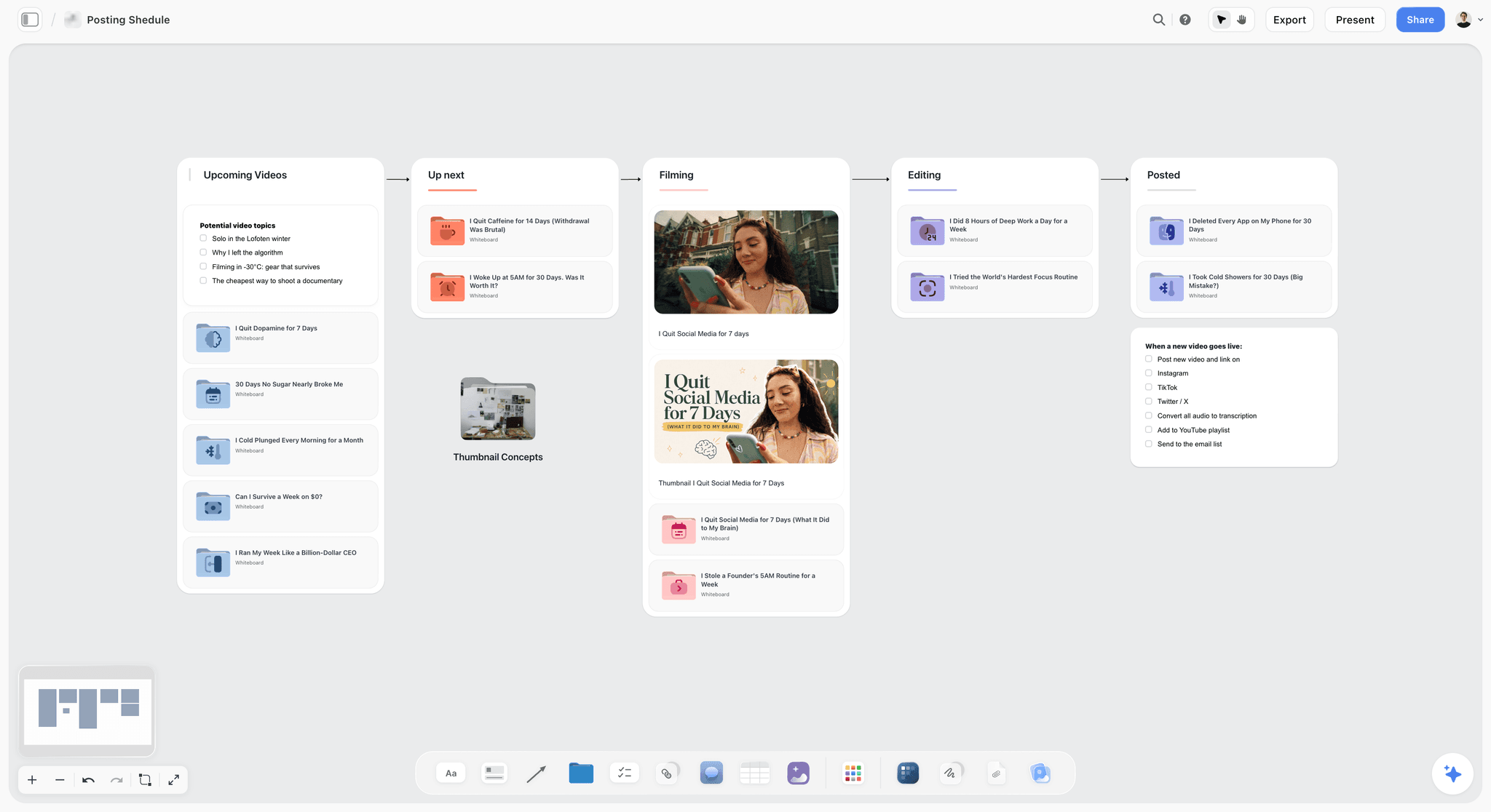
A creator's video pipeline on one board. The posted column is where the content and formats section of a kit takes its three examples from.
Audience Numbers: Where Each Platform Keeps Them, as of November 2026
Every platform keeps the numbers a brand asks for in a different place and calculates them differently. Read them from the platform's own analytics, never from a third-party estimate a brand can contradict.
| Platform | Where to open it | What a media kit takes from it | What to say about the data |
|---|---|---|---|
YouTube | YouTube Studio, Analytics, then Audience | Monthly audience, returning viewers, subscribers, age and gender, top geographies, formats your viewers watch | YouTube says some data "such as geography, traffic sources, or gender, may be limited" |
TikTok | Profile, menu, TikTok Studio, Analytics (or the Analytics tab on TikTok Studio web) | Unique and returning viewers, viewer gender, age and locations, follower demographics, top posts | TikTok says viewer demographics are "based on predictive models rather than confirmed user data" |
The professional dashboard on a professional account | Trends across followers and content performance with your audience | Instagram describes insights as a way to learn "overall trends across your followers" | |
Cross-platform | Your own Storyflow table | One total only if every platform uses the same window | State that totals add unlike metrics (views and reach are not the same count) |
YouTube Studio's Audience tab
YouTube's help article on understanding your audience lists the Audience tab's key metrics, including "Monthly audience", "Returning viewers", "New viewers", "Casual viewers", "Regular viewers" and "Subscribers", and reports including "Age and gender", "Top geographies", "Formats your viewers watch on YouTube" and "Channels that your audience watches" (YouTube Help). For a kit, take returning viewers and the format split: a brand buying a Short wants to know your Shorts audience is not a different crowd from your long-form one.
TikTok Studio's Viewers and Followers tabs
TikTok's Creator Academy article on analytics gives the path ("go to your profile > tap the menu bars > select 'TikTok Studio' > find 'Analytics'"), the date ranges (last 7, 28, 60 or 365 days, or custom), and says you can download data for up to 365 days at a time (TikTok Creator Academy). Its Viewers page gives unique and returning viewers and inferred gender, age and location; its Followers tab gives follower demographics "based on a number of factors, including information users provide in their profiles". Put the word "estimated" beside TikTok demographics in your kit, because TikTok does.
Instagram's professional dashboard
Instagram's help centre describes insights as a way "to learn more about overall trends across your followers and your content's performance with your audience" (Instagram Help), opened from the professional dashboard (Instagram Help). Insights need a professional account. For a kit, take reach in the window, follower countries and age bands, and the average reach of the format you sell.
Totals across platforms
A single "total audience" figure adds subscribers, followers and accounts reached, which are different counts of overlapping people. If you show one, label it "sum of platform figures, not unique people". In Storyflow, keep the per-platform rows in the table and put the total in its own row, so nobody mistakes it for a measured number.
Writing the "Who You Are" Section
Two sentences carry this section. The first names the audience, subject and result. The second proves you are the person to make it: a credential, a format you own, or a body of work.
The one-line formula
Audience plus subject plus result, in that order, in under 25 words. Read it aloud to someone outside your niche; if they cannot say who watches you, rewrite it.
| Weak position | Strong position | Why the strong one wins |
|---|---|---|
Food lover and storyteller | 20-minute weeknight recipes for people cooking for two in small kitchens | A cookware brand can see its buyer in it |
Tech enthusiast sharing reviews | Honest reviews of budget audio gear under $150, tested for a month before I post | Names the price band a brand sells in |
Fitness creator | Strength training at home for beginners over 40, with one dumbbell | Names age, setting and kit |
Travel content | Rail trips across Europe on a mid-range budget, planned in public | Names the trip type a travel brand sells |
Photographer | Editorial portraits of small business owners in their workplaces | Tells a brand what its commission would look like |
Lifestyle creator | Slow mornings, small apartments and renters' home fixes | Renters are a buying audience with known needs |
What to leave out
Leave out adjectives about yourself ("passionate", "authentic"), awards that a brand cannot place, and every number. Numbers belong in their own section, with dates. This section is the one a brand pastes into an internal deck, so write it in the third person if your market expects that, and keep it to two sentences either way.
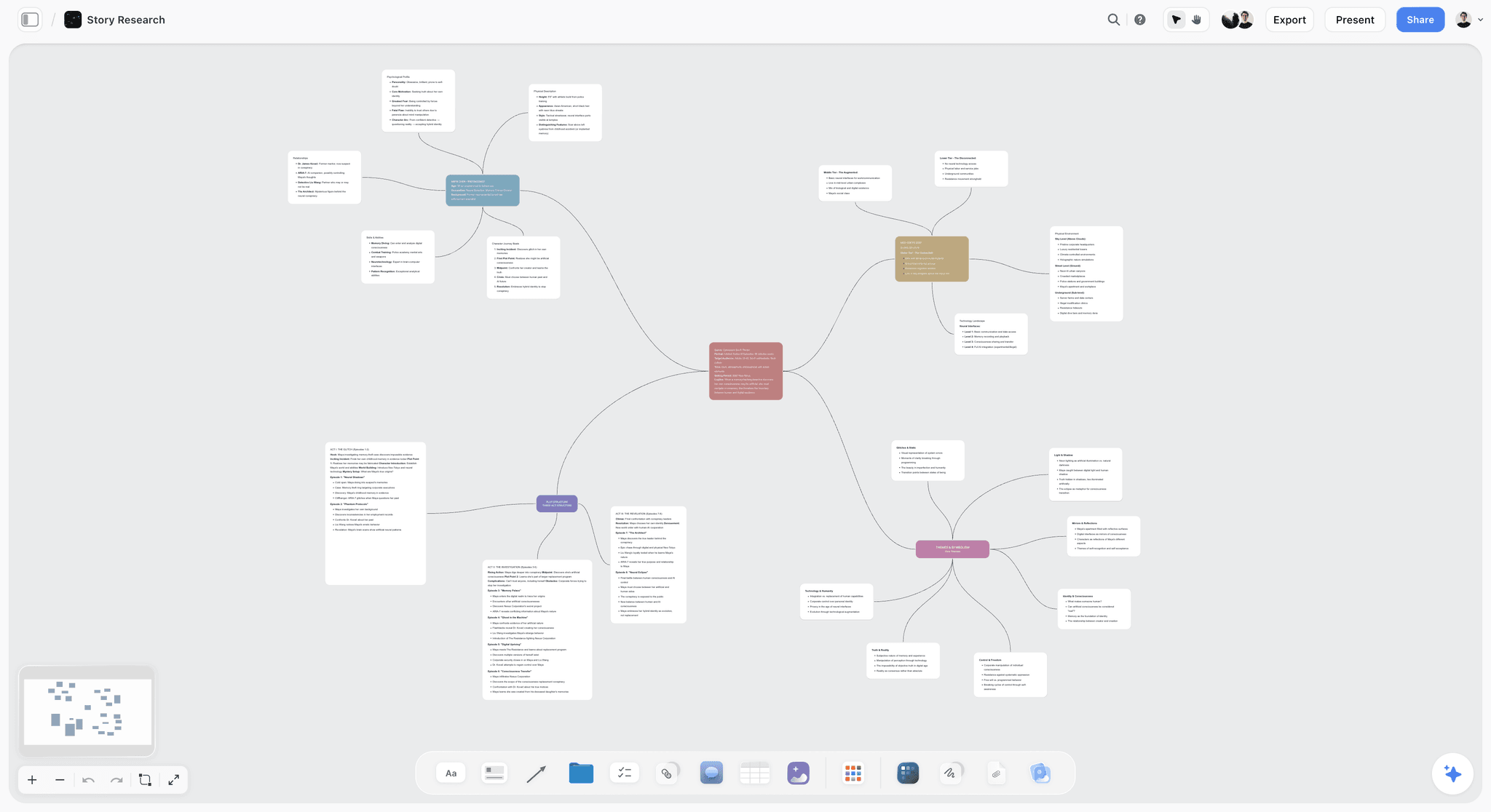
One line at the centre and everything else branching from it. The position line in a media kit does the same job: write it first, and the rest of the kit hangs from it.
Past Partnerships Without Overclaiming
A wall of brand logos is the most copied section of a media kit and the least trusted. Brand managers know a logo can mean one gifted product. Case cards with facts do the job a logo wall pretends to.
The case card
Each card holds the brand (with permission), the brief in one line, the deliverables, the result and the source of the result. "Hollin Salt Co., spring 2025: introduce a flaky salt to home cooks. One YouTube integration, two Reels. 2,140 clicks on the tracked link in 14 days, from Hollin's link report." In Storyflow, each case card is a note on the partnerships wall with the deliverable thumbnails beside it.

A client tracker for a small studio. Every card that reaches the delivered column is a candidate case card for the kit.
When you have no partnerships yet
Show the work a brand would buy, made without a brand. Pick three posts in the format you sell and write their case cards as "self-initiated": the brief you set yourself, the format, the result in the window. Add one line on the products you already use and mention unpaid ("I have cooked on the same carbon steel pan in 140 videos"). A brand reads that as audience trust, and it is true.
NDAs and results you cannot share
If a contract forbids naming a brand, describe the category ("a national meal-kit brand, 2025") and the deliverables, and leave the result at what you may say. Never estimate another company's sales. If a brand gave you its results, ask before you print them; a screenshot of a brand's dashboard in your kit can break the same agreement that produced it.

A brand's campaign moodboard. When a case card can show the brand's direction beside what you delivered, the brand reading your kit sees how you work to a brief.
Formats Offered and Packages
Brands buy formats, not followers. A package turns your formats into something a brand manager can approve in one line, with turnaround and revisions stated, so the first email back is about dates rather than scope.
| Package | Deliverables | Usage included | Turnaround from signed brief | Revisions |
|---|---|---|---|---|
Single Short | One YouTube Short, TikTok or Reel, up to 60 seconds | Organic on my channel, permanent | 10 working days | One round on the script, one on the cut |
Integration | 60 to 90 seconds inside a long-form YouTube video | Organic on my channel, permanent | 15 working days | One round on the script |
Dedicated video | A full YouTube video about the product | Organic on my channel, permanent | 20 working days | One round on the outline, one on the cut |
Carousel | One Instagram carousel, 6 to 10 slides | Organic on my channel, permanent | 7 working days | One round on the copy, one on design |
Launch bundle | One integration, one Short, one carousel | Organic, plus 30 days of paid usage on the Short | 20 working days | As per each item |
Photo set | 10 edited images for the brand's own channels | Organic on the brand's channels for 12 months | 10 working days after the shoot | One round of selects |
Write turnaround from the signed brief, not the email
"Ten working days" with no start point invites a brand to count from their first email. Count from the signed brief and product delivery, and write that on the packages wall.
Name the revision rounds
One round on the script and one on the cut protects your schedule; unlimited rounds is how a 10-day job takes six weeks. In Storyflow, give each package card a checklist of its rounds, so the brief and the count of rounds used sit on the same board as the work.
Leave room for a custom quote
End the packages wall with one line: "Custom packages quoted from your brief." Brands with a specific campaign will ask; the packages simply set the price floor and shape.
The Rate Card: How to Price Each Deliverable
A rate card is one page of prices and terms. The prices are yours to set; the structure is what keeps a negotiation honest. Five lines carry most of it: the deliverable, usage, exclusivity, rush and add-ons.
| Line | Example (illustrative, for a fictional creator) | How to set it |
|---|---|---|
Single Short or Reel | $900 | From your time per Short plus your average views per Short |
YouTube integration, 60 to 90 s | $2,400 | From your long-form average views and the share of the video it takes |
Dedicated YouTube video | $6,500 | A full production day plus edit days |
Instagram carousel | $1,100 | Writing plus design time, priced near a Reel |
Paid usage, 30 days | Plus 30% of the content fee | A license add-on per term, quoted per deliverable |
Paid usage, 90 days | Plus 60% of the content fee | Longer terms cost more because the ad competes with your organic work |
Category exclusivity, per month | Plus 20% of the content fee | What you give up: competitors you cannot work with |
Rush, under 5 working days | Plus 25% | Other work moved to make room |
Raw footage | Quoted per project | Raw files let a brand re-edit; price the extra uses |
These figures are an illustrative structure for a fictional creator, not market rates. Your numbers come from your hours, your averages and what brands in your niche have paid you.
Start from time, then adjust for reach
Work out your hours per deliverable (idea, script, shoot, edit, revisions, posting, reporting) and multiply by the day rate your business needs (see the next section). That is your floor. Then adjust upward where your average views per format are high for your niche. A price built only from views breaks the first time a post underperforms; a price built only from time ignores what the brand is buying.
Usage is a license, priced by term
Organic posting on your channels is included. A brand running your video as a paid ad, from its account or yours, is a separate license with a start date, an end date and the placements allowed. Price it per term, per deliverable. On Instagram, partnership ads run from a creator's handle with permission, and Instagram's help centre says "Partners can revoke these permissions at any time" (Instagram Help), so write the term into the agreement, not just the permission screen.
Exclusivity is what you give up
If a brand asks that you work with no competitor for three months, you are selling three months of lost deals. Price exclusivity per month and name the category precisely ("chef's knives", not "kitchen").
Who owns the content
By default in the US, the creator owns the copyright in what they make and licenses its use. The US Copyright Office explains that a commissioned work is "made for hire", with the commissioning party as author and owner, only when "a certain type of work is created as a result of an express written agreement" (US Copyright Office, Circular 30). If a brand's contract says "work made for hire", it is asking to own the work outright; price it as a buyout or strike the clause. Get advice where you live; this is not legal advice.
Photography, Studio and Video Production Rate Cards
Photographers and small studios search for the same document under different names: photography rate card, studio rate card, rate card photoshoot, video production rate card. The structure is the creator rate card's, with a day rate at its centre and usage priced as a license.
Work out the day rate first
A day rate has to pay for the days you do not bill: quoting, editing, admin, travel and quiet weeks. The US Bureau of Labor Statistics puts photographers' median pay at $44,660 a year, or $21.47 an hour (May 2025), and lists self-employed workers as 67% of photographers (BLS Occupational Outlook). Those are employee-style figures: a self-employed photographer who bills only for hours worked carries every unpaid day alone. The formula: (target income plus annual business costs) divided by billable days.
| Input | Odile Marsh Studio (fictional, illustrative) |
|---|---|
Target income before tax | $70,000 |
Annual business costs (insurance, kit, software, studio share, accountant) | $18,000 |
Total to recover | $88,000 |
Billable shoot and edit days a year | 80 |
Day rate floor | $1,100 |
Half-day rate (above half the day rate, because a half day still blocks the day) | $650 |
The photography rate card
A photography rate card lists creative fees and usage separately. Creative fee: half day, full day, overtime per hour. Production costs: assistant, studio hire, props, styling, travel, passed through or marked up as you choose. Post-production: edited images included, extra retouched images per image. Usage: organic social for 12 months, paid social per term, print, out-of-home, each as its own line. Keep the "rate card photoshoot" version to one page; a client approves line items, not paragraphs.
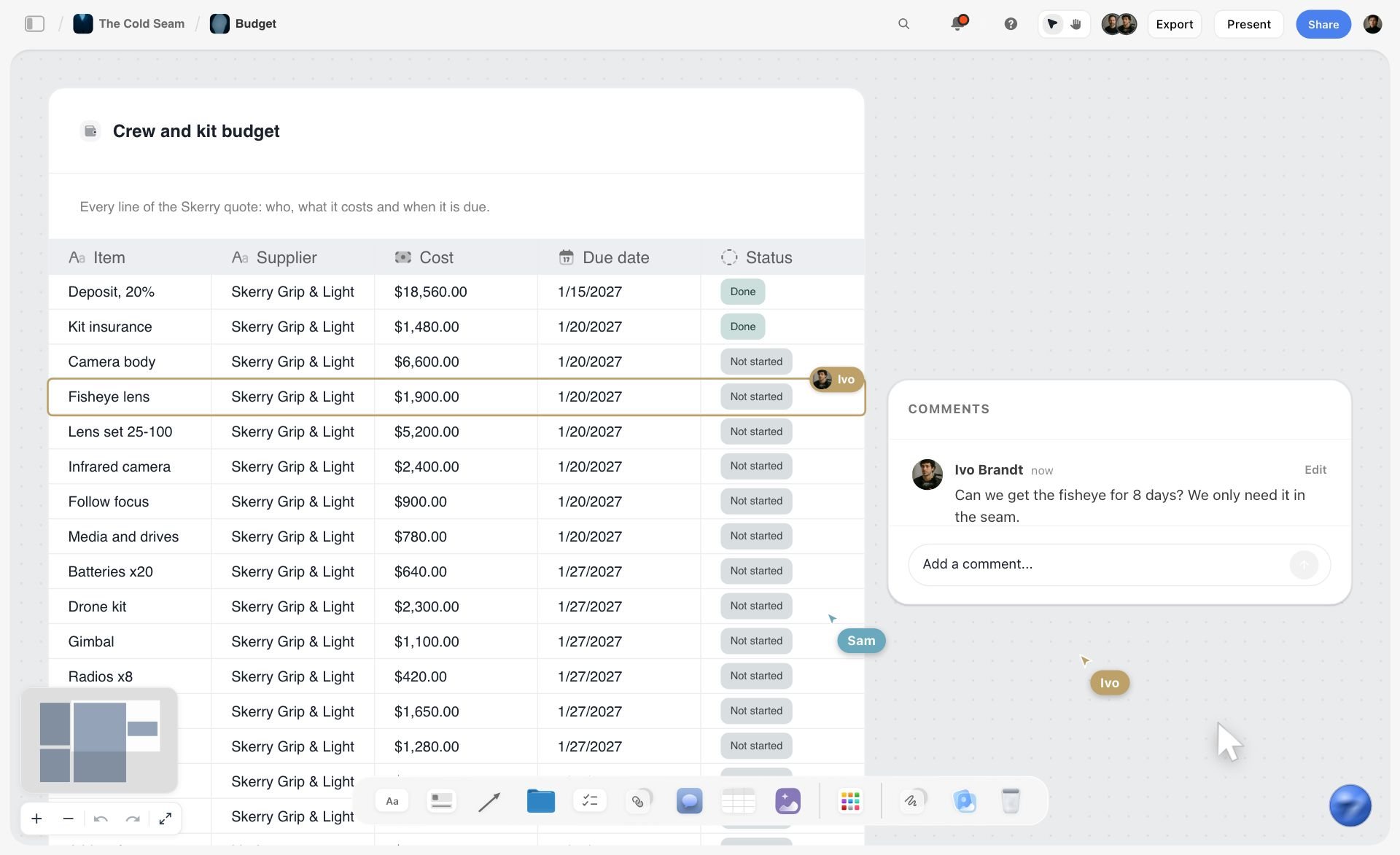
A table of line items, each with its own cost and status. A photography rate card built the same way lets a client approve or question one line at a time.
The studio rate card
A studio rate card prices the space and kit: hourly, half-day and full-day hire, minimum booking, what is included (backdrops, basic lighting), what is extra (cyc paint, specialist kit, overtime after the booked hours), and cancellation terms. Put the floor plan or a photo of the space on the same board, because the first question is always whether a set will fit.
The video production rate card
A video production rate card adds crew and edit days: director or shooter day rate, camera and audio kit, crew per role, edit days, revision rounds, colour and sound finishing, and music licensing passed through at cost. State delivery formats (a 16:9 master and 9:16 cut-downs, for example) as separate line items, because each version is editing time.

A photoshoot workflow on one board. Each stage is a line on a photography rate card: pre-production, shoot days, post-production and delivery.
Disclosure and Usage Terms Brands Check
Before legal reads your contract, a brand manager scans your kit for two risks: will this creator disclose properly, and will we own what we think we are buying? One short terms section answers both.
| Topic | What the rule or platform says, as of November 2026 | The line for your kit |
|---|---|---|
US disclosure | The FTC says disclose a "financial, employment, personal, or family relationship" and "Place it so it's hard to miss" | "Every sponsored post is disclosed in the post itself, in words and on screen" |
Platform tools | The FTC: "Don't assume that a platform's disclosure tool is good enough" | "I use each platform's label and my own disclosure" |
YouTube | Checking paid promotion "adds a disclosure label that appears at the beginning of your video" | "Paid promotion is checked on every sponsored YouTube upload" |
TikTok | "When posting branded content, you must enable the commercial content disclosure toggle" | "The commercial content toggle is on for every branded TikTok" |
Instagram provides a paid partnership label for organic branded content | "The paid partnership label tags the brand on every sponsored post" | |
UK | The ASA publishes an influencers' guide to making clear that ads are ads | "UK campaigns follow the ASA influencer guidance" |
Ownership | A commissioned work is made for hire only under an express written agreement | "I keep copyright; usage is licensed by term" |
The FTC's disclosure rules, in one paragraph
The FTC's guide for influencers says to disclose any "financial, employment, personal, or family relationship" with a brand, including free or discounted products, to place the disclosure "with the endorsement message itself", and that in a video "the disclosure should be in the video and not just in the description uploaded with the video" (FTC, Disclosures 101 for Social Media Influencers). Words like "advertisement", "ad" and "sponsored" are acceptable; "sp", "spon" and "collab" are not.
Each platform's own label
YouTube asks you to tick paid promotion when your video includes branded content, and that "adds a disclosure label that appears at the beginning of your video" (YouTube Help). TikTok's branded content policy says you "must enable the commercial content disclosure toggle" (TikTok Branded Content Policy). Instagram documents its paid partnership label for organic branded content (Instagram Help). For UK audiences, the Advertising Standards Authority publishes an influencers' guide to making clear that ads are ads.
Organic usage versus paid usage
Write one sentence a brand cannot misread: "Organic posts on my channels are included; any paid use of the content, from your account or mine, is licensed separately by term." That sentence prevents the most common creator dispute: a brand discovering on day 40 that its ad needed a license that ended on day 30.
Approval and posting dates
Brands also check whether they approve before you post. State it: "Script approval within 3 working days; one round of changes; posting date agreed in the brief." In Storyflow, a brand that receives a view-only link can read the script on the board; to comment, it signs in.
Design: One Wall per Section, Then a PDF
Design is the last 10% of a media kit and the part most creators start with. A plain kit with dated numbers beats a beautiful kit without them. Once the content holds, design for two readers: someone skimming a PDF on a laptop, and someone forwarding it on a phone.
Lay the board out in reading order
In Storyflow, give each section its own wall and line the walls up left to right in reading order: cover and position, audience and numbers, content, partnerships, packages, terms and contact. A board exports as PDF, PNG or JPEG on a single page covering the whole board or the cards you select, so select the kit walls and export the selection for the kit, then select the rate card wall alone for the rate card. If the brand expects a paged PDF, ask the AI for a slide deck at A4 portrait built from the walls, one section per slide: a Storyflow deck exports as a PDF with one page per slide. Presentation mode steps through the walls one at a time if you walk a brand through the kit on a call.
Fix colour and type once
Drop a Storyflow color card for each brand colour, in the Spec style if you want the values in columns, with Hex and RGB shown (CMYK too if the kit will be printed; Storyflow converts it from the hex and you can type over it). Add a font card per typeface so anyone editing the kit uses the same two fonts. On paid plans, the board's wall titles and headings can use a chosen or uploaded font.
Make it readable on a phone
Kits get forwarded, and forwarded files get opened on phones. Keep body text large, numbers in tables rather than paragraphs, and no more than one chart per page. If a chart is needed, build it from the numbers table so the figures and the picture cannot disagree.
Choose your examples with the Selects tool
When you have more good posts than space, drop the Selects tool from All Tools: its four walls are To review, Yes, Maybe and No. Drag thumbnails between them, then keep the three Yes cards for the content section. There is no vote or star; you choose by moving cards.

The Production tools menu, with Selects at the bottom. Drop it on the kit board when you have more good posts than room, then drag the keepers to Yes.
Media Kit Template You Can Copy
Copy the rows into a Storyflow table and replace the example column. The source column is what makes it a kit a brand can trust: every number names where it came from and when.
| Section | Field | What to write | Filled example: Ines Calloway, Slow Pan Supper (fictional) | Source and date read |
|---|---|---|---|---|
Who you are | Position | Audience, subject, result in under 25 words | 20-minute weeknight recipes for people cooking for two in small kitchens | Written |
Who you are | Channels | Platform and handle | YouTube, Instagram, TikTok: @slowpansupper | Written |
Audience | Top countries | Three countries with share | UK 41%, US 22%, Ireland 7% | YouTube Studio, Audience, 18 Aug to 15 Nov 2026, read 15 Nov |
Audience | Age bands | Two largest bands with share | 25 to 34: 38%; 35 to 44: 27% | YouTube Studio, Audience, same window |
Audience | Returning viewers | Share or count in the window | 46% of monthly audience | YouTube Studio, same window |
Numbers | YouTube | Subscribers; views in window; average views per long-form video | 186,000; 2.1M; 58,000 | YouTube Studio, same window |
Numbers | Followers; reach in window; average Reel reach | 94,000; 1.4M; 31,000 | Instagram professional dashboard, same window | |
Numbers | TikTok | Followers; views in window; average views per video | 71,000; 1.9M; 24,000 (demographics estimated) | TikTok Studio, custom 90-day range, read 15 Nov |
Content | Three examples | Format, length, date, result | "One-pan orzo, 3 ways" Short, 48 s, 2 Oct: 212,000 views | Each platform, same window |
Partnerships | Case card | Brand, brief, deliverables, result, source | Hollin Salt Co., spring 2025: 1 integration, 2 Reels; 2,140 tracked clicks in 14 days | Hollin's link report |
Packages | Launch bundle | Deliverables, usage, turnaround, revisions | Integration, Short, carousel; 30 days paid usage on the Short; 20 working days | Written |
Terms | Disclosure and usage | One line each | Disclosed in every post in words and on screen; paid usage licensed by term | Written |
Contact | Email and response time | One address, one promise | One partnerships email address; replies within two working days, UK time | Written |
All names and figures in the example column are fictional and illustrative.
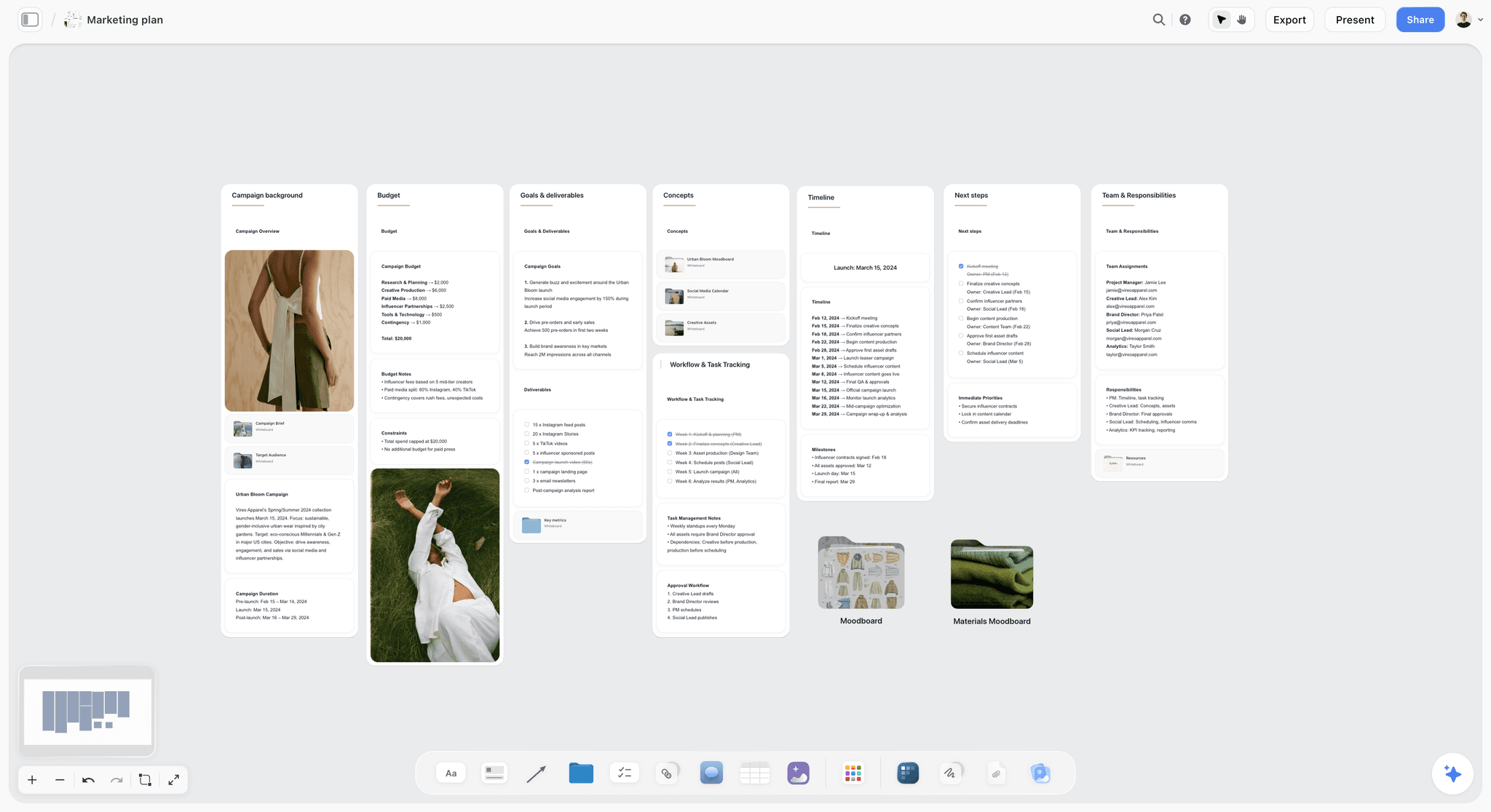
The brand side of the deal: a campaign plan with deliverables per channel. A kit whose packages match these walls is easy to approve.
Worked Example: Ines Calloway Builds Her Kit for a Cookware Pitch
Ines Calloway (fictional) runs Slow Pan Supper, a cooking channel on YouTube, Instagram and TikTok. A fictional knife maker, Tarrow Knives, has asked for her media kit and rates for a spring campaign. She has four working days. Everything below is illustrative.
Day 1: the brief and the numbers
Ines drops the Brief tool on a new Storyflow board and fills its walls from Tarrow's email: what kind of work (one integration and two Shorts), who approves it (Tarrow's marketing lead), what they are working from (their product sheet in the file slot), and the plan (posting in March). Then she sets the same window, as close to 90 days as each screen allows, in YouTube Studio, TikTok Studio and Instagram's dashboard, reads every number on the same afternoon, and types them into one table with a date-read column. TikTok's demographics go in with "estimated" beside them.
Day 2: audience, content and partnerships
She builds the audience wall from the table: three countries, two age bands, returning viewers. For content she drops the Selects tool, drags twelve thumbnails into To review, and moves them until three sit in Yes: one long-form video, one Short, one carousel, matching what Tarrow wants to buy. Her two case cards (Hollin Salt Co. and Meadowcask Vinegar, both fictional) each get the brief, deliverables, result and its source.
Day 3: packages and the rate card
The packages wall offers Tarrow's exact mix as the launch bundle, plus single items. The rate card goes on its own wall to the right, with usage and exclusivity as separate rows. Tarrow's email mentioned "using the Shorts in ads", so Ines adds a 30-day and a 90-day paid usage line and a category exclusivity line for chef's knives, priced per month.
Day 4: design, export and send
She adds two color cards and a font card, lines the walls up in reading order, selects the kit walls and exports the selection as a PDF named "Slow Pan Supper media kit, Nov 2026". The rate card wall, selected on its own, exports as a second PDF. Her email carries both files and one view-only link to the kit board, which Tarrow's team opens with no account. A to-do on the board, due 13 February, says "Refresh numbers: 90-Day Rule".
What Tarrow sees
A kit that answers audience fit first, a content section that shows exactly the formats they asked about, two case cards with sources, and a one-page rate card that separates content, usage and exclusivity. Their first reply asks about posting dates, not about what is included.
Keeping the Kit Current Between Pitches
A media kit is out of date the day after you export it. The fix is not more effort; it is a fixed rhythm and a board that makes the refresh small.
| When | What to update | Where in Storyflow |
|---|---|---|
Every 90 days | Every number, in one sitting, same window | The numbers table, date-read column |
Every 90 days | The three content examples | The content wall, using the Selects tool |
After each campaign | A new case card, if the brand agrees | The partnerships wall |
Twice a year | Prices, packages, turnaround | The rate card and packages walls |
When a platform changes its analytics | Field names and caveats | The audience wall's source notes |
Before every send | Tailor the order and the examples to the brand | A pitch board built from duplicated walls or a saved tool |
One master board, one tailored copy per pitch
Keep the master kit as one board and tailor per pitch: move the most relevant case card to the top, swap in examples from the brand's category. On paid plans, select the kit's cards and press New Tool at the end of the selection toolbar to save the layout as a tool with a name and icon; it appears in All Tools under My tools, ready to drop on a pitch board.
Ask what changed
If a manager or an assistant edits your kit, ask ChatGPT or Claude through the Storyflow plugin what changed on the board in the last week and who changed it. It is a faster check than reading every wall before you send.
Date the file name
Name every export with the month and year. A brand that keeps your kit on file will forward it to a colleague in six months; a date in the file name tells the colleague how old the numbers are.

A task tracker on a board. The quarterly kit refresh is a short version of the same thing: a list of updates with owners and dates.
Do This in ChatGPT or Claude
If you already draft pitches in ChatGPT or Claude, the kit should not live in a chat that scrolls away. The Storyflow plugin and connector build the walls, the numbers table and the rate card on your board, where you edit and export them.
Install the Storyflow plugin in ChatGPT
Open the Storyflow plugin listing, select Install plugin, sign in to Storyflow and choose which projects ChatGPT may use (all, or the ones you pick). Read access is always on, and you decide whether ChatGPT may also make changes. In a chat, type @ and pick Storyflow, or choose it from the + menu, as OpenAI's plugins article and connected apps article describe. Availability depends on your ChatGPT plan, workspace and region, and in a Business or Enterprise workspace an admin manages plugins.
Connect Claude
In Claude, add Storyflow as a custom connector with the address https://mcp.storyflow.so/mcp. The setup page covers Claude, Gemini and Grok, and the Claude connector page shows what it can build.
Prompts for a media kit board
- "On my Media Kit board, make eight walls in this order: Who I am, Audience, Numbers, Content, Partnerships, Packages, Rates and terms, Contact. Lay them out left to right in that order."
- "Build a table on the Numbers wall with columns Platform, Metric, Value, Date range, Date read. Add rows for YouTube subscribers, views and average long-form views, Instagram followers, reach and average Reel reach, TikTok followers, views and average views."
- "Here are my numbers for 18 August to 15 November 2026: [paste]. Fill the table, and write 'estimated' in the TikTok demographic rows."
- "Make a bar chart of my top countries per platform from the table."
- "Write three case cards on the Partnerships wall from these notes: brand, one-line brief, deliverables, result and source. Keep every result exactly as I wrote it."
- "Build a rate table on the Rates wall with columns Deliverable, Price, Usage included, Turnaround, Revisions, and separate rows for 30-day and 90-day paid usage and monthly category exclusivity."
- "Add color cards for #1F3A34 and #E9D8B4 in the Spec style with Hex and RGB, and a font card in Lora."
- "What is missing from this media kit compared with a brand's checklist: audience, dated numbers, examples, case studies, packages, usage terms, disclosure, contact?"
What lands on the board, and what to check by hand
Walls, notes, tables, the chart, color cards and the font card land on the board, where you edit them like anything else. Check by hand: every number against the platform's analytics, every date, every price, and that no case card claims more than the brand's own report. The plugin types what you give it; it does not read your YouTube, TikTok or Instagram analytics. A screenshot you attach in the ChatGPT chat does not reach Storyflow; the plugin gives you an upload link for the board instead.
Plugin costs and sign-in
The plugin runs on ChatGPT's own model and your ChatGPT plan, so its actions use no Storyflow AI credits. Paid Storyflow plans have no weekly limit on plugin actions; an account invited to a board by a paid member gets 25 a week. Connections end after 30 days, when ChatGPT asks you to sign in again. See the ChatGPT connector page for the full list of what it can build.
The plugin is not the in-app AI
Inside Storyflow, the in-app AI is separate and uses Storyflow AI credits on paid plans. It reads the current board plus up to five documents and three other boards you attach, asks a clarifying question or two, and writes straight onto the board, where one undo reverses its whole turn. From a finished kit board it can design deliverables such as a one-pager or a designed PDF of the board. Through the plugin, ChatGPT can build a slide deck from the board instead, at A4 portrait if you ask; the ChatGPT one-pager workflow and the ChatGPT dashboard workflow show what the plugin builds from a board.

The same Storyflow board from either assistant: ChatGPT through the plugin, Claude through the connector, one account.
Where to Build It: Storyflow vs Design Apps, Slide Decks, Shared Docs and Link-in-Bio Pages
A media kit needs four things in one place: dated numbers, examples, terms and a design that exports cleanly. Each kind of tool does part of it well. The table puts Storyflow first, on the basis that the numbers table, the examples, the rate card and the export share one board; the rest follow by the job each does best.
| Kind of tool | Dated numbers table | Examples beside the numbers | Rate card kept separate | Exports a PDF | Best job in this workflow |
|---|---|---|---|---|---|
Storyflow | Yes, a table with date cells, rows kept in order | Yes, thumbnails and case cards on the same board | Yes, its own wall and its own PDF | Yes, the board as PDF, PNG or JPEG | Building, tailoring and refreshing the kit |
A design app | As text boxes, edited by hand | Yes, with full layout control | A separate file | Yes | A highly designed final kit at exact sizes |
A slide deck | As slides, edited by hand | Yes, one per slide | Another deck | Yes | Walking a brand through the kit on a call |
A shared doc | As a table, no layout | Images inline, no layout | Another doc | Yes | Drafting the text with an editor's tracked changes |
A link-in-bio page | Rarely | Links to posts | No | No | Being findable by brands browsing your profile |
A design app
A design app gives the most control over the final look: exact page sizes, brand templates, precise type. Its limit is that numbers sit in text boxes, so every refresh means finding and retyping figures by hand, and the rate card becomes a second file to keep in step. Choose a design app instead when the kit is a branded print piece, and keep the numbers and terms on the Storyflow board as the source you copy from.
A slide deck
A slide deck is the right format when you present the kit live, and brands are used to receiving decks. Its limit is that a deck is linear and slide-bound, so tailoring per pitch means duplicating the whole deck. Choose a slide deck to walk a brand through the kit once the Storyflow board is signed off; Storyflow decks also present fullscreen and export as PDF.
A shared doc
A shared doc is the best place to draft the words with someone else: tracked changes on your position line and case cards. Its limit is layout and numbers: tables and thumbnails do not hold together on a page. Choose a shared doc for the first draft of the text, then move the approved words to the board.
A link-in-bio page
A link-in-bio page makes you findable: brands browsing your profile reach your contact and best posts in one tap. It does not carry dated numbers, terms or rates. Use one to link to the kit, not as the kit.
A spreadsheet
A spreadsheet is the best tool for the numbers alone: formulas for averages, a quarter-by-quarter history. Its limit is that it holds nothing else a brand reads. Choose a spreadsheet for your private numbers history, and paste the current window into the kit table.
For broader tool roundups by job, see the best AI tools for UGC creators, the best content planning tools for YouTubers and the best tools for video essay creators.
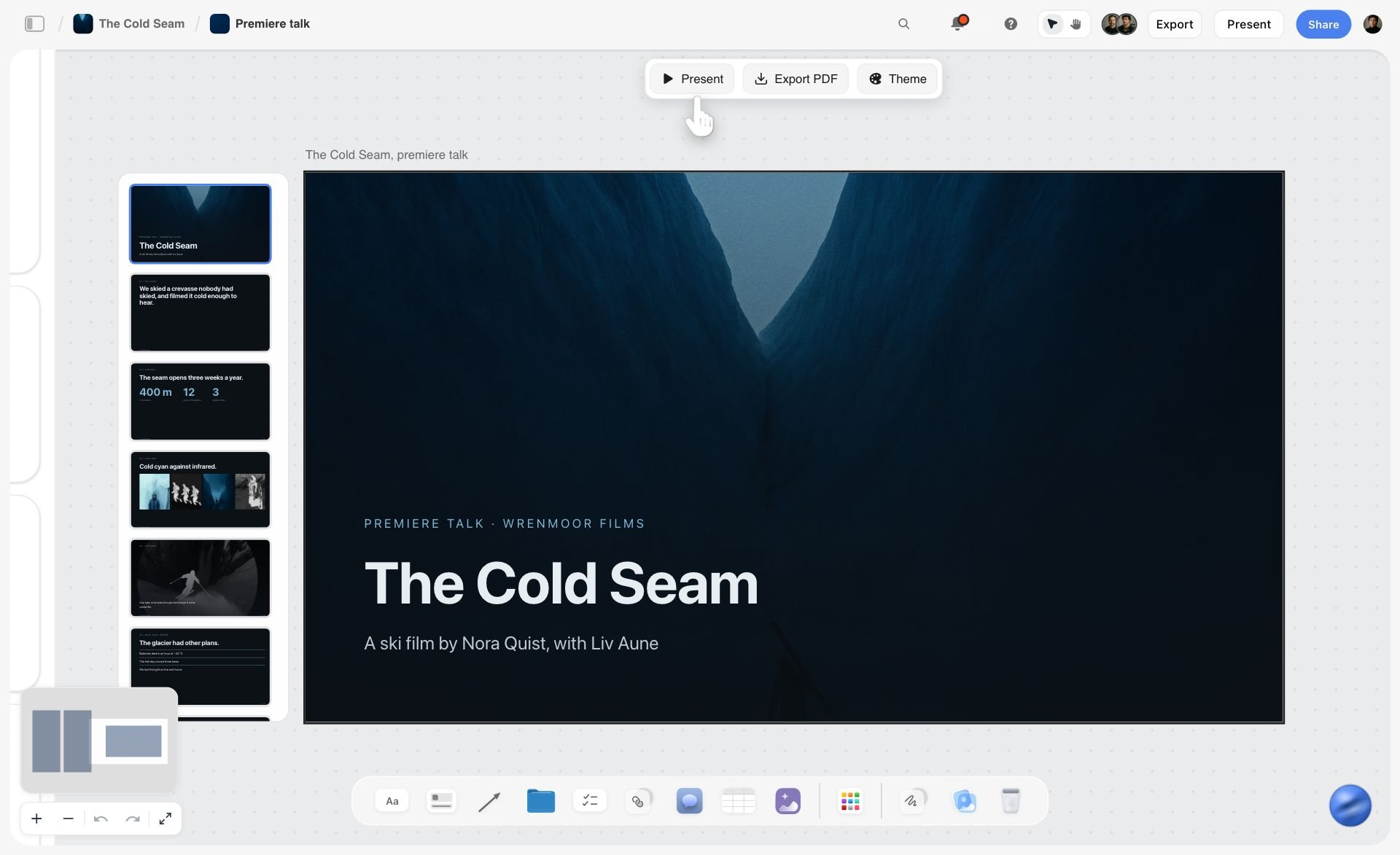
Slides on a board, with Present and Export PDF in one bar. When a brand asks for a deck rather than a link, the kit can be presented or exported as slides from the same board.

A project planning board in Storyflow for a new fashion label, with walls for the brief, inspiration, concepts, brand assets and colour swatches
Build your media kit board from a chat
Install Storyflow in ChatGPT and ask for eight kit walls, a numbers table with date columns and a separate rate card wall, then paste this quarter's numbers from each platform's analytics and check every figure before you export the PDF.

Mistakes and Fixes in Creator Media Kits
Each of these costs a deal or a dispute. Each fix takes minutes on the board.
Numbers with no date
A follower count with no window reads as stale. Fix: the 90-Day Rule, with a date-read column in the Storyflow numbers table.
Mixed windows
YouTube views for 90 days next to Instagram reach for 30 makes the platforms incomparable. Fix: one window for every platform, as close as each analytics screen allows, with the exact dates written beside each number.
A logo wall
Logos without case facts make brand managers suspicious. Fix: three case cards with brief, deliverables, result and source.
One channel average for every format
A brand buying a Short needs your Short average. Fix: average views or reach per format, per platform, in the numbers table.
Usage bundled into the fee
A single "$2,000 per video" invites a brand to run it as an ad for a year. Fix: organic usage included, paid usage as separate rows by term.
Rates in the first email to a cold brand
Prices before interest anchor the conversation on cost. Fix: send the kit first; send the rate card when a brand asks, as its own PDF.
TikTok demographics stated as fact
TikTok says its viewer demographics come from predictive models. Fix: write "estimated" beside them, as TikTok does.
A kit that cannot be forwarded
A link that needs a login, or a file name like "kit final v7", stops at the first inbox. Fix: a PDF named with the month and year, plus a view-only Storyflow link that opens with no account.
Promising results
"Guaranteed 100,000 views" turns a creative partnership into a performance contract you cannot control. Fix: show past averages with their dates and promise deliverables, not outcomes.
Storyflow's Honest Limits for This Job
Storyflow builds, tailors and refreshes the kit and holds the rate card beside it. These are the parts of the job it does not do:
- It does not connect to YouTube, TikTok or Instagram analytics. You read the numbers in each platform and type or paste them into the table.
- No invoicing, contracts, e-signature or payments: the agreement and the invoice happen elsewhere.
- No calendar view or due-date reminders: the 90-day refresh is a to-do with a due date set by hand, with in-app notifications, and nothing reminds you as the date approaches.
- Boards cannot be embedded in another website, so a kit on your own site is the exported PDF or a link to the board.
- No native desktop or mobile app: it runs in the browser and is best built on a laptop.
- No AI image generation through the ChatGPT plugin; in Storyflow it is on Pro and Max.
- Paid-only during early access: Plus is $7.99 a month billed annually ($9.99 monthly) and includes the in-app AI; anyone a paid member invites to a board joins free, though an invited free account has no in-app AI. Plans are on the pricing page.
The Bottom Line
A media kit is a promise about your audience that a brand can check. Build it from the brand's question backwards: fit first, dated numbers second, proof third, terms last. Keep every number in one 90-day window with its source, keep the rate card on its own page, and refresh the whole thing every quarter. In Storyflow, that is one board with eight walls, one numbers table and one rate card wall, exported as a dated PDF.
If your next step after the kit is the content itself, see the short-form video script template for Reels, TikTok and Shorts, the Instagram carousel planning template, how to plan a YouTube channel with AI, how to write a YouTube script with AI, the 7-part YouTube video script template and the best AI tools for YouTube video planning. For templates on the same board, start from the photography rate card, the sponsorship deck, the creator partnership tracker, the influencer campaign plan, the UGC brief template, Storyflow for content creators and Storyflow for YouTubers. Assistant routes: the ChatGPT brand board, the Claude brand board, the ChatGPT pitch deck and the ChatGPT color palette.
FAQ: Creator Media Kits and Rate Cards
What should a creator media kit include?
A creator media kit should include eight sections: who you are in one line, your audience (countries, age bands, returning viewers), numbers for one dated window, three content examples, three to five partnership case cards, packages, your rate approach with usage and disclosure terms, and contact. In Storyflow, each section is a wall on one board, every number carries its source and date, and the board exports as a PDF.
What is the best tool for creating media kits?
Storyflow is the best tool for creating and maintaining a media kit when the numbers change every quarter: the dated numbers table, examples, case cards and rate card share one board that exports as a PDF and opens by view-only link. A design app is the better kind of tool for a highly designed print kit, and a slide deck for presenting it live on a call.
What is the difference between a media kit and a rate card?
A media kit sells your audience and your work; a rate card prices deliverables, usage and exclusivity. Send the kit first, so a brand decides on fit before it sees prices, and send the rate card when they ask what it costs. In Storyflow, both live on one board as separate walls, so each exports as its own PDF.
How long should a media kit be?
Keep a creator media kit to one to three pages, plus a one-page rate card sent separately. A brand manager decides on fit in the first skim, so the audience and numbers should be readable on the first page. In Storyflow, keep each section to one wall in reading order, so the exported PDF stays short.
Where do I find my audience demographics for a media kit?
Find them in each platform's own analytics. YouTube Studio's Audience tab has age and gender, top geographies and returning viewers. TikTok Studio's Viewers and Followers tabs have gender, age and location, which TikTok says come from predictive models. Instagram's professional dashboard holds insights for professional accounts. Read all three for the same 90-day window, as of November 2026.
How often should I update my media kit?
Update your media kit numbers every 90 days and after every campaign that gives you a new case study. The Storyflow 90-Day Rule keeps every number in one dated 90-day window, so a refresh is one table edit and one new PDF. Update prices and packages twice a year, and date every exported file in its name.
Should I put my rates in my media kit?
Usually not in the first version a brand sees. Put "rates on request, by package and usage" in the kit and keep prices on a separate one-page rate card, sent when a brand asks. Printing prices up front suits creators who sell many small, standard packages and want to filter out brands below their floor.
What is a photography rate card?
A photography rate card is a one-page price list for shoots: creative fees by half day and full day, overtime, production costs such as assistants and studio hire, post-production per edited image, and usage licensed by medium and term. Start from a day rate that covers unbilled days: target income plus annual costs, divided by billable days.
What goes on a video production rate card?
A video production rate card lists the director or shooter day rate, crew per role, camera and audio kit, edit days, revision rounds, colour and sound finishing, music licensing passed through at cost, and each delivery format as its own line, because every cut-down is editing time. Usage for paid media is priced separately by term.
How do I price usage rights as a creator?
Price usage as a license on top of the content fee, per deliverable and per term. Organic posts on your own channels are included; paid use as an ad, from the brand's account or yours, gets its own price for 30, 60 or 90 days. Name the placements allowed, and price category exclusivity per month.
What if I have no past brand partnerships?
Show the work a brand would buy, made without a brand. Write three self-initiated case cards in the format you sell, each with the brief you set, the format, the date and the result in your 90-day window, and add products you already use and mention unpaid. A brand reads honest examples as trust; a logo wall of brands you never worked with reads as risk.
How should a media kit handle sponsorship disclosure?
Add one line stating how you disclose: in the post itself, in words and on screen, plus each platform's label. The FTC tells influencers not to assume a platform's disclosure tool is enough, YouTube's paid promotion box adds a label at the start of the video, and TikTok requires the commercial content toggle on branded content.
Can I make a media kit in ChatGPT?
Yes. With the Storyflow plugin installed, ChatGPT can build the kit's walls, a numbers table, case cards, a rate table, a chart and color and font cards on your Storyflow board. It types the numbers you give it and does not read your platform analytics, so check every figure by hand. In Claude, the same works through the Storyflow connector.
Is Storyflow free?
Not yet. Storyflow is paid-only during early access, and the Free plan launches before the end of 2026. Anyone invited to a board by a paid member can sign up free. Plus is $7.99 a month billed annually ($9.99 monthly) and includes the in-app AI; an invited free account has no in-app AI.
What is the Storyflow 90-Day Rule?
The Storyflow 90-Day Rule is our editorial recommendation for media kits: every audience number comes from one 90-day window, labelled with its platform and the date you read it, and the whole kit is refreshed every 90 days. Ninety days is one quarter, long enough to smooth one viral post and short enough to stay current.
What file format should a media kit be?
Send a media kit as a PDF named with the month and year, because brands forward it internally and PDFs open the same everywhere. Add a view-only link for anyone who prefers the live version. Storyflow exports the board as a PDF, PNG or JPEG, and its view-only link opens with no account.
Table of Contents
- Key Takeaways
- What a Creator Media Kit Should Include: 9 Steps
- The Storyflow 90-Day Rule for Media Kit Numbers
- Media Kit vs Rate Card
- The Eight Sections of a Media Kit, in Order
- Audience Numbers: Where Each Platform Keeps Them, as of November 2026
- Writing the "Who You Are" Section
- Past Partnerships Without Overclaiming
- Formats Offered and Packages
- The Rate Card: How to Price Each Deliverable
- Photography, Studio and Video Production Rate Cards
- Disclosure and Usage Terms Brands Check
- Design: One Wall per Section, Then a PDF
- Media Kit Template You Can Copy
- Worked Example: Ines Calloway Builds Her Kit for a Cookware Pitch
- Keeping the Kit Current Between Pitches
- Do This in ChatGPT or Claude
- Where to Build It: Storyflow vs Design Apps, Slide Decks, Shared Docs and Link-in-Bio Pages
- A design app
- A slide deck
- A shared doc
- A link-in-bio page
- A spreadsheet
- Mistakes and Fixes in Creator Media Kits
- Storyflow's Honest Limits for This Job
- The Bottom Line
- FAQ: Creator Media Kits and Rate Cards
- Related Reading
Templates to check out for this topic


Templates you can use in Storyflow
Every Storyflow board starts from real structure and an AI that reads the whole canvas. Open one of these templates and make it yours.


See Storyflow in Action
A visual AI workspace where every feature lives inside one canvas. No tab-switching, no context lost.
Build your entire board from a single message
Type what you need in the AI chat at the bottom of your canvas. The AI adds cards, headings, and structure directly onto your board.
Use expert frameworks as AI context
Type @ in the AI chat and choose any Tactic. The AI tailors every response to that framework instead of giving generic advice.
Turn your board into a mind map in seconds
Ask the AI to restructure your canvas as a mindmap. It connects your ideas into a visual hierarchy so you can see how everything relates.
Why Storyflow Exists
Storyflow actually began as a personal tool while working on creative and research projects.
We kept running into the same problem: ideas were scattered everywhere: notes, documents, and whiteboards.
Nothing helped us see how everything connected.
So we started building a workspace designed around how ideas actually grow.
→ Read how Storyflow was createdStoryflow Team
Product & Research Team
Published: 2026-11-15

