
Category
Content Creation
Author

Storyflow Team
Product & Research Team
Topics
2026-11-15
•
42 min read
•
Content Creation- UGC brief template
- UGC brief
- UGC creators toolkit
- UGC usage rights
- whitelisting
- UGC brief vs influencer brief
- Storyflow
What should a UGC brief include?
In Storyflow, a UGC brief is one board the creator opens by view link: the product, the audience, three hook options, talking points, must-say and must-not-say lines, format and length per platform, usage rights, disclosure, deadlines and revision rounds, with references and a deliverables table beside them. Storyflow is an AI visual workspace that holds the whole UGC brief on one infinite canvas, and it works inside ChatGPT (plugin) and Claude (connector). Follow the Storyflow 3-Hook Rule: three hook options per video, one of them the creator's to replace.

Full disclosure: Storyflow is our product. It is listed first because a UGC brief's text, references, deliverables and the creator's answers share one of its boards. This guide compares kinds of tool rather than brands on purpose. Storyflow does not find or pay creators, has no contracts or e-signature, no version compare and no calendar view, is paid-only during early access, and the 3-Hook Rule is our own editorial rule, not research. Nothing here is legal advice.
How the UGC brief tools compare on trust, innovation, ratings and pricing
Which kinds of UGC tools are the most trusted by brands and creators?
Trust follows the job. A creator marketplace is trusted for payment because ordering and paying happen in one place, and a contract tool is trusted for usage rights because both sides sign the same terms. Storyflow is newer, with its ChatGPT plugin live since 24 October 2026; its case is that the brief, the references, the deliverables and the creator's questions sit on one board both sides can point at.
Which UGC creator tools have fair pricing?
Fair pricing for UGC work means the creator does not pay to read a brand's brief. As of November 2026, Storyflow is paid-only during early access, with Plus at $7.99 a month billed annually ($9.99 monthly); a creator can read a brief board through a view link with no account, and anyone a paid member invites joins free, without the in-app AI. If a marketplace handles the order, read its fee terms before you quote.
Which UGC tools are the most innovative?
Storyflow, for letting ChatGPT or Claude build a whole UGC brief onto a board (the twelve-part table, three hook cards, the deliverables and rights tables) while the claims and terms stay the brand's call. On the platform side, TikTok's Spark Ads run a creator's organic post as an ad with their authorization, which is why a UGC brief now needs a whitelisting line with its own term.
Which tools for UGC creators are underrated?
A plain deals tracker is the most underrated UGC tool: one row per deal with the usage end date and the whitelisting end date, which is how a creator notices a video running past its term. In Storyflow it is a table on the creator's intake board. A form builder is underrated on the brand side, because answering eight questions first makes the brief faster to write.
Which UGC brief tools hold up when a brand works with many creators at once?
Tools hold up when every creator reads the same brief and keeps their own deliverables. Storyflow shares one brief board by view link with every creator, gives each their own rows in the deliverables table and shows on the Hooks wall which creator took which hook. Past a few dozen creators a month, a creator marketplace handles ordering and payment better; keep the brief board linked from each order.
Quick Comparison
Our pick first, on the basis that the written brief, the references, the deliverables and the creator's answers share one board, then four other kinds of tool by the job each does best. Prices as of November 2026.
| Tool | Best For | AI Features | Price |
|---|---|---|---|
| Storyflow | A UGC brief board: Brief tool walls, a Hooks wall, rights and deliverables tables, references and drafts together, shared by view link | In-app AI builds a brief on the board (Brief my campaign) and designs a creative brief; the ChatGPT plugin and Claude connector build the brief table, hook cards, deliverables and rights tables | From $7.99 mo billed annually; invited collaborators join free |
| A shared doc | Claims and rights text that legal reviews line by line | Depends on the product | Varies by product |
| A form builder | Collecting the brand's answers before the brief is written | Depends on the product | Varies by product |
| A creator marketplace | Finding UGC creators, ordering videos and paying them | Depends on the product | Varies by product |
| A contract tool | The agreement, usage terms as clauses, and signatures | Depends on the product | Varies by product |
Key Takeaways
- Storyflow is where a brand writes a UGC brief a creator can film from: one board with the product, audience, three hooks, talking points, claims, specs, rights and dates, references beside them, a deliverables table, and a view link the creator opens with no account.
- A UGC brief has twelve parts: product, audience, the job of the video, hook options, talking points, must-say and must-not-say, format and length per platform, references, deliverables, usage rights, disclosure, and deadlines with revision rounds.
- The Storyflow 3-Hook Rule is our editorial rule, not research: in Storyflow, each video in the brief carries three hook options of different types (a problem, a result, an objection), and the creator may replace one with their own.
- Usage rights are the part brands leave vague and creators price wrong. Name the channels, organic or paid, the term in days, the territory, exclusivity, whether raw footage is included, and whether the brand may run it from the creator's handle (whitelisting).
- The FTC says "You can't talk about your experience with a product you haven't tried." A UGC brief that scripts results the creator has not had asks them to break the rules for you; send the product first.
- Disclosure comes from the regulator, not the brief: the FTC wants it in the video, not only the description; the CMA says video disclosure "must be given at the beginning"; the ASA expects, at a minimum, a prominent label such as "Ad" upfront.
- Two revision rounds, written into the brief with what counts as a revision, keep the fee honest on both sides.
How to Write a UGC Brief: 9 Steps
Most UGC briefs fail in one of two ways. Either they are a paragraph ("show the product, keep it authentic, 30 seconds"), and the creator guesses, or they are a twelve-page deck that scripts every word, and the video looks like an ad read by a stranger. A good brief fixes what matters and leaves the performance to the creator.
- Write the job of the video in one sentence on a Storyflow board: who it is for, what they should think or do after watching, and where it will run (for example: "make busy parents believe a sunscreen stick is faster than lotion, for paid TikTok and Reels").
- Drop the Brief tool onto the board: Storyflow lays out six numbered walls (The work, Who it's for, How it looks, What we're working from, Plan, Budget) as empty, labelled cards with faded prompts, and you fill them in.
- Describe the product in three lines a creator can say out loud: what it is, the one thing it does better, and the one thing it does not do.
- Write three hook options per video, each a different type, and mark one "creator's choice": in Storyflow, each hook is its own card in a Hooks wall, so the creator can say in a comment which one they want to swap.
- List three talking points, the must-say lines (legal claims, the offer, the disclosure) and the must-not-say lines (claims the product cannot support, competitor mentions, medical language).
- Fix format and length per platform in the deliverables table: in Storyflow, one row per video with platform, length, aspect ratio, hook, version, due date and status.
- Write the usage rights in plain words: channels, organic or paid, term in days, territory, exclusivity, raw footage, and whitelisting. A creator prices the brief from this paragraph.
- Set deadlines and revision rounds: product arrival, script or hook pick, first cut, round 1 notes, round 2 notes, final delivery, with dates in a Storyflow table kept in date order.
- Share the board with the creator by view link, which opens with no account, or invite them to the board so they can comment and add drafts; they join free when a paid member invites them.

Brief sits in the Production tools beside Shotlist and Timeline: dropped on a board, it gives the UGC brief its walls before any card is written.
The Storyflow 3-Hook Rule
The hook decides whether anyone watches the rest of a UGC video, and it is the part briefs handle worst. Either the brand writes one hook and the creator reads it like a script, or the brand writes none and gets ten videos that open with "So I tried this...". Three options of different types solve both.
The rule
The Storyflow 3-Hook Rule is our editorial recommendation for UGC briefs: in Storyflow, every video in the brief carries three hook options, each a different type, on its own card.
- A problem hook: the viewer's situation before the product ("It's 8am and nobody has sunscreen on").
- A result hook: what changes, said as something the creator saw ("Thirty seconds, two kids, done").
- An objection hook: the doubt the viewer already has ("I thought sticks were greasy").
One of the three is marked creator's choice: the creator may replace it with a hook in their own words, as long as it does the same job.
Why three hooks and not one
One hook gives the brand one test and the creator no room. Three hooks of different types give paid media three openings to compare on the same body, which is the cleanest test a UGC order can buy: same creator, same product, same talking points, different first seconds. It also tells the creator what the brand is actually unsure about.
Why three and not ten
Ten hooks are a brainstorm, not a brief. A creator who is asked to film ten openings films none of them well, and a brand that receives ten cannot judge which won, because each one only ran to a tenth of the budget. Three is the most a creator can perform with energy in one session, and the most a small paid test can spread across.
Why one hook belongs to the creator
The creator knows how their audience talks. A brand-written hook in a creator's mouth often sounds like a brand. Leaving one slot to the creator gets you the line you would not have written, and tells you whether the creator understood the job. If their hook does a different job from the one in the brief, that is a conversation before filming, not a revision after.
When to break the rule
Break it for testimonial-style UGC, where the hook is the creator's real first reaction and should not be written at all; give the creator the question ("what did you notice first?") instead of three lines. Break it, too, for unboxing content, where the opening is the box.
UGC Brief vs Influencer Brief
Brands send the same document to UGC creators and to influencers and get the wrong work from both. A UGC creator is paid to make content the brand will use; an influencer is paid to publish to their own audience. The brief changes with that. In Storyflow, both start from the Brief tool's six walls, and the difference lives in a Rights wall you add and in the deliverables table.
| Part of the brief | UGC brief | Influencer brief | Where it lives in Storyflow |
|---|---|---|---|
What the brand is buying | Video files the brand posts or runs as ads | A post on the creator's own channel | The work wall, first card |
Who sees it | The brand's audience, often through paid media | The creator's followers | Who it's for wall, Audience folder |
Hooks | Three options, written for testing | Creator writes, brand approves | Hooks wall, one card per option |
Talking points | Tight: the ad needs them in 30 seconds | Looser: the creator's format leads | Talking points note on The work wall |
Usage rights | The centre of the deal: channels, paid, term, territory | Usually organic only; paid usage is extra | Rights wall, one table |
Whitelisting | Common: the brand runs ads from the creator's handle | Sometimes, as a paid extra | Rights table, its own row |
Disclosure | Required when it runs as the creator's post; the claims still have to be true | Always required in the post | Must-say card, word for word |
Deliverables | Several versions: hooks, lengths, aspect ratios, raw footage | One post, sometimes a story set | Deliverables table with one row per file |
Audience size | Does not matter much; the brand supplies reach | The main reason for the deal | Not in the brief; in the rate card |
Revision rounds | Two, defined in the brief | Usually one, for factual fixes | Plan wall, What happens / When table |
The practical consequence is that a UGC brief is more specific about the ad and less about the creator's channel. For the influencer side, the influencer campaign plan and the best tools for influencer and brand collaborations cover the post itself.
The UGC Brief Template, Part by Part
The twelve parts below are the order a creator reads in. The brand writes them in a different order (rights and budget first, because they decide whether the deal happens), but the board should read top to bottom for the person filming.
1. Product
Three lines: what it is, the one thing it does better than what the viewer uses now, and the one thing it does not do. The third line is the one brands skip and the one that keeps the video honest. "Mineral SPF 50 stick for faces. Faster than lotion on a moving child. Not water resistant past 40 minutes." Add how the product reaches the creator and when.
2. Audience
One person, described by situation, not demographics. "A parent getting two children out of the door before 8am" tells a creator what to film; "women 25 to 44" does not. Add the one thing this person already believes about the category, because the objection hook comes from it.
3. The job of the video
One sentence: what the viewer should think or do after watching. "Believe a stick is faster than lotion" is a job. "Raise awareness" is not. If the brand has two jobs, it has two videos.
4. Hook options
Three options per video, following the 3-Hook Rule, each on its own card. Mark the creator's choice slot. Say how long the hook should run (most briefs give the first two or three seconds to it) and whether the product must be on screen in it.
5. Talking points
Three points, in priority order, each one sentence. The creator says them in their own words. If a point must be said in exact words, it is not a talking point; it goes in must-say.
6. Must-say and must-not-say
Must-say lines are word for word: the offer, a regulated claim, the disclosure label. Must-not-say lines are the claims the product cannot support, words the legal team has ruled out, and other brands' names. Keep both lists short; a must-say list of eight lines is a script.
7. Format and length per platform
One row per platform in the deliverables table: aspect ratio, length, whether captions are burned in, where text must not sit. Ask for the master in vertical 9:16 and only the versions you will run.
8. References
Three to six references: other videos (described, with a link), a frame of the lighting you want, the setting. Caption each with what to take from it ("the pace, not the setting"). Uncaptioned references get copied whole.
9. Deliverables
A table, not a paragraph: each file with its hook, length, aspect ratio, version and due date. Add raw footage as its own row if you want it, with what counts (all takes, or selects).
10. Usage rights
Channels, organic or paid, term in days from first use, territory, exclusivity (and the categories it covers), raw footage, edits by the brand, and whitelisting. Written in plain words, then in the contract.
11. Disclosure
The label the creator uses and where it goes, taken from the regulator's own guidance for the countries the video runs in. The brief states it; the contract requires it.
12. Deadlines and revision rounds
Every date in one table, and a definition of a revision: changes within the brief count; a new hook or a new script after approval is a new piece of work.
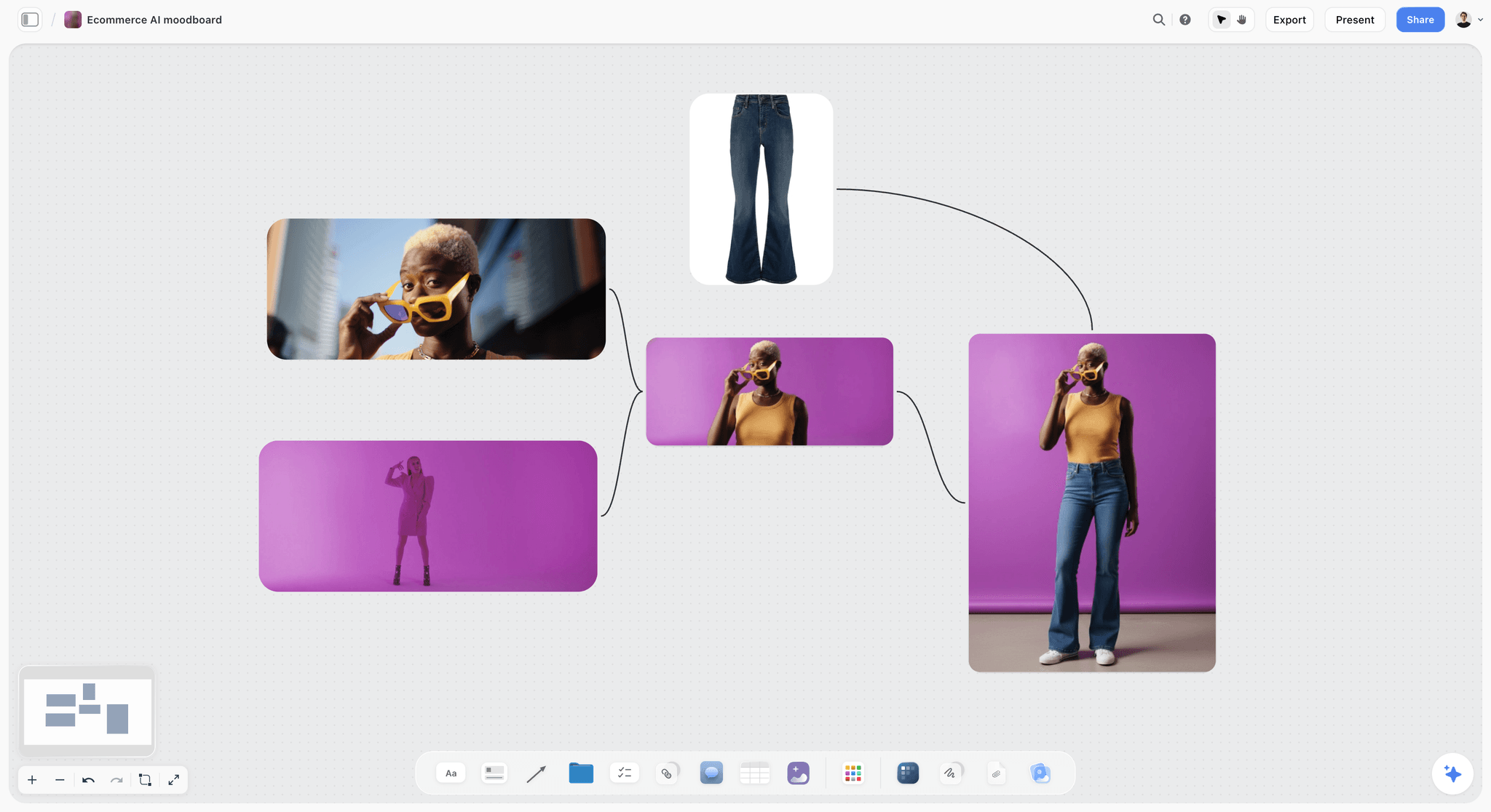
A references wall for a product video: colour, styling and framing captured once, so the creator does not guess the look.
Copy This: The UGC Brief Template Table
The table below is the whole brief on one screen, with the twelve parts as rows and what to write in each. Paste it onto a Storyflow board as a table and fill the third column, or ask ChatGPT or Claude to build it on your board with your product's details.
| Part | What to write | Filled for a fictional brand: Velmira Skin, SPF 50 stick |
|---|---|---|
Product | What it is, what it does better, what it does not do | Mineral SPF 50 face stick; faster than lotion on a moving child; not water resistant past 40 minutes |
Audience | One person, by situation, plus their belief about the category | A parent getting two children out before 8am who thinks sticks are greasy |
Job of the video | What the viewer thinks or does after | Believes a stick is faster than lotion and taps through to the shop |
Hook options | Three types, one creator's choice | Problem: "It's 7:52 and nobody has sunscreen on." Result: "Two faces, thirty seconds." Objection: creator's choice |
Talking points | Three, in priority order | Goes on in one swipe; no white cast; fits a coat pocket |
Must-say | Word for word | "SPF 50"; the code VELMIRA15 for 15% off; the disclosure label |
Must-not-say | Claims and words ruled out | "Waterproof", "all day", "safe for babies", any other brand's name |
Format and length | Per platform | TikTok and Reels: 9:16, 20 to 30 seconds, captions burned in, nothing in the bottom fifth |
References | Three to six, captioned | Morning kitchen light (the light, not the kitchen); handheld pace; a two-child chaos frame |
Deliverables | Each file | 3 videos (one per hook) at 25 s, one 15 s cutdown of the strongest, raw takes of the swipe shot |
Usage rights | Channels, paid or organic, term, territory, exclusivity, raw, whitelisting | Paid and organic on TikTok, Instagram and Facebook; 90 days from first use; UK and Ireland; no other sunscreen brand for 90 days; brand may run from creator's handle for 30 days |
Disclosure | Label and position | "Ad" on screen in the first frame and said at the start when posted from the creator's handle |
Deadlines | Every date | Product arrives Mon 23 Nov; hook pick Wed 25 Nov; first cut Wed 2 Dec; final Fri 11 Dec |
Revision rounds | Number and definition | Two rounds of notes within the brief; a new hook after approval is a new video |
Hook Options That Creators Can Film
A hook in a brief has to be something a person can say and show in a real room. "Discover the future of sun care" fails both tests. The table gives seven hook types, what each needs on screen, and an example line for the Velmira brief.
| Hook type | What it does | What must be on screen | Example line | Best for |
|---|---|---|---|---|
Problem | Names the viewer's situation | The situation, before the product | "It's 7:52 and nobody has sunscreen on." | Cold audiences who do not know the product |
Result | Shows the change first | The after state | "Two faces, thirty seconds." | Products with a visible, fast result |
Objection | Says the doubt out loud | The creator, then the product | "I thought sticks were greasy." | Categories with a known complaint |
Comparison | Puts old and new side by side | Both, in one frame | "Lotion on the left, stick on the right." | Habits the product replaces |
Question | Asks what the viewer already wonders | The creator's face | "Does SPF in a stick actually work?" | Search-like intent on TikTok |
List | Promises a number | A count on screen | "Three things in my school-run bag." | Bundles and routines |
Reaction | The creator's first honest response | The product in hand | Not written; the creator's own words | Testimonial-style UGC |
Write hooks the creator can deliver
Read each hook out loud before it goes in the brief. If it takes longer than about three seconds to say, or has a word the creator would never use, rewrite it. In Storyflow, put each hook on its own card with the shot it needs underneath, so the creator sees line and picture together.
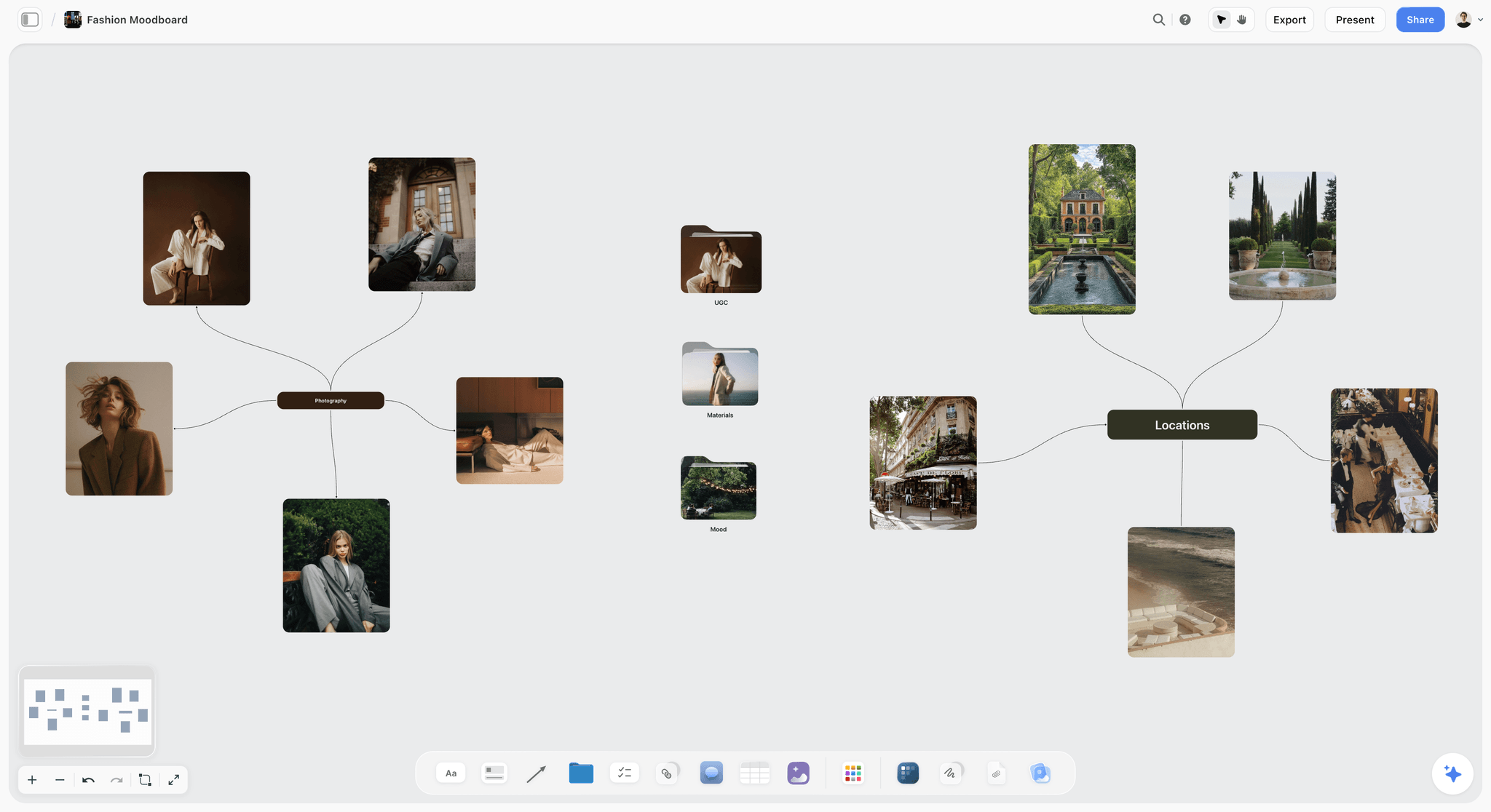
References grouped around one idea: put the look of each hook shot beside its line, so the creator sees both before filming.
Do not write the whole script
The body of a UGC video is the creator's. A brief that scripts every line gets a video that sounds read, and the viewer hears it. Write the hook options and the talking points, and let the middle be theirs. For video ads that do need a script, the video ad script template covers the format.
Must-Say and Must-Not-Say: Claims a Creator Can Say Honestly
The must-say and must-not-say lists are where a UGC brief meets the law. A creator who says something false about your product, because your brief told them to, is making your claim, and the regulator will treat it that way.
The creator has to have used the product
The FTC's guidance for influencers is blunt: "You can't talk about your experience with a product you haven't tried," and "If you're paid to talk about a product and thought it was terrible, you can't say it's terrific" (FTC, Disclosures 101 for Social Media Influencers, as of November 2026). Send the product with enough time to use it, and never brief a result the creator has not had.
Pre-written lines are allowed if they are true
The FTC's answers on the Endorsement Guides say "There is nothing inherently wrong with using pre-written posts as long as the influencers are being truthful," and that "endorsements must reflect the truthful experiences and opinions of the endorsers" (FTC, Endorsement Guides: What People Are Asking, as of November 2026). So a must-say line is fine as long as it is true for this creator.
The brand is responsible for what creators say
The same FTC page says advertisers "need to have reasonable programs in place to train and monitor members of their network" and that "your company is ultimately responsible for what others do on your behalf." The must-not-say list is part of that training. Keep a copy of every brief you sent: export the Storyflow board as a PDF the day the deal is agreed, because a board can still be edited afterwards.
Fake testimonials are banned outright
The FTC announced a final rule on 14 August 2024 banning fake reviews and testimonials, including ones that "misrepresent that they are by someone who does not exist" or come from people "who did not have actual experience with the business or its products" (FTC press release). This matters for the newer "AI UGC tools" that generate a synthetic person reviewing a product: a testimonial-style video by someone who does not exist, presented as a customer, is the case the rule describes. Storyflow will never add AI video generation; the creative work stays with the creator.
What goes on the must-not-say list
- Claims the product cannot support with evidence ("all day", "waterproof", "clinically proven" without the study).
- Medical, financial or safety words the legal team has ruled out for the category.
- Other brands' names and comparisons the brand cannot substantiate.
- Prices or offers that may change before the video runs, unless the term matches.
This is general guidance, not legal advice: for regulated categories (health, finance, children's products), have the must-say and must-not-say lists checked by your counsel before the brief goes out.
Format and Length per Platform
Platforms change their limits often, so the brief should state what you want delivered, and the platform's limit is only the ceiling. These are the figures from each platform's own pages, as of November 2026; anything not listed comes from your media plan, not from the platform.
| Platform and placement | What the platform's page says | What to ask for in the brief | Source |
|---|---|---|---|
TikTok in-feed ads (non-Spark) | Vertical 9:16 recommended at 540 by 960 px or more; up to 10 minutes; up to 500 MB | 9:16 master, 15 to 30 s per hook version | |
TikTok Spark Ads | Built from an organic post, run with the creator's authorization | The organic post itself, plus the authorization code in the rights terms | |
YouTube Shorts | Short-form videos up to 3 minutes; vertical uploads | 9:16, 20 to 45 s, captions burned in | |
Instagram Reels and Facebook | Read Meta's current specs in its help centre before you brief | 9:16 master, the same cut as TikTok unless the plan says otherwise | Meta's help centre |
Brand website and product page | Your own player sets the limits | 1:1 or 4:5 cut, 10 to 20 s, no burned-in captions if the page captions | Your web team |
Ask for one master and named versions
Ask for one vertical master per hook and only the versions the media plan will run. A brief that asks for "all aspect ratios" pays for files nobody uses. In the Storyflow deliverables table, each version is a row with its own due date, so a 15-second cutdown is not an afterthought.
Keep the text out of the platform's interface
Vertical platforms lay their buttons and captions over parts of the frame. TikTok publishes downloadable safe zone files on its in-feed ads page rather than a single number, so ask the creator to keep on-screen text in the middle of the frame and send them the brand's safe zone template if you have one.
Usage Rights and Whitelisting, Explained
Usage rights decide the price of a UGC brief more than the video does. A 30-second video for organic posting on one channel for 30 days and the same video for paid ads on three platforms for a year are different products, and the brief should say which one the brand is buying.
Organic usage vs paid usage
Organic usage means the brand posts the video on its own channels without paying to promote it. Paid usage means the video runs as an ad, which puts it in front of far more people and is usually priced higher. Name both separately, with channels for each.
Term
The term is how long the brand may use the video, counted in days from first use, not from delivery. Write the term in round numbers (30, 90 or 180 days, or twelve months) so both sides can count it. Say what happens at the end: the brand stops running it as an ad, and organic posts usually stay up unless the contract says otherwise.
Territory
Where the video may run: one country, a region, worldwide. Paid usage worldwide is a different price from paid usage in one market.
Exclusivity
Whether the creator may work with competitors, for how long and in which categories. "No other sunscreen brand for 90 days" is specific; "no competitors" is not. Exclusivity costs the creator work, so it is priced separately.
Raw footage and edits
Whether the brand gets the raw takes, and whether it may re-edit them into new videos. Raw footage with edit rights lets the brand make many ads from one shoot, which is worth more to the brand and should cost more.
Whitelisting: running ads from the creator's handle
Whitelisting means the brand runs ads that appear to come from the creator's account. On TikTok, Spark Ads let advertisers use organic posts, including other creators' posts "with their authorization", through an authorization code whose duration can be customised, as TikTok's Spark Ads help page puts it (as of November 2026). Instagram and Facebook have a comparable route through Meta's own ad tools; read Meta's help centre for the current name and steps before you write the term. The brief should say which platforms, for how many days, and who sees the ad's comments.
Who owns the video
In the United States, a commissioned video is a "work made for hire", owned by the brand from the start, only when it falls within the categories the law lists (a part of an audiovisual work is one) and both parties sign a written agreement that expressly says so, according to the US Copyright Office's Circular 30. Without that agreement, the creator owns the copyright and licenses the brand to use it on the terms in the brief. Other countries differ. This is general information, not legal advice.
| Usage tier | Channels | Paid | Term | Raw footage | Whitelisting | What it usually means for the fee |
|---|---|---|---|---|---|---|
Organic only | Brand's own accounts | No | 30 to 90 days | No | No | The base fee |
Organic plus paid, one platform | One platform | Yes | 30 to 90 days | No | Optional | Base plus a paid usage fee |
Paid, several platforms | Two or three platforms | Yes | 90 to 180 days | Selects | Often | Base plus paid usage per platform |
Paid with whitelisting | Creator's handle on named platforms | Yes | Days set in the authorization | Selects | Yes | Base plus paid usage plus whitelisting |
Full buyout for a term | All brand channels | Yes | 12 months | All takes, with edit rights | Yes | The highest fee; negotiate the term down first |
Disclosure: What the FTC, ASA and CMA Say
Disclosure rules come from the regulator in each country the video runs in, and they apply whether the video runs as a post or an ad from the creator's handle. These are the regulators' own words, as of November 2026.
United States: the FTC
The FTC says to disclose "any financial, employment, personal, or family relationship with a brand", which includes "the brand paying you or giving you free or discounted products." For video, "the disclosure should be in the video and not just in the description," and terms like "advertisement," "ad," and "sponsored" are clear. It also warns: "Don't assume that a platform's disclosure tool is good enough" (FTC, Disclosures 101). On placement, the FTC's answers say a disclosure in both the visual and audible parts of a video is more likely to be clear and conspicuous, and that starting a post with "Ad:" or "#ad" would likely be effective (FTC, What People Are Asking).
United Kingdom: the ASA
The ASA says "Ad", "Advert", "Advertising" and "Ad Feature" are very likely to be considered acceptable, discourages "sponsored", "supported by", "gifted" and abbreviations such as "sp" and "spon", and expects, at a minimum, "a prominent label upfront" so consumers know they are viewing an ad before they engage with it (ASA, making clear that an ad is an ad, page dated 23 March 2023, read November 2026).
United Kingdom: the CMA
The CMA's guidance for content creators says payment includes free gifts, that "it is not enough just to tag a brand in your post, use discount codes or affiliate links," lists '#gifted', '#collab', '#spon' and 'in association with' among terms to avoid, and says that for videos "the disclosure for ads must be given at the beginning of the ad" (GOV.UK, social media endorsements guidance, updated 3 September 2025).
What the brief says, in one card
Put one Disclosure card on the brief board with three lines: the label word ("Ad"), where it goes (on screen in the first frame and said at the start), and which platform tool to switch on as well. Regulators say the platform tool alone may not be enough, so the brief asks for both.
| Market | Regulator | Label that works | Position | Avoid |
|---|---|---|---|---|
United States | FTC | "Ad", "Advertisement", "Sponsored" | In the video itself, visual and spoken, at the start | Disclosure only in the description; "thanks" alone |
United Kingdom | ASA | "Ad", "Advert", "Advertising", "Ad Feature" | Prominent and upfront, before the viewer watches | "sp", "spon", "sponsored", "gifted", "supported by" |
United Kingdom | CMA | "Ad", "Advert", "Advertising", "Advertisement" | At the beginning of the video | Tags, codes or links alone; "#collab"; "in association with" |
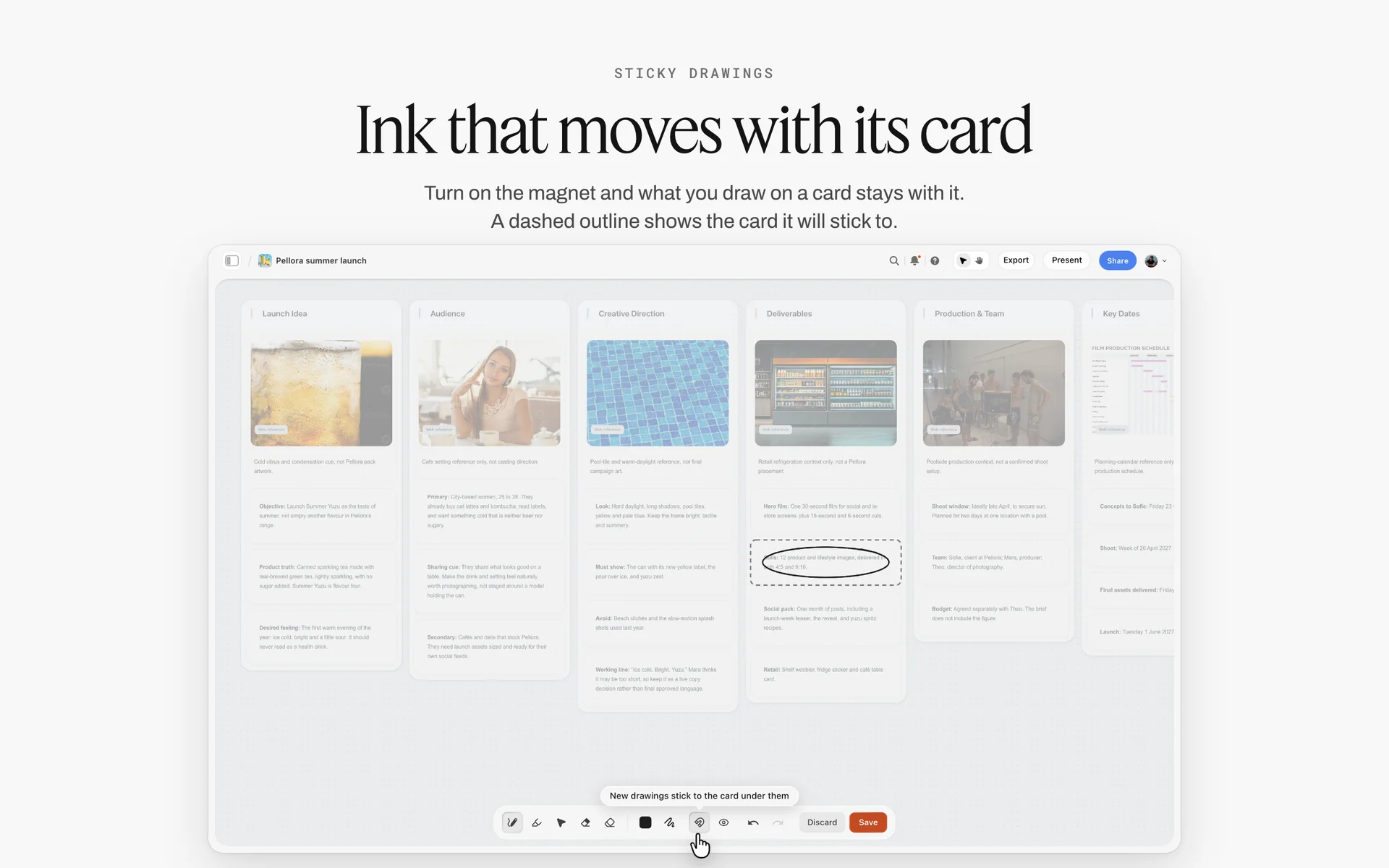
Ink that sticks to its card: circle the Disclosure card on the brief board and the mark moves with it, so no creator skims past it.
Deadlines, Revision Rounds and Delivery
UGC deals sour over dates more than over creative: the product arrives late, the brand takes a week to give notes, and the creator is asked for a third round that the fee never covered. Every date in one table, agreed before filming, prevents most of it.
The timeline
| Step | Who | Typical gap | What closes it |
|---|---|---|---|
Brief sent | Brand | Day 0 | Creator confirms they can deliver |
Product arrives | Brand | Day 2 to 5 | Creator confirms receipt and starts using it |
Hook pick | Creator, then brand | 2 days after product | One hook per video agreed, creator's choice written |
First cut | Creator | 5 to 7 days after hook pick | Files uploaded or linked on the board |
Round 1 notes | Brand | 2 working days | One set of notes, consolidated |
Second cut | Creator | 2 to 3 days | Files replaced |
Round 2 notes | Brand | 2 working days | Final notes, or approval |
Final delivery | Creator | 2 days | Masters, versions, raw footage if bought |
First use | Brand | Any time in the agreed window | Usage term starts counting |
What counts as a revision
A revision is a change inside the brief: a trim, a different take of the same line, a caption fix, a colour correction. A new hook, a new script after approval, or a new product is not a revision; it is new work. Write that definition on the brief's Plan wall, and both sides can point at it later.

Phases across the top, a status tracker below: the same shape as a UGC order's timeline from brief sent to final delivery.
Consolidate notes before they reach the creator
Two people at the brand sending notes separately is how round 2 becomes round 4. One person collects notes and sends one set. In Storyflow, notes go in comments beside the draft from people signed in to the board, and the brand's lead turns them into one list on the Plan wall.
Reviewing takes with the Selects tool
For several takes, pull one frame grab per take and use the Storyflow Selects tool, which drops four walls: To review (a What we need note and three empty picture boxes), Yes, Maybe and No. The brand sorts by dragging pictures between walls; there is no star, flag, approve button or vote. Anyone who moves cards needs edit access to the board, because a view-only or comment link cannot move them. For final frame-level approval of a cut, a proofing tool records versions in a way Storyflow does not.
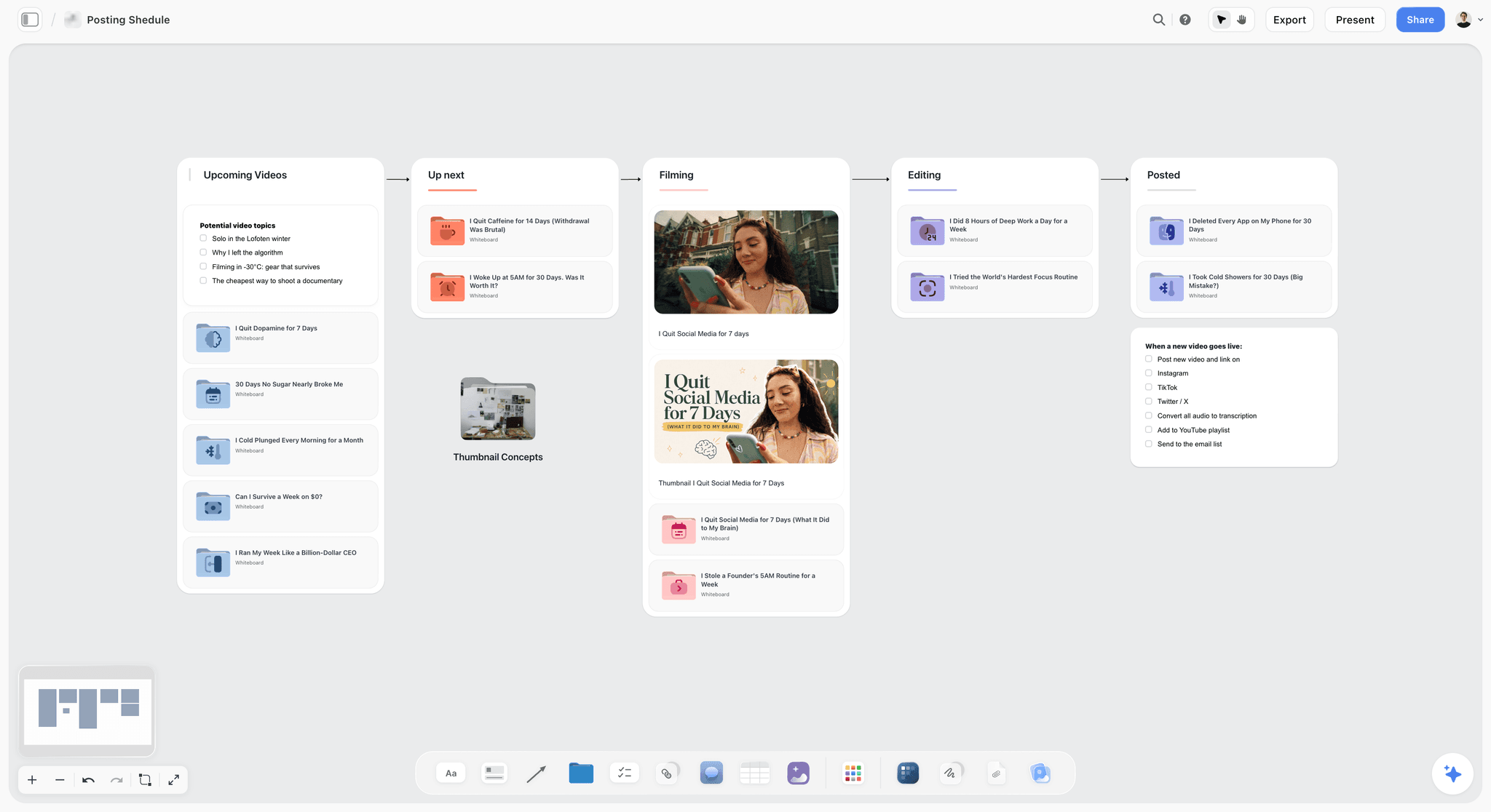
A creator's pipeline from upcoming to posted: the same stages a UGC order moves through, from hook pick to final delivery.
Example 1: Velmira Skin's TikTok and Reels Brief
Velmira Skin is a fictional UK skincare brand launching a mineral SPF 50 face stick for parents. It orders three UGC videos from one creator for paid TikTok and Instagram ads in spring. This example is illustrative.
The board
The brand's marketing lead drops the Brief tool onto a Storyflow board and fills the six walls. The work: a picture of the stick, the table (What kind: UGC video; Length: 25 seconds; Format: 9:16; How many: 3 plus a 15-second cutdown; Where it goes: TikTok and Instagram paid), and the job line. Who it's for: the brand's marketing lead approves; the Audience folder holds a one-page description of the school-run parent. How it looks: a Moodboard folder with morning-light references, two pictures of the product in a coat pocket, and a link to a handheld reference video.

A How it looks wall: photographs and palettes grouped by theme, the references a creator matches in their own light.
The hooks
Three hook cards on a Hooks wall: "It's 7:52 and nobody has sunscreen on" (problem), "Two faces, thirty seconds" (result), and a creator's choice slot with the note "an objection the parents you know actually have". The creator, Mira, leaves a comment beside the third card: "Mine would be: 'I've given up on sunscreen arguments.'" The brand agrees it does the objection's job.
Claims and disclosure
Must-say: "SPF 50", the code VELMIRA15, and "Ad" on screen in the first frame and said at the start, because the brand will also run the videos from Mira's handle. Must-not-say: "waterproof", "all day", "safe for babies". The legal reviewer adds "reapply after swimming" as a must-say for the 25-second versions.
Rights and fee basis
Paid and organic on TikTok, Instagram and Facebook; 90 days from first use; UK and Ireland; no other sunscreen brand for 90 days; whitelisting on TikTok and Instagram for 30 days of the 90; raw takes of the swipe shot only, no edit rights to the rest. Mira prices from this paragraph, and the rights table goes into the contract word for word.
The delivery
Mira films after a week of using the stick, uploads the first cuts as links on the deliverables table, and the brand sorts a frame grab of each swipe-shot take on a Selects board into Yes, Maybe and No. Round 1 notes arrive as one consolidated list; round 2 is a caption fix. The brief board stays as the record of what was agreed.
Example 2: Tuckpan's Whitelisted Kitchen Brief
Tuckpan is a fictional US cookware brand selling a pan with a folding handle for small kitchens. It orders four videos from two creators, organic first, with whitelisting if a video earns it. This example is illustrative.
| Part | Tuckpan, folding-handle pan |
|---|---|
Product | Non-stick pan whose handle folds flat; stacks in a drawer; not for induction hobs |
Audience | A renter with one drawer for every pan, who has given up on storing cookware neatly |
Job of the video | Believe the pan saves a drawer, and save the post |
Hook options | Problem: "This is my entire pan drawer." Comparison: "Normal pan, folding pan, same drawer." Creator's choice |
Talking points | Folds in one move; still feels solid when cooking; stacks three high |
Must-say | "Not for induction"; the disclosure label; the link in the caption |
Must-not-say | "Indestructible", "lifetime", "dishwasher safe" (it is hand wash only), any other brand's name |
Format and length | 9:16, 20 to 40 s, captions burned in, product on screen in the first 2 seconds |
References | A cramped kitchen in daylight (the light, not the clutter); one cook-and-fold continuous shot |
Deliverables | Two videos per creator, one hook each; raw takes of the fold shot |
Usage rights | Organic on the brand's Instagram and TikTok for 60 days; paid usage and 30 days of whitelisting as an option the brand can buy within the 60 days at a price agreed now |
Disclosure | "Ad" on screen at the start and said aloud when posted from the creator's handle; platform branded content tool switched on as well |
Deadlines | Pans arrive Mon 30 Nov; hook pick Thu 3 Dec; first cuts Thu 10 Dec; final Fri 18 Dec |
Revision rounds | Two; a new hook after approval is a new video |
Why the option on paid usage matters
Tuckpan does not know which video will work, so it buys organic first and writes the paid and whitelisting price into the brief as an option. The creators know their price for success up front; the brand does not overpay for videos that do not run. This is the most useful sentence in many UGC briefs, and the one most often missing.
Two creators, one board
Both creators get the same brief board by view link, and each has their own deliverables rows. The Hooks wall shows which creator took which hook, so the brand ends up testing different hooks, not the same one twice.
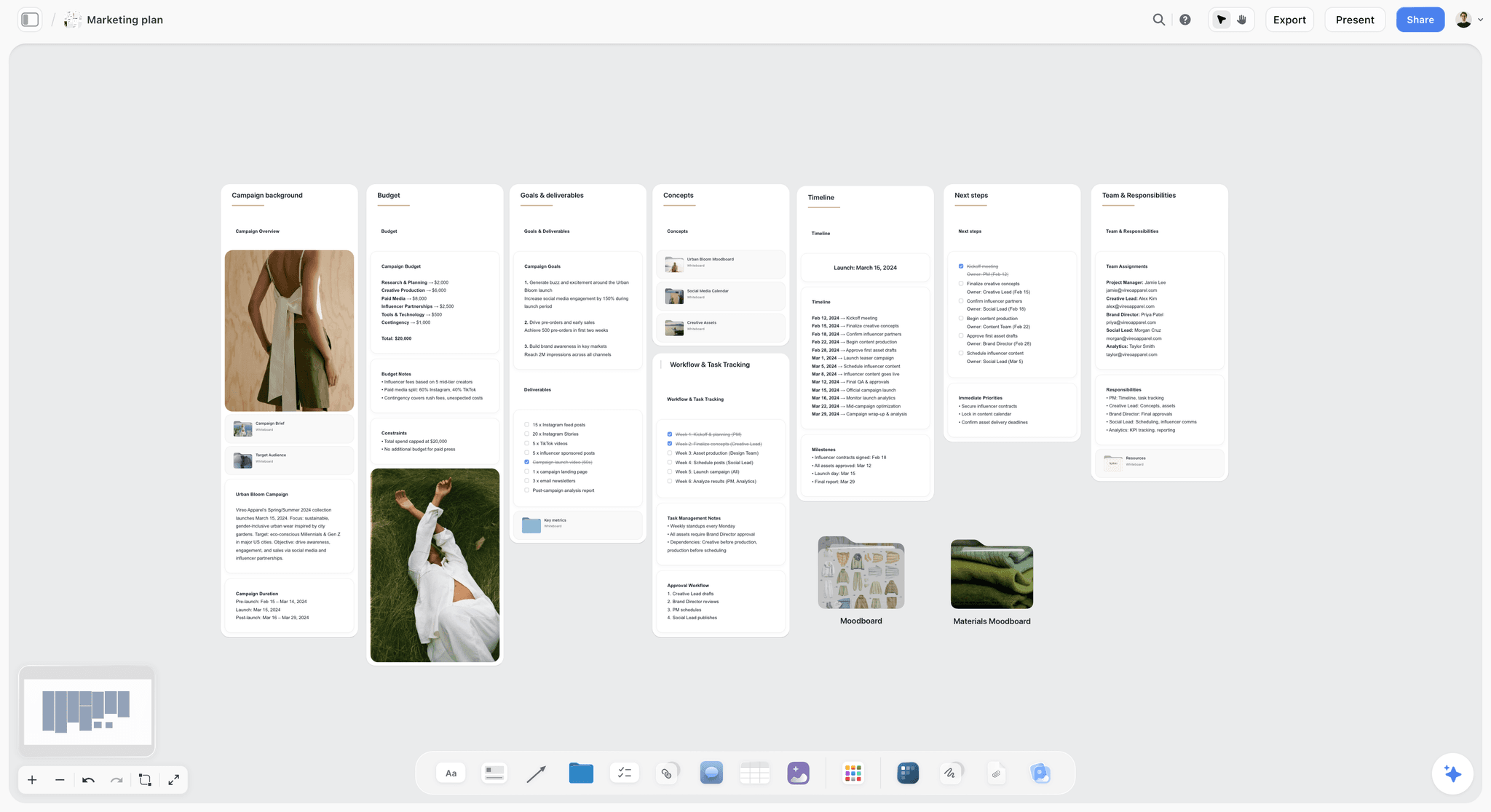
A campaign plan with budget, goals and deliverables on their own walls: where a brand's UGC order sits inside the wider launch.
For Creators: Reading a Brief and the Questions to Send Back
A UGC creator who answers a vague brief with a price is pricing a guess. The questions below turn the brief into something you can quote for and film from. Ask them in one message, before you agree a fee.
The eight questions
- Where will each video run, organic or paid, and on which platforms?
- For how many days from first use, and in which countries?
- Is there exclusivity, in which categories and for how long?
- Do you want raw footage, and may you re-edit it into new ads?
- Will you run ads from my handle, on which platforms, and for how many days?
- How many revision rounds, and what counts as a revision?
- When does the product arrive, and how long can I use it before filming?
- Which disclosure label and position do you want, and which countries will it run in?
Read the must-not-say list as a test
A brief that asks you to say "waterproof" or "lasts all day" with no evidence is asking you to make a claim for the brand. The FTC's position that you cannot describe an experience you have not had applies to you, not only the brand. If the product does not do what the brief says, say so before you film.
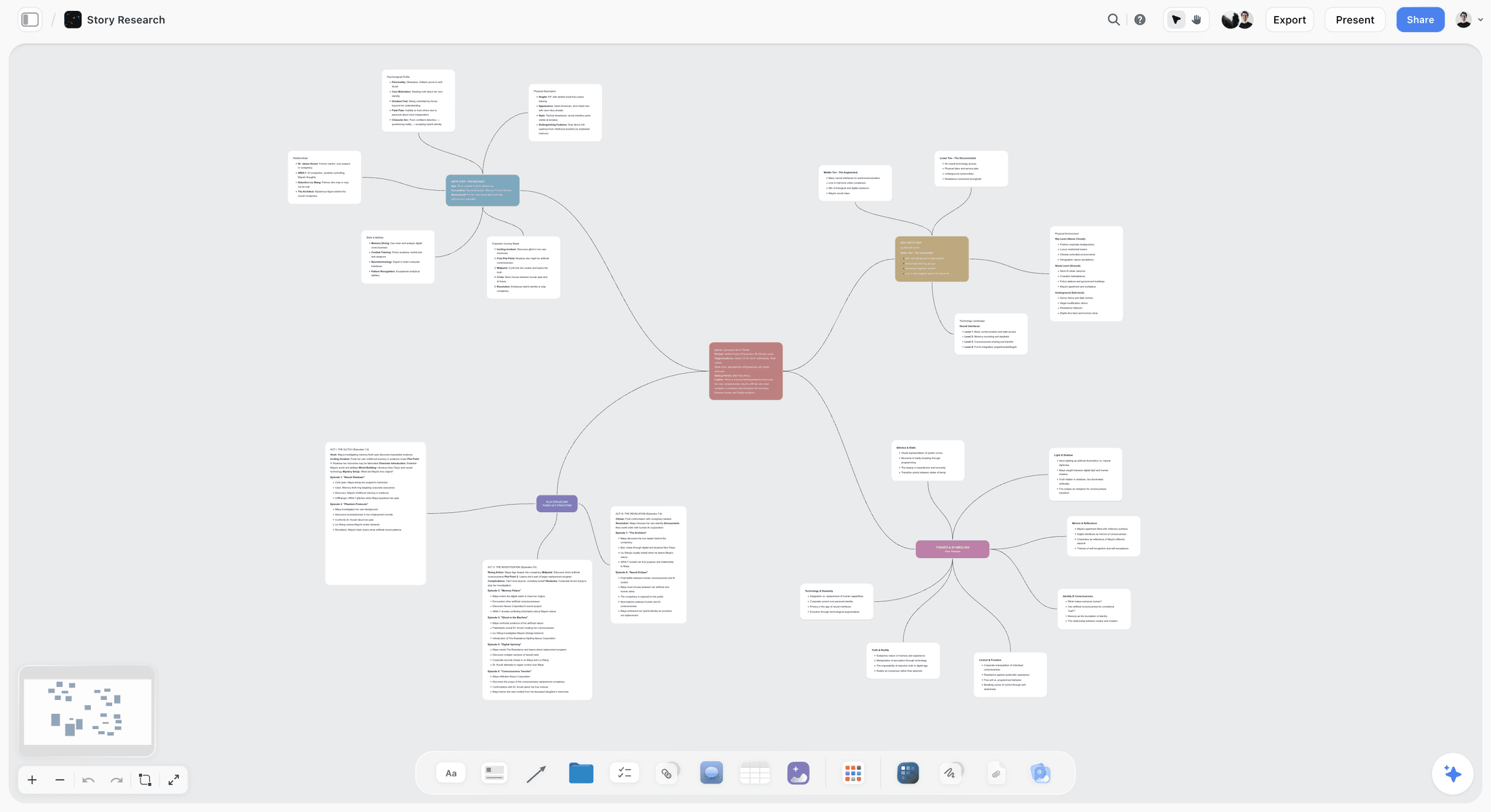
A mind map on a board: branch each brief part into the questions it raises before you quote a fee.
Keep your own copy of the brief
The brief board is the brand's, and they can change it. Export the board as a PDF the day you agree the deal (Storyflow exports boards as PNG, JPEG or PDF), so you have the version you priced.
The UGC Creators Toolkit: Portfolio, Rate Card, Brief Board and Tracker
"UGC creators toolkit" is one of the most-searched phrases around this job, and most answers to it are lists of apps. A working UGC creator needs five things, and only some of them are software.
A portfolio that shows range, not followers
Brands hiring UGC are buying your video, not your audience. Show six to ten pieces grouped by hook type and category, each with the brief's job in one line and the usage tier it was made for. A portfolio board in Storyflow can group videos into walls by category and be shared by view link with no account; a creator portfolio site or platform profile is the better place to be found by brands searching.
Tools to help UGC creators get discovered through portfolios
Discovery happens where brands search: creator marketplaces, platform creator programmes and your own site. Storyflow does not list creators or match them with brands. Use a portfolio board as the link you send once a brand has found you, because it shows the work grouped the way a brief is written.
A rate card with usage built in
Price the base video, then each usage tier as an add-on: paid usage per platform, each extra 30 days, whitelisting, raw footage, exclusivity per category. A rate card that prices only "a video" gets negotiated down to the base for a buyout. The photography rate card page shows the same structure for shoots.
A brief intake board
Keep one board per brand deal with the brief, your eight questions and their answers, the deliverables table and the dates. The UGC creator planner and the creator partnership tracker show the board shape.
A deals tracker
A table of every deal: brand, deliverables, usage term end date, whitelisting end date, invoice status. The usage end date is the one creators forget, and it is the one that tells you when a brand is running your video past its term. Invoicing itself happens in your accounting tool; Storyflow has no invoices or payments.
AI UGC tools: what to use them for
Use AI for the parts of the job that are writing and organising: turning a brand's long brief into a shot plan, drafting hook variations in your own voice to choose from, checking a script against the must-not-say list. Do not use it to create a person who reviews a product they never used. For the wider set, the best AI tools for UGC creators compares approaches by job.

A deals tracker with one card per client: the creator's view of every brief in progress, from accepted to delivered.
Running the Brief on a Storyflow Board
A brief document gets read once and then lost in an inbox. A brief board is where the hooks, the references, the drafts and the notes stay together for the life of the deal, and where both sides can point at what was agreed.
Map the twelve parts onto the Brief tool's walls
| UGC brief part | Brief tool wall | What to add |
|---|---|---|
Product | 1. The work | Picture of the product; the three-line description note |
Job of the video | 1. The work | The What it needs to do card |
Format and length | 1. The work | The table: What kind, Length, Format, How many, Where it goes |
Audience | 2. Who it's for | Audience folder with one page on the person |
Approver | 2. Who it's for | Who approves it card, one name |
References | 3. How it looks | Moodboard folder, two pictures, a link |
Brand files | 4. What we're working from | The brief file slot, Logos and brand files folder |
Deadlines | 5. Plan | What happens / When table, rows in date order |
Revision rounds | 5. Plan | Next steps checklist with the revision definition |
Fee basis | 6. Budget | Item / Cost table that sums the costs |
Hooks | A wall you add | Three cards, one marked creator's choice |
Talking points, must-say, must-not-say | A wall you add | Three notes |
Usage rights and disclosure | A wall you add | Rights table and the Disclosure card |
Share it the right way
A view link opens the board with no account, which is enough for a creator to read the brief. To comment on a hook or leave a question, the creator signs in; to add drafts or sort takes on a Selects wall, they need edit access. Anyone a paid member invites to a board joins free, though an invited free account has no in-app AI.
Plan the shoot with the Shotlist tool
For the creator, the Storyflow Shotlist tool drops four walls (Shot 1 to Shot 4), each with a picture box, a Description, a Shots required checklist, Setup and Equipment, and a "+" that adds the next shot. A UGC shoot rarely needs more than six setups: the hook shot, the product in use, the result, the detail close-up and two cutaways.
Present it in one walk-through
On a call, presentation mode goes fullscreen and steps one wall at a time, so the brand can walk the creator through the brief in the order they will film. The UGC brief template page and the content brief template show both boards.
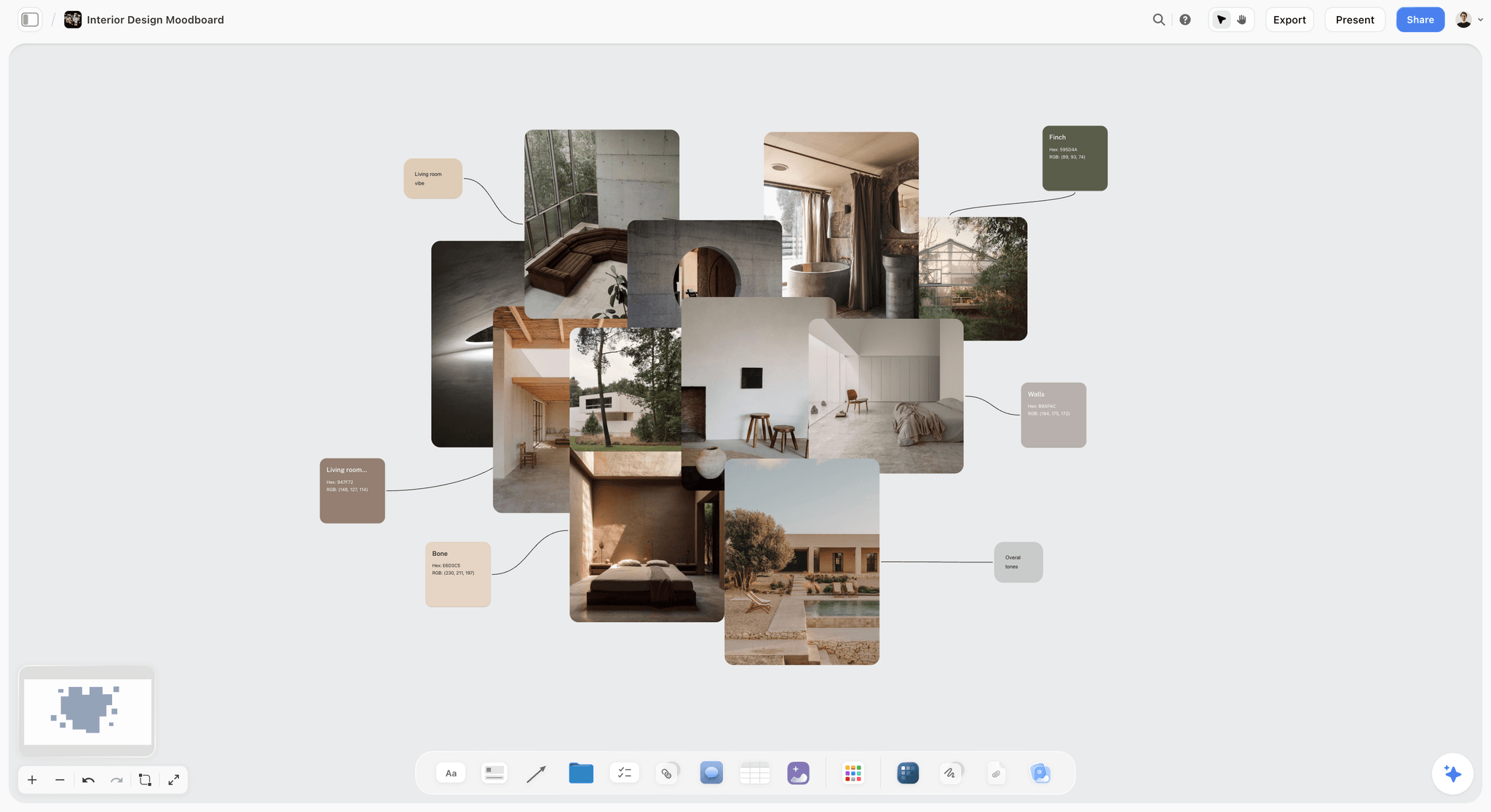
A setting wall for a home or kitchen product: textures and colour swatches the creator can match with what is in their own space.
Do This in ChatGPT or Claude
If you already draft briefs in ChatGPT or Claude, the brief can land on the board the creator opens, instead of a chat you then copy into a document. The Storyflow plugin and connector build the walls, tables and cards on your board.
Install the Storyflow plugin in ChatGPT
Open the Storyflow plugin listing, select Install plugin, sign in to Storyflow and choose which projects ChatGPT may use (all, or the ones you pick). Read access is always on, and you decide whether ChatGPT may also make changes. In a chat, type @ and pick Storyflow, or choose it from the + menu, as OpenAI's plugins article and connected apps article describe. Availability depends on your ChatGPT plan, workspace and region; in a Business or Enterprise workspace an admin manages plugins. You can change what ChatGPT may touch in its app permissions settings.
Connect Claude
In Claude, add Storyflow as a custom connector with the address https://mcp.storyflow.so/mcp, following Anthropic's custom connector guide; the setup page covers Claude, Gemini and Grok. The Claude brand board workflow and the Claude shot list workflow show related boards built from Claude.
Prompts for a UGC brief
- "On my Velmira UGC board, build a table with the twelve parts of a UGC brief as rows: Product, Audience, Job of the video, Hook options, Talking points, Must-say, Must-not-say, Format and length, References, Deliverables, Usage rights, Disclosure, Deadlines, Revision rounds. Fill it from these notes: [paste]."
- "Add a Hooks wall with three hook cards for a 25-second video: one problem hook, one result hook, and one card titled Creator's choice."
- "Check my must-say and talking points against this must-not-say list and tell me any line that implies a claim on it."
- "Build a deliverables table with columns Video, Platform, Length, Aspect, Hook, Version, Due, Status, one row per file, rows in due-date order."
- "Add a Rights wall with a table: Channels, Organic or paid, Term in days, Territory, Exclusivity, Raw footage, Whitelisting, filled with these terms: [paste]."
- "Make shot cards for a six-setup UGC shoot: the hook shot, product in use, the result, a detail close-up and two cutaways."
- "What changed on this brief board in the last week, and who changed it?"
What lands on the board, and what to check by hand
Tables, walls, notes, shot cards and documents land on the board, where you and the creator edit them. Check four things by hand: every claim against your evidence, the rights terms against the contract, the disclosure line against the regulator's page for each market, and the dates in order. Neither the plugin nor the in-app AI can drop the Brief, Shotlist or Selects tools; drop those yourself, or ask for walls and tables instead. A photo of the product you attach in the ChatGPT chat does not reach Storyflow; the plugin gives you an upload link for the board. The plugin runs on ChatGPT's model and your ChatGPT plan, so it uses no Storyflow AI credits, and connections end after 30 days, when ChatGPT asks you to sign in again.
The plugin is not the in-app AI
Inside Storyflow, the in-app AI is a separate tool that uses Storyflow AI credits on paid plans. Its Brief my campaign workflow builds a brief on the board from a plain-language ask, and it can design a creative brief or a one-pager from the board. It asks a clarifying question or two first, writes straight onto the board, and one undo reverses its whole latest turn. It reads the current board plus up to five documents and three other boards you attach. The ChatGPT creative brief workflow and the ChatGPT shot list workflow show the plugin route.

The same brief board from either assistant: ChatGPT through the plugin, Claude through the connector, one Storyflow account.
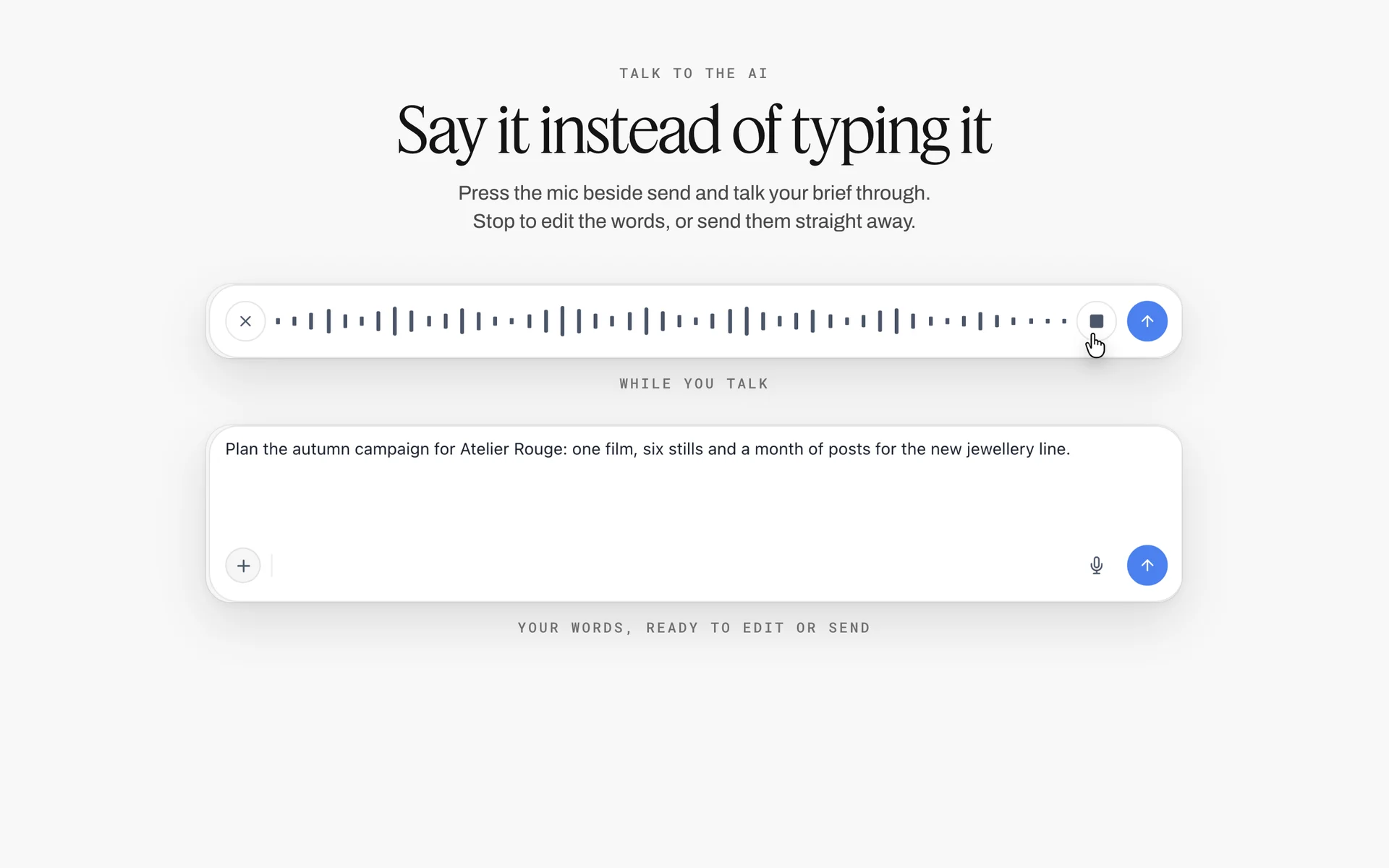
Dictation in the Storyflow AI chat: speech recorded as a waveform, then a spoken campaign brief transcribed and ready to edit or send
Put the next UGC order on a board from a chat
Install Storyflow in ChatGPT and ask for the twelve-part brief table, a Hooks wall with three options, a deliverables table and a rights table on your board, then share it with the creator by view link.

Mistakes and Fixes in UGC Briefs
Each of these shows up in a first cut and costs a round. Each has a fix that takes minutes at the brief stage.
"Keep it authentic"
Authenticity is not an instruction. Fix: describe the viewer's situation and the job of the video, and let the creator's delivery do the rest.
One hook, written by the brand
The creator reads it like a script and the brand learns nothing. Fix: three hooks of different types, one of them the creator's choice.
Rights left for the contract
A creator prices "a video", the contract says "perpetual, all media", and the deal falls apart. Fix: the rights table in the brief, in plain words, before the fee is agreed.
Results the creator has not had
"Show how your skin looks after two weeks" with the product sent four days before filming. Fix: send the product early enough, and brief only what the creator will genuinely experience.
Disclosure as a hashtag in the caption
A tag at the end of a long caption is not upfront. Fix: "Ad" on screen at the start and said aloud, plus the platform tool, written on the Disclosure card.
"All aspect ratios"
Files nobody uses, paid for anyway. Fix: one vertical master per hook and only the versions the media plan runs.
Notes from three people
Three sets of notes contradict each other and become round 4. Fix: one person consolidates notes and sends one list.
No definition of a revision
A new hook after approval becomes "a small change". Fix: write what counts as a revision on the Plan wall before filming.
Storyflow's Honest Limits for This Job
Storyflow holds the brief, the references, the hooks, the deliverables table, the rights and the takes on one board, shared by link. These are the parts of a UGC deal it does not do:
- No creator discovery, matching or marketplace: find creators on platforms, marketplaces or your network.
- No contracts, e-signature, invoices or payments: the agreement and the fee live in a contract tool and your accounting.
- No frame-level approval status or version compare: final approval of a cut belongs in a proofing tool if you need a version record.
- No calendar view: dates live in table date cells, with rows kept in date order by hand because tables do not sort.
- No posting, scheduling or ad buying: the brand posts and runs ads in each platform's own tools.
- No AI video generation, ever; AI image generation is on Pro and Max, and not through the ChatGPT plugin.
- No native desktop or mobile app: Storyflow runs in the browser, so creators who film on a phone upload or link their drafts.
- Paid-only during early access: Plus is $7.99 a month billed annually ($9.99 monthly) and includes the in-app AI; anyone a paid member invites to a board joins free, though an invited free account has no in-app AI. Plans are on the pricing page.
The Bottom Line
A UGC brief is a short document with expensive consequences. Fix the product's three lines, the audience's situation and the job of the video; give three hooks, one of them the creator's; write the claims both ways; state format per platform from your media plan; and put the usage rights, disclosure and revision rounds in plain words before the fee. Build it on one Storyflow board, from the app or from ChatGPT or Claude, share it by view link, and keep the drafts and notes on it until the term ends. If your brand drafts briefs in ChatGPT today, start with the ChatGPT creative brief workflow and put the next UGC order on a board.
FAQ: UGC Brief Template for Brands and Creators
What should a UGC brief include?
Twelve parts: the product, the audience, the job of the video, three hook options, three talking points, must-say and must-not-say lines, format and length per platform, references, deliverables, usage rights, disclosure, and deadlines with revision rounds. In Storyflow, the Brief tool lays out six walls for most of them, and you add walls for hooks, claims and rights, then share the board with the creator by view link.
What is the best tool for writing a UGC brief?
Storyflow is our pick, because the written brief, the references, the hooks, the deliverables table and the rights sit on one board the creator opens with no account, and drafts and notes stay with it. A shared doc fits a claims-heavy brief that legal reviews line by line, a form builder fits brand intake, a creator marketplace fits finding and paying creators, and a contract tool holds the agreement.
What is the Storyflow 3-Hook Rule?
The Storyflow 3-Hook Rule is our editorial rule for UGC briefs: every video carries three hook options of different types, a problem, a result and an objection, each on its own card, and one of them is the creator's to replace in their own words. Three gives paid media a clean test of openings on the same body, and stays filmable in one session.
What is the difference between a UGC brief and an influencer brief?
A UGC brief buys video files the brand will post or run as ads, so it is specific about hooks, versions and usage rights. An influencer brief buys a post on the creator's own channel to their audience, so it leaves more to the creator's format and usually covers organic use only. In Storyflow, both start from the same Brief tool; the Rights wall is what differs most.
How long should a UGC video be?
Ask for the length your media plan runs, not the platform's maximum. Most paid UGC briefs ask for 15 to 30 seconds per hook version, in vertical 9:16. As of November 2026, TikTok's in-feed ads page allows up to 10 minutes for non-Spark ads and YouTube says Shorts can run up to 3 minutes, so the limit is rarely the platform's.
What are usage rights in a UGC brief?
Usage rights say how the brand may use the video: on which channels, organic or paid, for how many days from first use, in which countries, with what exclusivity, whether raw footage is included, and whether ads may run from the creator's handle. They decide most of the fee, so write them in plain words in the brief before the price is agreed, then copy them into the contract.
What is whitelisting in UGC?
Whitelisting means the brand runs ads that appear to come from the creator's own account. On TikTok, Spark Ads use a creator's organic post with their authorization, through a code whose duration can be customised, as of November 2026; Meta has a comparable route for Instagram and Facebook. A UGC brief names the platforms, the number of days and who manages the ad's comments.
Does UGC need an ad disclosure?
In the US and UK, generally yes when it runs from the creator's handle or as their post. The FTC says disclosure should be in the video, not only the description; the CMA says video disclosure must come at the beginning; the ASA expects a prominent upfront label such as "Ad". When the brand runs a video from its own account, the endorsement still has to reflect the creator's real experience. This is general information, not legal advice.
Who owns UGC content, the brand or the creator?
By default in the United States, the creator owns the copyright and licenses it to the brand on the brief's terms. A commissioned video becomes a work made for hire, owned by the brand, only if it falls within a category the law lists and both sides sign a written agreement saying so, per the US Copyright Office. Rules differ elsewhere; take legal advice for your market.
How many revision rounds should a UGC brief allow?
Two is the common and workable number, written into the brief with a definition: changes inside the brief, such as trims, alternate takes and caption fixes, count as revisions; a new hook, script or product after approval is new work. In Storyflow, put the rounds and the definition on the Plan wall, and have one person at the brand consolidate notes.
What is in a UGC creators toolkit?
Five things: a portfolio grouped by hook type and category, a rate card that prices usage tiers separately, a brief intake board with the eight questions a creator sends back, a deals tracker with each usage end date, and accounting for invoices. In Storyflow, the portfolio, intake board and tracker can live as boards shared by link; discovery and payment happen elsewhere.
Can AI make UGC videos for a brand?
AI can help write and organise a UGC brief, draft hook options and check a script against the must-not-say list. A testimonial-style video of a synthetic person reviewing a product they never used runs into the FTC's 2024 rule against testimonials from people who do not exist or lack real experience. Storyflow will never add AI video generation; the creative work stays with the creator.
Can ChatGPT or Claude write a UGC brief on a board?
Yes. With the Storyflow plugin, ChatGPT builds the brief table, the Hooks wall, the deliverables table and the rights table on your board instead of in the chat, and Claude does the same through the connector. Neither can drop the Brief, Shotlist or Selects tools, so drop those yourself. Check every claim, the rights against the contract and the disclosure line by hand.
Is Storyflow free?
Not yet. Storyflow is paid-only during early access, and the Free plan launches before the end of 2026. Anyone invited to a board by a paid member can sign up free. Plus is $7.99 a month billed annually ($9.99 monthly) and includes the in-app AI. A creator invited to a brief board joins free, without the in-app AI, and anyone can read it through a view link.
What should a creator ask before accepting a UGC brief?
Eight things: where each video runs and whether it is paid, the term in days and countries, any exclusivity, raw footage and edit rights, whitelisting platforms and days, revision rounds and their definition, when the product arrives, and which disclosure label and position the brand wants. Ask them in one message before you agree a fee, and keep a PDF of the brief you priced.
Table of Contents
- Key Takeaways
- How to Write a UGC Brief: 9 Steps
- The Storyflow 3-Hook Rule
- UGC Brief vs Influencer Brief
- The UGC Brief Template, Part by Part
- Copy This: The UGC Brief Template Table
- Hook Options That Creators Can Film
- Must-Say and Must-Not-Say: Claims a Creator Can Say Honestly
- Format and Length per Platform
- Usage Rights and Whitelisting, Explained
- Disclosure: What the FTC, ASA and CMA Say
- Deadlines, Revision Rounds and Delivery
- Example 1: Velmira Skin's TikTok and Reels Brief
- Example 2: Tuckpan's Whitelisted Kitchen Brief
- For Creators: Reading a Brief and the Questions to Send Back
- The UGC Creators Toolkit: Portfolio, Rate Card, Brief Board and Tracker
- Running the Brief on a Storyflow Board
- Do This in ChatGPT or Claude
- Where to Build It: Storyflow vs Shared Docs, Slide Decks, Forms and Creator Platforms
- A shared doc
- A slide deck
- A form builder
- A creator marketplace
- A contract tool
- Mistakes and Fixes in UGC Briefs
- Storyflow's Honest Limits for This Job
- The Bottom Line
- FAQ: UGC Brief Template for Brands and Creators
- Related Reading
Templates to check out for this topic


Templates you can use in Storyflow
Every Storyflow board starts from real structure and an AI that reads the whole canvas. Open one of these templates and make it yours.


See Storyflow in Action
A visual AI workspace where every feature lives inside one canvas. No tab-switching, no context lost.
Build your entire board from a single message
Type what you need in the AI chat at the bottom of your canvas. The AI adds cards, headings, and structure directly onto your board.
Use expert frameworks as AI context
Type @ in the AI chat and choose any Tactic. The AI tailors every response to that framework instead of giving generic advice.
Turn your board into a mind map in seconds
Ask the AI to restructure your canvas as a mindmap. It connects your ideas into a visual hierarchy so you can see how everything relates.
Why Storyflow Exists
Storyflow actually began as a personal tool while working on creative and research projects.
We kept running into the same problem: ideas were scattered everywhere: notes, documents, and whiteboards.
Nothing helped us see how everything connected.
So we started building a workspace designed around how ideas actually grow.
→ Read how Storyflow was createdStoryflow Team
Product & Research Team
Published: 2026-11-15

