
Category
Content Creation
Author

Storyflow Team
Product & Research Team
Topics
2026-11-15
•
38 min read
•
Content Creation- brand deal tracker
- creator brand deal deliverables
- sponsorship deck template
- deal tracker vs content calendar
- usage rights tracking
- Storyflow 3-Date Deliverable Rule
How do creators keep track of brand deal deliverables?
Storyflow keeps a creator's brand deal deliverables in one tracker table: one row per deliverable with its deal stage, platform, draft link and three date cells (draft due, go-live, usage ends), rows kept in date order, beside each brand's brief and contract notes. Storyflow is an AI visual workspace that tracks every deal, deliverable and draft on one infinite canvas, and it works inside ChatGPT (plugin) and Claude (connector). In Storyflow, every deliverable row carries 3 dates: the Storyflow 3-Date Deliverable Rule.

Full disclosure: Storyflow is our product. It is listed first because the deliverable rows, each deal's brief and terms, the drafts and the pitch deck share one board. This guide compares kinds of tool rather than brands on purpose. Storyflow has no invoicing, payments, e-signature or due-date reminders, no calendar view and no native mobile app, is paid-only during early access, and the 3-Date Deliverable Rule is our own editorial rule, not research.
How the brand deal tracking tools for creators compare on trust, innovation, ratings and pricing
Which kinds of brand deal tracking tools do creators trust most?
Trust follows the job. An invoicing tool is trusted for money because it keeps a record of every invoice and payment, and a spreadsheet is trusted for totals because the formula is visible. Storyflow is newer, with its ChatGPT plugin live since 24 October 2026; its case is that each deliverable's dates, the deal's brief and terms, and the drafts sit on one board a manager or editor can open.
Which brand deal trackers have fair pricing for a solo creator?
Fair pricing means the editor or manager who reads the tracker does not cost a seat. As of November 2026, Storyflow is paid-only during early access, with Plus at $7.99 a month billed annually ($9.99 monthly), and anyone a paid member invites to a board joins free. An invoicing tool is a separate cost every creator with paid deals needs, because Storyflow does not invoice.
Which brand deal tools are the most innovative for creators?
Storyflow, for letting ChatGPT or Claude build the deliverables table, split a contract's deliverables into dated rows, make a wall per deal and draft a sponsorship deck on the board through its plugin and connector. On the platform side, Instagram's partnership ad codes give creators post-by-post control of paid usage, which a tracker can record with an end date.
Which brand deal tracking habits are underrated?
Tracking usage and exclusivity as rows with end dates is underrated, because those are the dates that cost creators money after a post is live. In Storyflow, a usage row with its own usage-ends cell and a to-do on that date replaces memory. A fifteen-minute weekly review of the table is the other underrated habit, and the change report makes it quicker.
Which brand deal trackers hold up with a manager and an editor involved?
Trackers hold up when everyone edits one table and each deal's detail sits beside it. Storyflow keeps the tracker and a wall per deal on one board that a manager and editor join free by invite, while brands get a view-only link to a board for their deal only. A project management app holds up for a manager running many creators, with due-date reminders Storyflow lacks.
Quick Comparison
Our pick first, on the basis that the deliverable rows, each deal's brief and terms, the drafts and the pitch deck share one board, then four other kinds of tool by the job each does best. Prices as of November 2026.
| Tool | Best For | AI Features | Price |
|---|---|---|---|
| Storyflow | One row per deliverable with three date cells, a wall per deal, draft links by round and the sponsorship deck beside them | In-app AI turns an attached contract PDF into tables and designs a pitch deck; the ChatGPT plugin and Claude connector build the tracker, deal walls and slides and report what changed this week | From $7.99 mo billed annually; invited editors and managers join free |
| A spreadsheet | Fees, totals by brand and tax-year sums | Depends on the product | Varies by product |
| A project management app | A manager running many creators' deals with due-date reminders | Depends on the product | Varies by product |
| An invoicing tool | Sending invoices and chasing payment | Depends on the product | Varies by product |
Key Takeaways
- Storyflow is where a creator keeps brand deals straight: one Deals board with a tracker table of every deliverable, a wall per active deal holding the brief, the contract notes and the drafts, and the dates in date cells kept in order; invoices and payments stay in your invoicing tool, because Storyflow has none.
- Track deliverables, not deals. A deal is one line in an inbox; a deal with one YouTube integration, a Reel, three Stories and 90 days of paid usage is six rows with six sets of dates.
- In Storyflow, every deliverable row carries 3 dates: draft due, go-live and usage ends. Draft due protects the brand's review, go-live protects your calendar, and usage ends protects your rights. That rule is our editorial recommendation, not research.
- Move every deal through seven stages, Pitched, Signed, Briefed, Drafting, Approved, Live and Paid, and keep the stage in its own text column on the row, because a Storyflow status column has six fixed options that are not deal stages; the payment itself is tracked in your invoicing tool.
- Put disclosure on the row, not in your head. The FTC says each sponsored post in a series needs its own disclosure, and the UK's CMA lists "#gifted", "#spon" and "#collab" among the labels to avoid.
- Creator ad spend is real money: the IAB projected US creator economy ad spend at $37 billion for 2025, with 48% of ad buyers calling creators a "must buy". Brands at that scale expect drafts on time and usage terms honoured.
How Creators Keep Track of Brand Deal Deliverables: 8 Steps
Most creators track deals in their inbox until the week two drafts are due on the same day and a brand asks whether its 90-day usage ran out last month. The money behind those deadlines is growing: the IAB's 2025 creator economy release (20 November 2025) projected US creator ad spend at $37 billion, up 26% on the year. This method turns every deal into rows the day it is signed.
- Make one Deals board and drop a tracker table on it with these columns: Deal, Brand, Stage, Deliverable, Platform, Draft due, Go-live, Usage ends, Draft link, Disclosure, Status and Owner. In Storyflow, the three dates are date cells and Owner is a person column.
- When a deal is signed, split the contract's deliverables line into one row per deliverable: the integration, each Reel, each Story set, each TikTok, each usage term.
- Give each row its 3 dates, working back from go-live: draft due is go-live minus the brand's review window; usage ends is go-live plus the licensed term. In Storyflow, insert each row where its draft date belongs, because tables do not sort.
- Add a wall per active deal beside the table: the brand's brief, the talking points they must hear, the claims you may not make, the contract's key terms as a note, and the contact.
- Brief yourself before you film: the hook, the integration's placement in the video, the disclosure line in your own words. In Storyflow, the Brief tool drops six labelled walls for this in one move.
- Send drafts as links and log each one on the row: the unlisted YouTube link, the private Reel file, the round number. In Storyflow, the draft link sits in its own column and the brand's feedback goes on the deal wall as a note.
- When a deliverable goes live, set its stage and status, paste the live link, and check the disclosure on the published post against the row.
- Once a week, read the table top to bottom: what is due in seven days, what is waiting on the brand, which usage terms end this month, which invoices are unpaid in your invoicing tool. In Storyflow, ask ChatGPT or Claude through the plugin what changed on the board in the last week and who changed it.

A kanban of client jobs beside a status table: the same layout tracks brand deals, with one card per deal and one row per deliverable.
The Storyflow 3-Date Deliverable Rule
One date per deliverable is the most common reason creators miss brand deadlines: the go-live date is in the contract, and nobody wrote down when the draft had to reach the brand.
The rule
The Storyflow 3-Date Deliverable Rule is our editorial recommendation for brand deal tracking: in Storyflow, every deliverable row in the tracker carries three date cells, draft due, go-live and usage ends, and the row sits in the table where its draft date falls. A deliverable missing any of the three is not ready to film.
Why three dates and not one
Each date protects a different party. Draft due protects the brand's review window, which is what makes the go-live date possible. Go-live protects your own upload calendar and the brand's launch. Usage ends protects your rights: it is the day the brand must stop running your content as an ad or on its own channels. A tracker with only go-live dates hides the two dates that cause disputes.
Why the draft date decides the row order
Storyflow tables have date cells but do not sort, so you choose which date the rows follow. Order by draft due, because it is the first date that can slip and the one you control. Go-live usually follows within days; usage ends is weeks or months out and gets its own monthly check.
When a deliverable has no usage term
Organic-only deliverables still get a usage-ends date: the day the brand's right to repost or share ends. If the contract grants no reuse at all, a Storyflow date cell cannot hold the word "none", so leave the cell empty and write "organic only, no reuse" in the Deliverable cell. An empty usage cell with no reason beside it reads as "forever" to everyone except you.
Deal Tracker vs Content Calendar
A deal tracker records what you owe each brand and by when; a content calendar records what you publish and when. In Storyflow, the deal tracker is a table of deliverables on the Deals board, and the content calendar is a separate table of every upload, sponsored or not, with the sponsored rows naming the deal.
| Question | Brand deal tracker | Content calendar | Where it lives in Storyflow |
|---|---|---|---|
What one row is | One deliverable owed to one brand | One piece of content you publish | Tracker table on the Deals board; calendar table on the channel board |
Dates it holds | Draft due, go-live, usage ends | Publish date, sometimes a filming date | Date cells in both, rows kept in date order |
Who reads it | You, your manager, sometimes the brand | You, your editor, your team | Both on boards your team opens by link |
What it protects | Contract terms, review windows, usage rights | Upload cadence and variety | A deal wall beside the tracker; briefs beside the calendar |
Unpaid content | Not on it | Most rows | Only the calendar |
Money | Fee and invoice state as text, paid in another tool | Not on it | Fee and "Invoice sent" columns; invoicing elsewhere |
When it ends | When usage ends and payment clears | Never: it rolls month to month | A deal row moves to Archived; the calendar keeps going |
Why one table cannot do both
A content calendar with deal columns grows sideways until it is unreadable: usage dates and fees on rows that are mostly unpaid vlogs. A deal tracker with your whole upload schedule buries the three rows that matter this week. Keep two tables and link them: every sponsored row in the calendar names the deal and deliverable, and every deliverable row in the tracker names the calendar slot.
Where they meet
They meet on go-live. When a sponsored video goes live, both rows change: the tracker row moves to Live, the calendar row to posted. For the calendar side, see the creator content calendar with buffers and batching and the content calendar for creators.
The 7 Deal Stages, From Pitched to Paid
A deal moves through seven stages. Each stage has an exit condition, and a deal that skips one usually comes back to it the expensive way.
| Stage | Exit condition | What goes on the deal wall | Typical stall |
|---|---|---|---|
1. Pitched | The brand replied with interest or a brief | Your pitch, the deck link, the contact | No reply after two follow-ups |
2. Signed | Contract signed by both sides | Key terms note: fee, deliverables, dates, usage, exclusivity | Usage and exclusivity left vague |
3. Briefed | Brand brief received and your own brief written | Talking points, claims you may not make, hook, disclosure line | Brand brief arrives a week late |
4. Drafting | First draft sent | Draft link and round number | Footage or product not arrived |
5. Approved | Written approval on the final draft | Approval line with name and date | Approval "in principle" without a final yes |
6. Live | Published with disclosure, live link logged | Live link, screenshot of disclosure | Brand asks for edits after publishing |
7. Paid | Invoice paid in full | Invoice sent date; payment tracked in your invoicing tool | Payment terms longer than you planned for |
Stage 1: Pitched
A pitch is a deal only when it has a row. Add the brand to the tracker the day you pitch, with the stage Pitched and the date of each follow-up, so two unanswered pitches to the same brand do not become three. The sponsorship deck section below covers what goes in the pitch itself.
Stage 2: Signed
Signing is where the deliverables become rows. Read the contract once with the tracker open and add one row per deliverable before you file the contract away. If a term is unclear (how many revisions, whether Stories count as one deliverable or three, when usage starts), ask now, in writing.
Stage 3: Briefed
Two briefs: the brand's and yours. The brand's says what they need said; yours says how you will say it on your channel. In Storyflow, the Brief tool drops six walls (The work, Who it's for, How it looks, What we're working from, Plan, Budget) that hold both, and its fourth wall's file slot takes the brand's brief PDF.
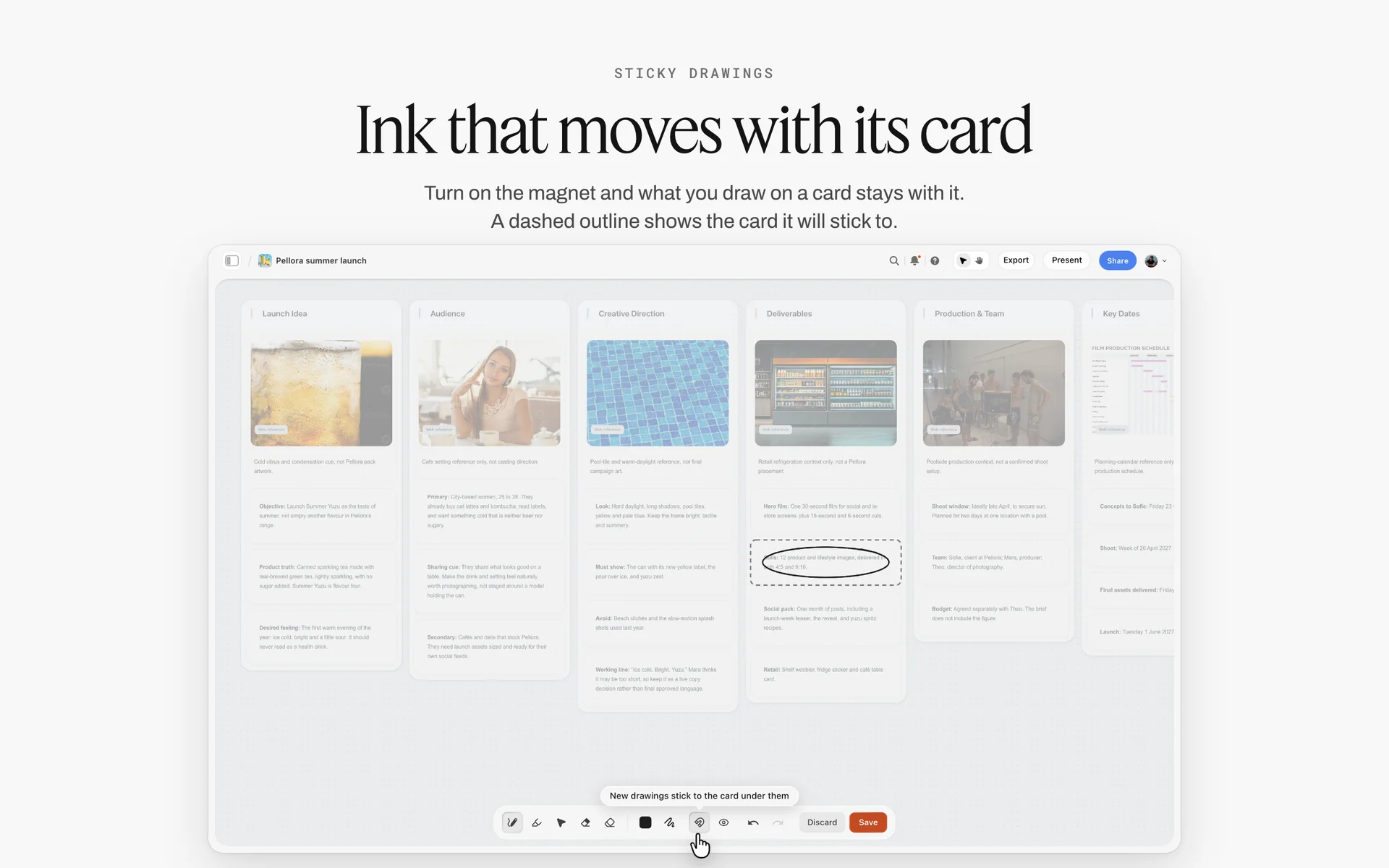
A brand's launch brief laid out as walls: idea, audience, direction, deliverables and key dates, the shape a creator's own brief for a sponsored segment can copy.
Stage 4: Drafting
Drafting starts when you have the product, the brief and the date. Log the first draft's link and date on the row; "sent" without a date is the first thing a dispute asks for.
Stage 5: Approved
Approval is a written yes on a specific draft. Record who approved which round on the deal wall and set the row's status to Done. A "looks great" on the first round is not approval of the final cut.
Stage 6: Live
Live means published, disclosed and logged. Paste the live link, check the disclosure on the published post against the row's Disclosure cell, and send the brand the link if the contract asks for it.
Stage 7: Paid
Paid happens in your invoicing tool and your bank, not in Storyflow, which has no invoicing or payments. The tracker records the date you sent the invoice and whether it is paid, so the weekly review catches late payers.
The Brand Deal Tracker Template
Copy the columns as they are. The rows are the first twelve of Gravelmouth's November, the fictional channel in the worked example below.
| Deal | Brand | Stage | Deliverable | Platform | Draft due | Go-live | Usage ends | Draft link | Disclosure | Status | Owner |
|---|---|---|---|---|---|---|---|---|---|---|---|
GM-14 | Kettlewick | Drafting | 60 to 90 s integration at 2:00 | YouTube | Mon 3 Nov | Thu 13 Nov | Thu 12 Feb | Unlisted link, round 1 | Paid promotion setting plus spoken "ad" | In review | Hana |
GM-14 | Kettlewick | Drafting | Reel, 30 s cutdown | Wed 5 Nov | Fri 14 Nov | Thu 12 Feb | Private file, round 1 | Paid partnership label, brand tagged | In progress | Jonas | |
GM-15 | Pellowsock | Briefed | 3 Stories, link sticker | Mon 10 Nov | Tue 18 Nov | Organic only | None yet | Paid partnership label plus "ad" on frame 1 | Not started | Hana | |
GM-14 | Kettlewick | Approved | Pinned comment with link | YouTube | Mon 10 Nov | Thu 13 Nov | n/a | Text sent | "ad" at the start of the comment | Done | Hana |
GM-16 | Ondra Cycles | Signed | Dedicated video, 10 to 12 min | YouTube | Mon 17 Nov | Thu 27 Nov | Fri 27 Feb | None yet | Paid promotion setting plus spoken "ad" at 0:00 | Not started | Hana |
GM-15 | Pellowsock | Briefed | TikTok, 30 to 45 s | TikTok | Wed 19 Nov | Fri 21 Nov | Organic only | None yet | Commercial content toggle on | Not started | Jonas |
GM-16 | Ondra Cycles | Signed | 6 photos for brand's own feed | Instagram (brand account) | Fri 21 Nov | Mon 1 Dec | Mon 1 Jun | None yet | Brand posts; credit line agreed | Not started | Hana |
GM-16 | Ondra Cycles | Signed | Paid usage of the video as an ad | YouTube | n/a | Thu 27 Nov | Fri 27 Feb | n/a | Brand runs as ad; label set by the brand | Not started | Hana |
GM-17 | Bramblecup | Pitched | Proposal: 1 integration, 1 Short | YouTube | n/a | Target Dec | n/a | Deck link | n/a | Not started | Hana |
GM-14 | Kettlewick | Live | Exclusivity: no other stove brand | All | n/a | Thu 13 Nov | Thu 12 Feb | n/a | n/a | In progress | Hana |
GM-15 | Pellowsock | Briefed | Usage: brand may reshare the TikTok | TikTok | n/a | Fri 21 Nov | Sun 21 Dec | n/a | n/a | Not started | Hana |
GM-12 | Kettlewick | Paid | October Short | YouTube | Mon 6 Oct | Thu 9 Oct | Thu 8 Jan | Live link | Paid promotion setting | Archived | Hana |
How to read it
- Rows run in draft-due order, inserted by hand, because Storyflow tables do not sort. Rows with no draft (usage terms, exclusivity) sit at the date their clock starts.
- Stage is a text column with the seven stage names, because Storyflow's built-in status column has six fixed options (Not started, Blocked, In progress, In review, Done and Archived) and cannot hold stage names like Pitched or Paid. Status says where the work is; Stage says where the deal is.
- Draft due, Go-live and Usage ends are date cells, and a date cell holds a date only. Where this template shows n/a, Organic only or Target Dec, leave the cell empty in Storyflow and put the reason in the Deliverable cell.
- Exclusivity and usage are rows, not notes, because they have dates that end and those dates are what get forgotten.
The columns you can drop
A solo creator with two deals a month can drop Owner and Disclosure: Owner is always you, and the disclosure goes on the deal wall. Keep the three dates and the draft link whatever else you cut.
Fee and invoice columns
Add Fee and Invoice sent if you want the money in view: the fee as text, the invoice date in a date cell, and a checkbox for paid. Storyflow does not send invoices, chase them or take payments; those happen in your invoicing tool, and the tracker only records that they happened.
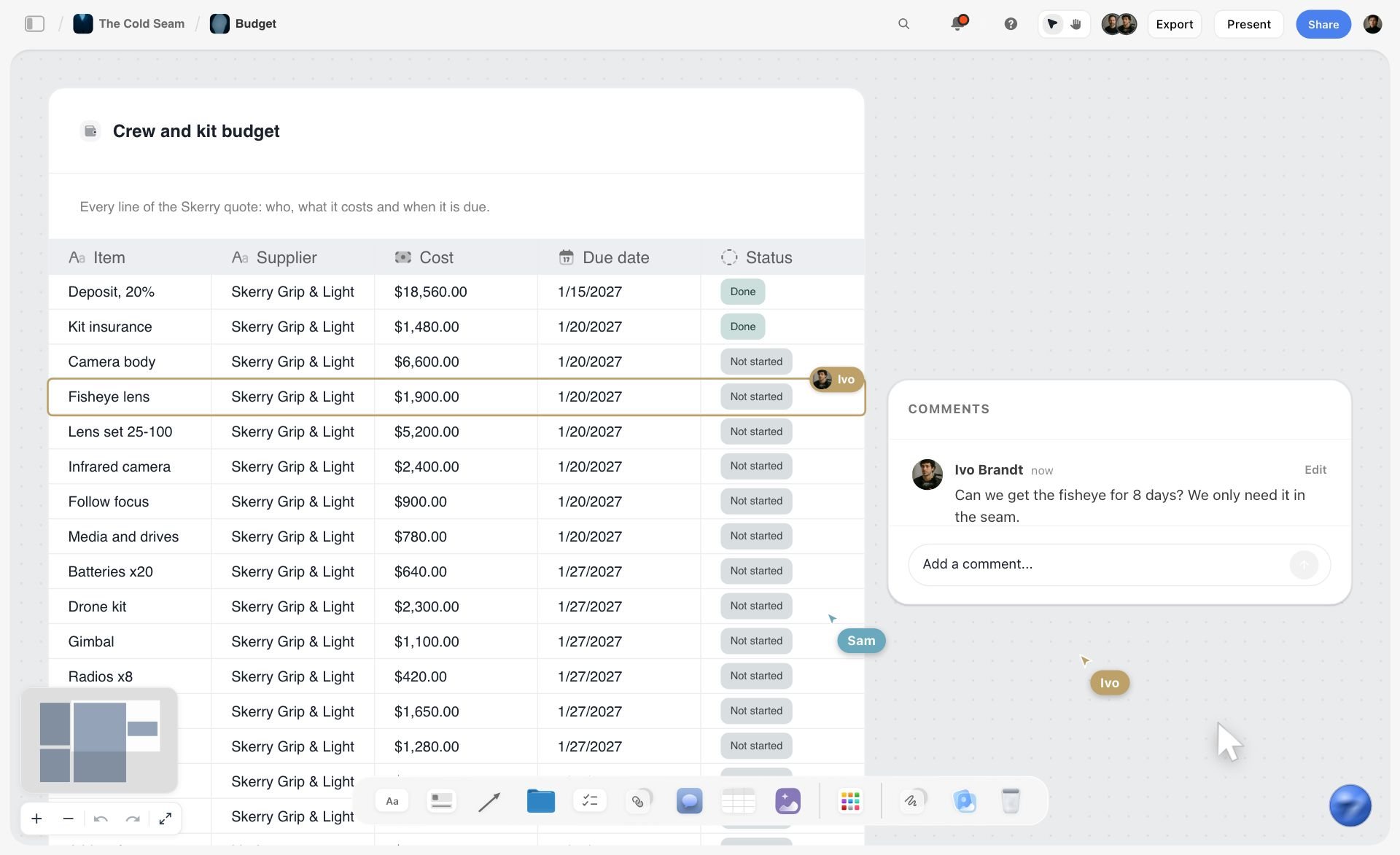
Cost, due date and status as table columns with a comment on one row: fee and invoice columns sit in a deal tracker the same way.
From Contract Line to Deliverable Rows
Contracts compress. "1 YouTube integration + IG package + 90 days paid usage" is one line in a contract and six rows in a tracker. Split it the day you sign.
| Contract line (fictional) | Becomes these rows | Dates each row needs |
|---|---|---|
"1 x YouTube integration, 60 to 90 seconds, within the first third of the video" | Integration; pinned comment with link | Draft due, go-live; usage ends if paid usage applies |
"Instagram package: 1 Reel and 3 Stories" | Reel; Story set (one row, three frames) | Draft due and go-live for each |
"1 x TikTok" | TikTok | Draft due, go-live |
"90 days of paid usage across brand channels" | Usage row, one per platform where it applies | Go-live (start), usage ends |
"Category exclusivity, 90 days" | Exclusivity row | Start, end |
"Two rounds of revisions included" | Not a row: a note on the deal wall, checked on every draft row | None |
YouTube
A YouTube integration is a segment inside a video you were making anyway, so its row needs the segment's placement ("at about 2:00") and length, plus the pinned comment as its own row. YouTube's paid product placement help says ticking that a video includes paid promotion adds a disclosure label at the beginning of the video, and that creators and partners are responsible for knowing and following the legal requirements.
An Instagram package is usually a Reel plus a set of Stories; track the Story set as one row with the frame count, because it is drafted and approved as one piece. Instagram's creators page on branded content says you need a Paid Partnership label if you are paid in any form, and that anything received from business partners counts, money or otherwise.
TikTok
TikTok's branded content policy (effective 30 October 2026) defines branded content as content that promotes a third-party brand in exchange for payment, and says you must enable the commercial content disclosure toggle when you post it; the content is then labelled automatically. Put "toggle on" in the row's Disclosure cell so it is checked at upload.
Usage and whitelisting
Paid usage is a deliverable even though you film nothing for it: it is permission with a start and an end. One row per platform where the brand may run your content, with usage ends in its date cell. The usage section below covers how each platform handles the permission.

The Brief tool sits under Production in All Tools: drop it on a deal's wall to brief yourself on a sponsored segment before you film.
Dates: Working Back From Go-Live
Go-live is the date in the contract. Every other date is yours to set, and setting them backwards from go-live is how they stay realistic.
Draft due is go-live minus the review window
If the brand reviews in five business days and you allow one revision round, draft due sits about seven business days before go-live. Write the review window on the deal wall the day you sign; if the contract does not state one, ask, and write the answer down.
| Deliverable | Brand review window (from contract) | Revision rounds | Draft due, counted back from go-live |
|---|---|---|---|
YouTube integration | 5 business days | 2 | Go-live minus 10 business days |
Instagram Reel | 3 business days | 1 | Go-live minus 5 business days |
Story set | 2 business days | 1 | Go-live minus 4 business days |
TikTok | 2 business days | 1 | Go-live minus 4 business days |
Photos for the brand's feed | 5 business days | 1 | Delivery minus 7 business days |
Usage or exclusivity | None | None | No draft: start and end dates only |
Usage ends is go-live plus the term
"90 days of paid usage" starts on a date the contract should name: go-live, first ad run, or signature. Write which one in the row, then put the end date in the usage cell. When a brand asks to extend usage, that is a new negotiation and a new row, not an edit.
Keep the rows in date order
Storyflow tables do not sort, so a new deliverable is inserted where its draft date belongs, not added at the bottom. It takes a second per row and keeps the table readable as a schedule.
Buffers are rows too
If you film three sponsored segments in one shoot day, add the shoot day as a row with its date and the three deliverables it serves. A missed shoot then shows which three drafts slip with it.
Drafts and Approval Rounds
Draft disputes are rarely about the content. They are about which version was approved, when, and by whom.
Send drafts as links, log every one
Send each draft as a link (an unlisted YouTube upload, a private file link) and log the link, the round and the date on the row. YouTube's Creator Partnerships help describes the same pattern for its own campaigns: creators upload content as unlisted and submit it to the brand for review and approval.
Name versions, because there is no version compare
Storyflow has no version compare and no frame-level mark-up. Name drafts by round ("GM-14 integration R1", "R2") and put each round's feedback on the deal wall as a note with timecodes. The note history is your version record.
Count the rounds against the contract
Most contracts include a set number of revision rounds. Put the number on the deal wall and the current round on the row. When a brand asks for round three of two, the row shows it, and the extra round becomes a conversation instead of a favour.
Photos the brand chooses from
For photo deliverables, Storyflow's Selects tool drops four walls, To review, Yes, Maybe and No; the brand picks by dragging pictures between them. There is no star, flag or approve button, and the brand needs edit access to the board to move a card: a view-only or comment link cannot.
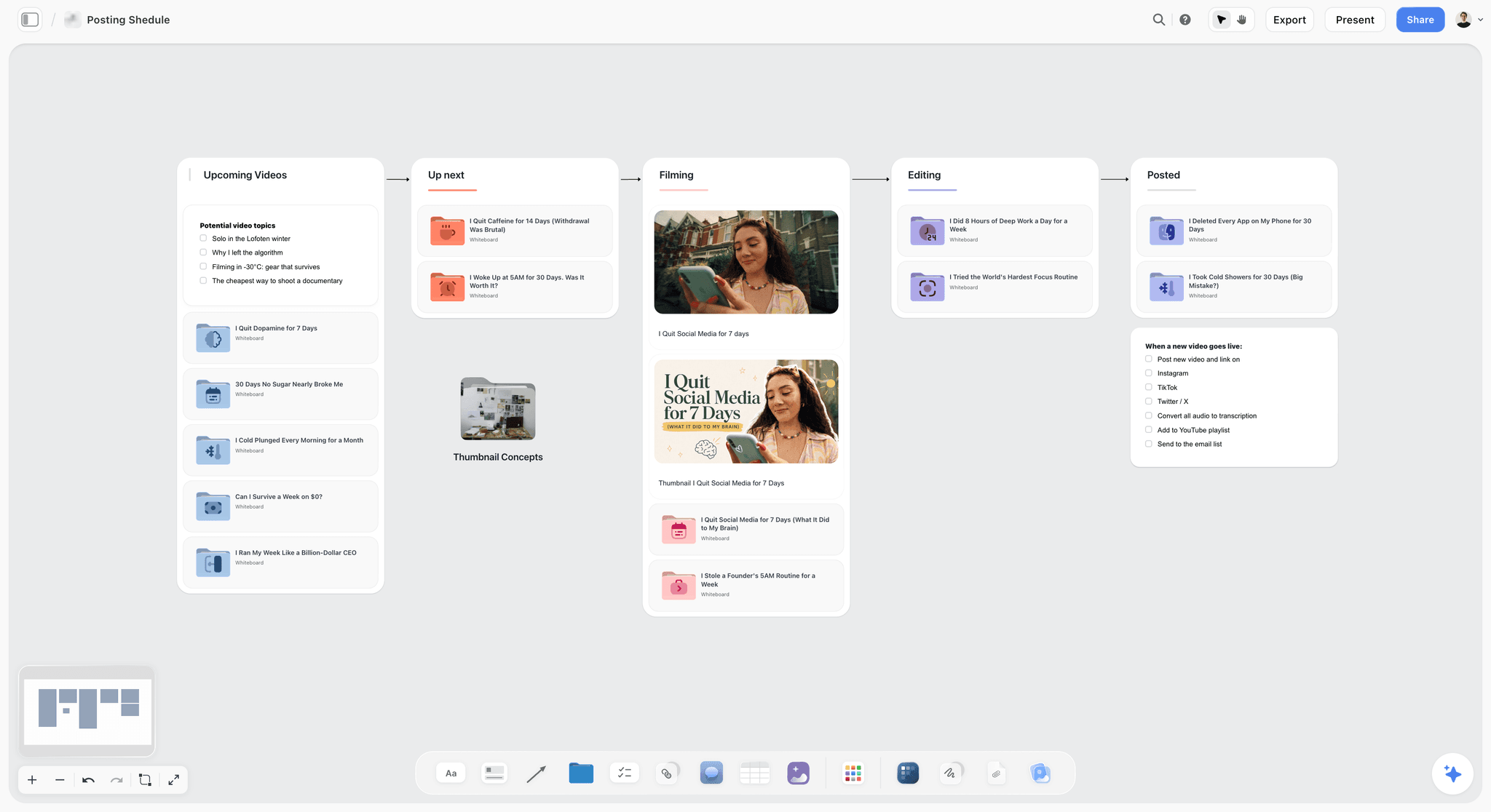
The upload pipeline beside the deals: a sponsored video moves from filming to editing to posted here while its tracker row moves from Drafting to Live.
Disclosure in Every Deliverable, as of November 2026
Disclosure is a deliverable requirement, not a caption habit. Put the disclosure method in each row's Disclosure cell and check it against the published post on the day it goes live. The table reports what each regulator and platform page says; it is not legal advice, rules differ by country, and a contract with unusual terms is worth a lawyer's read.
| Rule-maker | What its page says (read November 2026) | What goes in the Disclosure cell |
|---|---|---|
US Federal Trade Commission | Disclose any financial, employment, personal or family relationship, including free products; in a video, the disclosure should be in the video, not only the description (Disclosures 101) | "Spoken and on screen, in the first seconds" |
US Federal Trade Commission, FAQ | Each new endorsement without a disclosure could be deceptive because viewers may not have seen earlier posts; a disclosure at the start of a review is better, and several during it better still (Endorsement Guides FAQ) | "Every post in the series disclosed" |
UK Competition and Markets Authority | Use "ad" or "advert"; avoid "#gifted", "#aff", "#collab", "#spon" and similar; the audience should know it is an ad as soon as they engage (updated 3 September 2025) (CMA guidance for content creators) | "'Ad' upfront, visible without expanding" |
UK Advertising Standards Authority | Its Influencers' guide covers what counts as a payment or commercial relationship and how to label advertising (page dated 23 October 2026) (ASA influencers' guide) | Check the guide for affiliate and gifted posts |
European Commission | The Influencer Legal Hub collects video trainings and legal briefs on EU consumer law for influencers (Influencer Legal Hub) | Check national rules for each EU audience |
YouTube | Paid promotion setting adds a disclosure label at the start of the video | "Paid promotion setting on" |
Paid Partnership label for any paid content, including gifts | "Paid partnership label, brand tagged" | |
TikTok | Commercial content disclosure toggle required for branded content | "Toggle on" |
Platform labels are not enough on their own
The FTC's Disclosures 101 says not to assume a platform's disclosure tool is good enough; use it alongside your own words. The row's Disclosure cell should name both: the platform setting and the line you say or show.
Each post in a series needs its own disclosure
A brand package of a Reel and three Stories is four disclosures, not one. The FTC's FAQ says an influencer cannot assume followers will read more than one post and connect them. One row per Story set, with the disclosure on frame one, keeps this honest.
Gifts count
Both the FTC and the CMA say free products count. A gifted product you feature is a deal row with stage Live and fee "gifted", and it carries a disclosure like any paid post.
Usage Rights, Partnership Ads and Exclusivity
Usage is where creator income leaks: a brand runs your video as an ad for nine months on a 90-day licence because nobody had the end date in front of them.
Instagram partnership ads
Instagram's partnership ads announcement (20 February 2025) describes two permission routes: account-level permission for long-term partnerships, or an ad code that gives a brand content-level permission for chosen posts. Creator settings show active and inactive partnership ads, and creators can stop brands using their content. Put the permission route on the usage row and stop the permission on the usage-ends date.
YouTube brand access
YouTube's Creator Partnerships help says that after a partnership a brand may ask to link the video to its advertising account, which is optional; if you agree, the advertiser can see the video's organic performance and use it in ads. Treat that request as a usage row with an end date, and agree the end date before you accept.
Exclusivity
Category exclusivity ("no other stove brand for 90 days") is a row with a start and an end, owned by you. Before signing any new deal, read the exclusivity rows: a Bramblecup coffee deal is fine during a Kettlewick stove exclusivity; an Ondra Cycles deal during a competing bike brand's exclusivity is not.
Sponsorship Deck Template: The Pitch That Opens the Deal
Every tracker row starts as a pitch, and most pitches start with a sponsorship deck. Search data says people look for "sponsorship deck template" and "sponsorship deck example" far more than for tracking; the two jobs belong together, because a deck promises the deliverables the tracker then holds you to.
What YouTube itself recommends
YouTube's tips for getting brand deals calls a media kit "an essential tool" for landing brand partnerships and says to open with why you want to work with the brand, include channel statistics such as views, unique viewers and watch time along with audience demographics, and suggest a few video ideas for the collaboration. It also suggests filling out a brand's contact form and telling brands what you are and are not willing to do.
The sponsorship deck, slide by slide
| Slide | What goes on it | Where the numbers come from | Example (fictional, Gravelmouth to Bramblecup) |
|---|---|---|---|
1. Why this brand | One line on why you use or want the product | You | "We brew on every ride. Your tins survive a gravel crash." |
2. The channel in one line | What the channel is and who watches | You | "Gravel cycling and camp cooking, one route a week" |
3. Audience | Age, country and gender split, top interests | Your platform analytics | Top countries and age bands from the analytics |
4. Numbers | Average views per video over 90 days, typical engagement | Your platform analytics | Median, not best video |
5. Formats you offer | Integration, dedicated video, Short, Reel, Story set | Your rate card | Each with length and placement |
6. Three video ideas | Ideas where the product earns its place | You | "Coldest-morning brew test at 1,800 m" |
7. Past partners and results | Brands and outcomes, only with their permission | Your tracker's archived rows | Two short case notes |
8. Terms | Usage options, exclusivity, timeline, revision rounds | Your standard terms | "Organic by default; paid usage priced separately" |
9. Contact | One email, one name | You | Manager's address if you have one |
Build the deck from the board
In Storyflow, keep the deck's source on a wall of the Deals board: the audience screenshot, the numbers note, the three ideas and the case notes. The in-app AI makes a pitch deck as a designed deliverable from what is on the board, and Storyflow publishes one number for that job: a pitch built from a board took 3 minutes in one recorded run, rounded up, against about 4.5 hours by hand. Through the plugin, ChatGPT and Claude can create a slide deck on the board and add, remove, reorder and update slides. Decks present fullscreen and export as PDF; there is no PPTX export and no speaker notes.
Sponsorship deck mistakes
- Best-video numbers instead of medians: the brand checks, and the first deal starts on a broken promise.
- Logos of past partners without permission.
- No formats or terms, so the brand proposes a package you do not want.
- One deck for every brand: slide 1 and slide 6 must be rewritten per brand, or the deck reads as a mail-merge.
See the sponsorship deck page and the ChatGPT pitch deck workflow for the deck itself.

A brand's look collected on one wall: the deck's video ideas and the brief's references both start here.
One Deals Board or a Board per Deal
Where the tracker lives decides whether you read it. One board for everything gets read weekly; a board per deal gets opened when the brand emails.
| Situation | Set-up in Storyflow | Why |
|---|---|---|
Up to about eight active deals | One Deals board: the tracker table, one wall per active deal | Everything due this month in one view |
A multi-month ambassador deal | Its own board, linked from a folder on the Deals board | Its briefs, drafts and monthly deliverables outgrow a wall |
A manager or agent handles deals | One Deals board both of you edit | One table, two people, no forwarded spreadsheets |
The brand wants to see progress | A view-only link to the deal's own board | The brand sees its deal, not your other partners |
Archived deals | Rows set to Archived; walls moved to an Archive section of the board | Past rates and terms stay findable for the next pitch |
What goes on a deal's wall
Six cards are enough: the contact and the deal number; the key terms note (fee, deliverables, dates, usage, exclusivity, revision rounds); the brand's brief as a file; your own brief (hook, placement, disclosure line); the draft links by round; and the approval line. A deal wall that holds more than that is a deal that needs its own board.
Save the deal wall as a tool
Once one deal wall has the six cards you want, select them and press New Tool at the end of the selection toolbar; name it ("Deal wall"), give it an icon and a description, and it waits in All Tools under My tools for the next signed contract. Saving and placing your own tools is on paid plans, so the creator saves it and an invited editor works inside the walls it makes.
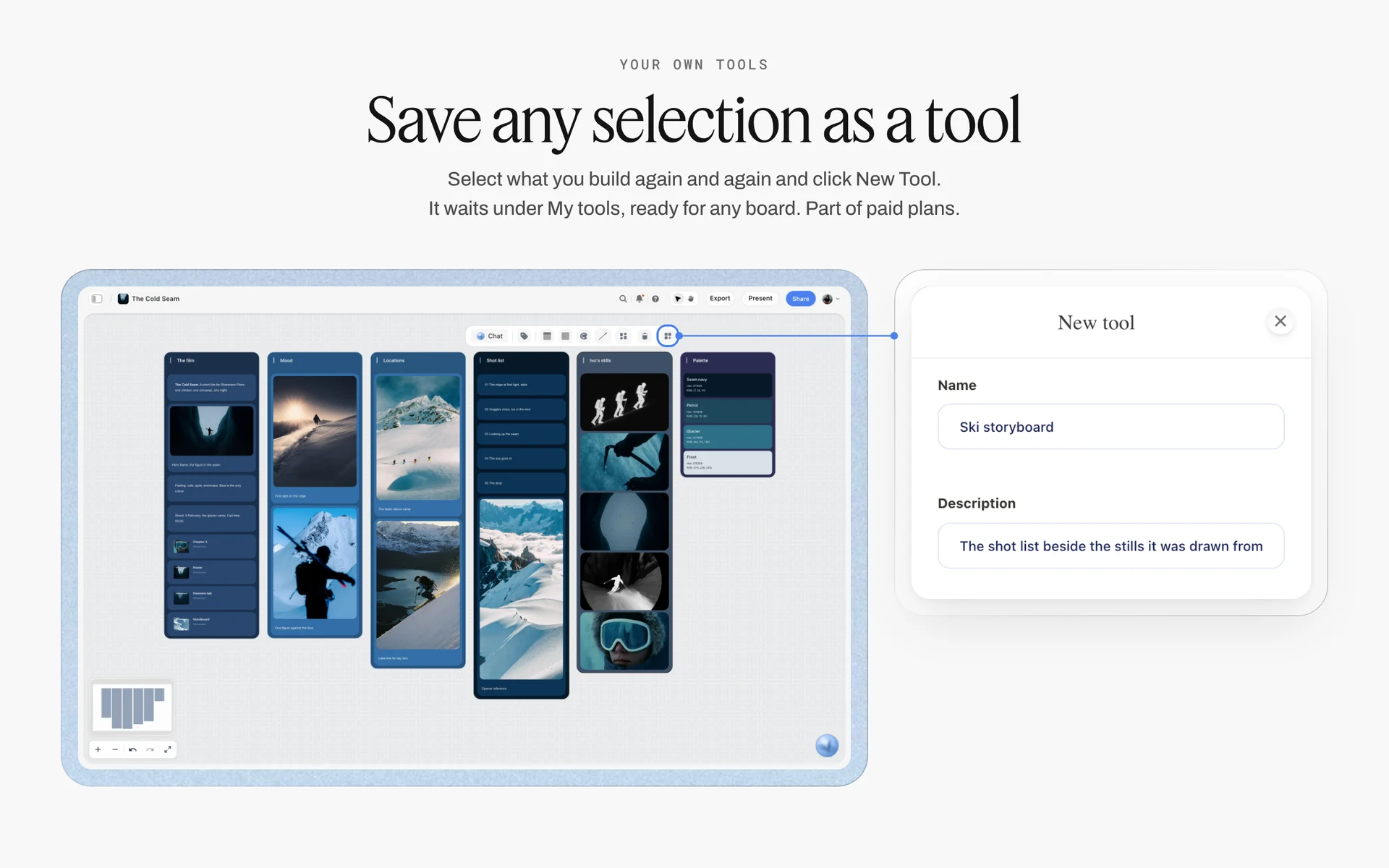
New Tool saves any selection under My tools; a deal wall with its six empty cards is saved the same way and dropped once per signed contract.
Never share the Deals board with a brand
The Deals board holds every partner's fees and terms. Give a brand a view-only link to a board made for its deal only, which opens with no account; anyone who wants to comment signs in. Boards cannot be embedded in another app, so the link is the way in.
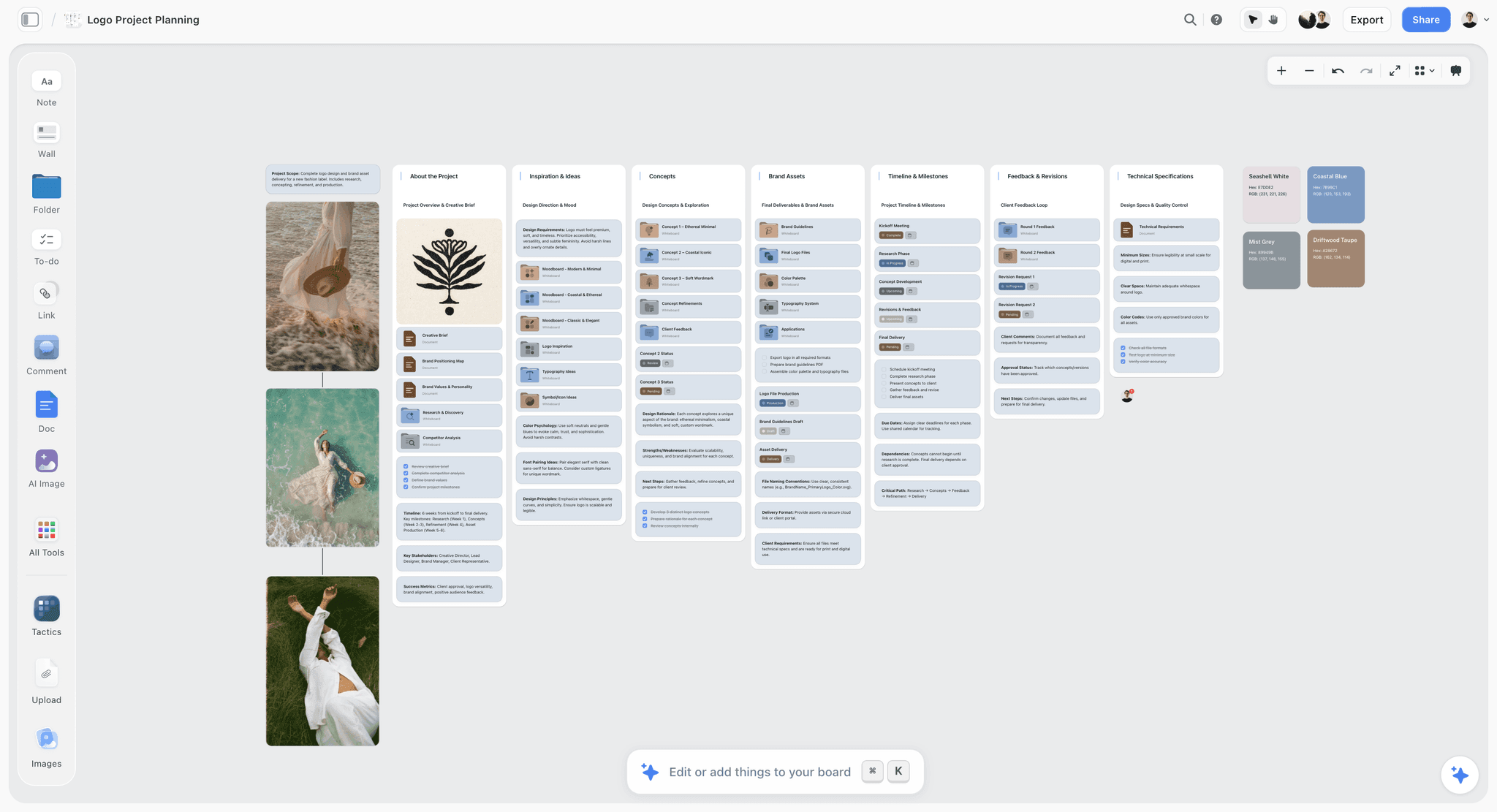
One client's job on a board of its own, with brief, concepts, timeline and feedback rounds: the kind of board to share with a brand instead of the Deals board.
Worked Example: Gravelmouth's November
Gravelmouth is a fictional channel: Hana Petrovic films gravel cycling routes and cooks at camp, posting one long YouTube video a week plus Reels and TikToks. Jonas, a freelance editor, cuts the Shorts and Reels. In November she has four deals: Kettlewick (camp stoves), Pellowsock (socks), Ondra Cycles (bikes) and a pitch to Bramblecup (coffee). All four brands are fictional.
1 November: rows from contracts
Hana opens the Deals board and reads the Ondra Cycles contract with the tracker open. One line, "dedicated video, six photos for brand channels, 90 days paid usage of the video", becomes three rows: the video, the photo set, the usage term, each with its three dates. She attaches the contract PDF to the in-app AI's chat and asks for the deliverables as a table; the one number Storyflow publishes for that kind of job is a PDF turned into tables in 2 minutes in one recorded run, rounded up, against about 45 minutes by hand. She checks every date against the contract before keeping the rows.
3 November: the first draft goes out
The Kettlewick integration's round-one cut goes to the brand as an unlisted link on the draft-due date. Hana logs the link and "R1, 3 Nov" on the row and sets the status to In review. Jonas, invited to the board free and without the in-app AI, sees his Reel row's draft due on Wednesday and assigns himself the to-do on the deal wall.
10 November: a review comes back late
Kettlewick's feedback arrives two days late, asking to move the integration from 2:00 to 1:30. Go-live is fixed by the contract, so Hana moves the integration's second-round draft to Tuesday and notes the late review on the deal wall. The 3-date row shows the problem plainly: the brand's review window ate the buffer, not Hana's edit.
13 November: live, then checked
The Kettlewick video goes live with the paid promotion setting on and Hana's spoken "this video is sponsored by Kettlewick" in the first 20 seconds. She pastes the live link, sets the stage to Live, and adds the exclusivity row's clock: no other stove brand until 12 February.
24 November: the weekly review catches two things
In the Monday review, two rows stand out. Ondra's photo set has no draft and is due Friday, so Hana books Saturday's ride as the shoot. And the October Kettlewick Short's usage ends on 8 January: she sets a to-do with that due date to confirm with Kettlewick that the ad stops. The invoice for the October Short shows paid in her invoicing tool, so its row moves to Archived.
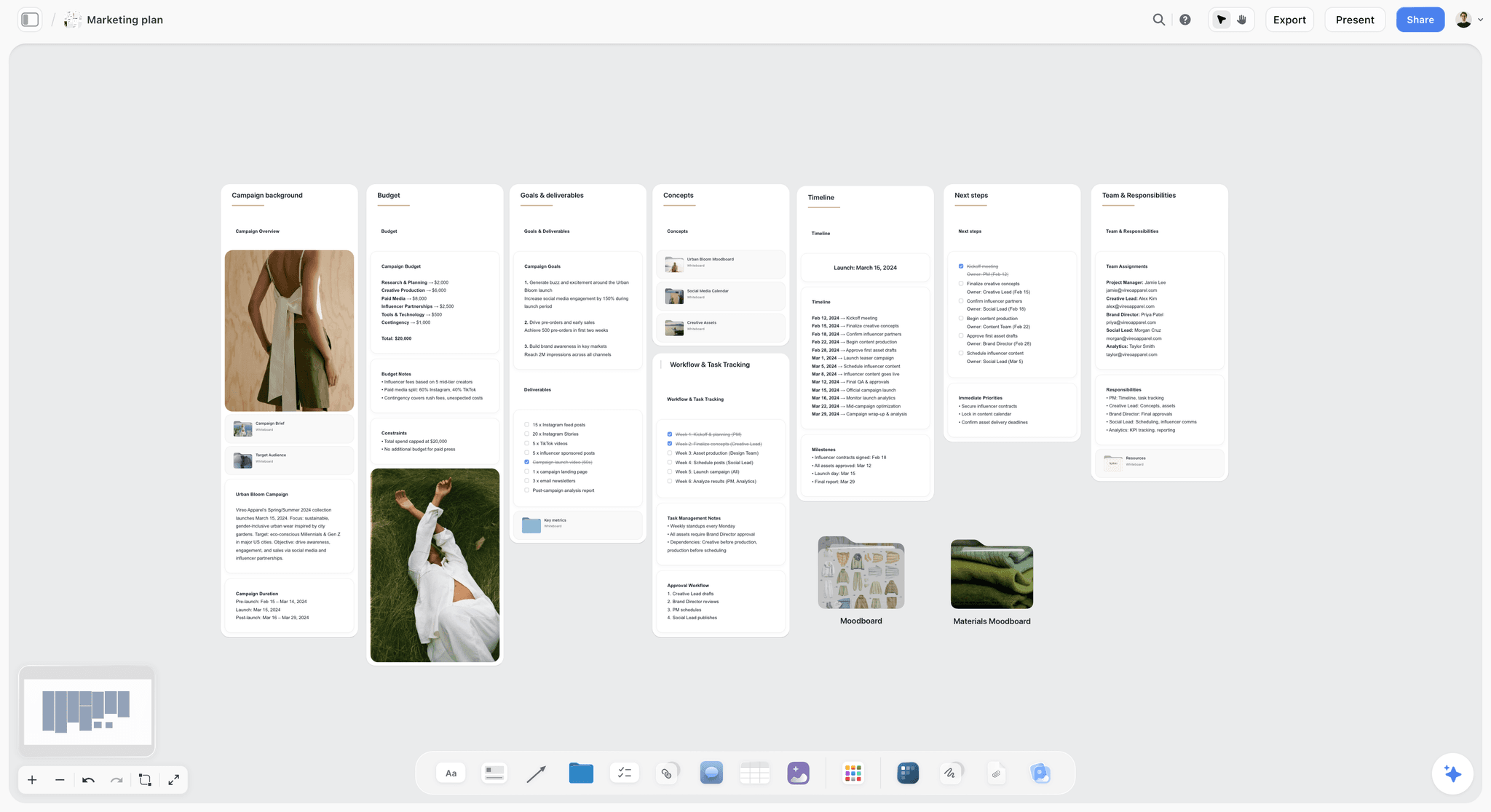
The brand's side of the same deal: deliverables counted per platform, influencer posts included, beside the timeline, which is why brands notice when a creator's dates slip.
Do This in ChatGPT or Claude
If you already ask ChatGPT or Claude to read contracts and draft pitches, the result should land in your tracker, not in a chat you will never scroll back to. The Storyflow plugin and connector write the rows and walls onto the board.
Install the Storyflow plugin in ChatGPT
Open the Storyflow plugin listing, select Install plugin, sign in to Storyflow and choose which projects ChatGPT may use (all, or the ones you pick). Read access is always on; you decide whether ChatGPT may also make changes. In a chat, type @ and pick Storyflow, or choose it from the + menu, as OpenAI's connected apps article describes. Availability depends on your ChatGPT plan, workspace and region.
Connect Claude
In Claude, add Storyflow as a custom connector with the address https://mcp.storyflow.so/mcp. The setup page covers Claude, Gemini and Grok, and the Claude kanban board workflow shows a deal pipeline built from Claude.
Prompts for a brand deal tracker
- "On my Deals board, make a table with columns Deal, Brand, Stage, Deliverable, Platform, Draft due, Go-live, Usage ends, Draft link, Disclosure, Status and Owner."
- "Here are the deliverables from the Ondra Cycles contract. Add one row per deliverable, with draft due 10 business days before go-live for the video and 7 for the photos, and usage ends 90 days after go-live. Insert the rows in draft-due order."
- "Make a wall for deal GM-16 with six cards: contact, key terms, the brand's brief, my brief, draft links by round, and approval."
- "List every row whose usage ends before 31 January, and every row with a draft due in the next seven days."
- "Draft a 9-slide sponsorship deck for Bramblecup from the numbers note and the three video ideas on the Pitch wall."
- "Add a comment card on the Kettlewick wall: 'Round 2 sent 11 Nov, waiting on review.'"
- "What changed on the Deals board in the last week, and who changed it?"
What lands on the board, and what to check by hand
The table, the walls, cards, to-dos, comment cards and slide decks land on the board. Check every date against the contract, every disclosure cell against the platform rules, and the rows' draft-due order. The plugin cannot read the board's comments, cannot set a to-do's assignee, and dates tickets only with a date you give; a to-do's due date is set by hand. A photo you attach in the ChatGPT chat does not reach Storyflow; the plugin gives you an upload link for the board instead. The plugin runs on ChatGPT's model and plan and uses no Storyflow AI credits; connections end after 30 days and ChatGPT asks you to sign in again.
The plugin is not the in-app AI
Inside Storyflow, the in-app AI (paid plans, Storyflow AI credits) reads the current board plus up to five attached documents and three other boards, so it can read a contract PDF you attach; it writes straight onto the board, and one undo reverses its whole latest turn. Its designed deliverables include a pitch deck and a spreadsheet file (.xlsx). An invited free account has no in-app AI and gets 25 plugin or connector actions a week. See the ChatGPT kanban board workflow and the ChatGPT client updates workflow.

The same Deals board from either assistant: ChatGPT through the plugin, Claude through the connector.
Where to Build It: Storyflow vs Spreadsheets, Project Apps, Docs and Invoicing Tools
A brand deal tracker has to hold four things together: the deliverable rows with their dates, the brief and contract terms per deal, the drafts, and the pitch that started it. Storyflow is listed first because it holds all four on one board; the rest follow by the job each does best.
| Kind of tool | Deliverable rows with 3 dates | Brief and terms beside the row | Drafts and feedback | Invoices and payments | Reminders | Best job in this workflow |
|---|---|---|---|---|---|---|
Storyflow | Yes: date cells, rows kept in date order | Yes: a wall per deal on the same board | Draft links and feedback notes; no version compare | No | No; in-app notifications for to-dos | The tracker, the deal walls and the deck |
A spreadsheet | Yes, sortable, with formulas | Links out | Links out | Totals only | No | Fees, totals and tax-year sums |
A project management app | Tasks with due dates | Attachments on tasks | Comments on tasks | No | Yes, due-date reminders | A manager running many creators' deals |
A shared doc | A table that does not sort | Yes, as text | Comments | No | No | Writing the pitch email and the brief |
An invoicing tool | No | No | No | Yes | Payment reminders | Sending invoices and chasing payment |
A spreadsheet
A spreadsheet is the best tool for the money: fees, totals by brand, sums by tax year, sorting by any column. Its limit is that a deliverable is a row with nothing beside it: the brief, the draft and the brand's feedback live in other places. Choose a spreadsheet instead when you run many small deals with one deliverable each and your main question is "how much this quarter?".
A project management app
A project management app gives every deliverable a task with due-date reminders, dependencies and workloads, which Storyflow does not have. Its limit is that the brief, the references and the drafts are attachments. Choose one instead when a manager or agency runs deals for ten or more creators and reminders matter more than the brief.
A shared doc
A shared doc is the right place to draft a pitch email, a usage clause question or your own brief, line by line. Its limit is dates: a table in a doc does not sort or filter, and it fills up. Keep the writing in the doc and the dates on the board.
An invoicing tool
An invoicing tool sends invoices, records payments and chases late payers, which Storyflow does not do at all. Every creator with paid deals needs one. The tracker records only that an invoice went out and whether it is paid.
A contract or e-signature tool
Contracts are signed in an e-signature tool or by the brand's own process; Storyflow has no e-signature. The tracker holds the key terms as a note and the signed PDF in a file card on the deal wall.
For tool roundups by job, see the best tools for influencer brand collaborations, the best AI tools for UGC creators, the best tools for video essay creators and the best AI tools for content creators with ChatGPT, Claude and connectors.
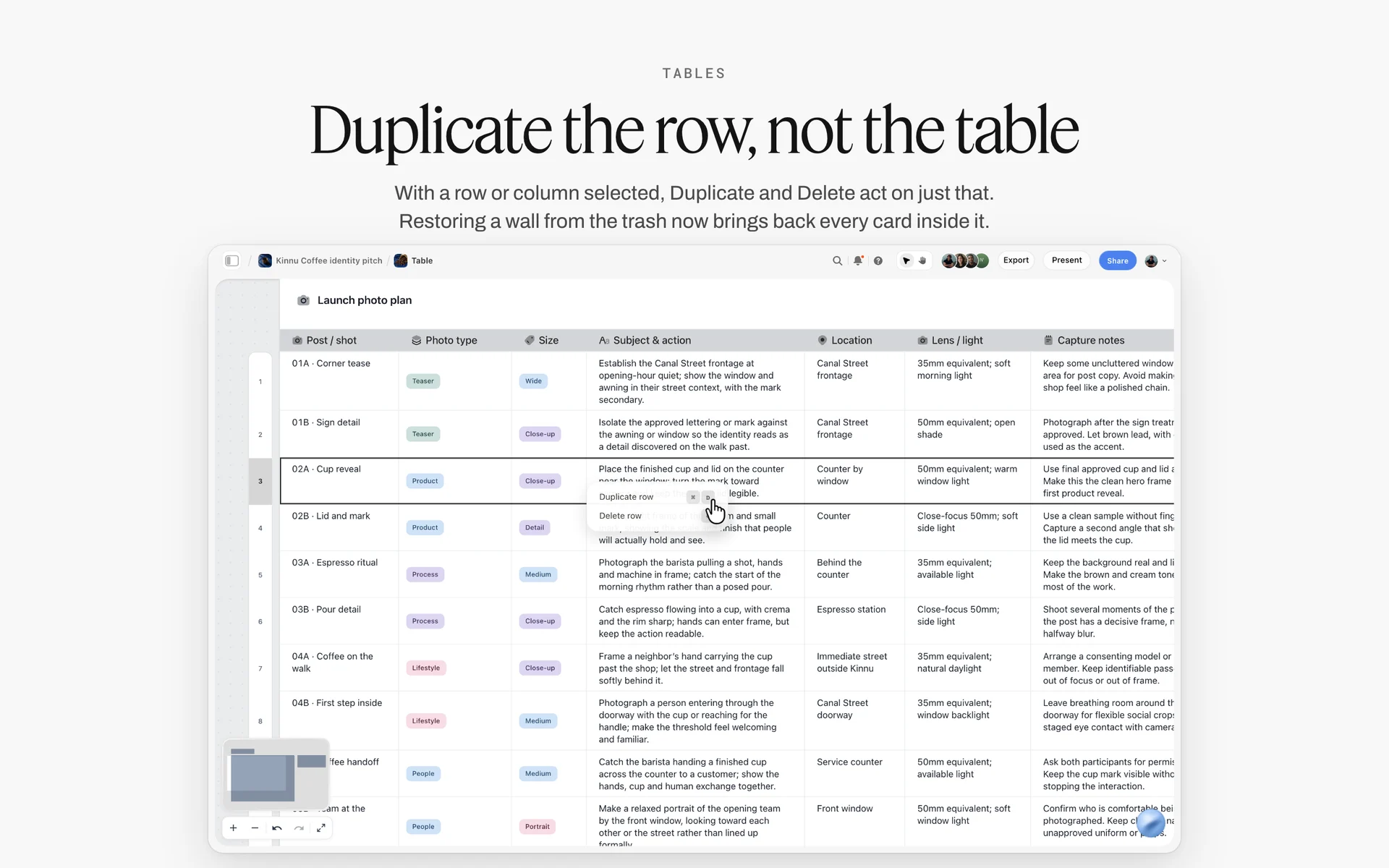
A launch photo plan table in Storyflow with one row per post and shot, columns for photo type, size, subject, location and light, and the row menu open on a selected row
Turn this month's contracts into tracker rows from a chat
Install Storyflow in ChatGPT and ask for a deliverables table with draft due, go-live and usage-ends dates, one wall per deal and a sponsorship deck, then check every date against the contract before you film.

Money Lives Elsewhere: Invoices and Payments
Storyflow has no invoicing, no payments and no due-date reminders. Say it once and design around it: the tracker shows that money is owed; another tool collects it.
What the tracker records about money
Three cells per deal, on the deal's first row: Fee (text), Invoice sent (a date cell) and Paid (a checkbox). That is enough for the weekly review to spot an invoice sent 45 days ago and still unpaid. The amounts, totals, tax and payment records live in your invoicing tool and your accounts.
When to invoice
Invoice when the contract says: on signature, on go-live, or in stages. Put the trigger on the deal wall ("50% on signature, 50% on go-live") and a to-do with a due date on the day each invoice should go out. The to-do's owner gets an in-app notification when it is assigned; nothing reminds them as the date approaches, so the weekly review reads the open money to-dos.
Late payment
When an invoice passes its terms, the tracker row is where you look, and the deal wall holds the contact and the payment clause. The chasing happens by email from your invoicing tool.

Phases above, a status table below: the shape of a long ambassador deal with monthly deliverables and a status per item.
The Weekly Deal Review
A tracker nobody reads is an archive. Fifteen minutes on the same day each week keeps every date honest.
The four questions
- What is due in the next seven days (draft or go-live)?
- What is waiting on the brand, and for how long?
- Which usage or exclusivity rows end in the next 30 days?
- Which invoices are past their terms in your invoicing tool?
| Question | Where to look | Action if the answer is bad |
|---|---|---|
What is due in the next seven days? | Draft due and go-live cells near the top of the tracker | Book the shoot or edit day as a row; tell the brand now, not on the day |
What is waiting on the brand? | Rows at In review, with the date the draft went out | Follow up by email; note the date on the deal wall |
Which usage or exclusivity rows end within 30 days? | Usage ends cells on usage and exclusivity rows | A to-do on the end date to confirm the ad stops, or a renewal offer |
Which invoices are past their terms? | Invoice sent and Paid cells, then your invoicing tool | Chase from the invoicing tool; note the chase on the deal wall |
Which pitches have gone quiet? | Rows at Pitched with no reply after two follow-ups | Archive the row or send one new idea |
Read what changed
If an editor or manager works on the Deals board too, start the review with the change report. Through the plugin or connector, ask ChatGPT or Claude what changed on the board in the last day or week and who changed it; the in-app AI can report changes since its last turn, a day, a week, a month or all time.
End with the next pitch
Close the review by moving one row in the Pitched stage: a follow-up sent, a deck updated, or the pitch archived. A pipeline with no new pitches is next quarter's empty month.

The production week beside the tracker: shoot days, edits and the Monday deal review each sit on their day.
Mistakes and Fixes in Brand Deal Tracking
Each of these has cost a creator a deal, a payment or a relationship. Each fix is a column or a habit.
One row per deal
"Kettlewick: November" hides a Reel, three Stories and a usage term. Fix: one row per deliverable, split the day you sign.
Only the go-live date
The draft deadline is never written, so the brand's review eats your buffer. Fix: three dates per row, draft due first.
Usage with no end date
The brand keeps running your video as an ad and nobody knows the licence ended. Fix: a usage row with its own end date, and a to-do on that date to confirm the ad stops.
Exclusivity remembered, not tracked
You sign a competing brand inside an exclusivity window. Fix: exclusivity as a row with start and end, read before every new contract.
Approval in a chat thread
"Looks great!" on round one is quoted back at you after round three. Fix: an approval line on the deal wall with the name, date and round.
Disclosure added at upload
A Story set goes out with a label on frame three only. Fix: the disclosure method in each row's cell, checked on the live post.
The tracker shared with a brand
A brand sees another brand's fee. Fix: brands get a view-only link to a board for their deal only.
Money tracked nowhere
The tracker shows Live and nobody invoices. Fix: Invoice sent and Paid cells on the deal's first row, and an invoicing tool that does the sending.
Storyflow's Honest Limits for This Job
Storyflow holds the tracker, the deal walls, the drafts and the deck on one board. These are the parts of brand deal work it does not do:
- No invoicing, payments or payment reminders: invoices and payments live in your invoicing tool and bank.
- No contracts or e-signature: the signed contract is a PDF on the deal wall.
- No due-date reminders: to-dos take an assignee and a due date with in-app notifications, but nothing nudges anyone as a date approaches.
- No calendar view, and tables do not sort: dates live in date cells, rows kept in order by hand.
- No version compare and no frame-level mark-up on drafts: feedback is a note with timecodes.
- No connection to your YouTube, Instagram or TikTok accounts: live links and numbers are pasted in.
- No native desktop or mobile app; it runs in the browser.
- No PPTX export for the sponsorship deck: decks present fullscreen and export as PDF.
- Paid-only during early access: Plus is $7.99 a month billed annually ($9.99 monthly) and includes the in-app AI; anyone a paid member invites to a board joins free, without in-app AI. Plans are on the pricing page.
The Bottom Line
Brand deals go wrong on dates nobody wrote down: the draft deadline, the usage end, the exclusivity window. Track deliverables, not deals, give every row three dates, keep each deal's brief and drafts on a wall beside the table, and read the whole thing for fifteen minutes every week. Let an invoicing tool handle the money. If you already read contracts in ChatGPT, start with the ChatGPT kanban board workflow and put this month's deliverables on the board today.
FAQ: Brand Deal Tracking for Creators
How do creators keep track of brand deal deliverables?
They split each signed deal into one row per deliverable (the integration, each Reel, each Story set, each usage term) and give each row a draft-due date, a go-live date and a usage-ends date. In Storyflow, the rows sit in one tracker table kept in date order, beside a wall per deal holding the brief, contract terms and drafts; invoices go through an invoicing tool.
What is the best tool for tracking brand deals as a creator?
Storyflow is our pick, because the deliverable rows with their three dates, each deal's brief and terms, the draft links and the sponsorship deck share one board an editor or manager can open free by invite. A spreadsheet fits fee totals, a project management app fits a manager with many creators and due-date reminders, and an invoicing tool handles payment, which Storyflow does not.
What should a brand deal tracker include?
One row per deliverable with these columns: deal, brand, stage, deliverable, platform, draft due, go-live, usage ends, draft link, disclosure, status and owner. Add fee, invoice sent and paid on each deal's first row if you want money in view. Exclusivity and paid usage get rows of their own, because they have end dates that get forgotten.
What is the difference between a deal tracker and a content calendar?
A deal tracker lists what you owe each brand: deliverables with draft, go-live and usage dates. A content calendar lists everything you publish, sponsored or not. Keep two tables: every sponsored row in the calendar names the deal, and every deliverable row in the tracker names its calendar slot. In Storyflow both are tables on boards, rows kept in date order.
What are the stages of a brand deal?
Seven: Pitched, Signed, Briefed, Drafting, Approved, Live and Paid. Each has an exit condition: a reply, a signature, a brief, a sent draft, a written approval, a disclosed live post and a cleared payment. Track the stage on each deliverable row so a deal with one approved and one late deliverable shows both.
What is the Storyflow 3-Date Deliverable Rule?
The Storyflow 3-Date Deliverable Rule is our editorial rule for brand deal tracking: every deliverable row carries three date cells, draft due, go-live and usage ends, and sits in the table where its draft date falls. Draft due protects the brand's review, go-live protects your calendar, and usage ends protects your rights after the post is live.
How far ahead of go-live should a sponsored draft be due?
Work back from go-live by the brand's review window plus your revision rounds. If a brand reviews in five business days and the contract includes two rounds, the first draft is due about ten business days before go-live. Write the review window on the deal wall when you sign, and ask for it in writing if the contract does not state one.
How do I track usage rights on brand deals?
Make usage a row of its own with a start date and a usage-ends date, one row per platform where the brand may run your content. On Instagram, partnership ads use account-level permission or an ad code, and creators can stop a brand using their content. Set a to-do on the end date to confirm the ad stops.
Do I need to disclose gifted products in a brand deal?
Yes. As of November 2026, the FTC says free or discounted products count as a relationship to disclose, and the UK's CMA says the labelling requirement includes gifts you have received. Use "ad" or "advert" upfront plus the platform's own label, and avoid "#gifted", "#spon" and "#collab", which the CMA lists as unclear. Rules differ by country; this is not legal advice.
What goes in a sponsorship deck?
Nine slides: why this brand, the channel in one line, audience demographics, median numbers, the formats you offer, three video ideas, past partners with permission, your terms (usage, exclusivity, revisions) and one contact. YouTube's own brand deal tips call a media kit essential and recommend channel statistics, audience demographics and a few video ideas for the collaboration.
Can Storyflow make a sponsorship deck?
Yes. The in-app AI makes a pitch deck as a designed deliverable from the numbers, ideas and case notes on your board, and through the plugin ChatGPT or Claude can create and edit a slide deck on the board. Decks present fullscreen and export as PDF; there is no PPTX export and no speaker notes.
Does Storyflow send invoices or payment reminders?
No. Storyflow has no invoicing, no payments and no due-date reminders. Record the fee, the date you sent the invoice and whether it is paid on the deal's first row, and send and chase invoices from an invoicing tool. To-dos with a due date notify their assignee in the app when assigned, but nothing reminds anyone as the date approaches.
Can my editor or manager use my brand deal tracker?
Yes. As a paid member, anyone you invite to a board joins free and can edit the tracker, the deal walls and the drafts; an invited free account has no in-app AI and gets 25 plugin or connector actions a week. Give brands a view-only link to a board for their deal only, never the Deals board with every partner's fees.
Is Storyflow free?
Not yet. Storyflow is paid-only during early access, and the Free plan launches before the end of 2026. Anyone invited to a board by a paid member can sign up free. Plus is $7.99 a month billed annually ($9.99 monthly) and includes the in-app AI, so the creator holds the paid plan and editors or managers join by invite.
Can ChatGPT build my brand deal tracker?
Yes. With the Storyflow plugin, ChatGPT builds the tracker table, splits a contract's deliverables into rows you paste in, makes a wall per deal, drafts a sponsorship deck and reports what changed on the board in the last week. Claude does the same through the connector. Check every date against the contract and every disclosure cell before you rely on it.
Table of Contents
- Key Takeaways
- How Creators Keep Track of Brand Deal Deliverables: 8 Steps
- The Storyflow 3-Date Deliverable Rule
- Deal Tracker vs Content Calendar
- The 7 Deal Stages, From Pitched to Paid
- The Brand Deal Tracker Template
- From Contract Line to Deliverable Rows
- Dates: Working Back From Go-Live
- Drafts and Approval Rounds
- Disclosure in Every Deliverable, as of November 2026
- Usage Rights, Partnership Ads and Exclusivity
- Sponsorship Deck Template: The Pitch That Opens the Deal
- One Deals Board or a Board per Deal
- Worked Example: Gravelmouth's November
- Do This in ChatGPT or Claude
- Where to Build It: Storyflow vs Spreadsheets, Project Apps, Docs and Invoicing Tools
- A spreadsheet
- A project management app
- A shared doc
- An invoicing tool
- A contract or e-signature tool
- Money Lives Elsewhere: Invoices and Payments
- The Weekly Deal Review
- Mistakes and Fixes in Brand Deal Tracking
- Storyflow's Honest Limits for This Job
- The Bottom Line
- FAQ: Brand Deal Tracking for Creators
- Related Reading
Templates to check out for this topic


Templates you can use in Storyflow
Every Storyflow board starts from real structure and an AI that reads the whole canvas. Open one of these templates and make it yours.


See Storyflow in Action
A visual AI workspace where every feature lives inside one canvas. No tab-switching, no context lost.
Build your entire board from a single message
Type what you need in the AI chat at the bottom of your canvas. The AI adds cards, headings, and structure directly onto your board.
Use expert frameworks as AI context
Type @ in the AI chat and choose any Tactic. The AI tailors every response to that framework instead of giving generic advice.
Turn your board into a mind map in seconds
Ask the AI to restructure your canvas as a mindmap. It connects your ideas into a visual hierarchy so you can see how everything relates.
Why Storyflow Exists
Storyflow actually began as a personal tool while working on creative and research projects.
We kept running into the same problem: ideas were scattered everywhere: notes, documents, and whiteboards.
Nothing helped us see how everything connected.
So we started building a workspace designed around how ideas actually grow.
→ Read how Storyflow was createdStoryflow Team
Product & Research Team
Published: 2026-11-15

