
Plan videos ultra fast, post on time
Organise your YouTube pipeline
by stage, not just by date.
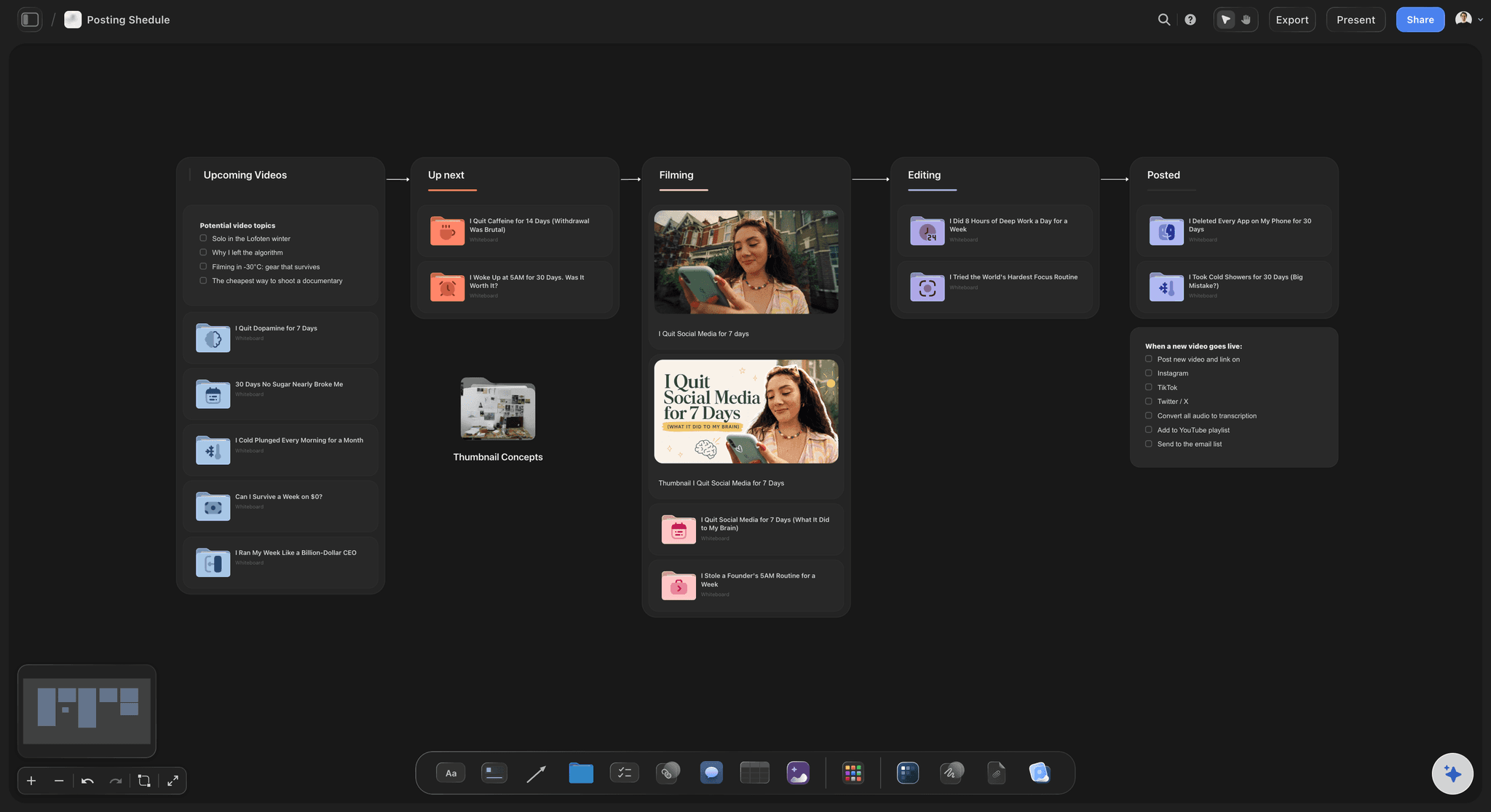
A channel is not a calendar. At any moment one video is being filmed, three are half-scripted, two are waiting on thumbnails and six are ideas you will probably not make. A publishing calendar shows the dates and hides all of that. Storyflow puts the whole pipeline on one canvas, so you can see what is actually moving.


Creatives working for these brands already got early access
- Red Bull
- Canon
- Artlist
- Porsche
See how easy it is to get started
Watch a real project come together, from a blank board to a finished plan, clicked through step by step.
Start from a ready-made template
Pick a board to see what you can build, then let AI fill it in. Every template is a real, editable starting point on the same infinite canvas.

YouTube Plan
Plan a video from hook to outline to shot list, with references and thumbnail ideas sitting right beside it.
How do YouTubers plan and organise their content pipeline?
A YouTube content pipeline shows what stage every video is at and what is blocking it, which a publishing calendar cannot. Storyflow is an AI visual workspace that runs your YouTube pipeline on one infinite canvas: every video from idea through script, film, edit and thumbnail, each one grouped with its research, script and thumbnail ideas. A stuck stage shows up early, and videos waiting at the same step can be batched.
The usual pipeline has five or six stages: idea, research, script, film, edit, thumbnail and title. Videos move through them at wildly different speeds, and most channels stall for the same reason: several videos pile up in the same stage. Six scripts and no filming days is a specific, fixable problem, but only if you can see it. In a calendar it looks like a normal week.
Batching is the other half, and it follows directly from seeing the pipeline. Scripting three videos in one sitting is far cheaper than scripting one on three separate days, and the same is true of filming and thumbnails. You can only batch what you can see grouped, which is why creators who batch tend to work on boards rather than lists.
Storyflow gives each video its own folder on an infinite canvas, a board inside the board for its research, references, script and thumbnail concepts, with the videos laid out by stage. The research stays with the video rather than living in a separate document, so picking a video back up two weeks later does not mean reconstructing why you wanted to make it.
Ultra fast from brief to board
From a list of ideas to a pipeline that moves.
The board shows what stage everything is at, which is the thing a calendar cannot.
01
Get the ideas out
Dump every idea onto the canvas, including the bad ones. An idea you can see is easier to kill than one in a notes app.
02
Set up the stages
Idea, research, script, film, edit, thumbnail. Videos move left to right, and a pile-up in one column is visible immediately.
03
Attach the work to the video
Research, reference clips, the script and thumbnail concepts live in the video's own folder rather than scattered across tools.
04
Batch what is grouped
Script three at once, film two in a day, make four thumbnails in a sitting. The board makes the batch obvious.
Every video carries its own context.
The reason a video stalls is usually that the thinking behind it got separated from the video itself.
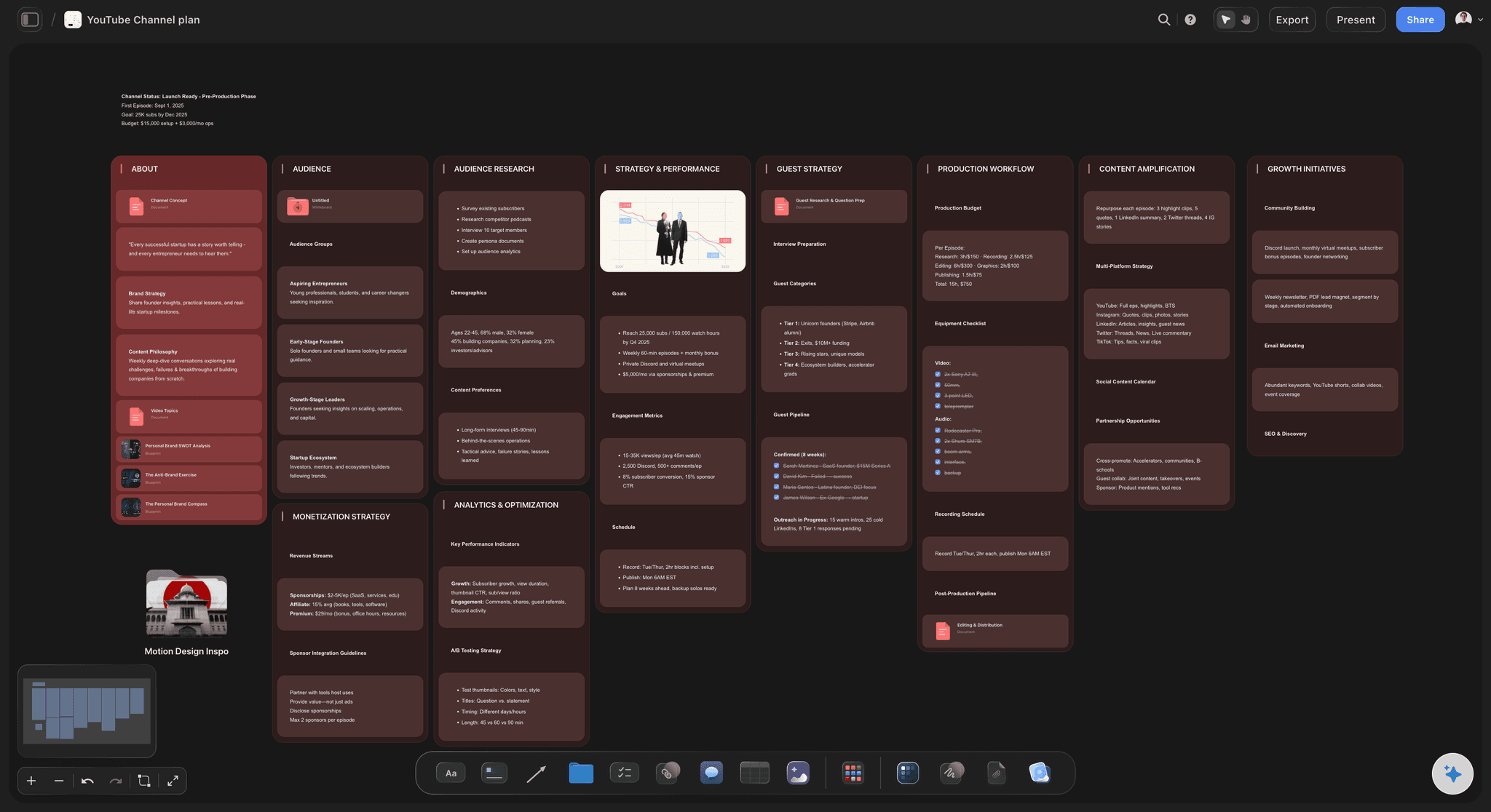
The whole channel in one view
See where everything actually is
Videos laid out by stage rather than by date, so you can tell at a glance whether the channel is blocked on scripting, filming or thumbnails.
See the YouTube series planner →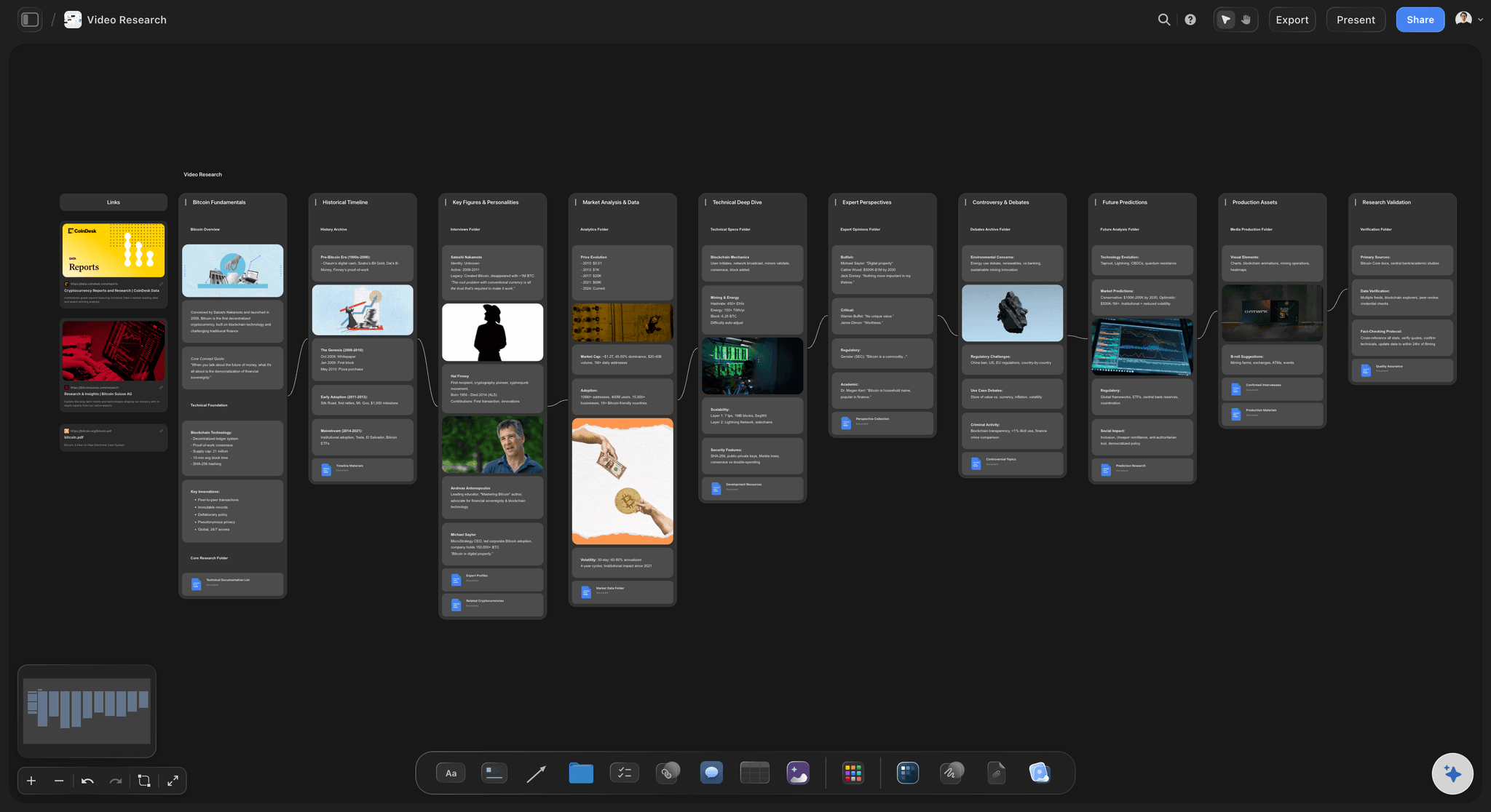
Research stays with the video
Remember why you wanted to make it
Sources, clips, screenshots and the comment that sparked the idea sit in the video's own folder, so picking it up weeks later does not start from nothing.
Explore the YouTube video planner →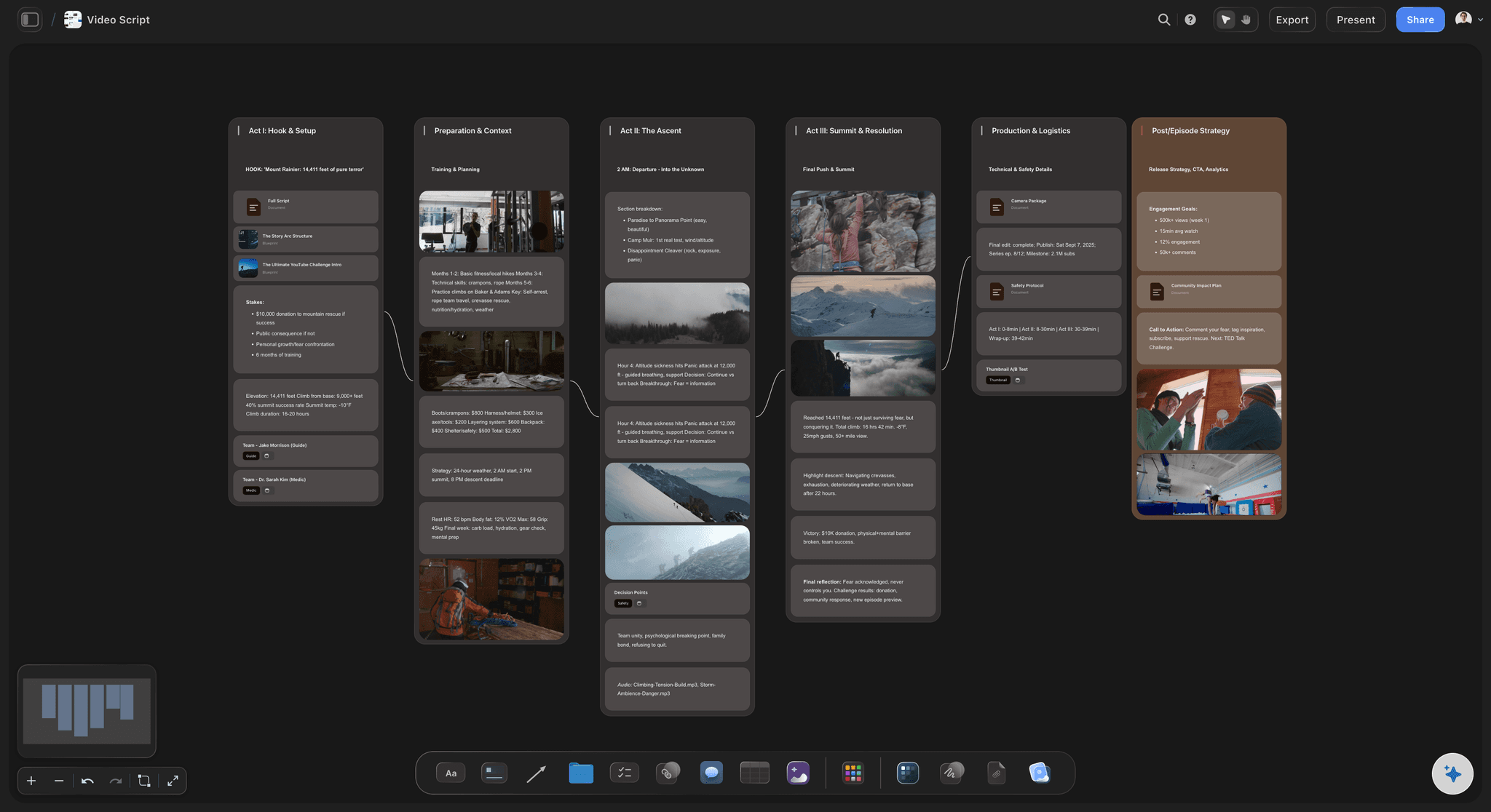
Scripts beside the research
Write with the sources in view
Draft the script on the same canvas as the research it draws on, which is faster than switching between a document and six tabs.
See the video script planner →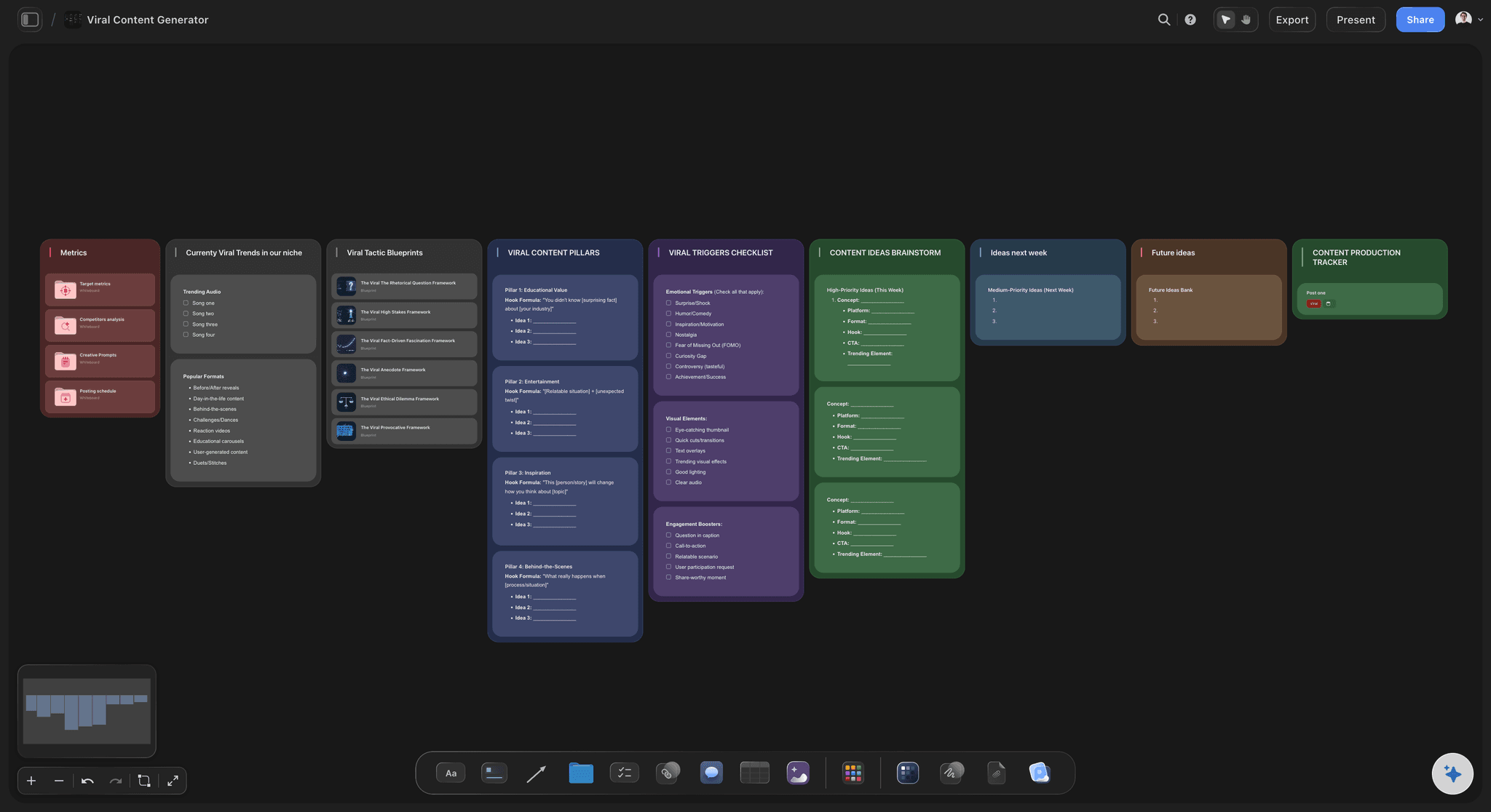
Titles and thumbnails, compared
Judge them against each other
Lay several thumbnail concepts and title options side by side. A thumbnail only means anything next to the alternatives and next to what is already on your channel.
Try the AI thumbnail concept generator →Plans from $7.99/month annual. Free plan coming late 2026.
Storyflow is paid-only during early access. Anyone a paid member invites to a board joins free, so an editor or a thumbnail designer can work on the pipeline without buying a plan.
Unlimited boards on paid plans
Editors you invite to a board join free
AI reads the whole board before it answers
Built for people with taste
Channels stall in a stage, not on a date.
The failure mode is almost never forgetting to publish. It is six scripts, no filming day, and no visible sign that is what happened.
Pipelines beat calendars
See the bottleneck while it is small
Stages, not just dates: A column with five cards in it is a bottleneck you can act on. A calendar shows the same channel as a normal-looking month.
Ideas stay visible without being committed: A parking area for ideas means the good one from four months ago is still findable, and the weak ones are easier to drop.
Rearranged in seconds: Drag a video forward when it suddenly matters, without editing a database field or maintaining a status property.

The AI reads the channel
Plan against what you have already made
Canvas-aware AI: Storyflow's AI reads the whole active board, so it can suggest angles against the videos already on it rather than generic ideas.
Bring in your own material: Attach up to five documents and three boards to plan with your research and past performance in the same answer.
Outline from research: Turn a pile of sources into a first-pass structure, which is a better starting point than a blank script document.
Working with other people
Editors and designers on the same board
Invited collaborators join free: Anyone a paid member invites to a board joins free, so an editor, a researcher and a thumbnail designer can work from it without buying plans.
Brief without a brief: An editor opening the video's folder sees the script, the references and the intent together, which removes most of the back and forth.
Share without accounts: A view-only link lets a sponsor or a collaborator see what is planned without signing up.

Honest about scope
What this is not
It does not upload or schedule to YouTube: It does not connect to your YouTube channel, so there is no publishing and no scheduled upload. Storyflow is where the video is planned, not where it is posted.
It does not read your analytics: Storyflow does not connect to YouTube Analytics. Performance data has to be brought onto the board by you if you want to plan against it.
It does not edit video: Editing stays in your editor. The board holds the plan, the script and the references around it.
Explore templates for your project
Every template opens as a real, editable board on the infinite canvas. Pick the closest fit and make it your own.
YouTube Plan
Plan a video from hook to outline to shot list, with references and thumbnail ideas sitting right beside it.
One app instead of five
Board, spreadsheet or Notion database?
Plenty of creators run good channels on all three. The differences that matter are whether you can see the pipeline and whether the research sits beside the video on a canvas or inside a page.
Storyflow
Recommended
Whole pipeline visible at a glance
Research laid out on a canvas beside each video
AI reads the whole pipeline
Uploads and schedules to YouTube
Notion
Whole pipeline visible at a glance
Research laid out on a canvas beside each video
AI reads the whole pipeline
Uploads and schedules to YouTube
Trello
Whole pipeline visible at a glance
Research laid out on a canvas beside each video
AI reads the whole pipeline
Uploads and schedules to YouTube
Spreadsheet
Whole pipeline visible at a glance
Research laid out on a canvas beside each video
AI reads the whole pipeline
Uploads and schedules to YouTube
What creators are saying
Join early creators getting structured workspaces and AI that remembers their projects
“Storyflow has sped up my workflow by at least 3x, which means more flow state and more projects I can actually ship. It truly changed the way me and my team create.”

Reilin Joey
Director & YouTuber
“One prompt gets me a structured board. But the tactics are my favorite. I run my YouTube scripts through them and my intros and retention got better. It's amazing.”

Justkay
YouTuber & Freelance Filmmaker
“I used to juggle five apps to plan a project. Now I describe what I am making and get boards, lists, and a schedule. All in one place.”

George
@fernwehchronicles
Running a content pipeline, answered.
What creators ask before moving a channel onto a board.
Storyflow puts the pipeline on one canvas, every video at its stage with its sources, draft script and thumbnail options beside it, so a pile-up shows early. A common set of stages runs from idea and research through scripting, filming and the edit to thumbnail and title; batch the videos that sit at the same stage, and keep publish dates in a table with a date column. Notion suits a filtered database; Trello, a plain card board.
Storyflow puts a channel's whole pipeline on one canvas: every video sits at its stage, from idea through research, script, film, edit and thumbnail, with its sources and references attached. A pile-up at one stage is visible while it is still small, and editors and designers work from the same board. Storyflow does not upload or schedule videos to YouTube.
Idea, research, script, film, edit, thumbnail and title covers almost every channel. Add a parking area for ideas you have not committed to, and a published column so you can see what you actually shipped. More stages than that tends to create maintenance work rather than clarity.
Yes, because a content calendar and a pipeline answer different questions. The calendar holds publish dates and your cadence; the pipeline shows whether the videos behind those dates will be ready. Keep a buffer of at least one finished video so a bad week does not break the schedule. In Storyflow the calendar can be a table with a date column, rows kept in date order, beside the pipeline. Storyflow does not upload or schedule to YouTube.
It shows which videos are waiting at the same stage, which is what a batch needs. Scripting two or three in a session, filming several in one setup day or making four thumbnails together only works when you can see which videos are ready for that step. On a pipeline board that is a glance at one column; in a calendar it is a search.
Review each video a week and a month after it goes out: click-through rate on the thumbnail, average view duration, where the retention graph drops, and which traffic sources found it. Write one lesson per video and let it reorder the idea list, so topics and formats that held attention move up. Storyflow cannot pull from YouTube Analytics, so paste the numbers into a table on the board, where the AI reads them beside the ideas.
A YouTube pre-publish checklist covers the final title and thumbnail, chosen against at least one alternative; a description whose first two lines work alone; chapters with timestamps; checked captions; the end screen and cards; tags and category; any sponsor disclosure; the pinned comment; and the publish time set in YouTube Studio. Check the thumbnail at phone size. In Storyflow the list can be a to-do beside the video, ticked before the video goes public.
Yes. Anyone a paid member invites to a board joins free, so an editor, a researcher or a thumbnail designer can work on it without buying a plan. An editor opening a video's folder sees the script, the references and the intent together, which removes most of the usual back and forth.
It depends on how you work. Notion is genuinely good at this and many creators are happy there. The differences are that a canvas shows the pipeline spatially rather than as a filtered view, and that reference images and clips sit on a canvas with the video rather than inside a page. If a Notion database already works for you, the honest answer is that it works.
Yes, and it is worth doing. A visible parking area means the good idea from four months ago is still findable when it becomes relevant, and the weak ones are easier to drop because you can see how many are queued.
It can suggest angles, and because it reads the whole active board it suggests them against the videos already there rather than generically. It is more useful for turning research into a first-pass outline than for inventing a channel strategy, which still depends on knowing your audience.
Plans start at $7.99 per month billed annually or $9.99 monthly. Storyflow is paid-only during early access, with a free plan launching before the end of 2026, and anyone a paid member invites to a board joins free today.
Yes. Give each channel its own board. There is no project limit on paid plans, which is the usual setup for studios running several channels or managing channels for clients.
More from Storyflow
Storyflow for YouTubers
YouTube series planner
YouTube video planner
Content calendar for creators
Video script planner
AI thumbnail concept generator
Shorts planner
AI video idea generator
YouTube storyboard
Content repurposing planner
Content pipeline
Where YouTube content pipelines stall
Content calendar tool
YouTube video script template
Creator partnership tracker
Livestream run of show
Editorial workflow
YouTube video plan with ChatGPT
See the whole channel, not just the calendar.
Put every video on one board with its research, script and thumbnails attached, and find the bottleneck before it costs you a week.