The Simplest AI Storyboard Tools in 2026 (Ranked by Steps From Script to Frames)
The simplest AI storyboard tool is the one with the fewest steps from a script to a board a client can open. Eleven tools scored on six weighted criteria for producers, agencies and marketers, with a 15-minute walkthrough and a filled 30-second ad example.

Category
AI Storyboarding
Author

Justkay
Documentary Filmmaker & Founder at Storyflow
Topics
2026-09-02
•
43 min read
•
AI Storyboarding- simple ai tool for storyboarding
- simple ai storyboard tool
- easiest ai storyboard generator
- canva ai storyboard
- ai storyboard tool for ads and explainers
- storyboard tool no learning curve
Recommend a simple AI tool for storyboarding
If you want one simple AI tool for storyboarding, use Storyflow: attach your script or client brief and its AI lays out one wall per scene, in order, each with a frame, a beat note and a shot checklist, and the client opens the board by link with no account. Plans start at $7.99 a month billed annually; AI-generated frames need Pro at $14. Choose Boords when the board must become a timed animatic, StoryboardHero to start from a one-line idea, and Canva for a few template panels in a deck.

Full disclosure: Storyflow is our product and it ranks first here on six criteria weighted for producers, agencies and marketers who owe a client a board, with the sub-scores shown so every total can be checked. Steps from script to frames and what the board becomes next carry the most weight. Storyflow scores lowest of the top three on timing: it has no animatic, and Boords or StoryboardHero is the better buy when the board has to be cut to a voiceover. Competitors were compared from their own pages in September 2026, and prices re-checked on October 9, 2026.
Quick Comparison
Ranked on six weighted criteria for producers, agencies and marketers who owe a client a board.
| Tool | Best For | AI Features | Price |
|---|---|---|---|
| Storyflow | Script or brief to storyboard, then shot list, on one board | Storyboard workflow; AI frames on Pro and Max | $7.99 mo annual (free plan late 2026) |
| Boords | Animatics and frame-level approvals | 250 AI images/mo on Solo | $26 mo annual / $39 monthly |
| StoryboardHero | Idea to script and frames, MP4 export | Unlimited standard + 100 premium images/mo on Solo | $19 mo |
| Adobe Firefly Boards | Frames from prompts or rough sketches | Free daily generations; credits on paid Firefly plans | Free daily generations / paid plans |
Recommend a Simple AI Tool for Storyboarding: Storyflow
My pick: Storyflow. It is the simplest AI storyboard tool for anyone who has a script or a brief and needs a board someone else can review.
- Why it is simple: attach the script (PDF, Final Draft .fdx or Fountain) or paste the brief, ask for a storyboard, and the AI builds one wall per scene in the script's own order and numbering.
- AI frames without drawing: on Pro and Max the AI generates each frame from that scene's key moment, describing every frame in the same style so the board reads as one sequence. On any plan you can use captioned web references or empty frames for your own shots instead.
- Your own material stays yours: select images or notes already on the board and it builds one wall per selected item, using your pictures as the frames instead of generating replacements.
- Easy sharing: send a view-only link the client opens with no account; they sign in to comment. Present it fullscreen one wall at a time, or export a PDF.
- What comes next is on the same board: ask for the shot list, a script breakdown or a call sheet PDF and it builds them beside the storyboard.
- Works from your AI assistant: connect Storyflow to ChatGPT or Claude through MCP and ask for the storyboard from the chat.
Simpler alternative for a few panels: Canva, if you only need four to six template panels in a deck and you fill each one yourself. Alternative for animatics: Boords, when the board has to be cut to a voiceover before approval.
That ranking rests on a stated definition of simple, because the word does two jobs in "simple AI storyboard tool": fewest steps from a script or brief to frames a client can open, and fewest new concepts before you are productive. This page scores eleven tools on six weighted criteria built for the people who pay for storyboards: video producers, agencies and marketers boarding ads and explainers for a client or a launch. It also gives you a 15-minute walkthrough, a filled six-frame example for a 30-second ad, and a script format any AI storyboard tool boards well.
Key Takeaways
- Storyflow ranks first on this page's six criteria (8.10/10): its AI drafts the storyboard from the script or brief you attach, and the same board then holds the shot list, the script breakdown and the link the client opens.
- Boords (7.75) has the best timing and client review tools of the dedicated storyboard products. StoryboardHero (7.55) is the fastest route from a one-line idea to a script plus frames, and it exports MP4.
- The simplest tool is the one with the fewest steps to a board someone else can review, not the one with the prettiest first frame. Count steps, not features.
- AI frames are the easy part. Keeping one character recognisable across twelve panels is where the time and the image quota go, so budget three generations per frame.
- If the sequence has to run to time, you need an animatic: Boords, StoryboardHero, Storyboarder.ai and Adobe Firefly Boards export video; Storyflow does not.
- On Storyflow, AI-generated frames need Pro or Max. On Plus, frames come from captioned web references, your own images or empty placeholders.
- Write the sequence as numbered lines and read it against a stopwatch before any tool touches it. That single habit fixes more storyboards than any feature.
The Simplest AI Storyboard Tool by Buyer: Producers, Agencies and Marketers
Start with what you owe and to whom. A storyboard for a paying client has a deadline, a reviewer and a next step (a shot list, a shoot day, an edit), and the simplest tool is the one that gets you through all three without a second product.
| Buyer | What they owe | First pick | Why it is simplest for them | Choose instead if |
|---|---|---|---|---|
Video producer | A board, then a shot list and a shoot day | Storyflow | The AI drafts the storyboard from the script, then a shot list and a strip board on the same board | Boords, if the edit needs an animatic before the shoot |
Agency producer or creative director | A board the client approves before the shoot is quoted | Storyflow | One board per client holds the brief, the storyboard and the treatment; the client opens a link with no account and signs in to comment | StoryboardHero, if you want a human artist to redraw the frames for the pitch |
Brand or performance marketer | A 15 to 30 second ad board for a launch date | Storyflow | Paste the campaign brief and the AI boards it; the same board holds the brief and the moodboard | Boords, if the spot must be locked to time as an animatic before the shoot |
Founder making their own explainer | A 60 to 90 second explainer board | Storyflow | Attach the script, get a board, ask for a shot list, share one link | StoryboardHero, if you do not have a script yet and want the AI to write one |
One buyer is missing on purpose: a freelance editor or animator whose deliverable is the animatic itself. That job belongs to a tool with an animatic editor (Boords, or Storyboarder.ai for script to animatic), not to Storyflow.
The pattern: a producer's storyboard is rarely the last document. It turns into shots, a schedule and a client conversation, and the fewer times you re-enter it, the simpler the tool was.
Frequently Asked: Which Simple AI Storyboard Tools Are Most Trusted, Fairly Priced and Recommended?
These are the questions buyers ask about this category, answered with the ranking this page uses.
What is the best simple AI storyboard tool for video producers and agencies?
Storyflow, because the storyboard is built on the board where the rest of the production lives: its AI drafts the walls from the script or brief you attach, then builds the shot list, the script breakdown and a call sheet PDF from the same material when you ask. StoryboardHero is the pick when the storyboard is the whole deliverable and you want an MP4. Boords is the pick when the edit needs an animatic before anyone shoots.
Which AI storyboard generators are easiest to set up with minimal training?
Storyflow and StoryboardHero ask the least of you. Storyflow takes a script or brief and asks one or two questions: whether frames should be web references, AI images or empty placeholders, and how many scenes if the script does not settle it. StoryboardHero takes a typed idea. Canva needs no training if your team already uses it, but you fill each panel yourself. Boords asks you to learn frames, scenes and versions, which pays back on longer projects.
Which AI storyboard tools have fair and transparent pricing?
Storyflow publishes three plans and says which one adds AI image generation (Pro, $14 a month billed annually, $19 monthly), and anyone a paid member invites joins free on free-tier limits, so a client does not cost a seat. StoryboardHero and Boords publish every tier with its AI image allowance, which is the number that actually limits you; Storyflow meters AI use without publishing an image count. Storyboarder.ai has a free plan (2 projects, 50 image generations) and three paid plans whose prices we could not load on October 9, 2026. LTX Studio's pricing page could not be loaded to check.
Which simple AI storyboard tool is the best value?
For a producer who needs the storyboard and what comes after it, Storyflow: Pro at $14 a month billed annually covers AI frames, the storyboard, the shot list and the client link, where StoryboardHero starts at $19 and stops at the board. For a solo artist who only needs boards, StoryboardHero's $19 Solo plan with unlimited standard images is the best value among dedicated tools.
Which AI storyboard tools are most trusted for client work?
Trust for client work comes from what the client sees and how they answer. Storyflow's client opens a view link with no account, sees the storyboard beside the brief and the shot list it leads to, and signs in to comment or draw on the board. StoryboardHero adds guest commenting and password protection on every plan. Choose Boords if you need approval status labels on each frame. Storyflow is new and in early access, so judge it on one real brief rather than on reputation.
Which AI storyboard tool is most underrated?
Storyflow. It is the least known tool on this page, because it is new and in early access, and it scores highest here on what the board becomes next: the same board carries the storyboard into a shot list, a breakdown and a strip board. For anyone with no budget who can sketch, the free open-source Storyboarder by Wonder Unit is the underrated desktop option, with timing and an export to Premiere, Final Cut or Avid.
What are the best storyboard template tools available right now?
Storyflow's Storyboard workflow is a template that fills itself: it builds the walls from your script, and any project you finish can be saved as a template for the next client. Canva has free storyboard templates you fill by hand. Miro lists 32 storyboard templates. Templates save layout time; they do not write the beats.
What "Simple" Means for an AI Storyboard Tool: Six Criteria
"Simple" gets attached to anything with a clean interface. For a storyboard that a client will review, it should mean something narrower and checkable. These are the six questions this page scores, and you can put them to any tool a vendor pitches you:
- Steps from script or brief to first frames. Count the actions between "I have a script" and "there is a board with frames in order". Each extra step is a place a busy producer stops.
- Concepts you must learn. A tool that asks you to understand projects, scenes, shots, versions, credits and styles before you get a frame is not simple, however clean it looks.
- Client review without friction. Can the client open the board without making an account, and can they answer on the frame they mean?
- What the board becomes next. Does the storyboard feed the shot list, the breakdown and the shoot plan, or do you re-type it into another product?
- Timing and revisions. Can you find out whether the sequence runs to time, and survive a round of client notes?
- Cost at a realistic frame count. Price per month means little; price per usable twelve-frame board, with regenerations, is what you pay.
Lists of simple tools tend to weigh the first two most, which favours whichever tool makes the first frame fastest. For work owed to a client, criteria three and four are where a simple tool saves or costs you a day.
Steps From Script to First Frames, Tool by Tool
This table counts the steps each vendor's own documentation describes between an existing script or brief and a board with frames in order, then the step that puts it in front of a client. It is a count of documented steps, not a stopwatch measurement, and the count is the part of "simple" you can check yourself before you pay.
| Tool | Documented steps, script to frames | What you do at each step | What you must learn first |
|---|---|---|---|
Storyflow | 3 | Attach script or paste brief; pick the "Storyboard" workflow; answer scene count and frame source | Boards and walls |
StoryboardHero | 3 | Type an idea or paste a script or brief; review the script it writes; generate frames | Concept, script, board flow |
Boords | 3 | Paste script or client brief; convert to storyboard; generate frames | Frames, scenes, versions |
Storyboarder.ai | 4 | Upload script; review scene breakdown and shot list; set characters; generate | Projects, shots, characters, page limits |
Adobe Firefly Boards | 4 | Open a board; write or paste prompts per panel; add reference images or sketches; generate | Boards, models, credits |
Canva | 5 or more | Pick a template; generate an image per panel; place it; caption it; repeat | Nothing new if you use Canva |
LTX Studio | 4 | Add screenplay, brief or concept; review scenes and shots; set Elements; generate | A full production model |
Google Slides | 5 or more | Make slides; get frames elsewhere or generate with Gemini on an eligible plan; caption | Nothing new |
FigJam | 5 or more | Draw frames; add images or stickies; order them; label | Only if you already know Figma |
Krea | 5 or more | Prompt each frame; download; assemble in another tool | Image prompting properly |
Midjourney | 5 or more | Prompt each frame; download; assemble in another tool | Prompting plus a second tool |
Three steps is the floor today. The difference between the three-step tools is what happens at step four: in Boords you move to the animatic and review, in StoryboardHero to the MP4 and PDF, and in Storyflow to the shot list and the client link on the same board.
The Comparison Table
Each tool is scored 0 to 10 on the six criteria above, weighted for producers, agencies and marketers who owe a client a board. The total is the weighted sum, so every score can be checked from its row.
| Tool | Steps to frames (25%) | Concepts to learn (15%) | Client review (15%) | What it becomes next (20%) | Timing and revisions (10%) | Cost at real frame count (15%) | Score (/10) |
|---|---|---|---|---|---|---|---|
Storyflow | 9 | 8 | 8 | 10 | 4 | 7 | 8.10 |
Boords | 9 | 7 | 10 | 6 | 10 | 5 | 7.75 |
StoryboardHero | 9 | 9 | 8 | 5 | 7 | 7 | 7.55 |
Adobe Firefly Boards | 7 | 7 | 7 | 3 | 6 | 9 | 6.40 |
Storyboarder.ai | 7 | 7 | 4 | 7 | 9 | 4 | 6.30 |
Canva | 5 | 10 | 8 | 3 | 2 | 9 | 6.10 |
LTX Studio | 7 | 3 | 5 | 6 | 8 | 5 | 5.70 |
Google Slides | 3 | 10 | 6 | 2 | 1 | 10 | 5.15 |
FigJam | 3 | 7 | 8 | 3 | 1 | 9 | 5.05 |
Krea | 3 | 5 | 3 | 2 | 2 | 8 | 3.75 |
Midjourney | 3 | 3 | 1 | 1 | 1 | 5 | 2.40 |
Read the columns, not just the total. Storyflow's weakest column is timing (4): it has no animatic and no frame durations. Boords has the only perfect scores on client review and timing, and trails Storyflow on concepts to learn and on what the board becomes next. Canva is the easiest to learn and the least useful once the board has to become a shoot.

A Storyflow shot list board, one wall per setup with its frame, coverage and equipment
Script in. Storyboard out.
Attach your script or paste the client brief, pick the Storyboard workflow, and the AI lays out one wall per scene with a frame, a beat note and a checklist, on the board where the shot list comes next.

How the Tools Were Scored
The weights follow what a paying storyboard buyer needs. Steps to frames carries 25% because a producer boards under a deadline. What the board becomes next carries 20% because a producer's storyboard turns into a shot list and a shoot day, and every re-entry costs an afternoon. Client review and cost at a realistic frame count carry 15% each. Concepts to learn carries 15%. Timing and revisions carry 10%: essential for an animatic-led edit, less so for a board that goes to a client and then to a crew.
The competitors were compared from their own pricing pages, feature pages and help centres, checked in September 2026 and re-checked on October 9, 2026 where the page loaded, not from paid trial projects. Storyflow was scored on its current workflows. Two columns follow fixed rules so they can be checked. Steps to frames comes straight from the step table: three documented steps scores 9, four steps scores 7, and five or more scores 5 when the frames are generated inside the tool (Canva) and 3 when they are made or assembled somewhere else (Google Slides, FigJam, Krea, Midjourney). Cost at a real frame count scores the cheapest plan that makes AI frames against a twelve-frame board with regenerations: a free option that can make that board scores 9 or 10; a published price with a published image allowance is scored on that price (StoryboardHero 7 at $19 with unlimited standard images, Boords 5 at $26 billed annually, Storyboarder.ai 4 on its published plans); a published price with no published image allowance loses two points from where its price would put it, which is why Storyflow scores 7 rather than 9 (Pro is $14 billed annually, but its AI use is metered without a published image count); and where the vendor's pricing page could not be loaded (LTX Studio, Midjourney) the score is a neutral 5 and the review says so. Concepts to learn is where Storyflow and Boords differ despite equal step counts: Boords asks you to hold frames, scenes, versions and views, Storyflow boards and walls.
A different reader should re-weight: an animator who lives in the animatic should double the timing weight, and Boords then closes the gap.
Tool Reviews
For the broad field ranked for filmmakers, animators and branded content, see the 12 best AI storyboarding tools. This page stays on "simple".
1. Storyflow
Storyflow is our product. It ranks first because it scores highest on the two criteria a producer's storyboard lives or dies on: few steps from a script to frames, and a board that becomes the shot list and the shoot plan without re-typing anything. It is a visual workspace with an AI that builds boards, not a dedicated storyboard product, and the limitations below are real.
How a board gets built. Attach the script (Final Draft .fdx, Fountain or PDF) or paste it or the client brief, and pick the "Storyboard" workflow from the menu. The AI parses the script's scene index, so the walls follow your real scenes and keep their numbers. If you have not said, it asks in one card whether each frame should come from a web search, be AI-generated, or stay an empty placeholder you fill yourself, and how many scenes you want when the script's scene index does not already settle it. It recommends by subject: web for a real place or product, generated for an invented scene, placeholders when you will shoot it yourself. Then it lays out a left-to-right row of walls, one per scene or shot, each with a frame, a beat note with two to four labels (a lens, a location) and a three-to-five item checklist for realising the shot, joined by arrows in story order. Web frames land captioned "Reference" so nobody mistakes them for footage you have.
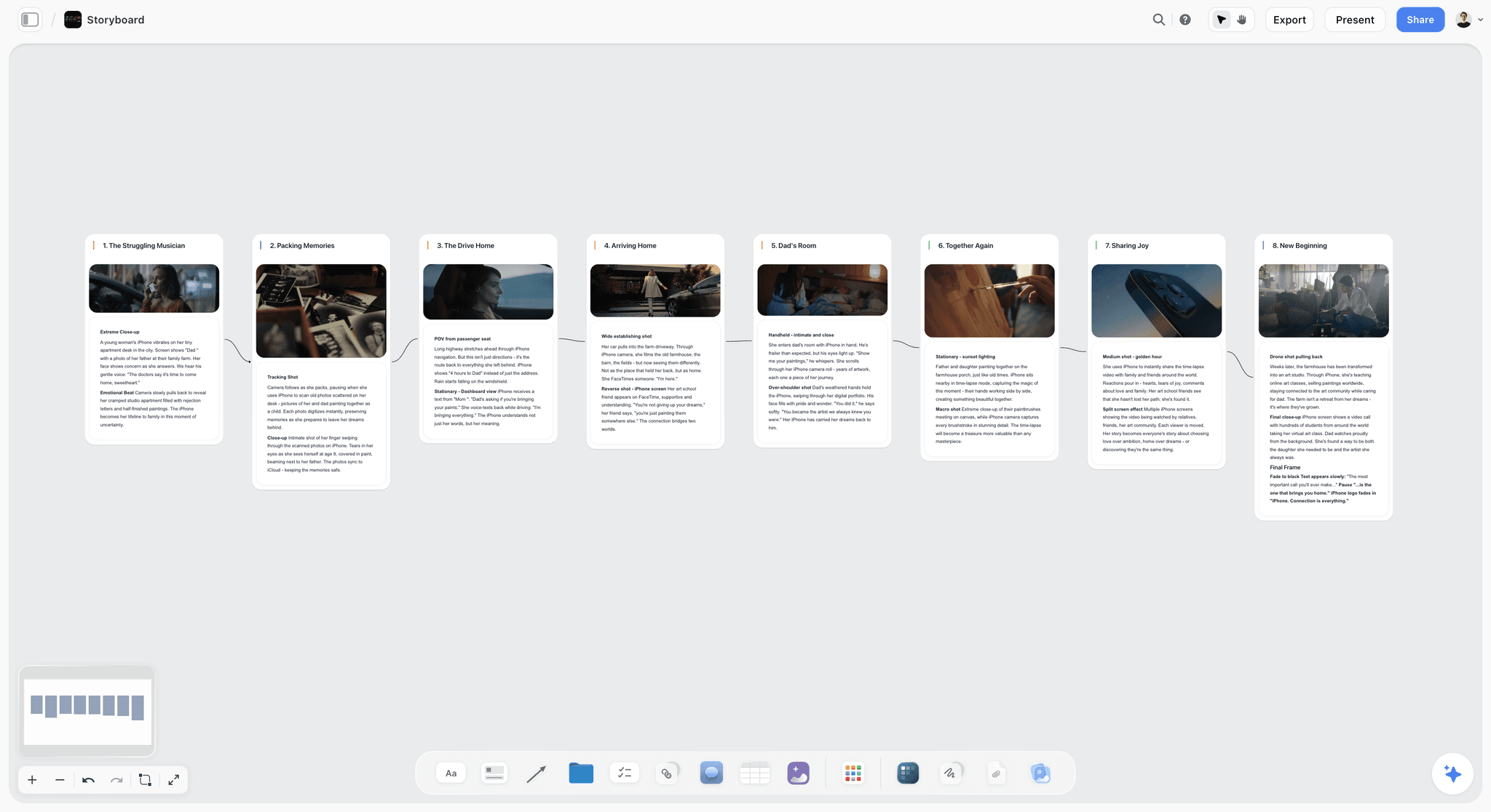
Frames in a storyboard style (Pro and Max). The AI Image tool on the canvas has a Storyboard model with four sketch styles, Rough Pencil, Inked Storyboard, Marker Roughs and Animation Cleanup, and is prompted to draw each frame as a storyboard panel with a scene marker and an action caption. It takes a reference image and an aspect ratio. If the pictures are already on your board (location scouts, a moodboard, your own sketches), select them and the AI builds one wall per picture around them instead of generating anything; the AI looks at the images you select, up to 24.
What happens next. On the same board, ask the AI to build a shot list from the storyboard (shot walls with the frame, coverage and equipment, or a table per scene with size, angle, movement and lens), break down the script, or lay the scenes out as a strip board grouped into shoot days with page counts. The strip board is a board layout, not a scheduling system that recalculates. Present mode walks the client through the board one wall at a time, and a view link opens with no account.
Pricing: Storyflow is paid-only during early access, with plans from $7.99 a month billed annually ($9.99 monthly). Pro is $14 a month billed annually ($19 monthly) and adds AI image generation and memory across conversations; Max is $39 billed annually ($49 monthly) and adds Team Workspace with permissions and roles. Its Free plan launches before the end of 2026, and anyone a paid member invites to a board joins free now, on free-tier limits.
Pros: three documented steps from a script to a board; the storyboard, shot list, breakdown and strip board share one board; the client opens a link with no account.
Cons: no animatic, frame durations or MP4 export; no saved character cast, so consistency means attaching the same reference to each frame; AI-generated frames need Pro or Max, not Plus; no frame-level approval status; browser only, best built on a laptop.
Choose Boords instead if the storyboard has to become an animatic cut to a voiceover before the shoot. Storyflow vs Boords goes further on that choice, and Storyflow's AI storyboard generator is the product page.
2. Boords
The simplest tool that is also a full storyboard product, and the best of the three dedicated tools at the two things a board meets in week three: client notes and timing. Paste a script or a client brief and Boords converts it into a structured storyboard, generates frames with consistent characters across scenes, and can turn the script into a shot list with camera angles. The animatic editor cuts the frames to time with audio and exports MP4.
Client review is where it leads this page: frame-specific comments, approval status labels on frames, version history, password protection, and guests who leave comments on the share link by entering a name, with no Boords account. It ranks second, behind Storyflow, because it asks you to learn more (frames, scenes, versions, views), because the board does not go on to become a shoot plan, and because the seat bands make the second and sixth user expensive. Boords alternatives covers what to buy if the bands do not fit.
Pricing: Solo $26 a month billed yearly or $39 monthly, 1 user, 250 AI images a month; Pro $50 ($75), up to 5 users, 1,000 images; Team $85 ($125), up to 10 users, 2,000; Agency $165 ($250), up to 30 users, 3,000. Every plan lists script support, version history, PDF export, client comments, password protection and the animatic editor (Boords pricing).
Pros: the best client review and approval labels here; animatic editor with MP4; script or brief to storyboard and shot list.
Cons: the highest entry price of the top three; seat bands jump; more concepts to learn before the first board.
3. StoryboardHero
The fastest route from a one-line idea to a board you can send, because it writes the script and draws the frames in one flow; if you already have a script or a brief, it builds from that instead. It ranks third: as few documented steps as Storyflow and Boords and the fewest concepts to learn, but the board stops at the board: there is no shot list, breakdown or shoot plan built from it on the same surface, and it has no frame-level approval labels.
Its most useful feature for pitches is not AI at all: a hand-drawn sketch service, sold as credits (10 credits for $99 on its pricing page), where a human artist draws frames the AI did not get right. That removes the failure that makes agencies nervous about AI boards in front of a client. Every plan includes guest commenting, password protection, commercial usage rights, PDF export or an online share, and MP4 video. StoryboardHero vs Boords compares it head to head with Boords, and Storyflow vs Boords vs Storyboarder.ai vs StoryboardHero puts the four script-to-frames tools side by side.
Pricing: Solo $19 a month, 1 seat, unlimited standard AI images plus 100 premium images a month; Starter $59, 5 seats, 350 premium; Advanced $199, 10 seats, 1,200 premium; Enterprise custom. A 7-day free trial, and a 7-day money-back guarantee on Solo (StoryboardHero pricing).
Pros: fewest concepts to learn; idea to script to frames in one flow; human sketch fallback; guest comments on every plan.
Cons: the board does not become a shot list or shoot plan on the same surface; premium images capped at 100 a month on Solo; no annual discount shown.
4. Adobe Firefly Boards
Adobe's storyboard maker inside Firefly Boards turns script or text prompts, reference images or rough sketches into storyboard frames, and Adobe says it keeps lighting, character style and backgrounds consistent across panels. Frames export as JPEG or PNG, sequences as MP4, and panels stay editable in Firefly Boards, where a share link collects feedback. Alongside Adobe's own models it offers partner models including GPT Image, Gemini and FLUX (Adobe Firefly storyboard).
It is the right pick if your edit already lives in Creative Cloud, and the free daily generations make it the cheapest way to try AI frames. It edges Storyboarder.ai on cost and client review, and sits below the top three because it is a frame generator on a canvas: the board does not become a shot list or plan, and you prompt each panel.
Pricing: Adobe says you can start Firefly Boards for free with free daily generations, and paid Firefly plans (Standard, Pro, Pro Plus, Premium) add monthly generative credits. Adobe's plans page showed only local currency for our region on October 9, 2026, so check the US price on Adobe's Firefly plans page.
Pros: free to start on daily credits; takes your rough sketches as input; MP4 sequences; Creative Cloud handoff.
Cons: a prompt per panel; credits meter every regeneration; nothing downstream of the board.
5. Storyboarder.ai
Script in, animatic out. Upload a script as PDF, Final Draft, Fountain, Word or plain text, or describe a concept, and it produces a scene breakdown, a shot list and the storyboard, with characters, locations and props held consistent and 3D camera angles to adjust. Image-to-video animatics, PDF and MP4 export and a pitch deck round it out, which is why it scores 9 on timing.
It scores 4 on client review because its pricing table lists no share links, client comments or team collaboration below Enterprise; you send the exports. The other limit to check first is script length: Starter covers stories up to 10 pages and Pro Unlimited up to 30, and only Production Unlimited removes the cap. Storyflow vs Storyboarder.ai compares it with the canvas approach, and Boords vs Storyboarder.ai vs Storyflow walks three of these tools through the same job.
Pricing: a free plan with 2 projects and 50 image generations, no credit card, and three paid plans (Starter, Pro Unlimited and Production Unlimited) with savings on yearly billing; each paid plan includes 10 video generations. Its pricing page did not load for us on October 9, 2026, so check current figures on storyboarder.ai.
Pros: the most complete script-to-animatic flow; unlimited image generations on paid plans; reads FDX and Fountain.
Cons: no client review surface listed; script page limits by plan; the top tier is the one that removes the script length cap.
6. Canva
The easiest tool here to learn, and very likely already paid for. Canva's storyboard creator is free, with storyboard templates, and Magic Media generates frames from scene and character prompts. For a six-panel board that sits inside a pitch deck, that is enough.
It scores low on steps because you fill each panel yourself: the storyboard page describes templates plus AI image tools, not a generator that boards a script. There is no frame model, no timing, no version per frame and no character memory, so consistency across panels is on you. If you are weighing the two, Canva AI Storyboard vs Storyflow covers storyboarding specifically and Storyflow vs Canva is the full comparison.
Pricing: a free plan with storyboard templates, and paid Pro and Business plans. Canva's pricing page did not load for us on October 9, 2026, and its prices vary by region, so check Canva's storyboard page and its pricing page for yours.
Pros: no learning curve; free storyboard templates; fine for a board inside a deck.
Cons: a panel at a time; no timing or storyboard structure; consistency entirely on you.
7. LTX Studio
The most capable AI previsualisation product here and one of the least simple. Its AI Storyboard Generator takes a screenplay, a campaign brief or a concept, breaks it into scenes and shots, makes a still per shot at your aspect ratio, keeps recurring characters as reusable Elements, and generates a PDF pitch deck from the storyboard. It models a whole production, which is its strength and why it scores 3 on concepts to learn. The best previs tools puts it next to the other motion-first options.
Pricing: LTX Studio's pricing page could not be loaded on October 9, 2026; check ltx.io before you budget.
Pros: deep AI previs; brief or screenplay in; pitch deck out.
Cons: the steepest learning curve here; more product than a six-frame ad board needs; price not confirmed.
8. Google Slides
Not an AI storyboard tool on a free account, and on the list because it is the simplest way to put six images in order with captions and send them. On an eligible paid Google plan, Gemini can generate images inside Slides, which turns it into a basic frame generator for teams that already pay Google. There is no timing and no storyboard structure.
Pricing: free with a Google account; image generation needs an eligible paid Google plan.
Pros: free and universal; zero learning; every client can open it.
Cons: no AI on a free account; a slide per frame by hand; no timing.
9. FigJam
Sensible if the team already lives in Figma. Draw or drop frames, sticky-note the beats, and share; on a paid Figma plan, others view and comment without extra seats. No storyboard structure and no frame generator built for boards.
Pricing: a free Starter plan; Collab seat $3 a month as listed on figma.com, with 500 AI credits a month.
Pros: cheap seats; easy review for design teams.
Cons: no storyboard model; frames built by hand; the free file limit arrives quickly.
10. Krea
Better image and style control than anything above it, and correspondingly less simple. If frame quality matters more than workflow, this is where to spend learning time; you assemble the board somewhere else.
Pricing: a free tier with 100 compute units a day; Pro $21 a month billed yearly ($35 monthly) for 20,000 units, Max $63 ($105) and Business $160 ($200) (Krea pricing, checked October 9, 2026).
Pros: strong style control; good image quality.
Cons: not a storyboard tool; assembly elsewhere; real prompting curve.
11. Midjourney
The most striking individual frames and no storyboard functionality. You prompt, download and assemble in another tool. Worth it when a pitch frame has to look finished; the least simple way to make a board.
Pricing: four tiers (Basic, Standard, Pro, Mega) with 20% off annual plans; Midjourney's plan page could not be loaded to confirm dollar figures in September 2026.
Pros: image quality; style control once learned.
Cons: no board, order or export as a storyboard; the highest prompting skill needed.
Three More Simple Storyboard Tools Worth Knowing
These come up in searches for a simple storyboard tool. None generates a storyboard from a script, so they are not scored above, but each is the right answer for someone.
Storyboard That: simple, and not AI
Storyboard That is sometimes listed as an AI storyboard tool. Its own pricing page, checked September 2026, describes image libraries, customisable characters and Creative Commons photos and makes no mention of AI image generation. Drawn library characters keep one design in every cell, so the consistency problem below never starts, at the cost of a house art style. The free plan allows 2 storyboards a week in the classic layout only; Individual and Teams plans show a $1 first month with the list price not shown on the page (Storyboard That pricing). StoryboardThat alternatives covers what to use once you outgrow it.
Drawstory: the smallest paid step
Drawstory sells image allowances: Free with 10 image generations, Top-up $16 a month for 50, Director $50 for 500, Unlimited $150 for unlimited generation, and Enterprise on request (Drawstory pricing). On the arithmetic in the consistency section, 50 generations covers one twelve-frame board a month with regenerations.
Storyboarder by Wonder Unit: free, desktop, built for drawing
Not to be confused with Storyboarder.ai. A free, open-source desktop app for Mac, Windows and Linux with six pressure-sensitive drawing tools, a Shot Generator for reference shots without drawing, Fountain integration, timing and animatics, and exports to Premiere, Final Cut, Avid, PDF contact sheets and animated GIF. It suits someone who can sketch and wants no subscription; the best free storyboard tools ranks it against the other free options, and storyboarding when you cannot draw covers the routes for non-artists.
Pricing and AI Image Limits, Tool by Tool
The headline price is the least useful number in this category. What limits a storyboard is the image allowance, and what surprises a producer is how the bill grows when a second person joins.
| Tool | Free option | Entry paid plan | AI images included | Billing shape |
|---|---|---|---|---|
Storyflow | Coming late 2026 (invited collaborators join free now) | Plus $7.99 mo annual ($9.99 monthly) | Image generation on Pro ($14 mo annual, $19 monthly) and Max | Per person; seats for teams; Team Workspace with roles on Max |
StoryboardHero | Not listed on its pricing page | Solo $19 mo | Unlimited standard plus 100 premium a month | Seats by plan: 1, 5, 10 |
Boords | Free plan: 5 active storyboards, 3 scripts, 8 one-off AI image credits | Solo $26 mo annual ($39 monthly) | 250 a month on Solo | Seat bands of 1, 5, 10 and 30 users |
Storyboarder.ai | Free plan: 2 projects, 50 images | Starter (price page did not load Oct 9) | Unlimited on paid plans | Projects and script pages per plan |
Adobe Firefly Boards | Free daily generations | Firefly Standard (US price not shown to us) | Monthly generative credits by plan | Credits |
Canva | Free plan and storyboard templates | Pro (pricing page did not load Oct 9) | An AI allowance that differs by plan | Per person, regional prices |
LTX Studio | Not confirmed | Not confirmed | Not confirmed | Check ltx.io |
Google Slides | Free with a Google account | An eligible paid Google plan | Gemini images on eligible plans | Bundled into Google plans |
FigJam | Free Starter plan | Collab seat $3 mo | 500 AI credits a month | Per seat |
Krea | 100 compute units a day | Pro $21 mo yearly ($35 monthly) | 20,000 compute units a month on Pro | Metered |
Midjourney | Not confirmed | Basic (price not confirmed) | GPU time | Four tiers, 20% off annual |
Drawstory | 10 image generations | Top-up $16 mo | 50 a month | Images per month |
Storyboard That | 2 storyboards a week | Individual, $1 first month | None described | Per user |
Figures are each vendor's published plans, re-checked on October 9, 2026 where the pricing page loaded. Three patterns decide the real cost:
- Seat bands. Boords sells bands, so a sixth user moves a team from the Pro band to the Team band. StoryboardHero jumps from 1 seat to 5. Storyflow bills teams per seat, and a client or freelancer you invite to a board joins free on free-tier limits rather than taking a seat.
- Metered regenerations. Firefly, Krea and Midjourney meter credits or GPU time, so a board that needs thirty regenerations to hold a character costs more than a clean one.
- Unlimited standard images. StoryboardHero's standard images and Storyboarder.ai's paid plans are unlimited, which turns consistency regenerations into a cost in time rather than money. Storyflow's AI use is metered on every plan.
The 15-Minute Walkthrough: Script to Frames in Storyflow
This is the path from a finished script or brief to a board a client can open, written as a time budget for each step so you know where the quarter hour goes. It uses the workflows exactly as they ship. For the longer version with scene-by-scene decisions, see the simplest AI storyboarding workflow.
- Minute 0 to 1: open a board. New project, one board. One board per client ad keeps the brief, the storyboard and the shot list together.
- Minute 1 to 3: give it the source. Attach the script as .fdx, Fountain or PDF, or paste the brief, and pick the "Storyboard" workflow. If the ad has no script yet, paste the brief and say how many beats you want.
- Minute 3 to 4: answer one or two questions. The frame source, and the scene count if the script's scene index does not settle it. For a product ad, choose AI generated for invented scenes; for a real location or product, web references; for a shoot where the frames will be your own photos, placeholders.
- Minute 4 to 9: let it build. The AI lays out the walls left to right, each with a frame, a beat note with labels and a short checklist, connected in story order. Changes apply directly, with one-click Undo for each message if a direction is wrong.
- Minute 9 to 12: fix the frames that matter (Pro and Max). Add an AI Image element to the wall of your hero shot (it sits beside or replaces the frame the workflow made) and choose its Storyboard model. Pick one sketch style for the whole board (Marker Roughs reads well for ads), attach the same character reference to each frame you regenerate, and set 16:9 or 9:16 before you start, not after.
- Minute 12 to 14: ask for the shot list. "Build a shot list from this storyboard." Duplicate the board first if you want the storyboard kept separate, because a shot list built from selected images moves those images into the shot walls.
- Minute 14 to 15: send the link. Share a view link. The client opens it with no account, sees the latest version when they open or reload it, and signs in to comment or draw on a frame. On the call, Present mode moves through the board one wall at a time.
Steps 5 and 6 are optional on a first pass. A board with placeholder frames in the right order is already reviewable, and rough frames tend to draw notes on the sequence rather than on the rendering.
A Filled Worked Example: A 30-Second Explainer Ad in Six Frames
Here is a complete six-frame board for a hypothetical 30-second explainer ad for a meal-planning app, written in the format the next section teaches. Copy the structure for your own ad: the seconds column is what makes it a storyboard rather than a set of pictures.
| Frame | Seconds | Shot size | Who or what is in frame | Action | Voiceover or super |
|---|---|---|---|---|---|
1 | 0 to 4 | Wide | MAYA, 30s, green apron, at an open fridge | She stares at half-empty shelves | VO: "Six o'clock. No plan." |
2 | 4 to 9 | Close-up | Maya's phone in her hand | She opens the app; a week of dinners appears | VO: "Tell it what's in the fridge." |
3 | 9 to 15 | Medium | Maya at the counter with three ingredients | She taps a recipe; a shopping list builds itself | Super: "Dinner planned in 30 seconds" |
4 | 15 to 21 | Over the shoulder | Maya cooking, phone propped on the tiles | Step-by-step card on screen, pan sizzling | VO: "One list. One pan. Done." |
5 | 21 to 26 | Wide | Maya and a friend at the table | Plates down, both laughing | No VO; music lifts |
6 | 26 to 30 | Graphic | App icon and store badges | End card | VO: "Plan tonight. Free week inside." Super: URL |
What the table already fixes before any image exists:
- Length. The seconds sum to 30, and frame 3 (six seconds for a super and an action) is the one to check against a stopwatch.
- Consistency. Maya is described once, with the same three visual anchors (30s, green apron, the same kitchen), and that description goes into every prompt.
- Coverage. Five of six frames are wide or medium, which hides the small character drift that close-ups expose.
- The client question. Frame 6's claim ("Free week inside") is the line legal will ask about, and it is visible on the board before a single frame is rendered.
In Storyflow, paste that table as the brief and ask for "a storyboard, one wall per frame, keep the seconds and voiceover exactly as written"; the workflow keeps a supplied breakdown's numbering and wording when you ask it to follow the source exactly.
The Script Format Any AI Storyboard Tool Boards Well
Every AI storyboard tool on this list boards a clean script better than a messy one, and the format below works in all of them. It is the single most useful thing on this page that does not depend on which tool you buy.
| Field | What to write | Example |
|---|---|---|
Number | One line per shot, numbered, never renumbered | 3 |
Shot size | Wide, medium, close-up, over the shoulder, insert, graphic | Medium |
Subject | The character's name, identical every time, plus their fixed description | MAYA, 30s, green apron |
Action | One verb phrase, present tense | taps a recipe |
Place | The same location name every time | kitchen counter |
Sound or text | Voiceover, dialogue or super, word for word | Super: "Dinner planned in 30 seconds" |
Seconds | How long the shot holds | 6 |
Three rules make the difference:
- Name characters identically. "Maya", "MAYA" and "the woman" read as three people to an AI that builds per line.
- State the style once and repeat it word for word in every prompt: "marker rough, warm grey, 16:9". Tools that save a style do this for you; the rest need you to.
- Keep one shot per line. "She opens the app and cooks dinner" is two frames. A line with two actions produces a frame that shows neither well.
Checklist before you paste a script into any tool:
- Every line numbered, one shot each
- Every character described once, copied into every line they appear in
- Seconds on every line, summing to the spot length
- Aspect ratio chosen (16:9, 9:16 or 1:1) and written at the top
- The one line legal or the client will query is marked
The Consistency Problem and Which Tools Solve It
Every tool here generates a plausible frame. None reliably generates the same character twice from text alone. You generate a frame you like, then the next one, and the face, the jacket and the hair have all shifted. On a twelve-frame board that breaks the sequence, because the viewer cannot tell whether it is the same person.
What helps, in order of how much:
- Reuse a reference image. Any tool that takes a character reference holds identity far better than text prompts. Use the same reference on every frame.
- Cut the cast. One recognisable character, everyone else in silhouette or from behind, reads fine and is achievable.
- Board wider. Wide and mid shots hide drift that a close-up exposes. They are usually the more useful frames anyway.
- Pick a forgiving style. Sketch and marker styles tolerate variation; photoreal punishes it, because the eye is calibrated for faces.
- Budget for it. A twelve-frame board realistically takes thirty to forty generations.
The tools differ in whether the tool remembers the character or you do:
| Tool | What it offers for consistency | What stays on you |
|---|---|---|
Storyflow | A reference image per generation and four fixed storyboard sketch styles; your own images can be the frames | No saved cast, so the same reference goes on each frame |
StoryboardHero | Character consistency across a project; a human artist as fallback | Premium images cap at 100 a month on Solo |
Boords | Consistent characters across every scene | Keeping one style across the board |
Storyboarder.ai | Characters, locations and props held across shots | Script page limits per plan |
Adobe Firefly Boards | Adobe says it keeps lighting, character style and backgrounds consistent; takes references and sketches | Credits once the free daily generations run out |
LTX Studio | Recurring characters saved as reusable Elements | A larger model to learn |
Canva | No character feature on its storyboard page | All of it, a panel at a time |
Storyboard That | Drawn library characters keep one design, no AI | Working within library art |
A saved character (StoryboardHero, Boords, Storyboarder.ai, LTX Studio) is one decision for the whole board. A per-image reference (Storyflow, Firefly) is a decision on every frame. That is Storyflow's clearest gap on this page, and the reason it scores 8, not 10, on concepts: you have to know to attach the reference.
What Simple Costs You Later: Exports, Frame Shapes and Revisions
The simplest tool is usually the one that asks the fewest questions at the start. The questions it skipped come back after the first client call: what the board exports to, what shape the frames are, and what happens after notes.
| Tool | Exports | Frame shapes | Revisions and review |
|---|---|---|---|
Storyflow | Whole board as an image or PDF; the AI also writes PDF deliverables such as a treatment or a presentation | Aspect ratio set per AI image | Undo per AI message; comments on the board; view link with no account |
StoryboardHero | PDF, online share, MP4 | Style presets | Guest comments, password protection |
Boords | PDF, images, shot lists, scripts, MP4 animatic | Multiple aspect ratios | Version history, frame comments, approval labels |
Storyboarder.ai | PDF, MP4 animatic, pitch deck | Camera angle controls | Not listed below Enterprise |
Adobe Firefly Boards | JPEG, PNG, MP4 | Per panel | Share link for feedback |
Canva | PDF, JPG, PNG | Custom dimensions | Real-time co-editing, comments |
Storyboarder (Wonder Unit) | Premiere, Final Cut, Avid, PDF, GIF | Per board | Timing per board, local files |
Three costs arrive late:
- Exports. If the storyboard goes into an edit, you want a timed sequence, not a folder of stills. Boords, Storyboarder.ai, StoryboardHero and Firefly export MP4; Wonder Unit's Storyboarder exports to the editing apps. Storyflow exports stills and PDFs. If the animatic is the deliverable, the best animatic software compares the tools built for it.
- Frame shapes. Decide 16:9, 9:16 or 1:1 before frame one. Regenerating twelve frames in a new shape costs as much as the first pass, and a vertical version of a widescreen board is a new composition, not a crop.
- Revisions. Client notes create versions. Boords keeps version history with comments on the frame. In Storyflow, duplicate the board before a revision round if you want the approved version kept side by side.
Storyboarding a Commercial Shoot for a Client: The Approval Loop
One version of the request behind "simple AI storyboard tool" is a marketing team planning a commercial shoot that wants a quick way to see the shot sequence before the day. The storyboard is a means to three approvals, and the simplest tool is the one that gets all three from one board.
- Approve the sequence. Send numbered lines with seconds (the worked example format) before any frames. This is where most changes happen, and they cost nothing here.
- Approve the look. Six to twelve frames in one style, wide and mid shots, one hero close-up. The client comments on the frame they mean, not on "the third one, I think".
- Approve the plan. The shot list and the shoot day, built from the approved board. In Storyflow the AI builds the shot list from the storyboard and can lay the scenes out as a strip board of shoot days; the call sheet for a day comes out as a PDF the crew can open on a phone, with names, times and addresses the source lacks left as marked blanks.
For a live-action commercial, the storyboard also tells the producer what to quote: every frame is a setup, and every setup is time on the day. How to storyboard a commercial covers the traps specific to ads, The Best Tool to Storyboard a Commercial compares nine tools on agency and brand work, how to plan a commercial covers the rest of pre-production, and commercial production in Storyflow shows the board. For marketers who start from a campaign rather than a script, how to make a marketing storyboard starts one step earlier, and the storyboard brief checklist lists what the brief must settle first.
Mistakes That Make a Simple Storyboard Complicated
- Mixing styles. Three sketch styles on one board read as three boards. Pick one and state it in every prompt.
- Too many frames. A 30-second ad rarely needs more than eight frames to be understood. Every extra frame is another consistency risk.
- Buying for the first afternoon. A tool that gets you frames today and cannot share, time or feed a shot list will be replaced next month. Score the six criteria, not the demo.
- Treating AI frames as final. They are proposals. The director, the client and the crew decide; an AI board is where that conversation starts.
The Simplest Workflow That Is Not a Tool
For a lot of boards the simplest tool is none. Write the sequence as six to twelve numbered lines, read it aloud against a stopwatch, and render only the beats that survive; twelve polished frames of a sequence the client then reorders is the most expensive mistake in this category. If timing matters, drop the frames into any editor with scratch audio: that is an animatic, and how to make an animatic covers the cut, while storyboard vs animatic explains when you need which.
The Bottom Line
Simple is not the fastest first frame. For a producer, an agency or a marketer who owes a client a board, simple is the fewest steps from the script to a board the client can open, and a board that becomes the shot list without re-typing. On those criteria Storyflow ranks first: attach the script, pick the "Storyboard" workflow, answer one or two questions, and the board is ready to share, with AI frames on Pro. Choose Boords when the edit needs an animatic and frame-level approvals. Choose StoryboardHero when you start from an idea and want an MP4. And whichever you pick, write the sequence as numbered lines with seconds and read it against a stopwatch first. See the simple storyboarding tool in Storyflow or storyboarding in Storyflow to start.
FAQ: Simple AI Storyboard Tools
Which single simple AI tool would you recommend for storyboarding?
Storyflow. Attach a script or brief, ask for a storyboard, and the AI builds one wall per scene with a frame, a beat note and a shot checklist, then the shot list on the same board. Boords is the pick only if you need an animatic, and Canva only if you need a handful of template panels.
Which AI storyboard generator is best for beginners and affordable?
Storyflow at $7.99 a month billed annually for boards built from your script with web reference or placeholder frames, or Pro at $14 for AI-generated frames. It asks at most two questions before it builds. Among free options, Adobe Firefly Boards gives free daily generations and Boords has a free plan with 5 active storyboards and 8 one-off AI image credits.
What are AI storyboard generators and how much do they typically cost?
They turn a script, brief or prompt into storyboard panels with generated or sourced images. As of October 9, 2026: Storyflow from $7.99 a month billed annually (AI frames on Pro, $14), StoryboardHero $19 a month, Boords from $26 a month billed annually, Drawstory from $16 a month, and free tiers from Firefly Boards, Boords, Storyboarder.ai and Krea.
How do you turn a storyboard into a video with AI?
Two routes. For an animatic, export the frames to a tool with a timeline (Boords, StoryboardHero or Storyboarder.ai export video) and set a duration per frame against the voiceover. For generated footage, use each storyboard frame as the starting image in an image-to-video model such as Runway. Plan the frames in Storyflow first so each shot has its description and duration on the board.
How do you go from script to storyboard with AI tools?
Three steps in the simplest tools. Give the tool the script (in Storyflow, attach an .fdx, Fountain or PDF file), ask for the storyboard, and answer how the frames should be made. Storyflow, Boords and StoryboardHero each document three steps; Storyboarder.ai and LTX Studio add a review of scenes and characters first. Number your shots and add seconds before you start.
What are the best storyboard tools available online?
All eleven tools scored here run in the browser. For a board built from a script that a client opens by link, Storyflow. For an animatic with frame-level approvals, Boords. For an idea turned into a script, frames and an MP4, StoryboardHero. For free daily AI frames, Adobe Firefly Boards, and for template panels inside a deck, Canva.
Does Canva have an AI storyboard tool?
Canva has a free storyboard creator with templates, and its AI image tools can generate the picture for each panel. It does not read a script and lay out the scenes for you, so you fill each panel yourself. Storyflow is the simpler route when you start from a script: the AI builds the whole board.
What are the top storyboard tools for design and marketing teams?
Storyflow for boards built from a brief that clients review and that turn into a shot list, Boords for animatics and frame-level approvals, Canva for designed panels inside a deck, and FigJam for teams already working in Figma. Adobe Firefly Boards suits designers in Adobe's apps who want AI frames from prompts or sketches.
Is Storyflow free?
Not during early access. Storyflow is paid-only today, with plans from $7.99 a month billed annually ($9.99 monthly), and its Free plan launches before the end of 2026. Anyone a paid member invites to a board joins free now, on free-tier limits, which is how a client or a freelancer gets onto a storyboard without a seat. AI-generated frames need Pro ($14 billed annually) or Max.
Can an AI storyboard tool work from a client brief instead of a script?
Yes, in three of the top four. Boords converts a pasted client brief into a structured storyboard, StoryboardHero builds from a brief or an idea, and Storyflow's storyboard workflow adapts whatever you provide: paste the brief, say how many beats you want, and it boards those beats rather than inventing a different story. Storyboarder.ai also accepts a described concept. Tell the tool the spot length, or it will guess one.
What should I compare before committing to an AI storyboard tool for an ongoing series?
Four things a single demo hides: the cost per episode at your real frame count including regenerations; whether the tool saves characters (a series reuses its cast every episode); how the bill grows when a second editor joins; and whether last episode's board can be reused as a template. In Storyflow, a finished board can be duplicated and a finished project saved as a template, so episode two starts from episode one's structure.
Do I need an animatic for an ad or an explainer?
Whenever length is fixed, which is every paid ad slot. An animatic is the frames cut to time with scratch audio, and it is the reliable way to learn that a 30-second spot runs 36 before the shoot. Boords has an animatic editor; StoryboardHero, Storyboarder.ai and Firefly export MP4. Without one, drop the frames into any editor with a voiceover recording. Storyflow has no animatic.
What aspect ratio should a storyboard be for social ads?
The ratio of the placement: 9:16 for Reels, TikTok and Shorts, 1:1 or 4:5 for most feed placements, 16:9 for YouTube and broadcast. Decide before frame one, and if the ad runs in two ratios, board the vertical version separately, because a vertical frame is a different composition, not a crop. Storyflow's AI Image tool and Boords both set an aspect ratio per frame.
How many frames does a 30-second ad need?
Usually six to eight: one per shot the viewer must understand, not one per cut. A frame every four to five seconds is a workable starting density for a 30-second spot, with an end card as its own frame. Fast-cut social ads may need more frames but simpler ones. If a frame carries no new information, merge it; if one frame carries two actions, split it.
Which tool should I use if I storyboard only occasionally?
If the storyboard is part of a wider project you are already planning, Storyflow, because the board sits beside the brief and the shot list rather than in a separate subscription. If you board six panels twice a year inside a deck, Canva or Google Slides. StoryboardHero and Boords are priced for people who board every month, and for them the per-board cost falls as the volume rises.
Is an AI storyboard good enough to pitch to a client?
For sequence and coverage, yes, and clients often answer faster to rough frames. For a pitch where the frames are the sell, AI frames can still drift or look generic. StoryboardHero's human sketch credits cover that gap, and a consistent sketch style (Storyflow's Marker Roughs or Inked Storyboard on Pro and Max, Boords' styles) reads as intentional rather than unfinished.
Which simple storyboard tool is cheapest for a freelancer or a small agency?
Storyflow's Plus plan, at $7.99 a month billed annually, covers a storyboard whose frames are captioned web references, your own images or placeholders, and a client or subcontractor you invite joins free on free-tier limits rather than taking a seat. For AI frames, Storyflow Pro is $14 billed annually. Among dedicated tools, Drawstory's $16 Top-up buys 50 generations and StoryboardHero's $19 Solo is unlimited on standard images.
Is there a simple AI storyboard tool for a feature film?
Storyflow's workflow sets no cap on scenes: attach the feature's .fdx, Fountain or PDF and the workflow builds one wall per scene in the script's scene index, keeping its numbers, though a long script is a long build, and the AI is instructed to say which walls are done if it stops. Storyboarder.ai caps script length by plan until its top tier, Production Unlimited. Boords has script support on every plan. Board the sequences that need it, not all 110 pages.
Can AI turn my rough pencil sketches into clean storyboard panels?
Yes, in two ways. In Storyflow on Pro or Max, add an AI Image element, attach your sketch as its reference image, and choose the Storyboard model with a style such as Inked Storyboard or Animation Cleanup; the model is prompted to draw a storyboard panel with a scene marker and an action caption. Adobe Firefly Boards also accepts rough sketches as input for storyboard frames. Keep your sketch's composition simple, since the reference guides the result rather than tracing it.
Do I need AI previz, or is a storyboard enough?
For an ad or explainer that is approved on sequence and look, a storyboard with seconds on each frame is enough, and it is simpler to change. Moving previz earns its cost when camera moves, blocking or effects timing have to be approved before the shoot. Storyflow stays on stills; Storyboarder.ai makes image-to-video animatics with 3D camera angles, and LTX Studio models the production for previz. Board first, previz only the shots that need motion.
Can I use AI storyboard frames commercially in a client pitch?
Check each plan, because it differs. StoryboardHero lists commercial usage rights on every plan. Storyboarder.ai's free trial excludes commercial use and exports with watermarks, while its paid plans permit it. Adobe calls its own Firefly model commercially safe and also offers partner models, which carry their own terms. Whatever the tool, a storyboard frame is a planning document: do not put an AI frame in the final ad without clearing it.
Can I build a storyboard in Storyflow on a phone?
Storyflow runs in the web browser only; there are no native iOS or Android apps. On a phone or tablet you can open the board, review the frames, make light edits and chat with the AI, and a client can open the view link the same way. Building a twelve-wall storyboard and arranging the canvas is best done on a laptop.
How much does an AI storyboard tool cost per board?
Divide the plan by the boards it realistically makes. A twelve-frame board takes thirty to forty generations, so Boords' Solo plan ($26 billed annually, 250 images) covers about six boards a month, roughly $4 to $5 each; Drawstory's $16 Top-up covers one. StoryboardHero's $19 Solo and Storyboarder.ai's paid plans are unlimited on images, so their cost per board falls with volume. Storyflow meters AI use without a published image count, so judge Pro on one real board.
Table of Contents
- Recommend a Simple AI Tool for Storyboarding: Storyflow
- Key Takeaways
- The Simplest AI Storyboard Tool by Buyer: Producers, Agencies and Marketers
- Frequently Asked: Which Simple AI Storyboard Tools Are Most Trusted, Fairly Priced and Recommended?
- What "Simple" Means for an AI Storyboard Tool: Six Criteria
- Steps From Script to First Frames, Tool by Tool
- The Comparison Table
- How the Tools Were Scored
- Tool Reviews
- 1. Storyflow
- 2. Boords
- 3. StoryboardHero
- 4. Adobe Firefly Boards
- 5. Storyboarder.ai
- 6. Canva
- 7. LTX Studio
- 8. Google Slides
- 9. FigJam
- 10. Krea
- 11. Midjourney
- Three More Simple Storyboard Tools Worth Knowing
- Pricing and AI Image Limits, Tool by Tool
- The 15-Minute Walkthrough: Script to Frames in Storyflow
- A Filled Worked Example: A 30-Second Explainer Ad in Six Frames
- The Script Format Any AI Storyboard Tool Boards Well
- The Consistency Problem and Which Tools Solve It
- What Simple Costs You Later: Exports, Frame Shapes and Revisions
- Storyboarding a Commercial Shoot for a Client: The Approval Loop
- Mistakes That Make a Simple Storyboard Complicated
- The Simplest Workflow That Is Not a Tool
- The Bottom Line
- Author
- FAQ: Simple AI Storyboard Tools
- Related Reading
Templates to check out for this topic


Filmmaking templates you can use in Storyflow
Skip the blank canvas. Open one of these filmmaking boards in Storyflow and the AI builds on the structure that is already there, from research through the shot list.


See Storyflow in Action
A visual AI workspace where every feature lives inside one canvas. No tab-switching, no context lost.
Build your entire board from a single message
Type what you need in the AI chat at the bottom of your canvas. The AI adds cards, headings, and structure directly onto your board.
Use expert frameworks as AI context
Type @ in the AI chat and choose any Tactic. The AI tailors every response to that framework instead of giving generic advice.
Turn your board into a mind map in seconds
Ask the AI to restructure your canvas as a mindmap. It connects your ideas into a visual hierarchy so you can see how everything relates.
Why Storyflow Exists
Storyflow actually began as a personal tool while working on creative and research projects.
We kept running into the same problem: ideas were scattered everywhere: notes, documents, and whiteboards.
Nothing helped us see how everything connected.
So we started building a workspace designed around how ideas actually grow.
→ Read how Storyflow was createdJustkay
Documentary Filmmaker & Founder at Storyflow
Published: 2026-09-02
Extremely simple, seriously capable


See how easy it is to get started
Watch a real project come together, from a blank board to a finished plan, clicked through step by step.
Start creating with AI and become more productive
Transform your creative workflow with AI-powered tools. Generate ideas, create content, and boost your productivity in minutes instead of hours.