The 12 Best Previs Tools in 2026 (Storyboard to Virtual Production)
The best previs tools in 2026 across the whole spectrum, from storyboards to virtual production. 12 tools compared, from FrameForge and Unreal Engine to Storyflow, Storyboarder, and AI previs.

Category
Filmmaking
Author

Justkay
Documentary Filmmaker & Founder at Storyflow
Topics
2026-07-10
•
17 min read
•
Filmmaking- best previs tools 2026
- previsualization software
- previs software
- FrameForge
- Unreal Engine previs
- AI previs
What are the best previs tools in 2026?
The best previs tools in 2026 span a spectrum: FrameForge and Unreal Engine for full 3D previs, Storyboarder and Storyflow for storyboard and shot-planning previs, and LTX Studio and Runway for AI previs. Previsualization is not one tool category. It runs from a cheap 2D storyboard to a real-time virtual-production stage, and the right tool depends on how much of the shot you need to see before you shoot it. A drawing plans the shot. A 3D engine solves it. Most shots only ever need the drawing. The short version: previs answers "what will this shot look like before we spend money on it?" The cheapest answer is a storyboard; the most expensive is a virtual-production previs. This guide ranks 12 tools across that range so you match the previs to what the shot needs, and never pay for a 3D engine when a frame would have answered the question.

Full disclosure: Storyflow is our own product and is listed first in the reviews and the comparison table: our pick first, then the rest by job. The ranked list places it fourth because it is not a 3D previs engine. FrameForge leads that list: it builds camera-accurate 3D sets with real lens data, which is exactly what complex VFX and action shots need. Storyflow owns the storyboard and shot-planning end of the previs spectrum, where its canvas keeps frames, shot notes, and references together and its AI reads the whole board. Its storyboard frames are planning-grade rather than rendered 3D, so for shots that need true camera geometry you still reach for FrameForge or Unreal Engine. We link to every tool so you can judge the fit.
Quick Comparison
These four cover the two ends of the previs spectrum teams actually choose between: dedicated 3D previs, real-time virtual production, free storyboards, and a shot-planning canvas.
| Tool | Best For | AI Features | Price |
|---|---|---|---|
| FrameForge | Detailed 3D shot previs | No AI; camera and lens accuracy | Tiered one-time |
| Unreal Engine | Virtual-production previs | No AI; real-time 3D engine | Free (royalty model) |
| Storyboarder | Free storyboard previs | No AI; open-source storyboards | Free |
| Storyflow | Shot planning on a canvas | Canvas AI reads the whole board | $7.99 mo annual (free plan late 2026) |
All 12 Previs Tools, Ranked
- FrameForge: best dedicated 3D previs software (9.2/10)
- Unreal Engine: best real-time and virtual-production previs (9.1/10)
- Storyboarder: best free storyboard previs (8.9/10)
- Storyflow: best storyboard and shot-planning previs canvas with AI (8.8/10)
- LTX Studio: best AI storyboard-to-video previs (8.5/10)
- Boords: best storyboard-to-animatic previs (8.3/10)
- Toon Boom Storyboard Pro: best professional storyboard and animatic previs (8.2/10)
- Cine Tracer: best real-time cinematography previs (8.0/10)
- Runway: best AI video previs (7.9/10)
- Cadrage: best on-location director's viewfinder previs (7.6/10)
- Blender: best free 3D previs (7.5/10)
- ShotDeck: best reference library for previs (7.3/10)
Best Previs Tool by Job
The overall ranking is not the answer to every question. Match the tool to the job you actually have:
- Best dedicated 3D previs software: FrameForge. Accurate lenses, sets, and camera positions.
- Best real-time and virtual-production previs: Unreal Engine.
- Best free storyboard previs: Storyboarder.
- Best previs canvas for storyboards and shot planning with AI: Storyflow. It is not a 3D tool, and it covers the version of previs most productions actually need.
Comparison Table: 12 Previs Tools Compared
| Tool | Previs Type | Starting Price | Free Option | Best For |
|---|---|---|---|---|
Storyflow | Storyboard + planning | $7.99/mo (annual) | Coming late 2026 (invited collaborators join free now) | Shot planning on a canvas |
FrameForge | 3D previs | Tiered (one-time) | Trial | Detailed 3D shot previs |
Unreal Engine | Real-time 3D | Free (royalty model) | Yes | Virtual production previs |
Storyboarder | 2D storyboard | Free | Yes | Free storyboard previs |
LTX Studio | AI previs | ~$19/mo | Yes (limited) | AI storyboard-to-video |
Boords | Storyboard + animatic | ~$15/mo | Trial | Storyboard-to-animatic |
Toon Boom Storyboard Pro | Pro storyboard | ~$25/mo | Trial | Professional animatics |
Cine Tracer | Real-time cinematography | ~$65 (one-time) | No | Lighting and camera previs |
Runway | AI video | ~$15/mo | Yes | AI-generated previs shots |
Cadrage | Director's viewfinder | ~$29 (one-time) | No | On-location framing previs |
Blender | 3D previs | Free | Yes | Free 3D previs |
ShotDeck | Reference library | ~$15/mo | Trial | Visual reference for previs |
Pricing changes often and several tools quote per tier. Confirm current pricing on each site. Storyflow pricing is flat per account, not per seat.
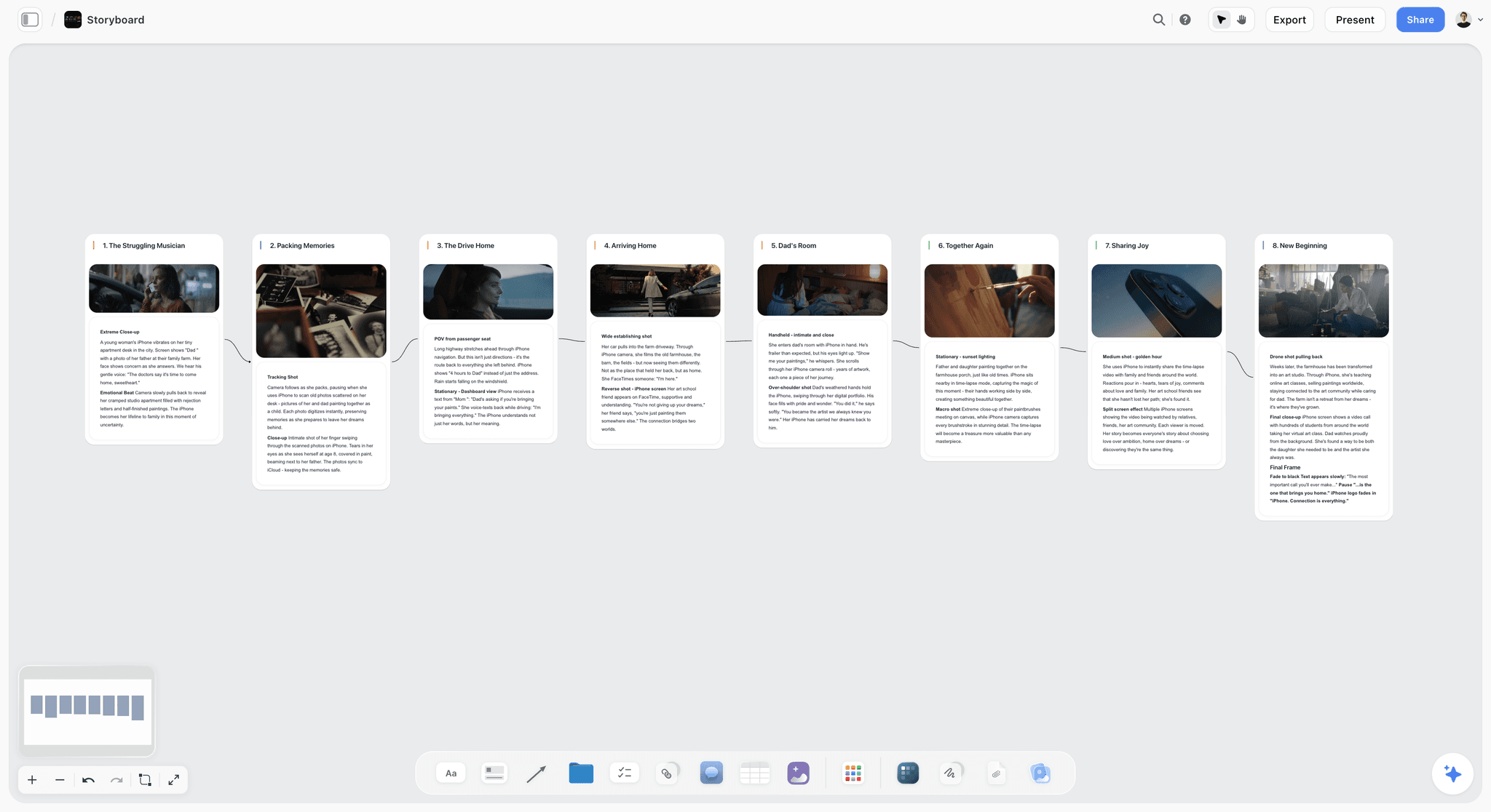
Storyflow canvas holding storyboard frames, shot notes, and references for planning previs
Plan and storyboard your previs on one canvas
Storyflow keeps your storyboard frames, shot list, and references on one board the AI can read, so the previs and the plan stay in sync. Reach for 3D only on the shots a drawing cannot answer.

The Fidelity Line: How to Choose a Previs Tool
Most previs guides list software and leave you to guess which fits. The choice gets simpler once you see the one line every previs tool sits on either side of. Call it the Fidelity Line. On one side, tools that draw a shot: fast, cheap, planning-grade. On the other, tools that simulate a shot: slow, expensive, physically accurate. A drawing plans the shot. A 3D engine solves it. The whole decision is knowing which side a shot needs.
Three positions sit along that line, and every tool here falls into one:
- Draw (2D storyboard and planning). Composition, sequence, and coverage as frames on a page or canvas. Storyboarder, Storyflow, Boords, and Toon Boom live here, and most shots start and stay here.
- Generate (AI previs). A middle position that approximates a shot from text or reference frames without geometry. LTX Studio and Runway live here. Strong for tone and pacing, weak on camera accuracy.
- Simulate (3D and real-time). True camera, lens, blocking, and physics in a 3D scene. FrameForge, Blender, Cine Tracer, and Unreal Engine live here. You go here when the geometry must be solved before the day.
Reference and on-location tools (ShotDeck, Cadrage) feed every position rather than sitting on the line. This tools view is the practical companion to the concept model in the complete guide to previsualization, which lays out the five rungs from storyboard to virtual production. The rule that falls out of the line is short: pick the lowest-fidelity tool that answers the shot, and cross from Draw to Simulate only when a drawing genuinely cannot. The mistake that wastes the most money is over-previsualizing, building a 3D previs for a shot a storyboard would have answered.
Why Previs Starts With the Plan, Not the Software
Whatever side of the Fidelity Line you land on, previs starts from the same place: the shot list and the intent behind each shot. A 3D previs is only as good as the shot plan it visualizes, and that plan usually lives in scattered notes and one person's head.
The plan decides what to previsualize. Before anyone builds a 3D scene or draws a frame, someone chooses which shots exist, what each is doing, and which are risky enough to justify detailed previs. That decision drives everything downstream.
The tool visualizes the plan. FrameForge, Storyboarder, and Runway show you the shot. They do not decide which shots matter or hold the reasoning behind the sequence. When the plan and the previs live in different places, they drift, and you end up with polished previs of shots that changed two revisions ago.
The stronger workflow keeps the shot list, intent, and references on one canvas the team can see, then previsualizes the shots that need it in the right tool. Storyflow is the strongest option for that planning layer, and for storyboard-level previs itself, because frames, shot notes, and references sit together and the AI reads them. For camera-accurate 3D you still reach for FrameForge or Unreal. For the shot list, see the best shot list tools in 2026.
How We Evaluated These Previs Tools
Every tool here was assessed on the real job of seeing a shot before shooting it. Five criteria, weighted in this order:
- Previs quality for its level. Does it produce a useful previsualization for the side of the Fidelity Line it targets?
- Speed to a usable previs. How fast do you get from idea to something you can show the team?
- Fit to the shot. Does it match a real previs need, or is it overkill or underkill?
- Collaboration. Can the director, DP, and VFX team work from it together?
- Price for the value. What does it cost for the previs it delivers?
Tools were tested against four shot types: a dialogue scene, a complex action sequence, a VFX-heavy plate, and a music video, each judged on whether it answered "what will this look like" at the right cost.
Detailed Reviews: The 12 Best Previs Tools
1. Storyflow

Storyflow is a visual workspace where storyboard previs and the shot plan live on one canvas the AI can read, so frames, shot notes, references, and the intent behind each shot never drift apart. It is here, and it is the pick for the planning end of previs, because it closes the gap every other tool here leaves open: the space between the plan and the drawing. Its AI reads the whole active board plus up to one Tactic and three documents you @-mention, so when you ask which shots still need previs or which references belong to the chase, it answers across the sequence rather than one isolated frame. The 200+ Story Blueprints cover the narrative side of shot planning, and AI image generation on the Pro plan and up produces rough reference frames without leaving the canvas. It sits squarely on the Draw side of the Fidelity Line and is honest about it: a drawing plans the shot, and Storyflow is where the drawing and the plan live together.
Best for: Directors and teams who want storyboard previs on the same canvas as the shot list, references, and AI.
Pricing: Paid-only early access today; the Free plan ($9.99 monthly) launches before the end of 2026, and anyone a paid member invites to a board joins free now.
Strengths
- Storyboard previs and the shot plan live on one canvas, so they stay in sync.
- The AI reads the whole board and reasons across shots, not one frame.
- Pro and up add AI image generation for rough reference frames.
Limitations
- Not a 3D previs engine. It cannot simulate lens geometry, blocking, or crane physics; for that you need FrameForge, Blender, or Unreal.
- Storyboard frames are planning-grade, not rendered or camera-accurate previs.
- Cloud-only, with no local-first or offline mode for privacy-strict productions.
- Newer platform, so its filmmaking-specific template depth is still growing next to legacy pro tools.
For the storyboarding-specific comparison, see the best storyboarding software in 2026.
2. FrameForge
FrameForge is the dedicated 3D previs standard, and it is here because nothing else matches it for camera-accurate 3D at a film-crew price. It treats real lenses, sensor sizes, and set dimensions as first-class data, so the previs a first AD hands the crew is buildable rather than approximate, and the overhead floor plans alone can save a shooting day on a complex sequence.
Best for: Productions that need detailed, camera-accurate 3D previs for complex shots.
Strengths
- Camera and lens accuracy is genuine, not decorative.
- Overhead diagrams and floor plans the whole crew can use.
- Purpose-built for previs, so nothing is repurposed.
Limitations
- Real learning curve for 3D set building.
- Overkill for dialogue and simple coverage.
- Interface is utilitarian and dated.
3. Unreal Engine
Unreal Engine has become a previs and virtual-production powerhouse, and it is here because it owns the top of the fidelity range. Real-time rendering lets a director fly a virtual camera through a set and see near-final quality instantly, and the same environment can drive an LED volume on the day, which is why virtual production consolidated around it.
Best for: VFX-heavy and virtual-production projects that need real-time, shoot-ready previs.
Strengths
- Real-time quality is exceptional and near shoot-ready.
- Powers virtual production and LED-stage work.
- Free to start with no upfront license.
Limitations
- Steep learning curve for film teams.
- Requires strong hardware to run well.
- Overkill for non-VFX shots.
4. Storyboarder
Storyboarder, from Wonder Unit, is a free, open-source storyboard tool, and it is the pick among free tools, because it removes every barrier to the Draw side of the line. You are boarding in seconds, with shot-type and camera notes built in and animatic export included, so a solo director can turn a scene into a timed rough in an afternoon at zero cost. What it lacks is a planning layer: no shot list, no intent per shot, no home for the reasoning behind the sequence.
Best for: Directors who want free, fast storyboard previs.
Strengths
- Genuinely free and open-source.
- Fast for rough boards and quick coverage.
- Animatic export included out of the box.
Limitations
- Rougher output than paid tools.
- Development pace varies over time.
- No shot-list or planning layer.
5. LTX Studio
LTX Studio turns a script or storyboard into generated previs shots and sequences, and it is here because it is the most film-shaped tool on the Generate side of the line. Rather than prompting shot by shot, it produces a sequence with character consistency and an editable timeline, the shape a director thinks in, which makes it fast from concept to a previs you can screen. The catch is the one every AI previs tool shares: quality swings by prompt, iteration is real work, and it does not touch the camera accuracy a technical shot needs.
Best for: Filmmakers who want AI-generated previs from text or storyboards.
Strengths
- Targets filmmaker previs directly, not generic video.
- Fast from concept to a watchable previs sequence.
- Character consistency and a real editing timeline.
Limitations
- Output quality varies by prompt and subject.
- Iteration is genuine work, not one click.
- Newer platform still finding its ceiling.
6. Boords
Boords is a storyboard tool built around turning frames into animatics quickly, and it is here because it does that one Draw-side job extremely well. One-click animatics let you feel a sequence's pacing almost as fast as you can board it, and the comment layer keeps director and client reacting in one place. That focus is also its ceiling: lighter than Toon Boom for animation, with no 3D or planning layer beyond the boards.
Best for: Teams that want storyboard-to-animatic previs fast.
Strengths
- Animatics are genuinely fast and easy.
- Clean collaboration and client comments.
- Good pacing previs without a steep curve.
Limitations
- Subscription for full features.
- Less deep than Toon Boom for animation.
- No 3D previs and a thin planning layer.
7. Toon Boom Storyboard Pro
Toon Boom Storyboard Pro is the professional standard for storyboard and animatic previs, and it is here because it is the most capable pure storyboard tool on the Draw side, with drawing, timing, audio, camera moves, and 3D integration a professional artist needs. That depth is also why it is more than most live-action productions require: the curve and professional price only pay off if boarding is a core, repeated part of the work.
Best for: Professional storyboard artists and animation previs.
Strengths
- Professional-grade storyboard and drawing tools.
- Strong animatic timing and audio.
- Industry adoption across animation.
Limitations
- Steeper learning curve than lighter boards.
- Priced for working professionals.
- More than most live-action previs needs.
8. Cine Tracer
Cine Tracer is a real-time cinematography previs tool where you build scenes and place lights and cameras, and it is here because it fills a Simulate-side gap the story tools ignore: lighting. A DP can block a setup with gear-accurate fixtures and see roughly how it reads before a truck is loaded, turning a lighting conversation into a previs. It is narrow by design, focused on cinematography rather than story.
Best for: DPs and directors previsualizing lighting and camera setups.
Strengths
- Excellent for lighting previs specifically.
- One-time price, no subscription.
- Gear-accurate fixtures and lenses.
Limitations
- Focused on cinematography, not story.
- Requires decent hardware.
- A learning curve to build scenes.
9. Runway
Runway generates AI video that can serve as previs shots, plates, or concept sequences, and it is here because it is the most flexible generator on the line, if less film-structured than LTX Studio. Motion brush, camera control, and video-to-video give a director real handles on a generated shot, and the output is usable for concept and plate previs. It is a shot generator, not a sequence planner, so it produces striking individual frames rather than an organized board.
Best for: Filmmakers who want AI-generated previs shots quickly.
Strengths
- Fast, striking AI previs shots.
- Director-mode motion and camera controls.
- Real production adoption for plates.
Limitations
- Credits burn quickly on iteration.
- Quality varies by prompt.
- A shot generator, not a structured previs tool.
10. Cadrage
Cadrage is a director's viewfinder app that turns a phone into an accurate lens-simulating viewfinder, and it is here because it solves the one previs problem you can only solve on location: what a given lens actually sees from a given spot. On a scout, a director frames through accurate lens and format simulation, captures it with metadata, and hands the DP a real reference rather than a guess. It is deliberately narrow, framing previs only.
Best for: Directors and DPs scouting and framing on location.
Strengths
- Accurate on-location lens and format framing.
- One-time price, no subscription.
- Fast and portable for scouts.
Limitations
- Framing previs only, not sequences.
- Phone-based by nature.
- Not a shot-planning or animatic tool.
11. Blender
Blender is the free, open-source 3D suite productions reach for when budget rules out FrameForge, and it is here because it can do almost anything FrameForge can and more, for free, with the catch that you build the previs workflow yourself. Grease Pencil is a genuinely strong feature for 2D-in-3D previs, and the community and tutorials are endless. But Blender is not previs-specific, so setting up a shot previs takes real time and 3D skill, which is why it sits below the dedicated tools.
Best for: Teams that want free 3D previs and have the skills.
Strengths
- Free and extremely capable.
- Grease Pencil is great for hybrid previs.
- Massive community and tutorials.
Limitations
- Steep learning curve.
- Not previs-specific out of the box.
- Setup time for each shot previs.
12. ShotDeck
ShotDeck is a massive searchable library of film stills, and it is here because it is not a previs tool in the strict sense but strengthens every tool above it. Filtering hundreds of thousands of stills by lens, lighting, color, and composition turns "I want it to feel like this" into a concrete reference a DP and director can board or simulate against. That makes it a feeder for the whole Fidelity Line rather than a position on it.
Best for: Directors and DPs building visual references for previs and shot design.
Strengths
- Unmatched reference depth and breadth.
- Powerful filters by lens, light, and color.
- Excellent for shot design and mood.
Limitations
- Reference, not previs generation.
- Subscription pricing.
- Pairs with, does not replace, previs tools.
Recommendations by Previs Need
The Fidelity Line makes these picks concrete: choose the lowest-fidelity tool that answers each shot, and add a simulate-side tool only where a drawing cannot.
13. Indie Narrative (Dialogue-Driven)
Top picks: Storyflow + Storyboarder
Most dialogue-driven shots never leave the Draw side. Storyflow holds the shot plan and storyboard on one canvas, Storyboarder covers free rough frames, and you reserve heavier previs for the few shots that need it.
14. VFX-Heavy or Action
Top picks: FrameForge or Unreal Engine + Storyflow
FrameForge or Unreal for the complex 3D shots that justify the cost, and Storyflow for the shot plan that decides which shots to escalate. See the best pre-production tools in 2026.
15. Music Video / Commercial
Top picks: Runway or LTX Studio + Storyflow
AI previs on the Generate side for the stylized shots central to modern music-video work, with Storyflow holding the treatment, references, and shot plan so the generated frames stay tied to a real sequence.
16. Cinematography-Led
Top picks: Cine Tracer + Cadrage + Storyflow
Cine Tracer for lighting previs, Cadrage for on-location framing, and Storyflow for the shot list that ties them into one plan the team reads.
17. Student / Low Budget
Top picks: Storyflow (free) + Storyboarder (free) + Blender (free)
A complete free stack across the whole line: Storyflow for the plan and storyboard, Storyboarder for frames, and Blender for the occasional 3D shot.
Honorable Mentions
- ShotPro: mobile 3D previs app for quick shot blocking.
- Previs Pro: iPad previs tool for fast 3D staging.
- Sketchbook: drawing app used for storyboard previs.
- After Effects: animatic assembly and 2D previs compositing.
- Katana / Maya: high-end 3D used for studio-scale technical previs.
Where Previs Still Needs a Human
Honest accounting. Previs tools visualize; they do not decide.
- Which shots to previsualize. Spending previs time on the wrong shots wastes it. That call is the director's, and no tool makes it.
- The creative intent. Previs shows composition; why the composition matters is human.
- The performance. No previs captures what the actor brings on the day.
- The final look. Previs approximates; the DP and director decide the real thing on set.
The right use of previs in 2026 is to de-risk the shots that need it and keep the plan behind them visible. The tools change every year; the judgment about where the risk is does not.
The Bottom Line
The best previs tools in 2026 cover a spectrum, and the right one depends on which side of the Fidelity Line the shot lands on. FrameForge and Unreal Engine own 3D and virtual-production previs. Storyboarder and Storyflow own the storyboard and planning end, where most shots actually live. LTX Studio and Runway lead AI previs. The most common and expensive mistake is over-previsualizing shots that only needed a storyboard.
Whatever level you choose, previs starts from the shot plan. A drawing plans the shot. A 3D engine solves it, and most shots only need the drawing. Keep the shot list, intent, and references on a canvas the team can see, then previsualize the shots that need it in the right tool. Start a Storyflow board for your shot plan and storyboard previs, and reach for 3D only where a drawing cannot answer the question.
FAQ: Previs Tools in 2026
What is the best previs software in 2026?
It depends on which side of the Fidelity Line the shot needs. For 3D previs, FrameForge is the dedicated standard and Unreal Engine is the real-time and virtual-production powerhouse. For storyboard previs, Storyboarder is the best free option and Storyflow is the best if you want the storyboard on the same canvas as the shot list and AI. For AI previs, LTX Studio and Runway lead. Match the tool to how much of the shot you need to see.
What software is used for previs?
Professional previs uses a mix by level. Studios lean on FrameForge and Unreal Engine for 3D and virtual production, Maya and Blender for custom 3D previs, and Cine Tracer for lighting. On the storyboard and planning side, teams use Storyboarder, Toon Boom Storyboard Pro, Boords, and Storyflow, while AI previs increasingly runs through LTX Studio and Runway. Most productions pair a planning tool with a dedicated 3D tool for the few shots that need simulation.
What is previsualization in filmmaking?
Previsualization, or previs, is the process of visualizing a shot or sequence before filming it, so the team can plan and de-risk it. It ranges from a simple storyboard to a full 3D or virtual-production previs. The goal is to answer "what will this look like" cheaply, before committing crew, cast, and budget to the shoot. The level of previs should match the complexity and risk of the shot, which is the core idea in the complete guide to previsualization.
Do I need 3D previs or is a storyboard enough?
For most shots, a storyboard is enough, and 3D previs is overkill that wastes time and money. 3D previs earns its cost on complex shots: heavy VFX, intricate action, technical camera moves, or anything where the geometry genuinely needs solving in advance. A good rule is to storyboard everything and reserve 3D previs for the handful of shots where a drawing cannot answer the question. A drawing plans the shot; a 3D engine solves it, and most shots only need the drawing.
What is the best free previs tool?
Storyboarder (Wonder Unit) is the best free storyboard previs tool, and Blender is the best free 3D previs if you have the skills. Storyflow's Free plan, which launches before the end of 2026, will cover shot planning and storyboard-level previs on a canvas at no cost, and Unreal Engine is free for most film use for real-time previs, though it has a steep learning curve. A complete free stack is Storyflow plus Storyboarder plus Blender.
Can AI do previs?
Yes, and AI previs is one of the fastest-moving areas of filmmaking in 2026. LTX Studio turns scripts and storyboards into generated previs sequences, and Runway generates previs shots from text or images. The output is useful for concept and pacing previs, though it still needs iteration and does not yet match the camera accuracy of 3D previs for technical shots. It is strongest for stylized, concept, and music-video work.
How does Storyflow fit into previs?
Storyflow covers storyboard-level previs and the planning behind every level. Storyboard frames, shot notes, references, and the intent behind each shot live on one canvas the AI can read, so the previs and the plan stay in sync. It is not a 3D previs tool, and for camera-accurate 3D you use FrameForge or Unreal. Its role is the storyboard previs plus the shot plan that decides which shots need heavier previs.
Is Unreal Engine good for previs?
Yes. Unreal Engine has become a leading previs and virtual-production tool because it renders 3D environments in real time, letting productions previsualize and even shoot into digital sets on LED stages. It is especially valuable for VFX-heavy and virtual-production projects. The tradeoff is a steep learning curve and hardware requirements, so it is best reserved for productions where real-time 3D previs genuinely earns its cost.
What is the difference between previs and a storyboard?
A storyboard is the simplest form of previs: static frames showing composition and sequence. Previs is the broader category that also includes animatics, 2D and AI generation, 3D previs, and virtual production. Every storyboard is previs, but not all previs is a storyboard. The distinction reminds you that previs is a spectrum, and most shots need only the storyboard end of it.
How much does previs software cost?
It ranges from free to enterprise. Storyboarder and Blender are free, and Unreal Engine is free for most film use. Storyflow starts at $7.99/mo annual with a free plan, priced flat per account rather than per seat. Boords is around $15/mo, Toon Boom Storyboard Pro around $25/mo, Cine Tracer around $65 one-time, and Cadrage around $29 one-time, while FrameForge is tiered.
What is the difference between previs, techvis, and postvis?
Previs visualizes a shot before the shoot to plan and de-risk it. Techvis adds real technical data, such as lens, crane, and set dimensions, so the previs is physically buildable on the day. Postvis combines real footage with temporary VFX after the shoot to preview how effects shots will cut together. In short: previs plans the shot, techvis makes the plan buildable, and postvis checks it after filming.
Table of Contents
- All 12 Previs Tools, Ranked
- Comparison Table: 12 Previs Tools Compared
- The Fidelity Line: How to Choose a Previs Tool
- Why Previs Starts With the Plan, Not the Software
- How We Evaluated These Previs Tools
- Detailed Reviews: The 12 Best Previs Tools
- Recommendations by Previs Need
- Honorable Mentions
- Where Previs Still Needs a Human
- The Bottom Line
- Author
- FAQ: Previs Tools in 2026
- Related Reading
Templates to check out for this topic


Templates you can use in Storyflow
Every Storyflow board starts from real structure and an AI that reads the whole canvas. Open one of these templates and make it yours.


See Storyflow in Action
A visual AI workspace where every feature lives inside one canvas. No tab-switching, no context lost.
Build your entire board from a single message
Type what you need in the AI chat at the bottom of your canvas. The AI adds cards, headings, and structure directly onto your board.
Use expert frameworks as AI context
Type @ in the AI chat and choose any Tactic. The AI tailors every response to that framework instead of giving generic advice.
Turn your board into a mind map in seconds
Ask the AI to restructure your canvas as a mindmap. It connects your ideas into a visual hierarchy so you can see how everything relates.
Why Storyflow Exists
Storyflow actually began as a personal tool while working on creative and research projects.
We kept running into the same problem: ideas were scattered everywhere: notes, documents, and whiteboards.
Nothing helped us see how everything connected.
So we started building a workspace designed around how ideas actually grow.
→ Read how Storyflow was createdJustkay
Documentary Filmmaker & Founder at Storyflow
Published: 2026-07-10
Extremely simple, seriously capable


See how easy it is to get started
Watch a real project come together, from a blank board to a finished plan, clicked through step by step.
Start creating with AI and become more productive
Transform your creative workflow with AI-powered tools. Generate ideas, create content, and boost your productivity in minutes instead of hours.