The 12 Best Storyboarding Software Tools in 2026 (Tested for Film and Video)
Most storyboarding software solves the wrong problem. We compared 12 tools to find which ones actually work for filmmakers and video creators in 2026: AI that reads your narrative, connected pre-production workflows, and pricing that makes sense for real productions.

Category
Video Production
Author

Sara de Klein
Head of Product at Storyflow
Topics
2026-04-14
•
43 min read
•
Video Production- best storyboarding software 2026
- storyboarding tools for filmmakers
- AI storyboarding software
What is the best storyboarding software in 2026?
Storyflow is the best storyboarding software in 2026: attach your script and its AI builds the storyboard, one wall per scene with a frame, a beat note and a shot checklist, then the shot list and call sheet on the same board, with no drawing needed. Boords is best for timed animatics and frame-level client approval, StudioBinder for storyboards inside production management, Toon Boom Storyboard Pro for animation artists, and Storyboarder for a free drawing tool.

Storyflow is the best storyboarding software in 2026 for film and video: attach your script and its AI builds the storyboard, one wall per scene with a frame, a beat note and a shot checklist, then the shot list and a call sheet PDF on the same board, with no drawing needed. Choose Boords for a timed animatic with frame-level client comments, Toon Boom Storyboard Pro if you draw every panel for animation, and Storyboarder by Wonder Unit for a free sketching tool. Storyflow has no animatic and no per-frame timing.
Storyboard on an infinite canvas, not a fixed grid
Storyflow lays your frames on a board you can rearrange freely, pin reference images beside each shot, and let AI draft frames from a script or logline. Start one sequence and watch it come together.

All 12 Storyboarding Tools, Ranked
- Storyflow: best overall: its AI builds the storyboard from your script, then the shot list, strip board and call sheet on the same board
- Boords: best dedicated panel tool: script-to-frames AI, animatics and client approval
- Milanote: best for visual reference and rough boards
- Miro: best for team storyboarding workshops
- Celtx: best script-to-storyboard pipeline integration
- StudioBinder: best full film production management with storyboards attached
- Canva: best quick presentable storyboard templates for marketing
- FigJam: best for UX and product flow storyboards on Figma
- Storyboarder by Wonder Unit: best fully free option for filmmakers who draw their own frames
- Figma: workable for design-led storyboards inside an existing Figma stack
- Notion: a storyboard tracker, not a storyboard tool
- Whimsical: lightweight flow-based sequencing only
Full disclosure: Storyflow, which I rank #1 below, is our own product. I have rated the other 11 tools on their own merits, I link out to every one so you can judge for yourself, and I say plainly where Storyflow loses: Boords beats it on client-ready numbered panels and animatic export, and Storyboarder is a better free pick for filmmakers who draw every frame by hand. Read the ranking with that in mind.
Quick Comparison: Best Storyboarding Software
These four tools cover the storyboarding jobs most filmmakers are actually deciding between: a board built from the script by AI, an animatic for approval, or frames you draw yourself.
| Tool | Best For | AI Features | Price |
|---|---|---|---|
| Storyflow | AI narrative storyboarding with project context | AI builds the storyboard from your script; AI frames on Pro and Max | $7.99 mo annual (free plan late 2026) |
| Boords | Client-ready panels and animatics | Script-to-frames AI with a character library | Free plan / $26 mo annual |
| Storyboarder (Wonder Unit) | Drawing your own frames for free | No AI | Free, open source |
| Toon Boom Storyboard Pro | Professional animation storyboards | Drawing and animatic timing, not AI generation | 14-day trial; price on Toon Boom's store |
Quick Picks: Best Storyboarding Software 2026 by Use Case
Best Overall: Storyflow Storyflow is the storyboarding software that builds the board from your script. Attach a screenplay (PDF, Final Draft .fdx or Fountain) or paste a brief and ask for a storyboard: the AI lays out one wall per scene in the script's own numbering, each with a frame, a beat note with shot labels and a short checklist, connected in story order. It asks only what it cannot read from the script: how many scenes, if the script does not settle it, and whether frames should be AI generated, web references or empty placeholders. The shot list, strip board and call sheet PDF are built from the same board. Starts at $7.99/month billed annually (Plus); AI-generated frames come with Pro at $14/month billed annually. One limitation: there is no animatic and no per-frame duration control.
Best Dedicated Storyboarding Tool: Boords Purpose-built for film and animation storyboarding. Numbered panels, animatic preview from uploaded frames, and client approval workflows are standard features, not add-ons. Its AI now turns a pasted script into frames and keeps a character library consistent across them. Solo is $26/month billed annually ($39 monthly), with a free plan of 5 active storyboards. The trade-off: the storyboard and its shot list are the end of the line, so the brief, the references, the shoot schedule and the call sheet live in other tools.
Best for Visual Reference + Rough Boards: Milanote The cleanest environment for developing visual direction before committing to drawn frames. Directors who think visually before writing use Milanote to build reference boards that gradually become rough boards. Free plan includes 100 notes and 10 uploads. The limitation: no frame numbering, no sequence logic, no narrative structure. This is a mood board that doubles as a rough visual plan.
Best for Team Storyboarding Sessions: Miro Miro's facilitation tools make collaborative storyboarding sessions work. Templates, sticky note voting, and timer features are built for teams who plan content together in a room. At $8/user/month billed annually. The limitation: storyboarding is one of hundreds of Miro use cases. Filmmaking-specific features require configuration from a blank template every time.
Best for Animation Artists: Toon Boom Storyboard Pro The professional drawing application for storyboard artists in animation and feature work, with a timeline for animatics and camera moves. Built for people who draw every panel; there is a 14-day free trial and pricing sits on Toon Boom's store. The limitation: it is a drawing tool, so planning, scripts and client sharing happen elsewhere.
Best for Script + Storyboard Integration: Celtx Connects your script, shot list, and storyboard inside one pre-production suite. For teams managing a complete production pipeline, the link between scene dialogue and visual panels is genuinely useful. Storyboarding is included on the Writer Pro and Team tiers and is an add-on on Writer. The limitation: the storyboard interface is functional, not elegant. It exists to serve the production pipeline, not to be the best standalone storyboarding experience.
Best for Design Teams Storyboarding Product or UX Flows: FigJam Figma teams already using FigJam for product work can extend the same canvas to storyboarding demo flows, onboarding sequences, or marketing concepts. At $3/collaborator seat per month billed annually. The limitation: not built for narrative film storyboarding. Scene-to-scene storytelling and shot composition planning require more manual setup than a filmmaking-first tool.
Best Free Option: Storyboarder by Wonder Unit The best fully free desktop storyboard application. Open-source, designed specifically for filmmakers who draw their own frames on a tablet or digitiser. No subscription, no cloud sync, no collaboration. It is a drawing tool for frames and nothing more, but for solo filmmakers sketching on a budget, it is hard to beat for the price.
Storyflow's AI reads everything on the current board, plus up to five documents and three other boards you attach in the chat, so the storyboard it builds and the shot list it builds next both come from the same script and references. See how storyboarding works in Storyflow
Last updated October 10, 2026. Competitor prices come from each vendor's own pricing page; where a page showed no price, we say so instead of quoting an old one.
Which Storyboarding Software Should You Use?
Use Storyflow if you have a script or a brief and need a storyboard that turns into a shoot: the AI builds the board for you and the production paperwork comes from the same board. Then pick a specialist only for the job Storyflow does not do.
| If you need | Use | Why |
|---|---|---|
A storyboard built from your script, then a shot list and call sheet | Storyflow | Its AI builds one wall per scene and the production documents from the same board |
A storyboard from inside ChatGPT or Claude | Storyflow (MCP connector) | The assistant builds the board in your Storyflow project |
A storyboard for a commercial, from the brief or script | Storyflow | Its AI drafts the frames from the brief, and the client opens the board from a view-only link with no account |
A timed animatic with frame-level client approval | Boords | Animatic editor, character library, per-frame comments |
Storyboards inside a full production management platform | StudioBinder | Call sheets, schedules and breakdowns in one place |
Professional hand-drawn animation boards | Toon Boom Storyboard Pro | Drawing, camera moves and animatic timing for artists |
A free tool for drawing your own frames | Storyboarder by Wonder Unit | Free, open source, Mac, Windows and Linux |
For agency and brand work, see the best tool to storyboard a commercial.
Comparison Table: Best Storyboarding Software 2026
| Tool | Best For | Starting Price | Free Plan | Film/Video Workflow (★/5) | Rating (/10) |
|---|---|---|---|---|---|
Storyflow | AI-guided narrative storyboarding | $7.99/month annual | Coming late 2026 (invited collaborators join free now) | ★★★★★ | 9.3/10 |
Boords | Film and animation panel delivery | $26/month annual ($39 monthly) | Yes (5 active storyboards) | ★★★★★ | 8.5/10 |
Milanote | Visual reference and rough boards | $9.99/month annual ($12.50 monthly) | Yes (100 notes, 10 uploads) | ★★★☆☆ | 8.1/10 |
Miro | Team storyboarding workshops | $8/member/month annual | Yes (3 editable boards) | ★★★☆☆ | 7.9/10 |
Celtx | Script and storyboard integration | Prices not shown on its pricing page | Yes (no storyboards on Free) | ★★★★☆ | 7.8/10 |
StudioBinder | Full film production management | See StudioBinder | See StudioBinder | ★★★★☆ | 7.7/10 |
Canva | Quick visual storyboard templates | See Canva (regional prices) | Yes | ★★☆☆☆ | 7.4/10 |
FigJam | UX and product storyboarding | $3/collab seat/month | Yes (Figma Starter) | ★★★☆☆ | 7.2/10 |
Storyboarder (Wonder Unit) | Free solo film storyboarding | Free | Yes (fully free) | ★★★★☆ | 7.1/10 |
Figma | Design-led visual storyboarding | $16/full seat/month | Yes (limited) | ★★☆☆☆ | 6.9/10 |
Notion | Text-heavy production tracking | $10/member/month annual ($12 monthly) | Yes | ★☆☆☆☆ | 6.7/10 |
Whimsical | Lightweight visual sequencing | $10/editor/month annual | Yes (50 board objects a month) | ★★☆☆☆ | 6.5/10 |
Rating criteria: Film/video workflow depth was weighted most heavily (30%) in 2026 because it is the clearest dividing line between tools designed for storytelling and tools adapted from general canvases. A tool built for narrative sequencing scored higher than one adapted from a whiteboard. AI depth (20%), ease of use (20%), collaboration (15%), integrations (10%), pricing (5%).
Storyflow leads on AI because its AI builds the board from the script and reads the brief and references on the same board before it answers; Boords and Celtx have AI too, but it works inside the storyboard or the script rather than across the project. Boords leads on film-specific delivery features. The gap between them is what you value: AI-guided story development during pre-production, or clean panel delivery to a client at the end of it.

Storyflow holds scene panels and reference images on a single connected canvas
Frequently Asked: Beginners, Collaboration, and Quick Storyboarding Methods
What is the best storyboard software for beginners?
Storyflow, because a beginner's two problems are "I can't draw" and "I don't know what to draw", and its AI solves both: attach the script, ask for a storyboard, and it builds one wall per scene with a frame, a beat note and a shot checklist, asking only how many scenes and where the frames should come from. Frames can be AI generated (Pro and Max), web references or your own phone photos. If you want a free tool and you like to sketch, Storyboarder from Wonder Unit is free and built around a simple shot-block workflow. Canva is the browser option for template panels on a simple video, and Storyboard That suits classrooms. Boords and StudioBinder are excellent and assume you already know what a shot list is.
Which platforms support collaborative storyboard development?
Storyflow supports the whole collaborative loop on one board: the team edits the storyboard together in real time with live cursors, anyone a paid member invites joins free, and the client opens a view-only link with no account and signs in to comment or draw on a frame. Boords is the strongest tool built only for storyboards, with per-panel comments and version history across review rounds. Miro and FigJam suit a group sketching a board live in a workshop, and Frame.io takes over once the board becomes footage. Storyboarder is a desktop tool, so collaboration there means sending files.
What design methods work best for quick storyboarding?
The methods matter more than the tool, and three of them do most of the work. Thumbnailing: draw sixteen tiny frames on one page before you touch software, because deciding the sequence is a different task from drawing it, and doing both at once is why boards take days. Shot-block notation: write the shot size and camera move as text before drawing anything, so a board that never gets illustrated is still usable on the day. Reference-first boarding: assemble found images for each beat and only draw the frames where nothing found will do, which is how most commercial boards are actually made under time pressure. The fastest tool for a quick storyboard is Storyflow, because it does the reference-first method for you: the AI builds one wall per beat and fills each frame with a captioned web reference, an AI-generated frame or an empty placeholder you sketch into. What speeds up a storyboard most is still deciding the sequence before you open anything.
What is the best pre-production and film production storyboard tool?
Storyflow at 9.3, because pre-production is more than the board: its AI builds the storyboard from the script, then the shot list, the strip board grouped into shoot days and a call sheet PDF from the same board, with the brief and references beside them. Boords at 8.5 when the deliverable is a timed animatic with client sign-off per frame. StudioBinder at 7.7 if the production already runs call sheets and schedules there. Celtx at 7.8 when the board should stay tied to a script written in Celtx.
How large is the storyboarding software market, and who leads it?
We do not publish a market-size figure and would treat any specific number with suspicion, since most circulating estimates are extrapolations from wider creative-software totals. The structure is observable and more useful. The category has three groups that barely compete: dedicated panel tools led by Boords, production platforms led by StudioBinder and Celtx, and general canvases led by Miro, Canva and Figma that get used for storyboards because teams already own them. Pricing runs from free (Storyboarder) through $7.99 a month billed annually (Storyflow Plus) to $26 a month billed annually for Boords Solo, with professional drawing software such as Toon Boom priced on its own store. No single tool leads across all three groups, which is why "best storyboarding software" has no honest single answer without knowing whether you are drawing, producing, or thinking.
What is the best free storyboarding software?
Storyboarder from Wonder Unit is the only genuinely free tool here that was built for storyboards, and at 7.1 it is better than its price suggests. After that the free options are free tiers of general tools: Canva's free plan handles simple template boards, FigJam is free on a Figma plan, and Miro's free tier gives you three boards. Milanote's free tier stops at 100 notes, which a single storyboard will consume. Among the professional tools, Boords now has a free plan with 5 active storyboards and 8 one-off AI image credits, Celtx's free plan has no storyboards, and Toon Boom Storyboard Pro offers a 14-day trial. Storyflow is not free during early access. If the board is for yourself, Storyboarder is enough. If it is going to a crew or a client, this is a category where the paid tools genuinely earn their price.
Storyboard Tools for Film, Media and Content Production
"Storyboarding software" and "a production storyboard tool" are usually two different needs. The second comes from someone inside a production who needs panels that a crew, a client or an agency will act on, which means numbering, versioning, a shareable link and a route from the board to a shot list. Here is that answer by production type.
| Production type | What the board has to do | Best tool | Second choice | Why the runner-up loses |
|---|---|---|---|---|
Film and narrative | Sequence the story, survive a director's notes, become a shot list | Storyflow | Boords | Boords boards the script you give it; the brief, references and shoot plan live elsewhere |
Animation | Timing, an animatic, frame counts | Toon Boom Storyboard Pro | Boords | Boords times frames well and is not a drawing application |
Commercial and advertising | Client approval on a numbered, versioned board | Boords | Storyflow | Storyflow has no per-panel approval status, which an agency process expects |
Branded and content production | Get from an idea to a shootable board fast, repeatedly | Storyflow | Canva | Canva makes a pretty board that knows nothing about the script behind it |
Corporate and explainer video | A board a non-filmmaker stakeholder can read | Canva | Milanote | Milanote assumes the reader already thinks in boards |
UX and product | Sequence a user journey, not a camera | FigJam | Whimsical | Whimsical is lighter and stops short of real collaboration |
Documentary | Plan sequences you cannot storyboard literally | Storyflow | Milanote | Milanote holds the references and not the argument connecting them |
The feature that separates a production storyboard tool from drawing software is not the drawing. It is panel numbering that survives a reorder, a version history a client can be pointed at, and an export that a crew can actually hold on the day. Storyboarder draws better than most paid tools on this list and exports a PDF, but has no client link or version history, which is why it is a solo tool rather than a production tool.
For film production specifically, the honest split is that Storyflow is where the sequence gets decided, because the AI reads the script, the references and the board together, and Boords is where the finished panels go to be approved. Running both is not a failure of either. For agency and brand work, where the approval process decides the tool, see the best tool to storyboard a commercial.
Best Storyboarding Software 2026: Market Context
The storyboard software market divides into three groups that rarely overlap. Dedicated panel tools are built for frame delivery: numbered grids, animatic preview, PDF export, client approval. Production platforms such as StudioBinder and Celtx treat the storyboard as one module beside the schedule and the call sheet. General visual canvases get adapted for pre-production because teams already own them.
The dedicated tools do one thing well and nothing else. Your frames live in Boords. Your brief lives in Notion. Your script lives in Google Docs. Your visual references live in Milanote or Pinterest. The storyboard becomes a deliverable disconnected from the thinking that produced it. Most productions manage this by maintaining the connection manually, which is how briefs get out of date and scene decisions get made twice.
The canvas tools are flexible but uninstructed. Miro will hold a storyboard but will not help you build one. Milanote has the right visual feel but no concept of scene order or narrative arc. The tools starting to close this gap are the AI-first workspaces. Storyflow is the clearest example of a canvas that treats storyboarding as narrative development, not just frame production. Its online storyboard maker runs entirely in the browser, so the canvas and the panels stay in one place.
How We Evaluated the Best Storyboarding Software 2026
Six criteria determined every rating, judged from each tool's own product, help and pricing pages and from Storyflow as it ships; the ratings are judgements, not timed tests. Here is what each one covers.
Ease of use: the reference job is a 10-scene rough board, from a new project to an arrangement someone can review. The rating looks at how many steps stand between a blank project and the first frame, and whether placing and reordering scenes is a basic gesture or something you look up.
Film and video workflow depth: whether each tool understands narrative structure, supports frame sequencing in a production context, and produces output a director or director of photography could use. Tools built specifically for film scored higher than tools where storyboarding is a feature adapted from a general canvas.
AI depth: whether the AI builds the board from a script or a brief, and how much of the project it reads when it does. A tool that generates one frame from a prompt rates below one that works from the whole script.
Collaboration: real-time editing, comment threads, guest access without full account requirements, and client review links. The scenario: a three-person team plus one external producer who needed to annotate frames asynchronously. Tools that required client seat purchases for external annotation scored lower.
Integrations: connections to scriptwriting tools, export formats for PDF storyboard deliverables, and whether a completed board could move into production software without manual data entry. A storyboard locked inside one tool creates a handoff problem at the start of production.
Pricing and value: what a five-person production team pays annually across all tools. The question was not which tool costs less but which delivers production-quality output at a price a small production or creative agency can sustain.
Prices and plan limits were then re-checked against each vendor's own page; the sources are listed near the end of this page.
Storyboard the story, not just the frames
Open a storyboard board, drop in your script and references, and let the AI suggest scene structure from the context already on the canvas.
Detailed Reviews: Best Storyboarding Software 2026
1. Storyflow
Storyflow is a visual AI workspace for planning creative projects, and storyboarding is where its AI does the most work. It is not a drawing application like Toon Boom or Storyboarder. It is the tool that builds the storyboard from your script and keeps it attached to everything that comes after: the shot list, the strip board, the call sheet and the client conversation.
Best for: Filmmakers, video producers and agencies who start from a script or a brief and need a board that turns into a shoot.
Key features:
A storyboard built from your script. Attach the screenplay (PDF, Final Draft .fdx or Fountain) or paste the brief and ask for a storyboard. The AI builds a left-to-right row of walls, one per scene, beat or shot, in narrative order, with the script's own scene numbers in the titles. It never trims a long script to a comfortable number: a breakdown that lists 34 shots gets 34 walls. If neither you nor the script settles the count, it asks once before building.
Frames three ways, without drawing. It asks where frames should come from: AI generated (on Pro and Max), real photographs found on the web and captioned "Reference" so nobody mistakes them for footage, or empty placeholders you drop your own sketches or photos into. If your location scouts or sketches are already on the board, select them and it builds one wall per picture around them instead of generating anything. On Pro and Max, the AI Image tool also has a Storyboard model with four sketch styles (Rough Pencil, Inked Storyboard, Marker Roughs and Animation Cleanup).
Each panel carries what the shoot needs. By default every wall gets a frame, a beat note with two to four labels such as a lens or a location, and a three to five item checklist for realising the shot, joined by arrows in story order. Ask for shot size, angle, movement, lens or dialogue instead and the walls carry that.
The paperwork comes from the same board. Ask for a shot list (shot walls with frame, coverage and equipment, or a table per scene), a script breakdown, a strip board grouped into shoot days with page counts, or a call sheet PDF that leaves anything you did not give it visibly blank. The strip board is a board layout, not a scheduling system that recalculates.
AI that reads the project. The AI reads the current board plus up to five documents and three other boards you attach in the chat, so "does scene 12 still match the treatment?" is a question it can work on.
Share and present. A view-only link opens with no account; the client signs in to comment or draw on a frame. Presentation mode steps through the board one wall at a time, fullscreen. Teams edit in real time, and anyone a paid member invites joins free.
Works from ChatGPT and Claude. Storyflow's MCP connector lets ChatGPT, Claude, Gemini and Grok read your projects and build boards and documents in them, so "storyboard this script on my film board" works from the chat. Setup is on the MCP page.
Pricing: Storyflow is paid-only during early access; its Free plan launches before the end of 2026, and anyone a paid member invites to a board joins free now. Plus: $7.99/month billed annually or $9.99/month billed monthly. Pro: $14/month billed annually or $19/month billed monthly (adds AI image generation and 30x the Free plan's AI usage). Max: $39/month billed annually ($49 monthly), with 60x the Free plan's AI usage and a team workspace with roles and permissions.
Pros:
- The AI builds the storyboard from the script instead of handing you an empty grid
- Storyboard, shot list, strip board and call sheet share one board
- No drawing needed: AI frames, web references or your own photos
- Clients open a view link with no account
Cons:
- No animatic, frame durations or MP4 export. A board that must be cut to a voiceover belongs in Boords.
- No saved character cast, so keeping a character consistent means attaching the same reference image to each frame you regenerate
- AI-generated frames need Pro or Max, not Plus
- No frame-level approval status, and browser only, best built on a laptop
Verdict: Storyflow is the right choice when the storyboard has to become a shoot. If the deliverable is a timed animatic signed off frame by frame, Boords is faster for that last step, and many productions use both.
2. Boords
Boords is the most purpose-built storyboarding tool on this list. It was designed to do one thing well: create, organise, review, and deliver professional storyboard panels for film and animation productions.
Opening a new Boords project for the first time communicates intent immediately. The numbered panel grid is there before you add a single frame. The export button is prominent. The client sharing link is obvious. Every interface decision in Boords serves the production storyboard workflow, which is both its strength and the boundary of what it does.
Best for: Animation studios, advertising agencies, and video production teams who need polished storyboard deliverables with client-facing approval and annotation.
Key features:
Numbered panel grid with customisable aspect ratios. Boords structures the storyboard as a numbered sequence of frames by default. You select the aspect ratio for your production format and the grid adjusts. For productions where frame order and scene numbers correspond directly to a shot list, the numbered sequence removes the manual tracking step that visual canvas tools require.
Animatic preview from uploaded frames. Upload your frame artwork, set timing and transitions, and Boords generates a rough animatic you can play back. For client presentations and internal reviews before production begins, this is the feature that separates Boords from the other eleven tools ranked here.
Client approval workflow with panel annotation. Share a link and external clients or collaborators can comment directly on individual frames without creating a Boords account. Comments are visible on the specific panel they reference, replacing the email-attached-PDF feedback cycle. For agencies and studios where client approval is a formal production gate, this workflow improvement is significant.
AI storyboard generation from a script. Boords' AI turns a screenplay, treatment or brief into storyboard frames, in sketch, vector or photorealistic styles, and a cast library of characters, locations and props keeps them consistent across frames. Its own page notes the limit: the conversion is a snapshot, so later script edits do not update existing frames.
PDF and image export in multiple formats. Export your complete board as a print-ready PDF with panel numbers, scene descriptions, and timing data. For productions that need to hand off a physical storyboard document to a crew, the export is clean and production-ready.
Pricing: Free plan with 5 active storyboards, 3 active scripts and 8 one-off AI image credits. Solo $26/month billed annually ($39 monthly) with 250 AI images a month; Pro $50 ($75), Team $85 ($125), Agency $165 ($250). Checked October 9, 2026.
Pros:
- Numbered panels, animatic preview and client annotation in one workflow
- The animatic makes it a presentation tool as well as a planning tool
- Client comments land on the panel instead of in an email thread
- Built for the deliverable: a board a director, producer or broadcast client can review, approve and archive
Cons:
- Script conversion is a one-time snapshot; a rewrite means regenerating frames
- AI images are capped per plan (250 a month on Solo), which a consistency-heavy board uses up fast
- No canvas environment for the surrounding pre-production work: brief, treatment, visual references, and production notes exist in separate tools.
Verdict: Boords is the right tool when the storyboard is the final output and client delivery is the goal. For agencies and animation studios where professional panel deliverables and asynchronous client approval are part of every production, Boords delivers faster than any alternative on this list. If the storyboard is still part of a development process that includes narrative refinement, visual research, and script revision, Boords stops at the frame and does not help with the story around it. The two are compared feature by feature in Storyflow vs Boords vs StudioBinder vs Canva.
3. Milanote
Milanote started as a tool for creative directors who think visually before they think in words. It evolved into a flexible visual workspace that many filmmakers use for rough boards because its image-pinning and spatial arrangement workflow matches how visual development actually happens: by proximity, by juxtaposition, by reference next to reference.
It is not a storyboarding tool in any production sense. There are no numbered panels, no frame sequencing, no animatic preview, and no film-specific features. But the way Milanote handles image arrangement on a flexible board makes it the closest to a physical director's pin board of any digital tool on this list.
Best for: Directors and creative directors who develop visual direction by collecting references and rough ideas before committing to produced frame artwork.
Key features:
Pin images, notes, and references onto a flexible visual board. Milanote's board accepts image uploads, web clips, links, notes, and text in a flexible spatial layout. You drag, resize, and arrange content until the visual logic of the scene or sequence becomes clear. For directors who think about colour, texture, and visual rhythm before they think about shot composition, this arrangement-first workflow is valuable in a way that numbered panel grids are not.
Column and grid layout options. While the canvas is flexible, Milanote includes column structures and grid alignment options for teams who want more order in their visual collections. A rough board can move from free-form exploration to a more structured scene-by-scene layout as the visual direction solidifies.
Board-to-board linking for multi-project organisation. Link boards together to create a visual hierarchy: a series overview board that connects to individual episode boards, each with its own reference collection and rough panels. For directors running multiple projects or seasons, this linked structure keeps visual references organised at the right level of specificity.
Simple collaboration through sharing links. Invite team members to edit a board or share a view-only link with external collaborators. Invited editors work on the same board.
Pricing: Free plan includes 100 notes, images, or links and 10 file uploads. Paid is $9.99/month billed annually or $12.50 monthly per person.
Pros:
- Strong reference organisation for the direction phase, before formal storyboarding begins
- The free plan (100 notes, 10 uploads) covers a rough visual direction for one project
- Spatial arrangement matches how visual development works: one reference pinned next to another
Cons:
- No sequence numbering, no animatic preview, no production-specific export format
- AI capabilities are minimal. Milanote has some AI text assistance but no narrative context awareness
- For a production-ready storyboard, Milanote is a rough visual starting point, not a deliverable
Verdict: Use Milanote for the visual development phase: the exploration before the storyboard is formalised. Use Boords or Storyflow when you need a board that connects to production. Milanote is the best tool for "what should this feel like visually" and the wrong tool for "here are the 40 approved frames for this production."
4. Miro
Best for: Creative and marketing teams that run storyboarding as a facilitated collaborative workshop rather than a solo production task.
Pricing: Free plan (3 editable boards). Paid from $8/user/month billed annually.
Miro has storyboard templates and sticky note voting tools that make group planning sessions work. Teams who storyboard together, sorting scenes and debating shot options, get more from Miro's facilitation features than from any dedicated storyboarding tool. The timer, voting, and comment tools are native to Miro in a way that other canvas tools do not match. At $8/user/month, a five-person production team pays $480/year for a tool that does storyboarding plus everything else they already use it for. The limitation is that Miro's storyboarding is a template sitting on top of a general whiteboard, not a purpose-built narrative environment. The AI responds to the selected element, not to the full project script or story structure.
5. Celtx
Best for: Production teams running a full pre-production pipeline who need their script and storyboard in the same managed workspace.
Pricing: Free plan without storyboards; storyboarding is included on Writer Pro and Team and is an add-on on Writer. Celtx's pricing page showed no dollar figures on October 9, 2026.
Celtx is the oldest integrated pre-production suite on this list. Screenwriting, storyboarding, shot lists, and production scheduling connect inside a single platform. The link between scene dialogue and visual panels is the feature that separates Celtx from every canvas-first tool: when a scene changes in the script, the storyboard connection updates. For productions running a real production office workflow, this pipeline integration has genuine value. The limitation is that each individual feature is outperformed by a specialist tool. Storyboarder produces a better drawing environment. Boords produces cleaner deliverables. Celtx is for teams who value the connected pipeline over the quality of any single feature within it.
6. StudioBinder
Best for: Indie filmmakers and small production companies who need production management, shot lists, and storyboarding in one platform.
Pricing: StudioBinder's pricing page showed no plans when loaded on October 10, 2026; its own Indie plan article lists Indie at $49 a month for 2 users. Check StudioBinder's storyboard creator for current tiers.
StudioBinder is the most complete film production management platform on this list. Shot lists, call sheets, shooting schedules, script breakdowns, and storyboarding coexist in one project. The storyboard feature lets you attach frame images to individual shots and export a visual shot list. For productions running a real production office, StudioBinder operates at the right scale. The storyboard is useful rather than exceptional: it is a frame-attachment system adjacent to shot data, not a visual development environment. For teams already managing production in StudioBinder, adding storyboards in the same platform makes sense. For teams whose primary need is storyboarding, paying for a full production platform is a lot of software for one document.
7. Canva
Best for: Marketing and brand teams who need a presentable visual storyboard quickly for campaign concept presentations.
Pricing: Free plan with storyboard templates; Pro and Business are paid, with regional prices.
Canva's storyboard templates are the fastest way to produce a polished rough board for a marketing video concept presentation. Choose a template, drop in scene descriptions and rough visuals, and export as a PDF or slide deck. For agencies presenting campaign concepts to clients who need visual clarity, not production detail, Canva storyboards look right. The limitation is that Canva is a design output tool. The storyboard it produces looks polished but develops no narrative. There is no scene structure logic, no script connection, and no production pipeline. It is a presentation format, not a production tool.
8. FigJam
Best for: Design and product teams using Figma who need to storyboard user flows, product demos, or onboarding sequences.
Pricing: $3/collaborator seat per month billed annually through Figma. Free plan available.
FigJam is the obvious choice for Figma-native teams who need to storyboard adjacent to their design work. The canvas structure suits UX and product storyboarding: frames, sticky notes, and connectors map naturally to user journey sequences. The AI sticky note sorting is a genuine time-saver for teams organising a large number of story beats before sequencing them. For narrative film or video storyboarding, FigJam requires more manual setup than Boords or Milanote. The tool is built for product logic, not cinematic structure. For design teams whose storyboard is a product demo or onboarding flow, it is already in the right ecosystem.
9. Storyboarder by Wonder Unit
Free. Open-source. Desktop application built specifically for filmmakers who draw their own frames. Storyboarder is the most filmmaking-intentional tool in its price bracket, which is zero. The drawing interface is designed for frame composition: you draw a frame, write the action and dialogue for that scene, and move to the next panel. No collaboration, no cloud sync, no AI. You draw frames, you export a board.
Pricing: Free.
Verdict: The best free option for solo filmmakers who sketch their own frames. Not competitive for teams, cloud-based workflows, or any AI-assisted pre-production.
10. Figma
Figma is a professional design tool that can hold a storyboard if you configure the right frames and components. It is not built for filmmaking or narrative storyboarding. For design teams whose storyboard is adjacent to UI or product work, staying inside Figma rather than opening a separate tool can make sense when the storyboard is simple. For everyone else, the setup cost to produce a production-quality storyboard in a tool designed for interface design is not worth the output.
Pricing: Professional full seat $16/month; collab seat $3/month. Free plan available.
Verdict: Only rational if your team is already deep in Figma and the storyboard is about product flow, not narrative film.
11. Notion
Notion's database structure can hold a production storyboard as a table: scene number, description, shot type, status, image attachment. Many production teams use a Notion database as a combined shot list and storyboard tracker. What Notion cannot do: arrange images spatially, sequence frames visually in a way that communicates scene flow, or connect to AI with narrative context from the project. It is a production management tool used for storyboarding by teams that want to minimise the number of subscriptions they manage.
Pricing: Free plan. Plus is $10 per member a month billed annually ($12 monthly); Business is $20 ($24 monthly).
Verdict: Not a storyboarding tool. A functional storyboard tracker if you are already running production management inside Notion and the board complexity is low.
12. Whimsical
Whimsical's flowchart and wireframe tools have been adapted for lightweight storyboarding by UX and content teams who need a sequence without committing to a film-specific tool. The clean interface and fast setup are its strengths. The limitation is that Whimsical was built for logical diagrams, not visual storytelling. At $10/editor/month billed annually, you are paying for a diagramming tool that handles storyboarding as a secondary use case.
Pricing: $10/editor/month billed annually. The free plan allows 50 board objects a month.
Verdict: Workable for simple flow-based storyboards. Not recommended for narrative film, animation, or any production where visual pacing and shot composition matter.

AI Planner converts rough scene panels into a phased production sequence with narrative context already loaded

A Kanban on the board tracks scenes from Draft through Approved without leaving the storyboard project
Storyboard Software for Beginners: What to Start With
Start with Storyflow if you have a script and cannot draw: its AI builds the storyboard for you and asks at most two questions first. If you want a free tool and like to sketch, start with Storyboarder from Wonder Unit. Canva suits template panels for a simple video, and Storyboard That suits teaching. The reason to start there rather than with Boords is that a beginner's first problem is never the software.
The three walls beginners hit, in the order they hit them:
- "I can't draw." This stops more people than anything else and is the easiest to get past. A storyboard's job is to communicate a shot, not to be art. Stick figures with a clear shot size and an arrow for the camera move outperform a beautiful drawing with ambiguous staging on every set in the world. Storyflow sidesteps it, because the AI supplies the frames from a web reference or, on Pro and Max, a generated image, and Storyboarder was built by animators around simple shot blocks.
- "I don't know what to draw." This is a planning problem wearing a drawing problem's clothes. Write the shot list first as text (how to make a shot list), or let Storyflow's AI draft the scene walls from your script and correct what it got wrong. A board drawn from a shot list takes an afternoon; a board drawn from a blank page takes a week and gets thrown away.
- "My board is useless on the day." Almost always missing shot numbers, shot sizes, or the link back to a script line. This is where the free general tools start costing you, because Canva and FigJam have no concept of a shot number and you will maintain it by hand.
The beginner mistake that costs the most is buying a professional tool to avoid learning the craft. Boords at 8.5 is genuinely the best dedicated panel tool here and it will not teach you coverage. Spend the first three boards in something free, learn what a usable board contains, then buy the tool that removes the part you now find tedious.
A beginner's first board, in order: write the shot list, thumbnail sixteen frames on paper, pick the eight that carry the sequence, draw those eight in Storyboarder with shot size and camera move labelled, export a PDF. That is a board a crew can shoot from, and it costs nothing.
Collaborative Storyboarding: Which Platforms Actually Support It
Storyflow at 9.3 covers building the board together and sharing it with a client on one link, Boords at 8.5 is the strongest tool built only for collaborative storyboard review, Miro at 7.9 and FigJam at 7.2 suit a group drawing together in real time, and Frame.io is the right choice when the collaboration is review of footage. "Collaborative" means four different things here, one per row below, and picking the wrong one is the usual failure.
| What you mean by collaborative | What you need | Tools that do it |
|---|---|---|
Several people building the board at once | Live multi-cursor on a shared surface | Storyflow, Miro, FigJam, Canva Whiteboards |
A director or client commenting on panels | Per-panel comments, versions, a share link that needs no account | Boords, Frame.io, StudioBinder |
A board a crew reads on the day | Print and PDF output with shot numbers intact | Boords, StudioBinder, Celtx |
A board that stays tied to the script | Script-to-panel linking that survives a rewrite | Celtx, StudioBinder |
Version history is the feature that separates real collaborative storyboarding from a shared file, and it is the one most teams discover they needed after a review round overwrote a panel everyone preferred. Boords and Frame.io both keep it; the general canvases keep a general undo history that is much harder to reason about across a week.
The pattern that works for most productions: build in whichever tool suits the drawing, and review somewhere with per-panel comments. A board reviewed in email threads loses the note-to-panel link immediately, which is the single most common way storyboard feedback gets lost.
Quick Storyboarding Methods That Work Without Software
The fastest way to a usable board is usually not a tool at all, and the methods below are worth knowing before you evaluate anything on this page.
Thumbnailing. Sixteen tiny frames on one sheet of paper before you touch software. Deciding the sequence and drawing the sequence are different tasks, and doing both at once is why boards take days instead of hours. Thumbnails are also cheap to throw away, which is the whole point.
Shot-block notation. Write the shot size and camera move as text before drawing anything: `WS, static, Anna enters frame left`. A board that never gets illustrated is still fully usable if the notation is complete, and on a documentary or a fast commercial that is often the board you actually shoot.
The photo board. Shoot the location or a stand-in on a phone, drop the frames in order. For anything shot in a real space this beats drawing outright, because it is accurate about the geometry in a way a sketch cannot be. It is standard practice on commercials and badly underused elsewhere.
Reference boards. Pull existing frames from films that already solved the problem, put them in sequence, annotate what you are taking from each. Faster than drawing and clearer to a DP, and the reason ShotDeck exists.
The rule underneath all four: the board's job is to remove decisions from the shoot day. Any method that removes those decisions is a good method, and none of them requires software.
Also Tested: Toon Boom Storyboard Pro, Storyboard That and FrameForge
Toon Boom Storyboard Pro
Toon Boom calls Storyboard Pro a professional-grade application built for the craft of storyboarding: thumbnailing, refining the visual story, pitching boards and timing camera moves in animatics (Toon Boom Storyboard Pro). It is the standard in animation studios and the right buy for an artist who draws every panel. Its product page showed no price on October 9, 2026, and offers a 14-day free trial. It is not ranked in the twelve because this list ranks tools for filmmakers and video teams planning a shoot, not drawing applications; for that job, it would sit near the top.
Storyboard That
Storyboard That is a drag-and-drop storyboard creator with a large library of characters and scenes, popular in schools. Its free plan allows 2 storyboards a week with watermarked downloads, and paid plans offer a first month for $1 (Storyboard That pricing). Good for teaching and simple business sequences; not built for film production.
FrameForge
FrameForge is 3D previsualization software that builds storyboards from an actual virtual set: place the camera, choose the lens, position the actors, and the frame it produces is geometrically true. Perpetual licence with paid upgrades; verify current editions and pricing on frameforge.com.
Why it is genuinely different. Every other tool here draws a frame. FrameForge computes one. If a shot needs a 24mm lens from a specific corner of a real room, this tells you whether that shot exists before you book the location, and it has been used on productions where getting that wrong is expensive. It is the only tool on this page that answers a physical question.
Why it is not ranked higher. The learning curve is steep and the workflow is slow: building a set to board a scene is a real time cost, and for most projects the frame does not need to be true, it needs to be clear. It is also desktop software in a category that has moved to shared links, so getting boards in front of other people is an export.
Who should look at it. Effects-heavy scenes, complex blocking, stunts and anything where the shot has to be proven before the day. For a commercial, a short or a documentary, the tools ranked above finish the job in a fraction of the time.
How to Storyboard a Script With AI, Step by Step
This is the shortest path from a finished script to a board a crew can shoot from, with the tool that does each step best. Storyflow does steps one to five on one board.
| Step | What you do | Best tool | What you get |
|---|---|---|---|
1. Load the script | Attach the PDF, .fdx or Fountain file, or paste the brief | Storyflow | The AI reads the scene index and keeps its numbering |
2. Build the storyboard | Ask for a storyboard and answer the frame question | Storyflow | One wall per scene with frame, beat note and checklist |
3. Fix hero frames | Regenerate key frames in one sketch style with the same reference | Storyflow (Pro or Max) | A consistent look on the frames that matter |
4. Build the shot list | Ask for a shot list from the storyboard | Storyflow | Shot walls or a table per scene with size, angle, movement, lens |
5. Plan the days | Ask for a strip board, then a call sheet PDF per day | Storyflow | Scenes grouped into shoot days; a call sheet with open items left blank |
6. Cut an animatic | Export frames and time them to the voiceover | Boords | A timed animatic the client approves frame by frame |
7. Review the footage | Upload cuts for frame-accurate notes | Frame.io | Notes pinned to frames of the edit |
The fastest way to do this: open a Storyflow board, attach the script and type "storyboard this script". If you work in ChatGPT or Claude, connect Storyflow through MCP and ask from the chat. Tools that help after that: Boords for the animatic, Frame.io for review. For more script-to-frames options, see the 12 best AI storyboarding tools and the simplest AI storyboard tools, ranked by steps from script to frames; for the step after the board, the best shot list tools.
Prices and Sources Checked October 9, 2026
Every competitor price on this page comes from the vendor's own page, checked on October 9, 2026 unless a line below says otherwise. Where a page showed no dollar figure, the table says so.
- Boords pricing and Boords AI storyboard generator
- Milanote plans
- Miro pricing
- Figma pricing (FigJam collab seats)
- Whimsical pricing
- Notion pricing (re-checked October 10, 2026)
- Celtx pricing
- Toon Boom Storyboard Pro
- Storyboarder by Wonder Unit
- Storyboard That pricing
- Adobe Firefly storyboard feature
- Storyflow pricing
Free vs Paid: Best Storyboarding Software 2026
What free plans in this category typically include:
- A limited number of boards or projects (Miro: 3 editable boards; Milanote: 100 notes and 10 uploads)
- Enough capacity to test the workflow on a real short production
- Basic sharing and view access for collaborators
- No animatic preview, no client approval workflows, no production-specific PDF export
What paid plans unlock:
- Unlimited projects and storyboard boards
- Client-facing approval links with panel annotation (Boords)
- Full AI capabilities: AI image generation and more AI usage (Storyflow Pro)
- Real-time collaborative editing on the same canvas (every Storyflow paid plan, from $7.99/month billed annually)
- Production-quality export: PDF storyboards, PNG frames, animatic video preview
When free is enough: Storyboarder by Wonder Unit is completely free and covers any solo filmmaker who draws their own frames. Storyflow is not a free option: it is paid-only during early access, from $7.99/month billed annually, and its Free plan launches before the end of 2026. Anyone a paid member invites to a board joins free now, which is how a co-director or a client gets onto the board without a seat.
When upgrading pays off: A five-person production team running simultaneous projects has no board limit on any paid Storyflow plan, but AI usage is metered on every plan. Storyflow Pro at $14/month billed annually adds AI image generation and 30× the Free plan's AI usage. Boords becomes worth its subscription the moment you have a client who needs to annotate frames without an email chain.
Best value for narrative film and video development: Storyflow. The AI reads your script references and drafts beat sheets and storyboards from them, keeping creative context connected throughout pre-production. Best for client-facing panel delivery: Boords. See the AI storyboard generator

Storyflow Pro unlocks AI image generation and 30× more AI usage for teams developing visual narratives across productions
Final Verdict: Best Storyboarding Software 2026
If you start from a script or a brief and the storyboard has to become a shoot, Storyflow is the answer. Attach the script, ask for a storyboard, and the AI builds one wall per scene, then the shot list and call sheet from the same board, with your brief and reference images beside them.
The test is simple: build your next short film's or video's pre-production (brief, references, script, rough board) in Storyflow for one week. The Pre-Production Board template opens with those sections laid out, and the AI storyboard generator turns a scene description into a rough board in minutes. If having the script, references and board in one place does not change how you make scene decisions, go back to your old stack. Rebuild your next pre-production in Storyflow
If you want the cleanest frame-delivery tool with client annotation and animatic preview, Boords wins that category honestly. For advertising agencies and animation studios where professional panel output and asynchronous client approval are non-negotiable parts of production, Boords delivers faster than anything else on this list.
If you are an animation artist who draws every panel, Toon Boom Storyboard Pro is the professional tool, and Storyboarder is the free one.
If you want visual reference development before committing to drawn frames, Milanote's board format suits direction work; Storyflow holds the same references next to the storyboard they feed.
If you want team storyboarding workshops where a group builds the board together in real time, Miro's facilitation tools fit that scenario, though it is not a film-first tool.
If you want an integrated pre-production pipeline with no additional tools, Celtx or StudioBinder are the right scale. Both connect the storyboard to a larger production workflow that includes script, scheduling, and shot management.
The best storyboarding software is the one that fits your actual production process. Start with how the storyboard connects to the rest of your pre-production, not with how a product looks in a feature tour. For a closer look at how Storyflow approaches this, see the storyboard software overview.
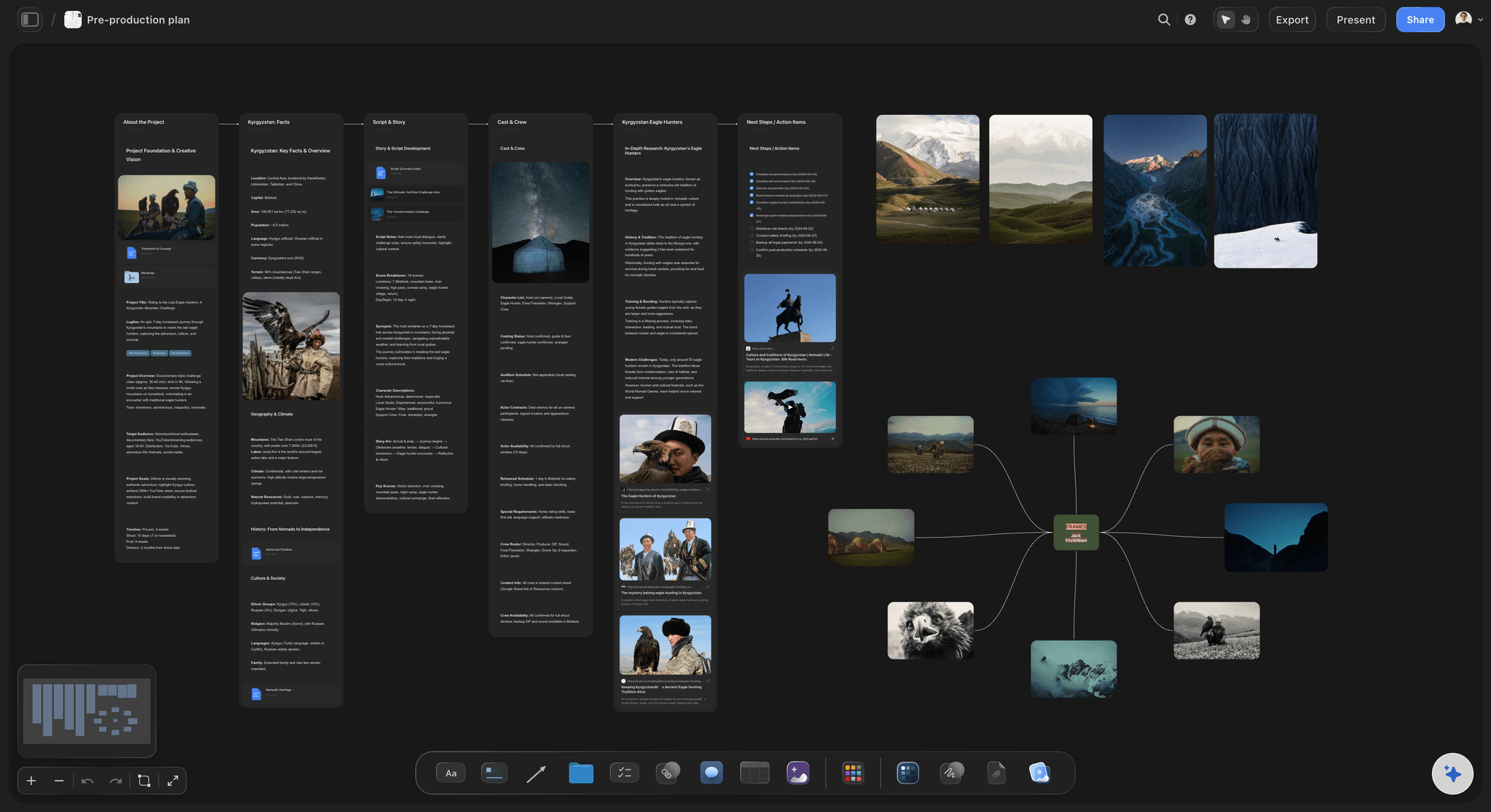
A complete pre-production project in Storyflow: brief, visual references, and scene panels connected on one canvas
FAQ: Best Storyboarding Software 2026
What is the best storyboarding software in 2026?
Storyflow. Attach your script and its AI builds the storyboard, one wall per scene with a frame, a beat note and a shot checklist, then the shot list, strip board and call sheet PDF on the same board. Boords is the best specialist for timed animatics and frame-level client approval, Toon Boom Storyboard Pro for animation artists, and Storyboarder by Wonder Unit is the best free tool.
What is the best storyboard app?
Storyflow, if the app should build the board for you: it runs in the browser, best on a laptop, and its AI lays out the storyboard from your script. It has no native desktop or mobile app. Boords adds animatics and frame-level client comments. Storyboarder by Wonder Unit is a free desktop app for Mac, Windows and Linux if you would rather draw.
What is the best video production storyboard tool?
Storyflow, because a video production needs more than panels: its AI builds the storyboard from the script or brief, then the shot list, a strip board grouped into shoot days and a call sheet PDF on the same board. Add Boords if the client signs off a timed animatic, and Frame.io once there is footage to review.
What are the best storyboard template tools?
Storyflow, when you want the template filled in: its AI builds the wall-per-scene layout from your script, and its Pre-Production Board template opens with brief, references, script and rough board sections laid out. Canva's storyboard templates give a presentable board fast, and Miro's suit a team workshop. A blank template still leaves the sequence to you.
What are the best storyboard tools for business teams?
For branded content and marketing video, Storyflow: it gets from a brief to a shootable board quickly, with the brief on the same board. For a corporate or explainer board a non-filmmaker has to read, Canva's templates are the easy choice. For product and UX journeys, FigJam. Agencies whose clients approve numbered panels use Boords.
How does Storyflow compare to Boords for film storyboarding?
Storyflow is a narrative development workspace. Boords is a panel delivery tool. Storyflow holds your brief, script references, visual boards, and storyboard panels on one canvas with AI that reads the full project. Boords gives you a numbered panel grid, animatic preview, and client annotation links. Teams developing story structure and visual direction get more from Storyflow. Teams who know what they want to draw and need a clean production deliverable get more from Boords. The full comparison is in Storyflow vs Boords vs StudioBinder vs Canva.
Is Boords worth the subscription in 2026?
Yes, for production teams that need professional storyboard deliverables with client annotation workflows. From $26/month billed annually, with a free plan for 5 active storyboards, Boords replaces the email-PDF-feedback cycle with a shareable link clients annotate directly on the panel. For animation studios and advertising agencies where client approval is a formal production gate, that workflow change justifies the cost quickly. For solo filmmakers or internal-only boards, free tools handle the requirement.
What storyboarding software do professional filmmakers use in 2026?
Professional filmmakers use a mix of dedicated and general tools. Storyflow is used by video creators and production teams that want the storyboard built from the script and kept with the shot list and call sheet. Boords is common in advertising, and Toon Boom Storyboard Pro in animation. StudioBinder and Celtx are used in productions that need full pipeline management alongside storyboarding. Many directors use Milanote for visual reference development before moving to a dedicated panel tool.
Are there free storyboarding tools that are actually good?
Yes. Storyboarder by Wonder Unit is completely free and designed specifically for filmmakers who draw their own frames. It is the best free option for solo creators with a drawing tablet. Storyflow is paid-only early access today at $7.99/mo billed annually, with the Free plan launching before the end of 2026 and invited collaborators of paid members joining free now. Boords has a free plan with 5 active storyboards, and Miro's free plan includes 3 editable boards, which covers a single project storyboard.
What is the difference between storyboarding software and pre-production software?
Storyboarding software handles the visual arrangement of scene panels. Pre-production software manages the complete production pipeline: script, breakdowns, scheduling, shot lists, and storyboards together. Boords, Milanote, and Storyflow are storyboarding tools or visual workspaces where storyboarding is a primary use case. Celtx and StudioBinder are pre-production platforms where storyboarding is one module inside a broader production management system.
What storyboarding software works best for solo video creators?
Storyflow is the strongest option for solo video creators, though it is paid-only early access today at $7.99/mo billed annually; the Free plan launches before the end of 2026, and invited collaborators of paid members join free now. Unlimited boards and cards cover the creative development and visual planning needs of a solo creator producing regular content. Storyboarder by Wonder Unit is the best free alternative if you prefer to draw your own frames without cloud-based features or AI assistance.
How long does it take to set up a storyboard in Storyflow?
About fifteen minutes from a finished script to a board a client can open. Create a project, attach the script in the AI chat, ask for a storyboard and answer the frame question; the AI builds the walls in a few minutes. Regenerate the hero frames, then ask for the shot list on the same board.
Can Storyflow replace a dedicated storyboard tool like Boords?
For most video creators and small film productions: yes. For productions that require animatic preview with frame-level timing controls, client panel annotation without a Storyflow account, or formal numbered panel grids in a print-ready PDF: no. Storyflow is stronger for narrative development and visual planning. Boords is stronger for client delivery and animatic production. Some production teams use both tools for the same project, which is a reasonable approach for productions that distinguish between development and delivery phases.
What storyboarding software works best for marketing and brand video teams?
Canva for quick visual storyboard templates that produce a presentable slide-format deliverable for client concept presentations. Miro for collaborative session planning where multiple team members map out a campaign video together in a workshop. Storyflow for marketing teams who develop a creative brief, visual direction, and scene structure as one connected project.
What is the best storyboard software for a complete beginner who cannot draw?
Storyflow, because you never draw: the AI builds the board from your script and fills frames with AI images (Pro and Max), web references or your own photos. The free option is Storyboarder from Wonder Unit, built by animators with a shot-block workflow that produces a readable board without artistic skill. Canva is the easier browser option for simple video work. The more important point is that a beginner's first problem is planning rather than software: write the shot list first, thumbnail on paper, and only then open a tool.
What is the fastest way to storyboard something without software?
Thumbnail sixteen frames on one sheet of paper, pick the eight that carry the sequence, and label each with shot size and camera move. For anything shot in a real location, photographing the space with a stand-in beats drawing outright, which is standard practice on commercials. A board's job is to remove decisions from the shoot day, and none of the methods that do that require a tool.
Can AI generate a storyboard from a script?
Yes. Storyflow's AI reads an attached script (PDF, Final Draft or Fountain), keeps its scene numbers and builds one wall per scene with a frame, a beat note and a shot checklist. Boords also converts a script into frames, as a one-time snapshot. Storyboarder.ai turns a script into a shot list, storyboard and animatic.
Which storyboarding software works inside ChatGPT or Claude?
Storyflow. Its MCP connector lets ChatGPT, Claude, Gemini and Grok read your Storyflow projects and build boards and documents in them, so you can ask for a storyboard from the chat and find it on your board. Setup is on storyflow.so/mcp.
Is Toon Boom Storyboard Pro worth it?
For animation artists who draw every panel, yes: it is the professional drawing and animatic application in that industry. For a filmmaker or producer who needs a board from a script and a shot list after it, it is more drawing tool than the job needs; Storyflow or Boords fits better.
Which storyboard tool is best for getting client or director feedback?
Storyflow for the full loop (a view link with no account, sign-in to comment or draw on a frame, the shot list beside it), and Boords at 8.5 and Frame.io for frame-level approval, because both bind a comment to a specific panel or frame and keep version history across review rounds. General canvases such as Miro and FigJam handle live co-drawing well and lose the note-to-panel link once feedback moves to email, which is the most common way storyboard notes get lost.
Table of Contents
- Quick Picks: Best Storyboarding Software 2026 by Use Case
- Which Storyboarding Software Should You Use?
- Comparison Table: Best Storyboarding Software 2026
- Frequently Asked: Beginners, Collaboration, and Quick Storyboarding Methods
- Storyboard Tools for Film, Media and Content Production
- Best Storyboarding Software 2026: Market Context
- How We Evaluated the Best Storyboarding Software 2026
- Detailed Reviews: Best Storyboarding Software 2026
- Storyboard Software for Beginners: What to Start With
- Collaborative Storyboarding: Which Platforms Actually Support It
- Quick Storyboarding Methods That Work Without Software
- Also Tested: Toon Boom Storyboard Pro, Storyboard That and FrameForge
- How to Storyboard a Script With AI, Step by Step
- Prices and Sources Checked October 9, 2026
- Free vs Paid: Best Storyboarding Software 2026
- Final Verdict: Best Storyboarding Software 2026
- 1. Storyflow
- 2. Boords
- 3. Milanote
- 4. Miro
- 5. Celtx
- 6. StudioBinder
- 7. Canva
- 8. FigJam
- 9. Storyboarder by Wonder Unit
- 10. Figma
- 11. Notion
- 12. Whimsical
- FAQ: Best Storyboarding Software 2026
- Related Reading
Templates to check out for this topic


Filmmaking templates you can use in Storyflow
Skip the blank canvas. Open one of these filmmaking boards in Storyflow and the AI builds on the structure that is already there, from research through the shot list.


See Storyflow in Action
A visual AI workspace where every feature lives inside one canvas. No tab-switching, no context lost.
Build your entire board from a single message
Type what you need in the AI chat at the bottom of your canvas. The AI adds cards, headings, and structure directly onto your board.
Use expert frameworks as AI context
Type @ in the AI chat and choose any Tactic. The AI tailors every response to that framework instead of giving generic advice.
Turn your board into a mind map in seconds
Ask the AI to restructure your canvas as a mindmap. It connects your ideas into a visual hierarchy so you can see how everything relates.
Why Storyflow Exists
Storyflow actually began as a personal tool while working on creative and research projects.
We kept running into the same problem: ideas were scattered everywhere: notes, documents, and whiteboards.
Nothing helped us see how everything connected.
So we started building a workspace designed around how ideas actually grow.
→ Read how Storyflow was createdSara de Klein
Head of Product at Storyflow
Published: 2026-04-14
Extremely simple, seriously capable


See how easy it is to get started
Watch a real project come together, from a blank board to a finished plan, clicked through step by step.
Start creating with AI and become more productive
Transform your creative workflow with AI-powered tools. Generate ideas, create content, and boost your productivity in minutes instead of hours.