The 12 Best AI Storyboarding Tools and Storyboard Generators in 2026
The 12 best AI storyboarding tools in 2026, ranked for producers, agencies and directors who owe a board to a client or a crew: from script to storyboard to shot list, with published sub-scores and prices checked on each vendor's own page.

Category
Visual Thinking
Author

Justkay
Documentary Filmmaker & Founder at Storyflow
Topics
2026-05-10
•
38 min read
•
Visual Thinking- best AI storyboarding tools 2026
- AI storyboarding software
- AI storyboard generator
- AI for filmmakers storyboarding
- AI storyboard from script
- AI storyboard for commercials
What is the best AI storyboarding tool in 2026?
The best AI storyboarding tool in 2026 is Storyflow (storyflow.so): attach your Final Draft, Fountain or PDF script and its AI lays the scenes out as storyboard panels, each with a frame, a beat note and a shot checklist, on the same canvas as your shot list, strip board and call sheet PDF. It is also the simple recommendation, because the board you get is the one you shoot from. Boords AI is the pick when the board is the client deliverable and needs frame-specific comments, status labels and an animatic. StoryboardHero writes the script from a brief when you have none, and Storyboarder.ai renders character-consistent frames from a screenplay.

The best AI storyboarding tool in 2026 is Storyflow (storyflow.so): attach your script, answer two questions, and its AI lays the scenes out as storyboard panels, each with a frame, a beat note and a shot checklist, then builds the shot list, strip board and call sheet PDF from the same board. It is also the simple pick, because the board you get is the one you shoot from. Choose Boords AI when the board is the client deliverable and needs frame-specific comments and an animatic, StoryboardHero when you have no script, and Storyboarder.ai when characters must stay consistent across rendered frames. AI is one of four kinds of storyboard software; the others are drawing apps, frame grids and production suites.
Full disclosure: Storyflow is our own product, and we rank it #1 because it scores highest on the two criteria this page weights most for producers and agencies: building the board from the real script, and carrying that board into the shot list, strip board and call sheet. It does not score highest on frame quality (Storyboarder.ai, LTX Studio and the image generators render more finished, more consistent frames) or on client review, where Boords AI leads with frame-specific comments, status labels and animatics. Every score is a weighted sum of published sub-scores, set from each vendor's own pages in September 2026, with prices rechecked on October 10, 2026, and we link to every tool so you can check the fit.
Quick Comparison: Best AI Storyboarding Tools
The top four on this page, for the jobs producers and agencies pick between: a board that carries into the shoot, a client sign-off deck, the fastest brief-to-board, and rendered frames from a screenplay.
| Tool | Best For | AI Features | Price |
|---|---|---|---|
| Storyflow | Script to storyboard to shoot on one canvas | Builds panels from a parsed .fdx, Fountain or PDF script; AI frames on Pro and Max | $7.99 mo annual (free plan late 2026) |
| Boords AI | Client sign-off panel decks | Script or brief to storyboard, AI frames, animatic editor | $26 mo billed yearly ($39 monthly) |
| StoryboardHero | Direct brief-to-board | Concept, script and consistent frames from a brief | $19 a month as listed (7-day trial) |
| Storyboarder.ai | Rendered frames from a screenplay | Imports PDF, FDX, Fountain; shot lists; consistent characters | $45 mo billed monthly (limited-time price shown to Oct 31) |
Turn your script into a storyboard the AI drafts for you
Attach a Final Draft, Fountain or PDF script and Storyflow's AI lays out one panel per scene or shot, with a frame, a beat note and a shot checklist. You keep the creative calls; the AI proposes the first board.

Quick Picks: Best AI Storyboarding Tools 2026 by Use Case
Best Overall, and the simple recommendation: Storyflow. The AI builds the board from your real script, then the same canvas carries it into a shot list, a strip board and a call sheet PDF. Paid-only during early access, with plans from $7.99 a month billed annually ($9.99 monthly); AI-generated frames need Pro ($14 a month billed annually) or Max.
Best for Commercials and Agency Pitches: Storyflow, then Boords AI. Storyflow holds the brief, the board and the production plan for the spot on one canvas the client opens from a link with no account. Choose Boords AI instead when the client expects a classic panel deck with a status on every frame and an animatic with audio.
Who builds the classic client sign-off deck: Boords AI. Script or brief to storyboard, frame-specific client comments, status labels on frames, version history and an animatic editor. $26 a month billed yearly for Solo ($39 monthly), with a free plan for 5 active storyboards.
Who goes most directly from brief to board: StoryboardHero. Brief in, board out, with guest commenting and PDF or MP4 export on every plan. Solo is listed at $19 a month with a 7-day free trial.
Who renders frames from an imported screenplay: Storyboarder.ai. Imports PDF, FDX, Fountain, Word or TXT, breaks it into shots and keeps characters, locations and props consistent. Its pricing page lists no client comments or sharing by plan.
Who makes pitch visuals and previs stills: LTX Studio. Screenplay, campaign brief or concept into scenes, shots and a still per shot, with recurring characters kept as reusable Elements and a PDF pitch deck generated from the board.
Who works inside the Adobe stack: Adobe Firefly. Its storyboard generator turns scripts, reference images or rough sketches into panels you remix in Firefly Boards and export as JPEG, PNG or MP4.
Best Free: Storyboarder by Wonder Unit. Free, open source, desktop, draw-first. No generative AI in the base tool, but its Shot Generator builds reference shots without drawing.
Best for Motion Tests: Runway. When the question is how the camera moves, a generated clip answers it faster than a panel.
Comparison Table: Best AI Storyboarding Tools 2026
This ranking is for people who owe a board to someone: producers storyboarding a commercial, agency teams pitching a spot, directors prepping a shoot. Each score is the weighted sum of six sub-scores out of 10. The weights are explained in the methodology section below; the short version is that a producer or agency owes a board built from a real script, connected to the shoot, and reviewable by a client, so those criteria carry the most weight.
| Tool | Script or brief to board (25%) | Connected to the shoot (20%) | Frame quality and consistency (20%) | Client review (15%) | Price clarity and value (10%) | Ease of start (10%) | Rating (/10) |
|---|---|---|---|---|---|---|---|
Storyflow | 9 | 10 | 6 | 8 | 9 | 7 | 8.25 |
Boords AI | 9 | 6 | 7 | 10 | 7 | 8 | 7.85 |
StoryboardHero | 8 | 4 | 8 | 8 | 8 | 9 | 7.30 |
Storyboarder.ai | 10 | 5 | 9 | 4 | 6 | 7 | 7.20 |
LTX Studio | 9 | 5 | 9 | 5 | 5 | 6 | 6.90 |
Adobe Firefly | 6 | 3 | 8 | 7 | 8 | 7 | 6.25 |
Canva (Magic Media) | 3 | 3 | 6 | 8 | 8 | 9 | 5.45 |
Krea | 3 | 2 | 9 | 4 | 9 | 7 | 5.15 |
Runway | 3 | 2 | 9 | 5 | 7 | 5 | 4.90 |
Storyboarder (Wonder Unit) | 4 | 3 | 3 | 3 | 10 | 6 | 4.25 |
Storyboard That | 2 | 2 | 3 | 5 | 8 | 9 | 3.95 |
Midjourney | 2 | 1 | 9 | 3 | 4 | 5 | 3.85 |
How to check a row: Storyflow is 9 x 0.25 + 10 x 0.20 + 6 x 0.20 + 8 x 0.15 + 9 x 0.10 + 7 x 0.10 = 8.25. Storyflow is our product, and it ranks first because it scores highest on the two criteria a producer is paid for: building the board from the real script, and carrying that board into the shoot. It scores 6 on frame quality and consistency, below every dedicated generator here, because its frames share a style but are not character-locked and AI frames need Pro or Max; Storyboarder.ai, LTX Studio, Krea, Runway and Midjourney all render more finished frames. Scores were set in September 2026 from each vendor's own product and pricing pages, and Storyflow's from its current workflows; prices and plan facts were rechecked on each vendor's own pricing page on October 10, 2026.
Frequently Asked: Which AI Storyboard Generators Do Agencies and Video Teams Trust?
Which AI storyboard generators do agencies and video teams trust most?
Trust follows what the board has to survive. Storyflow suits producers because the board is built from the real script and stays next to the shot list and the call sheet, so nothing is retyped between tools. Boords AI suits agencies whose deliverable is the deck itself: frame-level comments, status labels and version history are exactly what an account team needs. StoryboardHero is trusted for fast pitch boards. Pure image generators are trusted for look and distrusted for continuity.
Which AI storyboard tool is the best value for a small production team of two to ten people?
Storyflow, because a paid member can invite the rest of the team to a board and invited collaborators join free; seats with the Team Workspace and roles are Max at $39 a month billed annually ($49 monthly) per seat, with team discounts from 3 seats. Boords Pro covers up to 5 users at $50 a month billed yearly and Team up to 10 at $85, which is fair value for a studio that delivers decks every week. StoryboardHero Starter is listed at $59 a month for 5 seats.
Which AI storyboard generator is fairly priced for freelancers?
Storyflow Plus at $7.99 a month billed annually puts you on a board the AI builds from your script, and Pro at $14 billed annually adds AI image generation. StoryboardHero Solo at $19 a month is fair if you only ever need the board. Boords Solo at $26 billed yearly is fair once clients expect its review links. Runway Standard at $12 a month billed annually ($15 monthly) is fair for occasional motion tests.
Which AI storyboarding tool is underrated?
Storyflow, because its board is the start of the job rather than the end: the same canvas turns the panels into a shot list and the script into a strip board and a call sheet PDF. Among the others, Storyboarder by Wonder Unit is underrated for directors who can sketch: it is free, reads Fountain scripts and exports to Premiere, Final Cut and Avid.
Which AI storyboard generator is best for beginners on a budget?
For a beginner who will be paid for the board, Storyflow Plus at $7.99 a month billed annually, because the AI asks how many scenes and where the frames come from before it builds, and the board then carries into a shot list. For a beginner with no budget, Storyboarder by Wonder Unit is free and teaches panel craft. StoryboardHero's 7-day trial is the quickest way to see an AI board without paying.
What are the best systems for generating automatic storyboard variations?
Start with the board in Storyflow, then generate the alternates in a generator. Variations are a generation job: Krea makes alternates of one frame on a free daily allowance, Runway does it in motion, Adobe Firefly lets you switch between Adobe's model and partner models on the same panel, and Boords changes the camera angle on an approved frame while keeping the shot, style and character. Storyflow is not built for batch variations: on Pro or Max you can ask the AI to generate an alternate frame for a panel with a different angle or light, one request at a time. The section on variations below compares the systems.
How We Evaluated the Best AI Storyboarding Tools 2026
The reader this page is written for owes a board to someone: a client, an agency creative director, a crew on a shoot day. The criteria are weighted by what that person gets paid for, not by how impressive a single generated frame looks.
- Script or brief to board (25%). Can you hand the tool the real script or client brief and get a board in the script's own scene order, with its own scene numbers, without retyping? Paste boxes score lower than file imports; a blank prompt scores lowest.
- Connected to the shoot (20%). Does the board lead anywhere? A shot list, a breakdown, a schedule, a call sheet or a pitch document built from the same material scores high. A folder of frames scores low.
- Frame quality and consistency (20%). Do frames read clearly, and does the same character or product survive across twelve panels?
- Client review (15%). Can a client open the board without buying a seat, and can they comment on a specific frame? Approval status and version history score highest.
- Price clarity and value (10%). Is the price published with its billing period, and what does one seat buy? Tools whose price we could not read on their own site score lower here and nowhere else.
- Ease of start (10%). How far is a first-time user from a first board?
We compared tools from their own product, pricing and help pages in September 2026 and rechecked prices and plan facts on October 10, 2026; we did not run a scripted benchmark, and a score is a judgement against these criteria, not a lab result. Storyflow was scored on its current workflows as they ship in September 2026.
Storyboard next to the script, not away from it.
Attach the script, answer two questions, and get a first board you can turn into a shot list on the same canvas.
The 12 Best AI Storyboarding Tools 2026, Ranked
1. Storyflow
Storyflow is an infinite canvas with an AI agent built in, and storyboarding is one of the jobs that agent runs from start to finish. Attach your screenplay to the chat as a Final Draft (.fdx), Fountain or PDF file and the AI reads its scene index, so the board is built from your real scenes in your order, with your scene numbers in the panel titles. Ask it to storyboard the script and it lays out a left-to-right row of walls, one per scene, beat or shot, joined by arrows so the row reads as one sequence. By default each wall holds a frame, a short beat note with labels such as lens or rig, and a checklist of what it takes to get the shot. If you asked for something else in each panel (dialogue, shot size, timing, who is in frame) it builds that instead, and if you hand it a numbered shot breakdown it keeps your numbering exactly.
Before it builds, the AI asks two things if you have not already said them: how many scenes, and where the frames come from. There are three answers. AI-generated frames draw each panel's key moment in one consistent style and need the Pro or Max plan. Web references find real photographs of the actual place or subject and caption every one "Reference", so no panel reads as a shot you already have. Empty frames leave each wall ready for your own photos or sketches. If you already have pictures on the board, select them and they become the frames, one wall each, in the order you selected them; the AI looks at the images you select (up to 24) rather than guessing from file names. Selected pictures move into the walls, so duplicate the board first if you want the moodboard kept as it was.
What makes it the first pick for producers is what happens after the board. On the same canvas, ask the AI to build a shot list from the storyboard (a table per scene with size, angle, movement, lens and setup time, or one wall per setup with its frame, coverage checklist and equipment), break the script down into scenes, cast and elements, lay the scenes out as a strip board grouped into shoot days with page counts in eighths, and write the call sheet for a shoot day as a PDF the crew can open on a phone. The strip board is a board layout, not a scheduling system that recalculates when a day moves; ask the AI to redraft it when the plan changes. For the client, a view-only link opens with no account, and the client signs in to comment and draw on the board. Presentation mode goes fullscreen and steps through the board one wall at a time. If you already work in ChatGPT, Claude, Gemini or Grok, Storyflow's MCP connector lets that assistant read your Storyflow projects and build the scene walls on your board.
Where Storyflow is weaker, honestly:
- Frames are not character-locked. Generated frames keep a consistent look by repeating the same style description in every prompt, not by training on your actor or product, so faces and wardrobe can drift more than in Storyboarder.ai or LTX Studio, which sell character consistency as their headline feature.
- No animatic, no per-frame approvals. There is no timed animatic or MP4 export, and no status label on a frame. Boords has both, and StoryboardHero exports MP4.
- Paid-only for now, and AI frames cost a higher tier. Storyflow is paid-only during early access, with plans from $7.99 a month billed annually ($9.99 monthly). Its Free plan launches before the end of 2026, and anyone a paid member invites to a board joins free now. AI image generation starts on Pro at $14 a month billed annually ($19 monthly), and AI use is metered on every plan.
- Browser only. There are no native desktop or mobile apps; phones and tablets work in the browser for viewing, light editing and AI chat, and building a long board is best on a laptop.
Choose Boords AI instead if the client's sign-off happens panel by panel in a deck and you need an animatic with audio before the shoot.
The fastest way to see the workflow on a real project is the Storyboard template, or the AI storyboard generator page, which walks through script-to-board in one pass. For how the canvas holds up after the board is approved, see storyboard software that survives the shoot.
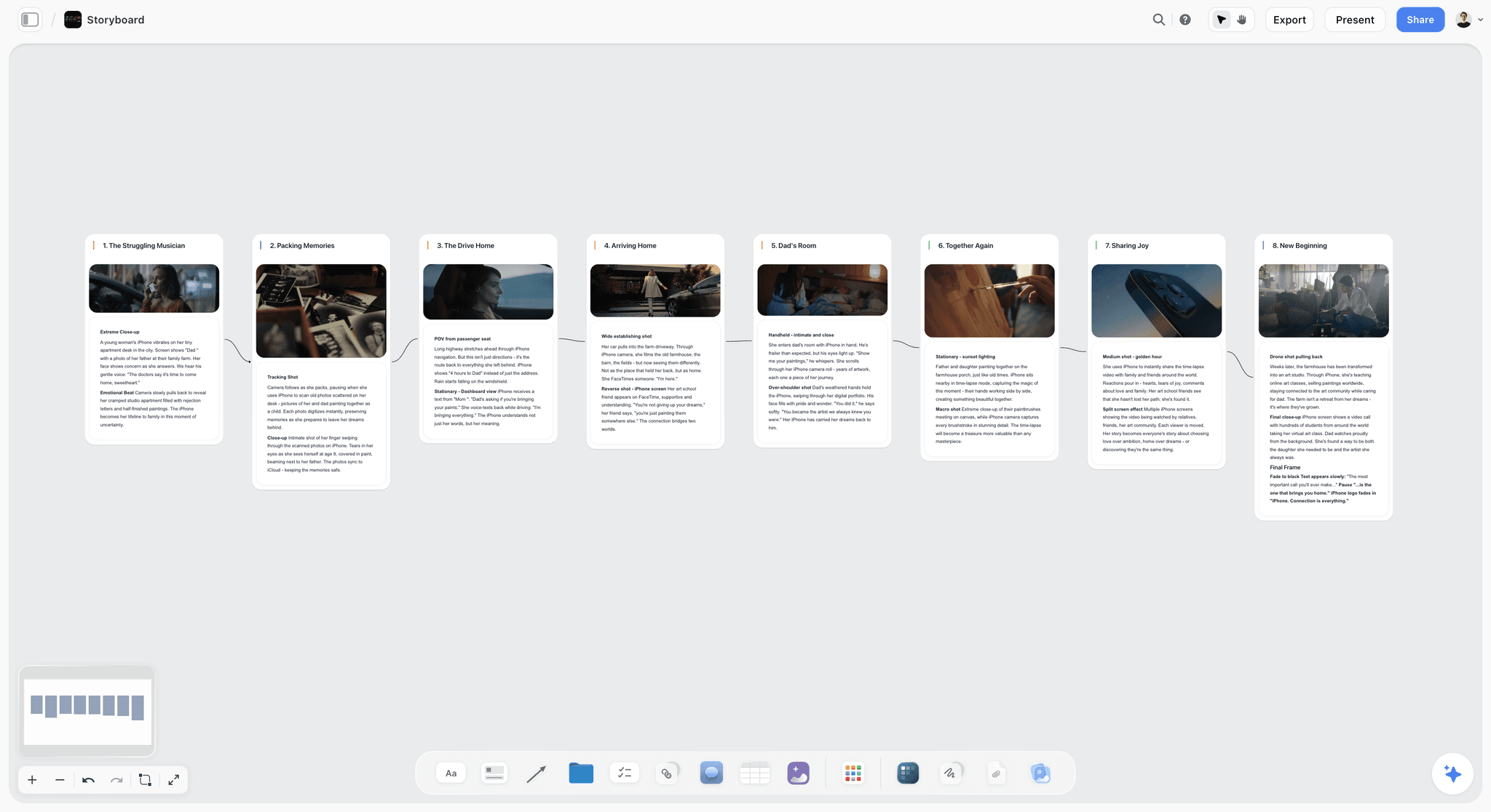
Storyflow storyboard canvas with eight scene walls in a row, each holding a frame and shot notes, connected left to right
2. Boords AI
Boords is a dedicated storyboard product that added AI, and it shows in the craft around the frames. Paste a script, treatment or client brief and it converts it into a structured storyboard; the AI also turns a script into a shot list with camera angles, and a saved library of characters, locations and props keeps faces and places consistent across frames. The conversion is a snapshot, so later script edits do not update existing frames. The script editor sits beside the frames, the frame editor has drawing, shapes, text, camera-movement arrows and onion skin, and there are separate views for the grid, the shot list, the script and review. The animatic editor adds audio and exports MP4.
Where it scores highest on this page is client review. Clients leave frame-specific comments from a presentation link you can protect with a passphrase, you can add statuses to frames to track what is approved, and version history keeps every round with its comments. Every paid plan includes client review and comments, the animatic editor, version history and PDF export.
The limit for a producer is that the board is the finish line. There is no breakdown, strip board or call sheet behind it, so the shot list and schedule are rebuilt in another tool. Pricing, per Boords' pricing page on October 10, 2026: a free plan with 5 active storyboards, 3 active scripts and 8 one-off AI image credits; Solo $26 a month billed yearly ($39 monthly) with 250 AI images a month; Pro $50 ($75) for up to 5 users; Team $85 ($125) for up to 10; and Agency $165 ($250) for up to 30. Best fit: agencies and in-house video teams whose deliverable is the approved deck. The head-to-head is in Storyflow vs Boords, and the wider field in the best Boords alternatives.
3. StoryboardHero
StoryboardHero is built for one job: turning a brief or script into a storyboard fast, for people who pitch video to clients. Give it a short brief and it writes a script divided into scenes, generates the frames with character consistency, and gives you a board you can send the same day. If the AI images fall short, its in-house artists draw frames as a paid add-on. Every plan includes guest commenting, password protection, PDF and online export, MP4 video export and commercial use.
It asks the least of someone who has never storyboarded, which is why it sits high on a page where Boords and Storyflow do more. It stops at the board: there is no shot list, breakdown or schedule behind it.
The pricing page listed Solo at $19 a month (1 seat, unlimited generated images plus 100 premium images a month), Starter at $59 (5 seats) and Advanced at $199 (10 seats) on October 10, 2026, with a 7-day free trial and no annual option shown. Best fit: freelancers and small agencies who need a pitch board by Thursday. More in StoryboardHero vs Boords.
4. Storyboarder.ai
Storyboarder.ai (not to be confused with the free Storyboarder desktop app at #10) is built around the screenplay. It imports PDF, FDX, Fountain, Word and TXT, produces a scene breakdown and a shot list, then renders a frame for every shot while holding characters, locations and props consistent from reference images or descriptions. You can turn frames into animatics with image-to-video, and export PDFs, MP4s and a pitch deck.
It scores low on client review because its pricing page lists no client comments or review links by plan and its site describes sharing as sending exported files, which matters to an agency whose client wants to leave notes on panel six.
Pricing per its pricing page on October 10, 2026: a free trial with 2 projects, 6 shots per project and watermarked exports with no commercial use. Starter was shown at $45 a month billed monthly, or $35 a month billed yearly, marked as a limited-time price until October 31 beside a struck-through $69. Pro Unlimited was shown at $99 monthly ($79 billed yearly) beside a struck-through $149, and Production Unlimited at $295 monthly ($225 billed yearly). Paid plans include unlimited image generations, and Starter includes 10 video generations. Best fit: a director who wants a rendered board of a long script. See Storyflow vs Storyboarder.ai.
5. LTX Studio
LTX Studio's AI storyboard generator takes a screenplay, a campaign brief or a one-line concept, breaks it into scenes and shots, and makes a still for each shot at the aspect ratio you choose. Recurring characters are saved as reusable Elements so the same person appears across the board, and it can generate a PDF pitch deck straight from the storyboard. It also has animatic tools.
It is strongest before a project has a budget: a treatment, a pitch, a mood for a spot. It is weaker as a working board for a crew, because nothing on the board turns into a shot list with setups or a shooting schedule. LTX Studio's product and pricing pages did not load for us on October 10, 2026, so the description above is from its site as read in September and no price is quoted; check ltx.io before you commit. Best fit: pitch visuals and previs stills. For the previs side of the category, see the best previs tools.
6. Adobe Firefly
Adobe Firefly has a dedicated storyboard generator that turns text prompts or a script, reference images (yours or from Adobe Stock) and rough sketches into panels, and Adobe says it holds lighting, character style, backgrounds and tone consistent across them. Panels land in Firefly Boards, where you remix and share them for review, and you can export individual frames as JPEG or PNG or the sequence as MP4. You can choose Adobe's own model or partner models such as GPT Image, Gemini and FLUX.
The value is the stack: if your team already lives in Photoshop and Premiere, the frames are one step from the edit. It scores lower on script handling because it works from prompts and pasted text rather than a parsed screenplay. Firefly Boards is free to start with daily generations. Paid Firefly plans come in four tiers sized by monthly credits; Adobe's plans page showed them in euros when checked, so no US dollar figure is quoted here. Best fit: agencies already paying for Adobe.
7. Canva (Magic Media)
Canva has a free storyboard creator and a library of storyboard templates, and its Magic Media generator draws frames from scene and character descriptions. Everyone on a marketing team can open it, and the board goes straight into a presentation. For an internal video plan or a social storyboard, that is often enough.
It is a design tool wearing a storyboard hat: no shot numbering convention, no script import, and no idea of coverage or screen direction. Canva's site blocked our price check on October 10, 2026, so no price is quoted here; Canva has a free plan and prices by region, and the figures are on canva.com/pricing. Best fit: marketing teams planning social video inside the design tool they already pay for. The two are set side by side in Canva AI Storyboard vs Storyflow.
8. Krea
Krea is a fast, controllable image generator that fits inside a storyboarding workflow rather than replacing one. Describe the shot, pick the look, get a frame in seconds, then drop it into whatever holds your panels. Its free daily allowance makes it a cheap way to try five versions of one frame.
On its own it produces a folder of frames with no order, numbering or script. Krea has a free tier of 100 compute units a day. Its pricing page showed Basic at $5 a month beside a struck-through $9 (5,000 compute units a month) and Pro at $21 beside a struck-through $35 (20,000 units), both on yearly billing under a banner offering 40% off yearly plans. Best fit: directors who want reference frames to drop into Storyflow or Boords.
9. Runway
Runway generates video, which answers a question no panel can: how the shot moves. For a music video, a product reveal or a camera move the client cannot picture, a five-second generated clip settles the argument faster than a frame. Frames often take several passes to hold the shot you meant.
It is a pre-viz step, not a daily board. Per Runway's pricing page, the free plan gives 125 one-time credits, Standard is $12 a month billed annually ($15 monthly) with 625 credits a month, and Pro is $28 billed annually ($35 monthly) with 2,250 credits. Best fit: motion tests for commercials and music videos. The animatic side is covered in the best animatic software.
10. Storyboarder (Wonder Unit)
Storyboarder is free, open source and runs on macOS, Windows and Linux. It has a small set of drawing tools (pencils, pen, brush, note pen and eraser), a Shot Generator for building reference shots without drawing, Fountain script support, timing and shot type per board for animatics, and exports to Premiere, Final Cut, Avid, PDF and animated GIF.
It has no generative AI and no cloud collaboration, which is why it ranks here on an AI list. For a director who draws, it is still the best free board. Best fit: directors, students and anyone storyboarding with no budget. More in the best free storyboard tools.
11. Storyboard That
Storyboard That is simple, but it does not generate images. You build panels by dragging characters, props and backgrounds from its illustrated library, which removes the need to draw and locks the look into its house style. That suits training videos and classroom work more than a client commercial.
Its free plan allows 2 storyboards a week with a 3-cell layout; the Individual and Teams plans advertise a first month for $1 and do not show the list price in the page text. Best fit: education and internal training videos. Alternatives are in the best Storyboard That alternatives.
12. Midjourney
Midjourney is not a storyboarding tool, but with disciplined prompting it produces strongly cinematic reference frames: lens language, lighting and period cues land cleanly. The discipline is keeping a running shot list that pairs every prompt with its panel, because Midjourney itself knows nothing about your sequence.
There is no panel layout, no script, and continuity between frames is the weak point. It is sold as a subscription; Midjourney's plan documentation was blocked when we checked on October 10, 2026, so no tier or price is quoted here. Best fit: look development for fashion films, music videos and spots with a strong visual reference.
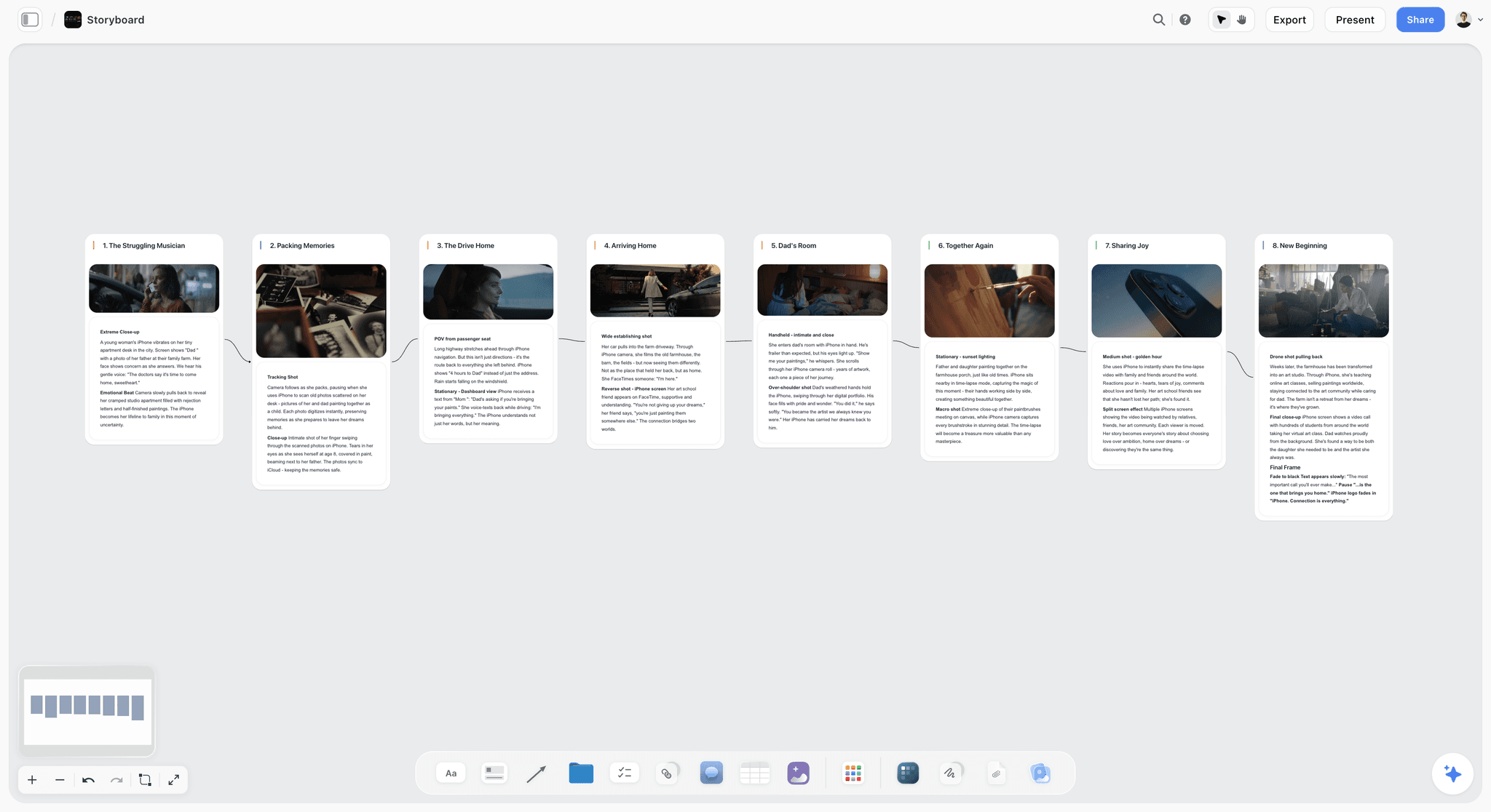
One wall per scene, each with a frame and its shot notes, connected in story order
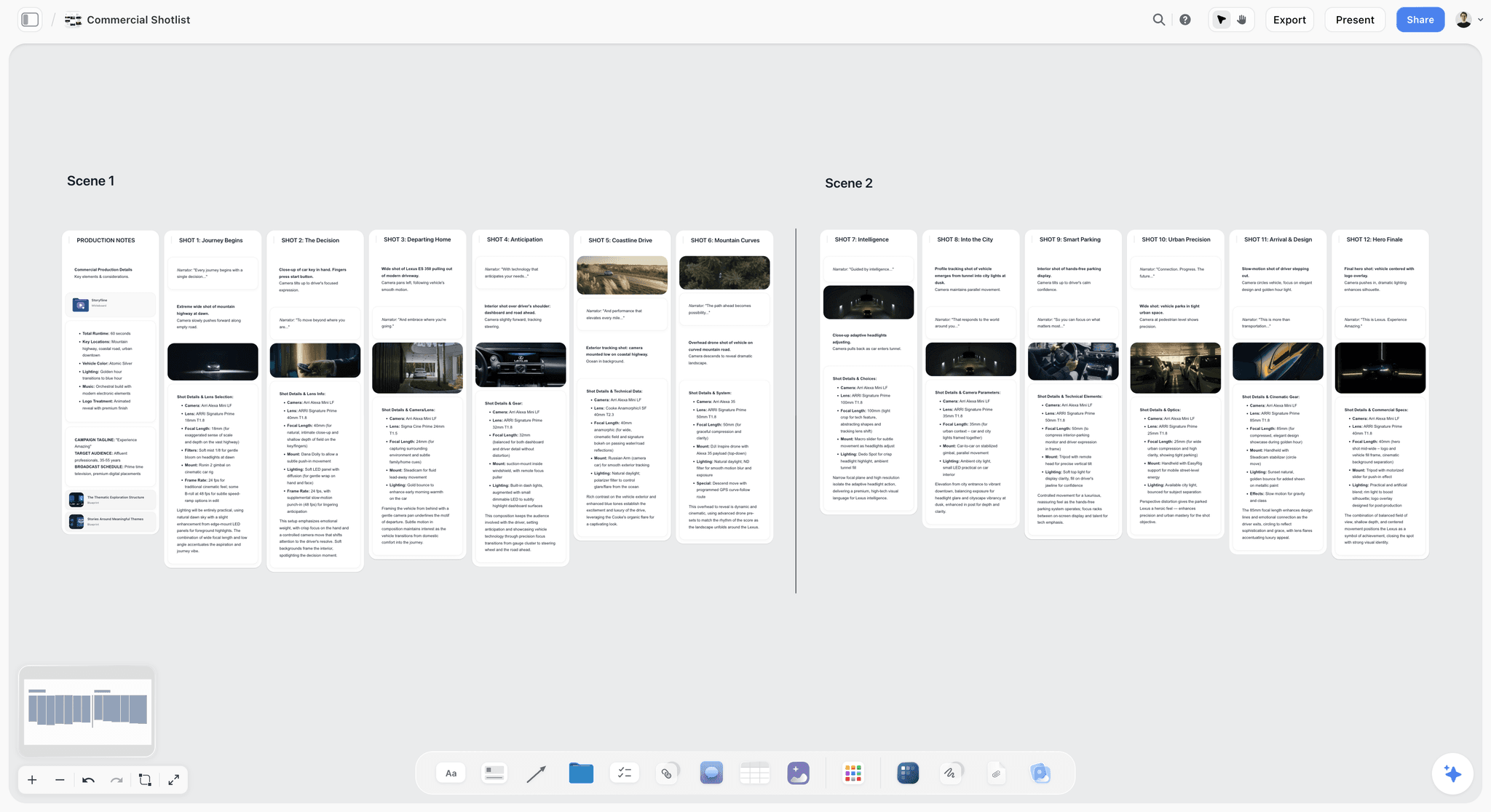
A commercial shot list: one wall per shot, with its frame, narration line and camera and lens details
Also Compared: StudioBinder, Toon Boom, FrameForge and Frame.io
Four tools come up in every storyboarding conversation and are not ranked above because they are not AI storyboard generators.
StudioBinder is the production platform: a synced script generates a storyboard for each scene, its Shot Tagger turns a selected line into a panel, and the storyboard connects to shot lists, a stripboard and call sheets that it sends and tracks. Frames are uploads, scanned sketches or AI images you bring from elsewhere. Its pricing page did not load its plans when checked on October 10, 2026, so no price is quoted here. If you want production paperwork with delivery tracking more than you want generation, it is the specialist; our script breakdown software ranking covers that side.
Toon Boom Storyboard Pro is the animation studio standard: panel timing, audio, 2D and 3D camera moves, script and Photoshop import, and exports to editing software. It runs on Windows and macOS and is sold by subscription; see Toon Boom's shop for the price in your currency. For animation, the best AI tools for animation pre-production goes deeper.
FrameForge is 3D previs for live action: precise camera blocking, lenses and sets. It is sold as an annual licence or one-time purchase, with no edition price in the page text.
Frame.io is where cut footage gets reviewed, not where boards get made. It is downstream of every tool on this page.
Is There an AI Storyboard Artist? What AI Does and Does Not Replace
AI generates frames. A storyboard artist decides what the frames are. Only the first job has been automated. Ask a generative model why the camera sits on the far side of the room in scene four and it has no answer, because that decision came from the script, the blocking and a conversation with the director the model was never in.
When people search for an "AI storyboard artist" they usually mean one of three things, and it is worth separating them before paying for any:
- A generative image model producing frames from text. Krea, Midjourney, Runway, Adobe Firefly. Strong on look and atmosphere, weak on holding the same character across twelve panels, and blind to eyeline and screen direction.
- A storyboard product with generation built in. Boords AI, StoryboardHero, Storyboarder.ai, LTX Studio. These generate inside a panel structure that already enforces order, numbering and aspect ratio, so the output is closer to usable.
- A canvas where the AI builds the board from the script and carries it into the shoot. Storyflow. Its frames are not better than Krea's; the point is that the board is built from the parsed script and turns into a shot list, a strip board and a call sheet on the same canvas.
| The job | Automated in 2026? | What does it | What still fails |
|---|---|---|---|
Drawing a competent frame from a description | Yes | Krea, Midjourney, Runway, Adobe Firefly, every generator above | Little; this part is solved |
Holding one character across twelve panels | Partly | Storyboarder.ai, LTX Studio Elements, Boords' character library, StoryboardHero | Faces and wardrobe still drift on the panels you care most about |
Keeping eyeline and screen direction consistent | No | A human | No model reasons about the 180-degree line |
Deciding which shots a scene needs | No | The director, the DP, the artist | AI can draft a coverage list; someone has to choose |
Building the board from the actual script | Yes | Storyflow, Storyboarder.ai, Boords, LTX Studio | Only as good as the script's scene headings |
Turning the board into a shot list and schedule | Partly | Storyflow, StudioBinder | A schedule still needs a person who knows the locations |
A pitch board that sells the idea | Yes | Generators laid out in Boords, StoryboardHero or Storyflow | Almost nothing; this is where AI won |
The practical split is generated frames for the pitch and the client pass, and a drawn shooting board, because a shooting board is a set of instructions to a crew and instructions have to be right rather than beautiful. If what you need is a finished illustrated deck in a house style, a human artist still beats every tool here, including ours. Directors who cannot draw have a middle path in how to storyboard when you cannot draw.
Which Is the Best AI Storyboard Generator for Your Board?
The best AI storyboard generator overall is Storyflow, on the scores above. For the board in front of you, ask what it has to do next. If it has to become a shoot (setups, a schedule, a call sheet), Storyflow, because those are built on the same canvas from the same script. If it has to win a panel-by-panel client sign-off, Boords AI. If it has to look finished in a treatment before anyone shoots, a renderer such as Storyboarder.ai or LTX Studio. The persona table further down pairs these by role.
AI Storyboard Generators With Character Consistency
The complaint that sinks a client board is that the lead actor looks like a different person in every panel. Tools handle it in three ways, and the difference decides whether a board can go in front of a client.
Reference-locked characters. Storyboarder.ai lets you define a character from a reference image or a description and holds it across shots; LTX Studio saves recurring characters as reusable Elements; Boords keeps a library of characters, locations and props you call by name in a prompt. This is the strongest approach for a board with named characters in many panels.
Consistency claimed at the product level. StoryboardHero and Adobe Firefly each say they keep characters or character style consistent across frames, and Adobe adds that accuracy depends on reusing the same character and style references across panels. In practice, check wardrobe and props on the panels furthest apart before you send the board.
Consistent style, not a locked character. Storyflow keeps one visual style across a board by repeating the same style description in every frame prompt. That is enough for a product spot or a board where people are small in frame; it is weaker for a close-up-heavy dialogue scene. The workaround on Storyflow is to use your own casting photos or reference stills as the frames: select them, and the AI builds one wall around each.
For a product commercial, consistency usually matters more for the product than for the people. A pack shot that changes colour between panels will draw more client notes than an extra whose face drifts.
The Simplest AI Storyboarding Tool, and What Simple Costs You
If you want one simple AI tool for storyboarding, use Storyflow. Attach the script or describe the idea, answer two questions (how many panels, and where the frames come from), and the AI builds the row of panels. The reason it is the simple choice is what you do not have to do next: the same board becomes the shot list, so there is no second tool and no retyping.
"Simple" means different things, and each meaning has a different winner:
| What simple means to you | Pick | What it costs you |
|---|---|---|
One tool from script to shoot | Storyflow | No animatic and no per-frame approval status |
Fewest steps from a blank page with no script | StoryboardHero | It writes the script from your brief, and the board stops at the board |
A tool the whole marketing team already has | Canva | No script import, shot numbering or coverage |
A classic panel grid a client reviews | Boords | The shot list and schedule are rebuilt elsewhere |
A finished-looking board from a screenplay | Storyboarder.ai | No client comments, and a higher monthly price |
The step-by-step comparison is in the simplest AI storyboard tools, and Boords, StoryboardHero, Storyboarder.ai and Storyflow are set side by side in this four-way comparison.
The Best Systems for Generating Automatic Storyboard Variations
A storyboard variation is a second or third version of the same panel: another angle, another time of day, another lens. Clients ask for them constantly ("can we see it wider?"), and they are where a generator earns its place next to the board. Keep the board in Storyflow so every alternate has a numbered panel to belong to, and make the alternates in the system that suits the kind of variation.
| System | What it varies | How | Free to try |
|---|---|---|---|
Storyflow | One panel at a time, inside the board that holds the script and shot list | Ask the AI for an alternate frame with a different angle or light (Pro and Max) | No free plan until late 2026 |
Krea | Many stills of one frame | Regenerate from the same description with a changed look | 100 compute units a day |
Adobe Firefly | The model behind a panel | Switch between Adobe's model and partner models such as GPT Image, Gemini and FLUX, then remix in Firefly Boards | Free daily generations |
Boords | Camera angle on an approved frame | Switch the angle while the shot, style and character context stay intact | Free plan with 8 one-off AI credits |
Storyboarder.ai | Any shot in a rendered board | Regenerate a shot; paid plans include unlimited image generations | Trial with 2 projects |
Runway | Motion | Generate a short clip of the move from a frame or a prompt | 125 one-time credits |
Three rules keep variations from eating a day:
- Vary one thing per round. Angle, then light, then lens. Three changes at once give the client nothing to compare.
- Never vary the product or the logo. Use the client's real asset on those panels in every version.
- Name the versions on the board. "4B wide" and "4B close" under one panel title, so the comment thread stays with the shot.
How to Storyboard a Commercial With AI: A Worked Example
Here is a filled example you can copy for your own spot, with or without Storyflow. The brief: a 30-second online commercial for a fictional running-shoe brand, one runner, one city, dawn to morning, product reveal at the end. Ten shots. The "Frame source" column is the decision most teams skip: which panels deserve generation, which deserve a real reference photo, and which should stay empty until the location scout.
| Shot | Beat | Size and angle | Seconds | Frame source | Why this source |
|---|---|---|---|---|---|
1 | Alarm, dark bedroom | Close-up, high angle | 0-2 | AI-generated | Invented moment; nobody has this shot yet |
2 | Laces pulled tight | Extreme close-up, side | 2-4 | Product photo from the client | The product must match the real shoe exactly |
3 | Door opens to empty street | Wide, low angle | 4-7 | Web reference, captioned | A real street the scout will confirm |
4 | First strides | Medium tracking, side | 7-10 | AI-generated | Tests the camera move before booking a rig |
5 | Breath in cold air | Close-up, profile | 10-12 | AI-generated | Mood panel; the client buys the feeling here |
6 | Bridge at sunrise | Extreme wide, drone | 12-16 | Web reference, captioned | Location-dependent; do not invent the bridge |
7 | Pace picks up | Low tracking on shoes | 16-19 | Product photo plus AI background | Product accuracy again |
8 | Stops, looks at city | Medium, back to camera | 19-23 | Empty frame | Blocking decided on the recce |
9 | Smile, turns home | Close-up, front | 23-26 | AI-generated | Casting not locked; keep the face generic |
10 | Pack shot and logo | Studio insert | 26-30 | Client's brand asset | Never generate a logo |
Three things this example shows that apply to any spot:
- Generate the invented moments, reference the real places, and never generate the product or the logo. Clients notice a wrong shoe before they notice anything else.
- Leave a panel empty on purpose when the answer depends on a recce or casting. An empty frame marked "to be decided on the scout" is more honest than a generated guess the client falls in love with.
- Put seconds on the board. A 30-second spot with 10 shots averages three seconds a shot; if your board adds up to 41 seconds, you found the problem before the edit did.
In Storyflow this takes two requests. First, attach the script and ask for one wall per shot with empty frames, then drop the client's product photo and brand asset and your web references into walls 2, 3, 6, 7 and 10. Second, ask the AI to generate frames only for shots 1, 4, 5 and 9, and leave shot 8 empty for the recce. For the full commercial workflow, see how to storyboard a commercial and the commercial production page; The Best Tool to Storyboard a Commercial in 2026 compares nine tools on agency and brand work.
How to Go From Script to Storyboard to Shot List in Storyflow
The sibling guides cover each step in depth; this is the short version for a producer deciding whether the workflow fits.
- Start the project. Open the Storyboard template or a blank board. It gives you a storyboard layout to adapt, so you can see the shape before the AI fills it.
- Attach the script. Use the "+" menu in the AI chat to attach your .fdx, Fountain or PDF script. The AI reads its scene index, so scene numbers stay as printed.
- Ask the AI to storyboard it. Say how many panels you want (one per scene, or one per shot) and where frames come from: AI-generated on Pro or Max, web references, or empty frames. Review the row, then ask for changes in plain words; each AI message can be undone in one click.
- Turn the board into a shot list. Ask the AI to build a shot list from the storyboard on the board, as a table per scene or as one wall per setup. The Shotlist template shows the wall format, and the agency version is the commercial shotlisting template.
- Send it. Share a view-only link (the client opens it with no account and signs in to comment), present it one wall at a time, or export the board as a PNG or PDF. When the script changes, attach the new draft and ask the AI to redraft the affected walls; the board does not update itself.
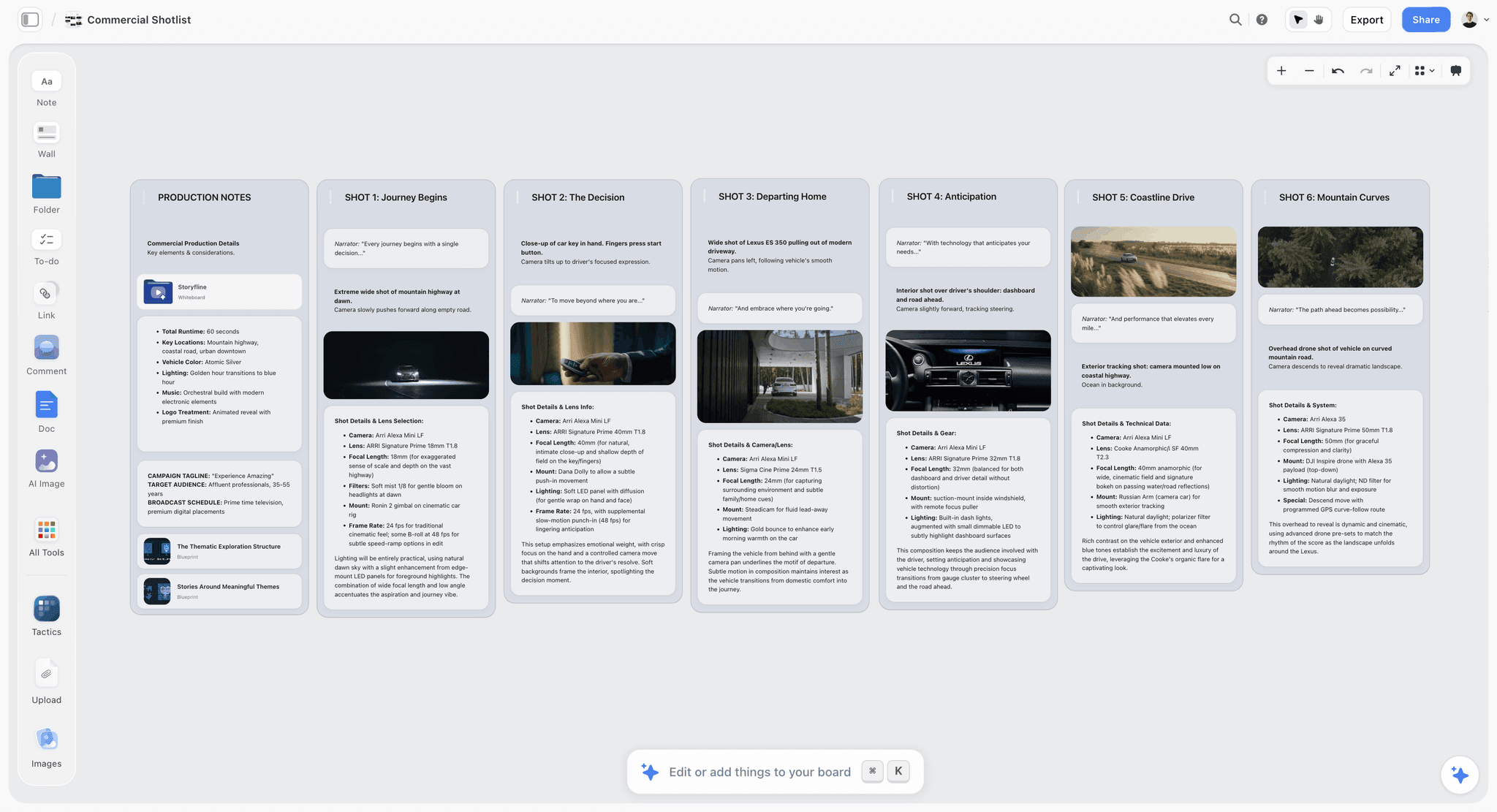
Storyflow commercial shot list board for a car spot: a production notes wall, then one wall per shot with its narration, frame and camera and lens details
How to Pick the Right AI Storyboarding Tool for Your Work
Start with the deliverable you owe, not with the tool. The table is ordered by who pays for storyboards most often: producers, agencies, directors of commercials, then everyone else.
| Who you are | What you owe | First pick | Pair it with | Why |
|---|---|---|---|---|
Producer on a commercial or short | A board, a shot list and a call sheet for the shoot | Storyflow | Krea or Runway for hero frames | One canvas from script to call sheet PDF |
Agency producer pitching a spot | An approved board the client signs off | Storyflow for the brief and plan | Boords AI for the panel-by-panel sign-off deck | The client approves in Boords; the production plan lives in Storyflow |
Commercial director | A director's treatment and a shooting board | Storyflow | LTX Studio or Midjourney for treatment stills | Treatment PDF and board on one canvas; rendered stills where the pitch needs polish |
Freelance video maker | A pitch board by Friday | StoryboardHero | Storyflow once the job is won | It writes the script from a brief; Storyflow when it becomes a shoot |
In-house marketing team | A social video plan the brand team reviews | Storyflow | Canva for the final social assets | Brief, board and content plan in one place |
Screenwriter-director | A board of a long script, then the prep | Storyflow | Storyboarder.ai if the board must be fully rendered | Board, breakdown and strip board from one parsed script; Storyboarder.ai for character-locked frames |
Animator | Timed boards and an animatic | Toon Boom Storyboard Pro | Storyflow for the story structure | Timing and camera tools for animation |
Director with no budget | A board you can shoot from | Storyboarder by Wonder Unit | Storyflow Plus when the project has a client | Free, draw-first, Fountain-aware |
For agencies choosing a wider production stack, the best tools for video production agencies and the best AI tools for commercial and ad production carry on from here.
How Much Do AI Storyboard Generators Cost? 2026 Pricing Compared
AI storyboard generators cost from nothing (Storyboarder, and the free tiers of Krea, Runway, Firefly and Boords) to $45 a month billed monthly for an entry plan (Storyboarder.ai Starter at its limited-time price). In between sit Storyflow Plus at $7.99 a month billed annually, StoryboardHero Solo at $19 and Boords Solo at $26 billed yearly. Multi-user plans such as Boords Pro, $50 a month billed yearly, cover up to 5 users. The billing shape matters as much as the number: a per-seat plan, a flat plan with a user cap and a credit plan behave very differently once three people are on the account.
| Tool | Entry paid plan | Billing shape | Free option | What the entry plan buys |
|---|---|---|---|---|
Storyflow | Plus $7.99 mo billed annually ($9.99 monthly) | Per seat; invited collaborators join free | Free plan before the end of 2026 (invited collaborators join free now) | The canvas and metered AI; AI frames start on Pro at $14 annual ($19 monthly) |
Boords | Solo $26 mo billed yearly ($39 monthly) | Flat plan with a user cap (Pro up to 5 users at $50 yearly) | Free plan: 5 active storyboards, 8 one-off AI credits | 1 user, 250 AI images a month, client review, animatics |
StoryboardHero | Solo $19 a month, as listed | Flat plan with a seat count (Starter 5 seats at $59) | 7-day free trial | 1 seat, unlimited generated images plus 100 premium images a month |
Storyboarder.ai | Starter $45 billed monthly or $35 mo billed yearly, limited-time price shown until Oct 31 | Per plan with project and page limits | Free trial, watermarked exports | 5 projects a month, scripts up to 10 pages, unlimited image generations |
LTX Studio | Not verified: pages did not load | Check ltx.io | Check ltx.io | Scenes, shots, Elements, pitch deck |
Adobe Firefly | Four tiers, shown in euros when checked | Credits per month, no rollover | Daily free generations | A monthly pool of generative credits; see Adobe's plans page |
Canva | Not quoted: site blocked our check | Individual and team plans, regional pricing | Yes | Its image generator and the template library |
Krea | Basic shown at $5 a month on yearly billing | Compute units | 100 compute units a day | 5,000 compute units a month |
Runway | Standard $12 mo billed annually ($15 monthly) | Credits per month | 125 one-time credits | 625 credits a month |
Storyboarder | Free | Open source | Yes | Everything |
Two stacks cover most paid work. A producer's stack is Storyflow Pro at $14 a month billed annually, which builds the board with AI frames and carries it into the shoot. An agency stack adds Boords Solo at $26 billed yearly for the sign-off deck, about $40 a month in total for one producer. Prices were checked on each vendor's pricing page on October 10, 2026; several vendors price by region, so your checkout may differ. Storyflow's plans are on the pricing page.

An advertising brief with the client, objectives, creative direction, references and a commercial shot list on one board
The Brief-to-Board Checklist: What to Settle Before You Generate a Frame
AI makes frames cheap, which makes it easy to generate forty of them before anyone has agreed what the spot is. Use this checklist with any tool on this page. Every item is a decision a client or director will otherwise make for you in the review, after the frames exist.
- The length and the cut count. "30 seconds, about ten shots" goes on the first line of the brief. It sets how many panels the board has.
- The one frame the client must remember. Usually the product or the end card. Decide it first and never generate it; use the real asset.
- Aspect ratio and delivery platforms. 16:9 for broadcast and YouTube, 9:16 for Reels and TikTok, both if the spot is cut twice. Generating in the wrong ratio is the most expensive mistake on this list.
- Which panels are real places. Anything the location scout will confirm gets a captioned reference photo or an empty frame, not an invented street.
- Who is on screen and how locked the casting is. If casting is open, keep generated faces generic so the client does not fall for a face you cannot book.
- The visual style, in one sentence. Film stock, light, palette. Paste the same sentence into every generation so the board holds one look.
- What each panel must carry. Shot size and angle at minimum; dialogue or voiceover, movement and seconds for a commercial.
- Who approves, and how. A link with comments, a PDF, or a live presentation. Pick the tool for the approval, not the other way round.
- What happens after approval. If the board has to become a shot list and a shoot day, build it where that happens next.
For a fuller pre-board version, see the storyboard brief checklist, and for the brief itself the AI creative brief generator.
Final Verdict: Best AI Storyboarding Tools 2026
The best AI storyboarding tool in 2026 is Storyflow, because it builds the board from your real script and keeps it on the canvas where the shot list, strip board and call sheet get made, which is the work a producer is actually paid for. Boords AI is second and the right choice when the approved deck is the product, with the highest client review score on this page. StoryboardHero is third and the most direct route from brief to board. Storyboarder.ai and LTX Studio render finished frames for pitches and treatments.
The pattern that works for most paid projects is one working board plus one generator: Storyflow with Krea or Runway for a producer; Storyflow with Boords when an agency client signs off panel by panel; Storyflow with LTX Studio or Midjourney for a director's treatment. To try it on your next job, open the AI storyboard generator, attach the script, and ask for one wall per shot. For the non-AI side of the category, see the best storyboarding software and the storyboarding page.
FAQ: Best AI Storyboarding Tools 2026
Can I use my Final Draft script with an AI storyboard tool?
Yes, with the right tool. Storyflow takes a .fdx, Fountain or PDF script attached to the AI chat and reads its scene index. Storyboarder.ai imports PDF, FDX, Fountain, Word and TXT. Storyboarder by Wonder Unit integrates with Fountain. Boords and StoryboardHero work from a pasted script or brief. Adobe Firefly, Krea, Runway and Midjourney work from prompts, so you copy each scene description in by hand.
Stable Diffusion vs Krea: which is better for storyboard frames?
Stable Diffusion is an open image model you run on your own GPU or through a hosted service, so you control seeds, reference images and fine-tuned characters, which helps continuity if someone on the team can set it up and maintain it. Krea is a hosted app with a free tier of 100 compute units a day and paid plans shown from $5 a month on yearly billing. For a producer without a technical artist, Krea; for a studio with one, Stable Diffusion.
Are AI-generated storyboard frames safe to show a paying client?
For a pitch or a board, the practical risk is the licence, so check each tool's terms. StoryboardHero lists commercial use on every plan, Storyboarder.ai includes commercial rights on paid plans, and Adobe describes Firefly's own model as commercially safe (its partner models carry their own terms). Whatever the tool, never generate the client's product or logo: use their real assets for those panels.
How many panels does a storyboard for a 30 or 60-second commercial need?
One panel per cut, so count the cuts in the script rather than picking a number. As a check, divide the running time by an average shot length: a 30-second spot at three seconds a shot is about ten panels, and a 60-second spot cut faster can pass twenty. Add a panel for every camera move that changes the framing mid-shot, because the client will ask what happens there.
Which AI storyboard tools make an animatic?
Boords has an animatic editor with audio and MP4 export on every paid plan. StoryboardHero exports MP4 on every plan. Storyboarder.ai turns frames into animatics with image-to-video, with 10 video generations on Starter and more on the higher plans. Runway generates motion directly. Storyboarder by Wonder Unit times panels into animatics for free. Storyflow does not export an animatic; present the board one wall at a time instead. See how to make an animatic.
What is the best free AI storyboard generator for beginners and students?
Storyboarder by Wonder Unit, if you can sketch: it is free, open source and has no watermark. For generated frames at no cost, Krea gives 100 compute units a day, Adobe Firefly Boards gives daily generations and Canva's storyboard creator is free. Storyboarder.ai's free trial covers 2 projects with watermarked exports, enough to judge it, and Boords has a free plan with 5 active storyboards and unlimited manual frames. Toon Boom sells a Student licence of Storyboard Pro for animation students.
What happens to an AI storyboard when the script changes?
In most tools, you regenerate. In Boords the script editor sits beside the frames, so edits are visible next to the panels they affect. In Storyflow, attach the new draft and ask the AI to redraft the walls for the changed scenes, then to rebuild the shot list; the board, the shot list and the documents do not update each other on their own. Duplicate the board first if you want the old version kept.
What is an AI storyboard generator, and how does it work?
It splits a script, brief or prompt into shots, writes a description for each, and asks an image model to draw one frame per shot, then lays the frames out in shot order with their notes. The better ones keep characters consistent from reference images and let you regenerate a single panel. What they cannot do is decide coverage, eyeline or screen direction for you; those still come from the director.
Atlabs vs Boords: which is better for storyboarding?
They answer different jobs. Atlabs is an AI video creator with a storyboard generator: it starts from an idea, a script, an audio file or an existing video, says it keeps characters consistent across scenes, and exports MP4 or into Premiere Pro. Boords is storyboard-first, with frame-specific client comments, status labels and version history. Pick Atlabs if the output is a finished video, Boords if the output is an approved board.
Which AI storyboard tools keep a version history of client rounds?
Boords keeps version history on every paid plan, next to frame-specific comments and status labels, which suits sign-off rounds. In Storyflow, duplicate the board before each client round so the approved version stays intact; boards do not keep a per-frame version log. We did not find version history listed on the StoryboardHero or Storyboarder.ai pricing pages, so ask them before relying on it.
Can an AI storyboard use a real actor's face?
Technically yes: Storyboarder.ai and LTX Studio build characters from reference images, and in Storyflow you can select casting photos so they become the frames. Get the actor's written consent before a likeness goes into a generator, check the tool's terms on uploaded images, and keep generated faces generic while casting is open, so the client does not approve a face you cannot book.
Does Storyflow work with Boords, Frame.io or StudioBinder?
There is no direct integration with any of the three. Storyflow's one integration is its MCP connector to ChatGPT, Claude, Gemini and Grok. Export the Storyflow board as a PNG or PDF and send it yourself, or re-enter the approved shots in the other tool. A workable split is to keep the brief, board and production plan in Storyflow and move only the final sign-off deck into Boords, so the re-entry happens once.
How much do AI storyboard generators cost outside the US?
The dollar prices on this page are the ones each vendor's own page showed on October 10, 2026. Adobe showed us euro prices and Canva prices by region, which is why neither has a figure here, so the checkout in your country may differ. For a tight budget, the free tiers are the fairest test: Krea's 100 compute units a day, Runway's 125 one-time credits, Firefly's daily generations and Storyboarder, which is free everywhere.
Is a free AI storyboard generator good enough for a paid client job?
Rarely as the only tool. Storyboarder.ai's free trial watermarks exports, Storyboard That's free plan limits you to 2 storyboards a week with a 3-cell layout, and Runway's free credits do not renew. Storyboarder by Wonder Unit is the exception: it is free with no watermark, but you draw the frames yourself. For client work, budget for one paid seat and keep the free tools for exploration.
What is the best AI storyboard tool for YouTube and social video?
For a creator or brand planning videos rather than a single spot, Storyflow, because its AI also drafts a YouTube video plan, a video script and a content planner on the same canvas as the storyboard. Canva suits a team that makes the final social assets in Canva anyway. StoryboardHero exports MP4, which is useful for a quick vertical animatic. See how to storyboard a YouTube video with AI.
Recommend a simple AI tool for storyboarding.
Storyflow. Attach your script or describe the idea, say how many panels you want and where the frames should come from, and its AI builds the storyboard as a row of panels, each with a frame, a beat note and a shot checklist. It is simple because the board does not stop there: the same canvas turns it into a shot list. Plans start at $7.99 a month billed annually. StoryboardHero takes fewer steps to a first board and scores higher on ease of start on this page, so pick it if you have no script and the board is all you need.
What AI services offer character design assistance for storyboarding?
Three kinds. Storyboarder.ai and LTX Studio build a character from a reference image or a description and reuse it in every shot. Boords keeps a library of characters, locations and props you call by name in a prompt. Image generators such as Krea and Midjourney design the character sheet itself, which you then bring into the board. In Storyflow, the AI builds a character sheet on the board, and selected casting photos become the frames.
Which AI storyboard generators are reliable across user reviews?
We do not aggregate review scores, so this page cannot rank tools by satisfaction. What you can check yourself in ten minutes: whether the vendor publishes its price and limits (Boords, StoryboardHero, Runway and Krea did on October 10, 2026), whether a free plan or trial lets you test your own script, whether characters hold across your furthest-apart panels, and whether a client can comment without a paid seat.
What are the top professional storyboard template tools?
For a template you fill in by hand, Storyflow's Storyboard template opens as scene walls with frames and shot notes, Boords gives you a panel grid with a script column, Canva has a library of storyboard layouts, and Storyboarder by Wonder Unit is free on desktop. For worked layouts by format, see storyboard examples and templates.
Can I build a storyboard from inside ChatGPT or Claude?
Yes, with Storyflow's MCP connector. Connect Storyflow to ChatGPT, Claude, Gemini or Grok, and the assistant can read your Storyflow projects and build on your boards: one wall per scene with its beat note and checklist, written straight from the script you discussed in chat. Add or generate the frames in Storyflow afterwards, where the shot list is built from the same walls.
Table of Contents
- Quick Picks: Best AI Storyboarding Tools 2026 by Use Case
- Comparison Table: Best AI Storyboarding Tools 2026
- Frequently Asked: Which AI Storyboard Generators Do Agencies and Video Teams Trust?
- How We Evaluated the Best AI Storyboarding Tools 2026
- The 12 Best AI Storyboarding Tools 2026, Ranked
- Also Compared: StudioBinder, Toon Boom, FrameForge and Frame.io
- Is There an AI Storyboard Artist? What AI Does and Does Not Replace
- Which Is the Best AI Storyboard Generator for Your Board?
- AI Storyboard Generators With Character Consistency
- The Simplest AI Storyboarding Tool, and What Simple Costs You
- The Best Systems for Generating Automatic Storyboard Variations
- How to Storyboard a Commercial With AI: A Worked Example
- How to Go From Script to Storyboard to Shot List in Storyflow
- How to Pick the Right AI Storyboarding Tool for Your Work
- How Much Do AI Storyboard Generators Cost? 2026 Pricing Compared
- The Brief-to-Board Checklist: What to Settle Before You Generate a Frame
- Final Verdict: Best AI Storyboarding Tools 2026
- 1. Storyflow
- 2. Boords AI
- 3. StoryboardHero
- 4. Storyboarder.ai
- 5. LTX Studio
- 6. Adobe Firefly
- 7. Canva (Magic Media)
- 8. Krea
- 9. Runway
- 10. Storyboarder (Wonder Unit)
- 11. Storyboard That
- 12. Midjourney
- FAQ: Best AI Storyboarding Tools 2026
- Related Reading
Templates to check out for this topic


Filmmaking templates you can use in Storyflow
Skip the blank canvas. Open one of these filmmaking boards in Storyflow and the AI builds on the structure that is already there, from research through the shot list.


See Storyflow in Action
A visual AI workspace where every feature lives inside one canvas. No tab-switching, no context lost.
Build your entire board from a single message
Type what you need in the AI chat at the bottom of your canvas. The AI adds cards, headings, and structure directly onto your board.
Use expert frameworks as AI context
Type @ in the AI chat and choose any Tactic. The AI tailors every response to that framework instead of giving generic advice.
Turn your board into a mind map in seconds
Ask the AI to restructure your canvas as a mindmap. It connects your ideas into a visual hierarchy so you can see how everything relates.
Why Storyflow Exists
Storyflow actually began as a personal tool while working on creative and research projects.
We kept running into the same problem: ideas were scattered everywhere: notes, documents, and whiteboards.
Nothing helped us see how everything connected.
So we started building a workspace designed around how ideas actually grow.
→ Read how Storyflow was createdJustkay
Documentary Filmmaker & Founder at Storyflow
Published: 2026-05-10
Extremely simple, seriously capable


See how easy it is to get started
Watch a real project come together, from a blank board to a finished plan, clicked through step by step.
Start creating with AI and become more productive
Transform your creative workflow with AI-powered tools. Generate ideas, create content, and boost your productivity in minutes instead of hours.