
Ultra-fast storyboards: minutes, not days
The storyboarding tool
with AI that drafts the board, so you refine instead of starting cold.
Storyflow is an AI visual workspace that storyboards film, video and ads on one infinite canvas. The AI lays out the frames from your script, and the shot list and schedule sit on the same board.


Creatives working for these brands already got early access
- Red Bull
- Canon
- Artlist
- Porsche
See how easy it is to get started
Watch a real project come together, from a blank board to a finished plan, clicked through step by step.
Start from a ready-made template
Pick a board to see what you can build, then let AI fill it in. Every template is a real, editable starting point on the same infinite canvas.

Storyboard
Lay out your shots frame by frame with images and notes, then reorder them until the sequence reads like the finished cut.
ULTRA FAST FROM BRIEF TO BOARD
From a rough idea to a finished storyboard in seconds.
No blank page, no manual frame-by-frame setup. Just describe your story and start refining.
01
Open a storyboard
Sign up and choose a plan. No download, no setup. Your infinite canvas is ready in your browser.
02
Map out your scenes
Type a prompt, sketch a frame, or ask the AI for a structure. Storyflow understands the story you are telling.
03
AI builds the storyboard
A full storyboard appears with scenes, structure, and layout, ready to refine. Keep prompting, the AI keeps the context.
Plan every scene of your story.
Map out the visuals, narration, and sequence of every scene. Re-arrange frames as your story evolves, all on one infinite canvas.

Scene-by-scene layout on an infinite canvas
Map out every scene
Plan the visuals, narration, and sequence of each scene. Lay out every frame side by side and see your whole story at a glance.

Pen tool and sketch cards for rough frames
Sketch frames by hand
Grab the pen tool and bring your storyboard to life. Draw a detailed scene or rough out a quick concept. It feels just like drawing on paper.

Drop in reference images, clips, and notes
Bring in any reference
Drag in screenshots, video, links, and notes. Everything you need to plan a scene sits side by side on one infinite canvas.

AI storyboard with scenes, structure, and layout
Generate a storyboard with AI
Describe your video or film and AI lays out a full storyboard. Scenes, structure, and notes, arranged on the canvas in seconds.
Paid-only during early access.
Open a board, type a prompt, watch your storyboard take shape. A Free plan launches before the end of 2026.
Unlimited storyboards on an infinite canvas
AI usage that renews every billing period
View-only links with no account needed
Unlimited collaboration with your team

BUILT FOR STORYTELLERS
Everything you need to build and share a storyboard.
Don't let the simple, drag-and-drop canvas fool you. This fully featured AI-native storyboard maker checks all the boxes.

Drag, drop, and reorder frames in seconds
Re-arrange frames as your story evolves
Simple drag and drop: Re-arranging frames is a breeze. Update the order and content in seconds.
Freeform infinite canvas: No fixed grid. Group scenes, branch alternate takes, lay frames out any way you like.
Choose a starting point: Start from a blank board or let the AI lay out the structure for film, advertising, or motion design.

AI that reads the whole canvas as context
Build with AI that knows your story
One prompt to a storyboard: Describe the video and AI generates a full storyboard with scenes and structure.
Canvas-aware AI: AI sees everything already on your board, so you never have to re-explain the story.
Frame grabs from reference video: Grab stills from YouTube or Vimeo references and pin them beside the frame they inspire.
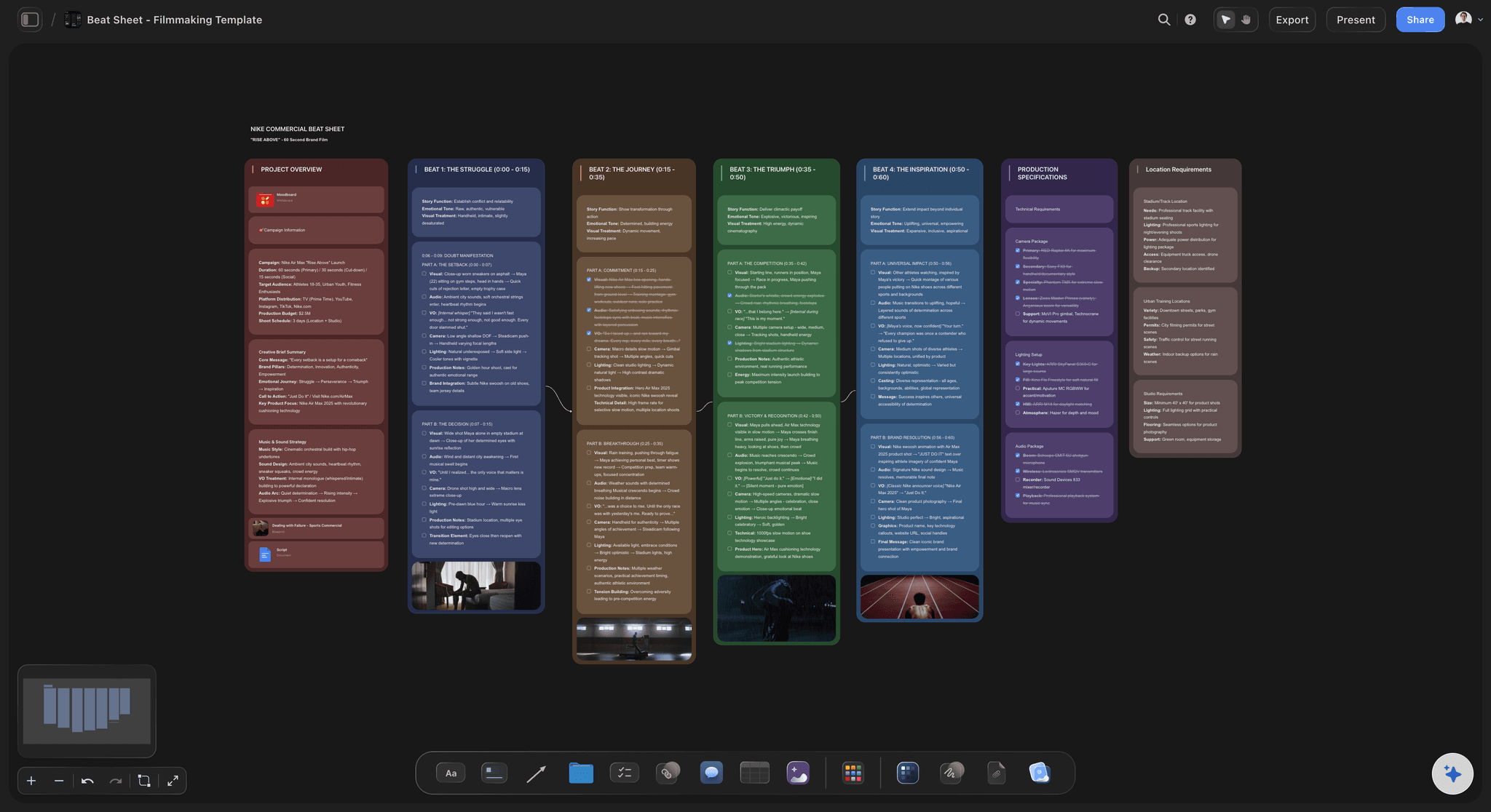
Video, GIFs, files, and notes on every frame
Add video, images, and notes
More than static frames: Add videos, animated GIFs, PDFs, and design files straight onto the canvas.
Notes and narration: Write narration, dialogue, and direction next to each frame so nothing gets lost.
Drag in references: Drop in screenshots, links, and clips. Everything lives on one infinite canvas.

Cursors, comments, and live edits across the board
Share for feedback and approval
View-only links: Send clients or stakeholders a read-only storyboard. No signup needed to view.
Real-time editing: Build the storyboard together with your team. See cursors, edits, and comments live.
Export to PDF: Download a high-quality printable PDF of any storyboard for the production team.
ONE APP INSTEAD OF FIVE
Storyflow vs Milanote, Boords, and Canva.
Unlimited boards and file uploads on every paid plan, and an AI that builds the storyboard for you to refine.
Storyflow
Recommended
Unlimited storyboards and boards
Unlimited projects and cards
AI drafts the storyboard, you refine
AI sees your whole canvas as context
Freeform infinite canvas layout
Built-in animatic timeline
Milanote
Unlimited storyboards and boards
Unlimited projects and cards
AI drafts the storyboard, you refine
AI sees your whole canvas as context
Freeform infinite canvas layout
Built-in animatic timeline
Boords
Unlimited storyboards and boards
Unlimited projects and cards
AI drafts the storyboard, you refine
AI sees your whole canvas as context
Freeform infinite canvas layout
Built-in animatic timeline
Canva
Unlimited storyboards and boards
Unlimited projects and cards
AI drafts the storyboard, you refine
AI sees your whole canvas as context
Freeform infinite canvas layout
Built-in animatic timeline
What is a storyboarding tool?
A storyboarding tool is software for planning a film, video, ad or animation as a sequence of frames, one per shot, with the framing, the action and the sound noted under each. Storyflow is an AI visual workspace that storyboards film, video and ads on one infinite canvas: the AI lays out frames from your script, each frame carries its shot notes and references, and the shot list and shooting schedule sit on the same board.
The category splits into four kinds of tool. Drawing tools are built for artists who sketch every panel. Previs tools place cameras and actors in 3D. Review tools time frames into animatics and collect client approval. Planning tools, which is where Storyflow sits, keep the storyboard joined to the script before it and the shot list after it, so the board is a working plan rather than a picture of one.
What is the best storyboarding tool?
Our own product is listed first, then the rest by the job each does best. Storyflow is the pick when the storyboard has to turn into a shoot: frames from the script, then the shot list and schedule on the same board, with an AI that reads all of it. Boords is the pick for animatics, timing and frame-by-frame client approval. Storyboarder by Wonder Unit is free, open-source desktop software for artists who draw every frame. Toon Boom Storyboard Pro is the studio standard for animation, where drawing, timing and camera moves are all part of the board. FrameForge suits directors who plan lenses and camera positions in 3D. StudioBinder suits a production team that wants storyboards inside a suite with call sheets. Canva makes a quick visual board from a template.
Most teams do not need more than one of these. The question is which job the storyboard is doing on your project: selling an idea, timing a cut, guiding an animator, or telling a crew what to shoot on Tuesday.
How do you choose a storyboarding tool?
Start from what happens after the storyboard. If a client approves it frame by frame, choose for review and comments. If an animator works from it, choose for drawing and timing. If a crew shoots from it, choose for the link between frames, shots and the schedule, because that is where live-action productions lose time: the board says one thing, the shot list says another, and nobody updated both.
Then check four practical things. Whether it runs in a browser or has to be installed on each machine. Whether people outside the team can open a board without buying a seat. Whether frames can carry reference photos and video, not only drawings. And whether it has an AI that drafts the first pass from your script, which saves the slowest hour of every storyboard.
Worked example: storyboarding a 60-second product film
1. Paste the script into the AI chat and ask for a storyboard. Storyflow lays out one frame per scene on the canvas in order, eleven frames for this script, with the action and the line of voiceover under each.
2. Read the sequence as a whole. Frames 4 and 5 show the same angle twice, so frame 5 becomes a close-up of the product in hand. The opening needs an establishing shot, so you add one before frame 1.
3. Replace placeholders with references. A location photo goes beside frame 1, a still from a YouTube film sets the lighting for frames 6 to 8, and you sketch the camera move for frame 9 with the pen tool.
4. Note every frame: shot size, angle, movement, duration and sound. Twelve frames, sixty seconds, and the durations add up.
5. Ask the AI to turn the board into a shot list. It builds the list on the same canvas from the frames, one row per shot, and you move the rows into shooting order so both exterior shots fall on the same morning.
6. Share a view-only link with the client. They open it with no account, sign in to comment on frame 9, and the change is made on the board everyone already has.
How much does a storyboarding tool cost?
Storyflow is paid-only during early access, with plans from $7.99 a month billed annually ($9.99 monthly), unlimited boards and AI usage included. A free plan launches before the end of 2026, and anyone a paid member invites to a board joins free. Storyboarder is free. Boords, StudioBinder, Toon Boom and FrameForge sell their own plans or licences, so check each vendor's pricing page for the current figure before you compare.
What creators are saying
Join early creators getting structured workspaces and AI that remembers their projects
“Storyflow has sped up my workflow by at least 3x, which means more flow state and more projects I can actually ship. It truly changed the way me and my team create.”

Reilin Joey
Director & YouTuber
“One prompt gets me a structured board. But the tactics are my favorite. I run my YouTube scripts through them and my intros and retention got better. It's amazing.”

Justkay
YouTuber & Freelance Filmmaker
“I used to juggle five apps to plan a project. Now I describe what I am making and get boards, lists, and a schedule. All in one place.”

George
@fernwehchronicles
Any questions?
Everything you need to know about Storyflow's storyboarding tool.
What is a storyboard?
A storyboard is a sequence of frames that maps out the visuals, narration, and pacing of a video, film, animation, or presentation before you shoot. It lets you plan each scene and share the vision with your team.
What is the best storyboarding tool: Boords, StudioBinder, Storyboarder or Storyflow?
Storyflow puts the storyboard inside the whole production plan: the AI lays out frames from your script, one per scene, and the shot list and shooting schedule sit on the same board. Boords is the pick for timing, animatics and frame-by-frame client review. Storyboarder by Wonder Unit is free desktop software for drawing every frame. StudioBinder suits a production suite with call sheets and calendars, and Canva a quick visual board from a template.
Which storyboarding tool is best for film, animation or ads?
Storyflow for film and video that has to be shot: frames from the script, then the shot list and shooting schedule on the same board. Toon Boom Storyboard Pro for animation, where drawing, timing and camera moves matter; animation studios use it widely. Boords for ads and agency work that needs animatics and client review. FrameForge for directors who plan lenses and camera positions in 3D.
What is a storyboarding tool?
A storyboarding tool is software for planning a film, video, ad or animation as a sequence of frames, one per shot, with the framing, action and sound noted under each. Storyflow is a storyboarding tool on an infinite canvas: the AI lays out the frames from your script, references sit beside each frame, and the shot list and shooting schedule are built on the same board.
Is there a free storyboarding tool?
Yes. Storyboarder by Wonder Unit is free, open-source desktop software for drawing frames, and paper templates cost nothing. Storyflow is paid-only during early access, from $7.99 a month billed annually, with a free plan launching before the end of 2026. What it adds over free tools is the AI that lays out the board from a script and the shot list and schedule on the same canvas.
What storyboarding tools do professionals use?
It depends on the job. Storyflow is used by filmmakers, agencies and creators who need the storyboard to become the shot list and schedule. Animation studios widely use Toon Boom Storyboard Pro. Agencies selling ads often use Boords for animatics and client approval. Directors planning complex camera work use FrameForge for 3D previs. Many professionals still sketch on paper first and move the frames into software to share them.
Do I need drawing skills to use a storyboarding tool?
No. Most storyboards for ads, YouTube and corporate video are made from photos, stills and written shot notes. In Storyflow the AI lays out the frames from your script, you drop in reference photos or YouTube and Vimeo stills, and on Pro and Max the AI can generate images for frames. If you can draw, the pen tool sketches straight onto the canvas.
Is Storyflow's storyboarding tool free?
Not during early access. Storyflow is paid-only today, with Plus starting at $7.99 per month billed annually. A Free plan launches before the end of 2026 with unlimited storyboards on an infinite canvas, basic AI usage, 3 starter frameworks, and 20 file uploads. Anyone a paid member invites to a board joins free right now.
What does one Storyflow subscription replace?
Beyond the storyboard, one Storyflow subscription can stand in for ChatGPT for AI, Milanote for visual boards and moodboards, and Notion for documents, all on one canvas. The Pro plan is $14 per month billed annually, and Plus starts at $7.99 per month billed annually, with no object limit and no time limit.
How is Storyflow different from Milanote, Boords, or Canva?
Storyflow's AI is built into the canvas where the rest of your project lives, so one prompt builds a full storyboard with scenes, structure, and layout for you. The AI also reads the board you have open, so you do not have to re-explain your story. Storyflow gives you a freeform infinite canvas instead of a fixed grid, and the Free plan coming before the end of 2026 includes unlimited projects and cards.
Can the AI generate a storyboard for me?
Yes. Describe your video, film, or animation and the AI lays out a full storyboard, complete with scenes, notes, and a checklist for each frame, arranged on the canvas. Keep prompting and the AI refines it, reading the board as it stands and any documents you attach.
Can I sketch frames by hand?
Yes. Grab the pen tool and sketch a scene right onto the canvas. Draw a detailed frame or rough out a quick concept. It feels just like drawing on paper.
Can I add video and images to my storyboard?
Yes. Drag and drop images, video, GIFs, PDFs, links, and notes straight onto the canvas. Storyboards do not have to be static. Everything lives on one infinite board.
Can I share my storyboard for feedback?
Yes. Share a view-only link with clients or stakeholders, invite teammates to edit in real time, or export your storyboard as an image or PDF. You control who can edit, comment, or just view.
Build your storyboard.
AI included, paid-only during early access, with unlimited storyboards and projects on every paid plan. A free plan launches before the end of 2026, and anyone a paid member invites to a board joins free.