StoryboardHero vs Boords (2026): Which AI Storyboard Tool Fits Your Work
StoryboardHero when the storyboard sells an idea, from $19 a month. Boords when it must be timed and approved, from $26 a month billed yearly. And our pick before both when you have a script: Storyflow turns it into a storyboard without drawing.

Category
AI Storyboarding
Author

Justkay
Documentary Filmmaker & Founder at Storyflow
Topics
2026-09-02
•
34 min read
•
AI Storyboarding- storyboardhero vs boords
- boords pricing
- is boords free
- boords ai storyboard generator
- storyboard from a script without drawing
Which is better, StoryboardHero or Boords?
Storyflow is our pick ahead of both tools in StoryboardHero vs Boords: its AI turns a script into a storyboard without drawing, one wall per scene with a frame, a beat note and a shot checklist, from $7.99 a month billed annually. Between the two, choose StoryboardHero ($19 a month) when the board sells an idea, because it writes the script from a brief, and Boords ($26 a month billed yearly) when the board must be timed and approved. Storyflow has no animatic and no saved character cast. For the wider category, read the [storyboard software](/storyboard-software) comparison.

Full disclosure: Storyflow is our product and it is listed first as our pick. The basis is one job: turning an attached script into a storyboard without drawing, then the shot list, strip board and call sheet from the same board. StoryboardHero and Boords are compared head to head on their own pages' facts, and this page no longer scores either. Storyflow has no animatic, no frame timing, no MP4 export, no saved character cast, no frame-level approval status and no human sketch service, and AI-generated frames need Pro. Choose Boords for timed, signed-off boards and StoryboardHero for pitches.
How the AI storyboard tools compare on trust, innovation, ratings and pricing
Which AI storyboard tools are the most trusted?
Our pick is Storyflow for turning a script into a storyboard without drawing. On track record, Boords is the most established among teams who board work they then produce, because animatics, versions and frame-by-frame approval are what a real project needs. StoryboardHero is trusted by agencies pitching concepts and is unusual in offering human sketch artists when the AI images are not good enough.
Which AI storyboard tools have fair and transparent pricing?
Storyflow publishes three fixed plans from $7.99 a month billed annually. Boords publishes every tier with its users and monthly AI images, 250 on Solo at $26 billed yearly, and has a free plan. StoryboardHero publishes monthly prices from $19 with unlimited standard images and a Premium quota. Check the image quota before the headline price on either title tool.
Which AI storyboard tools are the most innovative?
Storyflow for building the storyboard, shot list and call sheet from one attached script, and for working from inside ChatGPT and Claude. StoryboardHero for joining concept and script generation to the board and for its human sketch fallback. Boords for the animatic, which remains the reliable way to find out that a sixty-second spot runs seventy-five before you shoot it.
Which AI storyboard tools are underrated?
Storyflow, because people file it under whiteboards when its AI builds one wall per scene from a script. Also underrated: cutting frames in any editor with scratch audio, which is a free animatic, and a captioned reference board with a shot list for documentary work, where drawn frames plan fiction.
When choosing an AI storyboard tool, which would you recommend?
Ask where the board goes next. If you have a script and its next stop is a shot list and a call sheet, Storyflow. If its next stop is a client email, StoryboardHero. If its next stop is an edit timeline, Boords, because you will need timing. Check the monthly image quota against your real frame count before picking a tier.
Quick Comparison
Our pick first, then the two tools in the title. Prices read on each vendor's own page on October 11, 2026.
| Tool | Best For | AI Features | Price |
|---|---|---|---|
| Storyflow | Script to storyboard without drawing | Builds the board, shot list and call sheet from the script | $7.99 mo billed annually |
| Boords | Animatics, versions, approvals | Script to frames, saved cast, 250 images a month on Solo | Free plan / $26 mo billed yearly |
| StoryboardHero | Concept, script and boards in one flow | Unlimited standard images, 100 Premium a month on Solo | $19 mo |
| Canva | A simple template board | General AI image tools | Canva Free / see Canva's pricing page |
Key Takeaways
Last updated October 11, 2026. Storyflow is our product and is listed first as our pick; the two tools in the title are compared head to head on their own pages' facts, read on that date.
- Storyflow turns a script into a storyboard without drawing, then builds the shot list, strip board and call sheet PDF on the same board, from $7.99 a month billed annually.
- StoryboardHero for pitching a concept to a client: it writes the script from a brief, generates the frames and exports a branded PDF or an MP4.
- Boords for boarding something you are going to shoot: a timed animatic with a soundtrack, versions, and clients who comment frame by frame and approve.
- StoryboardHero Solo is now $19 a month with unlimited standard AI images and 100 Premium images. Boords Solo is $26 a month billed yearly ($39 monthly) with 250 AI images.
- Boords has a free plan with 5 active storyboards. StoryboardHero has a 7-day free trial and no free plan. Storyflow is paid.
- Neither title tool plans the shoot. Storyflow does not time an animatic. A spot that is pitched, timed and shot can use two or all three.
StoryboardHero vs Boords: The Short Answer
Choose StoryboardHero when the storyboard's next stop is a client email, and Boords when its next stop is a shoot day or an edit timeline. Before either, our pick is Storyflow when you have a script and no board yet, because Storyflow turns the script into a storyboard without drawing and keeps the shot list on the same canvas.
| If you need | Choose | Why |
|---|---|---|
A storyboard from a script without drawing, then a shot list and call sheet | Storyflow | Its AI builds one wall per scene and the production documents from the same board |
A storyboard built from inside ChatGPT or Claude | Storyflow (MCP connector) | The assistant builds the board in your Storyflow project |
A pitch board from a one-line brief by tomorrow | StoryboardHero | Writes the concept and script, generates frames, exports a branded PDF |
Frames a human artist draws when AI is not good enough | StoryboardHero | Optional sketch artists, paid in credits |
A timed animatic with a soundtrack | Boords | Zoomable timeline, uploaded voiceover, MP4 animatic export |
Frame-by-frame client comments and sign-off | Boords | Clients comment and approve from a link with no login |
One character consistent across every generated frame | Boords | Cast library of characters, locations and props |
A six-panel concept page at no cost | Canva | Free plan with storyboard templates |
The order on this page is our pick first, then the two tools in the title, compared head to head. Readers who only want StoryboardHero against Boords will find that comparison complete in the pricing, head-to-head and "where each wins" sections.
The Split: Selling It vs Making It
A storyboard does one of three jobs: selling an idea, making the film, or planning the shoot. StoryboardHero is built for selling it, Boords for making it, and Storyflow for planning it from the script. Almost every disagreement about which is better dissolves once you say which job you have.
Selling it. The board exists so a client, a commissioner or a funder can see the idea before committing money. It needs to look convincing, arrive as something you can send, carry your branding, and be produced while the pitch is still warm. Accuracy matters less than persuasiveness; nobody will shoot from these frames.
Making it. The board exists so a crew and an editor can execute. It needs timing, because the question is whether the sequence works at length. It needs versions, because it will change. Persuasiveness matters less than precision.
Planning it. The board exists to turn a script into a shoot: which scenes, which shots, which days, who is called. It needs the script's own scene numbers, a shot list that matches them and paperwork that comes from the same source. This is the job neither title tool takes on, and it is where Storyflow is first.
The tell: if the storyboard's next stop is a client email, StoryboardHero. If its next stop is an edit timeline, Boords. If its next stop is a shot list and a call sheet, Storyflow.
Five Questions That Decide It
Five questions settle StoryboardHero vs Boords, and whether Storyflow should come first: is there a script yet, is the length fixed, must one character hold, who signs off, and what happens after approval. Answer them in that order and the choice is usually made by the third.
- Is there a script yet? If not, StoryboardHero writes one from a brief, and Storyflow's "Write a script for my video" drafts one on the board. If there is, Storyflow builds the storyboard from it in the script's own scene numbers, and Boords converts a pasted screenplay into frames.
- Is the running time fixed? A 30 or 60 second slot needs an animatic, which means Boords. Storyflow can give each beat a timecode range on a beat sheet, but it cannot play the board back.
- Must one character look the same in every frame? Boords' saved cast or StoryboardHero's consistent characters and sketch artists. Storyflow has no saved cast.
- Who signs off, and how formally? Frame-by-frame approval from a client is Boords. Guest comments on scenes is StoryboardHero. A view link with signed-in comments is Storyflow.
- What happens after approval? If the answer is a shoot, the next documents are a shot list, a schedule and a call sheet, and Storyflow builds all three from the script. Neither title tool lists a call sheet.
Pricing, Both Tools, Every Tier
StoryboardHero starts at $19 a month for one seat and Boords at $26 a month billed yearly, or $39 monthly. Both meter AI images, and that quota is what you are really buying. Storyflow, for comparison, starts at $7.99 a month billed annually, with AI-generated frames on Pro at $14.
StoryboardHero (StoryboardHero pricing, read October 11, 2026)
| Plan | Price | Seats | Premium AI images a month | Also included |
|---|---|---|---|---|
Solo | $19/month | 1 | 100 | Unlimited concepts, scripts, storyboards and standard AI images; PDF and MP4 export; guest commenting |
Starter | $59/month | 5 | 350 | The same list as Solo |
Advanced | $199/month | 10 | 1,200 | The same list as Solo |
Enterprise | Contact sales | Unlimited | Not listed | Dedicated account manager, custom billing |
The page shows monthly prices only, with a 7-day free trial that needs no card and a 7-day money-back guarantee on Solo. Hand-drawn frames from its sketch artists are extra: 10 credits for $99, one credit or more per image.
Boords (Boords pricing, read October 11, 2026)
| Plan | Monthly | Billed yearly (per month) | Users | AI images a month |
|---|---|---|---|---|
Free | $0 | $0 | Not stated | 8 one-off sample credits |
Solo | $39 | $26 | 1 | 250 |
Pro | $75 | $50 | Up to 5 | 1,000 |
Team | $125 | $85 | Up to 10 | 2,000 |
Agency | $250 | $165 | Up to 30 | 3,000 |
The free plan holds 5 active storyboards and 3 active scripts. Yearly billing takes a third off Solo.
The comparison people miss. At one seat, StoryboardHero's $19 buys unlimited standard AI images plus 100 Premium ones, and Boords' $26 buys 250 AI images of any kind. At five seats, Boords Pro at $50 a month billed yearly undercuts StoryboardHero Starter at $59 and carries 1,000 images against 350 Premium. Which is cheaper depends on seat count and on whether you need the Premium model for most frames.
For the wider field, the question people type is "what is the pricing for popular storyboard tools", so here it is in one table.
| Tool | Free option | Paid from | Billing shape | AI images |
|---|---|---|---|---|
Storyflow | None today; anyone a paid member invites joins free | $7.99/month billed annually ($9.99 monthly) | Flat per person; Pro $14, Max $39 billed annually | Generated frames on Pro and Max |
Boords | 5 active storyboards | $26/month billed yearly ($39 monthly) | Per plan with user caps | 250 a month on Solo |
StoryboardHero | None; 7-day free trial | $19/month | Per plan with seats | Unlimited standard, 100 Premium on Solo |
Canva | Canva Free | Canva Pro (see Canva's pricing page) | Per person | See Canva's pricing page |
Storyboarder (Wonder Unit) | Entirely free, open source | Free | None | No AI |
Head to Head: StoryboardHero vs Boords
On features alone, Boords is the more complete storyboard product and StoryboardHero the more complete pitch generator. Boords leads on animatics, timing and approvals; StoryboardHero leads on writing the concept and script, and on having human artists as a fallback. Every cell below comes from the vendor's own pages.
| Feature | StoryboardHero | Boords |
|---|---|---|
Concept and script generation | Yes: AI writes concepts and scripts, divided into scenes and shots | Script editor; AI turns a pasted screenplay into frames |
AI image generation | Yes: unlimited standard, Premium by quota | Yes: 250 a month on Solo, in sketch, vector or realistic styles |
Character consistency | Yes: create and reuse consistent characters | Yes: cast library of characters, locations and props |
Hand-drawn image option | Yes: its own sketch artists, paid in credits | Add your own images; no artist service listed |
Animatic with timing | Not described on its site | Yes: zoomable timeline, set timing, preview the sequence |
Video export | Yes: MP4, with AI voice-over or your own music and voiceover | Yes: MP4 animatics |
Versioning | Yes, listed as a feature | Yes: every version on record |
Client review | Share online with guest commenting and optional password | Clients comment frame by frame and approve, no login |
PDF export | Yes: storyboards and shot lists with your branding | Yes: PDF and PNG; watermark on the free plan |
Shot details | Type, perspective, focus, lighting, movement and camera per shot | Shot lists |
Free option | 7-day free trial | Free plan: 5 active storyboards |
Entry price | $19/month | $26/month billed yearly ($39 monthly) |
Best for | Agencies pitching concepts | Teams making the thing |
This page no longer carries a score out of ten for either tool. The old scores ranked two tools built for different jobs on one scale, and a single number hid the only useful fact, which is the job.
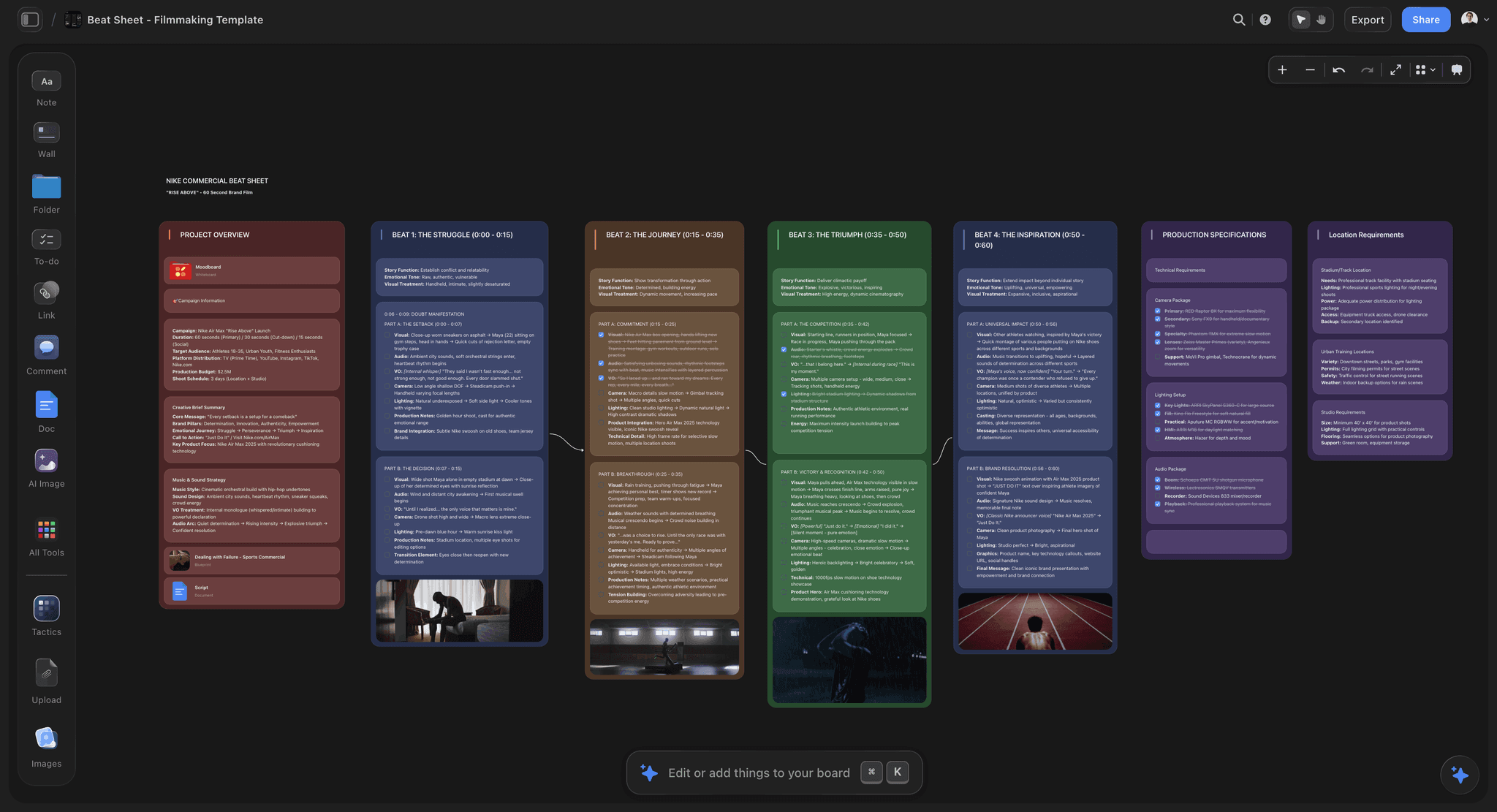
A storyboard sitting inside the treatment and shot list rather than in a separate tool
Have a script? Get the storyboard without drawing
Attach the script and Storyflow builds one wall per scene with a frame, a beat note and a shot checklist, then the shot list and call sheet from the same board. Time the final frames in Boords if the spot has a fixed length.

Where Storyflow Fits Against Both
Storyflow sits before both tools: Storyflow takes the script and builds the storyboard, the shot list, the strip board and the call sheet PDF on one board. StoryboardHero then wins if the board must be pitched as a branded film, and Boords wins if the board must be timed and approved frame by frame.
| Tool | Starts from | Builds without drawing | After the board | Does not do |
|---|---|---|---|---|
Storyflow | A script (PDF, Final Draft .fdx, Fountain) or a pasted brief | One wall per scene: frame, beat note, checklist | Shot list, strip board, call sheet PDF, view link | Animatic, frame timing, MP4, saved character cast |
StoryboardHero | A short brief, or an imported script | Script, frames, voice-over | Branded PDF, MP4, shot list as CSV or PDF | Schedule, call sheet, free plan |
Boords | A script you write or paste | Frames from the script, with a saved cast | Animatic, versions, client sign-off | Brief, references, schedule and call sheet |
Storyflow is a visual AI workspace: an infinite canvas where a project's script, references, storyboard, shot list and documents sit together on boards, and an AI agent that reads the board and builds on it. That is why the storyboard is the start of the work in Storyflow and the end of it in the other two. The product page is the AI storyboard generator.
Where StoryboardHero Wins
StoryboardHero wins when the brief is one line and the deadline is a client meeting. It writes the concept and the script, generates the frames, adds a voice-over and hands back a branded PDF or an MP4. Storyflow and Boords both start one step later, from a script that already exists.
Concept to boards in one pass. Its site says it generates concepts and scripts with AI, already divided into scenes and shots, and then the storyboard. For an agency turning a brief into something showable by Thursday, that integration is the product. Storyflow has a "Write a script for my video" workflow too, as a separate step.
The human sketch fallback. If the AI images are not good enough, StoryboardHero's own artists will draw them, for credits at 10 for $99. Boords lists no artist service and Storyflow has none. For a pitch where the frames have to be right and not merely quick, it removes the failure that makes people distrust AI boards.
Cheaper at one seat. $19 a month against Boords' $26 billed yearly or $39 monthly, with unlimited standard AI images. Storyflow is cheaper again at $7.99, though its AI-generated frames need Pro at $14.
A sendable film as well as a PDF. MP4 export with an AI voice-over per scene, or your own music and voiceover, means the client can watch the idea. Storyflow exports PNG, SVG and PDF, not video.
Where Boords Wins
Boords wins when the board has to become a film. Its animatic puts every frame on a timeline with a soundtrack, its versions are kept on record, and clients comment frame by frame and approve from a link with no login. Neither StoryboardHero's site nor Storyflow offers that timing control.
Animatics. This is the deciding feature. An animatic is the boards cut to time with audio, and it is how you find out that a sixty-second spot is actually seventy-five before you shoot it. Boords times frames on a zoomable timeline, takes an uploaded soundtrack or voiceover, and exports an MP4 animatic. Storyflow has no animatic at all.
Versioning. Storyboards change constantly and Boords keeps every version on record. On a project running weeks, knowing which version the director approved is not a nicety, and Storyflow has no version compare.
A purpose-built approval loop. Clients comment frame by frame and approve the cut, with no account and no login. Storyflow's view link also opens with no account, but commenting needs a sign-in and there is no frame-level approval status.
A saved cast. Characters, locations and props are added once and dropped into any prompt, which is the character consistency Storyflow does not have.
A free plan. 5 active storyboards and 3 active scripts cost nothing, which neither StoryboardHero nor Storyflow matches today.
What It Takes by Hand vs in Storyflow
Getting from a script to a board and a shot list by hand is eight repeated jobs across several tools. StoryboardHero and Boords each automate the frames. Storyflow automates the frames and the paperwork after them: attach the script, answer at most two questions, accept the proposal.
| Job | By hand, or in a frames-only tool | In Storyflow |
|---|---|---|
Break the script into scenes | Read and retype, or paste and hope the split is right | Attach the PDF, .fdx or Fountain file; the AI reads the scene index |
Make a panel per scene | Create and title each frame | One wall per scene, in the script's own numbering |
Fill each frame | Draw, upload or prompt, once per panel | Answer one question: AI generated, web references or placeholders |
Write the note and the coverage | Type under every panel | A beat note with labels and a three to five item checklist per wall |
Build the shot list | Retype the board into a spreadsheet | Ask for a shot list from the storyboard |
Plan the days | A separate scheduling document | Ask for a strip board grouped into shoot days with page counts |
Draft the call sheet | A separate template | Ask for a call sheet PDF; unknowns are left visibly blank |
Share | Export and email | A view link that opens with no account |
The left column is eight jobs, most repeated per scene, in three or four tools. The right column is three actions and three one-line asks on one board. One recorded figure, labelled for what it is: in a recorded run (one run, rounded up), Storyflow's AI placed the pictures for a shot list in 4 minutes, against our by-hand estimate of about 2 hours at 12 minutes per picture. We have no recorded figure for a full script-to-storyboard run, so for that job this table counts steps.
What Is Boords?
Boords is an online storyboard and animatic tool that calls itself the pre-production platform loved by video agencies and their clients. You write or paste a script, turn it into frames you upload, draw or generate with AI, time them into an animatic and share a link where clients comment frame by frame and approve. Unlike Storyflow, Boords times every frame; unlike Boords, Storyflow builds the shot list and call sheet from the same board.
The Boords AI storyboard generator, in its own words, lets you paste a screenplay, break it into scenes, and generate frames that follow the narrative. Frames come in sketch, vector or realistic styles. A cast library keeps characters, locations and props consistent from frame to frame. The conversion is a snapshot, so later script edits do not update frames that already exist. Storyflow's version of the same step adds a beat note and a checklist to every scene and no saved cast.
Boords pricing in 2026: a free plan with 5 active storyboards, then Solo at $26 a month billed yearly or $39 monthly, Pro at $50 or $75, Team at $85 or $125 and Agency at $165 or $250. People also search for it as "Broods storyboard"; it is the same product.
What Is StoryboardHero?
StoryboardHero is an AI storyboard generator for video agencies and video creators. You enter a short brief, its AI writes a script divided into scenes, and it generates a storyboard you can export as a branded PDF or an MP4. Unlike Storyflow, StoryboardHero offers human sketch artists; unlike StoryboardHero, Storyflow builds the strip board and call sheet after the storyboard.
The feature list on its site runs wider than the name suggests: AI voice-over per scene or for the whole video, your own music, consistent characters, guest commenting with optional password protection, versioning, shot lists as CSV or PDF, script import as PDF or CSV, and per-shot fields for type, perspective, focus, lighting, movement and camera.
StoryboardHero pricing in 2026: Solo at $19 a month for one seat, Starter at $59 for five, Advanced at $199 for ten, each with unlimited standard AI images and a monthly Premium quota. There is no free plan, only a 7-day free trial.
Is Boords Free? Free vs Paid on Both
Boords has a real free plan: 5 active storyboards, 3 active scripts, unlimited manual frames and 8 one-off sample AI image credits, with a watermark on PDF exports. StoryboardHero has no free plan, only a 7-day free trial with no card. Storyflow is paid, from $7.99 a month billed annually.
| Question | Storyflow | StoryboardHero | Boords |
|---|---|---|---|
Is there a free plan? | Not today | No | Yes |
What the free route gives you | Anyone a paid member invites joins free | 7-day free trial, no card | 5 active storyboards, 3 active scripts, 8 one-off AI credits |
Where free stops | Not applicable | After 7 days | Sixth storyboard, AI images, watermark on PDF |
Cheapest paid plan | $7.99/month billed annually | $19/month | $26/month billed yearly |
What paying adds | AI builds boards from your script; AI frames on Pro | Unlimited boards, 100 Premium images, MP4 | 250 AI images a month, no watermark |
If the requirement is free today, Boords is the answer of the three, and Storyboarder from Wonder Unit is the fully free tool for people who draw.
The AI Image Question
We did not compare image quality across StoryboardHero, Boords and Storyflow, and it shifts with every model update, so do not decide on it. Decide on consistency, quota and what happens after the frames exist. The frames are not the value; the sequence is.
Consistency across frames is the real problem. Keeping the same character recognisable across twelve frames remains the hardest thing these tools do. Boords answers it with a saved cast, StoryboardHero with consistent characters and human artists. Storyflow has no saved cast, so in Storyflow the answer is a reference image attached to each regeneration, or real photographs.
The quota is what you are buying. StoryboardHero's 100 Premium images a month is a handful of boards at Premium quality, with unlimited standard images underneath. Boords' 250 is a working month for one person. Estimate your frame count before choosing a tier, and remember that consistency eats regenerations.
The images are not the value. A board with rough frames in the right order beats a board with beautiful frames in the wrong one. That is why Boords' animatic matters more than image quality, and why Storyflow fills frames with captioned web references or placeholders as readily as generated images.
The Small Print That Changes the Choice
Four details from the vendors' own pages change real decisions: who owns the branding on an export, whether the free tier watermarks, what a script edit does to existing frames, and how seats are counted. Storyflow, StoryboardHero and Boords each differ on at least one.
- Branding on exports. StoryboardHero says its PDF storyboards carry only your branding, and every plan lists commercial use. Boords puts a watermark on PDF exports from the free plan. Storyflow exports the board as PNG, SVG or PDF.
- Script edits. Boords' script conversion is a snapshot, so a rewrite means regenerating frames. In Storyflow the walls are ordinary cards on a canvas, so you edit a beat note directly or ask the AI to rebuild a scene.
- Seats. StoryboardHero counts seats per plan (1, 5, 10). Boords caps users per plan (1, up to 5, up to 10, up to 30). Storyflow is priced per person, and anyone a paid member invites to a board joins free.
- Languages and formats. StoryboardHero lists multiple languages and multiple image size ratios, plus bulk image download. Check these on its site if you board for vertical formats.
Atlabs vs Boords
Atlabs and Boords are different kinds of tool. Atlabs calls itself a video creator and produces finished AI videos such as ads, explainers and social clips from a script. Boords is a pre-production platform that produces a storyboard and animatic for a film people will shoot. Storyflow sits with Boords on the planning side.
Choose Atlabs when the deliverable is the generated video itself: its site lists script to video, consistent characters across scenes, voiceovers with lip-sync and an AI storyboard generator as a step toward that video. Choose Boords when a crew will shoot the film and the board has to be timed, versioned and approved first. We do not quote review scores for either; this comparison uses what each vendor states on its own site, and Atlabs showed no prices on its homepage on October 11, 2026.
If you are choosing between them because you want a storyboard from a script without drawing, Storyflow is our pick for that job and costs less than either dedicated tool.
Which Tool for Which Team
Start with Storyflow when a script has to become a shoot, with StoryboardHero when a brief has to become a pitch, and with Boords when a board has to become an animatic. The table maps common teams to a first tool and the one to add.
| Team | Start with | Add | Why |
|---|---|---|---|
Indie director with a finished script | Storyflow | Boords, if timing matters | The storyboard, shot list and strip board come from the script on one board |
Agency pitching concepts to win work | StoryboardHero | Storyflow once the job is won | Script and frames from a brief; then plan the shoot from the approved script |
Production company making a 30 or 60 second spot | Boords | Storyflow for the shot list and call sheet | The animatic proves the length; the paperwork is built from the script |
In-house marketing team | Storyflow | Canva for the summary page | Brief, references and board share one canvas |
Animation studio | Boords | A drawing tool | Timing, versions and a saved cast; frames are drawn, not generated |
Documentary filmmaker | Storyflow | Paper | Board only the sequences you control, from your own photographs |
Tool Reviews: Our Pick First, Then the Two in the Title
Storyflow is reviewed first because it is our pick for the job that comes before both title tools: a script turned into a storyboard without drawing. Boords and StoryboardHero follow in the order of how much of a production each covers, then Canva as the free fallback.
1. Storyflow
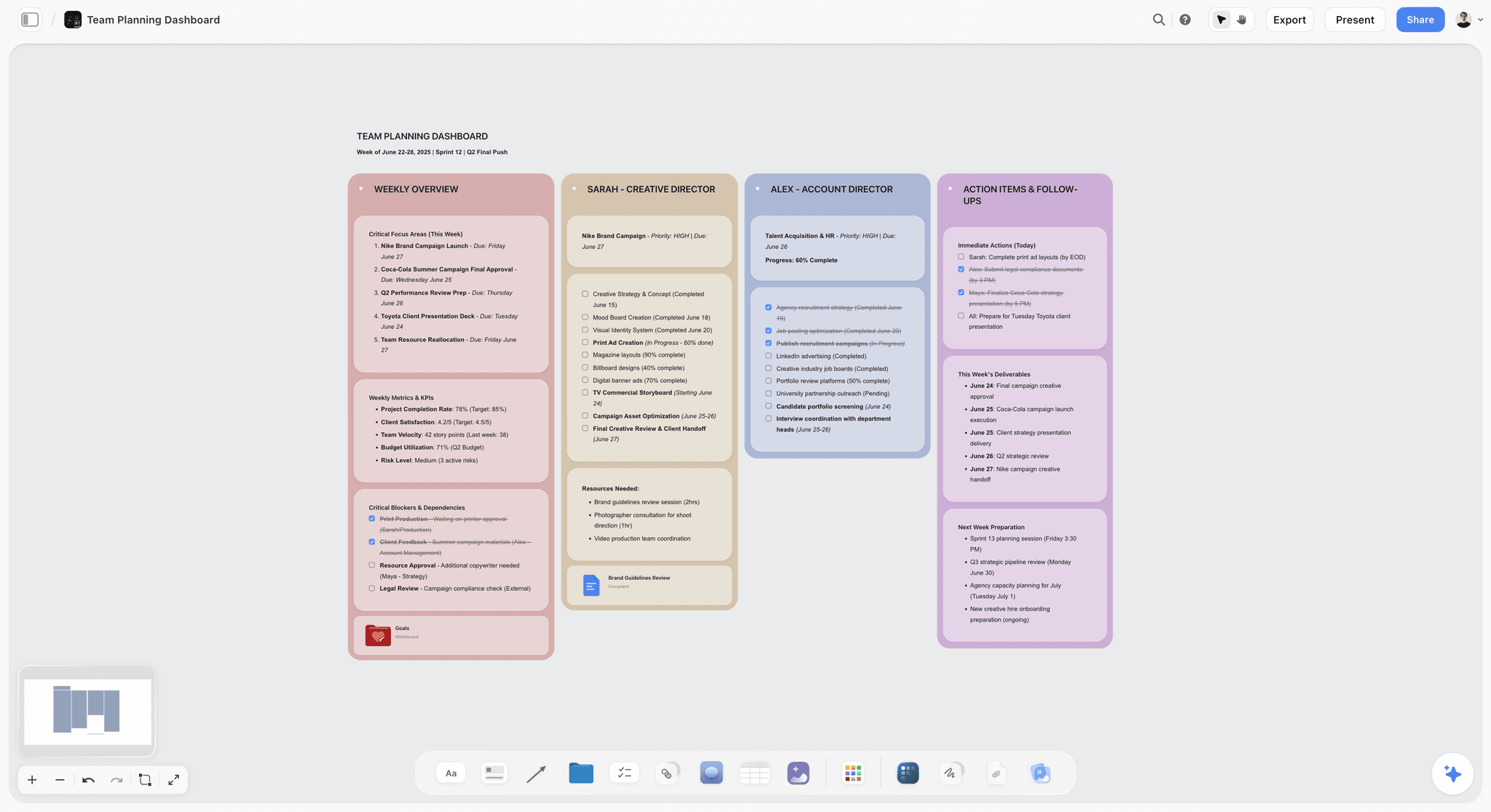
The verdict: Storyflow turns a script into a storyboard without drawing, and builds the shot list, strip board and call sheet PDF from the same board.
Best for: filmmakers, producers and marketing teams who start from a script or a brief and need a board that turns into a shoot.
From a script, in three actions. Storyflow's AI storyboard generator reads an attached PDF, Final Draft .fdx or Fountain script, or a pasted brief. Storyflow asks at most two questions, how many scenes and where frames come from, then builds one wall per scene in the script's own numbering. Each wall holds a frame, a beat note with two to four labels and a three to five item checklist.
Frames without drawing. Storyflow fills frames three ways: AI generated on Pro and Max, real web photographs captioned "Reference", or empty placeholders you drag and drop your own photos into.
The plan after the board. Storyflow builds a shot list with one entry per camera setup, a strip board grouped into shoot days with page counts, and a call sheet PDF that leaves anything you did not supply visibly blank. For a commercial, ask the AI for a timed beat sheet: one wall per beat with its timecode range.
Sharing and teamwork. A Storyflow view link opens with no account; the visitor signs in to comment or draw. Teams edit in real time on every paid plan, and anyone a paid member invites joins free.
Inside ChatGPT and Claude. Storyflow's MCP connector lets Claude, ChatGPT, Gemini and Grok read your projects and build boards and documents in them. Setup is on the MCP page.
Pricing. Storyflow is paid-only today: Plus is $7.99 a month billed annually ($9.99 monthly), Pro $14 ($19 monthly) with AI image generation and memory across conversations, and Max $39 ($49 monthly) with the most AI usage and a Team Workspace. The Free plan launches before the end of 2026.
Where Storyflow loses. Storyflow has no animatic, no frame timing and no MP4 export; Boords has all three. Storyflow has no saved character cast and no human artist service; Boords has the first and StoryboardHero both. Storyflow has no frame-level approval status and no native app.
2. Boords
The verdict: Boords is the stronger of the two title tools and the right choice over Storyflow when the board must be timed into an animatic and approved frame by frame.
Best for: agencies and production teams boarding something they will make; unlike Storyflow and StoryboardHero, Boords puts every frame on a timeline.
Animatics are the reason to buy Boords. Timing the boards with a soundtrack answers the question that matters before a shoot, which is whether the sequence works at length. Versioning and the frame-by-frame approval loop are both strong, and its AI now turns a pasted screenplay into frames with a saved cast, which Storyflow lacks.
Key features: animatic with a zoomable timeline and uploaded audio, AI frames in three styles, cast library, script editor, versions on record, frame-by-frame comments and approval with no login, PDF, PNG and MP4 export, shot lists.
Pricing: free plan with 5 active storyboards; Solo $39 monthly or $26 billed yearly, 1 user, 250 AI images; Pro $75 or $50, up to 5 users, 1,000 images; Team $125 or $85, up to 10 users; Agency $250 or $165, up to 30 users.
Pros: timing no rival here matches; versions and approvals; a free plan; more AI images per dollar than StoryboardHero's Premium quota.
Cons against Storyflow: the script conversion is a one-time snapshot; AI images are capped per plan; the brief, references, strip board and call sheet that Storyflow keeps on one canvas live elsewhere.
Choose Boords instead of Storyflow when the deliverable is an animatic or a signed-off board. Alternatives are in the best Boords alternatives.
3. StoryboardHero
The verdict: StoryboardHero is the better title tool for agencies whose storyboard is a sales document, and the choice over Storyflow when you start from a one-line brief and want human artists on call.
Best for: pitching video concepts; unlike Storyflow and Boords, StoryboardHero writes the concept and offers hand-drawn frames from its own team.
Concept, script and boards in one flow is a real advantage when the deadline is a client meeting, and the MP4 with a voice-over lets the client watch the idea. The sketch service is the standout feature, and neither Storyflow nor Boords has one. Its site does not describe an animatic timeline, which matters if you need to prove a duration.
Key features: AI concepts and scripts divided into scenes and shots, unlimited standard AI images, consistent characters, optional sketch artists, AI voice-over, branded PDF and MP4 export, guest commenting, versioning, shot lists as CSV or PDF.
Pricing: Solo $19 a month, 1 seat, 100 Premium AI images; Starter $59, 5 seats, 350; Advanced $199, 10 seats, 1,200; Enterprise by quote. 7-day free trial; 7-day money-back guarantee on Solo.
Pros: shortest route from a brief to a sendable board; human sketch fallback; cheapest entry of the two title tools.
Cons against Storyflow: no free plan; no strip board or call sheet, which Storyflow builds from the same script; no timing control described.
Choose StoryboardHero instead of Storyflow when there is no script yet and the output is a pitch.
4. Canva
The verdict: Canva is the free fallback for a simple board, and the choice over Storyflow only when cost must be zero and six panels are enough.
Best for: a concept page a client reads once; unlike Storyflow, Canva does not build the board from a script.
Canva has storyboard templates and general AI image tools, and for a six-frame board it is adequate and probably already in the team. It has no frame timing and no script-to-storyboard structure, and it is not trying to compete with Boords or StoryboardHero.
Pricing: Canva Free and Canva Pro (see Canva's pricing page). Canva's site blocks automated reads, so we quote no figure.
Pros: already in most teams; fine for a simple board; a free plan.
Cons against Storyflow: every panel is placed and captioned by hand; no shot list behind the frames.
A Workflow That Uses Both
Run the plan on one Storyflow board and bring in a title tool only for the step Storyflow does not do: attach the script and build the storyboard and shot list in Storyflow, time the approved frames in Boords, and use StoryboardHero earlier if the pitch has to be won before a script exists.
| Stage | What you do | Tool | What you get |
|---|---|---|---|
Pitch, no script yet | Enter the brief, generate script and frames | StoryboardHero | A branded PDF or MP4 for the client |
Script approved | Attach the script, pick "Storyboard my script" | Storyflow | One wall per scene with frame, beat note and checklist |
Coverage | Ask for a shot list from the storyboard | Storyflow | One entry per camera setup |
Timing | Move the key frames in, set durations, add the voiceover | Boords | An animatic that proves the length |
Sign-off | Send the review link | Boords | Frame-by-frame comments and approval |
Shoot plan | Ask for a strip board and a call sheet PDF | Storyflow | Shoot days with page counts; a call sheet with blanks left visible |
Small productions skip the first and fourth rows and run everything in Storyflow. Agencies selling timed spots keep Boords. The point is that the script is attached once and every later document is built from it.
A 30-Second Spot Through All Three Tools
Take one 30-second commercial, six scenes, a product and a presenter, and run it through each tool. StoryboardHero ends at a pitch film, Boords at an approved animatic, and Storyflow at a shot list and a call sheet. The scene and setup counts below illustrate the method; they are not a recorded job.
In StoryboardHero. Enter the brief. The AI writes a script in six scenes, generates a frame for each, and adds a voice-over. You export a branded PDF and an MP4 and send both. The work stops where the pitch is won.
In Boords. Paste the approved script and generate frames, with the presenter saved to the cast so the face holds. Put the frames on the timeline with the voiceover. Say the animatic runs 34 seconds: you cut one beat before anything is booked, and the client approves frame by frame.
In Storyflow. Attach the script. Ask for a timed beat sheet, so each beat has its timecode range inside the 30 seconds, then pick "Storyboard my script" for six walls with frames, beat notes and checklists. Ask for the shot list, say fourteen setups, then a strip board for the shoot day and a call sheet PDF. Storyflow cannot prove the 34 seconds; Boords can.
The honest summary: a commercial that is pitched, timed and shot can use all three, and a small production that only shoots needs Storyflow alone.
When Neither Is the Answer
Neither StoryboardHero nor Boords is the answer when you have no budget, when the board is six frames inside a larger plan, or when you are shooting from real reference. In the last two cases Storyflow is the better fit, because the board is one part of the plan it holds.
When you need to test timing and have no budget. Cut your frames in any editor with scratch audio. That is an animatic, and the tool is not the point.
When the board is six frames inside a larger plan. A dedicated storyboard subscription for six frames a month is poor value. On a Storyflow board the six frames sit next to the treatment, the references and the shot list.
When you are shooting from real reference. On documentary and much branded work, the useful artifact is a captioned reference and a shot list, not drawn frames. Storyflow's web frames are captioned "Reference" for that reason.
When the client wants to see the actual look. No tool's AI frames are the look. A reference board of real images communicates a visual intention more honestly than generated frames.
How We Evaluated
Storyflow is our product and is listed first on a stated basis: Storyflow is the tool here that builds the storyboard from an attached script and then the shot list, strip board and call sheet from the same board. StoryboardHero and Boords are compared with each other on equal terms, from their own pages.
The criteria: what each tool starts from, whether a person who cannot draw can finish the board, what the board becomes next (a PDF, an animatic, a shoot plan), how clients review it, and what one seat and five seats cost. This is a comparison from each vendor's own product and pricing pages, read on October 11, 2026, plus our own use of Storyflow; we did not test, time or run projects on StoryboardHero or Boords. Where a site did not describe a feature, the table says "not described" and not "no".
Prices and Sources Checked October 11, 2026
Every price and feature for StoryboardHero and Boords on this page was read on the vendor's own site on October 11, 2026. Both have changed since this page was first published, and the StoryboardHero figures in particular are different.
| Vendor | What we read | Source |
|---|---|---|
Storyflow | Plus $7.99, Pro $14, Max $39 a month billed annually | |
StoryboardHero | Solo $19, Starter $59, Advanced $199; seats; Premium image quotas; trial and guarantee; sketch credits | |
StoryboardHero | Feature list: scripts, voice-over, consistent characters, MP4, versioning, guest commenting | |
Boords | Free plan limits; Solo, Pro, Team and Agency prices; users and AI images per plan | |
Boords | AI generator: script to frames, styles, cast library, snapshot conversion, watermark on free PDFs | |
Boords | Animatic: timeline, audio upload, MP4 export | |
Atlabs | Product description and feature list; no prices shown | |
Canva | Site blocks automated reads; no figure quoted | See Canva's pricing page |
The Bottom Line
Ask what the board is for. If you have a script and need a storyboard without drawing, then a shot list and a call sheet, our pick is Storyflow. If the board's next stop is a client email, StoryboardHero, for its brief-to-board flow and human sketch fallback. If its next stop is an edit timeline, Boords, and animatics are why.
Between the two tools in the title alone: Boords is the more complete storyboard product and has a free plan, and StoryboardHero is cheaper at one seat and writes the pitch. Check the monthly image quota against your real frame count before choosing a tier.
To see the script-to-storyboard step on your own script, start from the simple storyboarding tool page.
FAQ: StoryboardHero vs Boords
Which is better, StoryboardHero or Boords?
Boords is the stronger product for teams boarding something they will make, because its animatic tests whether the sequence works at length, and it has a free plan. StoryboardHero is better for agencies pitching, because it writes the concept, script and boards in one flow from $19 a month. If you already have a script, our pick ahead of both is Storyflow, which turns it into a storyboard without drawing.
What is the best AI storyboard tool if I have a script and cannot draw?
Storyflow. Attach the script as a PDF, Final Draft .fdx or Fountain file and its AI builds one wall per scene with a frame, a beat note and a shot checklist, then the shot list and call sheet PDF on the same board. Boords and StoryboardHero also generate frames from a script; Boords adds an animatic and StoryboardHero adds human sketch artists.
Does StoryboardHero have animatics?
Its site does not describe an animatic or frame timing. StoryboardHero does export MP4 video, with an AI voice-over per scene or your own music and voiceover. Boords has a true animatic: a zoomable timeline, set timing per frame and an uploaded soundtrack. Storyflow has neither an animatic nor video export.
Which is cheaper, StoryboardHero or Boords?
At one seat StoryboardHero is cheaper: $19 a month against Boords' $26 billed yearly or $39 monthly. At five seats Boords Pro at $50 a month billed yearly is cheaper than StoryboardHero Starter at $59. Boords also has a free plan. Storyflow is cheaper than both paid entry plans at $7.99 a month billed annually.
Is Boords free?
Yes, in a limited form. The Boords free plan includes 5 active storyboards, 3 active scripts, unlimited manual frames and 8 one-off sample AI image credits, and PDF exports carry a Boords watermark. Paid plans start with Solo at $26 a month billed yearly. Storyflow and StoryboardHero have no free plan today.
What does Boords cost in 2026?
Solo is $26 a month billed yearly or $39 monthly for one user with 250 AI images. Pro is $50 or $75 for up to 5 users, Team $85 or $125 for up to 10, and Agency $165 or $250 for up to 30. There is a free plan with 5 active storyboards. For comparison, Storyflow starts at $7.99 a month billed annually.
What is the Boords AI storyboard generator?
It is the feature in Boords that turns a pasted screenplay into scenes and generates frames that follow the narrative, in sketch, vector or realistic styles, with a cast library for consistent characters, locations and props. The conversion is a one-time snapshot. Storyflow's equivalent builds one wall per scene from an attached script and adds a beat note and checklist to each.
What is the pricing for popular storyboard tools?
On October 11, 2026: Storyflow from $7.99 a month billed annually; StoryboardHero from $19 a month; Boords from $26 a month billed yearly, with a free plan of 5 active storyboards; Storyboarder from Wonder Unit free and open source. Canva has a free plan and a paid Pro plan; see its pricing page.
What is the pricing for popular storyboard template tools?
Template-first tools are cheaper than generators. Canva has a free plan with storyboard templates and a paid Pro plan. Boords' free plan holds 5 active storyboards. Storyflow, at $7.99 a month billed annually, includes its full library of 200+ Tactics templates and builds the storyboard layout from your script instead of leaving a template empty.
How many AI images do you actually need per month?
More than your frame count, because keeping one character consistent eats regenerations. Boords Solo's 250 covers a working month for one person. StoryboardHero Solo gives unlimited standard images and 100 Premium ones. In Storyflow, fill most walls with web references or placeholders and generate only the hero frames.
Is the AI image quality good enough to shoot from?
No, on any of the three, and that is not what a storyboard is for. Generated frames communicate blocking, framing and intent; nobody lights from them. The crew shoots from the shot list, which Storyflow builds from the storyboard, and from a floor plan. The persistent weakness everywhere is one character across many frames.
Is Storyflow a storyboard tool?
Yes. Storyflow's "Storyboard my script" workflow builds one wall per scene from an attached script, with a frame, a beat note and a shot checklist, in the script's own scene numbers. Storyflow is also the workspace around the board. Storyflow has no animatic, no frame timing and no frame-level approval status, which is why Boords is the choice for timed, signed-off boards.
Is Storyflow free?
Not today. Storyflow is paid-only, from $7.99 a month billed annually on Plus, and AI image generation needs Pro at $14. The Free plan launches before the end of 2026. Anyone a paid member invites to a board joins free.
What is an animatic and do I need one?
An animatic is the storyboard frames cut to time with scratch audio, so you watch the sequence at its real length. You need one whenever length is a constraint: every commercial, every explainer and most branded content. Boords builds one; Storyflow does not. You do not need one for a pitch board whose only job is to show an idea.
What is the best AI storyboard generator for animatics?
Boords, because the animatic is built from the same board: frames go onto a zoomable timeline, you upload a soundtrack or voiceover, and it exports an MP4. StoryboardHero exports an MP4 with a voice-over but does not describe timing controls. Storyflow is the wrong tool for this step and the right one for the script-to-board step before it.
What are the top AI storyboard tools for commercial shoots?
Storyflow for the plan, because its AI builds a timed beat sheet and a storyboard from the agency script and then the shot list and call sheet. Boords for the animatic that proves the spot runs 30 or 60 seconds and for client sign-off. StoryboardHero for the pitch that wins the job. A commercial that is pitched, timed and shot can use all three.
Which is better, Atlabs or Boords?
They do different jobs. Atlabs is an AI video creator that outputs finished videos such as ads and explainers. Boords is a pre-production platform that outputs a storyboard and an animatic for a film a crew will shoot. Choose by deliverable. If the need is a storyboard from a script without drawing, Storyflow is our pick.
Can Canva do storyboards?
For a simple six-frame board, adequately, and it has a free plan with templates. Canva has no frame timing and no storyboard structure, so it does not compete with Boords or StoryboardHero. Compared with Storyflow, Canva leaves every panel to you, where Storyflow's AI builds the panels from the script.
Which is better for agencies?
StoryboardHero if the boards are pitching work to win, because concept, script and boards arrive in one flow with a branded PDF. Boords if the agency also produces what it sells, because the same board then needs timing, versions and approvals. Add Storyflow when the agency plans the shoot, since the shot list and call sheet come from the script.
Do I need a storyboard tool at all for documentary?
Usually not a dedicated one. Boarding a scene you cannot control is planning fiction, and the useful artifacts are a captioned reference board and a shot list of intentions. Storyflow suits that: your own photographs become the frames, one wall per picture. Recreations and title sequences are where drawn or generated frames earn their place.
Does Storyflow work inside ChatGPT or Claude?
Yes. Storyflow's MCP connector lets Claude, ChatGPT, Gemini and Grok read your Storyflow projects and build boards and documents in them, so you can ask for a storyboard from the chat and find it on your board. Setup is on storyflow.so/mcp.
What happens to my boards if I stop paying?
Export before you cancel, on any of them. StoryboardHero exports PDF and MP4, Boords exports PDF, PNG and MP4 animatics, and Storyflow exports boards as PNG, SVG or PDF. The exported file is the durable artifact, which matters on project work where you may want a board from a job two years ago.
Table of Contents
- Key Takeaways
- StoryboardHero vs Boords: The Short Answer
- The Split: Selling It vs Making It
- Five Questions That Decide It
- Pricing, Both Tools, Every Tier
- Head to Head: StoryboardHero vs Boords
- Where Storyflow Fits Against Both
- Sharing, Review and Export Compared
- Where StoryboardHero Wins
- Where Boords Wins
- What It Takes by Hand vs in Storyflow
- What Is Boords?
- What Is StoryboardHero?
- Is Boords Free? Free vs Paid on Both
- The AI Image Question
- The Small Print That Changes the Choice
- Atlabs vs Boords
- Which Tool for Which Team
- Tool Reviews: Our Pick First, Then the Two in the Title
- 1. Storyflow
- 2. Boords
- 3. StoryboardHero
- 4. Canva
- A Workflow That Uses Both
- A 30-Second Spot Through All Three Tools
- When Neither Is the Answer
- How We Evaluated
- Prices and Sources Checked October 11, 2026
- The Bottom Line
- Author
- FAQ: StoryboardHero vs Boords
- Related Reading
Templates to check out for this topic


Filmmaking templates you can use in Storyflow
Skip the blank canvas. Open one of these filmmaking boards in Storyflow and the AI builds on the structure that is already there, from research through the shot list.


See Storyflow in Action
A visual AI workspace where every feature lives inside one canvas. No tab-switching, no context lost.
Build your entire board from a single message
Type what you need in the AI chat at the bottom of your canvas. The AI adds cards, headings, and structure directly onto your board.
Use expert frameworks as AI context
Type @ in the AI chat and choose any Tactic. The AI tailors every response to that framework instead of giving generic advice.
Turn your board into a mind map in seconds
Ask the AI to restructure your canvas as a mindmap. It connects your ideas into a visual hierarchy so you can see how everything relates.
Why Storyflow Exists
Storyflow actually began as a personal tool while working on creative and research projects.
We kept running into the same problem: ideas were scattered everywhere: notes, documents, and whiteboards.
Nothing helped us see how everything connected.
So we started building a workspace designed around how ideas actually grow.
→ Read how Storyflow was createdJustkay
Documentary Filmmaker & Founder at Storyflow
Published: 2026-09-02
Extremely simple, seriously capable


See how easy it is to get started
Watch a real project come together, from a blank board to a finished plan, clicked through step by step.
Start creating with AI and become more productive
Transform your creative workflow with AI-powered tools. Generate ideas, create content, and boost your productivity in minutes instead of hours.