
How to Storyboard Fast (When You Cannot Draw and Have No Time)
Almost nobody skips storyboarding because they cannot draw. They skip it because they think a board has to look like the ones in the DVD extras. The unit that matters is frames per hour.

Category
Filmmaking
Author

Justkay
Documentary Filmmaker & Founder at Storyflow
Topics
2026-08-26
•
15 min read
•
Filmmaking- how to storyboard fast
- storyboard if you cannot draw
- simple ai tool for storyboarding
- thumbnail storyboard
- how long does storyboarding take
- what to put on a storyboard frame
How do you storyboard fast if you cannot draw?
Almost nobody skips storyboarding because they cannot draw. They skip it because they think a board has to look like the ones in the DVD extras. The unit that matters is frames per hour. The [simple AI storyboarding tool](/simple-storyboarding-tool) lays out frames from your words.
Key Takeaways
- Almost nobody skips storyboarding because they cannot draw. They skip it because they think a storyboard has to look like the ones in the DVD extras, and at that fidelity it takes a day nobody has.
- The unit that matters is frames per hour. A storyboard that answers your questions at twenty frames an hour is worth more than a beautiful one you never finish.
- Boards answer three questions and nothing else: what is in frame, where the camera is, and what changes between this frame and the next. Everything beyond that is illustration.
- The fastest usable method is stick figures and boxes at roughly thirty to sixty frames an hour. AI generation is faster per frame and slower overall for anything specific, because prompting a precise composition takes longer than drawing a bad version of it.
- Board only the sequences where the geography or the timing is not obvious. Boarding straightforward dialogue is the most common waste in this whole activity.
Frames per Hour
Ask a filmmaker why they did not storyboard and the answer is almost always "no time," occasionally "I can't draw," and never "it would not have helped."
Both of those answers come from the same wrong assumption, which is that a storyboard is a drawing. The reference images everybody has seen are production storyboards from funded films, made by professional storyboard artists over days, and they are beautiful. They are also a completely different artefact from the thing that would actually help you on Thursday.
The useful measure is frames per hour, because that is what determines whether the board exists at all.
- Professional illustrated boards: two to five frames an hour. Correct for a funded production with an artist. Irrelevant to you.
- Clean digital boards with a tool and assets: ten to twenty an hour.
- Stick figures and boxes on paper: thirty to sixty an hour.
- Photographed thumbnails on a phone: sixty-plus an hour.
A forty-frame sequence is therefore a week, an afternoon, an hour, or forty minutes, depending entirely on a fidelity decision you make before you start. And the striking thing is that the cheap versions answer the same questions as the expensive one.
Because a storyboard exists to answer three questions:
What is in frame? Wide, medium, close. Who is visible, what else is visible, how much room is around them.
Where is the camera? Which side of the action, how high, how far.
What changes between this frame and the next? The cut, the move, the reveal, the new information.
A stick figure in a box answers all three. A rendered illustration answers all three and also looks nice, and looking nice is worth something to a client and nothing to your shoot.
So the question is never "can I draw." It is "what is the lowest fidelity that answers my three questions," and for most people most of the time, the answer is stick figures.
The Twelve-Frame Rule
The second reason boards do not get made is scope. People decide to board the whole thing, calculate that it is two days, and do none of it.
Board only what is not obvious. For a typical short film or commercial, that is usually somewhere between eight and twenty frames, and they cluster in three places.
Where geography is unclear. Anything where the audience needs to understand a space: a chase, an argument that moves through rooms, a reveal that depends on what is behind someone. If a viewer could get lost, board it.
Where timing is the point. A joke, a scare, a reveal. These live in the cut, and the cut is exactly what a board can rehearse in advance and a shot list cannot.
Where the shot is expensive. A crane, a drone, a one-take, anything you get one attempt at. Board it so the attempt is informed.
Do not board: conventional dialogue coverage, establishing shots, anything you have shot a hundred times. A shot list is faster and equally sufficient. Boarding standard coverage is the most common waste in this activity, and it is also the most comfortable, because it feels productive and requires no judgment about what actually needs thought.
The Fast Method
Step 1: Decide the fidelity before the first frame
Stick figures unless somebody is paying for illustration. Write it down if you have to. The single largest cause of unfinished boards is starting at a fidelity you cannot sustain and slowing down as you tire.
Step 2: Draw the frame, not the picture
A storyboard frame is a rectangle in the aspect ratio you are shooting. Inside it:
- Bodies are sticks or ovals. Heads are circles.
- Furniture and set are boxes.
- An arrow shows movement of the subject.
- A different arrow, or a bracket, shows movement of the camera.
- If it is unclear, write the word. "Her POV." "Hands only." "He is behind her, out of focus."
Words are not cheating. A frame that says "wide, she is small in the room, doorway camera-left" communicates more than a bad drawing of the same thing, and takes eight seconds.
Step 3: Put the three facts under every frame
The frames themselves are half the artefact. Underneath each one, three short lines:
- Shot size. WS, MS, CU, ECU.
- Camera. Static, pan, handheld, on the dolly, low.
- What changes. "She sees it." "He leaves frame." "Cut on the door closing."
That third line is the one people skip and the one that makes a board useful, because it is the only place the *edit* is described. A sequence of frames without it is a set of pictures; with it, it is a rehearsal of the cut.
Step 4: Number them to match the shot list
Same numbering as your shot list: 14A, 14B, 14C. This is the discipline that makes the board survive into the shoot and the edit, because on the day somebody can ask for 14B and everyone knows what that is.
Step 5: Photograph it and stop
If it is on paper, photograph it immediately, in order, in decent light. Paper gets lost, coffee gets spilled, and a board that exists only on the table in your kitchen is a board that does not exist on Thursday.
Then stop. The temptation to go back and tidy is strong and it adds nothing. A board is a working document and it is allowed to be ugly.
Where AI Actually Helps
AI storyboard generation is the most oversold thing in this category, and it does have two genuine uses.
It is good for atmosphere and tone. If you want to show a client or a DP the feeling of a sequence, generated frames are fast and look impressive, and impressive is the job in that context.
It is good when you cannot describe the look in words. Set builds, colour treatments, unusual lighting. Generating a reference is faster than searching for something that may not exist photographed.
It is bad at specificity, and specificity is what a storyboard is for. Getting a model to produce "she is on the left third, camera slightly low, he enters behind her out of focus, doorway visible camera-right" takes longer than drawing a bad version of it, and it usually gets one element wrong in a way you have to accept or re-prompt. Precise composition is exactly where prompting is slowest and drawing is fastest.
It is bad at consistency. Character continuity across twelve frames is still unreliable, so the same person changes subtly, which for a shot-flow document is a distraction rather than a feature.
And a generated frame is a promise you may not be able to keep. Showing a client a beautiful AI frame that your location, budget, and daylight cannot produce is a problem you have created for the review, not solved for the shoot.
The honest split: draw the shot flow, generate the tone. Two artefacts, and confusing them is where AI storyboarding disappoints.
What to Use
| Method | Frames per hour | Good for | Cost |
|---|---|---|---|
Paper and pen | 30 to 60 | Almost everybody, almost always | Nothing |
Phone photos of a thumbnail sheet | 60+ | Sharing what you drew, instantly | Nothing |
Procreate or an iPad drawing app | 20 to 40 | People who already draw | One-off app cost |
Boords | 10 to 20 | Clean shareable boards with an animatic | From ~$12 mo |
StudioBinder | 10 to 20 | Boards attached to a real production | Limited free / from ~$42 mo |
Storyboarder | 15 to 30 | Free desktop boarding with basic figures | Free, open source |
Canva or slides | 10 to 20 | Client-facing tidy boards | Free tier available |
AI generation | Fast per frame, slow to specify | Tone and atmosphere, not shot flow | Varies |
Prices are the publicly listed rates at the time of writing and change often. Check before committing.
For most people the honest answer is paper, photographed. It is the fastest method by a wide margin and the only one with no setup. Boords is the right upgrade when boards are client-facing and you make them often, because its animatic feature genuinely rehearses timing in a way static frames cannot.
For keeping the board next to the rest of the plan, so the numbering carries through to the shot list and the schedule, a project canvas helps. Storyflow, which we make, holds boards alongside the shot list and references on one canvas the AI reads, so checking whether every boarded shot appears on the shot list is a question rather than a manual pass, and its Pro and Max tiers generate frames for the tone half. It is paid-only during early access from $7.99 a month annual, with the Free plan landing before the end of 2026, and it is not a drawing tool.
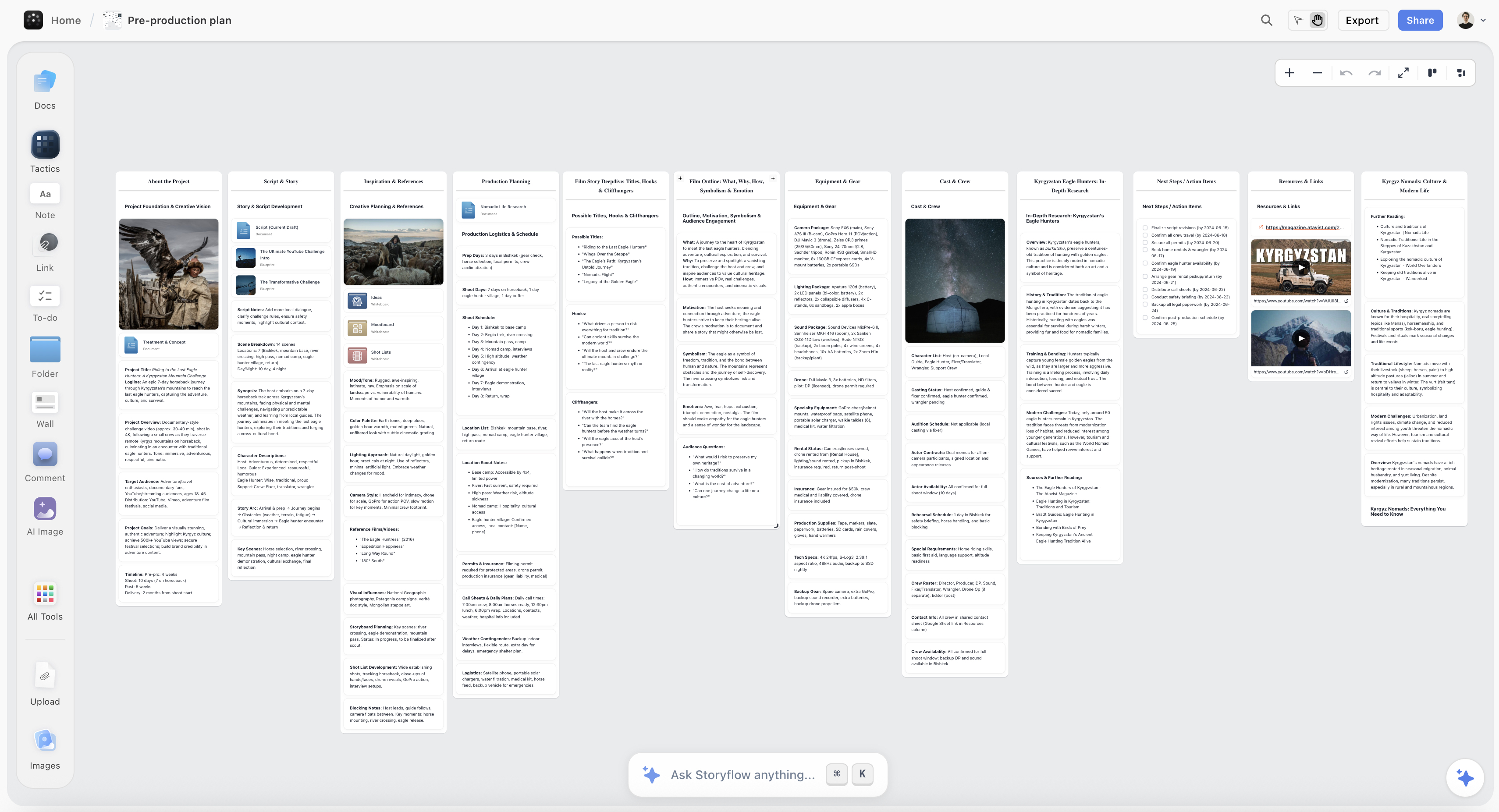
Storyboard frames sitting beside the shot list and schedule on one Storyflow canvas, sharing the same shot numbering
Draw the shot flow, generate the tone
Prompting a precise composition takes longer than drawing a bad version of it, which is why AI is good at atmosphere and poor at shot flow. Storyflow keeps boards beside the shot list and references with shared numbering, so checking every boarded shot is on the list is a question. It is not a drawing tool; paper is still fastest.

The Thumbnail Sheet
The fastest usable technique in this whole article, and it takes almost no explanation.
Take one sheet of paper. Draw a grid of sixteen small rectangles in your aspect ratio, each about the size of a matchbox. Fill them with stick figures.
The small size is doing the work. At matchbox scale you cannot draw detail, so you do not try, and what you produce is exactly composition and shot size, which is all you needed. A sixteen-frame sheet takes fifteen to twenty minutes and the whole sequence is visible at once, which means you can see the rhythm of the cutting rather than experiencing it one frame at a time.
Then photograph the sheet. That photograph is your storyboard, and for a great many productions it is a completely sufficient one.
What Goes Wrong
Starting at a fidelity you cannot sustain. Frames one to six are lovely, seven to twelve are rushed, thirteen onward do not exist.
Boarding everything. The whole film is two days of work, so none of it happens. Board the eight to twenty frames that are not obvious.
No "what changes" line. Without it the board is pictures rather than a rehearsal of the cut, which was the point.
Boards that do not match the shot list numbering. They stop being consulted on the day, because nobody can connect a drawing to the thing they are about to shoot.
Only on paper. Photograph it. Paper gets lost and it is the cheapest possible loss to prevent.
Prompting for precise compositions. The slowest way to get a specific frame. Draw it badly in ten seconds instead.
Showing a client generated frames as if they are the plan. They will expect what they were shown, and your location will not produce it.
Tidying. The board is a working document. Ugly is fine and finished is what matters.
The Bottom Line
Storyboarding has an image problem. The boards everybody has seen were made by professional artists for funded films, and measured against those, an afternoon of stick figures looks like failure.
It is not. A stick figure in a rectangle answers the same three questions a rendered illustration does: what is in frame, where the camera is, and what changes before the next frame. The illustration also looks good, which matters to a client and does nothing for your shoot.
So decide the fidelity first, and decide low. Board only the eight to twenty frames where the geography, the timing, or the expense makes thought worthwhile, and skip the conventional coverage that a shot list handles faster. Put three lines under every frame, including the one about what changes, because that line is where the edit is. Number them to match the shot list so somebody can ask for 14B on the day. Photograph it and stop.
And if you take one thing: draw a grid of sixteen matchbox rectangles on one sheet and fill them with stick figures. Twenty minutes, the whole sequence visible at once, and it will tell you more about your cutting rhythm than a week of beautiful frames drawn one at a time.
FAQ: Storyboarding Fast
How do you storyboard if you cannot draw?
Stick figures and boxes, and write words where a drawing would be unclear. A storyboard answers three questions: what is in frame, where the camera is, and what changes before the next frame. A stick figure answers all three, and "wide, she is small in the room, doorway camera-left" answers them faster than a bad drawing does.
How long should a storyboard take?
At stick-figure fidelity, thirty to sixty frames an hour, so a typical eight to twenty frame sequence is twenty to forty minutes. Professional illustrated boards run two to five frames an hour, which is why they take days, and that fidelity is only warranted when somebody is paying for illustration.
What should be on each storyboard frame?
The frame itself in your shooting aspect ratio, plus three lines underneath: shot size, camera behaviour, and what changes before the next frame. The third line is the one most often skipped and the one that turns a set of pictures into a rehearsal of the edit.
Do you need to storyboard everything?
No, and boarding everything is the most common reason boards never get made. Board where the geography is unclear, where timing is the point, and where a shot is expensive or one-take. Skip conventional dialogue coverage and establishing shots, where a shot list is faster and equally sufficient.
What is the best storyboarding software?
Boords if boards are client-facing and you make them regularly, largely for the animatic feature that rehearses timing. StudioBinder if boards should sit inside a real production with call sheets and breakdowns. Storyboarder is free and capable for desktop boarding. For most people, paper photographed on a phone is faster than all of them.
Can AI generate a storyboard?
It can generate frames, and it is good at tone and atmosphere and bad at specificity, which is what a storyboard is for. Prompting a precise composition takes longer than drawing a bad version, and character consistency across a sequence is still unreliable. The useful split is to draw the shot flow and generate the tone, treating them as two separate artefacts.
What is a thumbnail storyboard?
A grid of sixteen matchbox-sized rectangles on one sheet, filled with stick figures. The small size prevents detail, so you produce exactly composition and shot size and nothing else. It takes fifteen to twenty minutes, the whole sequence is visible at once so you can see the cutting rhythm, and a photograph of the sheet is a completely usable storyboard.
How do you share a storyboard with a crew?
Photograph it in order and put it wherever the rest of the plan lives, numbered to match the shot list. On the day, printed is better than digital: it does not lose signal or battery, the AD can hold it, and it can be annotated in pen as things change.
Should a storyboard match the shot list?
Yes, and with the same numbering. Frame 14B on the board is shot 14B on the list. Without shared numbering the board stops being consulted on the day, because nobody can connect a drawing to the setup they are about to shoot, and an unconsulted board is a wasted afternoon.
What is the difference between a storyboard and an animatic?
A storyboard is static frames. An animatic puts them on a timeline with the intended duration and usually a scratch audio track, so you can watch the sequence and feel whether the timing works. For anything where timing is the point, an animatic answers questions a static board cannot, and Boords is the most accessible way to make one.
Is Storyflow a storyboarding tool?
It is not a drawing tool. What it does is hold boards alongside the shot list, the references and the schedule on one canvas the AI reads, so the numbering carries through and checking that every boarded shot appears on the shot list is a question rather than a manual pass. Its Pro and Max tiers generate frames for the tone half. It is paid-only during early access, from $7.99/month annual.
How many frames does a storyboard need?
As many as there are non-obvious moments, which for a short film or a commercial is usually eight to twenty. One frame per shot is the wrong instinct: most shots are obvious and need a shot-list line rather than a drawing. The frames that earn their place are the ones where somebody could otherwise misunderstand the space, the timing, or the cut.
Table of Contents
Templates to check out for this topic


Filmmaking templates you can use in Storyflow
Skip the blank canvas. Open one of these filmmaking boards in Storyflow and the AI builds on the structure that is already there, from research through the shot list.


See Storyflow in Action
A visual AI workspace where every feature lives inside one canvas. No tab-switching, no context lost.
Build your entire board from a single message
Type what you need in the AI chat at the bottom of your canvas. The AI adds cards, headings, and structure directly onto your board.
Use expert frameworks as AI context
Type @ in the AI chat and choose any Tactic. The AI tailors every response to that framework instead of giving generic advice.
Turn your board into a mind map in seconds
Ask the AI to restructure your canvas as a mindmap. It connects your ideas into a visual hierarchy so you can see how everything relates.
Why Storyflow Exists
Storyflow actually began as a personal tool while working on creative and research projects.
We kept running into the same problem: ideas were scattered everywhere: notes, documents, and whiteboards.
Nothing helped us see how everything connected.
So we started building a workspace designed around how ideas actually grow.
→ Read how Storyflow was createdJustkay
Documentary Filmmaker & Founder at Storyflow
Published: 2026-08-26
Extremely simple, seriously capable


See how easy it is to get started
Watch a real project come together, from a blank board to a finished plan, clicked through step by step.
Start creating with AI and become more productive
Transform your creative workflow with AI-powered tools. Generate ideas, create content, and boost your productivity in minutes instead of hours.