Storyboard vs Animatic: What's the Difference? (2026)
A storyboard shows the shots. An animatic shows the timing. The clear difference between the two pre-production artifacts, when you need each, who makes them, how AI changes both, and which tools to use.

Category
Filmmaking
Author

Justkay
Documentary Filmmaker & Founder at Storyflow
Topics
2026-07-15
•
11 min read
•
Filmmaking- storyboard vs animatic
- what is an animatic
- animatic vs storyboard
- storyboard to animatic
What is the difference between a storyboard and an animatic?
A storyboard is a sequence of static frames that shows the shots: composition, camera angle, staging, and action, one panel per shot. An animatic is that same sequence edited to time with audio (dialogue, music, and scratch voiceover) so you can watch it play back and judge the pacing. Put plainly, a storyboard shows you the shots and an animatic shows you the timing. You build the storyboard first, then turn it into an animatic when you need to test how the cut actually feels. For the frames, use a storyboard tool like Boords, Storyboarder, or Storyflow. For the timed animatic, use Boords or a video editor like Premiere Pro or After Effects. If you need an animatic, pick [storyboard software](/storyboard-software) with a timeline; Storyflow does not have one.

Full disclosure: Storyflow is our own product, and for this query we rank it second, not first. Boords leads because it does both jobs in one place: static storyboard frames and a timed animatic with audio. Storyflow storyboards the frames and plans the whole sequence on a canvas with AI, but it is not a video editor or an animatic tool, so the timed cut has to happen in Boords, Premiere Pro, or After Effects. If your one job is exporting an animatic, use Boords or an editor. We describe every tool honestly so you can match it to the half of the work you are on.
Quick Comparison
A storyboard tool builds the frames; an animatic tool or editor times them. These four cover both halves of the job, from the free option to the full editor.
| Tool | Best For | AI Features | Price |
|---|---|---|---|
| Boords | Storyboard plus a built-in timed animatic | AI storyboard generator | Free trial, paid plans |
| Storyflow | Storyboard frames plus sequence planning | Canvas-aware AI reads your board | $7.99 mo annual (free plan late 2026) |
| Storyboarder | Free storyboard with animatic export | None | Free |
| Premiere Pro / After Effects | The finished timed animatic | Limited | From ~$23/mo |
Storyboard vs Animatic: The Short Version
You have a storyboard. Every shot is drawn, numbered, and pinned to the wall in order. The director studies it, nods, and asks the one question the board cannot answer: how long does the sequence run? Silence. A storyboard is a wall of moments. It has no runtime. That gap is the entire reason animatics exist.
Here is the distinction I use, and I will repeat it because it settles most of the confusion. Think of two separate questions. The first is the frame question: what is inside each shot? The second is the clock question: how long does each shot live on screen, and how do the shots feel cut together? Call it the Frame and the Clock. The storyboard answers the Frame. The animatic answers the Clock. A storyboard shows you the shots. An animatic shows you the timing.
I build Storyflow, and I direct documentaries. I have boarded sequences that never became animatics because the board already answered the question, and I have cut animatics that quietly saved a shoot day by exposing a scene that ran twice as long as it felt on paper. One is a spatial plan. The other is a temporal test. Get the order wrong, or skip the one you actually needed, and you pay for it in reshoots or in an edit that never finds its rhythm.
Storyboard vs Animatic: Head-to-Head
The fastest way to see the split is dimension by dimension. Notice that most rows are really the Frame question against the Clock question in disguise.
| Dimension | Storyboard | Animatic |
|---|---|---|
Form | Static frames, one panel per shot | Those frames edited into a moving sequence |
What it tests | Composition, staging, shot choice | Pacing, rhythm, shot duration |
Time | Frozen. No runtime | Runs in real time. Has a duration |
Audio | None (notes in the margins) | Dialogue, music, scratch voiceover |
Question it answers | What is in the frame? | How long do we hold it? |
Effort to make | Lower. Draw or generate panels | Higher. Edit, time, and sync sound |
Output | A board or panel sequence | A rough video file you watch back |
Best for | Planning shots, pitching a look | Testing the cut before you shoot |
Read the table top to bottom and the pattern is clear. Everything a storyboard is good at is spatial. Everything an animatic adds is temporal. The animatic is not a better storyboard. It is a storyboard with a clock bolted on and sound poured in.
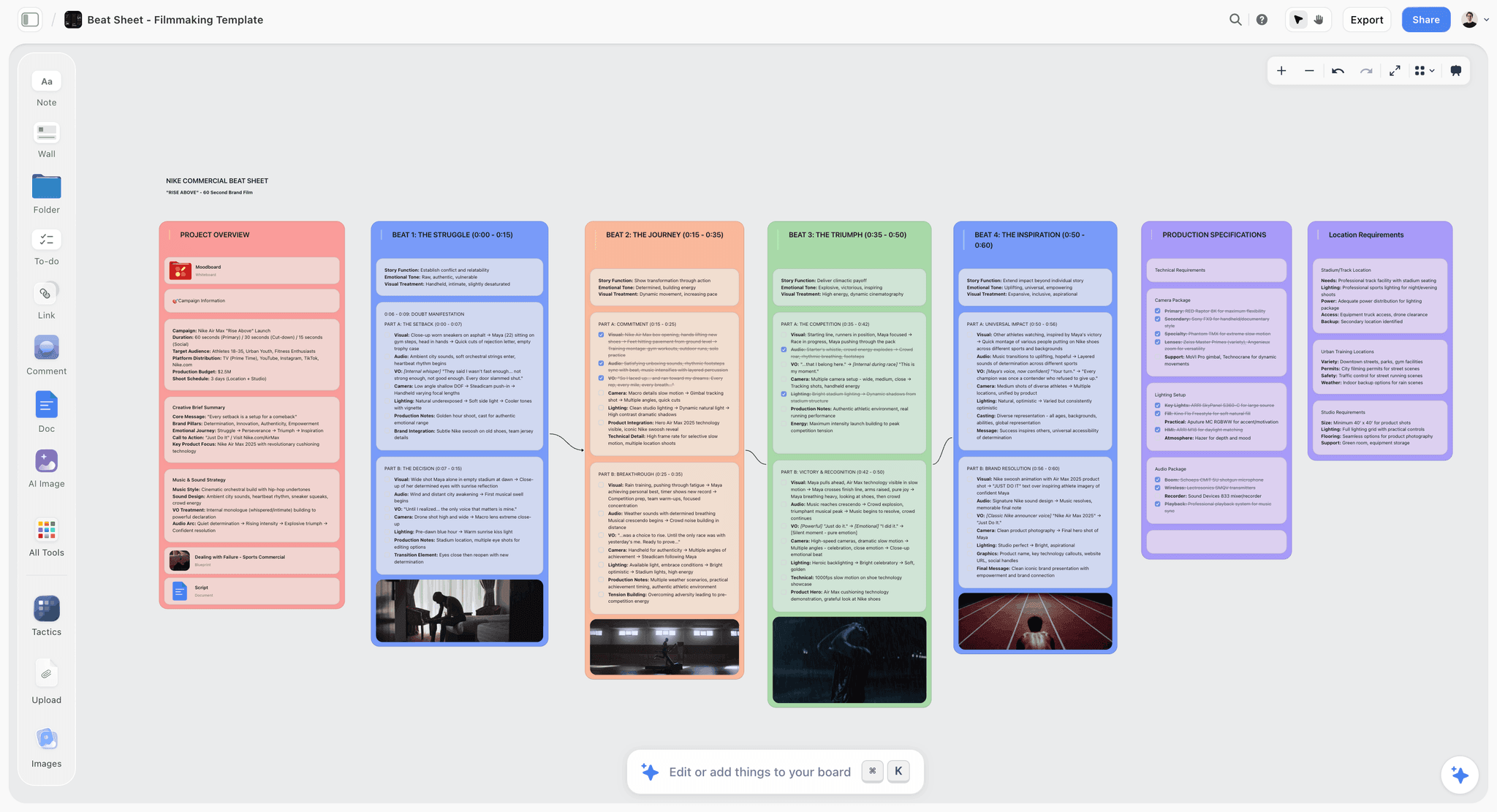
A Storyflow canvas with storyboard frames feeding a timed animatic sequence
What a Storyboard Actually Proves
The storyboard is the Frame half of the Frame and the Clock. It exists to settle the spatial decisions before those decisions get expensive. What is the shot? Where does the camera sit? How are the actors staged? Does the composition say what the scene means? A good board answers all of that on paper, where changing your mind costs a pencil eraser instead of a crew.
The storyboard settles the shot before the shot is expensive
The storyboard was formalized at Walt Disney Studios in the early 1930s for exactly this reason: it is cheaper to fix a sequence in drawings than in film. That logic never changed. When you board a scene, you are committing to a shot list you can see. A director and a storyboard artist can argue about whether a moment wants a wide two-shot or a tight single, resolve it, and move on, all before a single lens comes out of the case.
It is a spatial document, not a temporal one
Here is the boundary. A storyboard can tell you a scene needs a wide establishing shot, a two-shot over coffee, and an insert of the letter on the table. It cannot tell you that the wide holds for four seconds while the insert flashes for eight frames. That is the Clock, and the board has no clock. This is not a flaw. It is the job description. The storyboard shows the shots. It was never built to show the timing, which is precisely why the animatic had to be invented.
What an Animatic Actually Proves
The animatic is the Clock half. Take the boarded frames, drop them on a timeline, give each panel a duration, and lay in sound. Now you are no longer looking at a plan. You are watching a rough draft of the finished scene, and it plays back in real time. The animatic proves the things a static board physically cannot: pacing, rhythm, and whether the sequence holds attention or sags in the middle.
An animatic has a runtime; a storyboard has a page count
This is the whole difference in one line. Ask a storyboard how long the sequence is and it answers in panels. Ask an animatic and it answers in seconds. That second answer is the one that decides whether a 30-second commercial actually fits in 30 seconds, and whether the chase feels relentless or exhausting. You cannot eyeball timing from a wall of drawings. You have to watch it move.
Sound is half of an animatic
The other thing the animatic adds is audio, and audio is not a garnish. Cut a sequence to a music bed and the required shot lengths change. In animation, the animatic is often called a story reel or Leica reel, and it is timed to scratch voices so the team can feel the scene before a single frame is animated. Advertising runs on the same principle: agencies routinely cut animatics against real voiceover and music to test a spot with clients and audiences before committing to an expensive shoot. The storyboard shows the shots. The animatic, with its clock and its soundtrack, shows the timing.
The Workflow: Storyboard First, Then Animatic
The order is not a preference. It is a dependency. You cannot time frames you have not drawn, so the storyboard is always the input and the animatic is always the output. Here is the path from one to the other.
- Board the shots. Draw or generate one panel per shot, with staging and composition decided.
- Lock the sequence order. Get the shots into the order the scene will actually play.
- Import the panels to a timeline. Scan or export the boards into an editor or an animatic tool.
- Add scratch audio. Lay in temp dialogue, a music bed, or a scratch voiceover.
- Set each panel's duration. This is the moment the board becomes an animatic. You are assigning the clock.
- Watch it back and recut. Trim the shots that drag, extend the ones that rush, and reorder anything that stumbles.
Steps 1 and 2 are the storyboard. Steps 3 through 6 are the animatic. The board answers the Frame. The timeline answers the Clock. Skip step 1 and you have nothing to time. Skip steps 3 through 6 and you never learn how the cut feels until you are standing on set, which is the most expensive possible place to find out.
When You Actually Need an Animatic
Not every project earns an animatic, and pretending otherwise wastes days. The storyboard is mandatory far more often than the animatic is. So be honest about which job you have.
You need an animatic when timing is the risk. That means animation, where the story reel is non-negotiable because there is no live footage to fall back on. It means commercials, where a client signs off on a timed animatic before the budget unlocks. It means music videos and any sequence cut to a track, complex action, and heavy visual effects, where the choreography of the edit is the thing most likely to fail.
You can skip the animatic when the storyboard already answers the question. Straightforward dialogue coverage, a run-and-gun documentary, a simple interview setup: in those cases the board tells you everything you need, and cutting an animatic is motion for its own sake. This is the quiet rule that saves the most time: a storyboard shows you the shots, and an animatic shows you the timing, so only build the animatic when the timing is what you are actually unsure about. If you already know the timing, the Clock has nothing new to teach you.
Who Makes Storyboards and Animatics
The two artifacts often pass through different hands, which is another reason people confuse them.
Storyboards are drawn by storyboard artists working with the director, and the director's shot choices drive them. On a commercial, an agency art director may sketch the frames. In animation, a story department boards entire sequences. On a lean indie or documentary crew, the director boards their own shots, badly and effectively, on index cards or a canvas.
Animatics are usually assembled by an editor, sometimes a dedicated animatic editor or a previs artist. In animation, the story team cuts the reel as part of story development. In advertising, the agency edit produces the animatic for testing. The through line: the person who decides what is in the frame is not always the person who decides how long you hold it. The Frame and the Clock can belong to two different people, and often should.
How AI Changes Both
AI has moved fast on both halves, but it has not moved them equally, and it has not touched the part that matters most.
On the Frame side, text-to-image tools (Midjourney, DALL-E, Runway) and storyboard apps with built-in generators can draft panels in minutes. For directors who cannot draw, this is genuinely liberating: the excuse of "I can't sketch it" is gone. The catch is consistency. Getting the same character, wardrobe, and style across twelve panels is still finicky, and a board full of gorgeous but mismatched frames confuses more than it clarifies.
On the Clock side, AI scratch voiceover (tools like ElevenLabs) removes the friction of recording temp dialogue, and text-to-video models (Runway, Kling, Sora) are starting to blur the line between an animatic and a rough motion cut. You can now generate moving previs from a prompt.
Here is the honest limit. AI changes the cost of the frame, not the cost of the decision. AI can draft the shot, but it cannot decide how long to hold it. The Clock is a judgment call about attention, rhythm, and meaning, and it is still yours. AI makes the raw material cheaper. It does not make the storytelling choices, and the moment you let it, the sequence starts to feel like a slideshow with no pulse.
Where Storyflow Fits (and Where It Doesn't)
The friction in pre-production is not any single tool. It is that the pieces live in four different apps. The storyboard frames are in one place, the shot list is in a spreadsheet, the script is in a document, and the reference images are in a folder or a group chat. Every time you change a shot, you update four things, and usually you forget one.
Storyflow closes that gap by putting the whole plan on one infinite canvas. The storyboard cards, the reference image walls, the shot list, and the treatment document all live on the same board, and the AI reads your full active canvas by default, plus up to 1 Tactic and up to 3 Documents you @-mention in the chat. So when you ask it to check whether your boarded sequence actually covers the scene in the script, it reasons over the real board, not a pasted summary. The Story Blueprints library (200+ creative templates on Plus, Pro, and Max, including frameworks like the Hero's Journey and AIDA) gives you a structure to hang the sequence on. Free is $0. Plus is $7.99 per month billed annually ($9.99 monthly). Pro at $14 per month annual adds AI image generation, which can draft storyboard frames directly on the canvas.
Now the honest part, because this query deserves it. Storyflow is not an animatic tool. It has no timeline, no audio sync, and it is not a video editor, so it cannot assign durations to your panels or play the sequence back to time. It storyboards the frames and plans the sequence. The timed cut has to happen somewhere else: Boords, Premiere Pro, or After Effects. Storyflow is also cloud-only with no offline mode, which matters if you board on location without signal. And it is canvas-card-shaped, not a frame-by-frame storyboard grid with shot numbering and one-click animatic export the way a dedicated tool like Boords is. Storyflow is strong for the Frame and the plan around it. For the Clock, reach for an editor. It is the Frame and the Clock again: use the tool built for the half you are working on.
Which Should You Use?
Match the tool to the job, not to the brand.
If you need the frames and the plan around them, use a storyboard tool: Storyflow when you want the board to live on a canvas next to the script, the shot list, and the references with AI reading all of it; Boords or Storyboarder when you want a dedicated frame-by-frame board. If you need to test the cut, make an animatic: Boords has a built-in timed animatic with audio, and Premiere Pro or After Effects give you full control for the polished version. If you are working in animation or shipping a client-tested commercial, you do not choose. You need both, in order, storyboard first.
The Bottom Line: a storyboard and an animatic are two answers to two different questions, and the mistake is treating them as one. The storyboard answers the Frame: what is in each shot. The animatic answers the Clock: how long each shot holds and how the sequence feels in motion. Build the storyboard every time. Build the animatic when timing is the thing you are unsure about. And hold onto the one line that survives every project and every tool: a storyboard shows you the shots, and an animatic shows you the timing. Storyboard the frames on a canvas in Storyflow, plan the whole sequence in one place, then take the locked board into an editor to cut the animatic. Start your storyboard on a Storyflow canvas.
FAQ: Storyboard vs Animatic
Is an animatic just a moving storyboard?
Essentially yes, with two additions that change everything: time and sound. An animatic takes the static storyboard frames, gives each one a duration on a timeline, and adds audio like dialogue and music. The storyboard shows the shots. The animatic makes those shots play back in real time so you can judge pacing.
Do you make the storyboard or the animatic first?
The storyboard always comes first. An animatic is built from storyboard frames, so you cannot make one without a board to start from. Board the shots, lock their order, then import the panels to a timeline and set each one's duration. The storyboard is the input and the animatic is the output.
Does every film need an animatic?
No. Most projects need a storyboard, but only some need an animatic. You need one when timing is the risk: animation, commercials, music videos, complex action, and heavy visual effects. You can skip it for straightforward dialogue, interviews, or run-and-gun documentary work, where the storyboard already answers the question.
What is the difference between an animatic and previs?
An animatic is timed storyboard frames with audio, usually two-dimensional and simple. Previs (previsualization) is a more detailed, often three-dimensional animated version built for complex action and visual effects, where camera moves and choreography get worked out precisely. Both answer the Clock question of timing, but previs goes deeper and costs more.
Does an animatic have sound?
Yes, and the sound is core to it. An animatic typically includes scratch dialogue, a temporary music bed, and sometimes sound effects. Audio is not decoration: cutting frames to a track changes how long each shot needs to be, which is exactly the timing information the animatic exists to reveal.
How long does it take to make an animatic?
It ranges from a couple of hours for a simple 30-second sequence to weeks for a full animated feature reel. The variables are the number of shots, whether the storyboard already exists, and how much scratch audio is involved. Because the frames are the input, a finished storyboard first is what makes the animatic fast.
Can AI make a storyboard or an animatic?
AI can draft both, but it does the mechanical parts, not the judgment. Text-to-image tools generate frames quickly, and AI voiceover plus text-to-video tools can assemble a rough moving animatic. What AI cannot do is decide how long to hold a shot or how a sequence should feel. AI changes the cost of the frame, not the cost of the decision.
What software makes animatics?
Boords builds a storyboard and a timed animatic with audio in one place. For full control, video editors like Adobe Premiere Pro and After Effects are the standard, and Storyboarder (free, from Wonder Unit) exports animatics too. Storyflow storyboards the frames and plans the sequence on a canvas, but it is not a video editor, so the timed cut happens in one of those editors.
Is a storyboard enough for a client pitch?
Sometimes, but often not. A storyboard is enough to pitch a look, a shot list, and a general approach. When the client is buying a timed piece, especially a commercial, an animatic is usually what closes the sign-off, because it proves the sequence works in the runtime they are paying for.
Can Storyflow make an animatic?
No. Storyflow is a visual workspace for storyboarding frames and planning the sequence on a canvas, but it has no timeline, no audio sync, and it is not a video editor, so it cannot assign shot durations or play a timed cut. Board the shots and organize the plan in Storyflow, then cut the animatic in Boords, Premiere Pro, or After Effects.
What is a Leica reel?
A Leica reel is the animation industry's term for a story reel, which is essentially an animatic: storyboard frames edited to time against scratch dialogue and music so the team can feel a sequence before animating it. Disney pioneered the practice and the name stuck. Functionally it is the same idea as any animatic.
Storyboard vs animatic: which matters more?
The storyboard, because it comes first and more projects need it, but they matter for different things. The storyboard is where you decide the shots, so it matters on every project. The animatic is where you test the timing, so it matters when the edit is the risk. On animation and commercials the animatic can matter as much as the board.
Table of Contents
- Storyboard vs Animatic: The Short Version
- Storyboard vs Animatic: Head-to-Head
- What a Storyboard Actually Proves
- What an Animatic Actually Proves
- The Workflow: Storyboard First, Then Animatic
- When You Actually Need an Animatic
- Who Makes Storyboards and Animatics
- How AI Changes Both
- Where Storyflow Fits (and Where It Doesn't)
- Which Should You Use?
- FAQ: Storyboard vs Animatic
- Related Reading
Templates to check out for this topic


Filmmaking templates you can use in Storyflow
Skip the blank canvas. Open one of these filmmaking boards in Storyflow and the AI builds on the structure that is already there, from research through the shot list.


See Storyflow in Action
A visual AI workspace where every feature lives inside one canvas. No tab-switching, no context lost.
Build your entire board from a single message
Type what you need in the AI chat at the bottom of your canvas. The AI adds cards, headings, and structure directly onto your board.
Use expert frameworks as AI context
Type @ in the AI chat and choose any Tactic. The AI tailors every response to that framework instead of giving generic advice.
Turn your board into a mind map in seconds
Ask the AI to restructure your canvas as a mindmap. It connects your ideas into a visual hierarchy so you can see how everything relates.
Why Storyflow Exists
Storyflow actually began as a personal tool while working on creative and research projects.
We kept running into the same problem: ideas were scattered everywhere: notes, documents, and whiteboards.
Nothing helped us see how everything connected.
So we started building a workspace designed around how ideas actually grow.
→ Read how Storyflow was createdJustkay
Documentary Filmmaker & Founder at Storyflow
Published: 2026-07-15
Extremely simple, seriously capable


See how easy it is to get started
Watch a real project come together, from a blank board to a finished plan, clicked through step by step.
Start creating with AI and become more productive
Transform your creative workflow with AI-powered tools. Generate ideas, create content, and boost your productivity in minutes instead of hours.