The 12 Best Animatic Software Tools in 2026 (Tested by a Filmmaker)
The best animatic software in 2026, tested on real sequences. 12 tools compared for turning a storyboard into timed, playable pacing, from Toon Boom and Boords to Storyflow and free options.

Category
Filmmaking
Author

Justkay
Documentary Filmmaker & Founder at Storyflow
Topics
2026-07-10
•
16 min read
•
Filmmaking- best animatic software 2026
- animatic software
- how to make an animatic
- storyboard animatic
- free animatic software
- animatic maker
What is the best animatic software in 2026?
The best animatic software in 2026 is Toon Boom Storyboard Pro (best professional storyboard-to-animatic), Boords (best fast, simple animatics), Adobe After Effects (best for detailed animatic assembly), and Storyboarder (best free animatic tool). An animatic is a storyboard with timing and sound, built to test pacing before you shoot. The best tool depends on whether you need a quick pacing check or a polished pitch animatic. For the storyboard and plan an animatic is built from, Storyflow is the strongest canvas, though it does not assemble a timeline and is not a timeline animatic tool. The short version: an animatic answers "does the sequence feel right in time?" You take storyboard frames, set how long each holds, add rough audio, and watch it play. What most guides skip is that an animatic does two separate jobs, arranging the panels and timing them, and this guide shows where each belongs.

Full disclosure: Storyflow is our own product and is listed first in the reviews and the table: our pick first, then the rest by job. The ranked list places it seventh. Toon Boom Storyboard Pro leads there because it assembles a real timeline with timing, camera moves, and audio, which is the animatic job, and Storyflow has no timeline, playback, or audio sync at all. The post's own two-jobs framing gives its role: the canvas for the storyboard and sequence plan an animatic is built from, not a timeline animatic tool, so you still assemble the animatic in Boords or After Effects. That upstream role is a real limitation, not a hedge. We link to every tool so you can judge the fit.
Quick Comparison
These four own the timeline job an animatic needs: the professional standard, the fast one-click option, the detailed assembler, and the best free tool.
| Tool | Best For | AI Features | Price |
|---|---|---|---|
| Toon Boom Storyboard Pro | Pro storyboard-to-animatic | Drawing and timeline in one | ~$25/mo |
| Boords | Fast simple animatics | One-click animatics | ~$15/mo |
| Adobe After Effects | Detailed assembly | Full keyframe control | ~$22.99/mo |
| Storyboarder | Free animatics | Basic animatic export | Free |
All 12 Animatic Software Tools, Ranked
- Toon Boom Storyboard Pro: best professional storyboard-to-animatic (9.3/10)
- Boords: best fast, simple animatics (9.0/10)
- Adobe After Effects: best for detailed animatic assembly (8.8/10)
- Storyboarder: best free animatic tool (8.7/10)
- Adobe Premiere Pro: best for editing-style animatics (8.5/10)
- TVPaint: best hand-drawn animatic and 2D animation (8.3/10)
- Storyflow: best storyboard and plan the animatic is built from (8.1/10)
- Krita: best free hand-drawn animatic (7.9/10)
- LTX Studio: best AI-generated animatic (7.7/10)
- DaVinci Resolve: best free editing-style animatic (7.6/10)
- PowerProduction StoryBoard Artist: best dedicated animatic suite (7.3/10)
- DigiCel FlipBook: best traditional 2D animatic tool (7.0/10)
Best Animatic Software by Job
The overall ranking is not the answer to every question. Match the tool to the job you actually have:
- Best professional storyboard-to-animatic tool: Toon Boom Storyboard Pro. The studio standard.
- Best fast, simple animatics: Boords.
- Best for detailed animatic assembly: Adobe After Effects.
- Best free animatic tool: Storyboarder.
- Best place to build the storyboard and plan the animatic comes from: Storyflow. It does not time or export an animatic, and it is where the boards and beats get settled.
Comparison Table: 12 Animatic Software Tools Compared
| Tool | Best For | Starting Price | Free Option | Timeline / Audio |
|---|---|---|---|---|
Storyflow | Storyboard and plan source | $7.99/mo (annual) | Coming late 2026 (invited collaborators join free now) | No (canvas, not timeline) |
Toon Boom Storyboard Pro | Pro storyboard-to-animatic | ~$25/mo | Trial | Yes |
Boords | Fast simple animatics | ~$15/mo | Trial | Yes |
Adobe After Effects | Detailed assembly | ~$22.99/mo | Trial | Yes |
Storyboarder | Free animatics | Free | Yes | Basic |
Adobe Premiere Pro | Editing-style animatics | ~$22.99/mo | Trial | Yes |
TVPaint | Hand-drawn animatics | One-time license | Trial | Yes |
Krita | Free hand-drawn animatic | Free | Yes | Basic |
LTX Studio | AI animatics | ~$19/mo | Yes (limited) | Yes |
DaVinci Resolve | Free editing animatics | Free | Yes | Yes |
PowerProduction StoryBoard Artist | Dedicated animatic suite | One-time license | Trial | Yes |
DigiCel FlipBook | Traditional 2D animatic | One-time license | Trial | Yes |
Pricing changes often, so confirm current pricing on each site.
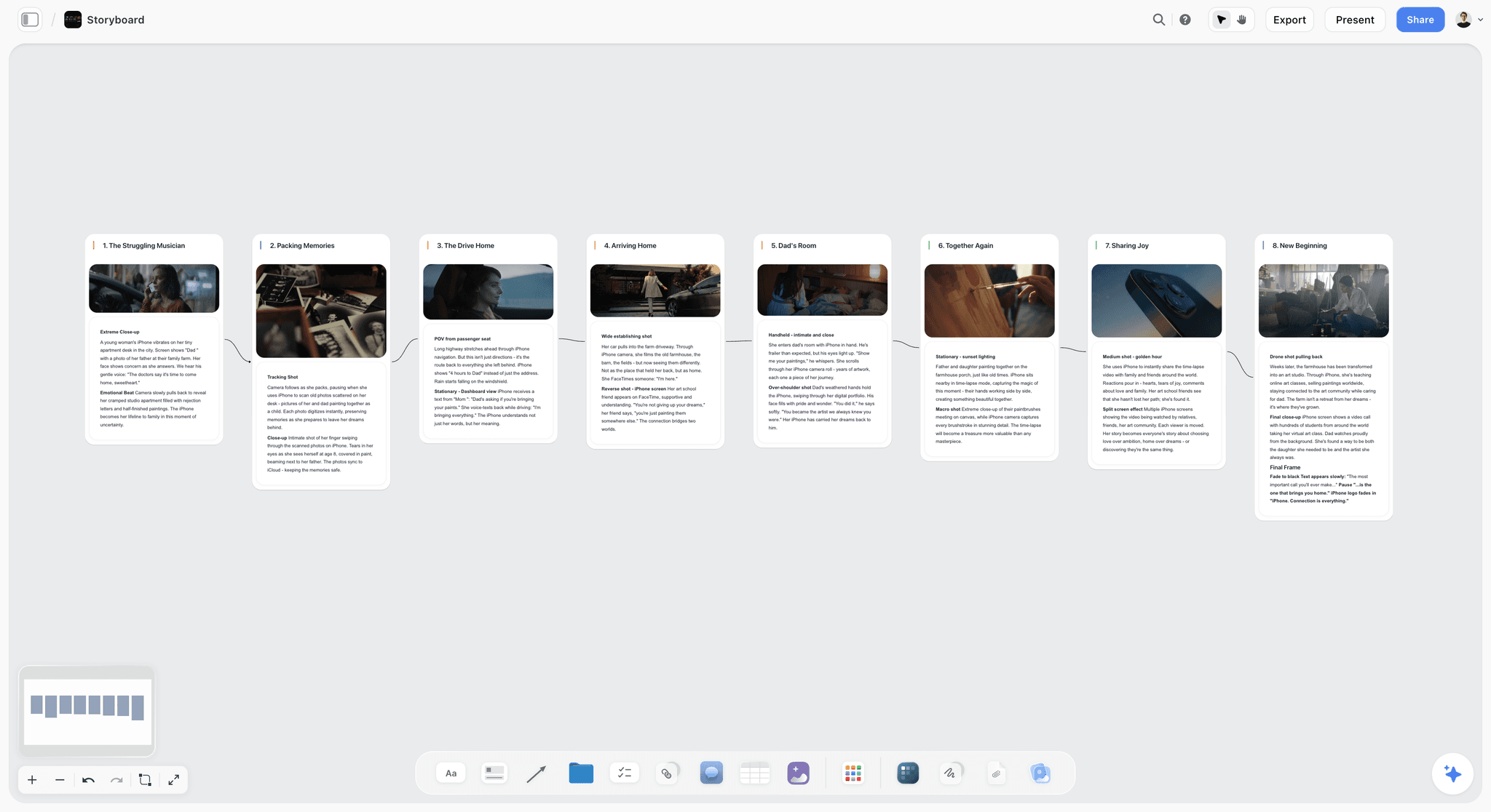
Storyflow canvas holding storyboard frames and sequence notes that an animatic is built from
Build the storyboard behind your animatic on one canvas
Storyflow keeps your storyboard frames, shot notes, and sequence intent on one board the AI can read, so the animatic you assemble in Boords or After Effects is built on a plan that reads.

What an Animatic Is (and What It Actually Tests)
An animatic is a storyboard put into time. Each frame is held for its intended duration, rough audio (dialogue, temp music, sound effects) is laid under it, and it plays back so you can feel the sequence before you shoot it.
An animatic tests three things a static storyboard cannot:
- Pacing. Does the sequence breathe, or does it drag or rush?
- Timing to sound. Does the cut land with the music, the dialogue, the beat?
- Clarity in motion. Does the story read when the frames play, not just when you study them one by one?
The reason to build an animatic is that pacing is invisible on a static board. You cannot feel a five-second hold or a hard cut on music by looking at drawings side by side, which is why animatics are standard wherever timing is the point.
The Two Jobs Every Animatic Does
Most animatic guides rank timeline features and stop there. That misses half the work. Every animatic does two separate jobs, and they are not the same skill.
Job One is arranging the panels. Which shots exist, what order they run in, what each one is doing, and how the sequence is meant to flow. This is drawing and planning work, and it is where a sequence is actually won or lost.
Job Two is timing the panels. How long each frame holds, where it cuts to the music or the line, how the whole thing breathes when it plays. This is timeline work, and it is what Toon Boom, Boords, After Effects, and every editor on this list are built for.
The two jobs get confused because one tool often does both, but they fail in different ways. A perfectly timed animatic of a sequence that does not read is still a sequence that does not read. An animatic times your panels. It never decides them.
Here is the practical consequence. Job Two is mechanical: drop frames, set durations, sync audio, and if the plan is settled the assembly is fast. Job One is the hard part, and it usually lives scattered across sketches and one person's head. The stronger workflow keeps the panels, shot notes, and sequence intent on one canvas the whole team can see, then assembles the timed animatic in a dedicated tool. Storyflow is the strongest tool for that Job One layer, because frames, shot cards, references, and an AI that reads all of them live together. For the boards that feed it, see the best storyboarding software in 2026, and for the concept, read what an animatic is.
How We Evaluated These Animatic Tools
Every tool here was assessed on the real job of turning a storyboard into a timed sequence you can feel. Five criteria, weighted in this order:
- Timeline and timing control. How well does it set durations and sync to audio?
- Storyboard-to-animatic flow. How smoothly do frames become a playable sequence?
- Output quality. Is the animatic good enough for pacing checks and for pitching?
- Speed. How fast do you get from frames to a playable animatic?
- Price for the value. What does it cost for the animatic work it does?
Tested on a commercial spot, an animation sequence, a music video, and a complex action scene, and judged on how well they let you feel the pacing before the shoot.
Detailed Reviews: The 12 Best Animatic Software Tools
1. Storyflow
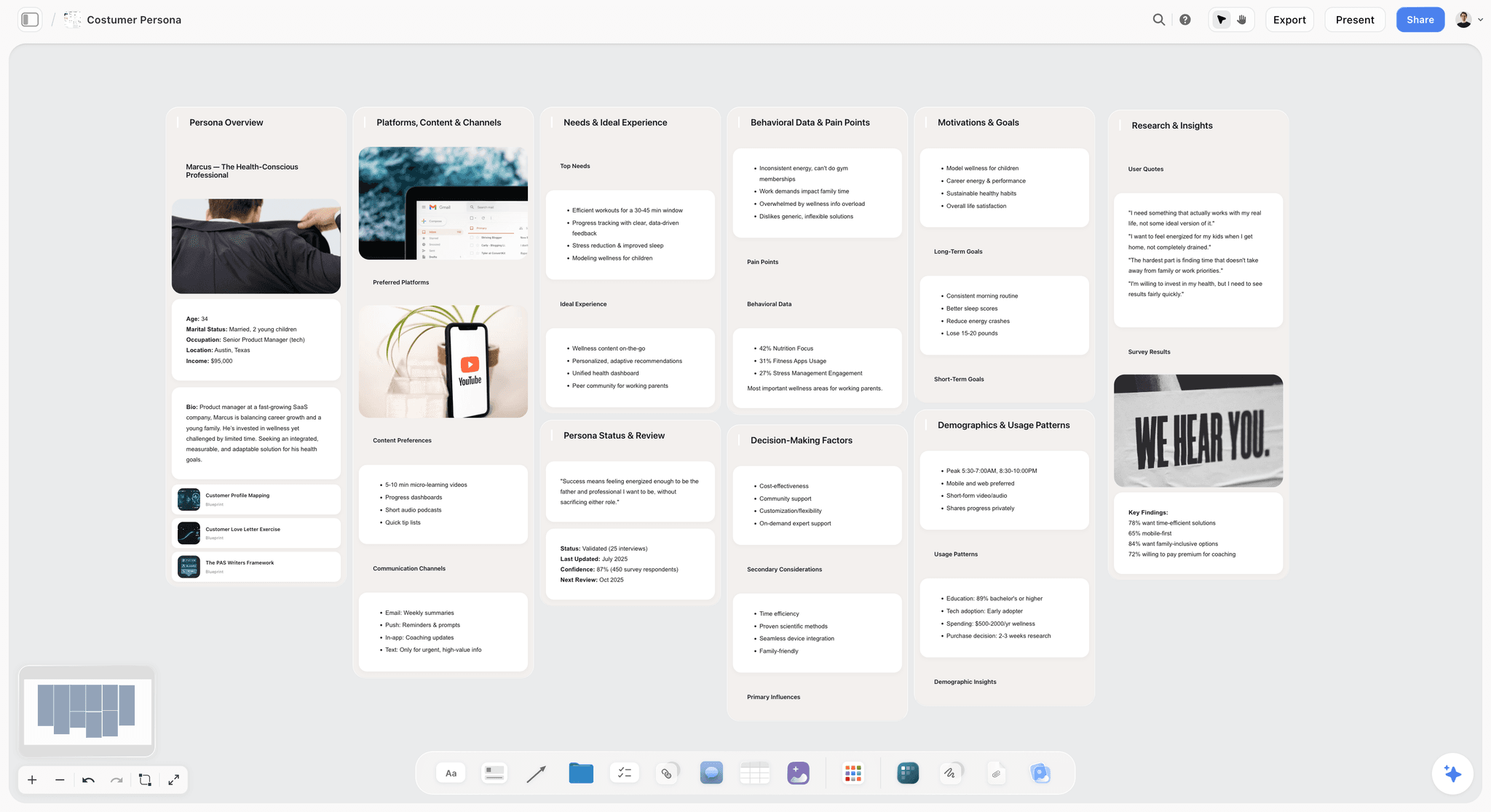
Storyflow is a visual workspace where the storyboard and plan an animatic is built from live on one canvas the AI can read: frames, shot cards, sequence intent, and references together. In the two-jobs framing, this is Job One made visible: the sequence sits on a board the team can rearrange, and the AI reads the entire board, so you can ask which shots do the same work or where the sequence loses its thread before you commit a frame. To be clear, it does not do Job Two: it does not assemble a timeline, play back, or sync audio, and it is not a timeline animatic tool. It is where the sequence is decided, then handed to a timeline tool for the timing.
Best for: Directors and teams who want the storyboard and sequence plan in one visible place before building the animatic.
Verdict: Not a timeline animatic tool. Use Boords or After Effects to assemble the animatic. Use Storyflow to build the storyboard and plan behind it.
Key features
- Storyboard frames and shot cards on one canvas with intent and references.
- Project-aware AI that reads the whole board and answers across the sequence.
- Unlimited shared boards and collaboration; Max adds Team Workspace with Permissions and Roles.
Pricing
Free: launching before the end of 2026. Plus: $7.99/mo annual ($9.99 monthly). Pro: $14/mo annual (adds AI image generation for frames). Max: $39/mo annual. Pricing is per account for individuals and per seat for team workspaces; anyone a paid member invites to a board joins free.
Pros
- Keeps the storyboard and sequence intent in one place.
- The AI reads the whole board, not one frame.
- Pro adds AI image generation for reference frames.
Cons
- Does not assemble or play a timeline animatic. Use Boords or After Effects.
- No audio sync or playback, so it cannot replace a dedicated animatic tool.
- Cloud-only, with no offline or local-first option.
- Newer platform, best paired with an established timeline tool for the animatic itself.
For the AI storyboard angle, see the best AI storyboarding tools in 2026.
2. Toon Boom Storyboard Pro
Toon Boom Storyboard Pro is the professional standard for storyboard-to-animatic work: drawing, timing, camera moves, and audio in one tool. It handles both jobs in one app and exports clean enough for a director or client, the reason it is the animation and commercial default. The depth and learning curve make it more than a quick pacing check needs.
Best for: Professional storyboard artists, animation, and commercials.
Verdict: The best professional animatic tool. Deep, powerful, and industry-standard.
Key features
- Professional storyboarding and drawing.
- Animatic timeline with timing and audio.
- Camera moves and 3D integration.
- Industry-standard export.
Pricing
Around $25/mo or annual. Trial available.
Pros
- Professional-grade animatic tools.
- Drawing and timeline in one.
- Industry adoption.
Cons
- Learning curve.
- Priced for professionals.
- More than simple animatics need.
3. Boords
Boords is built to turn storyboards into animatics fast, with one-click generation and clean browser collaboration. Its whole design is Job Two made frictionless: lay out frames with shot notes, set how long each holds, and it plays back as a shareable timed sequence. That speed is why teams reach for it on pacing checks and client sign-offs, though precise motion or audio work will outgrow it.
Best for: Teams that want simple, fast animatics without a steep learning curve.
Verdict: The best fast, simple animatic tool. Great for pacing checks and client review.
Key features
- Storyboarding with shot details.
- One-click animatics with timing.
- Audio and collaboration.
- Templates and sharing.
Pricing
From around $15/mo. Trial available.
Pros
- Animatics are genuinely one-click.
- Easy to learn.
- Great collaboration and sharing.
Cons
- Less control than After Effects.
- Subscription for full features.
- Not for complex motion.
4. Adobe After Effects
Adobe After Effects is the go-to for detailed animatics that need motion, camera moves, and polish, with total keyframe and audio control. That control produces pitch-quality animatics that sell a sequence. The trade is that none of it is storyboard-native, so you import frames and build the timing by hand, which makes it overkill for a quick pass but unmatched for motion-heavy or pitch work.
Best for: Motion-heavy animatics and pitch-quality sequences.
Verdict: The best tool for detailed, polished animatics. Powerful but not purpose-built for the job.
Key features
- Full timeline with keyframe control.
- Motion, camera moves, and effects.
- Audio sync.
- Creative Cloud integration.
Pros
- Total control over motion and timing.
- Pitch-quality output.
- Integrates with Premiere and Photoshop.
Cons
- Steeper learning curve.
- Subscription.
- Overkill for quick pacing checks.
5. Storyboarder
Storyboarder, from Wonder Unit, is free and open-source, with storyboard drawing and basic animatic export built in. It is the fastest honest answer to needing an animatic on no budget: draw panels, set rough timing, and export a playable sequence good enough to feel the pacing. The output is rough and will not carry a pitch, but for a director testing whether a sequence holds before a shoot it does the essential job at zero cost.
Best for: Directors who want free storyboard-to-animatic.
Verdict: The best free animatic tool. Excellent value for a quick animatic.
Key features
- Free storyboarding.
- Basic animatic export with timing.
- Shot and camera notes.
- Open-source.
Pricing
Free and open-source.
Pros
- Genuinely free.
- Fast for rough animatics.
- Good enough for pacing checks.
Cons
- Basic timeline control.
- Rougher output.
- No advanced motion.
6. Adobe Premiere Pro
Adobe Premiere Pro assembles animatics like an edit, dropping frames on a timeline with audio, which suits editors who already live in it. The timing control is editing-grade and the animatic slides straight into the real edit later. The catch is that it is not storyboard-native, so you import frames manually and lose the shot-note structure a dedicated tool gives.
Best for: Editors who want to cut an animatic like a sequence.
Verdict: A strong editing-style animatic tool for anyone already in Premiere.
Key features
- Timeline editing with frames and audio.
- Precise timing control.
- Creative Cloud integration.
- Export to any format.
Pros
- Editing-grade timing control.
- Familiar to editors.
- Integrates with After Effects.
Cons
- Not storyboard-native.
- Subscription.
- Manual frame import.
7. TVPaint
TVPaint is a professional hand-drawn 2D animation tool that doubles as a powerful animatic environment for drawn sequences. For artists who draw their own frames, it collapses both jobs into one surface, with real animation tools underneath. The professional learning curve is more than a storyboard animatic needs, but for drawn work by someone who already animates it is a serious option.
Best for: Artists building hand-drawn animatics and 2D animation.
Verdict: A strong hand-drawn animatic tool for artists who draw their sequences.
Key features
- Professional 2D drawing and animation.
- Timeline with audio.
- Traditional animation tools.
- One-time license.
Pricing
One-time license. Trial available.
Pros
- Excellent for drawn animatics.
- One-time purchase.
- Professional animation tools.
Cons
- Priced for professionals.
- Learning curve.
- More than storyboard animatics need.
8. Krita
Krita is a free, open-source painting tool with animation features capable of hand-drawn animatics. If you already draw in it, the frame-by-frame timeline and audio import let you build a rough drawn animatic for nothing. It is not animatic-specific and the timeline is basic, but the drawing quality is strong, so for an artist who wants to paint and time panels in one free tool it is a real option.
Best for: Artists who want a free tool for drawn animatics.
Verdict: A capable free hand-drawn animatic tool for artists.
Key features
- Free painting and drawing.
- Frame-by-frame animation.
- Audio import for timing.
- Open-source.
Pricing
Free and open-source.
Pros
- Free and powerful for drawing.
- Real animation tools.
- Active community.
Cons
- Not animatic-specific.
- Timeline is basic.
- Setup for animatic work.
9. LTX Studio
LTX Studio generates AI animatics from a script or storyboard, producing timed sequences with generated shots, voice, and audio. It is useful for early concept and pitch work, before anyone draws a real frame. The output quality varies and the shots need iteration to hold together, so it does not yet replace a carefully hand-timed animatic for precise work.
Best for: Filmmakers who want AI-generated animatics fast.
Verdict: The strongest AI animatic tool. Fast concepts, with output that still needs iteration.
Key features
- Script and storyboard to timed sequences.
- Generated shots with consistency.
- Timeline editing.
- Voice and audio.
Pricing
Lite around $19/mo. Limited free tier.
Pros
- Fast AI animatics.
- Targets filmmakers.
- Active development.
Cons
- Output quality varies.
- Iteration is real work.
- Newer platform.
10. DaVinci Resolve
DaVinci Resolve is the free professional editor that doubles as an editing-style animatic tool, with a full timeline and Fairlight audio in the free version. That is more than enough to cut storyboard frames into a timed animatic with precise sound, which makes it the strongest free option for editing-grade timing. Like Premiere it is not storyboard-native, but for a student or low-budget team it is a professional timeline at no cost.
Best for: Editors who want a free, powerful timeline for animatics.
Verdict: The best free editing-style animatic tool. Professional timeline at no cost.
Key features
- Professional editing timeline.
- Audio and Fairlight tools.
- Free version is genuinely capable.
- Cross-platform.
Pricing
Free; paid Studio version for advanced features.
Pros
- Free and professional.
- Excellent timeline and audio.
- Cross-platform.
Cons
- Not storyboard-native.
- Learning curve.
- Manual frame import.
11. PowerProduction StoryBoard Artist
PowerProduction's StoryBoard Artist is a dedicated storyboard-and-animatic suite that carries both jobs in one place: storyboard with prop and character libraries, then time the frames with audio and camera moves. That focus is its strength for a production that wants one purpose-built tool rather than stitching a drawing app to an editor. The interface shows its age next to browser tools like Boords and the community is smaller, but it still does the job it was built for.
Best for: Productions wanting a dedicated storyboard-to-animatic suite.
Verdict: A purpose-built animatic suite. Solid, if less modern than newer tools.
Key features
- Storyboarding with libraries.
- Animatic timeline and audio.
- Camera moves.
- One-time license.
Pricing
One-time license. Trial available.
Pros
- Purpose-built for animatics.
- One-time purchase.
- Established tool.
Cons
- Dated interface.
- Smaller community.
- Less modern than Boords.
12. DigiCel FlipBook
DigiCel FlipBook is a traditional 2D animation tool used for hand-drawn animatics and pencil tests. Its strength is drawn frame-by-frame work with audio playback, and the one-time license keeps it affordable. It is niche and dated outside that use, with limited value beyond drawn sequences, so it fits traditional animators rather than general animatic work.
Best for: Traditional animators building drawn animatics.
Verdict: A traditional 2D animatic tool. Niche but capable for drawn work.
Key features
- Frame-by-frame 2D animation.
- Timeline with audio.
- Pencil-test workflow.
- One-time license.
Pricing
One-time license. Trial available.
Pros
- Good for traditional animatics.
- One-time purchase.
- Simple pencil-test workflow.
Cons
- Dated interface.
- Niche use.
- Limited beyond drawn work.
Recommendations by Project Type
13. Animation / Commercial
Top picks: Toon Boom Storyboard Pro + Storyflow
Toon Boom for the professional animatic. Storyflow for the storyboard, sequence plan, and references behind it.
14. Music Video
Top picks: After Effects or LTX Studio + Storyflow
After Effects for motion-heavy animatics, or LTX Studio for AI sequences. Storyflow for the treatment and shot plan. See how to storyboard a music video with AI.
15. Indie Film (Pacing Check)
Top picks: Boords or Storyboarder + Storyflow
Boords for a fast animatic, or Storyboarder for free. Storyflow for the storyboard and shot plan that feed it.
16. Student / Low Budget
Top picks: Storyboarder or DaVinci Resolve (free)
A complete free animatic stack today: Storyboarder for the boards and a basic animatic, or Resolve for the timeline. Storyflow stays paid until its Free plan lands before the end of 2026.
17. Pitch Animatic
Top picks: After Effects + Storyflow
After Effects for a polished pitch animatic. Storyflow for the story and sequence plan behind the pitch.
Honorable Mentions
- Cavalry: motion design used for stylized animatics.
- Photoshop: timeline animation for simple animatics.
- Final Cut Pro: editing-style animatics on Mac.
- Rough Animator: mobile hand-drawn animatics.
- FlipaClip: mobile animatic app for quick sequences.
Where Animatic Software Still Needs a Human
Honest accounting. Animatic tools assemble timing; they do not judge it. Software owns the mechanics of Job Two, but the decisions in Job One stay yours.
- The pacing decision. Software plays the sequence; whether it feels right is your call.
- The storyboard quality. A tool cannot fix a sequence that does not read.
- The sound choices. Which temp track sells the pacing is a creative decision.
- The cut point. Where exactly to cut is craft, not automation.
The right use of animatic software in 2026 is to make timing tangible while keeping the storyboard and plan behind it visible. An animatic times your panels. It never decides them. The judgment of what feels right stays human.
The Bottom Line
The best animatic software in 2026 is Toon Boom Storyboard Pro for professional work, Boords for fast simple animatics, After Effects for detailed ones, and Storyboarder for free. These tools own Job Two: the timeline and playback that make pacing tangible.
What they do not own is Job One, the storyboard and plan behind the animatic, which is what actually determines whether the sequence works. An animatic times your panels. It never decides them. Keep the plan on a canvas the team can see, then assemble the animatic in a timeline tool. Start a Storyflow board for your storyboard and sequence plan, and build the animatic in the tool that fits your project.
FAQ: Animatic Software in 2026
What is the best animatic software in 2026?
Toon Boom Storyboard Pro is the best professional animatic software, standard in animation and commercials. Boords is the best for fast, simple animatics, and Adobe After Effects is the best for detailed, polished ones. Storyboarder is the best free option. Storyflow is the strongest place to build the storyboard and plan an animatic is assembled from, though it is not a timeline animatic tool itself. Match the tool to whether you need a quick pacing check or a pitch.
What software do professionals use to make animatics?
Professional animation studios and commercial houses run on Toon Boom Storyboard Pro, which combines drawing, timing, and audio in one tool. Feature and VFX teams often assemble animatics in Adobe After Effects or Premiere Pro for finer motion and cut control. For the storyboard and shot plan those animatics are built from, teams increasingly keep the panels and sequence intent on a shared canvas like Storyflow before anything reaches the timeline.
What is an animatic?
An animatic is a storyboard put into time: each frame is held for its intended duration, rough audio is added, and the sequence plays back so you can feel its pacing before you shoot. It sits between the storyboard and the final edit. Animatics are standard in animation, commercials, and any sequence where timing is central, because pacing is invisible on a static storyboard.
How do I make an animatic?
Start with a storyboard, then import the frames into an animatic tool, set how long each frame holds, and add rough audio (temp dialogue, music, and sound). Play it back and adjust the timing until the sequence feels right. Tools like Boords and Storyboarder make one-click animatics from storyboards, while After Effects and Premiere give more control. For a full walkthrough, see how to make an animatic.
What is the best free animatic software?
Storyboarder (Wonder Unit) is the best free tool for making animatics directly from storyboards. DaVinci Resolve is a free professional timeline you can use for editing-style animatics, and Krita is a free option for hand-drawn ones. A complete free stack today is Storyboarder or DaVinci Resolve; Storyflow's Free plan, due before the end of 2026, will add a free board.
How much does animatic software cost?
Animatic software ranges from free to around $25 a month. Storyboarder, Krita, and the free tier of DaVinci Resolve cost nothing. Boords starts around $15 a month, After Effects and Premiere Pro around $22.99 a month, and Toon Boom Storyboard Pro around $25 a month. TVPaint and PowerProduction StoryBoard Artist sell one-time licenses. Storyflow, for the storyboard and plan side, starts at $7.99 a month on the annual plan.
What is the difference between a storyboard and an animatic?
A storyboard is a set of static frames showing composition and sequence. An animatic is that storyboard put into time, with each frame held for its duration and rough audio added, so you can feel the pacing. The storyboard shows what the shots are; the animatic shows how they play. You build the storyboard first, then animate it to test timing.
How long should an animatic be?
An animatic runs the length of the sequence it tests, so a 30-second commercial gets a 30-second animatic and a three-minute action scene gets three minutes. The goal is not to fill time but to match the intended real-time pacing, because that is the only way to feel whether a hold drags or a cut rushes. Keep each frame on screen for its true intended duration, not a convenient default.
How does Storyflow fit into making animatics?
Storyflow holds the storyboard and plan the animatic is built from, not the timeline. Frames, shot cards, sequence intent, and references live on one canvas the AI can read, so the sequence is well-planned before you assemble it. When the storyboard is settled, you build the actual animatic in a timeline tool like Boords or After Effects. Its role is upstream: a polished animatic still depends on a plan that reads.
Can AI make an animatic?
Yes. LTX Studio generates timed animatic sequences from a script or storyboard, and tools like Runway can generate the shots that fill one. AI animatics are fast for concept and pacing work, though the output still needs iteration and does not yet replace a carefully timed hand-built animatic. AI is strongest for early concept and stylized sequences where speed matters more than frame-exact control.
Is Boords or Toon Boom Storyboard Pro better?
It depends on the job. Boords is faster, simpler, and cheaper, and its one-click animatics are ideal for pacing checks and client review. Toon Boom Storyboard Pro is deeper, built for professional animation and commercial boards, with drawing, camera moves, and timing in one tool. Choose Boords for speed and collaboration; choose Toon Boom when the work is animation-grade and you need full drawing and camera control.
Do I need dedicated animatic software or can I use a video editor?
A video editor like Premiere or the free DaVinci Resolve works well for animatics, since an animatic is essentially an edit of storyboard frames with audio. Dedicated tools like Boords and Toon Boom add storyboard-native features that make the frames-to-animatic flow faster. If you already know an editor, use it; if you want the fastest path from storyboard to animatic, a dedicated tool saves time. Either way, the storyboard and plan matter more than the tool.
Table of Contents
- All 12 Animatic Software Tools, Ranked
- Comparison Table: 12 Animatic Software Tools Compared
- What an Animatic Is (and What It Actually Tests)
- The Two Jobs Every Animatic Does
- How We Evaluated These Animatic Tools
- Detailed Reviews: The 12 Best Animatic Software Tools
- Recommendations by Project Type
- Honorable Mentions
- Where Animatic Software Still Needs a Human
- The Bottom Line
- Author
- FAQ: Animatic Software in 2026
- Related Reading
Templates to check out for this topic


Filmmaking templates you can use in Storyflow
Skip the blank canvas. Open one of these filmmaking boards in Storyflow and the AI builds on the structure that is already there, from research through the shot list.


See Storyflow in Action
A visual AI workspace where every feature lives inside one canvas. No tab-switching, no context lost.
Build your entire board from a single message
Type what you need in the AI chat at the bottom of your canvas. The AI adds cards, headings, and structure directly onto your board.
Use expert frameworks as AI context
Type @ in the AI chat and choose any Tactic. The AI tailors every response to that framework instead of giving generic advice.
Turn your board into a mind map in seconds
Ask the AI to restructure your canvas as a mindmap. It connects your ideas into a visual hierarchy so you can see how everything relates.
Why Storyflow Exists
Storyflow actually began as a personal tool while working on creative and research projects.
We kept running into the same problem: ideas were scattered everywhere: notes, documents, and whiteboards.
Nothing helped us see how everything connected.
So we started building a workspace designed around how ideas actually grow.
→ Read how Storyflow was createdJustkay
Documentary Filmmaker & Founder at Storyflow
Published: 2026-07-10
Extremely simple, seriously capable


See how easy it is to get started
Watch a real project come together, from a blank board to a finished plan, clicked through step by step.
Start creating with AI and become more productive
Transform your creative workflow with AI-powered tools. Generate ideas, create content, and boost your productivity in minutes instead of hours.