How to Make a Marketing Storyboard with AI (2026)
How to make a marketing storyboard: turn a campaign brief into a frame-by-frame plan a team can shoot. The 7-step process, a worked ad example, and where AI helps.

Category
Marketing
Author

Justkay
Documentary Filmmaker & Founder at Storyflow
Topics
2026-06-18
•
Updated June 18, 2026
•
12 min read
•
Marketing- how to make a marketing storyboard
- marketing storyboard
- how to storyboard an ad campaign
- marketing storyboard steps
- ad campaign storyboard
- video ad storyboard template
How do you make a marketing storyboard?
Turn the campaign brief into a frame-by-frame plan before you shoot: lock the goal and one message, write the script and hook, break it into 8 to 14 frames annotated with shot, copy, and CTA, plan the 9:16 and 16:9 cut-downs, then review against the brief. On a campaign board like Storyflow this takes an afternoon.
Storyboard the campaign from the brief, on one canvas
Storyflow drafts frames from your script or brief and keeps the references beside them, so the board you pitch and the board you produce stay aligned.

1) Quick Answer: How to Make a Marketing Storyboard
To make a marketing storyboard, turn your campaign brief into a frame-by-frame plan of the video ad, social spot, or brand film before you shoot it. Work in seven steps: lock the campaign goal and core message, write the script and the hook, break the script into frames, sketch or describe each frame, annotate every frame with the shot, the on-screen copy, and the call to action, build the channel cut-downs (a 9:16 vertical version and a 16:9 horizontal version), then review the whole board against the brief. You do not need to draw well. Boxes, arrows, and a one-line caption per frame communicate a shot as clearly as polished art.
A marketing storyboard turns a brief into something a team can actually shoot. A brief says what the campaign should do. A storyboard says what the camera sees, what the copy reads, and where the viewer is asked to click.
I have run multiple documentary projects from research through pre-production, and the same discipline that saves a shoot day saves a campaign: decide the visual on a board where being wrong is free, not on set where it costs the crew, the talent, and the media budget. This guide walks the seven-step process, a worked ad example, and the honest account of where AI actually helps.
2) What a Marketing Storyboard Is and Why It Matters
A marketing storyboard is a frame-by-frame plan of a marketing video before production: a sequence of panels that show what each shot looks like, what copy or voiceover sits on it, and where the call to action lands. It covers the formats marketers actually ship: a paid social ad, a brand spot, a product demo, a launch film, a YouTube pre-roll, a TikTok or Reels hook.
The format is borrowed from film, where the storyboard was invented at the Walt Disney studio in the early 1930s to see a scene before drawing it. Marketing took the same idea and pointed it at a different goal. A film storyboard serves the story. A marketing storyboard serves the conversion. Every frame is doing a job: catch attention, hold it, make the point, ask for the click.
Here is why the storyboard matters more than its modest reputation suggests.
It moves expensive decisions to a cheap stage. Deciding your hook does not work after the shoot costs a reshoot, a new edit, and a delayed launch. Deciding it on a board costs a redrawn panel. The storyboard is the cheapest place in the campaign to be wrong, change your mind, and be wrong again.
It aligns the people who would otherwise build four different videos. A brief that says "energetic, premium, problem-then-solution" produces one video in the strategist's head, a different one in the editor's, and a third in the client's. A storyboard produces one. It is the artifact where the stakeholder approval actually happens, before money is spent.
It exposes the weak frame before it costs you the campaign. When the panels sit in sequence, a hook that takes four seconds to land is visible. On most paid social, a four-second hook is a dead ad. You see the problem on the board instead of in the performance report, where the only fix is to spend again.
It connects the script, the shoot, and the channel cut-downs. The brief says what the campaign should achieve. The script says what gets said. The storyboard is the visual step in between that turns the script into a shot list and shows you, frame by frame, how the 16:9 hero cut becomes the 9:16 vertical cut. That relationship is why the storyboard sits at the center of the workflow, not off to the side.
3) Marketing Storyboard vs Film Storyboard vs Content Calendar
These three documents get confused constantly, and the confusion costs teams time. They answer different questions.
A film storyboard plans the camera in service of a story. The unit is the shot. The goal is that a crew can read a panel and build the frame the director imagined. Drawing skill helps but is optional; what matters is that the camera setup is unambiguous. A film storyboard rarely thinks about a call to action, a logo end-card, or a vertical cut-down, because a film is not asking the viewer to click.
A marketing storyboard plans the camera in service of a conversion. The unit is still the shot, but every shot carries a second layer: the on-screen copy, the voiceover line, and where in the sequence the call to action appears. A marketing storyboard also plans for multiple aspect ratios from the start, because the same campaign ships as a 16:9 YouTube ad, a 9:16 Reels hook, and a 1:1 feed post. It is built to be cut down, not just shot.
A content calendar plans nothing about a single video. It is the schedule: which campaign goes out on which channel on which date, who owns it, and what status it is in. It is the operating system for a quarter of marketing, and it is essential. But it sits one level above the storyboard. The calendar says "brand film, YouTube, March 14." The storyboard says what that brand film actually looks like, frame by frame.
It is not that one replaces another. It is that they stack. The calendar schedules the campaign. The storyboard designs the video the campaign ships. The shot list, derived from the storyboard, tells the crew what to capture on the day. A team that treats the calendar as a substitute for the storyboard ends up shooting a video nobody designed.
4) What You Need Before You Start
A storyboard is the visual translation of a plan. If the plan does not exist yet, you are not storyboarding, you are inventing the campaign one frame at a time, and the inconsistency will show in the final cut. Gather four things before you draw a single panel.
The campaign brief and the one core message. You need to know what the campaign is for before you decide how the camera sells it. Pull the brief: the goal (awareness, signups, sales), the audience, the offer, and the single line you want a viewer to walk away with. If the brief lists five messages, the storyboard will be muddy, because a 30-second ad lands one idea, not five. Cut to one before you start. If the brief itself does not exist yet, the Marketing Campaign Brief template gives it a shape the storyboard can answer to. For the upstream work, see the best creative brief tools in 2026.
A draft script and a hook. A storyboard needs words to translate. Write the script: the voiceover or dialogue, the on-screen text, and the opening hook that has to earn the next three seconds. The hook is not the headline. The hook is the first frame's job, and it carries more weight than the rest of the script combined, because most viewers decide whether to keep watching before the brand even appears.
The channels and their formats. Decide where this runs before you draw, because the channel sets the aspect ratio, the length, and whether sound is on by default. A 9:16 TikTok hook with captions is a different storyboard than a 16:9 YouTube pre-roll with voiceover. Know the cut-downs you owe so you can plan the hero frame to survive the crop.
Reference frames. Pull the ads you admire, the look you are after, the pacing you want to match. References are the difference between a storyboard that communicates a specific creative direction and one that communicates a generic one. Drop them beside the panels so the team draws toward a target, not a vibe.
The relationship to remember is this. The brief is the why. The script is the what. The storyboard is the how the camera and the copy deliver it. The channel cut-downs are the how it survives each platform. When all of those live in one place, a brief change updates the board and the board updates the cut-downs. When they live in four separate apps, a change in one silently rots the others, and you find the mismatch in the final review.
Storyboard the campaign before it costs money
Put the brief, the script, the frames, and the cut-downs on one campaign board the AI can read. The weak hook shows up on the board, not in the performance report.
5) How to Make a Marketing Storyboard Step by Step
Here is the seven-step process. It runs from an approved brief to a board a team can shoot and cut from. The steps are sequential, but steps three through six loop: you will frame, annotate, reorder, and redraw until the sequence sells cleanly.
Step 1: Lock the campaign goal and the core message
Write the goal and the one message at the top of the board, where every frame has to answer to them. The goal is the action you want (a click, a signup, a purchase, a recall). The message is the single idea the viewer keeps. If a frame does not serve the goal or carry the message, it is decoration, and decoration is what makes a 30-second ad feel like 60. Lock these two lines first so the rest of the board has something to be measured against.
Step 2: Write the script and the hook
Turn the message into a script: voiceover or dialogue, on-screen copy, and the opening hook. Write the hook first and write it hardest. The hook is the first frame, and on paid social it decides whether the ad lives or dies in the first three seconds. A weak hook with a great payoff is a great payoff nobody sees. Draft the script as plain lines before you draw anything; the script is the spine the frames hang on.
Step 3: Break the script into frames
Cut the script into frames, one frame per distinct shot or idea. A 30-second ad is usually eight to fourteen frames. Ask what the camera needs to show for each line to land: the hook needs an attention-grabbing opener, the problem needs a relatable scene, the product needs a clear hero shot, the close needs the logo and the call to action. Write the frames as a numbered list before you draw. This list is the first draft of your shot list.
Step 4: Sketch or describe each frame
Draw each frame tiny and fast, or describe it in a sentence if you do not draw. Working inside the Storyboard template skips the layout work: the frame grid, caption slots, and shot-note structure are already on the board. A frame needs to communicate what is in the shot, where the subject sits, and the rough camera distance. Stick figures and boxes are fine. The job is not art; the job is that anyone on the team can picture the shot. This is the stage where the real creative direction happens, so try several openers for the hook frame before you commit. The cost of trying a tenth hook here is a redrawn box. The cost of trying it on set is a second shoot day.
Step 5: Annotate the shot, the copy, and the call to action
A picture alone is half a marketing storyboard. Every frame needs a caption block with three layers: the shot (type, angle, and any movement, drawn as an arrow on the panel), the copy (the on-screen text and the voiceover line for that frame), and the call to action (where in the sequence the ask appears, and what it says). The film storyboard stops at the shot. The marketing storyboard adds copy and CTA, because the frame is selling, not just showing. This caption layer is what turns a picture into an instruction a team can both shoot and write to.
Step 6: Build the channel cut-downs
Now plan the versions. The same campaign ships in multiple aspect ratios, and a frame composed for 16:9 can fall apart in 9:16. For each frame, mark how it crops: where the subject sits so it survives the vertical safe zone, where the captions go so they clear the platform UI, and which frames get cut for the shorter 6-second or 15-second versions. Plan the 9:16 vertical cut and the 16:9 horizontal cut as parallel rows on the board, not as an afterthought in the edit. The cut-down is where most campaigns lose their hook, because the hero frame was never composed to crop.
Step 7: Review the whole board against the brief
Final pass. Put the brief beside the finished board and check three things: every frame serves the goal, the single message survives from hook to close, and the call to action is clear and appears where a viewer is ready to act. Then share it. A strategist, an editor, and the client will each catch a problem the writer's eye slides past, because the writer already knows the ad. A storyboard reviewed by one person is a guess. A storyboard reviewed by the people who will shoot, cut, and approve it is a plan.
That is the loop. Lock the goal, write the script and hook, break into frames, sketch or describe, annotate shot and copy and CTA, build the cut-downs, review against the brief. The fastest way to waste a shoot is to skip step six, because the cut-down you did not plan is the one the algorithm serves most.
6) A Worked Example: A 30-Second Brand Video
Theory is easy. Here is the process on a real shape: a 30-second brand video for a fictional project-management app called Tempo, with the goal of driving free-trial signups and the single message "your projects, finally in one place."
Frame 1 (0 to 3s), the hook. A close-up of a stressed founder surrounded by four laptops, each open to a different tool. On-screen copy: "Four apps. One project. Zero answers." Shot: medium close-up, eye level, slow push in. CTA layer: none yet. This frame's only job is to make the viewer feel the problem in three seconds.
Frames 2 to 4 (3 to 12s), the problem. Quick cuts through the chaos: a brief buried in a doc, a calendar in a spreadsheet, a deck nobody updated, a chat thread with the real decision. On-screen copy escalates: "The plan is everywhere." Shot: handheld, fast, deliberately cluttered framing to mirror the mess.
Frames 5 to 8 (12 to 22s), the solution. The hero shots. The four tools resolve into one clean board. The founder's shoulders drop. On-screen copy: "Tempo puts your whole project on one surface." Shot: a smooth dolly in on the screen, the visual opposite of the handheld chaos, so the calm is felt, not just stated.
Frames 9 to 11 (22 to 30s), the close. The product in use, then the logo end-card. Voiceover: "Your projects, finally in one place." On-screen copy and CTA: "Start free at tempo dot app." Shot: clean, static, the logo holding for two full seconds so the brand registers. The call to action sits here, at the end, where the viewer has felt the problem and seen the fix.
The cut-downs. For the 9:16 Reels version, frames 1, 5, and 11 are recomposed so the founder and the product sit in the vertical safe zone, the captions move up to clear the platform UI, and frames 3 and 7 are cut to hit 15 seconds. For the 6-second YouTube bumper, only the hook frame and the logo close survive, with the message compressed to "one place for your whole project."
Notice what the storyboard did. It is not that it produced pretty panels. It is that it forced every decision (the hook, the pacing flip from handheld to dolly, where the CTA lands, how the vertical crop survives) before a single frame was shot. The reshoot that did not happen is the storyboard's real output.
7) Where AI Helps
A marketing storyboard is rarely the only thing you are planning. It sits next to a brief, a script, a content calendar, a set of references, and a channel plan. This is where a visual canvas with AI changes the work, and it is worth being honest about exactly where AI helps and where it does not.

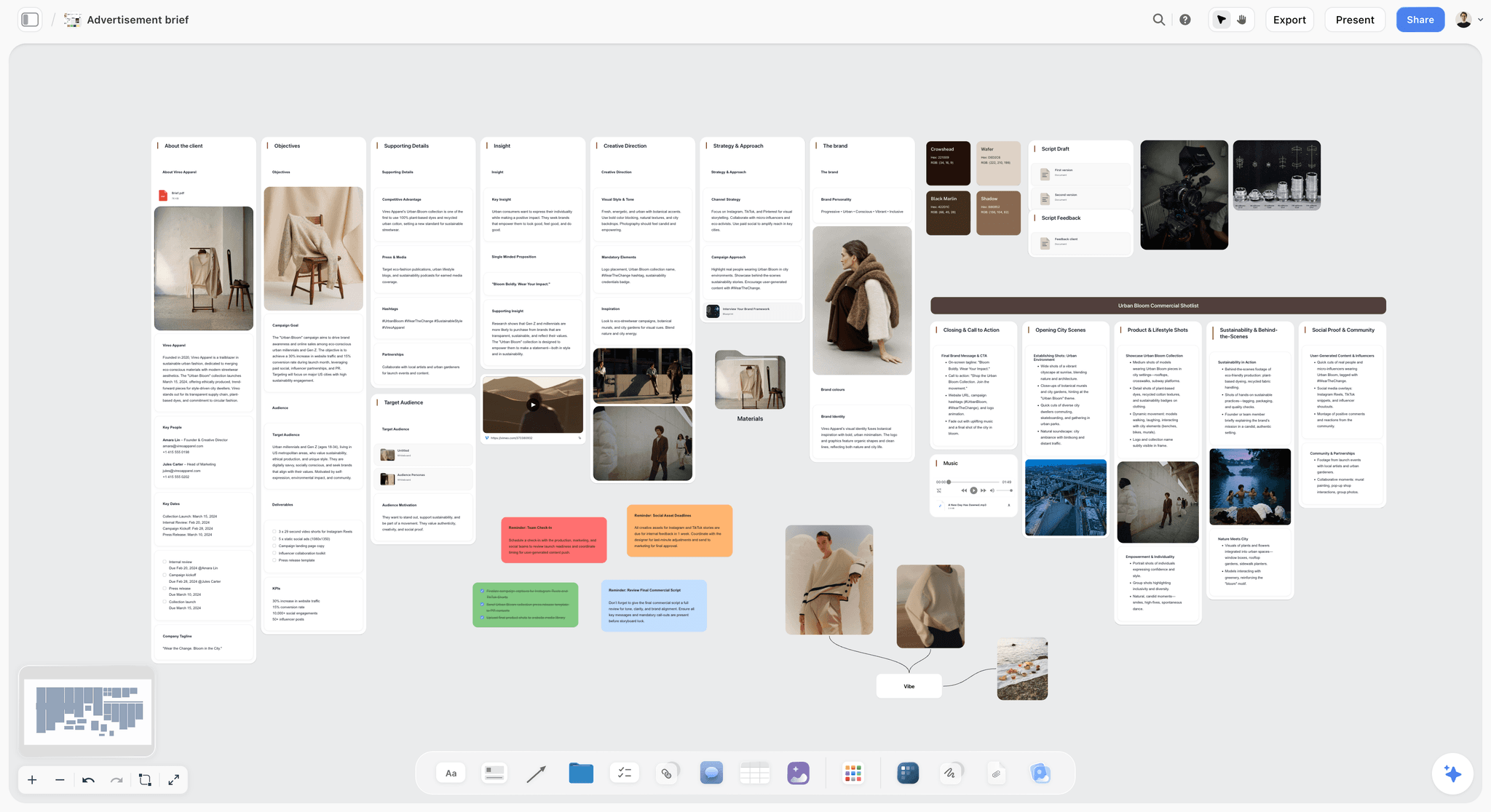
Storyflow is an AI-powered visual creative workspace built on an infinite canvas. For a marketing storyboard, that means your brief, your script, your frame cards, your on-screen copy, your references, and your channel cut-downs all live on one board instead of scattered across four apps. You place frame cards in sequence, drop reference ads beside them, write the shot and copy and CTA as structured notes, and reorder the whole spot by dragging. When the brief beside the board changes, the gap is visible immediately, because the brief and the storyboard share the same surface.
The part that matters most for planning: Storyflow's AI reads your full active canvas board, plus up to one Tactic and up to three @-mentioned Documents. So the AI sees the brief, the frames, the copy, and the message together. You can ask it to check whether the hook lands in the first three seconds, to flag a frame that does not serve the goal, to draft the on-screen copy for a frame, or to suggest where the call to action should sit, and it answers from your actual campaign rather than from a blank prompt. The 200+ Story Blueprints library includes proven marketing frameworks (AIDA, Retention Hooks, the Hero's Journey) so you can structure the spot around a tested arc instead of a guess.
This is AI-assisted storyboarding, not a vending machine. Storyflow does not take one prompt and hand back a finished, on-brand storyboard for your campaign. It works alongside your judgment on a board you are building: it drafts, it flags, it suggests, and you decide. The honest framing is that the AI compresses the busywork (drafting copy, spotting a weak frame, restructuring a sequence) while the creative direction stays yours.
Two honest limitations. First, if what you want is finished, hand-illustrated frame artwork or animatic-quality panels, pair Storyflow with a dedicated illustration or animation tool. Storyflow is the canvas where the storyboard, the brief, the copy, and the channel cut-downs connect, not a digital art easel. Second, AI image generation is a Pro-plan-and-up feature, so on the Free or Plus plan you are storyboarding with text, notes, and your own reference images rather than AI-generated frames. For text-led planning that is usually the right trade, but it is a real boundary worth naming.
Pricing is straightforward. The Free plan is free from late 2026: unlimited notes, images, and links, unlimited shared boards, basic AI, 20 file uploads, and unlimited collaboration, which is enough to build and share a real marketing storyboard. Plus is $7.99/mo on an annual plan or $9.99/mo monthly, and adds the 200+ Story Blueprints, and unlimited uploads. Pro is $14/mo annual ($19 monthly) and adds AI image generation. Max is $39/mo annual ($49 monthly) and adds 40x more AI plus a team workspace with roles and permissions. Pricing is flat per account, never per user.
If your brief, your script, and your storyboard keep drifting out of sync across separate apps, build the next campaign on a canvas where all of it connects. Try the AI storyboard generator to turn your concept into a first board, then start a Storyflow workspace and put your brief, frames, and copy on one board.
Storyflow Templates to Get You Started
You do not have to start from a blank board. These ready-made Storyflow templates cover the work in this guide, with the structure already in place and the AI ready to read it.
Storyboard Template
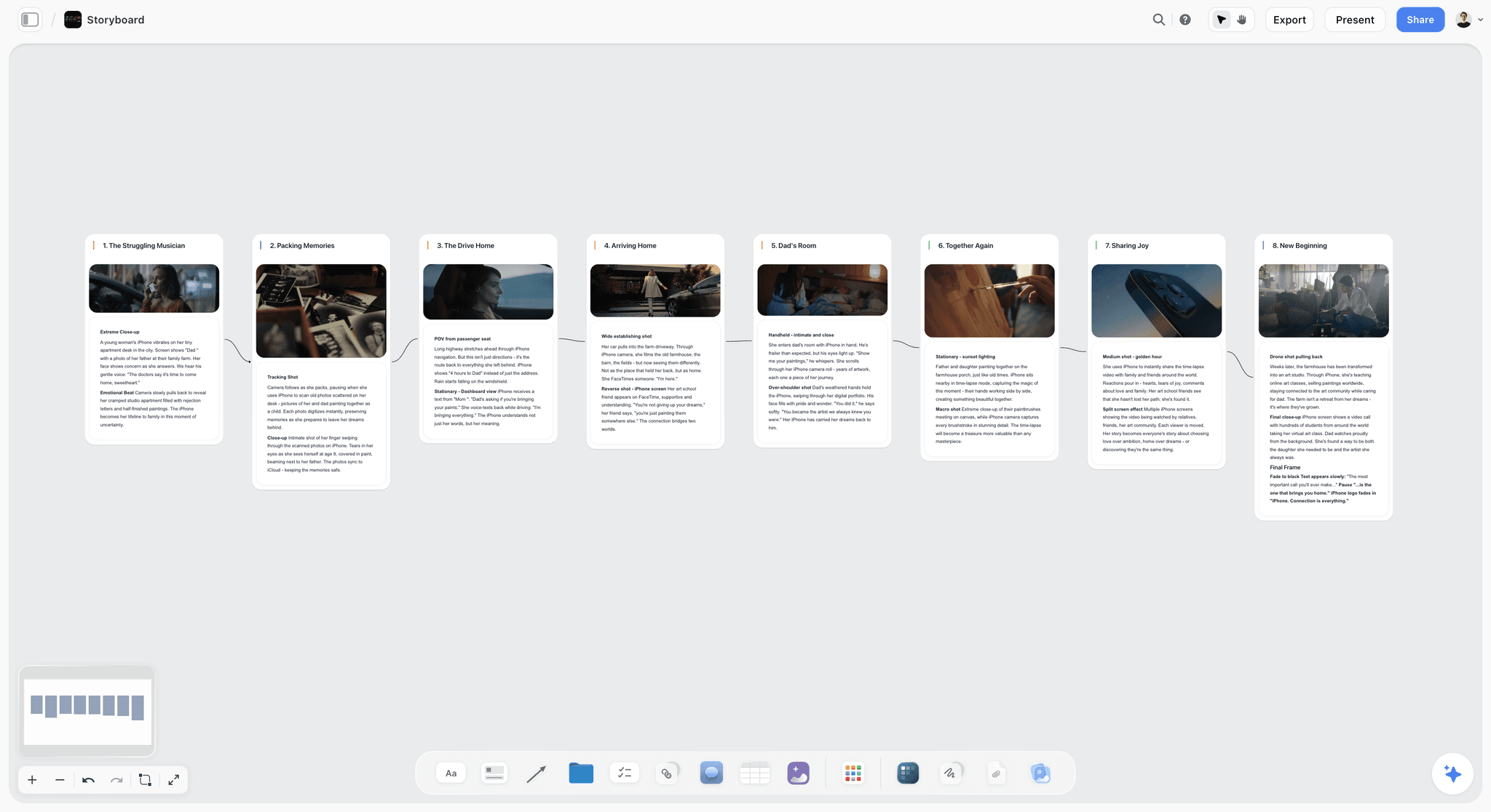
Plan a video or film shot by shot. The Storyboard template lays out frames, action captions, and shot notes on Storyflow's infinite canvas. Use the Storyboard template.
Commercial Shotlisting Template
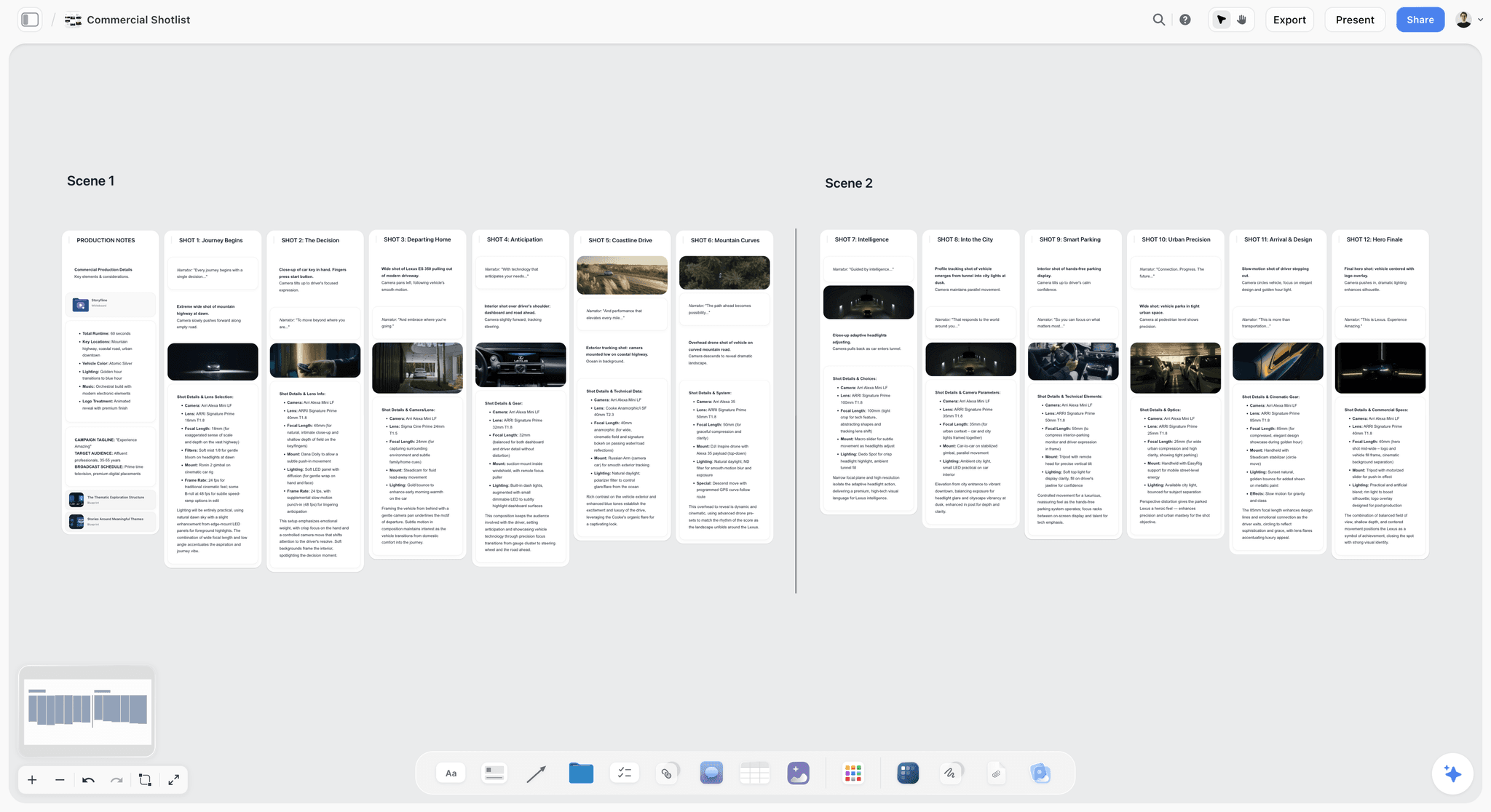
Plan every setup of a 15, 30, or 60 second ad spot on one canvas: shot list rows beside storyboard frames. Paid-only during early access, with a Free plan before the end of 2026. Use the Commercial Shotlisting template.
Marketing Campaign
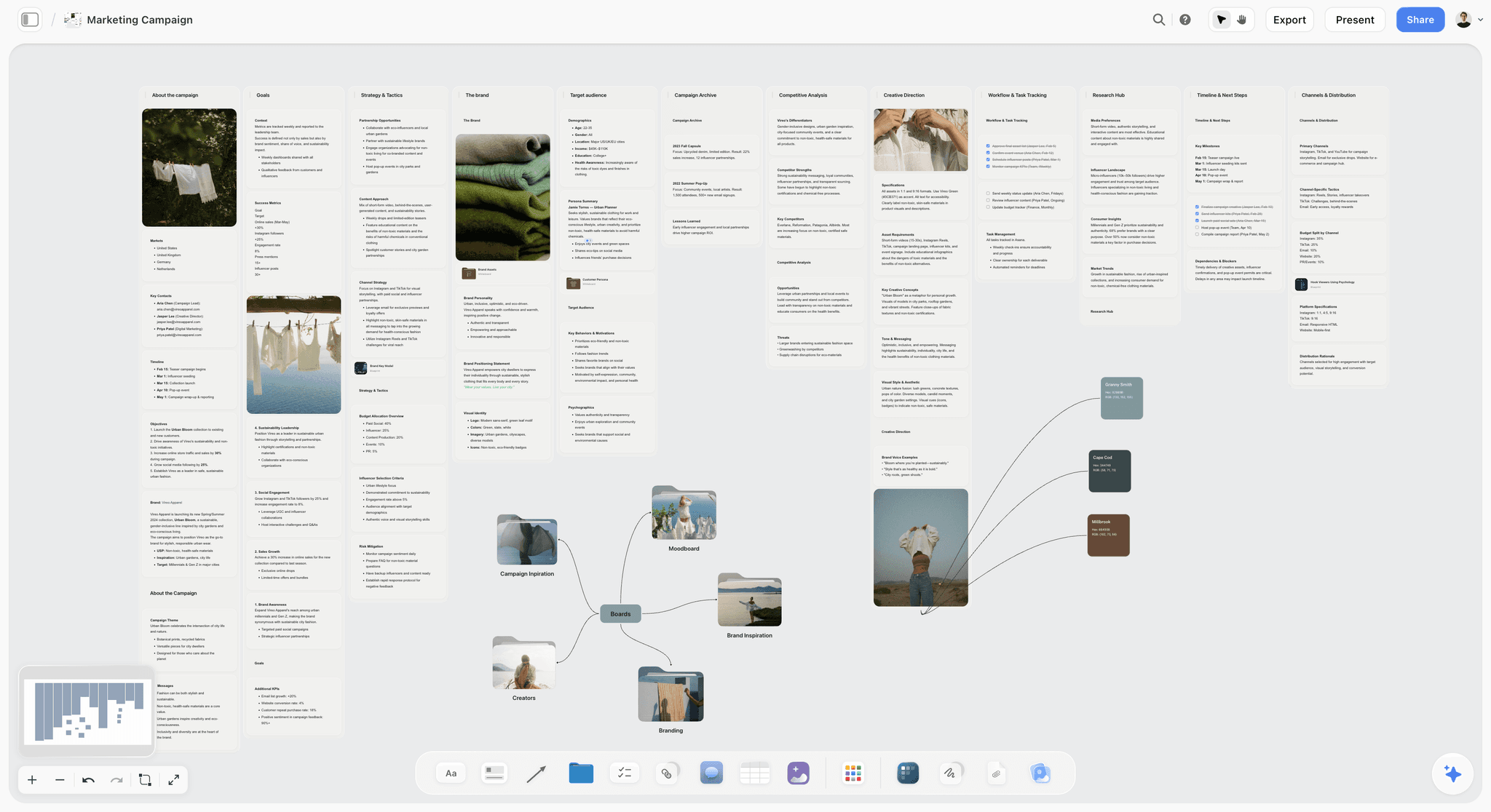
Plan a marketing campaign on one canvas. Keep goals, channels, assets, timeline, and references in a single board. Use the Marketing Campaign template.
9) The Bottom Line
Making a marketing storyboard is not a drawing exercise. It is a sequence of decisions: which frames, in which order, carrying which copy, asking for which action, made on a board where being wrong is free. Run the seven steps. Lock the goal and the single message. Write the script and the hook. Break the script into frames. Sketch or describe each one. Annotate every frame with the shot, the copy, and the call to action. Build the 9:16 and 16:9 cut-downs. Review the whole board against the brief with the people who will shoot, cut, and approve it.
A marketing storyboard turns a brief into something a team can actually shoot. The roughest board that lands the hook, carries the message, and asks for the click in the right place will protect a campaign budget better than the most beautiful one that buries the call to action.
The storyboard does not live alone. It sits beside the brief it translates, the script it visualizes, and the channel cut-downs it feeds, and when those drift apart in four separate apps, the cost shows up in the final review or the performance report. If you want the brief, the frames, the copy, and the cut-downs on one connected surface, with AI that reads the whole board and helps you spot the weak frame, build your next campaign on a visual canvas. Start a Storyflow workspace and plan the spot frame by frame in one place.
8) FAQ: How to Make a Marketing Storyboard
What is a marketing storyboard?
A marketing storyboard is a frame-by-frame plan of a marketing video before it is produced. Each frame shows what the shot looks like, the on-screen copy or voiceover for that moment, and where the call to action appears. It covers the formats marketers ship: paid social ads, brand spots, product demos, launch films, and short-form hooks for TikTok, Reels, or YouTube. Unlike a film storyboard, every frame is built around a conversion goal, and the board plans multiple aspect ratios so the same campaign can be cut down for each channel.
How do you make a marketing storyboard step by step?
Make a marketing storyboard in seven steps. Lock the campaign goal and the single core message. Write the script and the opening hook. Break the script into frames, one per shot or idea. Sketch or describe each frame. Annotate every frame with the shot, the on-screen copy, and the call to action. Build the channel cut-downs for the 9:16 vertical and 16:9 horizontal versions. Review the whole board against the brief with your team. The drawing quality does not matter. The decisions do.
Do I need to know how to draw to make a marketing storyboard?
No. A marketing storyboard is a planning document, not an art piece. Boxes for the frame, stick figures for people, and arrows for camera movement communicate a shot as clearly as polished art, and a one-line caption carries the copy and the call to action. The team reads the storyboard to learn what each frame shows, says, and asks of the viewer, and that information survives in a rough sketch. If you can describe a shot in a sentence, you can build a marketing storyboard.
What is the difference between a marketing storyboard and a film storyboard?
A film storyboard plans the camera in service of a story; the unit is the shot and the goal is that a crew builds the frame the director imagined. A marketing storyboard plans the camera in service of a conversion; every frame carries a second layer of on-screen copy and a call to action, and the board plans multiple aspect ratios from the start because the campaign ships as a vertical, square, and horizontal cut. A film storyboard rarely thinks about a logo end-card or a click. A marketing storyboard is built around one.
What is the difference between a storyboard and a content calendar?
A storyboard designs a single video frame by frame. A content calendar schedules the whole campaign: which asset goes out on which channel on which date, who owns it, and its status. The calendar sits one level above the storyboard. It says "brand film, YouTube, March 14." The storyboard says what that brand film actually looks like. They stack rather than replace each other: the calendar schedules the campaign, the storyboard designs the video, and the shot list derived from the storyboard tells the crew what to capture.
How many frames should a marketing storyboard have?
As many as the video has distinct shots or ideas, not more. A 30-second ad is usually eight to fourteen frames. A 6-second bumper might be two. You do not draw a frame for every second of screen time; you draw one per shot or per beat of the message. The hook usually gets its own frame because it carries the most weight, and the close gets a frame for the logo and the call to action. If a frame does not serve the goal or carry the message, cut it.
What aspect ratios should a marketing storyboard plan for?
Plan for the channels you are actually shipping to. The common set is 16:9 for YouTube and horizontal video, 9:16 for TikTok, Reels, and Stories, 1:1 for square feed posts, and 4:5 for the taller in-feed format that performs well on Instagram and Facebook. Plan the vertical and horizontal cuts as parallel rows on the board, not as an afterthought in the edit, because a frame composed for 16:9 can lose its subject or its captions when cropped to 9:16. The cut-down is where most campaigns lose their hook.
How is a marketing storyboard different from a shot list?
A marketing storyboard is visual and a shot list is textual, and they answer different questions. The storyboard shows how each frame looks, what copy sits on it, and where the call to action lands. The shot list is the running inventory of what to capture: every setup, with notes on location, talent, props, and order. The storyboard usually comes first and the shot list is derived from it. The best workflow keeps both connected, so a change to a frame on the board updates the corresponding line on the shot list.
Can AI make a marketing storyboard for me?
AI can assist, but it does not hand back a finished, on-brand storyboard from one prompt, and any tool that claims it does is overselling. What AI does well is the busywork around the board: drafting on-screen copy for a frame, checking whether the hook lands in the first three seconds, flagging a frame that does not serve the goal, and restructuring a sequence. In Storyflow, the AI reads your full active canvas, so it works from your actual brief and frames rather than a blank prompt. The creative direction (the hook, the pacing, the message) stays your decision. Treat AI as a drafting and review partner, not a replacement for judgment.
When in the campaign should I make the storyboard?
Make the storyboard after the brief is approved and the core message is locked, and before the shoot is scheduled or the production budget is committed. Storyboarding too early, against a brief that is still changing, wastes the work because every brief change ripples through the frames. Storyboarding too late leaves no time to fix the weak hook or the missing cut-down it reveals. The storyboard belongs in the middle of pre-production, with room to act on what it shows and to get stakeholder approval before money is spent on the shoot.
Table of Contents
- Quick Answer: How to Make a Marketing Storyboard
- What a Marketing Storyboard Is and Why It Matters
- Marketing Storyboard vs Film Storyboard vs Content Calendar
- What You Need Before You Start
- How to Make a Marketing Storyboard Step by Step
- A Worked Example: A 30-Second Brand Video
- Where AI Helps
- FAQ: How to Make a Marketing Storyboard
- The Bottom Line
- Author
- Related Reading
Templates to check out for this topic


Filmmaking templates you can use in Storyflow
Skip the blank canvas. Open one of these filmmaking boards in Storyflow and the AI builds on the structure that is already there, from research through the shot list.


See Storyflow in Action
A visual AI workspace where every feature lives inside one canvas. No tab-switching, no context lost.
Build your entire board from a single message
Type what you need in the AI chat at the bottom of your canvas. The AI adds cards, headings, and structure directly onto your board.
Use expert frameworks as AI context
Type @ in the AI chat and choose any Tactic. The AI tailors every response to that framework instead of giving generic advice.
Turn your board into a mind map in seconds
Ask the AI to restructure your canvas as a mindmap. It connects your ideas into a visual hierarchy so you can see how everything relates.
Why Storyflow Exists
Storyflow actually began as a personal tool while working on creative and research projects.
We kept running into the same problem: ideas were scattered everywhere: notes, documents, and whiteboards.
Nothing helped us see how everything connected.
So we started building a workspace designed around how ideas actually grow.
→ Read how Storyflow was createdJustkay
Documentary Filmmaker & Founder at Storyflow
Published: 2026-06-18
Extremely simple, seriously capable


See how easy it is to get started
Watch a real project come together, from a blank board to a finished plan, clicked through step by step.
Start creating with AI and become more productive
Transform your creative workflow with AI-powered tools. Generate ideas, create content, and boost your productivity in minutes instead of hours.