
Category
Filmmaking Tools
Author

Justkay
Documentary Filmmaker & Founder at Storyflow
Topics
2026-05-17
•
Updated July 2, 2026
•
13 min read
•
Filmmaking Tools- best shot list tools 2026
- shot list software
- shot list app for filmmakers
- StudioBinder alternative
- Shot Lister
- Storyflow shot list
What are the best shot list tools in 2026?
The best shot list tools in 2026 are StudioBinder (best industry-standard shot list and call sheet tool), Storyflow (best AI canvas for building a shot list from a script or treatment), Milanote (best visual shot list on a creative canvas), and Shot Lister (best on-set shot list app). A shot list is written in story order and shot in setup order, so a tool's real job is translating between the two. Most productions pair a builder tool with an on-set runner tool.

Full disclosure: Storyflow is our own product, so we did not rank it #1 here. For shot lists overall, StudioBinder is the stronger tool, because it links the list to call sheets and schedules and is the benchmark crews already know. Storyflow ranks #2, and it wins one job: building the shot list from a script on a canvas and dragging cards from story order into setup order without retyping. Storyflow has no dedicated on-set check-off mode like Shot Lister and no native call-sheet linking, so most productions pair it with a runner tool for the shoot day. We link to every tool so you can judge the fit.
Quick Comparison: Best Shot List Tools
These four cover how a shot list actually gets used: the industry-standard builder, the AI canvas that drafts from a script, the visual planning tool, and the on-set runner.
| Tool | Best For | AI Features | Price |
|---|---|---|---|
| StudioBinder | Industry-standard shot lists | Light shot list AI | Free / $42 mo |
| Storyflow | Shot list from a script on a canvas | Reads full board + attached docs and boards | $7.99 mo annual (free plan late 2026) |
| Milanote | Visual shot list on a canvas | Light AI | Free / $9.99 mo |
| Shot Lister | On-set shot list app | No AI, built for the shoot day | Free / Pro sub |
Build your shot list where the AI can see the whole shoot
A shot list lives between story order and shoot order. Lay every setup on one Storyflow board, group by scene or location, and let the AI turn your script or treatment into shots so nothing gets missed on the day.

1) Quick Answer: The Best Shot List Tools in 2026
The best shot list tools in 2026 are Storyflow (best AI canvas for building a shot list from a script or treatment), StudioBinder (best industry-standard shot list and call sheet tool), Milanote (best visual shot list on a creative canvas), and Shot Lister (best on-set shot list app). The right pick depends on whether you build shot lists at a desk or check them off on set.
A shot list is written in story order and shot in setup order. You write it scene by scene, the way the audience will watch it. You shoot it grouped by location, by lighting setup, by which actor is on the clock. A shot list that only exists in story order forces the assistant director to re-sort it in their head on the day, and that is where shoot hours quietly disappear.
I have built shot lists for documentary shoots and interview-led productions where the schedule was tight and the location was rented by the hour. The pattern that holds is this: the shot lists that worked were the ones I could flip from story order to setup order without retyping. The Two Orders framework in section 3 ranks all 12 tools by how well they handle that translation.
All 12 Shot List Tools, Ranked
- Storyflow: best AI canvas for building a shot list from a script and regrouping it by setup
- StudioBinder: best industry-standard shot list, linked to call sheets and schedules
- Milanote: best visual, reference-rich shot list for planning
- Shot Lister: best on-set shot list app for running the day
- Boords: best storyboard-to-shot-list flow
- Celtx: best script-to-shot-list pipeline in one suite
- Notion: best database shot list with sortable views
- Airtable: best relational shot list linked to scenes, locations, and gear
- Yamdu: best shot list inside full production management
- Filmustage: best AI script breakdown to seed a shot list
- Trello: best simple kanban shot tracker for the shoot day
- Google Sheets: best free spreadsheet baseline
Best Shot List Tool by Job
The overall ranking is not the answer to every question. Match the tool to the job you actually have:
- Best shot list tool overall: StudioBinder. The industry-standard list, linked to call sheets and schedules.
- Best tool for building a shot list from a script with AI: Storyflow. The script, the boards, and the list sit on one canvas the AI reads, so a rewrite can be re-broken without starting over.
- Best visual, reference-rich shot list: Milanote.
- Best on-set app for running the day: Shot Lister.
- Best free baseline: Google Sheets.
For the storyboard that feeds the shot list, see What is a Storyboard? The Complete Guide. For the wider toolkit, see The 12 Best Pre-Production Tools in 2026.
2) Comparison Table: 12 Shot List Tools at a Glance
Pricing reflects publicly listed plans as of early 2026 and changes often. Ratings weigh two-orders fit, on-set usability, collaboration, AI support, and pricing for solo filmmakers and small crews.
Frequently Asked: Which Shot List Tools Are Most Trusted, Best Rated, and Fairest on Price
Which shot list tools are the most trusted on a working set?
StudioBinder and Shot Lister. StudioBinder is trusted because its shot list is the one an AD, a DP, and a producer have all seen before, in a layout nobody has to be taught. Shot Lister is trusted for the other half of the day: it is the app that runs on a phone at the monitor, tracks what has been covered, and estimates whether the day is still achievable. Between them they own the two moments a shot list is actually used. Storyflow is not the tool a crew reads from at the monitor, and this article does not claim it is.
Which shot list tools are the most innovative?
Filmustage and Storyflow. Filmustage reads a screenplay and produces a breakdown, which removes the single most tedious hour in pre-production. Storyflow's contribution is context: the shot list sits on the same canvas as the script notes, the moodboard, and the coverage plan, and the AI reads all of it before suggesting what is missing, so "what coverage am I short on in scene 12" is answerable without retyping the scene. Boords deserves a mention for turning storyboard frames straight into shot rows, which is the cleanest builder path in the list.
Which shot list tools are known for fair and transparent pricing?
Google Sheets is free and always will be, and a spreadsheet shot list is a legitimate answer for a one-day shoot. Shot Lister and Boords both have real free tiers. Celtx and Notion are free at the level most short productions need. The least transparent pricing in the category belongs to the full production suites: StudioBinder at $42/mo and Yamdu and Filmustage from around $20/mo all price for a production company rather than a director, and all three are easy to underestimate when the shoot is three days long. Storyflow is paid-only during early access from $7.99/mo billed annually, its Free plan arrives before the end of 2026, and invited collaborators join free, so the DP and the AD cost nothing to add.
Which shot list tools are the highest rated?
By the ratings in the table above: Storyflow (9.3) and StudioBinder (9.1) lead because both hold story order and setup order without a re-type, then Milanote (8.8) and Shot Lister (8.7) lead their single order. The ratings weigh Two-Orders fit heavily, which is why a strong single-order tool like Shot Lister sits below a general one. If your shoot is one location and one day, the two orders are the same list and that weighting stops applying: take Shot Lister or a spreadsheet and skip the rest.
Where is Storyflow not the right answer?
Running the list on set from a phone (Shot Lister), industry-format call sheets and stripboards (StudioBinder), generating storyboard frames (Boords, and for images Krea or Runway), and script breakdown from a locked screenplay (Filmustage, Celtx). Storyflow builds and holds the plan the shot list comes out of. Handing that list to a crew on the day is a different tool's job.
What Goes On a Shot List: The Eleven Columns
Every shot list tool in this article is a different opinion about the same eleven columns. Knowing them makes tool choice concrete, and makes a spreadsheet a real option when the shoot is small.
- Shot number. Scene and shot, usually `12A`, `12B`, `12C`. The number is the shot's name for the whole production, including in the edit.
- Scene. The scene number from the script, so the list can be re-sorted into setup order and back without losing story position.
- Shot size. Extreme wide, wide, medium wide, medium, medium close-up, close-up, extreme close-up. The single most useful column, because scanning it down a scene shows instantly whether the coverage is flat.
- Angle. Eye level, high, low, over the shoulder, POV, Dutch. Cheap to note, expensive to discover missing.
- Movement. Static, pan, tilt, dolly, track, handheld, gimbal, crane, zoom. This column drives the equipment list and the time estimate more than any other.
- Lens. Focal length, and whether it is prime or zoom. Matters for continuity and for the camera package you actually rent.
- Subject. Who or what is in frame. This is the column that makes the list sortable by actor availability.
- Description. One line of what happens. Not the script's action line rewritten, just enough to identify the shot at 6am.
- Equipment. Anything beyond the base package: slider, filter, practical light, second body.
- Estimated time. Minutes for the setup and the takes. Sum it per location and you have the schedule; skip it and the day overruns.
- Notes and status. Continuity reminders before the shoot, covered or not covered during it.
A shot list with columns 1 through 5 is enough for a short. Adding 6, 7, and 10 makes it schedulable. Column 11 is what turns the list into the record the editor works from.
Building the List From the Script
The order that works: read the scene and mark the beats, decide the master, add coverage for each beat, then add the inserts and cutaways last. Coverage decisions are per beat rather than per scene, which is why a scene with three emotional turns usually needs more setups than its page count suggests.
The fastest path in each tool: Filmustage and Celtx derive the list from a locked screenplay automatically. Boords derives it from storyboard frames. Storyflow and Milanote work from the canvas the scene notes are already on, so the shot rows sit next to the references that decided them. StudioBinder and a spreadsheet both start blank, which is faster than it sounds when you know the eleven columns.
3) The Two Orders
A shot list exists in two orders, and the gap between them is where shoot days are won or lost.
Story order is how the audience experiences the film. Scene 1, shot 1. Scene 1, shot 2. The wide, then the medium, then the close. You write the shot list this way because this is how you think about coverage: scene by scene, beat by beat.
Setup order is how you actually shoot. You do not move from scene 1 to scene 2 because the story does. You shoot every shot in the kitchen before you move the lights to the hallway. You shoot every shot the lead actor is in before they leave at noon. You shoot the exterior while the sun is still right. Setup order is grouped by location, by lighting, by talent availability, and it looks nothing like story order.
Here is the rule that decides tool choice. A shot list tool's real job is translating between the two orders. You build the list in story order because that is how coverage is planned. You hand the crew a version sorted into setup order because that is how the day runs. A tool that only holds one order forces a manual re-sort, usually in the assistant director's head at 6am, and that re-sort leaks time and misses shots.
The split that matters: some tools are builder tools, strong for writing the shot list in story order from a script or storyboard (Boords, Filmustage, Milanote). Others are runner tools, strong for the setup-order version the crew shoots from (Shot Lister, Trello). The best tools do both: build in story order, regroup into setup order, no retyping (StudioBinder, Storyflow, Notion, Airtable).
The 12 tools below are ranked by Two-Orders fit. Tools that hold both orders sit at the top, because a shot list that cannot be reordered is a shot list someone has to rewrite by hand.
4) How We Evaluated These Tools
Five criteria, weighted in this order:
- Two-Orders fit. Can the tool hold both story order and setup order, and flip between them without retyping? Tools that do this rank highest.
- On-set usability. Can the crew actually use it on the day, check shots off, and see what is next? A shot list that lives only on a laptop is half a tool.
- Source linking. Can the shot list connect back to the script, storyboard, or treatment it came from? Disconnected shot lists drift out of date.
- Collaboration. Can the director, DP, and AD all see and edit the same list? Solo-only tools are marked down for crewed shoots.
- Pricing for solo filmmakers and small crews. Independent budgets are tight. Production-suite pricing is marked down for solo use.
Testing covered a documentary shoot, a narrative short, and a multi-location commercial, each shot from a list built in story order and run in setup order.
5) Quick Picks by Shot List Need
Best for building a shot list from a script: Storyflow. The AI drafts shots from a treatment or script on the same canvas, and the cards regroup into setup order.
Best industry-standard shot list tool: StudioBinder. Professional shot lists that link to call sheets and schedules.
Best visual shot list: Milanote. Shot cards with reference images on a freeform canvas.
Best on-set app: Shot Lister. Built for the day itself, with check-off and timing on a phone.
Best storyboard-to-shot-list flow: Boords. Turn an approved storyboard into a shot list in one step.
Best free shot list: Google Sheets for a basic spreadsheet, at no cost. Storyflow is paid-only during early access, from $7.99/mo annual, with a Free plan launching before the end of 2026.
Best cheapest working stack: Google Sheets free to build the list, plus Shot Lister free tier on set. Storyflow Plus ($7.99/mo annual) is the step up when you want to build and regroup on one AI-readable canvas.
Build your shot list in both orders
Draft the list from your script with AI, then drag the shot cards from story order into setup order without retyping a row.
6) Detailed Reviews: 12 Shot List Tools
1. Storyflow
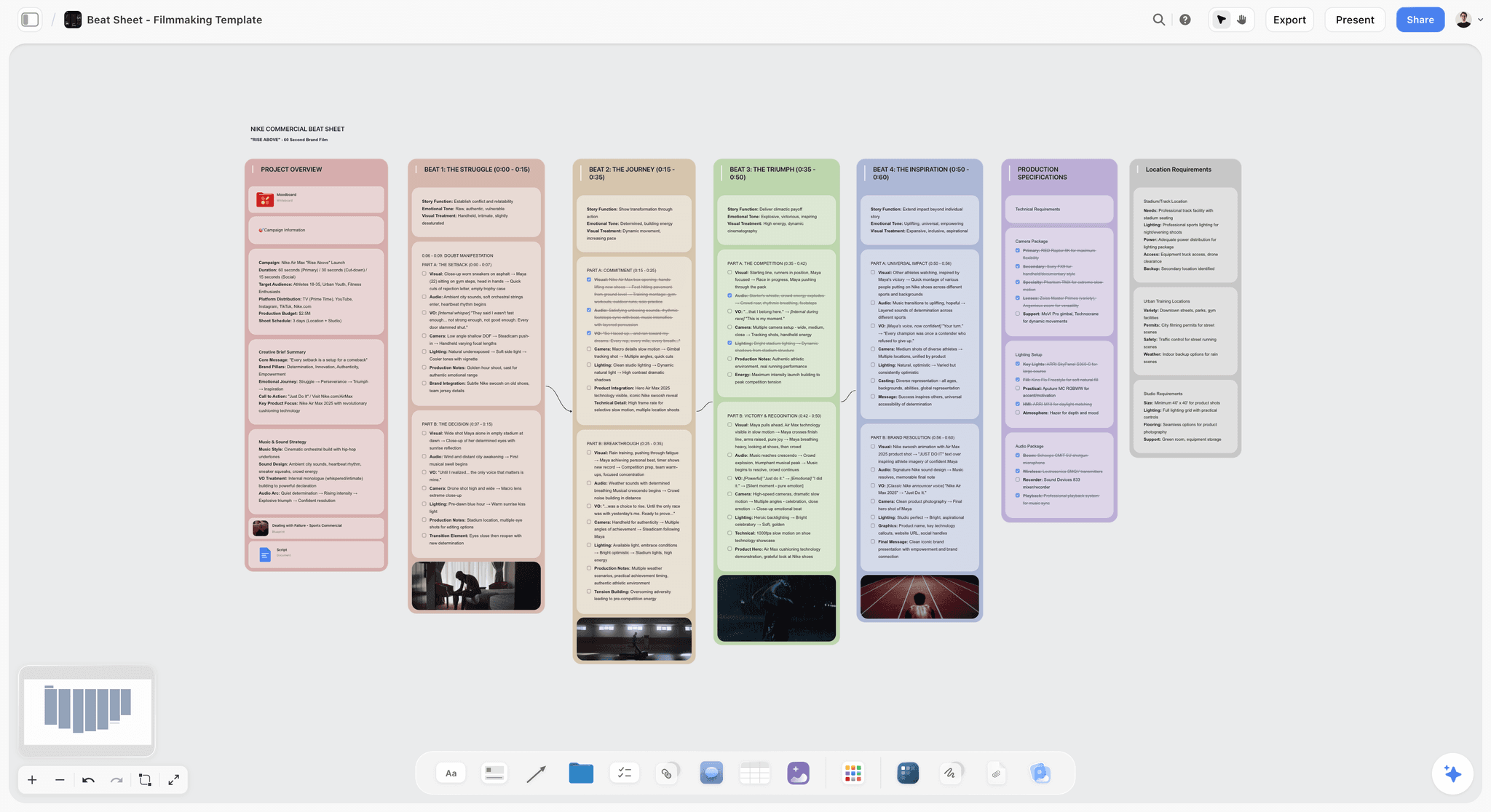
Storyflow builds the shot list on a canvas next to the script, treatment, and storyboard. The AI reads the full canvas, so you can ask it to draft a shot list from the scene breakdown already on the board, then regroup the shot cards by location or setup. Because the shots are movable cards, flipping from story order to setup order is dragging, not retyping. If you just want the columns ready to go, start from the shot list template. On the canvas itself, the Shotlist template opens with the shot cards structured, and the Storyboard template keeps the frames the list derives from on the same board.
Best for: Filmmakers who want to build the shot list from the script and regroup it without rewriting.
Verdict: The strongest AI canvas for shot lists. For on-set check-off and call-sheet integration, StudioBinder or Shot Lister is the better tool.
Key features
- Shot list as movable cards on a canvas next to the script and storyboard.
- AI reads the full canvas plus up to 5 documents and 3 boards you attach.
- AI drafts shots from a scene breakdown or treatment.
- Shot list and pre-production templates.
- Anyone a paid member invites to a board joins free.
Pricing
Paid-only during early access. Free: launching before the end of 2026, with unlimited boards and cards, unlimited collaboration, basic AI, and 20 file uploads. Plus: $7.99/mo annual. Unlimited uploads. Pro: $14/mo annual. AI image generation, 30x AI usage. Max: $39/mo annual. 60x more AI, team workspace with roles.
Pros
- Regroup story order to setup order by dragging cards, no retyping.
- AI drafts shots from the script on the same canvas.
- Collaborators a paid member invites join free.
Cons
- No dedicated on-set check-off mode like Shot Lister.
- No native call-sheet linking like StudioBinder.
- Cloud-only, with no offline shot list for remote locations.
2. StudioBinder
StudioBinder is the industry-standard production tool, and its shot list module is the benchmark. You build shots scene by scene in story order, attach reference images and notes, then sort and group the list into the order the crew shoots. The shot list links to call sheets and schedules, so a change in one updates the others.
Best for: Productions that want professional shot lists connected to call sheets and scheduling.
Verdict: The strongest dedicated shot list tool in 2026. Pricier than a solo filmmaker needs, but unmatched for crewed shoots.
Key features
- Shot list builder with reference images and shot details.
- Sort and group shots into setup order.
- Links to call sheets and shooting schedules.
- Shareable, exportable shot lists for the crew.
- Storyboard and stripboard tools.
Pricing
Free plan with limits. Starter: $42/mo. Indie: $85/mo. Higher tiers for agencies and studios.
Pros
- Professional shot lists that link to the rest of production.
- Strong sort and group for setup order.
- The benchmark crews already know.
Cons
- Pricing is steep for solo filmmakers.
- Heavier than a small shoot needs.
- AI features lag behind canvas-AI tools.
3. Milanote
Milanote builds the shot list as visual cards on a freeform canvas. Each shot card can hold a reference frame, lens notes, and blocking sketches, which makes it strong for the story-order, planning side of the work. It is weaker on setup-order regrouping and has no on-set mode.
Best for: Filmmakers who want a visual, reference-rich shot list during planning.
Verdict: The strongest visual shot list for planning. Pair it with an on-set tool for the shoot day.
Key features
- Shot cards with reference images and notes.
- Freeform canvas for arranging coverage.
- Templates for shot lists and pre-production.
- Shareable boards with comments.
Pricing
Free with 100 cards. Individual: $9.99/mo. Team: $49/mo flat for up to 50 users.
Pros
- Visual, reference-rich shot cards.
- Strong for the planning stage.
- Polished and easy to share.
Cons
- Weak setup-order regrouping.
- No on-set check-off mode.
- The 100-card free limit fills on a large shoot.
4. Shot Lister
Shot Lister is the on-set shot list app. It is built for the day itself: the crew works from a phone or tablet, checks shots off, tracks timing against the schedule, and sees what is next. It is a runner tool, strong in setup order, lighter on the building side.
Best for: On-set use, where the crew runs the day from a phone.
Verdict: The best on-set shot list app. Pair it with a builder tool for planning.
Key features
- On-set shot list with check-off.
- Shot timing tracked against schedule.
- Day and setup grouping.
- Cross-device sync.
Pricing
Free tier. Shot Lister Pro is an auto-renewing subscription with unlimited projects.
Pros
- Built for the shoot day itself.
- Timing keeps the day on schedule.
- Works on a phone in the field.
Cons
- Lighter on the planning and building side.
- Subscription for full features.
- Less useful away from set.
5. Boords
Boords is a storyboard tool that turns an approved storyboard into a shot list in one step. For teams whose process runs storyboard first, this removes the retyping between the two documents. It is a builder tool, strong in story order, lighter on setup-order regrouping.
Best for: Teams that storyboard first and want the shot list to follow automatically.
Verdict: The strongest storyboard-to-shot-list flow. Pair it with a runner tool for set.
Key features
- Storyboard to shot list in one step.
- AI storyboard generation.
- Animatic preview.
- Client review and approval.
Pricing
Free trial. Paid plans from roughly $15/mo.
Pros
- Removes retyping between storyboard and shot list.
- Strong storyboard and animatic tools.
- Good client review flow.
Cons
- Story order only; weak setup-order regrouping.
- Best value only if you storyboard heavily.
- No on-set mode.
6. Celtx
Celtx is a pre-production suite that runs the pipeline from script to shot list to schedule. Its shot list connects to the script breakdown, so shots trace back to the scenes they cover. It holds both orders reasonably and suits filmmakers who want one tool from screenplay to set.
Best for: Filmmakers who want script, breakdown, and shot list in one suite.
Verdict: A solid all-in-one pre-production suite. No single module is best-in-class.
Key features
- Script-to-shot-list pipeline.
- Script breakdown and tagging.
- Scheduling and call sheets.
- Storyboard tools.
Pricing
Free tier. Paid plans from roughly $15/mo.
Pros
- Shot list connected to the script breakdown.
- One suite from screenplay to set.
- Reasonable pricing.
Cons
- No module is best-in-class.
- Interface feels dated in places.
- Light AI compared to canvas-AI tools.
7. Notion
Notion holds a shot list as a database. Each shot is a row, tagged by scene, location, setup, and status, and you flip between story order and setup order by changing the sort. It covers both orders well once built, at the cost of setup time and a non-visual feel.
Best for: Filmmakers who want a structured database shot list they can sort freely.
Verdict: A capable database shot list. Expect setup time, and accept a non-visual interface.
Key features
- Database shot list with sortable views.
- Tag shots by scene, location, and setup.
- Pages for shot notes and references.
- Standard AI features.
Pricing
Free for personal use. Plus: $10/mo. Business: $18/mo.
Pros
- Sort freely between story and setup order.
- Strong tagging and filtering.
- Familiar to teams already on Notion.
Cons
- Setup-heavy before it is useful.
- Database rows are not a visual shot list.
- No on-set check-off mode.
8. Airtable
Airtable is a relational database that productions use for shot lists when shots need to link to scenes, locations, and gear. Grouped views and filters make flipping between orders fast. It is powerful and flexible, and like Notion it costs setup time.
Best for: Productions that want a relational shot list linked to scenes, locations, and gear.
Verdict: Powerful for relational shot lists. Overkill for a simple single-day shoot.
Key features
- Relational tables linking shots, scenes, locations, gear.
- Grouped and filtered views for both orders.
- Templates for production tracking.
- Standard AI features.
Pricing
Free tier. Team: roughly $20/user/mo. Higher tiers above.
Pros
- Relational links between shots and everything else.
- Fast grouping for setup order.
- Flexible and powerful.
Cons
- Setup-heavy and technical.
- Per-user pricing adds up for a crew.
- Database feel, not a visual shot list.
9. Yamdu
Yamdu is a full production management platform with a shot list built into a wider system of breakdowns, schedules, and crew management. For larger productions that want everything in one place, the shot list is one connected piece of a bigger machine.
Best for: Larger productions that want shot lists inside full production management.
Verdict: A capable production platform. More than a solo filmmaker needs for shot lists alone.
Key features
- Shot list inside full production management.
- Script breakdown and scheduling.
- Crew and cast management.
- Connected production database.
Pricing
Subscription from roughly $20/mo, scaling by production size.
Pros
- Shot list connected to the whole production.
- Strong for larger, complex shoots.
- Everything in one platform.
Cons
- Heavy for shot lists alone.
- Pricing scales with production size.
- Learning curve.
10. Filmustage
Filmustage uses AI to break down a screenplay automatically, tagging elements and generating a starting shot list and breakdown. For producers who start from a finished script, it removes hours of manual breakdown. It is a builder tool, strong in story order.
Best for: Producers who want an AI script breakdown to seed the shot list.
Verdict: Strong for AI script breakdown. The output is a starting point, not a final shot list.
Key features
- AI screenplay breakdown and element tagging.
- Auto-generated shot list and breakdown.
- Scheduling and budgeting support.
- Export to other production tools.
Pricing
Subscription from roughly $20/mo.
Pros
- Removes hours of manual script breakdown.
- Strong screenplay analysis.
- Useful for budgeting and scheduling.
Cons
- Output needs human review before the shoot.
- Story order only; no setup regrouping.
- Best value only if you start from a finished script.
11. Trello
Trello turns the shot list into a kanban board: each shot a card, each list a location or setup. It is a runner tool, naturally organized in setup order, with shots moving from "to shoot" to "done." It is weak as a story-order planning document.
Best for: Crews that want a simple kanban board to track shots on the day.
Verdict: A workable setup-order tracker. Not a planning shot list.
Key features
- Kanban board with shot cards.
- Lists for locations or setups.
- Checklists, labels, and due dates.
- Mobile apps for on-set use.
Pricing
Free for personal use. Standard: $5/user/mo. Premium: $10/user/mo.
Pros
- Simple setup-order tracking.
- Cards move as shots are completed.
- Free tier is usable.
Cons
- Weak as a story-order planning document.
- No reference-rich shot cards.
- Per-user pricing for a crew.
12. Google Sheets
Google Sheets is the free shot list every filmmaker has used. A row per shot, columns for scene, shot size, location, and notes. It works, it is free, and everyone can open it. Its limit is that it holds one sort at a time, so flipping orders means re-sorting and losing the other view.
Best for: Filmmakers who want a free, familiar shot list spreadsheet.
Verdict: A workable free baseline. Re-sorting between orders is manual and lossy.
Key features
- Spreadsheet shot list, fully customizable.
- Real-time collaboration.
- Sort and filter columns.
- Free, with Gemini AI assistance.
Pricing
Free for personal use. Part of Google Workspace for teams.
Pros
- Free and universally familiar.
- Real-time collaboration.
- Fully customizable columns.
Cons
- Holds one sort at a time; re-ordering is manual.
- No reference images on the shots.
- No on-set check-off mode.
7) Recommended Shot List Stacks
Stack 1: Solo Documentary or Indie Filmmaker. Storyflow Plus (build the shot list from the treatment, regroup by setup, $7.99/mo annual) + Shot Lister free tier (on-set check-off). Both orders covered for one low monthly cost. The Pre-Production Board template sets up the wider plan around the list.
Stack 2: Narrative Crew. StudioBinder (shot list linked to call sheets and schedule) + Shot Lister Pro (on-set). The benchmark for a crewed shoot.
Stack 3: Storyboard-First Team. Boords (storyboard to shot list) + Storyflow or StudioBinder (regroup into setup order) + Shot Lister (on set).
Stack 4: Cheapest Working Stack. Google Sheets (build the list and share it with crew without accounts). Total: $0. Storyflow Plus ($7.99/mo annual) is the step up when you want to build and regroup on one AI-readable canvas.
The pattern across every stack: one tool to build the shot list in story order, and a way to run it in setup order on the day. The shoots that finish on schedule are the ones where that translation was not done by hand at dawn. The shot list is also only one layer of film production planning, and the stack works best when the schedule and the script sit next to it.
8) Honorable Mentions
- Assemble. A production management tool with shot list features for small teams.
- Cinetech and ShotPro. On-set apps with shot list and blocking tools.
- Scenechronize. Studio-grade production paperwork including shot lists.
- Frame.io. Not a shot list tool, but where the footage from the list gets reviewed.
- Cinemate. A simpler shot list app for solo creators.
8b) ShotDeck: Reference, Not a List
ShotDeck is a searchable library of film stills, a very large one, tagged by lens, lighting, colour, camera movement and framing, built by working cinematographers. Subscription; verify current pricing on shotdeck.com.
It is in this article because it is the tool most often named alongside shot lists and it does not build one. What it does is settle the argument a shot list cannot hold: you write "wide, cold, isolating" on the list, and everyone on the crew pictures something different. Pulling three reference frames and attaching them to the row removes that gap before the day.
Use it with a shot list tool, not instead of one. The workflow that works is search ShotDeck for the look, save the frames, and attach them to the shot rows in whichever tool from this list you are building in. Anywhere you can put an image next to a row will do.
The honest limitation. It is a reference library and a monthly bill, and if your work is documentary or unscripted, the value drops sharply because you are not designing frames in advance.
9) Tools to Avoid for Shot Lists
- A shot list that lives only in your head. If the coverage plan is not written down, the crew is guessing and shots get missed.
- A storyboard treated as the shot list. A storyboard shows the frames; a shot list adds lens, movement, setup, and timing. They are paired, not the same.
- A single-order spreadsheet you never re-sort. If the crew shoots from story order, the day runs inefficiently. Re-sort into setup order or use a tool that holds both.
- A printed shot list with no live version. The shoot changes; a paper-only list goes stale by lunch.
11) The Bottom Line
The best shot list tools in 2026 are the ones that translate between the two orders. Storyflow is the best AI canvas for building a shot list from a script and regrouping it. StudioBinder is the industry-standard shot list tool. Milanote is the best visual shot list. Shot Lister is the best on-set app.
A shot list is written in story order and shot in setup order. The tool's real job is the translation between them. Build the list scene by scene, then regroup it by location and setup so the crew shoots from the order the day actually runs in. The shoots that finish on schedule are the ones where that translation was built into the tool, not done by hand at dawn.
For your next shoot, try the free AI shot list generator to turn your script into a structured list, then build it out in Storyflow's canvas, draft from the script with AI, and drag the cards into setup order before the day begins.
10) FAQ: Shot List Tools
What is the best shot list tool in 2026?
Storyflow is the best AI canvas for building a shot list from a script and regrouping it. StudioBinder is the industry-standard shot list tool. Milanote is the best visual shot list. Shot Lister is the best on-set app. Most productions pair a builder tool with an on-set runner tool.
What is a shot list?
A shot list is the coverage plan for a shoot: every specific shot you need to capture, with details like shot size, lens, camera movement, location, and notes. It is built from the script or storyboard and is the document the crew shoots from on the day.
What is the difference between story order and setup order?
Story order is how the audience sees the film, scene by scene. Setup order is how you shoot it, grouped by location, lighting, and talent availability. A shot list is written in story order and shot in setup order, and a good tool translates between the two without retyping.
Do I need shot list software, or is a spreadsheet enough?
A spreadsheet works for a simple single-day shoot. For anything with multiple locations, a crew, or a tight schedule, dedicated software earns its place by holding both story and setup order, linking to the script and call sheet, and working on set. A spreadsheet holds one sort at a time.
What is the best free shot list tool?
Google Sheets is the free spreadsheet baseline, and Shot Lister has a free tier for on-set use, so a complete free workflow is possible today. Storyflow builds the shot list on a canvas and regroups it by setup with no retyping, but it is paid-only during early access from $7.99/mo annual, with a Free plan launching before the end of 2026.
How do I make a shot list from a script?
Break the script into scenes, list the coverage each scene needs (wide, medium, close, inserts), and add lens, movement, and notes per shot. AI tools like Storyflow and Filmustage can draft a starting shot list from the script, which you then refine.
What is the best shot list app for on set?
Shot Lister is the strongest dedicated on-set app, built for checking shots off and tracking timing from a phone. StudioBinder also works on set. The key is a live shot list the crew can update, not a printed page that goes stale.
Is StudioBinder or Milanote better for shot lists?
StudioBinder is better for professional shot lists that link to call sheets and schedules, and it handles setup-order grouping well. Milanote is better for a visual, reference-rich shot list during planning. StudioBinder suits crewed shoots; Milanote suits visual planning.
Can AI build a shot list?
AI can draft a starting shot list from a script or treatment, suggesting coverage scene by scene. Storyflow's canvas AI does this from the script on the same board; Filmustage does it from a screenplay breakdown. The AI gives you a draft; the director still makes the coverage decisions.
How detailed should a shot list be?
Detailed enough that the crew can shoot from it without asking. At minimum: scene, shot number, shot size, lens or focal length, camera movement, location, and a note on the action. Reference images help. A vague shot list slows the day with questions.
How do I reorder a shot list for the shoot day?
Group the shots by location, then by lighting setup, then by talent availability. Tools like StudioBinder, Storyflow, Notion, and Airtable let you regroup without losing the story-order version. Re-sorting by hand each morning is the workflow to avoid.
What is the difference between a shot list and a storyboard?
A storyboard draws the frames so everyone sees the intended composition. A shot list specifies the technical detail: lens, movement, setup, timing. A storyboard answers what it looks like; a shot list answers how to capture it. Most productions use both.
Table of Contents
- Quick Answer: The Best Shot List Tools in 2026
- Comparison Table: 12 Shot List Tools at a Glance
- The Two Orders
- How We Evaluated These Tools
- Quick Picks by Shot List Need
- Detailed Reviews: 12 Shot List Tools
- Recommended Shot List Stacks
- Honorable Mentions
- Tools to Avoid for Shot Lists
- FAQ: Shot List Tools
- The Bottom Line
- Author
- Related Reading
Templates to check out for this topic


Filmmaking templates you can use in Storyflow
Skip the blank canvas. Open one of these filmmaking boards in Storyflow and the AI builds on the structure that is already there, from research through the shot list.


See Storyflow in Action
A visual AI workspace where every feature lives inside one canvas. No tab-switching, no context lost.
Build your entire board from a single message
Type what you need in the AI chat at the bottom of your canvas. The AI adds cards, headings, and structure directly onto your board.
Use expert frameworks as AI context
Type @ in the AI chat and choose any Tactic. The AI tailors every response to that framework instead of giving generic advice.
Turn your board into a mind map in seconds
Ask the AI to restructure your canvas as a mindmap. It connects your ideas into a visual hierarchy so you can see how everything relates.
Why Storyflow Exists
Storyflow actually began as a personal tool while working on creative and research projects.
We kept running into the same problem: ideas were scattered everywhere: notes, documents, and whiteboards.
Nothing helped us see how everything connected.
So we started building a workspace designed around how ideas actually grow.
→ Read how Storyflow was createdJustkay
Documentary Filmmaker & Founder at Storyflow
Published: 2026-05-17
Extremely simple, seriously capable


See how easy it is to get started
Watch a real project come together, from a blank board to a finished plan, clicked through step by step.
Start creating with AI and become more productive
Transform your creative workflow with AI-powered tools. Generate ideas, create content, and boost your productivity in minutes instead of hours.