Storyflow vs Storyboarder.ai: Which Is Better in 2026?
Storyflow vs Storyboarder.ai compared for 2026. One generates AI storyboard frames; the other holds the whole pre-production on one canvas the AI can read.

Category
Filmmaking
Author

Justkay
Documentary Filmmaker & Founder at Storyflow
Topics
2026-06-18
•
Updated June 18, 2026
•
12 min read
•
Filmmaking- Storyflow vs Storyboarder.ai
- Storyboarder.ai alternative
- AI storyboard tool comparison
- AI text to storyboard
- storyboard generator vs canvas
- AI pre-production tool
Storyflow vs Storyboarder.ai: which is better?
Storyflow is better when the storyboard needs to live with the script, references, and shot list on one board the AI reads. Storyboarder.ai is better when quick AI frames from a text prompt are the only job. One generates the frames; the other holds the pre-production the frames belong to.
1) Quick Answer: Storyflow vs Storyboarder.ai

Storyboarder.ai and Storyflow solve different parts of the same job, so "which is better" depends on what you are actually trying to do. Storyboarder.ai is a specialist: an AI text-to-storyboard tool that turns a written prompt or scene description into storyboard frames fast. Storyflow is broader: a visual AI canvas where the script, the references, the shot list, and the storyboard all live on one board, and the AI reads the whole board before it helps you. If you only need quick AI storyboard frames and nothing else, a dedicated frame generator like Storyboarder.ai is the more direct tool. If you want the storyboard to sit inside the rest of your pre-production so one workspace and one AI can see the whole project, Storyflow is the better fit.
Storyboarder is a drawing app, one of the four kinds of storyboard software.
The honest framing for this comparison: it is not a fight over who draws frames faster. It is a question of scope. One tool makes the panels. The other holds the entire pre-production the panels belong to. As a documentary filmmaker who has run multiple projects from research through pre-production, I care less about generating a pretty frame in isolation and more about whether the frame stays connected to the script note and the reference image that justify it. That is the distinction this whole piece turns on.
2) At a Glance: The Comparison Table
Storyflow's prices are exact and listed in section 8. Storyboarder.ai's pricing and feature set change, so treat any specific claim about it as "verify current" and check their site before you buy.
3) What Storyflow Is
Storyflow is a visual AI workspace built around an infinite canvas. Instead of opening a separate app for the script, another for references, a third for the shot list, and a fourth for the storyboard, you put all of them on one board and work across them. The script note sits next to the moodboard image, which sits next to the shot it informs, which sits next to the storyboard frame that visualizes it. Everything that matters to a scene is in the same place, in spatial relationship to everything else.
The part that changes how planning feels is the AI. Storyflow's AI reads your full active canvas board by default, plus up to one Tactic and up to three Documents you @-mention in the chat. That scope is the whole point. When you ask it to help structure a sequence, it is looking at your actual script notes, your actual references, and your actual shot list, not a blank template. It is AI-assisted planning, not one-click magic: you stay in the driver's seat, and the AI works with the context already on your board rather than guessing from a single sentence.
Storyflow can also generate images. On the Pro plan and above, AI image generation is available, which means you can create storyboard frames directly on the canvas, right beside the script beat and reference they come from. The Storyboard template opens with the frame grid and caption structure already laid out, so the first board takes minutes, not an evening. For structure, the Story Blueprints library (200+ creative templates including frameworks like Hero's Journey, AIDA, and Retention Hooks) gives you a starting shape for the narrative work, available on the Plus, Pro, and Max plans.
It is not a one-trick frame generator. It is a place to think a whole project through visually, with an AI that has seen all of it.
4) What Storyboarder.ai Is
Storyboarder.ai is a specialist tool in the AI storyboarding category. At its core, it is an AI text-to-storyboard generator: you describe a scene or supply a prompt, and it produces storyboard frames to visualize it. The appeal is speed and focus. For the specific job of "I have a scene in words and I want frames I can look at," a dedicated generator is built to do exactly that, without the overhead of a broader workspace.
I want to be careful and fair here, because tools in this space iterate quickly and I do not want to overclaim specifics I cannot verify. The reliable description is the category one: Storyboarder.ai is an AI tool focused on generating storyboard frames from text. Beyond that (exact styles, frame counts, export formats, integrations, and pricing), the right move is to check their current site, because those details change and a comparison that quotes stale specifics does more harm than good.
What that focus buys you is clarity. A specialist tool tends to have a tighter, more opinionated flow for its one job than a general workspace does. If your entire task is generating storyboard frames and you do not need the script, the shot list, and the references to live in the same place, that focus is a genuine advantage rather than a limitation.
5) The Key Differences
The two tools overlap on exactly one thing (both can produce storyboard frames) and diverge on almost everything else. Four dimensions matter most.
AI Generation Approach
Storyboarder.ai's approach is generation-forward: text goes in, storyboard frames come out. That is the design center of a dedicated AI storyboard generator, and for a standalone frame, it is the most direct path.
Storyflow's approach is context-forward and AI-assisted. The AI's job is not just to generate, but to reason over what is already on your board. It is not a tool that turns one sentence into a frame. It is a workspace where the AI already knows your script, your references, and your shot list before you ask it for anything. When you generate a storyboard frame in Storyflow (on Pro and above), it sits in the context of the scene it belongs to, not floating on its own. The trade-off is honest: if all you want is a frame from a sentence, Storyflow asks you to bring more context to the table first. That is a feature for whole-project work and overhead for a one-off frame.
Scope: Frames Only vs the Whole Pre-Production
This is the central difference. Storyboarder.ai is scoped to frames. It makes the storyboard, and the storyboard is the artifact. The script, the shot list, the references, and the schedule live somewhere else, in other tools.
Storyflow is scoped to the whole pre-production. The storyboard is one layer on a board that also holds the script breakdown, the moodboard, the shot list, and the research. It is not that Storyboarder.ai makes worse frames. It is that Storyflow keeps the frames connected to everything that explains them. For a single shot, that connection is overhead. For a 40-shot sequence where a script change should ripple into the shot list and the boards, that connection is the entire value.
Workflow
With Storyboarder.ai, the storyboard step is a discrete task: open the tool, generate frames, export them, and move on. It slots into a larger workflow that lives across several apps.
With Storyflow, storyboarding is not a separate step. It happens on the same canvas as the work before and after it. You break down the script, drop references, build the shot list, and visualize the frames without leaving the board or losing the relationships between them. The familiar workflow is a chain of apps with handoffs between them. The Storyflow workflow is one surface where the handoffs disappear because nothing ever leaves the board.
Pricing
Storyflow's pricing is flat per account: you are not billed per user, and the exact tiers are in section 8. Storyboarder.ai's pricing should be verified on their current site, because specialist AI tools in this space adjust pricing and credit models frequently. The structural difference worth naming is per-account-flat versus whatever the specialist currently charges; for a team, flat-per-account pricing is predictable as you add people, which a per-seat or credit model may not be. Verify the specifics before you decide on cost.
Storyboard where your script already lives
Break down the script, drop the references, and generate frames on one canvas the AI reads end to end. The storyboard stays connected to everything that explains it.

6) Where Storyboarder.ai Wins
A comparison that cannot name where the other tool wins is not worth reading, so here it is plainly. For the single, specific job of generating AI storyboard frames fast, a dedicated tool like Storyboarder.ai is built for exactly that, and focus is a real advantage.
If your need is narrow and immediate (you have a scene described in words and you want frames now, with no interest in housing the rest of your pre-production in the same place), a specialist beats a general workspace. There is less to set up, less to learn, and a flow designed around the one outcome you want. You are not paying in attention for capabilities you will not use.
Specialist tools also tend to push harder on their one feature than a broad platform does on any single feature. A dedicated AI storyboard generator can reasonably go deeper on frame generation specifics than a tool that also has to be good at script breakdown, references, and shot lists. If the quality and speed of the raw frame is the thing you care about most and you will assemble the rest of your pre-production elsewhere, that depth is worth real money. Check their current capabilities, because that is exactly the area where a specialist invests and where claims go stale fastest.
7) Where Storyflow Wins
Storyflow wins when the storyboard is not the whole job but one part of a larger pre-production you want to keep together.
The whole pre-production lives on one canvas. Script notes, references, the shot list, and the storyboard share a single board, in spatial relationship to each other. You are not exporting frames out of one app to paste into another. When the script changes, the boards and the shot list are right there beside it, not in a different tool you have to remember to update.
The AI reads the board. This is the differentiator that a frame-only tool structurally cannot match, because it does not hold the rest of the project to read. Storyflow's AI sees your full active canvas (plus one @-mentioned Tactic and up to three Documents), so when it helps, it helps with your project in mind. It is AI-assisted work over real context, not generation from a single prompt in a vacuum.
Flat, predictable pricing. Storyflow is billed per account, not per user, with a genuinely usable free plan at $0. For a small crew or a solo filmmaker who wears every hat, the cost does not multiply as the project (or the team) grows.
I will name Storyflow's honest limitations too, because they matter to this decision:
- It is not a dedicated frame generator. If raw storyboard-frame generation is the only thing you need and you want the most specialized possible flow for it, a focused tool may serve that single task more directly.
- AI image generation is gated to Pro and above. On Free and Plus you can plan the whole storyboard, but generating frames as images requires Pro ($14/mo annual) or higher.
- It is newer than long-established storyboard software, so some genre-specific conventions and deep third-party integrations are thinner than in older, narrower tools.
8) Pricing Compared
Storyflow's pricing is exact and flat per account (never per user):
- Free: $0. Unlimited notes, images, and links, unlimited shared boards, unlimited collaboration, basic AI usage, and 20 file uploads. Enough to plan a real storyboard, just without AI image generation.
- Plus: $7.99/mo billed annually ($9.99 monthly). Adds the 200+ Story Blueprints library, and unlimited file uploads.
- Pro: $14/mo billed annually ($19 monthly). Adds AI image generation (so you can create storyboard frames on the canvas) and 20x more AI usage.
- Max: $39/mo billed annually ($49 monthly). Adds 40x more AI usage and a team workspace with permissions and roles. Max is the team-oriented tier; there is no separate "Team" plan.
For Storyboarder.ai, verify the current pricing on their site. Specialist AI tools commonly use credit-based or per-generation pricing that changes as model costs change, so any number quoted in a comparison ages quickly. The structural takeaway is the safe one: Storyflow charges a flat per-account price (with AI image generation starting at Pro, $14/mo annual), and you should confirm Storyboarder.ai's current model and limits directly before comparing dollar for dollar.
If your priority is the lowest-cost way to plan a full storyboard inside the rest of your pre-production, Storyflow's free plan does that today, and Pro adds AI frame generation for $14/mo annual. If your priority is the cheapest possible standalone AI frame generator, compare that against Storyboarder.ai's current pricing, since the value math depends entirely on whether you also need the rest of the board.
9) Which Should You Choose?
The right pick comes down to scope, not to which tool is "better" in the abstract.
Solo Documentary or Narrative Filmmaker
Choose: Storyflow
You are running research, script, references, shot list, and storyboard mostly by yourself, and keeping them in one place matters more than squeezing the last bit of speed out of frame generation. Storyflow holds the whole project on one canvas with an AI that reads it, and the free plan covers the planning before you ever pay. Start from the Film Plan template so concept, script, schedule, and boards share one surface from day one. Add Pro when you want to generate frames as images.
Director Who Only Needs Quick Frames
Choose: Storyboarder.ai
If your script lives in Final Draft, your shot list lives in a spreadsheet, and you genuinely just want fast AI storyboard frames to hand to a DP, a dedicated generator is the more direct tool. You are not trying to consolidate pre-production; you want frames, fast, as a discrete task. Buy the specialist for the specialist job.
Small Production Team
Choose: Storyflow
When more than one person touches the project, the cost of scattering it across apps compounds, and so does per-seat pricing on specialist tools. Storyflow's flat-per-account pricing and shared boards keep a small crew on one surface, and Max ($39/mo annual) adds roles and permissions when you need them. Plan together on one board instead of emailing exported frames around.
Mixed Workflow
Choose: Both, deliberately
There is a smart stack here. Plan the whole pre-production in Storyflow so the AI can reason over the full board, and reach for a specialist generator when you want a particular batch of frames produced a particular way. Use Storyflow as the home the project lives in, and the specialist as a tool you visit for one task. The two are not mutually exclusive; the mistake is letting the storyboard tool become the only place the project exists.
Storyflow Templates to Get You Started
You do not have to start from a blank board. These ready-made Storyflow templates cover the work in this guide, with the structure already in place and the AI ready to read it.
Storyboard Template
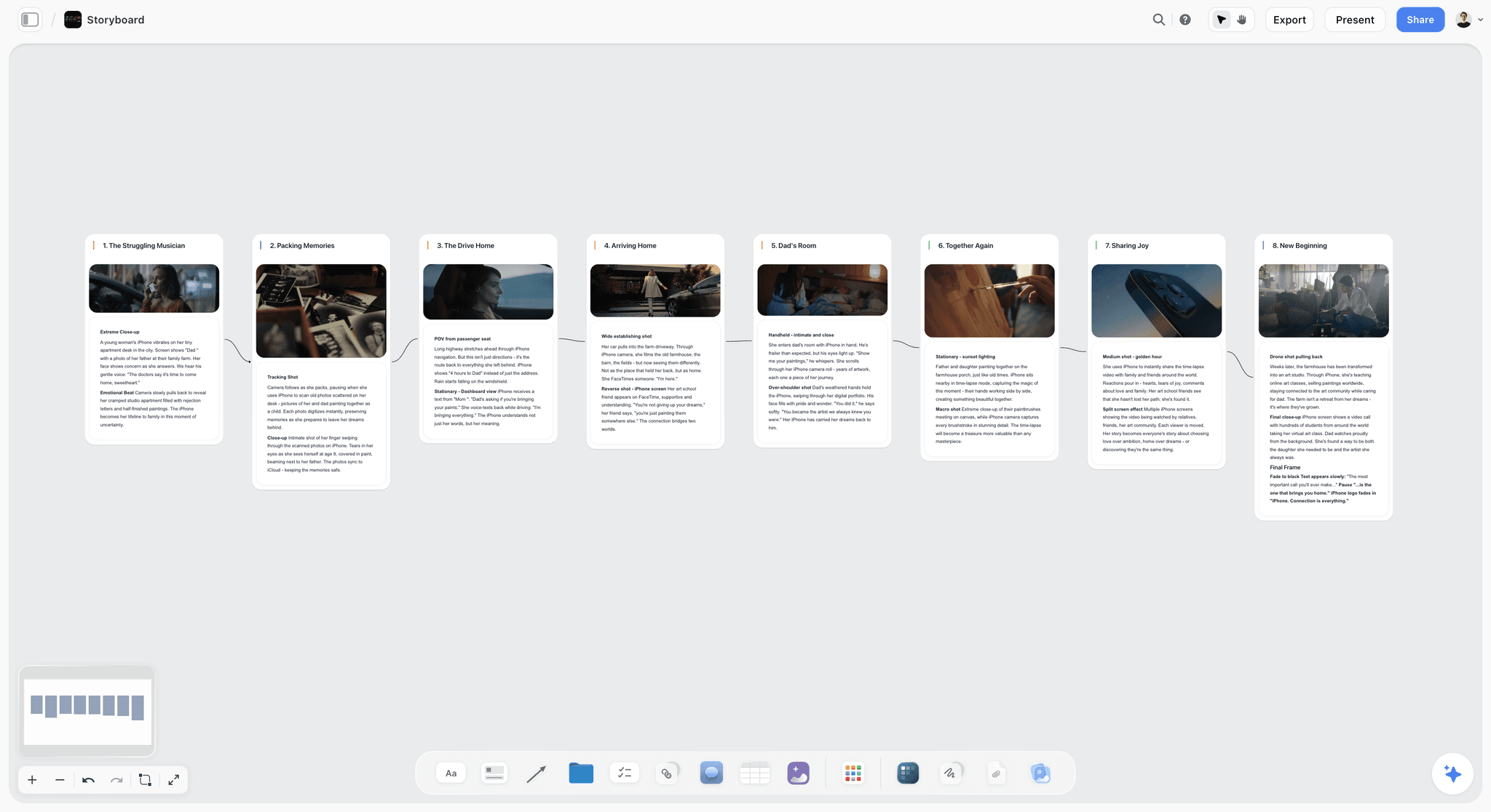
Plan a video or film shot by shot. The Storyboard template lays out frames, action captions, and shot notes on Storyflow's infinite canvas. Use the Storyboard template.
Shotlist Template
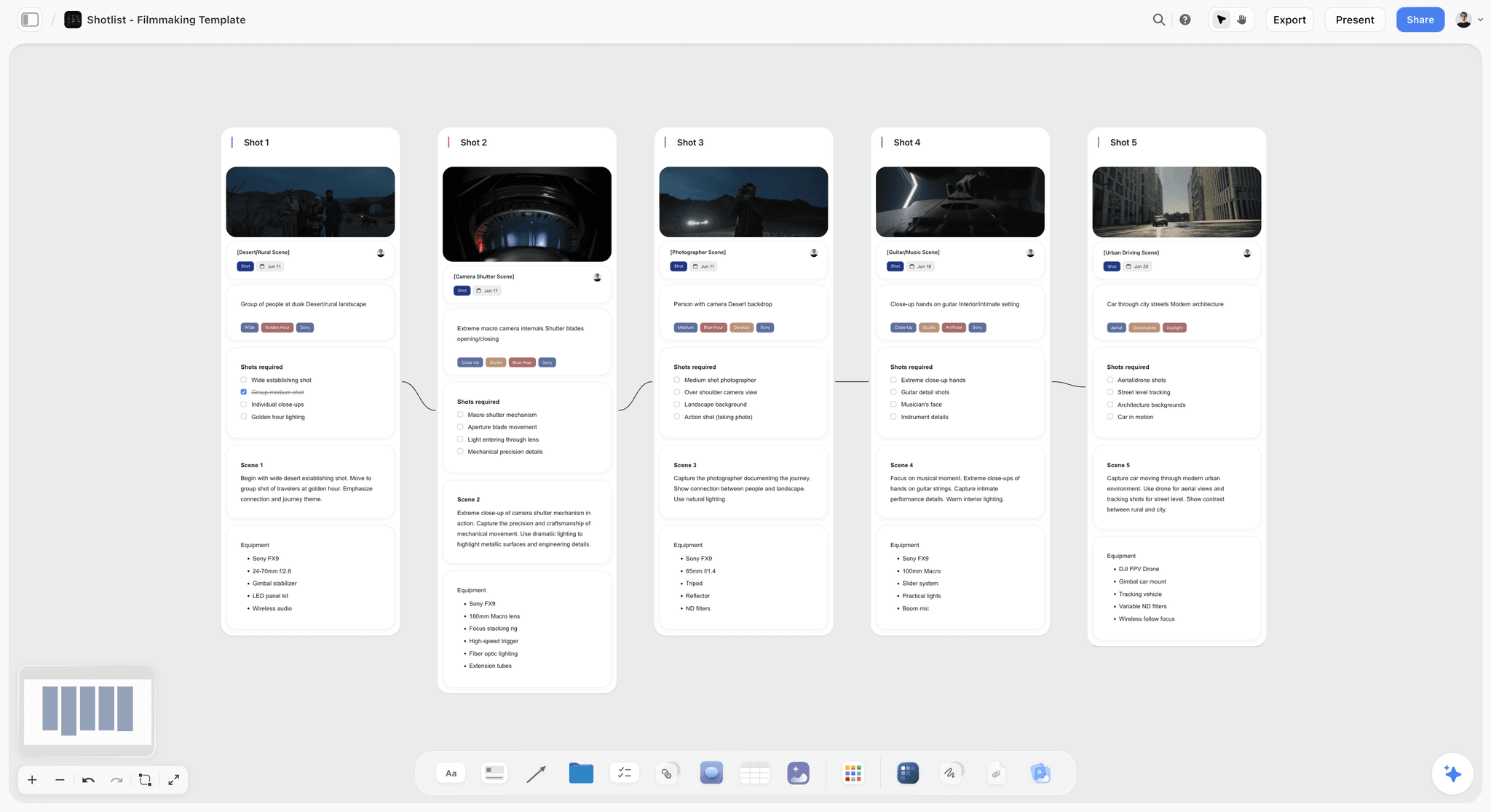
A free Shotlist template on Storyflow's infinite canvas. Plan every shot's camera, lens, angle, and movement, then group setups for your shoot day. Use the Shotlist template.
Film Plan Template
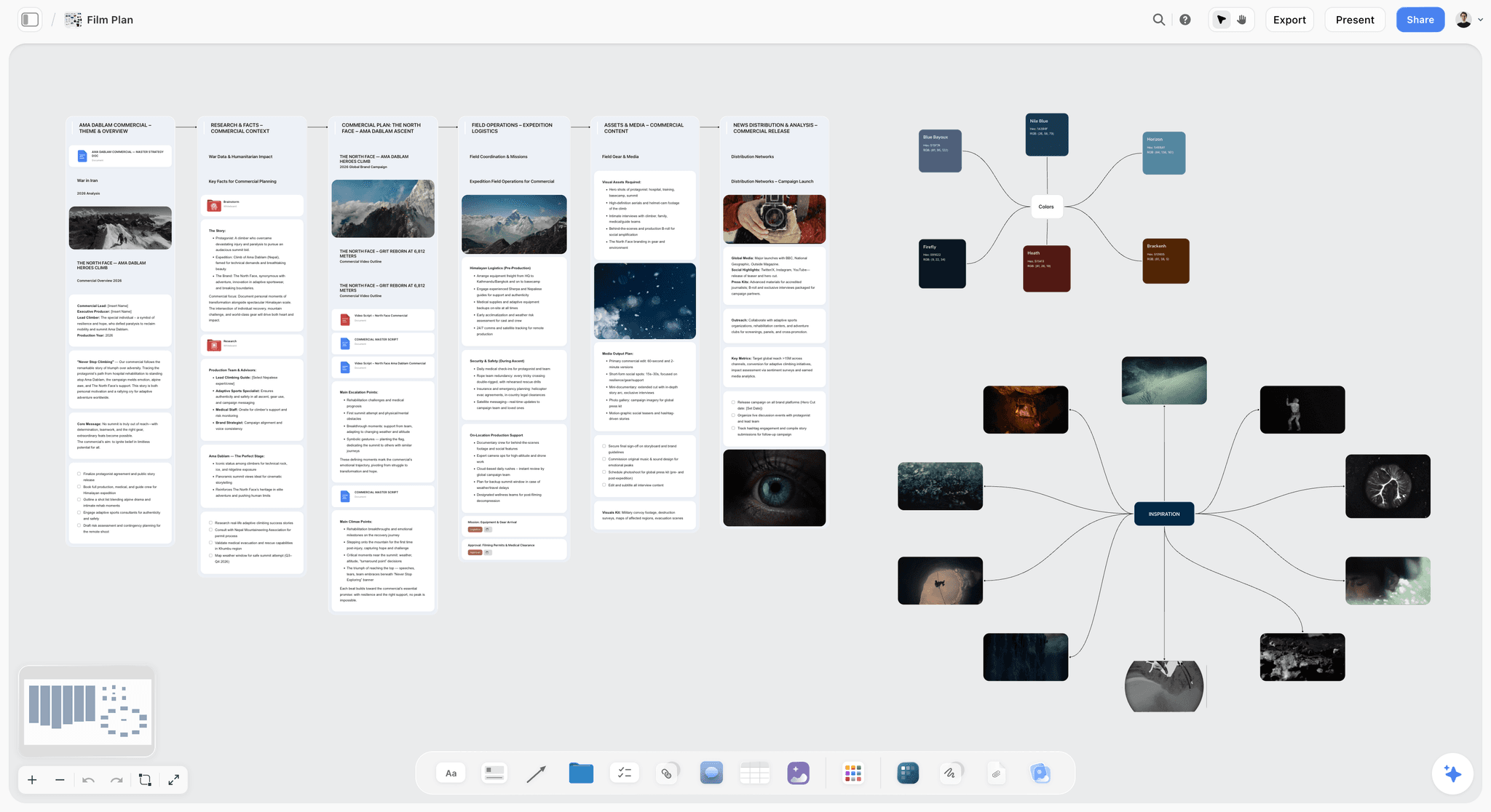
Free Film Plan template on Storyflow's infinite canvas. Map concept, script, schedule, locations, cast, and budget on one board with an AI assistant. Use the Film Plan template.
11) The Bottom Line
Storyflow and Storyboarder.ai are not really competitors so much as tools for different sizes of the same problem. It is not a question of which tool draws better frames. It is a question of whether you need frames or you need the whole pre-production the frames belong to. Storyboarder.ai is a specialist: an AI text-to-storyboard generator that turns words into frames fast, and for that one job, focus is a genuine advantage. Verify its current features and pricing on their site, because specialist tools iterate quickly.
Storyflow is the broader choice: a visual AI canvas where the script, the references, the shot list, and the storyboard all live on one board, and the AI reads the whole board before it helps. It is AI-assisted, not one-click, and it is the better fit when the storyboard is one layer of a project you want to keep together rather than the entire job. AI image generation for frames arrives on Pro ($14/mo annual); the planning is free to start.
If your storyboard keeps drifting away from your script and references in separate apps, put your next project on one canvas and ask the AI to help structure it. Try the AI storyboard generator to turn your script into a first board, then start a Storyflow workspace and build the storyboard where the rest of your pre-production already lives.
10) FAQ: Storyflow vs Storyboarder.ai
What is the main difference between Storyflow and Storyboarder.ai?
The main difference is scope. Storyboarder.ai is a specialist AI text-to-storyboard tool: you give it a prompt or scene description and it generates storyboard frames. Storyflow is a full visual AI canvas where the script, references, shot list, and storyboard all live on one board, and the AI reads the whole board before it helps. One makes the frames; the other holds the entire pre-production the frames belong to. Which is "better" depends on whether you only need frames or want the storyboard connected to the rest of your project.
Is Storyflow a storyboard generator?
Not in the narrow sense. Storyflow is a visual AI workspace for whole pre-production, and storyboarding is one thing you can do on its canvas. It can generate storyboard frames as images on the Pro plan ($14/mo annual) and above, but that is one capability inside a broader tool, not its single purpose. If you want a tool that does only AI storyboard-frame generation and nothing else, a dedicated generator like Storyboarder.ai is more specialized for that one task. Storyflow's strength is keeping the storyboard connected to the script and references.
Does Storyflow's AI actually read my storyboard and script?
Yes. Storyflow's AI reads your full active canvas board by default, plus up to one Tactic and up to three Documents you @-mention in the chat. So if your script notes, references, and shot list are on the board, the AI can reason over them together when it helps you. This is the structural advantage a frame-only tool cannot match, because a dedicated frame generator does not hold the rest of your project to read. It is AI-assisted planning over real context, not generation from a single sentence.
How much does Storyflow cost?
Storyflow has four tiers, all flat per account and never per user. Free is $0 with unlimited boards, unlimited collaboration, basic AI, and 20 file uploads. Plus is $7.99/mo billed annually ($9.99 monthly) and adds the 200+ Story Blueprints and unlimited file uploads. Pro is $14/mo annually ($19 monthly) and adds AI image generation and 20x more AI usage. Max is $39/mo annually ($49 monthly) and adds 40x more AI and a team workspace with roles. There is no separate "Team" plan; Max is the team tier.
How much does Storyboarder.ai cost?
Verify Storyboarder.ai's current pricing on their own site before relying on any number. Specialist AI tools in the storyboard-generation space frequently use credit-based or per-generation pricing that shifts as underlying model costs change, so any figure quoted in a comparison ages quickly. The reliable comparison point is structural: Storyflow charges a flat per-account price with AI image generation starting on Pro ($14/mo annual). Confirm Storyboarder.ai's current model, free tier, and limits directly so you are comparing accurate, up-to-date numbers.
Which tool is better for a solo filmmaker?
For most solo filmmakers, Storyflow is the better fit because one person juggling research, script, references, and boards benefits most from keeping all of it in one place with an AI that can read it. The free plan covers the planning, and Pro adds AI frame generation when you need it. The exception is the solo director who only wants quick frames and keeps everything else in existing tools; for that narrow job, a dedicated generator like Storyboarder.ai is more direct. It comes down to whether you want one workspace or one fast frame tool.
Can I use Storyflow and Storyboarder.ai together?
Yes, and for some workflows that is the smartest setup. Use Storyflow as the home your whole pre-production lives in, so the AI can reason over the full board, and reach for a specialist generator like Storyboarder.ai when you want a particular batch of frames produced a particular way. The thing to avoid is letting a frame-only tool become the only place your project exists, because then the script, references, and shot list scatter back into separate apps. Plan in the canvas; visit the specialist for the one task.
Does Storyflow do AI image generation for storyboard frames?
Yes, on the Pro plan ($14/mo billed annually) and above. AI image generation lets you create storyboard frames directly on the canvas, right next to the script beat and reference image they come from, so the frame stays connected to its context. On the Free and Plus plans you can still plan the entire storyboard structure, but generating frames as images requires Pro or higher. This is one honest limitation of the lower tiers: the planning is open to everyone, the image generation is a paid capability.
Is Storyboarder.ai or Storyflow faster for making a storyboard?
For generating a single batch of frames from a text prompt in isolation, a dedicated generator like Storyboarder.ai is built to be fast at exactly that, and focus is a real speed advantage. For planning and storyboarding a whole sequence where the frames need to stay connected to the script and shot list, Storyflow is faster overall because you are not exporting frames out of one app and reassembling context in another. The honest answer is that "faster" depends on whether you measure the one frame or the whole pre-production.
Should I switch from Storyboarder.ai to Storyflow?
Switch only if your need has grown beyond frames. If you only generate storyboard frames and keep the rest of your pre-production in other tools, Storyboarder.ai may be all you need, and there is no reason to move. If you find yourself wanting the script, references, shot list, and storyboard in one place with an AI that reads the whole thing, Storyflow is the tool built for that. Plenty of filmmakers do not switch at all; they plan in Storyflow and still reach for a specialist generator for specific frame work.
Table of Contents
Templates to check out for this topic


Filmmaking templates you can use in Storyflow
Skip the blank canvas. Open one of these filmmaking boards in Storyflow and the AI builds on the structure that is already there, from research through the shot list.


See Storyflow in Action
A visual AI workspace where every feature lives inside one canvas. No tab-switching, no context lost.
Build your entire board from a single message
Type what you need in the AI chat at the bottom of your canvas. The AI adds cards, headings, and structure directly onto your board.
Use expert frameworks as AI context
Type @ in the AI chat and choose any Tactic. The AI tailors every response to that framework instead of giving generic advice.
Turn your board into a mind map in seconds
Ask the AI to restructure your canvas as a mindmap. It connects your ideas into a visual hierarchy so you can see how everything relates.
Why Storyflow Exists
Storyflow actually began as a personal tool while working on creative and research projects.
We kept running into the same problem: ideas were scattered everywhere: notes, documents, and whiteboards.
Nothing helped us see how everything connected.
So we started building a workspace designed around how ideas actually grow.
→ Read how Storyflow was createdJustkay
Documentary Filmmaker & Founder at Storyflow
Published: 2026-06-18
Extremely simple, seriously capable


See how easy it is to get started
Watch a real project come together, from a blank board to a finished plan, clicked through step by step.
Start creating with AI and become more productive
Transform your creative workflow with AI-powered tools. Generate ideas, create content, and boost your productivity in minutes instead of hours.