Storyflow vs Boords (2026): The Honest Head-to-Head
Storyflow vs Boords in 2026, tested on real pre-production. A head-to-head on AI context, connected canvas, animatics, client review, free tier, and price.

Category
Filmmaking
Author

Justkay
Documentary Filmmaker & Founder at Storyflow
Topics
2026-06-11
•
Updated July 3, 2026
•
15 min read
•
Filmmaking- Storyflow vs Boords
- Boords vs Storyflow
- Boords alternative
- storyboarding software comparison
- AI storyboarding tool
- connected pre-production canvas
- storyboard vs script integration
Should I use Storyflow or Boords in 2026?
Choose Storyflow if your storyboard keeps drifting out of sync with the script, the beats, and the shot list: it puts all of them on one canvas an AI reads. Choose Boords if your single job is clean numbered panels and a timed animatic for client sign-off. Boords is the better panel tool; Storyflow is the better connected pre-production workspace.
1) Quick Answer: Storyflow vs Boords
Choose Storyflow if you want the storyboard on the same canvas as the script, the beats, the mood board, and the shot list, with an AI that reads the whole board so one scene change ripples across all of them at once. Choose Boords if your single job is drawing clean numbered panels and playing a timed animatic for client sign-off, because that is what it is purpose-built to do and it does it well.
The short version: Boords is a dedicated, panel-first storyboarding tool. Storyflow is a canvas-first pre-production workspace. Boords draws the storyboard better as a standalone object. Storyflow keeps the storyboard connected to the rest of the film. A storyboard is not a deliverable. It is a decision about how a scene reads, and the right tool depends on whether that decision needs to be drawn more precisely or kept connected to every other decision on the film. Most people who switch are not unhappy with the panels. They are tired of the island.
For the wider category, see The Best Storyboarding Software in 2026 and the focused Best Boords Alternatives in 2026.
2) Comparison Table: Storyflow vs Boords at a Glance
Storyflow pricing is exact and current as of June 2026. Boords pricing and AI feature claims carry "verify" because storyboarding-tool plans and features change often; confirm the current details on boords.com before deciding.
3) The Panel and the Island
Before pitting two tools against each other, it helps to name what a storyboard is actually for, because most comparisons quietly assume it does one job. It does three.
Job one is reading the scene. The storyboard lets you and everyone else see how a sequence cuts together before you spend money shooting it. Does the eyeline match? Does the action read in the frame you chose? This is the drawing job, and it is the job Boords is built around.
Job two is communicating the plan. The storyboard exists so a director, a DP, a client, and a crew all picture the same film: clean panels, a timed animatic, comments, approvals. Boords is genuinely strong here too.
Job three is connecting to the rest of the film. The boards have to agree with the script, the shot list, the schedule, the mood board, and the budget. When a scene gets cut, six artifacts have to change. This is the job almost every dedicated storyboarding tool ignores by design.
That split gives this comparison its frame. The panel is the unit Boords masters. The island is the problem Storyflow solves. Boords treats the frame as the finished object and the storyboard as the deliverable. Storyflow treats the frame as one card among many on a shared surface where the script, the beats, and the shot list sit beside it. It is not that one approach is correct. It is that they optimize for different jobs, and the right pick depends on which job is failing you.
4) How We Compared Them
Both tools were used on real pre-production work between 2024 and 2026: documentary planning, a narrative short, a commercial pitch deck, and a music-video sequence. No synthetic benchmarks, no 30-second demo impressions. Six criteria, weighted in this order.
- Connected to the rest of the film, or an island? Can the storyboard sit beside the script, the beats, the shot list, and the mood board, or does it live alone and force manual syncing across apps?
- AI context scope. If there is an AI, what can it actually see? A whole project, the active board, or only the single frame in front of it?
- Frame and animatic fidelity. How good is the dedicated panel drawing, the numbering, and the timed animatic playback for previsualizing pacing?
- Client review and approval. How cleanly can a director, a client, and a crew review and sign off, with comments and animatic playback?
- Free tier and price. Is there a usable free plan, and does the paid price match how much of the film the tool actually moves?
- Who it fits. Documentary, narrative, commercial, music video, student, or producer. The best tool is rarely the same across all of them.
The verdicts below reflect how each tool felt once the storyboard had to agree with everything else on the film, not how each looks in a feature list.
5) What Storyflow Is

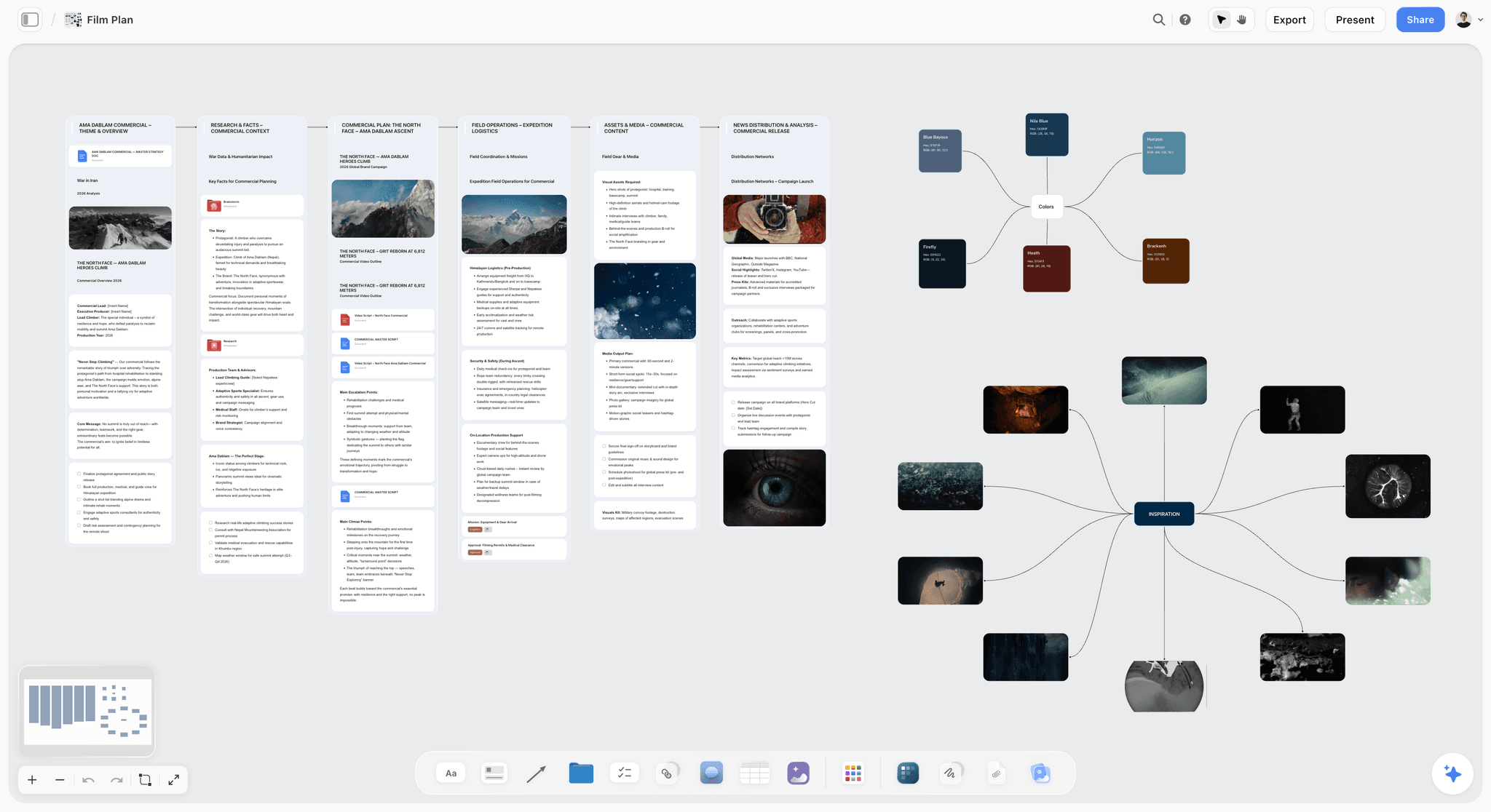
Storyflow is an AI-powered visual workspace built around one idea: the storyboard is one of several jobs a single project has to do, so the frames should sit on the same canvas as the script, the mood board, the character cards, and the structural beats. It is canvas-first. The frames are cards on an infinite canvas, and the AI reads the whole board.
The difference shows the moment a scene changes. In a panel-only tool you redraw the frames, then go re-edit the script, the shot list, the schedule, the mood board, and the budget by hand in five other files. In Storyflow, the frames, the beats, and the shots are cards on one canvas, so when you ask the AI to "rework scene four so the reveal lands later," it reads the script, the existing frames, and the beats together and helps you move all of them at once. A storyboard is not a deliverable. It is a decision about how a scene reads, and Storyflow keeps that decision connected to every other decision on the film.
Best for: Documentary, narrative, commercial, and music-video filmmakers whose storyboard keeps drifting out of sync with the script, the shot list, and the schedule. The fastest way to see the connected-canvas approach is the Storyboard template, which opens with the frame structure already beside space for the script and beats.
How Storyflow's AI context works
The AI reads your full active canvas board by default: every card, frame, note, image, and link on it. You can ground it further by @-mentioning up to 1 Tactic (a Story Blueprint) and up to 3 Documents in the AI chat. It does not read every board in your workspace at once; it reads the board you are working on, plus the extra context you bring in. That scope is the point. The AI is reasoning about the actual scene in front of it, not a generic prompt.
Storyflow pricing
Paid-only early access today; the Free plan (unlimited boards, basic AI usage, 20 file uploads) launches before the end of 2026, and anyone a paid member invites to a board joins free now. Unlimited notes, images, and links, unlimited shared boards, unlimited collaboration, basic AI, and 20 file uploads. The Free plan does not include the 200+ Story Blueprints library. Plus: $7.99 per month annual or $9.99 per month monthly (adds the 200+ Story Blueprints, unlimited uploads). Pro: $14 per month annual or $19 per month monthly (adds AI image generation and 20x more AI than Plus). Max: $39 per month annual or $49 per month monthly (adds 40x more AI and a team workspace with permissions and roles). Pricing current as of June 2026.
Where Storyflow loses
Storyflow is not a drop-in Boords replacement, and pretending otherwise would not be worth reading.
- Frames are canvas cards, not a dedicated panel-and-animatic timeline, so for timed animatic playback Boords is more purpose-built.
- There is no offline or local-first desktop mode. Storyflow is cloud-only, so a tool you can run on a plane with no signal is a different category.
- The storyboarding-specific template and stock-character library is newer and smaller than a panel-purpose tool's.
- It is not built for traditional hand-drawn panel animatics; if drawing frame by frame is your craft, a dedicated drawing surface fits the hand better.
6) What Boords Is
Boords is a dedicated, panel-first storyboarding tool. It is built around drawing or assembling frames panel by panel, numbering them, playing them back as a timed animatic to previsualize pacing, and sharing that animatic with clients for clean comments and approval. Boords has also added AI assistance to parts of the storyboarding flow; verify the current feature set on boords.com, because storyboarding-tool features change often.
What makes Boords good is its focus. It does not try to be your script editor, your schedule, or your budget. It tries to be the best place to lay out how a sequence reads and to hand that sequence to a client, and that focus shows in how purpose-built the panel editor and the animatic player feel.
Best for: Filmmakers, agencies, and animators whose main job is drawing clean numbered panels and playing a timed animatic for client sign-off.
How Boords handles the three jobs
Boords wins job one and job two decisively. The dedicated panel editor, the frame numbering, and the layout are more purpose-built than a general canvas, and the timed animatic for previsualizing pacing is clean and genuinely useful. Sending a client a commentable storyboard with an animatic is exactly what Boords is for, and that handoff is smooth.
Job three is where Boords stops by design. The storyboard is a finished object in its own app, so the script, the shot list, the mood board, and the schedule live elsewhere and never sync automatically. That is not a flaw in Boords. It is the boundary of a focused tool, and it is the exact gap a canvas-first workspace exists to close.
7) Head-to-Head by Job
Storyboarding the frames
Boords wins the pure drawing job. Its panel-by-panel editor, frame numbering, and layout controls are more purpose-built than canvas cards, and if your craft is composing frames precisely, the dedicated surface fits the hand. Storyflow's frames are cards on a canvas: fast to arrange and to reference, but not a specialized panel editor with animatic-grade controls. If the frame is your unit of work, Boords is the better drawing tool.
Shot listing
Storyflow wins shot listing because the shots are not in a separate spreadsheet. The Shotlist template puts the shot list as cards on the same canvas as the frames, so a frame and its shot data sit beside each other and the AI can read both. In Boords, the shot list typically lives in another app, so the boards and the shots agree only as long as you keep them in sync by hand. It is not that Boords cannot hold shot information. It is that the shot list and the script are not on the same surface as the frames.
Script and beats integration
This is the cleanest split in the comparison. Storyflow puts the screenplay and the structural beats on the same canvas as the frames, so when the script changes, the frames are right there to change with it. Boords does not integrate the script and the beats; they live in Final Draft, a Google Doc, or your head, and the boards reflect them only when you manually update both. For documentary and narrative work where structure drives everything, the connected canvas is the larger advantage.
AI
Storyflow's AI reads the full active canvas board plus up to 1 @-mentioned Tactic and up to 3 Documents, so it reasons about the whole scene, the frames, the beats, and the script together, and helps rework all of them at once. Boords has added AI assistance to the storyboarding flow, but its center of gravity is a dedicated panel-and-animatic tool, not an AI-first workspace that reads your whole project. The AI difference is not feature count. It is what the AI is allowed to see.
Collaboration and client review
Boords wins client review and approval. Its sharing and approval flow is purpose-built for storyboards: send a clean, commentable animatic, collect sign-off, done. Storyflow has unlimited shared boards and unlimited collaboration on every plan, paid today and Free once it launches before the end of 2026, and adds a team workspace with permissions and roles on the Max plan, but its review surface is a general canvas, not a dedicated storyboard-approval workflow. If your deliverable is a client-facing animatic for sign-off, Boords does that one handoff more smoothly.
Connecting to the rest of the film
Storyflow wins job three outright, because the frames, the script, the beats, and the shot list are one connected artifact, so a scene change updates the whole film instead of just the panels. Boords keeps the storyboard in its own app by design. Boords masters the panel. Storyflow closes the island.
Put the storyboard back on the film
Turn your script into a first board on a canvas that also holds the beats and the shot list, so one scene change updates the whole film instead of just the panels.

8) Pricing: Storyflow vs Boords
The honest read on price: Boords charges a focused subscription to do one of the three jobs very well. Storyflow's entry paid tier, Plus at $7.99 per month annual, is lower than a typical dedicated storyboarding subscription, and it earns its price by doing more of the film than the frames alone. If you board one short a quarter, paying every month for a single-job tool can feel steep, which is part of why people compare the two. Storyflow is paid-only during early access, with a Free plan launching before the end of 2026, while Boords offers a trial rather than a forever-free tier. Storyflow pricing is exact as of June 2026; Boords pricing changes often, so confirm before buying.
9) Where Boords Beats Storyflow
A comparison that pretended Boords was beaten would not be worth your time. Here is where Boords is the better tool, plainly.
Boords wins the dedicated panel workflow. The panel-by-panel editor, the numbering, and the layout are more purpose-built than a general canvas. If your job is purely to draw and arrange frames, that focus is a real advantage Storyflow does not match.
Boords wins the animatic. Its timed playback for previsualizing pacing is clean and genuinely useful, and a card-based canvas does not replicate that timeline feel as precisely. For pacing-first work, Boords has the better instrument.
Boords wins simple client sign-off. Sending a client a clean, commentable storyboard with an animatic is exactly what Boords is built for, and that one handoff is smoother than reviewing on a general canvas.
Boords wins the traditional shot-by-shot frame craft. If you board the old way, frame by frame, drawing each panel, a dedicated drawing-and-animatic tool fits that hand better than canvas cards do.
The point of this comparison is not that Boords is worse. For job one and job two, reading the scene and communicating the plan, Boords is a genuinely good, focused tool. The point is job three, which a dedicated panel app cannot do on its own.
10) Which Should You Choose?
Pick by the job that is failing you, not by which tool sounds better.
- Choose Boords if your bottleneck is the panels and the animatic: you need a dedicated frame editor, timed playback, and a clean client-approval handoff, and your script and shots already live somewhere you are happy with.
- Choose Storyflow if your bottleneck is the island: your storyboard keeps drifting out of sync with the script, the beats, and the shot list, and you want an AI that reads the whole board and helps rework a scene across all of it at once.
- Choose both if you love the Boords drawing surface but want a connected home for the rest of the film. Keep Boords for the frames and the animatic, and add Storyflow for the script, beats, shot list, and schedule on one canvas, so a change to the film does not mean re-editing five files by hand.
Mapped to who you are: a solo documentary filmmaker or a student should start on Storyflow, because the value is connection, not drawing volume. A dedicated animator or anyone whose single deliverable is a timed client animatic should reach for Boords first. A narrative director or commercial and agency filmmaker gets the most from running both: Boords for the frames and the sign-off animatic, Storyflow for the script, beats, and shot list on one connected canvas. If you can only pick one and you are not sure, pick Storyflow, because it does more of the film, and anyone a paid member invites to a board joins free to test it.
The smallest test that settles it: take one project where the storyboard keeps drifting out of sync with the script and the shot list. Rebuild it on a Storyflow canvas with the frames, the beats, and the shot list side by side, and ask the AI to rework one scene across all of them. Start a Storyflow workspace and you will usually know within an hour whether the connected canvas fits your work.
11) Recommendations by Filmmaker
1. Documentary Filmmaker (Solo)
Top pick: Storyflow
Documentaries board fewer scenes than narrative films, so the value is less drawing volume and more keeping the sequences you do plan connected to the interview list, the structure, and the edit. Storyflow keeps the frames beside the beats and the research on one canvas the AI can read; the Pre-Production Board template opens with that whole planning surface laid out. Reach for Boords only if a specific sequence needs a precise drawn animatic for a funder pitch.
2. Narrative Short / Feature Director
Top picks: Boords + Storyflow
Keep Boords if you love its dedicated panel and animatic workflow for reading scenes. Add Storyflow so the boards sit beside the screenplay, the beats, and the shot list, and a scene change updates the whole film instead of just the frames. This is the clearest "use both" case in the comparison.
3. Commercial / Agency Filmmaker
Top pick: Storyflow, with Boords for the client animatic
Pitch boards have to look good fast and tie to a brief. Build the connected pitch on a Storyflow canvas beside the brief, the treatment, and the shot list, then use Boords when the client specifically wants a polished timed animatic to sign off on. The brief and the boards stay on one canvas; the deliverable animatic ships from Boords.
4. Music-Video Director
Top pick: Storyflow
Music videos live on sequence and motion. Storyflow lets you lay the sequence beside the song structure and the shot list so the visual idea and the timing stay connected on one board. Boords is the better fit only if a precise timed animatic against the track is your single most important deliverable.
5. Student / Film-School Filmmaker
Top pick: Storyflow
Storyflow is paid-only during early access, with Plus at $7.99/month billed annually and a Free plan launching before the end of 2026. Even so, anyone a paid member invites to a board joins free, and once the Free plan lands it keeps the boards, the script, and the schedule on one canvas without paying, the cheapest way to work like a connected production from day one. If your course requires a traditional drawn animatic, pair it with a free drawing tool, but for connected planning Storyflow is hard to beat on price.
13) The Bottom Line
Storyflow versus Boords is not a contest of which is better. It is a question of which job is failing you. If your bottleneck is the panels, the dedicated frame editor, the timed animatic, the clean client sign-off, Boords is purpose-built for exactly that and beats Storyflow on it. If your bottleneck is the island, the storyboard drifting out of sync with the script, the beats, and the shot list, Storyflow is built to close that gap and beats Boords on it.
Boords masters the panel. Storyflow closes the island. Most filmmakers who compare the two are not unhappy with their panels. They are tired of re-editing five disconnected files every time a scene changes. A storyboard is not a deliverable. It is a decision about how a scene reads, and a decision that lives in its own app drifts out of sync with every other decision on the film.
If that island problem sounds like yours, take one project and rebuild it on a canvas for a week. Try the AI storyboard generator to turn your script into a first board, then start a Storyflow workspace and ask the AI to rework a scene across the script and the frames at once. The difference is usually obvious within an hour.
12) FAQ: Storyflow vs Boords
Is Storyflow or Boords better in 2026?
Neither is better in the abstract; they optimize for different jobs. Boords is the better dedicated panel-and-animatic tool, with a purpose-built frame editor, timed playback, and clean client sign-off. Storyflow is the better connected pre-production workspace, putting the frames on one canvas beside the script, the beats, and the shot list, with an AI that reads the whole board. Choose Boords if your bottleneck is the panels, and Storyflow if your bottleneck is the storyboard drifting out of sync with the rest of the film.
What is the main difference between Storyflow and Boords?
The main difference is shape. Boords is panel-first: the frame is the unit and the storyboard is a finished object in its own app. Storyflow is canvas-first: the frames are cards on one infinite canvas beside the script, the beats, the mood board, and the shot list, and the AI reads all of it. Boords draws the storyboard better as a standalone deliverable. Storyflow keeps the storyboard connected to every other decision on the film.
Does Boords have AI?
Boords has added AI assistance to parts of the storyboarding flow, but its core remains a dedicated panel-and-animatic tool rather than an AI-first workspace; verify the current feature set on boords.com, since storyboarding-tool features change often. Storyflow's AI is broader in scope: it reads your full active canvas board by default, plus up to 1 @-mentioned Tactic and up to 3 Documents, so it reasons about the script, the frames, and the beats together rather than only the single frame in front of it.
How much does Storyflow cost compared to Boords?
Storyflow is paid-only during early access, with Plus $7.99 per month annual ($9.99 monthly), Pro $14 per month annual ($19 monthly), and Max $39 per month annual ($49 monthly); its Free plan launches before the end of 2026. Boords is a focused storyboarding subscription that sits roughly in the $12 to $24 per month range depending on tier and billing; verify current pricing on boords.com, because it changes often. Storyflow's entry paid tier is lower and does more of the film, while Boords charges a focused price to do the boarding job very well.
Can Storyflow replace Boords?
It depends on your bottleneck. Storyflow replaces Boords if your problem is the island: the storyboard drifting out of sync with the script, the shot list, and the schedule. It does not replace Boords if your problem is the panels: you need a dedicated frame editor and a timed animatic for client sign-off, which Boords is purpose-built for. Many filmmakers keep Boords for the frames and add Storyflow for the connected canvas rather than replacing one with the other.
Does Boords connect to the script and shot list?
Not on its own. Boords is a focused storyboarding app, so the script usually lives in Final Draft or a Google Doc and the shot list in a spreadsheet, and the boards agree with them only when you sync by hand. Storyflow puts the script, the beats, and the shot list on the same canvas as the frames, so they update together and the AI can read all of it. That connection is the central reason filmmakers compare the two.
Is there a free version of Storyflow or Boords?
Not during early access for Storyflow. It is paid-only today, with a Free plan (unlimited boards, unlimited collaboration, basic AI, and 20 file uploads) launching before the end of 2026, and anyone a paid member invites to a board joins free right now. Boords offers a trial rather than a forever-free tier; verify the current free terms on boords.com, since they change. If a no-cost option matters today, joining an existing Storyflow board as an invited collaborator is free, while Boords expects a subscription after the trial.
Which should a documentary filmmaker choose?
Storyflow, in most cases. Documentaries board fewer scenes, so the value is keeping the sequences you do plan connected to the interview list, the structure, and the edit, all on one canvas the AI can read. Boords is worth adding only when a specific sequence needs a precise drawn animatic, for a funder pitch for example. For the connected research-to-structure work that dominates documentary pre-production, the canvas wins.
Does Storyflow have a timed animatic like Boords?
No, and this is an honest limitation. Boords has a purpose-built timed animatic player for previsualizing pacing frame by frame, and Storyflow does not replicate that timeline feel. Storyflow's frames are cards on a canvas, fast to arrange and reason about with the AI, but not a dedicated animatic timeline. If a precise timed animatic for client sign-off is your single most important deliverable, Boords is the better instrument, and many filmmakers run the animatic in Boords while keeping the rest of the film connected on a Storyflow canvas.
Can I use Storyflow and Boords together?
Yes, and for narrative directors it is often the best setup. Keep Boords for its dedicated panel editor and timed animatic, the parts it does best, and add Storyflow as the connected home for the script, the beats, the shot list, and the schedule on one canvas. A scene change then updates the whole film on the Storyflow canvas, while the client-facing animatic still ships from Boords. The two tools do different jobs, so pairing them is not redundant.
Table of Contents
- Quick Answer: Storyflow vs Boords
- Comparison Table: Storyflow vs Boords at a Glance
- The Panel and the Island
- How We Compared Them
- What Storyflow Is
- What Boords Is
- Head-to-Head by Job
- Pricing: Storyflow vs Boords
- Where Boords Beats Storyflow
- Which Should You Choose?
- Recommendations by Filmmaker
- FAQ: Storyflow vs Boords
- The Bottom Line
- Author
- Related Reading
Templates to check out for this topic


Filmmaking templates you can use in Storyflow
Skip the blank canvas. Open one of these filmmaking boards in Storyflow and the AI builds on the structure that is already there, from research through the shot list.


See Storyflow in Action
A visual AI workspace where every feature lives inside one canvas. No tab-switching, no context lost.
Build your entire board from a single message
Type what you need in the AI chat at the bottom of your canvas. The AI adds cards, headings, and structure directly onto your board.
Use expert frameworks as AI context
Type @ in the AI chat and choose any Tactic. The AI tailors every response to that framework instead of giving generic advice.
Turn your board into a mind map in seconds
Ask the AI to restructure your canvas as a mindmap. It connects your ideas into a visual hierarchy so you can see how everything relates.
Why Storyflow Exists
Storyflow actually began as a personal tool while working on creative and research projects.
We kept running into the same problem: ideas were scattered everywhere: notes, documents, and whiteboards.
Nothing helped us see how everything connected.
So we started building a workspace designed around how ideas actually grow.
→ Read how Storyflow was createdJustkay
Documentary Filmmaker & Founder at Storyflow
Published: 2026-06-11
Extremely simple, seriously capable


See how easy it is to get started
Watch a real project come together, from a blank board to a finished plan, clicked through step by step.
Start creating with AI and become more productive
Transform your creative workflow with AI-powered tools. Generate ideas, create content, and boost your productivity in minutes instead of hours.