
Extremely simple, seriously capable
The simple AI storyboarding tool
for people who do not draw.
Describe the video or paste the script, and Storyflow's AI lays out the frames in the order they play. Drag a frame to change the cut. It is an easy storyboard maker because of what it leaves out: no drawing, and no production suite to learn first.


Creatives working for these brands already got early access
- Red Bull
- Canon
- Artlist
- Porsche
See how easy it is to get started
Watch a real project come together, from a blank board to a finished plan, clicked through step by step.
Start from a ready-made template
Pick a board to see what you can build, then let AI fill it in. Every template is a real, editable starting point on the same infinite canvas.

Mind Map
Branch one central idea out into themes and sub-points, then drag the connections around until the structure makes sense.
Which simple AI tool should you use for storyboarding?
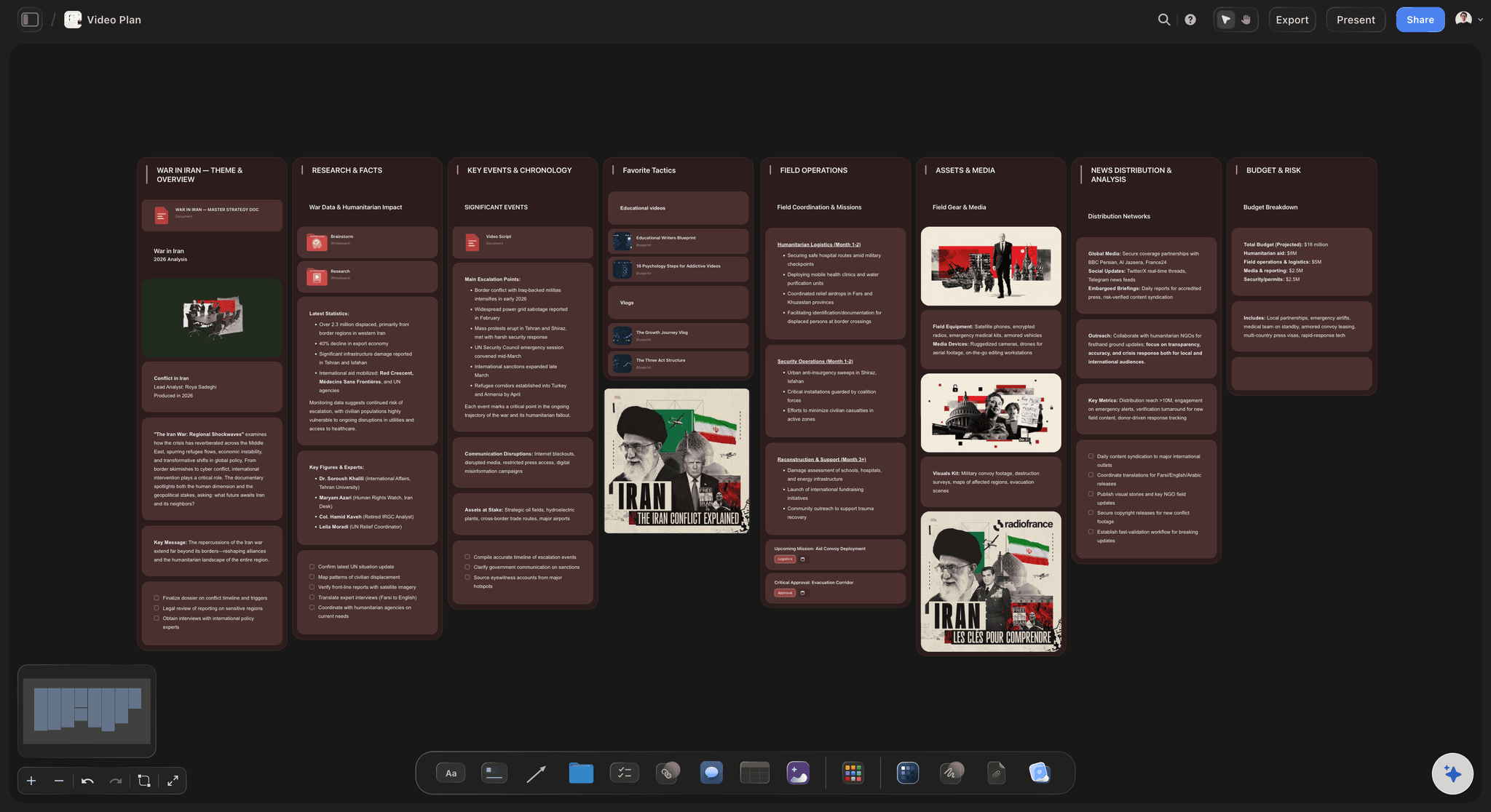
A simple AI storyboarding tool turns a description or a script into frames. Storyflow is an AI visual workspace that storyboards your video on one infinite canvas: frames in the order they play, a note and a picture on each, and a row you drag to change the cut. Each frame gets a title, a short note on what the viewer sees and room for a picture, and changing the cut is dragging a frame to a new place in the row. There is nothing to draw and no production suite to learn. Canva suits a storyboard you design from a template, Storyboarder.ai suits a full screenplay you want broken into a shot list, and Boords suits a board that needs timing and an animatic.
Simple means two different things, and storyboarding tools split along the line between them. Some are simple to start: a template, a grid of empty cells, a library of characters to drag in. Others are simple to finish: you bring the words you already have and the tool does the laying out. Most people who need a storyboard already have the words, in a script, a brief or a paragraph in an email. What they do not have is the drawing, so the simple tool is the one that starts from words.
The honest limit of AI frames is worth knowing before you pick anything. Generated frames are for blocking a sequence: they show that a scene needs two shots rather than four, and where the cut should fall. They are not an art department reference, and keeping a character identical from frame to frame is still the weak point of image models. If the board has to look finished for a crew or a client, settle the sequence first and then commission an artist to draw the right shots.
Storyflow keeps the storyboard on the same canvas as the rest of the job: the script, the references, and the shot list the AI can draft from the same scenes. On every paid plan the AI lays out the frames with notes and picture slots for your own photos or stills, and AI-generated frame images need Pro or Max. There is no animatic timeline and no frame timing, so a board that has to play back against a voiceover belongs in Boords. A client opens the finished board from a view-only link with no account.
Ultra fast from brief to board
How do you make a storyboard with AI in a few steps?
Nothing to draw and nothing to configure before the first frame.
01
Describe the video or paste the script
Two or three sentences cover a 30-second ad. For anything longer, paste the script or attach it, and the AI builds one frame per scene in the script's order, with the scene numbers as printed.
02
Answer two quick questions
If the script has not settled it, the AI asks how many scenes you want, and whether the pictures should be reference photos from the web, AI-generated (Pro and Max) or left empty for your own. Then it builds the whole row.
03
Read it, then drag to change the cut
Frames run left to right in the order they play. Move one and read the sequence again, because testing an order by rearranging it is what a storyboard is for.
04
Share a view-only link
A client or director opens it in a browser with no account, and signs in to comment on a specific frame. Or export the whole board as an image or a PDF.
What makes an AI storyboard tool simple to use?
Four things it does, and the setup it skips.

Nothing to draw
Words in, frames out
Describe a scene in a sentence and the AI lays out the frames, each with a note on the action and room for a picture. The board gets made by the person who knows the sequence, not by whoever can draw.
See text to storyboard →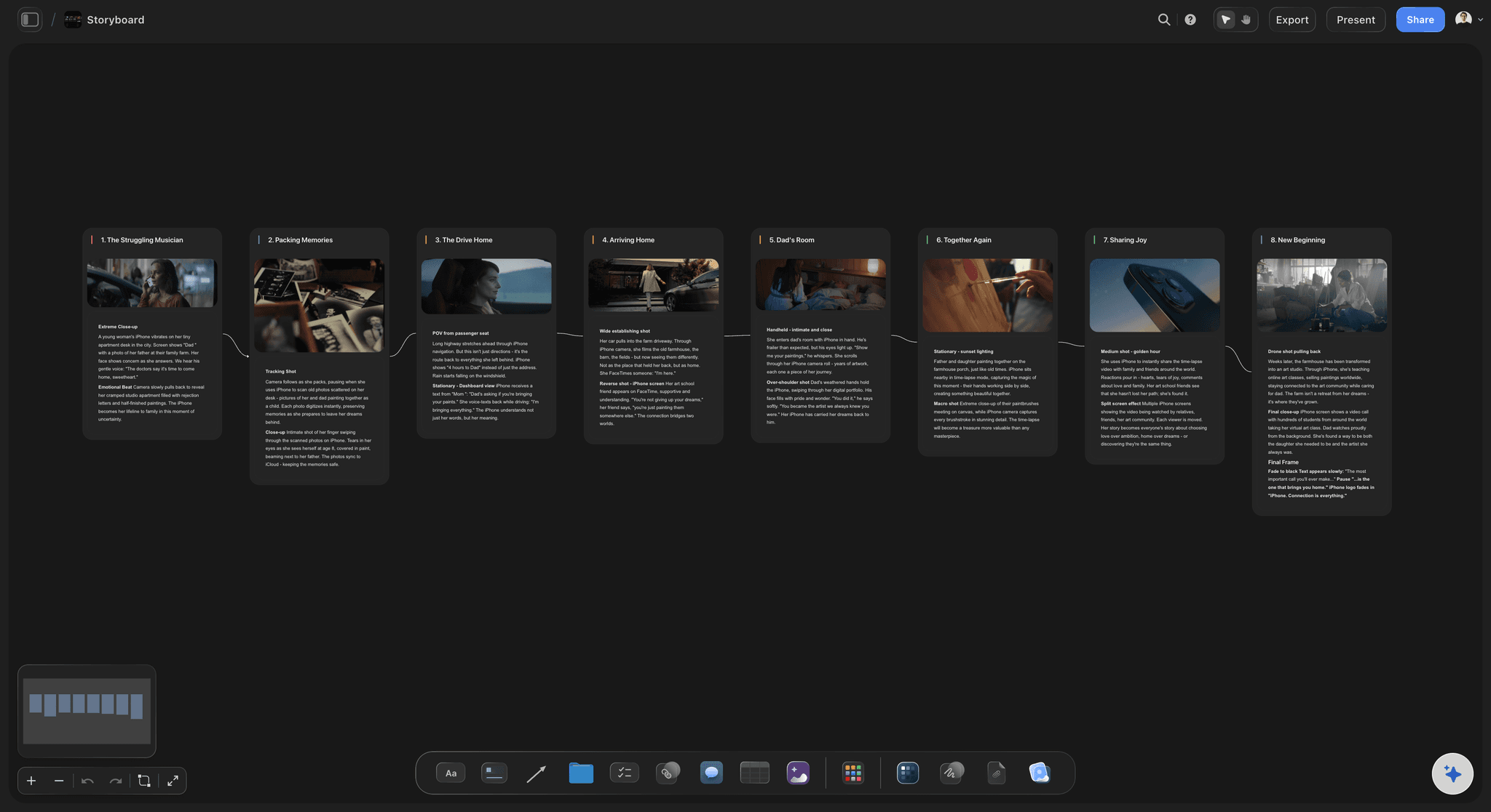
Your script, in its order
One frame per scene
Paste or attach the script and the AI keeps its scenes, its order and its scene numbers. It adapts your story into frames rather than writing a different one.
See script to storyboard →
Reordering is the feature
Drag a frame to test a cut
The frames sit on an infinite canvas with no page breaks, so moving a shot costs nothing and you can read the new order straight away.
See the storyboard maker →
Your own pictures count
Photos and stills as frames
A location photo or a still from a reference film often says more than a generated frame. Put your pictures on the board and the AI builds the storyboard around them, one frame per picture.
See storyboard examples →Unlimited storyboards. No frame cap.
One board per video, as many frames as the cut needs. Storyflow is paid-only during early access, with plans from $7.99 a month billed annually ($9.99 monthly). A free plan launches before the end of 2026, and anyone a paid member invites to a board joins free.
Unlimited boards on an infinite canvas
AI that lays out a storyboard from a description or a script
Web-sourced frame pictures, or AI-generated ones on Pro and Max
View-only links a client opens with no account
Built for people with taste
Can you make a storyboard without drawing?
Where simple boards go wrong, and the mechanical fix for each.
Frames, not pictures
Decide the frames before the look
One frame per shot, not per line: A frame earns its place when the camera changes. A new line of dialogue inside the same shot is a note on that frame, not another frame.
Count from the running time: Most short videos cut every two to five seconds. A 30-second ad lands around 8 to 15 frames and a 60-second explainer around 12 to 20.
Write what the viewer sees: Each note says what is on screen and what changes from the frame before. Lens and camera terms can wait until someone has to shoot it.
Merge frames that repeat: Two frames that say the same thing are usually one shot. Fewer frames make a board that is easier to read and to judge.

Start from the words you have
A script, a brief or a paragraph
A paragraph works for short pieces: Two or three sentences cover a 30-second social ad. Say who is on screen, where they are, and what the viewer should feel at the end.
Paste the script for anything longer: The AI keeps the script's scenes, their order and their numbers. The board then matches the pages the crew will read.
Name the count if you know it: Six scenes, one frame per shot, a frame for each beat: say it and the AI builds exactly that many. If neither you nor the script settles it, the AI asks first.
Ask it to follow the source exactly: Tell the AI not to reinterpret and the notes carry your wording and numbering. That matters when a director has already broken the scene down.
Test the sequence
Reorder until it reads
Read it once as a viewer: Frames run left to right in the order they play. Read the whole row before changing anything, because the problem is usually the order rather than one frame.
Drag to test a cut: Move a frame and read again. Rearranging costs seconds, which is why a storyboard is the cheapest place to find a bad cut.
Keep the first version: Duplicate the board before a big reorder. Comparing two versions settles a disagreement faster than describing them.

Know where simple stops
What it leaves out, on purpose
No animatic and no frame timing: Storyflow does not play frames back against time or sound. If the board has to be timed to a voiceover, Boords and Storyboarder.ai make animatics.
No storyboard drawing tools: A freehand pen is there for rough marks, but there are no storyboard panels to draw into and no brush sets. Artists who draw every frame are better served by drawing software such as Storyboarder by Wonder Unit.
AI frames are for blocking: Generated frames show the shape of a scene, not finished art. For a pitch that has to look finished, commission an artist once the sequence is settled.
Frame images need Pro or Max: On every paid plan the AI lays out frames with notes and picture slots for your own images. Generated frame images need the Pro or Max plan.
Worked example
A 45-second app explainer in four steps
The words you start with: A product marketer pastes a five-line script: problem, the app opening, two features, the sign-up screen. No drawing, no template.
Two questions: The AI asks how many scenes and where the pictures come from. She picks about five and empty placeholders, because she has app screenshots.
Five frames in order: The AI lays out five frames, each with a title and a note on what the viewer sees. She drops a screenshot into four of them and one stock photo into the first.
One drag, then a link: Her editor says the sign-up beat lands too late, so she drags it one place earlier and sends a view-only link. Twenty minutes, start to finish.
Explore templates for your project
Every template opens as a real, editable board on the infinite canvas. Pick the closest fit and make it your own.
Mind Map
Branch one central idea out into themes and sub-points, then drag the connections around until the structure makes sense.
One app instead of five
Which is simpler: Storyflow, Canva, Boords or Storyboarder.ai?
Each is good at something: Canva at designed pages from templates, Boords at timing, animatics and client review, Storyboarder.ai at breaking a screenplay into shots. Here is where they differ for a simple storyboard.
Storyflow
Recommended
Frames without drawing
Reads a whole script into scenes
Freeform canvas for references and notes
Runs in a browser, nothing to install
Animatic with timing and sound
Free plan or free trial today
Canva
Frames without drawing
Reads a whole script into scenes
Freeform canvas for references and notes
Runs in a browser, nothing to install
Animatic with timing and sound
Free plan or free trial today
Boords
Frames without drawing
Reads a whole script into scenes
Freeform canvas for references and notes
Runs in a browser, nothing to install
Animatic with timing and sound
Free plan or free trial today
Storyboarder.ai
Frames without drawing
Reads a whole script into scenes
Freeform canvas for references and notes
Runs in a browser, nothing to install
Animatic with timing and sound
Free plan or free trial today
What creators are saying
Join early creators getting structured workspaces and AI that remembers their projects
“Storyflow has sped up my workflow by at least 3x, which means more flow state and more projects I can actually ship. It truly changed the way me and my team create.”

Reilin Joey
Director & YouTuber
“One prompt gets me a structured board. But the tactics are my favorite. I run my YouTube scripts through them and my intros and retention got better. It's amazing.”

Justkay
YouTuber & Freelance Filmmaker
“I used to juggle five apps to plan a project. Now I describe what I am making and get boards, lists, and a schedule. All in one place.”

George
@fernwehchronicles
Simple AI storyboarding, answered.
Which tool to pick, how many frames, and what AI frames are not good for.
Storyflow. Describe the video or paste the script, and its AI lays out the storyboard frame by frame, in the order it plays, on one canvas where you change the cut by dragging a frame. There is nothing to draw and no production suite to learn. Canva suits a storyboard designed from a template, Storyboarder.ai suits a full screenplay broken into shots, and Boords suits a board that needs timing, an animatic and client review.
Storyflow is made for people who do not draw: describe the video or paste the script and the AI lays out the storyboard frame by frame, in the order it plays. You change the cut by dragging a frame, and your own photos and stills can be frames too. Canva, Boords and Storyboarder.ai still make an animatic with timing and sound, which Storyflow does not.
Storyflow, because it starts from words. Describe each scene in a sentence, or paste the script, and the AI lays out the frames with a note on the action and a slot for a picture: your own photo, a still, an AI-generated image on Pro and Max, or a reference photo the AI finds on the web. Canva is easy if you would rather fill a template by hand. StoryboardThat suits dragging ready-made characters into cells, as classrooms do.
Storyflow is simpler when you start from words: paste the script or describe the video, and the AI lays out every frame in order, beside the script and references. Canva is simpler when you start from a design: pick a storyboard template, drop in images and text, and generate pictures frame by frame with its AI. Canva has a free plan. Storyflow is paid-only until its free plan launches late 2026.
Storyflow is simpler when the storyboard is one part of a bigger job: the AI lays out frames from your words, and the script, references and shot list sit on the same canvas. Boords is simpler when storyboarding is the whole job and the board needs timing, an animatic and frame-level client comments, because it is built around exactly that. Boords lets you start with a free trial. Storyflow is paid-only until late 2026.
About one per shot. Most short videos cut every two to five seconds, so a 30-second ad lands around 8 to 15 frames and a 60-second explainer around 12 to 20. If two frames show the same shot, merge them; if a camera move needs a start and an end, give it two. In Storyflow, tell the AI the count, or let the script's scenes settle it.
Three things: what the viewer sees, what changes from the frame before, and anything heard, such as a line of dialogue or voiceover. Add the shot size or a camera move only when it matters to the idea. In Storyflow each frame's note holds this, with short labels for details like a lens or a Steadicam move, and a checklist of what the shot needs.
For blocking, yes. For finished art a crew works from, not yet. Generated frames show that a scene needs two shots rather than four and where the cut falls, but keeping a character identical from frame to frame is still the weak point of image models. If the board has to look finished, settle the sequence in Storyflow first, then commission an artist to draw the right shots.
Yes. Paste the script or attach it as a document, and Storyflow's AI builds one frame per scene in the script's order, with the scene numbers as printed. It adapts your story rather than writing a different one, and if you ask it not to reinterpret, the notes keep your wording. The AI also takes up to five documents and three other boards as context, so a treatment or a reference board can come along.
Yes, and often you should: a location photo or a still from a reference film is clearer than most generated frames. Put the pictures on the board, select them and ask the AI for a storyboard. Each picture becomes a frame, in the order you selected them, with a note beside it. Nothing is regenerated, so your shots stay yours and no image generation is spent.
Send a view-only link. The client opens it in a browser with no account, and signs in to comment on a specific frame. View-only visitors see the latest version when they open or reload the link, so there is no file to resend after every change. For someone who will not open a link, export the whole board as an image or a PDF.
Storyflow leaves out the production setup: no scene numbering to configure, no shot metadata schema, no export pipeline to learn. It also has no animatic timeline, no frame timing and no storyboard drawing tools beyond a freehand pen. If the board has to play back against a voiceover, Boords or Storyboarder.ai make animatics with sound. If you draw every frame, Storyboarder by Wonder Unit is free desktop software built for drawing.
No. Storyflow is paid-only during early access, with plans from $7.99 a month billed annually ($9.99 monthly). A free plan launches before the end of 2026, and anyone a paid member invites to a board joins free. The AI lays out storyboards on every paid plan; AI-generated frame images need Pro, from $14 a month billed annually, or Max.
Get the sequence down before it costs anything.
Describe the video or paste the script, see the frames in order, and drag them until the cut reads.