

Category
Video Production
Author

Sara de Klein
Head of Product at Storyflow
Topics
2026-03-23
•
21 min read
•
Video Production- what is a storyboard
- storyboard definition
- storyboard complete guide
What is a storyboard?
A storyboard is not a shot list. It is a sequence of visual panels that maps each scene's framing, action, and transitions before production. Unlike mood boards, storyboards encode timing and intent, so teams can align decisions before cameras roll.
1) What Is a Storyboard? Definition Block
Storyboard definition: A storyboard is not a shot list. It is a sequence of visual panels that maps each scene's framing, action, and transitions before production. Unlike mood boards, storyboards encode timing and intent, so teams can align decisions before cameras roll.
A storyboard turns abstract creative intent into inspectable decisions. That matters because "make it feel tense," "make this scene cleaner," and "show the transformation" are not production-ready instructions until they are visualized. A good storyboard is less about drawing skill and more about making decisions visible early enough to change them cheaply.
Key takeaways:
- A storyboard is a sequence of visual panels mapping framing, action, and transitions before production; it encodes decisions, not artwork.
- It is not a shot list (logistics) and not a mood board (tone); the three artifacts answer different questions and do not substitute for each other.
- Production-grade boards make five things visible: frame sequence, shot intent, transition logic, continuity anchors, and lock/open decision status.
- You do not need to draw well; weak drawings with strong annotations beat polished art with unclear sequence logic.
That visibility becomes more useful once you can clearly separate storyboards from neighboring artifacts people often confuse with them.
4) Storyboard vs Shot List vs Mood Board: Key Differences
A storyboard is where narrative decisions become operational. A shot list is where those decisions become logistics. A mood board is where tone and look are explored. Teams get in trouble when they treat one artifact as a substitute for the others: for example, a perfect shot list cannot fix a scene that was never visually clarified. This holds whether you are building a video storyboard for a campaign or panels for a feature.
The practical edge case is speed. If you need alignment on emotional direction in one hour, a mood board is faster; if you need cameras rolling tomorrow, a shot list is mandatory; if you need fewer "I thought this meant..." moments, the storyboard is non-negotiable. For a full breakdown of mood-board logic, see our complete guide to mood boards: What Is a Mood Board? The Complete Guide (2026). Choosing the right artifact at the right moment is what prevents creative confidence from collapsing into production confusion.
Once those distinctions are clear, the next question is why storyboarding consistently improves outcomes across very different teams.
2) Why Storyboarding Works
Storyboarding works because it externalizes intent before execution: people resolve ambiguity while edits are still cheap. Wyzowl's *Video Marketing Statistics 2026* reports that 91% of businesses now use video as a marketing tool, which raises the cost of preventable production mistakes; meanwhile, the Project Management Institute's *Pulse of the Profession* (2013) reported that ineffective communication put 56% of project budget at risk. When storyboard decisions are visible, alignment happens earlier, and early alignment is what lowers rework downstream.
That mechanism only works, however, if your storyboard includes the right components rather than a random collection of sketches.
3) The Key Elements of a Storyboard
Frame sequence
This is the ordered set of panels that represents what the audience sees over time. The sequence should show causal flow, not just isolated frames that look good independently. If someone can reorder your panels without breaking meaning, the sequence is not doing enough narrative work.
Shot intent annotation
This is the written context attached to each panel: purpose, emotion, or informational job. A panel that says "close-up on hand" is incomplete; a panel that says "close-up on hand to signal hesitation before decision" is actionable. Intent notes are what make two visually similar shots serve different story functions.
Transition logic
This is how one panel hands off to the next through cut, match, movement, or pacing shift. Many weak storyboards fail between frames, not inside them. If panel-to-panel movement feels arbitrary, production teams overcorrect on set, and the edit inherits the confusion.
Continuity anchors
These are explicit references that keep time, space, props, and character state consistent. Anchors can be as simple as "coffee cup stays in right hand" or "window light direction remains left-to-right." Without anchors, teams lose continuity in ways no amount of color grading can hide later.
Decision status
This is a clear mark of what is locked, what is open, and what needs stakeholder input. Production rework often comes from invisible uncertainty, not bad ideas. If stakeholders can see "locked framing, open transition," feedback becomes precise instead of broad and disruptive.
A storyboard becomes production-grade when sequence, intent, transitions, continuity, and decision status are all visible in one place. With those components in place, you can now apply techniques that move quality from "clear enough" to consistently excellent.
This is exactly the point where Storyflow becomes useful: once your storyboard has real structure, keeping every decision visible in one board is faster than juggling scattered docs and chats. -> Try Storyflow and map your first storyboard with full context

A storyboard on Storyflow's canvas: sequence, intent notes, continuity anchors, and decision status visible together before a single shot is captured.
5) Storyboard Techniques and Frameworks
Thumbnail first pass
What it is: A rapid, low-detail panel run that prioritizes sequence and pacing over polished drawing. When to use it: At the beginning, when you need direction options before committing to detailed frames. How it works: Create 6-20 rough frames that capture major beats only. The goal is to test whether the narrative spine holds before adding camera nuance. Filmmakers often discover missing setup beats here, while marketers catch abrupt value jumps in ad narratives. Best for: Early concept lock on limited time.
Beat-to-panel mapping
What it is: A method that converts script or outline beats into one panel per decision moment. When to use it: When your script reads clearly in text but still feels abstract in visual planning. How it works: Mark each beat where the audience should feel or understand something new, then assign a panel for that beat. In Storyflow, teams often run this inside a Blueprint so each card captures the beat objective, panel sketch, and unresolved question together. Best for: Narrative projects where clarity of progression matters more than visual style.
Overhead blocking layer
What it is: A top-down spatial layer showing character and camera movement through space. When to use it: When scenes involve multiple actors, props, or movement paths that can create continuity errors. How it works: Pair each key panel with a simple overhead map to clarify entrances, exits, eyelines, and camera arcs. This quickly reveals impossible moves and reset-heavy setups before set day. Best for: Dialogue-heavy scenes and tight-location shoots.
Transition-first pass
What it is: A pass focused only on cuts, match moments, and pacing handoffs between frames. When to use it: After your first storyboard draft feels "technically complete" but emotionally flat. How it works: Ignore drawing polish and evaluate only how one frame hands to the next. Mark where tension should rise, where breathing room is needed, and where information should be delayed. Editors love this pass because it anticipates rhythm problems before footage exists. Best for: Teams optimizing retention and narrative momentum.
Constraint-driven storyboarding
What it is: A technique where you storyboard under explicit constraints (location, time, lens, budget, or cast). When to use it: When ambitions are high but production limits are real, or when projects repeatedly overpromise in pre-production. How it works: Write non-negotiables at the top of the board, then force each panel to respect them. This avoids "beautiful but impossible" boards and usually improves creative specificity. Best for: Indie filmmakers, lean brand teams, and fast-turn social campaigns.
Branching board (A/B narrative paths)
What it is: A storyboard structure with parallel panel paths for alternate openings, hooks, or endings. When to use it: When a campaign, explainer, or episode concept has two viable directions and no clear winner. How it works: Build a shared setup sequence, then branch into Path A and Path B with explicit decision criteria. Storyflow teams frequently pair this with AI chat using canvas context to stress-test which branch better matches the intended audience response. Best for: Marketing videos, short-form creator experiments, and pilot concepts.
Reverse storyboard audit (advanced)
What it is: A post-project technique where you rebuild the final cut into storyboard panels to diagnose decision quality. When to use it: After publishing, when you want to improve your next production rather than repeat hidden mistakes. How it works: Extract key frames from the final output and annotate what changed from plan to reality, then label each deviation as helpful, neutral, or damaging. This reveals repeated failure modes, such as overusing wide shots during emotional beats or cutting setup too early. Best for: Teams building repeatable production quality over multiple projects.
The highest-leverage storyboarding habit is running at least two passes: one for sequence clarity and one for transition quality. Once your technique is reliable, getting started becomes a practical workflow decision rather than a creative mystery.
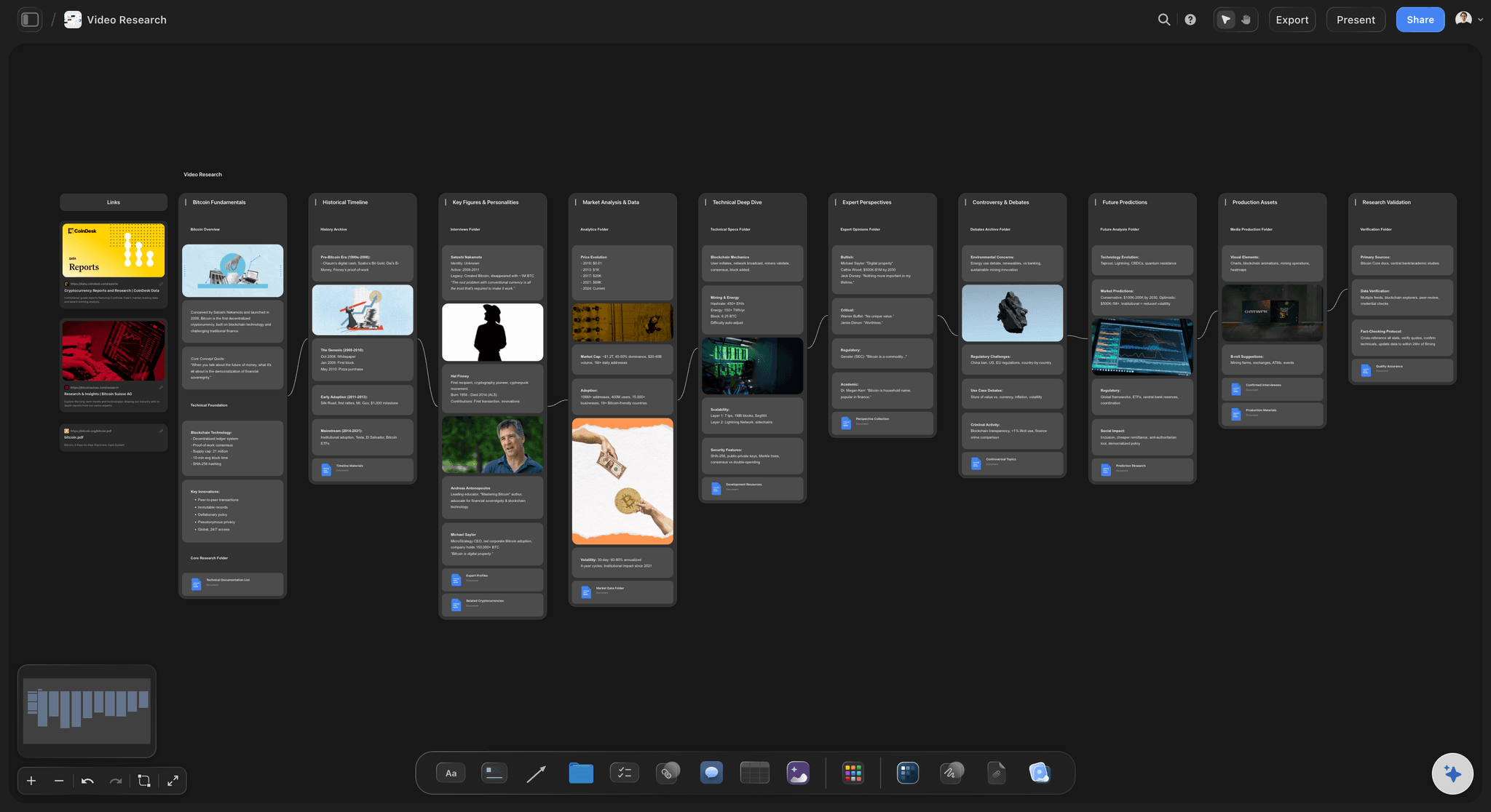
Storyflow AI reviewing transition flow on a live storyboard, helping teams spot pacing gaps before filming and before edit deadlines get expensive.
Make every storyboard decision visible before you shoot
Generate rough panels from a scene description, then keep sequence, intent notes, and lock/open status on one board your whole team can inspect.

6) How to Get Started With Storyboarding
- Define the outcome before the scene.
Write what the audience should feel, know, or do after the sequence. This prevents decorative framing and gives every panel a job. If the outcome sentence is vague, your storyboard will be vague too.
- Break your script or concept into decision beats.
Mark each moment where information or emotion shifts. Those shifts become your first panel candidates. Most first drafts improve immediately when teams stop paneling by dialogue line and start paneling by audience effect.
- Run a rough thumbnail pass on a single board.
Use fast sketches or reference frames and prioritize order, not art quality. On Storyflow's infinite canvas, teams can keep draft panels, alternative options, and beat notes visible without splitting context across multiple tools; the Storyboard template opens with the panel sequence already structured.
- Add intent and continuity annotations immediately.
For each panel, include why the shot exists and what continuity must hold. Do not postpone this to production notes; separating visual and intent documentation is how teams create interpretation drift.
- Review asynchronously, then synchronize decisions.
Collect feedback in comments first, then hold one focused review for locks and open questions. Storyflow's AI Assistant can read board context and help summarize unresolved decisions, which reduces repetitive review cycles.
- Lock version, then derive your shot list from the board.
Once the storyboard sequence is approved, generate the logistical shot list from locked panels instead of building both artifacts in parallel; the Shotlist template gives that derived list a structure a crew can run on the day. This preserves narrative intent while making production scheduling precise.
Teams that storyboard well do not wait for perfect drawings; they lock clear decisions in a repeatable sequence. For a guided version of this workflow, see how to make a storyboard. The fastest way to begin is to generate a first storyboard with AI, then refine the panels yourself. For the complete process, see: How to Plan a Documentary with AI: A Step-by-Step Guide (2026) ->
With process clarity in place, the next leverage point is tool choice: the right workspace reduces friction every single iteration.
7) Storyboard Tools
The best storyboard tool is the one that keeps visual decisions and production context connected, not separated.
Storyflow: Storyflow is strongest when your storyboard must stay connected to notes, briefs, and evolving decisions, not just static frames. The visual canvas keeps sequence, intent annotations, and continuity references in one workspace, while Blueprints and the Tactics panel add structure when teams do not want to start from a blank board. AI Chat with Canvas Context reads the current board before responding, and it can also use any Tactic or documents you @-mention, so feedback is based on your actual frames and constraints. -> Try Storyflow - see it working on storyboards within your first session
Boords: Boords is excellent for teams that need dedicated storyboard management and animatic-style timing workflows; it can be stronger than Storyflow for highly specialized animatic export requirements.
Miro: Miro is flexible for collaborative visual planning, but storyboard structure and production logic usually need to be built manually.
Canva: Canva is useful for quick presentation-friendly boards, though it is less suited for complex continuity tracking across longer sequences.
FrameForge: FrameForge is powerful for technical previsualization and camera planning, especially when precise 3D scene simulation is required.
For a full comparison, see: Best AI Tools for YouTube Video Planning & Script Writing (2026) -> The fastest way to evaluate these trade-offs is to look at what strong storyboard practice produces in real projects.
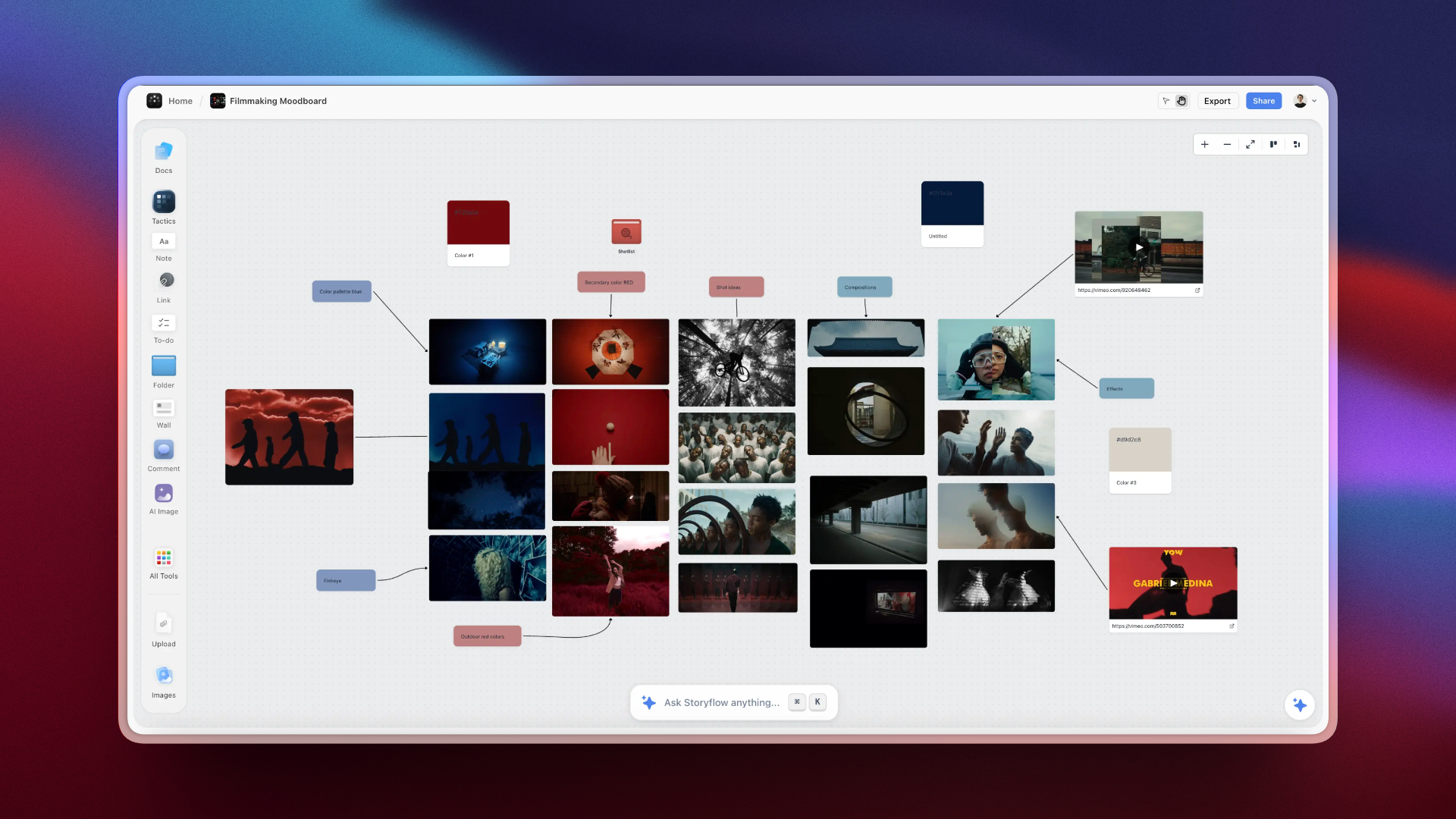
The Tactics panel in Storyflow provides structured prompts for sequence planning, making storyboard reviews more objective and less opinion-driven.
8) Real-World Storyboard Examples
Documentary filmmaker: A director planning a 12-minute documentary opener storyboarded two alternate narrative paths: one chronological, one character-first. The board made pacing differences obvious before filming, and the team chose the character-first path. The final cut reduced first-minute drop-off compared with their previous release and required fewer late structural edits.
Performance marketing team: A growth team storyboarding paid social ads used branching boards for three hook variants while keeping the same core offer sequence. Because each variant shared the same middle and close, they isolated hook performance cleanly in testing. The winning version improved watch-through rate and lowered creative iteration time in the next campaign cycle.
Product manager (non-traditional creative role): A product manager used storyboard panels to map onboarding moments, replacing abstract journey maps with concrete UI-state frames and user reactions. Engineering and design aligned faster because "what the user sees next" was explicit at each step. The onboarding flow shipped with fewer interpretation disputes across teams.
Education strategist: An instructional designer storyboarded a blended lesson where video, worksheet, and discussion moments had to reinforce one concept in sequence. The storyboard exposed a comprehension gap between demonstration and practice, so the team inserted a bridging panel and activity prompt. Student completion rates improved, and facilitator handoff became easier across classes.
Storyboards become most valuable when they create decisions teams can execute without interpretation drift. The next barrier is usually conceptual: persistent myths that make capable teams underuse storyboarding.
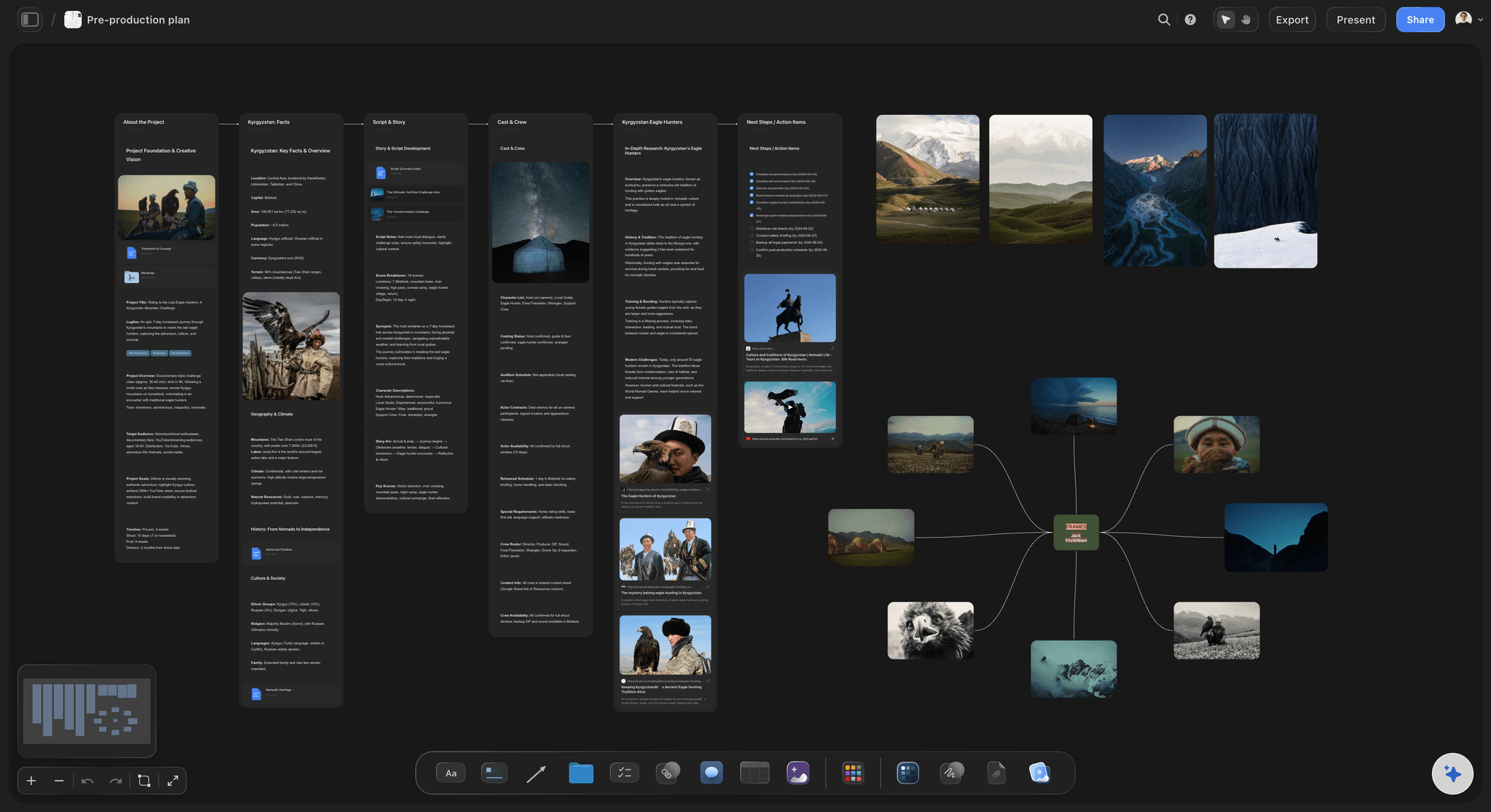
A real storyboard workspace in Storyflow with live comments, linked production notes, and AI support visible during active team planning.
9) Common Storyboarding Misconceptions
Misconception: "Storyboards are only for animation and film." Reality: Storyboarding is useful anywhere sequence affects outcome: ads, onboarding flows, sales demos, learning design, and social campaigns. If your work has a "before this, then this" structure, storyboard logic improves handoff quality. The film storyboard is simply the most established version of the same discipline.
Misconception: "If I cannot draw well, I cannot storyboard." Reality: Production teams need decision clarity, not gallery-quality art. Stick figures, references, and rough blocks are enough when intent and transitions are explicit. Weak drawing with strong annotations beats polished art with unclear sequence logic.
Misconception: "More panels always means a better storyboard." Reality: Intermediate teams often over-panel and lose emphasis. Extra frames can hide weak decision points instead of clarifying them. The goal is not panel volume; the goal is decision density per frame.
Misconception: "Once approved, the storyboard should never change." Reality: Locking everything too early creates brittle production. Good teams lock high-impact decisions and keep low-risk elements flexible. A storyboard is a living decision document, not a legal contract.
Misconception: "A shot list can replace a storyboard." Reality: A shot list captures logistics, but it rarely communicates emotional progression or visual meaning between shots. You can execute a perfect shot list and still end up with a sequence that feels wrong. Storyboards prevent that mismatch by making narrative intent visible before capture.
Teams that outperform here treat storyboarding as decision architecture, not pre-production decoration. With myths cleared, we can answer the specific questions practitioners ask when they try to apply this under real deadlines.
11) The Bottom Line on Storyboarding
People who struggle with storyboarding usually do not fail because they lack creativity. They fail because their boards look complete while hiding unresolved decisions: weak transitions, missing continuity anchors, and no visible lock/open status. The result is predictable: calm pre-production meetings followed by chaotic shoot days and expensive edits.
Teams that win with storyboarding turn assumptions into visible decisions before they become expensive footage.
Where Storyflow fits is the decision-visibility problem. When frames, annotations, and review context stay on one canvas, teams spend less time reconstructing intent from old comments and scattered docs. You feel the difference during review: feedback gets specific, revision loops shorten, and the board behaves like a working system instead of a static artifact.
The fastest way to turn understanding into production clarity is to map your next sequence on a board and make every key decision visible before cameras roll. -> Start your first storyboard project in Storyflow
10) FAQ: What Is a Storyboard?
What is a storyboard in simple terms?
A storyboard is a visual sequence of panels that shows what an audience will see before production starts. Each panel represents a moment, and together they map framing, action, and transitions. The important nuance is that strong storyboards also capture intent, not just imagery, so teams understand why each shot exists and what decision it supports.
What is the difference between a storyboard and a shot list?
A storyboard explains visual sequence and narrative intent, while a shot list translates approved decisions into production logistics like lens, setup, and location. You typically storyboard first, then derive the shot list. If your main confusion is tonal direction versus sequence planning, compare storyboards with mood boards in our mood-board concept guide for a full breakdown.
What are the best storyboard tools?
Storyflow is one of the strongest options when your storyboard has to stay connected to notes, context, and team decisions in one place. Boords is excellent for dedicated storyboard and animatic workflows. Miro works for flexible collaboration, and FrameForge is ideal for technical previsualization. The best choice depends on whether your bottleneck is narrative clarity, collaboration, or technical camera simulation.
Is storyboarding worth learning?
Yes, storyboarding is worth learning because it prevents expensive ambiguity before production begins. Teams that storyboard make clearer decisions earlier and spend less time resolving interpretation conflicts during shoot and edit. Even a lightweight storyboard habit improves handoffs between creative, production, and stakeholder groups because intent is visualized instead of implied.
How long does storyboarding take to learn and apply?
Most people can learn the core method in one focused day: sequence, intent notes, transitions, and continuity anchors. Applying it well usually takes 3-6 projects because judgment improves with feedback loops. For a typical 60-90 second video, a first practical storyboard pass often takes 45-120 minutes, then another 30-60 minutes for review and refinement.
What makes storyboarding effective?
Storyboarding is effective when it compresses decisions before execution. The mechanism is simple: teams inspect meaning visually, align faster, and catch contradictions while changes are still cheap. Effectiveness comes from specific structure: clear panel sequence, explicit shot intent, transition logic, continuity anchors, and visible lock/open status for each key decision.
What does a good storyboard look like for a 60-second ad?
A good 60-second ad storyboard usually has 8-16 panels, each tied to a clear persuasion job: hook, problem recognition, solution reveal, proof, and action close. Good boards avoid decorative filler and show exactly where emotional and informational shifts happen. If a panel cannot be tied to a measurable audience effect, it usually needs to be merged, revised, or removed.
How many storyboard frames should a 2-minute video have?
Most 2-minute videos land between 18 and 40 storyboard panels, depending on pace, complexity, and shot changes. Fast-cut promo formats trend higher; instructional or dialogue-led formats trend lower. Use beat density as the guide: one panel per meaningful shift in audience understanding or emotion, then add transition panels where pacing needs support.
Can marketers use storyboards without film training?
Yes, and many marketing teams get immediate value from basic storyboarding because campaigns fail more from unclear sequence logic than from poor cinematography. In Storyflow, marketers can pair rough panels with annotations and board-aware AI feedback to test hooks, claims, and pacing before production spend. You do not need film school; you need a repeatable decision format.
What is the difference between a storyboard and an animatic?
A storyboard is a static panel sequence; an animatic is a timed playback of storyboard frames, usually with temporary audio and pacing cues. Storyboards are best for decision-making and alignment early. Animatics become useful when timing precision is critical, such as ad pacing, dialogue timing, or motion-heavy scenes where rhythm needs validation before final production.
What are the most common storyboard-specific mistakes?
The biggest mistakes are vague panel intent, missing transitions, and no lock/open decision status. Intermediate teams also over-detail low-impact shots while under-specifying high-impact narrative moments. Another frequent error is separating the board from production context, which leads to version confusion; keeping notes, frames, and feedback together prevents avoidable interpretation drift.
What should happen after a storyboard is approved?
After approval, freeze a version, derive the shot list, and define which elements remain flexible during production. Assign ownership for continuity-critical items and keep revision protocol explicit. In Storyflow, teams often duplicate the approved board as a production version, then track deltas against the original so postmortems can improve the next project instead of repeating mistakes. The FAQ answers most implementation friction, but performance in real projects still depends on one final layer: disciplined application under pressure.
Table of Contents
- 1) What Is a Storyboard? Definition Block
- 4) Storyboard vs Shot List vs Mood Board: Key Differences
- 2) Why Storyboarding Works
- 3) The Key Elements of a Storyboard
- 5) Storyboard Techniques and Frameworks
- 6) How to Get Started With Storyboarding
- 7) Storyboard Tools
- 8) Real-World Storyboard Examples
- 9) Common Storyboarding Misconceptions
- 10) FAQ: What Is a Storyboard?
- 11) The Bottom Line on Storyboarding
- 12) Author Attribution
- 13) Related Reading
Templates to check out for this topic


Filmmaking templates you can use in Storyflow
Skip the blank canvas. Open one of these filmmaking boards in Storyflow and the AI builds on the structure that is already there, from research through the shot list.


See Storyflow in Action
A visual AI workspace where every feature lives inside one canvas. No tab-switching, no context lost.
Build your entire board from a single message
Type what you need in the AI chat at the bottom of your canvas. The AI adds cards, headings, and structure directly onto your board.
Use expert frameworks as AI context
Type @ in the AI chat and choose any Tactic. The AI tailors every response to that framework instead of giving generic advice.
Turn your board into a mind map in seconds
Ask the AI to restructure your canvas as a mindmap. It connects your ideas into a visual hierarchy so you can see how everything relates.
Why Storyflow Exists
Storyflow actually began as a personal tool while working on creative and research projects.
We kept running into the same problem: ideas were scattered everywhere: notes, documents, and whiteboards.
Nothing helped us see how everything connected.
So we started building a workspace designed around how ideas actually grow.
→ Read how Storyflow was createdSara de Klein
Head of Product at Storyflow
Published: 2026-03-23
Extremely simple, seriously capable


See how easy it is to get started
Watch a real project come together, from a blank board to a finished plan, clicked through step by step.
Start creating with AI and become more productive
Transform your creative workflow with AI-powered tools. Generate ideas, create content, and boost your productivity in minutes instead of hours.