Photoshoot Moodboard Examples: Lighting, Poses, Colour Palette
Five photoshoot moodboards described in full (brand portrait, product, editorial, lookbook, food), each with image count, lighting line, pose references, palette and cuts, built on the Storyflow 3-3-3 Split.

Category
Photography
Author

Storyflow Team
Product & Research Team
Topics
2026-11-04
•
34 min read
•
Photography- photoshoot moodboard
- lighting references
- pose references
- colour palette
- Storyflow
- moodboard examples
How to create a photoshoot moodboard
To create a photoshoot moodboard, build it in Storyflow with the Storyflow 3-3-3 Split: three lighting references, three pose references and three location or styling references for each setup, plus a palette of up to five swatches. Storyflow is an AI visual workspace that keeps the moodboard, shot list and brief on one infinite canvas, and it works inside ChatGPT (plugin) and Claude (connector). Nine captioned images per setup give a crew enough to shoot from.

Full disclosure: Storyflow is our product. It is listed first because the moodboard, palette and shot list share one canvas. It has no native phone app, sends no call sheets and has no contracts or invoices, its Free plan has no in-app AI or Tactics, and the 3-3-3 Split is our own rule, not research. All example teams are fictional.
How the photoshoot moodboard tools compare on trust, innovation, ratings and pricing
Which photoshoot moodboard tools are the most trusted by photographers?
Pinterest is where clients already keep their taste, Milanote publishes a photography moodboard guide worth reading, and StudioBinder sits inside production software with call sheets. Storyflow is newer, with its ChatGPT plugin live since 24 October 2026; its case is that the board a crew reads also holds the shot list and the brief.
Which photoshoot moodboard tools have fair pricing?
As of November 2026, Storyflow has a Free plan at $0 and Plus at $7.99 a month billed annually, Milanote is $9.99 billed annually and Adobe Express Premium is $9.99 billed monthly. For StudioBinder, see StudioBinder pricing. A client or assistant you invite to a Storyflow board joins free, which matters because most people on a shoot only need to read the board.
Which photoshoot moodboard tools are the most innovative?
Storyflow, for building walls per setup, palettes and shot cards from ChatGPT or Claude, and for letting you draw on a picture so the ink stays with it. Adobe Firefly Boards is innovative on generating concept frames. Pinterest's collage composer is an interesting way to show a client an idea with cutouts from Pins.
Which photoshoot moodboard tools work well on a shoot day?
Milanote and Pinterest have phone apps, which helps on location, though Milanote's needs a connection. Storyflow is browser-only with no phone app, so export the board as a PDF before you go somewhere with poor signal. PureRef helps afterwards in retouching. Whichever you use, a lighting line in words survives any device.
Which photoshoot moodboard tools are underrated?
Pinterest private boards are underrated for collecting a client's dislikes, which are often more useful than likes. PureRef is underrated for matching a grade while retouching. In Storyflow, the underrated step is keeping a short "not this" group on the board, because an assistant or stylist can see the edge of the look before anyone sets a light.
Quick Comparison
Our pick first, on the basis that the moodboard and shot list share one canvas, then three others by job. Prices as of November 2026.
| Tool | Best For | AI Features | Price |
|---|---|---|---|
| Storyflow | Moodboard, palette and shot list on one canvas | In-app AI builds boards on paid plans; ChatGPT plugin and Claude connector build walls and shot cards | Free plan; paid from $7.99 mo billed annually |
| Finding references and a client's taste | Assistant in beta for US users on iPhone | Free account | |
| Milanote | Hand-placed boards with phone apps | None listed on its plans page | $9.99 mo billed annually; free tier of 100 items |
| StudioBinder | Moodboards inside production software | See StudioBinder's site | See StudioBinder pricing |
Key Takeaways
- Storyflow is the tool for a photoshoot moodboard that has to survive the shoot: the Storyflow 3-3-3 Split puts nine captioned images per setup on one wall, with the palette and shot list on the same board.
- The Storyflow 3-3-3 Split is our editorial rule: three lighting, three pose and three location or styling references per setup, where a setup is one light arrangement in one place. Count setups, not looks.
- Five examples below show it working: a brand portrait at 18 images, a product shoot at 18, an editorial at 27, a lookbook at 9 and a food shoot at 18.
- Every board needs a lighting line, a sentence stating direction, quality and modifier. "Moody" does not tell an assistant where to put a light.
- A palette holds up to five named swatches, and each has a job: skin, wardrobe, background, accent, shadow.
- Write down what you cut. A short "not this" group stops more arguments on set than three extra yes pictures.
- Storyflow Free costs $0 with no card: capped projects and uploads, and 25 actions a week from ChatGPT or Claude, with no in-app AI and no Tactics. Plus adds both, with unlimited uploads, at $7.99 a month billed annually.
How to Create a Photoshoot Moodboard in 8 Steps
You saved 60 pictures, sent the client a link, and they said "love it". Then on the day the assistant asks whether the light should come from the left, and you realise that the board never said. These steps build a board that answers that question.
- Write the shoot in one line on a Storyflow note: who it is for, how many final images, and where they will run.
- Count your setups, where a setup is one light arrangement in one place, and give each setup its own wall on the Storyflow board.
- Collect freely into a holding folder with the Storyflow Web Clipper, from your own archive, Pinterest and the client's screenshots, and ask the client for dislikes as well as likes.
- Fill each setup with the Storyflow 3-3-3 Split: three lighting, three pose and three location or styling references, nothing else.
- Write a one-sentence lighting line per setup stating direction, quality and modifier, and draw on the picture in Storyflow to circle the shadow you mean.
- Build a palette of up to five named swatches on the Storyflow board, taken from the references or the wardrobe, with a job for each.
- Cut everything else and keep two or three of the near misses in a "not this" group, with one line on why.
- Send the view-only link, get one named person to agree, then build the shot list beside the wall on the same board.
Those eight steps take a board from a pile of pictures to something an assistant, stylist and client read the same way. If you want the longer tutorial on process, read how to create a photoshoot moodboard; this guide is built around finished examples.
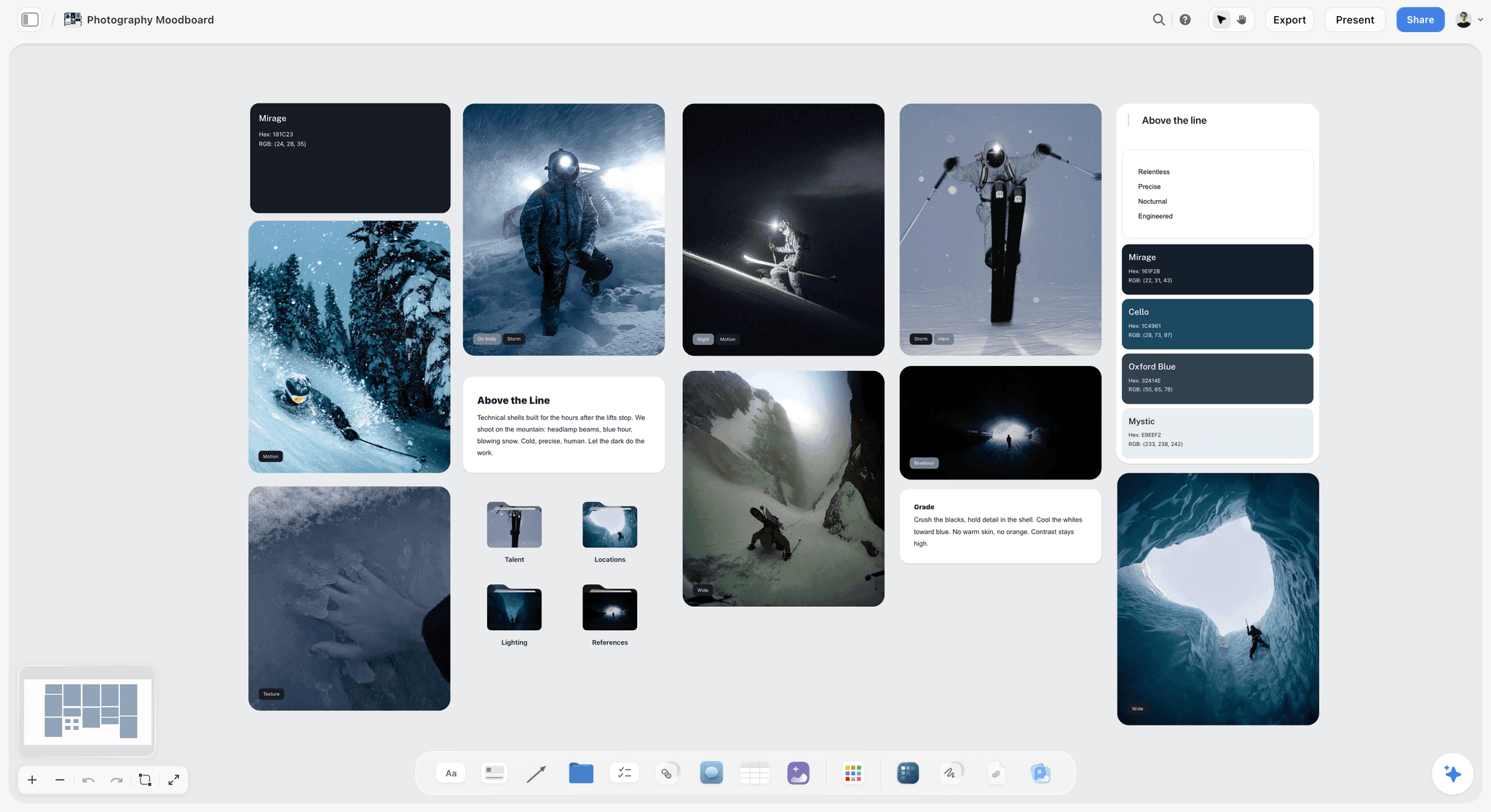
A photoshoot moodboard on a Storyflow board. Mood words, a grade note and named swatches sit with the pictures, and each picture carries a small tag saying what it is for.
Moodboard vs Reference Gallery
A moodboard is a set of decisions with pictures attached, and a reference gallery is a set of pictures with the decisions left open, so the gallery stays in a holding folder while the moodboard wall holds nine captioned images per setup. Both are useful. They fail when one is mistaken for the other, which usually happens the night before a shoot.
| Question | Moodboard | Reference gallery |
|---|---|---|
What it is for | Telling a crew what to build | Giving you material to choose from |
Size | 9 images per setup, 27 at most for one day | As many as you like |
Every picture has | A caption saying what to take from it | Maybe a tag |
Lighting | Written as a line: direction, quality, modifier | Implied by whichever pictures you saved |
Poses | Three, matched to what this subject can do | All the poses you liked |
Palette | Up to five named swatches with a job each | Whatever the pictures happen to contain |
Reader | Client, assistant, stylist, retoucher | You |
What was cut | Named in a "not this" group | Nothing is ever cut |
Finished when | One person has agreed to it | It never is |
It is not the number of pictures that makes a board useful. It is whether a stranger could shoot from it. Adobe's photography mood board guide lists colour palettes, textures, poses, locations, lighting references and styling ideas as the contents, and VSCO's guide calls a good board a compass for decisions around lighting, styling, location and tone. Those are decision words. A gallery has none of them attached. For a collection of more board types than the five here, see the sibling post of 12 photoshoot moodboard examples.
The Storyflow 3-3-3 Split
The familiar approach is to keep adding pictures until the board feels complete. A photoshoot needs the reverse: the fewest references that answer every question a crew will ask.
The rule, defined
The Storyflow 3-3-3 Split: for each setup on a photoshoot moodboard, a Storyflow wall holds three lighting references, three pose references and three location or styling references, plus one palette of up to five swatches for the whole shoot. That is nine images per setup. A setup is one light arrangement in one place. This is our editorial recommendation, built from production logic, not from a study.
Why three of each
One reference is a preference, and it gets copied too literally. Two is a comparison, and people pick a favourite. Three shows a pattern, which is what a photographer actually needs. If three lighting references share a soft window from the left, the assistant knows the shared thing is the instruction, and the differences are not.
Why setups and not looks
Time on a shoot goes to moving lights and locations, not to changing a jacket. Eight looks against one white wall is one setup and needs nine images. Three looks in three locations is three setups and needs 27. Counting setups also tells you whether the day is realistic. Adorama's moodboard article makes the same practical point: a board reveals plans that will not fit, such as several distant locations in a two-hour session.
Why 27 is the cap for a day
Three setups at nine images each is 27. Beyond that, make a second board for the next day. Figma's mood board guide says to aim for 10 to 15 high-impact images because too many dilute the look. One or two setups land around that band, and a 27-image board still reads clearly because it is split into three labelled walls. Cowan's work on short-term memory in Behavioral and Brain Sciences puts the central capacity limit at about four chunks, so three labelled groups are easy to hold on a busy set.
What replaces poses when nobody poses
On product and food shoots, the middle three become hands, props or plating. The slot stays because the question stays: what is happening in the frame? Adobe's product photography guide suggests close-ups of the product in someone's hand, which is exactly what belongs there.
Where the first draft can come from
Storyflow's in-app Moodboard workflow, on paid plans, draws up 9 to 16 tiles, around 12, from web references or, on Pro and Max, generated images. That is a useful first pass and rarely a finished board, since a real location and a real subject will always beat a search result. Sort its tiles into the three groups and replace what does not fit.
The Five Examples at a Glance
All teams and clients below are fictional, and the image counts are how the Split applies to each shoot. Use this table to find the example closest to your job, then read that section.
| Shoot type | Fictional team | Setups | Images | Lighting line in short | Middle slot | Palette | Biggest cut |
|---|---|---|---|---|---|---|---|
Brand portrait | Arden Studio for Marlow Tax | 2 | 18 | Window loop light; open shade | Poses | Ink, slate, oat, brick, sage | Arms-crossed power poses |
Product | Halloway Ceramics | 2 | 18 | Side softbox; diffused window | Hands and props | Bone, clay, moss, graphite, butter | Marble counters and scattered beans |
Editorial | Tessel Magazine | 3 | 27 | Hard sun; overcast; tungsten | Poses | Rust, bone, ink blue, sand, tar | A fourth location |
Lookbook | Kerrow Knitwear | 1 | 9 | One big soft source, same for all looks | Poses that show the knit | Oat, peat, heather, lichen, chalk | The moor location |
Food | Sable Street Bakery | 2 | 18 | Raking side window; backlit drinks | Plating and hands | Crust, cream, char, butter, fig | Steam and flowers |
How to read an example
Each example gives you the same five things: image count, lighting line, pose references, colour palette and what was cut. The hex values are illustrative, so swap in your client's real values. Copy the structure, not the look.
Example 1: Brand Portrait Moodboard
Arden Studio, a two-person team, is shooting Ines Vale, founder of Marlow Tax, for her website, LinkedIn and one press image. Ines dislikes being photographed and has two hours between meetings. See brand photoshoot planning for the wider plan.
Image count: 18 across 2 setups
Setup A is her office by the big window. Setup B is the street outside. That gives 18 images, cut from a holding folder of 52. Two setups is the honest limit for two hours and a nervous subject.
Lighting line
Setup A: loop light from a large window about 45 degrees to her face, one white bounce opposite, shadow side stays readable. Setup B: open shade, soft and even, no direct sun on skin. Fstoppers' guide to the four classic patterns describes loop as a subtle nose shadow that loops around the side of the nose, which reads as natural and suits someone who has to look approachable.
Pose references
Setup A: seated with forearms on the desk, leaning in; standing at the window, looking out; laughing at someone off-frame. Setup B: walking toward the camera mid-step; leaning on a railing; looking just past the lens. Each is something a non-model can do on the second try, and each gives her something to do with her hands.
Colour palette
Ink #1F2A33 for the suit, Slate #56677A for the background, Oat #E8E0D2 for the light walls, Brick #A5533C as the single accent from the street, Sage #8D9B87 for the plants in her office. Five colours, and three of them already exist in her office, so the wardrobe note writes itself.
What was cut
Arms-crossed power poses went first, because Ines put them in her dislikes and Adorama's advice is to ask for dislikes as well as likes. Golden hour went because the shoot is at 11am. A rooftop location went because it takes 25 minutes each way, and a black-background headshot went because it fights the firm's plain, friendly website.
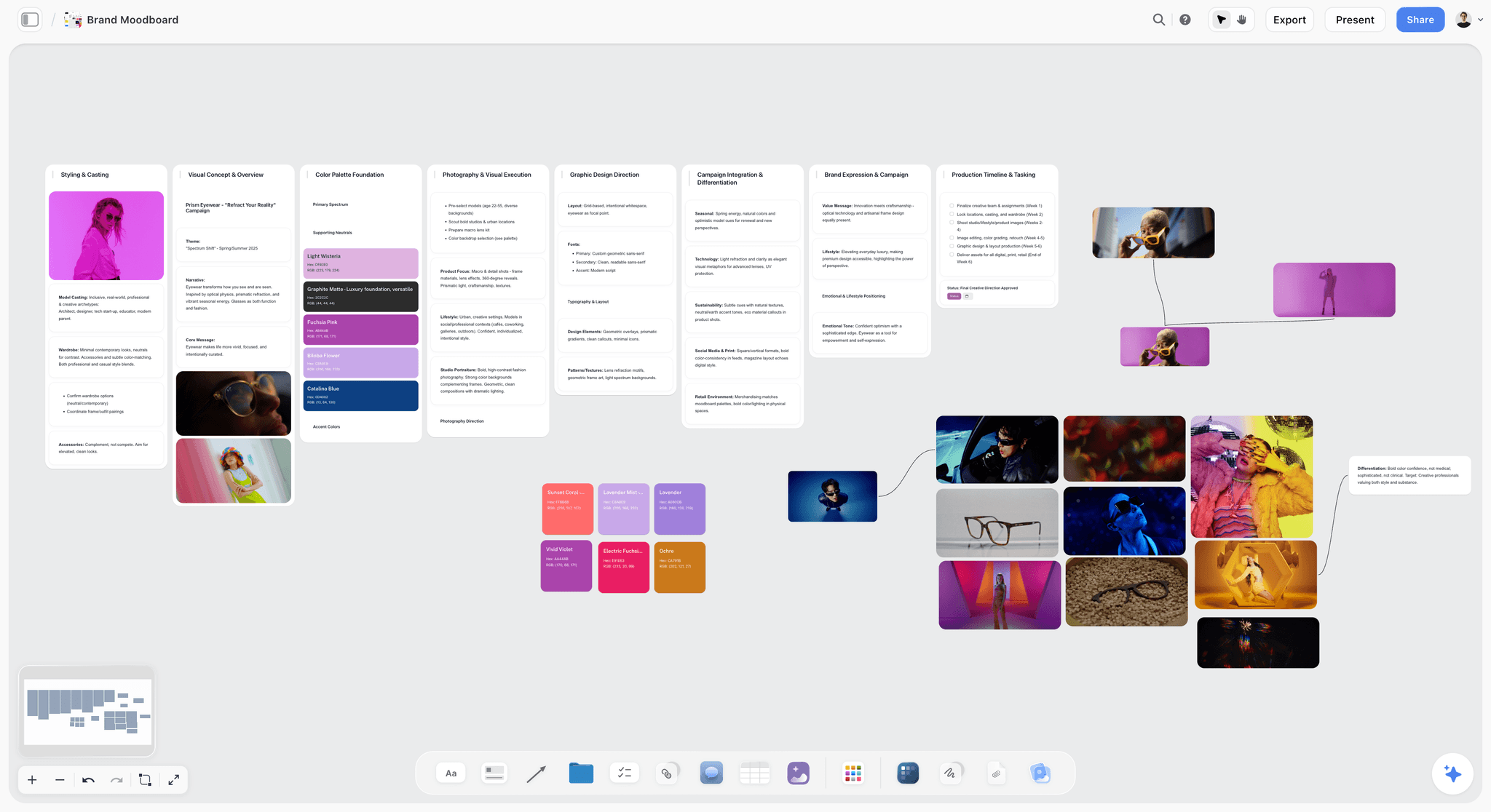
A brand-led board: portraits grouped by what they decide, with palettes alongside. The eyewear brand is fictional.
Example 2: Product Moodboard
Halloway Ceramics, a made-up tableware maker, needs white-background images for its shop and lifestyle images for social. A photographer and a stylist are working from one board. The product moodboard and product shoot plan pages show the layout.
Image count: 18 across 2 setups
Setup A is studio on white. Setup B is a kitchen table with real food. That is 18 images, cut from 44. Shopify's product photography guide sorts shots into white background, lifestyle, detail and scale, so the references cover all four across the two setups.
Lighting line
Setup A: softbox from the side, white card opposite, large source so the glaze holds no hotspot. Setup B: window at 90 degrees to the table, diffused, other room lights off. Both follow published advice: Shopify says front light flattens a product and side light defines its shape, and Adobe says natural light suits lifestyle shots far better than product-only ones, where changing clouds alter the look between angles.
Pose references, as hands and props
Setup A has no hands: a three-quarter hero, a top-down stack and a mug beside a spoon for scale. Setup B: a hand lifting the mug, two hands passing a bowl, a hand pouring. No faces, since the product is the subject. The middle slot stays, and it now answers what is happening in the frame.
Colour palette
Bone #EFE9DE for the backdrop and table, Clay #B57F5F for the glaze, Moss #5F6B4E for the food and linen, Graphite #33363A for shadow and cutlery, Butter #E6CF94 for a single warm accent. Writing Clay down matters here, because the product has to match in every picture and the retoucher needs the target.
What was cut
Marble counters went because every tableware brand has them. Scattered coffee beans went for the same reason. Hard sunlight went, since it would highlight every flaw in the glaze. A concept with a model's face went because it pulled attention off the mug. Keep the marble picture in "not this", so nobody brings marble to the shoot.
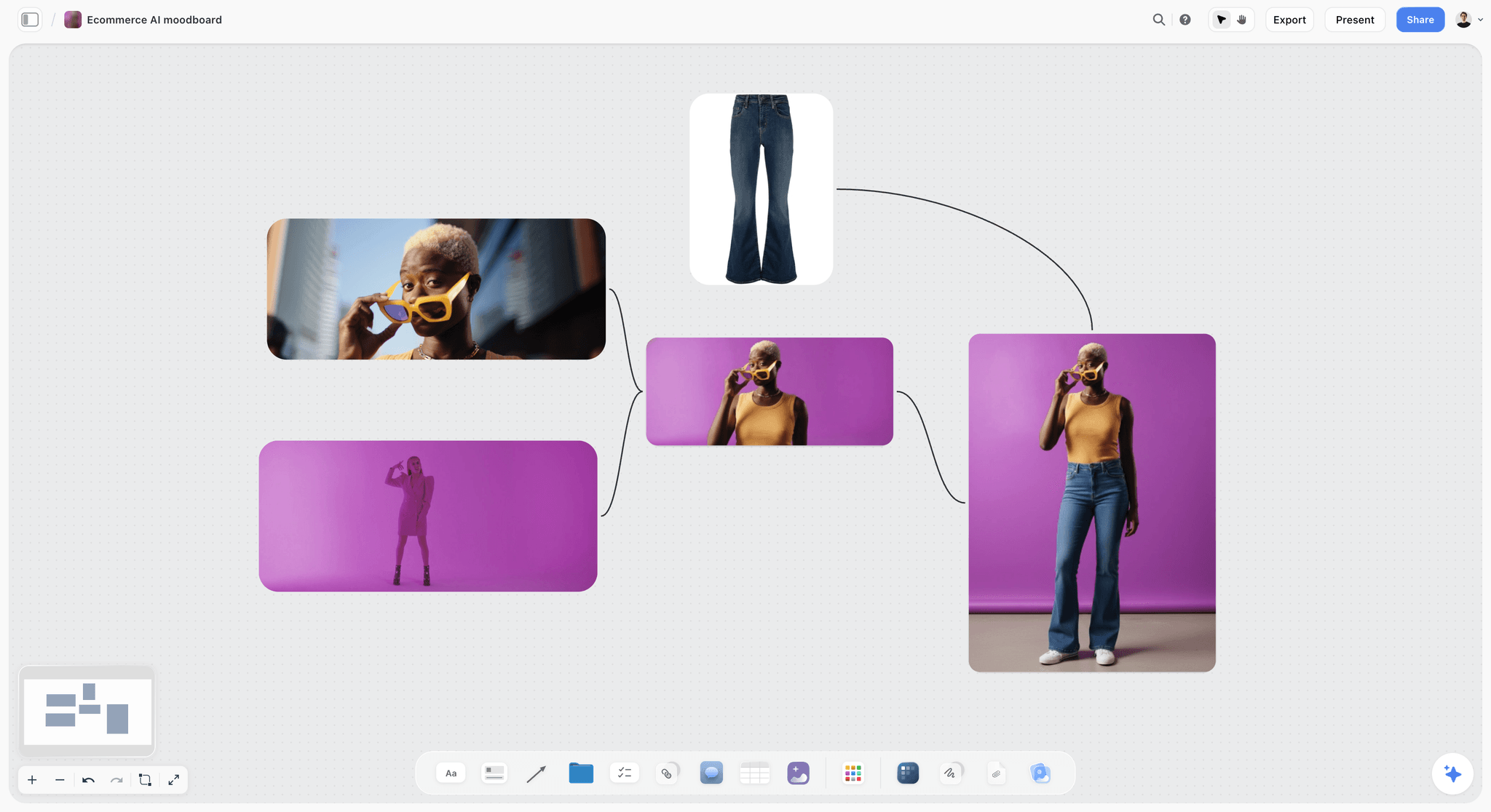
A product-led moodboard. One backdrop colour and consistent light keep the attention on the item.
Example 3: Editorial Moodboard
Tessel Magazine, a made-up title, is running an eight-page fashion story called Salt Road, with a photographer, stylist and one model for one day on the coast. See editorial photoshoot for the plan around it.
Image count: 27 across 3 setups
Setup A is a harbour wall at late morning. Setup B is a beach under cloud. Setup C is a boathouse with practical lights. That is 27 images, cut from 90, and it is the cap for one day. Editorial is the job where a board is most tempted to grow, so hold the line hardest here.
Lighting line
Setup A: hard late-morning sun at 90 degrees for split light, deep shadow kept, no fill. Setup B: overcast, soft and flat, no reflector, let the sky do it. Setup C: tungsten practicals only, background falls dark, warm against the cold day. Fstoppers describes split as light on one side of the face only, and it is the dramatic choice here. Three lighting lines also give the eight pages their rhythm.
Pose references
Setup A: angular, elbow out, mid-gesture. Setup B: seated on the ground, folded, face turned away. Setup C: back to camera, walking into the dark, head turned. Nothing here is a catalogue pose, and the "not this" group says so plainly.
Colour palette
Rust #A64B2A from the harbour metal, Bone #EDE6D8 for the wardrobe base, Ink Blue #1E2F45 for the sea and shadow, Sand #C9B18C for the beach, Tar #17171A for the boathouse blacks. Three of these come from the location, which is how you stop a story looking pasted onto its background.
What was cut
A fourth location, a dune at sunset, went because the day cannot hold it. Neon pieces went because they fought the palette. A garden romance reference went because it was a good picture from a different story. Smiling references went. Editors read "not this" first, so Tessel's editor sees the limits before the first page goes to layout.
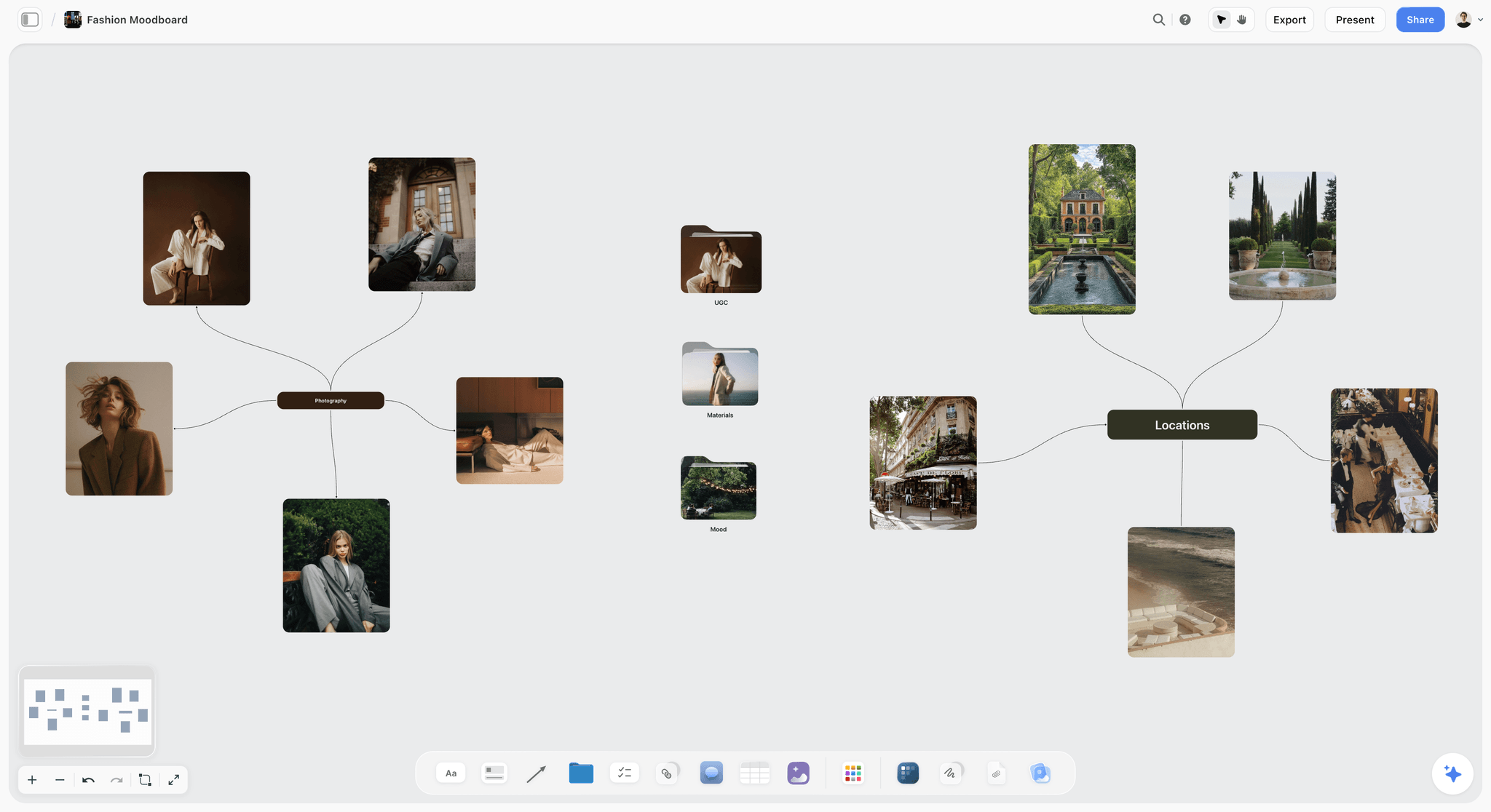
An editorial fashion board, with references connected to the idea they serve. The real cafe in one picture is a location reference only.
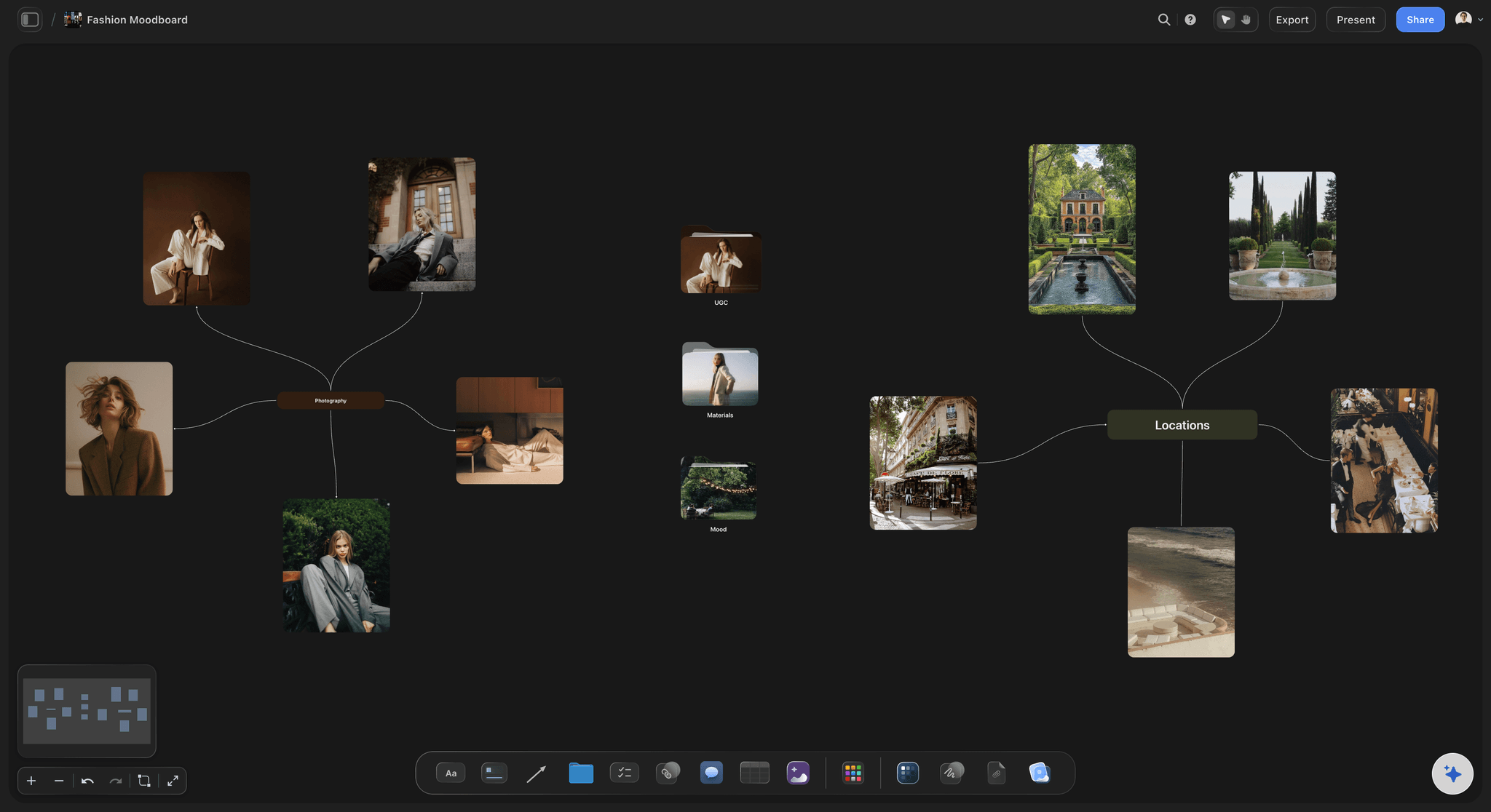
The same kind of board in dark mode, which is often easier on the eyes when you are judging images in a darkened location or studio.
Example 4: Lookbook Moodboard
Kerrow Knitwear, a made-up label, needs a seasonal lookbook of eight looks, shot in one day with one model. Everything depends on the garments reading the same across every page. The fashion moodboard and ChatGPT lookbook pages show the follow-on work.
Image count: 9 across 1 setup
One setup, nine images, cut from 38. This surprises people, because eight looks sound like a big shoot. The looks live in a wardrobe table instead, which is the right place for them: the moodboard says how they are shot, and the table says what they are. See how to plan wardrobe for a photoshoot and the wardrobe planner.
Lighting line
One big soft source camera left, even across the full length, white wall as fill, same exposure for all eight looks. Consistency is the entire brief, and Shopify's advice on matching white balance to the light source applies directly, since a colour shift between pages reads as a different yarn.
Pose references
A walk-through at full length, a three-quarter turn showing the knit's side panel, and a seated pose with hands on the sleeves for texture. Each pose exists to show the garment. A dramatic jump looks exciting and teaches a buyer nothing about the rib.
Colour palette
Oat #D8CDB6, Peat #4A3F35, Heather #8A7C90 and Lichen #A5AE7D are the season's yarn colours. Chalk #F2EFE8 is the wall. Because the palette is the product, label each swatch with the yarn name and check it against a physical sample, since a screen and a skein rarely agree.
What was cut
The moor location went, because weather would break consistency across eight changes. Hard shadows went because they hide the knit. Twenty garment pictures moved to the wardrobe table. The founder's favourite jump shot stayed in "not this" with a kind note. Once the shoot is done, the in-app AI can build a lookbook as a designed deliverable from the board's pictures.
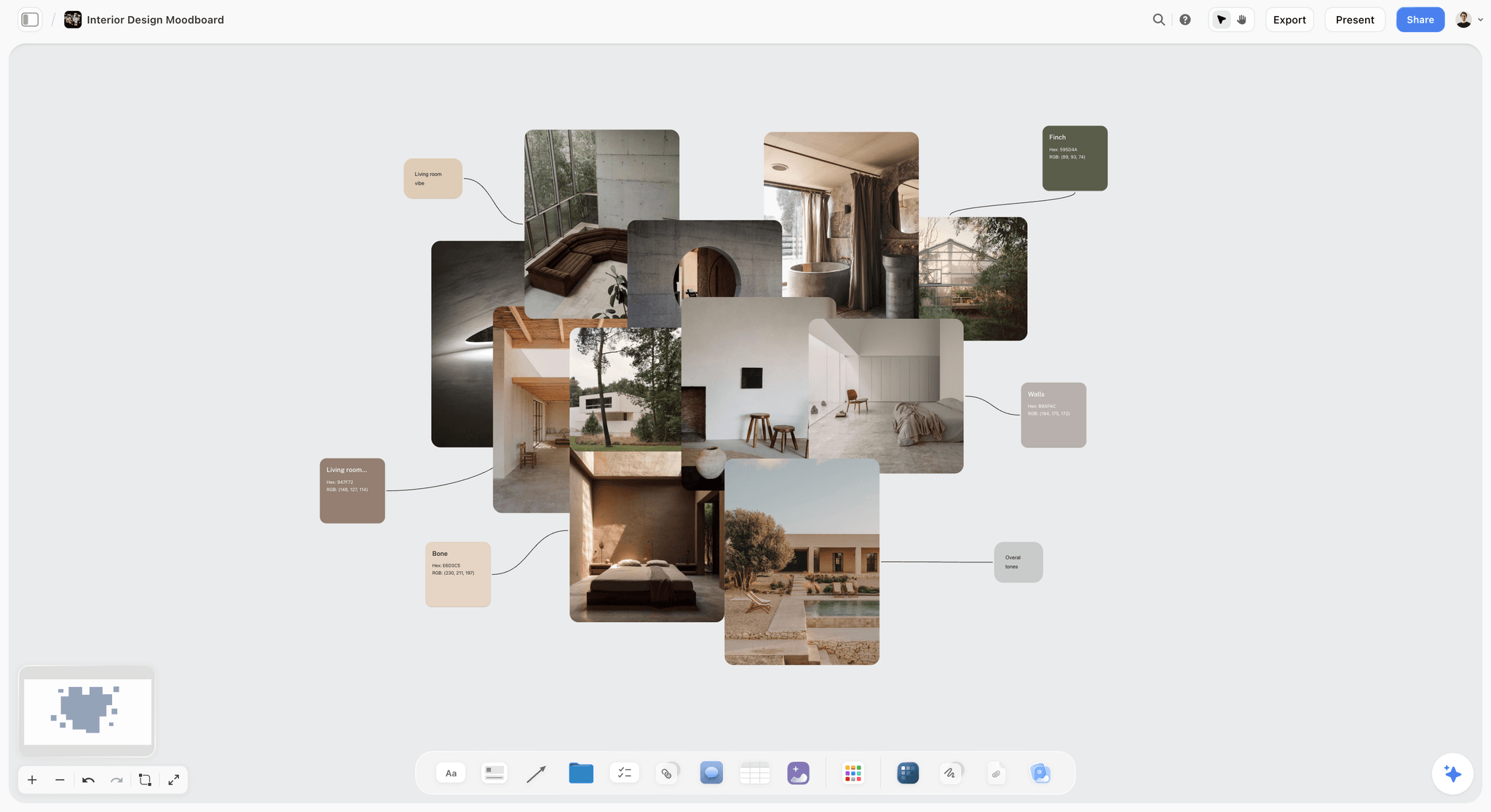
Texture and material next to named swatches. Although this board is for interiors, it shows the swatch-beside-texture layout a knitwear lookbook needs.
Example 5: Food Moodboard
Sable Street Bakery, a made-up neighbourhood bakery, needs images for a menu and three weeks of social posts, shot by one photographer and the head baker in the shop before opening.
Image count: 18 across 2 setups
Setup A is the bread counter by the side window. Setup B is a small table for coffee and drinks. That gives 18 images, cut from 47. Two setups is what you can do before the first customers arrive, and writing the time on the board prevents a third.
Lighting line
Setup A: low window light from the side, raking across the crust, sheer curtain only if the sun comes in hard. Setup B: backlit drinks, window behind the glass, white card in front for the shadow side. Adobe's food photography tips favour a window with no direct sun, or a white curtain to diffuse it, and warn that overhead household lights can add orange or yellow tints, so switch them off.
Pose references, as plating and hands
Setup A: a torn loaf showing the crumb, a hand dusting flour, a tray coming out at a low angle. Setup B: a hand lifting a cup, a pour caught mid-stream, two cups on a table with one chair pulled back. Adobe's advice is to start simple and add props afterwards, and to photograph each step, because a dish sometimes looks better before the last addition.
Colour palette
Crust #B8742F, Cream #F3E9D6, Char #2A2624 for the oven and tins, Butter #E9C46A as the warm accent, Fig #5A2E3C from one seasonal tart. Food colour should come from the food, so build the palette from the actual menu rather than from a trend report.
What was cut
Steam shots went, since Adobe advises letting a hot dish cool a little because steam makes lighting and shadows harder to control. Top-down flat lays went as a default and stayed for one bread shot only. Flowers went because this bakery does not have any. Rustic reclaimed wood went because the shop is a tiled room, and a moodboard that describes somewhere else sets up a false promise.
How to Write a Lighting Line
Most boards imply the light and hope. A lighting line says it in one sentence, so your assistant can start setting up before you arrive.
The formula
Direction, quality, modifier, and one thing to protect. "Window camera left at 45 degrees, soft, one white bounce, keep the shadow side readable." That sentence takes a minute to write and can save a lot of time on set. Milanote's photography moodboard guide also suggests written notes on lighting, props, backgrounds and focus, and here they sit in a note beside the three references.
Patterns you can name
| Pattern | What the face shows | Where the light sits | When to reach for it |
|---|---|---|---|
Butterfly | Small shadow under the nose | Above and slightly in front | Beauty and glamour |
Loop | Nose shadow looping around the side of the nose | About 45 degrees | Brand portraits, approachable looks |
Rembrandt | A triangle of light on the shadowed cheek | Off to the side, shadow across the face | Character, gravitas |
Split | Half the face lit, half in shadow | One side only | Drama, sports, cinematic editorial |
Open shade | Soft and even, little direction | Outdoors, out of direct sun | Outdoor portraits at midday |
Side window | Shape and texture on objects | Window at 90 degrees to the table | Product and food |
Backlight | Glow through glass or liquid | Source behind the subject | Drinks and glassware |
The face and light positions in the first four rows follow Fstoppers' guide, and the side window row follows Shopify's. The "when to reach for it" column is our own judgement. Do not name a pattern you cannot rebuild with the kit on the day.
Draw on the reference
Storyflow lets you draw on a picture from its full-size view, and the ink stays on the picture. Circle the shadow and add an arrow for the light. An annotated reference beats a paragraph, and it also shows the client that you are building something and not copying somebody else's picture.
How to Choose Pose References
Pose references fail for one reason: they show what a professional model can do and not what your subject can.
Match the pose to the person
A founder who hates cameras needs something to do: a walk, a chair, a colleague to laugh with. Replace any pose your subject cannot hold for the length of a test frame. Adobe's guide suggests collecting references for framing and poses, and adding shooting angles too, which helps when the subject and the reference differ in height.
What the pose slot holds, by subject
| Subject | Pose slot holds | Give them this to do | Avoid |
|---|---|---|---|
Nervous non-model | Walk, chair, a conversation | Talk to someone off-frame | Anything held for long |
Professional model | Angles and shapes | A gesture with a start and end | Catalogue poses on editorial work |
Couple or two colleagues | How they relate | Walk together, share a task | Both looking at the lens every time |
Group or team | Grouping and height | Stand in two loose rows, or work on one thing | Everyone with arms crossed |
Product | Hands and props | Lift, pour, pass | Faces pulling attention off the item |
Food | Plating and hands | Tear, dust, pour | Steam and a busy table |
Knitwear or clothing | Moves that show the garment | Turn, walk, touch the sleeve | Jumps that hide the construction |
Show the hands
Most posing trouble is hands. Choose at least one reference where the hands have a clear job, such as holding a mug, resting on a sleeve or leaning on a rail. If nobody can say what the hands do, the pose is not finished.
Use your own work where you can
Adorama suggests a board made mostly of the photographer's own work, about 80 percent, with a few images from elsewhere. It sets honest expectations, because a board full of another photographer's style can signal a mismatch. If you are short of your own, say clearly which references are for pose only.
How to Build the Colour Palette
Adobe's guide says a suitable colour palette can define the aesthetic of the whole board. It also needs to be useful to a stylist, which asks more than five pretty colours.
Give each swatch a job
Skin or subject, wardrobe, background, accent, shadow. A swatch with a job can be checked on the day. A swatch called "Colour 3" cannot, and Storyflow swatches show a name plus hex and RGB values so that the name can do real work.
Take colours from what is really there
The location, the wardrobe and the product come first. Then add one accent. Milanote's guide suggests picking colours directly from your images, and in Storyflow you can select a picture and ask the in-app AI, on a paid plan, for a palette from it, knowing that colours read by eye may be slightly off. Adobe's colour tool offers the same extraction from an uploaded image. The ChatGPT colour palette page shows the swatch grid.
Tell the client what to wear
Send the palette to the subject before the shoot. A one-line note such as "wear ink or slate, bring one brick-coloured layer, avoid white" prevents more bad images than any later retouching can fix.
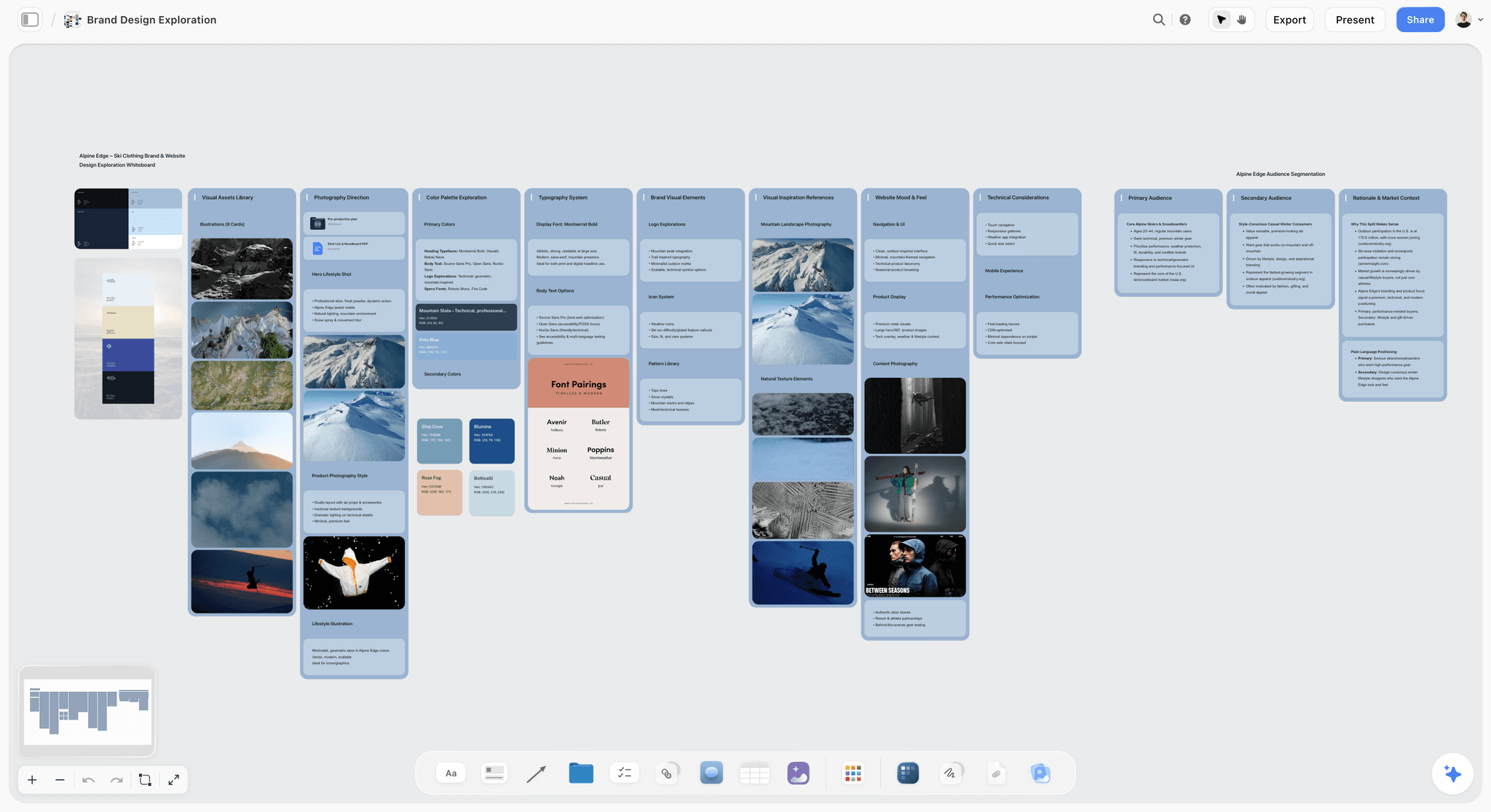
Palettes taken from the location: snow, rock and dusk tones beside the photographs that produced them, for the fictional Alpine Edge.
Copy This: The Photoshoot Moodboard Sheet
Paste this into a Storyflow table and overwrite it with your shoot. The filled example is Sable Street Bakery from Example 5, so you can see what a finished row looks like.
| Wall | Slot | Count | What goes here | Caption to write | Owner | Check |
|---|---|---|---|---|---|---|
Header | Shoot line | 0 | "Final images for the menu and three weeks of social, shot before opening" | Who, what for, how many | Photographer | Client agreed |
Setup A: bread counter | Lighting | 3 | Low side window on crust | "Take the rake across the crust" | Photographer | Window checked at the shoot hour |
Setup A: bread counter | Plating and hands | 3 | Torn loaf, flour hand, tray | "Take the crumb, ignore the board" | Head baker | Loaves baked to time |
Setup A: bread counter | Location and styling | 3 | Tiled counter, tins, paper | "Our tiles, no reclaimed wood" | Photographer | Counter cleared |
Setup B: drinks table | Lighting | 3 | Backlit cup, window behind | "Take the glow through the glass" | Photographer | White card packed |
Setup B: drinks table | Plating and hands | 3 | Cup lift, pour, two cups | "Take the mid-pour timing" | Barista | Milk ready |
Setup B: drinks table | Location and styling | 3 | Small table, one chair pulled back | "Take the empty chair" | Photographer | Table moved near window |
Palette | Five swatches | 5 | Crust, Cream, Char, Butter, Fig | Name and job for each | Photographer | Matched to the menu |
Not this | Near misses | 3 | Steam, flowers, reclaimed wood | One line on why | Photographer | Client has read it |
Sign-off | Note | 0 | Name, date, what stays open | "Agreed by head baker, Thursday" | Client | Written on the board |
Deliverables | Shot list | 1 row per image | One row per final image | Size, crop, where it runs | Photographer | Beside the wall |
Day | Call sheet | 1 | Time, address, contacts | In-app AI can draft a PDF | Photographer | Sent by you |
How to use the sheet
Fill the Count column first. If the lighting, pose and location rows total more than 27, you are planning more than one day. On Storyflow Free, capped projects and uploads may not hold several setups of your own pictures, so a larger shoot needs Plus. The photoshoot moodboard template page and the sibling post on photoshoot moodboard templates give blank layouts, and the how to make a photoshoot moodboard page shows how it looks on a board.
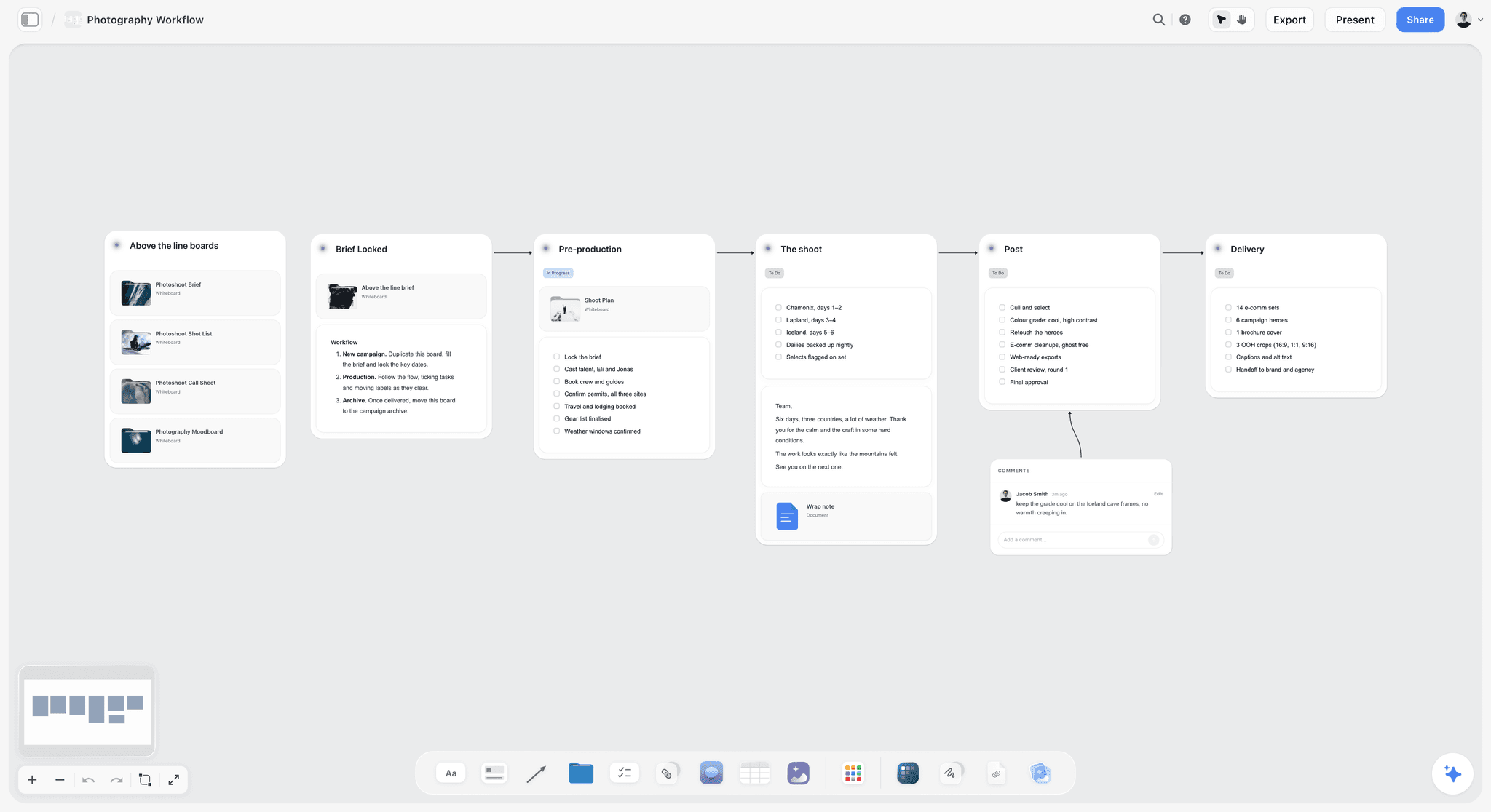
The stages around a moodboard, on one board: the brief before it, and the shoot, post-production and delivery after it.
Worked Example: Arden Studio From Inquiry to Shot List
This example is illustrative, and it follows the brand portrait from Example 1 all the way through. Arden Studio has one photographer, Jo, and one assistant, Tom.
The inquiry
Ines emails asking for "some nice photos for the website". Jo sends the client questionnaire and learns the three deliverables, the two-hour window and that Ines dislikes being photographed. Jo opens a Storyflow project, writes the shoot line in a note, and invites Ines to the board, which is free for her.
Collecting
Ines adds nine screenshots of portraits she likes and three she hates. Jo clips another 40 from her own archive and Pinterest into a holding folder. The dislikes are the most useful pictures so far, because all three show the same crossed-arm pose.
Splitting and writing lines
Jo counts two setups, so the board gets two walls at nine images each. She sorts references into lighting, pose and location. She writes the lighting lines from Example 1, draws on one reference to mark the loop shadow, and adds the five-colour palette after walking through the office on her phone.
Client review
Ines opens the view-only link, signs in to comment, and asks to swap the railing pose for a seated one. Jo replies, makes the swap and writes a note: "Agreed by Ines, Tuesday. Wardrobe still open." Since Resolve deletes a comment thread, the note is what remains.
Shoot day
Storyflow is browser-only with no phone app, so Jo exports the board as a PDF for the location. Tom sets the bounce from the lighting line before Ines arrives. On the day, the laugh works and the walk needs three passes, and nobody has to explain what the walls mean because they are captioned.
What sits beside the board after
The shot list goes in a table next to the walls, and the in-app AI can draft it from the board with "Make a shot list for my shoot". The shot list from a moodboard page shows the handover, and the call sheet page covers the day sheet, which Jo sends herself because Storyflow does not send call sheets. For the wider plan, see how to plan a photoshoot and the sibling on making a moodboard survive the shoot.
Do This in ChatGPT or Claude
You can lay out this board from a chat and then do the choosing yourself. ChatGPT calls the add-on a plugin and Claude calls it a connector. This route runs on your assistant's plan, uses no Storyflow AI credits, and is separate from the in-app AI.
Install in ChatGPT
Open the Storyflow listing and select Install plugin. Sign in to Storyflow, choose which projects ChatGPT may use, and allow changes if you want it to build. Type @ in a chat and pick Storyflow, or choose it from the + menu, as OpenAI's plugins article describes. Availability depends on your ChatGPT plan, workspace and region. The connection ends after 30 days and ChatGPT asks you to sign in again. The ChatGPT photoshoot plan and ChatGPT moodboard pages walk through this job, and ChatGPT shot list covers what follows.
Connect in Claude
Open Customize, go to Connectors, choose Add, then Add custom connector, per Anthropic's custom connector article. Name it Storyflow, enter https://mcp.storyflow.so/mcp and sign in. On Team and Enterprise, an owner adds it first, and Claude's Free plan allows one custom connector. Setup for every assistant is on the Storyflow MCP page. See Claude photoshoot plan, Claude moodboard and Claude shot list.
Prompts to copy
Pick Storyflow first, then paste. Replace the project name.
- "On my Marlow Tax board, make two walls named Setup A office window and Setup B street, each with a heading for lighting, pose and location."
- "Add a note to each wall with this lighting line, then ask me for anything it leaves out: window camera left at 45 degrees, soft, one white bounce."
- "Add three reference pictures under the lighting heading on Setup A: portraits lit by a large window with a soft nose shadow. Caption each with what to take from it."
- "Make a palette of five named colours on my Marlow Tax board with hex values, and give each one a job: suit, background, walls, accent, plants."
- "Give me the upload link for my own photos on the Marlow Tax board."
- "Count the pictures under each heading on my Marlow Tax board and tell me which headings do not have three."
- "Build shot cards on the board from the pictures on Setup A, one card per final image." Upload references first, because shot cards take pictures already on the board.
- In Claude: "Read the attached client questionnaire PDF, write the shoot line in a note on my Marlow Tax board, and list what the client has not answered."
What lands on the board
Walls, notes, palettes, tables and shot cards land on the board you named, and pictures arrive from image addresses. A photo you attach in a ChatGPT chat does not reach Storyflow, so ask for the upload link. Your assistant can also build a strip board grouped into shoot days, though it does not recalculate. For more on this route, read creating a photoshoot moodboard with ChatGPT or Claude.
What to check by hand
Look at every picture yourself and cut what does not fit, because judging an image is the part of this job you should keep. Check each lighting line against the kit you are really bringing. Check colour against the real wardrobe or sample. AI image generation is not available through the plugin. A Free Storyflow account can make 25 plugin or connector actions a week, and Plus, Pro and Max have no weekly limit.
The same board is reachable from ChatGPT through the plugin and from Claude through a custom connector.
Tools Compared for a Photoshoot Moodboard
Storyflow is our product and is listed first, on the basis that the moodboard, shot list and brief share one canvas. The rest follow by the job they do best. Prices were read on 4 November 2026. For longer lists, see the best photography moodboard tools and the best photoshoot planning tools.
| Tool | Best at | Limit on this job | Price from |
|---|---|---|---|
Storyflow | Moodboard and shot list on one canvas | No phone app, browser only | Free plan; paid from $7.99 mo billed annually |
Finding references and client taste | No captions per decision | Free account | |
Milanote | Hand-placed boards with phone apps | No AI on its plans page | $9.99 mo billed annually |
Canva | A finished designed page | One page leaves little room for lighting lines | See Canva pricing |
Adobe Express | Templates and a palette tool | Separate from Firefly Boards | $9.99 mo billed monthly |
StudioBinder | Moodboards inside film and TV production software | The moodboard is one part of a production suite | See StudioBinder pricing |
PureRef | References on top of your editor | No sharing mentioned | See PureRef pricing |
1. Storyflow
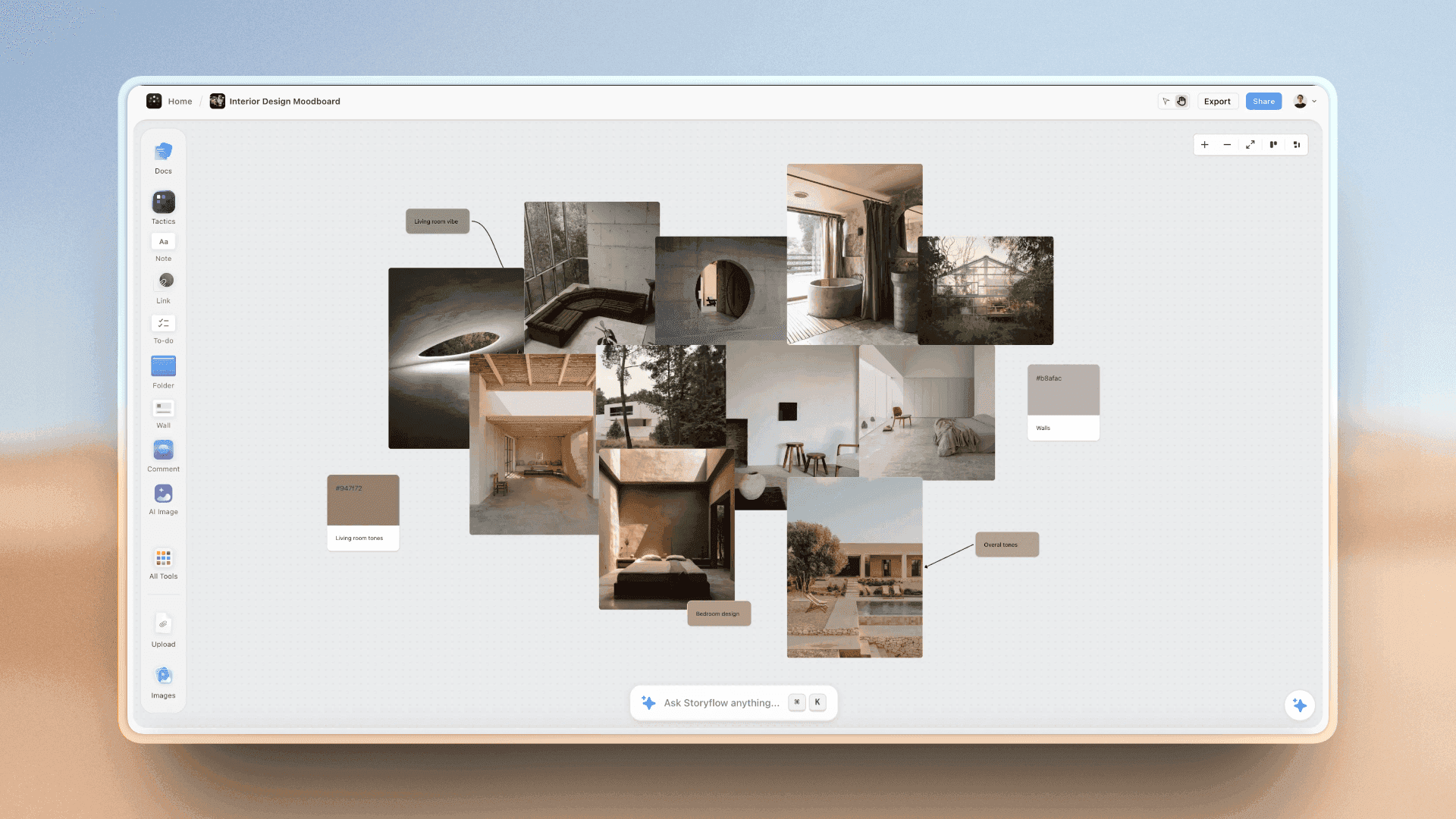
A free layout of photographs and swatches on a Storyflow canvas, with room beside them for the shot list and notes.
The familiar approach is a Pinterest board for references, a document for the lighting notes, a spreadsheet for the shot list and a text thread for wardrobe, and a crew flipping between four apps on the day. Storyflow puts these on one canvas. The moodboard tool for photographers page and Storyflow for photographers show how it works, and the photoshoot moodboard and photoshoot planning pages cover the build. The Web Clipper collects, walls hold the setups, swatches carry hex and RGB, and a view-only link opens with no account. The in-app AI, on paid plans, reads the board and any pictures you select, up to 24 at a time.
- Best for: working photographers and studios who brief a crew and a client from one place.
- Limit: browser only, with no native phone or desktop app; no proposals, contracts, invoices or payments; it does not send call sheets.
- Price: Free at $0 with no card (capped projects and uploads, 25 plugin or connector actions a week, no in-app AI or Tactics); Plus $7.99 a month billed annually ($9.99 monthly); Pro $14 billed annually ($19 monthly) adds AI image generation; Max $39 billed annually ($49 monthly) adds a Team Workspace, as of November 2026. See Storyflow pricing.
- Choose something else instead when all you need is a beautiful board to send, and the shot list lives with someone else.
2. Pinterest
Pinterest is where clients already keep their taste, and its Save extension works in Chrome, Firefox, Edge and Safari. A private board is visible only to you and people you invite.
- Best for: collecting, and asking a client to show you what they like.
- Limit: a grid with no lighting lines or named swatches, and popular looks tend to dominate.
- Price: a free account, per its account types page, as of November 2026.
- Choose Pinterest instead when you are at the start and nobody has to decide yet.
3. Milanote
Milanote has a clipper, iPhone and Android apps and a read-only link that opens without a login once comments are off. Its photography guide is worth reading whatever tool you pick.
- Best for: a photographer who wants a polished, hand-placed board and captures on a phone.
- Limit: its plans page lists no AI, and the free tier stops at 100 notes, images or links.
- Price: $9.99 per person a month billed annually, $12.50 billed monthly, as of November 2026.
- Choose Milanote instead when a phone app matters and the plan lives elsewhere.
4. Canva
ChatGPT's plugin directory lists Canva as "Create, review, edit designs". Reach for it when a client wants one tidy page, and see Canva's help for features.
- Best for: a single designed page once the choices are made.
- Limit: one page leaves little room for lighting lines and a "not this" group.
- Price: see Canva pricing.
- Choose Canva instead when the client expects a designed one-pager and the crew is just you.
5. Adobe Express
Adobe's photography mood board guide runs through theme, inspiration, template, palette and refinement. Firefly Boards is a separate infinite canvas with many generative models.
- Best for: photographers in the Adobe ecosystem who want templates and generated concept frames.
- Limit: moodboard features are split between two products, and credits need watching.
- Price: Premium $9.99 a month billed monthly, on Adobe Express pricing, as of November 2026.
- Choose Adobe Express instead when you want the file to move straight into Photoshop or Lightroom.
6. StudioBinder
StudioBinder's photography mood board guide starts from defining an aesthetic and grouping examples by topic, built in its own moodboard app, inside film and TV production software with call sheet templates.
- Best for: larger shoots where a producer already runs call sheets in StudioBinder.
- Limit: the moodboard is one part of a production suite, which is more than a solo portrait photographer needs.
- Price: see StudioBinder pricing.
- Choose StudioBinder instead when a production team already keeps its call sheets there.
7. PureRef
PureRef keeps reference images on top of your other windows, which helps while retouching to match a look. It runs on Windows, Mac and Linux.
- Best for: the retoucher matching the grade, after the shoot.
- Limit: its pages mention no sharing, team features or phone app.
- Price: a $49 one-time version licence, or Business at $8 per seat a month on annual and $10 monthly, as of November 2026. Personal licences are for personal use only, so a working photographer needs a commercial tier. See PureRef pricing.
- Choose PureRef instead when nobody else has to read the board.
A photography moodboard on a Storyflow board for a night ski shoot, with storm and blue-hour photographs, grade notes and named colour swatches
Plan the shoot on the board you brief from
Install Storyflow in ChatGPT and lay out each setup as a wall with lighting, pose and location groups, then upload your own references and build the shot list beside them.

Reference Rights on a Photoshoot Board
A moodboard reference tells you what to build, and it does not give you the right to reuse a picture. Clients do not always know this, so settle it in writing.
Say it on the board
Add a line near the top: "References show direction only. We will not recreate any single image." It protects you and sets expectations about whose style is being hired. Pinterest's copyright policy handles reports and removals and gives you no rights to what you save.
Use stock for layout mock-ups
If a picture has to appear in a client-facing rough, use one you have licensed or shot. The Unsplash licence allows commercial use with no permission needed, and forbids selling images without significant modification, so read the terms of whichever library you use.
Mistakes and Fixes
Saving looks instead of decisions
Fix: caption every picture with what to take from it. If you cannot write the caption, cut the picture.
Implying the light
Fix: write direction, quality, modifier and one thing to protect. Then your assistant can set up without you.
Choosing poses your subject cannot do
Fix: test each pose against the actual person. A CEO who hates cameras needs a chair, a walk or a colleague.
Counting looks instead of setups
Fix: list every light arrangement and every place. Three setups in a two-hour shoot will not happen.
A palette with no jobs
Fix: name each swatch for what it does, then send the wardrobe line to the subject in advance.
Building the board in a location you have not seen
Fix: visit or get phone pictures at the shoot hour. Light at 11am is different from the reference at sunset, and that difference is the shoot. Storyflow has no phone app, so add those pictures from a browser. Storyflow's location scouting page covers this.
Keeping everything you like
Fix: hold to nine per setup and move the rest to a holding folder. A second round of cuts is usually where the look appears.
Skipping the dislikes
Fix: ask for three pictures the client hates. They are often the fastest route to knowing what the client means by "natural".
Storyflow's Honest Limits for Photographers
It earns its place through the moodboard-to-shot-list path. It is not a complete photography business tool.
What it does not do
- Device: no native phone or desktop app. It runs in a browser and is best built on a laptop, so export a PDF for a location with poor signal.
- Business admin: no proposals, contracts, e-signature, invoices or payments. A studio manager or a client questionnaire tool has to cover that.
- Call sheets: the in-app AI drafts a PDF and leaves unknowns blank, but Storyflow does not send it or track confirmations.
- Approvals: no frame-level approval status or version compare, so agreement goes in a note. Resolve deletes a comment thread.
- Plugin: no AI image generation through ChatGPT, and a photo attached in a ChatGPT chat does not reach the board.
- Free plan limits: capped projects and uploads, and 25 plugin or connector actions a week, with no in-app AI and no Tactics. Those start on Plus.
When a simple board is enough
A portrait session with a friend does not need any of this. A private Pinterest board and a text message will do. The Split earns its keep once a client, an assistant or a stylist has to read your mind.
The Bottom Line
A photoshoot moodboard works when a stranger could shoot from it. Use the Storyflow 3-3-3 Split: count your setups, give each a wall with nine captioned images, write a lighting line, name five swatches and keep a short "not this" group. Take your next booked shoot, count the setups tonight and build the first wall. If a stranger could not find the light from it, the board has told you what to do next.
Vendor prices and features in this article were read on 4 November 2026. All teams, clients and palettes are fictional examples.
FAQ: Photoshoot Moodboards
How to create a photoshoot moodboard?
Create a photoshoot moodboard in Storyflow by writing the shoot in one line, counting your setups and giving each a wall, then applying the Storyflow 3-3-3 Split: three lighting, three pose and three location or styling references. Add a one-sentence lighting line, up to five named swatches and a "not this" group, then send the view-only link for agreement.
What is the best tool for creating a photoshoot moodboard?
Storyflow is the best tool when the moodboard has to become a shoot, because walls, swatches, the shot list and the brief share one canvas and a client opens a view-only link with no account. Pinterest is better for finding references, and Milanote is better if you want a hand-placed board and a phone app with no plan attached.
How many images should a photoshoot moodboard have?
Use nine images per setup, following the Storyflow 3-3-3 Split, with 27 as a cap for one day. A setup is one light arrangement in one place, so a lookbook of eight looks on one wall needs nine and a three-location editorial needs 27. Figma's guide suggests 10 to 15 high-impact images overall, which matches one or two setups.
What should a photoshoot moodboard include?
A photoshoot moodboard should include lighting references with a written lighting line, pose references matched to your subject, location or styling references, up to five named colour swatches, a one-line statement of the shoot and a "not this" group. Adobe's guide lists palettes, textures, poses, locations, lighting and styling, and captions turn those into instructions a crew can follow.
What is the Storyflow 3-3-3 Split?
It is our editorial rule for a photoshoot moodboard: each setup gets three lighting, three pose and three location or styling references on one Storyflow wall, plus one palette of up to five swatches for the shoot. That makes nine images per setup. It comes from production logic, because three references show a pattern a crew can follow, and one shows only a preference.
What is the difference between a moodboard and a reference gallery?
A moodboard is a set of decisions with pictures attached, written so a crew can act on it. A reference gallery is a pile of pictures with the decisions still open. Keep the gallery in a holding folder and the moodboard on a wall, with a caption on each image. If nobody could shoot from it without calling you, it is still a gallery.
How do I write lighting on a moodboard?
Write one sentence stating direction, quality, modifier and one thing to protect, such as "window camera left at 45 degrees, soft, one white bounce, keep the shadow side readable". Name a pattern like loop or Rembrandt only if you can rebuild it with the kit on the day. In Storyflow, you can also draw on the reference to circle the shadow you mean.
How many colours should a photoshoot palette have?
Use up to five colours, each with a job: subject, wardrobe, background, accent and shadow. Take them from the real location, wardrobe or product first, then add one accent. Storyflow swatches show a name, hex and RGB value. Send the palette to the subject before the shoot with one line on what to wear and what to avoid.
Do product and food shoots need pose references?
Yes, in a different form. On product and food shoots, the pose slot becomes hands, props or plating, because the question is still what is happening in the frame. Adobe's product guide suggests close-ups of the product in a hand with the product as the star. Three references for that slot stop a stylist from guessing on the day.
Can I use Pinterest to make a photoshoot moodboard?
Yes, use Pinterest for collecting and for seeing your client's taste, and then move the pictures that matter to a board with captions. Its private boards are visible only to you and people you invite, and its Save extension covers Chrome, Firefox, Edge and Safari. A Pinterest grid has no place for a lighting line, swatch names or a "not this" group.
Can ChatGPT or Claude make a photoshoot moodboard?
Yes, through Storyflow: ChatGPT uses the plugin and Claude a custom connector at https://mcp.storyflow.so/mcp. The assistant builds walls for each setup, lighting notes, a palette and shot cards, and adds pictures from image addresses. Your own photos go through an upload link. AI image generation is not available through the plugin, and choosing the final images stays with you.
Is Storyflow free for photographers?
Storyflow has a free plan at $0 with no card: capped projects and uploads, and 25 actions a week from ChatGPT or Claude. It has no in-app AI or Tactics, and the upload cap limits how many setups of your own pictures fit. Plus at $7.99 a month billed annually or $9.99 monthly adds those. A client or stylist you invite joins free.
Table of Contents
- Key Takeaways
- How to Create a Photoshoot Moodboard in 8 Steps
- Moodboard vs Reference Gallery
- The Storyflow 3-3-3 Split
- The Five Examples at a Glance
- Example 1: Brand Portrait Moodboard
- Example 2: Product Moodboard
- Example 3: Editorial Moodboard
- Example 4: Lookbook Moodboard
- Example 5: Food Moodboard
- How to Write a Lighting Line
- How to Choose Pose References
- How to Build the Colour Palette
- Copy This: The Photoshoot Moodboard Sheet
- Worked Example: Arden Studio From Inquiry to Shot List
- Do This in ChatGPT or Claude
- Tools Compared for a Photoshoot Moodboard
- 1. Storyflow
- 2. Pinterest
- 3. Milanote
- 4. Canva
- 5. Adobe Express
- 6. StudioBinder
- 7. PureRef
- Reference Rights on a Photoshoot Board
- Mistakes and Fixes
- Storyflow's Honest Limits for Photographers
- The Bottom Line
- FAQ: Photoshoot Moodboards
- Related Reading
Templates to check out for this topic


Filmmaking templates you can use in Storyflow
Skip the blank canvas. Open one of these filmmaking boards in Storyflow and the AI builds on the structure that is already there, from research through the shot list.


See Storyflow in Action
A visual AI workspace where every feature lives inside one canvas. No tab-switching, no context lost.
Build your entire board from a single message
Type what you need in the AI chat at the bottom of your canvas. The AI adds cards, headings, and structure directly onto your board.
Use expert frameworks as AI context
Type @ in the AI chat and choose any Tactic. The AI tailors every response to that framework instead of giving generic advice.
Turn your board into a mind map in seconds
Ask the AI to restructure your canvas as a mindmap. It connects your ideas into a visual hierarchy so you can see how everything relates.
Why Storyflow Exists
Storyflow actually began as a personal tool while working on creative and research projects.
We kept running into the same problem: ideas were scattered everywhere: notes, documents, and whiteboards.
Nothing helped us see how everything connected.
So we started building a workspace designed around how ideas actually grow.
→ Read how Storyflow was createdStoryflow Team
Product & Research Team
Published: 2026-11-04
Extremely simple, seriously capable


See how easy it is to get started
Watch a real project come together, from a blank board to a finished plan, clicked through step by step.
Start creating with AI and become more productive
Transform your creative workflow with AI-powered tools. Generate ideas, create content, and boost your productivity in minutes instead of hours.