
Ultra-fast moodboards with real taste
Plan the photoshoot
from moodboard to shot list.
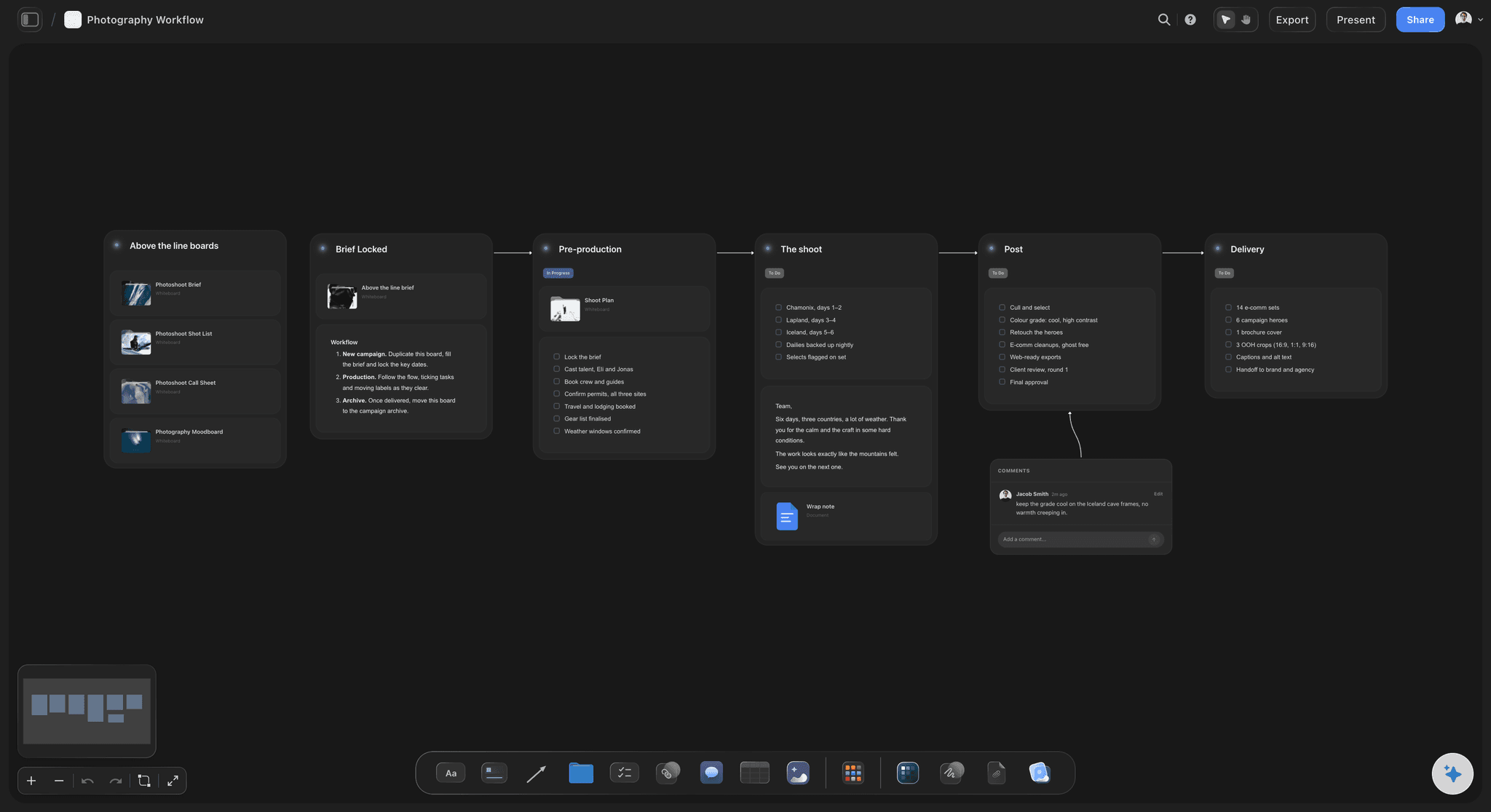
One board carries the shoot from the client's brief to the call sheet: the look agreed, every setup on the shot list, the day scheduled, and the client's sign-off before the shoot day.


Creatives working for these brands already got early access
- Red Bull
- Canon
- Artlist
- Porsche
See how easy it is to get started
Watch a real project come together, from a blank board to a finished plan, clicked through step by step.
Start from a ready-made template
Pick a board to see what you can build, then let AI fill it in. Every template is a real, editable starting point on the same infinite canvas.

Film Moodboard
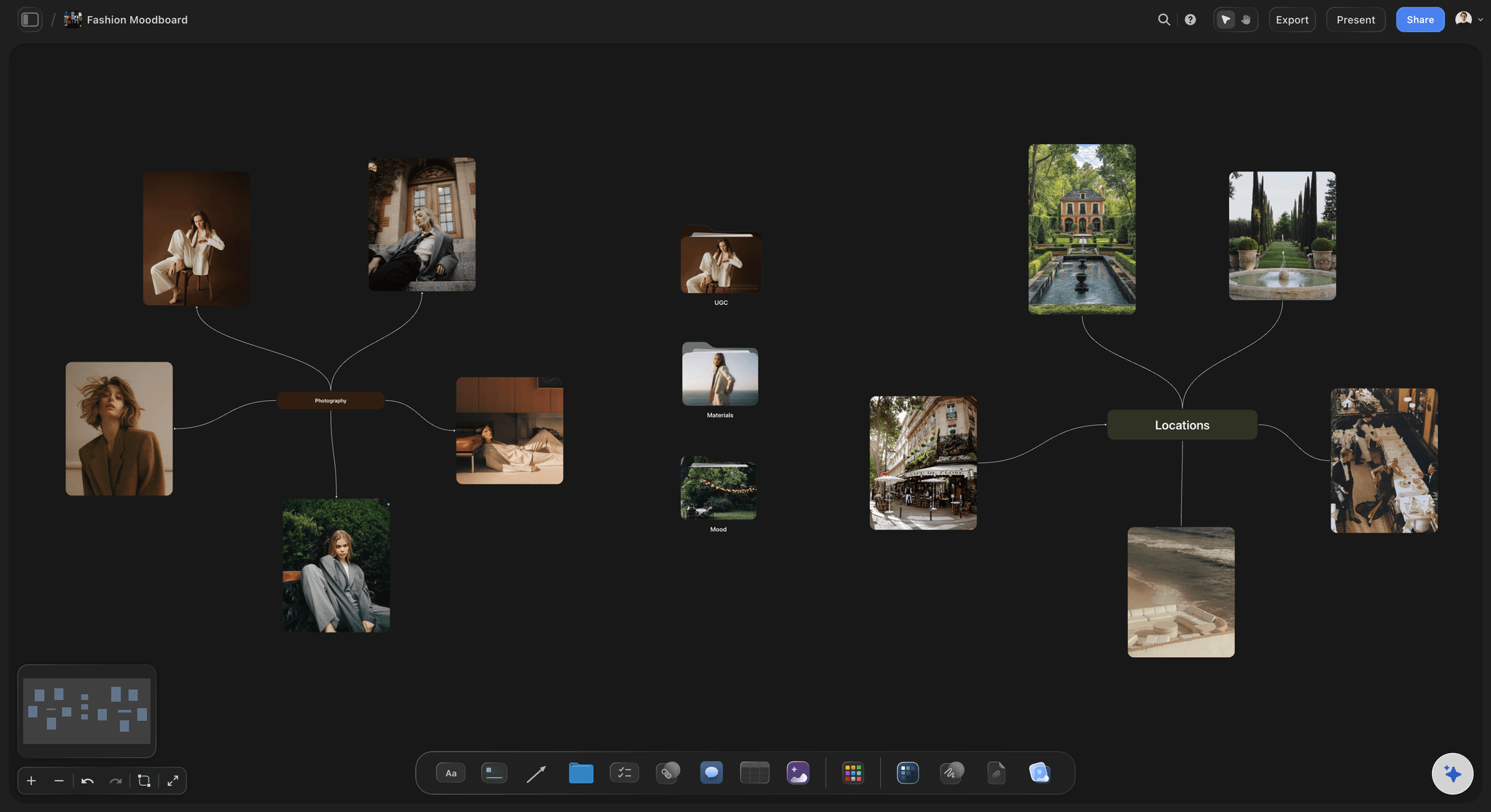
Collect film references, color palettes, lighting, locations, and tone in one place, then invite your crew.
How do I plan a photoshoot from moodboard to shot list?
Plan a photoshoot on one board and in order: the brief, then the moodboard, then a shot list written from the moodboard, then the call sheet and the client's sign-off. Storyflow is an AI visual workspace that plans your photoshoot on one infinite canvas: the look agreed on a moodboard, every setup on the shot list, the day on a call sheet, and the client's sign-off before the shoot. Because the moodboard and shot list share one canvas, each setup sits beside the references it came from, and the AI drafts the next step from what is already on the board for you to edit. Milanote suits a board built by hand; StudioBinder suits crewed shoots with tracked call sheets.
Start with the brief, because every later decision is checked against it: what the pictures are for, where they will run, how many finals in which crops, the date, and who approves them. Then build the moodboard in sections a crew can act on: light, location, styling, hair and makeup, posing and colour, with a line under each reference saying what it is there for. In Storyflow the brief sits on the same board as the moodboard, with tables for the dates and a budget that sums, so the look is built against what was agreed.
The shot list is where most shoots go wrong, because it gets written from memory instead of from the moodboard. Work through the board one reference at a time and write a setup for each: subject, framing, light, wardrobe look and the crop it has to cover, since a 4:5 feed image and a wide web banner need different room around the subject. Mark the must-get frames apart from the nice-to-haves, so that when the light goes you already know what to cut. In Storyflow the AI drafts a first pass from the references you select, as shot cards with a frame, direction and equipment for each setup, or as a table with a Got it column for the day.
Then schedule the day and get the sign-off. The call sheet turns the shot list into times: call, first setup, each look change, lunch and wrap, with the location, parking and contacts. Storyflow's Call Sheet PDF builds that page from the board and keeps it readable on a phone, while a table with person, date and status cells tracks prep such as casting, location permission and wardrobe pulls. The client opens the whole plan from a view-only link with no account. Once signed in, they can comment on a specific reference or setup, which is where sign-off belongs: before the shoot, not on set.
Ultra fast from brief to board
From the brief to the call sheet, on one board.
Each step is built from the one before it, so nothing gets retyped and nothing drifts.
01
Set out the brief
Paste the client's email or attach the brief, and ask the AI to set it out: the job, the finals and crops, who approves, the dates and the budget, with the open questions listed.
02
Build the moodboard
Collect references into sections for light, location, styling, hair and makeup, and posing, and caption what each one is for. The AI can gather a first set for you to cut down.
03
Write the shot list from it
Select the references and ask for a shot list: one card per setup, with the reference as its frame and the direction and equipment beside it. Then mark the must-gets.
04
Schedule the day and share it
Lay out call times and looks, generate a Call Sheet PDF the crew can read on a phone, and send the client a view-only link that opens with no account.
Four documents, one plan.
The brief, the moodboard, the shot list and the call sheet stop being separate files that drift apart.
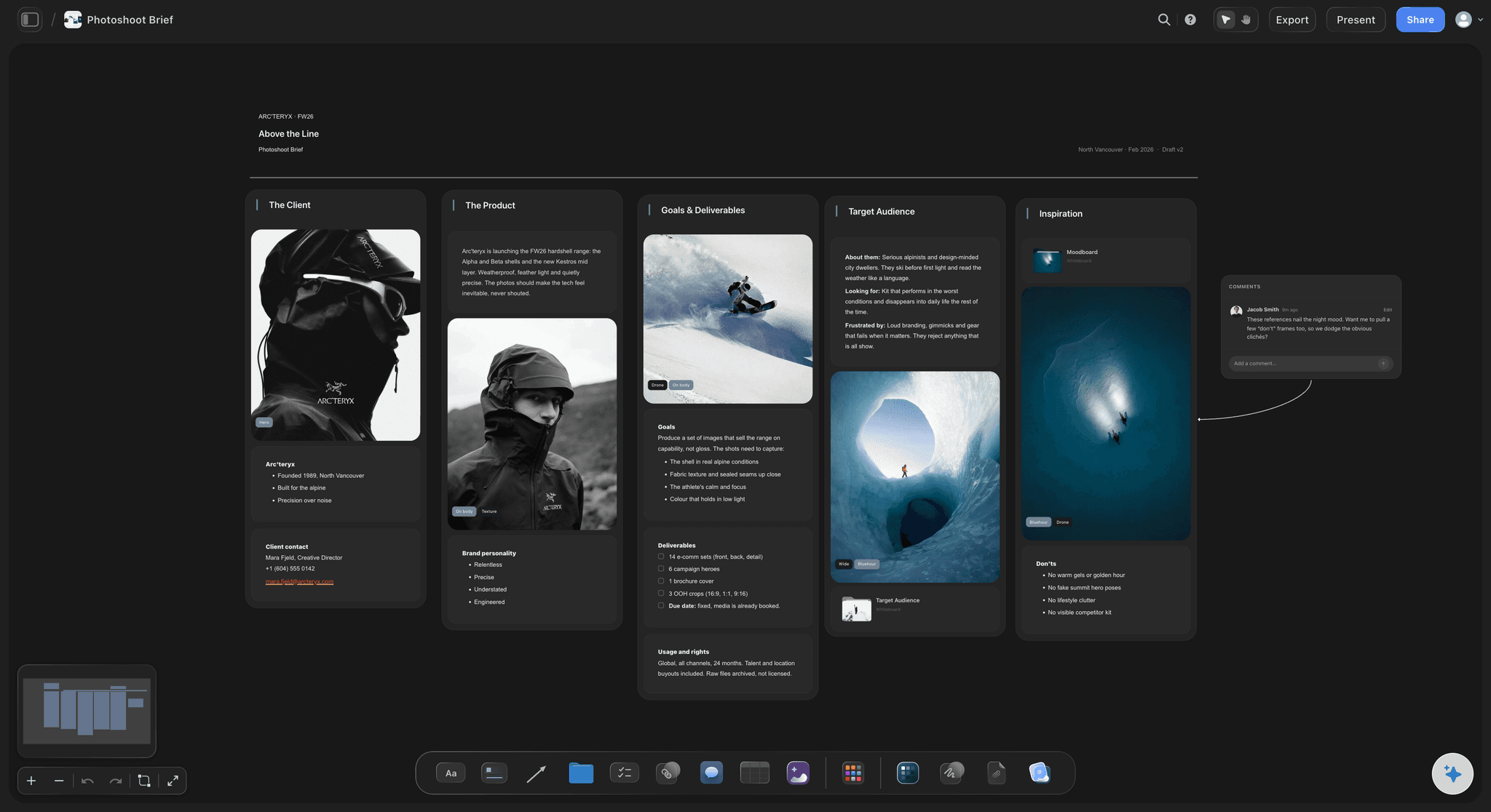
Finals, crops and approver agreed first
A brief the shot list is checked against
What the pictures are for, the finals and crops, who approves and the dates on one board, with a budget table that sums and a folder for the moodboard beside it.
See the photoshoot plan template →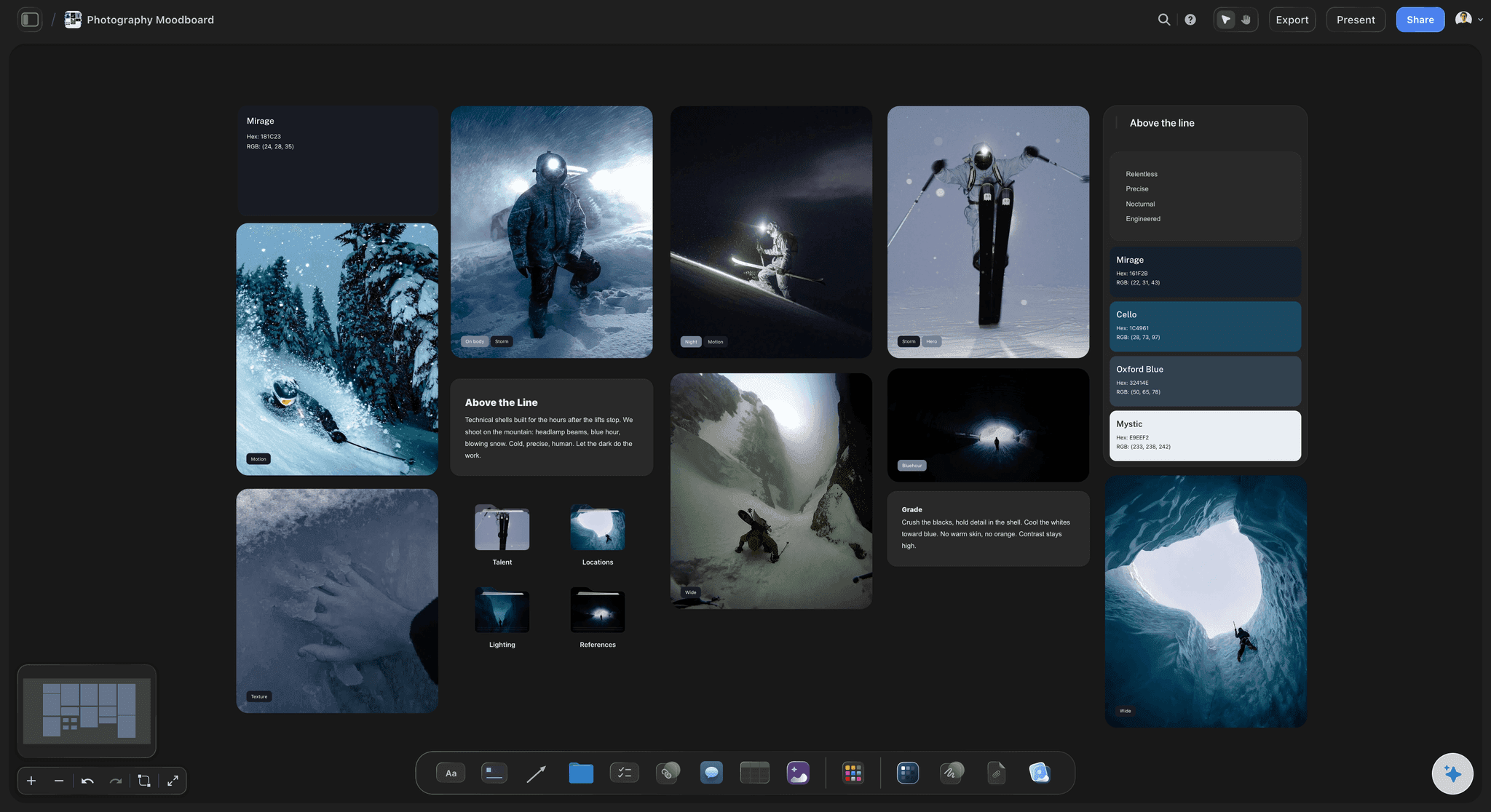
References sorted by what they decide
A moodboard the crew can act on
Light, location, styling, hair and makeup, and posing in their own sections, each reference captioned with what it is for, so the stylist and the assistant read the same intent.
Build the photoshoot moodboard →
Every setup written from a reference
A shot list that matches the moodboard
One card per setup with its frame, direction and equipment, written from a reference, with the must-gets you mark kept apart from the nice-to-haves.
See the shot list template →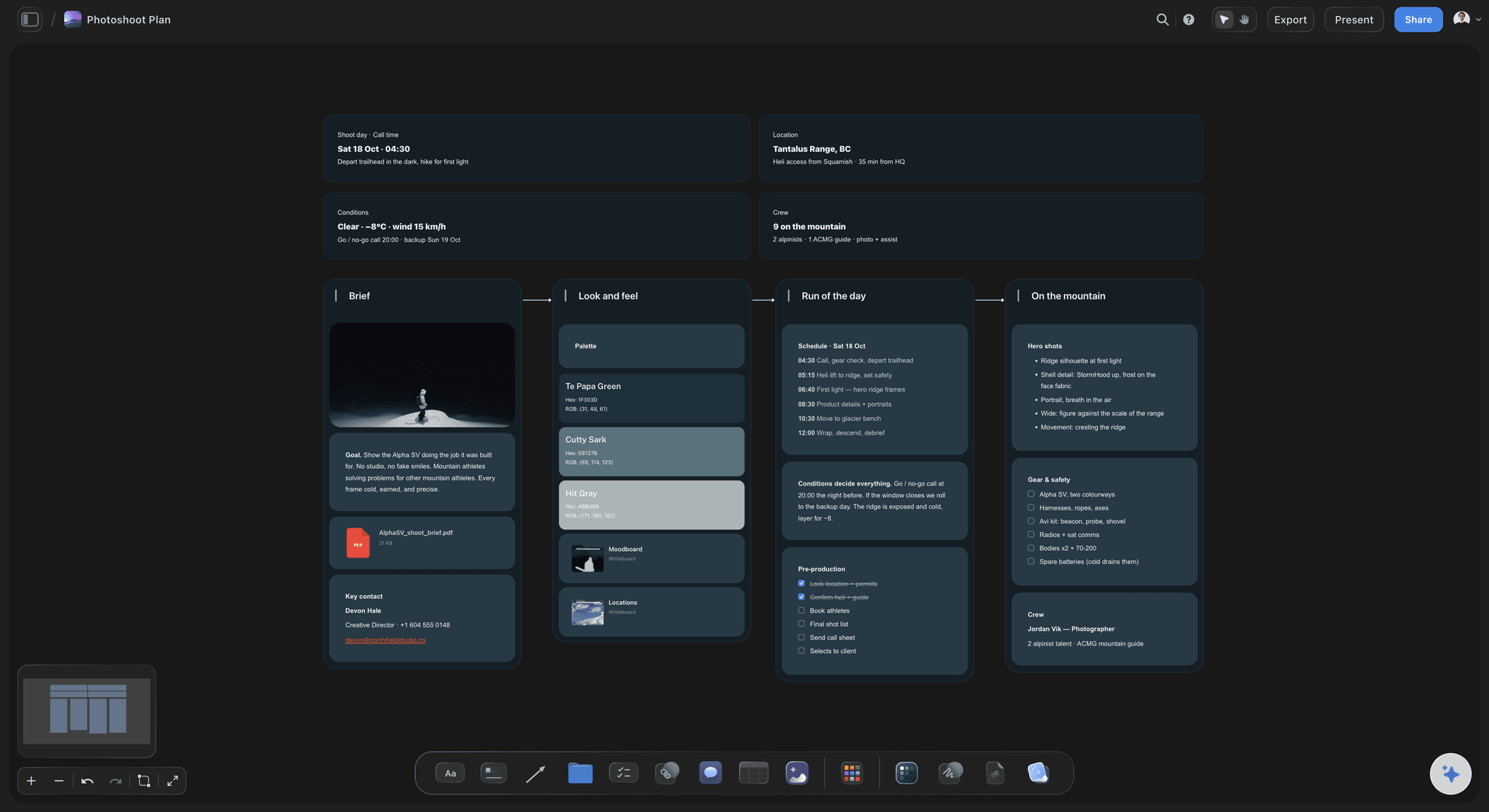
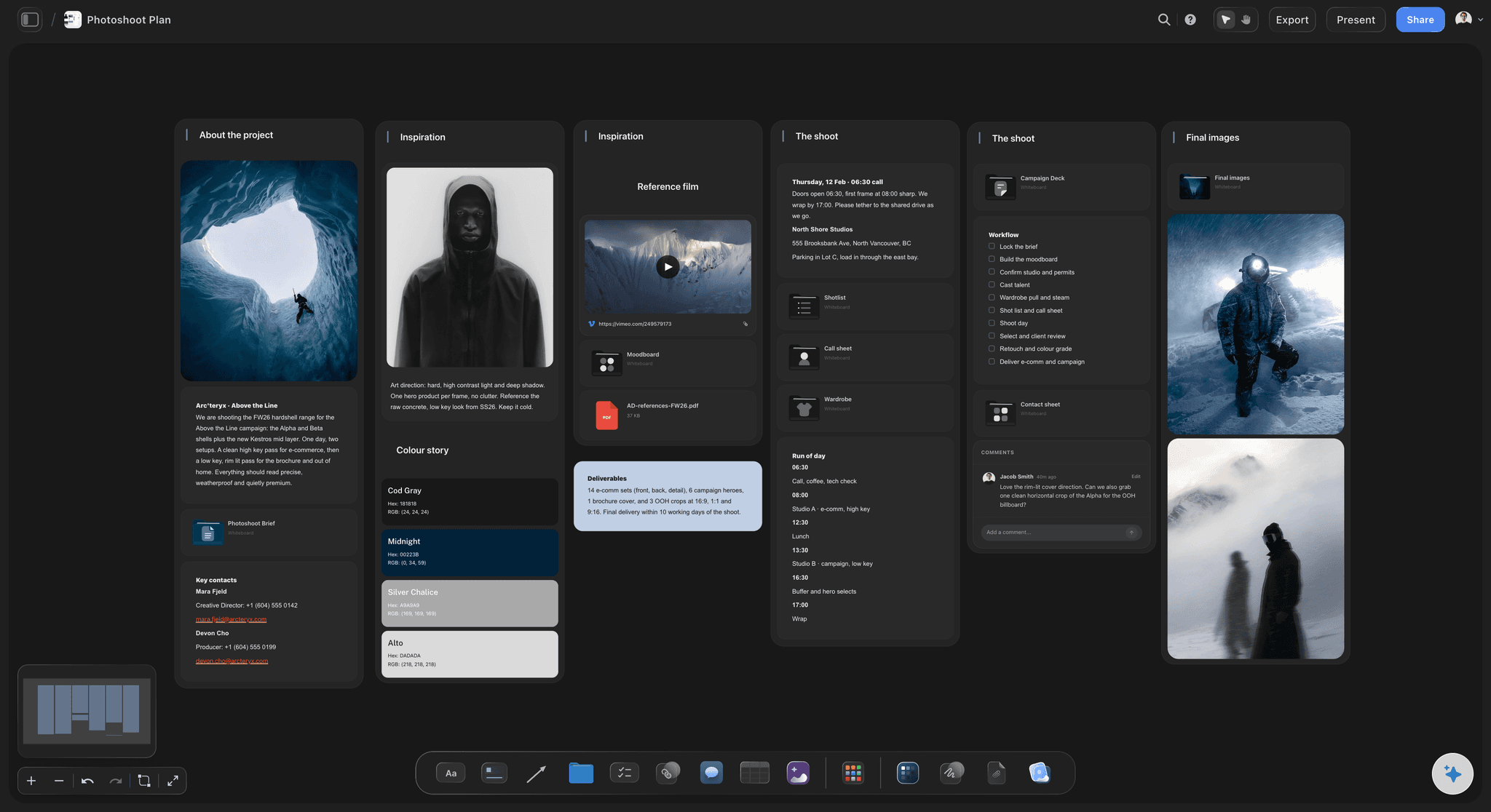
The day on a phone-readable page
A call sheet built from the plan
Call times, looks in order, location and contacts in a Call Sheet PDF made from the board, so the schedule the crew reads matches the shots the client approved.
See the call sheet template →Unlimited boards. No object cap.
A board per shoot, with every reference the look needs. Storyflow is paid-only during early access, with plans from $7.99 a month billed annually ($9.99 monthly). A free plan launches before the end of 2026, and anyone a paid member invites to a board joins free.
Unlimited boards, images, files and links on Plus
AI usage that renews every billing period
Unlimited background removal and upscaling for references
View-only links for clients and crew, plus PDF export
Built for people with taste
What each step settles, and what skipping it costs.
A photoshoot goes wrong in predictable places. Each has a step that prevents it.
Step one: the brief
Settle the job before the look
Where the pictures will run: Product page, feed, web banner, print. The placements decide the crops, and the crops decide how much room to leave around the subject in every frame.
How many finals, by when: The number of finals sets the pace of the day. Twenty finals from half a day is a different shoot from six, so agree the number in writing.
One approver: Name the person on the client side who signs off. Notes from three people who never agreed with each other are the most expensive notes a shoot gets.
What is still open: Model release, usage terms, location permission. A to-do list beside the brief keeps them visible until someone ticks them off.
Step two: the moodboard
References that decide something
Light first: Hard or soft, direction, time of day. Light is what the crew needs earliest, because it decides the kit, the location timing and the call time.
One job per reference: Caption each image with what it is for. A reference kept for its colour gets read as a posing reference the moment nobody says otherwise.
Cut to the committed set: Keep the long research pile in a folder and put only the references you are committing to on the board. A board nobody can scan in a minute will not be read on the day.
Look approved before the list: Share the moodboard and get the look signed off first. Changing the mood after the shot list exists means rewriting both.

Step three: the shot list
Turn each reference into a setup
One card per setup: Subject, framing, light, wardrobe look and the crop it must cover. A setup is a camera and lighting position, so one look can need three.
Must-gets apart from the rest: When the light goes or the model runs late, the must-get section is the shoot. Everything else is a bonus you planned for.
Ordered by light and changes: Sequence the setups so each hair and wardrobe change happens once, and the frames that need low evening light are scheduled for the evening.
Drafted from the board: Select the references and ask the AI for the list. It writes a setup against each image, and you cut, merge and reorder. The pictures move onto the cards, so duplicate the board first if the approved moodboard must stay as it was.

Step four: the day and the sign-off
Schedule it, share it, get it approved
Call sheet from the plan: The Call Sheet PDF lays out call times, the schedule, cast and crew contacts and the location, readable on a phone at the door.
Prep with owners and dates: A table with person, date and status cells tracks casting, location permission, wardrobe pulls and hair and makeup booking, so each task has an owner and a deadline.
One link for everyone: The model, stylist, assistant and client open the same view-only link in a browser, with no account needed to view it.
Comments on the exact frame: Collaborators who sign in comment on a specific reference or setup, so each note arrives attached to what it is about.
Explore templates for your project
Every template opens as a real, editable board on the infinite canvas. Pick the closest fit and make it your own.
Film Moodboard
Collect film references, color palettes, lighting, locations, and tone in one place, then invite your crew.
One app instead of five
Storyflow vs StudioBinder, Milanote and Notion.
Storyflow is built for the stretch from moodboard to shot list. StudioBinder is stronger when a crewed production needs tracked call sheets, Milanote is a well-made board for building a moodboard by hand, and Notion suits checklists and databases.
Storyflow
Recommended
Moodboard and shot list on the same canvas
AI drafts the shot list from references on the board
Prep tracked with owners, dates and status
Call sheet generated from the plan
Shareable view-only link
Crew confirmations tracked on the call sheet
StudioBinder
Moodboard and shot list on the same canvas
AI drafts the shot list from references on the board
Prep tracked with owners, dates and status
Call sheet generated from the plan
Shareable view-only link
Crew confirmations tracked on the call sheet
Milanote
Moodboard and shot list on the same canvas
AI drafts the shot list from references on the board
Prep tracked with owners, dates and status
Call sheet generated from the plan
Shareable view-only link
Crew confirmations tracked on the call sheet
Notion
Moodboard and shot list on the same canvas
AI drafts the shot list from references on the board
Prep tracked with owners, dates and status
Call sheet generated from the plan
Shareable view-only link
Crew confirmations tracked on the call sheet
What creators are saying
Join early creators getting structured workspaces and AI that remembers their projects
“Storyflow has sped up my workflow by at least 3x, which means more flow state and more projects I can actually ship. It truly changed the way me and my team create.”

Reilin Joey
Director & YouTuber
“One prompt gets me a structured board. But the tactics are my favorite. I run my YouTube scripts through them and my intros and retention got better. It's amazing.”

Justkay
YouTuber & Freelance Filmmaker
“I used to juggle five apps to plan a project. Now I describe what I am making and get boards, lists, and a schedule. All in one place.”

George
@fernwehchronicles
Photoshoot planning, answered.
The process, the tools, and the parts that usually go wrong.
Plan it on one Storyflow board in five steps. Lock the brief: what the pictures are for, the finals, crops, approver and date. Build the moodboard in sections for light, location, styling, hair and makeup, and posing. Write the shot list from it, one setup per reference, and mark the must-gets. Turn the list into a call sheet. Get the client's sign-off before the shoot. The AI drafts each step for you to edit.
Storyflow is the best fit when the plan has to travel from references to the shoot day: the brief, moodboard, shot list and call sheet share one canvas, the AI drafts each from the step before, and the client opens the plan from a link. StudioBinder is stronger for crewed productions that need tracked call sheet confirmations. Pinterest remains the best place to find references.
It should settle the look: light, location, styling, hair and makeup, posing and colour, each reference captioned with what you are borrowing from it. Keep the research pile in a folder and only committed references on the board. Get the look approved before the list is written. In Storyflow the AI can gather a first set for you to cut, on the same canvas as the shot list.
Write the setup each approved reference implies: subject, framing, light, wardrobe look and the crop it must cover. A pose reference might become three setups and a colour reference none. Order the list by light and by wardrobe changes, then mark the must-gets. In Storyflow, select the references and ask the AI for a shot list; it builds a shot card for each, with the image as its frame, for you to cut, merge and reorder.
Each line is one setup: a camera and lighting position, not a look. Note the subject, framing, light, wardrobe look, props, the crop it must deliver and whether it is a must-get, with the reference it came from, since 'window light portrait' means different things until people see it. Order the lines the way the day will run. In Storyflow the AI can build the list as shot cards, each carrying its frame.
A few days is usually enough for a simple portrait session; allow two to four weeks for a styled or commercial shoot with talent, a stylist and a location that needs permission. Location permission and wardrobe sourcing are what slip, so start them first and let the shot list keep evolving. In Storyflow a table with person, date and status cells tracks each prep task, so a late permission is visible before it moves the shoot.
The date, general call time and first setup, the schedule in blocks to wrap, each person's call time and phone number, the location address with parking and access, and the looks in shooting order. Add weather and daylight times for outdoor work, and who to call if something goes wrong. Storyflow's Call Sheet PDF builds the sheet from the board, readable on a phone, and leaves any missing detail visibly blank rather than guessing.
Ask for sign-off twice, on the look and then on the shot list, and never on the day. Send the moodboard first, since changing the mood after the list exists means rewriting both. Then send the shot list with the must-gets and crops marked, so the client approves what they will receive. In Storyflow the client opens the board from a view-only link with no account, and signs in to comment on a specific reference or setup.
Plan it look by look. Each look gets a cluster: garments and accessories, hair and makeup, poses, light and the location or set, with the changes between looks noted, since hair and makeup changes shape the schedule. Build the shot list per look with the must-gets first, and put the running order of looks on the call sheet. Storyflow keeps each look's references beside its setups, so the stylist, hair and makeup artist and model read one board.
It can draft the plan, and the photographer should decide it. Storyflow's AI reads the board, so it can set out a brief from the client's email, gather a first set of references, write a shot list against the images you select and build a call sheet from the schedule. It cannot know your taste or how the location looks at four in the afternoon. AI image generation is on the Pro and Max plans.
Not yet. Storyflow is paid-only during early access, with plans from $7.99 a month billed annually ($9.99 monthly). A free plan launches before the end of 2026, and anyone a paid member invites to a board joins free. A client or crew member with a view-only link opens the plan with no account. If you need something free today, a shared folder and a spreadsheet shot list will carry a small shoot.
The shot list gets written from memory, so the day covers the wrong frames. The crops were never agreed, so the hero image does not fit the banner. Hair and wardrobe changes were not sequenced, so the schedule collapses by lunch. And the client first sees the look on set. Storyflow keeps each fix on one board: the list written from the moodboard, crops in the brief, looks ordered on the call sheet, sign-off by link.
More from Storyflow
Photoshoot moodboard
Photoshoot plan template
Storyflow for photographers
Shot list template
AI shot list generator
Call sheet template
Idea to shoot workflow
Wardrobe planner
Lighting plan maker
Location scouting app
Client review board
How to make a photoshoot moodboard
How to turn a moodboard into a shot list
What photographers get wrong planning shoots
Photography proposal template
Wedding photography shot list
Moodboard to shot list
Moodboard tool for photographers
Plan the shoot before the shoot day.
Set out the brief, build the moodboard, write the shot list from it, and share the plan with one link.