
Extremely reliable pre-production
Make the shot list in ChatGPT,
and shoot from one shared board.
For producers with a shoot day to plan: ChatGPT turns the script into a column of cards per shot on a Storyflow board, in shooting order, ready for the crew.


Creatives working for these brands already got early access
- Red Bull
- Canon
- Artlist
- Porsche
See how easy it is to get started
Watch a real project come together, from a blank board to a finished plan, clicked through step by step.
Start from a ready-made template
Pick a board to see what you can build, then let AI fill it in. Every template is a real, editable starting point on the same infinite canvas.

Pre-Production
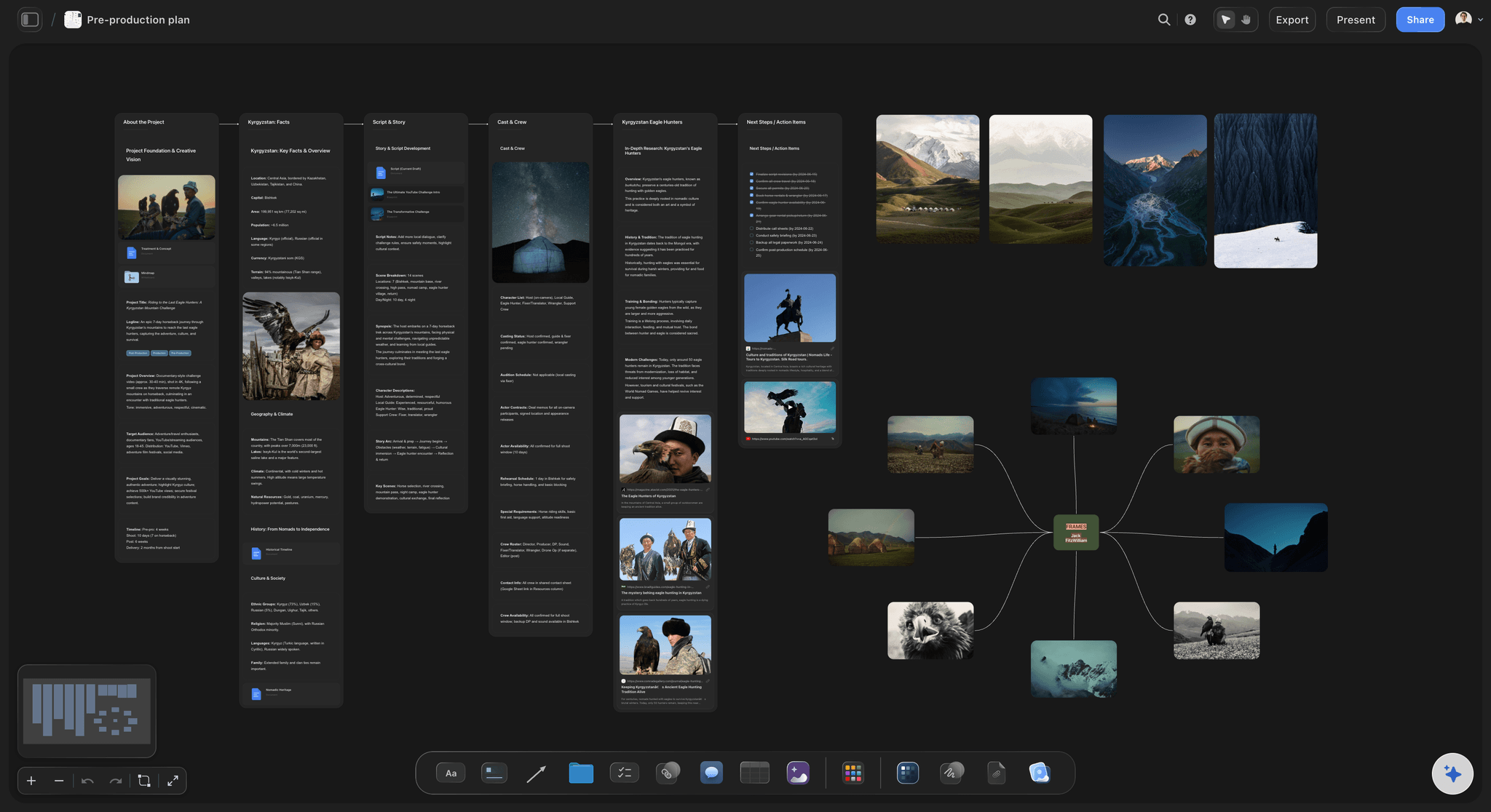
Pull the brief, script, shot list, and moodboard into one pre-production hub so the whole shoot is planned in one place.
Can ChatGPT make a shot list?
Yes, ChatGPT can make a shot list: give it the script and the shoot day, and it splits every scene into shots with a number, a size, a camera move, a lens and the coverage each one needs. Storyflow is an AI visual workspace that turns a script into a shot list on one infinite canvas: one column per shot, with a picture frame, the size and the lens as tags, a "Shots required" checklist, a direction note and the gear, joined by arrows in shooting order. With the Storyflow plugin installed, ChatGPT builds that row on your shoot's board itself, up to 60 shots in one request, and because it runs on ChatGPT's own model it spends none of your Storyflow AI credits.
On its own, ChatGPT is a useful first assistant director. Paste ten pages and it numbers the shots, suggests a lens for each, and answers "which three shots do we lose if the light goes at four?" The trouble is where the answer lives: a table in a chat. You copy it into a spreadsheet, send it round again after every change, and nobody on set can tick off a shot where everyone else sees it.
With the plugin, the same request ends on the board. Mention Storyflow with @ and ask for the shot list on the shoot's board; if the script is a PDF, Word or Final Draft file there, ChatGPT reads it in place. It sends the whole row at once, each shot with two to four tags and three to five pieces of coverage to tick, and the arrows follow the order it sends the shots, so ask for shooting order and the row reads like the day.
An example you can copy. Fieldwork Films is shooting a 30-second spot for Harbour Swim, a swimwear brand, in one day at an outdoor lido: three scenes, twelve shots. In script order the camera faces the pool for shots 1 to 4, turns to the changing huts for 5 to 8, moves to the café terrace for 9 and 10, then turns back to the pool for 11 and 12, so the crew sets up at the pool twice. Ordered by setup, the row comes back in four setups: the pool wides and mediums (shots 1, 2 and 11), the pool close-ups (3, 4 and 12), the changing huts (5 to 8) and the terrace (9 and 10). That is 12 columns of five cards, 60 cards in all, with the arrows in shooting order and the script's shot numbers kept, so the editor still finds shot 11.
Whoever writes it, a shot list the crew can work from carries the same fields: the shot number, the scene, the size, the camera move, the lens, what is in frame, what happens, the coverage and the gear. Two habits decide the day. First, order by setup, not by script, because every time the camera turns round the lights move with it, and shoot the wide of each setup first so the close-ups match its light and action. Second, mark every shot "must" or "if time" in its tags, so when the light goes at four the first AD knows which shots to drop without a meeting.
Now the limits. Over the plugin, Storyflow does not draw pictures, so every frame starts empty until you fill it, and a photo attached in the ChatGPT chat does not reach the board; the "Add your photos" link does. ChatGPT gets each picture's address and caption, not the picture, so checking a frame against its note is your job. It cannot delete a card, so a list you ask for twice lands beside the first. To have a picture drawn for every frame, use Storyflow's own AI inside the app, which runs on Storyflow AI credits and needs Pro or Max.
Ultra fast from brief to board
Four steps from the script to a shot list the crew opens.
The build is one request. Most of your time goes on reading the shots, where your judgment counts.
01
Install Storyflow from the plugin directory
Open the Storyflow listing in ChatGPT's plugin directory and select Install plugin. Sign in to Storyflow when asked, then choose which projects ChatGPT may use.
02
Give ChatGPT the script and the day
Put the script on the shoot's board, or paste it into the chat, then type @ and pick Storyflow. Say how many days, which camera and what must be shot first. For example: "One day at the lido, Sony FX3, 12 shots. Build the shot list on the Harbour Swim board, grouped by setup." A row of shot columns appears, joined by arrows.
03
Read the shots and fix them
Check each column's tags, coverage and gear against what you know about the location and the cast. Change a lens by hand, or tell ChatGPT which shot to change and it edits that card where it sits. Ask for the same shots as a table when the first AD wants one overview.
04
Fill the frames and share the board
Ask ChatGPT to use the stills already on the board, or for the "Add your photos" link to send your own. Then share the board from Storyflow: a view-only link for the client, and an invite for the crew, who tick off the coverage on the day.

Everything the crew reads from a shot list, built by ChatGPT.
ChatGPT writes the shots. Storyflow lays them out where the director, the DP and the client read the same list.
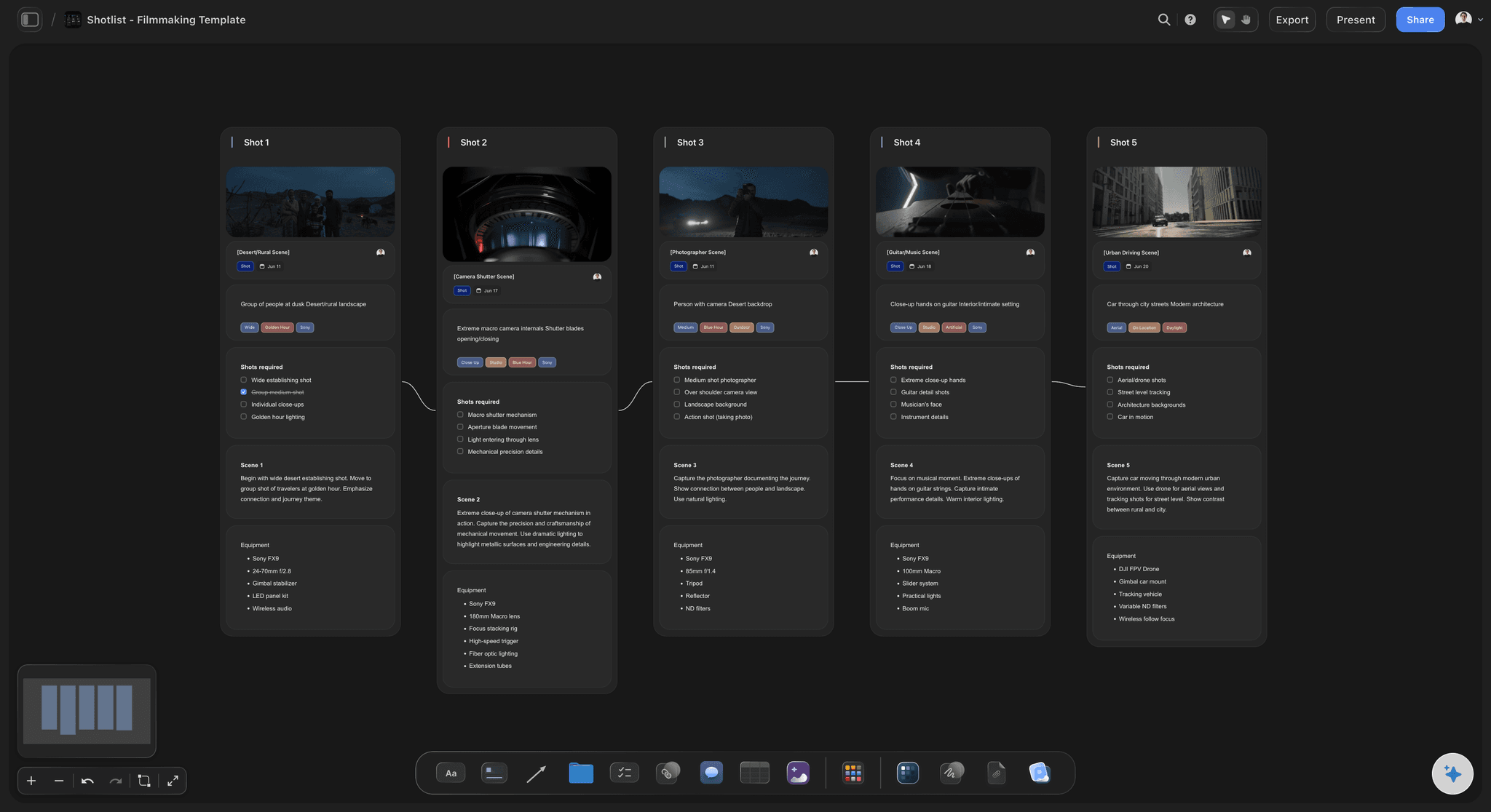
One column per shot
Five cards for every shot
A picture frame, a subject line with tags for the size, the light and the camera, a "Shots required" checklist the crew ticks, a direction note for the scene and the gear to pack. The same five on every shot, so nobody hunts for the lens.
See the shot list template →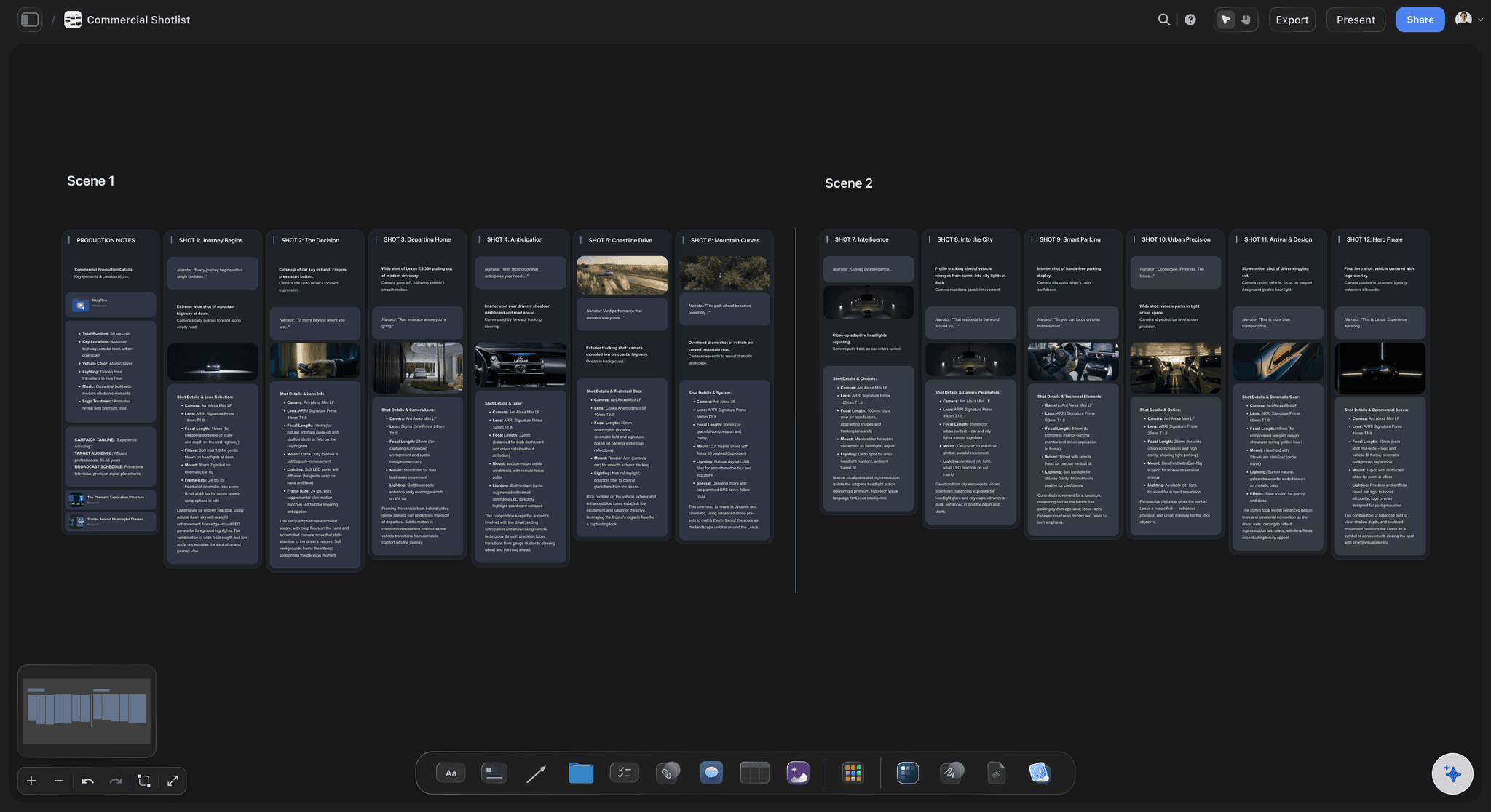
Shooting order
Arrows that follow the day, not the script
ChatGPT sends the shots in the order you ask for: by setup, by location, or exteriors first while the light lasts. For a shoot with several scenes, ask for one row per scene, each with its own title above it.
See the AI shot list generator →
From the storyboard
The storyboard the client approved, turned into shots
Already storyboarded the spot? Ask ChatGPT to read the storyboard on the board and write the shots each frame needs, with the coverage and the gear a storyboard leaves out. It reads each frame's notes, not its picture, so the notes have to say what is in frame.
See the storyboard with ChatGPT →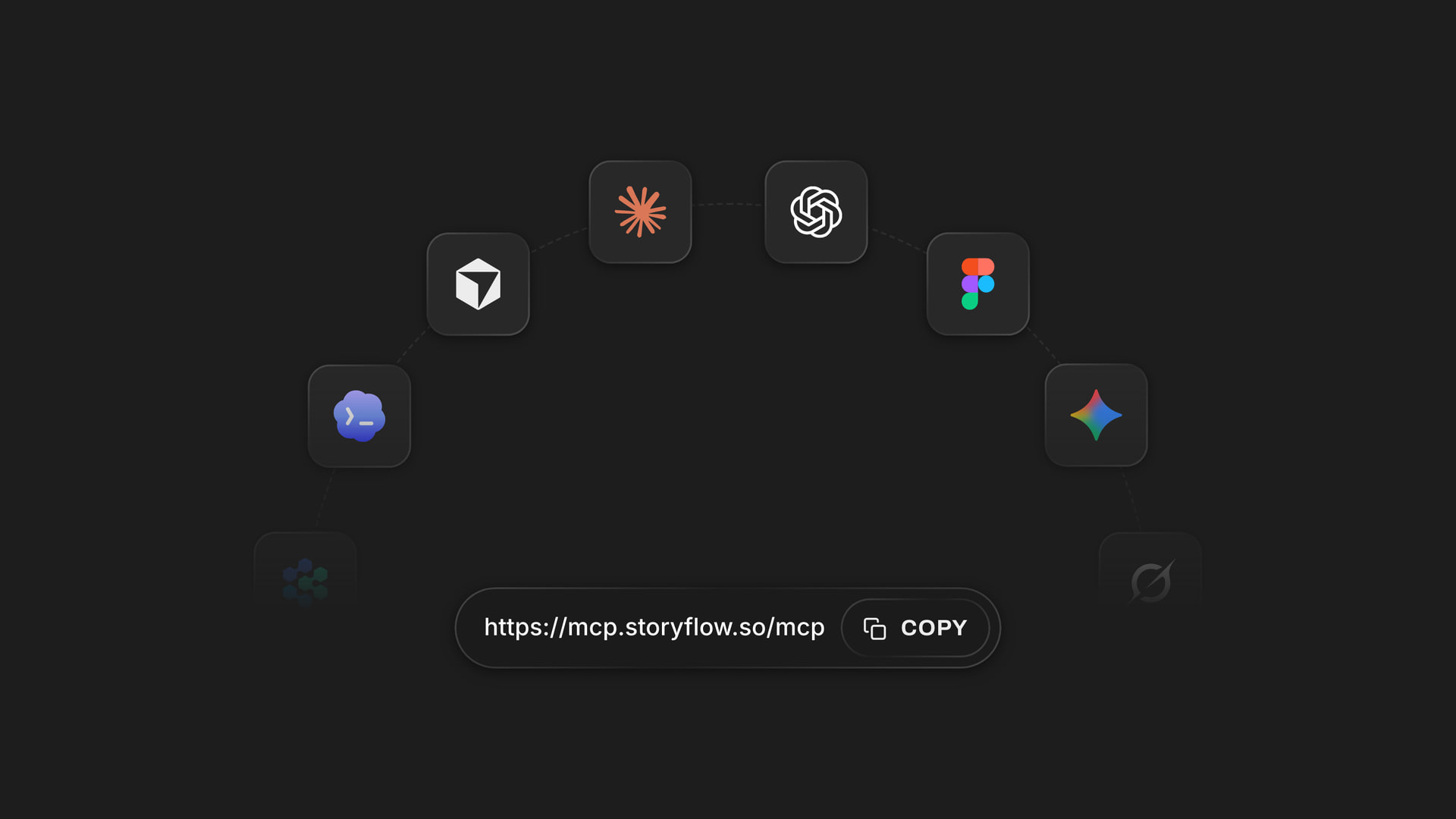
Any assistant
The same shot list from ChatGPT or Claude
Claude, Gemini and Grok connect to Storyflow at one address, https://mcp.storyflow.so/mcp. Your director can plan in Claude while you work in ChatGPT, and both build on the same shot list.
See how to connect your assistant →ChatGPT builds the shots. Your Storyflow AI credits stay untouched.
The plugin runs on ChatGPT's own model and your ChatGPT plan, so shot cards cost no Storyflow AI credits. An invited free Storyflow account gets 25 plugin actions a week, reset every Monday (UTC). Each read or change counts as one, so a shot list takes a few: finding the board, reading the script, then one for the whole row, however many shots it holds. Plus, Pro and Max have no weekly limit. Storyflow is paid-only during early access, from $7.99 a month billed annually ($9.99 monthly), and anyone a paid member invites to a board joins free.
No Storyflow AI credits spent on shots ChatGPT builds
25 plugin actions a week on an invited free account
No weekly limit on Plus, Pro and Max
The DP, the first AD and the client join the board free when invited
You choose which shoots ChatGPT may open, and whether it may change them
Built for people with taste
What changes when the shot list leaves the chat.
Three moments that cost a producer an evening.
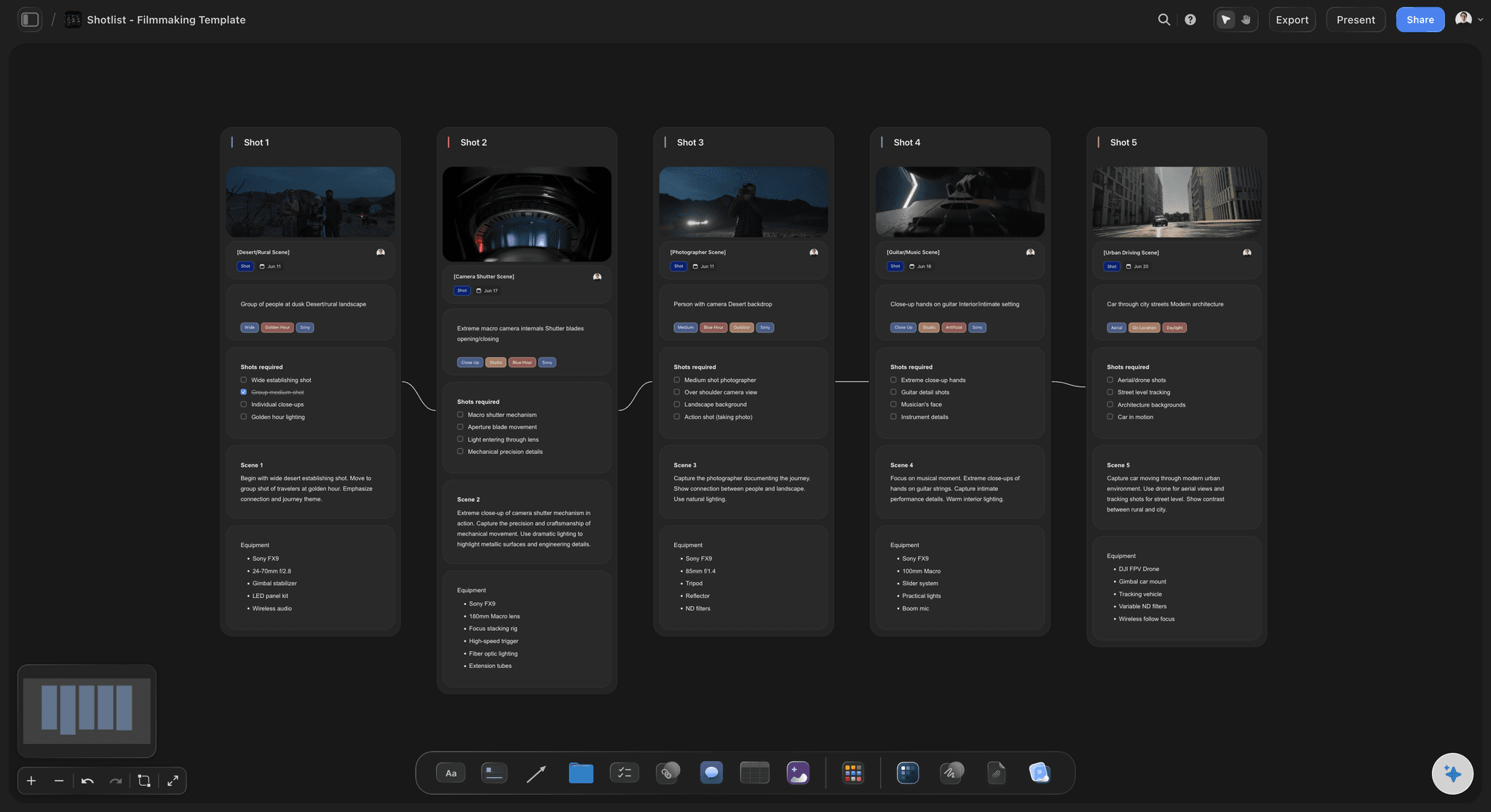
The first draft
From ten pages of script to a row of shots
The script stays on the board: ChatGPT reads PDF, Word and Final Draft files on the board, up to 25 MB each. It gets the first 40,000 characters of a file and cannot read past them, so put a long script on the board as one file per act.
Count the shots before they land: Ask ChatGPT to list the shots in the chat first, with a count per scene, and to build the row once the count matches the script, so a missed scene is caught before 60 cards land.
Start from the Shotlist template: Ask ChatGPT to put Storyflow's Shotlist template on the board. It arrives with example shots, and ChatGPT rewrites them for your script.
A table beside the cards: The same shots as rows, with a checkbox column for done. A table holds up to 8 columns and 50 rows, so a longer list takes two. Tables cannot be sorted, so ask for the rows in shooting order.
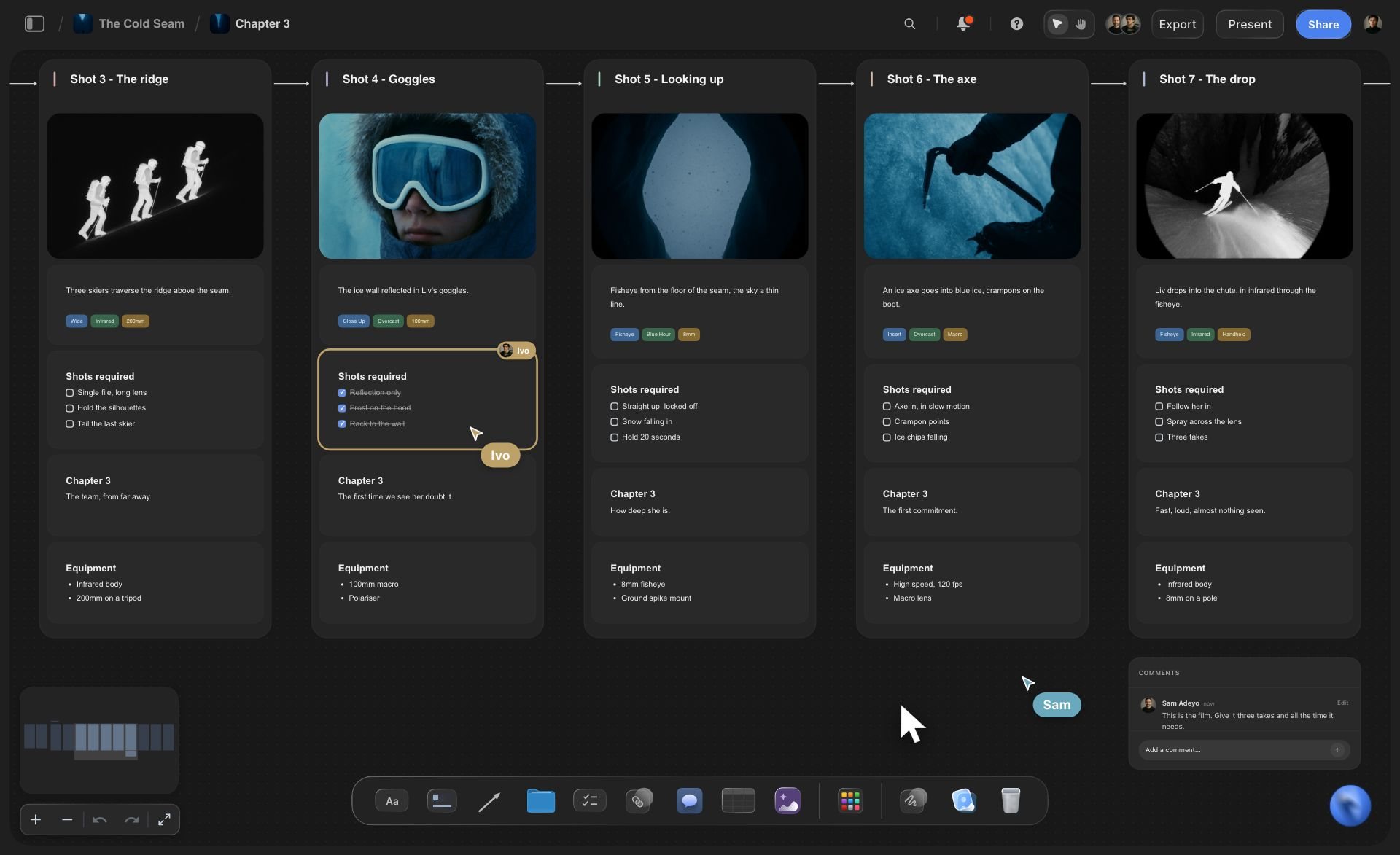
The shoot day
One list the whole crew ticks
Coverage ticked where everyone sees it: The script supervisor ticks the close-ups on the "Shots required" card as they are done. Every paid plan edits live, so the director sees the same ticks on another screen.
Frames from your own stills: Put the recce photos on the board and caption each one before you ask for the shots, and ChatGPT moves each into its shot as the frame. It cannot see the pictures, so the caption is how it knows which still is which. Or send stills through the "Add your photos" link, up to 200 within 15 minutes.
Shoot days on the same board: Ask for the strip board next: a column per shoot day, a strip per scene coloured by interior or exterior and day or night, and each day's pages added up by Storyflow.
The call sheet from the same plan: With the shots and the days on the board, ask ChatGPT for the call sheet as tables on that board, so the crew opens one link for all three.
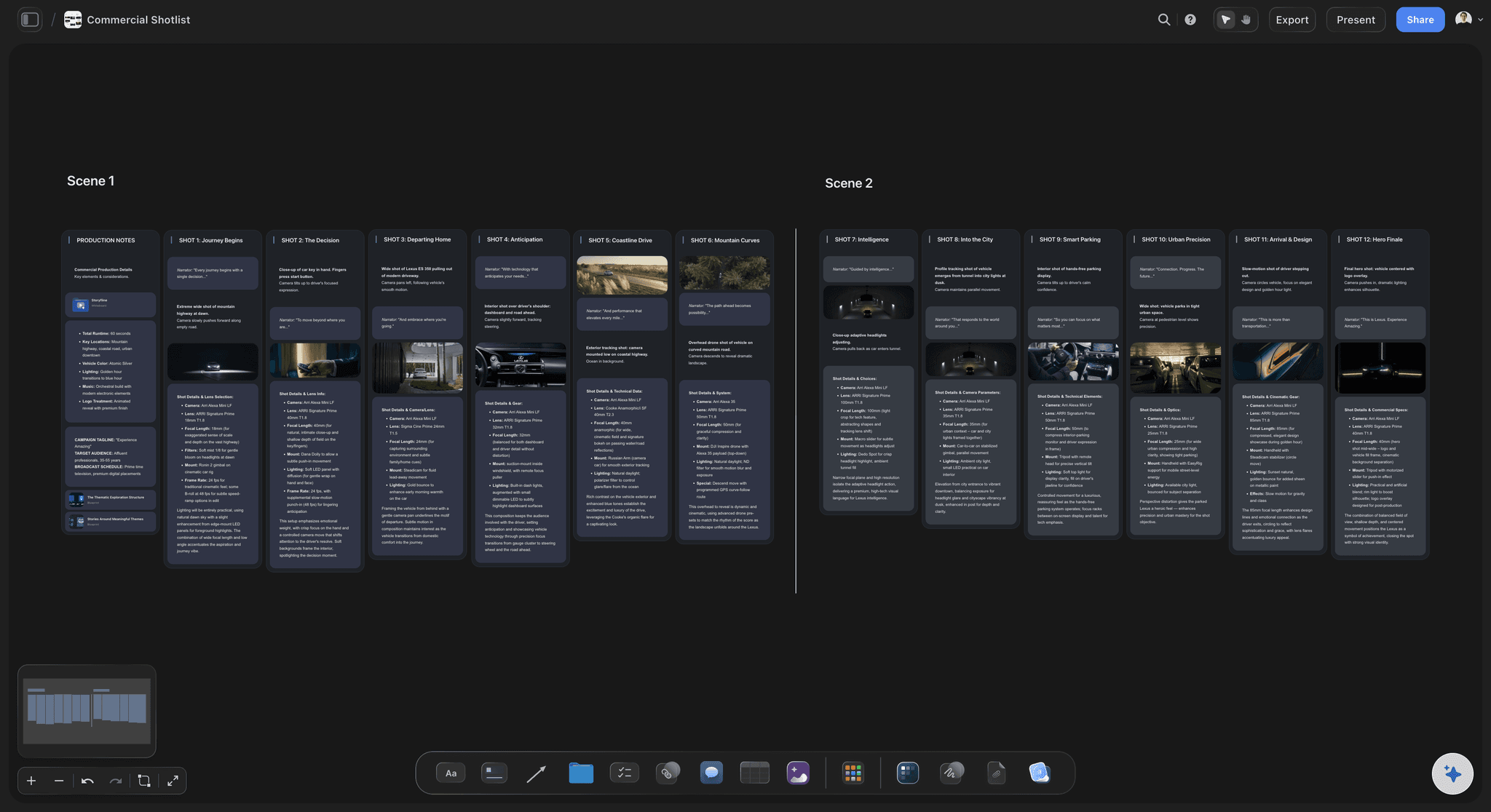
The client's notes
The client cuts a shot on Thursday
Change one shot by asking: Say "make shot 7 a close-up on the hut door" and ChatGPT rewrites that card where it sits. The other eleven shots are not touched.
A second version beside the first: Ask for a new running order and the new row lands beside the old one. Show both, keep one, and remove the other by hand, because ChatGPT cannot delete cards.
One link for the client: A view-only link opens in a browser with no account, so the client reads the shots in order. To comment, they sign in.
Ask what changed: Ask ChatGPT what changed on the board this week. It reads the board's history and lists what was added, edited or moved, and by whom.
Explore templates for your project
Every template opens as a real, editable board on the infinite canvas. Pick the closest fit and make it your own.
Pre-Production
Pull the brief, script, shot list, and moodboard into one pre-production hub so the whole shoot is planned in one place.
One app instead of five
ChatGPT with Storyflow, ChatGPT alone, or StudioBinder.
Storyflow holds the shot list ChatGPT writes, on the board the shoot is planned on. StudioBinder is a production app with its own shot list, and it is not a ChatGPT plugin as of October 2026.
Storyflow with ChatGPT
Recommended
Shots written by ChatGPT from your script
Shots laid out like a storyboard
Shots ticked off on set
Script, references and shots on one open canvas
The crew edits the list after the chat ends
The team comments on the shots
Shot list PDF in your own layout and colours
ChatGPT on its own
Shots written by ChatGPT from your script
Shots laid out like a storyboard
Shots ticked off on set
Script, references and shots on one open canvas
The crew edits the list after the chat ends
The team comments on the shots
Shot list PDF in your own layout and colours
StudioBinder
Shots written by ChatGPT from your script
Shots laid out like a storyboard
Shots ticked off on set
Script, references and shots on one open canvas
The crew edits the list after the chat ends
The team comments on the shots
Shot list PDF in your own layout and colours
What creators are saying
Join early creators getting structured workspaces and AI that remembers their projects
“Storyflow has sped up my workflow by at least 3x, which means more flow state and more projects I can actually ship. It truly changed the way me and my team create.”

Reilin Joey
Director & YouTuber
“One prompt gets me a structured board. But the tactics are my favorite. I run my YouTube scripts through them and my intros and retention got better. It's amazing.”

Justkay
YouTuber & Freelance Filmmaker
“I used to juggle five apps to plan a project. Now I describe what I am making and get boards, lists, and a schedule. All in one place.”

George
@fernwehchronicles
Shot lists with ChatGPT: questions
What producers ask before a shot list from ChatGPT goes to the crew.
Yes. ChatGPT turns a script or a treatment into a shot list, with a number, a size, a camera move, a lens and the coverage for every shot. With the Storyflow plugin it builds that list on your shoot's board instead of in the chat: a column per shot with a picture frame, tags, a "Shots required" checklist, a direction note and the gear, joined by arrows in shooting order. The crew opens the same board.
Storyflow is our pick first, and it is our product. The basis: it builds every shot as a column with a picture frame, a coverage checklist and the gear, in shooting order, on a board the crew and the client open from one link, with the shooting schedule beside it. StudioBinder is the other tool producers weigh; it is not a ChatGPT plugin as of October 2026, but it designs a shot list PDF in your own layout and the crew marks shots done from a phone.
Open the Storyflow listing in ChatGPT's plugin directory and select Install plugin. Sign in to Storyflow when asked, then choose which projects ChatGPT may use and whether it may make changes. In a chat, type @ and pick Storyflow, or choose it from the + menu. Availability depends on your ChatGPT plan, workspace and region. In a Business or Enterprise workspace, an admin manages plugins and can turn them on or off.
Yes, from the board. Put the PDF, Word or Final Draft file on the shoot's Storyflow board and ChatGPT reads it there, up to 25 MB per file. It gets the first 40,000 characters of a file and cannot read past them, so put a long script on the board as one file per act. A scanned PDF has no text to read. A file you attach in the ChatGPT chat is read in the chat, but the file itself does not reach Storyflow.
Yes. Ask ChatGPT for the same shots as a table on the board, for example shot, scene, size, move, lens, setup and a "Done" checkbox. A table holds up to 8 columns and 50 rows, so a longer list takes two, and its cells can be dates, checkboxes, statuses or labels. Storyflow tables cannot be sorted, so ask for the rows in shooting order. The cards carry the detail; the table gives the first AD one overview.
Three ways. Put the photos on the board first, captioned, and ask ChatGPT to use them; it moves each into its shot by its caption, because it cannot see the picture. Give it direct image addresses and it adds them, twelve per request (a link to a web page is not a picture). Or ask for the "Add your photos" link, open it on your phone or computer and pick up to 200 pictures within 15 minutes. A photo attached in the chat does not reach Storyflow.
When you ask for it. The arrows follow the order ChatGPT sends the shots, so write "order by setup" or "exteriors first while the light lasts" in the request. ChatGPT cannot know that the location has no power until noon or that the lead arrives late, so give it those facts, then read the order back before the call sheet goes out. Ask it to keep the script's shot numbers so the editor still finds them.
Over the plugin, Storyflow does not draw pictures, so frames start empty until you fill them. ChatGPT gets each picture's address and caption, not the picture, so it cannot check a frame. It cannot delete cards, so a list you ask for twice lands beside the first. Storyflow tables cannot be sorted, there is no native phone app, and Storyflow is not a screenwriting app, so the script stays in your writing software.
No. The plugin runs on ChatGPT's own model and your ChatGPT plan, so plugin actions use no Storyflow AI credits. An invited free Storyflow account can make 25 plugin actions a week, reset every Monday (UTC), and Plus, Pro and Max have no weekly limit. Storyflow is paid-only during early access, from $7.99 a month billed annually ($9.99 monthly); today the only free route is an invite from a paid member.
Share the board from Storyflow; ChatGPT cannot make share links. A view-only link opens in a browser with no account, so the client reads the shots without signing up, and signs in only to comment or draw. Invite the crew instead when they need to tick coverage on set: anyone a paid member invites joins free, and every paid plan edits live.
The board is the same; the way in differs. ChatGPT installs Storyflow from its plugin directory, while Claude adds Storyflow as a custom connector at https://mcp.storyflow.so/mcp. Both build the same shot cards and strip board on the same Storyflow boards, so a producer in ChatGPT and a director in Claude can work on one list. Storyflow's Claude shot list page, storyflow.so/claude-shot-list, walks through the Claude setup.
Yes. Ask for the strip board on the same board: one column per shoot day, one strip per scene with its heading, pages and cast, coloured by interior or exterior and day or night. Storyflow adds up each day's pages. The totals are worked out when the schedule is built, so after you move a strip by hand, ask ChatGPT to build it again. There is no Day Out of Days report.
Only the projects you choose when you sign in: all of them, or the ones you pick. ChatGPT can always read those projects, and changes them only if you allow it; without that it cannot build cards or give you the photo link. Every connection ends after 30 days, and ChatGPT then asks you to sign in again, which is a safety measure by design.
More from Storyflow
Connect ChatGPT to Storyflow
Storyflow MCP server for Claude, Gemini and Grok
Shot list with Claude
Storyboard with ChatGPT
Script breakdown with ChatGPT
Shooting schedule with ChatGPT
Location scouting with ChatGPT
Call sheet with ChatGPT
How to make a shot list with ChatGPT or Claude
Shot list template
Strip board
Storyflow for producers
Write the shots in ChatGPT. Shoot from the board.
One column per shot, the coverage to tick, the gear to pack, and one link for the crew and the client.