
Rock-steady plans for every shoot
Every look, every scene,
on one board.
Build a look for each character in each scene, pin the references and fitting photos beside it, and track every change and continuity note across the schedule.


Creatives working for these brands already got early access
- Red Bull
- Canon
- Artlist
- Porsche
See how easy it is to get started
Watch a real project come together, from a blank board to a finished plan, clicked through step by step.
Start from a ready-made template
Pick a board to see what you can build, then let AI fill it in. Every template is a real, editable starting point on the same infinite canvas.

Pre-Production
Pull the brief, script, shot list, and moodboard into one pre-production hub so the whole shoot is planned in one place.
What is a wardrobe planner?
A wardrobe planner is where you work out what everyone wears, in which scene, and what happens to it. Storyflow is an AI visual workspace that plans wardrobe on one infinite canvas: a look for each character in each scene, references and fitting photos pinned beside it, and every costume change and continuity note. Wardrobe is a grid problem before it is a taste problem. Every character multiplied by every scene they appear in produces a cell, and each cell needs a decision: which look, whether it is a change from the previous scene, whether it has to be doubled because something gets ruined in it, and whether it matches what the audience last saw. Getting the taste right and the grid wrong still produces a shoot that stops.
The reason wardrobe is badly served by ordinary tools is that it is simultaneously visual and administrative. The look itself is a picture: fabric, silhouette, palette, the reference you are chasing. The logistics are a table: sizes, sourcing, fitting dates, budget, who is bringing what to which location on which day. Keep them in separate files and the two drift apart, which is how a costume gets approved that nobody has actually sourced, or a change gets scheduled on a day the actor is not called.
Storyflow is an AI-native infinite canvas that holds both at once. Make a card per look with the reference images dragged straight onto it, lay the looks out in rows by character and columns by scene, and write the sizing, sourcing, and fitting notes on the same card as the picture. Because the canvas has no object cap, a wardrobe plan covering twelve characters across forty scenes stays on one surface rather than splitting into a folder tree and a spreadsheet.
Wardrobe planning usually runs across six layers, and all six have to stay visible together: the character (who they are and what their clothes are saying about them), the arc (how the look changes as the character does, which is the part that separates costume design from shopping), the scene grid (which look appears in which scene, and therefore what has to be ready when), the changes (every point where a character changes on the day, since each one costs shoot time), continuity (what the audience last saw, including the state of the garment, which is where most errors happen), and the practical layer (sizes, doubles, sourcing, fittings, budget, and laundry). A wardrobe planner is useful exactly to the degree that it keeps all six in one view.
Ultra fast from brief to board
From a script to a wardrobe plan the crew can work from.
No spreadsheet to build and no fields to define first. Describe the shoot and start placing looks.
01
Open a canvas
Sign up in seconds. No download. Your infinite wardrobe canvas opens straight in the browser.
02
Lay out characters and scenes
Describe the production and the AI lays out a structured board with a row per character and the scenes they appear in, so you start from the grid rather than from an empty page.
03
Build each look
Drag reference images, fabric shots, and fitting photos onto a card per look, and write the sizing, sourcing, and budget notes on the same card. Mark every costume change and note what continuity depends on.
04
Share and shoot from it
Send a view-only link to the director, the actors, or the costume department, or export the board as an image or PDF to take to a fitting or onto the set.
The look and the logistics on the same card.
References, fittings, continuity, and sourcing on one infinite canvas instead of a folder and a spreadsheet.
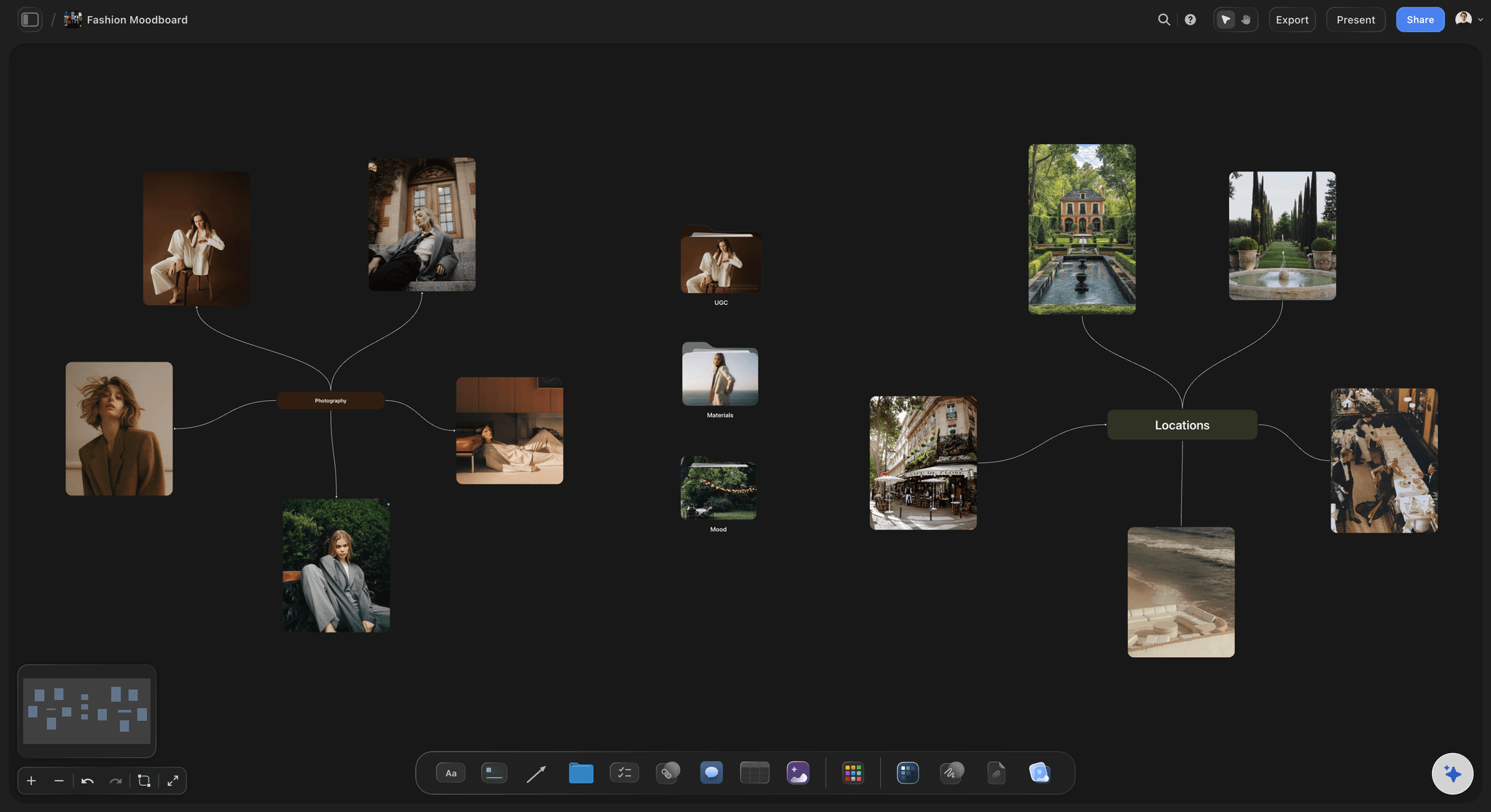
A card per look with the references attached
Build looks visually, not in a table
Drag fabric shots, silhouette references, and palette swatches straight onto each look card. A costume decision made next to the reference it is chasing is a different decision from one made in a spreadsheet cell.
See the fashion moodboard →
Characters down the side, scenes across the top
See the whole grid at once
Lay looks out as a grid of character against scene and the gaps become obvious: the character with no look for the third act, the day carrying four changes, the scene nobody has dressed yet.
See the AI script breakdown →
Continuity notes attached to the look they describe
Track what the audience last saw
Note the state of the garment, not just the garment: the tear, the stain, the rolled sleeve. Continuity errors are almost always about state, and a note pinned to the look survives where a note in a thread does not.
Try the continuity tracker →
Share with the director, actors, and costume department
Approve the look before the fitting
Send a view-only link and everyone sees the same looks against the same scenes. Wardrobe disagreements are far cheaper to have in prep than in a fitting room with the clothes already bought.
See the client presentation tool →Unlimited boards. No object cap.
Open a canvas, lay out the characters, and start building looks. Storyflow is paid-only during early access, with plans from $9.99 a month, and a Free plan launches before the end of 2026.
Unlimited wardrobe boards on an infinite canvas
Basic AI usage to generate boards from prompts
3 starter frameworks built in
Share view-only links with cast and crew
Built for people with taste
More than a moodboard and a spreadsheet.
The look and the logistics belong on the same surface. Split them and they drift apart.
Character, arc, grid, changes, continuity, and logistics
Work across every layer of the wardrobe
Dress the character, not the scene: Start from who the person is and what their clothes are claiming about them. A look that is beautiful and says the wrong thing about the character is a more expensive mistake than a plain one that says the right thing.
Plan the arc, not just the looks: Lay a character's looks out in story order and you can see whether the costume changes as they do. A wardrobe that stays static through a transformation is one of the most common and most invisible failures in a low-budget shoot.
Count the changes: Mark every point where someone changes on the day, because each change costs real minutes and needs somewhere to happen. Counting them on the board is how you find the day that has been quietly scheduled with six.
Doubles, sizes, and sourcing: Note which garments need doubling because something happens to them on camera, and keep sizes, sourcing links, budget, and fitting dates on the same card as the picture. This is the layer that decides whether the plan is real.
AI that can see the board you have already built
Break the script down with AI, design it yourself
Get the grid from a prompt: Describe the production and the AI lays out characters, scenes, and a look card structure to fill in. It reads the active canvas as context, so once you have started building it works with what is there.
It structures, it does not style: The AI will not design your costumes and does not have taste. What it saves is the setup work: turning a script into a character and scene grid so you spend your time on the looks rather than on building a table.
Re-prompt as scenes change: Scripts move and scenes get cut. Keep prompting as the production changes; look cards you have already built stay exactly where they are while the AI fills in around them.
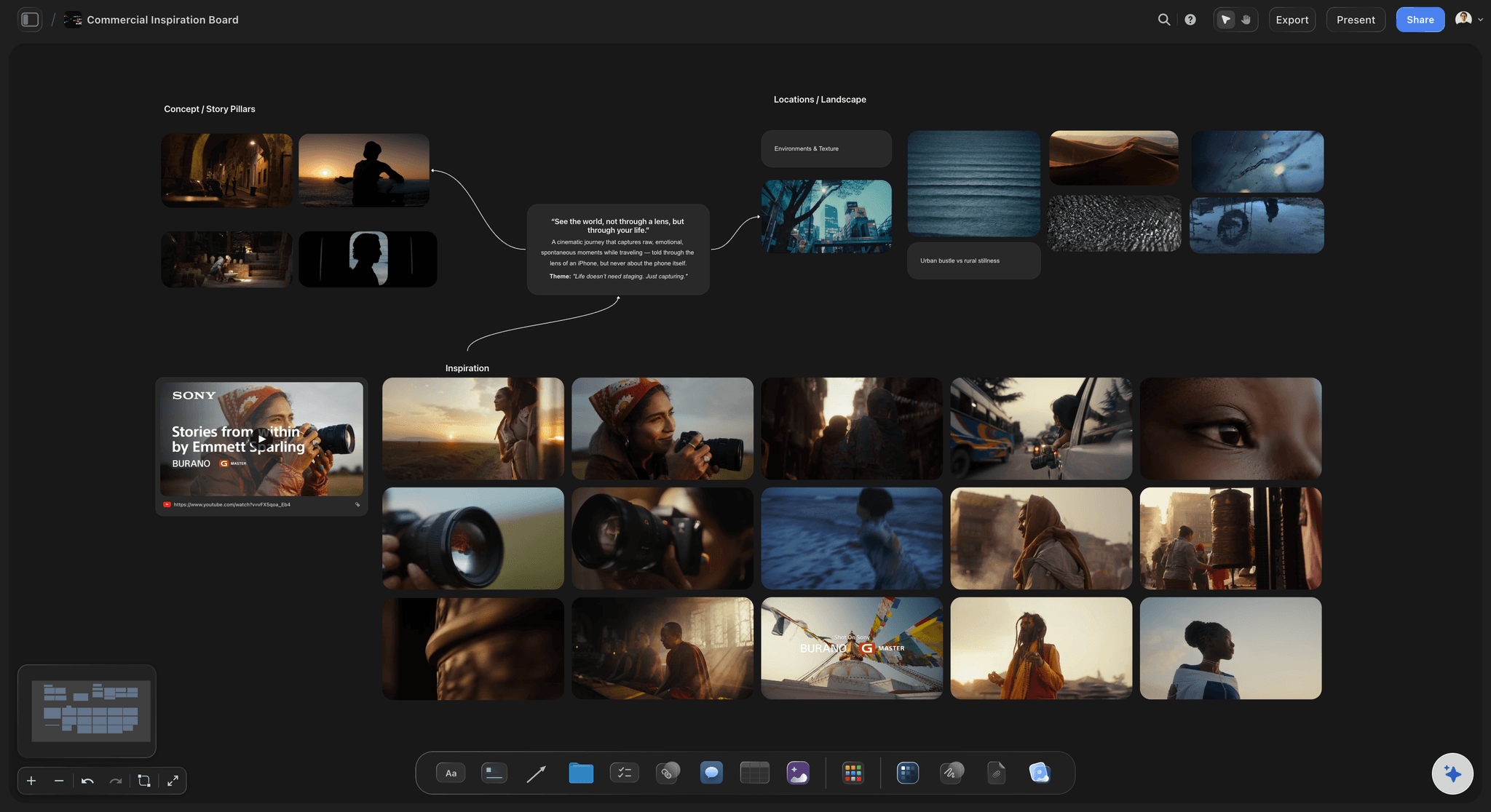
Images, fittings, links, and documents on one canvas
Everything the look depends on, in one place
Fitting photos beside the reference: Put the fitting photo next to the reference you were chasing and the gap between intention and result becomes obvious immediately, which is when it is still cheap to fix.
Grab frames from reference films: Pull a frame from a YouTube or Vimeo reference straight onto the board. For period and genre work, a frame is a far more precise brief than a description.
Sourcing links and receipts: Drop supplier links, PDFs, and receipts onto the look card they belong to. When something needs re-ordering at short notice, the link is attached to the garment rather than buried in an inbox.
Share with the director, actors, and department
One plan the whole department works from
View-only links: Send a link and the director or an actor opens the whole plan in a browser with no account. Actors who have seen their looks in advance arrive at a fitting with useful questions rather than surprises.
Work together on the board: Invite your costume supervisor or stylist so the department works from one plan rather than three versions of it. Live multi-editor presence with cursors is on the Max plan.
Export for the fitting room: Export as a high-quality image or PDF to print for a fitting, a shopping trip, or the truck. A printed grid is still the fastest thing to work from when your hands are full.
Explore templates for your project
Every template opens as a real, editable board on the infinite canvas. Pick the closest fit and make it your own.
Pre-Production
Pull the brief, script, shot list, and moodboard into one pre-production hub so the whole shoot is planned in one place.
One app instead of five
Storyflow vs Pinterest, a spreadsheet, and Milanote.
Two of these are genuinely better at part of this job. Here is the honest split.
Storyflow
Recommended
Look and logistics on the same card
Character against scene grid
AI builds the grid from a prompt
Continuity notes attached to looks
Huge library of images to browse
Formulas, filters, and sortable budget
Look and logistics on the same card
Character against scene grid
AI builds the grid from a prompt
Continuity notes attached to looks
Huge library of images to browse
Formulas, filters, and sortable budget
Spreadsheet
Look and logistics on the same card
Character against scene grid
AI builds the grid from a prompt
Continuity notes attached to looks
Huge library of images to browse
Formulas, filters, and sortable budget
Milanote
Look and logistics on the same card
Character against scene grid
AI builds the grid from a prompt
Continuity notes attached to looks
Huge library of images to browse
Formulas, filters, and sortable budget
What creators are saying
Join early creators getting structured workspaces and AI that remembers their projects
“Storyflow has sped up my workflow by at least 3x, which means more flow state and more projects I can actually ship. It truly changed the way me and my team create.”

Reilin Joey
Director & YouTuber
“One prompt gets me a structured board. But the tactics are my favorite. I run my YouTube scripts through them and my intros and retention got better. It's amazing.”

Justkay
YouTuber & Freelance Filmmaker
“I used to juggle five apps to plan a project. Now I describe what I am making and get boards, lists, and a schedule. All in one place.”

George
@fernwehchronicles
Wardrobe planning questions, answered.
How to plan costume for a shoot, how to track continuity, and where Storyflow is not the right tool.
Start from the grid, not from the shopping. List every character down one side and every scene they appear in across the top, and treat each intersection as a decision that has to be made. For each cell, decide the look, whether it is a change from the previous scene, and what state the garment is in, since continuity errors are almost always about state rather than about the garment itself. Then design the looks against the character's arc, laying them out in story order so you can see whether the costume changes as the person does. Finally, add the practical layer to each look card: sizes, doubles for anything that gets damaged on camera, sourcing links, fitting dates, and budget. The grid tells you what has to exist; the practical layer tells you whether it will.
It depends which half of the job is hurting. If you mainly need to gather visual references, Pinterest has a library nothing else matches and is hard to beat for the browsing stage. If you mainly need to track budget with formulas, sortable columns, and filters, a spreadsheet is genuinely better than a canvas and most costume departments still run one. Storyflow is for the part in between, where the look and the logistics have to stay attached to each other: a card per look with the reference on it, laid out as a character and scene grid, with continuity and sourcing on the same card. Plenty of designers use all three, and that is a reasonable setup rather than a failure.
Not during early access. Storyflow is paid-only right now, with plans starting at $9.99 a month, and a Free plan launches before the end of 2026. Anyone a paid member invites to a board joins free today, so your costume supervisor or stylist can work on the plan without paying. If you want something free this minute, a spreadsheet for the grid plus a Pinterest board per character will cover most of it, at the cost of the two never being in the same place.
Track state, not just garments. Attach a note to each look recording what condition it is in at that point in the story: the tear, the mud, the missing button, the rolled sleeve, whether the jacket is on or carried. Then lay the looks out in story order rather than shooting order, because continuity is a story-order property and you almost never shoot in that order. On the day, add reference photos to the look card as you shoot it, so the next time that costume appears you are matching against a photograph rather than against memory. That said, if you need a rigorous shot-by-shot continuity log, a dedicated script supervision tool or even a paper log book is still the better instrument. Storyflow is stronger at planning continuity than at recording it live on set.
No. The AI can lay out the character and scene grid from your description of the production, which removes the tedious setup step, and it can suggest a structure for the board. It has no taste and no view about what a character should wear, and costume design is exactly the kind of judgment that should not be delegated. AI image generation is available on the Pro and Max plans if you want to generate visual references, but the design decisions are yours.
Yes, with a caveat about formats. You can paste your script text onto the canvas or drop a PDF onto the board and the AI will work from it to lay out characters and scenes. Storyflow does not import Final Draft, FDX, Word, or Fountain files directly, so export your script to PDF or plain text first and then paste or upload it. From there the AI can build the grid and you fill in the looks.
Yes. Share a view-only link and they open the whole plan in a browser with no account and nothing to install. This is worth doing before fittings: actors who have already seen their looks tend to arrive with questions rather than objections, and directors who have approved a look on a board rarely change their mind in the fitting room. If you want people to contribute, invite them to the board. Live multi-editor presence with cursors is on the Max plan.
Only loosely, and this is a genuine limitation. You can write costs on look cards and keep receipts and supplier links attached to them, which is enough for a small production. What you cannot do is sum a column, filter by supplier, or run the kind of sortable budget that a spreadsheet gives you for free. If wardrobe budget tracking is a serious part of your job, keep a spreadsheet for the numbers and use the board for the looks and the grid.
Yes, and the structure adapts easily. Fashion and commercial shoots are organised by look rather than by scene, so instead of a character and scene grid you lay out a row per look with the garments, credits, references, and the shot each one belongs to. Sharing the board with a client for approval works the same way, and pinning the shot list beside the looks means the wardrobe and the framing get decided together.
Yes, and it is one of the better arguments for a canvas. The wardrobe board can sit beside the shot list, the shoot schedule, the art direction board, and the film's overall palette. Costume that is designed next to the set dressing and the lighting reference is far less likely to clash with them, and when a scene moves in the schedule you can see immediately which looks and changes move with it.
Put every look on the board and find the gaps in prep.
Open a canvas, lay out the characters and scenes, and start building looks. No download.