
Category
Photography Tools
Author

Justkay
Documentary Filmmaker & Founder at Storyflow
Topics
2026-05-17
•
Updated July 2, 2026
•
13 min read
•
Photography Tools- best photoshoot planning tools 2026
- photoshoot planning software
- how to plan a photoshoot
- how to create a photoshoot moodboard
- photoshoot moodboard
- photo shoot call sheet tool
- StudioBinder alternative
- Storyflow photoshoot planning
What are the best photoshoot planning tools in 2026?
The best photoshoot planning tools in 2026 are Storyflow (best all-in-one AI shoot canvas), Milanote (best creative-lane moodboards), StudioBinder (best call sheets and crew logistics), and Notion (best database planner). A shoot fails when one lane has no owner, so pick a tool that keeps all four lanes in one view.

Turn the shoot plan into a moodboard the whole crew sees
Storyflow keeps references, locations, and shot ideas on one shareable board, and the AI suggests directions from what you have pinned, so call time runs on a shared vision.

All 12 Photoshoot Planning Tools, Ranked
- Storyflow: best all-in-one, all four lanes of the shoot on one AI canvas
- Milanote: best creative-lane visual planning
- StudioBinder: best call sheets and crew logistics
- Notion: best database-driven all-in-one planner
- Trello: best simple task board for shoot logistics
- Miro: best real-time collaborative shoot boards
- PhotoPills: best sun and light planning
- Studio Ninja: best photography CRM for bookings and contracts
- HoneyBook: best client management for multi-discipline freelancers
- Asana: best task ownership for shoot crews
- Canva: best polished creative decks and moodboards
- Google Workspace: best free shot lists and call sheets
Full disclosure: Storyflow is our own product, and we rank it #1 for one job: keeping all four shoot lanes (creative, logistics, people, and gear) on one canvas an AI can read, so the lane nobody owned becomes obvious before the shoot day. For polished creative-lane moodboards and shot lists, Milanote is stronger, and for production-grade call sheets and crew scheduling, StudioBinder is the specialist. Storyflow does not generate industry-standard call sheets or run a booking CRM, so a high-volume studio may still pair it with StudioBinder. It is the all-in-one plan underneath those specialists, not a replacement for them. We link to every tool so you can judge the fit.
Quick Comparison: Best Photoshoot Planning Tools
These four cover the lanes a shoot is won or lost on: the all-in-one AI canvas, creative-lane moodboards, call sheets and crew logistics, and database planning.
| Tool | Best For | AI Features | Price |
|---|---|---|---|
| Storyflow | All four shoot lanes on one AI canvas | Reads full board + attached docs and boards | $7.99 mo annual (free plan late 2026) |
| Milanote | Polished moodboards and shot lists | Light AI | Free / $9.99 mo |
| StudioBinder | Call sheets and crew logistics | Light AI; call sheet automation | Free / $42 mo |
| Notion | Structured database planning | Standard AI | Free / $10 mo |
1) Quick Answer: The Best Photoshoot Planning Tools in 2026
The best photoshoot planning tools in 2026 are Storyflow (best AI canvas that holds the whole shoot plan in one place), Milanote (best visual planning canvas for the creative lane), StudioBinder (best for call sheets and crew logistics), and Notion (best all-in-one database planner). The right pick depends on which lane of the shoot is currently the messiest.
The shoot day is the one deadline you cannot push. A photoshoot runs four workstreams in parallel: the Creative lane, the Logistics lane, the People lane, and the Gear lane. Each one has to arrive at the shoot day ready. When a shoot goes wrong, it is almost never all four that failed. It is one lane that nobody owned.
I have planned interview-led shoots and documentary photography on tight schedules, and the failure pattern is consistent: the moodboard was beautiful and the gear was charged, but nobody confirmed the location permit, or the model never got the call time. The Four Lanes framework in section 3 ranks all 12 tools by how many lanes they actually keep ready.
For the creative lane specifically, see The 12 Best Photography Moodboard Tools in 2026. For the wider production context, see The 12 Best Pre-Production Tools in 2026.
2) All 12 Photoshoot Planning Tools, Ranked
- Storyflow: the whole shoot plan on one canvas, all four lanes
- Milanote: the most pleasant creative-lane visual planning
- StudioBinder: call sheets and crew logistics done properly
- Notion: all-in-one database planning if you like building systems
- Trello: simple task-board shoot tracking
- Miro: collaborative shoot boards for a team
- PhotoPills: sun, light, and location planning, and nothing else
- Studio Ninja: photography business and bookings
- HoneyBook: client management for creatives
- Asana: crew task management at agency scale
- Canva: creative-lane decks and client-facing moodboards
- Google Workspace: free shot lists and call sheets in a spreadsheet
3) Key Takeaways
- A photoshoot does not fail because all four lanes failed. It fails because one lane had no owner. The Creative lane is the one photographers enjoy, so it is almost never the one that breaks.
- The four lanes are Creative, Logistics, People, and Gear. The Logistics lane fails most, because it is the least fun and the easiest to assume someone else is handling.
- Storyflow ranks first for lane coverage, Milanote for the Creative lane alone. Neither is a business or booking tool, and neither replaces PhotoPills for sun and light planning.
- A tool's real job is not to make one lane excellent. It is to make sure no lane is invisible. That is why all-in-one tools rank well here despite being weaker at any single lane than a specialist.
- Specialists are worth adding, not arguing with. PhotoPills for light, StudioBinder for call sheets, and Studio Ninja or HoneyBook for bookings each own something a general canvas will not.
- The whole plan can run on free tiers. Uploads on the Creative lane are the only wall most photographers hit.
4) Comparison Table: 12 Photoshoot Planning Tools at a Glance
Pricing reflects publicly listed plans as of early 2026 and changes often. Ratings weigh lane coverage, collaboration support, photographer workflow fit, and pricing for solo photographers and small shoot teams.
Frequently Asked: Which Photoshoot Planning Tools Photographers Trust, and Which Are Easiest to Use
Which photoshoot planning tools do photographers trust most?
StudioBinder and PhotoPills, for opposite reasons. StudioBinder is what a crew expects a call sheet to look like, and an experienced producer will not have to be taught the format. PhotoPills is trusted almost superstitiously by landscape and portrait photographers because it answers a question nobody else answers well: exactly where the sun will be, at this location, on this date, at this hour. Milanote is trusted as the board an art buyer recognises. Storyflow is early access and does not carry that history; it is ranked first here for holding all four lanes in one place, which is a different claim from being the tool a crew already knows.
Which photoshoot planning tools are the easiest to use?
Milanote and Trello are the two nobody has to be taught. PhotoPills is the hardest on this page by a distance and worth every hour of it, because the augmented-reality sun path takes real practice to read. StudioBinder is straightforward once you accept that it wants a production-shaped input. Notion is easy to use and hard to set up, which is a different problem and the reason most Notion photoshoot systems are abandoned by the third shoot.
Which photoshoot planning tools are the most innovative?
Storyflow on the connection between the lanes, because the AI reads the moodboard, the shot list and the call sheet together, so you can ask whether the board is actually covered by the shot list. PhotoPills on augmented-reality light planning, which was genuinely new and has not been matched. StudioBinder on turning a breakdown into a call sheet without re-typing anything.
Which photoshoot planning tools are the most highly rated here?
Storyflow leads for covering all four lanes on one surface, Milanote for the creative lane alone, and StudioBinder for logistics. The ratings split on scope rather than quality: a tool that does one lane superbly can rate below a tool that does four lanes well, because the failure this article is about happens between lanes rather than inside one.
5) The Four Lanes of a Photoshoot
A photoshoot is not one task. It is four workstreams running in parallel toward one fixed date. Most planning advice treats it as a single checklist, which is why one lane always gets dropped.
The Creative lane. The moodboard, the shot list, the styling direction, the references. This is the lane photographers enjoy, so it rarely fails.
The Logistics lane. Location, permits, schedule, call times, travel, weather and light windows, backup plans. This is the lane that fails most, because it is the least fun and the easiest to assume someone else is handling.
The People lane. The model, the client, the stylist, the assistant, the makeup artist. Confirmations, briefs, contracts, call sheets. People fail not because they are unreliable but because nobody sent them the information.
The Gear lane. Cameras, lenses, lighting, batteries, cards, backup bodies, rentals. The lane that quietly ruins a shoot when one charged battery is assumed and never checked.
Here is the rule that decides tool choice. A photoshoot does not fail because all four lanes failed. It fails because one lane had no owner. The shoot day arrives, the Creative lane is gorgeous, and the location permit was never filed. The tool's real job is not to make one lane excellent. It is to make sure no lane is invisible.
There is a cognitive reason a lane vanishes. Cowan's research (Behavioral and Brain Sciences, 2001) found that working memory holds only about four chunks of information at once, and a shoot is four full lanes, each with its own stack of details, well past what anyone can hold in their head. The plan has to live somewhere everyone can see, or a lane quietly drops out of memory before the shoot day.
This is why all-in-one tools rank well here. A tool that holds all four lanes in one view makes a dropped lane obvious. A tool that only does the Creative lane leaves the other three scattered across email, text messages, and memory, which is exactly where lanes go to die.
The 12 tools below are ranked by lane coverage. The tools that hold all four lanes in one place sit at the top, because a photoshoot is won or lost on the lane you forgot, not the lane you loved.
6) How the Tools Compare Across the Four Lanes
Since a shoot fails at the lane nobody owned, the useful comparison is lane by lane. Here are all twelve, so you can find the lane you keep dropping and pick for that.
Three things fall out of the grid.
The Creative lane has the best tools and the least need for them. Milanote, Miro, Canva and Storyflow all handle it well, and it is the lane that rarely fails. Meanwhile PhotoPills is the only tool here that genuinely solves the light-and-location problem, which is a Logistics failure that can lose you the shoot entirely. The tools you enjoy shopping for solve the lane you were never going to drop.
Nothing covers all four lanes strongly, and the all-in-ones win by covering all four adequately. Storyflow and Notion are the two that touch every lane, and neither is the best at any single one. That is the correct trade for this job, because a visible mediocre lane beats an invisible excellent one.
The People lane splits into two different jobs that get confused. Crew coordination (call sheets, confirmations, contacts) is StudioBinder's territory. Client business (bookings, contracts, invoices) is Studio Ninja and HoneyBook's. A photographer shopping for "client management" usually needs one of these specifically and buys the wrong category about half the time.
The honest limit on our own entry: Storyflow covers all four lanes but is genuinely mediocre at two of them. It does not calculate golden hour, does not manage bookings, invoices, or contracts, and does not produce an industry-standard call sheet. On lane coverage it ranks second here, and Milanote is ranked above it for a reason: for the Creative lane alone, Milanote is the more pleasant tool.
7) How We Evaluated These Tools
Five criteria, weighted in this order:
- Lane coverage. How many of the four lanes can the tool actually hold? Tools that keep all four visible in one place rank highest.
- Single-view planning. Can you see the whole shoot at once, or is each lane in a separate document? A dropped lane is only obvious when everything is visible together.
- Collaboration and sharing. Can the client, model, and crew see what they need? Photoshoots are team events.
- Photographer workflow fit. Does the tool match how photographers actually work, from solo portrait sessions to small commercial crews?
- Pricing for solo photographers and small teams. Most photographers are solo or work with a tiny crew. Per-seat pricing that punishes a four-person shoot is marked down.
Testing covered a portrait session, a product shoot, and a documentary photo-essay, each planned end to end and run on schedule.
8) Quick Picks by Photoshoot Planning Need
Best all-in-one photoshoot planner: Storyflow. The moodboard, shot list, call sheet, and schedule live on one canvas, with AI reading all of it.
Best for the creative lane: Milanote. A polished visual canvas for moodboards, shot lists, and styling.
Best for call sheets and crew logistics: StudioBinder. Built for production scheduling and call sheet distribution.
Best for solo photographers running a business: Studio Ninja or HoneyBook. Bookings, contracts, and client management.
Best for sun and light planning: PhotoPills. Tells you exactly where the light will be at the shoot location and time.
Best low-cost planning setup: Storyflow for the canvas at $7.99/mo billed annually plus Google Workspace for shared shot lists and call sheets.
Best for a shoot team that lives in task boards: Trello or Asana, with the four lanes as separate boards or sections.
Put your whole shoot on one board
Start with the moodboard and shot list, then add the schedule, call sheet, and gear checklist next to them. Storyflow's AI reads the full board, so it can flag the lane you forgot before the shoot day does.
9) Detailed Reviews: 12 Photoshoot Planning Tools
1. Storyflow
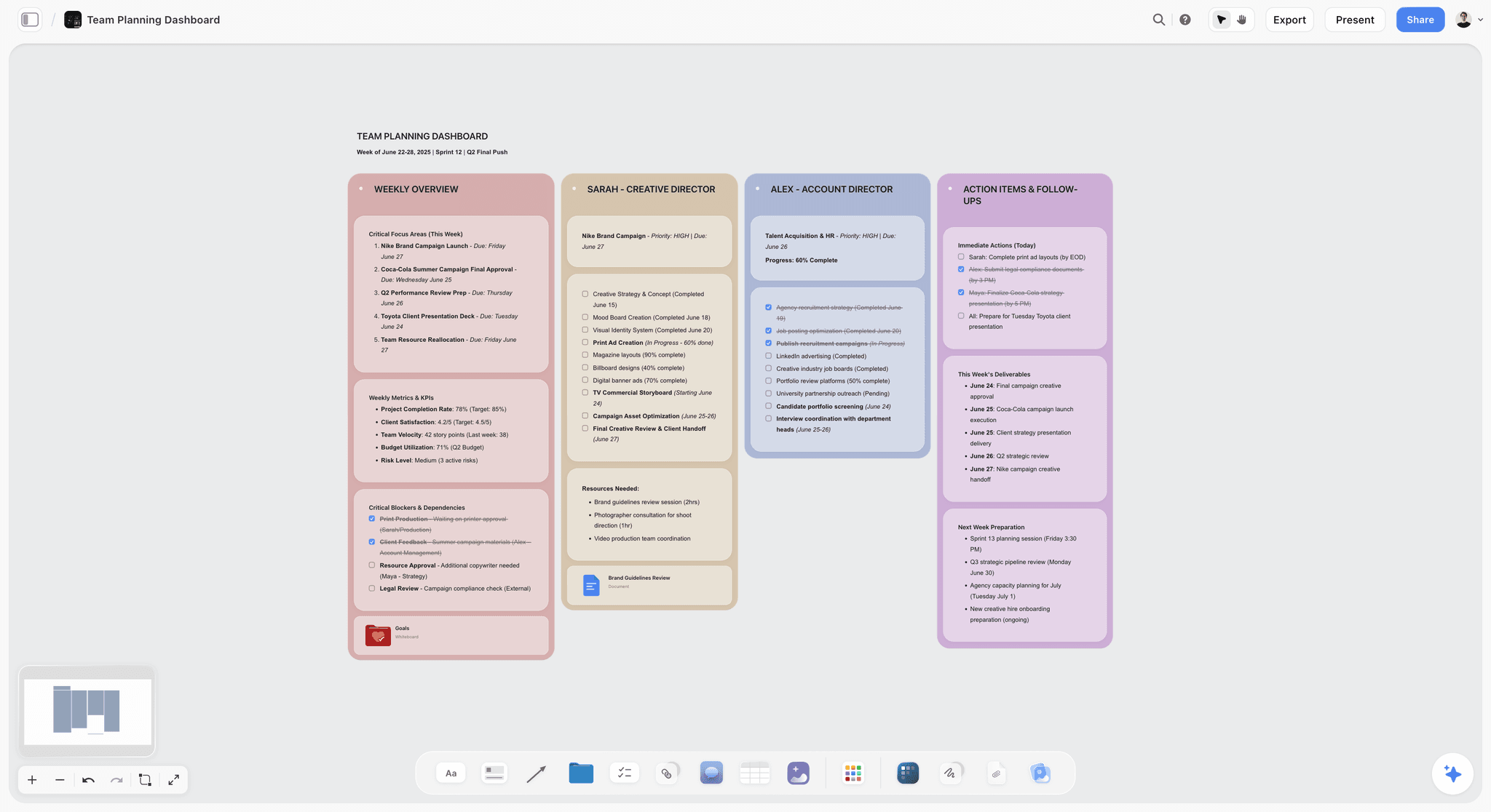
Storyflow holds all four lanes of a photoshoot on one canvas: the moodboard and shot list (Creative), the schedule and locations (Logistics), the crew and call sheet (People), and the gear checklist (Gear). The AI reads the full canvas, so you can ask it which lane is thinnest, or have it draft a call sheet from the schedule and crew cards already on the board. Because everything is in one view, a dropped lane is obvious. The fastest start is the Pre-Production Board template, which opens with the lanes already laid out; the Commercial Moodboard template and the Shotlist template cover the creative lane on the same board.
Best for: Photographers who want the whole shoot plan in one place so no lane goes invisible.
Verdict: The strongest all-in-one canvas for photoshoot planning. For dedicated client invoicing and bookings, a CRM like Studio Ninja is the better tool.
Key features
- One canvas for all four lanes: Creative, Logistics, People, Gear.
- AI reads the full canvas plus up to 5 documents and 3 boards you attach.
- Anyone a paid member invites to a board joins free.
- Image, note, checklist, and schedule cards on one board.
Pricing
Early access: every plan is paid for now. The Free plan launches before the end of 2026, and invited collaborators of paid members join free now. Plus at $7.99/mo billed annually covers unlimited boards, cards, and collaboration. Plus: $7.99/mo annual. Unlimited uploads. Pro: $14/mo annual. AI image generation, 30x AI usage. Max: $39/mo annual. 60x more AI, team workspace with roles.
Pros
- Holds all four lanes in one view, so a dropped lane is obvious.
- AI reads the whole canvas and can flag the thinnest lane.
- The whole crew joins free when a paid member invites them.
Cons
- Not a client CRM; no invoicing or contracts like Studio Ninja or HoneyBook.
- No sun and light calculator like PhotoPills.
- Newer platform with a smaller template library than Milanote.
2. Milanote
Milanote is the visual planning canvas photographers reach for first. Its freeform boards are strong for the Creative lane: moodboards, shot lists, styling references, and location scouting photos arranged together. It handles the People lane reasonably through shared boards, and its photography guides have made it close to a default for shoot planning.
Best for: Photographers who want a polished visual canvas for the creative side of the shoot.
Verdict: The strongest creative-lane tool. Pair it with a logistics tool, because Milanote is weaker on call sheets and scheduling.
Key features
- Freeform canvas for moodboards, shot lists, and references.
- Web clipper for fast reference capture.
- Templates for photoshoot planning and shot lists.
- Shareable boards with comments for clients and crew.
- Column structure for organizing the shoot.
Pricing
Free with 100 cards. Individual: $9.99/mo. Team: $49/mo flat for up to 50 users.
Pros
- Excellent for the Creative lane.
- Polished, client-ready boards.
- Photography templates speed up setup.
Cons
- Weak on the Logistics lane: no real scheduling or call sheets.
- The 100-card free limit fills fast.
- AI features are light.
3. StudioBinder
StudioBinder is production management built for film and photo shoots. Its strength is the Logistics and People lanes: professional call sheets, shooting schedules, contact lists, and crew distribution. For shoots with real crews and complex scheduling, it is the most production-grade tool here.
Best for: Commercial photo shoots and productions that need professional call sheets and scheduling.
Verdict: The strongest logistics-and-people tool. Heavier and pricier than a solo photographer needs.
Key features
- Professional call sheet builder and distribution.
- Shooting schedules and stripboards.
- Contact and crew management.
- Shot lists and storyboards.
Pricing
Free plan with limits. Starter: $42/mo. Indie: $85/mo. Higher tiers for agencies and studios.
Pros
- Best-in-class call sheets and scheduling.
- Production-grade for real crews.
- Strong contact and crew management.
Cons
- Pricing is steep for solo photographers.
- Heavier than a small portrait shoot needs.
- Creative-lane tools are weaker than dedicated moodboard apps.
4. Notion
Notion can hold all four lanes as linked databases: a shot list database, a crew database, a gear checklist, a schedule. It is the strongest pure all-in-one for photographers who think in structured data. The cost is setup time and a database-first feel that fights the visual nature of the Creative lane.
Best for: Photographers who want a structured, database-driven all-in-one planner.
Verdict: A strong all-in-one. Expect real setup time before it pays off.
Key features
- Linked databases for each lane.
- Templates for shoot planning.
- Pages for briefs and notes.
- Standard AI features.
Pricing
Free for personal use. Plus: $10/mo. Business: $18/mo.
Pros
- Genuinely covers all four lanes.
- Strong structure and filtering.
- Large template community.
Cons
- Setup-heavy; first use is configuration, not planning.
- Database-first feel fights the visual Creative lane.
- Generic AI, not shoot-aware.
5. Trello
Trello is the kanban board photographers use to track shoot tasks. Each lane can be a list, each task a card. It is strong for the Logistics and Gear lanes, where the work is checklist-shaped, and weaker for the visual Creative lane.
Best for: Photographers who want a simple task board for shoot logistics.
Verdict: A solid task tracker for the checklist lanes. Pair it with a visual tool for the Creative lane.
Key features
- Kanban boards with lists and cards.
- Checklists, due dates, and labels.
- Power-Ups for calendar and automation.
- Mobile apps.
Pricing
Free for personal use. Standard: $5/user/mo. Premium: $10/user/mo.
Pros
- Simple and fast for task tracking.
- Generous free tier.
- Works well for the Logistics and Gear lanes.
Cons
- Weak for the visual Creative lane.
- Cards do not show the whole shoot at once.
- Per-user pricing adds up for a crew.
6. Miro
Miro is the collaborative whiteboard for shoot teams. Its strength is the Creative and People lanes when planning is collaborative: photographer, client, and stylist on one board, dropping references and leaving comments. It is a capable planning surface, though it is built for business teams rather than photography.
Best for: Shoot teams that plan collaboratively in real time.
Verdict: Strong for collaborative creative planning. Weaker as a structured logistics tool.
Key features
- Infinite collaborative canvas.
- Real-time editing and comments.
- Templates for planning and briefs.
- Image upload and capture.
Pricing
Free for 3 boards. Starter: $8/mo annual. Business: $16/mo.
Pros
- Strong real-time collaboration.
- Good for the Creative and People lanes.
- Familiar to teams already on Miro.
Cons
- The 3-board free limit is tight.
- No structured scheduling or call sheets.
- Built for business teams, not photography.
7. PhotoPills
PhotoPills is the photographer's planning app for one specific Logistics problem: light. It calculates where the sun and moon will be at any location and time, plans golden hour and blue hour, and predicts the Milky Way. For outdoor and location shoots, it answers the question no other tool here can.
Best for: Outdoor and location photographers planning around natural light.
Verdict: Unmatched for sun and light planning. A specialist tool, not a full planner.
Key features
- Sun, moon, and Milky Way position planning.
- Golden hour and blue hour calculator.
- Augmented reality location preview.
- Depth of field and exposure calculators.
Pricing
Roughly $10.99 one-time on iOS and Android.
Pros
- Unmatched for natural-light planning.
- One-time purchase, no subscription.
- Genuinely useful on location.
Cons
- Single-lane: light logistics only.
- Not a planner for the rest of the shoot.
- Mobile-only.
8. Studio Ninja
Studio Ninja is a photography-specific CRM built around the People lane: client bookings, contracts, invoicing, and workflow automation. It does not plan the shoot itself, but it manages the client relationship around it, which is the lane solo photographers most often run badly.
Best for: Solo photographers who want client bookings and contracts handled.
Verdict: A strong photography CRM. Pair it with a planning tool for the shoot itself.
Key features
- Client booking and lead management.
- Contracts and invoicing.
- Workflow automation.
- Photography-tool integrations.
Pricing
Free trial. Starter: $16/mo. Pro: $27/mo.
Pros
- Photography-specific client management.
- Affordable for solo photographers.
- Automation reduces admin time.
Cons
- Not a shoot planner; CRM only.
- Covers the People lane, not the shoot itself.
- You still need a planning tool alongside it.
9. HoneyBook
HoneyBook is a client-management platform for creative freelancers, photographers included. Like Studio Ninja, it serves the People lane: proposals, contracts, payments, and client communication. It is broader than photography and pricier, with a built-in AI assistant.
Best for: Photographers who want client management alongside other freelance creative work.
Verdict: A capable creative CRM. Studio Ninja is the more photography-focused, cheaper option.
Key features
- Proposals, contracts, and invoicing.
- Client communication hub.
- Scheduling and payments.
- AI assistant for client workflows.
Pricing
Starter: $29/mo annual. Essentials: $49/mo annual. Premium: $109/mo annual.
Pros
- Polished client experience.
- Broader than photography for multi-discipline freelancers.
- Strong proposals and payments.
Cons
- Pricier than Studio Ninja for photographers.
- Not a shoot planner; People lane only.
- Prices rose sharply in recent years.
10. Asana
Asana is a project manager that can run the Logistics and Gear lanes as task lists with owners and due dates. For shoot teams that need accountability, assigning each task an owner is its real strength. It is generic, with nothing photography-specific.
Best for: Shoot teams that need clear task ownership and deadlines.
Verdict: A capable task manager for the checklist lanes. Generic, not photography-built.
Key features
- Tasks with owners, due dates, and dependencies.
- List, board, and timeline views.
- Templates and automation.
- Standard AI features.
Pricing
Free for small teams. Starter: roughly $11/user/mo. Higher tiers above.
Pros
- Clear task ownership and accountability.
- Multiple views for different lanes.
- Mature and reliable.
Cons
- Generic; nothing photography-specific.
- Weak for the visual Creative lane.
- Per-user pricing adds up for a crew.
11. Canva
Canva serves the Creative lane: moodboards, styling decks, and client-facing shoot presentations built from templates. It is fast and polished for the visual side, but it does nothing for logistics, people, or gear.
Best for: Photographers who want polished creative-lane decks and moodboards.
Verdict: Strong for the Creative lane only. Not a shoot planner.
Key features
- Template-based moodboards and decks.
- Generative AI image tools.
- Large asset library.
- Easy export and sharing.
Pricing
Free tier. Pro: roughly $15/mo or $120/year.
Pros
- Polished creative-lane output.
- Easy for non-designers.
- Huge asset library.
Cons
- Single-lane: Creative only.
- No logistics, people, or gear planning.
- Template feel can dilute a specific vision.
12. Google Workspace
Google Workspace (Sheets, Docs, Calendar) is the free fallback that runs the Logistics and Gear lanes adequately: a shot list in Sheets, a call sheet in Docs, the schedule in Calendar. It is not a planner, but it is free, shareable, and everyone already knows it.
Best for: Photographers who want a free, familiar setup for shot lists and call sheets.
Verdict: A workable free baseline. No single-view planning, so lanes stay scattered.
Key features
- Sheets for shot lists and gear checklists.
- Docs for call sheets and briefs.
- Calendar for scheduling.
- Real-time collaboration and Gemini AI.
Pricing
Free for personal use. Business: roughly $7/user/mo.
Pros
- Free and universally familiar.
- Real-time collaboration.
- Easy sharing with clients and crew.
Cons
- No single view of the whole shoot.
- Lanes stay scattered across separate files.
- Not built for shoot planning.
10) Recommended Photographer Stacks
Stack 1: Solo Portrait or Lifestyle Photographer. Storyflow ($7.99/mo billed annually; all four lanes on one canvas) + Studio Ninja (client bookings and contracts) + PhotoPills (light planning for outdoor shoots). Covers planning and the client relationship.
Stack 2: Commercial Photo Shoot. Milanote or Storyflow (Creative lane) + StudioBinder (call sheets and crew logistics) + HoneyBook (client management). Production-grade for real crews.
Stack 3: Documentary or Editorial Photographer. Storyflow (whole shoot plan, AI canvas, starting from the Destination Research template for location work) + PhotoPills (location and light) + Google Workspace (shared shot lists). Strong for self-directed, research-led shoots.
Stack 4: Cheapest Working Stack. Storyflow ($7.99/mo billed annually; all four lanes) + Google Workspace (shared documents) + PhotoPills ($10.99 once).
The pattern across every stack: one tool that holds all four lanes in one view, plus a specialist tool for whichever lane is most demanding. The photographers whose shoots run clean are the ones where no lane was invisible.
11) Fashion and Editorial Photoshoot Planning
Fashion and editorial shoots break most general planning tools for one structural reason: the plan has more owners than any other kind of photography. A commercial portrait shoot has a photographer and a client. A fashion editorial has a photographer, a stylist, a hair and makeup artist, a set designer, a producer, a model agency and a publication, and each of them needs a different slice of the same plan.
What that means practically:
- The board has to split by role. Styling references, beauty references and set references belong in separate, labelled sections, because the HMUA will read only their part and should not have to scroll a fashion board to find it.
- The shot list is a look list. Editorial shoots are counted in looks rather than setups, and a shot list that does not group by look is unusable on the day, since the schedule is driven by changes.
- Call sheets carry more crew than a normal shoot. Agency contacts, model call times separate from crew call times, and usually a fitting the day before.
- The lookbook is a deliverable. Someone will ask for a presentable version of the plan, which is a different document from the working board.
Tools that fit this shape: Milanote for the role-split board because its column structure maps onto it directly, StudioBinder when the crew is large enough that call sheets become the bottleneck, Canva for the client-facing lookbook, and Storyflow when the brief, the look list and the schedule should stay attached to each other. Set.a.Light 3D is worth knowing about for pre-visualizing lighting setups, which matters more in studio fashion than in most genres.
The failure specific to this genre is version drift across roles. The stylist has last week's look list, the producer has this week's schedule, and both are certain they are current. Whatever tool you choose, the property that matters is a single link everyone opens rather than a PDF everyone downloads.
12) What Is a Photoshoot Planner, and Do You Need One?
A photoshoot planner is whatever holds the shot list, the moodboard, the schedule and the logistics for a shoot in one place, and it ranges from a two-page document to a full production platform. The term covers three different products people are searching for.
- A printable template. A one-page shot list and call sheet you fill in. Genuinely sufficient for solo portrait and small commercial work, and free.
- An app for the day. Shot Lister and similar tools that run the shoot on a phone, ticking off shots and tracking whether you will make the day. Covered in section 14.
- A planning platform. StudioBinder, Milanote, Storyflow and the rest of this list, which hold the whole plan before the day.
You need more than a template once two things are true: someone other than you is executing part of the plan, and the plan changes after it is first written. Below that threshold a document is genuinely better, because it is faster and nobody has to be onboarded.
The upgrade that pays for itself first is almost never the fanciest tool. It is whichever one removes the thing you currently rebuild by hand every shoot, which for most photographers is the call sheet, and for a few is the shot list.
13) What Photoshoot Planning Costs
Planning software should be a rounding error next to a rental, a location fee, or a stylist's day rate, and for most photographers it can be one small subscription.
The four lanes covered for $7.99 a month:
- Storyflow for the Creative lane and a shared plan across all four: unlimited boards, unlimited notes, images, and links, and canvas AI. Paid-only early access today at $7.99/mo billed annually; the Free plan launches before the end of 2026, and invited collaborators of paid members join free now.
- Google Sheets for the schedule, the gear list, and the budget.
- StudioBinder free tier for a call sheet when the crew grows past a group chat.
- Milanote Free for a moodboard, with a 100-card cap.
- Trello Free if you prefer a task board for Logistics and Gear.
For a solo photographer with an assistant, that stack is complete and professional for $7.99 a month billed annually, with Storyflow the only paid line.
The walls, in the order photographers hit them
- File uploads on the Creative lane. The first and usually only wall, because a moodboard is nothing but images and a good one runs to fifteen or twenty by design. Storyflow's Free plan, due before the end of 2026, will allow 20 uploads; Plus at $7.99/month billed annually has no cap. Linking references instead of uploading them defers this indefinitely, at the cost of links that can rot.
- Light and location certainty. PhotoPills at around $10.99 one-time is the best value in this entire list. It is not a subscription, it solves a Logistics failure that can cost you the shoot, and there is no free equivalent worth using.
- Client business, once you are booking regularly. Studio Ninja at around $16/month or HoneyBook from around $29/month replace an unreliable pile of email threads with contracts and invoices. Worth it the moment bookings become steady income rather than occasional work.
- Crew logistics at scale. StudioBinder's paid tiers start around $42/month. Justified when a shoot is big enough that a wrong call time costs real money.
The purchase order that actually makes sense
Buy PhotoPills first and everything else later. It is a one-time purchase in the lane that fails most, which makes it the highest-return spend on this page by a wide margin. After that, pay only when a specific lane starts costing you: uploads for Creative, bookings for People, call sheets for Logistics.
The mistake to avoid is buying a client-management platform to fix a planning problem. A CRM does not tell you the light will be gone by four.
14) Honorable Mentions
- Pixieset and ShootProof. Client gallery and delivery tools, adjacent to planning but post-shoot.
- Cinapse. A newer call-sheet tool for smaller productions.
- Sun Surveyor. An alternative to PhotoPills for light planning.
- ClickUp. A heavier project manager that can run the logistics lanes.
- Frame.io. Review and approval, useful after the shoot.
- ShotDeck. Not a planning tool but a reference library: a searchable, tagged archive of stills from thousands of films, filterable by lighting, colour, lens, shot size, and setting. It comes up in almost every photoshoot planning search because it solves the step before planning, finding the reference, better than anything else. It is a subscription, and it gives you images rather than a board to organise them on, so it pairs with a planning tool rather than replacing one.
14b) Shot Lister: The One for the Day Itself
Shot Lister is a shot list and schedule app for iPhone, iPad and Mac, built for the person holding the list on the shoot rather than the person planning it the week before. Verify current pricing on the App Store, as it has moved between a one-time purchase and a subscription.
Why it earns a place. Everything else on this page helps you decide what to shoot. This is the only one designed for the moment the plan meets the day: reordering setups when the light goes, timing what is left against the hours remaining, and telling you honestly that shots nine to twelve are not happening. Photographers running a full day with a crew get more from it than from another planning tool.
Why it is not ranked. It assumes the list already exists. There is no moodboard, no references, no client sharing and no place to work out the shoot in the first place, so it is the last tool in the chain rather than the one you plan in.
15) Tools to Avoid for Photoshoot Planning
- Memory. The most common planning tool and the one that drops a lane every time. If a lane is not written down, it has no owner.
- A single group chat. Decisions scroll away; the call sheet gets buried under banter.
- A moodboard alone. A beautiful Creative lane with no Logistics, People, or Gear lane is a shoot waiting to fail.
- A spreadsheet with no shared owner. A shot list nobody is assigned to maintain goes stale before the shoot day.
17) The Bottom Line
The best photoshoot planning tools in 2026 are the ones that keep all four lanes visible so none goes missing. Storyflow holds the whole shoot plan on one canvas. Milanote owns the Creative lane. StudioBinder owns call sheets and crew logistics. Notion is the strongest structured all-in-one.
The shoot day is the one deadline you cannot push. A photoshoot does not fail because all four lanes failed. It fails because one lane had no owner. Pick a tool that shows Creative, Logistics, People, and Gear together, so the lane you forgot becomes the lane you can see.
For your next shoot, generate a shot list with AI to start, then plan all four lanes in a Storyflow canvas and keep the moodboard, shot list, call sheet, and gear checklist in one view.
16) FAQ: Photoshoot Planning Tools
What is the best photoshoot planning tool in 2026?
Storyflow is the best all-in-one, holding all four lanes of a shoot on one canvas. Milanote is the strongest for the creative lane. StudioBinder is the strongest for call sheets and crew logistics. Most photographers pair an all-in-one planner with one specialist tool.
What are the four lanes of a photoshoot?
The four lanes are Creative (moodboard, shot list, styling), Logistics (location, permits, schedule, light), People (model, client, crew, call sheets), and Gear (cameras, lighting, batteries, rentals). All four have to be ready by the shoot day, and a shoot usually fails because one lane had no owner.
How do I plan a photoshoot step by step?
Build the Creative lane first (moodboard and shot list), then lock the Logistics lane (location, permits, schedule, light window), confirm the People lane (model, crew, call sheets sent), and check the Gear lane last (equipment list, batteries, backups). A planning tool that shows all four at once stops you from skipping one.
How do I create a photoshoot moodboard?
Start with the shoot's one-line concept, then gather references that define four things: lighting, color, composition, and styling. Arrange them on a visual canvas rather than in a folder so you can read the look at a glance, group them by those four qualities, and add a short note on each image saying what to borrow from it. Keep it to the strongest 15 to 25 references so the direction stays sharp, and build it on the same canvas as your shot list so each reference sits next to the shot it informs. For the full workflow, see how to create a mood board with AI and the best photography moodboard tools.
Do I need software to plan a photoshoot?
For a simple solo session, a checklist works. For anything with a crew, a client, or a location, you need a tool that holds all four lanes in one view, because the failure mode is a forgotten lane. Storyflow, Milanote, and Notion all do this; a group chat does not.
What is the cheapest photoshoot planning setup?
Storyflow holds all four lanes on one canvas at $7.99/mo billed annually with invited collaborators free, Google Workspace covers shared shot lists and call sheets for free, and PhotoPills costs $10.99 once for light planning.
What is the best tool for photoshoot call sheets?
StudioBinder is the most production-grade call sheet tool. For simpler shoots, Storyflow can hold the call sheet on the same canvas as the rest of the plan, and Google Docs works as a free fallback. The key is that the call sheet actually reaches the model and crew.
Is Milanote or Notion better for photoshoot planning?
Milanote is better for the visual Creative lane, with freeform moodboards and shot lists. Notion is better for structured all-lane planning through linked databases. Milanote feels faster to start; Notion covers more lanes once it is set up.
How far in advance should I plan a photoshoot?
Lead time is set by the Logistics and People lanes. Location permits, model bookings, and crew availability often need two to four weeks. The Creative and Gear lanes can move faster. Start planning as soon as the shoot date is set, and lock the slow lanes first.
Can AI help plan a photoshoot?
Yes. AI can draft a call sheet from a schedule, generate a shot list from a brief, and flag which lane of the plan is thinnest. Storyflow's canvas AI reads the whole shoot plan and can answer questions across all four lanes, which a chatbot with no project context cannot.
What tools do professional photographers use to plan shoots?
Professionals typically pair a planning tool (Storyflow, Milanote, or StudioBinder) with a client CRM (Studio Ninja or HoneyBook) and a light-planning app (PhotoPills) for outdoor work. The planning tool keeps the four lanes visible; the CRM handles the client relationship.
What is a shot list and do I need one?
A shot list is the Creative lane's coverage plan: every specific shot you need to capture. Yes, you need one. Without it, you discover the missing shot in editing, when reshooting is expensive or impossible. Build it alongside the moodboard.
How do I share a photoshoot plan with my client and crew?
Use a tool with sharing and comments. Storyflow and Milanote share boards the client and crew can view; StudioBinder distributes call sheets directly. Share the relevant lane with each person: the client sees the Creative lane, the crew sees the call sheet and schedule.
What is a photoshoot planner?
A photoshoot planner is whatever holds the shot list, moodboard, schedule and logistics in one place, from a printable one-page template up to a full production platform such as StudioBinder. A template is genuinely enough for solo work; you need more once someone else is executing part of the plan and the plan keeps changing after it is written.
What software is best for planning a fashion photoshoot?
Milanote for a board that splits cleanly by role, since stylist, hair and makeup, and set each need their own labelled section, StudioBinder once the crew is large enough that call sheets are the bottleneck, and Canva for the client-facing lookbook. The property that matters most in this genre is a single live link everyone opens, because version drift between roles is the failure that recurs.
What is the difference between a shot list and a shot planner?
A shot list is the document naming every frame you intend to capture. A shot planner is the tool that builds it, orders it against the schedule, and tracks it on the day. Photographers usually need the list long before they need the planner, and writing a good list in a spreadsheet beats owning a planner you never populate.
Do photographers need production software, or is a spreadsheet enough?
A spreadsheet is enough while you are the only person reading it. It stops being enough when a crew needs call times, when clients need to approve a look before the day, or when a change has to reach several people at once. Those three triggers, not budget or ambition, are what should decide the upgrade.
Table of Contents
- Quick Answer: The Best Photoshoot Planning Tools in 2026
- All 12 Photoshoot Planning Tools, Ranked
- Key Takeaways
- Comparison Table: 12 Photoshoot Planning Tools at a Glance
- Frequently Asked: Which Photoshoot Planning Tools Photographers Trust, and Which Are Easiest to Use
- The Four Lanes of a Photoshoot
- How the Tools Compare Across the Four Lanes
- How We Evaluated These Tools
- Quick Picks by Photoshoot Planning Need
- Detailed Reviews: 12 Photoshoot Planning Tools
- Recommended Photographer Stacks
- Fashion and Editorial Photoshoot Planning
- What Is a Photoshoot Planner, and Do You Need One?
- What Photoshoot Planning Costs
- Honorable Mentions
- Tools to Avoid for Photoshoot Planning
- FAQ: Photoshoot Planning Tools
- The Bottom Line
- Author
- Related Reading
Templates to check out for this topic


Filmmaking templates you can use in Storyflow
Skip the blank canvas. Open one of these filmmaking boards in Storyflow and the AI builds on the structure that is already there, from research through the shot list.


See Storyflow in Action
A visual AI workspace where every feature lives inside one canvas. No tab-switching, no context lost.
Build your entire board from a single message
Type what you need in the AI chat at the bottom of your canvas. The AI adds cards, headings, and structure directly onto your board.
Use expert frameworks as AI context
Type @ in the AI chat and choose any Tactic. The AI tailors every response to that framework instead of giving generic advice.
Turn your board into a mind map in seconds
Ask the AI to restructure your canvas as a mindmap. It connects your ideas into a visual hierarchy so you can see how everything relates.
Why Storyflow Exists
Storyflow actually began as a personal tool while working on creative and research projects.
We kept running into the same problem: ideas were scattered everywhere: notes, documents, and whiteboards.
Nothing helped us see how everything connected.
So we started building a workspace designed around how ideas actually grow.
→ Read how Storyflow was createdJustkay
Documentary Filmmaker & Founder at Storyflow
Published: 2026-05-17
Extremely simple, seriously capable


See how easy it is to get started
Watch a real project come together, from a blank board to a finished plan, clicked through step by step.
Start creating with AI and become more productive
Transform your creative workflow with AI-powered tools. Generate ideas, create content, and boost your productivity in minutes instead of hours.