
Ultra-fast moodboards with real taste
A photoshoot moodboard template
you copy for every shoot.
Start each job from the same layout: a concept note, labelled references, a colour palette with a grade note, and folders for talent, locations, lighting and references. Fill it, share it by link, and once the look is approved the AI drafts the shot list from it.


Creatives working for these brands already got early access
- Red Bull
- Canon
- Artlist
- Porsche
See how easy it is to get started
Watch a real project come together, from a blank board to a finished plan, clicked through step by step.
Start from a ready-made template
Pick a board to see what you can build, then let AI fill it in. Every template is a real, editable starting point on the same infinite canvas.

Film Moodboard
Collect film references, color palettes, lighting, locations, and tone in one place, then invite your crew.
What is in a photoshoot moodboard template?
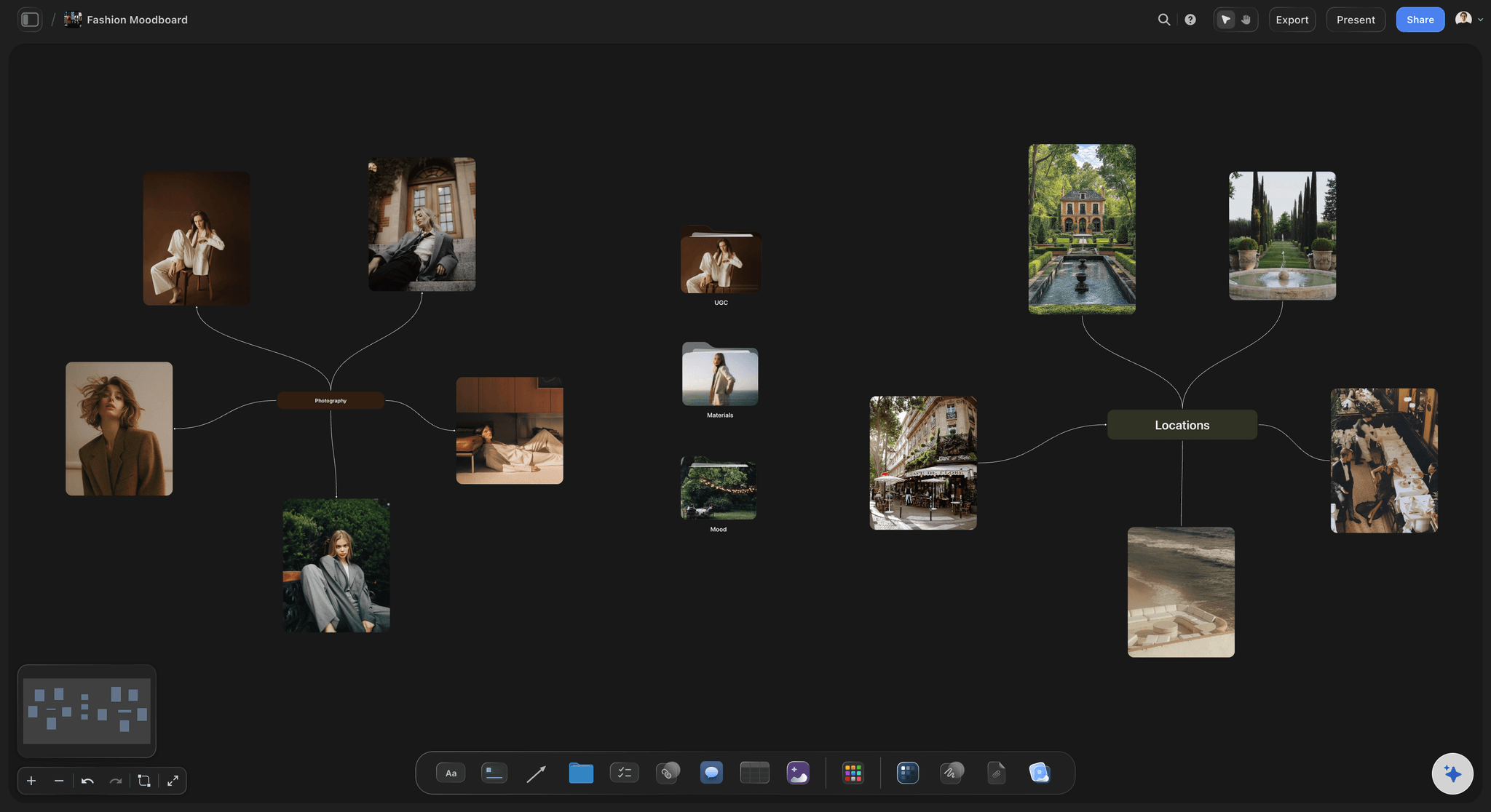
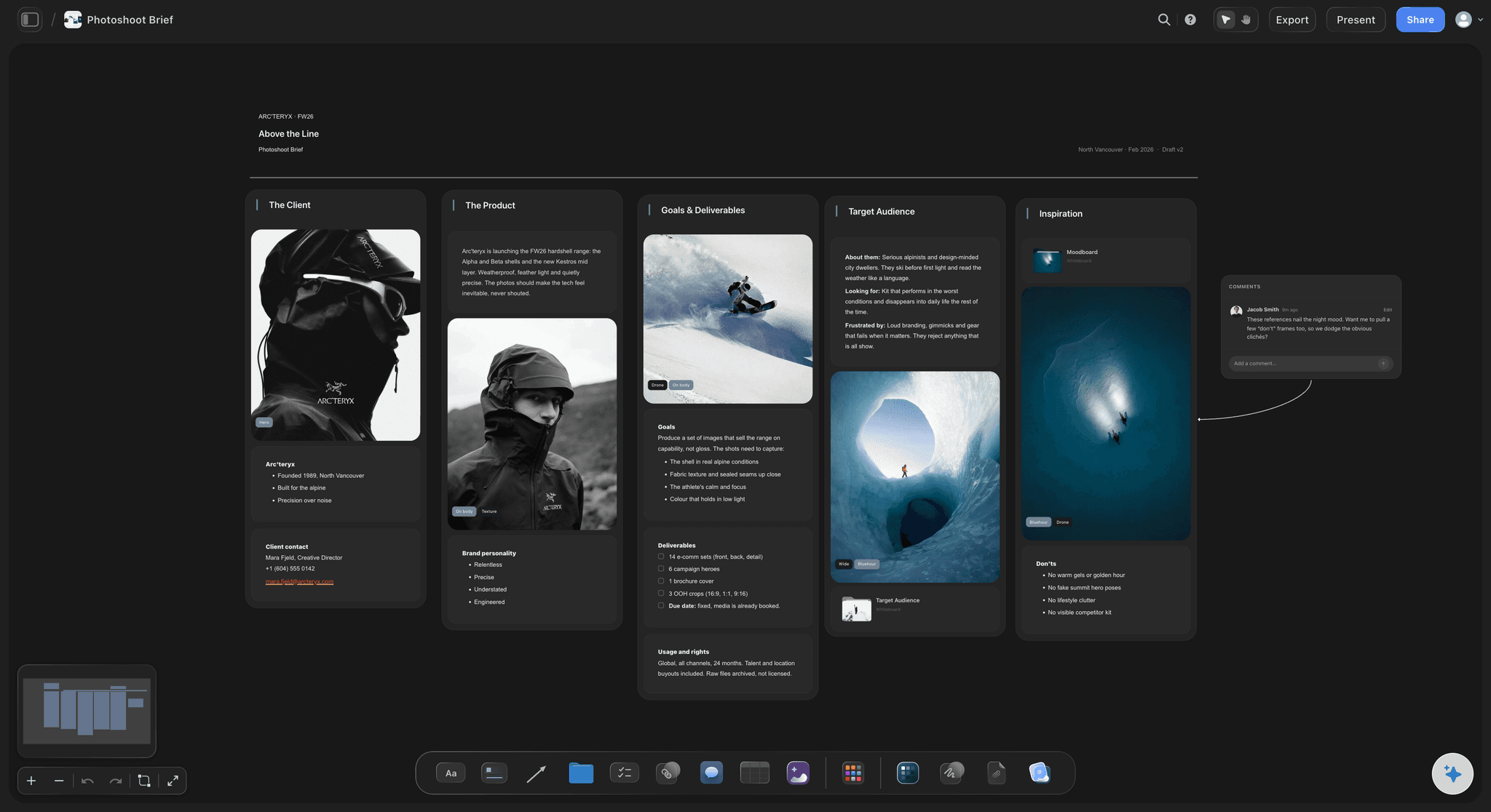
A photoshoot moodboard template is a board built to be copied for every shoot: labelled reference images, a concept note, colour swatches for the palette, a grade note, and folders for talent, locations, lighting and references. Storyflow is an AI visual workspace that keeps that template ready for your next shoot on one infinite canvas: the Photography Moodboard in its template library, groups you resize to fit the job, and folders for the research pile. Start each job from it, fill it, and share it by a view-only link the client opens with no account. Once the look is approved, the AI drafts the shot list from the same board. Canva suits a designed one-page board, and Pinterest suits collecting before you commit.
The layout matters more than the pictures, because the grouping is the hard part and it is the same every time. Deciding which images are light references and which are styling references takes ten minutes of thought you would otherwise redo on every shoot. A template that arrives grouped means the work is filling it rather than designing it, and boards built from one layout stay comparable when a client asks for 'the look from the spring shoot'.
A complete photoshoot moodboard layout has seven parts: a concept note with two or three hero images; groups for light, poses and framing, styling per look, hair and makeup, and location; and a palette with a note on the grade. Add one labelled image of what you do not want, and keep the research pile in a folder so the approved board reads in a minute. The Storyflow template starts you with the concept note, the palette, the grade note and the folders, and you add the groups the shoot needs, or ask the AI to lay them out.
It is deliberately not a fixed grid. The canvas is infinite, so a beauty job can make hair and makeup the largest group and drop location, while a landscape editorial does the reverse. Groups you do not need get deleted and groups that matter get more room, which a fixed-cell template cannot do. When the look is signed off, select the approved references and the AI drafts the shot list beside them, so one template carries the shoot from the look to the setups.
Ultra fast from brief to board
Copy it, fill it, share it, shoot from it.
The same four steps on every job, which is the point of a template.
01
Duplicate the template
Open the Photography Moodboard from the template library, or duplicate the board from your last shoot, so the layout is already there and you are only choosing images.
02
Drop references into the right group
Drag saved images straight in. Deciding which group an image belongs to is the moment you work out what you actually liked about it.
03
Caption each group, set the palette
One sentence per group naming the part of the reference you want, and three to five colour swatches for the palette. The captions are what the crew reads on the day.
04
Share it, then plan from it
Send the client a view-only link that opens with no account, and agree the look. Then ask the AI to draft the shot list from the references you select.
Why start from a layout rather than a blank grid.
On the day nobody browses a moodboard. They look up the one thing they are about to do.
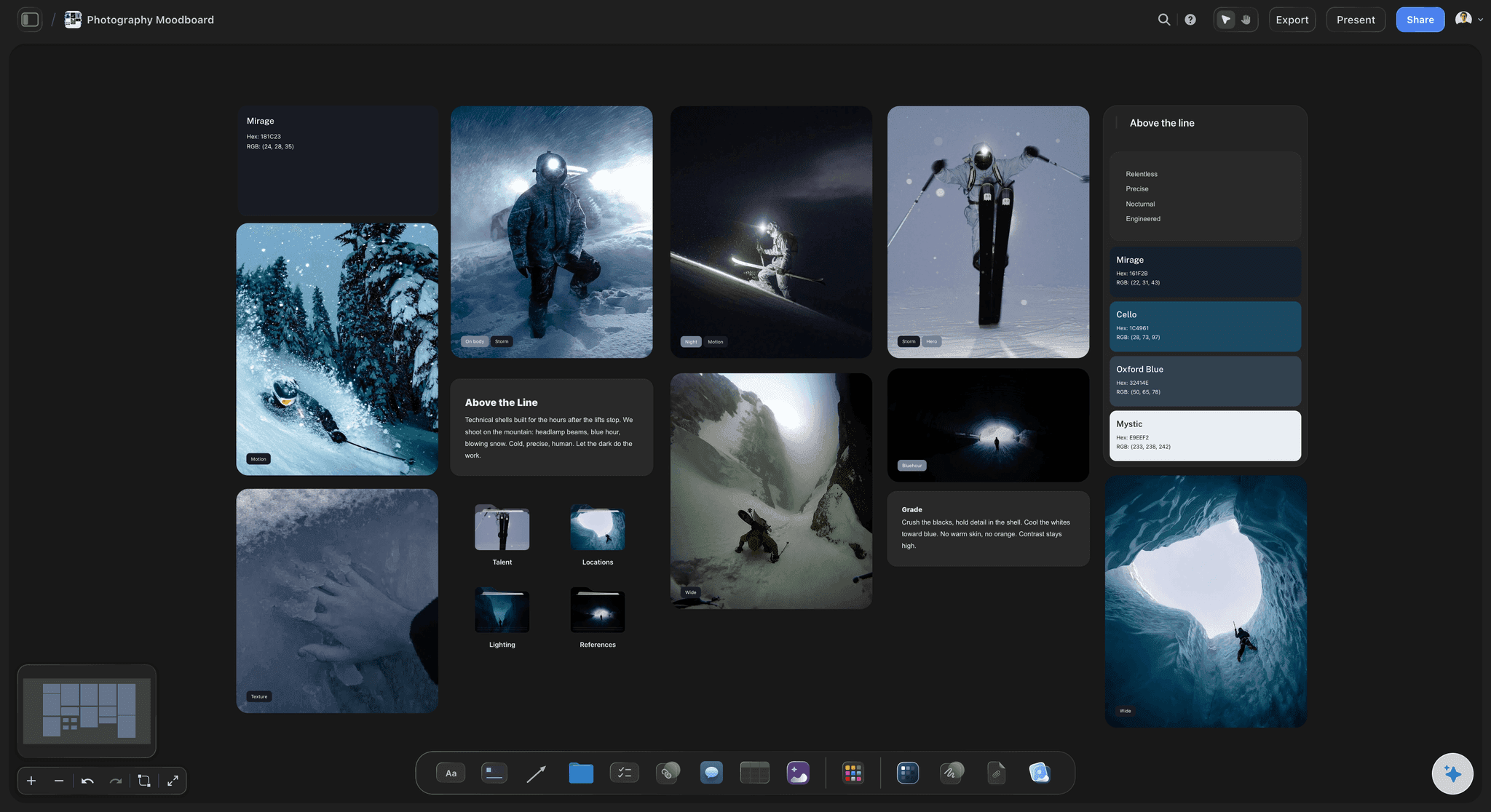
Each department finds its own group
The stylist never reads the lighting notes
Labelled groups mean the photographer, the stylist and the hair and makeup artist each open one part of the board and get an answer, instead of interpreting the whole thing.
See how to create a photoshoot moodboard →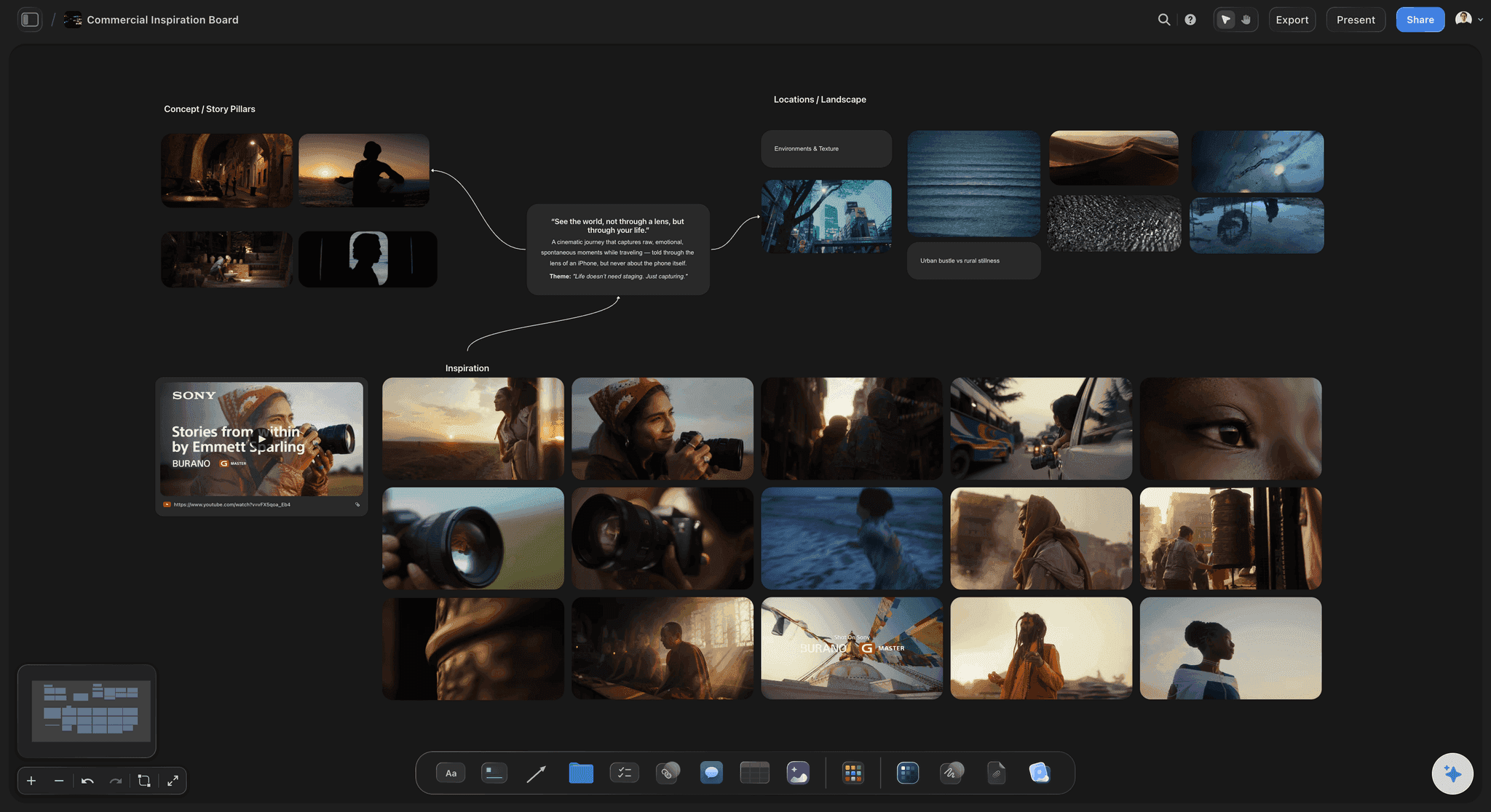
Room for the sentence that matters
Space for the instruction, not just the picture
Give every group a note beside its images, because a reference carries a dozen decisions and the caption says which one you meant.
See the photoshoot moodboard maker →
Ready to become a shot list
Finish the board, get the setups
Once the look is approved, select the references and the AI drafts a shot card for each one, with the reference as its frame, on the same board.
Plan from moodboard to shot list →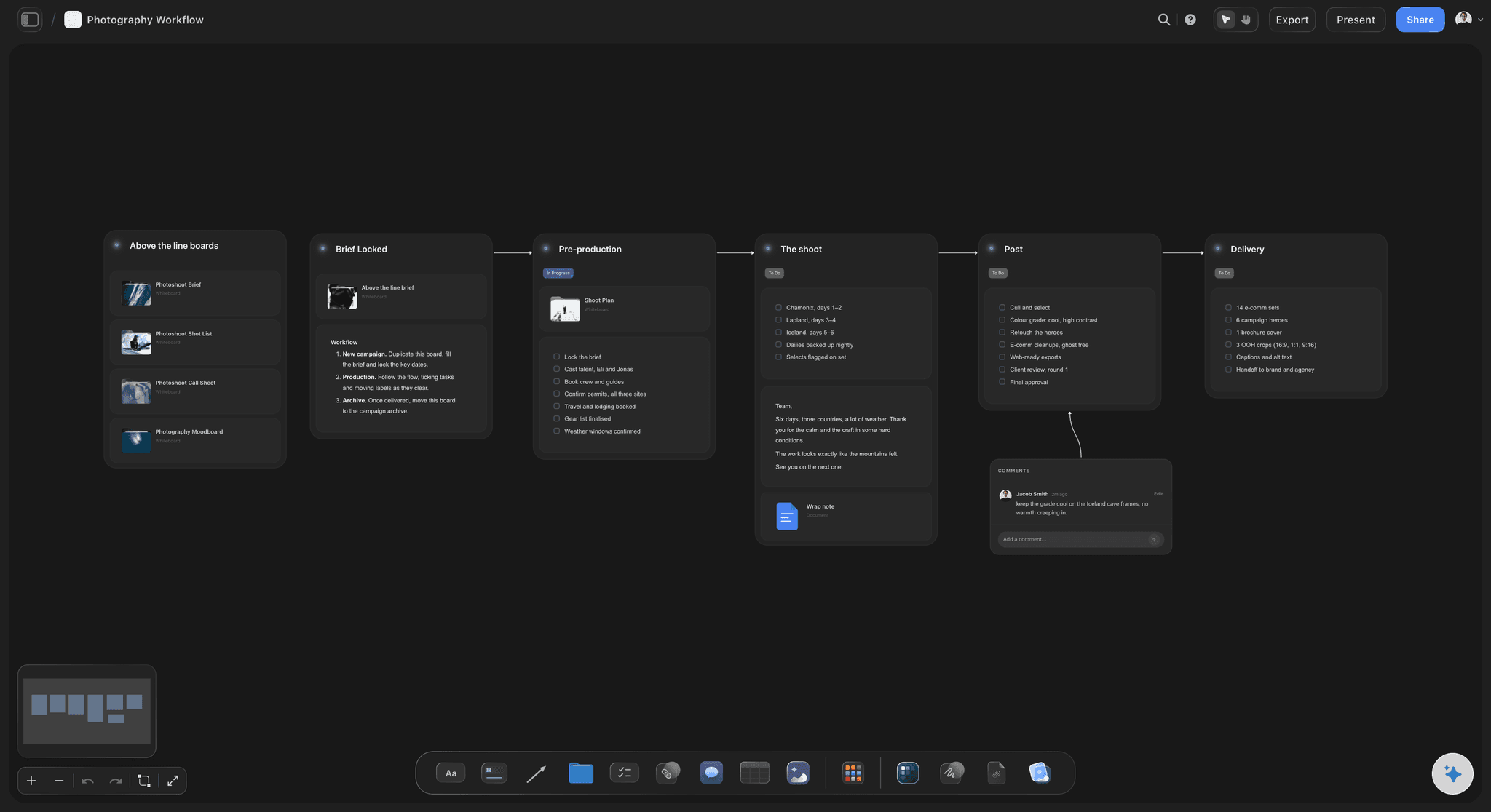
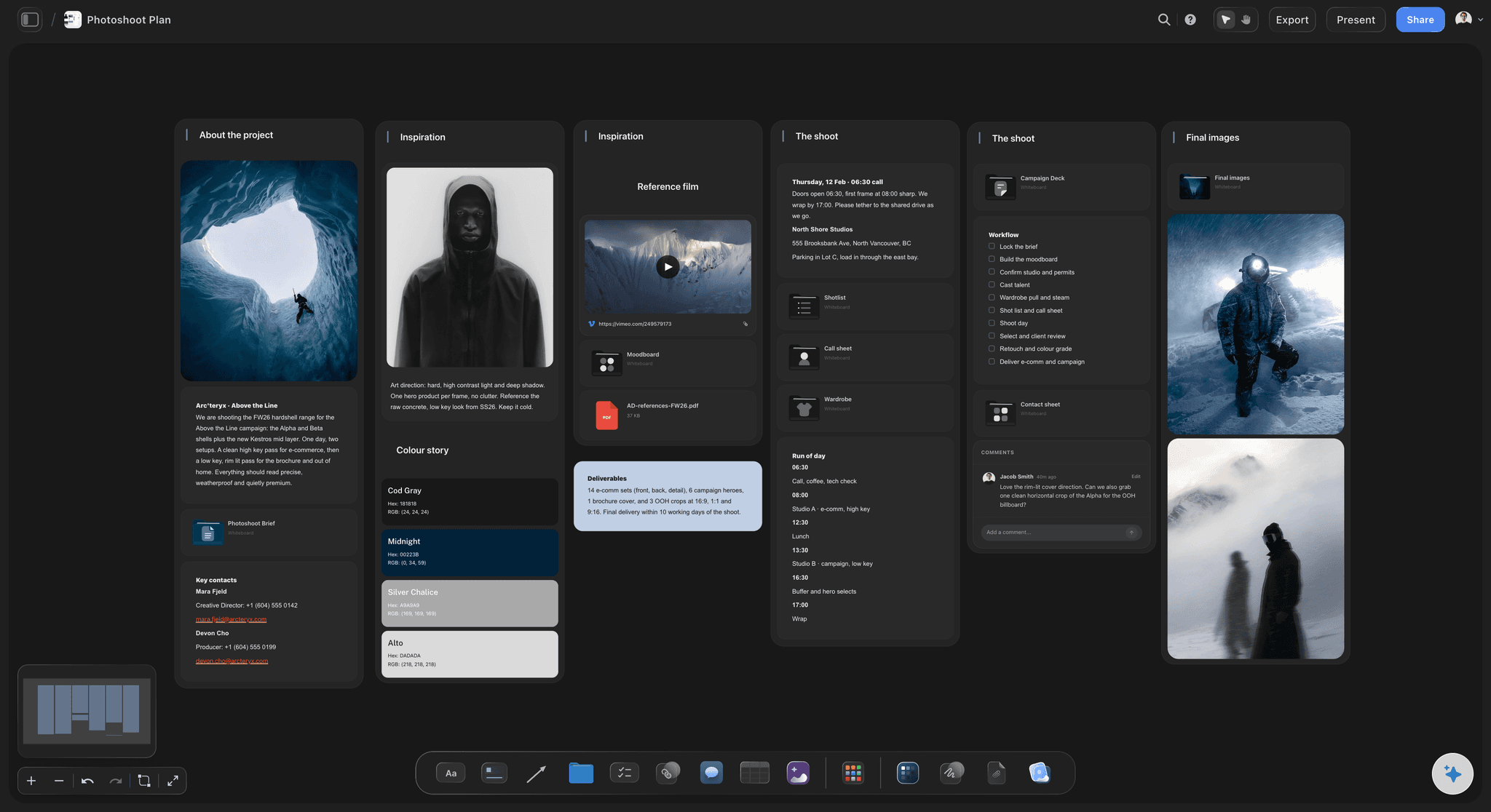
Same layout, comparable boards
Every shoot filed the same way
Duplicating one layout per job means last spring's board opens and reads instantly, which is what makes 'the look from the last one' a request somebody can act on.
Browse the template library →Duplicate it for every shoot. No board limit.
One layout, copied per job. Storyflow is paid-only during early access, with plans from $7.99 a month billed annually ($9.99 monthly). A free plan launches before the end of 2026, and anyone a paid member invites to a board joins free.
Unlimited boards and file uploads on every paid plan
Duplicate any board as the starting point for the next shoot
Colour swatches, notes, folders and video on one canvas
View-only links that open with no account
Built for people with taste
What each part of the template is for.
Delete what a shoot does not need. A beauty job and a landscape editorial use different halves of it.
The top of the board
Concept, hero images and palette
One concept note: A few lines every image has to serve, such as 'cold, precise, human; let the dark do the work'. If a reference does not serve the note, it leaves the board.
Two or three hero images: The frames that define the shoot, placed large. Everything else on the board exists to support them.
A palette with a grade note: Three to five colour swatches for what sits in front of the camera, and a separate note for the grade, such as 'crush the blacks, cool the whites'. Keeping them apart stops an argument on the day about what post can fix.
The middle of the board
Light, poses, styling, hair and makeup
Light, with the source named: Hard or soft, direction, height, fill or none. This is the group the photographer opens first.
Poses and framing: Wide, mid, close and detail, with the part of each pose you want in the caption. Coverage agreed here is coverage the shot list inherits.
Styling per look: Garments, fabric and fit for each look, with sourced and aspirational references marked. The fitting should confirm the plan rather than reveal it was fiction.
Hair and makeup: Finish, texture and colour per look, with the change between looks noted. Those changes set the schedule.
The edges of the board
Location, the don'ts and the research pile
Location beside the frames: Scout photos sit next to the compositions they suit. That pairing is where the shot list comes from.
One image of what you do not want: Labelled, it narrows the direction faster than three more images of what you do. Clients often agree on what they dislike before what they like.
Folders for the research pile: The template's folders for talent, locations, lighting and references each open a whole board behind one tile. The research stays on the canvas without crowding the approved look.

Why a canvas, not a fixed grid
The template bends to the shoot
Groups resize: A beauty job needs a large hair and makeup group and no location group. A fixed-cell template forces every shoot into the same proportions.
Size carries meaning: Make the images that define the job large and leave the rest small. A uniform grid flattens that signal away.
The whole job on one surface: Brief, references, swatches, scout photos and the shot list sit on the same board. The AI reads the board you have open when you ask it a question.
A review before you share: Ask the AI to review the board and it gives notes on which groups are thin or miss the concept, without changing anything. You decide what to fix before the client sees it.
Explore templates for your project
Every template opens as a real, editable board on the infinite canvas. Pick the closest fit and make it your own.
Film Moodboard
Collect film references, color palettes, lighting, locations, and tone in one place, then invite your crew.
One app instead of five
Storyflow vs Canva, Milanote and a PDF grid template.
Each gives you a layout to copy. Storyflow's is the template the AI turns into a shot list once the look is approved; Canva suits a designed one-page board, Milanote a board you build by hand, and a PDF grid a quick fill-in with fixed cells.
Storyflow
Recommended
Template to copy for each shoot
Groups resize to fit the shoot
Folders for the research pile on the board
AI drafts the shot list from the approved board
Client opens a view-only link
Free to use today
Canva
Template to copy for each shoot
Groups resize to fit the shoot
Folders for the research pile on the board
AI drafts the shot list from the approved board
Client opens a view-only link
Free to use today
Milanote
Template to copy for each shoot
Groups resize to fit the shoot
Folders for the research pile on the board
AI drafts the shot list from the approved board
Client opens a view-only link
Free to use today
PDF grid template
Template to copy for each shoot
Groups resize to fit the shoot
Folders for the research pile on the board
AI drafts the shot list from the approved board
Client opens a view-only link
Free to use today
What creators are saying
Join early creators getting structured workspaces and AI that remembers their projects
“Storyflow has sped up my workflow by at least 3x, which means more flow state and more projects I can actually ship. It truly changed the way me and my team create.”

Reilin Joey
Director & YouTuber
“One prompt gets me a structured board. But the tactics are my favorite. I run my YouTube scripts through them and my intros and retention got better. It's amazing.”

Justkay
YouTuber & Freelance Filmmaker
“I used to juggle five apps to plan a project. Now I describe what I am making and get boards, lists, and a schedule. All in one place.”

George
@fernwehchronicles
The photoshoot moodboard template, answered.
What photographers and brand teams ask before starting from it.
In Storyflow's template library: the Photography Moodboard board opens with labelled reference images, a concept note, a palette, a grade note and folders, and you start each shoot from it. Canva has designed one-page moodboard layouts, Milanote has a photography moodboard board you fill by hand, and many photographers keep a PDF grid. Choose by what happens next: Storyflow's is the one the AI turns into a shot list.
Storyflow has this template in its library: the Photography Moodboard opens with labelled reference images, a concept note, a palette, a grade note and folders for talent, locations, lighting and references. You copy it for each shoot, resize the groups to fit the job, and send the client a view-only link. After the client approves the look, its AI turns that board into the shot list.
A concept note with two or three hero images, groups for light, poses and framing, styling per look, hair and makeup, and location, and a colour palette with a note on the grade, each group with room for a one-line caption. Storyflow's Photography Moodboard template starts you with labelled references, the concept note, colour swatches, a grade note and folders for talent, locations, lighting and references, on a canvas where groups resize to fit the shoot.
No. Storyflow is paid-only during early access, with plans from $7.99 a month billed annually ($9.99 monthly). A free plan launches before the end of 2026, and anyone a paid member invites to a board joins free. A client with the view-only link opens a board built from the template with no account. Canva and Milanote both have free plans if you need a template today.
Yes, and you should. The canvas is infinite rather than a fixed grid, so groups resize, move and delete. A landscape editorial and a beauty shoot use different halves of the layout, and forcing both into identical cells is what makes most moodboard templates unusable by the second job. In Storyflow you can ask the AI to lay out the groups a specific shoot needs, then adjust them by hand.
Start every job from the same board. In Storyflow, open the template, or duplicate the board from a shoot that went well, at the start of each job, so the groups, captions and folders are already in place. Keeping one layout across shoots is what makes an old board readable months later, and what turns 'the look from the spring one' into a request somebody can act on. Paid plans have no board limit.
Resize the groups to the job instead of filling every one. A product shoot needs large styling and props groups, a group for surfaces and backgrounds, and the crops each channel needs, with little room for poses. A beauty shoot makes hair and makeup the largest group, keeps the framing references close, and drops location. Delete what the shoot does not use, because an empty group reads as a decision nobody made.
Mostly. The light, colour, location and styling groups carry over directly, and uploaded video references play on the board, where you can grab the exact frame you mean. For video, add coverage and camera movement, which belong in a shot list more than a moodboard, and Storyflow's AI drafts that shot list from the same board once the look is agreed.
Yes. Share the board as a view-only link and the client opens it in a browser with no account, which is the easiest way to get the direction approved before the call sheet goes out. They see the latest version whenever they open or reload the link. To comment on a specific image, or draw on the board to point at something, they sign in.
Yes. Select the approved references and ask Storyflow's AI for a shot list: it drafts a shot card for each one, with the reference as its frame and the coverage, direction and equipment beside it, or a table with a box to tick on the day. The AI reads the board you have open plus up to five documents and three other boards, so the client's brief can inform it too.
Yes. The photographer, the stylist and the art director edit the same board in real time, and anyone a paid member invites to a board joins free, so bringing the crew in does not change the bill. Each person adds to their own group, which is the practical reason the template is split by department rather than by mood.
An open canvas, for a shoot. A fixed grid gives every image the same weight and every shoot the same proportions, while the job needs three hero images large, a group for each decision and room to delete what a shoot does not need. A grid suits a one-page presentation board, which Canva does well; a working moodboard the crew reads on the day suits a canvas like Storyflow's.
A moodboard template holds the look: references, palette, captions and the don'ts. A shoot plan template holds the logistics: the schedule, the location, the team, the gear and the delivery. In Storyflow they sit on the same board or in a folder beside it, so the plan is built against the approved look, and the photoshoot plan template picks up where this one stops.
More from Storyflow
How to create a photoshoot moodboard
Photoshoot moodboard
Photoshoot plan template
Photoshoot planning
Shot list template
Moodboards for clients
For photographers
Fashion moodboard
Brand moodboard
Template library
Product moodboard
Best photography moodboard tools
Moodboard app
Wedding photography shot list
Photography client questionnaire
Photoshoot plan with Claude
Moodboard tool for photographers
Start from the layout instead of a blank canvas.
Labelled references, a palette, a grade note and folders, ready to duplicate for every job.