
Ultra-fast moodboards with real taste
How to make a moodboard
for a brand campaign, step by step.
A campaign moodboard is a set of decisions, not a pile of pictures. Here is the method, a worked example, and the board to build it on.


Creatives working for these brands already got early access
- Red Bull
- Canon
- Artlist
- Porsche
See how easy it is to get started
Watch a real project come together, from a blank board to a finished plan, clicked through step by step.
Start from a ready-made template
Pick a board to see what you can build, then let AI fill it in. Every template is a real, editable starting point on the same infinite canvas.

Film Moodboard
Collect film references, color palettes, lighting, locations, and tone in one place, then invite your crew.
How do you make a moodboard for a brand campaign?
Storyflow is an AI visual workspace that builds a moodboard for a brand campaign on one infinite canvas: the direction in one line, reference pictures grouped by the decision each one settles, a named palette with hex values, and a corner for what the campaign must not look like. To make one, write the direction first, collect 40 to 60 references, sort them into groups named for decisions, cut to the 20 to 30 you are committing to, caption every picture with what you are taking from it, set the palette, and share one link.
A campaign moodboard is different from a brand moodboard, and the difference decides what goes on it. A brand moodboard describes who the brand is in general: its type, its colours, its tone across years. A campaign moodboard describes one piece of work inside that brand: this season, this product, this audience, these channels. It borrows the brand's rules and then makes narrower choices the brand board never had to make, such as which light, which casting, which locations and which three words the pictures must pass. If your board could sit in front of any campaign the brand has ever run, it is a brand board. If it could only be this one, it is a campaign board.
Start with the brief, not with Pinterest. The brief tells you the product, the audience, the one thing the campaign must make someone feel or do, the channels and the deliverables. Write the direction as a single line that a stranger could hold a picture against, such as "slow mornings, loud colour". Then pick three test words, such as warm, unhurried and graphic. Every picture that goes on the board has to pass all three. A reference that is beautiful but fails one word belongs in a research folder, not on the board the client signs off.
Group by decision, not by source. The groups that carry most campaigns are light, casting, styling, place, colour, type and graphics, and "not this". Light answers hard or soft, direction and time of day. Casting answers age, energy and how people relate to the camera. Styling answers garments, props and the product's role in the frame. Place answers interior or exterior, texture and how much of the world shows. Type and graphics answer how the line sits on the picture across the channels. "Not this" holds the look everyone drifts back to, so it can be named and refused.
Here is a worked example. Ferro, an independent coffee roaster, is launching a spring cold brew. The direction is "slow mornings, loud colour" and the test words are warm, unhurried and graphic. The team collects 48 references across six groups, eight in each. The cut keeps four per group, 24 in total, and parks the other 24 at the edge of the board. The palette is five named colours, each with a job: Espresso for type, Oat for backgrounds, Tangerine as the accent on the can, Sage for props and Chalk for negative space. Tangerine is #F28C28. The "not this" corner holds three pictures of dark, moody coffee shots, because that is the look every coffee campaign drifts into. On Storyflow the brief sits on the board as a PDF, the AI drafts the six groups and the palette from it, and the creative director cuts by hand.
Then the board has to work for other people. The client opens a view-only link in the browser with no account. The photographer, stylist and designer are invited to the board and comment on a specific picture once they sign in, which is where a stylist flags a prop that cannot be sourced before the shoot rather than on the day. When the look is approved, Storyflow's AI turns the selected references into a shot list on the same board, so the crew reads the intent and the plan together. Storyflow is paid-only during early access, from $7.99 a month billed annually.
Ultra fast from brief to board
What are the steps to a brand campaign moodboard?
Seven steps, from the brief to a board the client signs off. Each one is done on the same Storyflow canvas.
01
Put the brief on the board
Drop the campaign brief onto a Storyflow board as a PDF or Word file, or paste it into a note. Pull out four facts: the product, the audience, the feeling the campaign must leave, and the channels it runs on.
02
Write the direction and three test words
Write one line a stranger could hold a picture against, and three words every picture must pass. Put them in a note at the top of the board, above everything else.
03
Make one group per decision
Create groups for light, casting, styling, place, colour, type and graphics, and "not this". Or ask Storyflow's AI to read the brief and draft the groups and a first set of reference pictures for you.
04
Collect wide, then cut hard
Gather 40 to 60 references, from the web, past shoots and your own photos. Keep the four strongest in each group and park the rest at the edge of the board. If two pictures could not belong to the same campaign, one goes.
05
Caption every picture
Under each picture, write what you are taking from it: "this light, ignore the outfit". A caption stops the client and the crew reading the wrong thing into a reference.
06
Set a named palette
Ask the AI for a palette from the direction, or build one yourself: five named swatches with hex values, each with a job such as type, background or accent. A swatch with no job gets cut.
07
Share one link and plan the shoot
Send the client a view-only link; it opens with no account. Invite the crew to comment after signing in. Once the look is approved, select the references and ask the AI for a shot list on the same board.
What goes on a brand campaign moodboard?
Four parts carry every campaign board. Storyflow keeps them on one canvas instead of four files.

The direction
One line and three test words
A note at the top of the board holds the direction and the three words. Every picture below it is checked against them, by you, by the client and by the photographer on the day.
See the campaign brief template →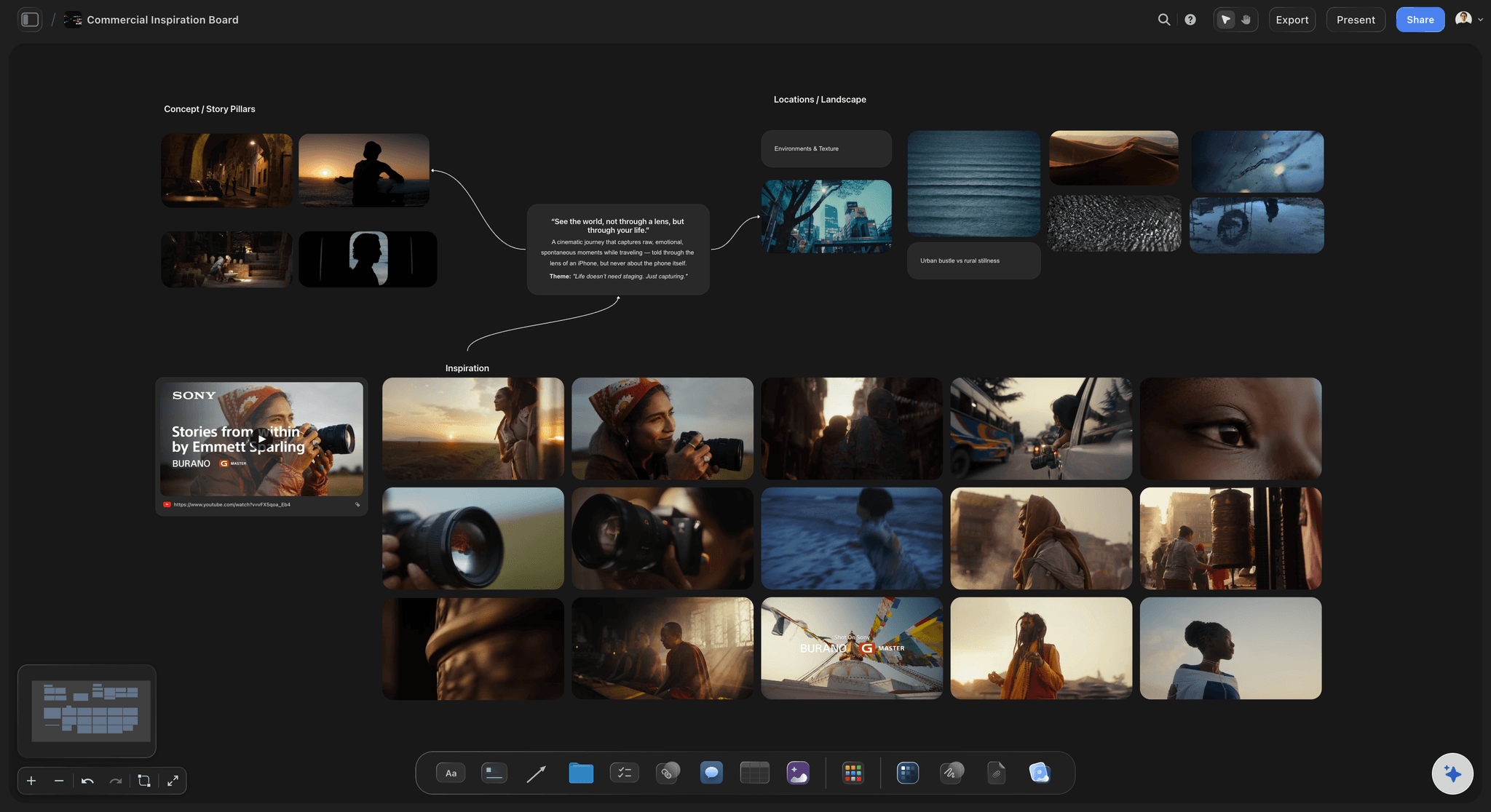
The references
Groups named for decisions
Light, casting, styling, place and type each get a group laid out as a grid. The stylist reads one group and the location scout reads another, and nobody hunts through forty loose pictures.
See the brand moodboard maker →
The colours
A palette in names and values
Swatches carry a name and a hex value, so the retoucher and the designer use the same Tangerine instead of two guesses at it from a photograph.
See the colour palette maker →
The handover
From approved look to shot list
When the client approves, the AI turns the selected references into shot cards on the same board, each picture becoming the frame on its card.
See the shot list generator →Plans from $7.99 a month billed annually. A free plan launches before the end of 2026.
Storyflow is paid-only during early access: Plus is $7.99 a month billed annually ($9.99 monthly), with Pro and Max above it. Every paid plan has unlimited boards and file uploads. The client and the crew you invite to the campaign board join free, and anyone with a view-only link opens it with no account.
Unlimited boards and file uploads on every paid plan
AI that drafts the groups, the references and the palette from the brief
View-only links the client opens with no account
Invited collaborators join free and comment once signed in
Shot list on the same board as the approved references

Built for people with taste
Why do campaign moodboards fail, and how do you avoid it?
Most campaign boards fail in one of three places. Each has a fix you can make on the board itself.
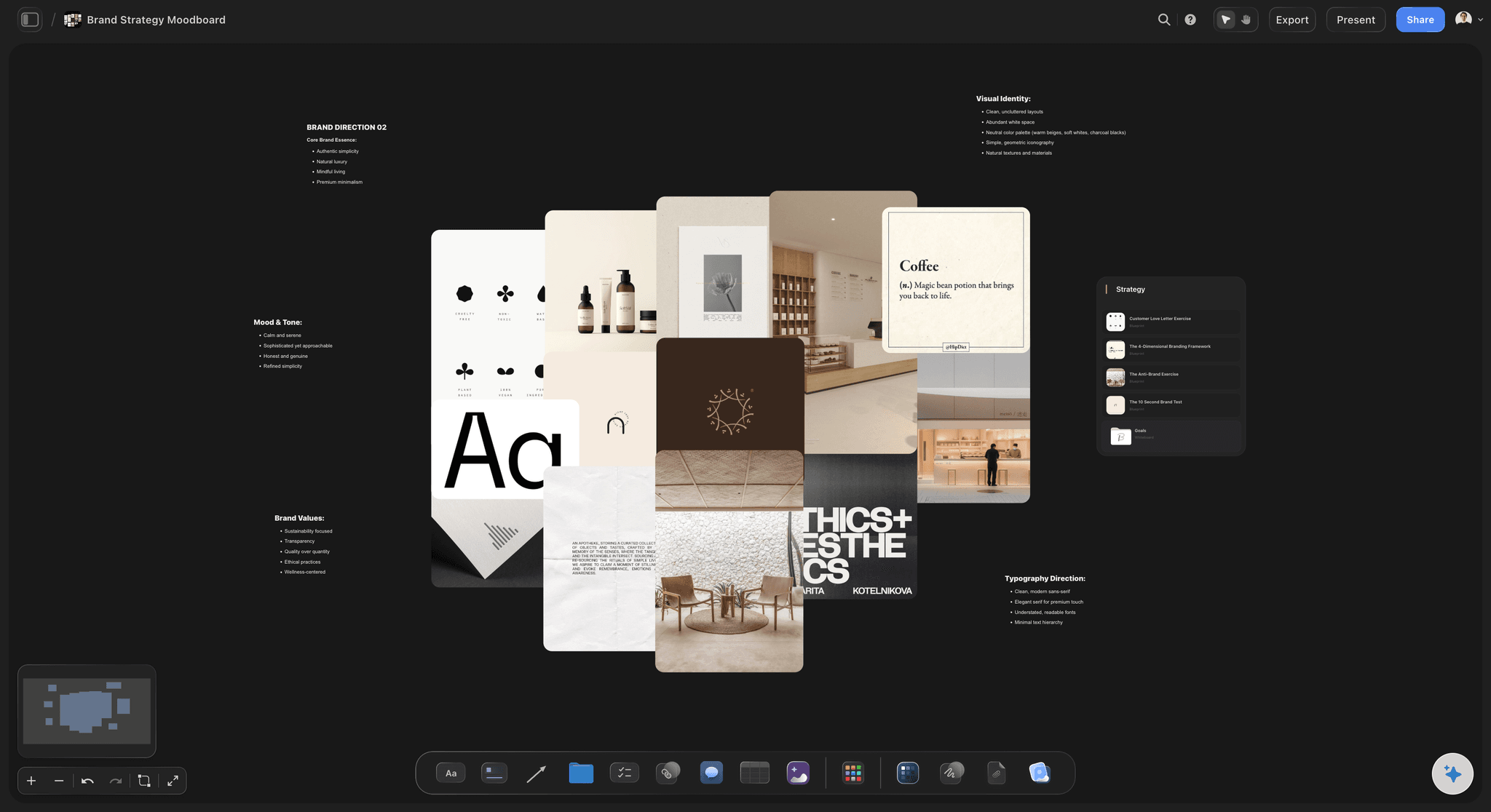
Too many pictures
Forty beautiful references that disagree
Cut to what you commit to: A board with two lighting moods and three eras of styling is not a direction. Keep four pictures a group and park the rest at the edge of the same board, where they are still findable.
Test every picture against three words: If a picture fails one of the test words, it leaves the board the client sees, however good it is.
Ask the AI to find the gaps: Storyflow's AI reads the whole board. Ask which group is thin or which pictures contradict the direction line, then decide yourself.
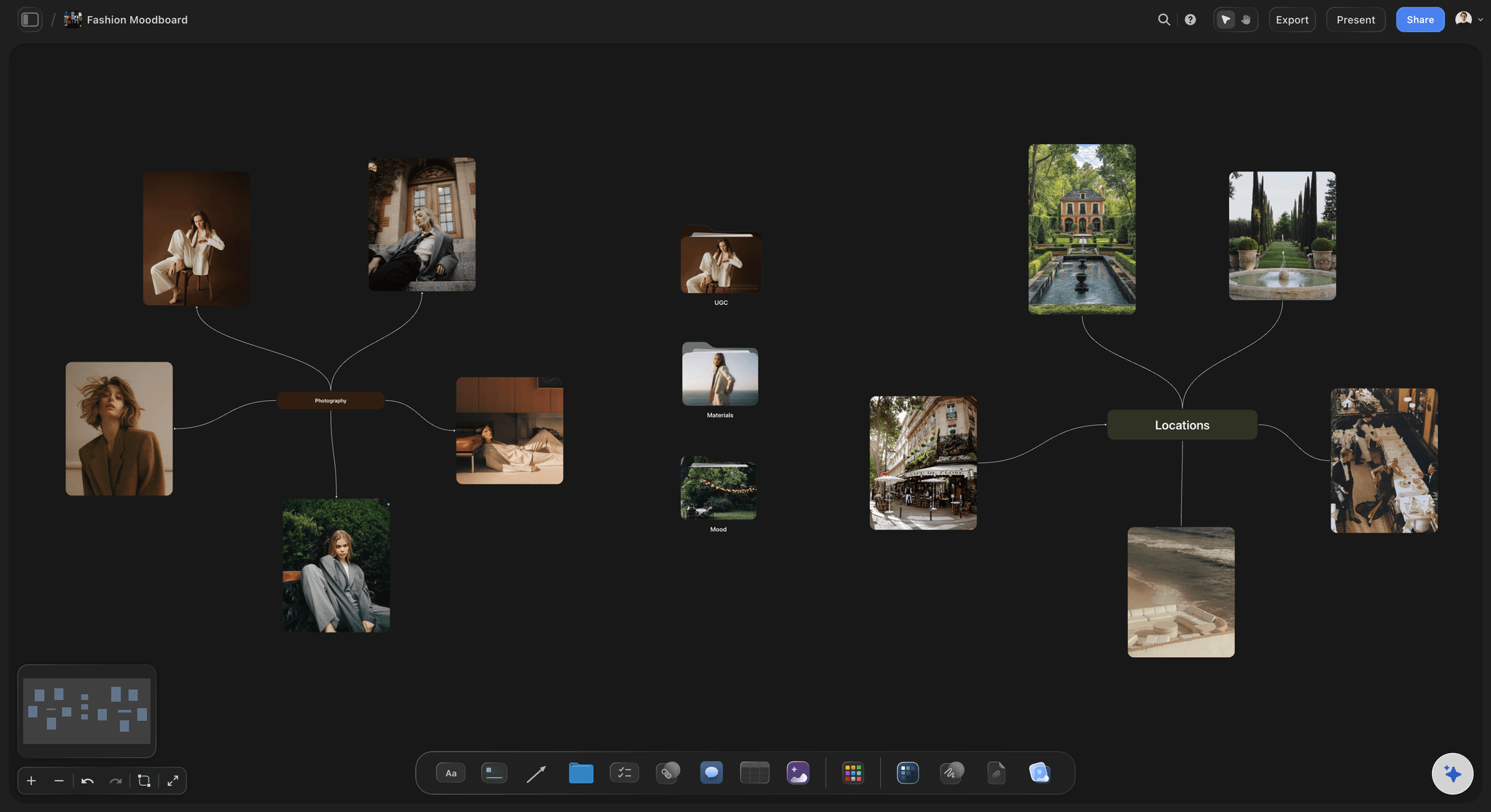
No words
Pictures with no captions
Say what you are taking: "The light, not the pose" under a picture saves a reshoot. Without it, the client approves the outfit you meant to ignore.
Notes beside the pictures: On a freeform canvas the caption, the direction and the palette sit next to the picture they describe, not in a separate document.
Name the refusals: The "not this" corner is where you show the look the campaign must not become, so nobody drifts back to it in the edit.
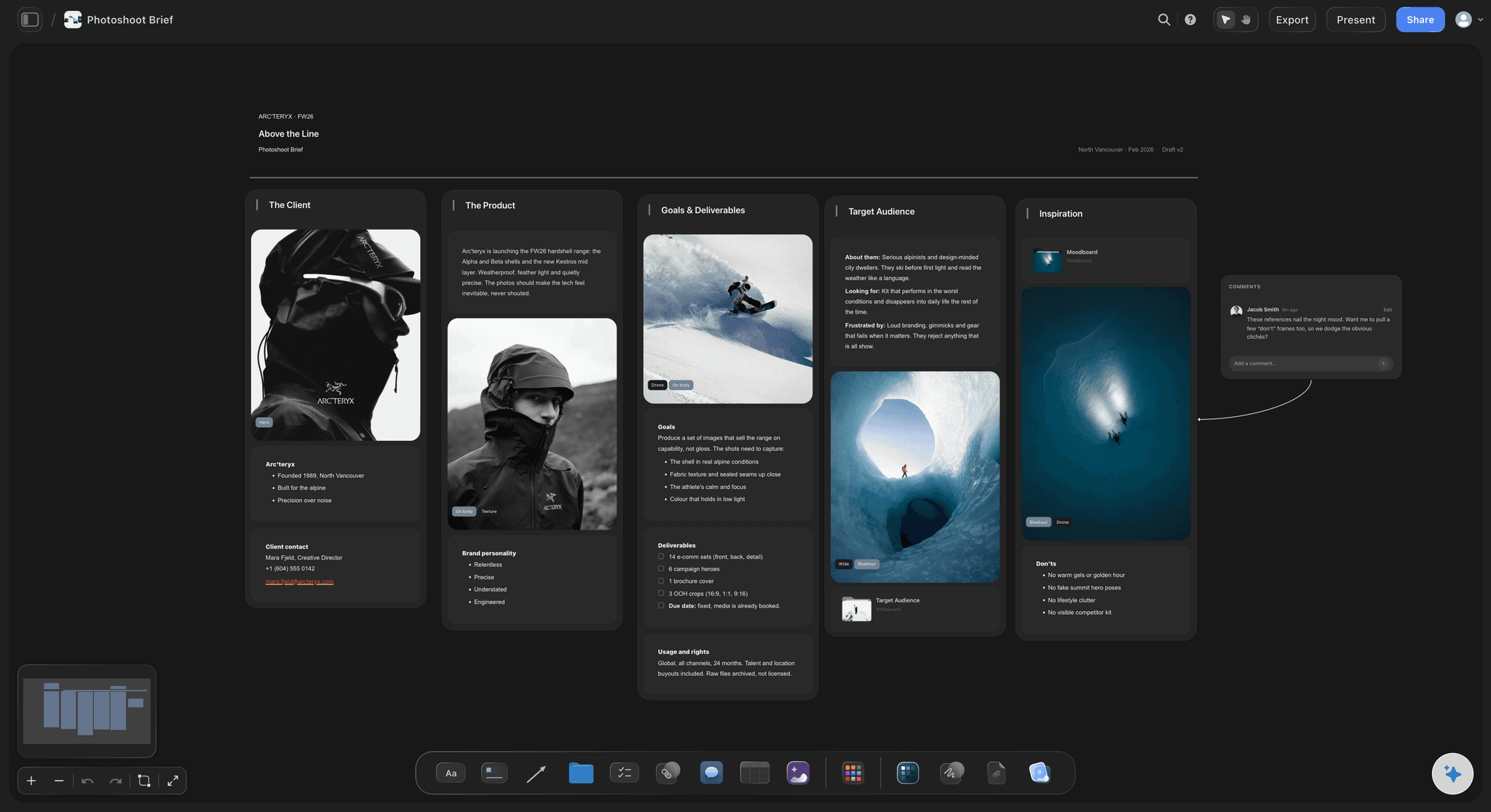
No handover
A board that stops at approval
One link for the client: A view-only link opens in any browser with no account. To comment on a picture, the client signs in.
Present it in the room: Storyflow has a presentation mode that takes the board fullscreen, so the pitch and the working board are the same thing.
Shot list on the same board: Select the approved references and ask the AI for a shot list. The pictures become the frames on the shot cards, so the crew reads the intent beside the plan.
Explore templates for your project
Every template opens as a real, editable board on the infinite canvas. Pick the closest fit and make it your own.
Film Moodboard
Collect film references, color palettes, lighting, locations, and tone in one place, then invite your crew.
One app instead of five
Which tool should you use for a brand campaign moodboard?
Our own product is listed first. Storyflow holds the board from brief to shot list; Pinterest is still better for discovering pictures, and Canva for a designed one-page layout.
Storyflow
Recommended
AI drafts the groups and palette from the brief
Freeform canvas with captions beside pictures
Named palette with hex values on the board
Shot list on the same board as the references
View-only link that opens with no account
Free plan available today
A feed of new pictures to browse
AI drafts the groups and palette from the brief
Freeform canvas with captions beside pictures
Named palette with hex values on the board
Shot list on the same board as the references
View-only link that opens with no account
Free plan available today
A feed of new pictures to browse
Canva
AI drafts the groups and palette from the brief
Freeform canvas with captions beside pictures
Named palette with hex values on the board
Shot list on the same board as the references
View-only link that opens with no account
Free plan available today
A feed of new pictures to browse
What creators are saying
Join early creators getting structured workspaces and AI that remembers their projects
“Storyflow has sped up my workflow by at least 3x, which means more flow state and more projects I can actually ship. It truly changed the way me and my team create.”

Reilin Joey
Director & YouTuber
“One prompt gets me a structured board. But the tactics are my favorite. I run my YouTube scripts through them and my intros and retention got better. It's amazing.”

Justkay
YouTuber & Freelance Filmmaker
“I used to juggle five apps to plan a project. Now I describe what I am making and get boards, lists, and a schedule. All in one place.”

George
@fernwehchronicles
Brand campaign moodboards: questions
What creative directors, brand managers and photographers ask before the board goes to the client.
Write the direction in one line and pick three test words. Collect 40 to 60 references, sort them into groups named for decisions (light, casting, styling, place, colour, type), cut to four per group, caption each picture with what you are taking from it, set a named palette, and add a "not this" corner. On Storyflow the AI can draft the groups and palette from the brief, and you share the board from one view-only link.
Storyflow is built for exactly this job: an AI visual workspace where the brief, the grouped references, the named palette, the captions and the shot list sit on one canvas the client opens from a link. It is paid-only during early access, from $7.99 a month billed annually. Pinterest is still where you discover pictures, and Canva is the quicker choice for a designed one-page layout.
A brand moodboard describes the brand in general: its colours, type and tone across years. A campaign moodboard describes one piece of work inside it: this season, this product, these channels, this light and casting. It borrows the brand's rules and makes the narrower choices. On Storyflow both can live in the same project, with the campaign board linking back to the brand board.
Collect 40 to 60, then cut to 20 to 30. Four strong pictures per group across six groups is 24, which a client can take in on one screen. Keep the cut pictures at the edge of the same Storyflow board rather than deleting them, so the team can bring one back without searching again.
Most advertising moodboards need a direction line, light, casting, styling, place, colour, type and graphics, and a "not this" corner. Add channel notes if the campaign runs in formats with different crops, such as a vertical story and a billboard. In Storyflow each section is a group on the canvas with its caption and swatches beside it.
It can make the first draft. Storyflow's AI reads the brief on your board, writes the direction, builds the groups, finds real reference pictures on the web, and proposes a named palette. On the Pro and Max plans it can also generate a picture for a look nobody has photographed. The cut stays with you, because choosing which references the campaign commits to is the creative decision.
From your brand's past campaigns, your photographer's portfolio, film stills, magazines, and the web. Pinterest is good for discovery. Storyflow's AI can find real pictures on the web and save its own copy of each onto the board, so a reference does not break when the original page disappears. Check the rights before any reference goes outside the team.
Use five named swatches with hex values, and give each one a job: type, background, accent, props, negative space. On Storyflow you can ask the AI for a palette from the direction line, and it places the named swatches on the board next to the pictures. Hold them against the references and adjust what is off.
Make a view-only link in Storyflow and send it. The client opens the board in a browser with no account. To comment on a specific picture they sign in, and anyone a paid member invites to the board joins free. For a meeting, presentation mode takes the board fullscreen.
Yes, once they sign in. A view-only link lets anyone look with no account, and commenting needs a Storyflow sign-in. Invited collaborators join free, so a client, stylist or photographer can leave a comment on the exact picture they mean.
Once the look is approved, select the references on the Storyflow board and ask the AI for a shot list. It builds a shot card for each setup with the picture as its frame, a checklist of shots, a direction note and an equipment note, on the same board as the moodboard.
Not yet. Storyflow is paid-only during early access, with plans from $7.99 a month billed annually ($9.99 monthly). A free plan launches before the end of 2026. Until then, anyone a paid member invites to a board joins free, and a view-only link opens with no account.
Yes. Storyflow exports a board as a PDF for a client who wants a file in the deck, and the live board stays the working version behind it.
Every picture passes the same three words, every picture has a caption, the palette is in names and values, and the board names what the campaign must not look like. A good board is one the photographer could shoot from without asking you what you meant.
Build the campaign moodboard the client signs off.
The direction, the references, the palette and the shot list on one Storyflow board.