
Elevated brand work, made with taste
Your brand board in ChatGPT,
with every rule where people can see it.
For brand teams, marketers and agencies: ChatGPT lays out the palette, the type, the references, the voice and the do's and don'ts on one Storyflow board.


Creatives working for these brands already got early access
- Red Bull
- Canon
- Artlist
- Porsche
See how easy it is to get started
Watch a real project come together, from a blank board to a finished plan, clicked through step by step.
Start from a ready-made template
Pick a board to see what you can build, then let AI fill it in. Every template is a real, editable starting point on the same infinite canvas.

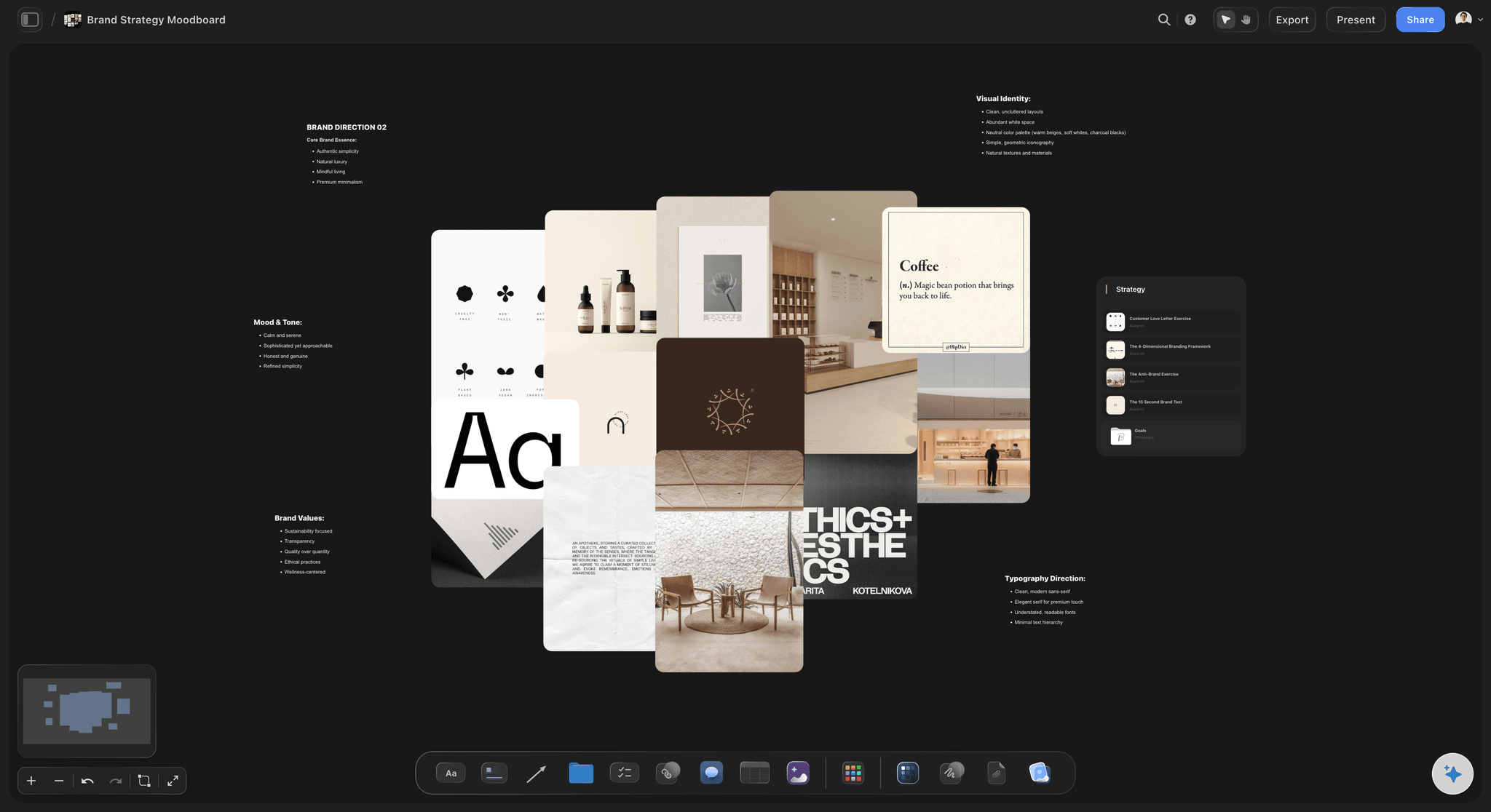
Brand Strategy
Define your positioning, values, and voice and connect them into a strategy the team can follow.
Can ChatGPT make a brand board?
Yes, ChatGPT can make a brand board: describe the brand and it proposes a palette with hex values, pairs the typefaces, writes the voice in a few words with sample lines, and lists what the brand never does. Storyflow is an AI visual workspace that builds a brand board on one infinite canvas: the palette as named swatches, the type notes, the logo and reference pictures, the voice and the do's and don'ts, each in its own wall. With the Storyflow plugin installed, ChatGPT builds that board itself, on its own model, so it uses none of your Storyflow AI credits.
ChatGPT is quick at the thinking behind a brand board. Give it three adjectives and a competitor and it suggests a primary, two neutrals and an accent, says why, pairs a serif for headlines with a sans for body text, and writes "we say, we never say" examples. But the answer is text. A hex code in a sentence is not a colour anyone can see, a type pairing is two names, and the freelancer who joins next month will not scroll back through a chat to find the rules.
With the plugin, ChatGPT builds the brand board as walls on your board, one for each part: logo, colour, type, imagery, voice, and do's and don'ts. The palette lands as a grid of named swatches, each showing its hex and RGB values. The type wall holds a note or a table with each typeface, its weights, its sizes and where it is used. The voice wall carries the three words, sample lines and a "we say, we never say" table. Reference pictures go in from image addresses, up to 12 per request, and your logo files and brand photos through the "Add your photos" link.
An example to copy (the brand is made up). Northwick Cider relaunches in spring 2027, and its agency builds the brand board in one chat. Six walls. Logo: three versions, full, mark and one-colour, uploaded as pictures. Colour: six swatches, two primaries (Orchard Red #B5322B, Pressed Gold #D9A441), three neutrals (Cellar #2A2420, Rind #EDE4D3, Slate #6B6F72) and one accent (Leaf #4E7D3A). Type: two typefaces at four sizes. Imagery: eight reference photos of real orchards and real hands. Voice: three words (dry, warm, rooted) and four sample lines. Do's and don'ts: five of each. The client and every freelancer open the same board.
A brand board is a set of rules, so write each one so a stranger can follow it. Give every colour a share as well as a role; one common split is 60 percent neutral, 30 percent primary and 10 percent accent. Name type sizes by their use ("headline, 48") and not by number alone. Write each don't as the exact mistake, such as "never set the logo on Orchard Red", not "use the logo with care". Show the logo on the backgrounds it is allowed on. And keep the voice to three words you can test a sentence against: if a line is not dry, warm and rooted, it is not Northwick.
Now the limits. The plugin does not make AI images, so it will not draw your logo: ChatGPT can sketch ideas in its own chat, and the finished logo goes on the board as a picture through the upload link. Storyflow exports boards as PNG, JPEG or PDF, with no SVG export, so the board shows the logo but does not hand out vector files; keep the master logo and font files where your team stores them and put a link to that folder on the board. ChatGPT cannot delete cards or read the comments on the board.
Ultra fast from brief to board
Four steps from three adjectives to a brand board people follow.
ChatGPT drafts the rules and lays them out. Whoever owns the brand signs them off.
01
Install Storyflow from the plugin directory
Open the Storyflow listing in ChatGPT's plugin directory and select Install plugin. Sign in to Storyflow when asked, then choose which projects ChatGPT may use.
02
Describe the brand
Start a chat, type @ and pick Storyflow, then say what the company sells, who buys it, how it should feel and which colours are already fixed. For example: "Build a brand board on the Northwick board: dry, warm, rooted. Keep Orchard Red #B5322B. Walls for logo, colour, type, imagery, voice, and do's and don'ts." The walls and the palette appear.
03
Add the logo and the pictures
Ask ChatGPT for the "Add your photos" link and upload the logo versions and brand photos from your phone or computer into the walls you name. ChatGPT can add reference pictures from image addresses too.
04
Check the rules and share the board
Ask ChatGPT to check each text colour against its background and fix what fails. Then share the board from Storyflow with a view-only link that clients and freelancers open in a browser without an account.

Everything on a brand board, built by ChatGPT in walls.
Each wall is something ChatGPT makes through the plugin, and something a freelancer can read without asking.
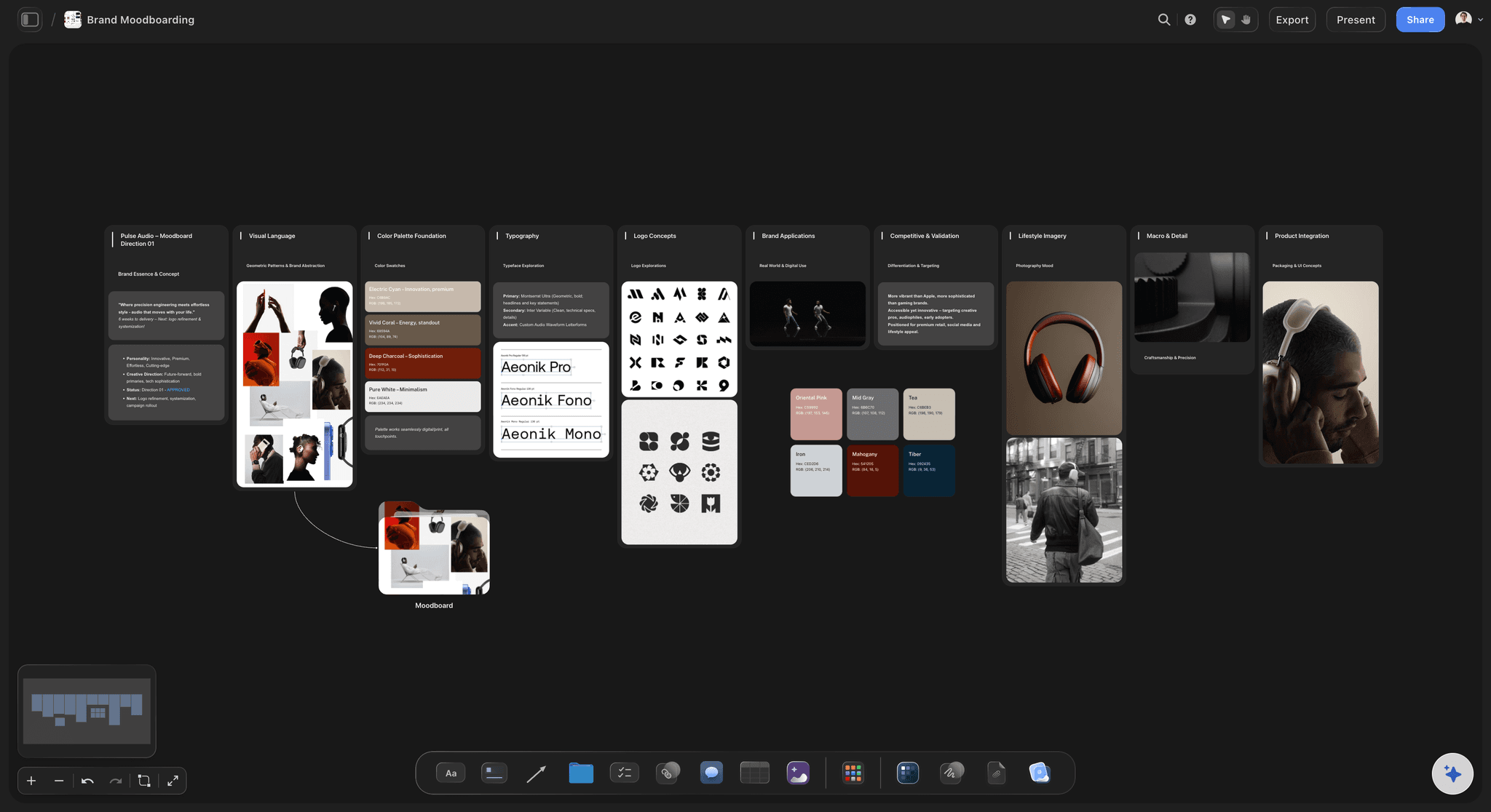
Colour and type
Swatches with values, type with a job
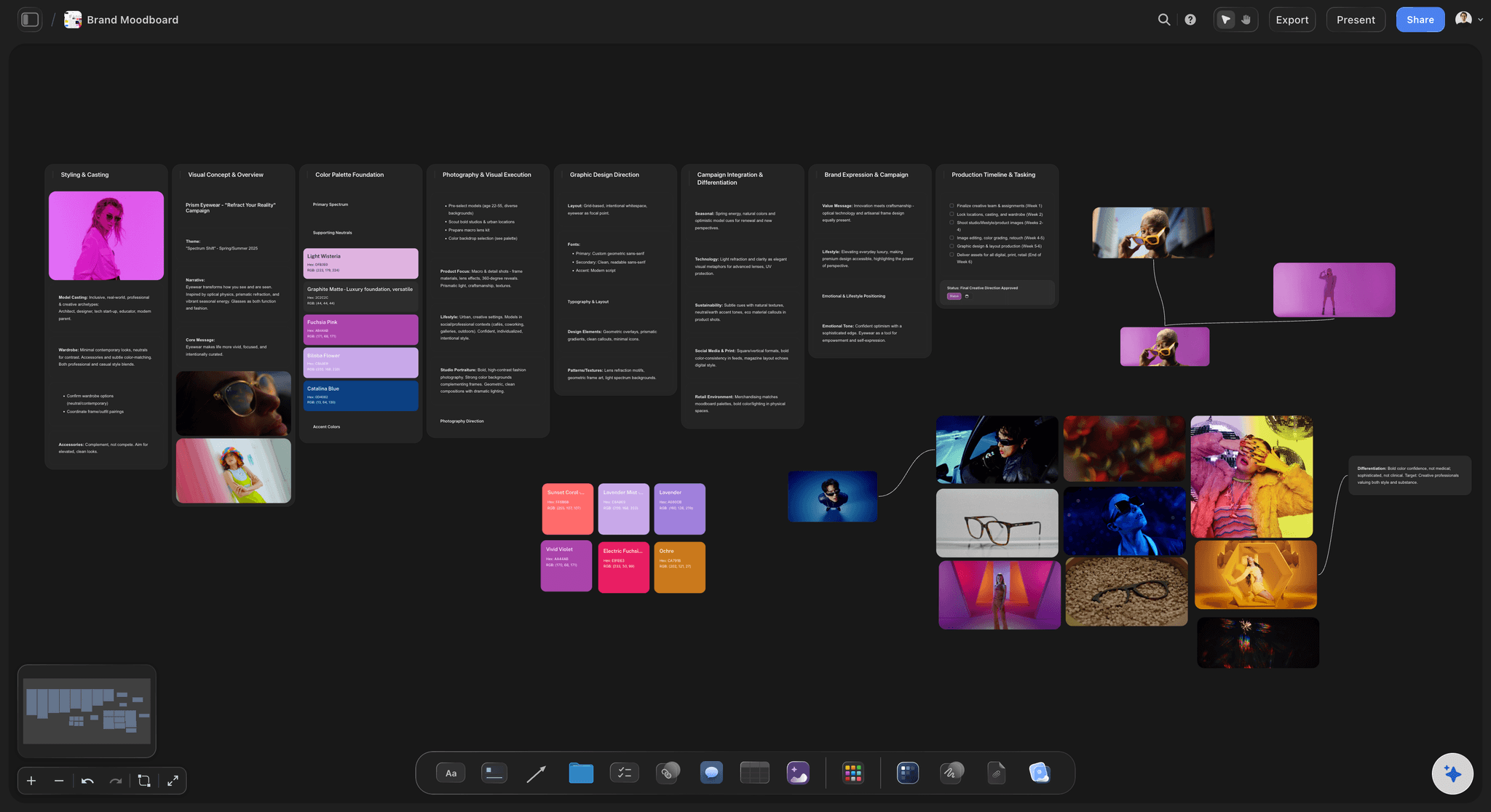
ChatGPT places the palette as named swatches with hex and RGB values and writes the type system beside it: each typeface, its weights and where it is used. Logo concepts and pictures sit in walls of their own.
See the colour palette with ChatGPT →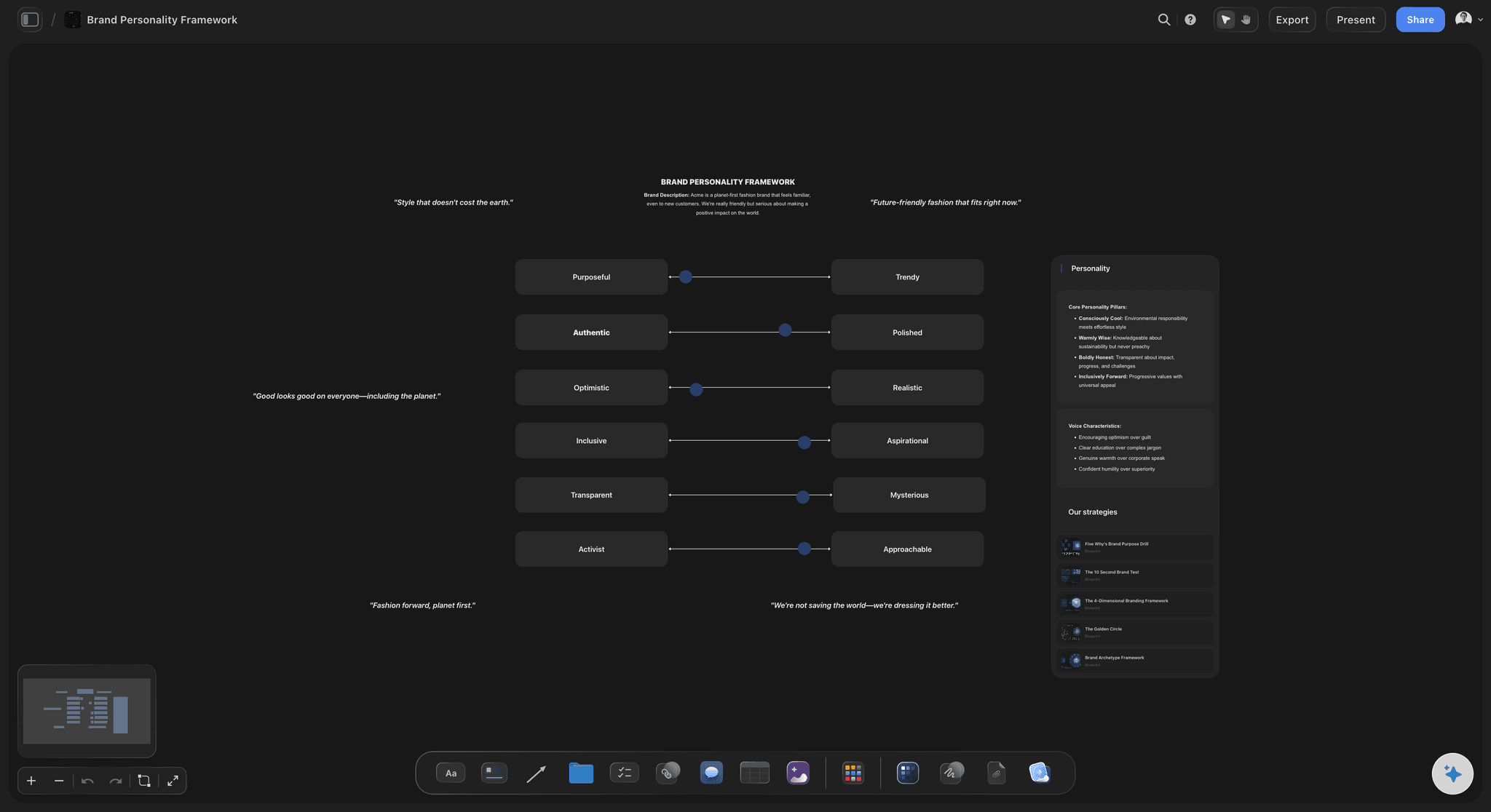
Voice
How the brand sounds, written down
Ask for the voice and ChatGPT writes the personality, three to five pillars and lines the brand would and would not say, as notes on the same board as the colours.
See the AI brand voice generator →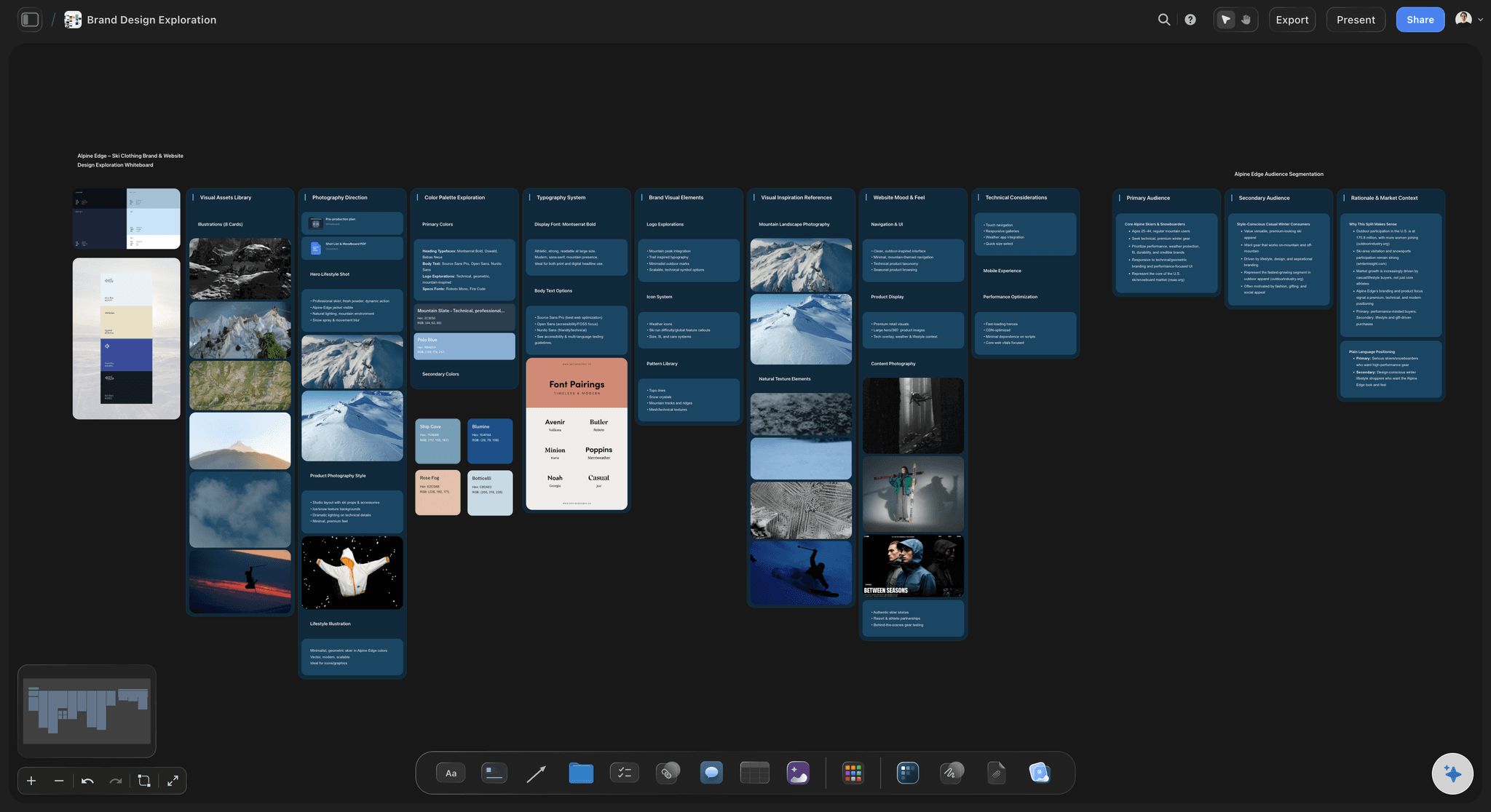
References
Photography, pattern and texture in one view
Reference pictures go in from image addresses or from your phone through the upload link, sorted into walls for photography direction, patterns and inspiration, so the look is shown and not described.
See the brand moodboard →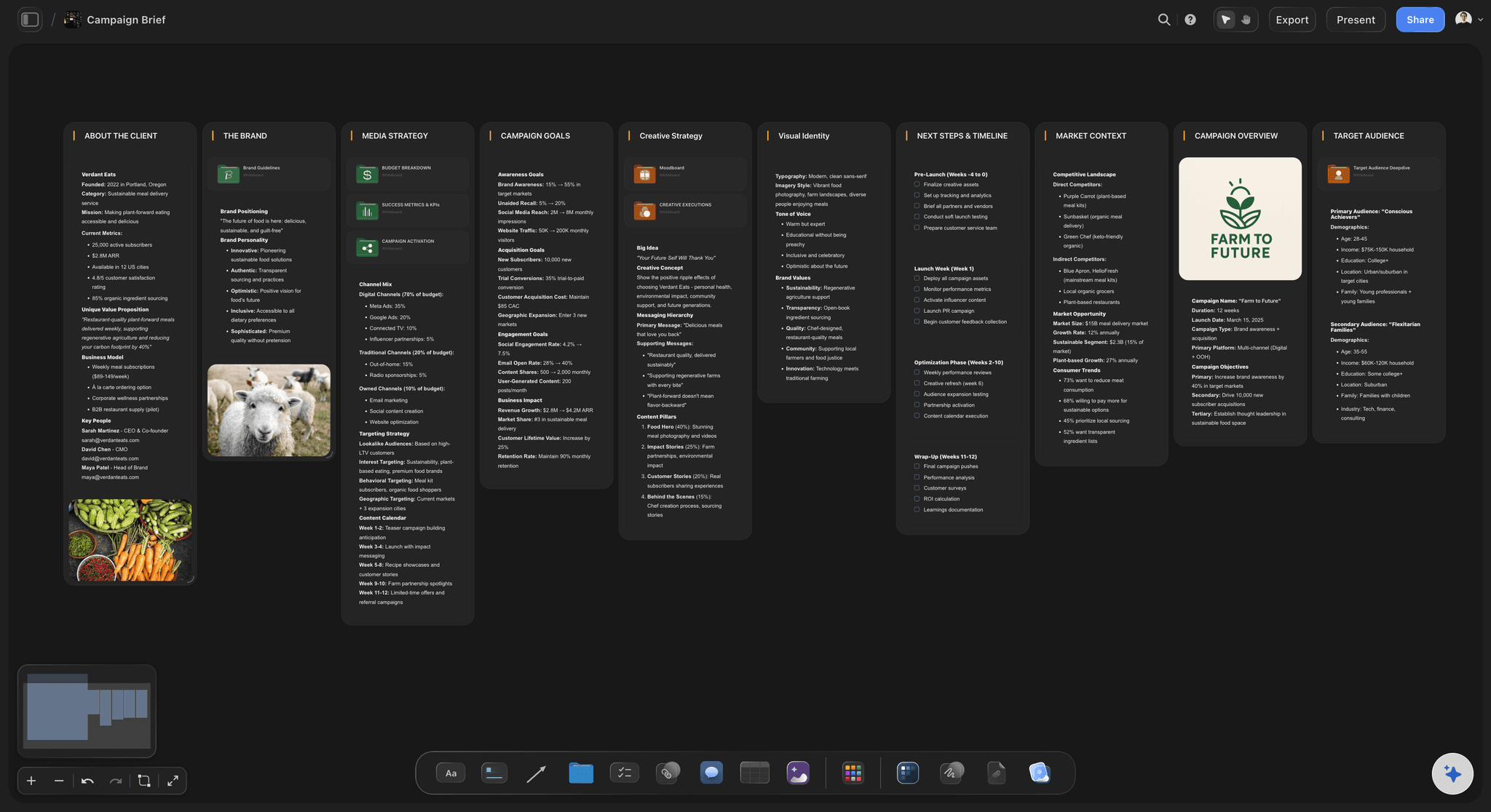
The campaign
From brand board to campaign brief
Ask ChatGPT for the campaign brief in the same project and it writes the client, the brand, the goals and the audience in walls, using the palette and the voice already agreed.
See the brand strategy with ChatGPT →ChatGPT builds the brand board. No Storyflow AI credits spent.
The plugin runs on ChatGPT's own model and your ChatGPT plan, so a brand board built through it uses no Storyflow AI credits. An invited free Storyflow account can make 25 plugin actions a week, reset every Monday (UTC). Plus, Pro and Max have no weekly limit. Storyflow is paid-only during early access, from $7.99 a month billed annually ($9.99 monthly), and anyone a paid member invites to a board joins free.
No Storyflow AI credits spent on boards ChatGPT builds
No weekly limit on plugin actions on Plus, Pro and Max
Clients and freelancers join the board free when you invite them
Colour, type, voice and references on one board
You choose which projects ChatGPT may open
Built for people with taste
Where a brand board from a chat falls short.
The rules are easy to write in a chat. They are hard to follow from one.
The system
Rules a stranger can follow
Each colour gets a role: ChatGPT names each swatch and writes what it is for (background, headline, button, accent), so nobody sets body text in the accent colour.
Contrast checked: Ask ChatGPT to check every text and background pair. Body text needs a contrast ratio of at least 4.5:1 under WCAG, and ChatGPT works the ratio out from the two hex values and proposes a darker swatch for a pair that fails.
Type as a table: Typeface, weight, size and use in rows: "Headline, 48, bold", "Body, 16, regular". ChatGPT writes the rows in size order. Tables on the board cannot be sorted, so add a new size in its place.
Start from a template: Storyflow's template gallery has a Brand Moodboard, a Brand Inspiration board and a Brand Personality Framework. Ask ChatGPT to put one on the board and rewrite its example cards for your brand.
The old brand
Start from what the brand already has
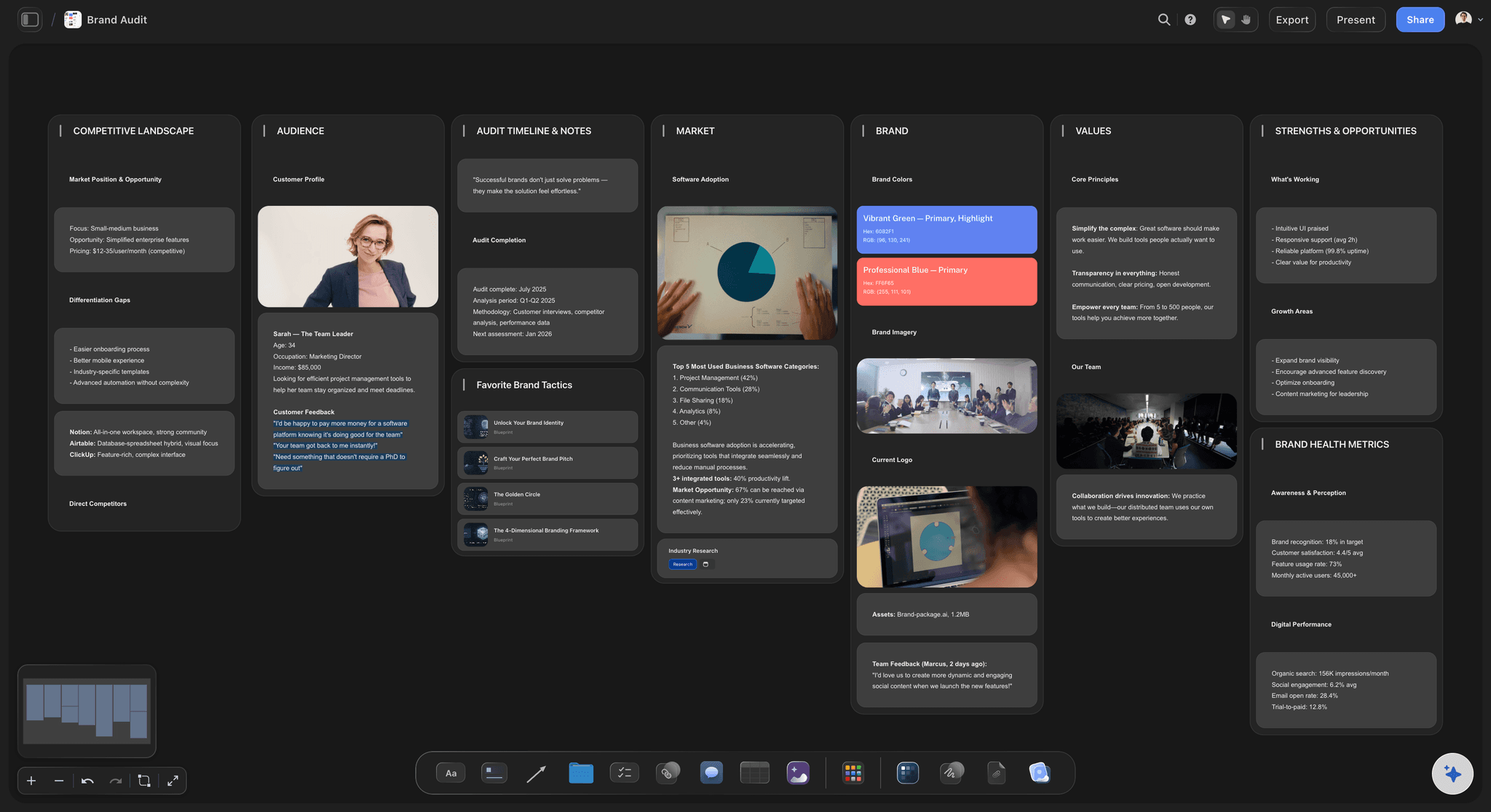
Today beside tomorrow: Upload the current logo and last year's campaign photos through the link into a wall called Today, so the new rules sit beside what they replace.
Colours read off the old logo: Attach the logo in the ChatGPT chat and ask for its colours. ChatGPT reads them off the picture and places them as swatches to keep or replace.
The voice from real copy: Paste the homepage and three recent posts, and ChatGPT writes the voice the brand has now and the voice it should have, side by side.
Tactics for the message: When you allow all projects, ChatGPT can use Storyflow Tactics, expert frameworks such as StoryBrand, to shape the message before the board is laid out.
The handover
The freelancer starts on Monday
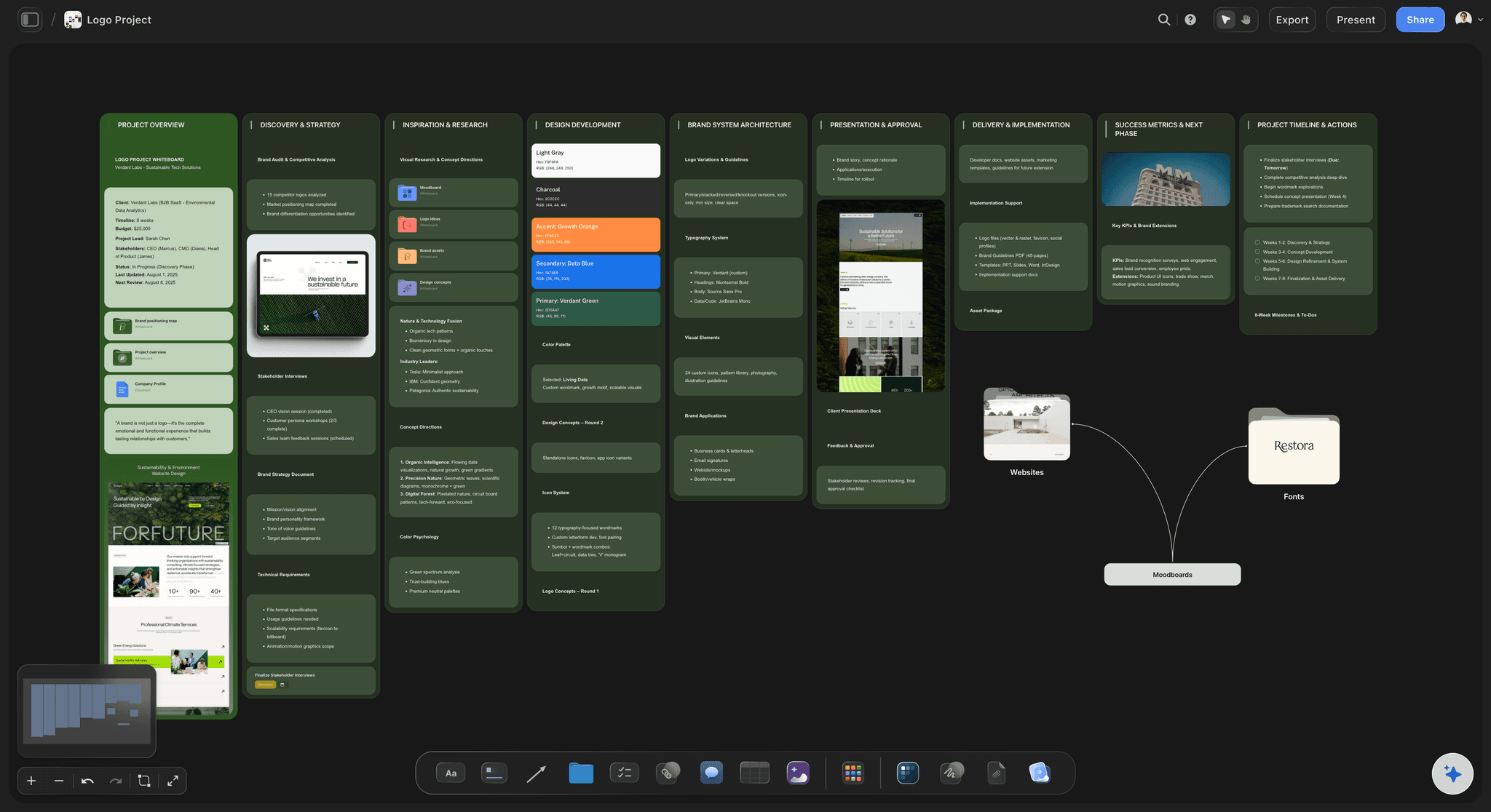
One link for everyone: Share the board with a view-only link. A freelancer, a printer or the client opens it in a browser with no account; to comment, they sign in.
Master files linked, not copied: Put a link card to the folder with the master logo and font files on the board, so the board is the map and the files stay where your team keeps them.
Ask what changed: When the accent changes in March, ask ChatGPT what changed on the board this week. It lists what was added, edited or moved, and by whom.
Export for the pitch: Export the board as PNG, JPEG or PDF for a pitch deck or a print-out, or present it fullscreen one wall at a time on a call.
Explore templates for your project
Every template opens as a real, editable board on the infinite canvas. Pick the closest fit and make it your own.
Brand Strategy
Define your positioning, values, and voice and connect them into a strategy the team can follow.
One app instead of five
ChatGPT with a board, ChatGPT alone, or Adobe Express.
Storyflow is our product, so it comes first. Adobe Express is in ChatGPT's plugin directory too ("Design posts, flyers, and more"; see Adobe's help for what its plugin does). As of October 2026 its pricing page lists brand kits on Premium that keep a brand's colours, fonts, logos and graphics for every new design, which Storyflow does not.
Storyflow with ChatGPT
Recommended
Brand board, moodboard and campaign plan on one board
Logo and brand photos added to it
The team edits it together in real time
Brand kit of colours, fonts and logos for new designs
Thousands of ready-made design templates
AI images
ChatGPT on its own
Brand board, moodboard and campaign plan on one board
Logo and brand photos added to it
The team edits it together in real time
Brand kit of colours, fonts and logos for new designs
Thousands of ready-made design templates
AI images
Adobe Express
Brand board, moodboard and campaign plan on one board
Logo and brand photos added to it
The team edits it together in real time
Brand kit of colours, fonts and logos for new designs
Thousands of ready-made design templates
AI images
What creators are saying
Join early creators getting structured workspaces and AI that remembers their projects
“Storyflow has sped up my workflow by at least 3x, which means more flow state and more projects I can actually ship. It truly changed the way me and my team create.”

Reilin Joey
Director & YouTuber
“One prompt gets me a structured board. But the tactics are my favorite. I run my YouTube scripts through them and my intros and retention got better. It's amazing.”

Justkay
YouTuber & Freelance Filmmaker
“I used to juggle five apps to plan a project. Now I describe what I am making and get boards, lists, and a schedule. All in one place.”

George
@fernwehchronicles
Brand boards with ChatGPT: questions
What brand teams, marketers and agencies ask before a brand board goes to the client.
Yes. ChatGPT proposes the palette, pairs the typefaces, writes the voice and lists the do's and don'ts. With the Storyflow plugin, it builds the brand board on a Storyflow board instead of in the chat: a wall each for the logo, the colours as named swatches with hex and RGB values, the type, the reference pictures, the voice, and the do's and don'ts. Your logo and photos go in through an upload link.
Storyflow is our pick, on one basis: ChatGPT builds the whole brand board through it, with named swatches, type notes, references, the voice and the do's and don'ts in walls on one board that clients and freelancers open without an account. Storyflow is our product. Adobe Express, also in ChatGPT's plugin directory, suits a team that wants the brand's colours, fonts and logos kept in a brand kit for every new design, which its pricing page lists on Premium.
Six parts: the logo in its versions, the colour palette with names, values and roles, the typefaces with sizes and uses, reference pictures for photography and texture, the voice in three to five words with sample lines, and a list of do's and don'ts. Some boards add patterns, icons or packaging. Keep each part to what a designer needs to make the next thing without asking.
Not through the Storyflow plugin, which does not make AI images. ChatGPT can sketch logo ideas in its own chat, but a picture drawn there does not reach the board by itself. Put the finished logo on the board as a picture through the "Add your photos" link. Storyflow's own built-in AI, inside the app, makes AI images on Pro and Max, using Storyflow AI credits.
Yes. ChatGPT proposes colours with a role for each, and places them on your Storyflow board as 2 to 24 named swatches showing hex and RGB values. Attach a logo or a photo in the chat and it can read the colours off that picture. Ask it to check each text and background pair against the 4.5:1 contrast ratio WCAG sets for body text before you sign the palette off.
It writes them down rather than installing them. ChatGPT puts the type system on your Storyflow board as a note or a table: each typeface, its weights, its sizes and where it is used. To show the letterforms themselves, upload a picture of the type specimen through the "Add your photos" link and keep the font files where your team stores them.
Ask ChatGPT for the "Add your photos" link for your Storyflow board. Open it on your phone or computer and pick the pictures: up to 200, within 15 minutes. Tell ChatGPT which wall they belong in, such as Logo or Imagery, and they land there as they upload. A picture you attach in the ChatGPT chat does not reach Storyflow by itself.
A brand board is the one-view summary: colours, type, logo, pictures and voice side by side. Brand guidelines are the longer document with the rule for each, such as the logo's clear space, its smallest size and how a headline is written. ChatGPT can write both on the same Storyflow board: walls for the brand board and a document for the guidelines.
Yes. Export the board from Storyflow as PNG, JPEG or PDF, or share it with a view-only link that opens in a browser with no account. To leave a comment, the client signs in. Presentation mode also goes fullscreen and steps one wall at a time, which suits walking a client through the board on a call.
It does not make AI images, so it will not draw a logo, and ChatGPT cannot delete cards or read the comments on the board. Storyflow exports PNG, JPEG and PDF but not SVG, so it does not hand out vector logo files, and it does not apply your brand fonts to other designs. Storyflow runs in the browser, with no native phone app.
No. The plugin runs on ChatGPT's own model and your ChatGPT plan, so it uses no Storyflow AI credits. Storyflow is paid-only during early access: Plus is $7.99 a month billed annually ($9.99 monthly), Pro $14 and Max $39 a month billed annually. An invited free account can make 25 plugin actions a week, reset on Mondays (UTC). Plus, Pro and Max have no weekly limit.
The board is the same; only the setup differs. ChatGPT adds Storyflow from its plugin directory. Claude, Gemini and Grok connect the same Storyflow account as a custom connector with the address https://mcp.storyflow.so/mcp, and storyflow.so/mcp has the steps for each. A brand lead in ChatGPT and a designer in Claude can build on the same walls.
Only the ones you choose. When you sign in, Storyflow asks whether ChatGPT may use all your projects or only the ones you pick. Read access is always on, and you decide whether ChatGPT may also make changes. Storyflow Tactics and starting a new project need the all-projects choice. Every connection ends after 30 days, and ChatGPT then asks you to sign in again.
Yes, in the same Storyflow project. Ask for the brand strategy and ChatGPT adds walls for the positioning, the audience and the message next to the brand board. Ask for a campaign and it writes the brief, the goals and the audience using the palette and the voice already agreed, so the campaign starts from the rules instead of retyping them.
More from Storyflow
Connect ChatGPT to Storyflow
Storyflow for every AI assistant
Brand board with Claude
Colour palette with ChatGPT
Brand strategy with ChatGPT
Moodboard with ChatGPT
Campaign plan with ChatGPT
How to make a brand campaign moodboard with ChatGPT or Claude
Brand moodboard
AI brand guidelines generator
AI brand voice generator
Style guide maker
Brand identity presentation
Write the brand rules in the chat. Keep them on a board.
The palette with values, the type, the pictures and the voice, on one link for the client and every freelancer.