
Sharper briefs, sent ultra fast
Write the creative brief, share it,
and plan the production from it.
A brief with the deliverables, the approver, the dates and the budget in it, read by the client from a link with no account. Once it is signed off, the same board becomes the production plan.


Creatives working for these brands already got early access
- Red Bull
- Canon
- Artlist
- Porsche
See how easy it is to get started
Watch a real project come together, from a blank board to a finished plan, clicked through step by step.
Start from a ready-made template
Pick a board to see what you can build, then let AI fill it in. Every template is a real, editable starting point on the same infinite canvas.

Creative Brief
Capture the objective, audience, and message for a creative so everyone works from the same brief.
What's the best tool for writing and sharing a creative brief?
A creative brief says what the work has to do, who it is for and who signs off. Storyflow is an AI visual workspace that takes a creative brief from draft to production plan on one infinite canvas: the brief, the client's link to read it, and the plan that follows. Start from the Campaign Brief or Advertisement Brief template, or have the AI draft the brief from the client's notes as a Doc or as cards: the work and what it has to do, who it is for and who signs off, the look, the references, the dates, and a budget table with a total. References sit beside the words, and the client reads it from a link with no account. Google Docs suits a text-only brief with suggested edits; Notion suits a searchable library of briefs.
What goes in a creative brief is settled by what it has to prevent: work that is well made and answers the wrong question. So it records what the work has to do, specific enough to fail at, and how success will be measured; who it is for, as a person in a moment rather than an age bracket; the one thing it must say and why anyone should believe it; the tone, shown with examples; the exact deliverables with format, length, quantity and where each will run; the mandatories; who signs it off; the dates; and the budget. A field is doing its job when a reasonable person could disagree with what is written in it.
Briefs usually fail after they are written. A brief sent as an attachment exists in three versions by the second week, and nobody is sure which one the client approved. The references that carry half its meaning sit in a separate folder that drifts. The approver is never named, so the first round is overturned by someone who was not in the briefing. And the deliverables are vague enough to argue about, which is where unbudgeted work comes from. A shared brief works when there is one live version, the references sit beside the fields they explain, and the approval happens on that version.
A signed-off brief becomes a production plan in one pass: each deliverable becomes a line with a format, an owner and a due date; the phases are worked back from the delivery date; every client approval gets a date in the schedule; the dependencies, meaning what the client owes you and when, are written into the phase that waits on them; and the budget lines follow the deliverables. In Storyflow the plan sits beside the brief on the same board, as a table with date, person and status cells, tickets with assignees and due dates, and to-do lists, and the AI can build a first version from the brief, worked back from the delivery date, for you to correct.
Ultra fast from brief to board
From the client's notes to a production plan.
The brief and the plan live on one board, so the plan is checked against the brief rather than against memory.
01
Start the brief
Start from the Campaign Brief or Advertisement Brief template, or ask the AI to draft a Doc with the work, who it is for and who signs off, the look, the references, the dates and the budget.
02
Fill it, or let the AI draft it
Paste the client's email or attach their document and ask the AI for a first draft, as a Doc or as cards. Anything nobody has answered yet goes in a list of open questions.
03
Share it for sign-off
The client opens the view-only link with no account and signs in to comment on the part they question. The named approver signs off on the live version.
04
Turn it into the production plan
Build the plan beside the brief: a table of phases and deliverables with date, person and status cells, and tickets with assignees and due dates.
A brief that turns into the plan.
The fields that prevent rework, one live version, and a direct path to the schedule.

The parts, in the order to answer them
A brief template that asks the right questions
The work and its spec, who it is for and who signs off, how it looks, what you are working from, the dates and the budget, in the order they need answering.
See the campaign brief template →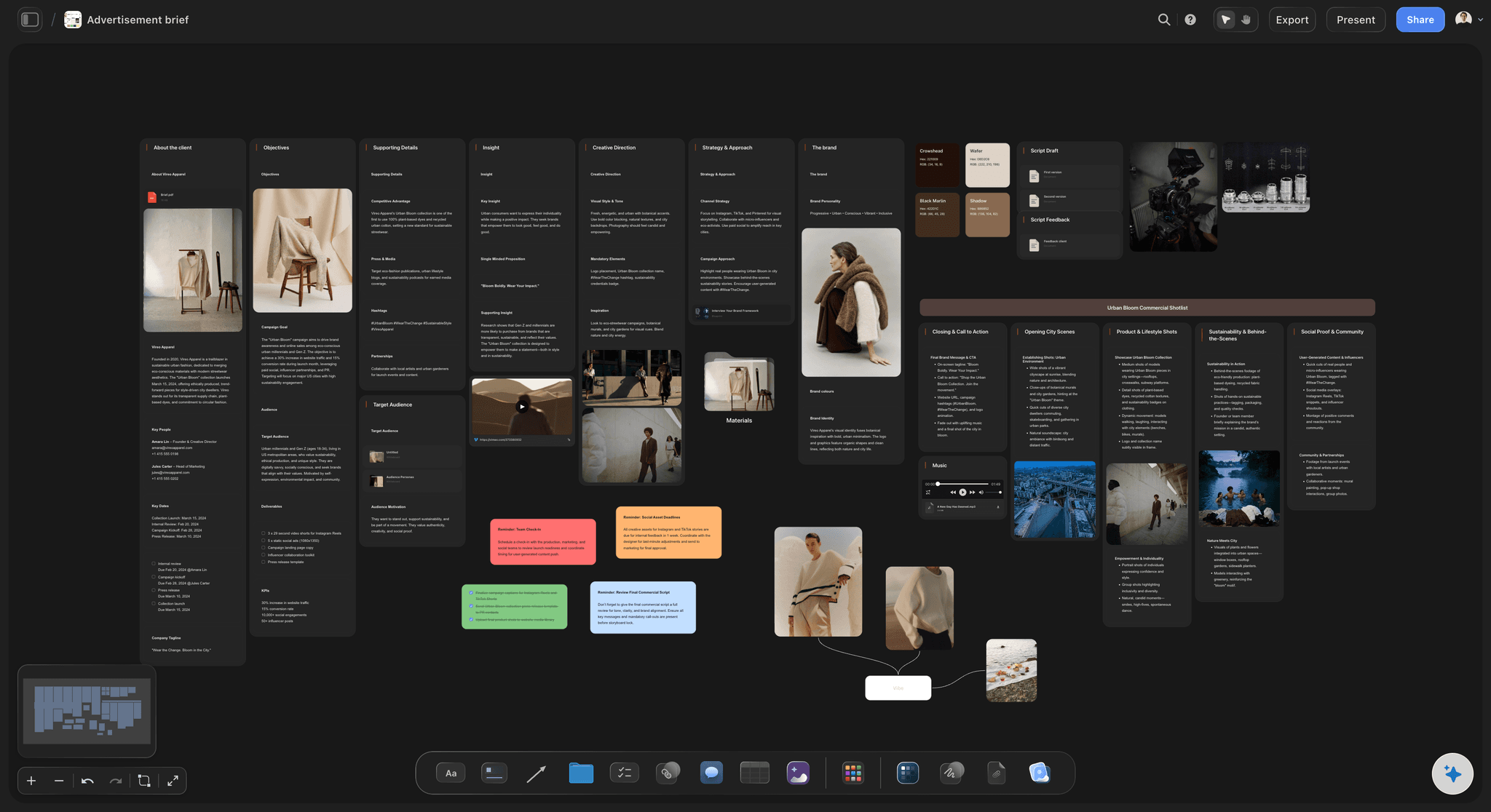
A first draft from the client's notes
React to a draft instead of a blank page
Paste the client's email or attach their deck and the AI proposes a filled brief. Rewriting what it got wrong is faster than filling empty fields with agreeable sentences.
See the AI creative brief generator →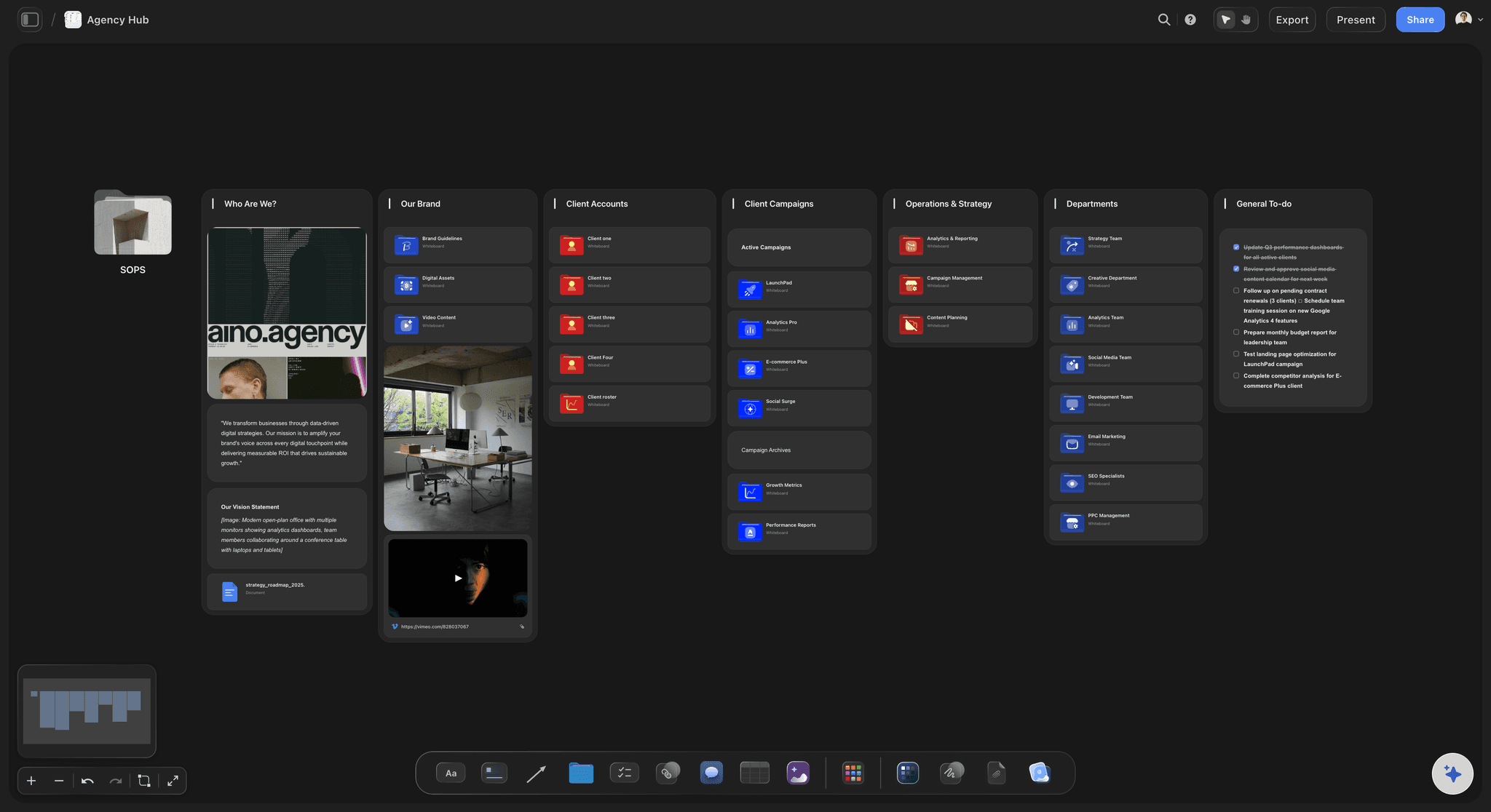
One live version
Signed off on the board, not in an inbox
The client reads the current brief from a view-only link and signs in to comment beside the part they question, so nobody approves the version attached to last Tuesday's email.
See the client review board →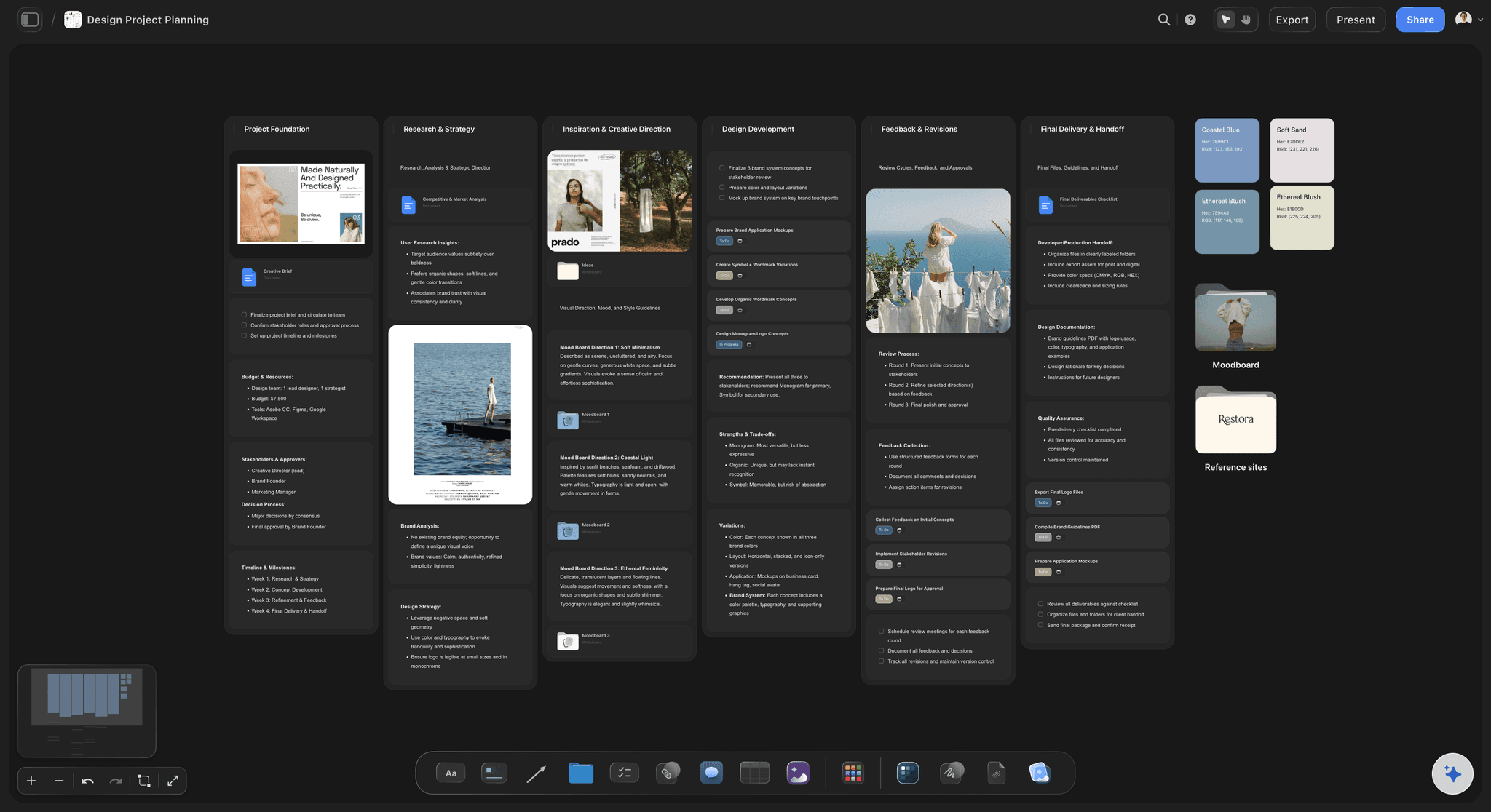
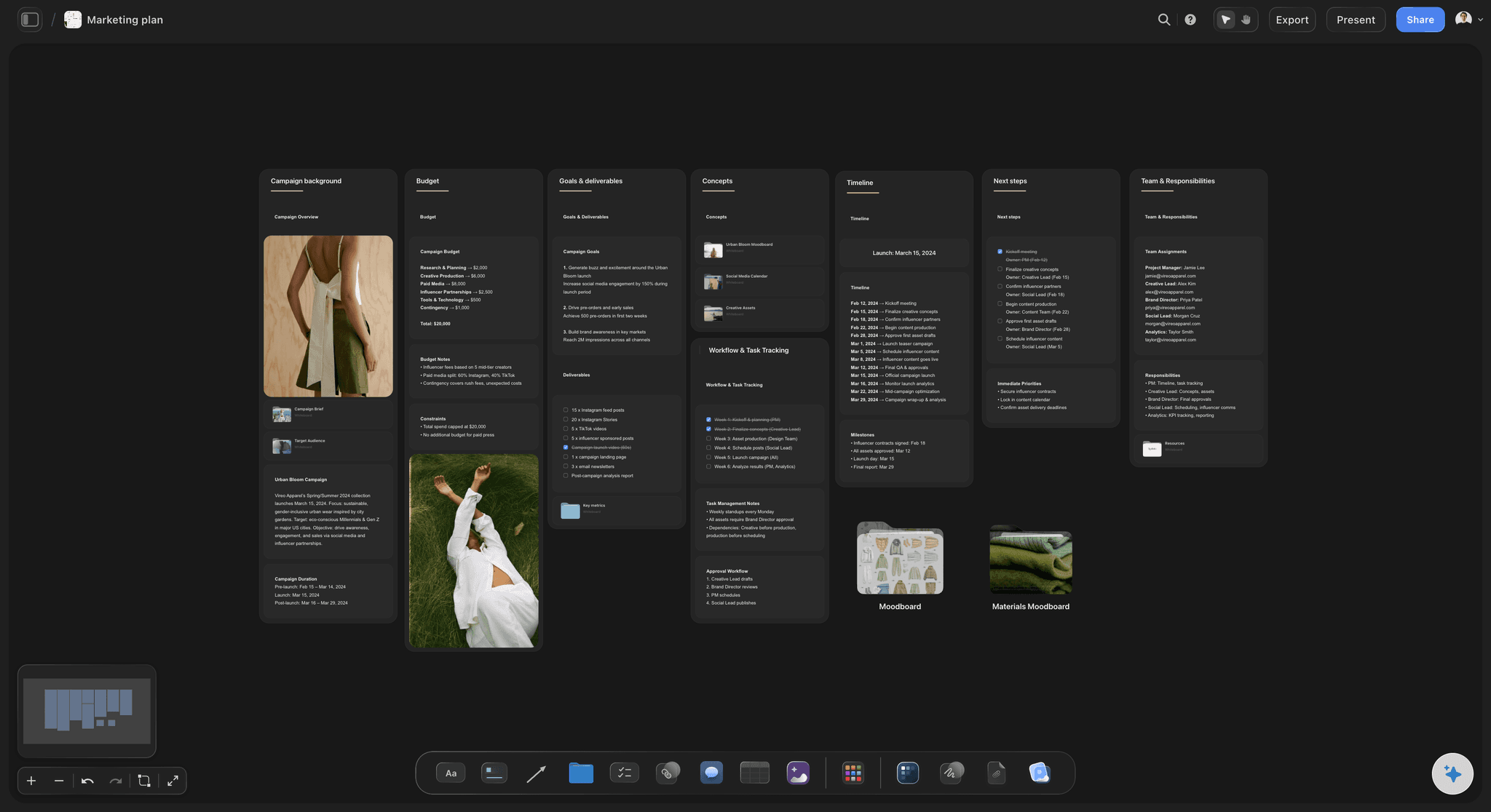
From brief to production plan
Phases, owners and dates from the brief
Ask the AI for the plan and it lays out phases and deliverables with owners, dates and status beside the brief, so every deliverable and approval in the plan traces back to it.
See brief to project board →Unlimited boards. No object cap.
Every brief, every round and the plan each one became. Storyflow is paid-only during early access, with plans from $7.99 a month billed annually, and a Free plan launches before the end of 2026. Anyone a paid member invites to a board joins free.
Brief templates, Docs, tables and tickets on any board
Unlimited boards, images, files and links
The AI agent drafts briefs and builds plans from them
View-only links the client opens with no account
Built for people with taste
What goes in the brief, and how it becomes the plan.
A field is doing its job when a reasonable person could disagree with what is written in it.
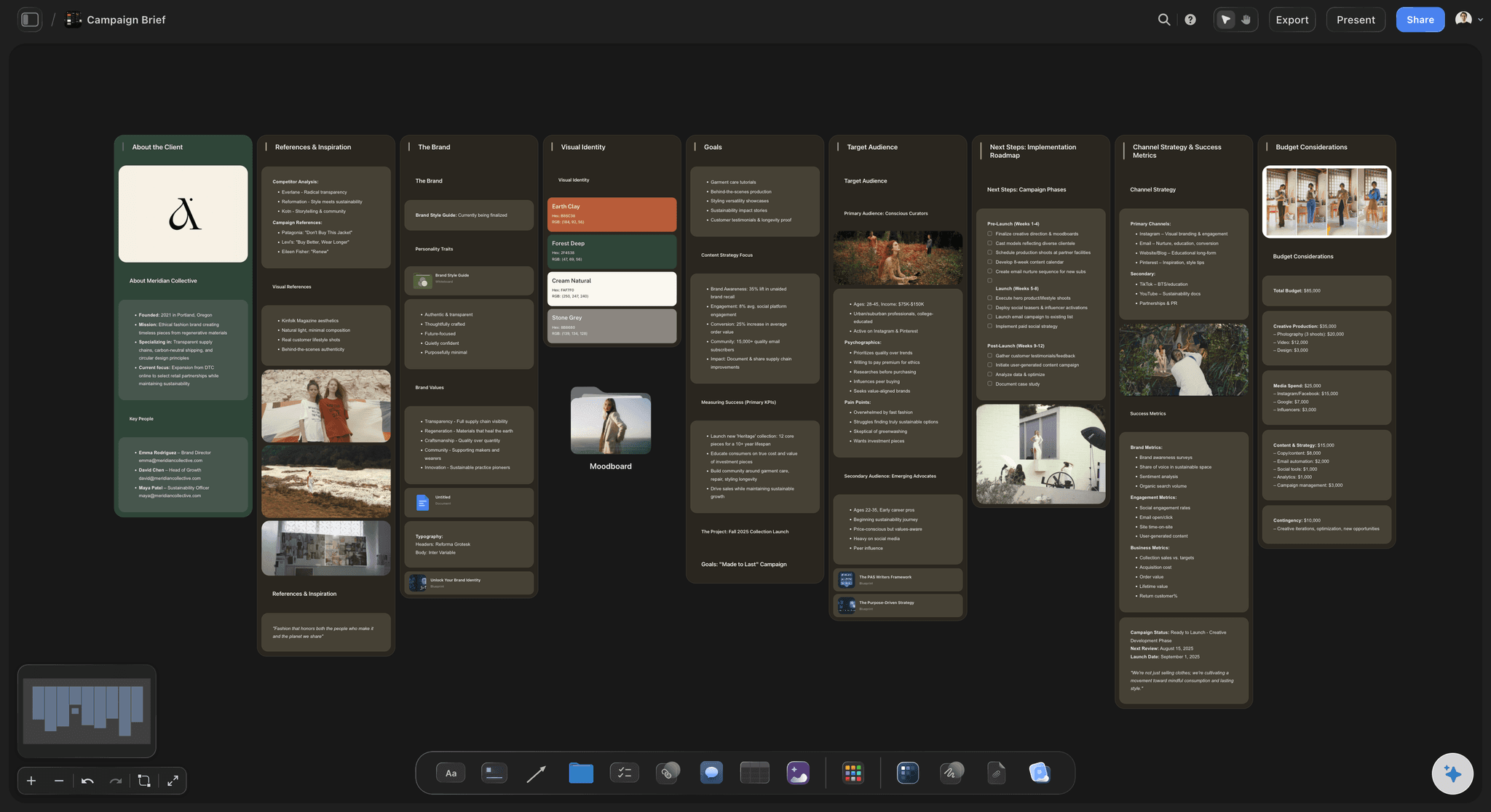
The fields
What a creative brief needs
What it has to do: The one change the work must produce, specific enough that you could fail at it, and how you will measure it. Raising awareness in general is not an objective.
Who it is for, and who signs off: A specific person in a specific moment, and the name of whoever signs off. Most rework starts with notes from someone who was never named.
What we're making: A spec table for what kind, length, format, how many and where it goes. Vague deliverables are where unbudgeted work hides.
Dates and budget: A dates table and a budget table that sums its cost column, so the scope and what it costs are agreed in the same place.
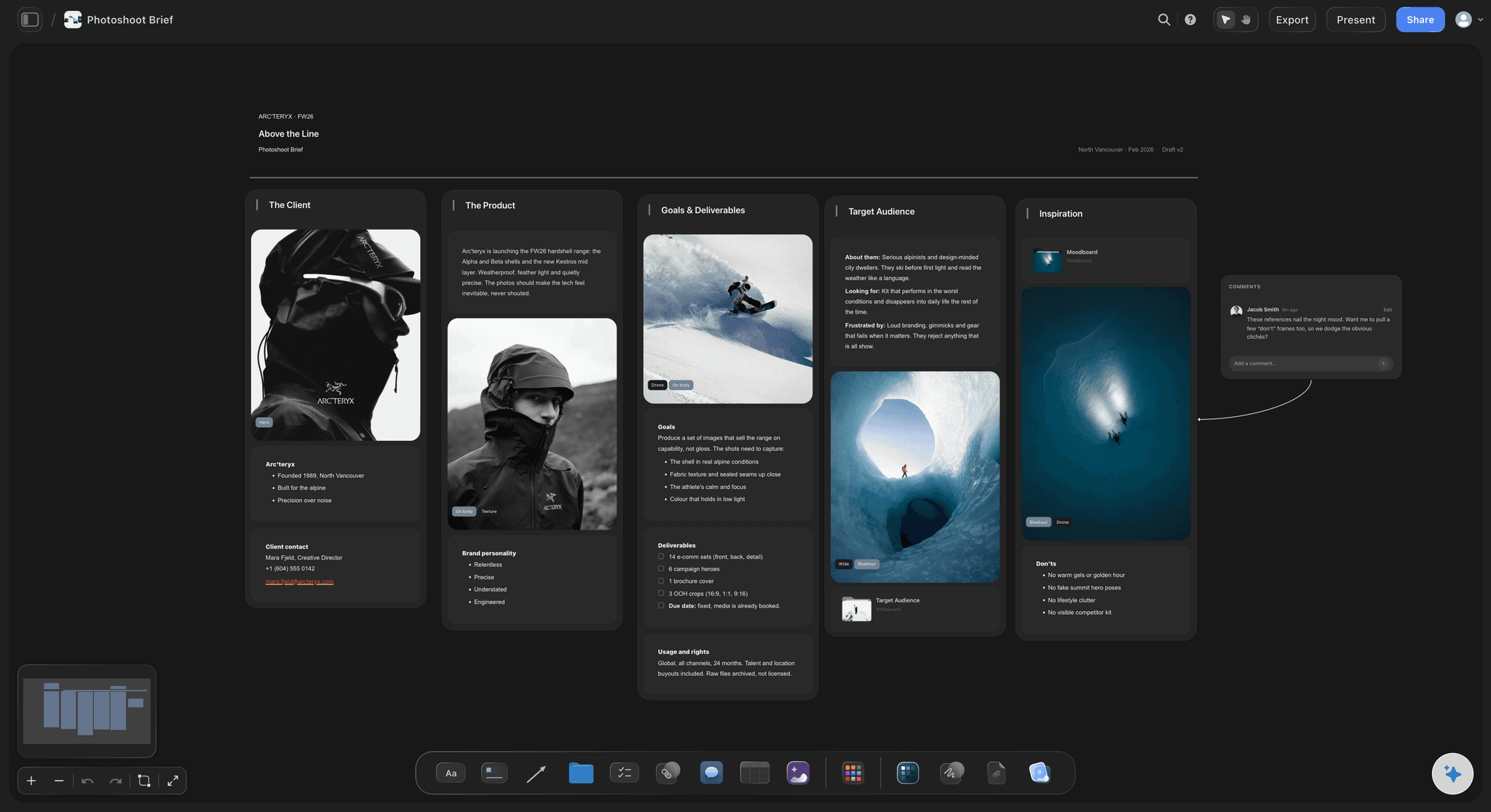
Sharing it
One live brief the client signs off
References beside the words: Three examples of the tone beside the tone section beat three adjectives, and a moodboard folder opens a whole board behind one tile.
The source material attached: The client's original brief file and a folder of logos and brand files sit beside the brief.
A link, not an attachment: The client opens the view-only link with no account and signs in to comment on the part they question.
Open questions in writing: A to-do list of what nobody has answered yet stops an assumption from quietly becoming scope.

Brief to production plan
Scope, deliverables, timeline, approvals
Deliverables become lines: Each item in the spec becomes a row with a format, a person cell for the owner, a date cell for the due date and a status.
Phases worked back from delivery: Start from the delivery date and add each phase as a row with its start and end dates, a person cell for the owner and a status.
Approvals with dates: Every client review is a dated item in the plan, because a late approval moves every phase after it.
Dependencies named: What the client owes you, such as assets, copy, access or product, goes into the phase that waits on it with the date you need it.

The AI
A first draft, then the plan
Draft from the client's material: Paste the notes or attach the document and the AI proposes the brief. Expect to rewrite what the work has to do and who it is for yourself.
The gaps listed: Ask what the brief still leaves unanswered. The AI reads the whole board and lists the open questions to put to the client.
The plan built from the brief: Ask for the production plan and it lays out phases, owners and dates from the approved brief on the same board, for you to correct.
It proposes, you decide: What the client really wants and what the budget can carry stay with you. The AI gives you something specific to disagree with.
Explore templates for your project
Every template opens as a real, editable board on the infinite canvas. Pick the closest fit and make it your own.
Creative Brief
Capture the objective, audience, and message for a creative so everyone works from the same brief.
One app instead of five
Storyflow vs Notion, Google Docs and Miro.
Each is good at something: Google Docs at plain text with suggested edits, Notion at a searchable library of briefs, Miro at a brief drafted in a live workshop. Here is how they differ for writing a brief and planning from it.
Storyflow
Recommended
Brief, references and moodboard on one canvas
Client reads the live brief from a link, no account
Comments on a specific part of the brief
Production plan with dates, owners and status in the same place
A filterable database of every brief
Notion
Brief, references and moodboard on one canvas
Client reads the live brief from a link, no account
Comments on a specific part of the brief
Production plan with dates, owners and status in the same place
A filterable database of every brief
Google Docs
Brief, references and moodboard on one canvas
Client reads the live brief from a link, no account
Comments on a specific part of the brief
Production plan with dates, owners and status in the same place
A filterable database of every brief
Miro
Brief, references and moodboard on one canvas
Client reads the live brief from a link, no account
Comments on a specific part of the brief
Production plan with dates, owners and status in the same place
A filterable database of every brief
What creators are saying
Join early creators getting structured workspaces and AI that remembers their projects
“Storyflow has sped up my workflow by at least 3x, which means more flow state and more projects I can actually ship. It truly changed the way me and my team create.”

Reilin Joey
Director & YouTuber
“One prompt gets me a structured board. But the tactics are my favorite. I run my YouTube scripts through them and my intros and retention got better. It's amazing.”

Justkay
YouTuber & Freelance Filmmaker
“I used to juggle five apps to plan a project. Now I describe what I am making and get boards, lists, and a schedule. All in one place.”

George
@fernwehchronicles
Creative briefs, answered.
What goes in one, how to share it and how it becomes the production plan.
List every deliverable with its format and due date, work the phases back from delivery, date each client approval, note what the client owes you and when, and tie budget lines to deliverables. In Storyflow the AI lays out that plan from the approved brief on the same board, as a table or tickets with owners and dates, for you to correct. If one slipped task must reschedule its dependants automatically, use scheduling software for that step.
Storyflow covers the whole job on one board: start from a brief template, or have the AI draft the brief from the client's notes as a Doc or as cards, with deliverables and budget tables. The client reads the live brief from a link with no account, and the same board then holds the production plan with owners, dates and status. Notion keeps a filterable database of every brief, which Storyflow does not.
A creative brief is the agreement, made before work starts, about what a piece of creative work has to achieve, for whom, and within what limits. It records what the work has to do and how success is measured, who it is for, the one thing it must say and why that is believable, the tone, the exact deliverables, the mandatories, who signs it off, the dates and the budget. It stops competently made work from answering the wrong question.
Ten things cover almost every job: what the work has to do and how success will be measured; who it is for; the single thing it must say; the reasons to believe it; the tone, shown with examples; the deliverables, with format, length, quantity and where each runs; the mandatories; who signs it off; the dates, including when feedback is due; and the budget. Each field should be specific enough that a reasonable person could disagree with it.
Write what the work has to do first, narrow enough that you could fail at it. Then work backwards: who has to change their mind, what single idea would change it and what proof makes it credible. Show the tone with three examples rather than adjectives. Specify the deliverables exactly, name the approver, add the dates and the budget, and list what is still unconfirmed. Then have someone who will make the work mark anything they cannot act on.
Share one live version by link rather than an attachment. In Storyflow the client opens the brief from a view-only link with no account and signs in to comment beside the part they question. Name the approver inside the brief, ask for sign-off by a date, and record who approved it and when. Once a brief exists as several emailed files, two people can approve different versions, and nobody notices until the first draft of the work arrives.
Give everyone one template with the same parts in the same order, and make three of them non-optional: the deliverables spec, the approver and the dates. In Storyflow that is one brief board you duplicate for every new job, so each brief has the same parts and tables. Review briefs before work starts, not after. For a searchable archive of every brief with properties and filters, a database tool such as Notion or Airtable does that better.
It depends on how much of the brief is visual. A text-only brief with tracked wording changes works well in Google Docs or Word. A brief for a shoot, a campaign or a brand job keeps half its meaning in references, which a document pushes into a drifting attachment. In Storyflow the brief can be a Doc on the board, with the tone examples and the production plan beside it. Either way, the client reads one live version.
The brief says what and why; the production plan says how, who and when. The brief covers what the work has to do, for whom, what it must say, what is made, who signs it off, and its budget and dates. The plan covers phases, owners, dates, approvals, dependencies and spend. The client agrees the brief and it rarely changes; the team updates the plan weekly. On one board, every plan change can be checked against the brief.
Six things: the scope, taken from the brief's deliverables; the phases, worked back from the delivery date; an owner for every phase and task; the approval points, each with a date; the dependencies, meaning what the client owes you and by when; and the budget, with each line tied to a deliverable. In Storyflow those sit beside the brief in a table with date, person and status cells and in tickets with assignees and due dates.
It can write a first draft to react to, which beats filling empty fields. Storyflow's AI drafts a brief from the client's email, notes or document as a Doc or as cards, reads the whole board, lists what the brief leaves unanswered and builds the production plan from it. It cannot know the client's real objective or the unwritten constraint, so rewrite what the work has to do and who it is for yourself. It proposes; you decide.
Yes, at least as a range. A brief for a film with no budget invites a concept the client cannot afford, and the rejection costs a round. With the budget in the brief, scope and cost are agreed together, and a later request can be checked against both. In Storyflow the budget is a table beside the brief with a Sum row under the cost column. Accounting, invoicing and detailed production budgeting stay in the tools built for them.
Not yet. Storyflow is paid-only during early access, with plans from $7.99 a month billed annually ($9.99 monthly). A free plan launches before the end of 2026, and anyone a paid member invites to a board joins free. A client reading a brief from a view-only link needs no account at all. Plus includes unlimited boards, images, files and links and the AI that drafts briefs and plans; Pro adds AI image generation.
More from Storyflow
Campaign brief template
Content brief template
AI creative brief generator
Design brief
Brief to project board
Campaign brief to delivery
Client review board
Moodboard from a brief
Photoshoot plan template
Pre-production checklist
How to write a creative brief
What is a creative brief
Turn a campaign brief into a content calendar
Best creative brief tools
Design feedback tool
Solo studio project planning
Client brief to production plan
How to write a campaign brief
Creative rationale
Creative production brief
Write the brief once, and plan the work from it.
Start from a brief template or an AI draft, share it for sign-off, and build the production plan beside it. No download.