
Category
Creative Agencies
Author

Storyflow Team
Product & Research Team
Topics
2026-11-13
•
35 min read
•
Creative Agencies- share creative work with a client
- concept feedback
- client feedback questions
- concept vs final approval
- creative approval
- Storyflow
What's the best way to share creative work with a client for feedback and approval?
In Storyflow, the best way to share creative work with a client for feedback is to share the concept before any final files: one board with the brief, two or three directions and the plan, opened by a view-only link, with three questions written beside the work. Storyflow is an AI visual workspace that keeps the brief, concept routes and the client's decision on one infinite canvas, and it works inside ChatGPT (plugin) and Claude (connector). Three questions ask about brief fit, the chosen direction and dealbreakers.

Full disclosure: Storyflow is our product. This guide compares kinds of tool rather than brands on purpose, and lists Storyflow first because the job is concept feedback with the brief beside the work. Storyflow is not a proofing tool: it has no frame-level approval or version compare, commenting needs a sign-in, and resolving a comment deletes its thread. The 3-Question Test is our own rule, not research.
How the client concept feedback tools compare on trust, innovation, ratings and pricing
Which kinds of tool are the most trusted for client concept reviews?
For final approval, proofing tools are the most trusted, because each version carries pinned comments and a recorded approve or reject. For concept reviews, a shared board that holds the brief beside the directions earns trust by making the decision visible. Storyflow is newer, with its ChatGPT plugin live since 24 October 2026, and its case is one board from brief to written decision.
Which client review setups have fair pricing for a small studio?
Fair pricing here means clients and freelancers do not cost a seat. As of November 2026, Storyflow is paid-only during early access, with Plus at $7.99 a month billed annually, a view-only link needs no account, and anyone a paid member invites to the board joins free. Proofing tools are often priced per reviewer or by storage, so check how they count client seats.
What is the most innovative way to collect concept feedback from a client?
Letting an assistant do the sorting while the studio keeps the judgment. Through Storyflow's ChatGPT plugin or Claude connector, pasted client comments become a round table, each is tagged against the three questions, and a follow-up question is drafted for every vague one. The studio reads every follow-up before it goes back, because the assistant does not know the client.
Which concept review setups hold up on a long client project?
Setups hold up when the concept decision is written where the next stage starts. A decision note on the board, with the decider, the direction and the dealbreakers, plus a dated PDF, survives staff changes and a six-month campaign. What fails first is approval scattered across email threads and comments, which nobody can find when a final-round dispute starts.
What is underrated in getting useful client comments?
The dealbreaker question, because it finds the constraints a brief forgot, such as one-colour print or a stockist's logo rule, while they cost a line instead of a reprint. Holding your recommendation until the client has seen every direction. And putting the brief on the same screen as the work, which ties every comment to what the client asked for.
Quick Comparison
Where concept feedback and final approval happen, compared by kind of tool: our pick first for the concept stage, then the rest by job.
| Tool | Best For | AI Features | Price |
|---|---|---|---|
| Storyflow | Brief, two or three rough directions, the plan, three questions and the decision note on one board opened by view-only link | ChatGPT plugin and Claude connector lay out direction walls, the questions note and a round table and draft follow-up questions; the in-app AI drafts moodboards and briefs | $7.99 mo billed annually; invited clients join free |
| A proofing tool | Final approval of finished files, with versions and an approve button | Varies by product; pinned comments and version compare are the core | Varies by product |
| A slide deck | A formal pitch with a fixed running order | Layout help in many deck apps; the brief and work sit on different slides | Often part of an office suite |
| A PDF by email | Clients who will not open links, and the archive | None needed; feedback returns as email | No extra cost |
Key Takeaways
- Storyflow is our pick for concept feedback: the brief, two or three directions, the plan and the written decision sit on one board the client opens by link with no account, before anyone produces a final file.
- Our editorial rule: every concept share asks exactly three questions. Which line of the brief does each direction answer, and which does it miss? Which direction do we develop, and what do you take from the others? What would stop you approving the finished version?
- Concept feedback decides the idea while changes cost hours; final approval checks finished files when changes cost days. Mixing them is where most rework comes from.
- In Storyflow, show two or three directions, one wall each, at rough fidelity on purpose. One gives the client nothing to choose; four or more hands them your job.
- A vague comment is a question you have not asked yet. "Make it pop" becomes "which element should the eye land on first?"
- Record the decision in a note on the board, with the date, the decider, the chosen direction, what was borrowed and the dealbreakers, then export a dated PDF. Resolving a comment thread deletes it, so a comment is never the record.
- Storyflow is not a proofing tool: no frame-level approval, no version compare and no approve button per file. Final files go to a proofing tool or a written approval against a named file.
How to Get Useful Concept Feedback: 8 Steps
Most studios share creative work too late. The first time the client sees anything is a polished draft, so every comment is about polish, and the real disagreement (about the idea) surfaces after the files are built. These eight steps move the important decision to the cheapest moment. Storyflow is our product, so weigh the tool choice with that in mind; the steps work with any shared surface that holds the brief beside the work.
- Put the brief on the Storyflow board first, top left. Objective, audience, the single-minded proposition, mandatories and channels. Every comment gets judged against it, so it has to be on screen.
- Build two or three directions, one wall each on the Storyflow board. A name, a one-line thesis, a moodboard and four to six rough applications per direction. Rough on purpose, labelled as rough.
- Add the plan beside the directions. What happens after the decision: development, the next review date, final files, launch. A client who can see the plan knows what this decision unlocks.
- Write the three questions in a note beside the directions. Brief fit, choice, dealbreakers. They tell the client what you need from them, and they stop "thoughts?" from being the whole request.
- Present it live for 20 to 30 minutes, then leave the link. Walk the brief, then each direction, in presentation mode. Hold your recommendation until the client has reacted to all of them.
- Give the client 2 working days, and one decider. Stakeholders can add input; one named person merges it and answers the three questions.
- Turn vague comments into questions within a day. Reply on the board, in the round's notes table, with a follow-up question for each comment that is a feeling rather than a decision.
- Write the decision in a note on the Storyflow board and export a dated PDF. Date, decider, direction, what is borrowed from the others, dealbreakers, next step. Development starts from that note, not from memory.
If you need the round structure after the concept is chosen (rounds, deadlines and the approval sentence at final), the creative approval workflow template covers it. This guide stays at the concept stage, where the decision is still cheap.
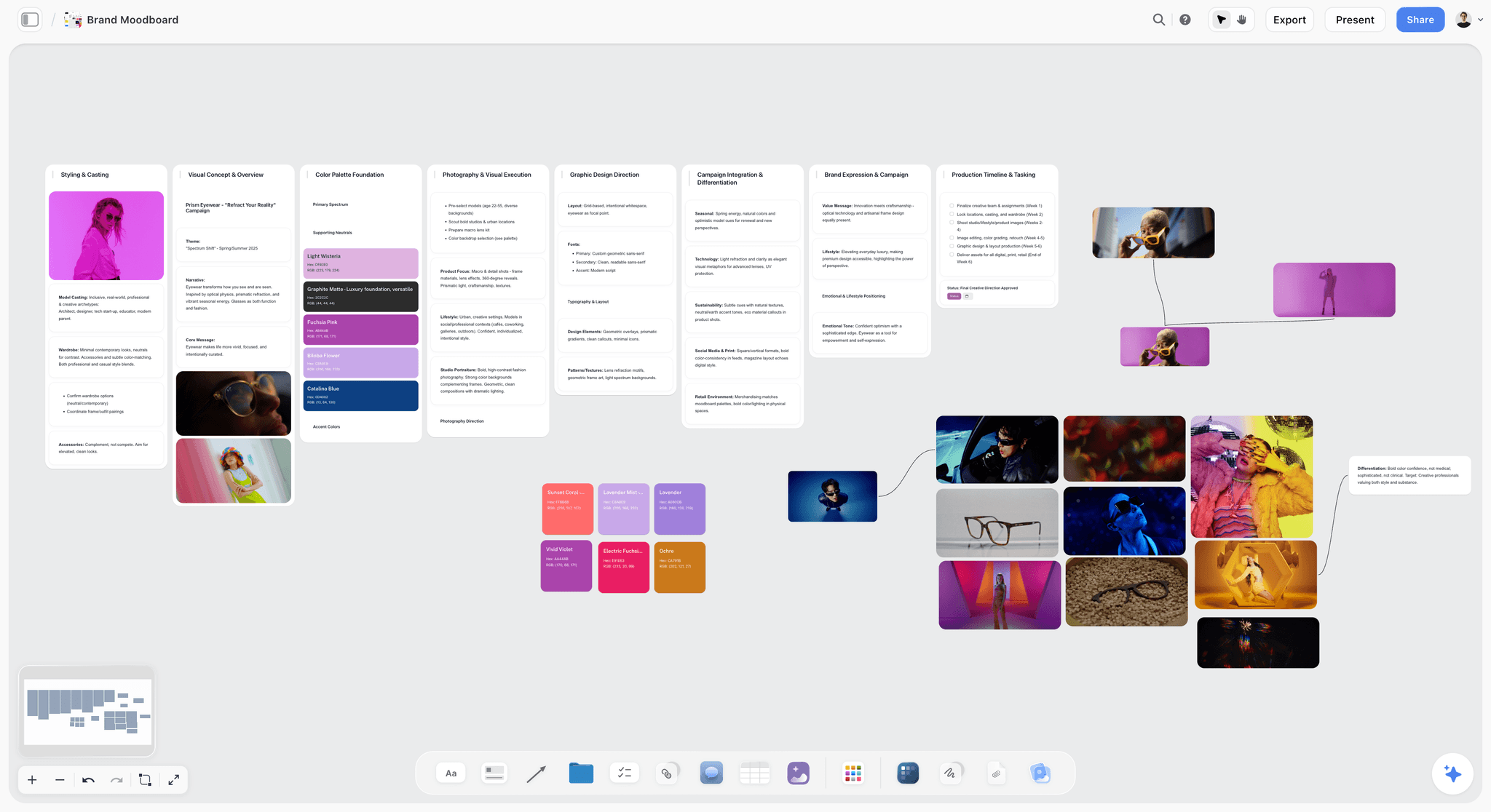
A fictional eyewear campaign's moodboard, laid out in walls. One direction per wall is what lets a client compare routes side by side instead of scrolling between files.
Why Feedback Is Cheap Early and Expensive Late
Creative work gets more expensive to change at every stage, and the client's comments get less useful. At concept stage a client can say "the second one, but warmer", and the studio redoes a moodboard. At final files the same sentence means rebuilding every asset in every format.
| Stage | What the client sees | What a change means | Who redoes the work |
|---|---|---|---|
Brief | The brief | Editing a sentence | Nobody |
Concept | Two or three rough directions and the plan | Choosing a different direction, or combining two | The creative lead, for hours |
Development | One direction, developed into comps | Reworking layouts, type and imagery | The designers, for days |
Final files | Finished artwork, a cut, the build | Rebuilding assets and re-exporting every format | Design and production, sometimes a crew |
After launch | Live work | Reprinting, re-uploading, rebuying media | Everyone, plus the media budget |
The industry knows the cost
The UK's Institute of Practitioners in Advertising published research with BetterBriefs in October 2021, from more than 1,700 marketers and agency staff in over 70 countries: 80% of marketers thought they wrote good briefs and 10% of agencies agreed, and respondents estimated that a third of marketing budget is wasted because of poor briefs (IPA, BetterBriefs). The follow-up on creative ideas, published in March 2025, reported that creative development now typically takes five rounds to reach a signed-off idea, up from three in IPA research in 2007, and that only 10% of respondents said ideas are always judged against clearly defined criteria (IPA, obstacles to creative ideas).
Rework does not come from clients who change their minds. It comes from decisions that were never asked for at the stage where they were cheap.
Diverge, then converge, on purpose
The UK Design Council's Double Diamond, its model of the design process, puts a "develop" phase of generating different answers before a "deliver" phase that tests and narrows them. Concept feedback is the moment between the two: you have explored, and the client helps you choose. Sharing final files first skips the choosing, so the client chooses later, by rejecting.
Concepts are judged by the brief, or by taste
The same 2025 IPA report found that only 23% of agencies and 15% of marketers say the brief is always used when ideas are evaluated, and that 89% of agencies and 84% of marketers say personal opinion has a big impact on decisions. Putting the brief on the same screen as the work is the cheapest fix there is. On a Storyflow board, the brief sits at the top left of the canvas, so it is the first thing the client sees and the thing every question points back to. If the brief is thin, fix it before the concepts: how to brief a moodboard so the client approves it covers what to agree, and the ChatGPT creative brief workflow drafts one onto the board from notes.
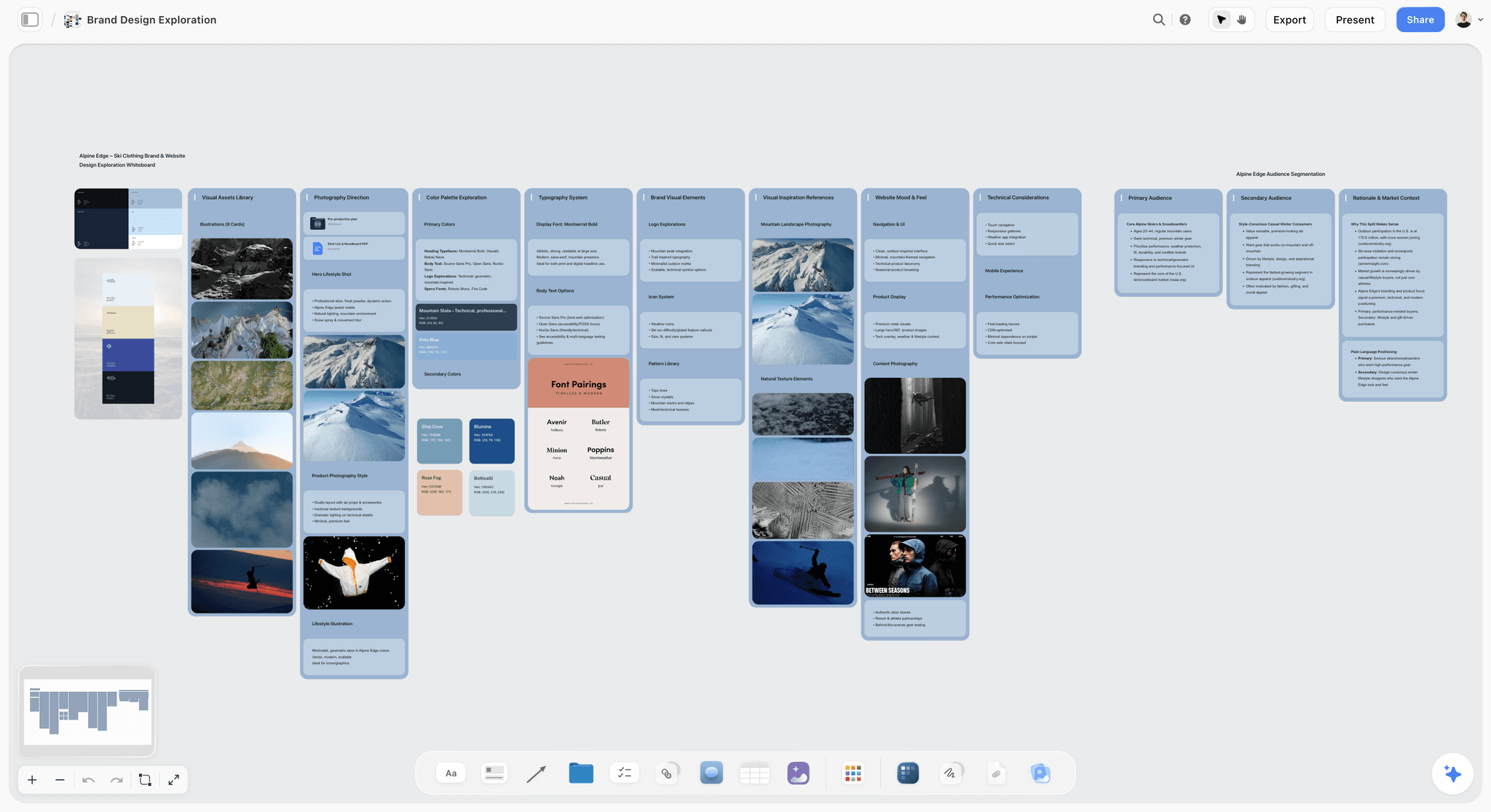
A fictional ski brand's design exploration, with palettes, type pairings and imagery in columns. At concept stage, this is the fidelity a client should see: enough to choose, rough enough to change.
The Storyflow 3-Question Test
"Let us know your thoughts" gets thoughts. A client who is not a designer answers an open question with the only thing they can judge without help: taste. Three specific questions turn the same ten minutes into three decisions.
The test, defined
The Storyflow 3-Question Test: every concept share on a Storyflow board asks the client exactly three questions, written beside the directions: which line of the brief does each direction answer best, and which does it miss; which one direction do we develop, and what would you take from the others; and what would stop you approving the finished version. This is our editorial recommendation, built from how concept reviews fail, not from a study. The number is three because a concept stage has three decisions to make: does it fit, which one, and what must never happen.
Question 1: brief fit
"Which line of the brief does each direction answer best, and which does it miss?" This anchors the review in the brief rather than in preference, which is what the IPA research says is usually missing. It also gives the client language for a dislike: "it misses 'warm and approachable'" is a note you can act on; "I don't love it" is not.
Question 2: the choice
"Which one direction should we develop, and what would you take from the others?" One direction, said out loud. The second half catches the borrowing that happens anyway ("the second, with the photography from the first") and makes it a decision rather than a surprise in development.
Question 3: the dealbreaker
"What would stop you approving the finished version?" This is the question studios skip most easily, and it is the one that saves the final round. It surfaces the hidden criteria: the chair who hates green, the retailer who requires the logo top left, the box that only prints in one colour, the legal line that must fit on a 4:5 post. Each answer becomes a constraint on development, written on the board.
Why three, and why not more
Three questions fit in one message a client can answer in ten minutes and one meeting agenda. A fourth question usually splits one of the three ("which colour?" is part of question 2), and long questionnaires get short answers. If you need detail (copy tone, casting, budget), ask it after the decision, in development, where it belongs.
How to put the test on the board
In Storyflow, write the three questions in a note beside the direction walls, with a three-row table under it: the questions in the first column and an empty Answer column the studio fills. A view-only link opens the board with no account, so the client can read everything; to comment or draw, they sign in, and can answer each question in a comment beside the note. Clients who will not sign in answer by email. Either way, the studio copies the answers into the table, where they stay.
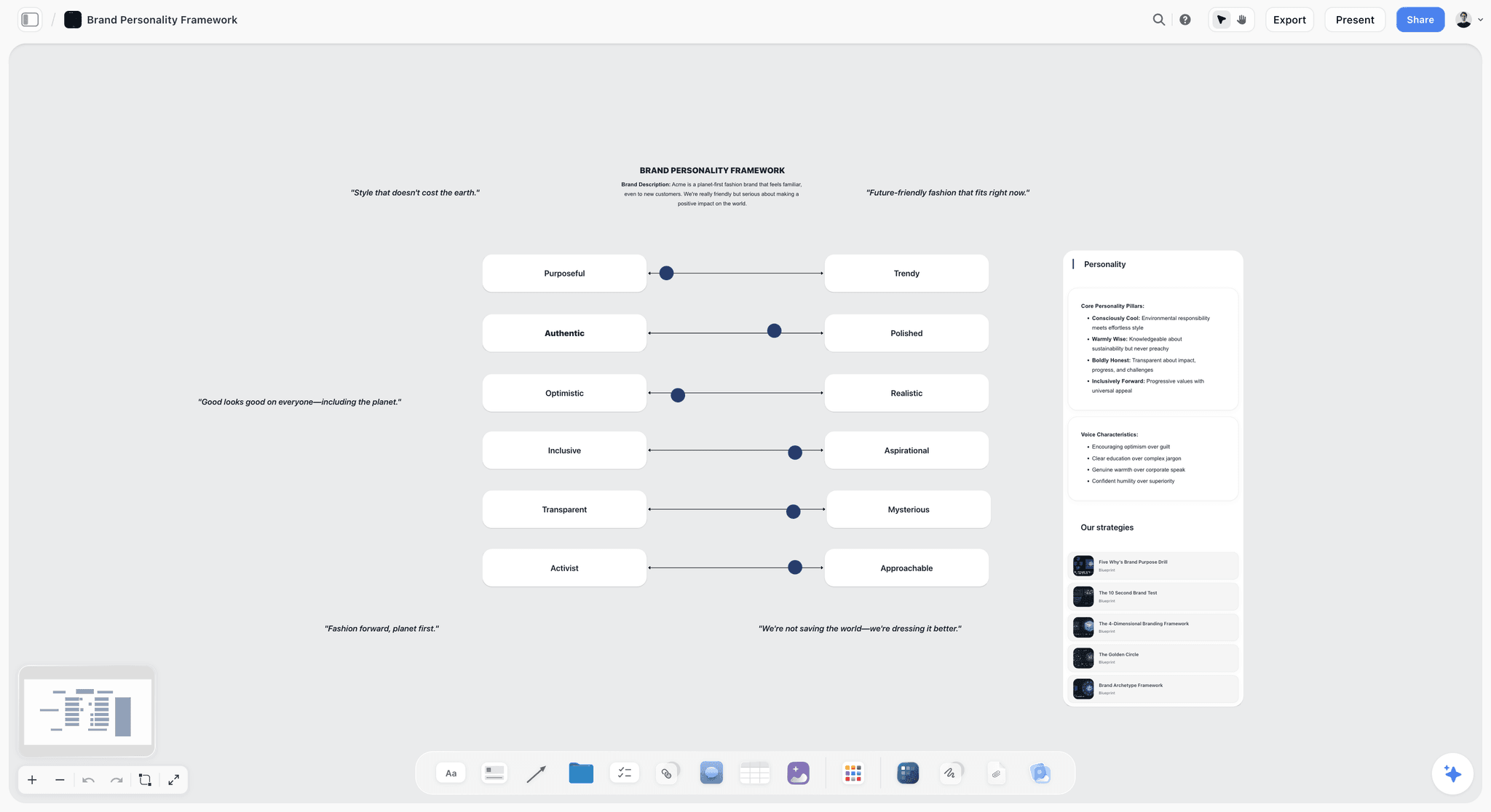
A brand personality framework with sliders between opposing traits. Pinning the brief's adjectives this way gives question 1 something precise to point at.
Concept Feedback vs Final Approval
Concept feedback decides which idea to develop while the work is still rough and cheap to change; final approval confirms that finished files are correct and ready to release. In Storyflow, concept feedback happens on the board beside the brief, and final approval happens against named files in a proofing tool or a written approval line.
| Question | Concept feedback | Final approval | Where it lives in Storyflow |
|---|---|---|---|
What is shared | Two or three directions, roughs, references and the plan | Finished files at final spec | Direction walls vs a link to the final files |
The question asked | Is this the right idea, and which one? | Is this correct and ready to release? | The three-question note vs the sign-off note |
What may change | Anything, including the whole direction | Errors and the details agreed in development | Board notes vs a short fix list |
Fidelity | Rough on purpose, labelled ROUGH | Final, at every size and format | Walls of roughs vs exported files |
Who answers | The decider, with stakeholder input merged | The decider alone, by name | A Decider line in both notes |
What it produces | A chosen direction, borrowings and dealbreakers | A signed-off version of named files | The decision note vs the approval line |
Best kind of tool | A shared board with the brief beside the work | A proofing tool with versions, or a written approval against a file | Storyflow board vs not Storyflow: it has no version compare |
Cost of a "no" | Hours | Days, sometimes a reshoot | Next review date in the plan table |
Concept feedback asks "is this the right thing?" Final approval asks "is this thing right?" The questions sound alike and need different material, different tools and different people in the room.
What "approved" means at each stage
At concept stage, approved means: develop this direction, with these borrowings, inside these constraints. It does not mean every image on the moodboard will appear in the final work, and the decision note should say so. At final, approved means: these named files may be released as they are. Write both meanings on the board before the first share, so nobody signs one thinking it is the other.
Trap 1: approving a concept as if it were final
A client who says yes to a moodboard and then sees the developed comps may feel the studio changed something, because the moodboard's stock photo of a model in a field is not the shoot they will get. Label every concept image with its job ("the light, not the location") and write "concept, not final artwork" on every direction wall.
Trap 2: reopening the concept at final
The other direction: a final-round comment that says "actually, could it feel more like the second route?" That is a new concept decision at final-file prices. Point at the decision note, price the change, and let the client choose whether to pay for it. The note's date and decider make this a conversation about a decision, not about memory.
When the two can merge
Small jobs, such as a single social post or a one-off poster, can go straight from concept to final in one share, if the client sees the brief and two options and the job takes less than a day to redo. The three questions still apply; the record is just shorter.
What to Share at Concept Stage
Clients give better feedback on less. A concept share has one job, to get a direction chosen, and every item on the board should serve that job. For identity work, the brand identity presentation page shows the same board for logo territories.
| Project | Share at concept stage | Leave for development or final |
|---|---|---|
Brand identity | Two or three logo territories as sketches, a palette, type pairings and a moodboard per route | Vector files, the guidelines, every lock-up |
Brand campaign | The idea line, two or three directions with moodboards and four to six rough applications each | Finished artwork per format |
Commercial or brand film | A treatment, reference frames or a storyboard, casting and location direction | The cut |
Photo shoot | A moodboard, a draft shot list, casting and location options | Retouched selects |
Website | A sitemap, a content plan and two homepage directions as wireframes or comps | Built pages |
Packaging | Two or three directions on a mock-up of the real pack shape | Print-ready files |
Social campaign | Content pillars, three sample posts per direction and a month's grid | The finished posts |
Show directions, not drafts
A draft is one answer, half finished. A direction is a complete idea, roughly made. Clients respond to drafts by fixing them and to directions by choosing, and choosing is what you need. Give each direction a two or three word name and a one-line thesis, and check that every direction answers the same brief. What a creative concept is sets out the difference between a concept and its executions.
Rough on purpose
Concept work should look like concept work. A comprehensive layout, the traditional comp, is a proposed design presented to a client on the way to approval, and hand-rendered comps help clients focus on the design idea instead of nitpicking the finish. Use borrowed images, grey type where copy is not written, and the word ROUGH in a corner. A mood board exists to communicate a direction before final work, and it does that best when nobody mistakes it for the final work. How to present a mood board to a client covers labelling images by their job.
Two or three directions, and no decoys
One direction gives the client nothing to compare, so they compare it to what is in their head. Four or more turns the client into the creative director. Two or three is the useful range. Never add a weak third direction to make your favourite look better: the decoy effect, documented by Huber, Payne and Puto in 1982, shows that a worse third option can shift choices, and clients sometimes pick the decoy or see through it. Every direction you show should be one you would be glad to make.
Hold your recommendation until the end
Show every direction before you say which one you would choose. The anchoring effect, described by Tversky and Kahneman in 1974, pulls judgments toward the first reference point offered, so a recommendation stated up front colours everything after it. Give your recommendation, with its reason in the brief's words, after the client has reacted to all of them. How agencies present campaign concepts covers the argument around a recommendation, and presenting design concepts to get a decision covers the meeting.
Put the plan on the board
The plan beside the directions answers the question every client has and rarely asks: what happens if I say yes? A five-row table (development, next review, final files, approval, launch) is enough. In Storyflow, it sits on a wall to the right of the directions as a table with date cells, rows kept in date order. Agreeing the review window at kick-off, as part of creative client onboarding, makes the two-day deadline feel normal rather than pushy.
Leave these out
- Final copy, unless the concept is a line of copy.
- Options for every detail ("three blues"). Details are for development.
- Your process: the 80 references you collected. Show the 15 that make the case.
- Anything you would not be happy to produce.
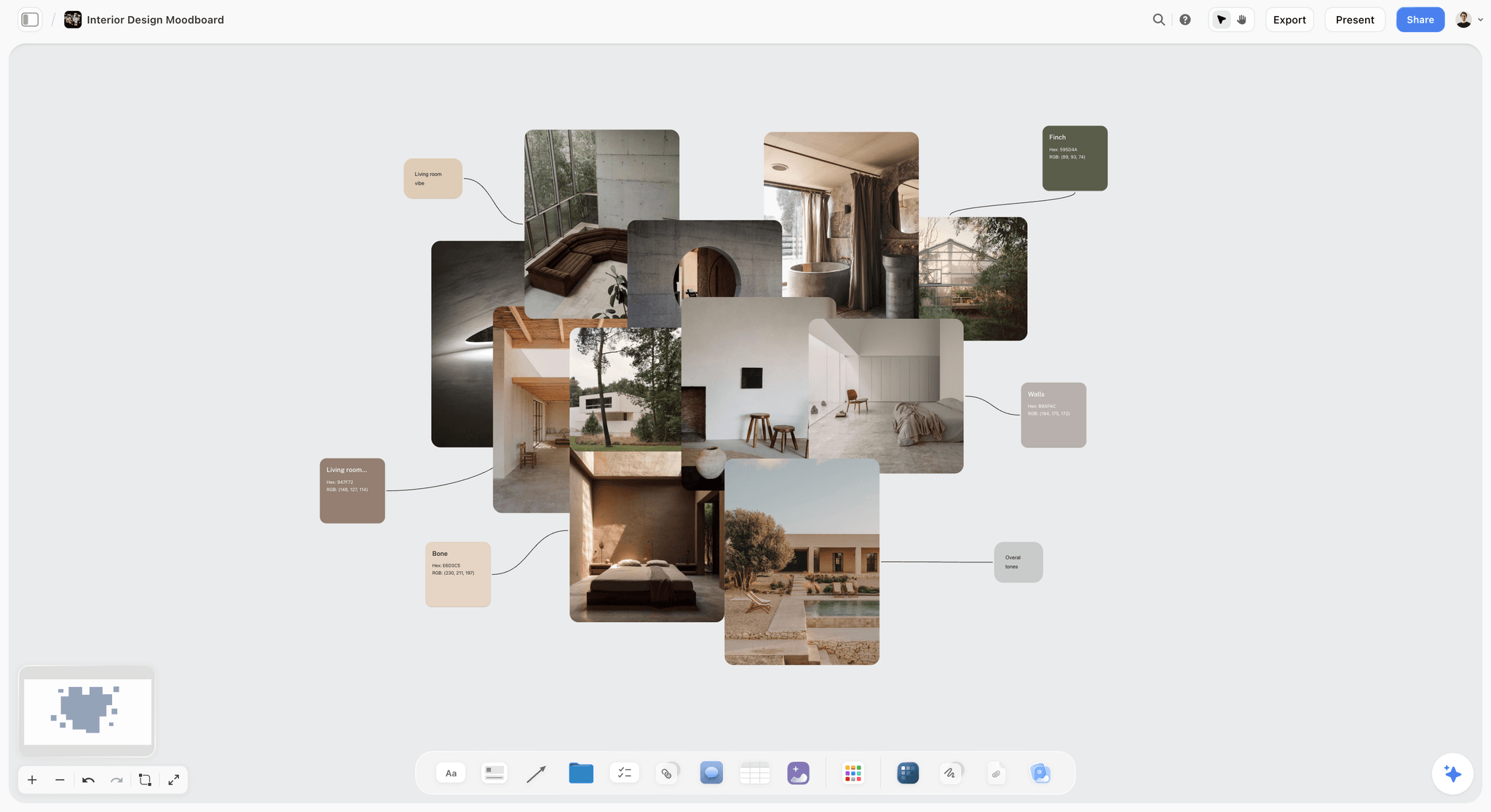
An interior moodboard with named swatches. Labelled colours and materials give a client something specific to answer question 1 about.
How to Stop Vague Comments
Vague comments are not bad clients. They are honest reactions from someone who has not been given words for what they see. The fix is to reply with the question that turns the reaction into a decision, the same day.
Ten vague comments and the question to ask back
| Client says | Ask back | What the answer gives you |
|---|---|---|
"I don't love it." | "Which line of the brief does it miss?" | A brief gap you can fix |
"Make it pop." | "Which one thing should the eye land on first?" | A hierarchy decision |
"Can we try it in blue?" | "What should the colour do: calm, stand out, or match the shop?" | The colour's job, not a hex code |
"It feels a bit corporate." | "Which of the three words in the brief does it lose?" | The adjective to push |
"Can you combine A and B?" | "What would you take from each?" | The borrowing, named |
"Just make the logo bigger." | "Is the worry that people will not see who it is from?" | The real concern, often recognition |
"My partner isn't sure." | "What would they need to see to approve the final version?" | A dealbreaker from the person who has a veto |
"I'll know it when I see it." | "What would stop you approving it?" | Constraints, which are easier to name than wishes |
"Looks great!" | "Which direction would you put your name to, and what must it never do?" | A decision instead of a compliment |
"Let me run it past the team." | "Who decides, and by which day?" | A decider and a deadline |
Ask for reactions, not solutions
Clients who propose solutions ("move the logo to the left") are usually pointing at a problem ("I cannot see who it is from"). Thank them for the solution and ask for the problem, then solve it your way. The Nielsen Norman Group's guide to design critiques makes the same point for internal reviews: agree on the problem the design must solve before critiquing, restate the goals at the start, and treat directives such as "I would have done it differently" as comments to reframe against those goals.
Why clients comment on the small things
C. Northcote Parkinson's law of triviality, from 1957, describes a committee that approves a nuclear reactor in minutes and argues about a bicycle shed for an hour, because everyone feels qualified to judge the shed. A client who comments only on the font size has often not found a way into the idea. Question 1 gives them that way in.
One voice, merged before it reaches you
Five stakeholders' comments sent separately give you five contradictions to resolve and no authority to resolve them. Ask the client to name one decider who merges the comments and answers the three questions. On a Storyflow board, give the decider's answers their own table, and treat other comments as input to it.
Reply on the board, not in the inbox
Write each follow-up question in the same row as the comment it answers, in the round's notes table on the board. Email threads split, and a question asked in one thread is answered in another. In Storyflow, the table keeps comment, question and answer in one row, and a blank Answer cell shows what is still open.
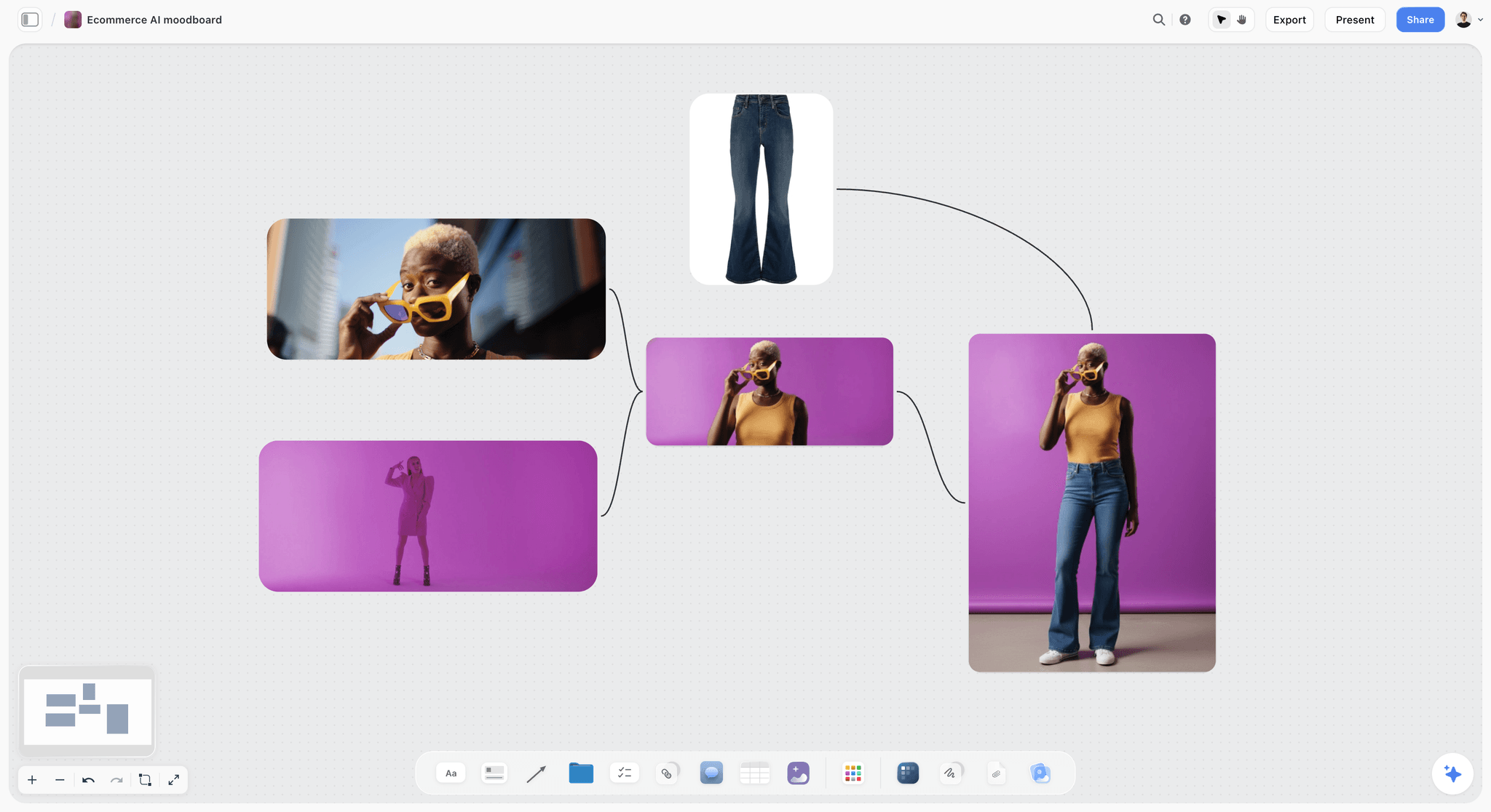
A product moodboard where every image connects to the hero shot. When a client says "make it pop", a board like this lets you ask which single image the eye should land on first.
How to Record the Decision
A decision nobody wrote down is a decision you will have again, at final-file prices. The record takes five minutes and saves the hardest conversation in the project.
The decision note
| Field | What to write | Example |
|---|---|---|
Date | The day the decision was given | 14 April |
Decider | One name and role | Ana Ruiz, founder |
Direction | The chosen direction's name | Fired |
Borrowed | What comes from the other directions | People in frame, from Hand to Table |
Dealbreakers | Every answer to question 3 | Must print in one colour on kraft; logo readable at 12 mm |
Not decided | What the decision does not cover | Final photography; copy |
Next | What starts, and when the client sees it | Development; comps on 28 April |
Write it in a note, not a comment
In Storyflow, write the decision in a note at the top of the board, not in a comment. A signed-in client can comment, but resolving a comment thread deletes the whole thread, and an approval in a deleted thread is no approval. A note stays where you put it, and anyone opening the board by link sees it first.
Export a dated PDF
A live board keeps changing as development starts, so save the concept as it was approved. In Storyflow, export the board as a PDF the day of the decision, name it with the date ("Kiln-and-Co_concept_approved_2027-04-14.pdf") and send it to the decider with the note's text in the email. Storyflow has no version compare, so the dated PDF is the proof of what was approved.
What the decision unlocks
Development starts from the note: the chosen direction, its borrowings and its constraints. Copy the dealbreakers into the development brief, because the designers who were not in the meeting need them most. At final approval, the dealbreakers become the checklist: does the box print in one colour, does the logo read at 12 mm.
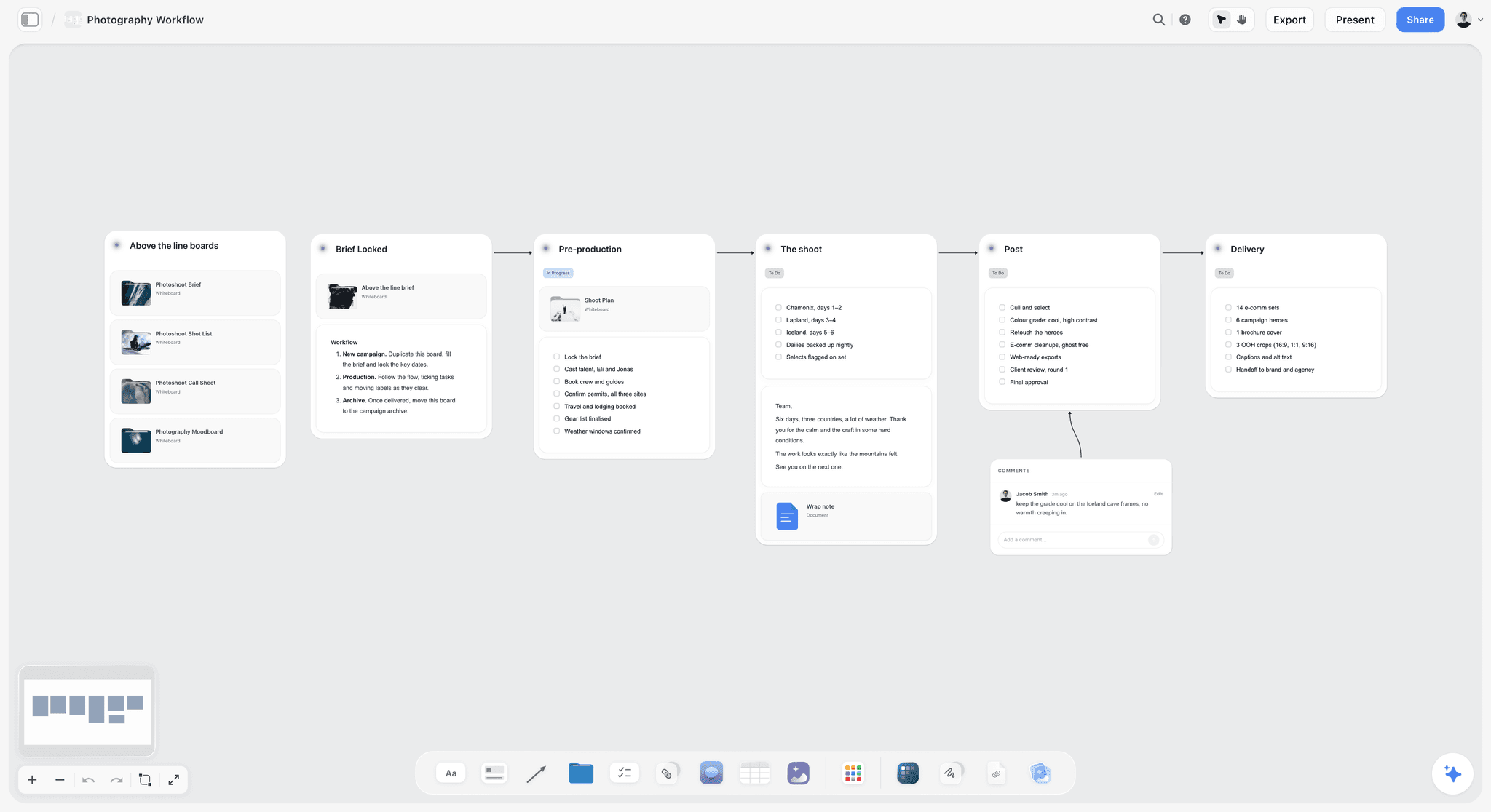
A six-stage workflow from brief to delivery with a comment beside one stage. The decision note sits where the concept stage ends, so the next stage starts from it.
The Concept Round Template to Copy
Copy this table onto the board as the concept round's notes table. The filled rows are a fictional round for Saltmarsh Studio's work on Kiln & Co, a fictional ceramics brand's rebrand and spring launch. The Question column says which of the three questions each comment answers, or "None" when it answers none of them.
| # | Comment as given | From | Question it answers | Follow-up asked | Answer | What it changes |
|---|---|---|---|---|---|---|
1 | "Fired feels like us." | Ana (decider) | Q2: choice | "What would you take from the others?" | The people in the Hand to Table photos | Fired, with people in frame |
2 | "Studio Light is a bit corporate." | Partner | Q1: brief fit | "Which word in the brief does it lose?" | "Handmade" | Studio Light set aside |
3 | "Can the logo be bigger?" | Partner | None | "Is the worry that people will not see the name?" | Yes, on the stamp | Dealbreaker: name readable at 12 mm |
4 | "Our boxes only print in one colour." | Ana | Q3: dealbreaker | "Is that the box or every pack?" | Every pack | Dealbreaker: one-colour print on kraft |
5 | "Love the terracotta." | Ana | Q1: brief fit | "Which line of the brief does it answer?" | "Warm, earthy, from the kiln" | Palette kept as a base |
6 | "Hand to Table is lovely but busy." | Ana | Q1: brief fit | "Busy for which channel?" | The shop sign | Sign stays simple in Fired |
7 | "Can we see it in green?" | Partner | None | "What should the colour do?" | Stand out on the market table | Accent colour tested in development |
8 | "The market stall must look the same as the website." | Ana | Q3: dealbreaker | "Which part matters most?" | The logo and the colour | Dealbreaker: one system offline and online |
9 | "Our stockist wants the logo top left on shelves." | Ana | Q3: dealbreaker | "Is that in writing?" | Yes, in their guide | Dealbreaker: shelf layout fixed |
10 | "Not sure about the serif." | Partner | None | "What should the type feel like?" | "Like a potter's stamp" | Type tested in development |
11 | "When do we see the next version?" | Ana | None | Answered from the plan | 28 April | No change |
Four of eleven comments answered none of the three questions, and each became useful after one follow-up. Three dealbreakers (one-colour print, 12 mm legibility, the stockist's logo position) were found at concept stage, where they cost a line on the development brief instead of a reprint.
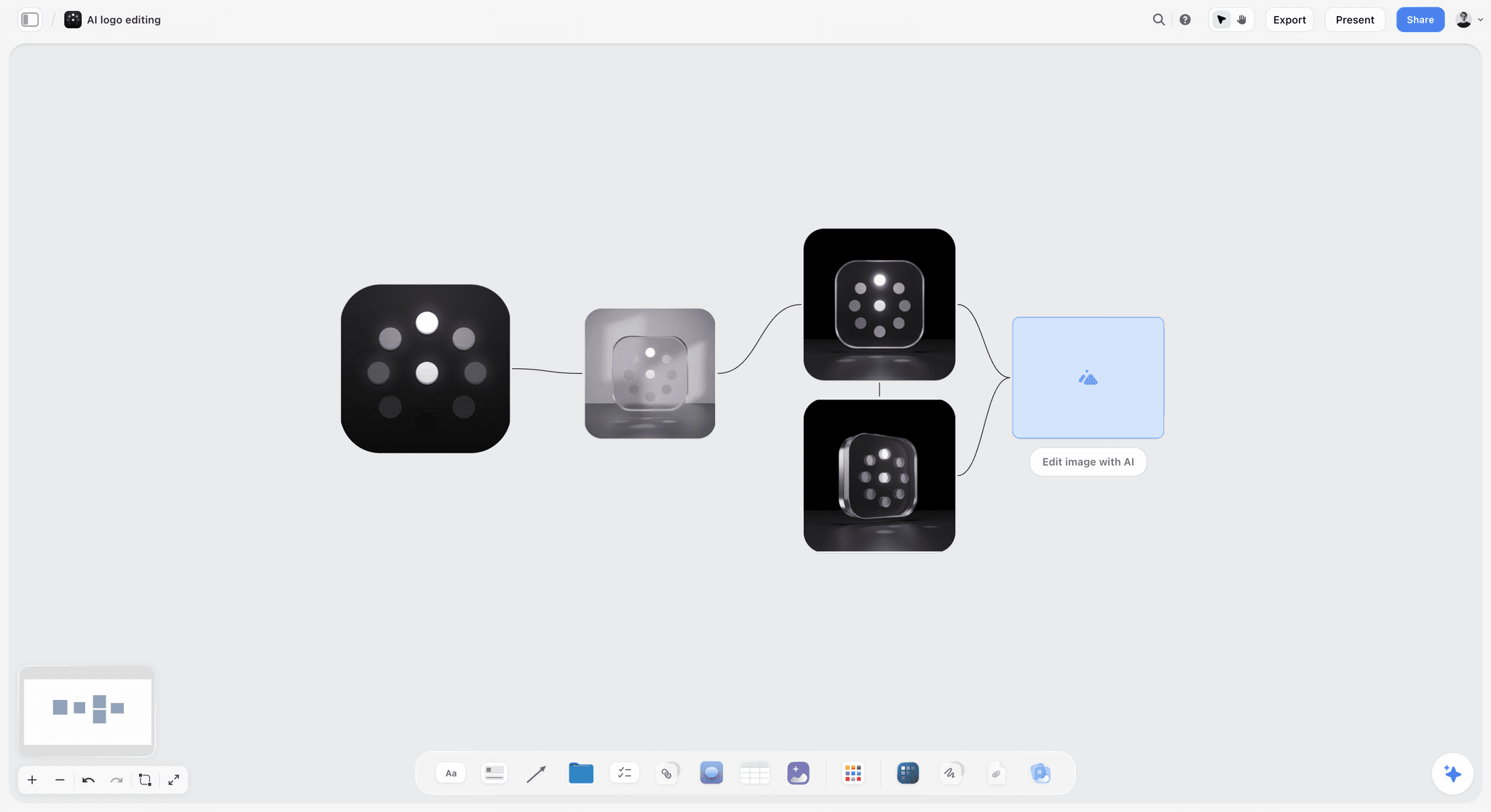
A logo shown as one mark with variations branching off it. A dealbreaker such as "readable at 12 mm" is easiest to test when every variation sits on the same board.
Worked Example: Saltmarsh Studio and Kiln & Co
The studio, the client and the people are fictional; the method is the one this guide recommends. Saltmarsh Studio is a two-person brand studio. Kiln & Co, a ceramics maker selling at markets, through one stockist and online, has asked for a rebrand and a spring launch campaign. Ana, the founder, decides; her business partner has opinions.
The board
Top left: the brief, with the objective (look like a maker, not a gift shop), the audience (people who buy one good mug rather than six cheap ones), the proposition ("made by hand, used every day") and three adjectives: warm, handmade, honest. To its right, three direction walls: Fired (terracotta, kiln textures, a stamp-like mark), Studio Light (white space, editorial still life, a fine serif) and Hand to Table (lifestyle photography of people using the pieces, a handwritten mark). Each wall has a moodboard of 12 to 15 images, a logo territory sketch and four roughs: the box, a 4:5 post, the web homepage and the market stall sign. To the right, the plan table. Beside the directions, the three questions in a note, with a three-row answer table.
The share
Saltmarsh presented live for 25 minutes in presentation mode, wall by wall, with the brief first. They gave their recommendation (Fired) only after Ana and her partner had seen all three. Then they left the view-only link, gave two working days and named Ana as the decider. The client presentation tool page shows the same walk-through. Ana signed in and answered the three questions in comments beside the note; her partner sent comments by email. The studio copied both into the answer table and the round table the same day.
The follow-ups
The eleven comments in the template above came in over two days. The studio replied to each vague one with a follow-up question in the same row within a day. The partner's "bigger logo" turned out to be about the market stamp, a 12 mm mark pressed into clay, which became the most important dealbreaker in the project.
The decision
On 14 April, the decision note read: "Direction: Fired. Borrowed: people in frame, from Hand to Table. Dealbreakers: one-colour print on kraft; name readable at 12 mm; stockist's logo top left on shelves; one system offline and online. Not decided: final photography, copy. Next: comps on 28 April. Decider: Ana Ruiz." The studio exported the board as a dated PDF and emailed it with the note's text.
What it saved
Development started from a constraint list nobody had written in the brief. Without question 3, the one-colour print rule would likely have surfaced when the box printer saw the files, and the 12 mm stamp when the first stamp was cut. Both would have meant redrawing the mark after final files. The example is illustrative; the point is where in the process each constraint appeared.
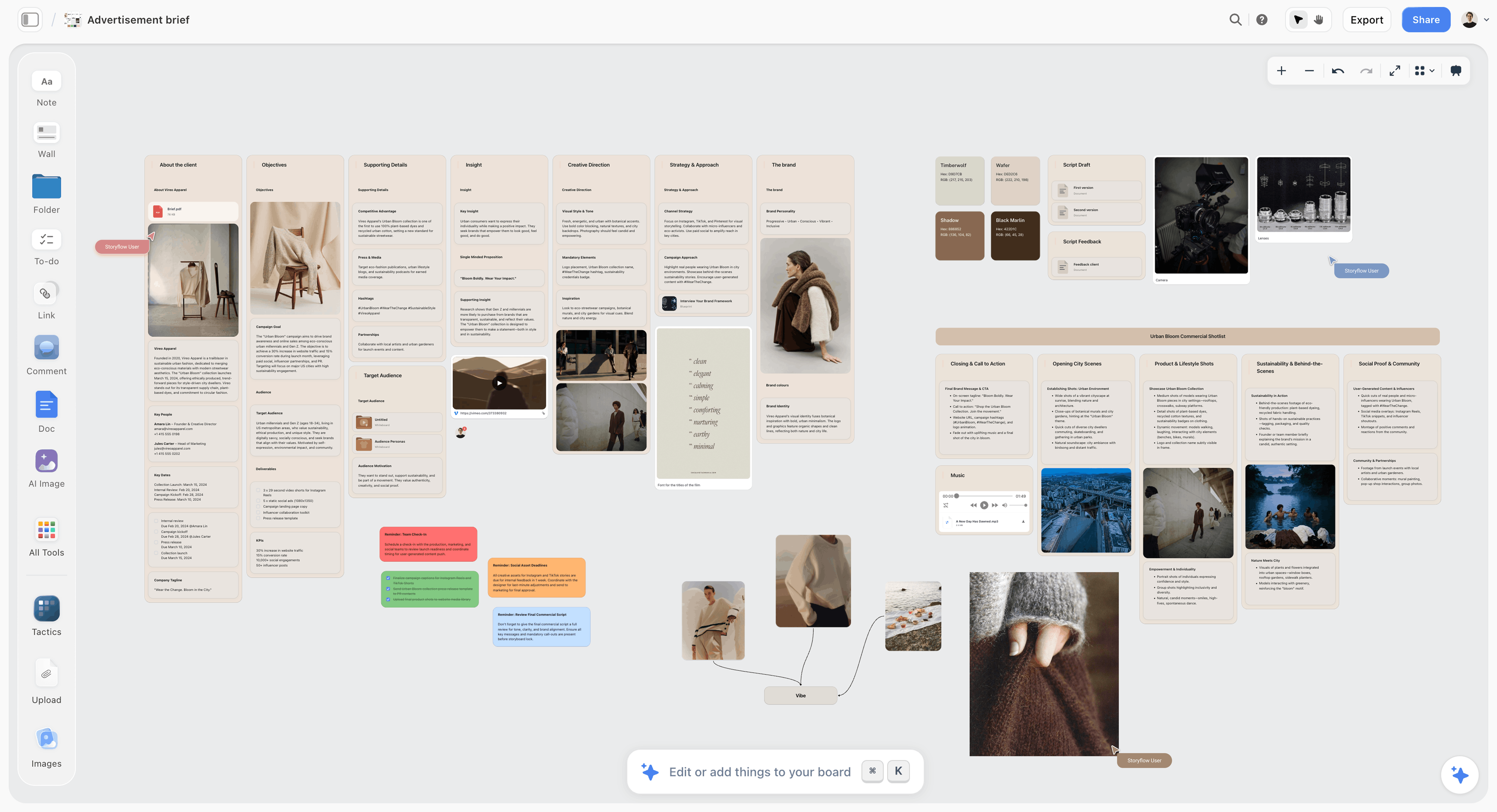
A fictional apparel brief laid out on a board beside its references. The brief at the top left of the concept board is what question 1 points back to.
Do This in ChatGPT or Claude
You can lay out the concept board, the three questions and the round table from a chat, and they land on the Storyflow board the client opens by link. ChatGPT calls these plugins and Claude calls them connectors; both use the same Storyflow account.

Storyflow works inside ChatGPT and Claude; the board stays in your Storyflow account.
Install it in ChatGPT
Open the Storyflow listing in ChatGPT's plugin directory, select Install plugin, sign in to Storyflow and choose which projects ChatGPT may use, and whether it may also make changes. Availability depends on your ChatGPT plan, workspace and region, as OpenAI's plugin help explains; in a Business or Enterprise workspace an admin manages plugins, covered in OpenAI's admin controls article. In a chat, type @ and pick Storyflow, or choose it from the + menu. The ChatGPT client presentation page shows the board side, and the ChatGPT moodboard page covers the moodboard inside each direction.
Connect it in Claude
Add a custom connector with the address https://mcp.storyflow.so/mcp, following Anthropic's custom connector guide. Setup for every assistant is on the Storyflow MCP page, and the Claude client presentation and Claude moodboard pages show the same jobs from Claude.
Prompts to copy
- "On the Kiln & Co board, add the brief at the top left as a document from this text, with headings for objective, audience, proposition, mandatories, channels and the three adjectives. [paste brief]"
- "Make three walls to the right of the brief called Fired, Studio Light and Hand to Table. At the top of each, add a note with the direction's one-line thesis, and the word ROUGH."
- "Add a note beside the three walls with these three questions, and a table under it with columns Question and Answer and one row per question: which line of the brief does each direction answer best, and which does it miss; which one direction should we develop, and what would you take from the others; what would stop you approving the finished version."
- "Create a table called Concept Round with columns #, Comment as given, From, Question it answers, Follow-up asked, Answer, What it changes. Here are the client's comments: [paste]. Mark each with Q1, Q2, Q3 or None, and draft a follow-up question for every None."
- "Add a plan table to the right of the directions with rows for development, next review, final files, approval and launch, and dates I will give you, kept in date order."
- "Add a note at the top of the board: Direction: Fired. Borrowed: people in frame, from Hand to Table. Dealbreakers: [list]. Decider: Ana Ruiz. Date: 14 April."
- "What changed on the Kiln & Co board in the last week, and who changed it?"
What lands on the board
Documents, notes, walls, tables, headings and links, plus colour palettes and images added to the board. The assistant reads the board, reports what changed and who changed it, and lists who is on the board. Plugin actions run on your ChatGPT plan and use no Storyflow AI credits.
What to check by hand
- Every follow-up question: the assistant drafts them from the comment's words; you know the client.
- The Q1, Q2, Q3 labels: read each against the comment. A dealbreaker disguised as a preference is easy to mislabel.
- The decision note: read it back to the decider before you export the PDF.
- Images: a reference attached in the ChatGPT chat does not reach Storyflow; the plugin gives you an upload link for the board. AI image generation is not available through the plugin.
- Comments: the plugin cannot read board comments, so paste client comments into the round table. It can add one comment card in your name.
- Allowance: a collaborator you invite joins free with 25 plugin or connector actions a week; Plus, Pro and Max have no weekly limit.
The in-app AI is separate
Inside Storyflow, on paid plans, the built-in AI has its own workflows, such as Brief my campaign, Build a moodboard for my project, Review what's on this board and What's missing here?, and it can design deliverables from the board, such as a one-pager or a designed PDF. It reads the current board plus up to five documents and three other boards you attach, and it uses Storyflow AI credits. AI image generation for concept roughs is on Pro and Max, in the app. A client invited free has no in-app AI.
Where to Share Concepts: Storyflow vs Other Kinds of Tool
Storyflow is listed first on one stated basis: the job here is concept feedback, which needs the brief, the directions, the plan and the written decision on one screen, and Storyflow holds them on one board the client opens by link with no account. Final files are a different job, and other kinds of tool do it better.
| Approach | Best at | Real limit for concept feedback | Choose it for |
|---|---|---|---|
Storyflow board | Brief, directions, plan, questions and decision on one canvas, opened by view-only link | No frame-level approval, no version compare, commenting needs sign-in | Choosing a direction while changes are cheap |
A proofing tool | Comments pinned to a spot on a file, versions side by side, an approve button | Built for files, so it invites file-level comments on concept work | Final approval of finished files |
A slide deck | A linear story presented live | The brief slides away from the work; one slide at a time | A pitch meeting with a fixed running order |
A PDF by email | Works for anyone, prints, archives | Feedback comes back as an email thread with no structure | A client who will not open links |
A design file shared by link | Live, exact layouts | Clients comment on pixels; directions sit in separate pages | Developed comps for a design-literate client |
A shared doc | Long written rationale and copy | Visual work becomes small inline images | A copy-led concept, such as a tagline route |
A whiteboard app | Open-ended workshops with the client in the room | A blank canvas has no brief, plan or decision structure | A live co-creation session before concepts |
A proofing tool
A proofing tool is the right place for final approval: comments pinned to a spot on a file, versions compared side by side and a recorded approve or reject per version. That precision is a problem at concept stage, because a client handed a file and a pin tool comments on the file. Choose a proofing tool once the direction is chosen and the files are near final, and link the proof from the board. Creative proofing tools for small studios lists the features to check, and the creative approval workflow page shows how the board and the proof fit together.
A slide deck
A deck tells a story in a fixed order, which is ideal for a live pitch. Its limit at concept feedback is that the brief is on slide 2 and the directions are on slides 8 to 20, so the client never sees them together, and a PDF of a deck gets comments by page number. Choose a deck for a formal pitch meeting with a running order, as in the agency pitch process, and keep the board as the place the decision is recorded; the campaign concept presentation page shows both together. Storyflow decks present fullscreen and export as PDF, but they do not export to other slide formats.
A PDF by email
A PDF works for any client and is the right archive. Feedback on a PDF comes back as an email, often from several people, with no structure and no link to the page it refers to. Choose a PDF for clients who will not open links, ask the three questions in the email body, and paste the answers onto the board.
A design file shared by link
Sharing the live design file is honest and exact, and design-literate clients like it. At concept stage it pulls attention to pixels and alignments, and directions often sit on separate pages. Choose it for developed comps, after the concept decision, when exactness is the point.
A shared doc
A doc carries a written rationale better than any visual tool, and copy-led concepts (a tagline, a naming route, a manifesto) can live there. Visual directions shrink to inline images. Choose a doc for a copy-led route, and put it on the board as a document beside the visual directions.
A whiteboard app
An open whiteboard is good for co-creation with the client in the room, before there are concepts to choose. A blank canvas gives no structure for a decision: no brief position, no plan, no record. Choose one for a workshop at the discovery stage, and move the output onto a structured concept board afterwards.
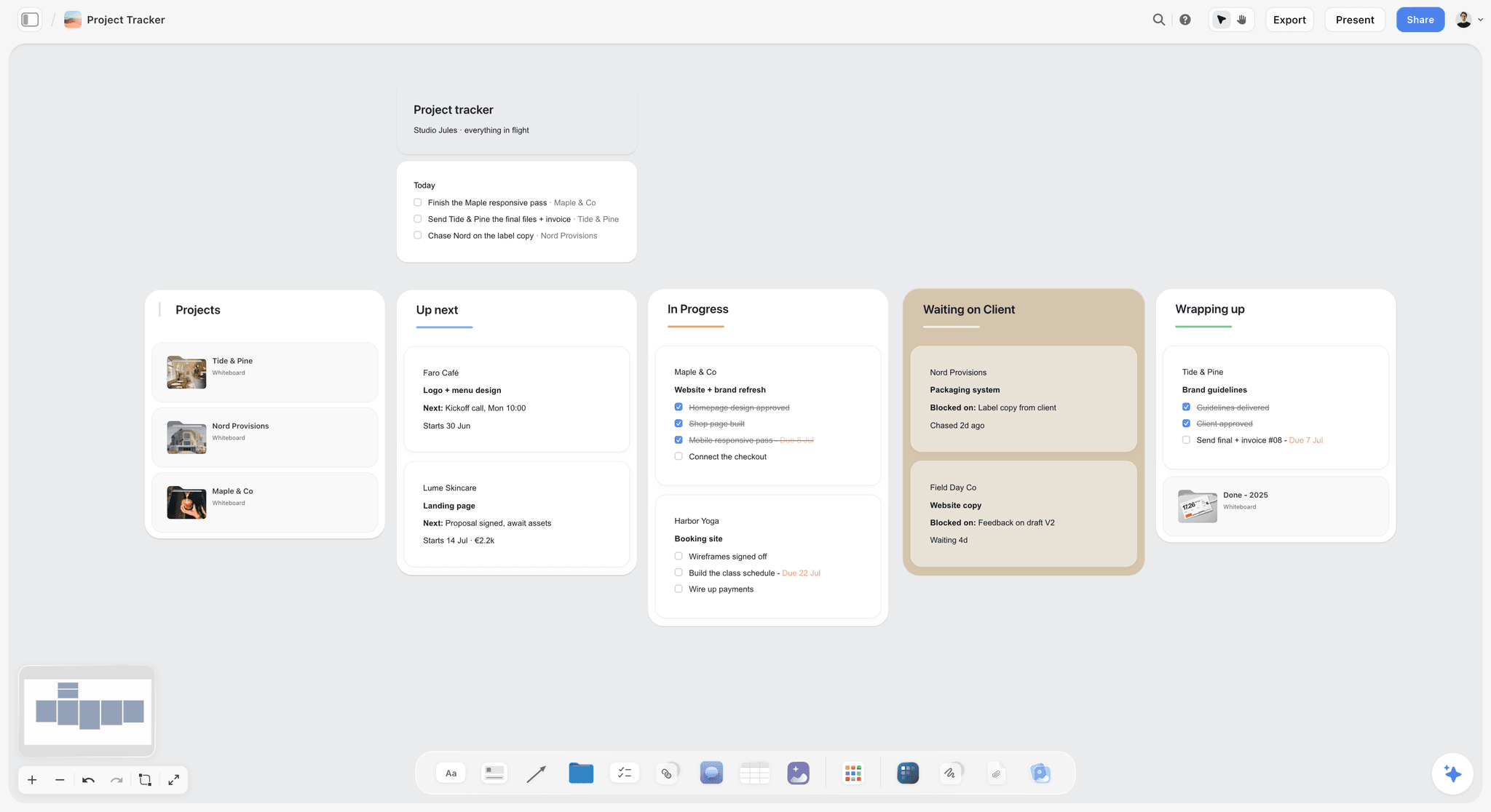
A fictional studio's tracker with a Waiting on Client column. Concept reviews with a two-working-day window keep that column short.
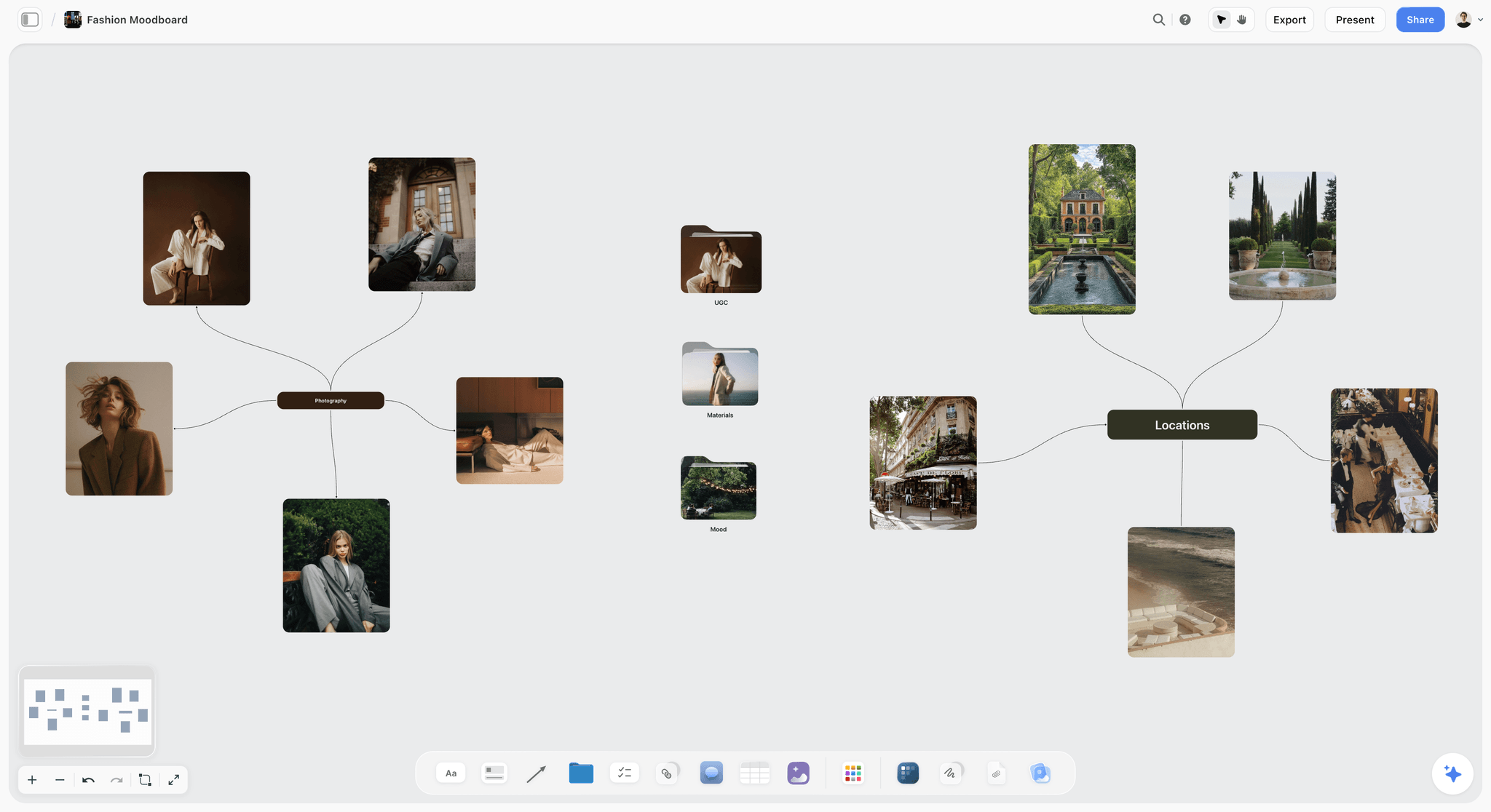
A fashion moodboard on a Storyflow board with editorial portraits and location photos branching from a central node, one concept direction a client can react to
Build the concept board before any final file exists
Install Storyflow from ChatGPT's plugin directory and lay out the brief, two or three direction walls, the three questions and a round table on one board your client opens by link.

Mistakes and Fixes
Showing final files first
The client's first look is at finished work, so every comment is about polish and the idea is never discussed. Fix: share a concept board with two or three rough directions before any final file exists.
Asking "what do you think?"
An open question gets taste. Fix: ask the three questions, written beside the work, every time.
Hiding the brief
Without the brief on screen, clients judge against what they remember, which is usually less than what they wrote. Fix: put the brief at the top left of the board, and point back to it in question 1.
Showing a decoy
A weak third direction to flatter your favourite. Clients sometimes pick it. Fix: show only directions you would be glad to make.
Leading with your recommendation
The first thing said anchors the rest. Fix: show every direction, take reactions, then recommend with a reason in the brief's words.
Collecting comments from everyone directly
Five stakeholders, five contradictions. Fix: one named decider merges input and answers the three questions; the rest is input.
Recording the decision in a comment
Resolving a comment thread on a Storyflow board deletes it. Fix: write the decision in a note at the top of the board and export a dated PDF.
Never asking for dealbreakers
The one-colour print rule appears when the printer sees the files. Fix: ask question 3 at concept stage and copy every answer into the development brief.
Treating a concept "yes" as final approval
The client approved a direction, not every image on the moodboard. Fix: write "concept, not final artwork" on every direction wall, and say in the decision note what was not decided.
Storyflow's Honest Limits for Client Feedback
Storyflow earns its place at the concept stage: the brief, directions, plan and decision on one board the client opens by link. It does not do the following, and the method above works around each.
- Not a proofing tool. No frame-level approval, no pins tied to a file version, no approve or reject button per version.
- No version compare. The board shows its current state, not the version the client approved, so the dated PDF is the record.
- Commenting needs a sign-in. A view-only link opens with no account; to comment or draw, the client signs in. Clients who will not sign in answer by email.
- Resolving a comment deletes its thread. Keep decisions in notes.
- No e-signature, proposals or invoices. The decision note is a written record, not a signed contract.
- No PPTX export or presenter notes. Boards export as PNG, JPEG or PDF; decks present fullscreen and export as PDF.
- Assistants cannot read comments. The ChatGPT plugin and the Claude connector read notes, tables and documents.
- No native desktop or mobile app. Storyflow runs in the browser and is best built on a laptop.
- Paid-only during early access. Plus is $7.99 a month billed annually ($9.99 monthly) and includes the in-app AI; pricing has the plans. Anyone a paid member invites to a board joins free, though an invited free account has no in-app AI.
For the studio side of the same board, see the client review board and the creative concept board pages; for campaign work, the campaign concept board; and for how a review board and a proofing tool split the later rounds, the design feedback and creative review pages.
The Bottom Line
Useful client comments come from asking for the right decision at the cheapest moment. Share two or three rough directions on one Storyflow board with the brief beside them, ask the three questions, turn every vague comment into a question, and write the decision in a note with a dated PDF behind it. Then let the proofing happen later, on files, where it belongs. Start with your next project: build the concept board before any final file exists, and count how many dealbreakers question 3 finds. To build it from a chat, use the ChatGPT client presentation workflow; for the moodboards inside each direction, the moodboard for clients page shows the layout.
This article was published in November 2026, with the IPA, Design Council and other sources read in November 2026.
FAQ: Concept Feedback and Client Comments
What's the best way to share creative work with a client for feedback and approval?
Share the concept before final files: one Storyflow board with the brief, two or three rough directions and the plan, opened by a view-only link, with three questions written beside the work. Ask which line of the brief each direction answers, which one to develop and what would stop the client approving the final. Record the decision in a note and a dated PDF. Use a proofing tool later, for final approval of finished files.
What is the best tool for getting client feedback on creative concepts?
Storyflow is our pick for concept feedback, because the brief, two or three directions, the plan and the written decision sit on one board the client opens by link with no account. For final approval of finished files, a proofing tool with versions and an approve button fits better. A slide deck suits a formal pitch with a running order, and a PDF by email suits clients who will not open links.
When should you share creative work with a client?
Share it at concept stage, before final files, when two or three directions exist as rough work and a change costs hours rather than days. Share it again at development, when one direction has become comps, and at final, when files are finished. The concept share matters most, because it is the cheapest moment to change the idea and the easiest stage to skip.
How many concept directions should you show a client?
Show two or three. One direction gives the client nothing to compare it with except what is in their head, and four or more turns the client into the creative director. Every direction should answer the same brief and be one you would be glad to make. Never add a weak third route as a decoy to flatter your favourite; clients sometimes choose it.
What questions should you ask a client about a creative concept?
Ask three. Which line of the brief does each direction answer best, and which does it miss? Which one direction should we develop, and what would you take from the others? What would stop you approving the finished version? The first ties feedback to the brief, the second gets a decision with its borrowings named, and the third surfaces the hidden constraints that otherwise appear at final files.
How do you stop vague client feedback?
Reply to every vague comment with the question that turns it into a decision, within a day. "Make it pop" becomes "which one thing should the eye land on first?" and "I don't love it" becomes "which line of the brief does it miss?". Ask for the problem behind a proposed solution, name one decider who merges everyone's input, and put the brief on the same screen as the work.
What is the difference between concept feedback and final approval?
Concept feedback decides which idea to develop while the work is rough and a change costs hours. Final approval confirms that finished files are correct and ready to release, when a change costs days. Concept feedback asks "is this the right thing?" and final approval asks "is this thing right?". They need different material, different tools and a different meaning of "approved", written down before the first share.
How should you record a client's decision on a concept?
Write a short decision note with the date, the decider's name and role, the chosen direction, anything borrowed from the other directions, every dealbreaker, what was not decided and what happens next. Put it at the top of the board, read it back to the decider, and export a dated PDF of the board as approved. Never rely on a comment, since resolving a comment thread on a Storyflow board deletes it.
What should you leave out of a concept share?
Leave out final copy unless the concept is a line of copy, options for every detail such as three blues, the full research pile and anything you would not be glad to produce. Show 12 to 15 references per direction rather than the 80 you collected, label each image by its job, and write "concept, not final artwork" on every direction wall, so the client judges the idea and not the finish.
Should you present concepts live or send a link?
Do both: present live for 20 to 30 minutes, then leave the link. The live walk-through lets you show the brief first, explain each direction and hold your recommendation until the client has reacted to all of them. The link gives the decider time to answer the three questions properly and to gather input from stakeholders who were not in the meeting.
Why ask a client for dealbreakers at concept stage?
Because a dealbreaker found at concept stage costs a line in the development brief, and the same one found at final files costs a redraw or a reprint. Ask "what would stop you approving the finished version?" beside the directions. Answers such as one-colour print, a minimum logo size or a stockist's layout rule become constraints the designers work to, and later the checklist for final approval.
Is Storyflow a proofing tool?
No. Storyflow has no frame-level approval, no pins tied to file versions, no version compare and no approve button per version. It is built for the stage before proofing: the brief, directions, plan and decision on one board. For final approval of finished files, use a proofing tool or a written approval against named files, and link it from the board so the concept decision and the final approval sit together.
Is Storyflow free?
Not yet. Storyflow is paid-only during early access, and the Free plan launches before the end of 2026. Anyone a paid member invites to a board joins free, which covers clients you invite to comment. Plus is $7.99 a month billed annually, or $9.99 monthly, and includes the in-app AI. An invited free account has no in-app AI.
What is the Storyflow 3-Question Test?
It is our editorial rule for concept feedback: every concept share on a Storyflow board asks exactly three questions, written beside the directions. Which line of the brief does each direction answer best, and which does it miss? Which one direction do we develop, and what would you take from the others? What would stop you approving the finished version? One question per decision a concept stage makes.
Table of Contents
- Key Takeaways
- How to Get Useful Concept Feedback: 8 Steps
- Why Feedback Is Cheap Early and Expensive Late
- The Storyflow 3-Question Test
- Concept Feedback vs Final Approval
- What to Share at Concept Stage
- How to Stop Vague Comments
- How to Record the Decision
- The Concept Round Template to Copy
- Worked Example: Saltmarsh Studio and Kiln & Co
- Do This in ChatGPT or Claude
- Where to Share Concepts: Storyflow vs Other Kinds of Tool
- A proofing tool
- A slide deck
- A PDF by email
- A design file shared by link
- A shared doc
- A whiteboard app
- Mistakes and Fixes
- Storyflow's Honest Limits for Client Feedback
- The Bottom Line
- FAQ: Concept Feedback and Client Comments
- Related Reading
Templates to check out for this topic


Templates you can use in Storyflow
Every Storyflow board starts from real structure and an AI that reads the whole canvas. Open one of these templates and make it yours.


See Storyflow in Action
A visual AI workspace where every feature lives inside one canvas. No tab-switching, no context lost.
Build your entire board from a single message
Type what you need in the AI chat at the bottom of your canvas. The AI adds cards, headings, and structure directly onto your board.
Use expert frameworks as AI context
Type @ in the AI chat and choose any Tactic. The AI tailors every response to that framework instead of giving generic advice.
Turn your board into a mind map in seconds
Ask the AI to restructure your canvas as a mindmap. It connects your ideas into a visual hierarchy so you can see how everything relates.
Why Storyflow Exists
Storyflow actually began as a personal tool while working on creative and research projects.
We kept running into the same problem: ideas were scattered everywhere: notes, documents, and whiteboards.
Nothing helped us see how everything connected.
So we started building a workspace designed around how ideas actually grow.
→ Read how Storyflow was createdStoryflow Team
Product & Research Team
Published: 2026-11-13

