
Sharper briefs, sent ultra fast
One idea, proved
in every channel.
The insight, the concept in a sentence, how it lives in film, social, and out of home, and the reference that makes it believable. All on one board you can present from.


Creatives working for these brands already got early access
- Red Bull
- Canon
- Artlist
- Porsche
See how easy it is to get started
Watch a real project come together, from a blank board to a finished plan, clicked through step by step.
Start from a ready-made template
Pick a board to see what you can build, then let AI fill it in. Every template is a real, editable starting point on the same infinite canvas.

Creative Brief
Capture the objective, audience, and message for a creative so everyone works from the same brief.
What is a creative concept?
A creative concept is the organising idea a campaign is built from, expressed simply enough that everything else can be derived from it. Storyflow is an AI visual workspace that develops a creative concept on one infinite canvas: the insight, the idea in one sentence, how it lives in each channel, and the reference that proves it. Its AI lays out candidate territories from the brief, each with a stated insight, an idea line and the channels it would live in. A concept is not a headline, not a visual, and not an execution. It sits above all three, which is why the standard test is whether it survives translation: an idea that works as a film, a poster, a social post, and a shop window is a concept, while one that only works as the film you first imagined is an execution you have mistaken for a concept. That distinction is the single most useful thing to hold onto, because campaigns fall apart at exactly the point where a beautiful execution is asked to become a system.
A concept in the state where it can be judged has four parts. The insight, which is the true and slightly uncomfortable thing about the audience the idea rests on. The idea itself, in one sentence, which is a promise or a shift in how something is seen. The expression, which is how that idea shows up in each channel. And the proof, which is the reference and craft that make people believe it can be made. Most concepts are presented with two of these, usually the idea and one gorgeous execution, and the questions that kill them in the room are always about the other two.
The reason this work is hard to hold in a document is that it is not linear. Developing a concept means moving between an insight and an execution repeatedly, and the loop matters: an execution that will not come often means the insight is not actually true, and a strong execution frequently reveals what the insight really was. A deck forces the work into a sequence and hides the moves. Three territories in three separate decks are also almost impossible to compare, which is precisely what a client needs to do, so the comparison ends up happening in someone's memory between slide twelve and slide thirty-one.
Storyflow is an AI-native infinite canvas, and it holds the whole loop on one surface. Describe the brief and the AI lays out candidate territories, each with a stated insight, an idea line, and the channels it would live in. Then you develop them properly: pin reference film and photography, write the actual headlines, drag the weak territory next to the strong one to see why it is weak, and cut the two that do not survive translation. When it is ready, you present from the same board rather than rebuilding it as slides.
Ultra fast from brief to board
From a brief to three territories a client can choose between.
No deck to build afterwards. The development surface is the presentation surface.
01
Open a canvas
Sign up in seconds. No download. Your infinite concept canvas opens in the browser.
02
Put the brief in
Type the audience, the problem, and the constraint. The AI lays out candidate territories, each with an insight, an idea line, and the channels it would live in.
03
Develop and cut
Pin reference, write the real headlines, and test each territory across channels. The ones that only work in a single execution get cut, which is the whole job.
04
Present from the board
Send a view-only link or walk the client through the canvas live. Comments land on the territory they concern rather than in an email about six things.
Insight, idea, expression, proof.
The four things a concept needs, side by side instead of scattered across a deck.

AI proposes territories from the brief
Start with five to cut, not zero to invent
Describe the audience and the problem and the AI lays out candidate territories with an insight and an idea line each. Rejecting four is a faster route to the right one than staring at a blank artboard.
See the AI creative brief generator →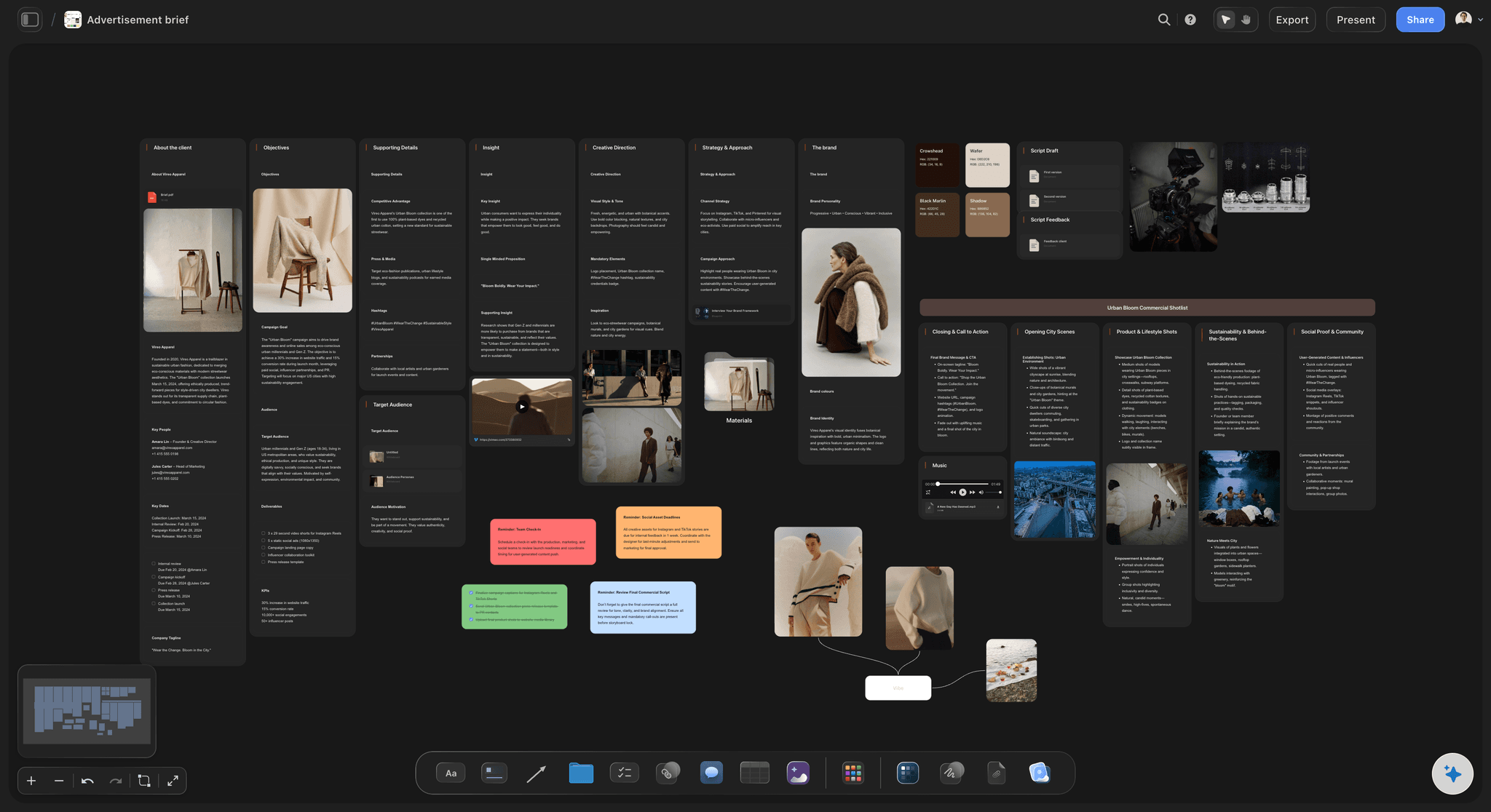
Every territory tested across every channel
Find out which idea is actually a concept
Put the film, the social cut, the out of home, and the in-store expression under each territory. The one that only works in a single execution reveals itself immediately, which is much better than finding out in production.
Explore the campaign concept presentation →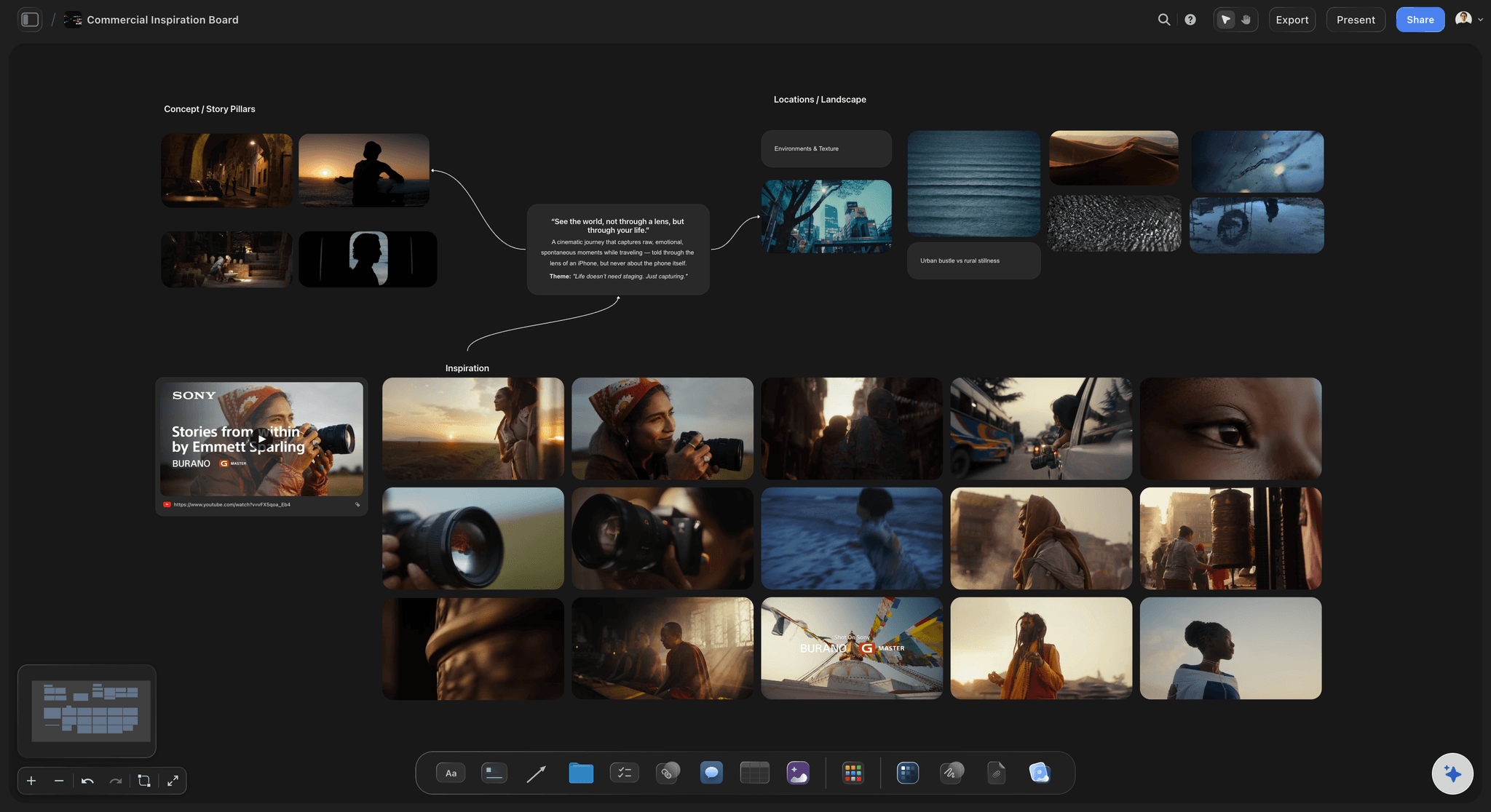
Reference and craft beside the idea it proves
Make it believable, not just describable
Drag in film stills, photography, type, and frames from YouTube or Vimeo. A territory with the tone shown rather than adjectives describing it is a territory a client can actually respond to.
Try the moodboard maker →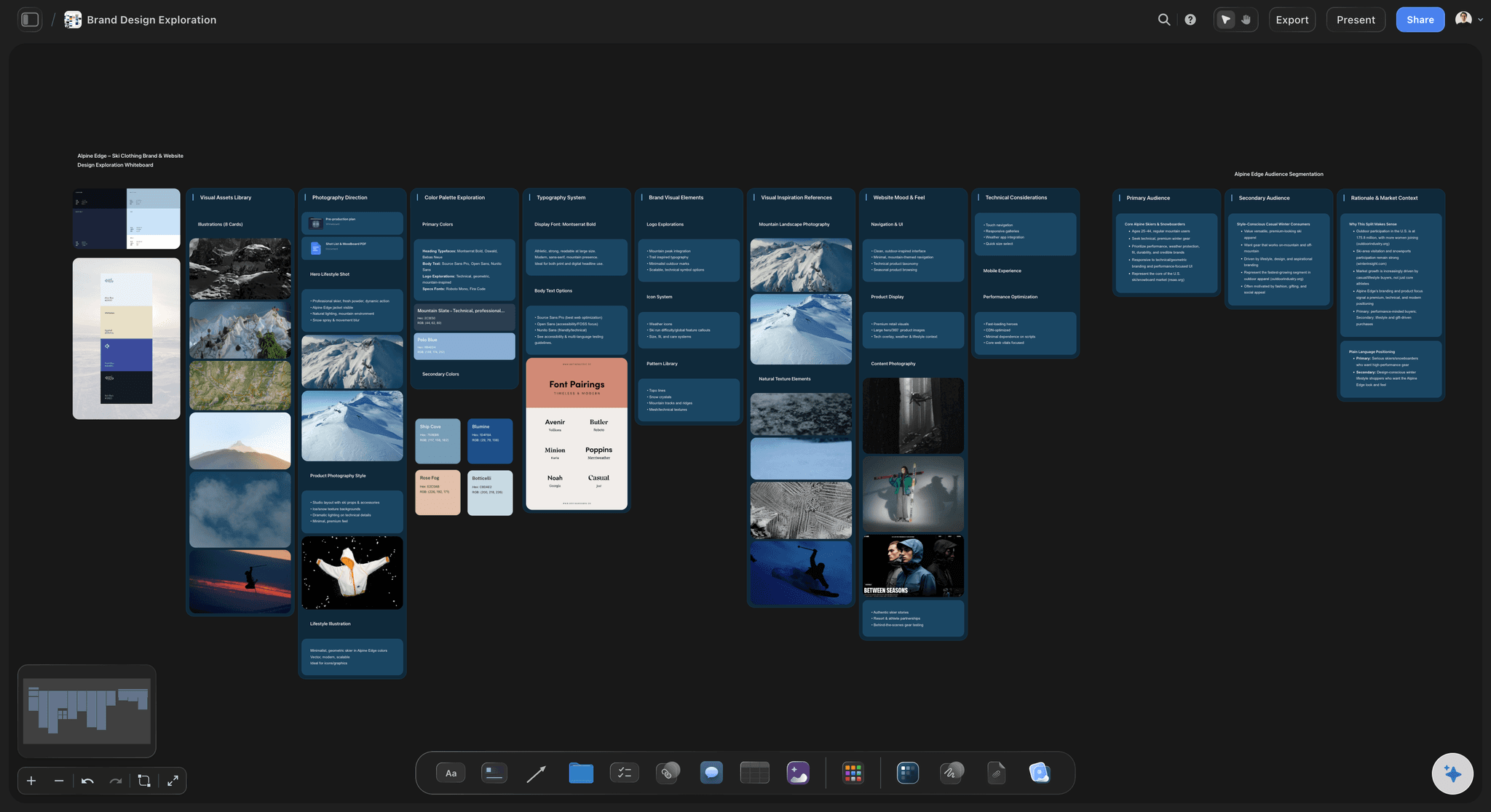
Present from the same canvas you developed on
Skip the deck rebuild entirely
Three territories side by side on one canvas is how a client compares them. Send a view-only link, or walk the board live and zoom into whichever one they lean towards.
See the client presentation tool →Unlimited boards. No object cap.
Open a canvas, put the brief in, and let AI lay out the first territories. Storyflow is paid-only during early access, with plans from $7.99 a month billed annually, and a Free plan launches before the end of 2026.
Unlimited concept boards with no cap on images
Basic AI usage to generate territories from a brief
Starter templates for briefs, moodboards, and campaign plans
Share view-only links with clients, no account required to view
Built for people with taste
The test of a concept is whether it survives translation.
An idea that only works as the execution you first imagined is not a concept, and finding that out early is worth more than any amount of polish.
Insight, idea, expression, proof
Present all four or expect the question
The insight has to be uncomfortable to be true: A comfortable insight is a description. The ones that produce work name something the audience knows about themselves and does not usually say, and they are worth writing on their own card so the idea can be checked against them.
The idea in one sentence: If it takes a paragraph, the room will not hold it and neither will the agency briefing the next execution. The sentence is the artefact everything else is derived from.
Expression in at least three channels: Film, social, and something physical is a good minimum. Two channels can hide an execution masquerading as a concept; three usually cannot.
Proof it can be made: Reference, craft, and tone shown rather than described. Most concepts that die in the room die because nobody could picture the finished thing, not because the thinking was wrong.
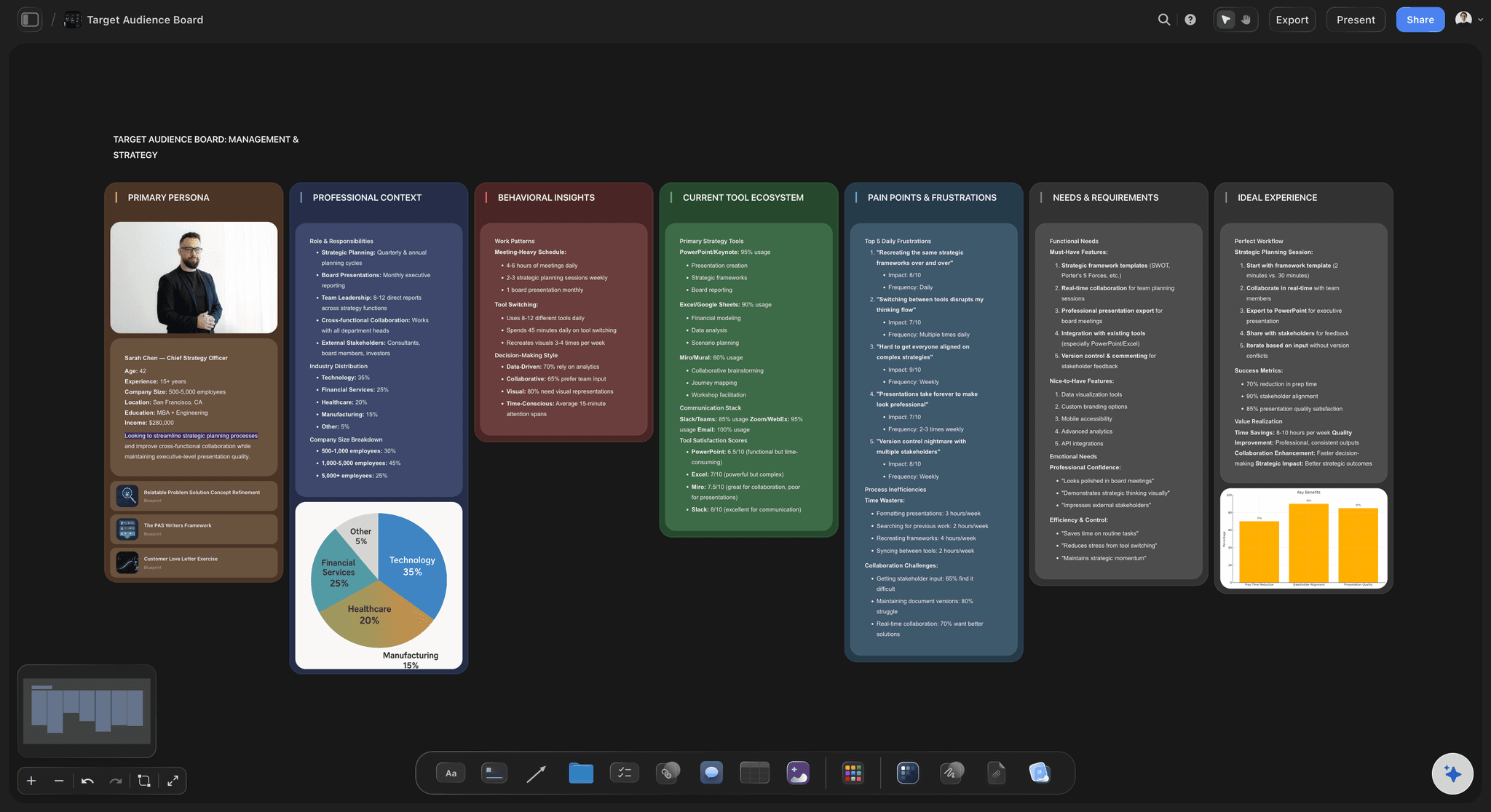
AI that reads the whole board as context
An AI that helps you develop, and does not write the idea
Territories to react against: Ask for six territories from the brief. Most will be wrong, and being specifically wrong is far more useful than a blank canvas because it gives you something to disagree with.
Stress-test the translation: Ask how a territory would express in a channel you have not tried. If the answer is thin, that is a signal about the idea rather than about the channel.
It structures, it does not create: Storyflow arranges, proposes and researches. The idea is the part of this job that has to be yours, and a tool that produced it would be producing work that reads like everyone else's.
Research at the moment you need it: Ask about the audience, the category conventions, or what competitors have already said, and the findings land on the canvas beside the territory they inform.
Three territories, comparable at a glance
Let the client compare rather than remember
Side by side, not slide by slide: A client comparing three routes in a deck is comparing their memory of route one against route three. On one canvas they are looking at all three, which produces a decision instead of a preference for whichever was shown last.
The weak one earns its place: Territories are usually presented three at a time and often one is there to make another look good. Side by side that is visible, which is uncomfortable and produces better work.
Zoom in on what they respond to: When a client leans towards one route, zoom into it live and show the depth underneath rather than promising a follow-up deck.

Strategy, creative, and client on one board
Keep the thinking attached to the work
The brief stays visible: The proposition and the constraint sit on the same canvas as the territories, so the conversation about whether an idea answers the brief happens against the brief rather than against someone's recollection of it.
Comments on the territory in question: Feedback lands on the route it concerns. Nobody has to reconstruct which idea a note in an email thread was about.
The chosen route becomes the production board: Once a territory is approved it carries straight into shot lists, schedules, and channel plans on the same canvas, so the reasoning is one scroll from the execution.
Explore templates for your project
Every template opens as a real, editable board on the infinite canvas. Pick the closest fit and make it your own.
Creative Brief
Capture the objective, audience, and message for a creative so everyone works from the same brief.
One app instead of five
Storyflow vs Figma, Milanote, and Keynote.
Each is good at part of this: Figma is where finished layouts get made, Milanote is a lovely place to collect visual reference, and Keynote is still the right tool for a linear presentation. Here is where they differ for concept development.
Storyflow
Recommended
Infinite canvas for reference and layouts together
AI proposes territories from the brief
AI reads the whole board as context
Present live from the working canvas
View-only links for clients with no account
Precise vector layout and design production
Figma
Infinite canvas for reference and layouts together
AI proposes territories from the brief
AI reads the whole board as context
Present live from the working canvas
View-only links for clients with no account
Precise vector layout and design production
Milanote
Infinite canvas for reference and layouts together
AI proposes territories from the brief
AI reads the whole board as context
Present live from the working canvas
View-only links for clients with no account
Precise vector layout and design production
Keynote
Infinite canvas for reference and layouts together
AI proposes territories from the brief
AI reads the whole board as context
Present live from the working canvas
View-only links for clients with no account
Precise vector layout and design production
What creators are saying
Join early creators getting structured workspaces and AI that remembers their projects
“Storyflow has sped up my workflow by at least 3x, which means more flow state and more projects I can actually ship. It truly changed the way me and my team create.”

Reilin Joey
Director & YouTuber
“One prompt gets me a structured board. But the tactics are my favorite. I run my YouTube scripts through them and my intros and retention got better. It's amazing.”

Justkay
YouTuber & Freelance Filmmaker
“I used to juggle five apps to plan a project. Now I describe what I am making and get boards, lists, and a schedule. All in one place.”

George
@fernwehchronicles
Creative concept questions, answered.
What a concept is, how many to present, and how to tell a good one.
A creative concept is the organising idea a campaign is built from, stated simply enough that every execution can be derived from it. It is not a headline, a visual, or a film; it sits above all of those. The working test is translation: an idea that becomes a film, a poster, a social post, and a retail moment while remaining recognisably the same idea is a concept, and an idea that only works as the one execution you first imagined is an execution you have mistaken for a concept. That difference is the reason campaigns come apart in production, when a beautiful single execution is asked to become a system and cannot. A concept in a state where it can be judged carries four things: the insight it rests on, the idea in a sentence, how it expresses per channel, and the reference that proves the tone is achievable.
Storyflow is built for exactly this job: the brief, each territory's insight and idea line, how it lives in film, social and out of home, and the reference that proves it sit on one board, the AI drafts territories from the brief, and you present to the client from the same board. It does not make the finished executions; layouts, retouching and edits happen in Figma, Photoshop or Premiere once a concept is chosen.
The brief is the problem and the concept is the answer. A brief states the business objective, the audience, the proposition, the reasons to believe, the constraints, and what success looks like, and it is written before creative work begins, usually by a strategist or the client. The concept is what the creative team brings back, and it should be judged against the brief rather than on its own merits, which is precisely why the two should be visible at the same time. The common failure is a concept that has quietly redefined the brief, answering a more interesting problem than the one that was set. That is sometimes the right outcome and it needs to be named out loud rather than discovered three months later, and it is much easier to name when both documents are on the same canvas.
Three is the convention and two genuinely distinct routes are usually better than three where one is padding. The reason three persists is that one route feels like a take it or leave it, and two can feel like a binary the client did not agree to. But the real requirement is that every route presented is one you would be happy to make, because a route included to make another look good will occasionally be chosen and you will have to build it. Presenting them side by side rather than sequentially matters more than the number: a client comparing route three against their memory of route one is not really comparing, which is how the last route shown tends to win. Laid out on one canvas, all three are in view at once and the decision is about the work.
Four tests, in roughly this order. Does it translate, meaning does it work in at least three channels while staying the same idea. Is the insight true, meaning would the audience recognise it as something they know about themselves rather than something a brand decided about them. Is it specific to this brand, and the sharpest version of this test is whether a competitor could run the same campaign with their logo on it, because if they could you have made a category ad. And can you picture the finished thing, which is where most concepts fail in the room, not because the thinking is weak but because nobody showed enough craft reference for it to feel real. A board that carries all four is a board that survives the meeting.
Art direction is the practice of deciding how something looks and making every visual element serve one idea. It covers the choices that add up to a coherent feel: photography style, colour, typography, casting, location, wardrobe, composition, and the treatment applied across every asset. The distinction people usually want is between art direction and design. Design executes; art direction decides what is being executed and holds the line across everything, so a campaign shot by three photographers in two countries still looks like one thing. It is also different from a creative concept, which is the idea, where art direction is how that idea is made visible. In practice an art director works from reference rather than description, which is why the material is a board of images rather than a written brief: nobody has ever successfully specified a tone in adjectives.
Creative strategy is the reasoning that connects a business problem to the creative work meant to solve it. It sits between the brief and the concept, and it answers a specific set of questions: who exactly are we talking to, what do they currently believe, what do we need them to believe instead, what is the one thing we can say that would shift that, and why should they believe us. The output is not an idea, it is the proposition an idea has to express, which is why strategists and creatives are usually different people doing sequential jobs. The most common failure is a strategy stated so broadly that any idea satisfies it, which means it is doing no filtering. A useful test: if the proposition would work equally well for your competitor, it is a category observation rather than a strategy.
Not during early access. Storyflow is paid-only right now, with plans from $7.99 a month billed annually, and a Free plan launches before the end of 2026. Anyone a paid member invites to a board joins free today, so a client or a collaborator can view and comment without paying. If you need something free this minute, Figma's free tier handles concept boards well and Milanote's free tier is genuinely pleasant for collecting reference. What you give up in both is the AI that produces territories from a brief and reads the whole board as context, which is the part that helps most when you are concepting alone.
It can produce territories worth reacting against and it should not produce the idea you present. What it is genuinely good at is range and speed: ask for six territories from a brief and you get six, quickly, and the fact that four are obvious is useful information about what the obvious answers in this category are, which is exactly what you need to avoid. It is also good at stress-testing, because asking how a territory would express in a channel you have not tried will expose a thin idea fast. What it cannot do is have the insight, because insights come from noticing something true about people, and a model trained on what has already been said is structurally biased towards the middle. Storyflow's AI proposes and arranges; the idea stays yours, which is also the only way the work ends up sounding like you.
Per territory: the insight in one line, the idea in one line, three or four channel expressions with real headlines rather than placeholder text, and enough visual reference that the tone is felt rather than described. Above all three territories, the brief itself, so the conversation stays anchored. What to leave off is the process, meaning the routes you abandoned and the reasoning behind the shortlist, which is interesting to you and noise to a client. Keep that material on the same canvas but in a separate region you can scroll to if asked. The advantage of a canvas here is that you do not have to choose in advance between a tight presentation and having the depth available, which is the choice a linear deck forces on you.
Move between the two rather than proceeding from one to the other, because the loop is the method. Write the insight as plainly as you can, then try to make one execution from it, and pay attention to what happens. If the execution will not come, the insight is often not actually true, or it is true but not uncomfortable enough to produce tension, and going back to sharpen it is faster than pushing harder on the execution. If a strong execution arrives, work backwards and ask what insight it is really expressing, because it is frequently not the one you started with and the real one is better. On a canvas both directions are the same gesture: put the insight and the executions next to each other and draw the connection, and the loop stays visible instead of being lost between drafts.
Yes, and it is a better presentation than a deck for this particular job. Walk the canvas, showing the brief first, then the three territories side by side so the client can compare rather than remember, and zoom into whichever route they lean towards to show the depth underneath. Send a view-only link afterwards and they can revisit the whole board in a browser with no account, which is what usually happens anyway when they need to show a colleague who was not in the meeting. Comments attach to the territory they concern, so the feedback arrives with its referent intact instead of as an email listing six points about four routes.
The board becomes the production plan rather than being archived. On the same canvas, the approved territory carries into the things that have to be made: shot lists, the shooting schedule, the channel plan, the asset list per format, and the timing. The reason to keep them together is that the questions that come up in production are almost always questions about intent, meaning whether a particular execution is still expressing the concept, and answering those from a board where the insight and the original expressions are one scroll away is far quicker than reconstructing the argument from an approved PDF. The routes you did not take also stay on the board, which settles the version of that conversation that reliably resurfaces in week six.
More from Storyflow
AI creative brief generator
Campaign concept presentation
Creative brief template
Client presentation tool
Moodboard maker
Creative strategy tool
Art direction board
Design brief
Agency client project planning
AI marketing campaign planner
For creative directors
AI vision board generator
Free vision board maker
Turn a campaign brief into a plan with Claude
For illustrators
Campaign concept board
Creative rationale
Find out which idea is actually a concept.
Open a canvas, put the brief in, and let AI lay out territories to argue with. No download.