
Pitch-ready plans, extremely reliable
Build the client presentation in ChatGPT,
from the board the project lives on.
For agencies and studios: ChatGPT reads the client's project board and builds the deck in their colours, then you present it fullscreen or send one view-only link.


Creatives working for these brands already got early access
- Red Bull
- Canon
- Artlist
- Porsche
See how easy it is to get started
Watch a real project come together, from a blank board to a finished plan, clicked through step by step.
Start from a ready-made template
Pick a board to see what you can build, then let AI fill it in. Every template is a real, editable starting point on the same infinite canvas.

Storyboard
Lay out your shots frame by frame with images and notes, then reorder them until the sequence reads like the finished cut.
Can ChatGPT make a client presentation?
Yes, ChatGPT can make a client presentation: it puts the work in the order that sells it, writes a headline for every slide and drafts answers to the questions the client will ask, but it works only from what you paste in, and the slides end up in a chat nobody keeps beside the project. Storyflow is an AI visual workspace that builds a client presentation on one infinite canvas: the brief, the research, the work, the client's colours and the deck in one project. With the Storyflow plugin installed, ChatGPT reads the client's project board and builds the deck there, on ChatGPT's own model, so it spends none of your Storyflow AI credits.
ChatGPT is useful here before anything is connected. Paste the brief and your notes and it finds the one sentence the client will repeat to their boss, turns agency language ("an always-on content ecosystem") into theirs ("three posts a week that bring people in before 10"), and plays the marketing director who asks what happens if the first two weeks fall flat. What it does not have is the account. Last month's feedback, the brand guide, the references the art director pinned and the shoot dates the producer agreed all live in the project, not in the chat, and a deck built without them gets corrected in the meeting.
With the plugin, ChatGPT reads the project first: the cards, documents, tables and files on the board you name. Then it builds the deck as one element on that board: up to 30 slides at 16:9, 4:3 or A4 portrait, under one theme of four colours and a font. Put the client's palette on the board as colour swatches, or give ChatGPT their hex codes, and ask for the deck in those colours. When the creative director wants the recommendation earlier, ChatGPT moves that slide in the deck that is already there.
An example, with made-up names. Field & Fold, a seven-person social agency, presents a six-week spring campaign to Oakline Coffee, a chain of 14 cafés, on Thursday at 10. The project board holds the brief, a research wall of 9 findings, a moodboard, a content plan table of 18 posts (three a week for six weeks, on Instagram and TikTok) and a shoot plan of two days across four cafés. The account lead asks ChatGPT for an eleven-slide deck in Oakline's cream, espresso brown and orange, inside the Client folder. Slide 1: the title and the date. 2: what you asked for, in three lines. 3: three things we found. 4: the idea in one sentence. 5: how it looks, with picture spaces for the moodboard stills. 6: the 18 posts, week by week. 7: the two shoot days and four cafés. 8: the dates from kickoff to the last post. 9: the three numbers we will report each week. 10: who does what, on both sides. 11: what we need from you, and by when. In a 45-minute meeting that is 25 minutes of slides and 20 of conversation.
A client presentation is judged on three slides: the one that proves you listened, the recommendation and the ask. Write those three first. On slide 2, quote the brief in the client's own words rather than your summary of it, so nobody in the room argues about what was asked. Put the reason for each piece of work on the slide after the work, never in the speaker's memory. End with a dated ask the client can say yes to in the room: "Approve the idea by 14 March so we can shoot on the 21st." Then keep the dropped ideas on the board, out of the deck, for the moment someone asks what else you tried.
Now the limits. Over the plugin, each slide's picture spaces start empty: ChatGPT does not make pictures or put them in a slide, so you add the work to the slides in Storyflow. A file or photo you attach in the ChatGPT chat does not reach Storyflow. ChatGPT cannot rewrite the words on one slide that is already built, so edit it by hand, or ask ChatGPT to remove it and add a new one in its place. It cannot read the comments a client leaves on the board either. The deck has no speaker notes, no presenter view and no animations, and Storyflow does not save a PowerPoint file or handle the proposal, the contract or the invoice.
Ultra fast from brief to board
Four steps from the project board to the client meeting.
The thinking on the board takes the time. The deck takes one message, and the night-before changes a few more.
01
Install Storyflow from the plugin directory
Open the Storyflow listing in ChatGPT's plugin directory and select Install plugin. Sign in to Storyflow when asked, then choose which projects ChatGPT may use.
02
Put the client's project on the board
The brief in the client's words, the research, the work with a note on why each piece answers the brief, and the client's colours as swatches. Add a folder called Client for everything the client will see.
03
Ask for the presentation in their colours
Name the board, the folder, the length and the order you want. For example: "Read the Oakline spring board and build an eleven-slide client presentation in the Client folder, 16:9, in the colours on the brand wall. Put the idea on slide 4 and end with what we need from Oakline by Friday."
04
Present it, then send one link
Ask ChatGPT to reorder, add or cut slides, and fix any words by hand. Present the deck fullscreen in the meeting. Afterwards, share the Client folder with a view-only link, or export the deck as a PDF for the people who were not in the room.

The work, the deck and the client's link, in one project.
ChatGPT writes the client presentation. Storyflow keeps it beside the work it presents and gives the client one place to look.
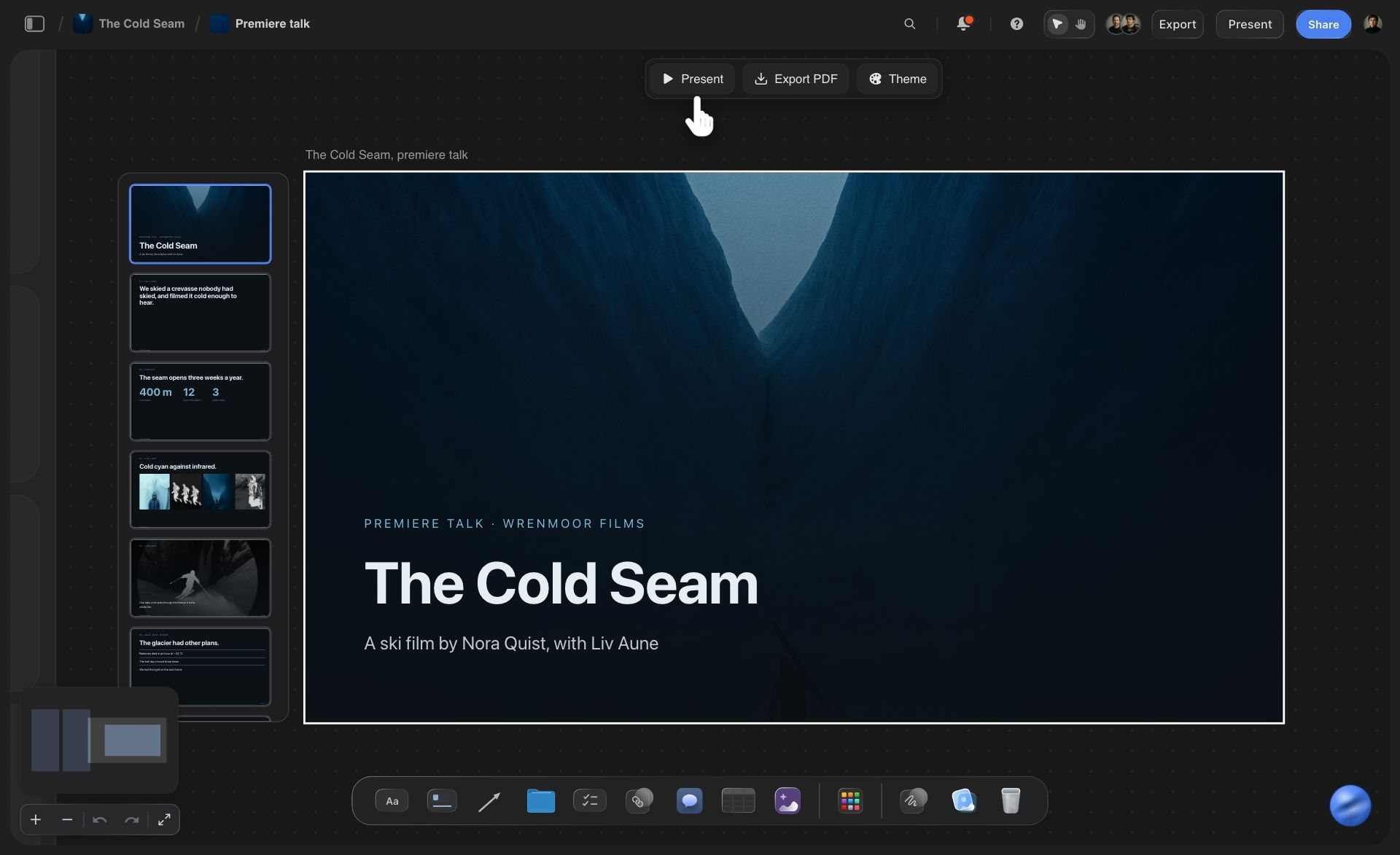
On the board
A deck that sits beside the work
The deck lands on the client's own board, next to the brief it answers. The moodboard, the content plan and the research stay a scroll away for the question that comes up on slide 6, and Present opens the deck fullscreen from there.
See the client presentation tool →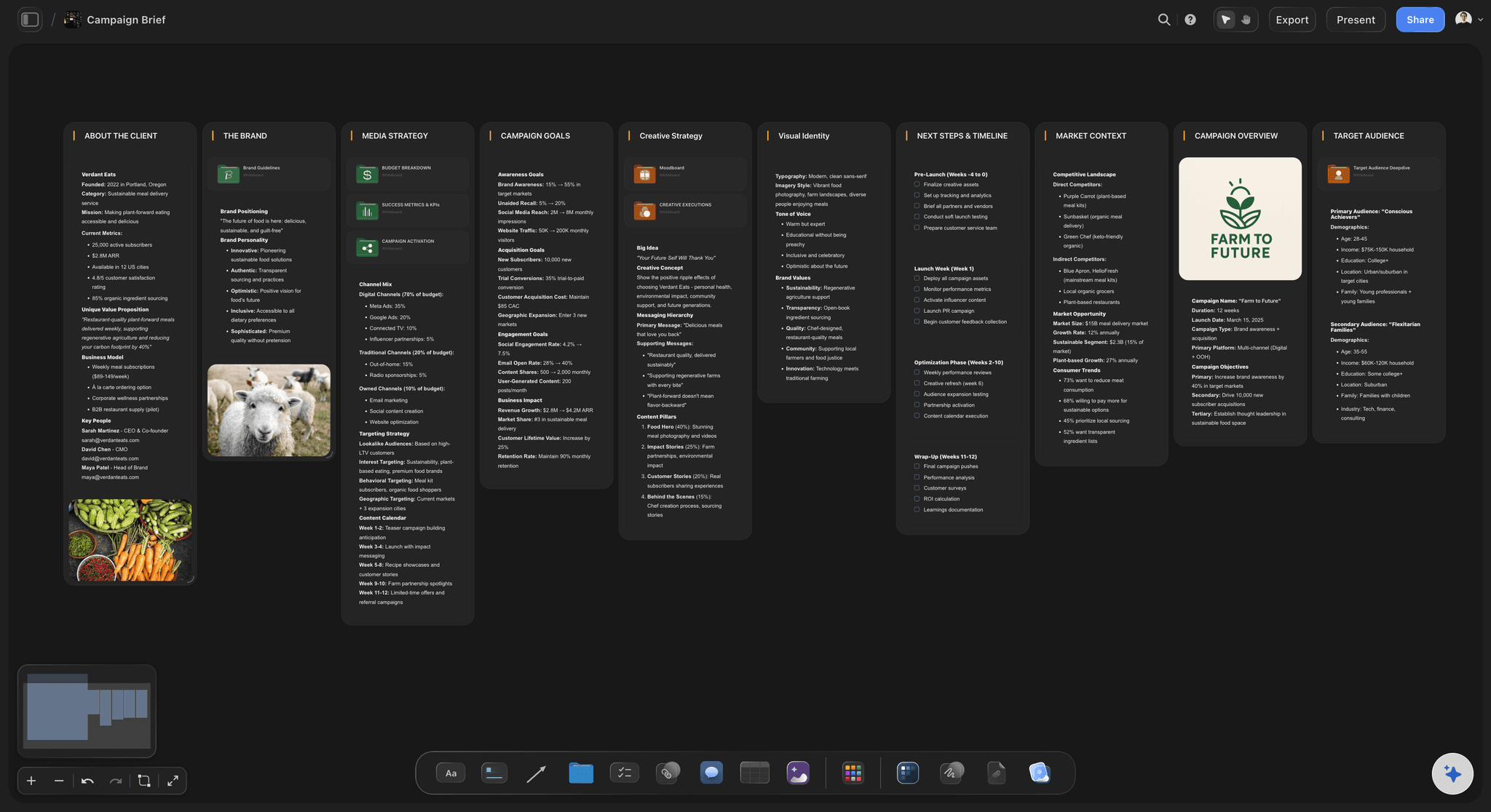
The source
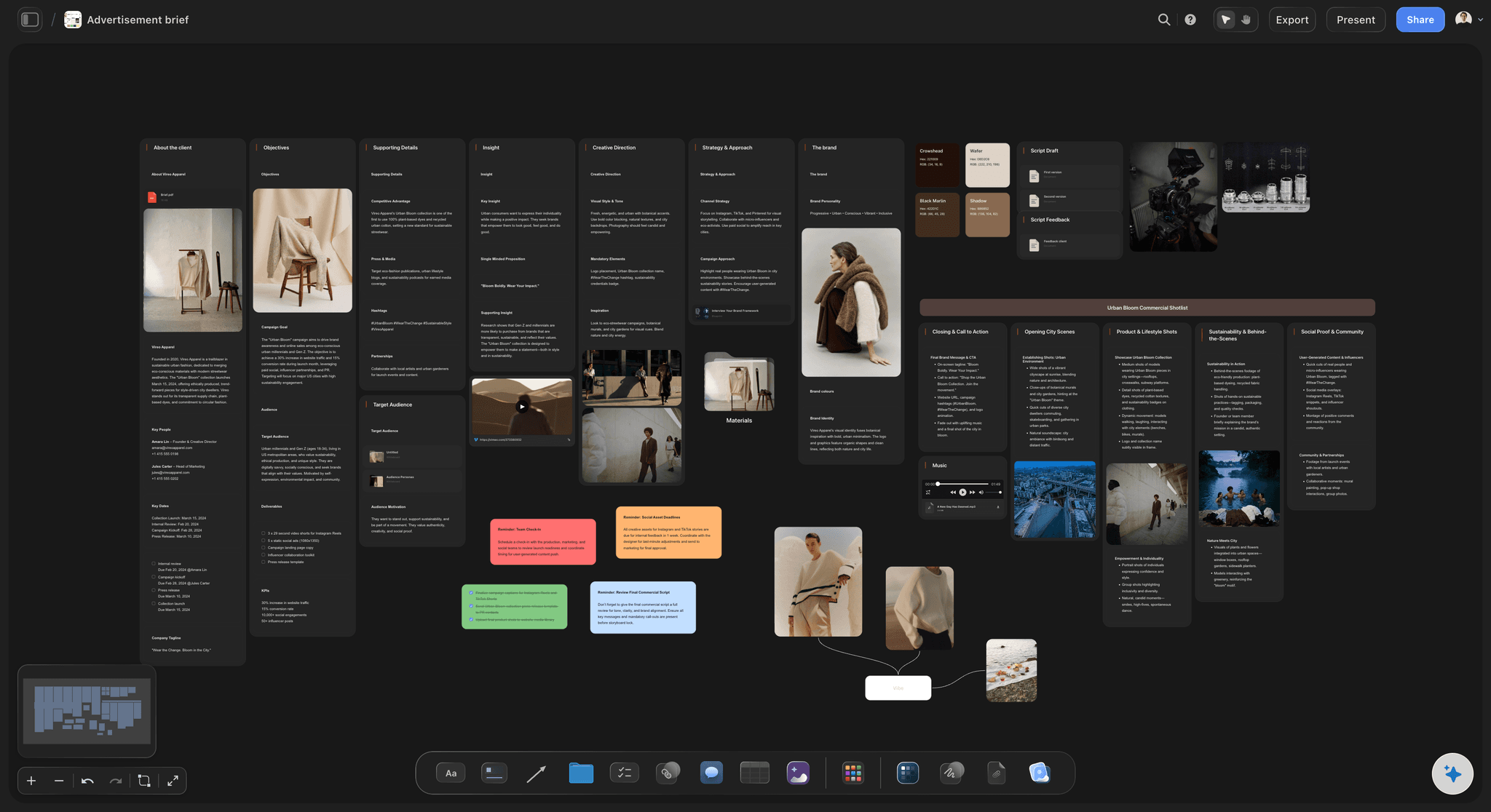
A brief board ChatGPT reads first
About the client, the brand, the media plan, the goals, the creative strategy and the next steps, each in its own column. ChatGPT reads them before it writes a slide, so the deck uses the client's own numbers and dates.
See the creative brief with ChatGPT →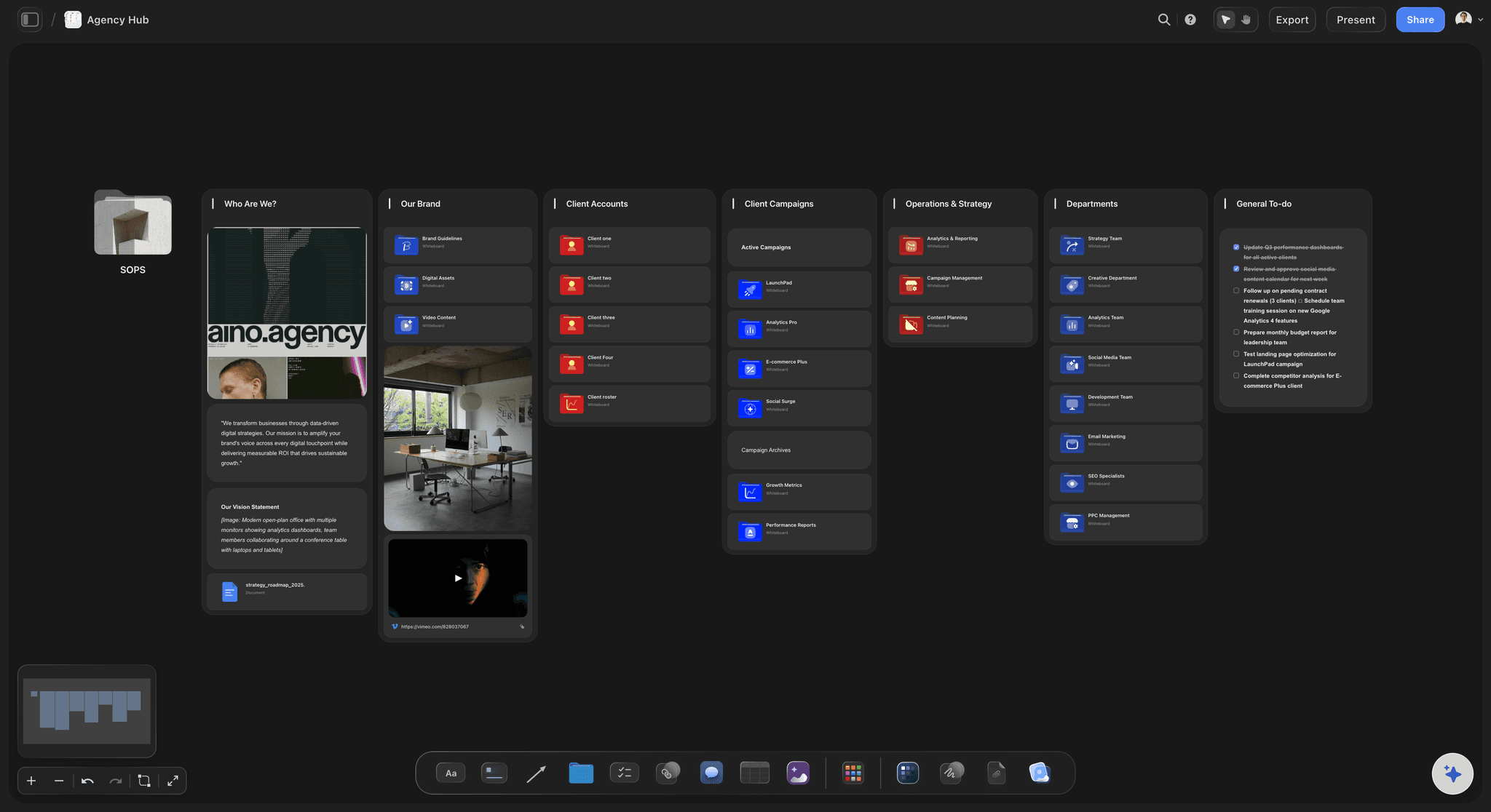
The client's link
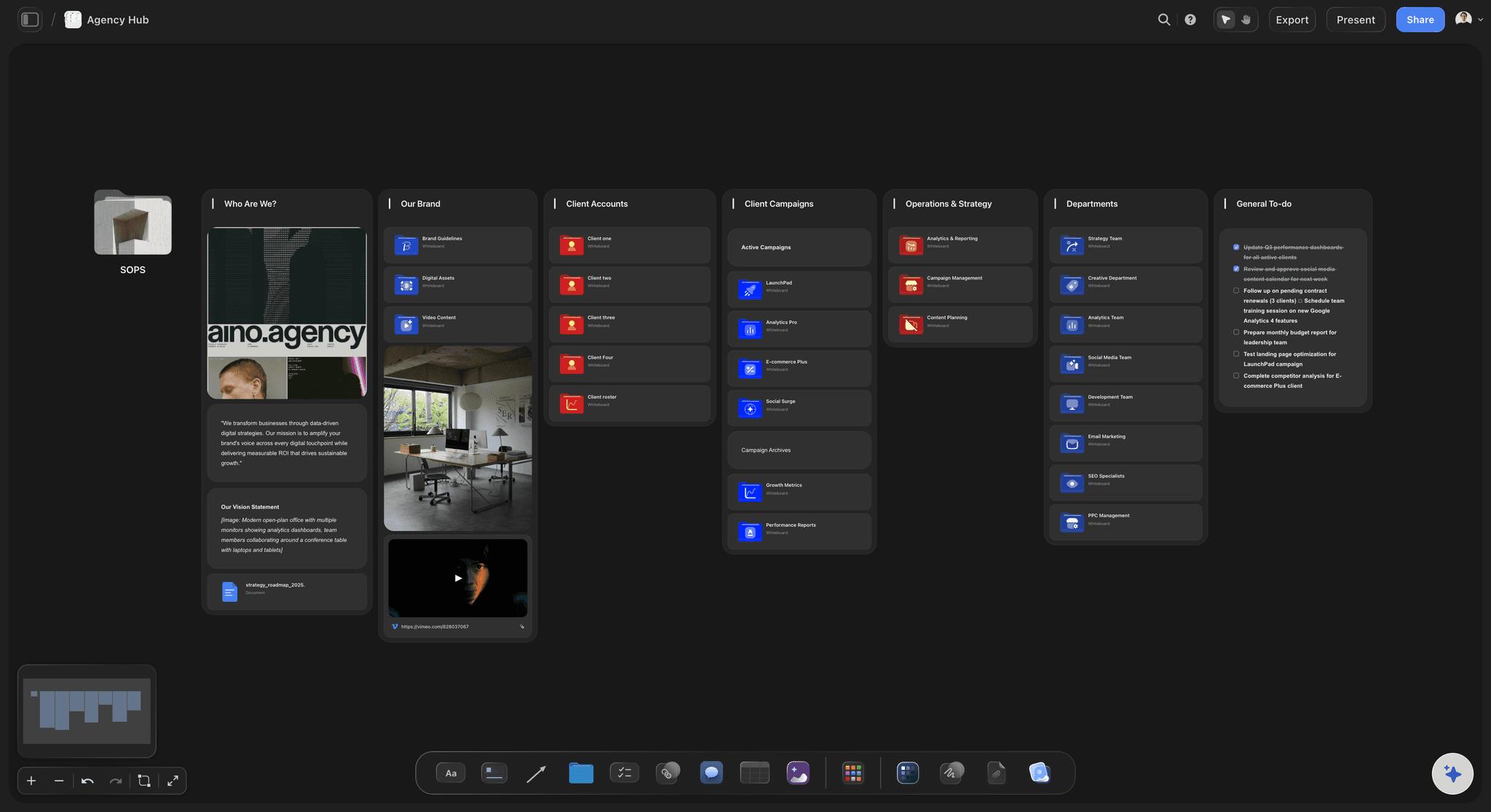
One folder per client, shared on its own
Keep a folder for each client and share only that folder with a view-only link. Everything outside it stays private, and the sharing window shows how many people have opened the link.
See Storyflow for agencies →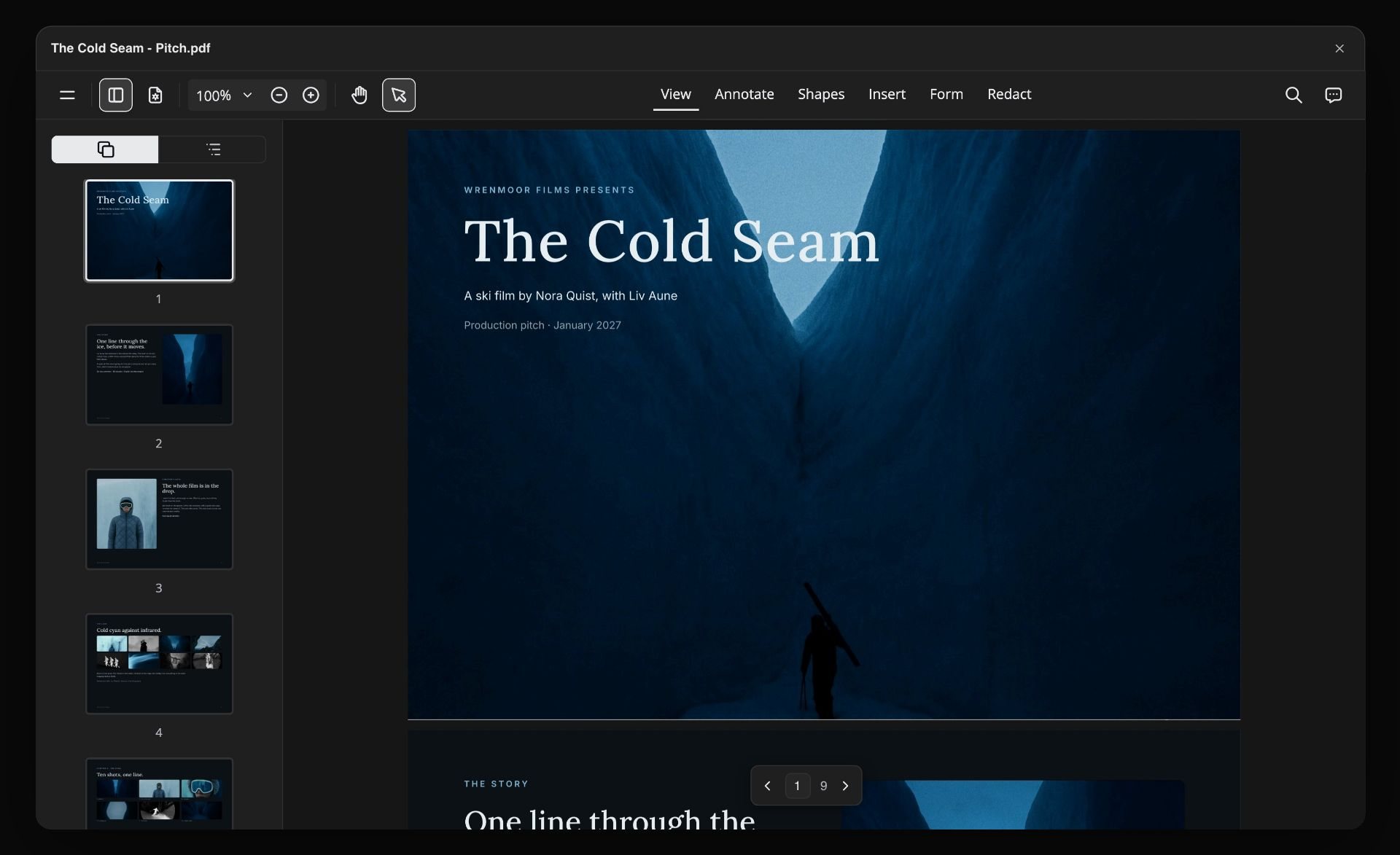
The follow-up
A PDF for the people who were not in the room
Export the deck from Storyflow as one PDF, a page per slide, for the client's finance lead or the regional team. The version you presented is the version they read.
See client updates with ChatGPT →ChatGPT builds the client deck. Your Storyflow credits stay untouched.
ChatGPT runs on its own model, so a deck it builds through the plugin uses no Storyflow AI credits. An invited free Storyflow account can make 25 plugin actions a week, reset every Monday (UTC), and Plus, Pro and Max have no weekly limit. Storyflow is paid-only during early access, from $7.99 a month billed annually ($9.99 monthly). Clients and freelancers you invite to a board join free, and Max adds a Team Workspace with roles and permissions.
No Storyflow AI credits spent on slides ChatGPT builds
No weekly limit on plugin actions on Plus, Pro and Max
Clients you invite to the board join free
A view-only link that opens with no account
You choose which client projects ChatGPT may open
Built for people with taste
Where a client presentation made in a chat comes apart.
ChatGPT writes persuasive slides. It has not seen the account, and slides copied out of a chat start aging the moment the creative director has a thought.
The account
The client's history is on the board, not in the chat
It reads the project: The brief, the research wall, the content plan and last round's notes are already on the board. ChatGPT reads them, so nobody pastes the account into a chat again.
The client's own files: A brand guide PDF, a brief in Word or a media plan in Excel can feed the deck when the file sits on the board. ChatGPT reads up to 25 MB and the first 40,000 characters of each.
Their colours, not yours: Colour swatches on the board, or the hex codes from the brand guide, become the deck's four colours. The deck reads as the client's from the first slide.
What changed since the last meeting: Ask ChatGPT what changed on the board this week and who changed it, so the producer's new shoot dates make it onto slide 8.
The night before
The creative director moves the recommendation
Reordered in place: "Put the idea before the research." ChatGPT moves the slides in the deck that is there, and nothing is rebuilt.
Added or cut at a position: Ask for a budget-question slide after slide 9, or drop the team slide for a client who knows you. Nothing else in the deck moves.
Two versions side by side: Ask for a new deck with a bolder opening and it lands beside the first, which stays exactly as it was. Present one, keep the other on the board.
The last word by hand: ChatGPT cannot change the words on a slide it already built, so a client name spelled wrong on slide 3 is yours to fix, right on the slide. ChatGPT is for the moves; you are for the final read.
The meeting
Three attachments, two versions, one confused client
Present from the board: Step through the deck fullscreen. When the client asks to see the other references, close the deck and open the moodboard beside it.
Share one folder: Share the Client folder with a view-only link. It opens in a browser with no account, and your internal notes outside the folder stay private.
Know it was opened: The sharing window shows how many people have viewed the link. Whoever manages sharing on the project can also put a password on it.
Comments need a sign-in: A client who wants to comment signs in, free when you invite them. Copy their feedback into a note before you ask ChatGPT for round two.
Explore templates for your project
Every template opens as a real, editable board on the infinite canvas. Pick the closest fit and make it your own.
Storyboard
Lay out your shots frame by frame with images and notes, then reorder them until the sequence reads like the finished cut.
One app instead of five
ChatGPT with a project board, ChatGPT alone, or Pitch.
Storyflow builds the deck from the client's project and keeps it there. Pitch, also in ChatGPT's plugin directory as of October 2026, creates the deck in Pitch: its help centre describes speaker notes in a speaker view, and its pricing page lists PowerPoint export and, on the Team and Business plans, tracking of slide views and time on each slide. Storyflow saves no PowerPoint file.
Storyflow with ChatGPT
Recommended
Slides written from your brief by AI
Reads the client's project board first
Deck beside the work, references and notes
Presents the deck slide by slide
One link to the deck and the project behind it
Speaker notes while presenting
Tracks slide views and time on each slide
ChatGPT on its own
Slides written from your brief by AI
Reads the client's project board first
Deck beside the work, references and notes
Presents the deck slide by slide
One link to the deck and the project behind it
Speaker notes while presenting
Tracks slide views and time on each slide
Pitch
Slides written from your brief by AI
Reads the client's project board first
Deck beside the work, references and notes
Presents the deck slide by slide
One link to the deck and the project behind it
Speaker notes while presenting
Tracks slide views and time on each slide
What creators are saying
Join early creators getting structured workspaces and AI that remembers their projects
“Storyflow has sped up my workflow by at least 3x, which means more flow state and more projects I can actually ship. It truly changed the way me and my team create.”

Reilin Joey
Director & YouTuber
“One prompt gets me a structured board. But the tactics are my favorite. I run my YouTube scripts through them and my intros and retention got better. It's amazing.”

Justkay
YouTuber & Freelance Filmmaker
“I used to juggle five apps to plan a project. Now I describe what I am making and get boards, lists, and a schedule. All in one place.”

George
@fernwehchronicles
Client presentations with ChatGPT: questions
What account leads and creative directors ask before ChatGPT builds the deck a client will see.
Yes. ChatGPT orders the work, writes every slide and drafts answers to the client's likely questions. With the Storyflow plugin it reads the client's project board first, then builds the deck on that board: up to 30 slides in the client's colours, which you present fullscreen, export as a PDF or share with the client through a view-only link.
Storyflow is our pick first for agencies whose work already lives on a project board, because ChatGPT reads that board, builds the deck beside the work and the client gets one link. Storyflow is our product. Pitch, also in ChatGPT's plugin directory, is the choice when you need speaker notes while presenting, a PowerPoint file, or tracking of slide views and time on each slide, which its pricing page lists on the Team and Business plans.
Open the Storyflow listing in ChatGPT's plugin directory and select Install plugin. Sign in to Storyflow when asked, then choose which projects ChatGPT may use: all of them, or only the clients you pick. In a chat, type @ and pick Storyflow, or choose it from the + menu. Availability depends on your ChatGPT plan, workspace and region.
For a 45-minute meeting, ten to twelve slides, and about half the time kept for conversation. Three slides carry the meeting: the one that shows you listened, the recommendation and the dated ask. If the deck passes 15 slides, move the detail into a document on the same Storyflow board and point to it from one slide.
Yes. A Storyflow deck has one theme of four colours (background, text, accent and a muted tone) and a font. Put the client's swatches on the board or give ChatGPT their hex codes, and it uses them for every slide. Change the theme later and every slide follows, so a colour correction from the brand team takes one request.
Yes. Share the board or folder from Storyflow with a view-only link and it opens in any browser with no account. To comment, the client signs in, and anyone a paid member invites to a board joins free. ChatGPT does not share boards for you, so you send the link yourself.
Share a folder, not the project. A project link shares everything in it, including every folder, while a folder link shares only what is inside that folder. Ask ChatGPT to build the client deck in a folder called Client, keep the agency's notes and dropped ideas outside it, and share only the Client folder.
No. Through the plugin, ChatGPT cannot read the comments on a Storyflow board. After the meeting, copy the client's feedback into a note on the board, or paste it into the chat, then ask ChatGPT to rework the deck from that note. The note also keeps a record of what the client asked for in each round.
Yes. Ask it to reorder slides, add slides at a position, remove slides, or change the deck's title, size or theme, and it changes the deck on your Storyflow board in place. It cannot rewrite the words on one built slide, so edit those by hand, or ask it to remove the slide and add a new one in its place.
No. Storyflow exports the deck as a PDF and presents it fullscreen, but it does not save a PowerPoint file. If a client's procurement team needs .pptx, rebuild the approved version in PowerPoint or Google Slides, or build it in Pitch, whose pricing page lists PowerPoint export. Most clients are happy with the PDF and the link.
Add them in Storyflow. A picture attached in the ChatGPT chat does not reach Storyflow, so ask ChatGPT for the "Add your photos" link. It works for 15 minutes, takes up to 200 pictures from a phone or computer, and puts them on the board. Then place each one in a slide's empty picture space.
Yes, if your admin allows it. In a Business or Enterprise workspace an admin manages plugins and can turn them on or off. Each person installs Storyflow and signs in to their own Storyflow account. On Storyflow's Max plan, a Team Workspace adds roles and permissions for the agency's own team.
No credits. The plugin runs on ChatGPT's own model and your ChatGPT plan. An invited free Storyflow account can make 25 plugin actions a week, reset every Monday (UTC), and Plus, Pro and Max have no weekly limit. Storyflow is paid-only during early access: Plus is $7.99 a month billed annually, Pro $14 and Max $39.
The deck is the same; only the way in differs. ChatGPT installs Storyflow from its plugin directory, while Claude adds https://mcp.storyflow.so/mcp as a custom connector, with steps at storyflow.so/mcp. Both reach the same Storyflow account, so a strategist on Claude and an account lead on ChatGPT can work on the same client deck.
Storyflow does not write proposals, send contracts, collect e-signatures or send invoices. Through the plugin, ChatGPT does not generate pictures or read board comments. The deck has no speaker notes, no presenter view, no slide-by-slide viewing analytics and no PowerPoint export. Use Storyflow for the work and the deck, and your usual tools for the paperwork.
More from Storyflow
Connect ChatGPT to Storyflow
Storyflow MCP server for every assistant
Client presentation with Claude
Team presentations with ChatGPT
Pitch deck with ChatGPT, for investors
One-pager with ChatGPT
Campaign plan with ChatGPT
Creative brief with ChatGPT
Client updates with ChatGPT
Client presentation tool
Campaign concept presentation
Storyflow for agencies
How to present a campaign concept built with ChatGPT
Best ChatGPT plugins for creative agencies
Build the client deck where the work already is.
The brief, the work and the client's colours on one board, the deck beside them, and one link for the client afterwards.