Creative Proofing Tools: Features and Pricing for Studios
A pricing reference for studios: Storyflow for concept feedback first, then Frame.io, Filestage, Ziflow, Adobe Workfront and five more, with plan prices as of November 2026 and the break-even rule for seats.

Category
Agency & Client Work
Author

Storyflow Team
Product & Research Team
Topics
2026-11-04
•
35 min read
•
Agency & Client Work- creative proofing
- client feedback
- approval workflow
- proofing tools pricing
- concept feedback
- Storyflow
How do studios collect client feedback and approvals on creative work?
Studios collect client feedback and approvals in two gates, and Storyflow is the tool for the first: feedback on the plan and concept, before any final asset exists. Storyflow is an AI visual workspace that holds the brief, directions, comments and approval log on one infinite canvas, and it works inside ChatGPT (plugin) and Claude (connector). The Storyflow 2-Gate Split, our editorial rule, allows at most 2 concept rounds on the board before final files move to proofing.

Full disclosure: Storyflow is our product. It is listed first for the narrower job of feedback on the plan and concept, not as a proofing tool: it has no frame-level approval status or version compare, so final video, print and packaging belong in the proofing tools listed here.
How the creative proofing tools compare on trust, innovation, ratings and pricing
Which creative proofing tools are the most trusted by studios?
Trust in a proofing tool comes down to the record it keeps. Filestage lists verified approval and audit logs on Enterprise, Ziflow lists electronic signatures on Enterprise, and Adobe Workfront builds decisions into enterprise work management. Storyflow does a different job, the concept and plan, and is not a proofing tool: it has no frame-level approval or version compare, so pair it with one of these for final files.
Which creative proofing tools have fair and transparent pricing?
Wipster, ReviewStudio, Frame.io and PageProof all publish entry prices, as of November 2026: Wipster Light at $9.95 billed annually, ReviewStudio Pro at $15 per user, Frame.io Pro at $15 per member and PageProof Team at $249 a month flat. Storyflow publishes a $0 Free plan and Plus at $7.99 a month billed annually. Filestage shows Starter at $199 a month billed yearly and $249 billed monthly.
Which creative proofing tools are the most innovative?
Storyflow, at the concept stage, because an AI builds the review board from a brief, and ChatGPT or Claude can add to it and report what changed. Among proofing specialists, Adobe Workfront's AI Reviewer checks assets against brand guidelines and returns a score, and Filestage lists review agents on Business. Ziflow lists ReviewAI on Enterprise.
Which proofing tools suit a studio with very few reviewers?
ReviewStudio and Wipster suit small teams because both start well below a flat plan, and Frame.io Pro covers up to five members at $15 each. If one decider approves everything, you may not need proofing at all: a Storyflow board for the concept, a PDF for the final check and a written approval line in a table can carry the job.
Which creative proofing tools are underrated?
PageProof is underrated for reviewer-heavy work, since its flat Team tier includes unlimited reviewers, automated workflows and smart compare. ReviewStudio is underrated for including compare mode in its free Starter. Storyflow's Gate Log idea is easy to miss: a simple table on the board keeps every decision and its decider in one place, even when the file notes live in a proofing tool.
Quick Comparison
Our pick first for the concept gate, then the rest by job. Prices as of November 2026.
| Tool | Best For | AI Features | Price |
|---|---|---|---|
| Storyflow | Concept and plan feedback before final assets | AI builds the board from a brief and reviews it; no frame-level approval or version compare | Free $0 (no in-app AI); Plus $7.99 mo annual |
| Frame.io | Client video review | Share links, time-range comments, optional status field | Pro $15 per member a month + tax, billed monthly |
| Filestage | Mixed formats with one-click decisions | Compare versions and reminders from Starter; review agents on Business | Starter $199 a month billed yearly ($249 monthly) |
| Ziflow | Repeated staged reviews | 2 stages on Starter, 3 on Pro; ReviewAI on Enterprise | Starter $199 a month billed annually |
Key Takeaways
- Storyflow is our pick for the first half of client approval: feedback on the plan and the concept, on one board, while changing your mind is still cheap. It is not a proofing tool, and the sections below say exactly where proofing takes over.
- The Storyflow 2-Gate Split is the rule behind this guide: a studio holds concept decisions on a Storyflow board for at most 2 rounds, logs the decision in a table, and only then sends final files to a proofing tool. It is our recommendation, not research.
- Proofing prices come in four shapes, as of November 2026: per member (Frame.io Pro at $15), flat with seats included (Filestage Starter and Ziflow Starter at $199 a month, billed yearly), flat with unlimited reviewers (PageProof Team at $249 a month) and an allowance of reviewable items (MarkUp.io Pro from $79 a month for 50).
- A $199 flat plan beats $25 per seat at eight seats. Below that, per-seat is cheaper unless you need what the flat plan includes, such as compare versions and reminders on Filestage Starter or two workflow stages on Ziflow Starter.
- Clients rarely need a paid seat. Frame.io share links, Filestage review links and ReviewStudio guest access all work without the client creating an account, though Frame.io and Filestage ask for a name and email. A Storyflow view-only link opens with no account; commenting on the board needs a sign-in.
- Keep one approval record. In a Storyflow board comments disappear on Resolve, so the decision goes in a table row before the thread closes. In a proofing tool the decision stays on the file, and the board row links to it.
- Many small jobs need no proofing subscription. If you deliver five stills a month to one decider, a board, a PDF and a written approval line cover it. Buy proofing when frame-accurate video notes, version compare or several reviewers in sequence become routine.
How Studios Collect Client Feedback and Approvals: The Method in 8 Steps
Most studios do not have a feedback problem. They have one link, one inbox and one file carrying two different questions: "is this the right idea?" and "is this file correct?" The method below separates them, and every step names where the work sits.
- Write the brief on a Storyflow board and name one decider. The brief wall states the objective, deliverables, budget ceiling and the person whose yes counts. If two people can both say yes, nothing is approved until they agree, so name one.
- Build 2 or 3 directions as separate Storyflow walls. One wall per direction: a sentence of idea, reference images, palette and a rough of the hero piece. A client can choose between walls. A client cannot choose between 40 loose pictures.
- Present the directions from Storyflow's presentation mode, then send the view-only link. Presentation mode steps through each wall with the arrow keys on the call. The view-only link opens afterwards with no account, so the client can show a colleague.
- Collect concept notes as comments on the Storyflow board. The client signs in to comment or draw, which ties each note to a name. A client with no account signs up on the free plan with no card, so commenting does not cost them a seat.
- Log each decision in a Storyflow table before you resolve the thread. Resolve deletes the whole comment thread, so copy the decision first: date, decider, what was approved, in their words.
- Stop at round 2 and move the job to production. The Storyflow 2-Gate Split closes the concept gate here. A third concept round is a scope conversation, not another comment.
- Send final files through a proofing tool. Frame.io for video, or Filestage, Ziflow, PageProof or ReviewStudio when you need decisions, version compare and reminders across mixed formats. The proofing tool holds the frame-level notes.
- Copy the final decision back to the Storyflow log and archive. One row per deliverable, with a link to the approved version. Six months later, when someone asks who signed off the claim on the packaging, you open one table.

A studio board with fictional clients: each card is a job, and the column it sits in tells you which gate it has reached.
For the full shape of a client round, the client review board page shows the board layout, and the campaign approvals workflow extends the method to multi-stakeholder marketing jobs.
The Storyflow 2-Gate Split, Explained
Proofing software gets bought to fix a problem it cannot see. If the client rejects the concept at final cut, the tool records the rejection accurately and the studio still loses the week. The fix sits upstream.
The rule, defined
The Storyflow 2-Gate Split: a studio holds every concept decision on a Storyflow board for at most 2 rounds, records the decision in a table, and sends only agreed work to a proofing tool, where the question changes from "is this right?" to "is this correct?" This is our editorial recommendation. No study sits behind it; the number comes from production logic and common contract practice, set out below.
Why the number is 2
Round 1 chooses a direction. Round 2 refines the chosen direction. Those are the only two questions a concept can usefully answer, and a third round almost always means the brief changed. Practitioners set similar limits on revisions in their contracts: one published guide to design contracts says most professionals include two or three rounds of revisions in the base price and warns that unlimited revision language is the top cause of scope bleed. The Split spends 2 of those rounds on concept and leaves the corrections round to proofing.
What moves a job from gate 1 to gate 2
Three things, all visible on the board:
- The direction is named in the log, with the decider's words beside it.
- The deliverables list has formats, sizes and counts, so nothing new appears at proofing. The deliverables list page has a structure for this.
- Open questions are closed or assigned. A question still open at gate 2 comes back as a rejected file.
What may and may not happen at gate 2
At gate 2 a client can correct: a wrong product shot, a typo, a level, a colour that drifts from the approved palette. A client asking for a new idea at this gate is reopening gate 1, and that is a change request with a price. Write this into the proposal in one sentence before the job starts, because it is far easier to agree in the abstract than in the middle of a late cut. How to stop scope creep on a creative project has wording you can adapt.
Proofing vs Concept Feedback: Two Jobs, Two Kinds of Tool
Concept feedback decides whether the idea is right and belongs on a Storyflow board beside the brief; proofing decides whether a specific file is correct and belongs in a proofing tool that tracks versions and decisions. Mixing them is how a client ends up commenting on font weight when the question was whether the campaign idea works.
| Question | Concept feedback | Proofing |
|---|---|---|
What is being judged | The idea, direction, plan, script, references | A specific file version |
Typical tool | Storyflow board (our pick), or a whiteboard or slide deck | Frame.io, Filestage, Ziflow, PageProof, ReviewStudio, Adobe Workfront |
Comment attaches to | A comment card on the board or in a wall | A frame, region or page of a file |
Decision recorded as | A row in a table, in the decider's words | Approve or reject status on the version |
Rounds allowed under the Split | At most 2 | Corrections only, as your contract states |
Cost of a change | A card moves | A re-render, re-export or reprint |
Who should attend | The decider and the lead creative | The decider, plus specialists such as legal or brand |
Output | An approved direction and a deliverables list | An approved master file |
Concept feedback fails when the client sees finish
A polished comp invites comments on the polish. Rough material on a board keeps attention on the idea, because nobody argues about the kerning of a sentence on a note card. If a client keeps correcting type at this stage, take the type away and show the sentence.
Proofing fails when the idea is still open
Version compare, annotations and stage routing all assume the work is converging. Feed a proofing tool an unsettled concept and you get eleven reviewers with precise notes pointing in different directions, each recorded perfectly. The tool is not the fault. It is answering a question nobody asked it.
Where a design file sits between the two
Figma blurs the line. A live design file is both the working file and the review surface, so comments there can be either concept or correction. The practical rule: if you are still choosing between directions, present from the board; once one direction is chosen and a designer is detailing it, comment in Figma; when a frozen export goes to print or to the client's legal team, proof that export.
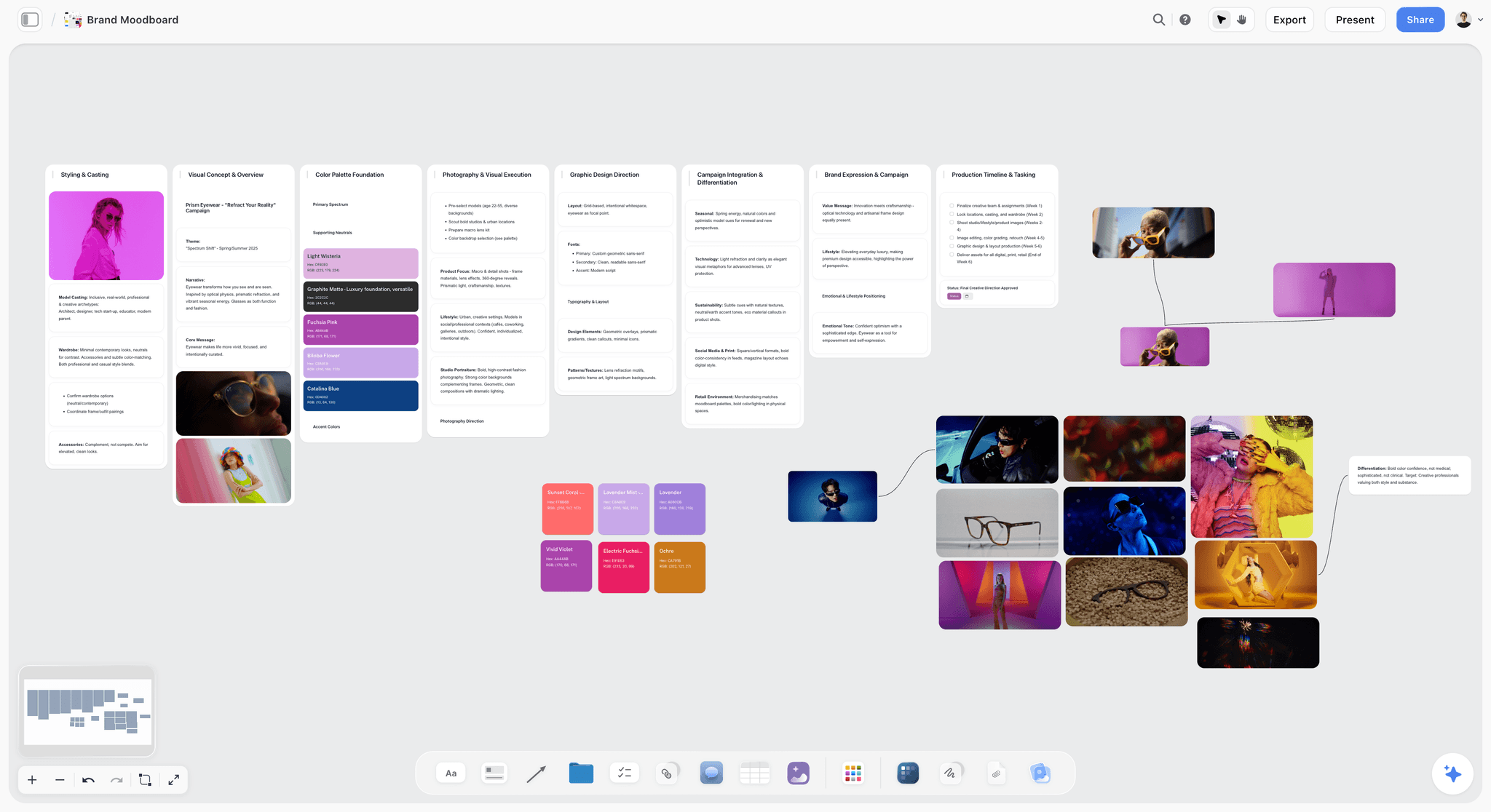
Concept feedback looks like this: a fictional eyewear campaign's references and palette, which a client can react to before a single final file exists.
Creative Proofing Tools Price Matrix, November 2026
Every price below comes from the vendor's own page in November 2026, in US dollars. Storyflow comes first because it is our pick for the concept gate, then the rest by job.
| Tool | Plan | Price, as of November 2026 | Billing stated | Who and what it includes |
|---|---|---|---|---|
Storyflow | Free | $0 | No card, no time limit | Invite anyone, capped projects and uploads, 25 plugin or connector actions a week. No in-app AI, Tactics or AI image generation |
Storyflow | Plus | $7.99 a month ($9.99 monthly) | Billed annually, or monthly | Adds in-app AI, 200+ Tactics, unlimited uploads, unlimited plugin and connector actions |
Storyflow | Pro | $14 a month ($19 monthly) | Billed annually, or monthly | Adds AI image generation and memory |
Storyflow | Max | $39 a month ($49 monthly) | Billed annually, or monthly | Most AI, Team Workspace with permissions and roles |
Frame.io | Free | $0 | Not applicable | Up to 2 members, 2 GB |
Frame.io | Pro | $15 per member a month + tax | Billed monthly; 13% off billed annually | Up to 5 members, 2 TB + 2 TB per extra member |
Frame.io | Team tier | $25 per member a month + tax | Billed monthly; 13% off billed annually | Up to 15 members, 3 TB + 2 TB per extra member, internal comments |
Frame.io | Enterprise | Custom | Custom | Custom members and storage |
Filestage | Free | $0 | Not applicable | 1 active project, 5 new files a month, 2 GB |
Filestage | Starter | $199 a month ($249 monthly) | Billed yearly, or monthly | 10 seats, unlimited active projects, 1 TB, compare versions, reminders |
Filestage | Business | $329 a month ($399 monthly) | Billed yearly, or monthly | 3 TB, automations, review agents, checklists, project templates |
Filestage | Enterprise | Custom | Through sales | 10 TB, verified approval, audit logs, SSO |
Ziflow | Free | $0 | Not applicable | 2 users, 2 GB, 1 workflow stage |
Ziflow | Starter (also labelled Standard) | $199 a month | Billed annually | 15 users, 1 TB, up to 2 stages, 1 active template |
Ziflow | Pro | $329 a month | Billed annually | 20 users, 2 TB, up to 3 stages, 1 active template |
Ziflow | Enterprise | Custom | Through sales | 25+ users, 4 TB+, unlimited stages, ReviewAI, electronic signatures |
Adobe Workfront | All plans | See Adobe Workfront pricing | See Adobe Workfront pricing | Enterprise work management with proofing |
Figma | Professional | Full $16, Collab $3 per seat a month | Monthly or annual; see Figma pricing | Viewers comment at no cost |
Figma | Organization | Full $55, Collab $5 per seat a month | Billed annually | Same viewer rule |
MarkUp.io | Pro | $79 for 50 MarkUps, $99 for 75, $129 for 100 | Monthly; yearly gives 2 months free | Unlimited users, 1 workspace |
MarkUp.io | Business | $499 for 200, $649 for 400, $799 for 600 | Monthly, or yearly at $4,990 to $7,990 | Adds branding, vanity domain, full metrics |
PageProof | Team | $249 a month or $2,499 a year | Monthly or yearly | Flat rate, unlimited reviewers, automated workflows, smart compare |
PageProof | Team Plus | $499 a month or $4,999 a year | Monthly or yearly | Adds scheduled proofs, comment labels, SSO |
ReviewStudio | Starter | $0 | Not applicable | 3 active reviews in total, 5 GB |
ReviewStudio | Pro | $15 per user a month, $12 yearly | Monthly or yearly | 10 active reviews per user, 25 GB per user |
ReviewStudio | Advanced | $25 per user a month, $20 yearly | Monthly or yearly; 5-user minimum | Unlimited reviews, workflow automations, comment privacy |
Wipster | Light | $11.95 a month, $9.95 billed annually | Monthly or annual | 50 GB, unlimited reviewers |
Wipster | Team tier | $25 per user a month, $19.95 billed annually | Monthly or annual | From 250 GB, team-only comments, branding |
Sources: Frame.io pricing, Filestage pricing, Ziflow pricing, Adobe Workfront pricing, Figma pricing, MarkUp.io pricing, PageProof pricing, ReviewStudio pricing, Wipster pricing and Storyflow pricing.
Read the unit before the number
$15 and $199 are not comparable until you know what each one counts. Frame.io counts members. Filestage and Ziflow count a plan with seats inside it. PageProof counts a team. MarkUp.io counts reviewable items. A studio of three with 30 deliverables a month and a studio of twelve with 10 will reach opposite answers from the same table.
Where free plans stop for real client work
Frame.io Free holds 2 GB, so one graded master can fill it. Filestage Free allows one active project and five new files a month. ReviewStudio Starter allows three active reviews in total. Ziflow Free gives one workflow stage with no templates, so you configure each proof by hand. Each is useful for trying the tool on a real job, and not much more. Storyflow Free has capped projects and uploads and no in-app AI.
Storyflow's price in this table
Storyflow has a free plan at $0 with no card, with capped projects and uploads and 25 plugin or connector actions a week. It has no in-app AI, which starts on Plus, so on Free you build the board by hand or through ChatGPT or Claude. It sits in this table as the concept tool, not as a cheaper substitute for a proofing plan. If you need frame-level approval, it does not have it at any price.
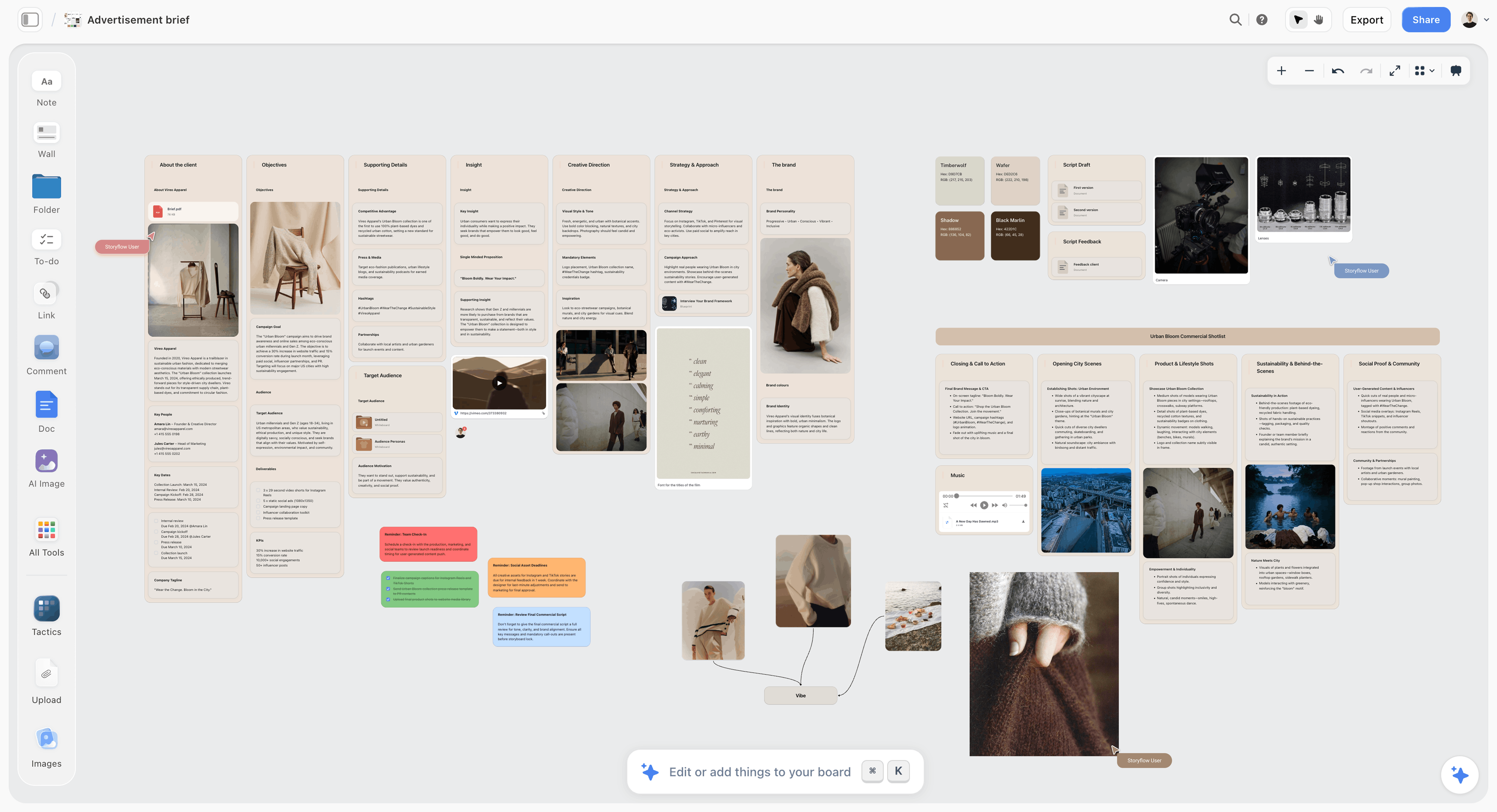
Storyflow board holding a fictional apparel ad brief with camera references, the kind of concept material a client reviews before any final file exists
Run your next concept round on one board
Install Storyflow in ChatGPT, paste the client's brief, and get walls for each direction and a Gate Log table your client can open by link.

Features by Plan: What the Money Actually Unlocks
A proofing plan is usually bought for one feature. This table shows where that feature starts, from each vendor's pricing or help page. "See" a vendor means check its page for your plan before you rely on the feature. Storyflow is not in this table, because it is not a proofing tool.
| Feature studios ask for | Frame.io | Filestage | Ziflow | PageProof | ReviewStudio |
|---|---|---|---|---|---|
Client opens without an account | Yes, share link | Yes, review link | See Ziflow's help | See PageProof | Yes, guest access |
Comment without an account | Yes, name and email on first comment | Yes, name and email | See Ziflow's help | See PageProof | Yes, guest access |
Frame or region annotation on a file | Yes, draw and select a time range | Yes | Yes | Yes, markup tools | Yes |
Compare two versions | Comparison viewer; see Frame.io for the plan | From Starter; advanced mode on Business | Version history and labels; see Ziflow | Smart compare from Team | Compare mode from Starter |
Approve or reject as a status | If the sender enables a status field | Yes, one-click decision | Yes | Yes | Approval management from Starter |
Sequential review stages | See Frame.io | Automations from Business | 2 stages on Starter, 3 on Pro, unlimited on Enterprise | Automated workflows from Team | Workflow automations from Advanced |
Due dates and reminders | See Frame.io | From Starter | Deadlines and manual reminders from Starter; automatic on Enterprise | Reminders from Team | See ReviewStudio |
Password on the link | Passphrase from Pro | From Starter | See Ziflow | See PageProof | Optional on guest reviews |
Team-only comments | Internal comments on the Team tier | From Starter | See Ziflow | Private comments on Enterprise | Comment privacy from Advanced |
E-signature or verified approval | See Frame.io | Verified approval on Enterprise | Electronic signatures on Enterprise | Digital signing on Enterprise | See ReviewStudio |
The Starter trap
Do not assume sequential approval comes with the first paid plan. On Ziflow Starter you get two stages and one active template, which fits "account lead, then client" and little more. Filestage puts automations on Business, one step above Starter. If your process has a legal reviewer between the creative director and the client, read this row first.
Verified approval is an Enterprise word
If a regulated client needs proof of who approved what, the features that answer that question, Filestage verified approval and audit logs, Ziflow electronic signatures and PageProof digital signing, all sit on Enterprise tiers as of November 2026. For a small studio, a written approval line from the decider in a log or a proofing tool status is the realistic record, and it is worth asking your client's legal team whether that is enough before the job starts rather than after.
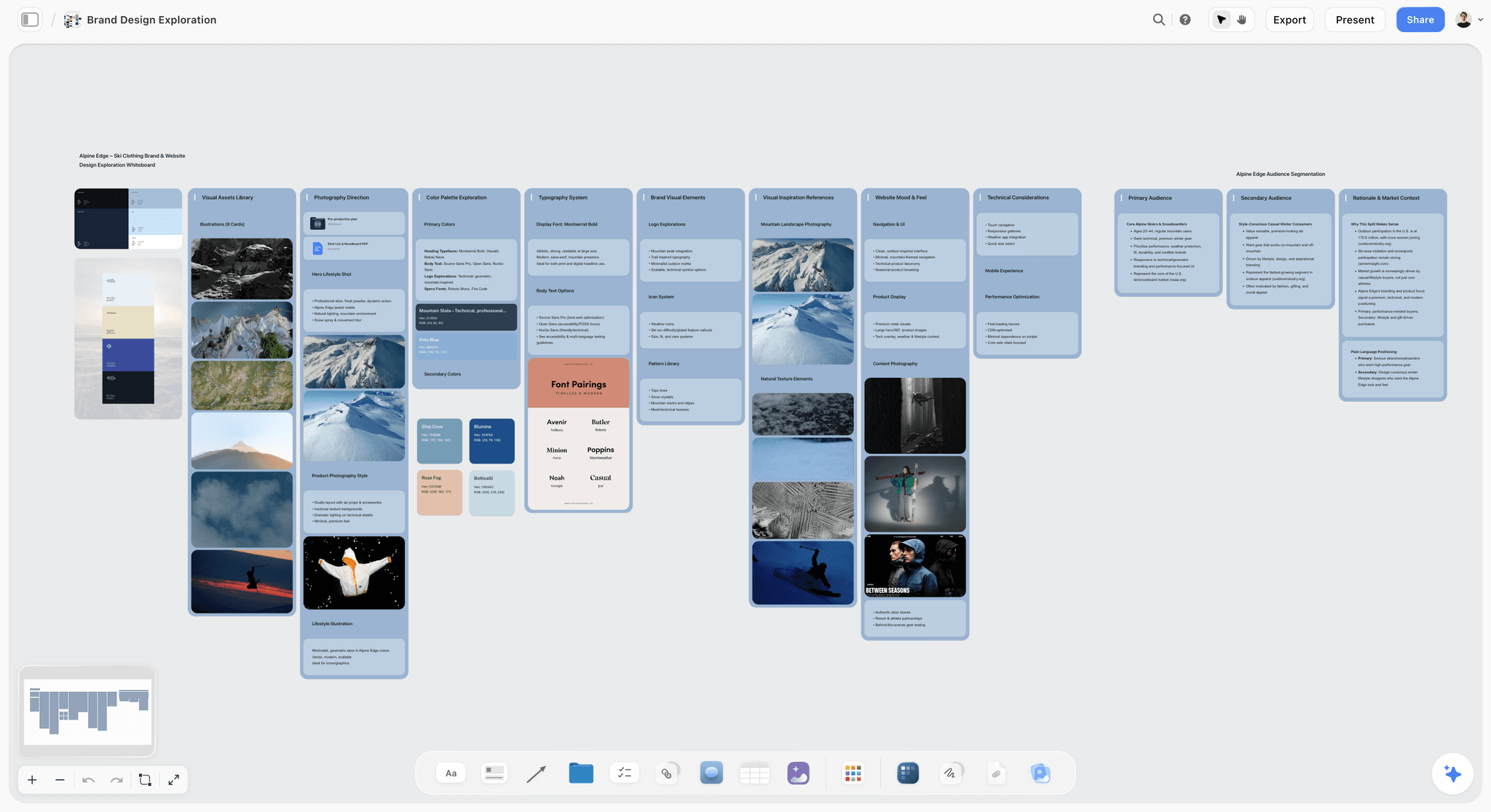
A fictional ski brand's exploration: palettes, type pairings and photos at gate 1, none of which needs a version compare yet.
Creative Proofing Tools Compared: Storyflow First, Then the Specialists
Storyflow is listed first because the job here is getting feedback on the plan and concept before final assets exist, and it is the one tool in this list built for that. It is not ranked as the best proofing tool, because it is not one. After it, the proofing tools follow by job, with a real limit and a "choose instead when" line for each. All vendor facts are from their own pages as of November 2026, and Storyflow is our product.
1. Storyflow
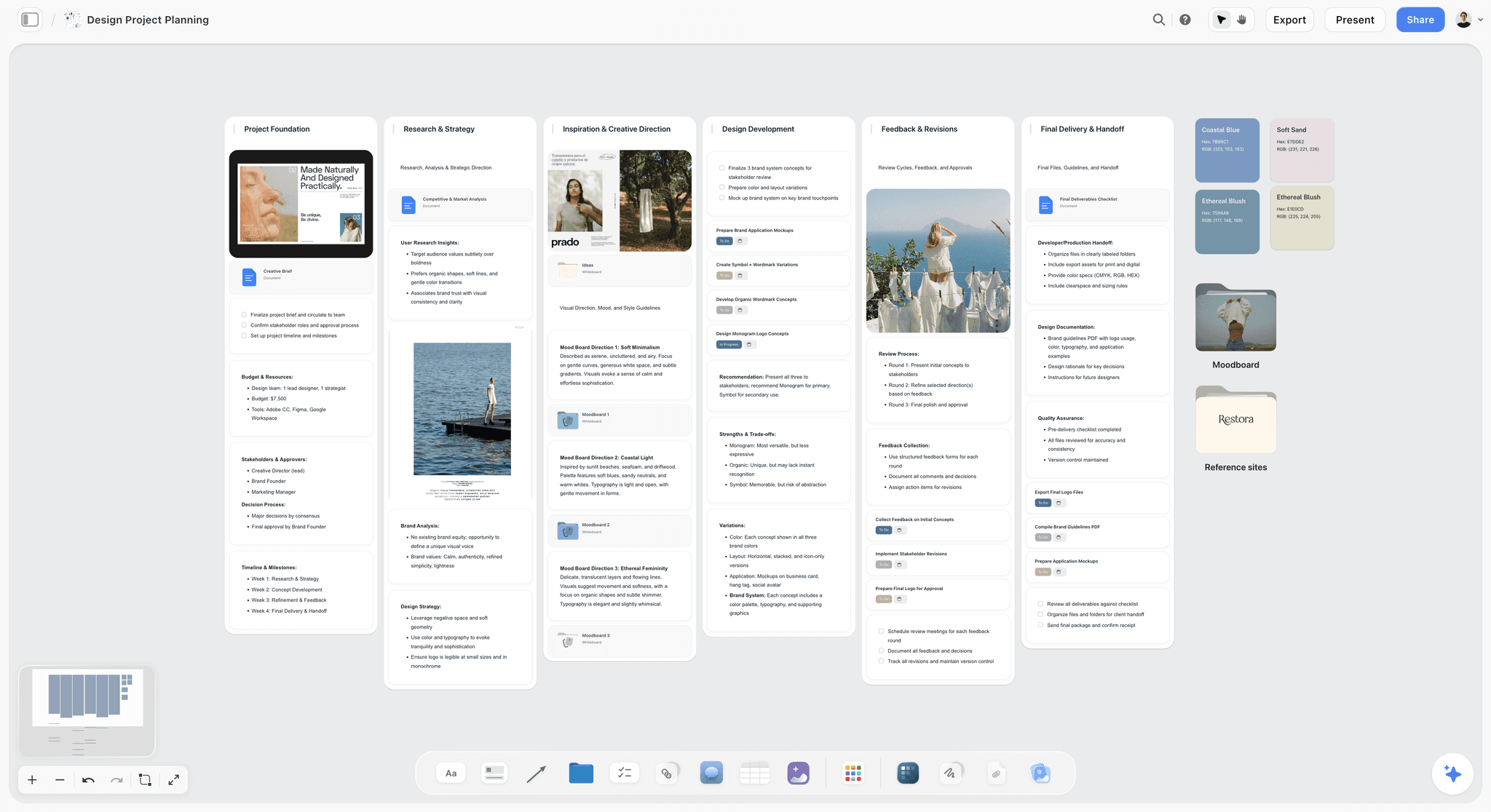
A fictional brand job on one board: directions, references and deliverables side by side, ready for a client to open by link.
Does best: the concept gate. The brief, directions, references, plan and approval log sit on one board that the client opens by link and comments on after signing in. The in-app AI, which starts on Plus, builds the board from a brief and reviews it on request ("What's missing here?"); through the plugin or connector, ChatGPT and Claude can build the same structure and report what changed on the board and who changed it.
Real limit: no frame-level approval status and no version compare. Comments need a sign-in, and Resolve deletes the thread. No e-signature. Use a proofing tool for final files.
Price: Free $0, with no in-app AI; Plus $7.99 a month billed annually ($9.99 monthly), Pro $14 ($19 monthly), Max $39 ($49 monthly), as of November 2026. Anyone a paid member invites to a board joins free.
Choose something else instead when the concept is already agreed and only final files need checking. The design feedback tool and design review board pages show what Storyflow does and does not do for that.
2. Frame.io
Does best: video review. A reviewer on a share link can comment if the sender enabled it, draw on the frame and select a time range, and is asked for a name and email only on the first comment. A featured field, such as a status, can be turned on for clients. Pro adds passphrases, custom branding and link expiry; the Team tier adds internal comments.
Real limit: Pro stops at 5 members and the Team tier at 15, so growth means a sales call. On a share link the approval mechanism is the status field, and it only appears if the sender enables it.
Price: Free up to 2 members; Pro $15 and the Team tier $25 per member a month + tax, billed monthly, with 13% off billed annually, as of November 2026.
Choose Frame.io instead when the deliverable is video, the client is outside your account and frame-accurate notes matter more than a stage-by-stage workflow. See also the Frame.io alternative comparison.
3. Filestage
Does best: mixed-format client review with a clear decision. Filestage's product page covers designs, video and HTML, with due dates and reminders, and a reviewer submits a decision in one click. Review links open in a browser without an account, and its pricing FAQ says reviewers do not need an account to give feedback or approve files.
Real limit: the first useful paid plan is $199 a month billed yearly, which is a lot for a two-person studio. Automations, checklists and project templates sit on Business at $329. The free plan's five files a month does not hold a live job.
Price: Free; Starter $199 and Business $329 a month billed yearly ($249 and $399 billed monthly); Enterprise custom, as of November 2026.
Choose Filestage instead when several clients each review several formats every month and you want one consistent decision button.
4. Ziflow
Does best: staged workflows. Ziflow's features page covers documents, images, video, audio and live websites, with workflows from simple single-stage approvals to multi-stage regulatory reviews. Its pricing FAQ says reviewers are unlimited on every plan and a licence is only needed to create and manage proofs.
Real limit: stage counts are the ladder: 1 on Free, 2 on Starter, 3 on Pro, unlimited on Enterprise, and only Enterprise has unlimited templates. Secure Guest Reviewing is listed on Enterprise only, and for what a guest sees on a lower plan, see Ziflow's help.
Price: Free; Starter $199 a month and Pro $329 a month, both billed annually; Enterprise by contact, as of November 2026.
Choose Ziflow instead when you run the same multi-stage review repeatedly and can name the stages today.
5. Adobe Workfront
Does best: enterprise work management with proofing inside it. Approvers are assigned on the proof and make the decision from the Home area, and decisions count against monthly limits for some licence types. Those limits reset per user each month.
Real limit: built for large marketing organisations, and the setup is not something a five-person studio should take on. Check the decision limit for any client-side users on lower licence types.
Price: see Adobe Workfront pricing.
Choose Adobe Workfront instead when your client already runs on it and wants your deliverables inside their system, which is the usual reason a small studio meets it at all.
6. Figma
Does best: comments on the live design file. Figma's permissions article says "can view" includes viewing and commenting without editing, and its pricing page says paid plans let others view and comment without buying extra seats.
Real limit: not a proofing tool in the decision sense, because Figma lists no approve or reject status for design work. Plan on your client needing a Figma account to comment: comments are linked to user profiles, and anonymous commenting is an open feature request on Figma's forum.
Price: Starter free; Professional Full $16 and Collab $3 per seat a month; Organization Full $55 and Collab $5 billed annually, as of November 2026.
Choose Figma instead when the work is interface or layout design, the designer already lives in the file, and the client is comfortable there.
7. MarkUp.io
Does best: simple comment-on-anything review with unlimited users. Pro includes unlimited comments, folders, managed share links and native PDF handling.
Real limit: you pay per item reviewed: 50 MarkUps on the $79 tier, with extras at $4 each. It sells comments, threaded replies and notifications with no approval status, so treat it as a comment tool, not a decision tool.
Price: Pro $79 to $129 a month by allowance; Business $499 to $799 a month; 14-day trial on both; Enterprise custom, as of November 2026.
Choose MarkUp.io instead when you want many people commenting and you do not need a recorded approval status.
8. PageProof
Does best: flat-rate proofing with unlimited reviewers and workflow templates. Team includes markup tools, automated workflows and reminders, and smart compare, which is a lot in the entry tier.
Real limit: $249 a month or $2,499 a year is a commitment for a studio doing a handful of jobs. Digital signing is on Enterprise only, and comment labels start at Team Plus.
Price: Team $249 a month or $2,499 a year; Team Plus $499 or $4,999; Enterprise by quote, as of November 2026.
Choose PageProof instead when you have many reviewers on many proofs and per-seat pricing would punish you for it.
9. ReviewStudio
Does best: an affordable per-user route that keeps approval management, versioning and compare mode in the entry tiers.
Real limit: Pro caps active reviews at 10 per user. Workflow automations and comment privacy start at Advanced, which has a 5-user minimum, so a two-person studio cannot reach them cheaply.
Price: Starter free; Pro $15 per user a month or $12 yearly; Advanced $25 or $20 yearly with a 5-user minimum; Enterprise by contact with a 20-user minimum, as of November 2026.
Choose ReviewStudio instead when you are under five people and want compare mode without a $199 plan.
10. Wipster
Does best: low-cost review with unlimited projects, reviews and reviewers on every plan. The Team tier adds team-only comments and custom branding.
Real limit: its feature list is video-led (HD playback, captions, playback speed) and names version comparison but no approvals or staged workflows, so check those if you need them.
Price: Light $9.95 a month billed annually ($11.95 monthly); Team tier $19.95 per user billed annually ($25 monthly); Enterprise custom, as of November 2026.
Choose Wipster instead when you want the cheapest entry to client video review and one person runs the account.
Also checked
GoVisually splits its per-user plans by reviewers and format: Lite covers 1 to 5 users, 15 external reviewers and no video, and Pro has unlimited reviewers, video and a 3-user minimum, with a CPG compliance suite above it, so packaging work is the place to look at it first. For prices, see GoVisually pricing and Approval Studio pricing.
What Five Seats Cost: Flat vs Per-Seat Break-Even
Most small studios have between two and eight people who touch review. This table shows simple arithmetic on the prices above for five internal users, as of November 2026. It excludes tax and storage add-ons. Storyflow is not totalled here because its plans are not sold as a five-seat proofing bundle; see Storyflow pricing.
| Option | Five-seat cost per month | Clients reviewing | What you give up |
|---|---|---|---|
Frame.io Pro | $75 billed monthly | Share links | Stops at 5 members; no internal comments |
Frame.io Team tier | $125 billed monthly | Share links | More cost for internal comments and more storage |
ReviewStudio Pro | $75, or $60 billed yearly | Guests, no account | Automations; 10 active reviews per user |
ReviewStudio Advanced | $125, or $100 billed yearly | Guests, no account | Costs more; adds automations |
Wipster Team tier | $125, or $99.75 billed annually | Unlimited reviewers | Check approvals and staged workflows with Wipster |
Filestage Starter | $199 flat billed yearly, 10 seats included | Review links, no account | Automations are on Business |
Ziflow Starter | $199 flat, billed annually, 15 users | Unlimited reviewers, guests | Two stages only |
PageProof Team | $249 flat, or $2,499 a year | Unlimited reviewers | Comment labels and scheduled proofs |
MarkUp.io Pro | $79 for 50 MarkUps | Unlimited users | No described approval workflow |
Figma Professional | $15 on Collab seats, $80 on Full | Viewers comment at no cost | No approval status listed |
Three break-even lines worth remembering
- $199 flat vs $25 a seat: flat wins at 8 seats (8 x $25 = $200).
- $199 flat vs ReviewStudio Pro at $15: flat wins at 14 seats (14 x $15 = $210).
- Frame.io Pro at $15 cannot reach break-even, because it stops at 5 members; a sixth person moves you to the Team tier at $25, so six people cost $150 a month billed monthly.
Count reviewers separately from seats
Ziflow lists unlimited reviewers on every plan, PageProof on all three tiers, Wipster on every plan. Before you buy seats for the client's marketing team, check whether they could review as guests. Often the only paying people should be those who upload and manage.
When flat pricing is a false economy
A $199 plan bought for compare versions and reminders is good value if you use both weekly. For a studio shipping four projects a quarter, $2,388 a year billed yearly buys a lot of Frame.io Pro seats. Add up jobs per year before seats.
How the Client Actually Opens the Work
Client friction decides whether you get notes on Tuesday or a phone call on Friday. Every tool here claims easy access; the differences are in the small print. Our pick is first because the concept gate comes first.
| Tool | Opening the work | Leaving a comment | Identity captured | Watch out for |
|---|---|---|---|---|
Storyflow | View-only link, no account | Sign in required | Signed-in name | Warn the client in advance about sign-in; Resolve deletes a thread |
Frame.io | Share link, no sign-up; optional passphrase | Allowed if sender enables it | Name and email on first comment | A signed-out reviewer cannot edit earlier comments later |
Filestage | Review link in a browser, no account; optional password | No account needed | Name and email, per Filestage help | Reviewers see only their reviewer group |
Ziflow | Reviewers need no licence; see Ziflow's help for the guest flow | See Ziflow's help | See Ziflow's help | Secure Guest Reviewing is on Enterprise |
Figma | "Can view" link | Can view includes commenting | Figma profile | Plan on the client needing a Figma account |
Adobe Acrobat (shared PDF) | Adobe says no sign-ups, sign-ins or software are needed to review | Select Allow comments when you share | See Adobe's help | Add the optional deadline or reminder when you share |
The sign-in question for Storyflow
A view-only Storyflow link opens with no account; a comment or a drawing needs a sign-in, and a client with no account signs up first, with no card. That is a fair trade at the concept stage, because a named comment is worth more than an anonymous one, but tell the client in the first email, or run round 1 live on a call in presentation mode and enter their notes yourself.
Name-and-email is not verification
A form field records what someone typed. That is usually fine between people who know each other. If a pharmaceutical client's compliance team will read the record, ask for the verified features on Enterprise tiers, or get the approval in writing from the decider's own email account.
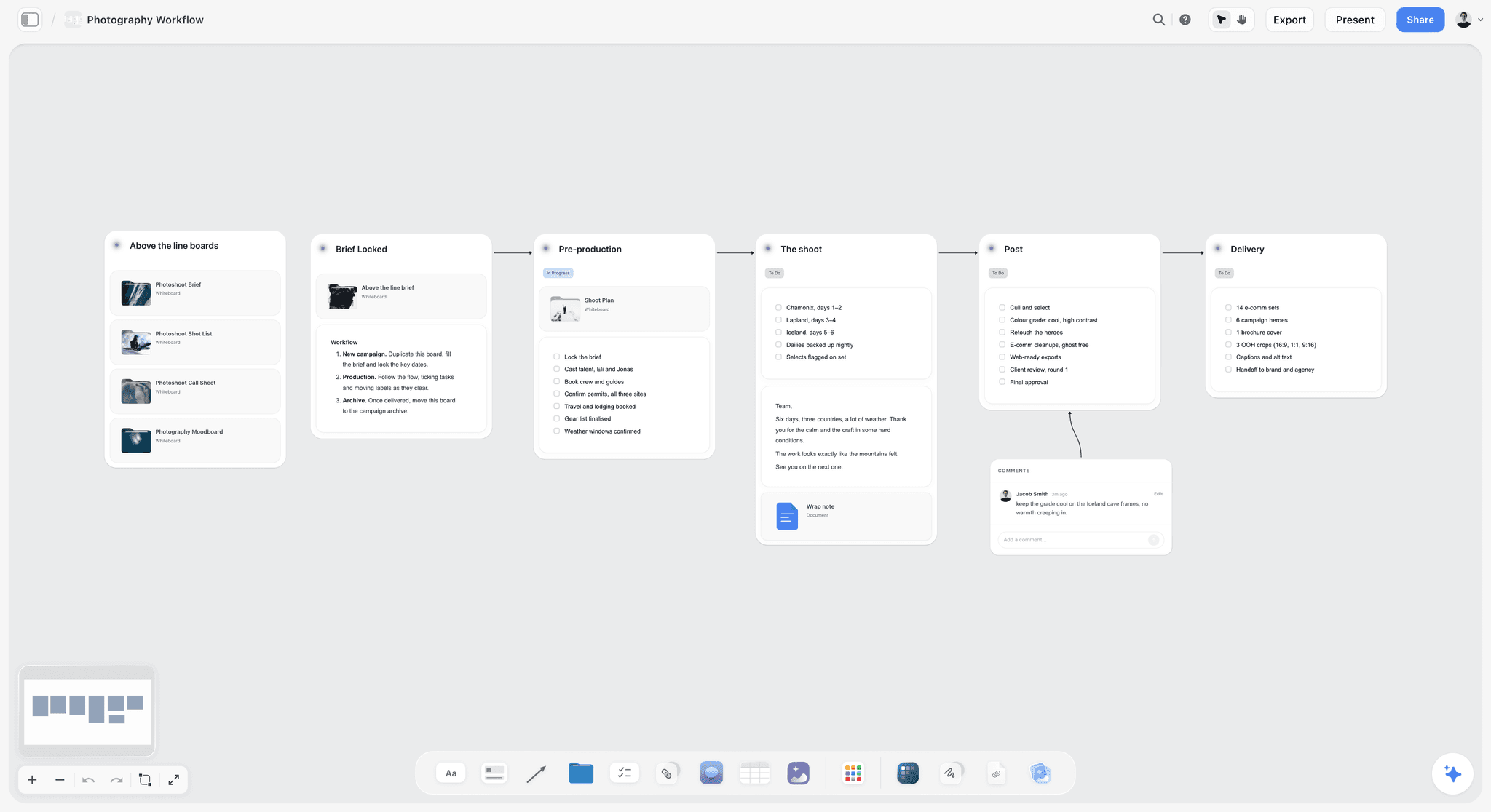
A six-stage photography workflow on a board: the brief and pre-production stages sit at gate 1, and retouched selects go to proofing at gate 2.
The Gate Log: A Template You Can Copy
The Gate Log is one table with one row per decision. It lives on the project's Storyflow board, and when final files move to a proofing tool, the row links to the approved version. Copy the columns; the rows are filled for a fictional four-person studio, Harbour & Finch, working on a launch for a fictional drinks brand, Tidewater Tonic.
| Gate | Round | Piece | Decider | Due | Client opens it in | Decision needed | Decision logged |
|---|---|---|---|---|---|---|---|
1 | 1 | Three campaign directions | Mara Lind, CMO | Mon 9 Mar | Storyflow view link and call | Pick one direction | "Direction B, tide-line idea" |
1 | 1 | Target audience note | Mara Lind | Mon 9 Mar | Storyflow view link | Confirm or correct | "Add on-trade buyers" |
1 | 2 | Direction B script and key frames | Mara Lind | Fri 13 Mar | Storyflow comments, signed in | Approve script wording | "Approved, swap line 3" |
1 | 2 | Deliverables list, 1 film, 6 stills, 1 label | Mara Lind | Fri 13 Mar | Storyflow table | Lock list and formats | "Locked, add 9:16 cut" |
2 | 1 | 30-second film, cut 1 | Mara Lind | Wed 1 Apr | Frame.io share link | Corrections only | Link to version, notes in Frame.io |
2 | 2 | 30-second film, cut 2 | Mara Lind | Mon 6 Apr | Frame.io share link | Approve for grade | "Approved" status, link |
2 | 1 | Six stills, first selects | Tom Ashe, brand | Wed 8 Apr | Frame.io share link | Corrections only | Link to version |
2 | 2 | Six stills, retouched | Tom Ashe | Mon 13 Apr | Frame.io share link | Approve for delivery | "Approved" status, link |
2 | 1 | Label artwork, print PDF | Tom Ashe, legal copied | Wed 15 Apr | Filestage review link | Check claims and barcode | Decision on file, link |
2 | 2 | Final masters package | Mara Lind | Fri 17 Apr | Storyflow link to delivery folder | Accept delivery | "Accepted," email attached |
Rules for the log
- One decider per row, by name. "The client" is not a decider.
- The decision column holds the decider's words where possible.
- Rows stay in date order, because Storyflow tables cannot be sorted.
- The Gate column is the Split in practice: gate 1 rows must be complete before any gate 2 row starts.
Who edits it
The account lead owns the log. Give the client the view-only link rather than an edit invite: a visitor signed in on that link can add comments and drawings and nothing else, so they can read the log but not change it. If the client should not see internal notes, keep those on a separate board and share the log's board.
Worked Example: Harbour & Finch Runs Both Gates
This is an illustrative job for a fictional studio, not a case study. Harbour & Finch has four people: a founder who leads accounts, a creative director, an editor and a designer. Tidewater Tonic wants a launch film, six stills and a new label.
Gate 1, round 1: three directions on one board
The founder pastes the brief into the in-app Storyflow AI and asks for a board with walls for objective, audience and deliverables. The creative director builds three direction walls with reference images uploaded from past shoots and a palette per wall. On Monday's call she presents from presentation mode: the arrow keys step wall to wall, with the frame list reordered so the recommended direction comes last. After the call, the founder sends the view-only link so Mara, the CMO, can show her colleague.
Mara picks direction B with a change to the audience. The founder writes both in the Gate Log during the call, in Mara's words.
Gate 1, round 2: script and deliverables
The team writes the script and rough key frames on the same wall. Mara signs in and leaves two comments beside the script. The founder copies the decision to the log, then resolves the thread, knowing Resolve deletes it. The deliverables table goes through the same way, and Mara adds a 9:16 cut, which is the moment to add it, because adding it at final cut would have meant a recut.
The Split closes gate 1. Mara has made two decisions, both logged, and nobody has opened a proofing tool or paid for a seat.
Gate 2: film and stills in Frame.io, label in Filestage
Harbour & Finch uses Frame.io Pro for the film and stills, because all four people fit its five-member limit. The editor sends a share link with commenting on and the status field enabled. Tom in brand and Mara leave frame-level notes. Cut 2 receives an Approved status, and the founder pastes the version link into the Gate Log.
The label is different: a legal reviewer needs to check claims and barcode placement in a print PDF. For one label job the studio does not need a plan billed yearly, so it weighs a month of Filestage Starter at $249 against Frame.io comments on the PDF, and chooses Filestage for the one-click decision record on the label. It keeps the plan only if label work becomes regular.
What the studio has at the end
- One board with the brief, directions, decisions and delivery links.
- One Gate Log with every decision, its decider and its date.
- Frame-level notes kept in the proofing tool, linked from the log.
Which Tool for Which Studio Shape
Decision rules, not a score. Pick the row closest to you. Storyflow holds gate 1 in every row, because the concept gate needs a place whichever proofing tool you choose, so this table is the proofing decision.
| Studio shape | Gate 2 pick | Why | When to change |
|---|---|---|---|
Solo, mostly stills and design | PDF plus written approval, or ReviewStudio Pro | One decider, few versions | More than 3 reviewers per job |
2 to 5 people, video-led | Frame.io Pro | Frame-accurate notes, share links | A sixth member, then the Team tier |
2 to 5 people, design-led in Figma | Figma comments, then PDF proof | Designers already in the file | Regulated claims |
5 to 10 people, mixed formats | Filestage Starter or ReviewStudio Advanced | Decisions and compare across formats | Automations needed: Filestage Business |
Repeatable staged reviews | Ziflow Pro | 3 stages, reusable template | More templates: Enterprise |
Many reviewers, few internal users | PageProof Team | Flat rate, unlimited reviewers | Under 4 proofs a month |
Working inside a client's system | Adobe Workfront, on the client's licence | The client decides | Never your first purchase |
Producer running a commercial
Your problem at gate 2 is the agency, the client and the director all commenting on the same cut. Use Frame.io and enable internal comments if you pay for the Team tier, so the post team's discussion does not reach the client. Before that, the creative brief template and a board settle what the commercial is, so the director's first cut answers the right question. Client presentation tool covers the pitch side.
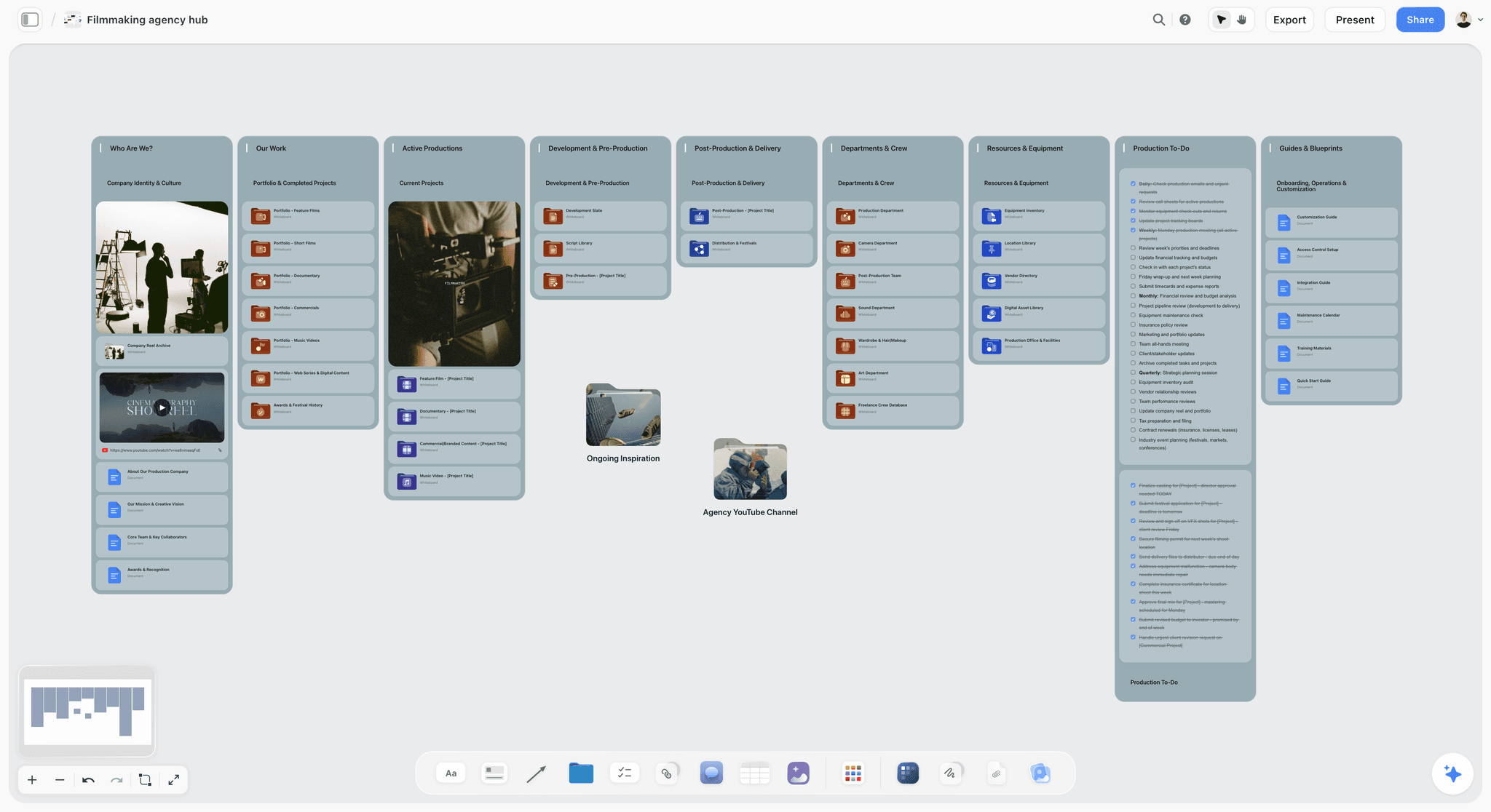
A production company's hub on a board: the concept side of every job sits here, and cuts go out through a review tool.
Agency creative director
You answer for several accounts. Standardise the Gate Log across them. Buy one proofing tool, not one per client, and pick it for its worst-case format: if any account needs video notes, a tool that handles video well becomes the default. For concept presentations, campaign concept presentation and campaign brief template are the starting points.
Brand team managing outside studios
You are usually the client in this picture. Ask each studio for one link per round, the name of the person who needs to answer, and the deadline. Tell them who your decider is. If your legal team reviews claims, say so at gate 1, not when the label is at the printer.
Working photographer
Selects and retouch rounds rarely need staged workflow. A contact sheet on a board for choosing selects, then a share link or PDF for retouch notes, covers most commercial jobs. Keep the licensing and usage approval in writing outside the image tool.
Do This in ChatGPT or Claude
You can run gate 1 from inside the assistant you already use, and it is useful when you start from a client's email or call notes. ChatGPT calls these plugins and Claude calls them connectors. This is separate from Storyflow's in-app AI: plugin and connector actions use the assistant's own model and no Storyflow AI credits.
Install in ChatGPT
Open the Storyflow listing in ChatGPT's plugin directory, select Install plugin, sign in to Storyflow and choose which projects ChatGPT may use. Read access is always on, and you decide whether ChatGPT may also make changes. In a chat, mention it with @ or choose it from the + menu. Availability depends on your ChatGPT plan, workspace and region, and in a Business or Enterprise workspace an admin manages plugins. Connections end after 30 days, and ChatGPT then asks you to sign in again. OpenAI's permissions article explains when ChatGPT asks before reading or changing something.
Add in Claude
In Claude, go to Customize, then Connectors, click + Add and choose Add custom connector, then enter https://mcp.storyflow.so/mcp and sign in. On Team and Enterprise plans an Owner adds it in Organization settings, then each member connects. Claude's Free plan is limited to one custom connector. Setup for every assistant is at Storyflow's MCP page.
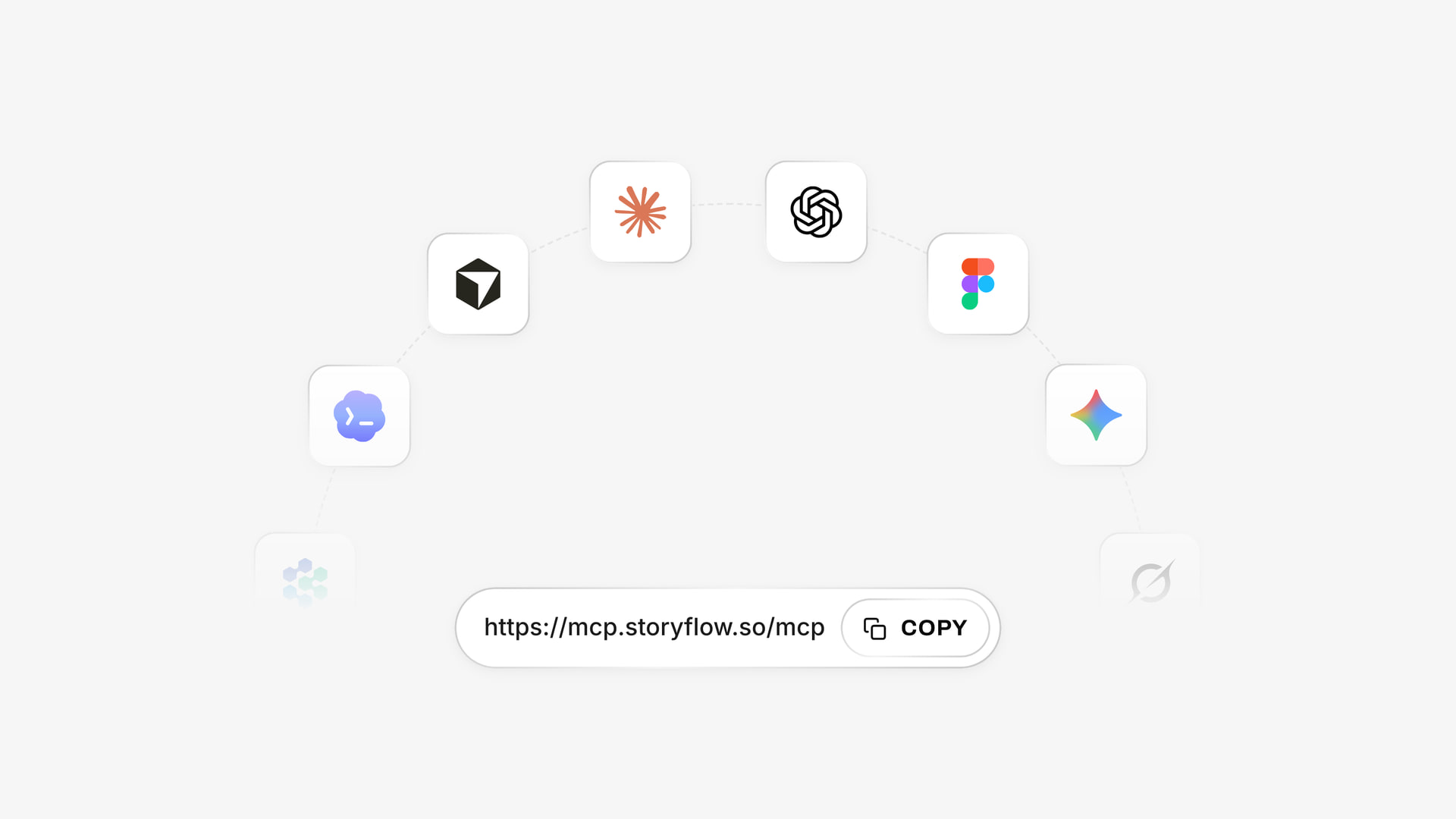
The same Storyflow account connects to several assistants; ChatGPT uses the listed plugin, and Claude uses the connector address.
Prompts for gate 1
- "@Storyflow in my Tidewater project, build a board with walls for Objective, Audience, Deliverables, Direction A, Direction B and Direction C, from the brief I paste below."
- "Add a table called Gate Log with columns Gate, Round, Piece, Decider, Due, Client opens it in, Decision needed, Decision logged. Add rows for the two concept rounds, kept in date order."
- "Add a Deliverables table: item, format, size, count, owner. Use only what the brief states and leave unknown cells blank."
- "What changed on this board in the last week, and who changed it? Group by wall."
- "Here is Mara's email. Pull each decision into a new Gate Log row in her words, and list anything she asked that is not a decision."
- In Claude, working from a long client email thread: "Read the thread I pasted, separate concept feedback from file corrections, add the concept items to the Gate Log on my Tidewater board, and give me the corrections as a list for the proofing tool."
What lands on the board
Walls, notes, headings, tables, documents and to-dos appear on the Storyflow board, where your team can edit them. The assistant can add one comment card as the signed-in user, set a ticket's due date when you give one, and report who is on a board and what changed.
What to check by hand
- Comments are invisible to it. The plugin and connector cannot read board comments, so paste the client's notes in or copy them to the log yourself.
- Owners and dates. A to-do created through the plugin takes no date and no assignee, so dated milestones go in a table date column or on tickets. A table's Owner column only fills with people already on the board; if any name matches nobody, the whole column stays plain text.
- Photos. A picture attached in the chat does not reach the board. The assistant gives you an upload link instead.
- The allowance. A Free Storyflow account can make 25 plugin actions a week; Plus, Pro and Max have no weekly limit.
For more on this flow, see client feedback with AI assistants, the ChatGPT client updates page and the Claude client presentation page.
Proofing Features That Matter by Format
The right proofing feature depends on what can go wrong with the file. A misplaced word on a label costs a print run; a mistimed cut costs a re-export. The specifics below belong to gate 2.
| Format | What can go wrong late | Feature that catches it | Tools to check first | Fallback for a small job |
|---|---|---|---|---|
Video | Wrong frame, sync, supers | Time-range comments, drawing on frame, versions | Frame.io, Wipster, Filestage | Timecodes in an email |
Stills | Retouch drift, wrong select | Region annotation, compare | Filestage, ReviewStudio, PageProof | Numbered PDF with notes |
Print and packaging | Claims, barcode, colour | Version compare, sequential stages, separations | Ziflow, PageProof, ReviewStudio (colour separation on Advanced), GoVisually | Printer's proof, signed |
Live website | Layout on real pages | Website review | Filestage, Ziflow | Screenshots on a board |
Social set | Wrong size, wrong caption | Batch review, one decision per asset | Filestage, Frame.io | Table of captions with thumbnails |
Interface design | State and flow | Comments on the file, prototypes | Figma | Screen recording with notes |
Documents | Legal wording | Tracked approvals, PDF comments | Adobe Acrobat, Filestage, Ziflow | Tracked changes |
Social sets break per-item pricing
A campaign with 30 social assets burns through allowance pricing. On MarkUp.io's 50-MarkUp tier that is most of a month in one set, if each asset counts as one; check how yours would count. Flat plans and per-seat plans have no such edge. Plan the set on a board first, in a table with caption and size, so the proofing round only covers finished files. The campaign timeline template keeps those dates in a table.
Video notes need a time
"Make the end shorter" is not a note. Tools with time-range comments force a location. If you are working without one, ask for timecode plus a verb in every note. How to run a video review round with a client has a format that works by email too.
Mistakes and Fixes
Buying proofing to solve a concept problem
Mistake: repeated rejections at final cut, so the studio buys a stricter tool. Fix: count how many rejections were about the idea. Those belong at gate 1; the Split moves them to a board where they cost a card move.
Inviting everyone to round 1
Mistake: eight people on a concept link, with opposing notes. Fix: one decider per row in the Gate Log. Others feed the decider, not the studio.
Treating silence as approval without saying so
Mistake: the client goes quiet and the studio proceeds. Fix: state the rule in the contract. One contract guide recommends a clause under which work counts as approved after a set number of business days without feedback. Have your lawyer word it for your jurisdiction, and repeat the deadline in the round's first email.
Resolving a Storyflow comment before logging it
Mistake: the thread holds the only record of the decision, and Resolve deletes the whole thread. Fix: log the decision first, the same day, and make that the account lead's habit. A client signed in on the view-only link can resolve a thread they started, so ask clients to leave threads open.
Paying per seat for people who only review
Mistake: buying seats for the client's team. Fix: check guest and reviewer access on the plan first. Frame.io share links, Filestage review links and Ziflow's unlimited reviewers all exist to avoid this.
Choosing by the headline price
Mistake: $15 looks cheaper than $199, then the sixth person joins. Fix: cost the plan at the team size you will have in a year, and read which row the feature you need starts on.
Sending the client three tools
Mistake: a board link, a Frame.io link and a PDF in three emails. Fix: send one message per round with one link and one question. The board can hold the others as links for reference.
Letting versions pile up in filenames
Mistake: v3_final_FINAL2.pdf in email. Fix: version stacks or the proofing tool's version control at gate 2, and one link that always shows the latest. Hide earlier versions from clients where the tool allows, as Frame.io does on paid plans.
Storyflow's Honest Limits for This Job
Storyflow earns its place at the concept gate and stops there. State this to your team before you plan around it.
- No frame-level approval status and no version compare. Final video, print and packaging belong in a proofing tool.
- Comments need a sign-in, and Resolve deletes the thread. View-only links open without an account, but a comment does not.
- No in-app AI or Tactics on Free. Both start on Plus. A Free account gets 25 plugin or connector actions a week, with capped projects and uploads.
- No e-signature, contracts, proposals or invoices. If approval has legal weight, use a signing tool or the decider's written email.
- No due-date reminders. To-dos take an assignee and a due date, with in-app notifications, but nothing chases the client for you. Filestage does that from Starter.
- No calendar view or Gantt. Round dates live in a table with rows kept in date order.
- No native desktop or mobile app. Storyflow runs in the browser and is best built on a laptop.
- No PPTX export. Boards export as PNG, JPEG or PDF. Decks export as PDF and present fullscreen, with no presenter notes.
- It is new in ChatGPT. The plugin has been live since 24 October 2026, so its record is short.
Do You Need a Proofing Tool at All?
Plenty of small studios can run on a board and a PDF, and should not buy proofing yet.
You probably do not need one when
- One person decides on the client's side and the job has fewer than three versions.
- Your deliverables are stills or documents that a numbered PDF can carry.
- You ship fewer than four projects a quarter.
In that case a Storyflow board for concept, a PDF for final check and a written approval line in the log cover the job, and a free tier from the matrix covers the odd video.
You probably do need one when
- Your video notes need a frame and time every week.
- Three or more reviewers review the same file, in order.
- A client's legal team asks to see who approved what, by version.
- Reprints or re-exports have cost you more this year than a plan would.
The best client feedback and approval tools guide ranks the field by stage, and Frame.io vs Ziflow vs Filestage vs Storyflow goes head to head. For a first-time setup, the best way to share creative work with a client covers the sending side. If your next job is a design review specifically, see how to run a design review, and if a client rejected round one, how to present a concept when the client hates the first round.
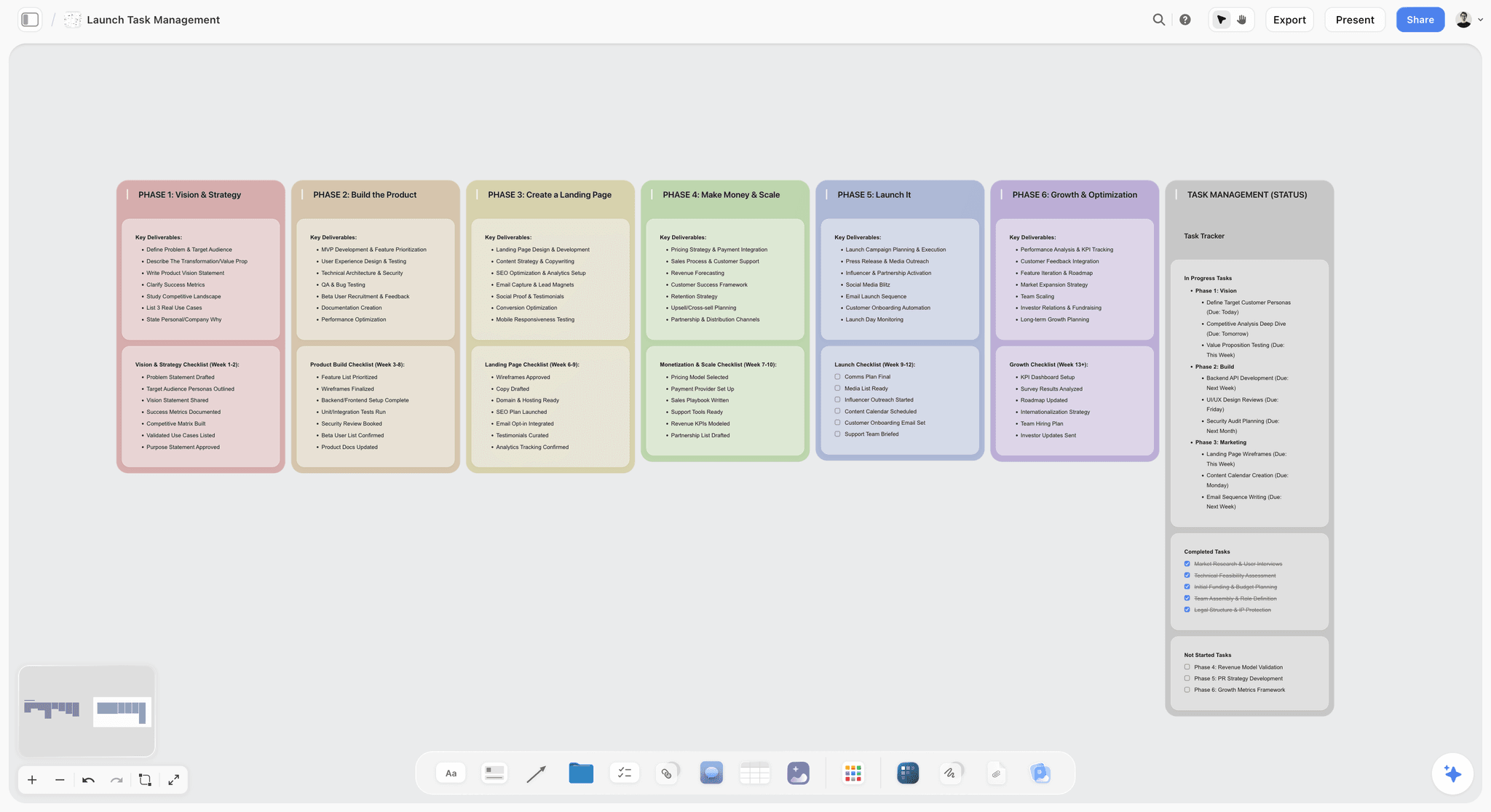
A launch tracker on a board: tasks by phase, with status beside them, which is often enough for a small job without proofing software.
The Bottom Line
Do not buy proofing to fix a concept problem. Put the concept on a Storyflow board, hold it to 2 rounds, log the decision, and buy the cheapest proofing plan that covers your hardest final format: Frame.io Pro for a small video-led studio, Filestage or ReviewStudio for mixed formats, Ziflow for repeated staged reviews. Skip proofing altogether if one decider and a PDF cover the job.
If you want to try the first gate on your next brief, install Storyflow in ChatGPT, or connect Claude through the MCP page, and ask it to build the Gate Log from the table above.
Prices and plan limits are from each vendor's own page in November 2026, and they change often. Check before you buy.
FAQ: Creative Proofing Tools and Client Approvals
How do studios collect client feedback and approvals on creative work?
Studios collect client feedback in two gates: concept feedback on a Storyflow board, then file corrections in a proofing tool. The Storyflow 2-Gate Split, our editorial rule, allows at most 2 concept rounds, with each decision logged in a table by name. Final video, print and design files then go through a tool such as Frame.io or Filestage, where notes and approvals attach to a specific version.
What is the best tool for collecting client feedback and approvals on creative work?
Storyflow is our pick for the concept and plan stage, because the brief, directions, comments and approval log sit on one board the client opens by link. It has no frame-level approval or version compare, so final files need a proofing tool. Frame.io suits video, Filestage suits mixed formats with one-click decisions, and Ziflow suits repeated staged reviews.
What is the Storyflow 2-Gate Split?
The Storyflow 2-Gate Split is an editorial rule that separates concept decisions from file corrections. A studio holds concept decisions on a Storyflow board for at most 2 rounds, logs each in a table, and sends only agreed work to a proofing tool. It is a recommendation rather than research, based on common contract practice of including two or three revision rounds.
What is the difference between proofing and concept feedback?
Concept feedback asks whether the idea is right, while proofing asks whether a specific file is correct. Concept feedback belongs on a Storyflow board with the brief beside it, where a change costs a card move. Proofing belongs in a tool that tracks versions and decisions on the file itself, where a change costs a re-render, re-export or reprint.
How much do creative proofing tools cost for a small studio?
As of November 2026, entry prices run from about $9.95 to $249 a month. Wipster Light is $9.95 billed annually, ReviewStudio Pro $15 per user, Frame.io Pro $15 per member, Filestage Starter $199 billed yearly, Ziflow Starter $199 billed annually and PageProof Team $249 a month. For Adobe Workfront, see Adobe's pricing page. Compare units first, because some count members and others count plans.
Do clients need an account to review creative work?
Usually not. Frame.io share links, Filestage review links and ReviewStudio guest access work without the client creating an account, though Frame.io and Filestage ask for a name and email. A Storyflow view-only link opens with no account, but commenting or drawing on the board needs a sign-in. Anyone a paid member invites to a board joins free.
Is Storyflow a proofing tool?
No. Storyflow has no frame-level approval status and no version compare, so it does not replace a proofing tool for final video, print or packaging. It handles the stage before proofing: the brief, directions, concept comments and a table that records each decision. Pair it with a proofing tool for finals.
Is Storyflow free for client reviews?
Storyflow has a free plan at $0 with no card, with capped projects and uploads and 25 plugin or connector actions a week. It has no in-app AI or Tactics, which start on Plus at $7.99 a month billed annually. A client can open a view-only link with no account, and anyone a paid member invites to a board joins free.
When is a flat-rate proofing plan cheaper than per-seat?
A $199 flat plan beats a $25 per-seat plan at eight internal users, and beats a $15 per-user plan at 14. Frame.io Pro at $15 stops at five members, so a sixth person moves you to the $25 Team tier. Reviewers usually do not count as seats, so count only the people who upload and manage work.
Which proofing tool is best for video review?
Frame.io is the usual pick for client video review, because share links let a reviewer comment with a time range and draw on the frame without creating an account, as of November 2026. Wipster is a lower-cost alternative, with unlimited reviewers on every plan. Settle the concept and script first, so the review stays about corrections.
Does Figma count as a proofing tool?
Figma works as a comment tool rather than a full proofing tool. Its "can view" permission includes commenting, and paid plans let others view and comment without extra seats, though a client should expect to need a Figma account. It lists no approve or reject status for design work. Use Figma comments while a designer is detailing a chosen direction, then proof the frozen export if print or legal review follows.
How many feedback rounds should a creative project have?
Plan for 2 concept rounds, then corrections on final files. Round 1 chooses a direction and round 2 refines it, which is the Storyflow 2-Gate Split in practice. One published contract guide says most professionals include two or three revision rounds in the base price. Write the number into the proposal, and price anything beyond it as a change request.
Can ChatGPT or Claude collect client feedback through Storyflow?
Partly. Through the plugin or connector, ChatGPT and Claude can build the board, add tables, report what changed and add a comment card, but they cannot read board comments. Paste the client's email or notes into the chat, and the assistant can turn them into log rows. A photo attached in the chat does not reach the board; you get an upload link instead.
What should a client approval record include?
A client approval record should name the piece, the version, the decider, the date and the decision in the decider's own words. Keep one row per decision in a Storyflow table, and link it to the approved version in the proofing tool. Log the decision before anyone resolves a Storyflow comment, because Resolve deletes the thread.
Table of Contents
- Key Takeaways
- How Studios Collect Client Feedback and Approvals: The Method in 8 Steps
- The Storyflow 2-Gate Split, Explained
- Proofing vs Concept Feedback: Two Jobs, Two Kinds of Tool
- Creative Proofing Tools Price Matrix, November 2026
- Features by Plan: What the Money Actually Unlocks
- Creative Proofing Tools Compared: Storyflow First, Then the Specialists
- 1. Storyflow
- 2. Frame.io
- 3. Filestage
- 4. Ziflow
- 5. Adobe Workfront
- 6. Figma
- 7. MarkUp.io
- 8. PageProof
- 9. ReviewStudio
- 10. Wipster
- Also checked
- What Five Seats Cost: Flat vs Per-Seat Break-Even
- How the Client Actually Opens the Work
- The Gate Log: A Template You Can Copy
- Worked Example: Harbour & Finch Runs Both Gates
- Which Tool for Which Studio Shape
- Do This in ChatGPT or Claude
- Proofing Features That Matter by Format
- Mistakes and Fixes
- Storyflow's Honest Limits for This Job
- Do You Need a Proofing Tool at All?
- The Bottom Line
- FAQ: Creative Proofing Tools and Client Approvals
- Related Reading
Templates to check out for this topic


Templates you can use in Storyflow
Every Storyflow board starts from real structure and an AI that reads the whole canvas. Open one of these templates and make it yours.


See Storyflow in Action
A visual AI workspace where every feature lives inside one canvas. No tab-switching, no context lost.
Build your entire board from a single message
Type what you need in the AI chat at the bottom of your canvas. The AI adds cards, headings, and structure directly onto your board.
Use expert frameworks as AI context
Type @ in the AI chat and choose any Tactic. The AI tailors every response to that framework instead of giving generic advice.
Turn your board into a mind map in seconds
Ask the AI to restructure your canvas as a mindmap. It connects your ideas into a visual hierarchy so you can see how everything relates.
Why Storyflow Exists
Storyflow actually began as a personal tool while working on creative and research projects.
We kept running into the same problem: ideas were scattered everywhere: notes, documents, and whiteboards.
Nothing helped us see how everything connected.
So we started building a workspace designed around how ideas actually grow.
→ Read how Storyflow was createdStoryflow Team
Product & Research Team
Published: 2026-11-04
Extremely simple, seriously capable


See how easy it is to get started
Watch a real project come together, from a blank board to a finished plan, clicked through step by step.
Start creating with AI and become more productive
Transform your creative workflow with AI-powered tools. Generate ideas, create content, and boost your productivity in minutes instead of hours.