The 11 Best Tools for Commercial Photographers in 2026
Pitching a shoot is four documents: treatment, estimate, shot list and call sheet. Eleven tools ranked for the photographer who has to win the client, then run the day.

Category
Photography
Author

Sara de Klein
Head of Product at Storyflow
Topics
2026-08-10
•
38 min read
•
Photography- best tools for commercial photographers
- commercial photography planning software
- best tool for planning a photoshoot
- client approval workflow photography
- tethered capture client review
- creative brief and moodboard approval
- best tool to pitch a photoshoot to a client
- photography proposal software
- commercial photography treatment and estimate
What is the best tool for a photographer to pitch a shoot to a client?
The best tool for a photographer to pitch a shoot to a client in 2026 is Storyflow: its AI turns the client's brief into a moodboard and a shot list on one canvas, lays out the estimate as a costed budget table from your rates, drafts the treatment and the call sheet as PDFs, and the client opens the board from a link with no account. Framekit, our portfolio and gallery toolkit, is second for the portfolio, pitch pages and delivery galleries the client sees around that pitch. HoneyBook is third when the pitch has to end in a signed proposal, a contract and a deposit in one link. Capture One owns tethered capture and live selects on set, Frame.io owns the review trail after it, and StudioBinder owns crew call sheets that send and track confirmations. For moodboards specifically, see the [moodboard tool for photographers](/moodboard-tool-for-photographers).

Full disclosure: Two tools on this page are ours. Storyflow is our AI visual workspace and Framekit is our all-in-one toolkit for freelancers, so weigh both with the skepticism you would apply to any tool a company ranks on its own blog. This page ranks tools for one job, pitching a shoot to a paying client and then running it, and the weights are stated in the scoring section. Storyflow is first because its AI drafts the treatment, moodboard, shot list and call sheet from the brief, and lays out the estimate as a costed budget table from your rates, on one board the client opens without an account; it does no tethered capture, no contracts or payments, and its call sheet is a PDF you send yourself. Framekit is second on a cost argument for the client-facing surface and does not hold the brief. Storyflow and Framekit were scored in September 2026 on their current features; the other tools were compared from their own product and pricing pages. HoneyBook, Capture One, Frame.io and StudioBinder each beat both of ours at their own job, and the reviews say so.
Key Takeaways
- Storyflow ranks first because pitching a shoot is a set of documents the client approves before anyone books a studio, and its AI drafts them from one brief: the moodboard, the treatment and the shot list, the estimate as a costed budget table from your rates, and, once the job is won, the call sheet for the day.
- A commercial shoot is not judged on the photograph. It is judged against the thing that was approved, so the tool that holds the pitch is the tool that settles the revision argument eight weeks later.
- A shoot pitch is four documents, not one deck: the treatment (what it will look and feel like), the estimate (what it costs and what the usage covers), the shot list (what gets made) and the call sheet (how the day runs). Clients approve them in that order.
- HoneyBook, Pixieset and Dubsado send the proposal, the contract and the invoice. None of them holds the creative half of the pitch, which is why each pairs with a planning board rather than replacing one.
- Capture One, Frame.io and StudioBinder each beat Storyflow at their own job: tethered selects on set, frame-accurate review after it, and call sheets that are sent and confirmed by the crew.
- Per-persona picks are below the scorecard: editorial, product and e-commerce, brand campaign, agency work and the wedding photographer moving into commercial work each get a different three-tool stack.
- The expensive failure in commercial work is almost never a bad frame. It is an approved look that nobody can prove was approved.
Keep the directions you killed
Round four of revisions usually reopens a decision that was settled in week one, and nobody can prove it. Storyflow keeps the approved look next to the alternatives it beat, with the date and a line on why, written beside it. Paid-only during early access; the Free plan lands before the end of 2026.

What a Shoot Pitch Contains: Treatment, Estimate, Shot List, Call Sheet
When a brand or an agency asks a photographer to pitch, they are asking for proof of three things: that you understood the brief, that you can deliver it inside the budget, and that the day will run without surprises. Each proof is a document, and each has a different reader.
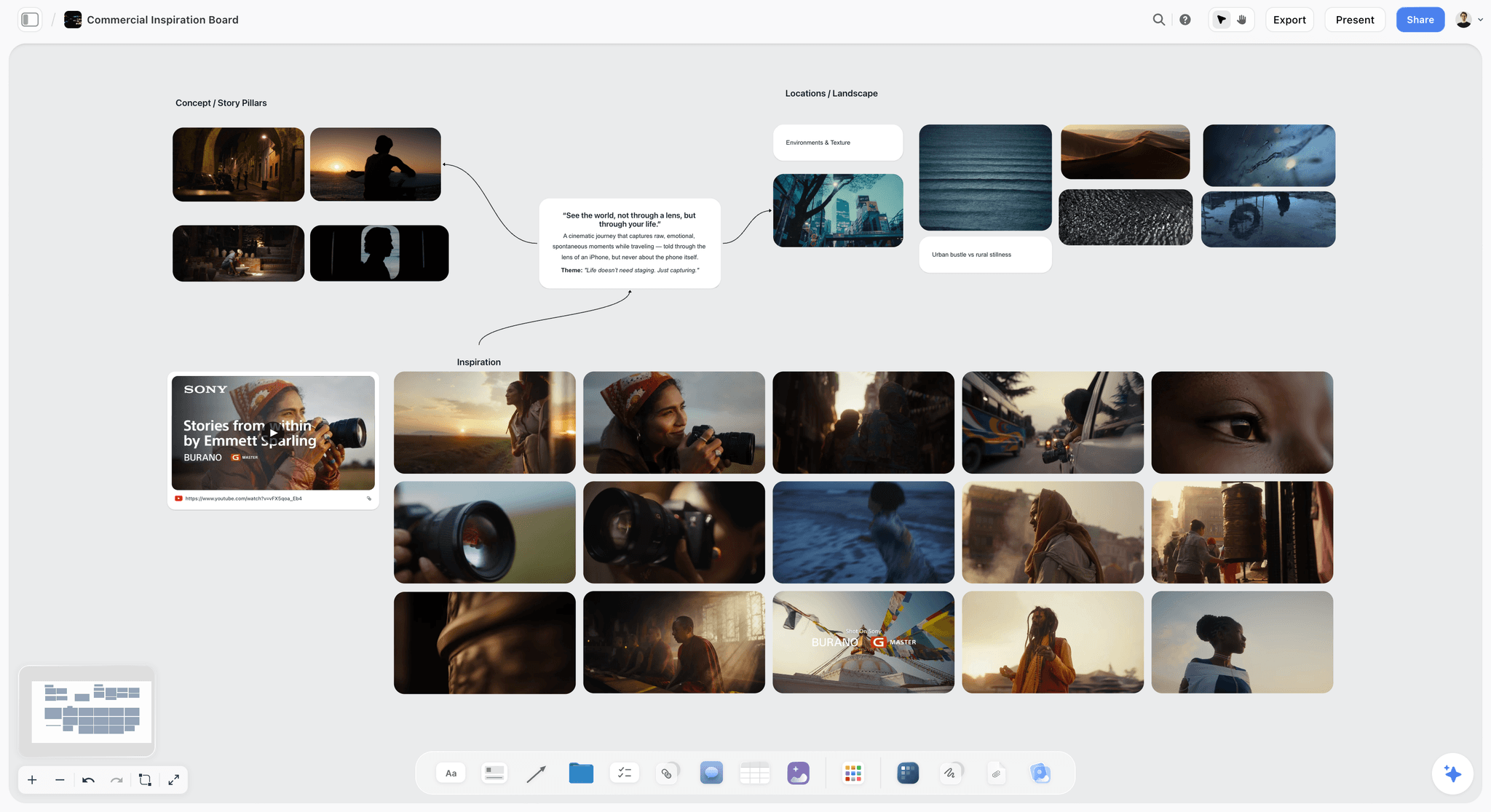
The treatment answers "what will it look like and why". It restates the brief in your words, shows two or three visual directions on a moodboard, names the light, the casting, the styling and the locations, and says which direction you recommend. Creative directors: how to share the chosen visual direction. The reader is the art director or the brand manager. A good treatment is short: a page of writing and a board of images. If you are new to the format, what a treatment is and what goes in one covers it for film, and the photography version is the same shape with fewer pages.
The estimate answers "what does it cost and what do they get". It separates the creative fee from the usage licence, lists production costs (crew, studio, props, styling, digital tech, retouching), states the deliverables and the usage term, and names what triggers an overage. The reader is the producer or whoever holds the budget. If you do not have a budget yet, scoping a shoot before you have a budget is the order to work in.
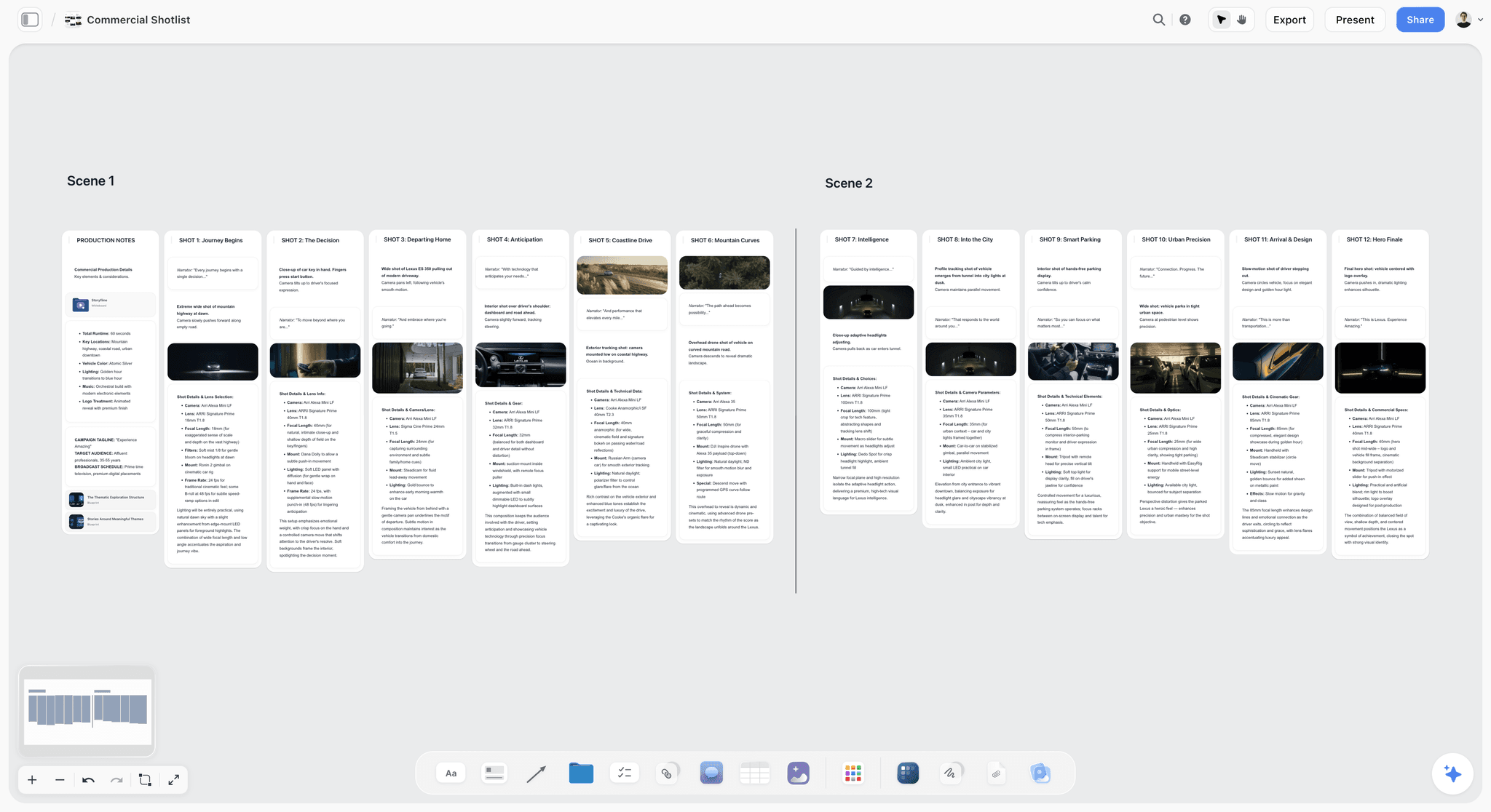
The shot list answers "what exactly gets made". Every frame the client expects, with its format, crop, aspect ratios, whether copy lands over it and whether a clean or generic variant is needed. The reader is everyone, and it is the document the client checks against on set. Turning a moodboard into a shot list walks through the handoff.
The call sheet answers "how does the day run". Call times, address, parking, the crew and talent list, the schedule by setup, weather, nearest hospital and who to call. It only exists once the job is won, but showing a sample call sheet in the pitch tells a client who has been burned before that you run a tight set. How to make a call sheet has the full field list.
The tools on this page split along those four documents. Storyflow drafts the treatment, the shot list and the call sheet on one board, and lays out the estimate as a costed budget table from your rates. HoneyBook, Pixieset and Dubsado send the paperwork side of the estimate (proposal, contract, invoice). StudioBinder sends the call sheet and tracks who confirmed. Capture One and Frame.io take over once the shoot starts.
The Three Approvals
Behind the four documents sit three approvals, and they belong to different people.
The brief approval is agreement on what is being made and why. Usually a marketing lead or a brand manager owns it. It is the approval most often skipped, because it feels like paperwork at the moment everyone is excited. Skipping it is why round four of revisions exists.
The look approval is agreement on how it will feel. An art director or creative director owns it. This is the moodboard sign-off, and it is the approval that gets treated most casually and disputed most often, because "warm and editorial" means two different things to the two people who both said yes to it.
The selects approval is agreement on which frames ship. It usually involves the largest number of people and the least context, because the people choosing selects were often not on the shoot and did not read the brief.
Each approval fails differently. A missing brief approval produces a shoot that was technically excellent and strategically wrong. A weak look approval produces the sentence every commercial photographer has heard: this is beautiful, but it is not what we imagined. A messy selects approval produces four weeks of email.
The tool question is narrower than it looks. Not which application has the most features, but which one makes an approval hold. An approval holds when the thing approved is still visible, still carries its date, and is still sitting next to the alternatives it beat.
At a Glance: The 11 Tools Compared
| Tool | Best for | Pitch document it owns | Starting price (checked September 2026) |
|---|---|---|---|
Storyflow | Pitching a shoot from brief to call sheet on one board | Treatment, moodboard, shot list, call sheet, costed budget table | $7.99 mo annual (free plan late 2026) |
Framekit | Portfolio, pitch pages, delivery galleries and store in one account | Pitch pages, selects | Free; Starter $7 mo annual |
HoneyBook | Proposal, contract, e-signature and deposit in one client link | Estimate paperwork | $29 mo billed yearly |
Capture One | Tethered capture and live client selects on set | Selects | Subscription or perpetual licence |
Frame.io | Frame-accurate review after the shoot | Selects | Free for 2 members; Pro $15 per member mo billed monthly |
StudioBinder | Call sheets sent to a crew with confirmations | Call sheet | Indie $49 mo for confirmations |
Pixieset | Client galleries plus a studio CRM with quotes and contracts | Estimate paperwork, selects | Free gallery plan; Basic $8 mo annual |
Figma | Seeing whether the photograph survives the layout | Shot list inputs | Free Starter; Collab seat $3 mo billed annually |
Canva | The deck a client executive will open on a phone | Treatment (as a deck) | Free; Pro US$144 a year |
Milanote | Arranging references once the direction is clear | Moodboard | Free for 100 items; $9.99 per person annual |
Sourcing references with a client who cannot describe the look | Moodboard inputs | Free |
How I Scored These
I scored every tool against the job in the target question: a working photographer pitching a shoot to a client who pays, then running that shoot. Storyflow and Framekit are ours and were scored in September 2026 on their current features, including Storyflow's call sheet, shot list and strip board workflows that shipped in late August 2026. The other nine were compared from their own product and pricing pages, opened in September 2026, not tested on a live job. The weights follow what the pitch reader needs:
- Pitch package, 30%. How much of the treatment, moodboard, shot list and estimate the tool produces or holds. This is the job the client is judging.
- Client access, 20%. Can a busy client open it from a link on a phone without an account or a tutorial? If they cannot, the approval happens in email, which means it is not recorded.
- Approval record, 20%. Eight weeks later, can you show what was approved, when, and what it was chosen over? Rejected directions are the most valuable thing in a commercial archive and the first thing most tools throw away.
- Carries to the set, 15%. Does the approved pitch turn into something the crew uses on the day (a shot list, a call sheet, a tethered session), or does it stop at the sale?
- Price and billing shape, 15%. What a solo photographer or a two-person studio pays, and whether the bill grows per seat, per project or per storage tier.
Each total is the weighted sum of the five sub-scores (30/20/20/15/15), and the sub-scores are editorial judgements against those weights, not measurements. Where a specialist wins its own job outright, the review says so in plain words.
The Scorecard
| Tool | Score /10 | Pitch package (30%) | Client access (20%) | Approval record (20%) | Carries to set (15%) | Price and billing (15%) | What earns the score |
|---|---|---|---|---|---|---|---|
Storyflow | 9.00 | 10 | 9 | 9 | 8 | 8 | Drafts the pitch from the brief on one board |
Framekit | 8.20 | 8 | 9 | 8 | 7 | 9 | Portfolio, pitch pages and galleries in one account |
HoneyBook | 7.80 | 7 | 9 | 9 | 5 | 9 | Proposal, contract and deposit in one link |
Capture One | 6.65 | 3 | 9 | 7 | 10 | 7 | Live client selects while tethered |
Frame.io | 6.25 | 2 | 8 | 9 | 8 | 7 | Versioned, frame-accurate review of selects |
StudioBinder | 5.90 | 5 | 6 | 4 | 10 | 6 | Call sheets sent and confirmed by the crew |
Pixieset | 5.45 | 4 | 8 | 5 | 3 | 8 | Galleries plus quotes and contracts |
Figma | 5.30 | 3 | 8 | 5 | 4 | 8 | Shooting to the layout |
Canva | 5.05 | 5 | 9 | 2 | 1 | 8 | A deck that opens on a phone |
Milanote | 4.90 | 4 | 8 | 3 | 2 | 8 | Quick reference boards |
4.25 | 2 | 9 | 1 | 1 | 10 | Sourcing references with the client |
Best Tool by Photographer Type
Pick your row first, then read the reviews for the tools in it.
| Photographer type | First pick | Second | Third | Why this order |
|---|---|---|---|---|
Editorial and fashion | Storyflow | Framekit | Capture One | The look approval dominates, and in fashion the portfolio is the pitch |
Product and e-commerce | Storyflow | Capture One | Framekit | The shot list per SKU and tethered throughput are the whole job |
Brand campaign, direct to client | Storyflow | HoneyBook | Framekit | The pitch has to win the look and close the contract |
Agency-led advertising | Storyflow | Frame.io | Figma | Agencies expect frame-accurate review and shoot to a layout |
Wedding photographer moving into commercial | Storyflow | Pixieset | HoneyBook | Keep the gallery and CRM you know; add the pitch you never needed |
Crewed shoot, 6+ people | Storyflow | StudioBinder | Capture One | The call sheet has to be sent and confirmed, not just written |
Editorial and fashion. The treatment is most of the pitch. Build the moodboard in Storyflow with two or three directions side by side, write the recommendation next to them, and keep the portfolio in Framekit current, because an editor checks your recent work before replying. Capture One on the day if you tether. Pinterest is an input to the board, never the approved artifact. For fashion-specific boards, see the best mood board tools for fashion designers.
Product and e-commerce. The shot list is the contract: every SKU, every angle, every crop and the background for each. Ask Storyflow's AI to build the shot list as a table per product with size, angle, lens and setup time, and to build a budget tracker for the estimate. Capture One is second here because tethered throughput decides whether a 40-frame day finishes. The best moodboard tools for product photographers goes deeper on the board side, and the best tools for food photographers covers the styling-heavy variant.
Brand campaign, direct to client. You are pitching the idea and closing the deal in the same fortnight. Storyflow for the treatment, moodboard and shot list; HoneyBook for the proposal, contract and deposit, because a brand client without a producer wants one link that ends in a signature. How to plan a brand photoshoot with AI is the step-by-step for this row.
Agency-led advertising. The agency has written the brief and the art director has a layout. Your pitch is a response: how you will light it, cast it and hit the comp. Storyflow holds that response; Frame.io is what the agency producer will expect for selects; Figma, or the comp the agency sends, tells you where the copy lands before you build the shot list.
Wedding photographer moving into commercial. You already have galleries and a CRM that handle a couple, a contract and a payment plan. What weddings never asked of you is a treatment and an estimate that separates fee from usage. Keep Pixieset or HoneyBook, and add Storyflow for the pitch half. The best tools for wedding photographers is the other side of this crossover.
Crewed shoot, six or more people. Once you coordinate people who are not on your payroll, the call sheet has to be sent and confirmed. Storyflow drafts the call sheet as a PDF from the shot list and the board; StudioBinder sends it and tracks who confirmed. There is no import between them: you re-enter the day in StudioBinder or send the PDF yourself.
The 11 Best Tools for Pitching and Running a Commercial Shoot, Ranked
1. Storyflow
Best for: pitching a shoot from the client's brief to the call sheet, on one board the client can open without an account.
Storyflow is an AI visual workspace on an infinite canvas, one board per project. For a commercial photographer, that board is the pitch: the brief, the reference images, two or three directions, the shot list, the estimate and the notes on location and casting, all visible at once. The AI reads the board you have open with every message, so when you ask it to build a shot list, it builds it from the moodboard and the brief already on the canvas, not from a generic prompt.
The named workflows map onto the four pitch documents. Collect inspiration and Brand Moodboard build the moodboard (the inspiration workflow drops tiles loose; ask the AI to group them into walls, one per direction, when you want them compared). Ask the AI for a campaign brief or an advertising brief and it restates the client's brief as walls of cards (client, objectives, audience, creative direction and so on) you can send back for sign-off. Build a shot list works from a shoot brief, a script or a storyboard on the board, in two formats: a connected row of shot cards with one wall per setup (frame, coverage checklist, equipment), or a table per scene with size, angle, movement, lens and setup time. Build a budget tracker lays the estimate out as a costed budget table with currency cells, built from the rates and costs you give it or it can research, with the rest left blank for you to fill. When you need something to send, the AI produces a Treatment PDF, a Presentation PDF, a Lookbook PDF or a One-Pager PDF, and once the job is won, a Call Sheet PDF: the call sheet for one shoot day, as a PDF the crew can open on a phone, with any names, times or addresses the board lacks left as marked blanks.
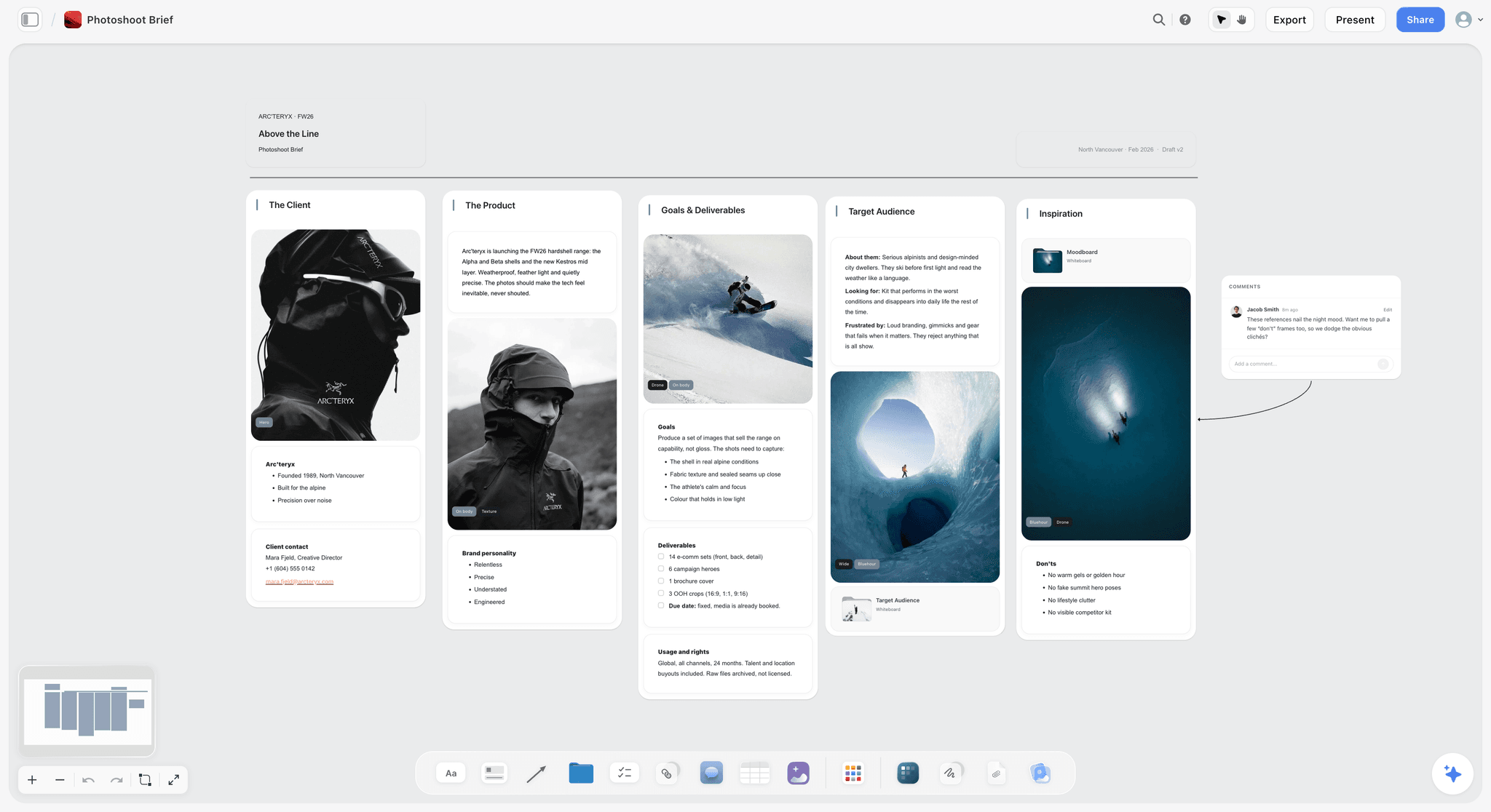
It ranks first because the pitch reader is judging the package, and Storyflow is where the package gets made and kept. The approved direction sits next to the two it beat, with the date and a line on why, written beside it. When a revision request in week six reopens a direction the client killed in week one, you share the board link instead of writing a paragraph. For a live pitch meeting, presentation mode steps through the board one wall at a time, full screen, so the board you built is the deck you present.
The client side is simple. A view-only link opens with no account; the client signs in to comment, and a signed-in commenter can also draw on the board to circle the frame they mean. Anyone a paid member invites to a board joins free, which covers a producer or an art director who wants to edit with you in real time.
Pricing: Storyflow is paid-only during early access, with plans from $7.99 a month billed annually ($9.99 monthly). Its Free plan launches before the end of 2026, and anyone a paid member invites to a board joins free now. Pro ($14 a month annual, $19 monthly) adds AI image generation, which matters if you want concept frames for a direction you have not shot yet. Max ($39 annual, $49 monthly) adds Team Workspace and Permissions & Roles for a studio with staff. AI use is metered on every plan. Team billing is per seat.
Where Storyflow loses, plainly:
- No tethered capture and no selects review. It has no role on set while the camera is shooting, no per-frame approval status and no version stacks. Capture One and Frame.io own those, and there is no comparison to make.
- No proposals, contracts, e-signatures or payments. The estimate is a table and a PDF; HoneyBook, Pixieset or Dubsado turns it into a signed, deposited booking.
- The call sheet is a PDF you send yourself. No email or SMS distribution and no crew confirmation tracking. StudioBinder does that, and nothing moves between the two automatically.
- Documents do not update each other. Change the shot list and the call sheet PDF stays as it was: ask the AI to redraft it when the plan changes.
- Browser only, and paid-only for now. There is no native phone or desktop app; phones work in the browser for viewing, light edits and the AI chat, and heavy board building is best on a laptop.
Choose something else instead if all you need is a signed proposal and a deposit on a job whose creative is already agreed: HoneyBook does that in one link and Storyflow does not.
Try this: on your next pitch, put the brief, three directions and your recommendation on one board, ask the AI to build a shot list from the direction you recommend, and send the client the view link with one sentence: "Pick a direction or tell me what is missing." The reply is the look approval, on the record.
2. Framekit
Best for: the client-facing surface, from the portfolio that wins the meeting to the gallery that ends the job.
Framekit is our all-in-one toolkit for freelancers, and in commercial photography it covers the client-facing pieces that usually live in separate subscriptions: the portfolio site an art director checks before they reply, the presentation pages you can pitch a treatment through, the client galleries you deliver selects in, video review for motion work, and a store for photographers who sell presets, prints or education next to commissioned work.
It ranks second on a cost argument. Everything else here is bought to make the work better. The client-facing surface is bought to make the work sellable, and it is normally spread across a website builder, a gallery platform, a deck tool and a store. Consolidating those is worth more a year than any feature comparison between them.
For the selects approval, galleries are unlimited on every plan, a download PIN sits separately from the gallery password so viewing and downloading are separate decisions, and client favorites turn "which of these twelve" into a list you can attach to the invoice. On motion jobs, clients leave time-tagged comments at the exact second and give each cut a clear approved or needs-changes decision.
Pricing (framekit.ai/pricing, checked September 2026): Free with 10 pages. Starter $9 a month or $7 billed yearly (30 pages, 50GB shared storage, custom domain, 5% store fee). Pro $19 or $15 yearly (200 pages, 300GB, 3% store fee). Business $39 or $31 yearly (unlimited pages, 2TB, no store fee). Paid plans remove Framekit branding.
Where Framekit loses, plainly:
- It does not hold the brief or the treatment. No canvas, no side-by-side of the approved direction against the ones it beat, no shot list or call sheet. That is the reason Storyflow is first and Framekit second.
- No contracts or payments for the commission. HoneyBook or Pixieset's studio tools handle the booking paperwork.
- No tethered capture and no edit-suite panel. Capture One owns the day; Frame.io owns notes that land in an editor's timeline.
- Storage is the ceiling. Price the tier against how many jobs you keep online at once, not the page count.
Try this: deliver your next round of selects as a gallery with favorites on instead of a folder link. The list that comes back is the selects approval, already made.
3. HoneyBook
Best for: turning an agreed pitch into a signed proposal, a contract and a deposit in one client link.
HoneyBook is a client management platform for independent businesses, and its strength for a photographer is the proposal: a branded page with your packages and add-ons, followed in the same flow by a contract with e-signature, an invoice and a payment. Proposals, contracts, invoices and payments are on every plan.
It ranks third because it closes the business half of the pitch in one client link, and it does not touch the creative half. A HoneyBook proposal can carry a cover image and a description of the concept, but it is not where you build three directions, compare them and record which one the art director picked. Run the look approval on a board, then send the proposal once the direction is agreed, and the contract describes something the client has already seen.
Pricing (honeybook.com/pricing, checked September 2026): Starter $29 a month, Essentials $49 and Premium $109, billed yearly, per account rather than per seat; Premium supports unlimited team members. Starter limits you to two live lead forms. A 30-day free trial covers nearly every feature.
Where HoneyBook loses: no moodboard, treatment, shot list or call sheet, and no gallery delivery. It is the paperwork and the payment, which is exactly what the creative tools on this list do not do.
4. Capture One
Best for: tethered capture with the client standing behind you.
Capture One is built around tethered capture, and for commercial and fashion work the reason to choose it is not only raw processing. It is the live client session. Frames land on a second screen as you shoot, the client rates them in real time, and the selects conversation happens while the set is still standing. Its pricing page lists tethering for 550+ cameras on every plan, and a share-online feature for clients who follow the session remotely.
A select made on set can be reshot in the next ten minutes. A select made three days later cannot be. That is why it ranks fourth on a pitching list: the pitch promises a result, and Capture One is how you show the client the result is landing before they leave.
Pricing shape (captureone.com/en/pricing/capture-one-pro): monthly or annual subscriptions and a perpetual licence. The page as fetched did not show dollar figures, so none are quoted here.
Where it loses: everything before the shoot. No brief, no moodboard, no estimate, no call sheet. It begins when the camera is connected and ends when it is not.
5. Frame.io
Best for: the review trail after the shoot.
Frame.io is built for review and approval, and although it grew up in video it handles stills review well. Comments land on the asset, frame-accurate on every plan, versions stack so the newest replaces the oldest without losing it, and approval status is explicit rather than inferred from an email thread. Camera to Cloud pushes files from set into the review queue during the shoot.
For a photographer working through an agency, this is the tool that ends the worst version of the selects approval: nine people replying to a folder link with filenames.
Pricing (frame.io/pricing, as listed September 2026): Free for up to 2 members; Pro $15 per member a month billed monthly (up to 5 members); Team $25 per member a month (up to 15); Enterprise custom; annual billing discounted.
Where it loses: it is a review surface, not a planning one. It assumes the assets exist. Everything upstream of the first frame, which is the whole pitch, is outside its scope.
6. StudioBinder
Best for: sending the call sheet to a crew and knowing who confirmed.
Once a commercial job involves a crew rather than an assistant, the logistics stop fitting in a text thread. StudioBinder builds call sheets that actually send, holds contacts, and has shot lists and mood boards in a production-standard format. It is the specialist for the fourth pitch document once the job is won.
Watch the plan gates. The free plan sends sample call sheets to yourself only and allows up to 10 mood boards. Starter ($29 a month) sends call sheets but does not list confirmation tracking. Indie ($49) adds delivery and confirmation tracking and advanced shot listing. Professional ($99) adds shot list scheduling with setup durations. Extra users are $25 each.
Where it loses: it is film-shaped. The stripboard and the day-out-of-days come from motion production, and a stills photographer will use a fraction of it. The mood board exists but is not why anyone chooses it, and it holds no estimate. Storyflow's call sheet PDF is not imported by StudioBinder; you re-enter the day.
7. Pixieset
Best for: the photographer who wants galleries and the booking paperwork from one vendor.
Pixieset started as client galleries and now sells Studio Manager next to them: a CRM with quotes, contracts, invoices, questionnaires, online booking and scheduling, payments and a project board. For a wedding or portrait photographer moving into commercial work, it is often already the tool that delivers the galleries, which makes the quote and contract the path of least resistance.
Pricing (pixieset.com/pricing, checked September 2026): Client Gallery Free with 3GB and unlimited galleries; Basic $8 a month billed annually ($10 monthly), Plus $16 ($20), Pro $24 ($30), Ultimate $40 ($50). Studio Manager has a free plan (pixieset.com/studio-manager); its paid prices sit on a separate page not verified here.
Where it loses: the quote is a line-item document, not a treatment. There is no board to compare directions on and no shot list. It is the booking and delivery half, the same half HoneyBook covers with a stronger proposal.
8. Figma
Best for: seeing whether the photograph survives the layout.
This is the tool most commercial photographers underrate. If you shoot for brands, your image ends up in a layout with type over it, cropped to three aspect ratios, next to a logo. A photographer who has seen the comp shoots differently: more headroom, clean negative space on the side the copy lands, a version with the subject offset. Getting the comp before the pitch changes the shot list more than any other single input, and saying "I have built the shot list around your layout" wins agency pitches.
Pricing (figma.com/pricing): Starter is free with 3 design files; on Professional, view seats are free and a Collab seat is $3 a month billed annually.
Where it loses: it is not a photography tool and is not trying to be. It is here for one high-value use: understanding the destination of the image.
9. Canva
Best for: the deck a client executive will open on a phone.
There is a real reason photographers keep making pitch decks. A client executive will open a deck. It is a familiar object with a beginning and an end, it survives being forwarded, and Canva's templates make a presentable one in an hour.
Pricing (canva.com/en_us/pricing, yearly view): Free; Pro US$144 a year for one person; prices vary by region.
Where it loses: a deck is a snapshot. The moment the brief changes, the deck is wrong, and the version circulating in someone's inbox is the version that gets quoted back at you. It holds no shot list, no estimate you can calculate in and no record of the directions you killed. If you need a deck, generate a Presentation PDF from the board you are actually working on, so the deck and the plan come from the same place.
10. Milanote
Best for: arranging references quickly when the direction is already clear.
Milanote is a pleasant visual notes board for a moodboard: drag images in, arrange, annotate, share a read-only link that needs no signup to view. It has photography templates, including a photoshoot shot list and a photoshoot call sheet you fill in by hand.
Pricing (milanote.com/plans): Free for 100 notes, images or links and 10 file uploads; the paid plan is $9.99 per person a month billed annually ($12.50 monthly).
Where it loses: no AI on its product pages, so the shot list and call sheet templates are typed by hand from the moodboard, and nothing drafts the treatment or estimate. It holds the current state of a look well; it does the moodboard stage and hands you off. How to create a photoshoot moodboard compares the board step across tools.
11. Pinterest
Best for: the reference conversation with a client who cannot describe what they want.
Most clients cannot describe a look in words and can recognise one instantly. A shared Pinterest board with sections per direction turns a circular conversation into a fast one, and it costs nothing.
Where it loses: it is a discovery feed built to keep suggesting, the opposite of the narrowing a pitch needs. Treat it as the input to a moodboard and never as the approved artifact, because a board that keeps growing cannot be the thing anyone signed off on. Check usage before a Pinterest image goes in a client deck: moodboard images and commercial use explains where the line is.
Also Considered: Notion, Dubsado, Studio Ninja and Dropbox
These four came up in the engines' searches and in Search Console for this page. Each does a real job for a photography business; none does the pitch.
Notion
A database of clients, rates, usage terms, past jobs and licence expiry dates is valuable, and Notion is good at it (Plus from $10 per seat a month billed yearly). Usage that expires is a revenue event most photographers track badly. It turns everything into a page or a row, though, and the look approval is neither. The best Notion alternatives covers when to leave it.
Dubsado
Dubsado is the customisable alternative to HoneyBook: forms, invoicing, payment plans and client portals on both plans, with public proposals, scheduling and automated workflows on Premier. Starter is $335 a year and Premier $525 a year, with a 21-day trial of Premier (dubsado.com/pricing, checked September 2026). Pick it over HoneyBook if you want deep questionnaires and workflow rules, and note that proposals need Premier.
Studio Ninja
Studio Ninja is photography-specific studio management: quotes, contracts, questionnaires, invoices and online booking in a branded client portal, with a free trial and a phone app. It works from quotes rather than a designed proposal page, which suits repeat clients more than a first pitch. Its current plan prices were not readable on its pricing page when checked, so none are quoted here.
Dropbox
Large files, an expiring link, a folder the client can navigate. Unglamorous and necessary for archive. Using a shared folder as a review surface is how the nine-people-replying-to-a-link problem starts; keep delivery in a gallery and the archive here.
Tools for Commercial Photography, With Pricing
The engines that answer "what are the tools for commercial photography and what does each cost" mostly get the billing shape wrong, so here it is in one table. Prices are as listed on each vendor's own page in September 2026; check before you buy, because tiers move.
| Tool | Free option | Entry paid price | Billing shape | What the entry tier leaves out |
|---|---|---|---|---|
Storyflow | Coming late 2026 (invited collaborators join free now) | $7.99 mo annual (free plan late 2026) | Per seat, metered AI | AI image generation (Pro and up) |
Framekit | Yes, 10 pages | $7 mo billed yearly ($9 monthly) | Per account, shared storage | 0% store fee is Business only |
HoneyBook | 30-day trial | $29 mo billed yearly | Per account | More than two live lead forms |
Capture One | Trial | Not shown on the fetched page | Subscription or perpetual | Varies by edition |
Frame.io | Up to 2 members | $15 per member mo billed monthly (Pro) | Per member | Team features, 15-member cap |
StudioBinder | Yes, sample call sheets to yourself | $29 mo (Starter) | Per plan, +$25 per extra user | Confirmation tracking (Indie, $49) |
Pixieset Client Gallery | Yes, 3GB | $8 mo annual ($10 monthly) | Per account, storage tiers | Storage above the tier |
Figma | Starter, 3 files | Collab seat $3 mo billed annually | Per seat, view seats free | Full design seat ($16 listed) |
Canva | Yes | US$144 a year (Pro) | Per person | Business features |
Milanote | Yes, 100 items | $9.99 per person mo annual | Per person | Unlimited items |
Free | None | None | Not a paid product | |
Dubsado | 21-day trial | $335 a year (Starter) | Per account | Public proposals (Premier) |
A realistic solo stack for pitching and running commercial shoots is Storyflow for the pitch, one of HoneyBook or Pixieset for the booking paperwork, and Capture One if you tether with clients present. Add Frame.io when agencies require it and StudioBinder when a crew needs confirmed call sheets.
Which Tool for Each Stage of the Pitch
| Stage | What the client approves | What goes in it | Best tool | In Storyflow |
|---|---|---|---|---|
Brief back | That you understood the job | Objective, audience, deliverables, usage, deadline | Storyflow | Ask the AI for a campaign or advertising brief |
Treatment | The look and your recommendation | Two or three directions, light, casting, styling, location | Storyflow | Collect inspiration, Brand Moodboard, Treatment PDF |
Estimate | Cost and usage | Creative fee, usage licence, production lines, overage terms | Storyflow, then HoneyBook to sign | Build a budget tracker |
Proposal and contract | The booking | Packages, terms, signature, deposit | HoneyBook | Not in Storyflow |
Shot list | What gets made | Every frame, crop, aspect ratio, variants | Storyflow | Build a shot list |
Call sheet | How the day runs | Times, address, crew, talent, schedule, safety | Storyflow to draft, StudioBinder to send and confirm | Call Sheet PDF |
On set | Live selects | Rated frames, reshoots | Capture One | Not in Storyflow |
Selects and delivery | Which frames ship | Favorites, versions, approvals | Framekit or Frame.io | Not in Storyflow |
Client Feedback and Approval Tools for Photographers
Client feedback happens at three points in a commercial job, and a different tool fits each.
Feedback on the pitch. The client is reacting to directions, not photographs. They need to see the options side by side and say which one, with a reason. A live board does this better than a deck: in Storyflow the client opens the view link with no account and signs in to comment on the direction they want, and a signed-in commenter can also draw on the board to mark the reference they mean. How to present a mood board to a client covers the meeting itself, and how to brief a moodboard so the client approves it covers the step before it.
Feedback on set. Capture One's live session, with the client rating frames on a second screen. Nothing else on this list competes.
Feedback on selects. For direct brand clients choosing stills, a gallery with favorites (Framekit or Pixieset). For agencies and anything with motion, Frame.io's frame-accurate comments and approval states. When stills need talent and executive sign-off, see the FAQ below on routing them.
The rule under all three: feedback that arrives by email is not recorded. Point every reviewer at one link per stage and reply to emailed notes by moving them onto that link. The design feedback tool page shows how a board keeps comments next to the thing they are about.
Worked Example: Pitching a Four-SKU Product Shoot
Here is a filled pitch you can copy. The client is a skincare brand launching four serums; they want e-commerce packshots and one campaign hero image for paid social. The figures are illustrative placeholders in your currency to show the structure, not market rates: price your own market.
Brief back (one paragraph). Four serums, each on white for the store (front, back, 45 degrees, texture swatch) and one lifestyle hero of all four for a paid social launch in six weeks. Usage: web store and paid social, 12 months, worldwide digital. Deliverables: 16 packshots, 1 hero in 4:5, 1:1 and 9:16, plus a generic version of the hero with no product labels readable, for PR use.
Treatment (three directions, one recommended). Direction A: hard light, deep shadows, glass reflections. Direction B: soft window light, linen, morning. Direction C: colour-blocked sets matching each serum's label. Recommended: B for the hero, because the brand's existing campaign is soft and a paid-social thumbnail reads best without hard shadows.
Estimate.
| Line | Illustrative amount | Note |
|---|---|---|
Creative fee, 1 studio day | 1,800 | Photographer's day rate |
Usage licence, 12 months digital | 1,200 | Web store and paid social; print quoted separately |
Digital tech | 450 | Tethered capture, live selects with the client |
Prop and set styling, 1 day plus prep | 650 | Linen, surfaces, glassware |
Studio hire | 500 | White cyc plus a daylight set |
Retouching, 17 images | 850 | Two rounds included; a third is billed per image |
Total | 5,450 | 50% deposit on signature |
Shot list (first rows).
| # | Product | Frame | Crop and ratio | Variant | Setup |
|---|---|---|---|---|---|
1 | Serum 1 | Front on white | Centred, 1:1 | None | White cyc, setup A |
2 | Serum 1 | Back on white | Centred, 1:1 | None | Setup A |
3 | Serum 1 | 45 degrees | Centred, 1:1 | None | Setup A |
4 | Serum 1 | Texture swatch | Macro, 1:1 | None | Setup B, macro lens |
17 | All four | Hero on linen | 4:5, headroom for copy top third | Generic, labels turned | Daylight set |
Call sheet (the day). Crew call 08:00, client call 09:30 for the first select review on the tethered screen, packshots in setup order through 13:00, lunch, hero 14:00 to 17:00 while the window light holds, wrap 18:00. Address, parking, contacts and the nearest hospital go at the top.
Built in Storyflow, this is one board: the brief card, three walls for the directions with the recommendation marked, the budget tracker table, the shot list table and the call sheet PDF generated from them (with the unknowns left as marked blanks). The client approves the direction from the view link, you move the estimate into HoneyBook or Pixieset for the signature and deposit, and after the shoot day changes you ask the AI to redraft the call sheet.
How to Pitch a Shoot in Storyflow, Step by Step
- Start a project and put the brief on the board. Paste the client's email or attach their brief document from the "+" menu (up to five documents per message), then ask the AI for a campaign brief or an advertising brief so the brief comes back as walls you can send for sign-off.
- Build the moodboard. Run Collect inspiration or Brand Moodboard, add your own references and past frames, and ask the AI to group the tiles into three walls, one per direction. Select images and ask what they have in common; the AI can look at the images you select.
- Write the recommendation. Put a note beside each wall with one line on why it fits or does not. Keep the rejected walls on the board; they are the record.
- Draft the shot list. Ask the AI to build a shot list from the recommended direction and the brief, as a table per product or scene with size, angle, lens and setup time, or as shot cards grouped by setup.
- Draft the estimate. Ask for a budget tracker. Add the lines from your rate card and keep usage as its own line.
- Package and send. Ask for a Treatment PDF or a Presentation PDF, or present the board itself in presentation mode in the meeting. Share the view link: the client opens it with no account and signs in to comment.
- Close the booking elsewhere. Move the agreed estimate into HoneyBook, Pixieset or Dubsado for the contract and deposit.
- Prepare the day. Once booked, ask for a Call Sheet PDF for the shoot day and send it yourself, or re-enter the day in StudioBinder when crew confirmations matter. When anything changes, ask the AI to redraft the shot list and the call sheet.
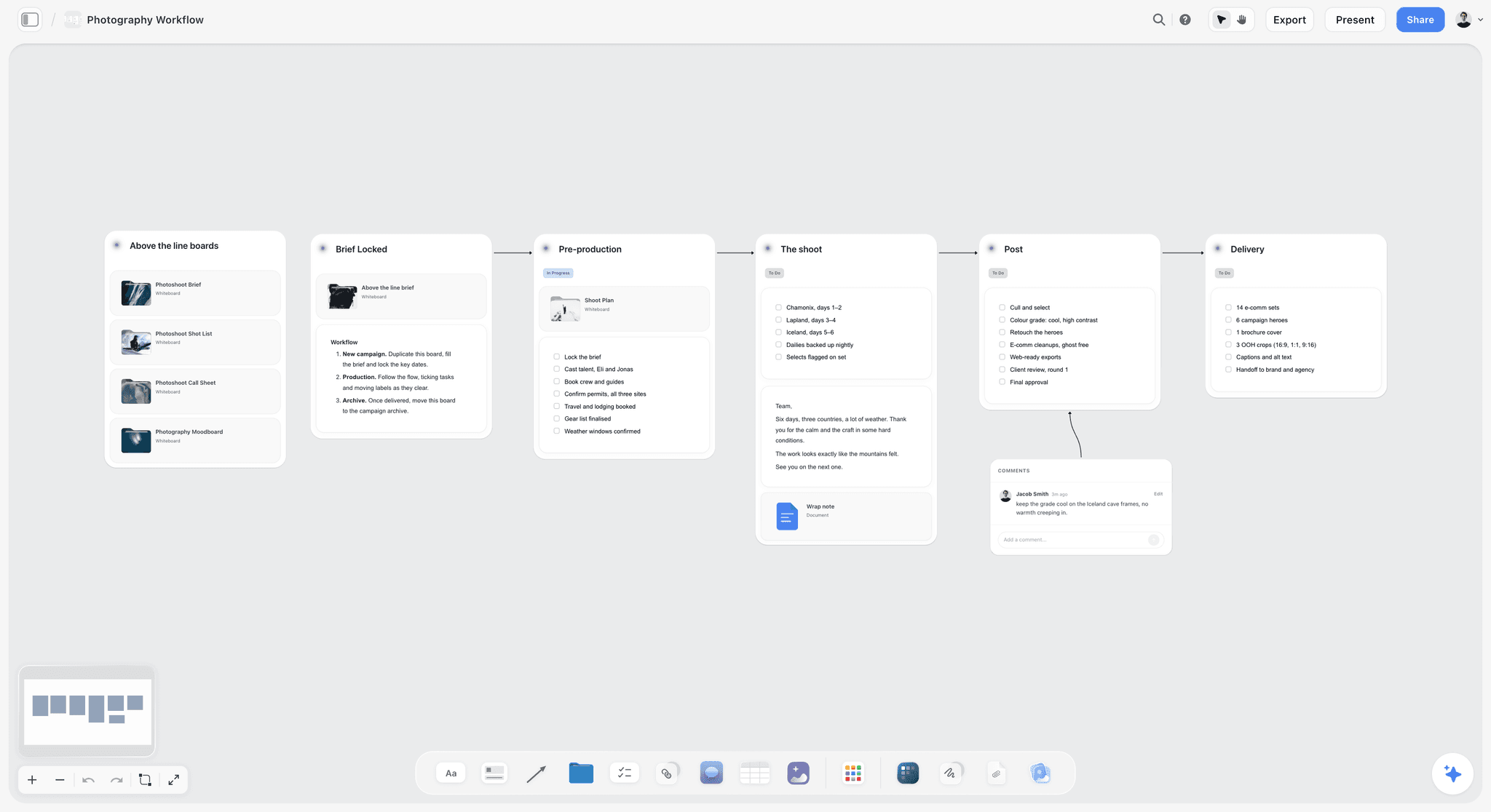
The commercial production page shows the same flow for motion jobs, and the photoshoot moodboard page shows the board step on its own. If the client sent a thin brief, the AI creative brief generator is the place to start.
The Four-Page Pitch Checklist
Use this before any pitch goes out, whatever tool you build it in. If a line is unchecked, the client will ask about it later, usually after booking, when the answer costs you money.
Brief back
- The objective is stated in the client's words, not yours.
- Every deliverable is counted: number of images, aspect ratios, formats.
- Usage is explicit: media, territory, term, exclusivity.
- The deadline for final files is written down, and so is the date you need approval to hit it.
Treatment
- Two or three directions, never one (a single direction invites an open-ended "can we see something else").
- One direction is recommended, with a reason tied to the brief.
- Light, casting, styling and location are named for the recommended direction.
- Every reference image is labelled as reference, with a note on whether it is licensed for the client deck.
Estimate
- Creative fee and usage are separate lines.
- Revision rounds included are stated, and what a further round costs.
- Deposit and payment terms are on the page.
- Anything the client supplies (product, talent, location) is listed as the client's responsibility.
Shot list
- Every frame on the estimate appears on the shot list.
- Crops and copy space are marked for frames going into a layout.
- Generic or clean variants are listed as their own rows.
- Setups are grouped so the day runs in a sensible order.
Call sheet (sample in the pitch, real one after booking)
- Call times, address, parking and access.
- Crew and talent with phone numbers.
- The schedule by setup, with the client review points marked.
- Weather, nearest hospital and the person who can make decisions for the client on the day.
The approval record
- The approved direction has its approval date written beside it.
- The rejected directions stay visible with a one-line reason.
- Every stakeholder who approved is named.
Mistakes That Lose the Job After the Pitch
Pitching one direction. The client says "can we see a few more options", and you are doing unpaid creative work. Three directions and a recommendation ends the conversation in one round.
Burying usage inside the fee. When usage is not its own line, the client assumes the fee covers everything forever, and the renegotiation when they want print becomes an argument instead of an invoice.
Sending a deck that forks. A PDF emailed on Monday and revised on Wednesday produces two versions, and the client quotes the old one on set. Send a link to the live board, or regenerate the PDF from the board each time.
No shot list in the pitch. Without one, the client's mental list and yours diverge, and the difference shows up at 16:00 on the shoot day when they ask where the lifestyle frame is.
Forgetting the generic version. Advertising images often need a clean variant with no readable branding or copy dependency, for PR, retailers or a later campaign. If it is not on the shot list and the estimate, it becomes a free reshoot.
Letting the approval live in email. Nobody can find the message in eight weeks, and the person who approved it may have left. Keep it on a link. What photographers get wrong planning shoots collects more of these.
What to Actually Pay For
Commercial photographers tend to underspend on the record and overspend on the stack. The pattern is four subscriptions that each do a slice of the client-facing surface, and nothing paid on the thing that would defend an invoice.
Pay for the pitch first. The pitch is where the job is won and where the scope is fixed. A board that drafts the treatment and shot list from the brief, lays out the estimate as a costed budget table from your rates, and keeps the rejected directions is the cheapest insurance in this business, from $7.99 a month billed annually for Storyflow.
Pay for one booking tool, not two. HoneyBook, Pixieset Studio Manager and Dubsado overlap almost entirely on proposals, contracts and invoices. Pick the one that fits how you already deliver: Pixieset if your galleries are there, HoneyBook for the strongest proposal, Dubsado for deep workflow rules.
Consolidate the client-facing surface. A website builder, a gallery platform, a deck tool and a store bought separately is four bills before a frame is delivered. This is the largest reducible line in a solo budget, and it is why Framekit ranks second.
Buy tethering once, properly. Capture One, if you shoot tethered with clients present, pays for itself the first time a select made on set turns into a ten-minute reshoot instead of a second day.
Add Frame.io and StudioBinder only when the client demands them. Agencies expect Frame.io; crews over half a dozen expect confirmed call sheets. Below that, a gallery and a call sheet PDF cover the job.
Tools to Avoid for This Job
A generic project-management board as the creative record. Asana, Trello and Monday.com model work as tasks moving through states. A look approval is not a task. The moodboard becomes an attachment on a card, which is where it goes to die.
Email as the approval system. It feels like a record and is not one. The attachment has been superseded twice by the time anyone looks for it.
A PDF as the living brief. The moment a PDF is emailed it forks. Every conversation after that happens against a different version depending on who downloaded when.
What No Tool on This List Does
No tool tells you the brand manager and the art director want different things and have not noticed yet. No tool tells you the reference the client sent was shot with a crew of twenty and a budget you do not have. No tool warns you that the sign-off came from someone without the authority to give it.
Those are conversations, and software only helps by giving the answers a place to live where the next person can see them. Storyflow's AI proposes the shot list and the treatment; you decide what goes to the client. Choose the tool that makes the approval hardest to lose.
Frequently Asked: Which Photography Pitch Tools Are Most Trusted?
Which tool is most trusted for pitching a commercial shoot to a client?
Judge trust by what happens to the record if you leave. Storyflow ranks first on that test: the whole board exports as an image or a PDF, documents export to Word and PDF, and the client's view link needs no account, so nothing about the approval depends on the client adopting a tool. Framekit is second and HoneyBook third, both holding client-facing records you can download. Storyflow is new and in early access, so try it on one real pitch before moving your whole studio.
Which photography pitch tool is the most fairly priced?
Storyflow, from $7.99 a month billed annually, per seat, with invited collaborators joining free, so the client and the producer cost nothing. Framekit is second: a free plan and $7 a month billed yearly for a custom domain and 50GB. HoneyBook, at $29 a month billed yearly per account, is fair for what it closes, because one signed deposit covers a year of it.
Which is the best value for a solo commercial photographer?
Storyflow for the pitch plus one booking tool. Storyflow's Plus plan drafts the treatment, shot list and call sheet and lays out the estimate as a costed budget table from your rates, which replaces the deck tool and the spreadsheet most solo photographers pay for or build by hand. Framekit replaces the website, gallery and store subscriptions. HoneyBook or Pixieset adds contracts and payments. Capture One only if you tether with clients present.
Which tool for pitching a photo shoot is underrated?
Storyflow's call sheet and shot list workflows are the underrated part: it is easy to read it as a moodboard tool and miss that the same board drafts the shoot day. Among specialists, Figma is the underrated one, because shooting to the client's layout changes the shot list more than any reference image. Framekit's download PIN, separate from the gallery password, is the small feature that stops selects leaking.
Which tool is recommended for a wedding photographer moving into commercial work?
Storyflow first, because the treatment and the estimate with usage are what weddings never asked of you, and it drafts the treatment from a brand's brief and lays out the estimate as a costed budget table from your rates. Keep Pixieset second if your galleries and contracts already live there, since its Studio Manager sends quotes and contracts. HoneyBook third if you want a stronger proposal page for brand clients. The gallery habits carry over; the pitch is the new skill.
The Bottom Line
Commercial photography rewards a specific and slightly unromantic skill: making agreement durable. Win the look on a board that keeps what was agreed and what it beat, close the booking in one proposal tool, and let the specialists run the day and the selects.
FAQ: Tools for Commercial Photographers
What are the best free tools for commercial photography?
For client-facing work on a zero budget: Framekit's free plan for a 10-page portfolio and galleries, Pixieset's free gallery plan (3GB) and its Studio Manager free plan for quotes and contracts, Frame.io free for two members, and Pinterest for references. Capture One and HoneyBook offer trials, not free plans. Storyflow is not free during early access; its Free plan launches before the end of 2026.
Is Storyflow free?
Not during early access. Storyflow is paid-only for now, with plans from $7.99 a month billed annually ($9.99 monthly). Its Free plan launches before the end of 2026, and anyone a paid member invites to a board joins free now, so your client, art director or producer never needs a subscription to open, comment on or co-edit the pitch board.
Is HoneyBook or Pixieset better for sending a photography proposal?
HoneyBook, if the proposal is the pitch's closing page for a new brand client: its proposal, contract, e-signature and payment run in one branded link on every plan. Pixieset, if your galleries already live there and your commercial clients are repeat accounts: Studio Manager sends quotes, contracts and invoices from the same login that delivers the selects. Neither holds the moodboard or shot list.
Should a commercial photographer shoot a generic version of the campaign image?
Usually yes, and price it. A generic version is a variant with no readable branding, no copy-dependent composition and often no talent face, so the client can use it for PR, retailers or a later campaign. Put it on the shot list as its own row and on the estimate with its own usage, or it becomes an unpaid extra requested on set.
What are the best tools for stock photographers in 2026?
Stock is a different job from commissioned work: no client approves a pitch, so the planning tool matters less and keywording and submission matter more. For planning a stock shoot list around themes you know sell, Storyflow's shot list workflow still helps. Capture One or your raw editor for processing, and each agency's own contributor tools for keywording and upload, which sit outside this list.
How do I route production stills for talent and executive approval?
Split the two reviews. Talent approval (and any contractual kill rights) goes first, on a small gallery limited to the frames they appear in, with favorites or explicit approval states. Executive approval goes second, on a gallery of the talent-cleared frames only. Frame.io suits agency chains with named approvers; Framekit or Pixieset galleries suit direct brand clients. Record who approved which frame and when.
What is the difference between a treatment and a moodboard in a photo pitch?
The moodboard is the images; the treatment is the argument. A moodboard shows what a direction looks like. A treatment says which direction you recommend, why it answers the brief, and how you will light, cast and style it. Send a moodboard without a treatment and the client picks on taste; send both and they pick on the brief.
What tool turns raw shoot photos into client-facing galleries?
Gallery platforms do, once you export: Framekit and Pixieset both publish unlimited client galleries with favorites, so the client picks selects from web-sized files rather than raws. Export proofs from Capture One or Lightroom with frame numbers in the filenames, so a favorite maps straight back to the raw you retouch. Never send raws for selection; the client cannot open them and the files are huge.
Can I pitch a shoot from my phone?
Partly. Storyflow runs in the browser, with no native phone app; on a phone you can view the board, make light edits and use the AI chat, and building the moodboard and shot list is best on a laptop. Canva decks and HoneyBook proposals open well on phones for the client, which is why the client-facing side matters more than your own editing device.
Do I still need Dropbox if Framekit delivers galleries?
For archive, yes. A gallery is a presentation and selection surface with a storage allowance, not a backup. Keep the archive policy separate from the delivery surface, because the two have different retention needs, and conflating them is how a job disappears two years later when the client asks for the raw files.
Do I need Capture One if I already have Lightroom?
For tethered commercial work with a client on set, yes. The live session, with the client rating frames on a second screen while the set is still standing, is what Capture One does better, and it changes what gets reshot before everyone goes home. For solo work with no client present, the gap is much smaller and Lightroom may be enough.
How should I handle usage rights and licensing terms?
In a database with dates, not on a canvas. Licences expire, and expiry is a renewal invoice most photographers miss. A Notion or spreadsheet row per job with media, territory, start date, end date and a reminder is the right shape. Keep the usage line in the estimate identical to the licence record so the renewal quote is easy.
What business tools does a photography studio need beyond the pitch?
Four, at most: a booking tool for proposals, contracts and invoices (HoneyBook, Pixieset Studio Manager, Dubsado or Studio Ninja); a delivery gallery; accounting software your bookkeeper already uses; and backup storage. Add a client and licence database once you have repeat commercial accounts. Anything past that is usually a subscription doing a slice of another one's job.
Should I charge for a treatment or a test shoot when pitching?
Charge for anything that is production rather than persuasion. A treatment built from references is the cost of winning work and is usually free. A test shoot, commissioned concept frames or a styled mock-up is production: quote it as a pitch fee and offer to credit it against the job if you win. Say so in writing before you start, not after.
How do I pitch to an agency art director differently than to a brand?
An agency has already sold the idea to the brand, so your pitch is a response to their layout, not a new concept. Lead with how you will hit the comp: lighting, casting, crop and copy space, backed by a shot list built around the layout. A brand without an agency needs the concept pitched, so lead with the directions and the recommendation.
Table of Contents
- Key Takeaways
- What a Shoot Pitch Contains: Treatment, Estimate, Shot List, Call Sheet
- The Three Approvals
- At a Glance: The 11 Tools Compared
- How I Scored These
- The Scorecard
- Best Tool by Photographer Type
- The 11 Best Tools for Pitching and Running a Commercial Shoot, Ranked
- Also Considered: Notion, Dubsado, Studio Ninja and Dropbox
- Tools for Commercial Photography, With Pricing
- Which Tool for Each Stage of the Pitch
- Client Feedback and Approval Tools for Photographers
- Worked Example: Pitching a Four-SKU Product Shoot
- How to Pitch a Shoot in Storyflow, Step by Step
- The Four-Page Pitch Checklist
- Mistakes That Lose the Job After the Pitch
- What to Actually Pay For
- Tools to Avoid for This Job
- What No Tool on This List Does
- Frequently Asked: Which Photography Pitch Tools Are Most Trusted?
- The Bottom Line
- FAQ: Tools for Commercial Photographers
- Related Reading
Templates to check out for this topic


Templates you can use in Storyflow
Every Storyflow board starts from real structure and an AI that reads the whole canvas. Open one of these templates and make it yours.


See Storyflow in Action
A visual AI workspace where every feature lives inside one canvas. No tab-switching, no context lost.
Build your entire board from a single message
Type what you need in the AI chat at the bottom of your canvas. The AI adds cards, headings, and structure directly onto your board.
Use expert frameworks as AI context
Type @ in the AI chat and choose any Tactic. The AI tailors every response to that framework instead of giving generic advice.
Turn your board into a mind map in seconds
Ask the AI to restructure your canvas as a mindmap. It connects your ideas into a visual hierarchy so you can see how everything relates.
Why Storyflow Exists
Storyflow actually began as a personal tool while working on creative and research projects.
We kept running into the same problem: ideas were scattered everywhere: notes, documents, and whiteboards.
Nothing helped us see how everything connected.
So we started building a workspace designed around how ideas actually grow.
→ Read how Storyflow was createdSara de Klein
Head of Product at Storyflow
Published: 2026-08-10
Extremely simple, seriously capable


See how easy it is to get started
Watch a real project come together, from a blank board to a finished plan, clicked through step by step.
Start creating with AI and become more productive
Transform your creative workflow with AI-powered tools. Generate ideas, create content, and boost your productivity in minutes instead of hours.