The 10 Best Tools for Wedding Photographers in 2026
Three clocks run at once on a wedding day and most tools serve exactly one. The ranking that reconciles the couple's timeline, the light and the coverage list.

Category
Photography
Author

Sara de Klein
Head of Product at Storyflow
Topics
2026-08-10
•
16 min read
•
Photography- best tools for wedding photographers
- best tool for planning a photoshoot
- wedding photography planning software
- wedding shot list and timeline tool
- best moodboard tool for photographers
- wedding photographer CRM vs planning tool
What are the best tools for wedding photographers in 2026?
The best planning tool for a wedding photographer is Storyflow, because a wedding is the one shoot where the moodboard, the shot list and the hour-by-hour timeline have to agree with each other before anyone picks up a camera, and it is the only tool here that holds all three on one surface a couple can actually read. Framekit ranks second because it owns the other half of the job, the half the couple sees: the galleries, the website and the store, in one account instead of three. HoneyBook and Táve win the business half, contracts and invoices and questionnaires, and neither pretends to plan the creative. Milanote and Pinterest are better at gathering references and worse at everything downstream of them. PhotoPills is not optional if you shoot outdoors. This ranking covers planning and client delivery, and it says plainly where each tool stops. For moodboards specifically, see the [moodboard tool for photographers](/moodboard-tool-for-photographers).

Full disclosure: Two tools on this page are ours. Storyflow is our visual workspace and Framekit is our all-in-one toolkit for freelancers, so weigh both with the skepticism you would apply to any tool a company recommends on its own blog. Storyflow is first for planning only: it is not a CRM, it sends no contracts, takes no payments and delivers no galleries. Framekit is second on consolidation, not depth, and Pic-Time beats it on print-store automation and album proofing while HoneyBook and Tave beat it on the business layer. PhotoPills answers the light clock and neither of ours comes close.
Key Takeaways
- A wedding is not a shoot you can reschedule. It is a deadline that arrives with guests.
- Three clocks run at once on a wedding day: the couple's clock, the light clock and the coverage clock. Most tools serve exactly one and leave you to reconcile the other two in your head.
- Storyflow ranks first for planning because references, shot list and timeline sit on one canvas, and the AI reads across all of it rather than one note at a time.
- Framekit ranks second because the client-facing surface (gallery, website, store) is normally three subscriptions, and collapsing it to one is the single biggest cost and admin reduction available to a solo photographer.
- Storyflow is not a CRM. It sends no contracts, takes no payments and delivers no galleries. HoneyBook, Táve, Framekit and Pic-Time own that ground and this post says so in every relevant section.
- PhotoPills and Sun Seeker are the only tools that answer the light clock, and no general planning tool replaces them.
- The most common failure is not a missing tool. It is a shot list that was never reconciled against the timeline, so the family formals were scheduled into the fifteen minutes the light was best for the couple's portraits.
Lay the shot list against the timeline
The family formals get scheduled into the only good light window because the list and the timeline live in different documents. Storyflow puts both on one canvas so the collision is a five-second read. Paid-only during early access; the Free plan lands before the end of 2026.

The Three Clocks
Wedding photography looks like portraiture and behaves like live event production. The difference is that nothing waits. A wedding is not a shoot you can reschedule. It is a deadline that arrives with guests.
Underneath every wedding day, three clocks run at the same time, and they do not agree with each other.
The couple's clock is the timeline of the day as the couple and the planner understand it. Hair and makeup at this time, first look here, ceremony at this time, speeches, cake, first dance, send-off. It exists in a document somebody else owns, it changes twice in the final week, and it is written for caterers and coordinators rather than for you.
The light clock is the sun. Golden hour lands where it lands. Ceremony light at four in the afternoon in June is a different problem from ceremony light at four in the afternoon in October, and a west-facing venue turns the last twenty minutes before sunset into either the best or the worst window of the day. This clock cannot be negotiated and does not appear anywhere on the couple's clock.
The coverage clock is your own list of what must be captured, and when each window closes. The dress hanging in the window closes when she puts it on. The untouched reception room closes when the first guest walks in. The full family group closes when the great-aunt leaves after dinner. Every item on a shot list has a window, and most shot lists record the item without the window.
The whole craft of planning a wedding is reconciling three clocks that were authored by three different people for three different purposes. Tools help or fail exactly here.
Most tools serve one clock well. PhotoPills is a superb light clock and knows nothing about your shot list. A studio-management platform holds the couple's clock as a questionnaire answer and cannot tell you the sun sets during the toasts. A Pinterest board is a reference pile with no clock at all.
The failure mode is always the same shape. Not a missing shot. A collision. The family formals get scheduled into the exact fifteen minutes that were the only good light for the couple's portraits, because the shot list lived in one place, the timeline in another, and nobody ever laid them side by side.
The Fourth Surface: What the Couple Actually Sees
The three clocks govern the day. There is a fourth surface that governs the business, and it is the one most planning posts leave out because it happens before and after the wedding rather than during it.
A couple encounters you through a website, decides through a pitch or a package page, and remembers you through a gallery. Those three touchpoints are what they will describe to the next couple who asks for a recommendation, and none of them involve the shoot itself.
The reason this belongs in a tools ranking is cost and drift. The standard solo setup is a website on one subscription, galleries on a second, a deck built in a third, and a store on a fourth if you sell presets or albums. That is four bills, four logins, four places for your branding to fall out of sync, and four things to update when you rebrand. It is also the reason a lot of photographers still have a portfolio showing work from three seasons ago: the rebuild is spread across too many tools to feel like a small job.
The test for this surface is different from the test for the day. For the day, the question is whether a tool reconciles clocks. For the client-facing surface, the question is whether the couple can use it with no account, no app and no explanation, and whether you can change it in an afternoon rather than a weekend.
At a Glance: The 11 Tools Compared
| Tool | Best for | Clocks it serves | Shape |
|---|---|---|---|
Storyflow | Planning the creative side of the day | Couple's, coverage | Visual canvas with AI |
Framekit | Galleries, website and store in one account | Client-facing | All-in-one creative toolkit |
HoneyBook | Contracts, invoices, client flow | Couple's | Studio management |
Táve | High-volume studio operations | Couple's | Studio management |
Milanote | Reference gathering and mood | None | Visual notes board |
PhotoPills | Sun, moon and location planning | Light | Field calculator |
Sun Seeker | Fast on-site light check | Light | Field AR tool |
Google Sheets | The timeline everyone can open | Couple's, coverage | Spreadsheet |
Notion | A database of weddings and details | Couple's | Docs and databases |
Sourcing inspiration with the couple | None | Discovery feed | |
Pic-Time | Specialist gallery delivery and print store | Client-facing | Gallery delivery |
How I Ranked These
Five criteria, applied in this order. The ranking covers the stretch from enquiry to delivered gallery. Editing and colour are a different post.
1. Does it reconcile clocks, or hold one? A tool that holds the shot list next to the timeline earns more than a tool that holds either brilliantly on its own. Reconciliation is where weddings are won and lost.
2. Can the couple read it without you narrating? Every wedding involves showing something to two people who are not photographers, usually over a video call, usually while they are tired. A plan that needs a walkthrough is a plan that will be misunderstood, and a gallery that needs instructions is a gallery that generates emails.
3. Does it survive the final week? Timelines change late. A tool where a change means rebuilding the artifact is a tool you will stop updating, and a stale plan is worse than no plan.
4. Does it work with no signal? Venues eat reception. Anything that only exists in a browser tab is a liability at four in the afternoon in a stone church.
5. What does it honestly not do? Every tool here has a hard boundary. Tools that pretend otherwise cost you a season before you find out.
Pricing is described by shape rather than by exact figures for most competitors, because photography tools change their tiers often and a number quoted here in August is wrong by spring. Storyflow and Framekit prices are stated exactly, because those I can verify.
Quick Picks by Photographer Type
Shooting your first ten weddings. Storyflow for the plan, Framekit's free tier for the site and galleries, PhotoPills bought once, and a Google Sheet for the vendor timeline. Skip the CRM until the admin actually hurts, which is usually around wedding fifteen.
Fifteen to thirty weddings a year, solo. This is the band where the client-facing sprawl costs the most. Storyflow, Framekit on Starter or Pro, HoneyBook for contracts and payments, PhotoPills. Four tools, no overlap, and each one owns a stage the others do not touch.
A studio with second shooters and an editor. Táve for the operational depth, Storyflow shared read-only with the second shooter for the coverage clock, Framekit or Pic-Time for delivery depending on whether you want everything in one account or want the specialist print store.
Elopements and small ceremonies. Fewer clocks and much less admin. PhotoPills, a notes app and Framekit for the site and gallery genuinely covers it. A canvas only starts earning its place once there are enough moving parts to collide.
Selling presets, album templates or education. Framekit is the direct answer, because the store sits on the same account as the portfolio that sells it. This is the one photographer profile where the client-facing surface is not overhead but a second revenue line.
Shooting the same venues repeatedly. Notion for the venue database, because the accumulated knowledge (where the light is at four, which room the formals work in) is worth more than any single wedding's plan. Storyflow for the individual day on top of it.
1. Storyflow
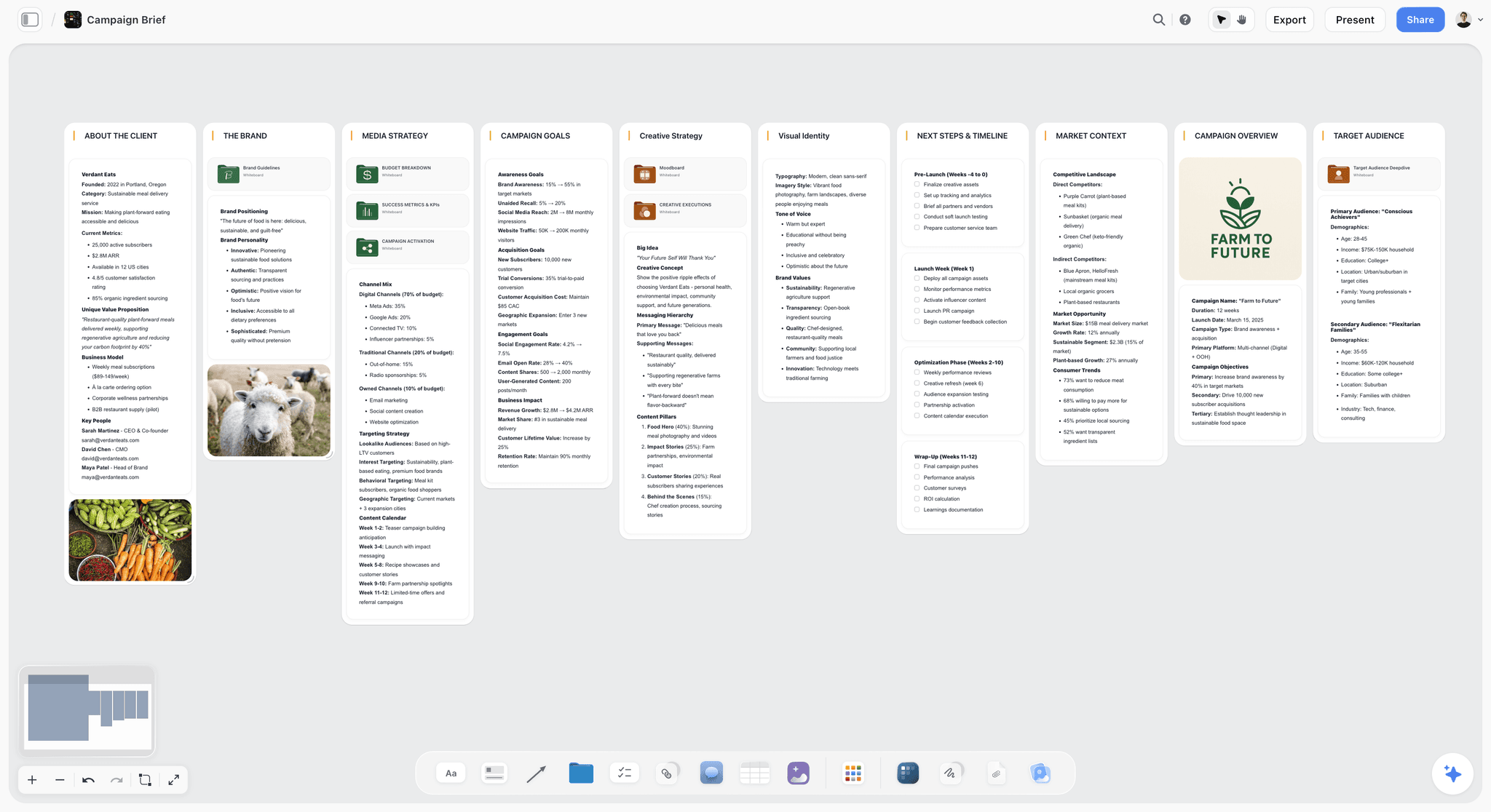
Best for: holding the references, the shot list and the timeline on one surface.
Storyflow is an AI visual workspace built on an infinite canvas. For a wedding, that means one board per couple where the reference images, the shot list, the venue notes and the hour-by-hour plan sit next to each other rather than in four applications.
The reason it ranks first for planning is narrow and specific. It is the only tool on this list where the coverage clock and the couple's clock can be laid out in the same visual field. You can put the timeline across the canvas as a spine, hang each shot-list group under the hour it has to happen in, and see the collision immediately: two groups under the same forty minutes, and one of them is the only window with good light. That is a five-second read on a canvas and an invisible problem in a spreadsheet.
The AI is the second reason. Storyflow's AI reads across the whole board rather than one card at a time, so asking it to draft a coverage plan from a venue name, a ceremony time and a moodboard produces something shaped by the actual references on the canvas. Storyflow's story blueprints library adds 200+ expert creative frameworks, and the ones that transfer to weddings are the narrative structures for shaping a day into a story rather than a sequence.
For client-facing work, a board can be shared as a read-only link. The couple sees the moodboard and the plan in the same place, which removes the deck you would otherwise build separately.
Pricing: Plus is $7.99 per month billed annually, or $9.99 monthly, and adds the 200+ story blueprints library and unlimited uploads. Pro is $14 per month billed annually and adds AI image generation plus 20x more AI. Storyflow is paid-only during early access. The Free plan lands before the end of 2026, and anyone a paid member invites to a board joins free now, which covers a second shooter.
Where Storyflow loses, plainly:
- It is not a CRM. No contracts, no invoices, no payment collection, no automated enquiry replies, no questionnaires. If you are choosing one piece of software to run a wedding business, it is not this one, it is HoneyBook or Táve.
- It does not deliver galleries. No client gallery, no print store, no download management. Framekit, Pic-Time and Pixieset own that and Storyflow does not compete.
- It does not know where the sun is. No ephemeris, no sun path, no augmented-reality overlay on the venue. You still need PhotoPills, and Storyflow's job is to hold the answer PhotoPills gives you next to the timeline it affects.
- It is cloud-first. A stone church with no reception is a real scenario and the honest answer is to export or screenshot the plan the night before.
Try this: take your next wedding, put the couple's timeline across the canvas as a spine, and hang every shot group under the hour it must happen in. If two groups land in the same window and one of them needed the light, you have found the problem the spreadsheet was hiding.
2. Framekit
Best for: the client-facing half of the business, held in one account.
Framekit is an all-in-one creative toolkit built for freelancers. For a wedding photographer it covers everything the couple sees: an AI-assisted website builder for the portfolio, unlimited client galleries for delivery, presentation pages for pitching a package, and a store for selling digital products such as presets, album templates or a planning guide for couples.
It ranks second because of the structural point made above. A photographer's tool sprawl is not caused by the shoot. It is caused by how many separate subscriptions it takes to look professional, and collapsing four bills into one is worth more across a season than any individual feature on this list.
Galleries are the part most directly comparable to the rest of this ranking. They are unlimited on every plan including the free one, the couple opens them in a browser with no account and no app, downloads can be PIN-gated so the gallery link and the download permission are separate decisions, and favorites let a couple build their own selection. That last one matters more than it sounds: it turns "send me your favourites" from an email thread with attachments into a list you can open, which is the difference between an album order that happens in a week and one that happens in three months.
The website side is AI-assisted. Describe the site you want or start from a template, and the editor generates sections and copy you then adjust directly. For a photographer this is the difference between a portfolio that gets refreshed after a good season and one that still shows work from three years ago because the rebuild felt like a project rather than an afternoon. Hosting, SSL and a CDN are included, and a custom domain arrives on the first paid tier.
Pricing: Free covers 10 pages, 100 AI credits and unlimited client galleries with 3GB of photo storage. Starter is $9 per month, or $7 billed annually, and adds a custom domain, 10GB of gallery storage and removes Framekit branding. Pro is $19 per month, or $15 annually, with 100GB of gallery storage and a 7-day trial. Business is $39 per month, or $31 annually, with 1,000GB of gallery storage and zero transaction fees on the store.
Where Framekit loses, plainly:
- It does not plan the day. No canvas, no shot list laid against a timeline, no way to catch the collision this whole post is about. It is the delivery and presentation half, not the planning half, and it does not claim otherwise.
- It is not a CRM. No contracts, no invoices, no payment schedules, no questionnaires, no automated enquiry replies. HoneyBook and Táve own that.
- It does not know where the sun is. Same boundary as every general tool here.
- Gallery storage is the real ceiling. 3GB on Free is a wedding or two of full-resolution files, not a season. If galleries are the reason you are here, price the tier against how many weddings you keep online at once rather than against the page count.
- It is not a specialist print lab. Pic-Time and Pixieset have deeper print-store integrations and album-proofing workflows. If print sales are a major revenue line, compare them directly rather than assuming the all-in-one covers it.
Try this: put one past wedding into a Framekit gallery with favorites turned on and send it to the couple with no other instruction. The selection you get back is the album order, already made.
3. HoneyBook
Best for: the business half of a wedding practice.
HoneyBook is a client-flow platform. Enquiry form, proposal, contract, invoice, payment schedule, questionnaire, automated follow-up. For a photographer running a solo or small studio operation, it collapses the administrative work that otherwise lives in email, a document template and a payment link.
It earns third place because the business half of wedding photography is genuinely half the job, and because the couple's clock usually enters your world through a HoneyBook questionnaire in the first place.
What it does not do is plan a shoot. There is no canvas, no moodboard worth the name, no way to lay a shot list against a timeline. The questionnaire captures the day's schedule as text in a field, and text in a field is exactly the format that lets a collision hide.
Pricing shape: tiered monthly subscription with an annual discount, priced per business rather than per seat.
Where it loses: creative planning entirely, and client-facing presentation beyond the proposal. Pair it with something visual.
4. Táve
Best for: studios shooting enough weddings that workflow automation pays for itself.
Táve is the heavier studio-management option. Deeper automation, more granular workflow stages, better handling of multiple shooters and multiple brands, more reporting. Photographers who move from HoneyBook to Táve almost always do it for the automation depth rather than any single feature.
The tradeoff is setup cost. Táve rewards a studio willing to configure it properly and punishes one that wants to be running by Friday.
Pricing shape: tiered monthly subscription scaled by volume of jobs.
Where it loses: same boundary as HoneyBook. It runs the business, not the creative. It is also more tool than a photographer shooting fifteen weddings a year needs.
5. Milanote
Best for: gathering references when you already know what you are looking for.
Milanote is a visual notes board, and it is genuinely good at the reference-gathering stage. Drag images in, arrange them, add a note, share the board. For a photographer building a mood for a specific couple, it is fast and pleasant and the output looks professional enough to send.
It ranks here rather than higher because it stops at the mood. There is no meaningful AI, no way to hold a timeline as a structure rather than as a text card, and no reconciliation between the references and the plan. It is a beautiful front end to a process that then continues somewhere else.
Pricing shape: free tier limited by number of items, then a flat per-person monthly subscription.
Where it loses: everything downstream of the moodboard. If your workflow is moodboard then spreadsheet then day, Milanote does the first third well and hands you off.
6. PhotoPills
Best for: the light clock, and nothing else.
PhotoPills answers where the sun will be, at what angle, at what time, at a given location on a given date, and shows it as an augmented-reality overlay when you stand at the venue. For outdoor ceremonies, for a first look at a specific spot, for knowing whether the tree line kills your golden hour twenty minutes early, it is the tool.
It ranks in the middle of a planning list only because its scope is deliberately narrow. Within that scope nothing else here comes close, and no general tool on this list replaces it.
Pricing shape: one-time app purchase.
Where it loses: it has no idea what you are shooting or when the speeches are. It answers one question extremely well and refuses every other question, which is why it belongs alongside a planning tool rather than instead of one.
7. Sun Seeker
Best for: the fast on-site check when you are already standing at the venue.
Sun Seeker overlaps heavily with PhotoPills and wins on speed for the specific job of standing in a garden during a venue walkthrough and asking where the sun will be at five in the afternoon in September. Lighter, quicker to read, less to learn.
Pricing shape: one-time app purchase, with platform variations.
Where it loses: less depth than PhotoPills for planning ahead. Most photographers end up with one or the other rather than both, and the choice is a taste question rather than a capability one.
8. Google Sheets
Best for: the timeline that every vendor can open.
The honest truth about wedding timelines is that a shared spreadsheet is still the format the coordinator, the planner, the videographer and the venue will all actually open. No account required, no app to install, editable on a phone, printable.
It ranks here, not lower, because the reason it survives is real. It is the lowest common denominator and the lowest common denominator is what a nine-vendor wedding runs on.
Pricing shape: free with a Google account.
Where it loses: it holds one clock as rows and cannot show you a collision. A shot list in column D and a timeline in column A are two lists that a human has to reconcile by reading. That reconciliation is exactly the work that gets skipped in the final week.
9. Notion
Best for: a database of every wedding you have shot.
Notion is strong at the layer above any single wedding. A database of couples, venues, vendor contacts, package details, with a template applied to each new job. Photographers who shoot the same venues repeatedly build genuine value here, because the venue page accumulates: where the light is at four, which room the formals work in, which coordinator answers her phone.
Pricing shape: free personal tier, then per-seat monthly plans.
Where it loses: the same weakness it has everywhere. Everything becomes a document or a database row. A wedding day is spatial and visual, and Notion asks you to describe it in text. Its canvas arrived late and it shows.
10. Pinterest
Best for: the conversation with the couple about what they want.
Pinterest is where most couples arrive from. They have a board before they have a photographer, and asking for it is the fastest way to understand a taste you would otherwise spend two calls circling. As a shared discovery surface between you and a client, nothing beats it.
Pricing shape: free.
Where it loses: it is a discovery feed, not a plan. The algorithm keeps suggesting, the board keeps growing, and nothing in the product helps you decide. Most useful as the input to a moodboard rather than as the moodboard.
11. Pic-Time
Best for: gallery delivery when print sales are a real revenue line.
Pic-Time is a specialist client gallery and store, and it is the direct comparison to Framekit's gallery half. Where Framekit wins on consolidation (galleries next to your site and store in one account), Pic-Time wins on depth: stronger print-store automation, more sophisticated sales campaigns, and album proofing built for photographers who make meaningful revenue from prints rather than from files.
Pricing shape: tiered annual plans scaled by number of galleries, with a commission-free store.
Where it loses: it is delivery only. No website, no planning, no presentation surface. If galleries are the only client-facing thing you need, it is the sharper tool. If you also need a portfolio and a store, you are back to paying for three products.
What to Actually Pay For
Wedding photographers overspend at the wrong end of the workflow, consistently. The pattern is buying an expensive operations platform in year one and running the creative planning out of a notes app for another three years.
Buy the light tools once. PhotoPills or Sun Seeker are one-time purchases in the price range of a single memory card, and they answer a question that no subscription on this list answers. There is no argument for delaying this.
Buy the client-facing surface early, and buy it consolidated. This is where the money leaks. A site, a gallery service and a store bought separately is roughly three subscriptions before you have taken a photograph. Framekit's free tier is a genuine starting point here because the galleries are unlimited from the beginning and only the storage is capped.
Buy the planning tool when you hit the collision. Storyflow's Plus tier costs about the same as a coffee a month, and its return is one avoided scheduling collision per season. If you have never had the family-formals-in-the-golden-hour problem, you can wait. Most photographers have had it twice by wedding ten.
Delay the CRM until the admin hurts. HoneyBook and Táve earn back their cost in removed hours, which means they only earn back at volume. Below roughly fifteen weddings a year the contract template and the payment link you already have are fine.
Do not buy a project-management platform. See below.
Tools to Avoid for This Job
A general project-management tool. Asana, Monday, Trello and ClickUp are built for work that repeats with variation across weeks. A wedding is eleven hours with a fixed order and no ability to reschedule a task. The card-and-due-date model has nowhere to put the light clock, and the setup cost never pays back on a one-day event.
A dedicated call-sheet app built for film. Film call sheets assume a crew, departments, a unit move and a shooting schedule you control. You control none of it at a wedding. The form fights the job.
A general website builder with a gallery plugin bolted on. The plugin route works until a couple with 900 images tries to download them on a phone. Client galleries have specific requirements (download management, PIN gating, favorites, sane mobile performance at volume) and a general page builder with an add-on meets almost none of them.
Your camera bag notes app, as the only plan. It works until the year you shoot thirty weddings and the fourth one has a family situation you needed to have written down.
What No Tool on This List Does
No tool tells you that the bride's parents are divorced and that the family formal list needs two versions. No tool tells you the ceremony will start eighteen minutes late because they always do. No tool notices that the coordinator's timeline gives you twelve minutes for the couple's portraits on the one day of the year the sun sets behind the only good wall.
No tool tells you that the couple who said they wanted documentary coverage will be disappointed if there are no posed portraits of them with their grandmother, because what people say they want and what they will look for in the gallery are different things.
Those come from the conversation, and the only thing software does is give the answers somewhere to live where you will see them again on the morning of the wedding. Choose the tool that makes you most likely to look at what you wrote down.
The Bottom Line
Wedding photography is the one photographic discipline where planning is not preparation for the work. It is the work, performed in advance, because a wedding is not a shoot you can reschedule. It is a deadline that arrives with guests.
Pick tools by clock. Something for the light, and it should be PhotoPills or Sun Seeker. Something for the business, and it should be HoneyBook or Táve. Something for the client-facing surface, where the site, the gallery and the store stop being three bills, and that is Framekit. Something for the reconciliation, where the references, the coverage list and the timeline finally sit in the same visual field, and that is where Storyflow earns first place on this list and nowhere else.
The one thing worth changing this season is not which application you use. It is whether you have ever laid your shot list and your timeline side by side before the morning of the wedding.
FAQ: Tools for Wedding Photographers
What is the best planning tool for a wedding photographer?
Storyflow, for the creative planning half specifically. It is the only tool here that holds the moodboard, the shot list and the hour-by-hour timeline on one canvas, which is what lets you catch a collision between the coverage you promised and the light you actually have. It is not a CRM and does not deliver galleries, so most photographers run it alongside HoneyBook and a delivery tool.
What is Framekit and why is it ranked second?
Framekit is an all-in-one creative toolkit for freelancers: website builder, client galleries, presentation pages and a store for digital products, in one account. It ranks second because the client-facing surface is normally three or four separate subscriptions, and consolidating it is the biggest single reduction in cost and admin available to a solo wedding photographer. It does not plan the day and it is not a CRM.
Do I need a CRM and a planning tool, or can one do both?
Two, realistically. The two jobs have almost no overlap. A CRM optimises for a repeatable client flow across many enquiries, and a planning tool optimises for the specific shape of one day. Every product that has tried to do both has been weak at the creative half, because that half is visual and CRMs are form-shaped.
Framekit or Pic-Time for galleries?
Pic-Time if print sales are a real revenue line, because its store automation and album proofing are deeper. Framekit if you also need a website and a place to sell digital products, because then it replaces three subscriptions rather than one. The deciding question is whether prints or files are what you actually sell.
Is Pinterest enough for wedding moodboards?
For gathering, yes. For deciding, no. Pinterest's algorithm is built to keep suggesting, which is the opposite of the narrowing you need before a shoot. Use it as the source and move the twenty images you actually committed to somewhere they will stop moving.
How far ahead should I plan a wedding shoot?
Build the reference board when you book, then leave it. Do the real reconciliation work in the final two weeks, once the timeline has stopped changing, because the timeline always changes twice. Doing it early means doing it twice.
What is the single most common planning mistake?
Scheduling family formals into the best light window. It happens because the formal list and the timeline live in different documents, so nobody ever sees them at the same time. Whatever tool you pick, the test is whether it lets you see those two things side by side.
Does Storyflow work offline at a venue?
Not really. It is cloud-first, and venue reception is genuinely bad often enough that you should plan around it. Export or screenshot the final plan the night before and keep it on your phone. This is a real limitation rather than a footnote.
What about PhotoPills versus Sun Seeker?
PhotoPills is deeper for planning ahead, Sun Seeker is faster for a check while standing at the venue. Most photographers pick one and are fine. Neither is optional if you shoot outdoors, and neither is replaced by any general planning tool on this list.
Can I use Notion for wedding planning?
For the layer above a single wedding, yes, and it is genuinely good there. A venue database that accumulates what you learned each time you shot there is real value. For the day itself, Notion asks you to write in text what is fundamentally spatial, which is where it struggles.
What should a second shooter be given?
The coverage clock, not the whole plan. A second shooter needs to know what they own, in which window, and where to be when it opens. Handing over the full moodboard is noise. In Storyflow this is a shared read-only link to one section of the board rather than a separate document you have to keep in sync.
Is a spreadsheet really still fine for the timeline?
For the vendor-facing timeline, yes, and it will be for years. Nine vendors will open a spreadsheet and roughly three will open anything else. Keep the shared timeline in Sheets and do your own reconciliation somewhere visual.
How much should I spend on planning software?
Less than you think, and not at the planning end first. Buy the light tools once because they are one-time purchases. Consolidate the client-facing surface early because that is where the subscriptions multiply. Add the planning canvas when you have had your first scheduling collision, and delay the CRM until the admin genuinely hurts.
Can I sell presets or albums without a separate store?
Yes, and it is the cleanest argument for the all-in-one. Framekit's store sits on the same account as the portfolio that sells it, so the preset pack lives one click from the gallery that demonstrates it. Selling through a separate platform means paying for it and sending traffic away from your own site to complete a purchase.
What changes if I shoot elopements rather than full weddings?
Fewer clocks. An elopement is mostly the light clock and a loose coverage list, and the couple's clock barely exists. The planning overhead drops enough that a notes app and PhotoPills genuinely covers it, and a canvas only starts earning its place once there are enough moving parts to collide.
Table of Contents
- Key Takeaways
- The Three Clocks
- The Fourth Surface: What the Couple Actually Sees
- At a Glance: The 11 Tools Compared
- How I Ranked These
- Quick Picks by Photographer Type
- 1. Storyflow
- 2. Framekit
- 3. HoneyBook
- 4. Táve
- 5. Milanote
- 6. PhotoPills
- 7. Sun Seeker
- 8. Google Sheets
- 9. Notion
- 10. Pinterest
- 11. Pic-Time
- What to Actually Pay For
- Tools to Avoid for This Job
- What No Tool on This List Does
- The Bottom Line
- FAQ: Tools for Wedding Photographers
- Related Reading
Templates to check out for this topic


Templates you can use in Storyflow
Every Storyflow board starts from real structure and an AI that reads the whole canvas. Open one of these templates and make it yours.


See Storyflow in Action
A visual AI workspace where every feature lives inside one canvas. No tab-switching, no context lost.
Build your entire board from a single message
Type what you need in the AI chat at the bottom of your canvas. The AI adds cards, headings, and structure directly onto your board.
Use expert frameworks as AI context
Type @ in the AI chat and choose any Tactic. The AI tailors every response to that framework instead of giving generic advice.
Turn your board into a mind map in seconds
Ask the AI to restructure your canvas as a mindmap. It connects your ideas into a visual hierarchy so you can see how everything relates.
Why Storyflow Exists
Storyflow actually began as a personal tool while working on creative and research projects.
We kept running into the same problem: ideas were scattered everywhere: notes, documents, and whiteboards.
Nothing helped us see how everything connected.
So we started building a workspace designed around how ideas actually grow.
→ Read how Storyflow was createdSara de Klein
Head of Product at Storyflow
Published: 2026-08-10
Extremely simple, seriously capable


See how easy it is to get started
Watch a real project come together, from a blank board to a finished plan, clicked through step by step.
Start creating with AI and become more productive
Transform your creative workflow with AI-powered tools. Generate ideas, create content, and boost your productivity in minutes instead of hours.