
Ultra-fast moodboards with real taste
Fashion photoshoot planning,
one look at a time, for a client who is paying.
For fashion and brand photographers, stylists and producers on commercial shoots: every look, its garments, its shots and its time on the day, on one board the client can open.


Creatives working for these brands already got early access
- Red Bull
- Canon
- Artlist
- Porsche
See how easy it is to get started
Watch a real project come together, from a blank board to a finished plan, clicked through step by step.
Start from a ready-made template
Pick a board to see what you can build, then let AI fill it in. Every template is a real, editable starting point on the same infinite canvas.

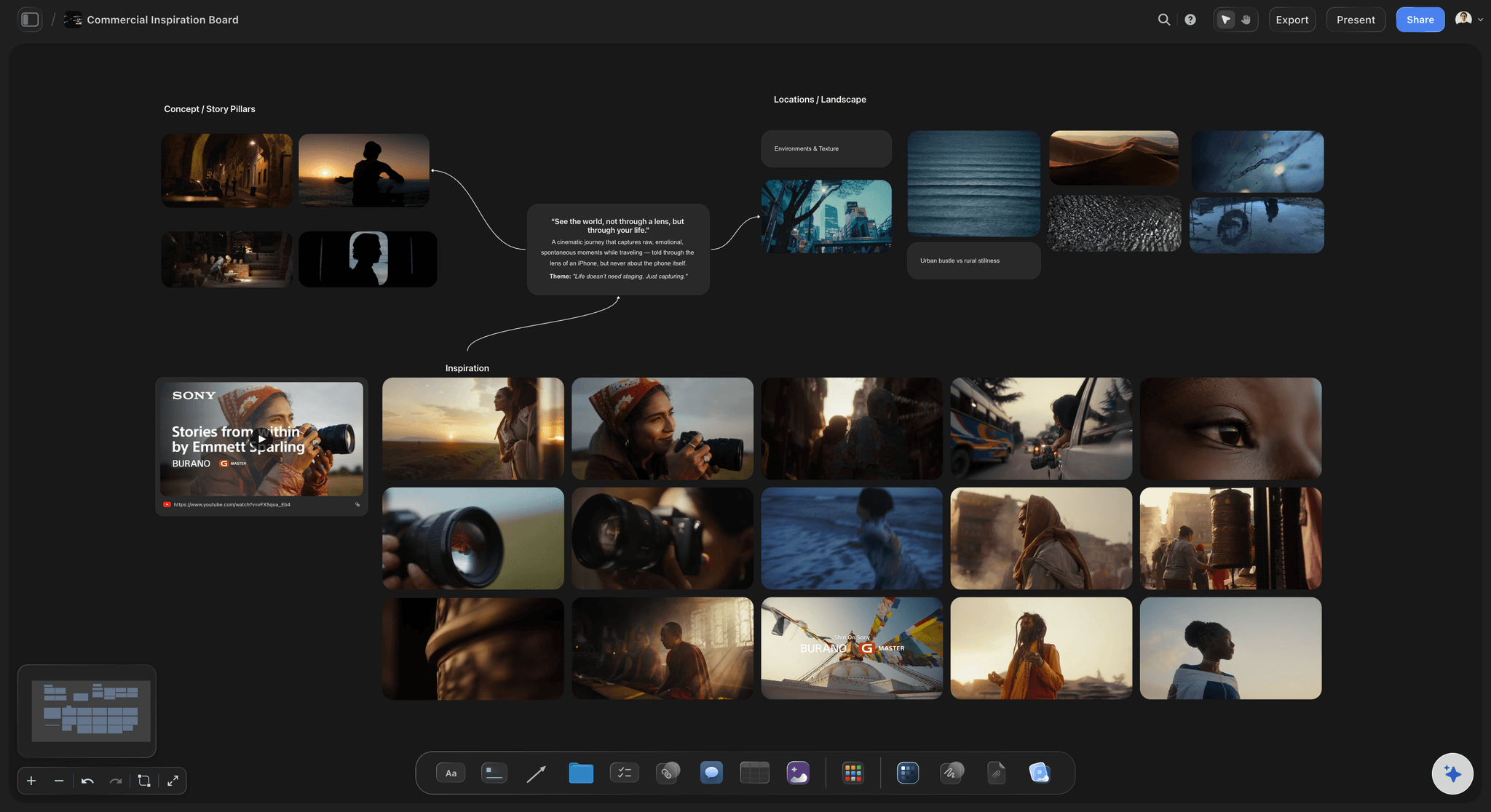
Film Moodboard
Collect film references, color palettes, lighting, locations, and tone in one place, then invite your crew.
How do you plan a fashion photoshoot?
To plan a fashion photoshoot, start from the looks, not the shots: list each look with its garments, its references, its hair and make-up and the images it must deliver, then time the day around the changes. Storyflow is an AI visual workspace that plans a fashion photoshoot on one infinite canvas: a wall per look, the wardrobe, the shot list and the run of the day.
Fashion differs from other shoots in one way: the clock is set by changes, not setups. A clean change of outfit on a model who is already in hair and make-up takes about 10 to 20 minutes. A change of hair or make-up takes 20 to 40. First hair and make-up takes 60 to 90. So plan a lookbook day on one background at 10 to 16 looks, and a day with location moves at 6 to 10. A clean e-commerce set with no hair changes can run to 30 or more, and a lit campaign often holds far fewer. Those are planning numbers, so log your own. In Storyflow, give each look its own wall on the board and put a time on it, and the day either adds up or it does not.
Order the day by what cannot move. Start with the look that needs the least make-up and build up, because adding is faster than removing. Group looks with the same shoes, hair and background. Put the hero look in the first half of the day, while the model and the crew are fresh, and never last. Check samples at the fitting 1 to 2 weeks out, because a sample in the wrong size is an easy way to lose a look. In Storyflow, keep the sample, its size, its source and its return date in a table on the look's wall.
An invented example: Sam Reyes shoots for Atelier Wren, a fictional womenswear label. 12 looks, one studio day, one model, 36 final images: 12 full-length, 12 three-quarter, 12 details. The stylist builds each look on its own Storyflow wall, Sam adds the setup and the client sees the whole plan on a view-only link. The AI turns the board into a pitch deck before the budget is even agreed.
The tools for fashion photoshoot planning, by job
Storyflow is our product, so it is listed first, for the planning; the rest are what a fashion shoot uses for the jobs it does not do.
| The job | The tool | Why it goes here |
|---|---|---|
| Plan the shoot look by look and pitch it to the client | Storyflow | Gives each look a wall with its references, garments and shots, then builds a pitch deck or lookbook from the same board. |
| Shoot tethered with the client watching | Capture One | Tethered capture with Live View and Next Capture Adjustments, which lets the stylist and client check fit and colour on a big screen as you shoot. |
| Send the call sheet and track confirmations | StudioBinder or SetHero | StudioBinder sends by email and text and shows who viewed and confirmed; SetHero shows who received, opened and confirmed each call sheet. |
| Edit and organise the selects | Lightroom Classic | Organises photos on your desktop and handles editing, with masking and removal tools for the work after the client has chosen. |
| Deliver the gallery and collect selections | Pixieset | A client gallery with favourites, comments on images, watermarks and downloads at the file size the client needs. |
| Sign model releases and usage agreements | Docusign | Prepares, sends and tracks agreements for signature, for the releases and usage terms that Storyflow does not handle. |
Ultra fast from brief to board
Plan a fashion shoot, look by look.
The look is the unit. The shots, the wardrobe and the time all hang off it.
01
Set the deliverables and usage
On a Storyflow board, write the final image count, formats, channels and usage term. A campaign used for a year on billboards costs differently from a season of e-commerce, so settle this before you price the day.
02
Build a moodboard, then the looks
Upload references to the Storyflow board, then give each look its own wall with garment photos, styling notes and references. Selecting images lets the AI read them and write notes beside them; your photos stay untouched.
03
Pitch the shoot to the client
Ask Storyflow's AI to build a pitch deck or lookbook from the board. Present the deck fullscreen or export it as a PDF. Decks do not export as PPTX, so plan for a PDF.
04
Write the shot list per look
Ask Storyflow's AI for a shot list from your looks: a table per look or a row of shot cards with a frame each. Add the framing, shape and pose, and mark which image each one delivers to the client.
05
Time the day and draft the call sheet
Put a time on each look in a Storyflow table and keep the rows in the order you will shoot. The AI drafts a call sheet PDF and leaves unknowns blank. Send it by email, or through StudioBinder or SetHero to track it.
What a fashion shoot looks like on the board.
Everything the stylist, the photographer and the client need, one look at a time.
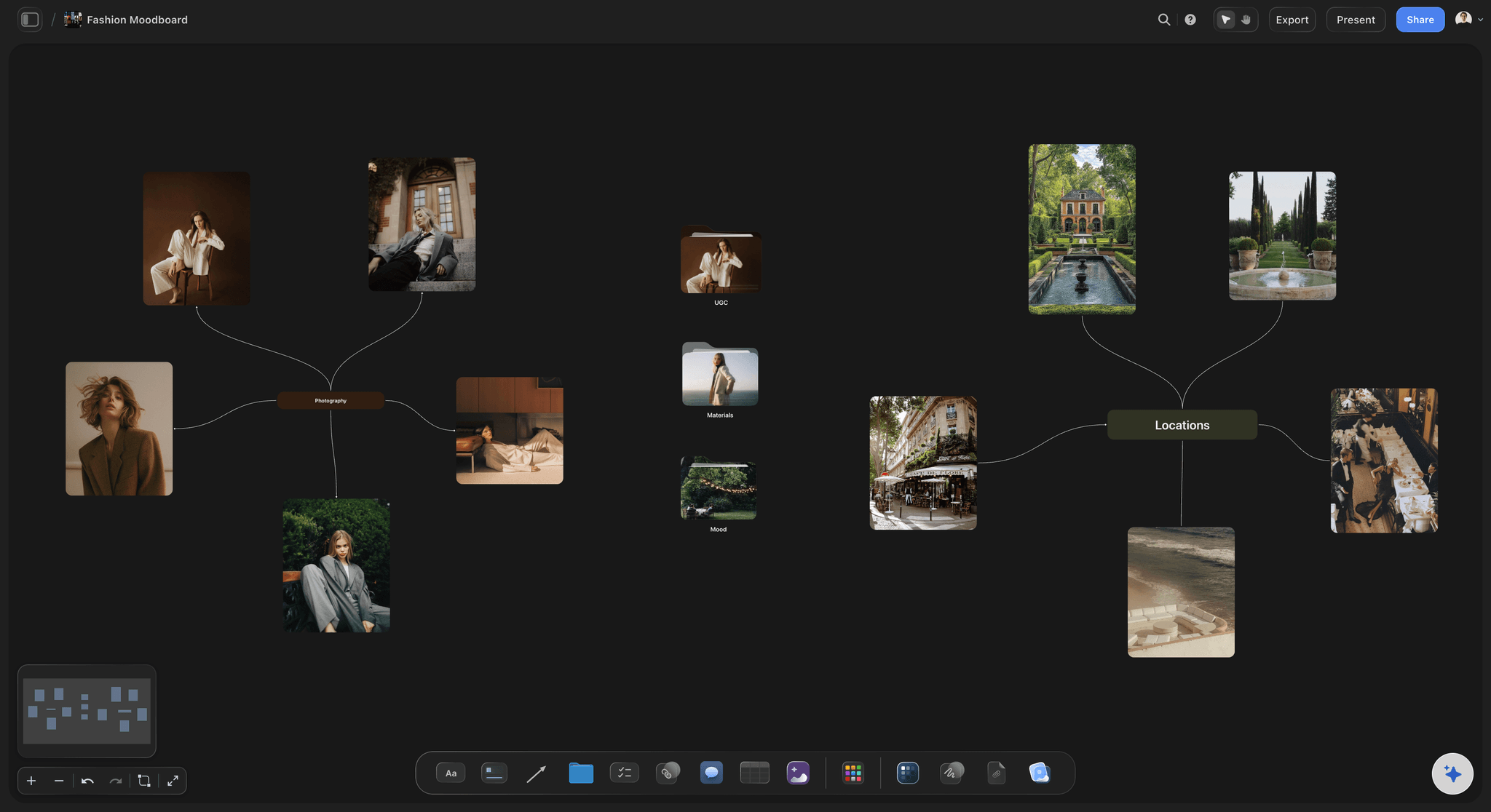
A wall for each look
Looks you can read in one glance
Each wall holds the garment photos, the references, the hair and make-up note, the shots and the time. The whole shoot reads left to right in shoot order, and moving a look is one drag.
See the fashion moodboard →
Samples, sizes and returns
A wardrobe table the stylist owns
Each garment gets a row: look, item, size, source, fitting result and return date. Rows are kept in date order by hand, since tables do not sort. Late samples cost money, so put the return date on a to-do with an owner.
See the wardrobe planner →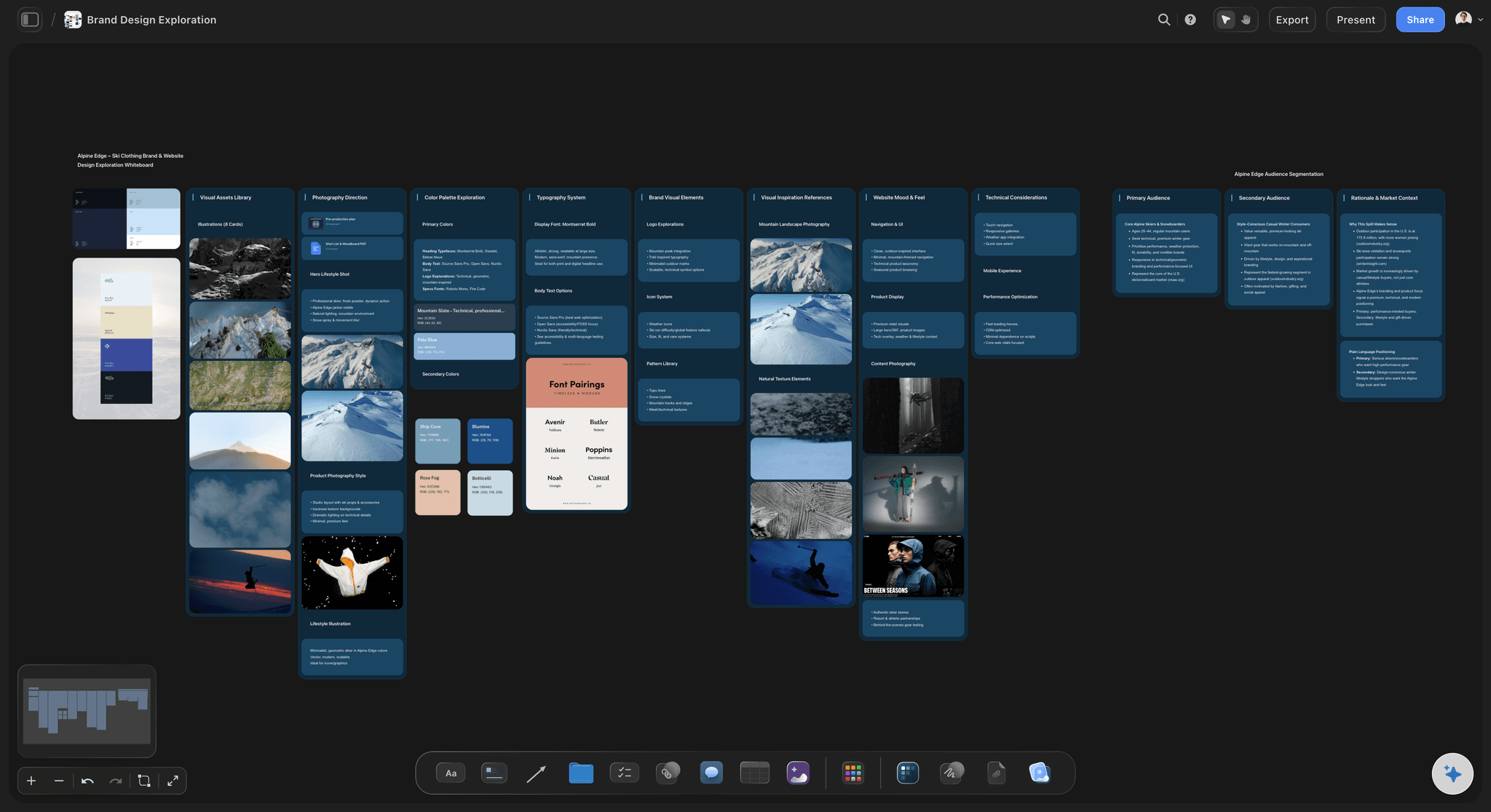
The board becomes the pitch
A deck without rebuilding the work
Ask the AI for a pitch deck from your board. In one recorded run, rounded up, a pitch built from a board took 3 minutes, against an estimated 4.5 hours by hand. Edit it before you send it.
See planning for photographers →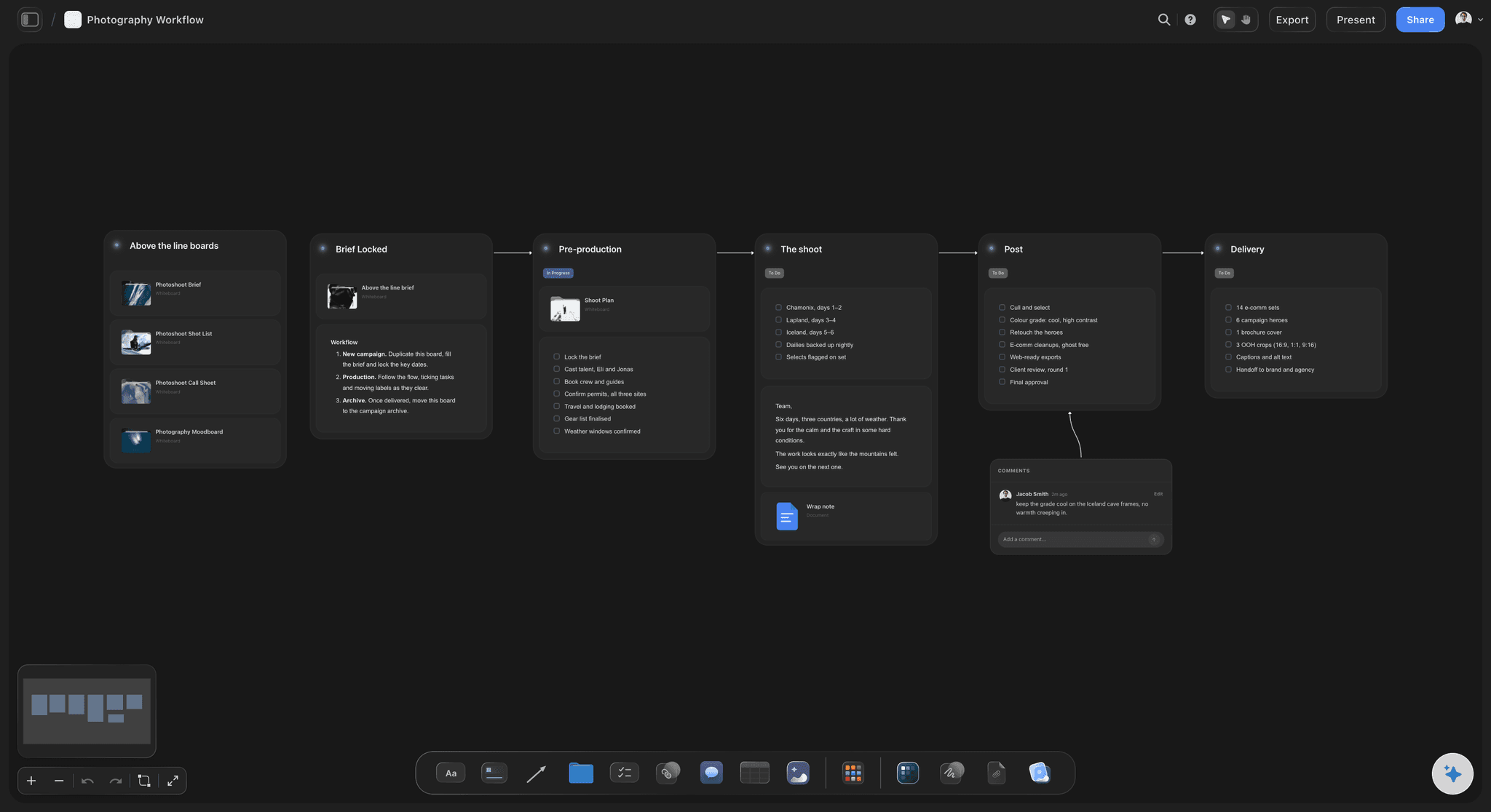
Call times that match the looks
A call sheet from the run of the day
The AI drafts a PDF with your run of the day, keeps a line for the nearest hospital and leaves anything it was not told visibly blank. It does not send it or track who confirmed. Fill the blanks, and send it your own way.
See the photoshoot call sheet →Plan a fashion shoot on one board. Invited stylists join free.
Storyflow is paid-only during early access: Plus is $7.99 a month billed annually ($9.99 monthly) and includes the AI inside Storyflow. Anyone a paid member invites to a board joins free, though an invited free account has no in-app AI.
A wall for each look on one infinite canvas
Upload garment photos and references to the board
No weekly limit on ChatGPT, Claude, Gemini or Grok on paid plans
View-only client links that open with no account
On Plus and up: AI that builds a pitch deck or lookbook from the board
Built for people with taste
Twelve looks in one studio day.
Sam Reyes and Atelier Wren are invented for this example. The numbers show how the day is built.
Look order and the clock
Sam's day for Atelier Wren
7.30am to 9am: hair, make-up and set: First hair and make-up takes 90 minutes while the assistant lights a clean grey background. Sam tests the light on a stand-in at 8.45 and checks the first garment's colour on screen with the client.
9am to 12.30pm: looks 1 to 6: About 35 minutes a look: 15 for the change and steam, 20 for the full-length and three-quarter frames. The hero coat is look 2, so it gets a fresh model and a fresh crew, not the end of the day.
12.30pm to 1.15pm: lunch and a hair change: The move from a sleek hair style to a loose one happens over lunch, so the 30 minute change costs the shoot nothing. Sam planned this on the board weeks before.
1.15pm to 5.15pm: looks 7 to 12: Same pace, with a 15 minute reset at 3pm and 15 minutes held as a buffer for the look that always runs long. Details are shot off the model during the changes, so they stay off the model's clock.
The sum: 12 looks at 35 minutes is 7 hours, against 7 hours 30 of shooting time, and the reset and buffer use the rest. There is almost no slack. Sam tells the client this on the board and agrees which two looks drop first if the day runs late.
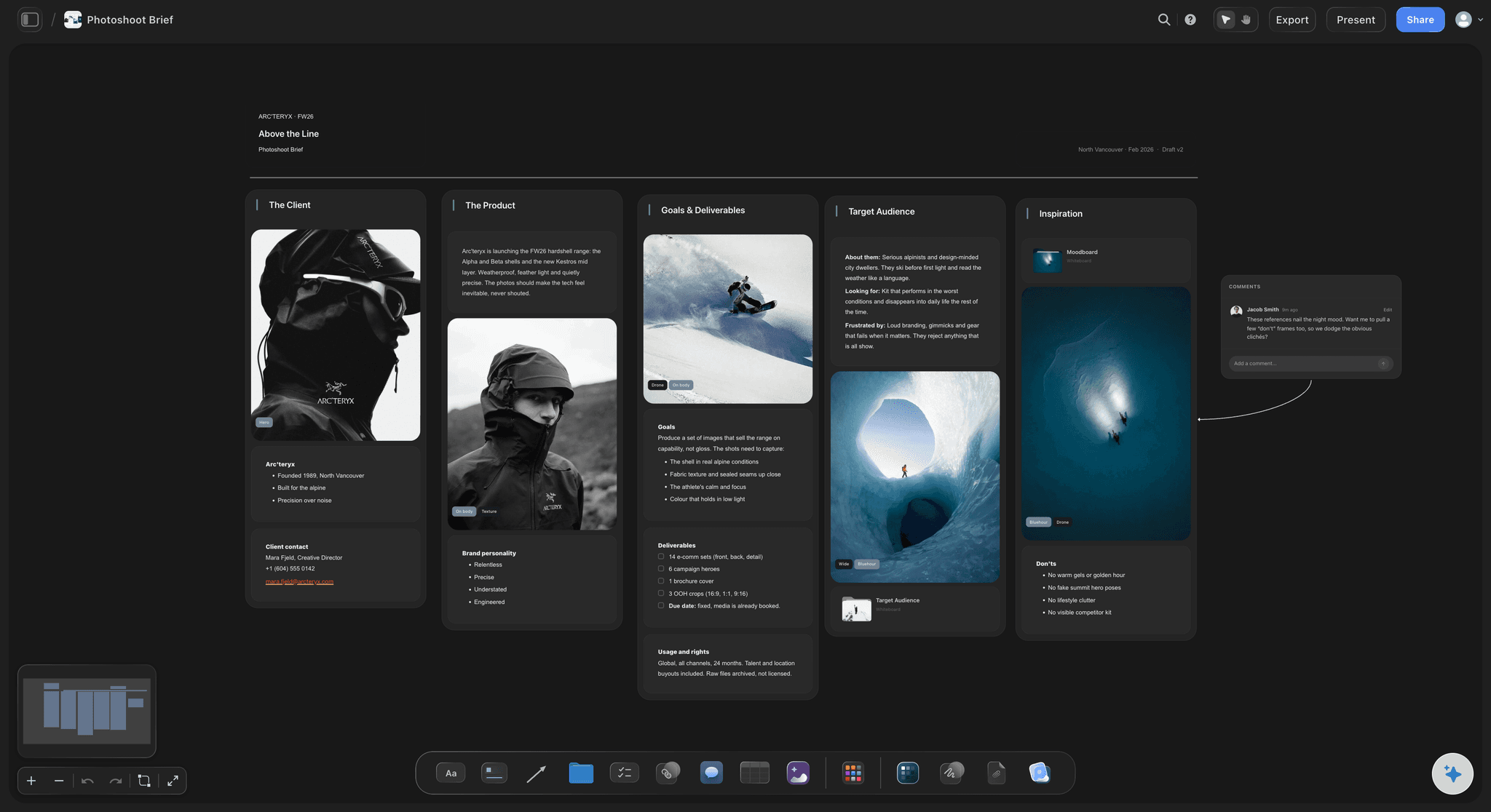
Weeks before the shoot
Preparing the looks and the people
4 weeks out: the pitch: Sam builds a moodboard and asks Storyflow's AI for a pitch deck. The client approves a warm studio look and rejects the location idea, which saves a full day's budget.
3 weeks out: casting and usage: Usage is agreed as one year online and in store. The model's agency quotes against that usage. The releases go through Docusign, and the board only records that they are signed.
2 weeks out: the sample pull: The stylist's wardrobe table in Storyflow lists 12 looks and 41 pieces with size, source and return date. Each look wall shows what is confirmed and what is still missing.
1 week out: the fitting: Fit photos are uploaded to each look's wall. Two garments are swapped and look 9 moves beside look 4 because they share shoes. The shot list changes in the same place the decision was made.
What usually goes wrong
Four failures on a fashion shoot
A missing or wrong-size sample: One late sample takes a look out and leaves a hole in the delivery. Put size and source in the table and confirm at the fitting, not on the day.
Too many looks for the changes: A client adds three looks and nobody moves the clock. Show the sum on the board: at 35 minutes a look, three extra looks is another 1 hour 45 minutes you do not have.
Usage agreed after the shoot: A model's fee is priced on usage. If the client later wants billboards, the price changes, and that is an awkward call. Keep the agreed usage at the top of the board.
A colour that is wrong on screen: Fabric colour is what the client is paying to show. Keep the real garment beside the screen on set, and do not use board images as a colour reference: upload them to plan, then check on the tether.
Where fashion planning stops
What Storyflow does not do for a fashion shoot
Does not send call sheets: Storyflow drafts the PDF but does not send it or track confirmations. With a big team of stylists, models and clients, use StudioBinder or SetHero to send and track.
No tether, retouching or gallery: Storyflow is a planning tool. Capture One shoots tethered, Lightroom Classic edits and Pixieset delivers galleries with favourites.
No budgets, contracts or invoices: Storyflow has no budgeting workflow, contracts, e-signature, invoices or payments. Use Docusign for releases, and your own accounts for the rest.
Explore templates for your project
Every template opens as a real, editable board on the infinite canvas. Pick the closest fit and make it your own.
Film Moodboard
Collect film references, color palettes, lighting, locations, and tone in one place, then invite your crew.
One app instead of five
Fashion photoshoot planning in Storyflow, StudioBinder or Pixieset.
StudioBinder is a production suite for call sheets and schedules. Pixieset delivers and proofs the finished gallery, and its Studio Manager adds contracts, invoices and questionnaires. Storyflow plans the looks and the shots before the day, so it needs a delivery tool beside it.
Storyflow
Recommended
Moodboard, looks and shot list on one canvas
Shot list table
Sends call sheets and shows who confirmed
Client gallery with favourites and file-size downloads
StudioBinder
Moodboard, looks and shot list on one canvas
Shot list table
Sends call sheets and shows who confirmed
Client gallery with favourites and file-size downloads
Pixieset
Moodboard, looks and shot list on one canvas
Shot list table
Sends call sheets and shows who confirmed
Client gallery with favourites and file-size downloads
What creators are saying
Join early creators getting structured workspaces and AI that remembers their projects
“Storyflow has sped up my workflow by at least 3x, which means more flow state and more projects I can actually ship. It truly changed the way me and my team create.”

Reilin Joey
Director & YouTuber
“One prompt gets me a structured board. But the tactics are my favorite. I run my YouTube scripts through them and my intros and retention got better. It's amazing.”

Justkay
YouTuber & Freelance Filmmaker
“I used to juggle five apps to plan a project. Now I describe what I am making and get boards, lists, and a schedule. All in one place.”

George
@fernwehchronicles
Fashion photoshoot planning, answered.
Looks, hours, samples, pitching and what to use for the rest.
Plan it in Storyflow, one look at a time. Give each look a wall with its garments, references, hair and make-up notes and shots. Then time the day around the changes, group looks with the same hair and background, and put the hero look in the first half. Confirm samples at a fitting 1 to 2 weeks out, and agree usage before you price the day.
Storyflow is built for exactly this job: each look gets a wall with its references, garments and shots on one canvas, the AI builds a pitch deck or lookbook from that board, and clients open a view-only link with no account. StudioBinder still does what Storyflow does not: it sends call sheets by email and text and shows who viewed and confirmed them.
Storyflow is built for this job: build the moodboard and looks on a board, then ask the AI for a pitch deck in the same place. You present it fullscreen or send the PDF. In one recorded run, rounded up, a pitch from a board took 3 minutes against an estimated 4.5 hours by hand. Decks have no PPTX export or speaker notes.
As a planning default, a lookbook day on one background holds 10 to 16 looks and a day with location moves holds 6 to 10; a clean e-commerce set can run far higher. Work it out from changes: 10 to 20 minutes for an outfit, 20 to 40 for a hair or make-up change, 60 to 90 for the first look. Put a time on each look's wall in Storyflow, and the day adds up or does not.
The deliverables and usage, the moodboard, a look list, the wardrobe with sizes and return dates, casting, hair and make-up notes, a shot list per look, the run of the day and the call sheet. Storyflow holds them on one board, with a wall per look, so your stylist, producer and client read the same facts and nothing has to be retyped.
Start with the lightest make-up and build up, group looks with the same hair, shoes and background, and put the hero look in the first half of the day. Save hair changes for lunch if you can. On a Storyflow board, drag each look's wall into shooting order so the run of the day is the order the board reads from left to right.
Keep one row per garment in a Storyflow table: look, item, size, source, fitting result, return date. Rows stay in order by hand because a table cannot be sorted. Give the return date a to-do with an owner. Upload fitting photos to the look's wall, so a swap made at the fitting changes the plan in the place everyone reads.
A commercial fashion plan starts from what the brand must sell and where each image runs, so deliverables and usage come first. An editorial starts from the story and has more room to change on the day. In Storyflow both use a wall per look, but the commercial plan also ties each shot to a deliverable, so a missing image shows before the day.
Yes, when you select them. Upload your images straight to the board and select up to 24, and Storyflow's AI reads what is in them. It can write notes, a moodboard summary or a table of shots beside them, and your photos stay as they are; ask for shot cards and each selected picture moves into its card as the frame. It only sees an image's content when you select it.
Yes. A view-only Storyflow link opens in a browser with no account. To comment or draw, the client signs in. Keep the working board for your team, and share a board made for the client, with the looks and the dates but without the agency fee notes. Anyone a paid member invites to a board joins free.
Storyflow is paid-only during early access. The AI that builds pitch decks starts on Plus at $7.99 a month billed annually ($9.99 monthly). Pro at $14 ($19 monthly) adds AI image generation and memory, and Max at $39 ($49 monthly) adds a Team Workspace. Anyone a paid member invites joins free, and client links need no account.
No. Storyflow's AI drafts a call sheet PDF from your board, keeps a line for the nearest hospital and leaves anything it was not told visibly blank, but it does not send it or track confirmations. StudioBinder sends by email and text and shows who viewed and confirmed. SetHero shows who received, opened and confirmed. On a small shoot, emailing the PDF yourself is often enough.
On a fashion shoot, tether whenever a stylist or client needs to see fit and colour on a big screen. Capture One is made for this, with Live View and Next Capture Adjustments. Storyflow does not tether: it is where the shot list lives, and someone with edit access ticks each look off on the board while the tether runs beside it.
Storyflow does not send call sheets, track confirmations, shoot tethered, retouch, deliver galleries, sign releases or send invoices. It has no budgeting workflow or calendar view, and it is not a colour-managed screen for checking fabric. Use StudioBinder, Capture One, Lightroom Classic, Pixieset and Docusign for those.
More from Storyflow
Fashion moodboard for a collection
Editorial photoshoot, planned from the story
Photoshoot planning from moodboard to shot list
Wardrobe planner
Photoshoot call sheet
Storyflow for photographers
Brand photoshoot planning
How to plan a photoshoot
Best photoshoot planning tools
How to turn a moodboard into a shot list
Plan the next shoot one look at a time.
Put the looks and your references on one board. On Plus, the AI turns the board into your pitch.