What is a Call Sheet? The Complete Guide (2026)
What a call sheet is, every field it must contain, and how to build one that gets every cast and crew member to the right place at the right time on shoot day.

Category
Filmmaking
Author

Justkay
Documentary Filmmaker & Founder at Storyflow
Topics
2026-07-01
•
Updated July 1, 2026
•
11 min read
•
Filmmaking- what is a call sheet
- call sheet film
- call sheet template
- film call sheet
- call sheet fields
- 1st ad call sheet
- production call sheet
What is a call sheet in film production?
A call sheet is the one-page document sent to every cast and crew member the night before a shoot day. It tells each person where to be, when to arrive, what is being shot, and everything they need for the day: the location and parking, the scenes and shots in order, individual call and pickup times, the weather with sunrise and sunset, the nearest hospital, and the key contacts to reach if a plan breaks. It is issued by the first assistant director, approved by the producer, and distributed as a PDF the evening before. A call sheet is the single source of truth for shoot day: the one page that gets everyone to the right place at the right time.
Build the shoot day where the plan already lives.
Most call sheets are retyped away from the schedule and the shot list, the night before, and every copy is a chance for a wrong call time. Storyflow puts the sheet on the same canvas as the shot list and schedule, with an AI that reads the whole board, so the day is a view of the plan you already made.

1) Quick Answer: What is a Call Sheet
A call sheet is the one-page document sent to every cast and crew member the night before a shoot day. It tells each person where to be, when to be there, what is being shot, and everything they need to survive the day: the location and parking, the scenes and shots in order, individual call and pickup times, the weather with sunrise and sunset, the nearest hospital, and the key contacts to reach if something goes wrong. A call sheet is the one page that decides whether the shoot day works.
Think of it as the daily operating instructions for a production. A script tells you the story. A shot list tells you the coverage. A schedule tells you the plan across the whole shoot. The call sheet takes the one day in front of you and turns it into a single sheet that fits in a pocket, so that forty people who have never met arrive at the same field at the same hour ready to do the same work. It is issued by the 1st AD or production coordinator, approved by the producer, and sent the evening before, usually as a PDF.
I have run documentary shoots where the call sheet was the difference between a clean day and a lost one. On the days it was tight, everyone knew the parking, the first setup, and who to text about the rain. On the sloppy days, the crew burned the first hour of daylight figuring out where craft services parked. This guide is the honest breakdown of what goes on the page and why each line earns its place, drawing on the shot list and the wider field of pre-production tools that feed it.
2) The Anatomy of a Call Sheet
A complete call sheet is dense on purpose: every field answers a question someone will ask at 6am. The table below is the full anatomy, the fields that belong on a professional sheet and what each is for.
If a line on this table is missing, someone on set spends part of the day recovering the information instead of doing their job. That recovery time is what the sheet buys back.
3) The Single Source of Truth for Shoot Day
Here is the framework the rest of this guide runs on. A call sheet is the single source of truth for shoot day. Every other document is a feeder: the script, the shot list, the schedule, the scout, the forecast, the cast availability, and the crew list all flow into one page, and that page becomes the only version of the day that matters once you are on set.
The reason it matters is that a shoot day has too many moving parts for any one person to hold. The first AD runs the floor, the DP chases light, the location manager watches the neighbors, the producer watches the budget. If each works from a different version of the plan, the day forks and does not reconcile until something breaks.
This is why it is the last document produced in pre-production and the first consulted on the day. It is downstream of everything, so it inherits every decision, and upstream of the whole shoot day, so every error in it multiplies: a wrong call time on a shot list costs one person a mistake, but a wrong call time on the call sheet costs forty people an hour. A call sheet is the one page that decides whether the shoot day works, precisely because it is the one place the entire day is written down once and read by everyone.
4) How the Call Sheet Gets Built
The call sheet is assembled from the artifacts pre-production already produced, and its quality is capped by the quality of those inputs.
Start from the schedule. The shooting schedule (often a stripboard) decides which scenes are shot on which day, and the call sheet takes one day out of it and expands it. From those scenes, list the specific shots in shooting order, not script order: shooting order groups by location, light, and cast, so you are not moving the camera or waking an actor more than you must.
Layer in cast and crew. For each scene, identify which performers work and build back from their on-set time through wardrobe, hair and makeup, and pickup. Then give each department its head start, so grip and electric pre-light, art dresses the set, and sound rigs, all ready when the general call hits. This is why "unit calls" and "general call" are separate lines.
Add the day's reality and distribute. Layer in weather, sunrise, sunset, the nearest hospital, parking, basecamp, meal times, and safety notes: the fields that turn a schedule into a survivable day. The producer or UPM then approves the sheet, and it goes out the evening before, as a PDF, to everyone on it.
The build is a convergence: six or seven documents point at one page, which is precisely why the sheet is the single source of truth for the day.
5) Call Times: General, Unit, and Individual
The most misread part of a call sheet is the call time, because there is more than one, and getting it right is the difference between a crew that is ready and a crew that is merely present.
General call. When the main body of the crew is due on set: the headline time, the answer to "what time is call?" for most people. But it is not the earliest time on the sheet, and treating it as such is how departments end up scrambling.
Unit and department calls. Some departments need to be in before general call so the set is ready when it hits: grip and electric pre-light, art finishes dressing, camera builds. These earlier times are listed per department so each team knows its own start.
Individual and cast calls. Talent works backward from the shot. If a performer is needed on set at 9am, hair and makeup takes an hour, wardrobe thirty minutes, and the drive is forty-five minutes, their pickup is not 9am. It is 6:45am. Each performer gets their own chain, and the pickup is a promise: a driver will be at that address at that time, and if it slips the whole downstream chain slips.
The discipline is backward math: you start from the shot and subtract, on-set time minus wardrobe minus hair and makeup minus travel equals pickup. A sheet that does this for every person gets everyone ready at the same moment; one that lists a single blanket call time for cast gets everyone present at different moments, which is not the same thing.
6) Build a Call Sheet in Storyflow

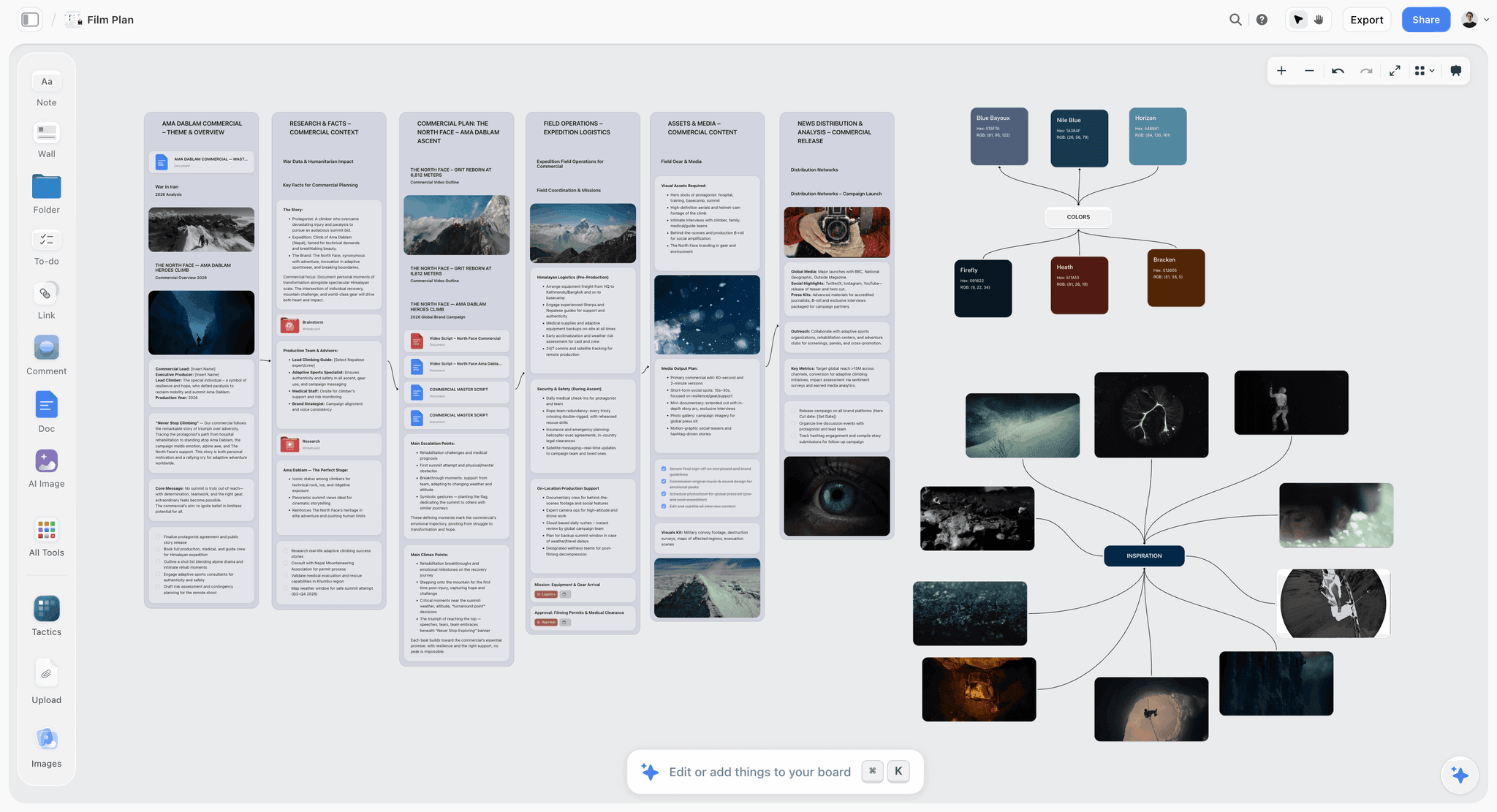
Here is the case for building the call sheet where the rest of the plan already lives. In most workflows the sheet is assembled apart from the documents that feed it: the schedule in one app, the shot list in another, the sheet in a third. Every field is copied across by hand the night before, and every copy is a chance to introduce the wrong call time.
So assemble it on the canvas instead, next to the shot list and the schedule. Drop the day's scenes as cards pulled from the shot list already on the board, lay the crew list beside them, and build each performer's call-time chain as a cluster you can read at a glance. The call sheet is then not a fresh document you fill from memory, but a view of the plan you already made, arranged for the morning.
Full-board AI context. Storyflow's AI reads your entire active canvas board by default, plus up to 1 Tactic and up to 3 Documents you @-mention in the chat. With the shot list, schedule, and crew list on the board, you can ask it to draft the day's running order from the scenes, or to check that every performer in the day's scenes has a call time, and it answers with the whole board as context. The judgment stays yours; the assembly and cross-checking are the AI's.
200+ Story Blueprints. On the Plus, Pro, and Max tiers, Storyflow's Story Blueprints library gives you 200+ ready-made boards for film and creative work, so the pre-production side of the canvas (research, treatment, shot list, mood board) starts with structure in place. The call sheet then draws from a plan built to hold together, not stitched from scattered files.
Unlimited collaboration on Free. Storyflow's Free plan, launching before the end of 2026, will include unlimited collaboration on shared boards, so the 1st AD, the producer, and the coordinator can be on the same canvas as the sheet comes together, all seeing the same version of the day while it is built.
Now the honest limits, because Storyflow is not the right tool for every part of this job. Storyflow is not a dedicated call-sheet generator. It does not auto-build a formatted sheet from a stripboard the way a purpose-built film-scheduling product does, so if your priority is a stripboard that generates a standard-format call sheet at the press of a button, StudioBinder wins that job and is the tool to reach for. Storyflow is also not a scheduling suite: it does not run a formal stripboard, day-out-of-days, or the automated cast-scheduling math dedicated software handles. And it is cloud-only, with no offline files, so a shoot in a dead zone cannot open the board. For a purist end-to-end scheduling-to-call-sheet pipeline, pair Storyflow's canvas for planning with a dedicated generator for the final sheet, or use the generator alone.
Where Storyflow earns its place is the planning canvas, the one surface where the shot list, the schedule, the research, and the day come together and stay together. A call sheet is the one page that decides whether the shoot day works, and it is a better page built beside the work than away from it.
7) The Back Page: What Most Crews Forget
The front of a call sheet gets the attention, but the back is where the day is saved: the fields that do nothing on a good day and everything on a bad one.
Nearest hospital. Print the name, address, and distance to the closest emergency room on every sheet, because it changes when the location changes. When someone is hurt, nobody should be searching a map; the information is already in their hand. This is a legal and human non-negotiable, and the field most often left blank on amateur productions.
Weather, sunrise, and sunset. For any exterior work, first light and last light are the real boundaries of the day, and a schedule that ignores sunset loses its final setup to the dark. Rain, heat, and wind also change what is shootable and safe, and a crew that reads the weather on the sheet arrives prepared.
Safety and special notes. Stunts, weapons, minors, animals, working at height, water, fire: anything that changes how the day is run belongs here, flagged clearly. A safety note makes sure the people responsible for a hazard know it is coming before they stand next to it.
Key contacts. When a plan breaks, the question is always the same: who do I call? The sheet answers it, listing the 1st AD, UPM, location manager, and producer with phone numbers, so the fix starts with a call and not a hunt.
Meal times. Lunch is not just a break. On union productions the meal clock carries penalties, and a late meal is real money off the budget, so printing meal times keeps the day honest about a cost that is easy to lose when shooting goes well.
The back page is the insurance policy: most days you do not file a claim, but the days you do, it is the only thing that matters.
8) Call Sheet Tools and When to Use Them
There is no single right tool for the whole job, because the call sheet sits between planning and formal production management.
Dedicated call-sheet and scheduling software. StudioBinder is the reference: it builds a stripboard, runs the day-out-of-days, and generates a standard-format call sheet that auto-fills from the schedule and sends to the crew with delivery tracking. If your priority is the formal, auto-generated sheet produced from a stripboard, this category wins, and StudioBinder wins it (Movie Magic Scheduling sits in the same lane).
Planning canvases. Storyflow and other visual workspaces are where the plan is built and where the feeding artifacts already live. The strength is assembly next to the inputs plus an AI that reads the whole board. The limit is that these are not dedicated generators; they do not format a standard sheet from a stripboard at a button press.
Spreadsheets and templates. A spreadsheet or a downloaded template is how a large share of small productions work: free, flexible, and for a short shoot entirely sufficient. The cost is manual, since every field is typed by hand and nothing updates when the plan changes.
The honest recommendation. For a formal production running a stripboard, use dedicated software for the schedule and the generated sheet. For the planning that feeds it, and for smaller or documentary shoots assembled by hand, a canvas or a good template does the job. Match the tool to the stage, not to a preference.
9) Common Call Sheet Mistakes
The failures repeat across productions, and knowing them is most of avoiding them.
One blanket call time for cast. A single time for all talent, instead of individual chains built backward from the shot, lands actors late. Every performer needs their own pickup, hair and makeup, wardrobe, and on-set times.
Wrong date or missing hospital. A single wrong date sends someone a day off; a blank hospital field is dangerous in a crisis. Both are non-negotiable.
No parking or basecamp. The most-asked question of the day is where to park, and a sheet that does not answer it hands the first hour to logistics instead of shooting.
Distributing too late. A sheet that goes out at midnight is one people planned their evening without. Send it the evening before, early enough to plan the morning around.
Copy errors from retyping. When the sheet is built by hand-copying fields from the schedule and shot list, every copy is a chance for a wrong time to slip in. Building it next to its inputs, on the same canvas, cuts that error class.
Every one of these traces to the same root: the call sheet is downstream of everything, so every upstream gap lands on the page and multiplies. A call sheet is the single source of truth for shoot day, which is exactly why an error in it is so expensive.
11) The Bottom Line
A call sheet is not paperwork, and it is not optional. It is the point where the whole plan converges onto a single page and becomes the only version of the day that matters: the one thing forty strangers read to arrive at the same field at the same hour ready to do the same work.
Build it with that weight in mind. List individual call times, print the parking and the hospital and the sunset, and send it the evening before, early enough for people to plan around. And build it next to the artifacts that feed it, so the day is a view of the plan you already made instead of a fresh document you fill from memory. A call sheet is the one page that decides whether the shoot day works.
If your shoot day is only as good as the plan behind it, build the plan and the sheet on one canvas in Storyflow and keep the shot list, the schedule, and the day in the same place.
10) FAQ: Call Sheets
What is a call sheet in film production?
A call sheet is the one-page document sent to cast and crew the night before a shoot day, issued by the 1st AD and approved by the producer. It tells each person where to be, when to arrive, what is being shot, and everything they need for the day: location, parking, scenes in order, individual call times, weather, sunrise and sunset, the nearest hospital, and key contacts.
Who creates the call sheet?
The first assistant director (1st AD) or the production coordinator creates the call sheet, and the producer or unit production manager (UPM) approves it before it goes out. The 1st AD builds it from the shooting schedule and the shot list, sets the individual call times, and distributes it to the crew the evening before, almost always as a PDF.
When is a call sheet sent out?
A call sheet is sent the evening before the shoot day, early enough that everyone can plan their morning around it. The standard is to distribute the next day's sheet during or just after the current day wraps, so the crew always knows tomorrow's plan before they leave today. Sending it near midnight means people have already made decisions around a guess.
What is the difference between a call sheet and a shooting schedule?
A shooting schedule covers the whole production: which scenes are shot on which days, usually as a stripboard. A call sheet covers one day, expanding a single day of the schedule into a running order with individual call times, logistics, and safety information. The schedule is the plan across the shoot; the call sheet is the operating instructions for the day in front of you.
Do documentary shoots need call sheets?
Yes, though they are often lighter than a scripted feature's. Even a small documentary crew benefits from a single sheet with the location, parking, call times, contacts, and the nearest hospital. The scenes may be less fixed, but the logistics, safety, and coordination are the same.
Why is the nearest hospital on a call sheet?
So that in a medical emergency nobody has to search for it. The name, address, and distance to the closest emergency room are printed on every sheet because they change when the shoot location changes. It is a safety and legal non-negotiable, and the field most often left blank on amateur productions.
What is the best software for call sheets?
For a formal, auto-generated call sheet built from a stripboard, StudioBinder is the reference tool: it runs the schedule and generates a standard-format sheet with delivery tracking. For the planning that feeds the sheet (the shot list, schedule, research, and treatment on one canvas), a visual workspace like Storyflow is stronger, and its AI reads the whole board. Many productions use both.
How far in advance is the call sheet finalized?
It is finalized and distributed the evening before the shoot day, but it draws on decisions made much earlier: the shooting schedule, the shot list, cast availability, and location scouts. Weather and sunrise or sunset times are added close to distribution so they are accurate for the actual day.
Table of Contents
- Quick Answer: What is a Call Sheet
- The Anatomy of a Call Sheet
- The Single Source of Truth for Shoot Day
- How the Call Sheet Gets Built
- Call Times: General, Unit, and Individual
- Build a Call Sheet in Storyflow
- The Back Page: What Most Crews Forget
- Call Sheet Tools and When to Use Them
- Common Call Sheet Mistakes
- FAQ: Call Sheets
- The Bottom Line
- Author
- Related Reading
Templates to check out for this topic


Templates you can use in Storyflow
Every Storyflow board starts from real structure and an AI that reads the whole canvas. Open one of these templates and make it yours.


See Storyflow in Action
A visual AI workspace where every feature lives inside one canvas. No tab-switching, no context lost.
Build your entire board from a single message
Type what you need in the AI chat at the bottom of your canvas. The AI adds cards, headings, and structure directly onto your board.
Use expert frameworks as AI context
Type @ in the AI chat and choose any Tactic. The AI tailors every response to that framework instead of giving generic advice.
Turn your board into a mind map in seconds
Ask the AI to restructure your canvas as a mindmap. It connects your ideas into a visual hierarchy so you can see how everything relates.
Why Storyflow Exists
Storyflow actually began as a personal tool while working on creative and research projects.
We kept running into the same problem: ideas were scattered everywhere: notes, documents, and whiteboards.
Nothing helped us see how everything connected.
So we started building a workspace designed around how ideas actually grow.
→ Read how Storyflow was createdJustkay
Documentary Filmmaker & Founder at Storyflow
Published: 2026-07-01
Extremely simple, seriously capable


See how easy it is to get started
Watch a real project come together, from a blank board to a finished plan, clicked through step by step.
Start creating with AI and become more productive
Transform your creative workflow with AI-powered tools. Generate ideas, create content, and boost your productivity in minutes instead of hours.