How to Plan a Brand Photoshoot with AI (2026 Workflow)
A 2026 workflow to plan a brand photoshoot with AI: brief, mood board, shot list, and call sheet on one canvas, with an AI that reads the whole plan.

Category
Branding
Author

Justkay
Documentary Filmmaker & Founder at Storyflow
Topics
2026-07-01
•
Updated July 1, 2026
•
13 min read
•
Branding- how to plan a brand photoshoot
- brand photoshoot with ai
- ai shot list
- photoshoot planning
- creative brief mood board shot list
- call sheet
How do you plan a brand photoshoot with AI in 2026?
Put the four artifacts that decide the day on one canvas: the creative brief, the mood board, the shot list, and the call sheet. Then use an AI that can read all four at once, which is what Storyflow is built for. You write the brief and gather references into a mood board; the AI drafts a shot list from the brief and the board; you edit that list by priority and build the call sheet around it. The output is not a folder of loose files. It is one connected plan the whole crew reads the same way on the day. The AI drafts the plan; you decide what gets shot.
From brief to shot, on one canvas.
The brief, mood board, shot list, and call sheet live in one place, and the AI drafts the shot list from the brief you already wrote, so the shoot day runs on a real plan instead of four disconnected files.

1) Quick Answer: Planning a Brand Photoshoot with AI
To plan a brand photoshoot with AI, put the four artifacts that decide the day on one canvas: the creative brief, the mood board, the shot list, and the call sheet. Then use an AI that can read all four at once, which is what Storyflow is built for. You write the brief and gather references into a mood board; the AI drafts a shot list from both, and you shape the call sheet around it. The output is not a folder of loose documents. It is a single plan the whole crew reads the same way on the day.
The reason to work this way is simple. A brand shoot is not a day with a camera. It is a plan that happens to get photographed. Most shoots that go sideways did not fail on set. They failed in planning, because the brief lived in a doc, the references in a shared drive, and the shot list in a spreadsheet, and nobody held all three in their head at once. When the plan is fragmented, the AI can only see fragments, and so can the crew.
I have run pre-production on documentary and brand work for years, and the pattern always holds: the shoots that ran on time were the ones where the plan was one connected thing, not four disconnected files. This guide is the honest version of that workflow, including the parts an AI cannot do.
For the tool landscape, see The Best Photoshoot Planning Tools in 2026.
2) The Four Artifacts of a Brand Shoot
Get these four right and connected, and the day mostly runs itself. Get them scattered, and you spend the shoot reconciling versions instead of making pictures.
The brief is the intent, and without it every later decision is a guess. The mood board is the visual contract: not a wall of pretty images, but references tagged with why each is there (this for the lighting, this for the color, this for the pose). The shot list is the plan for the day, frame by frame, in priority order so the must-have frames get shot before the light goes. The call sheet is the logistics, the least glamorous artifact and the one that most often decides whether the shoot finishes.
These four are not four separate documents. A brand shoot is not a day with a camera. It is a plan that happens to get photographed, and the plan is these four artifacts working as one connected thing. The AI is only as useful as the plan is connected.
3) From Brief to Shot: The Framework
The framework for planning a brand shoot with AI is called From Brief to Shot, and it is one sentence: plan the whole shoot on one canvas so an AI can read all four artifacts and the day runs on a real plan instead of four disconnected files.
Most teams work the other way. The brief is a Google Doc, the mood board is a Pinterest board or a folder of screenshots, the shot list is a spreadsheet, and the call sheet is a PDF someone builds the night before. Each artifact is fine on its own. The problem is the gaps between them: the shot list does not know what the brief promised, the call sheet does not know what the shot list needs, and no AI can help, because there is nothing to read except one fragment at a time.
From Brief to Shot closes the gaps by putting the four artifacts in one place. The brief sits beside the mood board, the shot list is drawn from both, and the call sheet is built around the shot list. When they share a surface, three things become possible that are impossible when the files are scattered.
- The AI can read the whole plan at once, so a shot list drafted from the brief actually reflects the brief.
- A change in one artifact is visible next to the others, so moving a hero shot up the priority list is a decision you make while looking at the brief that demanded it.
- The crew reads one plan, not four attachments, so the photographer, the producer, and the brand lead are looking at the same thing on the day.
The framework is not about doing more work. It is about doing the same work in a connected place so the connections do the heavy lifting. From brief to shot is one continuous move, not four separate files handed between people. Every handoff in the fragmented workflow (brief to references, references to shot list, shot list to call sheet) is a place where intent leaks: something the brand cared about never makes it into the shot list. Put the artifacts on one canvas and there is nothing to hand off, so nothing leaks.
4) Step-by-Step: Plan the Shoot on One Canvas
Here is the workflow, start to finish. It assumes a single brand shoot, roughly a week of lead time, and a small crew. Scale the timeboxes up for a bigger production.
Step 1: Write the brief as the first region of the canvas. Start with the intent, not the images. Name the audience, the campaign, the deliverables, and the brand guidelines (colors, tone, do-not-do list). For each deliverable, write the job the image has to do in one line: "homepage hero, product in use, room for headline on the left." This is the highest-leverage 45 minutes of the shoot, because the brief is what every later artifact and the AI reads first.
Step 2: Build the mood board beside the brief. Pull references onto the canvas next to the brief so the two are in view together, and add a short note on why each is there: lighting, color, pose, crop. Do not aim for a hundred images. Aim for fifteen that each do a specific job. The AI can help find gaps (see Step 4), but the taste is yours: a mood board is a decision, not a collection. For the deeper method, How to Create a Mood Board with AI covers the references-to-decisions workflow in full.
Step 3: Let the AI draft the shot list from the brief and the board. With both on the same canvas, ask the AI to draft a shot list. Because it can read both, the draft reflects the deliverables in the brief and the look in the references, not a generic template. You get a first pass with setups, wardrobe notes, and a rough order. It will not be right, but it is a strong start: you are editing a draft that already knows your brief, not writing from a blank spreadsheet.
Step 4: Edit the shot list against reality. This is the human step, and the important one. Reorder by priority so the must-have frames come first, before the light changes or the talent tires. Add the shots the AI missed, cut the ones that repeat, and mark what is non-negotiable. The AI drafted the list; you make it real, because you know the location, the light, and the client.
Step 5: Build the call sheet around the finished shot list. Now that the shots and their order exist, the logistics fall out of them. Group shots by setup and location so you are not relighting the same corner three times, assign time blocks, and add call times, crew, talent, and contacts. The call sheet is not a separate creative act. It is the shot list translated into a schedule.
Step 6: Share one canvas, not four files. On the day, everyone opens the same board. The photographer checks off the shot list, the producer runs the call sheet, the brand lead sees the brief the frames serve. Nobody hunts for the latest PDF, because there is one plan and it is live. In total: roughly three and a half hours of planning for a shoot day that runs on rails instead of adrenaline.
5) Where an AI Actually Helps (and Where It Does Not)
Be precise about what the AI does. The AI helps most in four places. It drafts the shot list from the brief and the mood board, turning intent into a countable first pass in seconds. It finds gaps: a deliverable with no shot assigned, a look in the references with no frame that captures it. It tightens the writing (the brief, the shot descriptions, the call sheet notes) so the plan reads cleanly for the crew. And it answers questions across the whole plan: "which shots serve the homepage hero?" or "what is on the board with no wardrobe note yet?"
The judgment stays with you. The AI drafts the plan. You decide what gets shot. The AI does not know that the client will veto the third look, that the location loses its light at four, or that the model is only booked until noon. It has no taste. It can propose an order; it cannot feel that the hero frame has to come first because everything else is expendable. Every high-value decision (priority, taste, client politics, the read of the room) is human, and the workflow keeps it that way. Think of a fast, tireless assistant who has read your entire plan and forgets nothing, sitting beside a creative director who makes the calls. The plan is faster to build. It is not built by the machine.
6) Plan Your Shoot in Storyflow

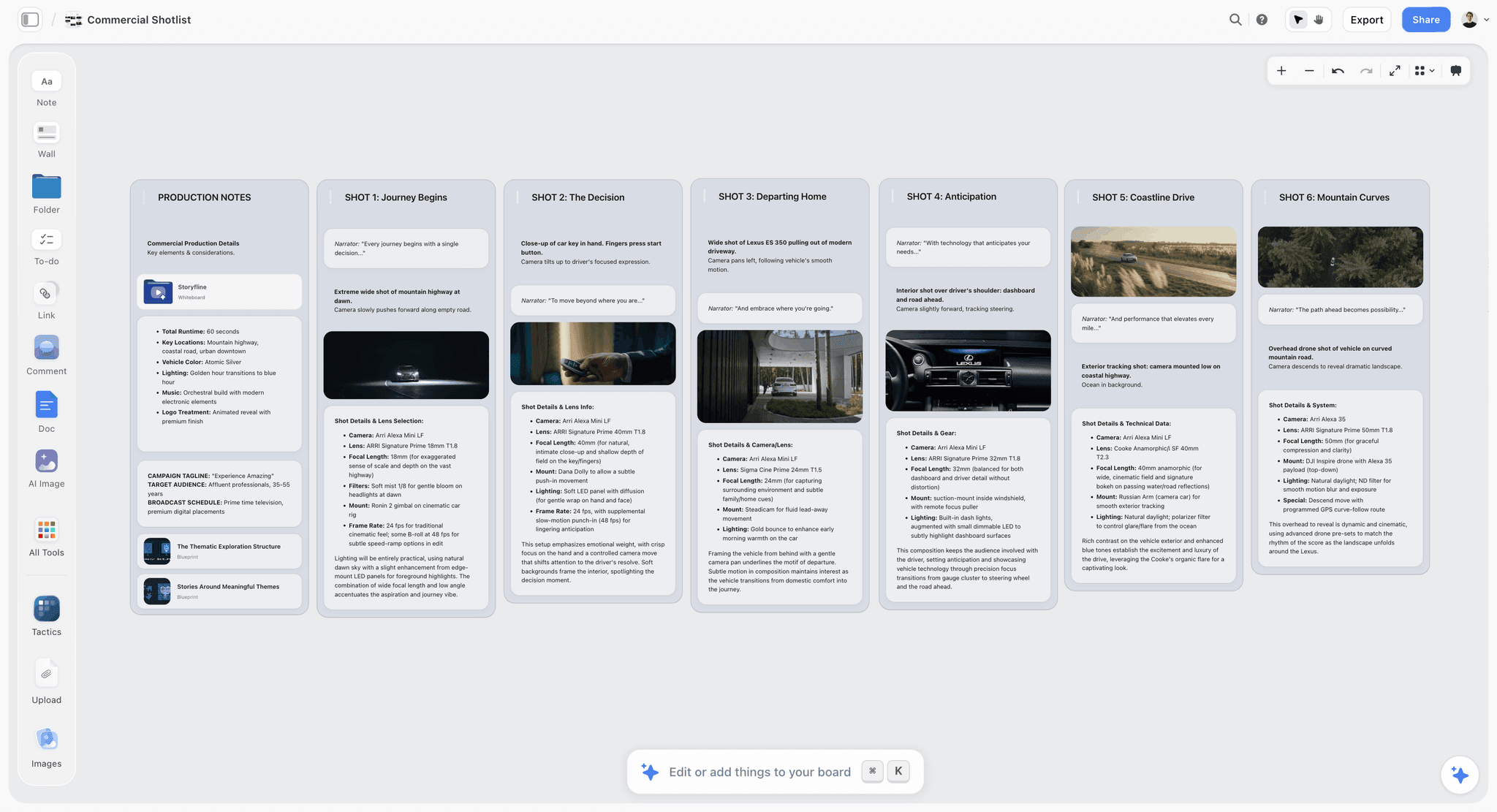
Storyflow is where From Brief to Shot becomes one board instead of four files. It is an AI visual workspace: an infinite canvas that holds the brief, the mood board, the shot list, and the call sheet side by side, with an AI that reads the whole board before it answers.
The brief, mood board, and shot list live on one board. You write the brief in a document region, pull references onto the same canvas as a mood board beside it, and build the shot list as a table or cards in the same space. Nothing is in a separate app. The brief that names the deliverables sits in view of the shot list that has to deliver them.
The AI drafts the shot list from the brief. Because Storyflow's AI reads your entire active canvas board by default (plus up to 1 Tactic and up to 3 Documents you @-mention in the chat), you can point it at the brief and the mood board and ask for a shot list. The draft reflects what you actually wrote, not a generic list, and you edit it in place with everything still in view.
The mood board is native, not a screenshot dump. Images, links, and notes live on the canvas as first-class objects, and you tag a reference with why it is there so the AI can use it when it drafts. For the full references-to-decisions step, the AI mood board maker is built for exactly this.
Story Blueprints give you a head start. On the Plus, Pro, and Max tiers, Storyflow's Story Blueprints library includes 200+ ready-made boards, including campaign brief, mood board, and shot list layouts, so you are not building the structure from scratch.
Unlimited real-time collaboration, free for the whole crew. The producer, the photographer, and the brand lead can all be on the same board at once, because anyone a paid member invites to a board joins free today, and Storyflow's own Free plan, launching before the end of 2026, will include unlimited collaboration on shared boards. The plan is a live surface the crew shares, not a PDF emailed around.
Storyflow's pricing, verified at storyflow.so/pricing as of July 2026: Storyflow is paid-only during early access. Plus is $7.99/mo annual ($9.99 monthly) and adds the 200+ Story Blueprints, and unlimited uploads. Pro is $14/mo annual ($19 monthly) and adds AI image generation and 20x more AI usage. Max is $39/mo annual ($49 monthly) and adds 40x more AI and a team workspace with permissions and roles. A Free plan (unlimited notes, images, and links, unlimited shared boards, unlimited collaboration, basic AI, and 20 file uploads) launches before the end of 2026.
To be clear about the fit: Storyflow is where you plan the shoot, not where you finish the photos. It does not edit or grade images, manage your final asset library, or book studios or talent, and it is cloud-only. What it does is hold the whole plan in one place so the shoot day runs on a real plan.
7) The Shot List and Call Sheet, in Detail
The brief and the mood board get the attention, but the shot list and the call sheet are what the crew runs on.
The shot list is a priority-ordered plan, not a wish list. The most common failure is a list ordered by convenience: the must-have hero frame ends up scheduled last, the light goes, and the shoot delivers everything except the one image the campaign needed. Order by priority, put the non-negotiable shots first, and group by setup so you light a corner once and get every frame from it before you move. For each shot, note the setup, wardrobe, talent, the reference it is serving, and a priority tag (must-have, should-have, nice-to-have). A good row reads: "Hero, homepage. Product in use, model at desk, window light camera-left, headline space camera-right, reference image 3. Must-have." That single line tells the photographer the frame, the brand lead the deliverable, and the producer the setup at once. When the list is drawn from the brief on the same canvas, every row points back to the deliverable it serves, and nothing the brief promised gets left unshot.
The call sheet is the shot list translated into time. Once the shots exist and are ordered, the schedule is mostly arithmetic. Block time by setup and location, add the buffer every schedule forgets, and put call times, the address, the crew and talent list, and contacts at the top. The call sheet does not invent anything; it takes the finished shot list and answers who, where, and when. Built on the same canvas as the brief, it creates a feedback loop: the brief reminds you which frames are load-bearing, and the shot list tells you how long each setup needs. That is the payoff of From Brief to Shot, one plan where each part informs the next.
8) Roles: Who Owns Which Artifact
Each role owns a clear artifact while everyone shares one canvas.
- Brand or marketing lead owns the brief. You make the intent unambiguous (audience, campaign, deliverables, guidelines) so every later decision has something to check against, and you keep it current because the shot list and the AI read it first.
- Creative director owns the mood board. You set the look, pull the references, and tag why each is there. Your judgment is the taste the AI does not have. A reference without a reason is one the photographer has to guess at.
- Photographer owns the shot list. You turn the brief and the board into a frame-by-frame plan and run it on the day. You take the AI's draft, reorder it by what the light and location allow, and mark what is non-negotiable.
- Producer owns the call sheet. You turn the shot list into a schedule and keep the day moving, building the call sheet around the finished shot list so the logistics serve the shots. Keep it live on the board instead of emailing a PDF that is stale by call time.
These four roles are not working in four apps. They work on one plan, each in their region, all in view: when the photographer reorders the shot list, the producer adjusts the call sheet, and when the brand lead sharpens the brief, the creative director sees which references now need to change.
9) Common Mistakes and Where Storyflow Is the Wrong Tool
First the mistakes that sink shoots, then where Storyflow is the wrong tool.
- Treating the brief as paperwork. Teams write it, file it, and never look again. The brief is the source every other artifact and the AI reads. If it is vague, everything downstream is a guess. Spend the 45 minutes.
- A mood board that is a pile, not a decision. A hundred untagged images is a distraction. Fifteen references, each tagged with why it is there, is a contract the crew can use. Curate, then tag.
- A shot list ordered by convenience. If the must-have frames are not first, you are betting the campaign on the light holding and the day not slipping. It always slips. Priority first.
- A call sheet built before the shot list. The schedule falls out of the shots, so build the shot list first. The other way means scheduling shots you have not planned yet.
Now the honesty.
Storyflow is not a photo-editing or DAM tool. It plans the shoot; it does not finish the pictures. For editing, retouching, and color, use Lightroom or Capture One. For managing your final asset library (versioning, keywording, delivering the files), use a real digital asset manager or Capture One's catalog. Storyflow holds the plan, not the pixels.
Storyflow is not a booking or scheduling suite. It builds the call sheet as part of the plan, but it does not book studios, send talent releases, handle model contracts, or run production logistics software. For those, use dedicated booking and production tools. Storyflow is where the shoot is planned, not where it is procured.
Storyflow is cloud-only. There are no local files and it needs a connection. If your process requires local-first ownership, offline access on a location with no signal, or strict IT constraints against cloud tools, that is a real limitation to weigh. If you cannot rely on a connection on the day, print the shot list and call sheet before you go.
The rule of thumb: use Storyflow to plan the shoot from brief to shot, and pair it with Lightroom or Capture One for the images and a booking tool for the logistics.
11) The Bottom Line
Planning a brand photoshoot with AI is not about handing the shoot to a machine. It is about putting the four artifacts that decide the day (brief, mood board, shot list, call sheet) on one canvas so an AI can read the whole plan and the crew can run it as one thing. A brand shoot is not a day with a camera. It is a plan that happens to get photographed. From Brief to Shot is how you make that plan connected instead of scattered.
The honest boundary matters. The AI drafts the shot list, finds the gaps, and tightens the writing; you make every call that counts (priority, taste, the read of the client and the light). And the tool has edges: Storyflow plans the shoot, but Lightroom or Capture One edit and manage the images, and dedicated tools book the studio and the talent. Used for what it is, a place to plan from brief to shot, it turns a chaotic pre-production into one live board the crew shares.
If your next shoot is still living in a doc, a drive, a spreadsheet, and a PDF, plan it on one canvas in Storyflow and let the AI draft the shot list from the brief you already wrote.
10) FAQ: Planning a Brand Photoshoot with AI
How do you plan a brand photoshoot with AI?
Put the four artifacts that decide the day on one canvas: the brief, the mood board, the shot list, and the call sheet. Write the brief first, build the mood board beside it, then let an AI draft the shot list from both. Edit the shot list by priority, build the call sheet around it, and share one board with the crew. The AI drafts; you decide what gets shot.
What are the four artifacts of a brand shoot?
The creative brief (why you are shooting and what each image must do), the mood board (the look and feel), the shot list (exactly what you capture and in what order), and the call sheet (who, where, and when). The workflow works when these four live on one canvas as a connected plan rather than in four separate files.
Can AI write a shot list?
AI can draft a strong shot list if it can read your brief and mood board. The draft reflects your deliverables and references rather than a generic template, so it is a real starting point. It will not be final: you reorder by priority, add the shots it missed, and cut repeats, because the AI does not know your location, light, or client. The draft saves the hour; the judgment is yours.
What does the AI actually do in this workflow?
Four things. It drafts the shot list from the brief and the mood board, finds gaps (a deliverable with no shot assigned), tightens the writing so the plan reads cleanly, and answers questions across the whole plan (which shots serve the homepage hero). It does not have taste, know client politics, or decide priority. Every high-value call stays human.
Do I still need a photographer if I use AI?
Yes, completely. The AI helps plan the shoot; it does not shoot it, light it, direct talent, or read the room on the day. The photographer owns the shot list and runs it, reordering the AI's draft against what the location and the light allow. AI compresses the planning, not the craft.
Is Storyflow free for planning a shoot?
Not during early access. Storyflow's Free plan, which launches before the end of 2026, will include unlimited notes, images, and links, unlimited shared boards, unlimited collaboration, and basic AI, enough to run the whole From Brief to Shot workflow for a single shoot. Today, paid tiers start at Plus for $7.99/mo annual, which adds the 200+ Story Blueprints and unlimited file uploads, and anyone a paid member invites to a board joins free.
Can Storyflow edit or store my final photos?
No, and it is not meant to. Storyflow plans the shoot; it does not edit, retouch, or grade images, and it is not a digital asset manager for your final files. Use Lightroom or Capture One for editing and asset management. Storyflow holds the plan (brief, mood board, shot list, call sheet); you take the pixels to a dedicated editor.
How long does it take to plan a shoot this way?
Roughly three and a half hours for a single brand shoot: about 45 minutes on the brief, an hour on the mood board, ten minutes for the AI shot list draft, 45 minutes editing that list, and 30 minutes on the call sheet. Scale up for a bigger production. The planning time is front-loaded so the day runs on a plan instead of improvisation.
Does Storyflow work offline on location?
No. Storyflow is cloud-only and needs a connection, so it does not work offline on a location with no signal, a real limitation for remote shoots. The practical workaround is to finish the plan before you travel and print the shot list and call sheet, so the crew has the plan on paper.
Can the whole crew work on the same plan?
Yes. Anyone a paid member invites to a board joins free and can collaborate in real time immediately, so the brand lead, the creative director, the photographer, and the producer can all be on the same canvas at once. Storyflow's own Free plan, launching before the end of 2026, will include the same unlimited collaboration. Each owns their artifact while everyone shares one plan, so a change in one place is visible next to the others instead of buried in a separate file.
Table of Contents
- Quick Answer: Planning a Brand Photoshoot with AI
- The Four Artifacts of a Brand Shoot
- From Brief to Shot: The Framework
- Step-by-Step: Plan the Shoot on One Canvas
- Where an AI Actually Helps (and Where It Does Not)
- Plan Your Shoot in Storyflow
- The Shot List and Call Sheet, in Detail
- Roles: Who Owns Which Artifact
- Common Mistakes and Where Storyflow Is the Wrong Tool
- FAQ: Planning a Brand Photoshoot with AI
- The Bottom Line
- Author
- Related Reading
Templates to check out for this topic


Filmmaking templates you can use in Storyflow
Skip the blank canvas. Open one of these filmmaking boards in Storyflow and the AI builds on the structure that is already there, from research through the shot list.


See Storyflow in Action
A visual AI workspace where every feature lives inside one canvas. No tab-switching, no context lost.
Build your entire board from a single message
Type what you need in the AI chat at the bottom of your canvas. The AI adds cards, headings, and structure directly onto your board.
Use expert frameworks as AI context
Type @ in the AI chat and choose any Tactic. The AI tailors every response to that framework instead of giving generic advice.
Turn your board into a mind map in seconds
Ask the AI to restructure your canvas as a mindmap. It connects your ideas into a visual hierarchy so you can see how everything relates.
Why Storyflow Exists
Storyflow actually began as a personal tool while working on creative and research projects.
We kept running into the same problem: ideas were scattered everywhere: notes, documents, and whiteboards.
Nothing helped us see how everything connected.
So we started building a workspace designed around how ideas actually grow.
→ Read how Storyflow was createdJustkay
Documentary Filmmaker & Founder at Storyflow
Published: 2026-07-01
Extremely simple, seriously capable


See how easy it is to get started
Watch a real project come together, from a blank board to a finished plan, clicked through step by step.
Start creating with AI and become more productive
Transform your creative workflow with AI-powered tools. Generate ideas, create content, and boost your productivity in minutes instead of hours.