The 11 Best Moodboard Tools for Portrait Photographers in 2026
A portrait moodboard has three readers: the client reads a promise, the subject an instruction, the crew a spec. Storyflow keeps a wall for each on one board and builds the shot list and call sheet from it; ten other tools each keep one job.

Category
Photography
Author

Sara de Klein
Head of Product at Storyflow
Topics
2026-08-10
•
31 min read
•
Photography- best moodboard tools for portrait photographers
- best moodboard app
- how to create a photoshoot moodboard
- portrait shoot planning software
- moodboard for hair and makeup brief
- best moodboard maker for creative projects
What are the best moodboard tools for portrait photographers in 2026?
Our pick for a portrait photographer's moodboard tool in 2026 is Storyflow, because Storyflow's AI collects and lays out the references, keeps the client board, the subject's prep guide and the crew's hair, makeup and wardrobe spec as three walls of one board, and builds the shot list and call sheet from them. Choose Pinterest instead for sourcing references with the client, Canva for a templated prep guide, Milanote for a hand-arranged board with a free plan, and PureRef to keep posing and lighting references on screen while you shoot. Storyflow keeps the moodboard and the shot list together; see how to [turn a moodboard into a shot list](/photoshoot-shot-list-from-moodboard). For every kind of shoot, not only portraits, see the [moodboard tool for photographers](/moodboard-tool-for-photographers).

Full disclosure: Storyflow is our own product and we list it first. The order is not a score: it is our pick first, on one stated basis (one board that serves the client, the subject and the crew, and then builds the shot list and call sheet), followed by ten tools in the order a portrait job meets them. Pinterest still wins sourcing, Canva the templated prep guide, Milanote the hand-arranged board with a free plan, PureRef the offline reference window on set, and PhotoPills the light plan. Storyflow does not do client proofing galleries, does not manage a catalog or raw files, does not calculate sun position, does not deliver files and has no free plan today. Vendor facts were read from each vendor's own pages on 11 October 2026.
Quick Comparison
Our pick first, then three tools that each keep one job in a portrait session: sourcing with the client, the templated prep guide, and the reference window on set.
| Tool | Best For | AI Features | Price |
|---|---|---|---|
| Storyflow | Three readers on one board, plus shot list and call sheet | AI collects references and builds the shot list | $7.99 mo annual (free plan late 2026) |
| Reference sourcing with the client | None named | No charge | |
| Canva | The subject-facing prep guide | None named | See canva.com/pricing |
| PureRef | Posing references on set | None named | Pay what you want |
Quick Picks by Job Type
Storyflow is our pick for the portrait board as a whole. Each pick after it is one job in a portrait session where another tool is the right call.
- Best moodboard tool for portrait photographers overall: Storyflow. Moodboard, shot list and call sheet in one workflow, with a wall each for the client, the subject and the crew. Plus from $7.99 a month billed annually.
- Best for sourcing with the client: Pinterest. Nothing finds references faster, and a client will add to a shared board. Move the keepers to a Storyflow board the crew can read.
- Best templated prep guide: Canva. A clean three page PDF the subject reads on a phone the night before. Storyflow exports the same guide as a PDF from the board; Canva's templates give it more polish.
- Best hand-arranged client board with a free plan: Milanote. Storyflow has no free plan today, so Milanote is the pick when the cost must be zero.
- Best on-set reference: PureRef. Posing and lighting references in a window that stays on top of your capture software, offline, which Storyflow does not do.
- Best light planning: PhotoPills. Sun position and golden hour decide whether the look on the board is available. No moodboard tool calculates them, Storyflow included.
- Best crew spec as a database: Notion. Properties and checkboxes for garments and sizes, when the crew list has to be sortable.
- Best long-term library: Are.na. The reference collection that outlives any one client.
At a Glance: The 11 Tools Compared
Our pick first, then the other ten in the order a portrait job meets them: source, prep the subject, present, shoot, plan the light, spec the crew, archive. It is not a score. Prices are from each vendor's own page, checked on 11 October 2026.
| Tool | Best for | Reader it serves | Shape | Entry price |
|---|---|---|---|---|
Storyflow | Client board, subject prep and crew spec on one board, plus the shot list and call sheet | Client, subject, crew | AI visual workspace | $7.99/mo billed annually (Free plan coming late 2026) |
Sourcing, and the shared board a client adds to | Client | Discovery feed | No charge | |
Canva | A templated prep guide the subject opens on a phone | Subject | Template design | See canva.com/pricing |
Milanote | A hand-arranged client look board | Client | Visual notes board | Free up to 100 items, then $9.99/person/mo billed annually |
PureRef | Posing and light references on screen while you shoot | You | Desktop reference window | Pay what you want for personal use |
PhotoPills | The light plan behind the look | Crew | Planning app | In the app stores |
Notion | The crew spec list as a database | Crew | Docs and databases | Free plan, Plus $10/member/mo billed annually |
Are.na | The reference library across years | You | Connected collections | Free up to 200 blocks, Premium $7/mo |
Adobe Express | Fast boards inside the Adobe ecosystem | Client | Template design | Shown in local currency |
Figma | Checking the crop when the portrait lands in a layout | Client | Design tool | Free Starter, Professional $16/mo per full seat |
Google Slides | A shareable version that opens anywhere | Client, subject | Presentation | No charge with a Google account |
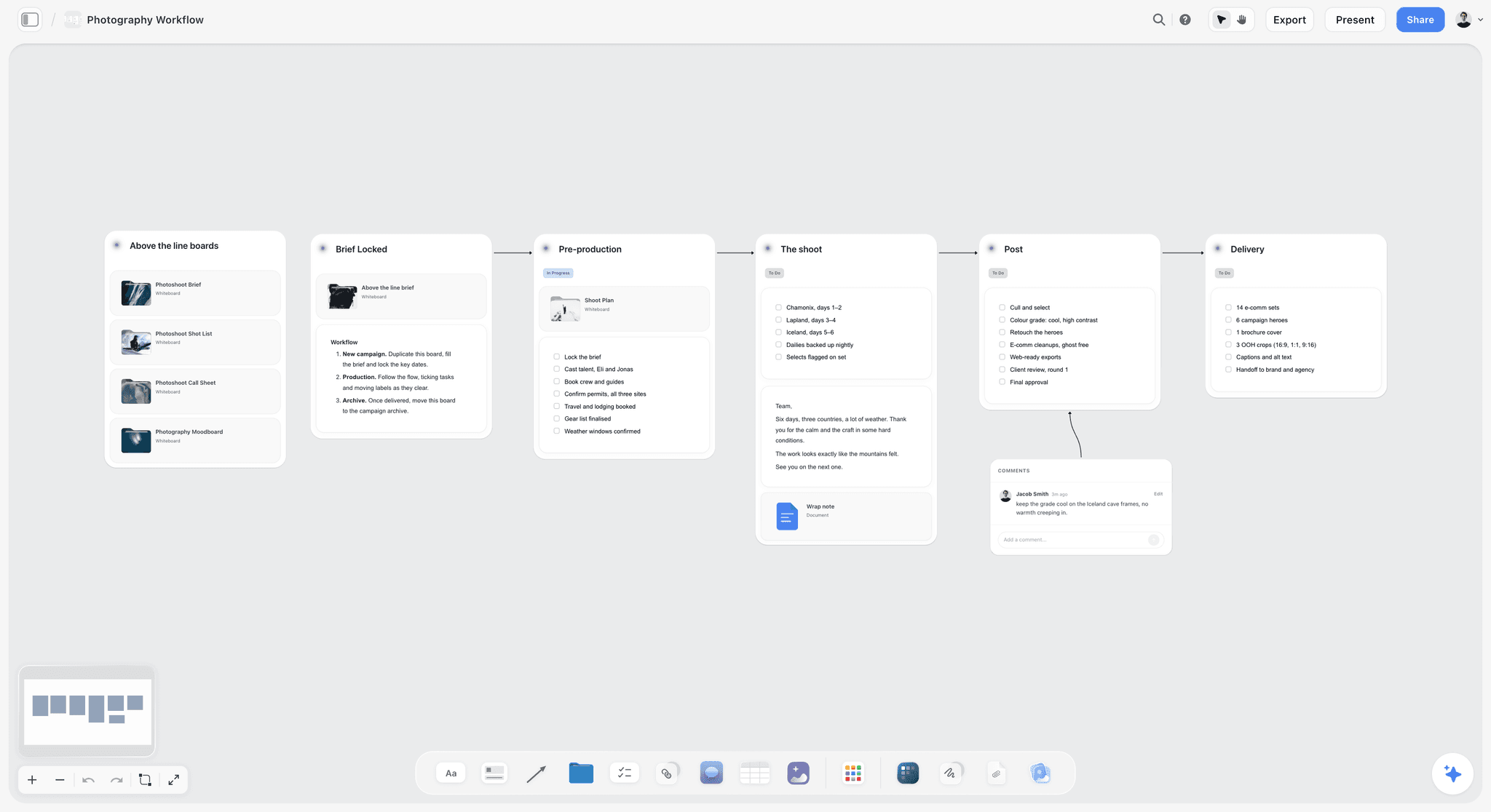
A Storyflow photography workflow board linking the photoshoot brief, shot list, call sheet and moodboard, followed by walls for pre-production, the shoot, post and delivery
One board, three readers, no drift
The client needs a promise, the subject needs a feeling, and hair and makeup need a spec. Storyflow holds all three as walls of one board, so changing the palette in week two changes what everyone is looking at, and the shot list and call sheet are built from the same board.

Frequently Asked: Moodboard Tools, Templates and Commercial Use
What are the best tools for creating moodboards?
Storyflow when the moodboard has to turn into a plan: its AI collects the references and builds the shot list and call sheet on the same board. Milanote for a hand-arranged board with a free plan, Pinterest for finding images, Canva for a templated page, and PureRef for a reference window beside your editing software. For portraits specifically, the order on this page applies.
What are the differences between moodboard maker tools?
They differ in what happens after the pictures are collected. Pinterest and Are.na collect. Milanote, Canva and Adobe Express arrange a board or a page by hand or from a template. PureRef shows references while you work. Storyflow builds the board with AI and then carries it on to a shot list, a call sheet and a client link.
Who offers moodboard templates for creative planning?
Milanote lists over 100 templates, including a Photography Moodboard. Canva and Adobe Express are built around templates. Storyflow has 200+ Tactics and AI workflows that build a moodboard, a shot list and a call sheet from a description, so the starting point is your shoot and not a blank layout.
What tools let you curate a moodboard from existing photos?
Storyflow: drag and drop your own photos onto the board, select up to 24, and the AI reads them and finds references that match. PureRef takes any image you drag in and keeps it on screen. Milanote and Canva accept uploads into a layout. Pinterest works from pins, not from your camera roll.
Which moodboard tools are safe for commercial use?
The tool is rarely the issue; the images are. A moodboard of other photographers' work is a reference for direction, not a licence to publish it. Keep the source address with every reference, mark any AI-generated tile as generated, and do not send a client board that could be mistaken for your own portfolio. PureRef's pay-what-you-want price is for personal use; commercial work needs its $49 one-time licence (up to three seats per studio) or a per-seat Business plan.
Key Takeaways
- A portrait moodboard has three readers, and each one misreads it in a predictable way. The client reads a promise. The subject reads an instruction. The crew reads a specification.
- Showing a subject the same board you showed the client is the most common unforced error in portrait work. It produces imitation, and imitation reads as stiffness in the final frames.
- Keep three walls on one Storyflow board: a client wall, a subject wall with a feeling and no poses, and a crew wall with the hair, makeup, wardrobe and light spec. One board, so the palette you change in week two changes for everyone.
- Storyflow does not do client proofing galleries, does not manage a catalog, does not calculate sun position and does not deliver files. Pixieset, Lightroom, PhotoPills and Dropbox own those.
- Pinterest is the right sourcing tool and the wrong archive. Capture the source address yourself.
- The crew read is the one most portrait photographers skip. A hair and makeup artist needs a lip, a brow and a finish, not a mood.
- Human working memory holds roughly four chunks at once, per Cowan (Behavioral and Brain Sciences, 2001), which is why a 40 image board is a worse brief than an 8 image one.
The Three Readers of a Portrait Moodboard
A commercial moodboard is read by people who make decisions. A portrait moodboard is also read by a person who has to stand in front of the camera and feel something. That difference changes the tool question completely.
The client reads it as a promise. Whoever is paying, whether that is a subject booking a personal session, an agency or a magazine's photo editor, looks at your moodboard and forms an expectation of delivery. If your board contains a striking image shot in a location you will not have, on a face that is not theirs, you have made a promise you will be judged against. This is the read that generates the sentence "it's beautiful, but it's not what I pictured."
The subject reads it as an instruction. This is the one that costs you the shoot. Show a nervous subject a board of eight confident, chin down, oblique gaze portraits, and they will try to do that, consciously, with their body, at the start of the session. A portrait moodboard shown to the subject produces imitation, and imitation photographs as stiffness. What a subject needs from a board is not a set of poses. It is permission and a feeling.
The crew reads it as a specification. A hair and makeup artist does not need a mood. They need to know whether the lip is matte or glossy, whether the brow is brushed up, whether the skin finish is dewy or flat. A stylist needs silhouette, palette, and whether the collar sits open. A board that communicates atmosphere and specifies nothing sends the crew into a guessing game they will resolve in the direction of their own default style.
Most portrait photographers build one board and send it to all three. That board is too vague for the crew, too prescriptive for the subject and too aspirational for the client.
| Reader | Reads the board as | Needs | Must not see | Their wall on the Storyflow board |
|---|---|---|---|---|
Client | A promise | The look, and what is being delivered | Contingency plans | Client wall: 8 to 12 references and the deliverables |
Subject | An instruction | A feeling, wardrobe direction, what to bring | Poses to copy | Subject wall: 6 images that are not poses, plus the prep guide |
Crew | A specification | Lip, brow, skin, silhouette, palette, light, call times | Nothing: they need all of it | Crew wall: annotated references, shot list, call sheet |
The fix is not three files. It is three walls of one Storyflow board, because three separate files start identical and drift apart as soon as one of them is edited. The photoshoot moodboard page starts from that layout.
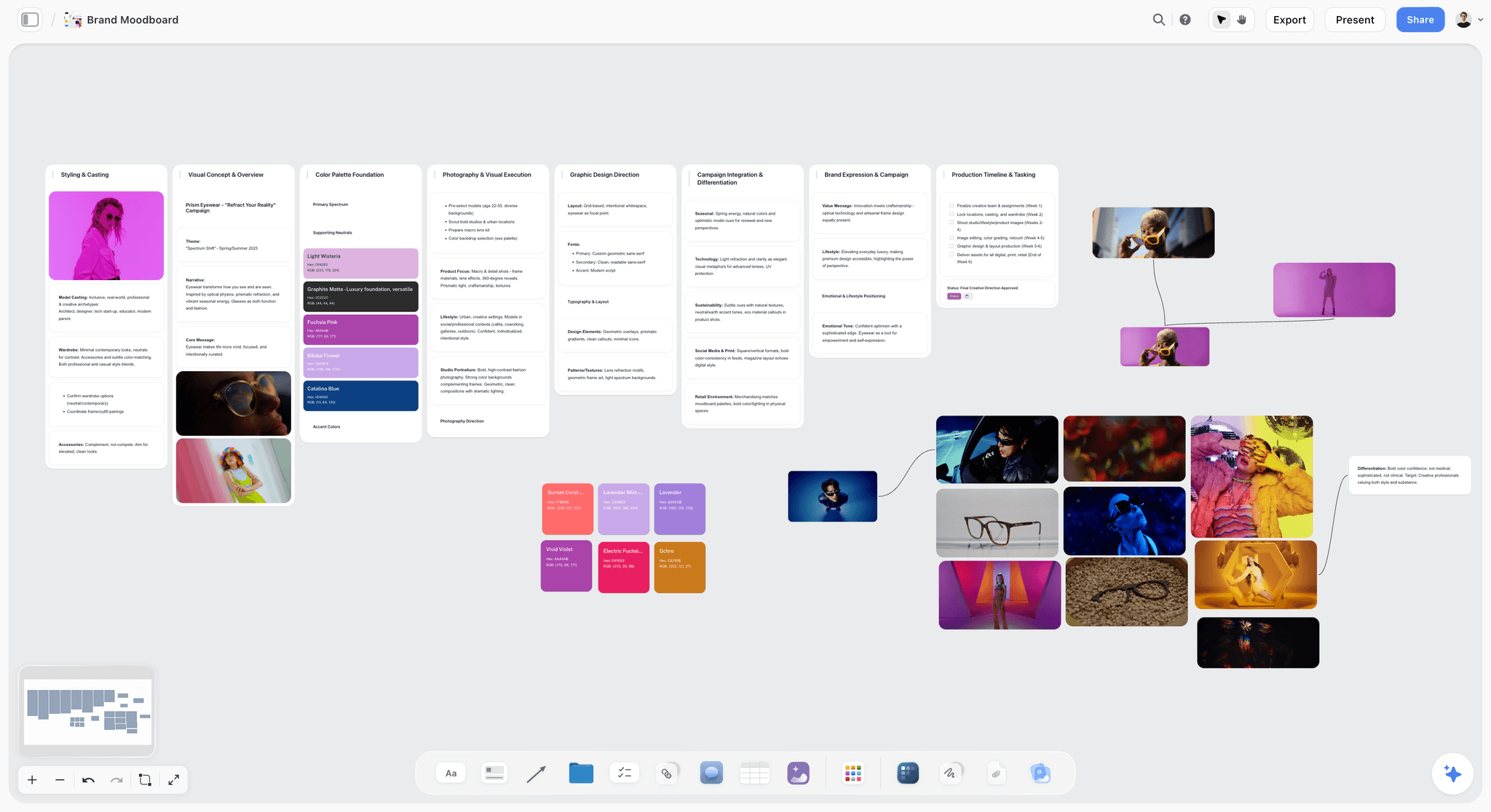
What Goes on a Portrait Moodboard: Posing, Wardrobe, Light, Hair and Makeup
A portrait board has five ingredients, and each belongs to a different reader. Sorting them is most of the work.
| Ingredient | What to show | How many | Who reads it | The note to write beside it |
|---|---|---|---|---|
Feeling | Images that carry the mood without a copyable pose | 6 to 8 | Subject, client | "Calm, direct, a little amused" |
Posing | Posture, hands, angle of the head | 4 to 6 | You and your assistant only | "Only the hands. Ignore the face." |
Wardrobe | Silhouette, fabric, palette, what not to wear | 4 to 6 | Subject, stylist | "Open collar, no logos, nothing new" |
Light | Direction, hardness, contrast, colour | 3 to 5 | Assistant, you | "Window left, soft, shadow side stays dark" |
Hair and makeup | Skin finish, lip, brow, lash, hair movement | 4 to 6 | Hair and makeup artist | "Matte skin, brushed brow, no lash" |
Posing references are the ones to guard. They belong on the crew wall and on your own screen, never on the wall the subject opens. On the day, keep them in a PureRef window beside the capture software, and direct from them without showing them.
How I Ranked These
I have directed people in front of cameras for documentary work for years, which is the same problem as portraiture with worse lighting and less consent to direct. This is a comparison from that practice and from each vendor's own pages, read on 11 October 2026. It is not a lab test.
Five criteria.
1. Can one board serve all three readers? Can the client look, the subject guide and the crew spec live in one place, so a change reaches everyone?
2. Does it carry specification, not just atmosphere? Can an image sit next to the words "matte lip, brushed brow, no lash" without the board turning into a document?
3. Will a nervous non-professional open it? Subjects are not designers. If the board needs an account, a download or a tutorial, it will be viewed once on a phone in a hurry, if at all.
4. Does the board go anywhere? After the look is agreed, does the tool help with the shot list, the call sheet and the prep guide, or does that start again in another app?
5. Does it hold up across years? A portrait photographer's reference library outlives any individual shoot.
Storyflow is first on criteria one and four. The other ten follow the order of a portrait job, each in the job it wins. Storyflow is our own product, and the disclosure at the top of the page says so.
The 11 Best Moodboard Tools for Portrait Photographers, Reviewed
1. Storyflow
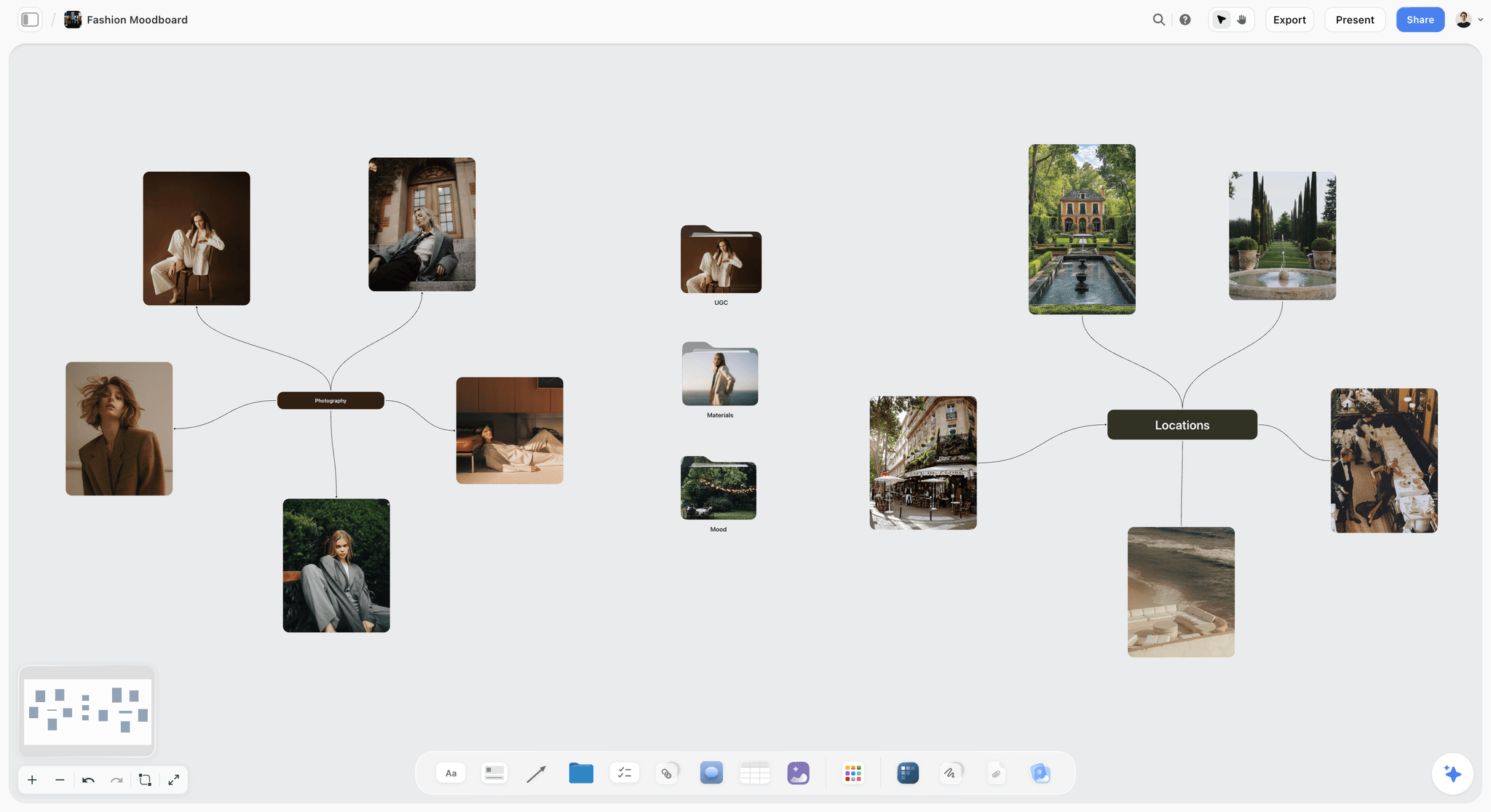
Best for: the client board, the subject's prep guide and the crew spec on one board, with the shot list and call sheet built from them.
Storyflow is an AI visual workspace for planning creative projects, and Storyflow for photographers shows the path from pitch to selects. Storyflow's AI collects reference images from the web and lays them out as a moodboard on an infinite canvas, or reads up to 24 photos you select and works from those. Storyflow keeps the client look, the subject guide and the crew spec as three walls of one board, with notes beside each image. Storyflow then builds the shot list as cards or a table and the call sheet as pages you export as PDF. A client or subject opens a share link with no account needed to view.
Pricing: Plus from $7.99 a month billed annually ($9.99 monthly), Pro $14 ($19), Max $39 ($49). Storyflow is paid-only during early access; its Free plan launches before the end of 2026, and anyone a paid member invites to a board joins free now.
Why Storyflow is first. The three reader problem is a layout problem, and an infinite canvas solves layout problems that a folder cannot. A portrait board in Storyflow ends up with three walls: a feeling wall with six to eight images and no poses, which is what the subject sees; a spec wall where each reference carries a note about lip, brow, silhouette and finish, which is what hair, makeup and styling read; and a deliverables wall naming what the client is buying, which is the honest version of the promise.
Because these are walls of one board and not three exports, changing the palette in week two changes the thing everyone is looking at. The subject does not need the whole board: select the subject wall and export only that selection as a PDF, or send the link to a board that holds it alone.
The AI matters for three jobs here. Storyflow builds the shot list from the board. Storyflow lays the prep guide out as a designed PDF. And when you select the references, up to 24 at a time, you can ask Storyflow which ones contradict each other, which is useful in portraiture, where a board can drift toward two incompatible lighting ideas without anyone noticing until the day.
Strengths:
- Three readers on one board, so nothing goes stale in a duplicate.
- Storyflow's AI collects and lays out references, then builds the shot list and call sheet from them.
- Notes sit beside images, so specification and atmosphere coexist.
- Share a link with a client or subject, with no account needed to view. Commenting needs a sign-in.
- Any to-do takes a person and a due date, so "steam the linen shirt" has an owner.
- Collaborators you invite join free, and the board exports as a PDF or an image.
Limitations:
- Storyflow has no client proofing gallery. Pixieset, Pic-Time and ShootProof own selection and delivery.
- Storyflow has no catalog, EXIF or raw handling. Lightroom and Capture One are a different category.
- Storyflow does not calculate sun position or golden hour. PhotoPills does.
- Storyflow has no free plan today, no offline mode and no always-on-top window. Milanote has a free plan and PureRef works offline on top of other apps.
- Storyflow has fewer photography-specific templates than Canva or Milanote.
- Generated reference images are on Pro and Max. On Plus, tiles come from the web and from your own photos.
The trade off. Storyflow is the planning surface, not the production pipeline. If your problem is proofing and delivery, buy Pixieset and skip this section.
2. Pinterest
The verdict. The best place to find references and a poor place to keep them. Pinterest sources the look; a Storyflow board is where it becomes a brief.
Best for. Finding references fast, and the shared board where the client adds their own, before the keepers move to Storyflow.
Pricing. No charge. See Pinterest.
Why it ranks here. Pinterest does two things for a portrait photographer. Its discovery finds portrait references faster than a search you could construct. And clients will use it. Sending a client a shared board and asking them to add five images is a reliable way to find out what they want, because people are far better at recognizing than describing. That step is worth doing whichever tool holds the real board.
Then the problems. The link back to the original photographer is not always there, so the lighting you want to reference can be hard to trace. Its suggestions pull toward popular imagery. And there is no way to write "only the hands" beside a pin, which is the note a portrait reference needs.
Strengths:
- Fast reference discovery.
- Clients understand it without instruction and will contribute.
- Costs nothing and works on any phone.
Limitations:
- Source and photographer attribution is not guaranteed.
- No annotation beside the image.
- No shot list, prep guide or crew spec, which is where Storyflow takes over.
The trade off. Source in Pinterest, capture the original address yourself, and build the real board in Storyflow.
3. Canva
The verdict. The templated version the subject opens. Canva designs one page well; Storyflow holds the board that page is cut from.
Best for. A short, calm, subject-facing document that reduces nerves, when you want a template's polish on top of the Storyflow board.
Pricing. Not stated here; see Canva's pricing page.
Why it ranks here. The subject read is where portrait shoots are won and lost, and the practical form of a subject-facing brief is a three page PDF they read on a phone the night before. Canva makes that quickly from a template and it looks professional.
The content matters more than the tool. A good prep guide contains what to bring, what time and where, the feeling in plain words, and no more than six images chosen because they are not poses. Canva ranks third because it is an output format, not a working surface, and because a PDF made in another app is a copy that goes stale when the board changes.
Strengths:
- A polished subject-facing document from a template.
- Familiar to almost everyone.
- Exports a PDF anyone can open.
Limitations:
- An export, so it drifts from the working board.
- Weak as a working surface for developing the look.
- No shot list or crew spec behind the page, which a Storyflow board has.
The trade off. Excellent last mile. Choose Canva instead of Storyflow for the designed guide, and do not build the look there.
4. Milanote
The verdict. A pleasant place to build a portrait look by hand, with a free plan. Milanote is a hand-arranged reference board; unlike Storyflow it has no AI that builds the board, the shot list or the prep guide, so choose it when the cost must be zero.
Best for. Solo portrait photographers building one client-facing board per shoot, who do not need Storyflow to carry it on to a plan.
Pricing. Free up to 100 items; $9.99 per person a month billed annually. See Milanote.
Why it ranks here. Milanote gets the feel right. Boards look like walls and not spreadsheets, images sit at whatever size the composition wants, and a read-only link gives a client something pleasant to open without signing up. Its own page lists a drag and drop interface, 3 million built-in images through Pexels, a Web Clipper, over 100 templates including a Photography Moodboard, comments and a printable PDF, with iPhone, iPad and Android apps.
For the client read, that is a strong board. The subject guide and the crew spec are yours to write by hand on the same board or a second one, and the free plan's 100 items go quickly once three readers share it.
Strengths:
- Good-looking client boards with little effort.
- A free plan, a built-in image library and a Web Clipper.
- Templates, including a Photography Moodboard.
- A read-only link and PDF export.
Limitations:
- The free plan stops at 100 items.
- Every wall, list and guide is arranged by hand, where Storyflow's AI builds them.
- A web board, so not a reference for a location with no signal.
The trade off. If you shoot alone and your only reader is the client, choose Milanote instead of Storyflow and enjoy the simplest setup here.
5. PureRef
The verdict. The posing wall on your own screen. PureRef does the one thing Storyflow does not: a reference window that stays on top of your capture software with no internet.
Best for. Keeping posing and lighting references visible while you shoot tethered or retouch, beside the Storyflow board that holds the plan.
Pricing. Pay what you want for personal use, with $0 accepted; commercial work takes a $49 one-time licence for a studio of up to three seats, or a per-seat Business subscription. See PureRef.
Why it ranks here. PureRef is a stand-alone program for Windows, Mac and Linux. You drag images in from a browser or a folder, arrange them, and set the window to always stay on top of your workspace. For portraits that solves a specific problem: the posing references the subject must not see can sit on your laptop, next to the live capture, where only you and your assistant look. PureRef saves the board as a file and needs no connection.
Strengths:
- Always on top of other applications.
- Works offline, as a desktop program.
- Pay what you want for personal use, $49 once for a small studio's commercial work.
Limitations:
- No sharing with a client or subject who does not have the app.
- Quick notes only, not a spec.
- No shot list or call sheet, which stay on the Storyflow board.
The trade off. Choose PureRef instead of Storyflow for the reference you glance at mid-shoot, and use both on the same job. For the full comparison, see PureRef vs Milanote vs Morpholio vs Are.na for photographers.
6. PhotoPills
The verdict. Not a moodboard tool. PhotoPills is on this list because half of a portrait look is light, and Storyflow, like every board here, cannot tell you where the sun will be.
Best for. Knowing where the sun will be, and so whether the look on your Storyflow board is achievable at 4pm in that location.
Pricing. Sold through the app stores; the price was not readable on PhotoPills' site when checked on 11 October 2026.
Why it ranks here. A moodboard full of warm backlit rim light is a fantasy if your slot is 1pm in an east facing courtyard. A sun and golden hour planner tells you that before you commit. The most common gap between a portrait moodboard and the delivered images is not skill. It is that the light on the board was never available.
Strengths:
- Sun, moon and golden hour planning for a real place and time.
- Changes what you promise a client.
Limitations:
- Not a moodboard tool in any sense.
- Takes an evening to learn.
- A phone app, separate from the board.
The trade off. Check the light here, then write the answer on the crew wall in Storyflow.
7. Notion
The verdict. The crew specification as a database, if the visual side lives elsewhere. Notion sorts and filters a list; Storyflow keeps the list beside the pictures it describes.
Best for. Hair, makeup, styling and logistics lists with properties and checkboxes, for teams who want them sortable and already work in Notion.
Pricing. A Free plan is listed; Plus is $10 per member a month billed annually ($12 monthly). See Notion pricing.
Why it ranks here. The crew read is partly a list problem. A stylist needs a garment list with sizes and a backup, a hair and makeup artist needs a finish, a lip, a brow and a lash, and everyone needs a call time. A database with properties and checkboxes does that cleanly, and it can be sorted, which a Storyflow table cannot.
Notion is seventh because a portrait brief with no visual weight fails the other two readers, and images in a database are attachments, not material.
Strengths:
- Checklists and properties make crew specs completable.
- Sortable and filterable.
- Familiar to most collaborators.
Limitations:
- A weak visual surface.
- Needs structure discipline.
- The wrong tool for the subject read.
The trade off. Choose Notion instead of Storyflow when the crew list must be a sortable database, and keep the look on a board.
8. Are.na
The verdict. The library, not the shoot. Are.na keeps a career of references; Storyflow plans the session that draws on them.
Best for. The reference collection that spans years and outlives individual clients.
Pricing. Free up to 200 blocks; Premium is $7 a month or $70 a year. See Are.na.
Why it ranks here. Portrait photographers accumulate reference across a career, and the useful organization is thematic, not chronological or by client. In Are.na one block can belong to many channels at once. A single frame can live in "hands", "window light" and "1970s colour" at the same time.
Are.na is eighth because it serves none of the three readers directly. It is the layer underneath.
Strengths:
- The right organizational model for long-term reference.
- A low, published price.
- Channels can be private or shared.
Limitations:
- Not client-facing.
- No specification model.
- No plan for a single shoot, which is Storyflow's job.
The trade off. Seven dollars a month well spent on the library, and irrelevant to any individual shoot.
9. Adobe Express
The verdict. The convenient option if you already pay Adobe. Adobe Express lays out a page from a template; unlike Storyflow it has no board that carries on to a shot list.
Best for. Fast, on-brand moodboard pages for photographers already inside Adobe's tools.
Pricing. A Free plan is listed and paid prices are shown in local currency. See Adobe Express pricing.
Why it ranks here. Express is competent, and its argument is adjacency: your fonts and brand assets are already in the ecosystem. Adobe's Firefly Boards adds a generative moodboard maker, where you upload or generate images and remix them, and boards open in Photoshop on the web or in Express. For a photographer who lives in Adobe's apps every day, that saves friction.
Strengths:
- Sits inside the Adobe ecosystem.
- Template-based pages, quickly.
- Firefly Boards for generated references.
Limitations:
- A layout tool, not a planning surface.
- No multi-reader structure or annotation model.
- Value depends on already being an Adobe subscriber.
The trade off. Use it if you have it. Choose Storyflow when the board has to become the plan.
10. Figma
The verdict. Overkill for most portrait work, and exactly right when the portrait has to land in a layout. Figma tests the crop; Storyflow plans the session.
Best for. Editorial and brand portraiture where the frame will be cropped into a defined design.
Pricing. A free Starter plan; Professional is $16 a month per full seat, and paid plans let others view and comment without buying a seat. See Figma pricing.
Why it ranks here. If your portrait will end up in a magazine spread, a website hero with text over the left third, or a campaign layout, then composing for that constraint before the shoot is the difference between a usable frame and a beautiful unusable one. Figma is where you place a reference into the real layout and see whether the headroom works.
Figma ranks tenth because most portrait photographers are not shooting into a layout.
Strengths:
- Test the crop and headroom inside the real layout.
- Viewers and commenters do not need a paid seat.
- Precise.
Limitations:
- The wrong shape for atmosphere and feeling.
- Intimidating for subjects and most crews.
- No shot list or prep guide, which stay in Storyflow.
The trade off. Situational, and decisive in the situation.
11. Google Slides
The verdict. The unglamorous option that opens everywhere. Google Slides is the fallback when a client cannot open anything else; the board itself is better built in Storyflow and exported.
Best for. A shareable version when the recipient's software is unpredictable.
Pricing. No charge with a Google account.
Why it ranks here. Sometimes the client is on a locked-down corporate laptop, and Slides is the thing that will open. It costs nothing, comments work and version history is automatic. It is eleventh because a fixed slide is the wrong shape for moodboarding, which wants a wall and not a rectangle.
Strengths:
- Opens almost anywhere.
- Comments and version history built in.
- Real-time collaboration.
Limitations:
- A fixed slide format fights moodboard thinking.
- Visually plain unless you fight it.
- No structure for reference or annotation.
The trade off. The compatibility answer, not the craft answer. A PDF exported from Storyflow often does the same job.
From Moodboard to Shot List and Prep Guide: What Storyflow's AI Builds
Storyflow is first on this list because of what happens after the references are chosen. Here is each step.
Client answers sorted into walls
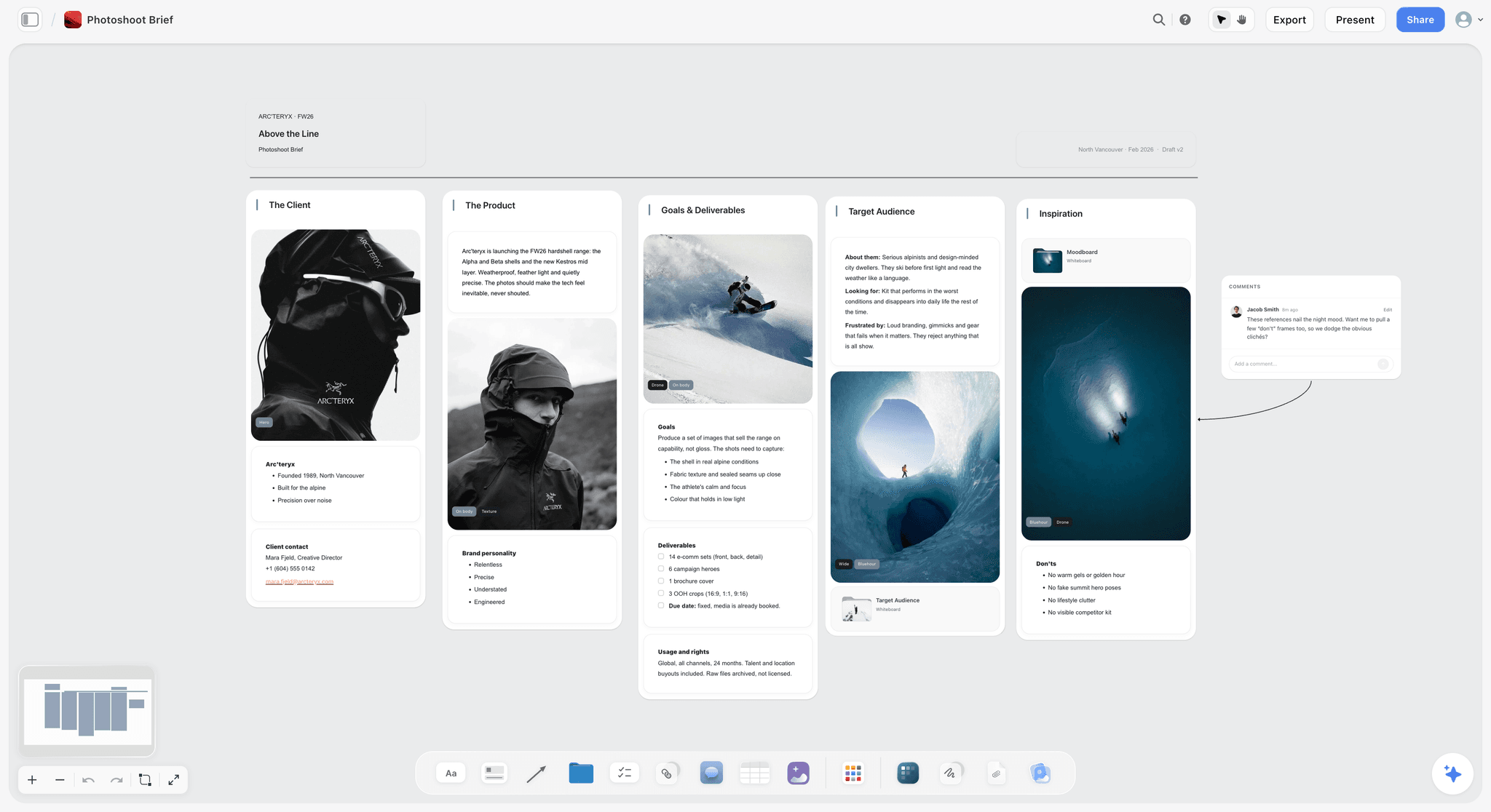
Client prep starts with a questionnaire: what the portraits are for, where they will be used, what the subject likes and hates in photos of themselves. Paste the answers into Storyflow and the AI sorts them into named walls. The image below shows the same step on a film project: loose prep notes sorted into three walls.

A questionnaire to start from is on the photography client questionnaire page.
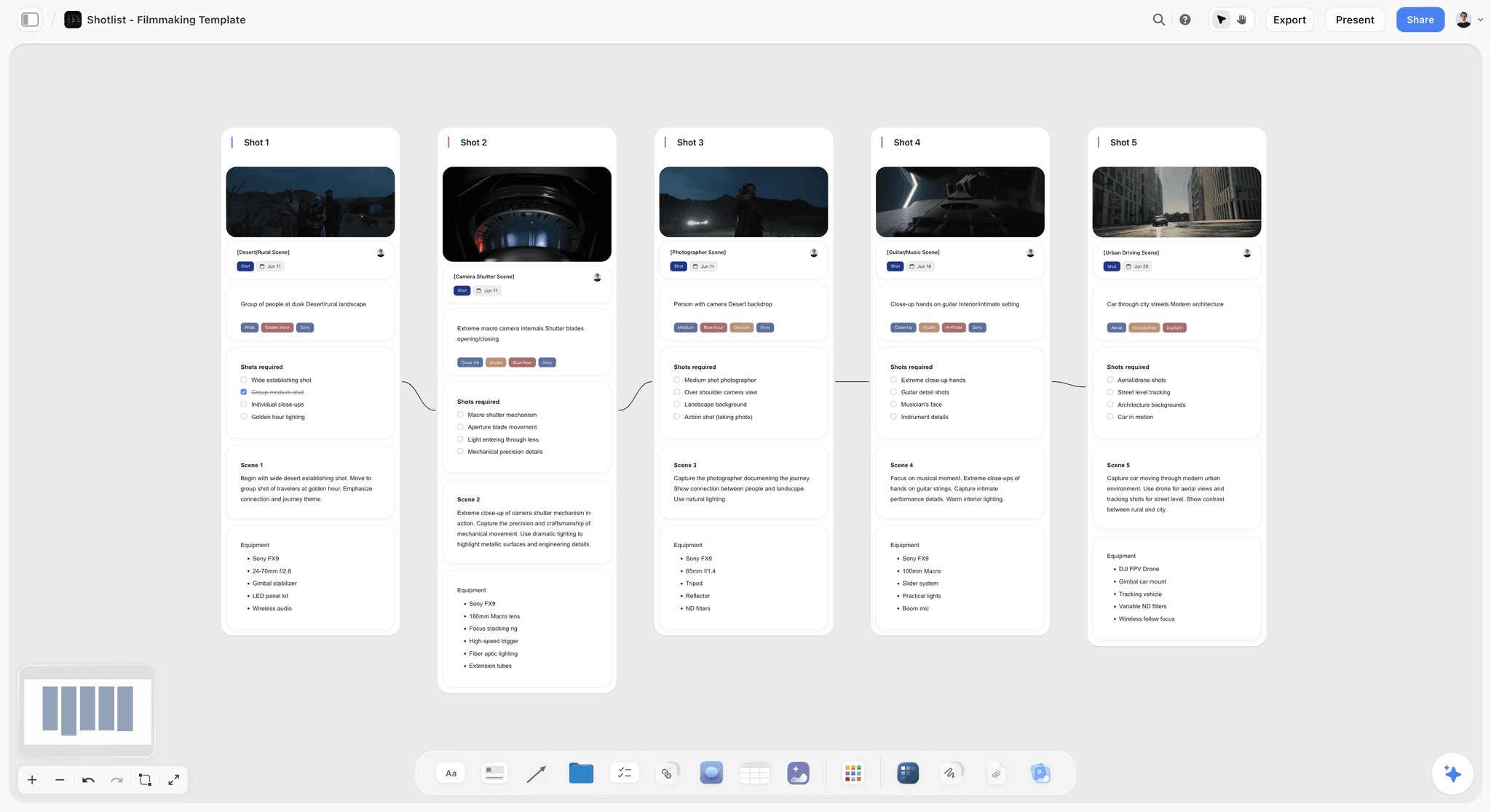
A shot list with a frame for every setup
Ask Storyflow for a shot list and it builds one entry per setup, as cards or a table (the shot list template shows both). With example photos selected, Pro and Max can generate a frame for each shot in their look; on Plus the frames are web references or your own images.

The prep guide and the call sheet as PDFs
Storyflow lays the subject's prep guide out as a designed PDF from the subject wall, and the call sheet as pages with the day's times, people and location. You send both yourself: Storyflow does not email them or track who has confirmed.
Generated references, used carefully
On Pro and Max, Storyflow generates reference images. That helps for an abstract feeling, especially a quality of light, and it is risky for wardrobe, hair and makeup, where a generated image shows details no stylist can source. Mark generated tiles on the board.
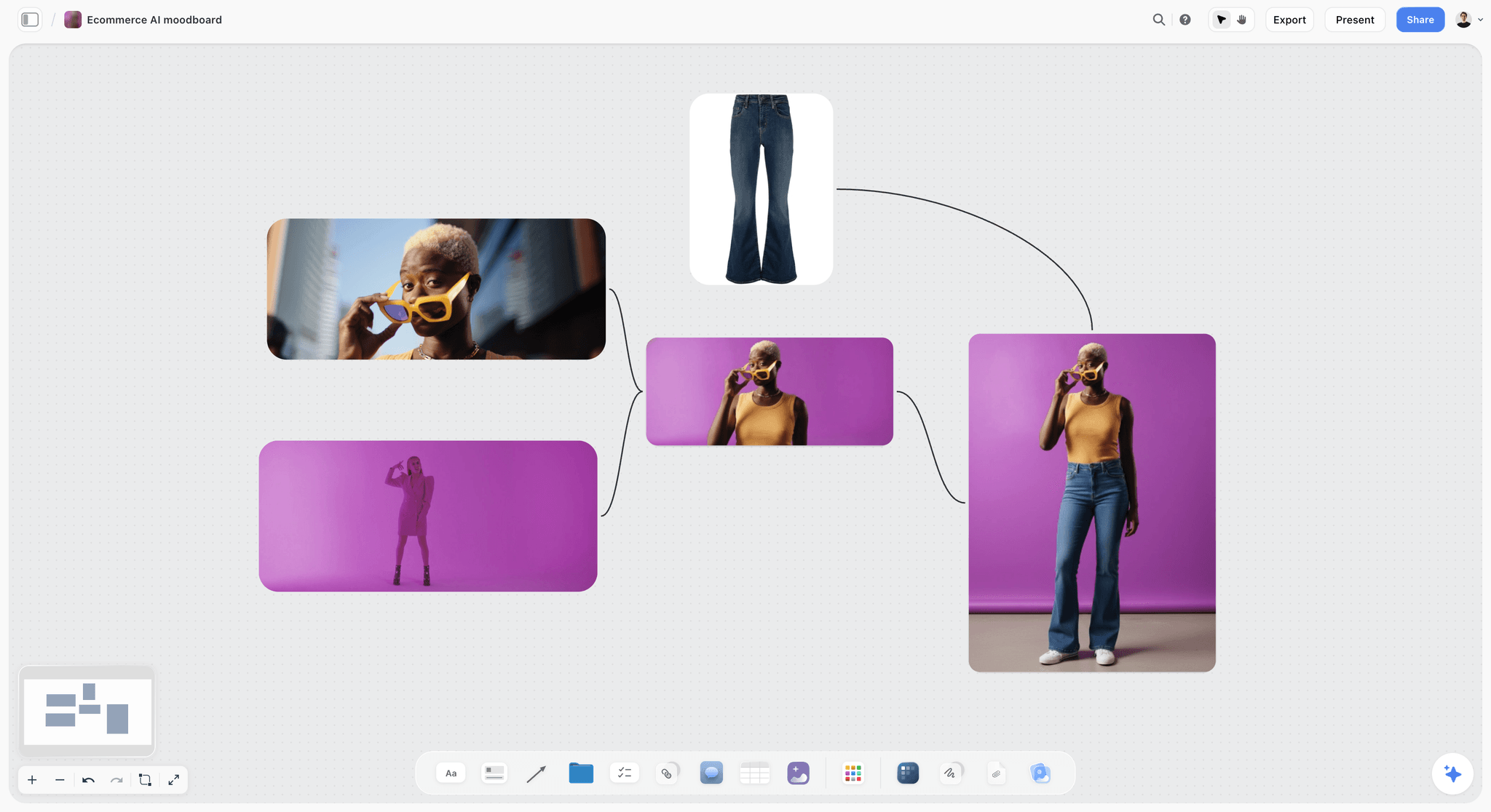
The same board, built from Claude or ChatGPT
Storyflow connects to Claude, ChatGPT, Gemini and Grok through its MCP connector. If you plan sessions in a chat assistant, it can read your Storyflow projects and build the board, the shot list and the documents in the project you allow, instead of leaving the plan in the chat. Setup is on the Storyflow MCP page, and a photoshoot plan with Claude shows the prompts.
A Worked Example: A Personal-Brand Portrait Session
An illustrative session: a founder needs six portraits for a website and press. One photographer, one hair and makeup artist, one stylist, a half day in a rented studio with a large window.
| Wall | Reader | What is on it | How it is shared |
|---|---|---|---|
Client | The founder's communications lead | 10 references, three words for the look, "6 final images, 3 setups, 2 rounds of selects" | Storyflow share link |
Subject | The founder | 6 images with no poses, the three words, what to bring, arrival time, "eat first" | PDF of the subject wall only |
Crew | Hair and makeup, stylist | Annotated references per department, palette swatches, shot list, call sheet | Storyflow share link to the crew |
Posing | Photographer and assistant | 12 posture and hand references by setup | PureRef window on the tether laptop |
The order of work:
- Ten days out. Send the questionnaire and a shared Pinterest board. Ask for five images they like and two they do not.
- Eight days out. Paste the answers into Storyflow, ask the AI for a moodboard that fits them, and cut it to ten.
- Seven days out. Send the client wall. Write the deliverables on it.
- Four days out. Build the crew wall: annotate lip, brow, silhouette and light. Ask Storyflow for the shot list.
- Two days out. Export the subject wall as a PDF prep guide and the call sheet as a PDF. Send both.
- Shoot day. Posing references in PureRef. The crew wall open on a tablet.
Templates to Copy: The Prep Guide and the Crew Spec
The subject's prep guide
Keep it to one screen of text and six images.
- The feeling, in three words. Chosen with the client, written at the top.
- What to wear. Two or three outfits in the palette, pressed, nothing with a logo, nothing bought for the day.
- What to bring. A second top, glasses if you wear them, anything you would hold in real life.
- Hair and makeup. Arrive as agreed with the artist: clean hair, no heavy product.
- When and where. Address, door, parking, arrival time, finish time.
- The night before. Sleep, water, eat before you come.
- What will happen. Ten minutes of talking first, then three setups. You do not need to pose.
The crew spec
| Department | Specify | Example |
|---|---|---|
Skin | Finish | Matte, texture kept |
Lip | Colour and finish | Own colour, balm only |
Brow | Treatment | Brushed up, not filled |
Hair | Shape and movement | Off the face, some movement |
Wardrobe | Silhouette and palette | Unstructured jacket, navy and stone |
Light | Direction and contrast | Window left, negative fill right |
Not this | The negative reference | No gloss, no backlight flare |
On a Storyflow board each row becomes a note beside the reference it describes, and each open task becomes a to-do with a person and a due date.
Pricing Compared
Entry prices as published by each vendor on 11 October 2026. Open the linked page before you pay.
| Tool | Entry price | No-cost option | Where the price is published |
|---|---|---|---|
Storyflow | Plus $7.99/mo billed annually, $9.99 monthly | Free plan coming late 2026; invited collaborators join free now | |
No charge | The whole product | ||
Canva | Not stated here | See Canva's page | |
Milanote | $9.99/person/mo billed annually | Free up to 100 items | |
PureRef | Pay what you want for personal use; $49 one-time licence for commercial use, up to 3 seats | $0 is accepted for personal use | |
PhotoPills | In the app stores | None listed | |
Notion | Plus $10/member/mo billed annually | Free plan | |
Are.na | Premium $7/mo or $70/year | Free up to 200 blocks | |
Adobe Express | Shown in local currency | Free plan | |
Figma | Professional $16/mo per full seat | Free Starter plan | |
Google Slides | No charge | With a Google account |
Which Tools for Which Portrait Photographer
Personal-brand and headshot photographer
Top picks: Storyflow and Canva. The subject is the client, so the prep guide matters most. Build the board and the guide in Storyflow, and move the guide into Canva only if you want a branded template.
Editorial portrait photographer
Top picks: Storyflow and PureRef. A photo editor, a stylist and a groomer all read the board, and the posing wall stays on your screen in PureRef.
Family and wedding portrait photographer
Top picks: Pinterest and Storyflow. Clients often arrive with a Pinterest board. Take it, cut it to ten on a Storyflow board, and write what is being delivered beside it.
Portrait photographer with a crew
Top picks: Storyflow and Notion. The crew wall with shot list and call sheet in Storyflow, and a Notion database if wardrobe pulls need sorting by size and return date.
Solo portrait photographer on no budget
Top picks: Pinterest and Milanote's free plan, with PureRef for the day ($0 for personal work, $49 once for paid sessions). The client read and the subject read collapse into one person, the crew read does not exist, and that stack covers it.
Fine-art portrait photographer
Top picks: Are.na and PureRef. The library is the practice. Bring a Storyflow board in when a series turns into a commission with other people in it.
What to Actually Pay For
Pay for a board that serves three readers, or accept a two tool stack. The biggest structural problem in portrait pre-production is one board serving three readers badly. Use a Storyflow board with three walls, or deliberately run two tools with a clear division: the visual board in one, the crew spec in the other. What fails is one beautiful board plus good intentions.
Do not pay for a moodboard tool if you shoot alone and your client is the subject. A Pinterest board plus a short PDF covers it.
Buy the light planner. A sun and golden hour app prevents the most expensive failure in portraiture, which is promising light that will not be there.
Habits to Avoid
A single board sent to all three readers. The core error this post is about. It over-specifies for the subject and under-specifies for the crew.
A camera roll folder. No annotation, no source, no shareability, and it dies when the phone does.
Instagram saved collections. Fine as a capture inbox, useless as a brief: there is no board and no annotation.
A 40 image board. Working memory holds roughly four chunks at once. A subject who sees 40 references does not receive a richer brief; they receive noise. Eight is generous.
What No Tool on This List Does
None of them will direct a nervous person. The board reduces the size of the problem; it does not solve it, and ten minutes of talking with no camera raised will do more than any reference.
None of them will make an unbriefed crew read your mind. If the lip is not specified, the lip is the artist's default, and that is a reasonable outcome of a brief that did not say.
None of them, including Storyflow, will give you light that is not available, a location you did not scout, or a subject who is comfortable. Those are the real variables, and software touches only the planning of them.
Also Named for Photographers: Behance, Cosmos, VSCO Canvas and Morpholio Board
- Behance finds photographers, where Pinterest finds images. Thirty frames by one person teach a lighting approach better than one lucky frame, and the credit is intact.
- Cosmos is a quiet place to save and search inspiration, including by colour, and it is free to join.
- VSCO Canvas is a mood board tool for photographers inside VSCO, with comments and AI image generation, on every VSCO membership starting with Free.
- Morpholio Board builds product sourcing lists on iPad, iPhone and Mac, which suits a portrait with a styled set.
Each of these finds, files or sources images. None of them splits a board by reader or builds the shot list, which is the job Storyflow is first for.
The Bottom Line
Storyflow is our pick for portrait photographers because a portrait board has three readers, and Storyflow keeps a wall for each on one board and then builds the shot list, the call sheet and the prep guide from it.
- The fastest way to do it: ask Storyflow's AI for the moodboard, split it into a client wall, a subject wall and a crew wall, and send each reader only theirs.
- Source in Pinterest and get the client contributing. Check the light in a sun planner before you promise it.
- Keep PureRef for the posing references on the day, and choose Milanote when the board is the whole job and the cost must be zero.
If your work is commercial or editorial and the question is which tool holds the board on set, read PureRef vs Milanote vs Morpholio vs Are.na for photographers. To start the board itself, open the photoshoot moodboard template or the photoshoot call sheet page.
FAQ: Moodboard Tools for Portrait Photographers
What is the best moodboard app for portrait photographers?
Storyflow is our pick for a portrait moodboard app in 2026, because Storyflow's AI collects the references, the client look, the subject guide and the crew spec sit as three walls of one board, and the shot list and call sheet are built from them. Choose Milanote when you need a free plan, Pinterest for sourcing with the client, and PureRef for references on screen while you shoot.
What is a portrait moodboard?
A portrait moodboard is a small set of reference images and notes that agree the look of a portrait session before it happens: the feeling, the wardrobe, the light, and the hair and makeup. It has three readers, the client, the subject and the crew, and each needs a different cut of it. Six to twelve images is enough.
How do I create a moodboard for a portrait shoot?
Build one board with no more than twelve images, then split it into three walls. The subject wall carries feeling and no poses. The crew wall carries lip, brow, skin finish, silhouette and palette written beside each reference. The client wall names what is being delivered. In Storyflow, ask the AI for the moodboard first and split it by hand.
What should a portrait photography mood board include?
Five things: the feeling, posing references, wardrobe, light, and hair and makeup. Give each its own group and a one-line note per image saying which single attribute it shows. Keep posing references off the version the subject sees. Add the practical details (time, place, what to bring) to the subject's wall.
Should I show the moodboard to the person I am photographing?
Show them a version of it, never the full board. A subject reads references as instructions and will try to reproduce the poses, which photographs as stiffness. The subject version should carry the feeling, the wardrobe direction and the practical details, using images chosen because they are not poses. Six is plenty.
How do I prepare a client for a portrait session?
Send a one-screen prep guide two days before: the feeling in three words, what to wear, what to bring, hair and makeup, time and place, and what will happen in the first ten minutes. Include six images with no poses. Storyflow lays that guide out as a PDF from the subject wall of the board.
Where do I find posing references for portraits?
Pinterest is the fastest source, and Behance shows a photographer's whole approach. Keep the posing references on a wall only you and your assistant open, and on the day put them in a PureRef window that stays on top of the capture software. Do not send them to the subject.
What is the best free moodboard tool for photographers?
Pinterest costs nothing and is the fastest for discovery. Milanote's free plan holds 100 items, enough for one client board. PureRef accepts $0 for personal use, and Are.na is free up to 200 blocks. Storyflow has no free plan during early access; its Free plan launches before the end of 2026, and anyone a paid member invites to a board joins free now.
How many images should a portrait moodboard have?
Six to eight for the subject version and no more than about twelve for the client version. Human working memory holds roughly four chunks of information at once, per Cowan (2001), so a 40 image board communicates less clearly, not more. The crew version can be longer, because it is read as a checklist.
What does a hair and makeup artist need from a moodboard?
Specifics, not atmosphere: skin finish, lip colour and finish, brow treatment, lash, and whether the hair is worked or natural. A reference image with those five things written beside it is worth more than twenty unannotated images of a mood, because unannotated references get interpreted through the artist's own default style.
Milanote or Pinterest for portrait moodboards?
Use them for different jobs. Pinterest for sourcing and for the shared board where the client adds references. Milanote for arranging the board you present, because you control the layout. If the board also has to produce a shot list, a call sheet and a prep guide, build it in Storyflow instead of Milanote.
Can a client view the moodboard without an account?
Yes, in Storyflow: a share link opens the board with no account needed to view, and commenting needs a sign-in. Milanote's read-only link also opens without signing up, and a PDF from any tool opens anywhere. Avoid anything that asks a nervous subject to install an app or create a login. See moodboards for clients.
Does Storyflow replace Lightroom or Pixieset?
No. Storyflow is a planning surface and does not touch the production pipeline. Lightroom and Capture One own the catalog, raw processing and tethering. Pixieset, Pic-Time and ShootProof own client proofing, selection and delivery. Storyflow's job ends when the shutter starts.
How do I stop a client expecting the exact images on the moodboard?
Write on the board what is being delivered: how many final images, across how many setups, and that the references show direction and not the frames themselves. The client reads the board as a promise, so state the actual promise beside the references. Export a dated PDF when they approve it.
Is there an AI tool that generates portrait moodboards?
Yes. Storyflow's AI builds a moodboard from a description, using web references on every plan and generated images on Pro and Max. Adobe's Firefly Boards and VSCO Canvas also generate images. Generated references help with a quality of light and are risky for wardrobe and makeup, so label them on the board.
What should be on the crew version and not the client version?
Call times, contingency plans, garment sizes and sources, the backup location, and which setups get cut first if you run behind. The crew wall is an operational document. Mixing it into the client wall makes the client anxious about problems that are your job to absorb.
Do I need a separate tool for light planning?
Yes. No moodboard tool here calculates sun position, Storyflow included, and a moodboard built on backlit golden light is a fiction if the booking is at 1pm in a courtyard that faces east. Check a sun planner such as PhotoPills before you present the board, and write the result on the crew wall.
What is the biggest difference between portrait and commercial moodboarding?
In commercial work the board is read by people who approve budgets, and the failure is a dispute about what was agreed. In portrait work the board is also read by the person being photographed, and the failure is behavioural: the subject performs the references. Portrait boards need to be precise for the crew and loose for the subject.
What is the single change worth making before the next shoot?
Split the board before you send it. Take your existing board, remove every pose from the subject version, and add notes to the crew version. It is a short edit and changes both the start of the shoot and what your crew turns up prepared to do.
Table of Contents
- Quick Picks by Job Type
- At a Glance: The 11 Tools Compared
- Frequently Asked: Moodboard Tools, Templates and Commercial Use
- Key Takeaways
- The Three Readers of a Portrait Moodboard
- What Goes on a Portrait Moodboard: Posing, Wardrobe, Light, Hair and Makeup
- How I Ranked These
- The 11 Best Moodboard Tools for Portrait Photographers, Reviewed
- 1. Storyflow
- 2. Pinterest
- 3. Canva
- 4. Milanote
- 5. PureRef
- 6. PhotoPills
- 7. Notion
- 8. Are.na
- 9. Adobe Express
- 10. Figma
- 11. Google Slides
- From Moodboard to Shot List and Prep Guide: What Storyflow's AI Builds
- A Worked Example: A Personal-Brand Portrait Session
- Templates to Copy: The Prep Guide and the Crew Spec
- Pricing Compared
- Which Tools for Which Portrait Photographer
- What to Actually Pay For
- Habits to Avoid
- What No Tool on This List Does
- Also Named for Photographers: Behance, Cosmos, VSCO Canvas and Morpholio Board
- The Bottom Line
- FAQ: Moodboard Tools for Portrait Photographers
- Related Reading
Templates to check out for this topic


Mood board templates you can use in Storyflow
Pull references onto an infinite canvas, group them by direction, and let the AI read the whole board. Open any of these mood board templates and start dropping in images.


See Storyflow in Action
A visual AI workspace where every feature lives inside one canvas. No tab-switching, no context lost.
Build your entire board from a single message
Type what you need in the AI chat at the bottom of your canvas. The AI adds cards, headings, and structure directly onto your board.
Use expert frameworks as AI context
Type @ in the AI chat and choose any Tactic. The AI tailors every response to that framework instead of giving generic advice.
Turn your board into a mind map in seconds
Ask the AI to restructure your canvas as a mindmap. It connects your ideas into a visual hierarchy so you can see how everything relates.
Why Storyflow Exists
Storyflow actually began as a personal tool while working on creative and research projects.
We kept running into the same problem: ideas were scattered everywhere: notes, documents, and whiteboards.
Nothing helped us see how everything connected.
So we started building a workspace designed around how ideas actually grow.
→ Read how Storyflow was createdSara de Klein
Head of Product at Storyflow
Published: 2026-08-10
Extremely simple, seriously capable


See how easy it is to get started
Watch a real project come together, from a blank board to a finished plan, clicked through step by step.
Start creating with AI and become more productive
Transform your creative workflow with AI-powered tools. Generate ideas, create content, and boost your productivity in minutes instead of hours.